MCP2150 - Electronic component Microchip - Free user manual and instructions
Find the device manual for free MCP2150 Microchip in PDF.


User questions about MCP2150 Microchip
0 question about this device. Answer the ones you know or ask your own.
Ask a new question about this device
Download the instructions for your Electronic component in PDF format for free! Find your manual MCP2150 - Microchip and take your electronic device back in hand. On this page are published all the documents necessary for the use of your device. MCP2150 by Microchip.
USER MANUAL MCP2150 Microchip
Programming Windows XP ^® for Embedded IR Applications
Author: Joseph Snyder, Microchip Technology Inc. Frank Ableson, Unwired Tools, LLC
INTRODUCTION
This application note details the tools, supporting technologies and procedures for the development of infrared applications on Windows XP® based PC.
A Windows XP (WinXP) application that interfaces with an embedded system via IrCOMM is included in the appendices of this application note. This source code demonstrates the use of the Windows® Application Programming Interface (API) required for IrDA® standard IR communication on Windows XP based platforms.
Appendix A: "Example Irda® Standard System Description" describes the system and documents the tool used to create this Windows XP application program, while Appendix B: "Win XP Source Code - IrDA DEMO.CPP" through Appendix C: "WinXP Source Code - IrDA DemoDlg.cpp" is the WinXP Application Program source code.
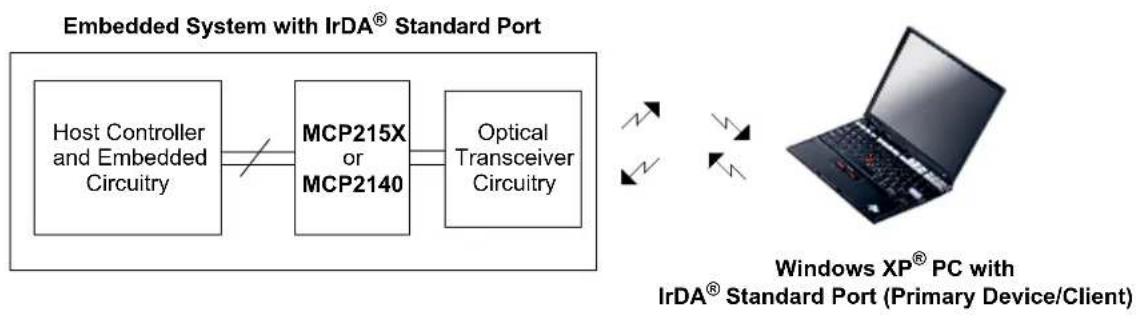
FIGURE 1 shows an IrDA standard system, where a Windows XP based PC is communicating with an embedded system. In this system, the PC operates as the Primary device (Client) and the embedded system operates as the Secondary device (Server). The terms Client and Server are used in reference to Windows (PC) programming, while Primary device and Secondary device are terms used by the IrDA standard.
FIGURE 1: WINDOWS XP - EMBEDDED SYSTEM BLOCK DIAGRAM

flowchart
graph LR
    A["Host Controller and Embedded Circuitry"] --> B["MCP215X or MCP2140"]
    B --> C["Optical Transceiver Circuitry"]
    D["Windows® XP PC with IrDA® Standard Port (Primary Device/Client)"] -->|双向箭头| E["Computer"]
    D -->|双向箭头| E
Terminology
Below is a list of useful terms and their definitions:
- Microsoft ^® Foundation Class (MFC): Class library and framework for application development on Windows based platforms.
- Microsoft Visual Studio ^ .NET: Development environment for the development of Windows desktop applications using Visual C++ ^ , Visual Basic ^ , Visual C# ^ and the .NET framework. Available for purchase from Microsoft's web site at www.microsoft.com.
- Microsoft Software Development Kit (SDK): Documentation, samples, header files, libraries and tools needed to develop applications that run on the Windows operating system.
- Primary Device: The IrDA standard device that queries for other devices.
- Secondary Device: The IrDA standard device that waits to detect IR communication before performing any IR communication.
- Host Controller: The controller in the embedded system that communicates to the MCP215X or MCP2140.
- MCP215X: An IrCOMM protocol handler IC that supports IR communication from 9600 baud to 115,200 baud.
- MCP2140: A low-cost IrCOMM protocol handler IC that supports IR communication at 9600 baud.
- Protocol Stack: A set of network protocol layers that work together. Figure 2 shows the IrDA standard protocol stack.
- IrCOMM (9-wire “cooked” service class): IrDA standard specification for the protocol to replace the serial cable (using flow control).
FIGURE 2: IrDA ^® STANDARD DATA - PROTOCOL STACKS
| IrTran-P | IrObex Ir | Lan IrComm (1) | IrMC | |
| LM-IAS | Tiny Transport Protocol (Tiny TP) | |||
| IR Link Management - Mux (IrLMP) | ||||
| IR Link Access Protocol (IrLAP) | ||||
| Asynchronous Serial IR (2, 3)(9600 -115200 b/s) | Synchronous Serial IR(1.152 Mb/s) | Synchronous4 PPM(4 Mb/s) | ||

Supported by the MCP215X and MCP2140.

Optional IrDA ^® standard data protocols not supported by the MCP215X and MCP2140.
Note 1: The MCP215X and MCP2140 implement the 9-wire "cooked" service class serial replicator.
2: An optical transceiver is required.
3: The MCP2140 support 9600 baud IR communication only.
INFRARED COMMUNICATIONS
The application built and discussed in this application note uses a high-level, infrared protocol called IrCOMM. This protocol is designed to be a wire-replacement technology. Infrared technology is an excellent choice for data collection for many reasons, including:
- Availability: Virtually every late-model PDA and laptop contains an IrDA standard port.
- Cost: IrDA standard communications may be added to a custom design very economically, as demonstrated in this application note.
- Convenience and compatibility: Working without wires means no cables, gender-changers or any other gadgets that allow two devices to communicate. This is vital to the frequent traveler or technician in the field.
For more information regarding the IrComm protocol, visit the IrDA organization's web site at:
http://www.irda.org.
WINDOWS XP DEVELOPMENT
Visual Studio .NET is available from Microsoft for the development of Windows based applications. With Visual Studio .NET, the developer can create applications using Microsoft's familiar API's (Win32 ^® , ATL, MFC, .NET Compact Framework).
Windows XP Tools
Microsoft's Visual Studio .NET offers a wide range of development choices, including the Visual C++, Visual Basic and Visual C# programming languages. This application note focuses on development of IrDA standard applications using Microsoft's Visual Studio .NET using C++.
While this project is Visual Studio 2003 compatible, it is actually "WIN32" code, not "managed".NET code. The source code in this project will build in any MFC aware environment including Visual Studio 6.X, Visual Studio 2003, and Visual Studio 2005.
Note: The sample application created in this Application Note is a Microsoft Foundation Class (MFC) C++ application which relies heavily on the characteristics of object oriented programming. Therefore, to get the most out of this application note's examples requires an understanding of C+ programming. However, it is possible to employ "C" to perform IrDA programming under the Windows environment. For examples of non-MFC IrDA programming, see Appendix I: "MCHP941.C SOURCE Code".
WINDOWS PROGRAMMING
The Windows programming model is based on an event-driven architecture. Events can be generated through user interaction or some other event. Each time the user interacts with the interface, an event is generated and a message is placed in the operating system's message queue to be dispatched to the application. A message handler in the application handles the event by calling the appropriate function.
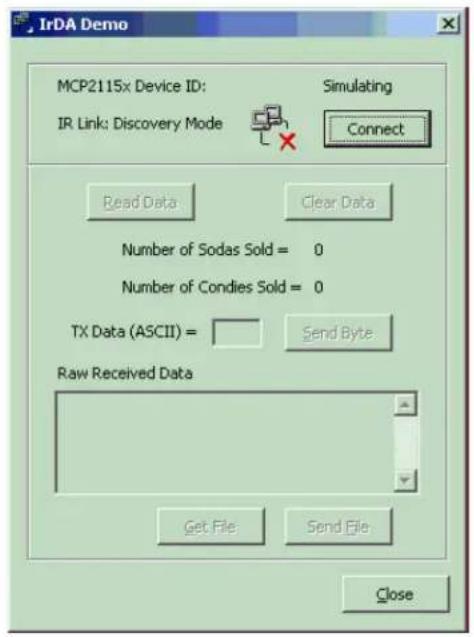
Selecting the Connect button in the application generates an IDC_CONNECT message (see Figure 3). That message is placed in the Windows message queue. The message is then retrieved, placed in the application's message loop and dispatched in the message map to the message handler, function OnBnClickedConnect() (see Example 1).
FIGURE 3: APPLICATION EVENT DISPATCH
text_image
IrDA Demo MCP2115x Device ID: Simulating IR Link: Discovery Mode Connect Read Data Clear Data Number of Sodas Sold = 0 Number of Condies Sold = 0 TX Data (ASCII) = Send Byte. Raw Received Data Get File Send File Close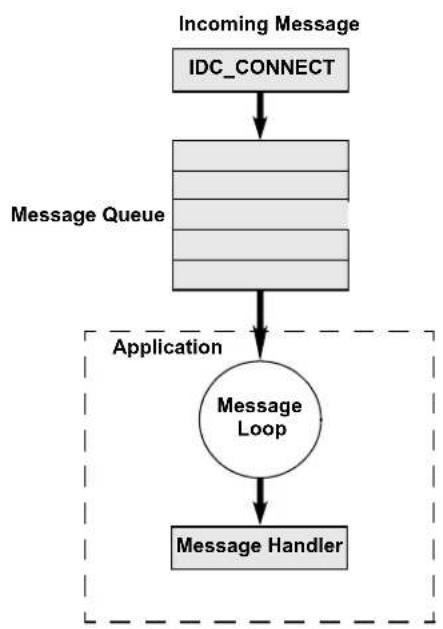
flowchart
graph TD
    A["Incoming Message"] --> B["IDC_CONNECT"]
    B --> C["Message Queue"]
    C --> D["Application"]
    D --> E["Message Loop"]
    E --> F["Message Handler"]
EXAMPLE 1: MESSAGE HANDLER
Line # Code
1 BEGIN_MESSAGE_MAP(CIrDADemoDlg, CDialog)
2 ON_BN_CLICKED(IDC_READ_DATA, OnBnClickedReadData)
3 ON_BN_CLICKED(IDC_CLEAR_DATA, OnBnClickedClearData)
4 ON_BN_CLICKED(IDC_CONNECT, OnBnClickedConnect)
5 ON_BN_CLICKED(IDC_SEND_BYTE, OnBnClickedSendByte)
6 ON_BN_CLICKED(IDC_SEND_FILE, OnBnClickedSendFile)
7 ON_BN_CLICKED(IDC_RECEIVE_FILE, OnBnClickedReceiveFile)
8 ON_BN_CLICKED(IDC_DISPLAY_DATA, OnBnClickedShowRawData)
9 ON_MESSAGE(WM_CONNECTION_CLOSE, OnConnectionClose)
10 END_MESSAGE_MAP()
11
12 void CIrDADemoDlg::OnBnClickedConnect()
13 {
14    //Connect to device
15 }
Microsoft Foundation Class Library
The Microsoft Foundation Class (MFC) library consists of a framework for developing applications for Windows based operating systems. The classes provide an object-oriented wrapper around the Windows API, simplifying the development of Windows programs. MFC includes classes for user interface objects, such as windows, dialog boxes and buttons. The common application tasks (such as dispatching messages) are provided by the classes and macros, as shown in the message-map macro in Example 1.
PROJECT WIZARD
The creation of MFC based applications can be simplified using the Microsoft Application Wizard (AppWizard). The Microsoft development tools provide application wizards that eliminate the need to create a project from scratch. The MFC AppWizard guides you through the creation of a MFC project. The AppWizard generates source, header and resource files that contain the required classes and macros for a skeleton application and guides you through the configuration of the project. For a dialog-based application, the AppWizard creates the message maps and two classes. The first class is derived from CWinApp, which handles the initialization, termination and running of the program. The second class is derived from CDialog, which handles the creation of a dialog box.
CREATING A PROJECT
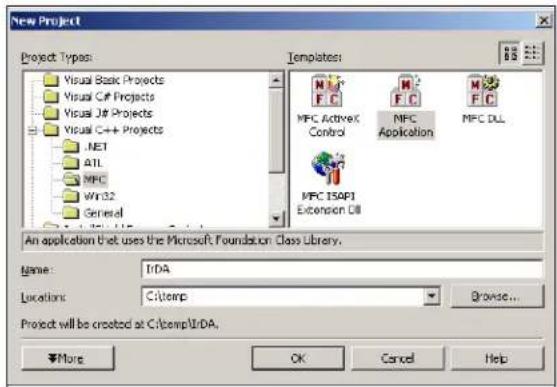
- The first step in creating a MFC based application is to create a project using the Project Wizard. From the File menu, select New, then Project. Select the MFC subfolder under the Visual C++ Projects folder. After entering a project name, select the OK button and the MFC Application Wizard will open (see figure 4).
FIGURE 4: NEW PROJECT
text_image
New Project Project Types: Visual Basic Projects Visual C# Projects Visual J# Projects Visual C++ Projects .NET ATL MFC WY32 General Templates: MFC ActiveX Control MFC Application MFC DLL MFC 154P1 Extension DLL An application that uses the Microsoft Foundation Class Library. Name: InDA Locations: C:\temp Browse... Project will be created at C:\temp\InDA. More OK Cancel Help- Under the Application Type tab, select the Dialog based checkbox (see Figure 5).
FIGURE 5: MFC APPWIZARD STEP 1

text_image
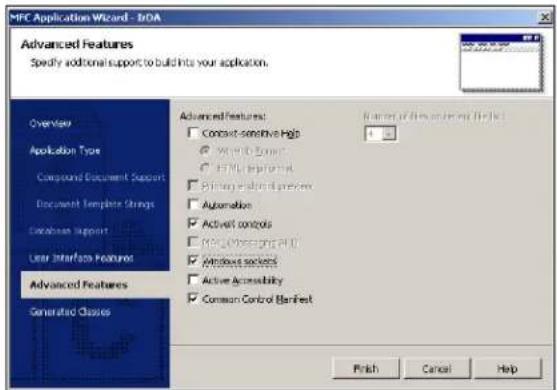
MFC Application Wizard - E-DA Application Type Specify Document/View architecture support, language, and interface style options for your application. Overview Application Type Compound Document Support Document Template Strings Database Support User Interfaces Features Advanced Features Generated Classes Application Type: Single document Multiple documents Shared based Use HTML dialog Multiple top-level documents Project style: Windows Explorer NPC standard Use of NPC Use MPC in a shared Out Use MPC in a static library Resource language: English (United States) Finish Cancel Help- Under the Advanced Features tab, select the Windows Sockets checkbox (see Figure 6). Windows Sockets must be selected to support IrDA standard communications. Please see the "Infrared Communications on Windows Platforms" section of this document for more information.
FIGURE 6: MFC APPWIZARD STEP 2
text_image
MFC Application Wizard - InDA Advanced Features Specify additional support to build into your application. Overview Application Type Compound Document Support Document Template Strings Database Support User Interface Features Advanced Features Generated Classes Advanced Features: Contact-sensitive Help Work-to-ZOOM HTML Interface Binary Input d以前 Automation Active controls MFC Monitoring AND Windows packets Active Accessibility Common Control Manifest Finish Cancel Help- The Generated Classes tab shows the class names for the classes created by the AppWizard, as well as the source files that will be created for each class object (see Figure 7 and Figure 8).
FIGURE 7: MFC APPWIZARD STEP 3

text_image
MFC Application Wizard - BDA Generated Classes Review generated classes and specify base classes for your application. Overview Application Type Compound Document Support Document Template Strings Database Support User Interface Features Advanced Features Generated Classes CDAApp CDAApp Class name: CDAApp Class type: CDAApp Finish Cancel HelpFIGURE 8: MFC APPWIZARD STEP 3
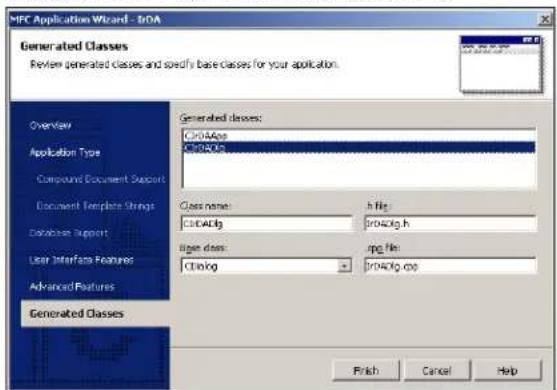
text_image
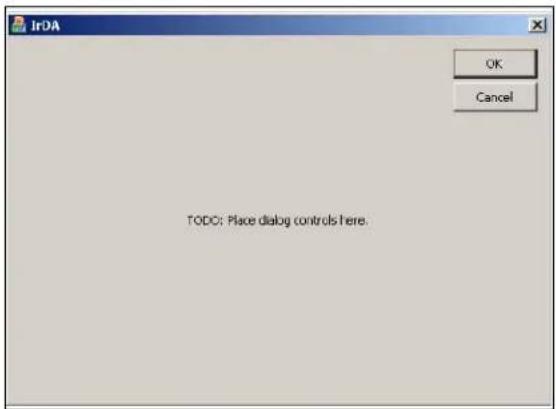
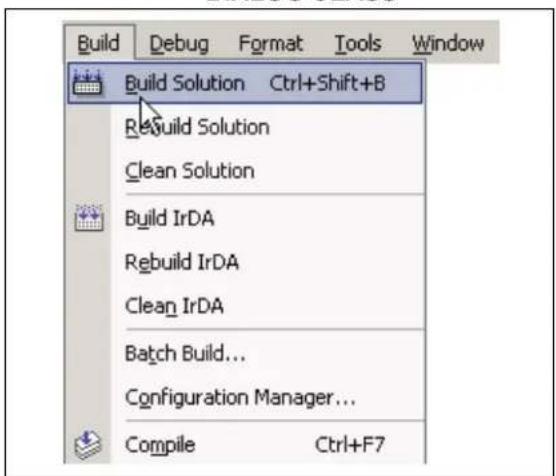
MFC Application Wizard - tROA Generated Classes Review generated classes and specify base classes for your application. Overview Application Type Compound Document Support Document Template Strings Database Support User Interfaces Features Advanced Features Generated Classes CROAAps CROACp Generated classes: Class name: CICADlg h file: CROAClg.h Image files: Cilog img file: CROAClg.csp Finished Cancel Help- The above steps will create the skeleton application in Figure 9 after selecting Build Solution from the Build menu (Figure 10). After creating the skeleton program with the AppWizard, only the dialog box controls and event handlers need to be added to the application.
FIGURE 9: MFC APPWIZARD STEP 4 - APPLICATION CLASS
text_image
IrDA OK Cancel TODO: Place dialog controls here.FIGURE 10: MFC APPWIZARD STEP 4 - DIALOG CLASS
text_image
Build Debug Format Tools Window Build Solution Ctrl+Shift+B Rebuild Solution Clean Solution Build IrDA Rebuild IrDA Clean IrDA Batch Build... Configuration Manager... Compile Ctrl+F7INFRARED COMMUNICATIONS ON WINDOWS PLATFORMS
Microchip's infrared wireless communication devices support the IrCOMM standard protocol layer, which allows the emulation of serial or parallel connections. IrCOMM was intended to support IrDA standard modems and legacy applications built on the Serial API. Therefore, Windows originally supported IrCOMM using virtual serial ports. The virtual serial port implementation of IrCOMM had inherent limitations, including the inability of multiple applications sharing virtual ports and full error-correction in the IrDA standard stack. Starting with Windows 2000, virtual serial ports, as well as the general implementation of IrCOMM to map the ports, were discontinued. The IrCOMM protocol is now exposed through the Windows WinSock API rather than through the Serial API. This application note focuses on implementing IrCOMM using the WinSock API.
WinSock Applications
WinSock is Microsoft's implementation of the widely-used Sockets API. It allows the use of sockets with Windows based applications. A socket enables communication between two endpoints on a network. These endpoints are usually referred to as a client and a server. The client initiates the connection with the server, while the server waits for a connection request from a client. Once a connection has been established, either the client or the server can initiate the exchange of data. This application note focuses on using the PC as the client, which then initiates the connection to the DSTEMP device, which acts as the server.
CONNECTING TO A SERVER
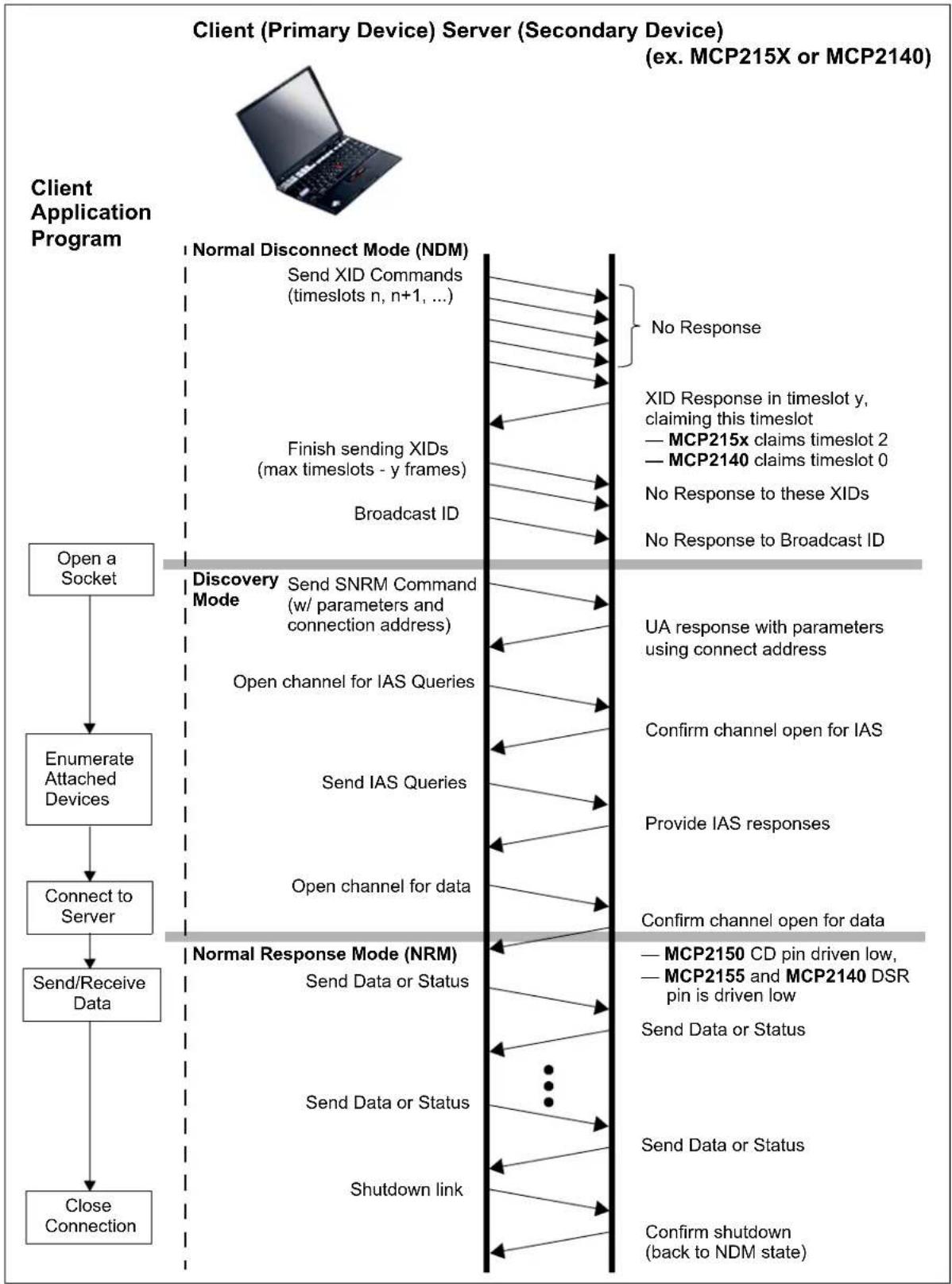
A client application using WinSock should execute the following steps to connect to a server (see Figure 11).
In the code snippets demonstrated in Example 2 through Example 9, the WinSock API is used directly. The functions getsockopt and setsockopt are used extensively to perform IrDA specific functions not normally associated with traditional TCP/IP sockets programming. These functions are handy for accessing network-specific features.
FIGURE 11: CONNECTION SEQUENCE
flowchart
graph TD
    A["Client Application Program"] --> B["Open a Socket"]
    B --> C["Enumerate Attached Devices"]
    C --> D["Connect to Server"]
    D --> E["Send/Receive Data"]
    E --> F["Close Connection"]

    G["Client (Primary Device) Server (Secondary Device) (ex. MCP215X or MCP2140)"] --> H["Normal Disconnect Mode (NDM)"]
    H --> I["Send XID Commands (timeslots n, n+1, ...)"]
    H --> J["Finish sending XIDs (max timeslots - y frames)"]
    H --> K["Broadcast ID"]

    L["Discovery Mode"] --> M["Send SNRM Command (w/ parameters and connection address)"]
    M --> N["Open channel for IAS Queries"]
    M --> O["Send IAS Queries"]
    M --> P["Open channel for data"]

    Q["Normal Response Mode (NRM)"] --> R["Send Data or Status"]
    R --> S["Send Data or Status"]
    R --> T["Shutdown link"]

    U["XID Response in timeslot y, claiming this timeslot"] --> V["MCP215x claims timeslot 2"]
    U --> W["MCP2140 claims timeslot 0"]
    X["UA response with parameters using connect address"] --> Y["Confirm channel open for IAS"]
    X --> Z["Provide IAS responses"]
    AA["Confirm channel open for data"] --> AB["MCP2150 CD pin driven low, MCP2155 and MCP2140 DSR pin is driven low"]
    AA --> AC["Send Data or Status"]
    AA --> AD["Send Data or Status"]
    AA --> AE["Confirm shutdown (back to NDM state)"]
Steps:
- Initialize the WSADATA structure by calling WSAStartup (see Example 2).
- Open a stream socket (see Example 3).
- Search for the device by enumerating all the devices connected to the system (see Example 4).
- Query the device's IAS database to verify the type of features supported by the device (see Example 5).
- Enable the 9-Wire mode before connecting (see Example 6).
- Connect to the device (see Example 7).
- Send/Receive data (see Example 8).
- Disconnect and close socket (see Example 9).
EXAMPLE 2: INITIALIZE THE WSDATA STRUCTURE
| Line # Code | |
| 1 | WORD WSAVerReq = MAKEWORD( 1, 1 ); |
| 2 | WSADATA WSATada; |
| 3 | |
| 4 | if ( WSAStartup( WSAVerReq, &WSAData ) != 0 ) |
| 5 | { |
| 6 | // wrong winsock dlls? |
| 7 | } |
EXAMPLE 3: OPEN A STREAM SOCKET
| Line # Code | |
| 1 | if (( sock = socket( AF_IRDA, SOCK_STREAM, 0 )) == INVALID_SOCKET ) |
| 2 | { |
| 3 | // WSAGetLastError |
| 4 | } |
EXAMPLE 4: SEARCH FOR THE SECONDARY DEVICE
| Line # Code | |
| 1 | if ( getsockopt( sock, SOL_IRLMP, IRLMP_ENUMDEVICES, |
| 2 | (CHAR *) pDevList, &DevListLen ) == SOCKET_ERROR ) |
| 3 | { |
| 4 | // WSAGetLastError |
| 5 | } |
EXAMPLE 5: QUERY THE IAS DATABASE
Line # Code
1 if (getsockopt(sock, SOL_IRLMP, IRLMP_IAS_QUERY,
2    (char *) pIASQuery, &IASQueryLen) == SOCKET_ERROR)
3 {
4    // WSAGetLastError
5 }
6
7 if (pIASQuery->irdaAttribType != IAS_ATTRIB_OCTETSEQ)
8 {
9    // Peer's IAS database entry for IrCOMM is bad.
10 }
11
12 if (pIASQuery->irdaAttribute.irdaAttribOctetSeq.Len < 3)
13 {
14    // Peer's IAS database entry for IrCOMM is bad.
15 }
EXAMPLE 6: ENABLING 9-WIRE MODE
Line # Code
1 if ( setsockopt( sock, SOL_IRLMP, IRLMP_9WIRE_MODE,
2    (const char *) &Enable9WireMode, sizeof(int) ) == SOCKET_ERROR )
3 {
4    // WSAGetLastError
5 }
EXAMPLE 7: CONNECTING TO THE DEVICE
Line # Code
1 if (connect(sock, (const struct sockaddr *) &DstAddrIR,
2    sizeof(SOCKADDR_IRDA) ) == SOCKET_ERROR )
3 {
4    // WSAGetLastError
5 }
EXAMPLE 8: SENDING AND RECEIVING DATA
Line # Code
1 if (( BytesRead = recv(sock, buffer, sizeof(buffer), 0)) == SOCKET_ERROR )
2 {
3    // WSAGetLastError
4 }
5
6 if (( BytesSent = send(sock, buffer, sizeof(buffer), 0)) == SOCKET_ERROR )
7 {
8    // WSAGetLastError
9 }
EXAMPLE 9: DISCONNECTING AND CLOSING THE SOCKET
Line # Code
1 if (shutdown(sock, 0) == SOCKET_ERROR)
2 {
3    // WSAGetLastError
4 }
5
6 if (closesocket(sock) == SOCKET_ERROR)
7 {
8    // WSAGetLastError
9 }
10
11 if (WSACleanup() == SOCKET_ERROR)
12 {
13    // WSAGetLastError
14 }
Sockets with MFC
Just as MFC simplifies Graphical User Interface (GUI) development over the base Windows SDK, MFC encapsulates socket communications with two classes (CASyncSocket and CSocket) that encapsulate the Windows Socket API. These classes simplify the development of applications that communicate over a network using sockets. CASyncSocket provides more flexibility than CSocket, with the benefit of network event notification. The event notification eliminates the need to continually poll the socket for incoming data. When data is received from a client, server or peer, the system automatically calls the CASyncSocket member function Receive(). The developer adds the necessary code that processes the data in the Receive() callback function.
An application that utilizes the CASyncSocket class must follow the same steps with the CASyncSocket class object as an application utilizing the WinSock API. However, the CASyncSocket member function CASyncSocket::setsockopt() does not support the parameters required for IrDA standard communications. Therefore, the first five steps are executed using a handle to a socket. After the devices are enumerated and 9-Wire mode has been set with setsockopt() (see Example 13), a CASyncSocket socket object is created and the socket handle is attached to the socket object using CASyncSocket::Attach().
The non-MFC socket operations rely on values defined in the Microsoft-supplied header file #include
Steps:
- Initialize the WSADATA structure (see Example 10).
- Create a handle to a socket (see Example 11).
- Search for the device by enumerating all the devices (see Example 12).
- Set 9-Wire mode (see Example 13).
- Create an CASyncSocket object (see Example 14).
- Attach the handle to the CASyncSocket object (see Example 15).
- Connect to the device (see Example 16).
- Send/Receive data (see Example 17).
- Close the socket (see Example 18).
EXAMPLE 10: INITIALIZING THE WSDATA STRUCTURE
Line # Code
1 WORD WSAVerReq = MAKEWORD(1,1);
2 WSADATA WSADATA;
3
4 if (WSAStartup(WSAVerReq, &WSAData) != 0)
5 {
6    // wrong winsock dlls?
7    AfxMessageBox(IDS_WINSOCK_DLLS, MB_OK | MB_ICONEXCLAMATION);
8 }
EXAMPLE 11: CREATING A HANDLE TO A SOCKET
Line # Code
1 m_hSocket = socket(AF_IRDA, SOCK_STREAM, 0);
2
3 if ( INVALID_SOCKET == m_hSocket )
4 {
5    // WSAGetLastError
6 }
EXAMPLE 12: SEARCHING FOR THE SECONDARY DEVICE
Line # Code
1 if ( getsockopt( m_hSocket, SOL_IRLMP, IRLMP_ENUMDEVICES,
2    (char *) pDevList, &nDevListLen ) == SOCKET_ERROR )
3 {
4    // WSAGetLastError
5 }
EXAMPLE 13: SETTING 9-WIRE MODE
Line # Code
1 if ( setsockopt( m_hSocket, SOL_IRLMP, IRLMP_9WIRE_MODE,
2    (const char *) &Enable9WireMode, sizeof(int) ) == SOCKET_ERROR )
3 {
4    // WSAGetLastError
5 }
EXAMPLE 14: CREATING AN CASYNCSOCKET OBJECT
Line # Code
1 CASyncSocket m_socket;
2 if (m_socket.Create())
3 {
4    // WSAGetLastError
5 }
6 }
EXAMPLE 15: ATTACHING THE HANDLE TO THE CASYNCSOCKET OBJECT
Line # Code
1 if (m_socket.Attach(m_hSocket) != 0)
2 {
3    // WSAGetLastError
4 }
EXAMPLE 16: CONNECTING TO THE DEVICE
Line # Code
1 if (m_socket.Connect((const struct sockaddr *) &m_DestSockAddr,
2 sizeof(SOCKADDR_IRDA)) == SOCKET_ERROR)
3 {
4    // WSAGetLastError
5 }
EXAMPLE 17: SENDING AND RECEIVING DATA
Line # Code
1 if ((m_socket.Send((LPCTSTR)m_sendBuff, m_nSendDataLen)) == SOCKET_ERROR)
2 {
3    // WSAGetLastError
4 }
5
6 void CMCPSocket::OnReceive(int nErrorCode)
7 {
8    // Process received data.
9 }
EXAMPLE 18: CLOSING THE SOCKET
Line # Code
1 if (m_socket.m_fConnected)
2 {
3    m_socket.m_fConnected = FALSE;
4    m_socket.Shutdown();
5    m_socket.Close();
6 }
Using Threads
The user interface will not respond to messages during network interaction (such as sending or receiving large amounts of data or connecting to a network endpoint). Processing data or completing other tasks in a separate thread frees the user interface thread to process user interface event messages while the data processing on the network is taking place. The CWinThread class object allows the creation of additional threads to handle these background tasks in order to eliminate interference with messages generated by the user. The dialog box object creates and spawns a second thread that contains the socket object. The two threads communicate with messages using the functions PostMessage() and SendMessage(). In the IrDA standard application, when the user selects a button to send data, the user interface thread posts a message to the background thread to send to the server. The user interface thread is then free to process any other user events while the background thread attempts to connect to the server. When the server sends data to the client, the background thread receives the data and then sends a message to the user interface thread, informing it that data has been received.
Windows XP Application Testing
Table 1 shows the different PC products that were used in the development and validation of the WinXP PC application program.
TABLE 1: WINDOW XP ^ PC USED
| PC Model O.S. | Version Comment | |
| IBM® Thinkpad® 600x | Windows XP Professional | |
| IBM® Thinkpad® T30 | Windows 2000 Professional |
PC Application Code Descriptions
The Windows XP PC application program (called MCP215XDemo) is shown in Appendix B: "Win XP Source Code - IrDA DEMO.CPP" through Appendix G: "Win XP Source Code - Include Files".
Table 2 briefly describes the role of each source file and has a link to the appendix that contains that source file.
For more information about the operation of the system (embedded system and Windows XP PC application program), please refer to Appendix A: "Example Irda® Standard System Description".
TABLE 2: MCP215XDEMO SOURCE FILES
| File Name Description | Appendix | |
| IrDA Demo.cpp | Application entry and exit. Creates the dialog box object and handles initialization and running of the application. | Appendix B |
| IrDA DemoDlg.cpp | Dialog box object. Handles all events generated by the user. Creates the socket and thread objects. Controls connecting and writing to the device by posting messages to the thread object. | Appendix C |
| ClientThread.cpp Secondary | dary thread created by the dialog box object. Controls communications with the server freeing the dialog box object to process user events. Posts messages to dialog box object on receipt of data from the server. | Appendix D |
| MCPSocket.cpp | Socket object connection to the MCP21XX server. | Appendix E |
| TransparentBitmap.cpp | Bitmap object that displays the connection state of the client with the server. | Appendix F |
| IrDA Demo.h, IrDA DemoDlg.h, ClientThread.h, MCPSocket.h, TransparentBitmap.h, stdafx.h | Include Files. | Appendix G |
Resources
For additional information on the Windows XP operating system development, visit:
http://msdn.microsoft.com/
Recommended Reading
Table 3 gives a list of additional documentation for Windows operating system development, while Table 4 shows some of the documentation available from Microsoft's web site.
SUMMARY
This application note has shown some of the fundamental programming concepts and design considerations for the development of Windows XP application programs. Attention was given to the WinSock API calls for IrCOMM communications.
Using the source code from the example Windows XP application program should allow you to get your custom application to connect to an embedded IrDA standard system using either the MCP215X or MCP2140 device.
| Biography
Frank Ableson is a consultant specializing in the development of IrDA application programs for Palm OS, PocketPC OS, Symbian® OS and Windows OS systems. For inquiries into consulting services, please contact Frank via e-mail at fableson@unwired-Tools.com
TABLE 3: ADDITIONAL WINDOWS DEVELOPMENT READING
| Title Author ISBN | ||
| Programming Windows® 95 with MFC Jeff Prosise | 1556159021 | |
| Network Programming in Windows NT® | Alok K. Sinha 0201590565 | |
| The MFC Answer Book Eugene Kain 0201185377 | ||
| The C Programming Language Brian W. Kernighan, Dennis M. Ritchie 0131103628 |
TABLE 4: WINDOWS DOCUMENTATION (AVAILABLE AT HTTP://MSDN.MICROSOFT.COM/)
| Title Date | Description | |
| Creating an Infrared WinSock Application | May 2002 | Describes the creation of an infrared application using windows sockets. |
| Windows® Sockets in MFC | — | Describes the two MFC classes that support sockets. |
NOTES:
APPENDIX A: EXAMPLE IrDA ^® STANDARD SYSTEM DESCRIPTION
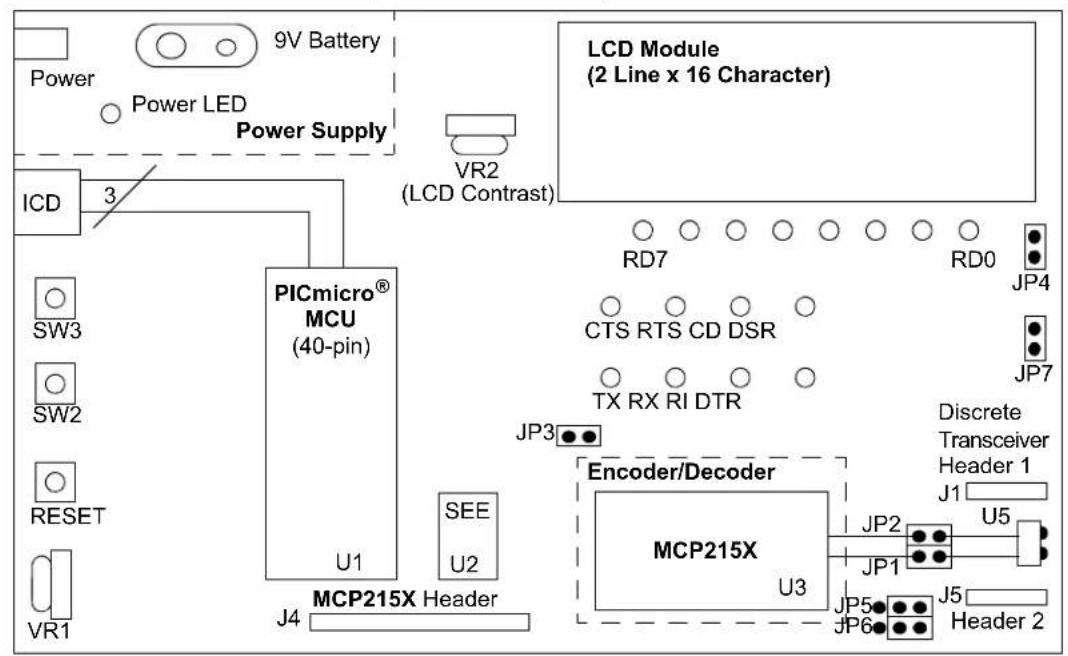
A description of the example IrDA standard system is provided to facilitate a better understanding of the Windows XP (WinXP) application program functions. This WinXP application program communicates with an embedded system to transfer data and control operation/status. The embedded system acts as an IrDA standard Secondary device. Figure A-1 shows this example IrDA standard system with a Primary device (PC) and a Secondary device (embedded system). Figure A-2 shows a detailed block diagram of the embedded system (Secondary device). For additional information on the implementation of an embedded system, please refer to AN858, "Interfacing the MCP215X to a Host Controller", DS00858.
The embedded system uses a 40-pin PIC cu and a MCP215X device and is available as a demo board.
FIGURE A-1: PPC PDA - EMBEDDED SYSTEM BLOCK DIAGRAM
flowchart
graph LR
    A["Host Controller and Embedded Circuitry"] --> B["MCP215X or MCP2140"]
    B --> C["Optical Transceiver Circuitry"]
    D["Windows XP® PC with IrDA® Standard Port (Primary Device/Client)"] -->|Data Flow| E["Computer Interface"]
FIGURE A-2: EMBEDDED SYSTEM (IR DEMO BOARD 1) BLOCK DIAGRAM
text_image
9V Battery Power Power LED Power Supply ICD 3 VR2 (LCD Contrast) PICmicro® MCU (40-pin) U1 SEE U2 J4 MCP215X Header LCD Module (2 Line x 16 Character) RD7 RD0 JP4 CTS RTS CD DSR JP7 TX RX RI DTR JP3 Encoder/Decoder MCP215X U3 JP2 JP1 JP5 JP6 Discrete Transceiver Header 1 J1 U5 Header 2Embedded System Firmware Operation
The embedded system has two programs that can be selected to run. The first is a vending machine, while the second is a 240-byte data transfer.
VENDING MACHINE
This demo emulates a vending machine by counting the number of each item (soda and candy) dispensed.
Each time the SW2 button is depressed, the counter for the number of sodas is incremented. Each time the SW3 button is depressed, the counter for the number of candies is incremented. Each counter is an 8-bit value and can display a value from 0 to 255 (decimal).
The program monitors for data being received from the IR port (received on the host UART) and will then respond with the appropriate data. Table A-1 shows the two commands of the vending machine program.
TABLE A-1: VENDING MACHINE COMMANDS
| Command Value (ASCII) | Hex Value | Demo Program |
| 5 0x35 | Transfer | the current soda and candy counter values to the Primary device. |
| 6 0x36 | Clears | the current soda and candy counters. |
Note: All other values are ignored.
240 BYTE DATA TRANSFER
Depressing SW2 and SW3 will cause the program in the PICmicro® microcontroller to execute the Transfer 240 Bytes routine. In this demo, the PIC16F877 receives a single byte from the IrDA standard Primary device. This received byte is moved to PORTD (displayed on the LEDs) and then a 240-byte table is transmitted back to the Primary device.
Note: The byte sent by the Primary device is expected, since most PDAs will not establish a link until data is sent. This application program forces the link open when the Connect button is depressed by transmitting a null data packet (a packet with 0 data bytes).
Windows XP Application Program User Interface
In this case, the main user interface (UI) form (Figure A-3) either displays all the information required, has a button to do the requested action or has a button to display the information (trace buffer).
The Connect button causes the application to attempt a connection with the Secondary device. Once this command is completed, the Device ID of the Secondary device is displayed and the IR Link shows the state of the link. If the link states Normal Response mode, the link is ready for data transfer. The MCP2150 CD signal (or MCP2155/40 DSR signal) will turn on.
Note: Once the IR link indicates Normal Response mode, the other buttons of the application can be selected for their desired operation.
FIGURE A-3: IrDA ^® STANDARD DEMO MAIN FORM

text_image
IrDA Demo MCP2115x Device ID: IR Link: Discovery Mode Simulating Connect Read Data Clear Data Number of Sodas Sold = 0 Number of Condies Sold = 0 TX Data (ASCII) = Send Byte Raw Received Data Get File Send File CloseVENDING MACHINE
To interface to the embedded system running the vending machine program, the main UI form displays all the user information (Figure A-3).
The Read Data button can then be selected, prompting the read data command to be sent to the embedded system. The embedded system will respond with strings that include the following information:
• number of sodas sold, and
• number of candies sold.
Selecting the Clear Data button will send the clear data command and clear the counters on the embedded system's application.
240 BYTE DATA TRANSFER
To interface to the embedded system running the Vending Machine program, the main UI form displays some of the information the user needs (Figure A-3).
Once the Windows XP application has connected to the embedded system (Secondary device), select the Get File button to transfer 240 bytes from the embedded system to the PC. The trace buffer is displayed in the Raw Data Received box. To clear the trace buffer, select the Clear button in the trace buffer dialog box.
Description of Graphical User Interface (GUI)
The GUI consists of a number of user interface elements, including command buttons, text labels and a text-entry field.
- The Connect button attempts to establish a connection to the IR demo board. The PC is acting as the Primary device and the demo board acts as the Secondary device.
- The Read Data button causes a query to be sent to the demo board requesting a tally of the number of sodas and candies dispensed. Data received from the demo board is parsed and displayed in text labels.
- The Clear Data button sends a command to the demo board instructing it to reset the application level counters.
- The Send Byte button transfers the byte entered into the TX Data (ASCII) text box. Any byte may be entered and transferred to the embedded system. If the byte corresponds to one of the commands to read data, clear data or transfer a buffer, the board will respond depending on its mode (vending machine or 240-byte transfer).
- The Get File button initiates the 240-byte data transfer from the embedded system by sending the embedded system the command byte for the transfer.
- The Send File button allows the user to select a file on the PC and transfer it to the embedded system.
Code Module Description
Table A-2 briefly describes the role of each source code module.
TABLE A-2: WINDOWS XP ^ APPLICATION PROGRAM FUNCTIONS
| File Name Description | Appendix | |
| IrDA Demo.cpp | Application entry and exit. Creates the dialog box object and handles initialization and execution of the application. | Appendix B |
| IrDA DemoDlg.cpp Dialog | box object. Handles all events generated by the user. Creates the socket and thread objects. Controls connecting and writing to the device by posting messages to the thread object. | Appendix C |
| ClientThread.cpp Secondary | dary thread created by the dialog box object. Controls communications with the server, freeing the dialog box object to process user events. Posts messages to dialog box object to receipt of data from the server. | Appendix D |
| MCPSocket.cpp | Socket object connection to the MCP21XX server. | Appendix E |
| TransparentBitmap.cpp | Bitmap object that displays the connection state of the client with the server. | Appendix F |
| IrDA Demo.h, IrDA DemoDlg.h, ClientThread.h, MCPSocket.h, TransparentBitmap.h, stdafx.h | Include Files. Appendix G |
Software License Agreement
The software supplied herewith by Microchip Technology Incorporated (the "Company") is intended and supplied to you, the Company's customer, for use solely and exclusively with products manufactured by the Company.
The software is owned by the Company and/or its supplier, and is protected under applicable copyright laws. All rights are reserved. Any use in violation of the foregoing restrictions may subject the user to criminal sanctions under applicable laws, as well as to civil liability for the breach of the terms and conditions of this license.
THIS SOFTWARE IS PROVIDED IN AN "AS IS" CONDITION. NO WARRANTIES, WHETHER EXPRESS, IMPLIED OR STATUTORY, INCLUDING, BUT NOT LIMITED TO, IMPLIED WARRANTIES OF MERCHANTABILITY AND FITNESS FOR A PARTICULAR PURPOSE APPLY TO THIS SOFTWARE. THE COMPANY SHALL NOT, IN ANY CIRCUMSTANCES, BE LIABLE FOR SPECIAL, INCIDENTAL OR CONSEQUENTIAL DAMAGES, FOR ANY REASON WHATSOEVER.
APPENDIX B: WIN XP SOURCE CODE - IRDA DEMO.CPP
FIGURE B-1: IRDA DEMO.SPP - PAGE 1
// IrDA Demo.cpp : Defines the class behaviors for the application.
//
#include "stdafx.h"
#include "IrDA Demo.h"
#include "IrDA DemoDlg.h"

#ifdef _DEBUG
#define new DEBUG_NEW
#endif

// CIrDADemoApp

BEGIN_MESSAGE_MAP(CIrDADemoApp, CWinApp)
ON_COMMAND(ID_HELP, CWinApp::OnHelp)
END_MESSAGE_MAP()

// CIrDADemoApp construction

CIrDADemoApp::CIrDADemoApp()
{
    // TODO: add construction code here,
    // Place all significant initialization in InitInstance
}

// The one and only CIrDADemoApp object

CIrDADemoApp theApp;

// CIrDADemoApp initialization
FIGURE B-2: IrDA DEMO.CPP - PAGE 2
BOOL CIRDADemoApp::InitInstance()
{
    // InitCommonControls() is required on Windows XP(r) if an application
    // manifest specifies use of ComCt132.dll version 6 or later to enable
    // visual styles. Otherwise, any window creation will fail.
    InitCommonControls();

    CWinApp::InitInstance();

    if (!AfxSocketInit())
    {
    AfxMessageBox(IDP_SOCKETS_INIT_FAILED);
    return FALSE;
    }

    AfxEnableControlContainer();

    CIRDADemoDlg dlg;

    // Connect to the simulator or to the board on the IR port.
    // m_bSimulate is set with the command line flag /s. For debugging,
    // the flag is set under Project->Properties->Debugging
    CString strSimFlag((LPCTSTR)IDS_SIMULATE_FLAG);

    if (m_lpCmdLine == strSimFlag)
    dlg.m_bSimulate = TRUE;
    else
    dlg.m_bSimulate = FALSE;
    m_pMainWnd = &dlg;
    INT_PTR nResponse = dlg.DoModal();
    if (nResponse == IDOK)
    {
    // TODO: Place code here to handle when the dialog is
    // dismissed with OK
    }
    else if (nResponse == IDCANCEL)
    {
    // TODO: Place code here to handle when the dialog is
    // dismissed with Cancel
    }

    // Since the dialog has been closed, return FALSE so that we exit the
    // application, rather than start the application's message pump.
    return FALSE;
}
Software License Agreement
The software supplied herewith by Microchip Technology Incorporated (the "Company") is intended and supplied to you, the Company's customer, for use solely and exclusively with products manufactured by the Company.
The software is owned by the Company and/or its supplier, and is protected under applicable copyright laws. All rights are reserved. Any use in violation of the foregoing restrictions may subject the user to criminal sanctions under applicable laws, as well as to civil liability for the breach of the terms and conditions of this license.
THIS SOFTWARE IS PROVIDED IN AN "AS IS" CONDITION. NO WARRANTIES, WHETHER EXPRESS, IMPLIED OR STATUTORY, INCLUDING, BUT NOT LIMITED TO, IMPLIED WARRANTIES OF MERCHANTABILITY AND FITNESS FOR A PARTICULAR PURPOSE APPLY TO THIS SOFTWARE. THE COMPANY SHALL NOT, IN ANY CIRCUMSTANCES, BE LIABLE FOR SPECIAL, INCIDENTAL OR CONSEQUENTIAL DAMAGES, FOR ANY REASON WHATSOEVER.
APPENDIX C: WINXP SOURCE CODE - IRDA DEMODLG.CPP
FIGURE C-1: IrDA DEMODLG.CPP - PAGE 1
// IrDA DemoDlg.cpp : implementation file
//
#include "stdafx.h"
#include "IrDA Demo.h"
#include "IrDA DemoDlg.h"
#include "MCPSocket.h" // class CMCPSocket
#include "ClientThread.h"
#include "TransparentBitmap.h"
#include <af_irda.h>
#include ".\irda demodlg.h"

#ifdef _DEBUG
#define new DEBUG_NEW
#endif

#define STATE_NDM 0 // Program states
#define STATE_DISCOVERY 1 // Program states
#define STATE_CONNECTING 2 // Program states
#define STATE_NRM 3 // Program states
#define COMMAND_SEND_DATA_NUM_CHARS 24
#define COMMAND_ASCII_HEX 0x34 // Prompts server to toggle between ASCII/HEX
#define COMMAND_SEND_DATA 0x35 // Prompts server to send client counter data
#define COMMAND_CLEAR_DATA 0x36 // Clears counters on server
#define COMMAND_READ_DATA 0x37 // Reads A/D value from server
#define COMMAND_TX_BYTES 0x56 // Transfers file to the embedded system.
#define COMMAND_RX_BYTES 0x57 // Receives file from the embedded system.
#define TIMER_3SEC 3000

CEvent termEvent(TRUE); // event to communicate termination of all threads,
    // initially TRUE in case no threads are started
long nThreadCount = 0; // count of all active threads

// CAboutDlg dialog used for App About

class CAboutDlg : public CDialog
{
public:
    CAboutDlg();

// Dialog Data
    enum { IDD = IDD_ABOUTBOX };

protected:
    virtual void DoDataExchange(CDataExchange* pDX); // DDX/DDV support
FIGURE C-2: IrDA DEMODLG.CPP - PAGE 2
// Implementation
protected:
    DECLARE_MESSAGE_MAP()
};

CAboutDlg::CAboutDlg() : CDialog(CAboutDlg::IDD)
{
}

void CAboutDlg::DoDataExchange(CDataExchange* pDX)
{
    CDialog::DoDataExchange(pDX);
}

BEGIN_MESSAGE_MAP(CAboutDlg, CDialog)
END_MESSAGE_MAP()

// CIrDADemoDlg dialog

CIrDADemoDlg::CIrDADemoDlg(CWnd* pParent /*=NULL*/)
: CDialog(CIrDADemoDlg::IDD, pParent), m_pClientThread(NULL),
    m_bSimulate(FALSE), m_bProgramState(STATE_NDM)
{
    m_pConnectedBitmap = m_pConnectNotBitmap = NULL;
    m_pConnectedBitmap = new CTransparentBitmap(IDB_CONNECTED, RGB(0, 128, 128));
    m_pConnectNotBitmap = new CTransparentBitmap(IDB_CONNECTEDNOT, RGB(0, 128, 128));
    m_pCurrentStateBitmap = m_pConnectNotBitmap;
    m_hIcon = AfxGetApp()->LoadIcon(IDR_CONNECTION);
}

void CIrDADemoDlg::DoDataExchange(CDataExchange* pDX)
{
    CDialog::DoDataExchange(pDX);
}

BEGIN_MESSAGE_MAP(CIrDADemoDlg, CDialog)
ON_WM_SYSCOMMAND()
ON_WM_PAINT()
ON_WM_QUERYDRAGICON()
//})AFX_MSG_MAP
ON_WM_CLOSE()
ON_BN_CLICKED(IDC_READ_DATA, OnBnClickedReadData)
ON_BN_CLICKED(IDC_CLEAR_DATA, OnBnClickedClearData)
ON_BN_CLICKED(IDC_CONNECT, OnBnClickedConnect)
ON_BN_CLICKED(IDC_ASCII_HEX, OnBnClickedAsciiHex)
ON_BN_CLICKED(IDC_SEND_BYTE, OnBnClickedSendByte)
ON_BN_CLICKED(IDC_SEND_FILE, OnBnClickedSendFile)
ON_BN_CLICKED(IDC_RECEIVE_FILE, OnBnClickedReceiveFile)
ON_BN_CLICKED(IDC_DISPLAY_DATA, OnBnClickedShowRawData)
ON_MESSAGE(WM_CONNECTION_CLOSE, OnConnectionClose)
ON_MESSAGE(WM_NEWMESSAGE, OnNewMessage)
ON_MESSAGE(WM_CONNECTION_DONE, OnConnectionDone)
ON_MESSAGE(WM_DEVICE_ATTACHED, OnDeviceAttached)
ON_MESSAGE(WM_DEVICE_NOTATTACHED, OnDeviceNotAttached)
ON_MESSAGE(WM_SEND_COMPLETE, OnSendDataComplete)
ON_WM_TIMER()
END_MESSAGE_MAP()
FIGURE C-3: IrDA DEMODLG.CPP - PAGE 3
void CIRDADemoDlg::CleanupThread()
{
    TRACE( _T( "CIRDADemoDlg::CleanupThread()\n" ));
    if ( m_pClientThread )
    {
    // ask the client thread to terminate
    if ( ::PostThreadMessage( m_pClientThread->m_nThreadID, WM_TERM_THREAD, 0, 0 ) == 0 )
    TRACE( _T( "Thread 0x%02x possibly already terminated\n" ),
    m_pClientThread->m_nThreadID );

    // wait up to ls for secondary threads to terminate
    // termEvent will be signaled when thread count reaches 0
    if ( termEvent.Lock( 1000 ))
    TRACE( _T( "Threads terminated gracefully\n" ));
    else
    TRACE( _T( "WARNING: All secondary thread(s) not gracefully terminated.\n" ));
    }
}

// CIRDADemoDlg message handlers

BOOL CIRDADemoDlg::OnInitDialog()
{
    CDialog::OnInitDialog();

    // m_bSimulate is set with the command line flag /s. For debugging,
    // the flag is set under Project->Properties->Debugging
    // Move dialog to the right so it doesn't cover up the simulation server dialog.
    if ( m_bSimulate )
    {
    CPoint    Point;
    CRect    DialogRect;
    CRect    ParentRect;
    CWnd    *DesktopWindow = NULL;
    int    nWidth;
    int    nHeight;

    GetWindowRect( DialogRect );
    DesktopWindow = GetDesktopWindow();

    if ( DesktopWindow )
    {
    DesktopWindow->GetWindowRect( ParentRect );
    Point.x = ParentRect.Width() / 2;
    Point.y = ParentRect.Height() / 2;
    DesktopWindow->ClientToScreen( &Point );
    nWidth = DialogRect.Width();
    nHeight = DialogRect.Height();
    Point.x += nWidth / 2;
    Point.y -= nHeight / 2;
    MoveWindow( Point.x, Point.y, nWidth, nHeight, FALSE );
    }
    }

    // Add "About..." menu item to system menu.

    // IDM_ABOUTBOX must be in the system command range.
    ASSERT((IDM_ABOUTBOX & 0xFFFF0) == IDM_ABOUTBOX);
    ASSERT(IDM_ABOUTBOX < 0xF000);
FIGURE C-4: IrDA DEMODLG.CPP - PAGE 4
c
#ifndef _WIN32_WCE
    CMenu* pSysMenu = GetSystemMenu(FALSE);
    if (pSysMenu != NULL)
    {
    CString strAboutMenu;
    strAboutMenu.LoadString(IDS_ABOUTBOX);
    if (!strAboutMenu.IsEmpty())
    {
    pSysMenu->AppendMenu(MF_SEPARATOR);
    pSysMenu->AppendMenu(MF_STRING, IDM_ABOUTBOX, strAboutMenu);
    }
    }
#endif
    // Limit the text for the transmit edit control to one character.
    ((CEdit*)GetDlgItem(IDC_BYTE))->SetLimitText(1);

    // Set the counters to zero or else there will just be a blank space where the numbers go.
    SetDlgItemInt(IDC_SODAS_SOLD, 0);
    SetDlgItemInt(IDC_CANDIES_SOLD, 0);
    SetDlgItemInt(IDC_CHANGEBOX, 0);

    // Set the icon for this dialog. The framework does this automatically
    // when the application's main window is not a dialog
    SetIcon(m_hIcon, TRUE);    // Set big icon
    SetIcon(m_hIcon, FALSE);    // Set small icon
    WCE_DEL CreateDeviceAnimation();
    WCE_INS CenterWindow(GetDesktopWindow());    // center to the hpc screen
    InitializeSocketThread();    // Create and initialize the thread. Creates the socket.

    SetProgramState(STATE_NDM);//Starts the search for devices => must come after thread is initialized.
    return TRUE; // return TRUE unless you set the focus to a control
}

void CIrDADemoDlg::OnSysCommand(UINT nID, LPARAM lParam)
{
    if ((nID & 0xFFFF0) == IDM_ABOUTBOX)
    {
    CAboutDlg dlgAbout;
    dlgAbout.DoModal();
    }
    else
    {
    CDialog::OnSysCommand(nID, lParam);
    }
}
FIGURE C-5: IrDA DEMODLG.CPP - PAGE 5
c
#ifndef _WIN32_WCE
void CIrDADemoDlg::OnPaint()
{
    if (IsIconic())
    {
    CPaintDC dc(this); // device context for painting
    SendMessage(WM_ICONERASEBKGND, reinterpret_cast<MPARAM>(dc.GetSafeHdc()), 0);

    // Center icon in client rectangle
    int cxIcon = GetSystemMetrics(SM_CXICON);
    int cyIcon = GetSystemMetrics(SM_CYICON);
    CRect rect;
    GetClientRect(&rect);
    int x = (rect.Width() - cxIcon + 1) / 2;
    int y = (rect.Height() - cyIcon + 1) / 2;

    // Draw the icon
    dc.DrawIcon(x, y, m_hIcon);
    }
    else
    {
    DrawConnectionImage();
    CDialog::OnPaint();
    }
}

#endif

// The system calls this function to obtain the cursor to display while the user drags
// the minimized window.
HCURSOR CIrDADemoDlg::OnQueryDragIcon()
{
    return static_cast<HCURSOR>(m_hIcon);
}

// This function is separate from OnBrClickedConnect() so that it
// can be repeatedly called if user wants to try to connect again.
BOOL CIrDADemoDlg::ConnectWithServer()
{
    TRACE(_T("CIrDADemoDlg::ConnectWithServer())\n");

    if (m_pClientThread)
    {
    // ask the client thread to terminate
    if ( ::PostThreadMessage(m_pClientThread->m_nThreadID, WM_DEVICE_CONNECT, 0, 0) == 0)
    {
    AfxMessageBox(IDS_THREAD_TERMINATED, MB_OK | MB_ICONEXCLAMATION);
    TRACE(_T("Thread 0x%02x possibly already terminated\n"),
    m_pClientThread->m_nThreadID);
    }
    }
    return TRUE;
}
FIGURE C-6: IrDA DEMODLG.CPP - PAGE 6
void CIrDADemoDlg::DisconnectWithServer()
{
    // Post message to thread to close connection with socket.
    if (m_pClientThread)
    {
    if (::PostThreadMessage(m_pClientThread->m_nThreadID,
    WM_DEVICE_DISCONNECT, 0, 0) == 0)
    TRACE(_T("Thread 0x%02x possibly already terminated\n"),
    m_pClientThread->m_nThreadID);
    }
}

// Callback from the client socket thread to signify a connection has been established.
LRESULT CIrDADemoDlg::OnConnectionDone(WPARAM, LPARAM)
{
    SetProgramState(STATE_NRM);
    return 0;
}

// Callback from the client socket thread to signify a connection has been disestablished.
LRESULT CIrDADemoDlg::OnConnectionClose(WPARAM, LPARAM)
{
    if (STATE_CONNECTING == m_bProgramState) // We were trying to connect and failed.
    {
    if (AfxMessageBox(IDS_RETRYCONNECT, MB_YESNO) == IDYES)
    {
    ConnectWithServer();
    return 0;
    }
    }

    SetProgramState(STATE_NDM);
    return 0;
}

LRESULT CIrDADemoDlg::OnSendDataComplete(WPARAM wParam, LPARAM lParam)
{
    switch (m_nLastCommand)
    {
    case COMMAND_SEND_DATA:
    case COMMAND_TX_BYTES:
    // Do nothing
    break;
    default:
    // This will reenable the buttons if the connection did not close after command
    // was sent.
    SetProgramState(m_bProgramState);
    }
    return 0;
}
FIGURE C-7: IrDA DEMODLG.CPP - PAGE 7
// The Connect button serves as both a connection and disconnection button. The
// button text is changed in the OnConnectionClose and OnConnectionDone.
void CIrDADemoDlg::OnBnClickedConnect()
{
    // If disconnected, then connect, else disconnect.
    if (STATE_DISCOVERY == m_bProgramState)
    {
    SetProgramState(STATE_CONNECTING);
    ConnectWithServer();
    }
    else //( STATE_NRM == m_bProgramState)
    {
    // Program state will change when the disconnected message from the socket is received.
    //SetProgramState(STATE_DISCOVERY);
    DisconnectWithServer();
    }
}

// Prompts embedded system to send the vending machine data to this server.
void CIrDADemoDlg::OnBnClickedReadData()
{
    ClearTraceBuffer();

    // Disable buttons until command completes so the user does not send command
    // more than once at a time. AsyncSendBuff() posts a message when complete.
    EnableButtons(FALSE);

    // Start a timer to trigger a time-out if the system
    // does not respond (handled in OnTimer().
    m_pTimer = SetTimer(WM_TIMER_SEND_DATA, TIMER_3SEC, 0 );

    m_nLastCommand = COMMAND_SEND_DATA;
    SendData(m_nLastCommand);
}

void CIrDADemoDlg::OnBnClickedClearData()
{
    ClearTraceBuffer();
    m_nLastCommand = COMMAND_CLEAR_DATA;
    SendData(m_nLastCommand);
}

void CIrDADemoDlg::OnBnClickedAsciiHex()
{
    m_nLastCommand = COMMAND_ASCII_HEX;
    SendData(m_nLastCommand);
}
FIGURE C-8: IrDA DEMODLG.CPP - PAGE 8
void CIrDADemoDlg::OnBnClickedSendByte()
{
    CString str;
    GetDlgItemText(IDC_BYTE, str);

    ClearTraceBuffer();

    if (str.GetLength() < 1)
    {
    AfxMessageBox(IDS_ENTER_DATA);
    return;
    }

    // Save the byte because user may be trying
    // to send a read, clear, transfer... command.
    switch(*str.GetBuffer(0))
    {
    case '4':
    m_nLastCommand = COMMAND_ASCII_HEX;
    break;
    case '5':
    m_nLastCommand = COMMAND_SEND_DATA;
    break;
    case '6':
    m_nLastCommand = COMMAND_CLEAR_DATA;
    break;
    case '7':
    m_nLastCommand = COMMAND_READ_DATA;
    break;
    case 'V':
    m_nLastCommand = COMMAND_TX_BYTES;
    break;
    case 'W':
    m_nLastCommand = COMMAND_RX_BYTES;
    break;
    default:
    m_nLastCommand = -1;
    break;
    }

    SendData(str);
}

void CIrDADemoDlg::SendData(int nData)
{
    CString str;
    str.Format(_T("%c"), nData);
    SendData(str);
}
FIGURE C-9: IrDA DEMODLG.CPP - PAGE 9
void CIrDADemoDlg::SendData(CString strData)
{
    if (m_pClientThread && (m_pClientThread->m_socket).m_fConnected)
    {
    (m_pClientThread->m_socket).AsyncSendBuff( ( void* )( LPCTSTR )strData, strData.GetLength() );
    }
    else
    {
    // we are not connected to peer, reset state
    SetProgramState( STATE_NDM );
    m_pClientThread = NULL;
    }

    TRACE(_T("CIRDADemoDlg::SendData()\n"));
}

// Sends a file to the embedded system.
// Sequence:
// 1. Prompt user to select the file.
// 2. Send the number of bytes.
// 3. Wait for OK.
// 4. Send the file.
void CIRDADemoDlg::OnBnClickedSendFile()
{
    ClearTraceBuffer();

    // Get file to send.
    CFileDialog dlg(TRUE);

    if (dlg.DoModal())
    {
    CFile sourceTxFile;
    CFileException ex;
    m_strTxFileName = dlg.GetFileName();

    if (!sourceTxFile.Open(m_strTxFileName, CFile::modeRead, &ex))
    {
    TCHAR szError[1024];
    ex.GetErrorMessage(szError, 1024);
    MessageBox(szError, _T("Error"), MB_OK | MB_ICONEXCLAMATION);
    }
    else
    {
    // Disable buttons until command completes so the user
    // does not send command more than once at a time.
    EnableButtons(FALSE);
    DWORD nFileLength = (DWORD)sourceTxFile.GetLength();
    sourceTxFile.Close();
    m_nLastCommand = COMMAND_TX_BYTES;

    // Start a timer to trigger a time-out if the system
    // does not respond (handled in OnTimer());
    m_pTimer = SetTimer(WM_TIMER_TX_BYTES, TIMER_3SEC, 0);

    SendData((DWORD)nFileLength);
    }
}
FIGURE C-10: IrDA DEMODLG.CPP - PAGE 10
// Get a file from the embedded system.
// Sequence:
// 1. Send command COMMAND_RX_BYTES
// 2. Receive data from system.
void CIrDADemoDlg::OnBnClickedReceiveFile()
{
    ClearTraceBuffer();
    m_nLastCommand = COMMAND_RX_BYTES;

    // Disable buttons until command completes so the user
    // does not send command more than once at a time.
    EnableButtons( FALSE );

    // Start a timer to trigger a time-out if the system
    // does not respond (handled in OnTimer().
    m_pTimer = SetTimer( WM_TIMER_TX_BYTES, TIMER_3SEC, 0 );

    SendData( m_nLastCommand );
}

// This button is only on the Pocket PC(tm). The laptop
// application displays the data in the dialog.
void CIrDADemoDlg::OnBnClickedShowRawData()
{
    MessageBox( (LPCTSTR)m_strTraceBuffer, _T( "Raw Data" ), MB_OK );
}

// This is a message from the socket. The socket posts this message when it has received
// something from client to the client. m_nLastCommand is the last command sent to the
// client. I use the same mesage (WM_NEWMESSAGE) because the socket does not know what
// the last command was. It only knows that it received some data from the client.
LRESULT CIrDADemoDlg::OnNewMessage(WPARAM wParam, LPARAM lParam)
{
    int nCharPos;
    int nRead = (int)lParam;

    // Kill the timer so we don't get a time-out error.
    KillTimer( m_pTimer );

    // We always show the raw data received in the raw data textbox.
    m_strRawRecvData = CString((TCHAR *)wParam);

    // Remove any extra line feeds. They will be displayed as characters if they are not removed.
    while (( nCharPos = m_strRawRecvData.Find( _T( "\n\n" ) ) != -1 )
    m_strRawRecvData.Delete( nCharPos, 1 );

    m_strTraceBuffer = m_strTraceBuffer + m_strRawRecvData;
    WCE_DEL SetDlgItemText( IDC_RECEIVEDDDATA_RAW, (LPCTSTR)m_strTraceBuffer );

    switch ( m_nLastCommand )
    {
    case COMMAND_ASCII_HEX:
    // Do nothing
    break;
FIGURE C-11: IrDA DEMODLG.CPP - PAGE 11
case COMMAND_SEND_DATA:
    // The firmware must send both \r\n.
    // The string received will be as shown below:
    // SODA = 000\r\nCANDY = 000
    // 12345678901234567890123456789
    // The word soda, two spaces, "=" , three characters,
    // one space, the word candie, one space, "=" one space,
    // three characters representing three digit number.

    if ( m_strRawRecvData.GetLength() < COMMAND_SEND_DATA_NUM_CHARS )
    {
    AfxMessageBox( IDS_DATARECVERROR, MB_OK );
    }
    else
    {
    int nNumDigits = 3;

    // Find the value for soda by searching for '='
    nCharPos = m_strRawRecvData.Find( _T( '=' ) ) + 2;

    // Remove the leading zeros.
    while (( m_strRawRecvData.GetAt( nCharPos ) == '0' ) && ( nNumDigits > 1 ))
    {
    nCharPos++;
    nNumDigits--;
    }

    SetDlgItemText( IDC_SODAS_SOLD, m_strRawRecvData.Mid( nCharPos, nNumDigits );

    // Find the value for candies by searching for the next '='
    nCharPos = m_strRawRecvData.Find( _T( '=' ), nCharPos ) + 2;
    nNumDigits = 3;

    // Remove the leading zeros.
    while (( m_strRawRecvData.GetAt( nCharPos ) == '0' ) && ( nNumDigits > 1 ))
    {
    nCharPos++;
    nNumDigits--;
    }

    SetDlgItemText( IDC_CANDIES_SOLD, m_strRawRecvData.Mid( nCharPos, nNumDigits );

    // This will reenable the buttons if the connection did not close.
    SetProgramState( m_bProgramState );

    // SetDlgItemText( IDC_CHANGEBOX, m_strRawRecvData.Mid( 4, 2 );
    }
    break;
case COMMAND_CLEAR_DATA:
    // Do nothing
    break;
case COMMAND_READ_DATA:
    // Do nothing
    break;
FIGURE C-12: IrDA DEMODLG.CPP - PAGE 12
case COMMAND_TX_BYTES:
    // Sequence:
    // 1. Send the number of bytes (done in OnBnClickedSendFile().
    // 2. Wait for OK.
    // 3. Send the file.

    // If received OK send file.
    if (m_strRawRecvData == "255")
    {
    CFile sourceTxFile;
    CFileException ex;

    if (!sourceTxFile.Open(m_strTxFileName, CFile::modeRead, &ex))
    {
    TCHAR szError[1024];
    ex.GetErrorMessage(szError, 1024);
    MessageBox(szError, _T("Error"), MB_OK | MB_ICONEXCLAMATION);
    //AfxMessageBox(IDS_ERROR_FILE_OPEN, MB_OK | MB_ICONEXCLAMATION);
    }
    else
    {
    CString strData;
    DWORD nFileLength = (DWORD)sourceTxFile.GetLength();
    BYTE *lpBuf = new BYTE[nFileLength];
    sourceTxFile.Read(lpBuf, nFileLength);
    strData.Format(_T("%s"), lpBuf);

    // Clear the last command so we don't end up in a loop.
    // It also needs to be reset or else the buttons will not
    // be reenabled when it is done sending data.
    m_nLastCommand = -1;

    SendData(strData);
    delete[] lpBuf;
    sourceTxFile.Close();
    }
    }

    break;
case COMMAND_RX_BYTES:
    // Receive the 240 byte buffer from the client.
    // Do nothing. It is already displayed in the raw data window.
    // m_nLastCommand = -1;
    break;

default:
    AfxMessageBox(IDS_UNRECOGNIZED_RESPONSE, MB_OK | MB_ICONEXCLAMATION);
    break;
}

return 01;
FIGURE C-13: IrDA DEMODLG.CPP - PAGE 13
void CIrDADemoDlg::OnOK()
{
    CleanupThread();

    if (m_pConnectedBitmap != NULL)
    delete m_pConnectedBitmap;

    if (m_pConnectNotBitmap != NULL)
    delete m_pConnectNotBitmap;

    //SendMessage(WM_CLOSE, 0, 0);
    CDialog::OnOK();
}

// Callback from the thread indicating that a device has been moved within range of the IR port.
LRESULT CIrDADemoDlg::OnDeviceAttached(WPARAM wParam, LPARAM lParam)
{
    SetProgramState(STATE_DISCOVERY);
    SetDlgItemText(IDC_MCP_DEVICEID, (LPCTSTR)lParam);
    return OL;
}

// Callback from the thread indicating that no devices are within the range of the IR port.
LRESULT CIrDADemoDlg::OnDeviceNotAttached(WPARAM, LPARAM)
{
    SetProgramState(STATE_NDM);
    SetDlgItemText(IDC_MCP_DEVICEID, _T("")) );
    return OL;
}
FIGURE C-14: IrDA DEMODLG.CPP - PAGE 14
// Sets state to one of the four program states:
//    NDM (Normal Disconnect Mode) - no devices attached.
//    Discovery - Device is attached, but no connection has been initiated.
//    Connecting - User initiated a connection with device.
//    NRM (Normal Response Mode) - Successful connection to a device.
void CIRDADemoDlg::SetProgramState(int nState)
{
    if (STATE_NDM == nState)
    {
    //    if (m_bSimulate)
    {
    //    SetProgramState(STATE_DISCOVERY);    // Straight to discovery if simulating.
    //    return;
    }
    m_bProgramState = nState;

    // Search for devices connected to IR port when we are in Disconnect mode.
    // Ignored if simulating.
    SearchForDevices();

    // Only play part of the animation because we don't want the folder in the
    // last half displayed.
    WCE_DEL    m_DeviceAnimation.Play(0, 13, -1);
    WCE_DEL    m_DeviceAnimation.ShowWindow(SW_SHOW);
    SetDlgItemText(IDC_LINK_STATUS, CString((LPCTSTR)IDS_NDM));
    SetDlgItemText(IDC_MCP_DEVICEID, CString((LPCTSTR)IDS_NODEVICE));
    GetDlgItem(IDC_CONNECT)->SetWindowText(_T("Connect"));
    EnableButtons(FALSE);
    }
    else if (STATE_DISCOVERY == nState)
    {
    WCE_DELm_DeviceAnimation.Stop();
    WCE_DEL m_DeviceAnimation.ShowWindow(SW_HIDE);
    m_bProgramState = nState;
    m_pCurrentStateBitmap = m_pConnectNotBitmap;
    RedrawConnectionBitmap();
    SetDlgItemText(IDC_LINK_STATUS, CString((LPCTSTR)IDS_DISCOVERY));
    GetDlgItem(IDC_CONNECT)->SetWindowText(_T("Connect"));
    GetDlgItem(IDC_CONNECT)->EnableWindow(TRUE);
    EnableButtons(FALSE);
    }
    else if (STATE_CONNECTING == nState)
    {
    m_bProgramState = nState;
    SetDlgItemText(IDC_LINK_STATUS, CString((LPCTSTR)IDS_CONNECTING));
    }
    else if (STATE_NRM == nState)
    {
    m_bProgramState = nState;
    m_pCurrentStateBitmap = m_pConnectedBitmap;
    RedrawConnectionBitmap();
    SetDlgItemText(IDC_LINK_STATUS, CString((LPCTSTR)IDS_NRM));
    GetDlgItem(IDC_CONNECT)->SetWindowText(_T("Disconnect"));
    GetDlgItem(IDC_CONNECT)->EnableWindow();
    EnableButtons(TRUE);
    }
    else
    {
    m_bProgramState = -1;
    }
}
FIGURE C-15: IrDA DEMODLG.CPP - PAGE 15
void CIrDADemoDlg::InitializeSocketThread()
{
    #ifndef _WIN32_WCE
    // Connect to the simulator or to the board on the IR port.
    // m_bSimulate is set with the command line flag /s. For debugging
    // the flag is set under Project->Properties->Debugging
    if (m_bSimulate)
    {
    DWORD MaxNameLength = MAX_COMPUTERNAME_LENGTH + 1;
    char lpszHostName[MAX_COMPUTERNAME_LENGTH + 1];

    if (GetComputerName((LPTSTR)lpszHostName, (LPDWORD) &MaxNameLength) != 0)
    {
    m_strServerName = lpszHostName;
    }
    else
    {
    AfxMessageBox(IDS_COMPUTER_NAME_ERROR, MB_OK | MB_ICONEXCLAMATION);
    return;
    }
    }
#endif

    // Create a thread to handle the connection. The thread created is suspended so
    // that we can set variables in CClientThread before it starts executing.
    CClientThread* pThread = (CClientThread*)AfxBeginThread(RUNTIME_CLASS(CClientThread), THREAD_PRIORITY_NORMAL, 0, CREATE_SUSPENDED);

    if (!pThread)
    {
    TRACE(_T("Could not create thread\n"));
    AfxMessageBox(IDS_THREAD_CREATION, MB_OK | MB_ICONEXCLAMATION);
    return;
    }

    pThread->m_strServerName = m_strServerName; // server machine name
    pThread->m_bSimulate = m_bSimulate; // server machine name
    pThread->m_socket.m_pThread = pThread; // the thread that m_socket lives
    m_pClientThread = pThread; // keep a pointer to the connect socket thread

    // Now start the thread.
    pThread->ResumeThread();
}

void CIrDADemoDlg::SearchForDevices()
{
    if (m_pClientThread) // Look for devices connected to IR port. Ignored if simulating.
    {
    // Ask the client thread to start looking for devices.
    // The TRUE parameters tell the client to search. Thread does nothing if simulating.
    if (::PostThreadMessage(m_pClientThread->m_nThreadID, WM_DEVICE_SEARCH, TRUE, 0) == 0)
    {
    AfxMessageBox(IDS_THREAD_TERMINATED, MB_OK | MB_ICONEXCLAMATION);
    TRACE(_T("Thread 0x%02x possibly already terminated\n"),
    m_pClientThread->m_nThreadID);
    }
    }
}
FIGURE C-16: IrDA DEMODLG.CPP - PAGE 16
void CIRDADemoDlg::RedrawConnectionBitmap()
{
    #ifndef _WIN32_WCE
    CRect rect;
    GetDlgItem(IDC_DRAW_AREA)->GetWindowRect(&rect);
    ScreenToClient(&rect);
    InvalidateRect(rect);
    Invalidate();
    UpdateWindow();
#endif

void CIRDADemoDlg::DrawConnectionImage()
{
    #ifndef _WIN32_WCE
    CPaintDC dc(this); // Device context for painting
    CRect rect;
    GetDlgItem(IDC_DRAW_AREA)->GetWindowRect(&rect);
    ScreenToClient(&rect);

    m_pCurrentStateBitmap->DrawTransparentBitmap(&dc, // The destination DC.
    rect.left, // X coordinate.
    rect.top); // Y coordinate.

#endif

void CIRDADemoDlg::CreateDeviceAnimation()
{
    #ifndef _WIN32_WCE
    CRect rect;
    GetDlgItem(IDC_DRAW_AREA)->GetWindowRect(&rect);
    ScreenToClient(&rect);

    rect.top = rect.top - 10;
    rect.left = rect.left - 10;
    rect.right = rect.right + 10;
    rect.bottom = rect.bottom + 10;

    if (m_DeviceAnimation.Create(WS_CHILD | WS_VISIBLE | ACS_CENTER | ACS_TRANSPARENT, rect, this, IDR_DEVICE_SEARCH) == FALSE)
    AfxMessageBox(IDS_DEVICE_ANIMATION, MB_OK | MB_ICONEXCLAMATION);

    // Open displays the clip's first frame.
    if (m_DeviceAnimation.Open(IDR_DEVICE_SEARCH) == FALSE)
    AfxMessageBox(IDS_DEVICE_ANIMATION, MB_OK | MB_ICONEXCLAMATION);

#endif
}
FIGURE C-17: IrDA DEMODLG.CPP - PAGE 17
void CIrDADemoDlg::EnableButtons(BOOL nEnable)
{
    if (nEnable == TRUE)
    {
    GetDlgItem(IDC_READ_DATA)->EnableWindow();
    GetDlgItem(IDC_CLEAR_DATA)->EnableWindow();
    //GetDlgItem(IDC_ASCII_HEX)->EnableWindow();
    GetDlgItem(IDC_BYTE)->EnableWindow();
    GetDlgItem(IDC_SEND_BYTE)->EnableWindow();
    GetDlgItem(IDC_RECEIVE_FILE)->EnableWindow();
    GetDlgItem(IDC_SEND_FILE)->EnableWindow();
    WCE_INS GetDlgItem(IDC_DISPLAY_DATA)->EnableWindow();
    }
    else
    {
    GetDlgItem(IDC_READ_DATA)->EnableWindow(FALSE);
    GetDlgItem(IDC_CLEAR_DATA)->EnableWindow(FALSE);
    //GetDlgItem(IDC_ASCII_HEX)->EnableWindow(FALSE);
    GetDlgItem(IDC_BYTE)->EnableWindow(FALSE);
    GetDlgItem(IDC_SEND_BYTE)->EnableWindow(FALSE);
    GetDlgItem(IDC_RECEIVE_FILE)->EnableWindow(FALSE);
    GetDlgItem(IDC_SEND_FILE)->EnableWindow(FALSE);
    WCE_INS GetDlgItem(IDC_DISPLAY_DATA)->EnableWindow(FALSE);
    }
}

void CIrDADemoDlg::OnTimer(UINT nIDEvent)
{
    switch (nIDEvent)
    {
    case WM_TIMER_SEND_DATA:
    case WM_TIMER_TX_BYTES:
    case WM_TIMER_RX_BYTES:
    // Stop the timer so that no more than one of these error messages
    // is displayed. Restart if the user wants to continue waiting.
    KillTimer(m_pTimer);

    if (AfxMessageBox(IDS_NORESPONSE, MB_YESNO) == IDYES)
    {
    m_nLastCommand = -1; // Reset the command.
    SetProgramState(m_bProgramState); // Reenable the buttons.
    }
    else
    {
    m_pTimer = SetTimer(nIDEvent, TIMER_3SEC, 0);
    }
    break;
    }

    CDialog::OnTimer(nIDEvent);
}

void CIrDADemoDlg::ClearTraceBuffer()
{
    m_strTraceBuffer.Empty();
}
NOTES:
Software License Agreement
The software supplied herewith by Microchip Technology Incorporated (the "Company") is intended and supplied to you, the Company's customer, for use solely and exclusively with products manufactured by the Company.
The software is owned by the Company and/or its supplier, and is protected under applicable copyright laws. All rights are reserved. Any use in violation of the foregoing restrictions may subject the user to criminal sanctions under applicable laws, as well as to civil liability for the breach of the terms and conditions of this license.
THIS SOFTWARE IS PROVIDED IN AN "AS IS" CONDITION. NO WARRANTIES, WHETHER EXPRESS, IMPLIED OR STATUTORY, INCLUDING, BUT NOT LIMITED TO, IMPLIED WARRANTIES OF MERCHANTABILITY AND FITNESS FOR A PARTICULAR PURPOSE APPLY TO THIS SOFTWARE. THE COMPANY SHALL NOT, IN ANY CIRCUMSTANCES, BE LIABLE FOR SPECIAL, INCIDENTAL OR CONSEQUENTIAL DAMAGES, FOR ANY REASON WHATSOEVER.
APPENDIX D: WIN XP SOURCE CODE - CLIENTTHREAD.CPP
FIGURE D-1: CLIENTTHREAD.CPP - PAGE 1
// ClientThread.cpp : implementation file
//
#include "stdafx.h"
#include "IrDA Demo.h"
#include "ClientThread.h"
#include ".\clientthread.h"

extern CEvent termEvent; // event to communicate termination of all threads
extern long nThreadCount; // count of all active threads

#define DEVICE_LIST_LEN 10

// CClientThread

IMPLEMENT_DYNCREATE(CClientThread, CWinThread)

CClientThread::CClientThread():m_bDeviceAttached(FALSE)
{
    // count of all threads running
    if ( InterlockedIncrement( &nThreadCount ) == 1 )
    termEvent.ResetEvent(); // only one reset needed

    m_hSocket = NULL;
    m_pDevListBuff = NULL;
    m_nDevListLen = sizeof(DEVICELIST) - sizeof(IRDA_DEVICE_INFO) +
    (sizeof(IRDA_DEVICE_INFO) * DEVICE_LIST_LEN);
    m_pDevListBuff = new unsigned char[m_nDevListLen];
    m_DestSockAddr.irdaAddressFamily = AF_IRDA;
    m_DestSockAddr.irdaDeviceID[0] = 0;
    m_DestSockAddr.irdaDeviceID[1] = 0;
    m_DestSockAddr.irdaDeviceID[2] = 0;
    m_DestSockAddr.irdaDeviceID[3] = 0;
    memcpy( m_DestSockAddr.irdaServiceName, "IrDA:IrCOMM", 25 );
}

CClientThread::~CClientThread()
{
    // This notifies parent thread when all threads have been deleted.
    // Note that it's still not terminated at this point, but it's close enough.
    if (InterlockedDecrement(&nThreadCount) == 0)
    termEvent.SetEvent(); // possibly called twice, but no harm done

    if ( m_pDevListBuff )
    delete [] m_pDevListBuff;
}
FIGURE D-2: CLIENTTHREAD.CPP - PAGE 2
BOOL CClientThread::InitInstance()
{
    TRACE( _T( "CClientThread::InitInstance()\n" ));
    if ( m_bSimulate == FALSE )
    {
    // The sequence to connect to a device is: create a socket, scan the immediate vicinity
    // for IrDA(r) standard devices with the IRLMP_ENUMDEVICES socket option, choose a device
    // from the returned list, form an address and call connect.

    // Need to use AF_IRDA, which is an int, as the address family, but the class takes
    // a string as the address. So use the non-MFC functions to create the socket, then
    // attach it to my MFC derived class.
    // SOCKET socket(BOOL Create( UINT nSocketPort = 0,
    // int af, int nSocketType = SOCK_STREAM,
    // int type, long lEvent,
    // int protocol; LPCTSTR lpszSocketAddress = NULL );

    WORD WSAVerReq = MAKEWORD(1,1);
    WSADATA WSADATA;

    if ( WSAStartup( WSAVerReq, &WSAData ) != 0 )
    {
    // wrong winsock dlls?
    AfxMessageBox( IDS_WINSOCK_DLLS, MB_OK | MB_ICONEXCLAMATION );
    }
    }

    return TRUE;
}

int CClientThread::ExitInstance()
{
    // Send message to the main thread indicating that this socket connection has closed
    AfxGetMainWnd()->SendMessage( WM_CONNECTION_CLOSE );
    return CWinThread::ExitInstance();
}

BEGIN_MESSAGE_MAP(CClientThread, CWinThread)
ON_THREAD_MESSAGE(WM_TERM_THREAD, OnTermThread)
ON_THREAD_MESSAGE(WM_DEVICE_SEARCH, OnDeviceSearch)
ON_THREAD_MESSAGE(WM_DEVICE_CONNECT, OnDeviceConnect)
ON_THREAD_MESSAGE(WM_DEVICE_DISCONNECT, OnDeviceDisconnect)
END_MESSAGE_MAP()
FIGURE D-3: CLIENTTHREAD.CPP - PAGE 3
// CClientThread message handlers
// User-defined message will be posted by parent thread when parent thread's
// main window is going to close.
void CClientThread::OnTermThread(UINT, LONG)
{
    TRACE( _T( "CClientThread::OnTermThread()\n" ));
    // active close
    if ( m_socket.m_fConnected )
    {
    m_socket.m_fConnected = FALSE;
    m_socket.Shutdown();
    m_socket.Close();
    }
    ::PostQuitMessage( 0 );
}

// Continuously searches for devices connected to the IR port.
// Called by CIrDADemoDlg when in Normal Disconnect Mode (NDM).
void CClientThread::OnDeviceSearch(UINT bContinueSearching, LONG)
{
    TRACE( _T( "CClientThread::OnDeviceSearch()\n" ));
    // Connect to the simulator or to the board on the IR port.
    // m_bSimulate is set with the command line flag /s. For debugging,
    // the flag is set under Project->Properties->Debugging
    if ( m_bSimulate )
    {
    // Post message that device is connected and supply name of device.
    AfxGetMainWnd()->PostMessage( WM_DEVICE_ATTACHED, 0, (LPARAM)"Simulating" );
    }
    else
    {
    // This function is called twice. Once to start and
    // once to stop. We don't want to start twice.
    if (( m_bContinueSearching == TRUE ) && ( bContinueSearching == TRUE ))
    return;

    m_bContinueSearching = bContinueSearching;

    while ( m_bContinueSearching )
    {
    MSG msg;

    // Process other messages
    while ( :: PeekMessage( &msg, NULL, 0, 0, PM_NOREMOVE ) )
    {
    if ( !PumpMessage( ) )
    {
    m_bContinueSearching = FALSE;
    ::PostQuitMessage( 0 );
    break;
    }
    }
}
FIGURE D-4: CLIENTTHREAD.CPP - PAGE 4
// If SearchForDevices() fails due to an error with the socket,
// it will post a message and change m_bContinueSearching to FALSE.
SearchForDevices( 5 /* Number of searches */);

// Check for a connected device.
PDEVICELISTpDevList = (PDEVICELIST)m_pDevListBuff;

if ( pDevList->numDevice > 0 )
{
    // Just assume that there is only one device
    // connected and that it is the MCP IrDA standard demo board.
    //for ( int i = 0; i < (int)pDevList->numDevice; i++ )
    ///{
    //    // For each IR port, check for the IrDA standard demo board.
    //    // typedef struct _IRDA_DEVICE_INFO
    //    // {
    //    //    u_char    irdaDeviceID[4];
    //    //    char    irdaDeviceName[22];
    //    //    u_char    irdaDeviceHints1;
    //    //    u_char    irdaDeviceHints2;
    //    //    u_char    irdaCharSet;
    //    } _IRDA_DEVICE_INFO;
    //    // pDevList->Device[i]. see _IRDA_DEVICE_INFO for fields
    //    // display the device names and let the user select one
    ///}

// Don't repeatedly send the device attached message.
if ( m_bDeviceAttached == FALSE )
{
    m_bDeviceAttached = TRUE;

    memcpy(&m_DestSockAddr.irdaDeviceID[0],
    &pDevList->Device[0].irdaDeviceID[0], 4);
    TRACE( _T( "Found Device\nID - %s\nName - %s\n" ),
    pDevList->Device[0].irdaDeviceID,
    pDevList->Device[0].irdaDeviceName );

    TCHAR strW[22];

    for ( int index = 0; index < 22; index++ )
    strW[ index ] = pDevList->Device[0].irdaDeviceName[ index );

    // Post message that device is connected and supply name of device.
    AfxGetMainWnd()->PostMessage( WM_DEVICE_ATTACHED, 0, (LPARAM)strW );
}
else
{
    // Don't repeatedly send the device detached message.
    if ( m_bDeviceAttached == TRUE )
    {
    TRACE( _T( "Device Detached\n" ));
    m_bDeviceAttached = FALSE;

    // Post message that there is no device.
    AfxGetMainWnd()->PostMessage( WM_DEVICE_NOTATTACHED );
}
}
FIGURE D-5: CLIENTTHREAD.CPP - PAGE 5
void CClientThread::OnDeviceConnect(UINT, LONG)
{
    TRACE( _T( "CClientThread::OnDeviceConnect() \n" ));
    // Stop the searching in function OnDeviceSearch()
    m_bContinueSearching = FALSE;

    // Connect to the simulator or to the board on the IR port.
    // m_bSimulate is set with the command line flag /s. For debugging,
    // the flag is set under Project->Properties->Debugging
    if ( m_bSimulate )
    {
    if ( m_socket.m_hSocket == INVALID_SOCKET )
    m_socket.Create();

    // Try to connect to the peer
    if ( m_socket.Connect( m_strServerName, SOCKET_PORT ) == 0 )
    {
    if ( GetLastError() != WSAEWOUDBLOCK )
    {
    DisplaySocketError();
    ::PostQuitMessage( 0 );    // Terminates thread.
    }
    }
    }
    else //if ( m_bSimulate == FALSE )
    {
    // SOCKADDR_IRDA m_DestSockAddr = ( AF_IRDA, 0, 0, 0, 0, "IrDAService" );
    // typedef struct _SOCKADDR_IRDA
    // {
    // u_short   irdaAddressFamily;
    // u_char   irdaDeviceID[4];
    // char   irdaServiceName[25];
    // } SOCKADDR_IRDA, *PSOCKADDR_IRDA, FAR *LPSOCKADDR_IRDA;

    // The MFC functions don't seem to support the options needed for the IrDA standard.
    // Therefore, use the SOCKET handle first to set options and attach here before
    // connecting.

    // Enable 9 Wire mode before connect().
    int Enable9WireMode = 1;

    if ( setsockopt( m_hSocket, SOL_IRLMP, IRLMP_9WIRE_MODE, (const char *) &Enable9WireMode,
    sizeof(int) ) == SOCKET_ERROR )
    {
FIGURE D-6: CLIENTTHREAD.CPP - PAGE 6
DisplaySocketError();
}
else
{
    if (m_socket.Create())
    {
    if (m_socket.Attach(m_hSocket) != 0)
    {
    if (m_socket.Connect((const struct sockaddr *) &m_DestSockAddr, sizeof(SOCKADDR_IRDA)) == SOCKET_ERROR)
    {
    DisplaySocketError();
    }
    WCE_INS m_socket.OnConnect(0);
    }
    else
    {
    DisplaySocketError();
    }
    }
}

void CClientThread::OnDeviceDisconnect(UINT, LONG)
{
    TRACE(_T("CClientThread::OnDeviceDisconnect() \n"));
    m_bDeviceAttached = FALSE;

    // active close
    if (m_socket.m_fConnected)
    {
    m_socket.m_fConnected = FALSE;
    m_socket.ShutDown();
    m_socket.Close(); // Deallocates socket handles and frees associated resources.
    m_hSocket = NULL;
    )

    AfxGetMainWnd()->PostMessage(WM_CONNECTION_CLOSE);
}
FIGURE D-7: CLIENTTHREAD.CPP - PAGE 7
BOOL CClientThread::SearchForDevices(int nNumberOfSearches)
{
    if ( nNumberOfSearches == 0 )
    return FALSE;

    PDEVICELIST    pDevList = (PDEVICELIST)m_pDevListBuff;

    // Initialize the number of devices to zero.
    pDevList->numDevice = 0;
    int nDevListLen = m_nDevListLen;    // Want to preserve the size of the allocated list
    // so we can reuse it.

    // The MFC function GetSockOpt() only supports two levels (SOL_SOCKET and IPPROTO_TCP).
    // Need to use the SOL_IRLMP level with the option IRLMP_ENUMDEVICES which doesn't seem
    // to be supported either. Therefore, use the handle to get the options. When the user
    // tries to connect, use the MFC function Attach() to attach the handle to our class.
    // IRLMP_ENUMDEVICES returns a list of all available IrDA standard devices in pDevList.

    if (( INVALID_SOCKET == m_hSocket ) || ( NULL == m_hSocket ))
    {
    m_hSocket = socket(AF_IRDA, SOCK_STREAM, 0 );

    if ( INVALID_SOCKET == m_hSocket )
    {
    CString str;
    int nError = WSAGetLastError();

    if ( nError == WSAEAFNOSUPPORT )
    str.Format(IDS_NOIRDA_SUPPORT );
    else
    {
    str.Format(IDS_SOCKET_FAILURE, nError );
    str = str + CString((LPCSTR)IDS_EXITAPP );
    }

    if ( AfxMessageBox(str, MB_ICONEXCLAMATION | MB_YESNO) == IDYES )
    // There is nothing that can be done without a socket, so shut down
    // the application or the user will get this error repeatedly.
    AfxGetMainWnd()->SendMessage(WM_CLOSE);

    return FALSE;
    }
}
FIGURE D-8: CLIENTTHREAD.CPP - PAGE 8
if ( getsockopt( m_hSocket, SOL_IRLMP, IRLMP_ENUMDEVICES, (char *) pDevList, &nDevListLen )
== SOCKET_ERROR )
{
    DisplaySocketError();

    // Stop the searching in function OnDeviceSearch()
    m_bContinueSearching = FALSE;
    return FALSE;
}
else
{
    // Failed to find an IR port. Keep searching for the specified number of times.
    if ( pDevList->numDevice == 0 )
    return SearchForDevices( --nNumberOfSearches );
}

return TRUE;
}

void CClientThread::DisplaySocketError()
{
    int nError = WSAGetLastError();
    CString str;
    str.Format( IDS_SOCKET_FAILURE, nError );
    AfxMessageBox( str, MB_OK | MB_ICONEXCLAMATION );
}
Software License Agreement
The software supplied herewith by Microchip Technology Incorporated (the "Company") is intended and supplied to you, the Company's customer, for use solely and exclusively with products manufactured by the Company.
The software is owned by the Company and/or its supplier, and is protected under applicable copyright laws. All rights are reserved. Any use in violation of the foregoing restrictions may subject the user to criminal sanctions under applicable laws, as well as to civil liability for the breach of the terms and conditions of this license.
THIS SOFTWARE IS PROVIDED IN AN "AS IS" CONDITION. NO WARRANTIES, WHETHER EXPRESS, IMPLIED OR STATUTORY, INCLUDING, BUT NOT LIMITED TO, IMPLIED WARRANTIES OF MERCHANTABILITY AND FITNESS FOR A PARTICULAR PURPOSE APPLY TO THIS SOFTWARE. THE COMPANY SHALL NOT, IN ANY CIRCUMSTANCES, BE LIABLE FOR SPECIAL, INCIDENTAL OR CONSEQUENTIAL DAMAGES, FOR ANY REASON WHATSOEVER.
APPENDIX E: WINXP SOURCE CODE - MCPSOCKET.CPP
FIGURE E-1: MCPSOCKET.CPP - PAGE 1
// MCPSocket.cpp : implementation file
//
#include "stdafx.h"
#include "IrDA Demo.h"
#include "MCPSocket.h"
#include "ClientThread.h"
#include <af_irda.h>

// CMCPSocket

CMCPSocket::CMCPSocket()
{
    m_nBytesSent = m_nSendDataLen = 0;
    m_nRecvDataLen = sizeof(int); // initialize for 4 byte data length
    m_nBytesRecv = 0;
    m_fConnected = FALSE;
    m_bReadDataLength = TRUE;
}

CMCPSocket::~CMCPSocket()
{
}

// CMCPSocket member functions

// Peer has closed the TCP connection.
void CMCPSocket::OnClose(int nErrorCode)
{
    ((CClientThread*)m_pThread)->m_hSocket = NULL;
    ((CClientThread*)m_pThread)->m_bDeviceAttached = FALSE;
    m_fConnected = FALSE;
    ShutDown();
    Close();
    TRACE(_T("CMCPSocket::OnClose: CAsyncSocket::Close() called\n"));
    AfxGetMainWnd()->SendMessage(WM_CONNECTION_CLOSE, 0, 0);
    WCE_INS CCeSocket::OnClose(nErrorCode);
    WCE_DEL CAsyncSocket::OnClose(nErrorCode);
}
FIGURE E-2: MCPSOCKET.CPP - PAGE 2
void CMCPSocket::OnConnect(int nErrorCode)
{
    OutputDebugString(_T("CMCPSocket::OnConnect\n"));
    if (nErrorCode == 0)
    {
    m_fConnected = TRUE;
    AfxGetMainWnd()->SendMessage(WM_CONNECTION_DONE, 0, 0);
    }
    else
    {
    // Error in doing a Connect to peer, I will just quit this thread.
    // Or you might want to notify the parent thread of nErrorCode.
    m_fConnected = FALSE;
    AfxGetMainWnd()->SendMessage(WM_CONNECTION_CLOSE, 0, 0);
    }

    WCE_INS CCeSocket::OnConnect(nErrorCode);
    WCE_DEL CAsyncSocket::OnConnect(nErrorCode);
}

void CMCPSocket::OnReceive(int nErrorCode)
{
    int nRead = 0;
    char strBuffA[MAX_BUFF];

    // nRead = Receive(m_ReceiveBuff, DATA_SIZE);
    nRead = Receive(strBuffA, DATA_SIZE);

    // Convert the ASCII string to the Unicode string.
    for (int index = 0; index <= sizeof(strBuffA); index++)
    m_ReceiveBuff[index] = strBuffA[index];

    // if something was read
    if (nRead > 0)
    {
    m_ReceiveBuff[nRead] = '\0';
    AfxGetMainWnd()->SendMessage(WM_NEWMESSAGE, (WPARAM)m_ReceiveBuff, (LPARAM)nRead);
    }

    TRACE(_T("CClientSocket::OnReceive(int nErrorCode = %d) nRead = %d\n"), nErrorCode, nRead);
    WCE_INS CCeSocket::OnReceive(nErrorCode);
    WCE_DEL CAsyncSocket::OnReceive(nErrorCode);
}

void CMCPSocket::OnSend(int nErrorCode)
{
    OutputDebugString(_T("CMCPSocket::OnSend\n"));

    // Make sure we are connected to peer before sending data.
    // OnSend will also be called right after connection is established,
    // DoAsyncSendBuff() will not send any data because the initial
    // state of this CConnectSoc object has 0 bytes to send.
    if (m_fConnected)
    DoAsyncSendBuff();

    WCE_INS CCeSocket::OnSend(nErrorCode);
    WCE_DEL CAsyncSocket::OnSend(nErrorCode);
}
FIGURE E-3: MCPSOCKET.CPP - PAGE 3
// Called by the dialog when the user tries to send data.
void CMCPSocket::AsyncSendBuff(void* lpBuf, int nBufLen)
{
    // We don't queue up data here.
    // If you are going to queue up data packet, it would be better to limit the size
    // of the queue and remember to clear up the queue whenever the current packet has been sent.
    if (m_nSendDataLen != 0 || nBufLen > MAX_BUFF)
    {
    TCHAR szError[256];
    wsprintf(szError, _T("CConnectSoc::AsyncSendBuff() can't accept more data\n"));
    AfxMessageBox(szError);
    return;
    }
    else
    {
    if (nBufLen > MAX_BUFF)
    {
    TCHAR szError[256];
    wsprintf(szError, _T("CConnectSoc::AsyncSendBuff() oversize buffer.\n"));
    AfxMessageBox(szError);
    return;
    }

    memcpy(m_sendBuff, lpBuf, nBufLen);
    m_nSendDataLen = nBufLen;
    m_nBytesSent = 0;
    DoAsyncSendBuff();
    }

    AfxGetMainWnd()->SendMessage(WM_SEND_COMPLETE);
    TRACE(_T("CMCPSocket::AsyncSendBuff()\n"));
}
FIGURE E-4: MCPSOCKET.CPP - PAGE 4
// Send the data left in the buffer. Called by AsyncSendBuff() and OnSend().
// If TCP stack cannot accept more data and gives error of WSAEWOULDBLOCK,
// we break out of the while loop. Whenever TCP stack can accept more data,
// our CConnectSoc::OnSend() will be called.
void CMCPSocket::DoAsyncSendBuff()
{
    while (m_nBytesSent < m_nSendDataLen)
    {
    int nBytes;

    if ((nBytes = Send((LPCTSTR)m_sendBuff + m_nBytesSent, m_nSendDataLen - m_nBytesSent))
    == SOCKET_ERROR)
    {
    if (GetLastError() == WSAEWOULDBLOCK)
    break;
    else
    {
    TCHAR szError[256];
    wsprintf(szError, _T("Server Socket failed to send: %d"), GetLastError());
    Close();
    AfxMessageBox(szError);
    m_nBytesSent = 0;
    m_nSendDataLen = sizeof(int);
    return;
    }
    }
    else
    {
    m_nBytesSent += nBytes;
    }
    }

    if (m_nBytesSent == m_nSendDataLen)
    {
    m_nBytesSent = m_nSendDataLen = 0;
    }
}
Software License Agreement
The software supplied herewith by Microchip Technology Incorporated (the "Company") is intended and supplied to you, the Company's customer, for use solely and exclusively with products manufactured by the Company.
The software is owned by the Company and/or its supplier, and is protected under applicable copyright laws. All rights are reserved. Any use in violation of the foregoing restrictions may subject the user to criminal sanctions under applicable laws, as well as to civil liability for the breach of the terms and conditions of this license.
THIS SOFTWARE IS PROVIDED IN AN "AS IS" CONDITION. NO WARRANTIES, WHETHER EXPRESS, IMPLIED OR STATUTORY, INCLUDING, BUT NOT LIMITED TO, IMPLIED WARRANTIES OF MERCHANTABILITY AND FITNESS FOR A PARTICULAR PURPOSE APPLY TO THIS SOFTWARE. THE COMPANY SHALL NOT, IN ANY CIRCUMSTANCES, BE LIABLE FOR SPECIAL, INCIDENTAL OR CONSEQUENTIAL DAMAGES, FOR ANY REASON WHATSOEVER.
APPENDIX F: WIN XP SOURCE CODE - TRANSPARENTBITMAP.CPP
FIGURE F-1: TRANSPARENTBITMAP.CPP - PAGE 1
#include "StdAfx.h"
#include "transparentbitmap.h"

CTransparentBitmap::CTransparentBitmap(void)
{
}

CTransparentBitmap::CTransparentBitmap(UINT nIDResource, COLORREF cTransparentColor) :
m_cTransparentColor( cTransparentColor )
{
    LoadBitmap( nIDResource );
}

CTransparentBitmap::~CTransparentBitmap(void)
{
}

void CTransparentBitmap::DrawTransparentBitmap(CDC* pDC, int xStart, int yStart)
{
    CBmap bmAndBack, bmAndObject, bmAndMem, bmSave;
    CDC dcMem, dcBack, dcObject, dcTemp, dcSave;

    dcTemp.CreateCompatibleDC( pDC );
    dcTemp.SelectObject( this ); // Select the bitmap

    BITMAP bm;
    GetObject( sizeof( BITMAP ), (LPSTR)&bm );

    CPoint ptSize;
    ptSize.x = bm.bmWidth; // Get width of bitmap
    ptSize.y = bm.bmHeight; // Get height of bitmap
    dcTemp.DPtoLP(&ptSize, 1); // Convert from device
    // to logical points

    // Create some DCs to hold temporary data.
    dcBack.CreateCompatibleDC(pDC);
    dcObject.CreateCompatibleDC(pDC);
    dcMem.CreateCompatibleDC(pDC);
    dcSave.CreateCompatibleDC(pDC);

}
FIGURE F-2: TRANSPARENTBITMAP.CPP - PAGE 2
// Create a bitmap for each DC. DCs are required for a number of GDI functions.
// Monochrome DC
bmAndBack.CreateBitmap(ptSize.x, ptSize.y, 1, 1, NULL);

// Monochrome DC
bmAndObject.CreateBitmap(ptSize.x, ptSize.y, 1, 1, NULL);

bmAndMem.CreateCompatibleBitmap(pDC, ptSize.x, ptSize.y);
bmSave.CreateCompatibleBitmap(pDC, ptSize.x, ptSize.y);

// Each DC must select a bitmap object to store pixel data.
CBitmap* pbmBackOld = dcBack.SelectObject(&bmAndBack);
CBitmap* pbmObjectOld = dcObject.SelectObject(&bmAndObject);
CBitmap* pbmMemOld = dcMem.SelectObject(&bmAndMem);
CBitmap* pbmSaveOld = dcSave.SelectObject(&bmSave);

// The only mapping mode Windows CE(tm) supports is MM_TEXT
// Set proper mapping mode.
// dcTemp.SetMapMode(pDC->GetMapMode());

// Save the bitmap sent here, because it will be overwritten.
dcSave.BitBlt(0, 0, ptSize.x, ptSize.y, &dcTemp, 0, 0, SRCCOPY);

// Set the background color of the source DC to the color
// contained in the parts of the bitmap that should be transparent
COLORREF cColor = dcTemp.SetBkColor(m_cTransparentColor);

// Create the object mask for the bitmap by performing a BitBlt
// from the source bitmap to a monochrome bitmap.
dcObject.BitBlt(0, 0, ptSize.x, ptSize.y, &dcTemp, 0, 0, SRCCOPY);

// Set the background color of the source DC back to the original
// color.
dcTemp.SetBkColor(cColor);

// Create the inverse of the object mask.
dcBack.BitBlt(0, 0, ptSize.x, ptSize.y, &dcObject, 0, 0, NOTSRCCOPY);

// Copy the background of the main DC to the destination.
dcMem.BitBlt(0, 0, ptSize.x, ptSize.y, pDC, xStart, yStart, SRCCOPY);

// Mask out the places where the bitmap will be placed.
dcMem.BitBlt(0, 0, ptSize.x, ptSize.y, &dcObject, 0, 0, SRCAND);

// Mask out the transparent colored pixels on the bitmap.
dcTemp.BitBlt(0, 0, ptSize.x, ptSize.y, &dcBack, 0, 0, SRCAND);

// XOR the bitmap with the background on the destination DC.
dcMem.BitBlt(0, 0, ptSize.x, ptSize.y, &dcTemp, 0, 0, SRCPAINT);

// Copy the destination to the screen.
pDC->BitBlt(xStart, yStart, ptSize.x, ptSize.y, &dcMem, 0, 0, SRCCOPY);

// Place the original bitmap back into the bitmap sent here.
dcTemp.BitBlt(0, 0, ptSize.x, ptSize.y, &dcSave, 0, 0, SRCCOPY);

// Reset the memory bitmaps.
dcBack.SelectObject(pbmBackOld);
dcObject.SelectObject(pbmObjectOld);
dcMem.SelectObject(pbmMemOld);
dcSave.SelectObject(pbmSaveOld);
FIGURE F-3: TRANSPARENTBITMAP.CPP - PAGE 3
// Memory DCs and bitmap objects will be deleted automatically
}

void CTransparentBitmap::DrawBitmap(CDC *pDC, CRect rect, BOOL bCenter)
{
    ASSERT_VALID( pDC );
    //ASSERT_VALID( pBitmap );

    CDC dcMem;
    dcMem.CreateCompatibleDC( pDC );

    CBitmap* pOldBitmap = dcMem.SelectObject( this );

    if ( bCenter )
    {
    BITMAP bitmap;
    GetObject( sizeof( BITMAP ), &bitmap );
    CSize sizeBitmap( bitmap.bmWidth, bitmap.bmHeight );
    CSize diff = rect.Size() - sizeBitmap;
    rect.DeflateRect( diff.cx / 2, diff.cy / 2 );
    }

    pDC->BitBlt( rect.left, rect.top, rect.Width(), rect.Height(), &dcMem, 0, 0, SRCCOPY );
    dcMem.SelectObject( pOldBitmap );
}
NOTES:
Software License Agreement
The software supplied herewith by Microchip Technology Incorporated (the "Company") is intended and supplied to you, the Company's customer, for use solely and exclusively with products manufactured by the Company.
The software is owned by the Company and/or its supplier, and is protected under applicable copyright laws. All rights are reserved. Any use in violation of the foregoing restrictions may subject the user to criminal sanctions under applicable laws, as well as to civil liability for the breach of the terms and conditions of this license.
THIS SOFTWARE IS PROVIDED IN AN "AS IS" CONDITION. NO WARRANTIES, WHETHER EXPRESS, IMPLIED OR STATUTORY, INCLUDING, BUT NOT LIMITED TO, IMPLIED WARRANTIES OF MERCHANTABILITY AND FITNESS FOR A PARTICULAR PURPOSE APPLY TO THIS SOFTWARE. THE COMPANY SHALL NOT, IN ANY CIRCUMSTANCES, BE LIABLE FOR SPECIAL, INCIDENTAL OR CONSEQUENTIAL DAMAGES, FOR ANY REASON WHATSOEVER.
APPENDIX G: WIN XP SOURCE CODE - INCLUDE FILES
FIGURE G-1: IrDA DEMO.H
// IrDA Demo.h : main header file for the PROJECT_NAME application
//
#pragma once

#ifndef __AFXWIN_H__
    #error include 'stdafx.h' before including this file for BCH
#endif

#include "resource.h" // main symbols

// CIrDADemoApp:
// See IrDA Demo.cpp for the implementation of this class
//
class CIrDADemoApp : public CWinApp
{
public:
    CIrDADemoApp();

// Overrides
    public:
    virtual BOOL InitInstance();

// Implementation

DECLARE_MESSAGE_MAP()
};
extern CIrDADemoApp theApp;
FIGURE G-2: IrDA DEMODLG.H - PAGE 1
;
; Software License Agreement
;
; The software supplied herewith by Microchip Technology Incorporated
; (the "Company") is intended and supplied to you, the Companyis
; customer, for use solely and exclusively with products manufactured
; by the Company.
;
; The software is owned by the Company and/or its supplier, and is
; protected under applicable copyright laws. All rights are reserved.
; Any use in violation of the foregoing restrictions may subject the
; user to criminal sanctions under applicable laws, as well as to
; civil liability for the breach of the terms and conditions of this
; license.
;
; THIS SOFTWARE IS PROVIDED IN AN "AS IS" CONDITION. NO WARRANTIES,
; WHETHER EXPRESS, IMPLIED OR STATUTORY, INCLUDING, BUT NOT LIMITED
; TO, IMPLIED WARRANTIES OF MERCHANTABILITY AND FITNESS FOR A
; PARTICULAR PURPOSE APPLY TO THIS SOFTWARE. THE COMPANY SHALL NOT,
; IN ANY CIRCUMSTANCES, BE LIABLE FOR SPECIAL, INCIDENTAL OR
; CONSEQUENTIAL DAMAGES, FOR ANY REASON WHATSOEVER.
// IrDA DemoDlg.h : header file
//
#pragma once
class CMCPSocket;
class CClientThread;
class CTransparentBitmap;

// #include "PushButton.h"

// CIrDADemoDlg dialog
class CIrDADemoDlg : public CDialog
{
    // Construction
public:
    LRESULT OnConnectionClose(WPARAM, LPARAM);
    LRESULT OnNewMessage(WPARAM lParam, LPARAM);
    LRESULT OnConnectionDone(WPARAM wParam, LPARAM); // pending connection has been established
    LRESULT OnConnectionClosed(WPARAM wParam, LPARAM); // pending connection has been established
    LRESULT OnDeviceAttached(WPARAM wParam, LPARAM);
    LRESULT OnDeviceNotAttached(WPARAM wParam, LPARAM);
    LRESULT OnSendDataComplete(WPARAM wParam, LPARAM);
    CIRDADemoDlg(CWnd* pParent = NULL); // standard constructor

    CClientThread* m_pClientThread;
    CString m_strServerName;
    BOOL m_bSimulate;
    CString m_strTxFileName;
FIGURE G-3: IrDA DEMODLG.H - PAGE 2
// Dialog Data
enum { IDD = IDD_IRDADEMO_DIALOG };

// Implementation
protected:
    HICON m_hIcon;
    int m_nLastCommand;
    CString m_lastString;
    CTransparentBitmap* m_pConnectedBitmap;
    CTransparentBitmap* m_pConnectNotBitmap;
    CTransparentBitmap* m_pCurrentStateBitmap;
    BOOL m_bConnecting;
    int m_bProgramState;
    WCE_DEL CAnimateCtrl m_DeviceAnimation;
    UINT_PTR m_pTimer;
    CString m_strRawRecvData;
    CString m_strTraceBuffer;

    void ClearTraceBuffer();
    void RedrawConnectionBitmap();
    void DrawConnectionImage();
    BOOL ConnectWithServer();
    void DisconnectWithServer();
    void CleanupThread();
    virtual void DoDataExchange(CDataExchange* pDX); // DDX/DDV support
    void SendData(int nData);
    void SendData(CString strData);
    void InitializeSocketThread();
    void SearchForDevices();
    void CreateDeviceAnimation();
    void EnableButtons(BOOL nEnable);

    // Generated message map functions
    virtual BOOL OnInitDialog();
    afx_msg void OnSysCommand(UINT nID, LPARAM lParam);
    WCE_DEL afx_msg void OnPaint();
    afx_msg HCURSOR OnQueryDragIcon();
    afx_msg void OnBnUpdateConnection( CCmdUI* pCmdUI );
    DECLARE_MESSAGE_MAP()

public:
    afx_msg void OnBnClickedReadData();
    afx_msg void OnBnClickedClearData();
    afx_msg void OnBnClickedConnect();
    afx_msg void OnBnClickedAsciiHex();
    afx_msg void OnBnClickedSendByte();
    afx_msg void OnBnClickedSendFile();
    afx_msg void OnBnClickedReceiveFile();
    afx_msg void OnBnClickedShowRawData();

protected:
    virtual void OnOK();
public:
    void SetProgramState(int nState);
    afx_msg void OnTimer(UINT nIDEvent);
};
FIGURE G-4: CLIENTTHREAD.H
;
; Software License Agreement
;
; The software supplied herewith by Microchip Technology Incorporated
; (the "Company") is intended and supplied to you, the Companyis
; customer, for use solely and exclusively with products manufactured
; by the Company.
;
; The software is owned by the Company and/or its supplier, and is
; protected under applicable copyright laws. All rights are reserved.
; Any use in violation of the foregoing restrictions may subject the
; user to criminal sanctions under applicable laws, as well as to
; civil liability for the breach of the terms and conditions of this
; license.
;
; THIS SOFTWARE IS PROVIDED IN AN "AS IS" CONDITION. NO WARRANTIES,
; WHETHER EXPRESS, IMPLIED OR STATUTORY, INCLUDING, BUT NOT LIMITED
; TO, IMPLIED WARRANTIES OF MERCHANTABILITY AND FITNESS FOR A
; PARTICULAR PURPOSE APPLY TO THIS SOFTWARE. THE COMPANY SHALL NOT,
; IN ANY CIRCUMSTANCES, BE LIABLE FOR SPECIAL, INCIDENTAL OR
; CONSEQUENTIAL DAMAGES, FOR ANY REASON WHATSOEVER.
///////
#pragma once

#include "MCPSocket.h"

// CClientThread

class CClientThread : public CWinThread
{
    DECLARE_DYNCREATE(CClientThread)

protected:
    CClientThread();    // protected constructor used by dynamic creation
    virtual ~CClientThread();

public:
    CMCPSocket m_socket;
    CString m_strServerName;
    BOOL m_bSimulate;
    SOCKET m_hSocket;
    BOOL m_bDeviceAttached;
    virtual BOOL InitInstance();
    virtual int ExitInstance();

protected:
    int m_nDevListLen;
    int m_bContinueSearching;
    unsigned char* m_pDevListBuff;
    SOCKADDR_IRDA m_DestSockAddr;
    BOOL SearchForDevices(int nNumberOfSearches);
    void DisplaySocketError();
    afx_msg void OnTermThread(UINT, LONG);
    afx_msg void OnDeviceSearch(UINT, LONG);
    afx_msg void OnDeviceConnect(UINT, LONG);
    afx_msg void OnDeviceDisconnect(UINT, LONG);
    DECLARE_MESSAGE_MAP()

public:
    // virtual BOOL OnIdle(LONG 1Count);
};
FIGURE G-5: MCPSOCKET.H
;
Software License Agreement
;
The software supplied herewith by Microchip Technology Incorporated
(the "Company") is intended and supplied to you, the Companyis
customer, for use solely and exclusively with products manufactured
by the Company.
;
The software is owned by the Company and/or its supplier, and is
protected under applicable copyright laws. All rights are reserved.
Any use in violation of the foregoing restrictions may subject the
user to criminal sanctions under applicable laws, as well as to
civil liability for the breach of the terms and conditions of this
license.
;
THIS SOFTWARE IS PROVIDED IN AN "AS IS" CONDITION. NO WARRANTIES,
WHETHER EXPRESS, IMPLIED OR STATUTORY, INCLUDING, BUT NOT LIMITED
TO, IMPLIED WARRANTIES OF MERCHANTABILITY AND FITNESS FOR A
PARTICULAR PURPOSE APPLY TO THIS SOFTWARE. THE COMPANY SHALL NOT,
IN ANY CIRCUMSTANCES, BE LIABLE FOR SPECIAL, INCIDENTAL OR
CONSEQUENTIAL DAMAGES, FOR ANY REASON WHATSOEVER.
pragma once
class CIrDADemoDlg;

// CMCPSocket command target

WCE_INS class CMCPSocket : public CCeSocket
WCE_DEL class CMCPSocket : public CAsyncSocket
{
public:
    CMCPSocket();
    virtual ~CMCPSocket();

    CWinThread* m_pThread; // the thread we are running in CCriticalSection* m_pCriticalSection;
    CString* m_pLastString;

    TCHAR m_sendBuff[MAX_BUFF];
    int m_nSendDataLen; // length of data to send
    int m_nBytesSent; // bytes sent so far

    TCHAR m_ReceiveBuff[MAX_BUFF];
    int m_nRecvDataLen; // bytes to receive
    int m_nBytesRecv; // bytes received so far
    BOOL m_fConnected; // TCP connection
    BOOL m_bReadDataLength; // reading packet header
    void AsyncSendBuff(void* lpBuf, int nBufLen);

    CIrDADemoDlg* m_pIrDADemoDlg;
    virtual void OnConnect(int nErrorCode);
    virtual void OnSend(int nErrorCode);
    virtual void OnReceive(int nErrorCode);
    virtual void OnClose(int nErrorCode);

protected:
    void DoAsyncSendBuff();
};
FIGURE G-6: TRANSPARENTBITMAP.H
#pragma once
#include "afxwin.h"

class CTransparentBitmap :
    public CBitmap
{
public:
    CTransparentBitmap(void);
    CTransparentBitmap(UINT nIDResource, COLORREF cTransparentColor);
    ~CTransparentBitmap(void);
    void DrawBitmap(CDC *pDC, CRect rect, BOOL bCenter);
    void DrawTransparentBitmap(CDC* pDC, int xStart, int yStart);

    COLORREF m_cTransparentColor;
};
FIGURE G-7: STDAFX.H - PAGE 1
;
; Software License Agreement
;
; The software supplied herewith by Microchip Technology Incorporated
; (the "Company") is intended and supplied to you, the Companyis
; customer, for use solely and exclusively with products manufactured
; by the Company.
;
; The software is owned by the Company and/or its supplier, and is
; protected under applicable copyright laws. All rights are reserved.
; Any use in violation of the foregoing restrictions may subject the
; user to criminal sanctions under applicable laws, as well as to
; civil liability for the breach of the terms and conditions of this
; license.
;
; THIS SOFTWARE IS PROVIDED IN AN "AS IS" CONDITION. NO WARRANTIES,
; WHETHER EXPRESS, IMPLIED OR STATUTORY, INCLUDING, BUT NOT LIMITED
; TO, IMPLIED WARRANTIES OF MERCHANTABILITY AND FITNESS FOR A
; PARTICULAR PURPOSE APPLY TO THIS SOFTWARE. THE COMPANY SHALL NOT,
; IN ANY CIRCUMSTANCES, BE LIABLE FOR SPECIAL, INCIDENTAL OR
; CONSEQUENTIAL DAMAGES, FOR ANY REASON WHATSOEVER.
,( )
#pragma once
#ifdef VC_EXTRALEAN
#define VC_EXTRALEAN // Exclude rarely-used stuff from Windows headers
#endif
#ifdef _WIN32_WCE
// Modify the following defines if you have to target a platform prior to the
// ones specified below.
// Refer to MSDN for the latest info on corresponding values for different platforms.
#ifdef WINVER // Allow use of features specific to Windows(r) 95
// and Windows NT 4 or later.
#define WINVER 0x0400 // Change this to the appropriate value to target Windows 98
// and Windows 2000 or later.
#endif
#ifdef _WIN32_WINNT // Allow use of features specific to Windows NT(r) 4 or later.
#define _WIN32_WINNT 0x0400 // Change this to the appropriate value to target Windows 98
// and Windows 2000 or later.
#endif
#ifdef _WIN32_WINDOWS // Allow use of features specific to Windows 98 or later.
#define _WIN32_WINDOWS 0x0410 // Change this to the appropriate value to target Windows Me
// or later.
#endif
#ifdef _WIN32_IE // Allow use of features specific to IE 4.0 or later.
#define _WIN32_IE 0x0400 // Change this to the appropriate value to target IE 5.0 or later.
#endif
#endif
FIGURE G-8: STDAFX.H - PAGE 2
#define _ATL_CSTRING_EXPLICIT_CONSTRUCTORS// some CString constructors will be explicit

// turns off MFC's hiding of some common and often safely ignored warning messages
#define _AFX_ALL_WARNINGS

#include <afxwin.h>    // MFC core and standard components
#include <afxext.h>    // MFC extensions
#include <afxdisp.h>    // MFC Automation classes

#include <afxdtctl.h>    // MFC support for Internet Explorer 4 Common Controls
#ifndef _AFX_NO_AFXCMN_SUPPORT
#include <afxcmn.h>    // MFC support for Windows Common Controls
#endif // _AFX_NO_AFXCMN_SUPPORT

#include <afxsock.h>    // MFC socket extensions
#include <af_irda.h>
#include <afxmt.h>
// #include <lm.h>

// user defined messages
#define WM_NEWMESSAGE    WM_USER+200
#define WM_TERM_THREAD    WM_USER+201
#define WM_CONNECTION_CLOSE    WM_USER+202
#define WM_CONNECTION_DONE    WM_USER+203
#define WM_DEVICE_CONNECT    WM_USER+204
#define WM_DEVICE_DISCONNECT    WM_USER+205
#define WM_DEVICE_SEARCH    WM_USER+206
#define WM_DEVICE_ATTACHED    WM_USER+207
#define WM_DEVICE_NOTATTACHED    WM_USER+208
#define WM_SEND_COMPLETE    WM_USER+209
#define WM_TIMER_SEND_DATA    WM_USER+210
#define WM_TIMER_TX_BYTES    WM_USER+211
#define WM_TIMER_RX_BYTES    WM_USER+212

#define DATA_SIZE    290
#define MAX_BUFF    4096
#define SOCKET_PORT    9000

#ifndef _WIN32_WCE
#define WCE_INS    /###
#define WCE_DEL
#endif
Software License Agreement
The software supplied herewith by Microchip Technology Incorporated (the "Company") is intended and supplied to you, the Company's customer, for use solely and exclusively with products manufactured by the Company.
The software is owned by the Company and/or its supplier, and is protected under applicable copyright laws. All rights are reserved. Any use in violation of the foregoing restrictions may subject the user to criminal sanctions under applicable laws, as well as to civil liability for the breach of the terms and conditions of this license.
THIS SOFTWARE IS PROVIDED IN AN "AS IS" CONDITION. NO WARRANTIES, WHETHER EXPRESS, IMPLIED OR STATUTORY, INCLUDING, BUT NOT LIMITED TO, IMPLIED WARRANTIES OF MERCHANTABILITY AND FITNESS FOR A PARTICULAR PURPOSE APPLY TO THIS SOFTWARE. THE COMPANY SHALL NOT, IN ANY CIRCUMSTANCES, BE LIABLE FOR SPECIAL, INCIDENTAL OR CONSEQUENTIAL DAMAGES, FOR ANY REASON WHATSOEVER.
APPENDIX H: MAKEFILE SOURCE CODE
FIGURE H-1: MAKEFILE.TXT
all: mchp941.exe
mchp941.exe: mchp941.obj
    link /out:mchp941.exe mchp941.obj wsock32.lib
mchp941.obj: mchp941.c
    cl /c mchp941.c
NOTES:
Software License Agreement
The software supplied herewith by Microchip Technology Incorporated (the "Company") is intended and supplied to you, the Company's customer, for use solely and exclusively with products manufactured by the Company.
The software is owned by the Company and/or its supplier, and is protected under applicable copyright laws. All rights are reserved. Any use in violation of the foregoing restrictions may subject the user to criminal sanctions under applicable laws, as well as to civil liability for the breach of the terms and conditions of this license.
THIS SOFTWARE IS PROVIDED IN AN "AS IS" CONDITION. NO WARRANTIES, WHETHER EXPRESS, IMPLIED OR STATUTORY, INCLUDING, BUT NOT LIMITED TO, IMPLIED WARRANTIES OF MERCHANTABILITY AND FITNESS FOR A PARTICULAR PURPOSE APPLY TO THIS SOFTWARE. THE COMPANY SHALL NOT, IN ANY CIRCUMSTANCES, BE LIABLE FOR SPECIAL, INCIDENTAL OR CONSEQUENTIAL DAMAGES, FOR ANY REASON WHATSOEVER.
APPENDIX I: MCHP941.C SOURCE CODE
FIGURE I-1: MCHP941.C - PAGE 1
mchp941.c
Author: Frank Ableson
Copyright UnwiredTools, LLC
http://unwiredtools.com

Date: May 2006
Purpose: Quick and Dirty exercise of irda sockets code with Microchip IrDA Demo Board

Attributes: Portions taken from Microsoft.com IrDA samples
*/

#define _WIN32_WINNT 1    // needed for af_irda.h

#include <windows.h>
#include <stdlib.h>
#include <stdio.h>
#include <af_irda.h>
#include <tchar.h>

#define IAS_QUERY_ATTRIB_MAX_LEN 32
#define DEVICE_LIST_LEN 5

void Status(char * str);
void DoIrTest();

void DoIrTest()
{
    int i,k;
    int NineWireMode = 1;
    char buf[200];
    char buf2[200];
    char tbuf[100];
    int result;
    // discovery buffer
    BYTE    DevListBuff(sizeof(DEVICELIST) - sizeof(IRDA_DEVICE_INFO) + (sizeof(IRDA_DEVICE_INFO) * DEVICE_LIST_LEN)];
    int    DevListLen = sizeof(DevListBuff);
    PDEVICELIST pDevList = (PDEVICELIST) &DevListBuff;
    SOCKET sock;
FIGURE I-2: MCHP941.C - PAGE 2
// buffer for IAS query
BYTE    IASQueryBuff[sizeof(IAS_QUERY) - 3 + IAS_QUERY_ATTRIB_MAX_LEN];
int    IASQueryLen = sizeof(IASQueryBuff);
WINDOWS_IAS_QUERY * pIASQuery = (PIAS_QUERY) &IASQueryBuff;
BYTE *pPI, *pPL, *pPV;
SOCKADDR_IRDA DatAddrIR = { AF_IRDA, 0, 0, 0, 0, "IrDA:IrCOMM" };
WSADATAWSAData;
BOOL Found = FALSE;
WORDWSAVerReq = MAKEWORD(1, 1);

if ( WSAStartup( WSAVerReq, &WSAData ) != 0 )
{
    // wrong winsock dlls?
    Status("WSAStartup( WSAVerReq, &WSAData ) != 0");
    goto leaveme;
}

if (( sock = socket( AF_IRDA, SOCK_STREAM, 0 )) == INVALID_SOCKET )
{
    // WSAGetLastError
    Status("sock == INVALID_SOCKET");
    goto leaveme;
}

// search for the peer device
pDevList->numDevice = 0;

// try up to 10 times to discover peer device

for (k = 0; k<10; k++)
{
    sprintf(buf, "Discovery Attempt # $d", k+1);
    Status(buf);
    if ( getsockopt( sock, SOL_IRLMP, IRLMP_ENUMDEVICES, (CHAR *) pDevList, &DevListLen ) == SOCKET_ERROR )
    {
    // WSAGetLastError
    Status("getsockopt( sock, SOL_IRLMP, IRLMP_ENUMDEVICES,... ) == INVALID_SOCKET");
    goto leaveme;
    }

    if (pDevList->numDevice == 0 )
    {
    // No devices found, tell the user.
    Status("No devices found");
    //goto leaveme;
    }
    else
    {
    goto foundsecondary;
    }
}

if (pDevList->numDevice == 0 )
{
    Status("No devices, bailing");
    goto leaveme;
}
FIGURE I-3: MCHP941.C - PAGE 3
foundsecondary:
    memset(tbuf,0,sizeof(tbuf));
    for (i=0;i<(signed) strlen(pDevList->Device[0].irdaDeviceName);i++)
    {
    tbuf[i] = pDevList->Device[0].irdaDeviceName[i];
    }
    sprintf(tbuf,"Found : %s",pDevList->Device[0].irdaDeviceName);
    Status(tbuf);

    // Assume first device ...
    memcpy(&DstAddrIR.irdaDeviceID[0], &pDevList->Device[0].irdaDeviceID[0], 4);

    // Query the peer to check for 9 Wire IrCOMM support.
    memcpy(&pIASQuery->irdaDeviceID[0], &pDevList->Device[0].irdaDeviceID[0], 4);

    // IrCOMM IAS attributes
    memset(&pIASQuery->irdaClassName[0],0x00,sizeof(pIASQuery->irdaClassName));
    memset(&pIASQuery->irdaAttribName[0],0x00,sizeof(pIASQuery->irdaAttribName));
    memcpy(&pIASQuery->irdaClassName[0], "IrDA:IrCOMM", 11);
    memcpy(&pIASQuery->irdaAttribName[0], "Parameters", 10);

    if (getsockopt(sock, SOL_IRLMP, IRLMP_IAS_QUERY, (char *) pIASQuery, &IASQueryLen) == SOCKET_ERROR)
    {
    // WSAGetLastError
    Status("getsockopt(sock, SOL_IRLMP, IRLMP_IAS_QUERY,...) == INVALID_SOCKET");
    goto leaveme;
    }

    if (pIASQuery->irdaAttribType != IAS_ATTRIB_OCTETSEQ)
    {
    // Peer's IAS database entry for IrCOMM is bad.
    Status("pIASQuery->irdaAttribType != IAS_ATTRIB_OCTETSEQ");
    goto leaveme;
    }

    if (pIASQuery->irdaAttribute.irdaAttribOctetSeq.Len < 3)
    {
    // Peer's IAS database entry for IrCOMM is bad.
    Status("pIASQuery->irdaAttribute.irdaAttribOctetSeq.Len < 3");
    goto leaveme;
    }
FIGURE I-4: MCHP941.C - PAGE 4
// Search for the PI value 0x00 and check 9 Wire, see IrCOMM spec.
pPI = pIASQuery->irdaAttribute.irdaAttribOctetSeq.OctetSeq;
pPL = pPI + 1;
pPV = pPI + 2;
while (1)
{
    if (*pPI == 0 && (*pPV & 0x04))
    {
    Found = TRUE;
    //printf("Found = TRUE\n");
    break;
    }

    if (pPL + *pPL >= pIASQuery->irdaAttribute.irdaAttribOctetSeq.OctetSeq + pIASQuery->irdaAttribute.irdaAttribOctetSeq.Len)
    {
    break;
    }

    pPI = pPL + *pPI;
    pPL = pPI + 1;
    pPV = pPI + 2;
}
if (!Found)
{
    // Peer doesn't support 9 Wire mode.
    // error
    Status("! Found");
    goto leaveme;
}

if (setsockopt(sock, SOL_IRLMP, IRLMP_9WIRE_MODE, (const char *) &NineWireMode, sizeof(int) == SOCKET_ERROR)
{
    // WSAGetLastError
    sprintf(buf, "setsockopt(sock, SOL_IRLMP, IRLMP_9WIRE_MODE, ... == SOCKET_ERROR [ &d]", WSAGetLastError());
    //Status("setsockopt(sock, SOL_IRLMP, IRLMP_EXCLUSIVE_MODE, ... == SOCKET_ERROR");
    Status(buf);
    goto leaveme;
}
if (connect(sock, (const struct sockaddr *) &DstAddrIR, sizeof(SOCKADDR_IRDA)) == SOCKET_ERROR)
{
    // WSAGetLastError
    Status("connect(sock, ... == SOCKET_ERROR");
    goto leaveme;
}
else
{
    Status("Successfully connected to device!");
    while (!kbhit())
    {
    buf[0] = 0x35; // send vending info
    result = send(sock, buf, 1, 0);
    sprintf(buf, "send returns %d", result);
    Status(buf);
FIGURE I-5: MCHP941.C - PAGE 5
memset(buf,0,sizeof(buf));
result = recv(sock,buf,50,0);
sprintf(buf2,"recv returns %d",result);
Status(buf2);
Status("****************");
Status(buf);
Status("****************");
Sleep(2000);
}

if (shutdown(sock, 0) == SOCKET_ERROR)
{
Status("shutdown(sock) == SOCKET_ERROR");
}

if (closesocket(sock) == SOCKET_ERROR)
{
Status("closesocket(sock) == SOCKET_ERROR");
}

leaveme:
sprintf(tbuf,"last error = %d",GetLastError());
Status(tbuf);
Status("leaveme");
if (WSACleanup() == SOCKET_ERROR)
{
Status("WSACleanup() == SOCKET_ERROR");
}

void Status(char * str)
{
printf("%s\n",str);
}

int main(int argc,char * argv[])
{
printf("\n\n\nMCHP AppNote 941 \"c\" example application\n");
printf("UnwiredTools, LLC\nhttp://unwiredtools.com\n");
printf("press any key to begin\nOnce connected, board is queried every two seconds\npress any key to end application.\n");
getch();
printf("starting\n");
DoIrTest();
printf("complete\n");
return 0;
}
NOTES:
Note the following details of the code protection feature on Microchip devices:
• Microchip products meet the specification contained in their particular Microchip Data Sheet.
- Microchip believes that its family of products is one of the most secure families of its kind on the market today, when used in the intended manner and under normal conditions.
- There are dishonest and possibly illegal methods used to breach the code protection feature. All of these methods, to our knowledge, require using the Microchip products in a manner outside the operating specifications contained in Microchip's Data Sheets. Most likely, the person doing so is engaged in theft of intellectual property.
• Microchip is willing to work with the customer who is concerned about the integrity of their code.
- Neither Microchip nor any other semiconductor manufacturer can guarantee the security of their code. Code protection does not mean that we are guaranteeing the product as “unbreakable.”
Code protection is constantly evolving. We at Microchip are committed to continuously improving the code protection features of our products. Attempts to break Microchip's code protection feature may be a violation of the Digital Millennium Copyright Act. If such acts allow unauthorized access to your software or other copyrighted work, you may have a right to sue for relief under that Act.
Information contained in this publication regarding device applications and the like is provided only for your convenience and may be superseded by updates. It is your responsibility to ensure that your application meets with your specifications. MICROCHIP MAKES NO REPRESENTATIONS OR WARRANTIES OF ANY KIND WHETHER EXPRESS OR IMPLIED, WRITTEN OR ORAL, STATUTORY OR OTHERWISE, RELATED TO THE INFORMATION, INCLUDING BUT NOT LIMITED TO ITS CONDITION, QUALITY, PERFORMANCE, MERCHANTABILITY OR FITNESS FOR PURPOSE. Microchip disclaims all liability arising from this information and its use. Use of Microchip devices in life support and/or safety applications is entirely at the buyer's risk, and the buyer agrees to defend, indemnify and hold harmless Microchip from any and all damages, claims, suits, or expenses resulting from such use. No licenses are conveyed, implicitly or otherwise, under any Microchip intellectual property rights.
Trademarks
The Microchip name and logo, the Microchip logo, Accuron, dsPIC, KEELOQ, KEELOQ logo, microID, MPLAB, PIC, PICmicro, PICSTART, PRO MATE, rfPIC and SmartShunt are registered trademarks of Microchip Technology Incorporated in the U.S.A. and other countries.
AmpLab, FilterLab, Linear Active Thermistor, Migratable Memory, MXDEV, MXLAB, SEEVAL, SmartSensor and The Embedded Control Solutions Company are registered trademarks of Microchip Technology Incorporated in the U.S.A.
Analog-for-the-Digital Age, Application Maestro, CodeGuard, dsPICDEM, dsPICDEM.net, dsPICworks, ECAN, ECONOMONITOR, FanSense, FlexROM, fuzzyLAB, In-Circuit Serial Programming, ICSP, ICEPIC, Mindi, MiWi, MPASM, MPLAB Certified logo, MPLIB, MPLINK, PICkit, PICDEM, PICDEM.net, PICLAB, PICtail, PowerCal, PowerInfo, PowerMate, PowerTool, REAL ICE, rfLAB, Select Mode, Smart Serial, SmartTel, Total Endurance, UNI/O, WiperLock and ZENA are trademarks of Microchip Technology Incorporated in the U.S.A. and other countries.
SQTP is a service mark of Microchip Technology Incorporated in the U.S.A.
All other trademarks mentioned herein are property of their respective companies.
© 2007, Microchip Technology Incorporated, Printed in the U.S.A., All Rights Reserved.

Printed on recycled paper.
QUALITY MANAGEMENT SYSTEM CERTIFIED BY DNV
=ISO/TS 16949:2002=
Microchip received ISO/TS-16949:2002 certification for its worldwide headquarters, design and wafer fabrication facilities in Chandler and Tempe, Arizona; Gresham, Oregon and design centers in California and India. The Company's quality system processes and procedures are for its PIC® MCUs and dsPIC® DSCs, KEELOQ® code hopping devices, Serial EEPROMs, microperipherals, nonvolatile memory and analog products. In addition, Microchip's quality system for the design and manufacture of development systems is ISO 9001:2000 certified.
WORLDWIDE SALES AND SERVICE
AMERICAS
Corporate Office
2355 West Chandler Blvd.
Chandler, AZ 85224-6199
Tel: 480-792-7200
Fax: 480-792-7277
Technical Support:
http://support.microchip.com
Web Address:
www.microchip.com
Atlanta
Duluth, GA
Tel: 678-957-9614
Fax: 678-957-1455
Boston
Westborough, MA
Tel: 774-760-0087
Fax: 774-760-0088
Chicago
Itasca, IL
Tel: 630-285-0071
Fax: 630-285-0075
Dallas
Addison, TX
Tel: 972-818-7423
Fax: 972-818-2924
Detroit
Farmington Hills, MI
Tel: 248-538-2250
Fax: 248-538-2260
Kokomo
Kokomo, IN
Tel: 765-864-8360
Fax: 765-864-8387
Los Angeles
Mission Viejo, CA
Tel: 949-462-9523
Fax: 949-462-9608
Santa Clara
Santa Clara, CA
Tel: 408-961-6444
Fax: 408-961-6445
Toronto
Mississauga, Ontario,
Canada
Tel: 905-673-0699
Fax: 905-673-6509
ASIA/PACIFIC
Asia Pacific Office
Suites 3707-14, 37th Floor
Tower 6, The Gateway
Habour City, Kowloon
Hong Kong
Tel: 852-2401-1200
Fax: 852-2401-3431
Australia - Sydney
Tel: 61-2-9868-6733
Fax: 61-2-9868-6755
China - Beijing
Tel: 86-10-8528-2100
Fax: 86-10-8528-2104
China - Chengdu
Tel: 86-28-8665-5511
Fax: 86-28-8665-7889
China - Fuzhou
Tel: 86-591-8750-3506
Fax: 86-591-8750-3521
China - Hong Kong SAR
Tel: 852-2401-1200
Fax: 852-2401-3431
China - Qingdao
Tel: 86-532-8502-7355
Fax: 86-532-8502-7205
China - Shanghai
Tel: 86-21-5407-5533
Fax: 86-21-5407-5066
China - Shenyang
Tel: 86-24-2334-2829
Fax: 86-24-2334-2393
China - Shenzhen
Tel: 86-755-8203-2660
Fax: 86-755-8203-1760
China - Shunde
Tel: 86-757-2839-5507
Fax: 86-757-2839-5571
China - Wuhan
Tel: 86-27-5980-5300
Fax: 86-27-5980-5118
China - Xian
Tel: 86-29-8833-7250
Fax: 86-29-8833-7256
ASIA/PACIFIC
India - Bangalore
Tel: 91-80-4182-8400
Fax: 91-80-4182-8422
India - New Delhi
Tel: 91-11-4160-8631
Fax: 91-11-4160-8632
India - Pune
Tel: 91-20-2566-1512
Fax: 91-20-2566-1513
Japan - Yokohama
Tel: 81-45-471-6166
Fax: 81-45-471-6122
Korea - Gumi
Tel: 82-54-473-4301
Fax: 82-54-473-4302
Korea - Seoul
Tel: 82-2-554-7200
Fax: 82-2-558-5932 or
82-2-558-5934
Malaysia - Penang
Tel: 60-4-646-8870
Fax: 60-4-646-5086
Philippines - Manila
Tel: 63-2-634-9065
Fax: 63-2-634-9069
Singapore
Tel: 65-6334-8870
Fax: 65-6334-8850
Taiwan - Hsin Chu
Tel: 886-3-572-9526
Fax: 886-3-572-6459
Taiwan - Kaohsiung
Tel: 886-7-536-4818
Fax: 886-7-536-4803
Taiwan - Taipei
Tel: 886-2-2500-6610
Fax: 886-2-2508-0102
Thailand - Bangkok
Tel: 66-2-694-1351
Fax: 66-2-694-1350
EUROPE
Austria - Wels
Tel: 43-7242-2244-39
Fax: 43-7242-2244-393
Denmark - Copenhagen
Tel: 45-4450-2828
Fax: 45-4485-2829
France - Paris
Tel: 33-1-69-53-63-20
Fax: 33-1-69-30-90-79
Germany - Munich
Tel: 49-89-627-144-0
Fax: 49-89-627-144-44
Italy - Milan
Tel: 39-0331-742611
Fax: 39-0331-466781
Netherlands - Drunen
Tel: 31-416-690399
Fax: 31-416-690340
Spain - Madrid
Tel: 34-91-708-08-90
Fax: 34-91-708-08-91
UK - Wokingham
Tel: 44-118-921-5869
Fax: 44-118-921-5820