MCP19119 - Electronic component Microchip - Free user manual and instructions
Find the device manual for free MCP19119 Microchip in PDF.


User questions about MCP19119 Microchip
0 question about this device. Answer the ones you know or ask your own.
Ask a new question about this device
Download the instructions for your Electronic component in PDF format for free! Find your manual MCP19119 - Microchip and take your electronic device back in hand. On this page are published all the documents necessary for the use of your device. MCP19119 by Microchip.
USER MANUAL MCP19119 Microchip
Digitally-Enhanced Power Analog Controller with Integrated Synchronous Driver
Synchronous Buck Features:
- Input Voltage: 4.5V to 40V
• Output Voltage: 0.5V to 3.6V
- Greater than 3.6V requires external divider
- Switching Frequency: 100 kHz to 1.6 MHz
• Quiescent Current: 5 mA Typical
• High-Drive:
- +5V Gate Drive
- 1A/2A Source Current
- 1A/2A Sink Current
- Low-Drive:
- +5V Gate Drive
- 2A Source Current
- 4A Sink Current
- Peak Current Mode Control
• Differential Remote Output Sense
• QEC-100 Qualified
- Multiple Output Systems:
- Master or Slave
- Frequency Synchronized
- Configurable Parameters:
- Overcurrent Limit
- Input Undervoltage Lockout
- Output Overvoltage
- Output Undervoltage
- Internal Analog Compensation
- Soft Start Profile
- Synchronous Driver Dead Time
- Switching Frequency
- Thermal Shutdown
Microcontroller Features:
- Precision 8 MHz Internal Oscillator Block:
- Factory Calibrated
- Interrupt Capable
- Firmware
- Interrupt-on-Change Pins
- Only 35 Instructions to Learn
• 4096 Words On-Chip Program Memory
• High-Endurance Flash:
- 100,000 Write Flash Endurance
- Flash Retention: >40 years
- Watchdog Timer (WDT) with Independent Oscillator for Reliable Operation
- Programmable Code Protection
• In-Circuit Debug (ICD) via Two Pins (MCP19119)
- In-Circuit Serial Programming™ (ICSP™) via Two Pins
- 11 I/O Pins and One Input-Only Pin (MCP19118) - Three Open-Drain Pins
- 14 I/O Pins and One Input-Only Pin (MCP19119) - Three Open-Drain Pins
• Analog-to-Digital Converter (ADC):
- 10-Bit Resolution
- 12 Internal Channels
- Eight External Channels
- Timer0: 8-Bit Timer/Counter with 8-Bit Prescaler
- Enhanced Timer1:
- 16-Bit Timer/Counter with Prescaler
- Two Selectable Clock Sources
- Timer2: 8-Bit Timer/Counter with Prescaler
- 8-Bit Period Register
- I^2C^TM Communication:
- 7-Bit Address Masking
- Two Dedicated Address Registers
- SMBus/PMBus ^TM Compatibility
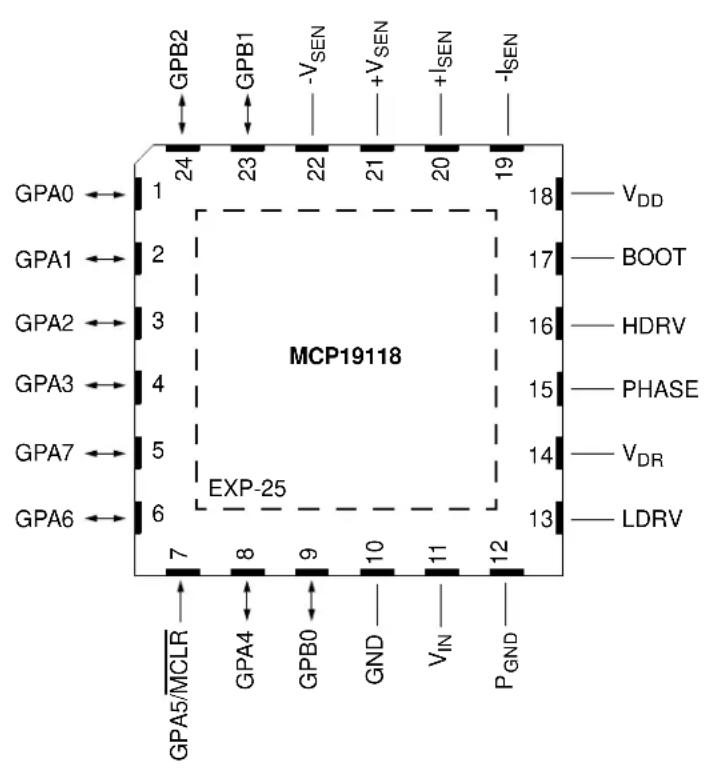
Pin Diagram - 24-Pin QFN (MCP19118)
text_image
GPA0 ← 1 GPA1 ← 2 GPA2 ← 3 GPA3 ← 4 GPA7 ← 5 GPA6 ← 6 24 23 22 21 20 19 MCP19118 EXP-25 7 8 9 10 11 12 GPA5/MCLR GPA4 GPB0 GND VIN PGND VDD BOOT HDRV PHASE VDR LDRVTABLE 1: 24-PIN SUMMARY
Note 1: The Analog Debug Output is selected when the ATSTCON
2: Selected when the device is functioning as multiple output master or slave by proper configuration of the MLTPH<2:0> bits in the BUFFCON register.
3: Selected when the device is functioning as multi-phase master or slave by proper configuration of the MLTPH<2:0> bits in the BUFFCON register.
4: The IOC is disabled when MCLR is enabled.
5: Weak pull-up always enabled when MCLR is enabled, otherwise the pull-up is under user control.
Pin Diagram - 28-Pin QFN (MCP19119)

text_image
GPB2 GPB5 GPB1 -VSEN +VSEN +ISEN -ISEN GPA0 ← 1 28 27 26 25 24 23 22 GPA1 ← 2 GPA2 ← 3 GPB4 ← 4 GPA3 ← 5 GPA7 ← 6 GPA6 ← 7 EXP-29 MCP19119 21 ← GPB6 20 — VDD 19 — BOOT 18 — HDRV 17 — PHASE 16 — VDR 15 — LDRV 8 9 10 11 12 13 14 GPA5/MCLR GPB0 GPB7 GND VIN PGNDTABLE 2: 28-PIN SUMMARY
| I/O | 28-Pin QFN | ANSEL | A/D | Timers | MSSP | Interrupt | Pull-Up | Basic Additional |
| GPA0 | 1 | Y | AN0 | — | — | IOC | Y | — |
| GPA1 | 2 | Y | AN1 | — | — | IOC | Y | — |
| GPA2 | 3 | Y | AN2 | T0CKI | — | IOC INT | Y — | |
| GPA3 | 5 | Y | AN3 | — | IOC | Y | — | |
| GPA4 | 9 | N | — | — | — | IOC | N | — |
| GPA5 | 8 | N | — | — | — | IOC^(4) | Y^(5) | |
| GPA6 | 7 | N | — | — | — | IOC | N | — |
| GPA7 | 6 | N | — | — | SCL | IOC | N | — |
| GPB0 | 10 | N | — | — | SDA | IOC | N | — |
| GPB1 | 26 | Y | AN4 | — | — | IOC | Y | — |
| GPB2 | 28 | Y | AN5 | — | — | IOC | Y | — |
| GPB4 | 4 | Y | AN6 | — | — | IOC | Y | ICSPDAT ICDDAT |
| GPB5 | 27 | Y | AN7 | — | — | IOC | Y | ICSPCLK ICDCLK |
| GPB6 | 21 | N | — | — | — | IOC | Y | — |
| GPB7 | 11 | N | — | — | — | IOC | Y | — |
| V_IN | 13 | N | — | — | — | — | — | V_IN |
| V_DR | 16 | N | — | — | — | — | — | V_DR |
| V_DD | 20 | N | — | — | — | — | — | V_DD |
| GND | 12 | N | — | — | — | — | — | GND |
| P_GND | 14 | N | — | — | — | — | — | — |
| LDRV | 15 | N | — | — | — | — | — | — |
| HDRV | 18 | N | — | — | — | — | — | — |
| PHASE | 17 | N | — | — | — | — | — | Switch Node |
| BOOT | 19 | N | — | — | — | — | — | Floating Bootstrap Supply |
| +V_SEN | 24 | N | — | — | — | — | — | Output Voltage Differential Sense |
| -V_SEN | 25 | N | — | — | — | — | — | Output Voltage Differential Sense |
| +I_SEN | 23 | N | — | — | — | — | — | Current Sense Input |
| -I_SEN | 22 | N | — | — | — | — | — | Current Sense Input |
Note 1: The Analog Debug Output is selected when the ATSTCON
2: Selected when the device is functioning as multiple output master or slave by proper configuration of the MLTPH<2:0> bits in the BUFFCON register.
3: Selected when the device is functioning as multi-phase master or slave by proper configuration of the MLTPH<2:0> bits in the BUFFCON register.
4: The IOC is disabled when MCLR is enabled.
5: Weak pull-up always enabled when is enabled, otherwise the pull-up is under user control.
Table of Contents
1.0 Device Overview 9
2.0 Pin Description 12
3.0 Functional Description....17
4.0 Electrical Characteristics 23
5.0 Digital Electrical Characteristics 29
6.0 Configuring the MCP19118/19 37
7.0 Typical Performance Curves 53
8.0 System Bench Testing 57
9.0 Device Calibration 59
10.0 Relative Efficiency Measurement 67
11.0 Memory Organization 69
12.0 Device Configuration 81
13.0 Oscillator Modes....83
14.0 Resets 85
15.0 Interrupts 93
16.0 Power-Down Mode (Sleep) 101
17.0 Watchdog Timer (WDT) 103
18.0 Flash Program Memory Control 105
19.0 I/O Ports 111
20.0 Interrupt-on-Change 121
21.0 Internal Temperature Indicator Module 123
22.0 Analog-to-Digital Converter (ADC) Module 125
23.0 Timer0 Module....135
24.0 Timer1 Module with Gate Control 137
25.0 Timer2 Module 140
26.0 PWM Module 143
27.0 Master Synchronous Serial Port (MSSP) Module 147
28.0 In-Circuit Serial Programming™ (ICSP™) 191
29.0 Instruction Set Summary 193
30.0 Development Support 203
31.0 Packaging Information....207
Appendix A: Revision History 213
Index 215
The Microchip Web Site 221
Customer Change Notification Service 221
Customer Support 221
Product Identification System....223
TO OUR VALUED CUSTOMERS
It is our intention to provide our valued customers with the best documentation possible to ensure successful use of your Microchip products. To this end, we will continue to improve our publications to better suit your needs. Our publications will be refined and enhanced as new volumes and updates are introduced.
If you have any questions or comments regarding this publication, please contact the Marketing Communications Department via E-mail at docerrors@microchip.com. We welcome your feedback.
Most Current Data Sheet
To obtain the most up-to-date version of this data sheet, please register at our Worldwide Web site at:
http://www.microchip.com
You can determine the version of a data sheet by examining its literature number found on the bottom outside corner of any page. The last character of the literature number is the version number, (e.g., DS30000000A is version A of document DS30000000).
Errata
An errata sheet, describing minor operational differences from the data sheet and recommended workarounds, may exist for current devices. As device/documentation issues become known to us, we will publish an errata sheet. The errata will specify the revision of silicon and revision of document to which it applies.
To determine if an errata sheet exists for a particular device, please check with one of the following:
- Microchip's Worldwide Web site; http://www.microchip.com
- Your local Microchip sales office (see last page)
When contacting a sales office, please specify which device, revision of silicon and data sheet (include literature number) you are using.
Customer Notification System
Register on our web site at www.microchip.com to receive the most current information on all of our products.
NOTES:
1.0 DEVICE OVERVIEW
The MCP19118/19 is a highly integrated, mixed signal, analog pulse-width modulation (PWM) current mode controller with an integrated microcontroller core for synchronous DC/DC step-down applications. Since the MCP19118/19 uses traditional analog control circuitry to regulate the output of the DC/DC converter, the integration of the PIC ^® microcontroller mid-range core is used to provide complete customization of device operating parameters, start-up and shutdown profiles, protection levels and fault handling procedures.
The MCP19118/19 is designed to efficiently operate from a single 4.5V to 40V supply. It features integrated synchronous drivers, bootstrap device, internal linear regulator and 4 kW nonvolatile memory, all in a space-saving 24-pin 4 mm x 4 mm QFN package (MCP19118) or 28-pin 5 mm x 5 mm QFN package (MCP19119).
After initial device configuration using Microchip's MPLAB® X Integrated Development Environment (IDE) software, the PMBus or I²C can be used by a host to communicate with, or modify, the operation of the MCP19118/19.
Two internal linear regulators generate two 5V rails. One 5V rail is used to provide power for the internal analog circuitry and is contained on-chip. The second 5V rail provides power to the PIC device and is present on the V_DD pin. It is recommended that a 1 F capacitor be placed between V_DD and P_GND . The V_DD pin may also be directly connected to the V_DR pin or connected through a low-pass RC filter. The V_DR pin provides power to the internal synchronous driver.
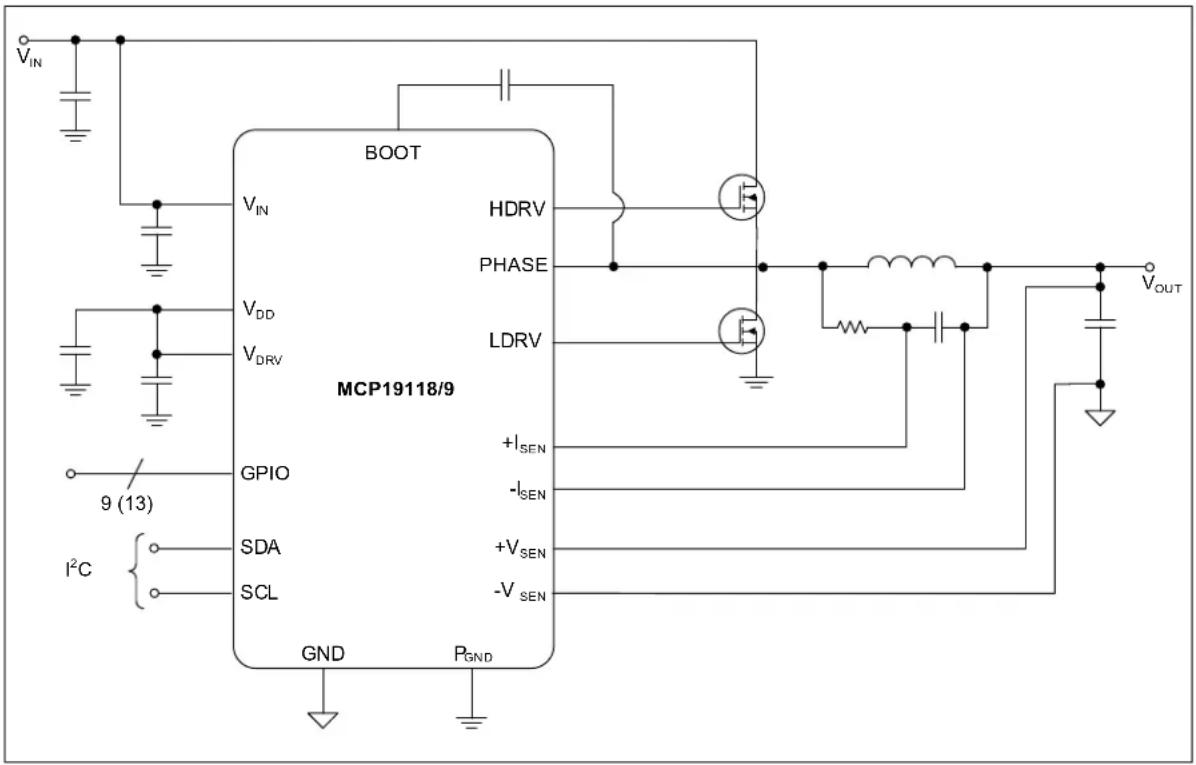
FIGURE 1-1: TYPICAL APPLICATION CIRCUIT
text_image
BOOT V_IN V_DD V_DRV MCP19118/9 HDRV PHASE LDRV GPIO +I_SEN -I_SEN SDA +V_SEN -V_SEN SCL GND P_GND I^2C 9 (13) V_OUTFIGURE 1-2: MCP19118/19 SYNCHRONOUS BUCK BLOCK DIAGRAM

flowchart
graph TD
    subgraph Input
        A["+ISEN"] --> B["DC current sense gain"]
        C["-ISEN"] --> D["AC current sense gain"]
        E["8VOUT"] --> F["OV REF"]
        G["VOUT"] --> H["UV REF"]
        I["8+5"] --> J["VREGREF"]
        K["BGAP"] --> L["AV_DD"]
        M["+VSEN"] --> N["Slave Mode"]
        O["-VSEN"] --> P["Master Mode"]
        Q["Debug MUX"] --> R["I/O"]
        S["Master Mode"] --> T["VZO"]
    end

    subgraph Control
        U[" Bias Gen "] --> V[" LDO1 "]
        U --> W[" LDO2 "]
        X[" BGAP "] --> Y[" VDAC "]
        Z[" 5R "] --> AA[" UVLO "]
        AB[" 6R "] --> AC[" 5R "]
        AD[" 5V_IN "] --> AE[" OC Comp "]
        AF[" 4DLY / 4"] --> AG[" DLY / 4 "]
        AH[" 4V_DR "] --> AI[" 4V_DR "]
        AJ[" 4V_DLR / 4DLY / 4DLY / 4DLY / 4DLY / 4DLY / 4DLY / 4DLY / 4DLY / 4DLY / 4DLY / 4DLY / 4DLY / 4DLY / 4DLY / 4DLY / 4DLY / 4DLY / 4DLY / 4DLY / 4DLY / 4DLDVD"]
    end

    subgraph Output
        AC[" VOUT "] --> AD
        AE --> AF
        AG --> AH
        AI --> AJ
        AK[" -ISEN "] --> AL[" LDRV "]
        AM[" +VSEN "] --> AN[" -VSEN "]
        AO[" PGND "] --> AP[" I/O(Digital Signals) "]
        AQ[" GND "] --> AR[" 11 (15) "]
    end

    B --> S
    D --> T
    F --> U
    H --> U
    J --> U
    L --> U
    N --> U
    P --> U
    R --> U
    S --> U
    T --> U
    U --> V
    V --> W
    W --> X
    X --> Y
    Y --> Z
    Z --> AA
    AA --> AB
    AB --> AC
    AC --> AC
    AC --> AD
    AC --> AE
    AC --> AF
    AC --> AG
    AC --> AH
    AC --> AI
    AC --> AJ
    AC --> AK
    AC --> AL
    AC --> AM
    AC --> AN
    AC --> AO
    AC --> AQ
    AC --> AR
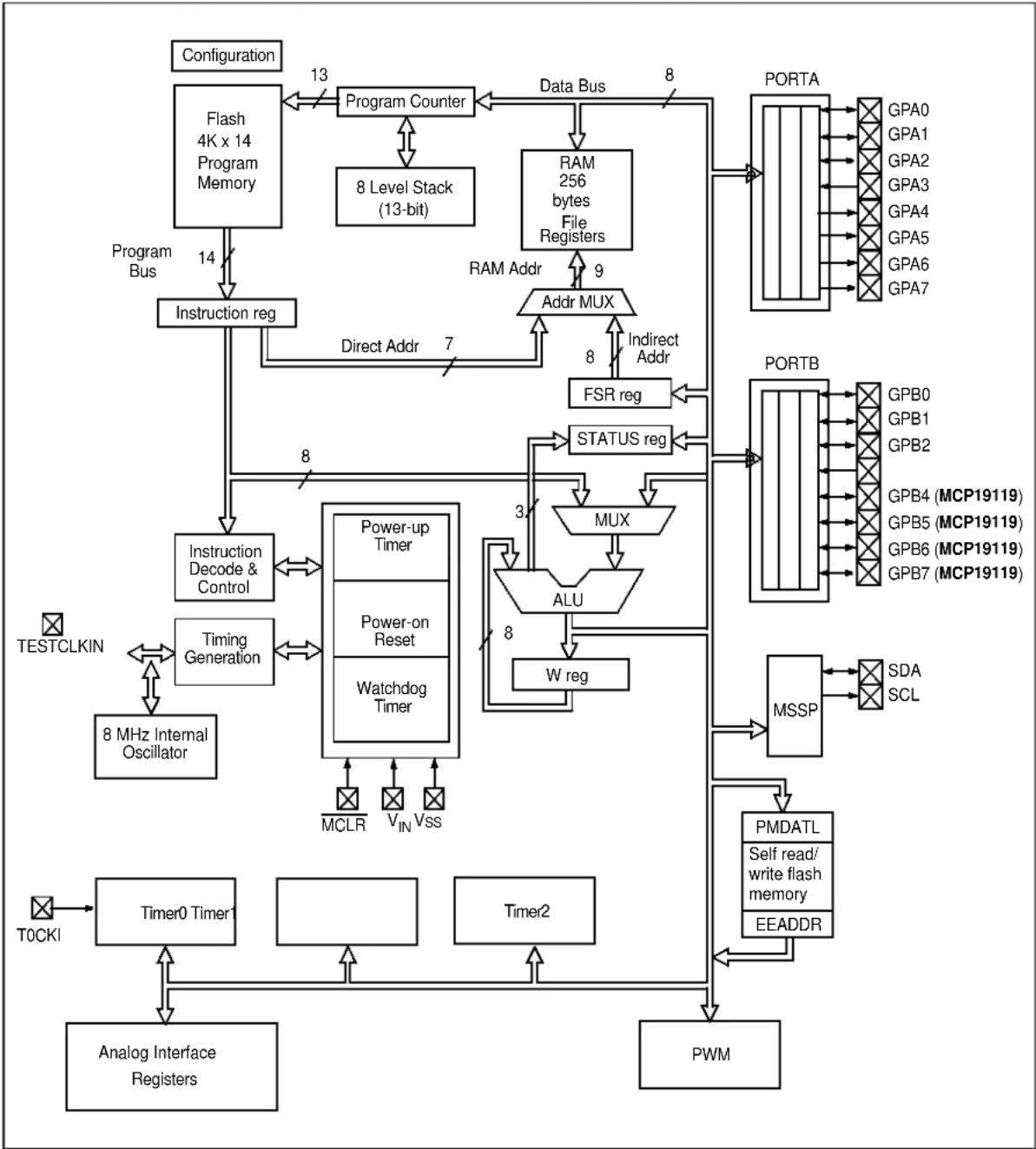
FIGURE 1-3: MICROCONTROLLER CORE BLOCK DIAGRAM
flowchart
graph TD
    A["Configuration"] -->|13| B["Program Counter"]
    B --> C["8 Level Stack (13-bit)"]
    C --> D["RAM 256 bytes File Registers"]
    D --> E["Addr MUX"]
    E --> F["FSR reg"]
    F --> G["STATUS reg"]
    G --> H["MUX"]
    H --> I["ALU"]
    I --> J["W reg"]
    J --> K["MSSP"]
    K --> L["PMDATL Self read/write flash memory EEADDR"]
    L --> M["PWM"]
    M --> N["Analog Interface Registers"]
    N --> O["Timer0 Timer"]
    O --> P["Timing Generation"]
    P --> Q["8 MHz Internal Oscillator"]
    Q --> R["Instruction Decode & Control"]
    R --> S["Power-up Timer"]
    S --> T["Power-on Reset"]
    T --> U["Watchdog Timer"]
    U --> V["MCLR"]
    U --> W["VIN"]
    U --> X["Vss"]
    X --> Y["T0CKI"]
    Y --> Z["Timer0 Timer"]
    Z --> AA["Analog Interface Registers"]
    AA --> AB["PWM"]
    AC["Program Bus"] --> AD["Instruction reg"]
    AD --> AE["Direct Addr 7"]
    AE --> AF["RAM Addr 9"]
    AF --> AG["Indirect Addr 8"]
    AG --> AH["PORTA"]
    AH --> AI["GPA0 GPA1 GPA2 GPA3 GPA4 GPA5 GPA6 GPA7"]
    AI --> AJ["PORTB"]
    AJ --> AK["GPB0 GPB1 GPB2 GPB4 (MCP19119) GPB5 (MCP19119) GPB6 (MCP19119) GPB7 (MCP19119)"]
    AK --> AL["SDA SCL"]
2.0 PIN DESCRIPTION
The MCP19118/19 family of devices features pins that have multiple functions associated with each pin. Table 2-1 provides a description of the different functions. See Section 2.1 “Detailed Pin Functional Description” for more detailed information.
TABLE 2-1: MCP19118/19 PINOUT DESCRIPTION
| Name Function | Input Type | Output Type | Description | |
| GPA0/AN0/ANALOG_TEST | GPA0 TTL CMOS | General | purpose I/O | |
| AN0 AN — | A/D Channel 0 input | |||
| ANALOG_TEST — | — Internal analog signal multiplexer output (1) | |||
| GPA1/AN1/CLKPIN GPA1 TTL | CMOS General purpose I/O | |||
| AN1 AN — | A/D Channel 1 input | |||
| CLKPIN | — | — | Switching frequency clock input or output (2,3) | |
| GPA2/AN2/T0CKI/INT | GPA2 TTL CMOS General purpose I/O | |||
| AN2 AN — | A/D Channel 2 input | |||
| T0CKI | ST | — Timer0 clock input | ||
| INT | ST | — External interrupt | ||
| GPA3/AN3 | GPA3 TTL CMOS General purpose I/O | |||
| AN3 AN — | A/D Channel 3 input | |||
| GPA4 | GPA4 TTL | OD | General purpose I/O | |
| GPA5/MCLR | GPA5 TTL | — | General purpose input only | |
| MCLR | ST | — Master Clear with internal pull-up | ||
| GPA6/ICSPDAT | GPA6 | ST | CMOS | General purpose I/O |
| ICSPDAT | CMOS | Serial Programming Data I/O (MCP19118 Only) | ||
| GPA7/SCL/ICSPCLK | GPA7 | ST | OD | General purpose open-drain I/O |
| SCL I | ^2C^TM OD I | ^2C clock | ||
| ICSPCLK | ST | — | Serial Programming Clock (MCP19118 Only) | |
| GPB0/SDA | GPB0 | TTL | OD | General purpose I/O |
| SDA | ^2C | OD | ^2C data input/output | |
| GPB1/AN4/EAPIN | GPB1 | TTL | CMOS | General purpose I/O |
| AN4 AN — | A/D Channel 4 input | |||
| EAPIN | — | — | Error amplifier signal input/output(3) | |
| GPB2/AN5 | GPB2 | TTL CMOS General purpose I/O | ||
| AN5 AN — | A/D Channel 5 input | |||
| GPB4/AN6/ICSPDAT (MCP19119 Only) | GPB4 | TTL | CMOS | General purpose I/O |
| AN6 AN — | A/D Channel 6 input | |||
| ICSPDAT | ST | CMOS | Serial Programming Data I/O | |
Legend: AN = Analog input or output CMOS = CMOS compatible input or output OD = Open Drain
TTL = TTL compatible input ST = Schmitt Trigger input with CMOS levels I²C = Schmitt Trigger input with I²C
Note 1: Analog Test is selected when the ATSTCON
2: Selected when the device is functioning as multiple output master or slave by proper configuration of the MLTPH<2:0> bits in the BUFFCON register.
3: Selected when the device is functioning as multi-phase master or slave by proper configuration of the MLTPH<2:0> bits in the BUFFCON register.
TABLE 2-1: MCP19118/19 PINOUT DESCRIPTION (CONTINUED)
| Name | Function | Input Type | Output Type | Description |
| GPB5/AN7/ICSPCLK/ALT_CLKPIN(MCP19119 Only) | GPB5 TTL CMOS General purpose I/O | |||
| AN7 AN — A/D Channel 7 input | ||||
| ISCPCLK ST — Serial Programming Clock | ||||
| ALT_CLKPIN — Alternate switching frequency clock input or output(2,3) | ||||
| GPB6 (MCP19119 Only) GPB6 TTL CMOS General purpose I/O | ||||
| GPB7 (MCP19119 Only) GPB7 TTL CMOS General purpose I/O | ||||
| V_IN | V_IN | — — | Device input supply voltage | |
| V_DD | V_DD | — — | Internal +5V LDO output pin | |
| V_DR | V_DR | — — | Gate drive supply input voltage pin | |
| GND | GND | — — | Small signal quiet ground | |
| P_GND | P_GND | — — | Large signal power ground | |
| LDRV | LDRV | — — | High-current drive signal connected to the gate of the low-side MOSFET | |
| HDRV | HDRV | — — | Floating high-current drive signal connected to the gate of the high-side MOSFET | |
| PHASE | PHASE | — — | Synchronous buck switch node connection | |
| BOOT | BOOT | — — | Floating bootstrap supply | |
| +V_SEN | +V_SEN | — — | Positive input of the output voltage sense differential amplifier | |
| -V_SEN | -V_SEN | — — | Negative input of the output voltage sense differential amplifier | |
| +I_SEN | +I_SEN | — — | Current sense input | |
| -I_SEN | -I_SEN | — — | Current sense input | |
| EP | — | — — | Exposed Thermal Pad | |
Legend: AN = Analog input or output CMOS = CMOS compatible input or output OD = Open Drain
TTL = TTL compatible input ST = Schmitt Trigger input with CMOS levels I²C = Schmitt Trigger input with I²C
Note 1: Analog Test is selected when the ATSTCON
2: Selected when the device is functioning as multiple output master or slave by proper configuration of the MLTPH<2:0> bits in the BUFFCON register.
3: Selected when the device is functioning as multi-phase master or slave by proper configuration of the MLTPH<2:0> bits in the BUFFCON register.
2.1 Detailed Pin Functional Description
2.1.1 GPA0 PIN
GPA0 is a general purpose TTL input or CMOS output pin whose data direction is controlled in TRISGPA. An internal weak pull-up and interrupt-on-change are also available.
AN0 is an input to the A/D. To configure this pin to be read by the A/D on channel 0, bits TRISA0 and ANSA0 must be set.
When the ATSTCON
2.1.2 GPA1 PIN
GPA1 is a general purpose TTL input or CMOS output pin whose data direction is controlled in TRISGPA. An internal weak pull-up and interrupt-on-change are also available.
AN1 is an input to the A/D. To configure this pin to be read by the A/D on channel 1, bits TRISA1 and ANSA1 must be set.
When the MCP19118/19 is configured as a multiple output or multi-phase master or slave, this pin is configured to be the switching frequency synchronization input or output, CLKPIN. See Section 3.10.6 "Multi-Phase System" and Section 3.10.7 "Multiple Output System" for more information.
2.1.3 GPA2 PIN
GPA2 is a general purpose TTL input or CMOS output pin whose data direction is controlled in TRISGPA. An internal weak pull-up and interrupt-on-change are also available.
AN2 is an input to the A/D. To configure this pin to be read by the A/D on channel 2, bits TRISA2 and ANSA2 must be set.
When bit T0CS is set, the T0CKI function is enabled. See Section 23.0 "Timer0 Module" for more information.
GPA2 can also be configured as an external interrupt by setting the INTE bit. See Section 15.2 "GPA2/INT Interrupt" for more information.
2.1.4 GPA3 PIN
GPA3 is a general purpose TTL input or CMOS output pin whose data direction is controlled in TRISGPA. An internal weak pull-up and interrupt-on-change are also available.
AN3 is an input to the A/D. To configure this pin to be read by the A/D on channel 3, bits TRISA3 and ANSA3 must be set.
2.1.5 GPA4 PIN
GPA4 is a true open-drain general purpose pin whose data direction is controlled in TRISGPA. There is no internal connection between this pin and the device V_DD , making this pin ideal to be used as an SMBus Alert pin. This pin does not have a weak pull-up, but interrupt-on-change is available.
2.1.6 GPA5 PIN
GPA5 is a general purpose TTL input-only pin. An internal weak pull-up and interrupt-on-change are also available.
For programming purposes, this pin is to be connected to the MCLR pin of the serial programmer. See Section 28.0 "In-Circuit Serial Programming™ (ICSP™)" for more information.
2.1.7 GPA6 PIN
GPA6 is a general purpose CMOS input/output pin whose data direction is controlled in TRISGPA. An interrupt-on-change is also available.
On the MCP19118, the ISCPDAT is the serial programming data input function. This is used in conjunction with ICSPCLK to serial program the device. This pin function is only implemented on the MCP19118.
2.1.8 GPA7 PIN
GPA7 is a true open-drain general purpose pin whose data direction is controlled in TRISGPA. There is no internal connection between this pin and the device V_DD . This pin does not have a weak pull-up, but interrupt-on-change is available.
When the MCP19118/19 is configured for communication (see Section 27.2 ^2 Mode Overview"), GPA7 functions as the clock, SCL.
On the MCP19118, the ISCPCLK is the serial programming clock function. This is used in conjunction with ICSPDAT to serial program the device. This pin function is only implemented on the MCP19118.
2.1.9 GPB0 PIN
GPB0 is a true open-drain general purpose pin whose data direction is controlled in TRISGPB. There is no internal connection between this pin and the device V_DD . This pin does not have a weak pull-up, but interrupt-on-change is available.
When the MCP19118/19 is configured for communication (see Section 27.2 ^2 Mode Overview"), GPB0 functions as the clock, SDA.
2.1.10 GPB1 PIN
GPB1 is a general purpose TTL input or CMOS output pin whose data direction is controlled in TRISGPB. An internal weak pull-up and interrupt-on-change are also available.
AN4 is an input to the A/D. To configure this pin to be read by the A/D on channel 4, bits TRISB1 and ANSB1 must be set.
When the MCP19118/19 is configured as a multiple output or multi-phase master or slave, this pin is configured to be the error amplifier signal input or output. See Section 3.10.6 "Multi-Phase System" and Section 3.10.7 "Multiple Output System" for more information.
2.1.11 GPB2 PIN
GPB2 is a general purpose TTL input or CMOS output pin whose data direction is controlled in TRISGPB. An internal weak pull-up and interrupt-on-change are also available.
AN5 is an input to the A/D. To configure this pin to be read by the A/D on channel 5, bits TRISB2 and ANSB2 must be set.
2.1.12 GPB4 PIN
This pin and its associated functions are only available on the MCP19119 device.
GPB4 is a general purpose TTL input or CMOS output pin whose data direction is controlled in TRISGPB. An internal weak pull-up and interrupt-on-change are also available.
AN6 is an input to the A/D. To configure this pin to be read by the A/D on channel 6, bits TRISB4 and ANSB4 must be set.
On the MCP19119, the ISCPDAT is the serial programming data input function. This is used in conjunction with ICSPCLK to serial program the device. This pin function is only implemented on the MCP19119.
2.1.13 GBP5 PIN
This pin and its associated functions are only available on the MCP19119 device.
GPB5 is a general purpose TTL input or CMOS output pin whose data direction is controlled in TRISGPB. An internal weak pull-up and interrupt-on-change are also available.
AN7 is an input to the A/D. To configure this pin to be read by the A/D on channel 7, bits TRISB5 and ANSB5 must be set.
On the MCP19119, the ISCPCLK is the serial programming clock function. This is used in conjunction with ICSPDAT to serial program the device. This pin function is only implemented on the MCP19119.
This pin can also be configured as an alternate switching frequency synchronization input or output, ALT_CLKPIN, for use in multiple output or multi-phase systems. See Section 19.1 "Alternate Pin Function" for more information.
2.1.14 GPB6 PIN
This pin and its associated functions are only available on the MCP19119 device.
GPB6 is a general purpose TTL input or CMOS output pin whose data direction is controlled in TRISGPB. An internal weak pull-up and interrupt-on-change are also available.
2.1.15 GPB7 PIN
This pin and its associated functions are only available on the MCP19119 device.
GPB7 is a general purpose TTL input or CMOS output pin whose data direction is controlled in TRISGPB. An internal weak pull-up and interrupt-on-change are also available.
2.1.16 V IN PIN
Device input power connection pin. It is recommended that capacitance be placed between this pin and the GND pin of the device.
2.1.17 V DD PIN
The output of the internal +5.0V regulator is connected to this pin. It is recommended that a 1.0 F bypass capacitor be connected between this pin and the GND pin of the device. The bypass capacitor should be placed physically close to the device.
2.1.18 V DR PIN
The 5V supply for the low-side driver is connected to this pin. The pin can be connected by an RC filter to the V_DD pin.
2.1.19 GND PIN
GND is the small signal ground connection pin. This pin should be connected to the exposed pad on the bottom of the package.
2.1.20 P GND PIN
Connect all large signal level ground returns to P_GND . These large-signal level ground traces should have a small loop area and minimal length to prevent coupling of switching noise to sensitive traces.
2.1.21 LDRV PIN
The gate of the low-side or rectifying MOSFET is connected to LDRV. The PCB trace connecting LDRV to the gate must be of minimal length and appropriate width to handle the high peak drive currents and fast voltage transitions.
2.1.22 HDRV PIN
The gate of the high-side MOSFET is connected to HDRV. This is a floating driver referenced to PHASE. The PCB trace connecting HDRV to the gate must be of minimal length and appropriate width to handle the high-peak drive current and fast voltage transitions.
2.1.23 PHASE PIN
The PHASE pin provides the return path for the high-side gate driver. The source of the high-side MOSFET, the drain of the low-side MOSFET and the inductor are connected to this pin.
2.1.24 BOOT PIN
The BOOT pin is the floating bootstrap supply pin for the high-side gate driver. A capacitor is connected between this pin and the PHASE pin to provide the necessary charge to turn on the high-side MOSFET.
2.1.25 +V SEN PIN
The noninverting input of the unity gain amplifier used for output voltage remote sensing is connected to the +V_SEN pin. This pin can be internally pulled-up to V_DD by setting the PE1
2.1.26 -V SEN PIN
The inverting input of the unity gain amplifier used for output voltage remote sensing is connected to the -V_SEN pin. This pin can be internally pulled-down to GND by setting the PE1
2.1.27 +I SEN PIN
The noninverting input of the current sense amplifier is connected to the +I_SEN pin.
2.1.28 -I SEN PIN
The inverting input of the current sense amplifier is connected to the -I_SEN pin.
2.1.29 EXPOSED PAD (EP)
There is no internal connection to the Exposed Thermal Pad. The EP should be connected to the GND pin and to the GND PCB plane to aid in the removal of the heat.
3.0 FUNCTIONAL DESCRIPTION
3.1 Linear Regulators
Two internal linear regulators generate two 5V rails. One 5V rail is used to provide power for the internal analog circuitry and is contained on-chip. The second 5V rail provides power to the internal PIC core and is present on the V_DD pin. It is recommended that a 1 F capacitor be placed between V_DD and P_GND .
The V_DR pin provides power to the internal synchronous MOSFET driver. V_DD can be directly connected to V_DR or connected through a low-pass RC filter to provide noise filtering. A 1 F ceramic bypass capacitor should be placed between V_DR and P_GND . When connecting V_DD to V_DR , the gate drive current required to drive the external MOSFETs must be added to the MCP19118/19 quiescent current, I_Q(max) . This total current must be less than the maximum current, I_DD-OUT available from V_DD , that is specified in Section 4.2 “Electrical Characteristics”.
EQUATION 3-1: TOTAL REGULATOR CURRENT
$$ I _ {D D O U T -} \quad I _ {Q} + I _ {D R I V E} + I _ {E X T} \tag {1} $$
Where:
- I_DD-OUT is the total current available from V_DD
- I_Q is the device quiescent current
- I_DRIVE is the current required to drive the external MOSFETs
- I_EXT is the amount of current used to power additional external circuitry
EQUATION 3-2: GATE DRIVE CURRENT
$$ I _ {D R I V E} = \left(Q _ {g H I G H} + Q _ {g L O W}\right) \times F _ {S W} $$
Where:
- I_DRIVE is the current required to drive the external MOSFETs
- Q_gHIGH is the total gate charge of the high-side MOSFET
- Q_gLOW is the total gate charge of the low-side MOSFET
- F_SW is the switching frequency
Alternatively, an external regulator can be used to power the synchronous driver. An external 5V source can be connected to V_DR . The amount of current required from this external source can be found in Equation 3-2. Care must be taken that the voltage applied to V_DR does not exceed the maximum ratings found in Section 4.1 “Absolute Maximum Ratings(†)”.
3.2 Internal Synchronous Driver
The internal synchronous driver is capable of driving two N-Channel MOSFETs in a synchronous rectified buck converter topology. The gate of the floating MOSFET is connected to the HDRV pin. The source of this MOSFET is connected to the PHASE pin. The HDRV pin source and sink current is configurable. By setting the PE1
Note 1: The PE1
The MOSFET connected to the LDRV pin is not floating. The low-side MOSFET gate is connected to the LDRV pin and the source of this MOSFET is connected to P_GND . The drive strength of the LDRV pin is not configurable. This pin is capable of sourcing a peak current of 2A. The peak sink current is 4A. This helps keep the low-side MOSFET off when the high-side MOSFET is turning on.
Note 1: Refer to Figure 1-1 for a graphical representation of the MOSFET connections.
3.2.1 MOSFET DRIVER DEAD TIME
The MOSFET driver dead time is defined as the time between one drive signal going low and the complimentary drive signal going high. Refer to Figure 6-2. The MCP19118/19 has the capability to adjust both the high-side and low-side driver dead time independently. The adjustment of the driver dead time is controlled by the DEADCON register and is adjustable in 4 ns increments.
Note 1: The DEADCON register controls the amount of dead time added to the HDRV or LDRV signal. The dead time circuitry is enabled by the PE1
3.2.2 MOSFET DRIVER CONTROL
The MCP19118/19 has the ability to disable the entire synchronous driver or just one side of the synchronous drive signal. The bits that control the MOSFET driver can be found in Register 8-1.
By setting the ATSTCON
Individual control of the HDRV or LDRV signal is accomplished by setting or clearing the ATSTCON
3.3 Output Voltage
The output voltage is configured by the settings contained in the OVCCON and OVFCON registers. No external resistor divider is needed to set the output voltage. Refer to Section 6.10 "Output Voltage Configuration".
The MCP19118/19 contains a unity gain differential amplifier used for remote sensing of the output voltage. Connect the +V_SEN and -V_SEN pins directly at the load for better load regulation. The +V_SEN and -V_SEN are the positive and negative inputs, respectively, of the differential amplifier.
3.4 Switching Frequency
The switching frequency is configurable over the range of 100 kHz to 1.6 MHz. The Timer2 module is used to generate the HDRV/LDRV switching frequency. Refer to Section 26.0 "PWM Module" for more information. Example 3-1 shows how to configure the MCP19118/19 for a switching frequency of 300 kHz.
EXAMPLE 3-1: CONFIGURING F SW
BANKSEL T2CON
CLRF T2CON ;Turn off Timer2
CLRF TMR2 ;Initialize module
MOVLW 0x19 ;Fsw=300 kHz
MOVWF PR2
MOVLW 0x0A ;Max duty cycle=40%
MOVWF PWMRL
MOVLW 0x00 ;No phase shift
MOVWF PWMPHL
MOVLW 0x04 ;Turn on Timer2
MOVWF T2CON
3.5 Compensation
The MCP19118/19 is an analog peak current mode controller with integrated adjustable compensation. The CMPZCON register is used to adjust the compensation zero frequency and gain. Figure 3-1 shows the internal compensation network with the output differential amplifier.
FIGURE 3-1: SIMPLIFIED INTERNAL COMPENSATION

text_image
+VSEN -VSEN VREF3.6 Slope Compensation
In current mode control systems, slope compensation needs to be added to the control path to help prevent subharmonic oscillation when operating with greater than 50% duty cycle. In the MCP19118/19, a negative slope is added to the error amplifier output signal before it is compared to the current sense signal. The amount of slope added is controlled by the SLPCRCON register.
Note 1: To enable the slope compensation circuitry, the ABECON
The amount of slope compensation added should be equal to the inductor current down slope during the high-side off time.
3.7 Current Sense
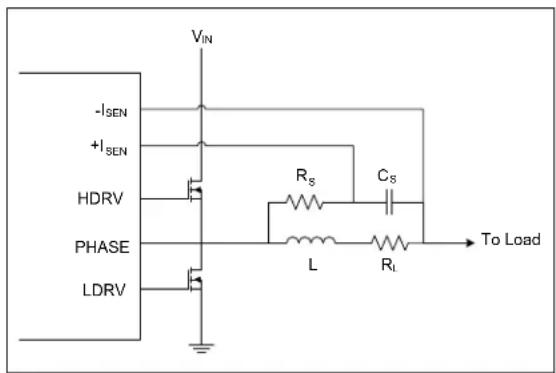
The output current is differentially sensed by the MCP19118/19. The sense element can be either a resistor placed in series with the output or the series resistance of the inductor. If the inductor series resistance is used, a filter is needed to remove the large AC component of the voltage that appears across the inductor and leave only the small AC voltage that appears across the inductor resistance, as shown in Figure 3-2. This small AC voltage is representative of the output current.
FIGURE 3-2: INDUCTOR CURRENT SENSE FILTER
text_image
-ISEN +ISEN HDRV PHASE LDRV VIN Rs Cs L RL To LoadThe value of R_S and C_S can be found by using Equation 3-3. When the current sense filter time constant is set equal to the inductor time constant, the voltage appearing across C_S approximates the current flowing in the inductor, multiplied by the inductor resistance.
EQUATION 3-3: CALCULATING FILTER VALUES
$$ \frac {L}{R _ {L}} R \quad_ {S} \times (C _ {S}) $$
Where:
- L is the inductance value of the output inductor
- R_L is the series resistance of the output inductor
- R_S is the current sense filter resistor
- C_S is the current sense filter capacitor
Both AC gain and DC gain can be added to the current sense signal. Refer to Section 6.3 "Current Sense AC Gain" and Section 6.4 "Current Sense DC Gain" for more information.
3.7.1 PLACEMENT OF THE CURRENT SENSE FILTER COMPONENTS
The amplitude of the current sense signal is typically less than 100 mV peak-to-peak. Therefore, the small signal current sense traces are very susceptible to circuit noise. When designing the printed circuit board, placement of R_S and C_S is very important. The +I_SEN and -I_SEN traces should be routed parallel to each other with minimum spacing. This Kelvin sense routing technique helps minimize noise sensitivity. The filter capacitor, C_S , should be placed as close to the MCP19118/19 as possible. This will help filter any noise that is injected onto the current sense lines. The trace connecting C_S to the inductor should occur directly at the inductor and not at any other +V_SEN trace. The filter resistor, R_S , should be placed close to the inductor. See Figure 3-3 for component placement. Care should also be taken to avoid routing the +I_SEN and -I_SEN traces near the high current switching nodes of the HDRV, LDRV, PHASE or BOOST traces. It is recommended that a ground layer be placed between these high current traces and the small signal current sense traces.
FIGURE 3-3: CURRENT SENSE FILTER COMPONENT PLACEMENT

text_image
-ISEN +ISEN Cs Rs To PHASE INDUCTOR To Load3.8 Protection Features
3.8.1 INPUT UNDERVOLTAGE LOCKOUT
The input undervoltage lockout (UVLO) threshold is configurable by the VINLVL register. When the voltage at the V_IN pin of the MCP19118/19 is below the configurable threshold, the PIR2
Note 1: The UVLO DAC must be enabled by setting the VINLVL
2: Interrupt flag bits are set when an interrupt condition occurs, regardless of the state of its corresponding enable bit or the Global Interrupt Enable (GIE) bit in the INTCON register.
Some techniques that can be used to disable the switching of the MCP19118/19 while the VINIF flag is set include setting the ATSTCON
3.8.2 OUTPUT OVERCURRENT
The MCP19118/19 senses the voltage drop across the high-side MOSFET to determine when an output overcurrent (OC) exists. This voltage drop is configurable by the OCCON register and is measured when the high-side MOSFET is conducting. To avoid false OC events, leading edge blanking is applied to the measurements. The amount of blanking is controlled by the OCLEB<1:0> bits in the OCCON register. See Section 6.2 "Output Overcurrent" for more information.
Note 1: The OC DAC must be enabled by setting the OCCON
3.8.3 OUTPUT UNDERVOLTAGE
When the output undervoltage DAC is enabled by setting the ABECON
By setting the PE1
Note 1: The UV DAC must be enabled by setting the ABECON
2: Interrupt flag bits are set when an interrupt condition occurs, regardless of the state of its corresponding enable bit or the Global Interrupt Enable (GIE) bit in the INTCON register.
3: The output of the remote sense comparator is compared to the UV threshold. Therefore, the offset in this comparator should be considered when calculating the UV threshold.
When the output overvoltage DAC is enabled by setting the ABECON
By setting the PE1
Note 1: The OV DAC must be enabled by setting the ABECON
2: Interrupt flag bits are set when an interrupt condition occurs, regardless of the state of its corresponding enable bit or the Global Interrupt Enable (GIE) bit in the INTCON register.
3: The output of the remote sense comparator is compared to the OV threshold. Therefore, the offset in this comparator should be considered when calculating the OV threshold.
3.8.5 OVERTEMPERATURE
The MCP19118/19 features a hardware overtemperature shutdown protection typically set at +160°C. No firmware fault-handling procedure is required to shutdown the MCP19118/19 for an overtemperature condition.
3.9 PIC Microcontroller Core
Integrated into the MCP19118/19 is the PIC microcontroller mid-range core. This is a fully functional microcontroller, allowing proprietary features to be implemented. Setting the CONFIG
A minimal amount of firmware is required to properly configure the MCP19118/19. Section 6.0 "Configuring the MCP19118/19" contains detailed information about each register that needs to be set for the MCP19118/19 device to operate. To aid in the development of the required firmware, a Graphical User Interface (GUI) has been developed. This GUI can be used to quickly configure the MCP19118/19 for basic operation. Customized or proprietary features can then be added to the GUI-generated firmware.
Note 1: The GUI can be found on the MCP19118/19 product page on www.microchip.com.
2: Microchip's MPLAB X Integrated Development Environment Software is required to use the GUI.
The MCP19118/19 device features firmware debug support. See Section 30.0 "Development Support" for more information.
3.10 Miscellaneous Features
3.10.1 DEVICE ADDRESSING
The communication address of the MCP19118/19 is stored in the SSPADD register. This value can be loaded when the device firmware is programmed or configured by external components. By reading a voltage on a GPIO with the ADC, a device-specific address can be stored into the SSPADD register.
The MCP19118/19 contains a second address register, SSPADD2. This is a 7-bit address that can be used as the SMBus alert address when PMBus communication is used. See Section 27.0 "Master Synchronous Serial Port (MSSP) Module" for more information.
3.10.2 DEVICE ENABLE
A GPIO pin can be configured to be a device enable pin. By configuring the pin as an input, the PORT register or the interrupt-on-change (IOC) can be used to enable the device. Example 3-2 shows how to configure a GPIO as an enable pin by testing the PORTGPA register.
EXAMPLE 3-2: CONFIGURING GPA3 AS DEVICE ENABLE
BANKSEL TRISGPA
BSF TRISGPA, 3 ;Set GPA3 as input
BANKSEL ANSELA
BCF ANSELA, 3 ;Set GPA3 as digital input
:
: ;Insert additional user code here
:
WAIT_ENABLE:
BANKSEL PORTGPA
BTFSS PORTGPA, 3 ;Test GPA3 to see if pulled high
;A high on GPA3 indicated device to be enabled
GOTO WAIT_ENABLE ;Stay in loop waiting for device enable
BANKSEL ATSTCON
BSF ATSTCON, 0 ;Enable the device by enabling drivers
:
: ;Insert additional code here
:
The output voltage measured between the +V_SEN and -V_SEN pins can be monitored by the internal ADC. In firmware, when this ADC reading matches a user-defined power good value, a GPIO can be toggled to indicate the system output voltage is within a specified range. Delays, hysteresis and time-out values can all be configured in firmware.
3.10.4 OUTPUT VOLTAGE SOFT START
During start-up, soft start of the output voltage is accomplished in firmware. By using one of the internal timers and incrementing the OVCCON or OVFCON register on a timer overflow, very long soft start times can be achieved.
3.10.5 OUTPUT VOLTAGE TRACKING
The MCP19118/19 can be configured to track another voltage signal at start-up or shutdown. The ADC is configured to read a GPIO that has the desired tracking voltage applied to it. The firmware then handles the tracking of the internal output voltage reference to this ADC reading.
3.10.6 MULTI-PHASE SYSTEM
In a multi-phase system, the output of each converter is connected together. There is one master device that sets the system switching frequency and provides each slave device with an error signal, in order to regulate the output to the same value.
The MCP19118/19 can be configured as a multi-phase master or slave by setting the MLTPH<2:0> bits in the BUFFCON register. When set as a multi-phase master device, the internal switching frequency clock is connected to GPA1 and the output of the error amplifier is connected to GPB1. The GPIOs need to be configured as outputs.
When set as a multi-phase slave device, the GPA1 pin is configured as the CLKPIN function. The switching frequency clock from the master device must be connected to GPA1. The slave device will synchronize its internal switching frequency clock to the master clock. Phase shift can be applied by setting the PWMPHL register of the slave device. The slave GPB1 pin is configured as the error signal input pin (EAPIN). The master error amplifier output must be connected to GPB1. Gain can be added to the master error amplifier output signal by the SLVGNCON register setting (Register 6-8). The slave device will use this master error signal to regulate the output voltage. When set as a slave device, GPA1 and GPB1 need to be configured as inputs. Refer to Section 26.1 "Standard Pulse-Width Modulation (PWM) Mode" for additional information.
Note 1: The ALT_CLKPIN can also be used by setting the APFCON
3.10.7 MULTIPLE OUTPUT SYSTEM
In a multiple output system, the switching frequency of each converter should be synchronized to a master clock to prevent beat frequencies from developing. Phase shift is often added to the master clock to help smooth the system input current. The MCP19118/19 has the ability to function as a multiple output master or slave by setting the appropriate MLTPH<2:0> bits in the BUFFCON register.
When configured as a multiple output master, the GPA1 pin is set as the CLKPIN output function. The internal switching frequency clock is applied to this pin and is to be connected to the GPA1 pin of the slave units.
When configured as a multiple output slave, the GPA1 pin is set as the CLKPIN input function. The switching frequency clock of the master device is connected to this pin. Phase shift can be applied by appropriately setting the PWMPHL register of the slave device. Refer to Section 26.1 "Standard Pulse-Width Modulation (PWM) Mode".
Note 1: The ALT_CLKPIN can also be used by setting the APFCON
The MCP19118/19 is a highly integrated controller. To facilitate system prototyping, various internal signals can be measured by configuring the MCP19118/19 in Bench Test mode. To accomplish this, the ATSTCON
Note 1: The factory-set calibration words are write-protected even when the MCP19118/19 is placed in Bench Test mode.
4.0 ELECTRICAL CHARACTERISTICS
4.1 Absolute Maximum Ratings (†)
| V_IN - V_GND | -0.3V to +42V |
| V_IN - V_GND (non-switching transient < 500 ms) | -0.3V to +48V |
| V_BOOT - V_PHASE | -0.3V to +6.5V |
| V_PHASE (continuous) | GND - 0.3V to +38V |
| V_PHASE (transient < 100 ns) | GND - 5.0V to +38V |
| V_DD internally generated | +5V ±20% |
| V_HDRV , HDRV Pin | +V PHASE - 0.3V to V_BOOT + 0 . 3 V |
| V_LDRV , LDRV Pin | +(V GND - 0.3V) to ( V_DD + 0 . 3 V) |
| Voltage on MCLR with respect to GND | -0.3V to +13.5V |
| Maximum Voltage: any other pin | +(V GND - 0.3V) to ( V_DD + 0 . 3 V) |
| Maximum output current sunk by any single I/O pin | 25 mA |
| Maximum output current sourced by any single I/O pin | 25 mA |
| Maximum current sunk by all GPIO | 65 mA |
| Maximum current sourced by all GPIO | 65 mA |
| ESD protection on all pins (HBM) | 1.0 kV |
| ESD protection on all pins (MM) | 100V |
† Notice: Stresses above those listed under “Maximum Ratings” may cause permanent damage to the device. This is a stress rating only and functional operation of the device at those or any other conditions above those indicated in the operational listings of this specification is not implied. Exposure to maximum rating conditions for extended periods may affect device reliability.
4.2 Electrical Characteristics
| Electrical Specifications: Unless otherwise noted, V_IN =12V, V_REF =1.2V, F_SW =300kHz Z_A =T+25°C. Boldface specifications apply over the T_A range of -40°C to +125°C. | ||||||
| Parameter Sym. Min. Typ. Max. Units Conditions | ||||||
| Input | ||||||
| Input Voltage V | IN | 4.5 | — | 40 | V | |
| Input Quiescent Current | I_Q | — | 5 | 10 | mA | Not switching |
| Shutdown Current I | SHDN | — | 1.8 | — | mA | Note 4 |
| Adjustable Input Undervoltage Lockout Range | UVLO | 3 | — | 32 | V | VINLVL is a LOG DAC |
| Input Undervoltage Lockout Hysteresis | UVLOHYS | — | 13 | — | % | Hysteresis applied to adjustable UVLO setpoint |
| Overcurrent | ||||||
| Overcurrent Minimum Threshold | OCMIN | — | 160 | — | mV | |
| Overcurrent Maximum Threshold | OCMAX | — | 620 | — | mV | |
| Overcurrent Mid-Scale Threshold | OCMID | 240 | 400 | 550 | mV | |
| Overcurrent Step Size | OCSTEP_SIZE | 10 | 15 | 25 | mV | |
| Adjustable OC Leading Edge Blanking Minimum Set Point | LEBmin | — | 114 | — | ns | |
| Adjustable OC Leading Edge Blanking Maximum Set Point | LEBmax | — | 780 | — | ns | |
| Current Sense | ||||||
| Current Sense Minimum AC Gain | I_AC\_GAIN | — | 0 | — | dB | |
| Current Sense Maximum AC Gain | I_AC\_GAIN | — | 22.8 | — | dB | |
| Current Sense AC Gain Mid-Set Point | I_AC\_GAIN | 8.5 | 11.5 | 14 | dB | |
| Current Sense AC Gain Step Size | I_AC\_GAIN\_STEP | — | 1.5 | — | dB | |
| Current Sense AC Gain Offset Voltage | I_AC\_OFFSET | -175 | 9 | 135 mV | ||
| Current Sense Minimum DC Gain | I_DC\_GAIN | — | 19.5 | — | dB | |
| Current Sense Maximum DC Gain | I_DC\_GAIN | — | 35.7 | — | dB | |
| Current Sense DC Gain Mid-Set Point | I_DC\_GAIN | 27 | 28.6 | 30.3 | dB | |
| Current Sense DC Gain Step Size | I_DC\_GAIN\_STEP | — | 2.3 | — | dB | |
Note 1: Ensured by design. Not production tested.
2: V_DD-OUT is the voltage present at the V_DD pin. V_DD is the internally generated bias voltage.
3: This is the total source current for all GPIO pins combined. Individually, each pin can source a maximum of 25 mA.
4: PE1 = 0x00h, ABECON = 0x00h, ATSTCON = 0x80h, WPUGPA = 0x00h, WPUGPB = 0x00h and SLEEP command issued to PIC core, see Section 16.0 "Power-Down Mode (Sleep)".
4.2 Electrical Characteristics (Continued)
| Electrical Specifications: Unless otherwise noted, V_IN = 12V , V_REF = 1.2V , F_SW = 300 kHz , T_A = +25°C .Boldface specifications apply over the T_A range of -40°C to +125°C. | ||||||
| Parameter | Sym. | Min. | Typ. | Max. | Units | Conditions |
| Current Sense DC Gain Offset Voltage | I_DC\_OFFSET | 1.4 1.56 | 1.7 V | |||
| Voltage for Zero Current VZC — 1.45 — V VZCON = 0x80h | ||||||
| Voltage Reference | ||||||
| Adjustable V_OUT Range V | OUT_RANGE | 0.5 | — | 3.6 | V | V_OUT range with no external voltage divider |
| V_OUT Coarse Resolution | V_OUT\_COARSE | 10.8 | 15.8 | 25.8 | mV | |
| V_OUT Coarse Mid-Set Point | V_OUT\_COARSE\_MID | 1.85 | 2.04 | 2.25 | V | |
| V_OUT Fine Resolution | V_OUT\_FINE | — | 0.8 | 1 mV | ||
| Output Overvoltage | ||||||
| Adjustable Overvoltage Range | OV_RANGE | 0 | — | 4.5 | V | |
| Adjustable Overvoltage Mid-Set Point | OV_MID | 1.8 | 2 | 2.3 | V | |
| Adjustable Overvoltage Resolution | OV_R | — | 15 | — | mV | |
| Output Undervoltage | ||||||
| Adjustable Undervoltage Range | UV_RANGE | 0 | — | 4.5 | ||
| Adjustable Undervoltage Mid-Set Point | UV_MID | 1.8 | 2 | 2.3 | V | |
| Adjustable Undervoltage Resolution | UV_R | — | 15 | — | mV | |
| Remote Sense Differential Amplifier | ||||||
| Closed-Loop Voltage Gain | A_VOL | 0.95 | 1 | 1.05 | V/V | |
| Common Mode Range | V_CMR | GND – 0.3 | — | V_DD + 1.0 | V Note 1 | |
| Common-Mode Reject Ratio | CMRR | — | 57 | — | dB | |
| Differential Amplifier Offset | V_OS | — | 30 | — | mV | See Section 9.4 “Calibration Word 4 and Calibration Word 5” and Section 9.5 “Calibration Word 6 and Calibration Word 7” |
| Compensation | ||||||
| Minimum Zero Frequency | F_ZERO\_MIN | — | 350 | — | Hz | |
| Maximum Zero Frequency | F_ZERO\_MAX | — 35000 | — Hz | |||
| Minimum Error Amplifier Gain | G_EA\_MIN | — | 0 | — | dB | |
| Maximum Error Amplifier Gain | G_EA\_MAX | — | 36.15 | — dB | ||
Note 1: Ensured by design. Not production tested.
2: V_DD-OUT is the voltage present at the V_DD pin. V_DD is the internally generated bias voltage.
3: This is the total source current for all GPIO pins combined. Individually, each pin can source a maximum of 25 mA.
4: PE1 = 0x00h, ABECON = 0x00h, ATSTCON = 0x80h, WPUGPA = 0x00h, WPUGPB = 0x00h and SLEEP command issued to PIC core, see Section 16.0 "Power-Down Mode (Sleep)".
4.2 Electrical Characteristics (Continued)
| Electrical Specifications: Unless otherwise noted, V_IN = 12V , V_REF = 1.2V , F_SW = 300 kHz , T_A = +25°C .Boldface specifications apply over the T_A range of -40°C to +125°C. | ||||||
| Parameter | Sym. | Min. | Typ. | Max. | Units | Conditions |
| Oscillator | ||||||
| Internal Oscillator Frequency | F_OSC | 7.60 8.00 | 8.40 MHz | |||
| Switching Frequency F | sw | — | F_OSC/N — kHz | |||
| Switching Frequency Range Select | N 5 — 80 | |||||
| Maximum Duty Cycle — (N-1)/N — %/ | 100 | |||||
| Dead Time Adjustment | ||||||
| Dead Time Step Size | DT_STEP | — | 4 | — | ns | |
| HDRV Output Driver | ||||||
| HDRV Source Resistance | R_HDRV-SCR | — | 1 | 2.6 | Ω | Measured at 500 mANote 1, High Range |
| — | 2 | 3.5 | Ω | Measured at 500 mANote 1, Low Range | ||
| HDRV Sink Resistance | R_HDRV-SINK | — | 1 | 2.6 | Ω | Measured at 500 mANote 1, High Range |
| — | 2 | 3.5 | Ω | Measured at 500 mANote 1, Low Range | ||
| HDRV Source Current | I_HDRV-SCR | — | 2 | — | A | Note 1, High Range |
| — | 1 | — | A | Note 1, Low Range | ||
| HDRV Sink Current | I_HDRV-SINK | — | 2 | — | A | Note 1, High Range |
| — | 1 | — | A | Note 1, Low Range | ||
| HDRV Rise Time | t_RH | — | 15 | 30 | ns | Note 1, C_LOAD = 3.3 nF ,High Range |
| HDRV Fall Time | t_FH | — | 15 | 30 | ns | Note 1, C_LOAD = 3.3 nF ,High Range |
| LDRV Output Driver | ||||||
| LDRV Source Resistance | R_LDRV-SCR | — | 1 | 2.5 | Ω | Measured at 500 mANote 1 |
| LDRV Sink Resistance | R_LDRV-SINK | — | 0.5 | 1.0 | Ω | Measured at 500 mANote 1 |
| LDRV Source Current | I_LDRV-SCR | — | 2 | — | A | Note 1 |
| LDRV Sink Current | I_LDRV-SINK | — | 4 | — | A | Note 1 |
| LDRV Rise Time | t_RL | — | 15 | 30 | ns | Note 1, C_LOAD = 3.3 nF |
| LDRV Fall Time | t_FL | — | 7 | 15 | ns | Note 1, C_LOAD = 3.3 nF |
Note 1: Ensured by design. Not production tested.
2: V_DD-OUT is the voltage present at the V_DD pin. V_DD is the internally generated bias voltage.
3: This is the total source current for all GPIO pins combined. Individually, each pin can source a maximum of 25 mA.
4: PE1 = 0x00h, ABECON = 0x00h, ATSTCON = 0x80h, WPUGPA = 0x00h, WPUGPB = 0x00h and SLEEP command issued to PIC core, see Section 16.0 "Power-Down Mode (Sleep)".
4.2 Electrical Characteristics (Continued)
| Electrical Specifications: Unless otherwise noted, V_IN =12V, V_REF =1.2V, F_SW =300 kHz, T_A =+25°C.Boldface specifications apply over the T_A range of -40°C to +125°C. | ||||||
| Parameter | Sym. | Min. | Typ. | Max. | Units | Conditions |
| Linear Regulator | ||||||
| Bias Voltage, LDO Output | V_DD | 4.6 5.0 | 5.4 V | V | IN=6.0V to 40V, Note 2 | |
| Internal Circuitry Bias Voltage | AV_DD | -5.0 | -V | V | IN=6.0V to 40V, Note 2 | |
| Maximum V_DD Output Current | I_DD | 30 | - | m | A | |
| Line Regulation ΔV | DD/ \ (V_DD × V_IN) | - | 0.05 | 0.1 | %/V | (VDD+1.0V) ≤ VIN ≤ 40VNote 2 |
| Load Regulation | V_DD/V_DD | -1.75 | -0.8 | +0.5 | % | I_DD =1 mA to 30 mANote 2 |
| Output Short-Circuit Current | I_DD\_SC | - | 65 | - | mA | V_IN =(VDD+1.0V)Note 2 |
| Dropout Voltage | V_IN-V_DD | - | 0 | .5 | 1 V | DD=B0 mA, V_IN=V_DD +1.0VNote 2 |
| Power Supply Rejection Ratio | PSRR_LDO | - | 60 | - | dB | f≤1000 Hz, I_DD =25 mA, C_IN =0 μF, C_DD =1 μF |
| Band Gap Voltage | BG | -2.5% | 1.23 | +2.5% | V | |
| GPIO Pins | ||||||
| Maximum GPIO Sink Current | I_SINK\_GPIO | - | - | 90 | mA | Note 3, Note 1 |
| Maximum GPIO Source Current | I_SOURCE\_GPIO | - | - | 90 | mA | Note 3, Note 1 |
| GPIO Weak Pull-Up Current | I_PULL-UP\_GPIO | 50 250 | 400 | μA | V | DD=5V |
| GPIO Output Low Voltage | V_OL | - | - | 0.6 | V | OL=7 mA, V_DD =5V, T_A =+90°C |
| GPIO Output High Voltage | V_OH | V_DD -0.7 | - | - | V | I_OH =-2.5 mA, V_DD =5V, T_A =+90°C |
| GPIO Input Leakage Current | GPIO\_I_IL | - | ±0.1 | ±1 | μA | Negative current is defined as current sourced by the pin, T_A =+90°C |
| GPIO Input Low Voltage | V_IL | GND | 0.8 V | I/O Port with TTL buffer | ||
| GND | 0.2 V_DD | V | V_DD =5V, T_A =+90°C | |||
| GND | 0.2 V_DD | V | I/O Port with Schmitt Trigger buffer, V_DD =5V, T_A =+90°C | |||
Note 1: Ensured by design. Not production tested.
2: V_DD-OUT is the voltage present at the V_DD pin. V_DD is the internally generated bias voltage.
3: This is the total source current for all GPIO pins combined. Individually, each pin can source a maximum of 25 mA.
4: PE1 = 0x00h, ABECON = 0x00h, ATSTCON = 0x80h, WPUGPA = 0x00h, WPUGPB = 0x00h and SLEEP command issued to PIC core, see Section 16.0 "Power-Down Mode (Sleep)".
4.2 Electrical Characteristics (Continued)
Electrical Specifications: Unless otherwise noted, V_IN = 12V , V_REF = 1.2V , F_SW = 300kHz , z_A = T + 25^ . Boldface specifications apply over the T_A range of -40^ to +125^ .
| Parameter | Sym. | Min. | Typ. | Max. | Units | Conditions |
| GPIO Input High Voltage V | IH | 2.0 — V | DD | V I/O | Port with TTL buffer, V_DD = 5 V, _AT = +90^ | |
| 0.8V_DD | — | V_DD | V I/O | Port with Schmitt Trigger buffer, V_DD = 5 V, _AT = +90^ | ||
| 0.8V_DD | — | V_DD | V | A +90^ , T | ||
| Thermal Shutdown | ||||||
| Thermal Shutdown T | SHD | — | 1 | 6 | 0 | — ° C |
| Thermal Shutdown Hysteresis | T_SHD\_HYS | — | 20 | — | °C | |
Note 1: Ensured by design. Not production tested.
2: V_DD-OUT is the voltage present at the V_DD pin. V_DD is the internally generated bias voltage.
3: This is the total source current for all GPIO pins combined. Individually, each pin can source a maximum of 25 mA.
4: PE1 = 0x00h, ABECON = 0x00h, ATSTCON = 0x80h, WPUGPA = 0x00h, WPUGPB = 0x00h and SLEEP command issued to PIC core, see Section 16.0 "Power-Down Mode (Sleep)".
4.3 Thermal Specifications
| Parameter | Sym. | Min. | Typ. | Max. | Units | Test Conditions |
| Temperature Ranges | ||||||
| Specified Temperature Range | T_A | -40 | — | +125 | °C | |
| Operating Temperature Range | T_A | -40 | — | +125 | °C | |
| Maximum Junction Temperature | T_J | — | — | +150 | °C | |
| Storage Temperature Range | T_A | -65 | — | +150 | °C | |
| Thermal Package Resistances | ||||||
| Thermal Resistance, 24L-QFN 4x4 | _JA | — | 42 | — | °C/W | |
| Thermal Resistance, 28L-QFN 5x5 | _JA | — | 35.3 | — | °C/W | |
5.0 DIGITAL ELECTRICAL CHARACTERISTICS
5.1 Timing Parameter Symbology
The timing parameter symbols have been created with one of the following formats:
| 1. TppS2ppS | 3. TCC:ST | (I2C specifications only) |
| 2. TppS 4. Ts (I | 2C specifications only) |
| T | |
| F Frequency TTime | |
Lowercase letters (pp) and their meanings:
| pp | ||||
| cc CCP1 osc OSC1 | ||||
| ck CLKOUT | rd | RD | — | |
| cs | rw | or | ||
| di | SDI | sc | SCK | |
| do | SDO | ss | ||
| dt | Data in | t0 | T0CKI | |
| io | I/O port | t1 | T1CKI | |
| mc | wr | |||
Uppercase letters and their meanings:
| S | |||
| F | Fall | P | Period |
| H | High | R | Rise |
| I | Invalid (high-impedance) V | Valid | |
| L | Low | Z | High-impedance |
| I^2C^TM only | |||
| AA | Output access | High | High |
| BUF | Bus free | Low | Low |
Tcc:ST (I²C specifications only)
| CC | |||
| HD | Hold | SU | Setup |
| ST | |||
| DAT | Data input hold | STO | Stop condition |
| STA | Start condition | ||
FIGURE 5-1: LOAD CONDITIONS
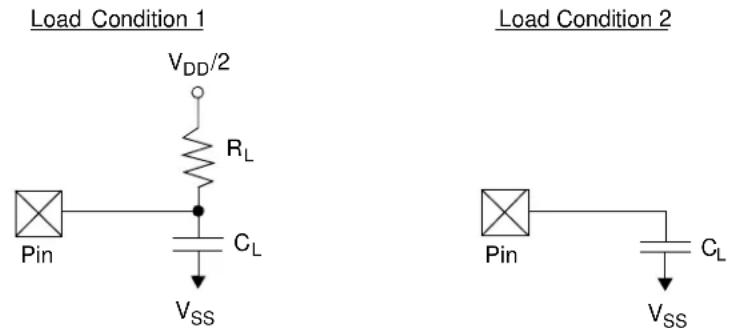
$$ R _ {L} = 4 6 4 \Omega $$
$$ C _ {L} = 5 0 \mathrm{pF} \quad \text { for all GPIO pins } $$
5.2 AC Characteristics: MCP19118/19 (Industrial, Extended)
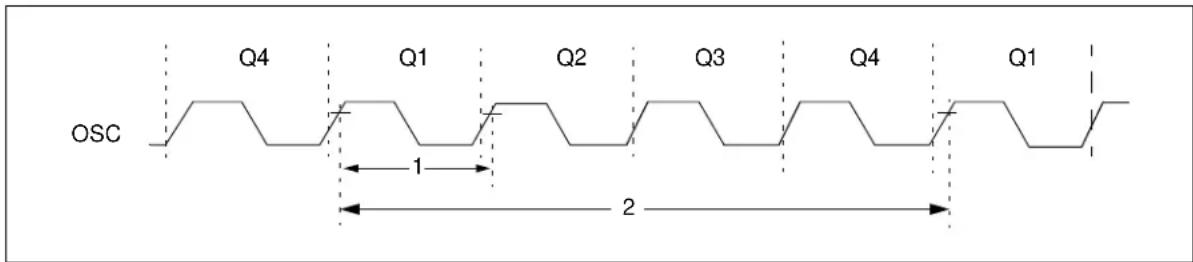
FIGURE 5-2: EXTERNAL CLOCK TIMING
text_image
OSC Q4 Q1 Q2 Q3 Q4 Q1 1 2TABLE 5-1: EXTERNAL CLOCK TIMING REQUIREMENTS
| Param No. | Sym. Characteristic Min. Typ. | Max. Units Conditions | |||||
| F_OSC | Oscillator Frequency^(1) | — | 8 | — | MHz | ||
| 1 | T_OSC | Oscillator Period^(1) | — | 250 | — | ns | |
| 2 | T_CY | Instruction Cycle Time^(1) | — | 1000 | — | ns | |
* These parameters are characterized but not tested.
Data in the "Typ." column is at V_IN = 12V (V_DD = 5V) , +25^ unless otherwise stated. These parameters are for design guidance only and are not tested.
Note 1: Instruction cycle period ( T_CY ) equals four times the input oscillator time base period. All specified values are based on characterization data for that particular oscillator type under standard operating conditions with the device executing code.
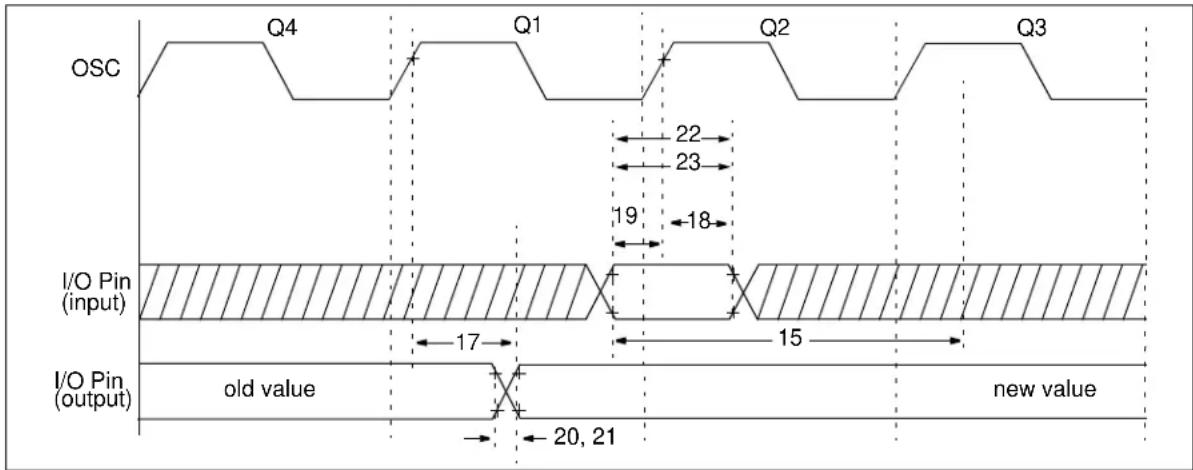
FIGURE 5-3: CLKOUT AND I/O TIMING
other
| Signal | Q1 | Q2 | Q3 | Q4 | |-----------------|------|------|------|------| | OSC | | | | | | I/O Pin (input) | | | | | | I/O Pin (output) | | | | |TABLE 5-2: CLKOUT AND I/O TIMING REQUIREMENTS
| Param No. | Sym. Ch | characteristic Min. Typ. | Max. Units Conditions | ||||
| 17 | TosH2ioV | OSC1 (Q1 cycle) to Port output valid | — | 50 | 150* | ns | |
| — | — | 300 | ns | ||||
| 18 | TosH2iol | OSC1 (Q2 cycle) to Port input invalid (I/O in hold time) | 100 | — | — | ns | |
| 19 | TioV2osH | Port input valid to OSC1 (I/O in setup time) | 0 | — | — | ns | |
| 20 | TioR | Port output rise time | — | 10 | 40 | ns | |
| 21 | TioF | Port output fall time | — | 10 | 40 | ns | |
| 22 | Tinp | INT pin high or low time | 25 | — | — | ns | |
| 22A | 40 | — | — | ns | |||
| 23 | Trbp | Port A change INT high or low time | Tcy | — | —ns | ||
| 23A | Trbp | ||||||
* These parameters are characterized but not tested.
† Data in the "Typ." column is at V_IN = 12V ( V_DD = 5V ), +25°C unless otherwise stated.
FIGURE 5-4: RESET, WATCHDOG TIMER, OSCILLATOR START-UP TIMER AND POWER-UP TIMER TIMING

text_image
VDD MCLR Internal POR 30 33 32 PWRT Time Out OSC Time Out Internal Reset Watchdog Timer Reset 34 31 34 I/O PinsTABLE 5-3: RESET, WATCHDOG TIMER, OSCILLATOR START-UP TIMER AND POWER-UP TIMER REQUIREMENTS
| Param No. | Sym. Characteristic Min. Typ. | Max. Units Conditions | |||||
| 30 | T_MCL | Pulse Width (Low) 2 —— μs | — | V | _DD = 5V, -40°C to +85°C | ||
| 31 | T_WDT | Watchdog Timer Time-Out Period (No Prescaler) | 7 | 18 | 33 | ms | V_DD = 5V, -40°C to +85°C |
| 32 | T_OST | Oscillation Start-Up Timer Period | — | 1024T_OSC | — | — | T_OSC = OSC1 period |
| 33* | T_PWRT | Power-Up Timer Period (4 x T_WDT ) | 28 | 64 | 132 | ms | V_DD = 5V, -40°C to +85°C |
| 34 | T_IOZ | I/O High-Impedance from Low or Watchdog Timer Reset | — | — | 2.0 | μs | |
* These parameters are characterized but not tested.
Data in the “Typ.” column is at V_IN = 12V (V_DD = 5V) , +25°C unless otherwise stated. These parameters are for design guidance only and are not tested.
FIGURE 5-5: TIMER0 AND TIMER1 EXTERNAL CLOCK TIMINGS

text_image
TOCKI 40 41 42TABLE 5-4: TIMER0 AND TIMER1 EXTERNAL CLOCK REQUIREMENTS
| Param No. | Sym. | Characteristic | Min. | Typ.^ | Max. | Units | Conditions | |
| 40* | TtOH | TOCKI High Pulse Width | No Prescaler | 0.5T_CY+20 | — | — | ns | |
| With Prescaler | 10 | — | — | ns | ||||
| 41* | TtOL | TOCKI Low Pulse Width | No Prescaler | 0.5T_CY+20 | — | — | ns | |
| With Prescaler | 10 | — | — | ns | ||||
| 42* | TtOP | TOCKI Period | Greater of: 20 or _CY+40N | — | — | ns | N = prescale value (2, 4, ..., 256) | |
* These parameters are characterized but not tested.
Data in the “Typ.” column is at V_IN = 12V (V_DD = 5V) , +25°C unless otherwise stated. These parameters are for design guidance only and are not tested.
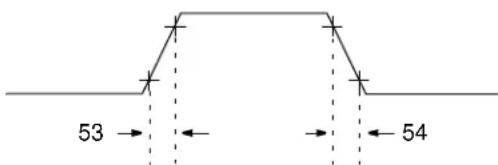
FIGURE 5-6: PWM TIMING
PWM (CLKPIN)
text_image
53 54Note: Refer to Figure 5-1 for load conditions.
TABLE 5-5: PWM REQUIREMENTS
| Param No. | Sym. | Characteristic Min. Typ.† Max. Units Conditions | ||||||
| 53* TccR PWM (CLKPIN) output rise time — 10 25 ns | ||||||||
| 54* TccF | PWM (CLKPIN) output fall time | — | 10 | 25 | ns | |||
* These parameters are characterized but not tested.
Data in the “Typ.” column is at V_IN = 12V ( V_DD = 5V ), +25°C unless otherwise stated. Parameters are for design guidance only and are not tested.
TABLE 5-6: MCP19118/19 A/D CONVERTER (ADC) CHARACTERISTICS
| Standard Operating Conditions (unless otherwise stated)Operating temperature -40°C ≤ TA ≤ +125°C | |||||||
| Param No. | Sym. | Characteristic | Min. | Typ.^ | Max. | Units | Conditions |
| AD01 | N_R | Resolution | — | — | 10 | bit | |
| AD02 | E_IL | Integral Error | — | — | ±1 | LSb | AV_DD=5.0V |
| AD03 | E_DL | Differential Error | — | — | ±1 | LSb | No missing codes to 10 bits AV_DD=5.0V |
| AD04 | E_OFF | Offset Error | — | +3.0 | +5.0 | LSb | AV_DD=5.0V |
| AD07 | E_GN | Gain Error | — | ±2 | ±5 | LSb | AV_DD=5.0V |
| AD06 AD06A | V_REF | Reference Voltage^(3) | — | AV_DD | — | V | |
| AD07 | V_AIN | Full-Scale Range | GND | — | AV_DD | V | |
| AD08 | Z_AIN | Recommended Impedance of Analog Voltage Source | — | — | 10 | kΩ | |
* These parameters are characterized but not tested.
† Data in the “Typ.” column is at V_IN = 12V ( V_DD = 5V ), +25°C unless otherwise stated. These parameters are for design guidance only and are not tested.
Note 1: Total Absolute Error includes integral, differential, offset and gain errors.
2: The A/D conversion result never decreases with an increase in the input voltage and has no missing codes.
3: When ADC is off, it will not consume any current other than leakage current. The power-down current specification includes any such leakage from the ADC module.
TABLE 5-7: MCP19118/19 A/D CONVERSION REQUIREMENTS
| Standard Operating Conditions (unless otherwise stated)Operating temperature -40°C ≤ T A ≤ +125°C | |||||||
| Param No. | Sym. | Characteristic Min. Typ. | † | Max. | Units | Conditions | |
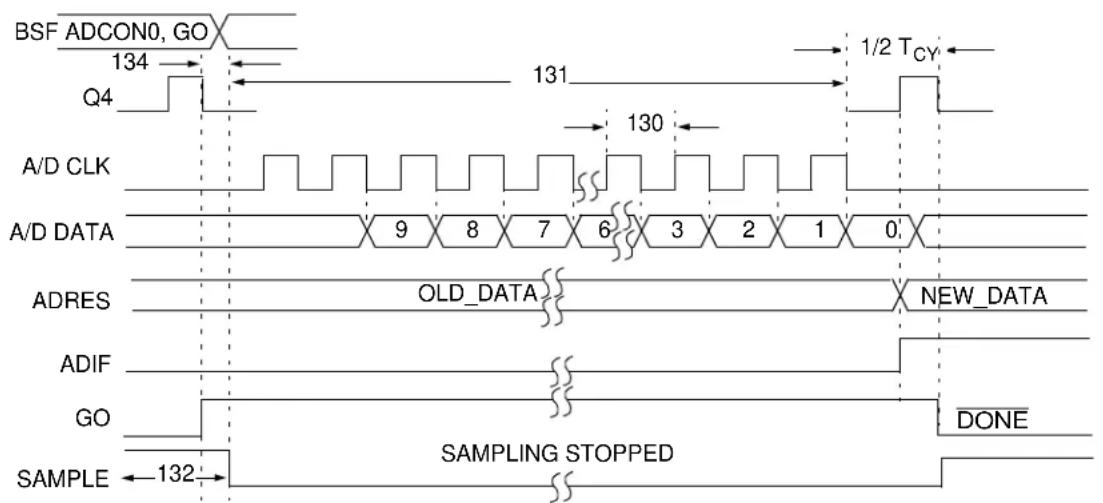
| AD130* T AD | A/D Clock PeriodA/D Internal RC Oscillator Period | 3.01.6 | —4.0 | 9.06.0 | μsμs | TOSC-based, VDD= 5.0VAt VDD= 5.0V | |
| AD131 | TCNVConversion Time (not including Acquisition Time)(1) | — | 11 | — | TAD | Set GO/DONE bit to new data in A/D Result register | |
| AD132* T ACQ | Acquisition Time | 11.5 | — | μs | |||
| AD133* T AMP | Amplifier Settling Time | — | — | 5 | μs | ||
| AD134 | TGOQ4 to A/D Clock Start | —— | TOSC/2TOSC/2 + TCY | —— | —— | If the A/D clock source is selected as RC, a time of TCY is added before the A/D clock starts. This allows the SLEEP instruction to be executed. | |
* These parameters are characterized but not tested.
Data in the “Typ.” column is at V_IN = 12V (V_DD = 5V) , +25°C unless otherwise stated. These parameters are for design guidance only and are not tested.
Note 1: ADRESH and ADRESL registers may be read on the following T_CY cycle.
FIGURE 5-7: A/D CONVERSION TIMING (NORMAL MODE)
text_image
BSF ADC0, GO 134 Q4 131 1/2 TCY A/D CLK 130 A/D DATA 9 8 7 6 3 2 1 0 ADRES OLD_DATA NEW_DATA ADIF GO DONE SAMPLE 132 SAMPLING STOPPEDNote 1: If the A/D clock source is selected as RC, a time of T_CY is added before the A/D clock starts. This allows the SLEEP instruction to be executed.
FIGURE 5-8: A/D CONVERSION TIMING (SLEEP MODE)

text_image
BSF ADCON0, GO 134 Q4 131 130 A/D CLK A/D DATA 9 8 7 6 3 2 1 0 ADRES OLD_DATA NEW_DATA ADIF GO DONE SAMPLE 132 SAMPLING STOPPEDNote 1: If the A/D clock source is selected as RC, a time of T_CY is added before the A/D clock starts. This allows the SLEEP instruction to be executed.
NOTES:
6.0 CONFIGURING THE MCP19118/19
The MCP19118/19 is an analog controller with digital peripheral. This means that device configuration is handled through register settings instead of adding external components. The following sections detail how to set the analog control registers.
The VINLVL
Note: The VINIF interrupt flag bit is set when an interrupt condition occurs, regardless of the state of its corresponding enable bit or the Global Interrupt Enable (GIE) bit in the INTCON register.
6.1 Input Undervoltage Lockout
The VINLVL register contains the digital value that sets the input undervoltage lockout. When the input voltage on the V_IN pin to the MCP19118/19 is below this programmed level, the INTCON
REGISTER 6-1: VINLVL: INPUT UNDERVOLTAGE LOCKOUT CONTROL REGISTER
| R/W-0 U-0 R/W-x R/W-x R/W-x R/W-x R/W-x R/W-x | |||||||
| UVLOEN | — | UVLO5 | UVLO4 | UVLO3 | UVLO2 | UVLO1 | UVLO0 |
| bit 7 bit 0 | |||||||
| Legend: | |||
| R = Readable bit | W = Writable bit | U = Unimplemented bit, read as ‘0’ | |
| -n = Value at POR | ‘1’ = Bit is set | ‘0’ = Bit is cleared | x = Bit is unknown |
bit 7 UVLOEN: Undervoltage Lockout DAC Control bit
1 = Undervoltage Lockout DAC is enabled
0 = Undervoltage Lockout DAC is disabled
bit 6 Unimplemented: Read as '0'
bit 5-0 UVLO<5:0>: Undervoltage Lockout Configuration bits
UVLO<5:0>=26.5*ln(UVLO _SET_POINT /4)
6.2 Output Overcurrent
The MCP19118/19 features a cycle-by-cycle peak current limit. By monitoring the OCIF interrupt flag, custom overcurrent fault handling can be implemented.
To detect an output overcurrent, the MCP19118/19 senses the voltage drop across the high-side MOSFET while it is conducting. Leading edge blanking is incorporated to mask the overcurrent measurement for a given amount of time. This helps prevent false overcurrent readings.
When an output overcurrent is sensed, the OCIF flag is set and the high-side drive signal is immediately terminated. Without any custom overcurrent handling implemented, the high-side drive signal will be asserted high at the beginning of the next clock cycle. If the overcurrent condition still exists, the high-drive signal will again be terminated.
The OCIF interrupt flag must be cleared in software. However, if a subsequent switching cycle without an overcurrent condition has not occurred, hardware will immediately set the OCIF interrupt flag.
The OCCON register contains the bits used to configure both the output overcurrent limit and the amount of leading edge blanking (see Register 6-2).
The OCCON
Note: The OCIF interrupt flag bit is set when an interrupt condition occurs, regardless of the state of its corresponding enable bit or the Global Interrupt Enable (GIE) bit in the INTCON register.
REGISTER 6-2: OCCON: OUTPUT OVERCURRENT CONTROL REGISTER
| R/W-0 R/W-x R/W-x R/W-x R/W-x R/W-x R/W-x R/W-x | |||||||
| OCEN OC | LEB1 OCLEB0 | OOC4 OOC3 | DOC2 OOC1 | OOC0 | |||
| bit 7 bit 0 | |||||||
Legend:
| R = Readable bit | W = Writable bit | U = Unimplemented bit, read as '0' |
| -n = Value at POR | '1' = Bit is set | '0' = Bit is cleared x = Bit is unknown |
bit 7 OCEN: Output Overcurrent DAC Control bit
1 = Output Overcurrent DAC is enabled
0 = Output Overcurrent DAC is disabled
bit 6-5 OCLEB<1:0>: Leading Edge Blanking
00 = 114 ns blanking
01 = 213 ns blanking
10 = 400 ns blanking
11 = 780 ns blanking
bit 4-0 OOC<4:0>: Output Overcurrent Configuration bits
00000 = 160 mV drop
00001 = 175 mV drop
00010 = 190 mV drop
00011 = 205 mV drop
00100 = 220 mV drop
00101 = 235 mV drop
00110 = 250 mV drop
00111 = 265 mV drop
01000 = 280 mV drop
01001 = 295 mV drop
01010 = 310 mV drop
01011 = 325 mV drop
01100 = 340 mV drop
01101 = 355 mV drop
01110 = 370 mV drop
01111 = 385 mV drop
10000 = 400 mV drop
10001 = 415 mV drop
10010 = 430 mV drop
10011 = 445 mV drop
10100 = 460 mV drop
10101 = 475 mV drop
10110 = 490 mV drop
10111 = 505 mV drop
11000 = 520 mV drop
11001 = 535 mV drop
11010 = 550 mV drop
11011 = 565 mV drop
11100 = 580 mV drop
11101 = 595 mV drop
11110 = 610 mV drop
11111 = 625 mV drop
6.3 Current Sense AC Gain
The current measured across the inductor is a square wave that is averaged by the capacitor ( C_S ) connected between +I_SEN and -I_SEN . This very small voltage plus the ripple can be amplified by the current sense AC gain circuitry. The amount of gain is controlled by the CSGSCON register.
REGISTER 6-3: CSGSCON: CURRENT SENSE AC GAIN CONTROL REGISTER
| U-0 R/W-x R/W-x R/W-x R/W-x R/W-x R/W-x R/W-x | |||||||
| — | Reserved | Reserved | Reserved | CSGS3 | CSGS2 | CSGS1 | CSGS0 |
| bit 7 bit 0 | |||||||
Legend:
| R = Readable bit | W = Writable bit | U = Unimplemented bit, read as ‘0’ |
| -n = Value at POR | ‘1’ = Bit is set | ‘0’ = Bit is cleared x = Bit is unknown |
bit 7 Unimplemented: Read as '0'
bit 6-4 Reserved
bit 3-0 CSGS<3:0>: Current Sense AC Gain Setting bits
0000 = 0 dB
0001 = 1.0 dB
0010 = 2.5 dB
0011 = 4.0 dB
0100 = 5.5 dB
0101 = 7.0 dB
0110 = 8.5 dB
0111 = 10.0 dB
1000 = 11.5 dB
1001 = 13.0 dB
1010 = 14.5 dB
1011 = 16.0 dB
1100 = 17.5 dB
1101 = 19.0 dB
1110 = 20.5 dB
1111 = 22.0 dB
6.4 Current Sense DC Gain
DC gain can be added to the sensed inductor current to allow it to be read by the ADC. The amount of DC gain added is controlled by the CSDGCON register.
Adding DC gain to the current sense signal used by the control loop may also be needed in some multi-phase systems to account for device and component differences. The CSDGEN bit determines if the gained current sense signal is added back to the AC current signal (see Register 6-4). If the CSDGEN bit is cleared, DC gain can still be added but the gained signal is not added back to the AC current signal.
REGISTER 6-4: CSDGCON: CURRENT SENSE DC GAIN CONTROL REGISTER
| R/W-0 U-0 U-0 R/W-x R/W-x R/W-x R/W-x | |||||||
| CSDGEN | — | — | — | Reserved | CSDG2 | CSDG1 | CSDG0 |
| bit 7 bit 0 | |||||||
| Legend: | |||
| R = Readable bit | W = Writable bit | U = Unimplemented bit, read as '0' | |
| -n = Value at POR | ‘1’ = Bit is set | ‘0’ = Bit is cleared | x = Bit is unknown |
| bit 7 | CSDGEN: Current Sense DC Gain Enable bit1 = DC gain current sense signal used in control loop0 = DC gain current sense signal only read by ADC |
| bit 6-4 | Unimplemented: Read as ‘0’ |
| bit 3 | Reserved |
| bit 2-0 | CSDG<2:0>: Current Sense DC Gain Setting bits000 = 19.5 dB001 = 21.8 dB010 = 24.1 dB011 = 26.3 dB100 = 28.6 dB101 = 30.9 dB110 = 33.2 dB111 = 35.7 dB |
6.5 Voltage for Zero Current
In multi-phase systems, it may be necessary to provide some offset to the sensed inductor current. The VZCCON register can be used to provide a positive or negative offset in the sensed current. Typically, the VZCCON will be set to 0x80h, which corresponds to the sensed inductor current centered around 1.45V. However, by adjusting the VZCCON register, this centered voltage can be shifted up or down by approximately 3.28 mV per step.
REGISTER 6-5: VZCCON: VOLTAGE FOR ZERO CURRENT CONTROL REGISTER
| R/W-x R/W-x R/W-x R/W-x R/W-x R/W-x R/W-x R/W-x |
| VZC<7:0> |
| bit 7 bit 0 |
Legend:
| R = Readable bit W = Writable bit | U = Unimplemented bit, read as ‘0’ | ||
| -n = Value at POR | ‘1’ = Bit is set | ‘0’ = Bit is cleared | x = Bit is unknown |
bit 7-0
VZC<7:0>: Voltage for Zero Current Setting bits
00000000 = -420.00 mV Offset
00000001 = -416.72 mV Offset
•
.
.
10000000 = 0 mV Offset
•
.
。
11111110 = +413.12 mV Offset
11111111 = +416.40 mV Offset
6.6 Compensation Setting
The MCP19118/19 uses a peak current mode control architecture. A control reference is used to regulate the peak current of the converter directly. The inner current loop essentially turns the inductor into a voltage-controlled current source. This reduces the control-to-output transfer function to a simple single-pole model of a current source feeding a capacitor. The desired response of the overall loop can be tuned by proper placement of the compensation zero frequency and gain. Figure 6-1 shows a simplified drawing of the internal compensation. See Register 6-6 for the adjustable zero frequency and gain settings.
FIGURE 6-1: SIMPLIFIED COMPENSATION

text_image
+VSEN -VSEN VREFREGISTER 6-6: CMPZCON: COMPENSATION SETTING CONTROL REGISTER
| R/W-x R/W-x R/W-x R/W-x R/W-x R/W-x R/W-x R/W-x | |||||||
| CMPZF3 | CMPZF2 | CMPZF1 | CMPZF0 | CMPZG3 | CMPZG2 | CMPZG1 | CMPZG0 |
| bit 7 bit 0 | |||||||
Legend:
| R = Readable bit | W = Writable bit | U = Unimplemented bit, read as '0' |
| -n = Value at POR | '1' = Bit is set | '0' = Bit is cleared x = Bit is unknown |
bit 7-4 CMPZF<3:0>: Compensation Zero Frequency Setting bits
| 0000 = 1500 Hz | |
| 0001 = 1850 Hz | |
| 0010 = 2300 Hz | |
| 0011 = 2840 Hz | |
| 0100 = 3460 Hz | |
| 0101 = 4300 Hz | |
| 0110 = 5300 Hz | |
| 0111 = 6630 Hz | |
| 1000 = 8380 Hz | |
| 1001 = 9950 Hz | |
| 1010 = 12200 Hz | |
| 1011 = 14400 Hz | |
| 1100 = 18700 Hz | |
| 1101 = 23000 Hz | |
| 1110 = 28400 Hz | |
| 1111 = 35300 Hz | |
| bit 3-0 | CMPZG<3:0>: Compensation Gain Setting bits |
| 0000 = 36.15 dB | |
| 0001 = 33.75 dB | |
| 0010 = 30.68 dB | |
| 0011 = 28.43 dB | |
| 0100 = 26.10 dB | |
| 0101 = 23.81 dB | |
| 0110 = 21.44 dB | |
| 0111 = 19.10 dB | |
| 1000 = 16.78 dB | |
| 1001 = 14.32 dB | |
| 1010 = 12.04 dB | |
| 1011 = 9.54 dB | |
| 1100 = 7.23 dB | |
| 1101 = 4.61 dB | |
| 1110 = 2.28 dB | |
| 1111 = 0.00 dB |
6.7 Slope Compensation
A negative voltage slope is added to the output of the error amplifier. This is done to prevent subharmonic instability when:
- the operating duty cycle is greater than 50%
- wide changes in the duty cycle occur.
The amount of negative slope added to the error amplifier output is controlled by Register 6-7.
The slope compensation is enabled by setting the ABECON
REGISTER 6-7: SLPCRCON: SLOPE COMPENSATION RAMP CONTROL REGISTER
| R/W-x R/W-x R/W-x R/W-x R/W-x R/W-x | R/W-x | R/W-x | |||||
| SLPG3 | SLPG2 | SLPG1 | SLPG0 | SLPS3 | SLPS2 | SLPS1 | SLPS0 |
| bit 7 bit 0 | |||||||
Legend:
| R = Readable bit | W = Writable bit | U = Unimplemented bit, read as '0' |
| -n = Value at POR | '1' = Bit is set | '0' = Bit is cleared x = Bit is unknown |
bit 7-4
SLPG<3:0>: Slope Compensation Amplitude Configuration bits
| 0000 = 0.017 V_PK-PK , measured for 50% duty cycle waveform |
| 0001 = 0.022 V_PK-PK , measured for 50% duty cycle waveform |
| 0010 = 0.030 V_PK-PK , measured for 50% duty cycle waveform |
| 0011 = 0.040 V_PK-PK , measured for 50% duty cycle waveform |
| 0100 = 0.053 V_PK-PK , measured for 50% duty cycle waveform |
| 0101 = 0.070 V_PK-PK , measured for 50% duty cycle waveform |
| 0110 = 0.094 V_PK-PK , measured for 50% duty cycle waveform |
| 0111 = 0.125 V_PK-PK , measured for 50% duty cycle waveform |
| 1000 = 0.170 V_PK-PK , measured for 50% duty cycle waveform |
| 1001 = 0.220 V_PK-PK , measured for 50% duty cycle waveform |
| 1010 = 0.300 V_PK-PK , measured for 50% duty cycle waveform |
| 1011 = 0.400 V_PK-PK , measured for 50% duty cycle waveform |
| 1100 = 0.530 V_PK-PK , measured for 50% duty cycle waveform |
| 1101 = 0.700 V_PK-PK , measured for 50% duty cycle waveform |
| 1110 = 0.940 V_PK-PK , measured for 50% duty cycle waveform |
| 1111 = 1.250 V_PK-PK , measured for 50% duty cycle waveform |
bit 3-0
SLPS<3:0>: Slope Compensation V/ t Configuration bits
6.7.1 SLPS<3:0> CONFIGURATION
The SLPS<3:0> bits directly control the V/ t of the added ramp. This byte should be set proportional to the switching frequency according to the following equation:
EQUATION 6-1:
Where:
F_SW = Device switching frequency n = Decimal equivalent of SLPS<3:0>
The SLPG<3:0> bits control the amplitude of the added ramp. The values listed above correspond to a 50% duty cycle waveform and are true only if the SLPS<3:0> bits are set according to Equation 6-1. If less amplitude is required, the SLPS<3:0> bits can be adjusted to a lower switching frequency.
6.8 MASTER Error Signal Gain
When operating in a multi-phase system, the output of the MASTER's error amplifier is used by all SLAVE devices as their control signal. It is important to balance the current in all phases to maintain a uniform temperature across all phases. Component tolerances make this balancing difficult. Each SLAVE device has the ability to gain or attenuate the MASTER error signal depending upon the settings in the SLVGNCON register.
Note: The SLVGNCON register is configured in the multi-phase SLAVE device.
REGISTER 6-8: SLVGNCON: MASTER ERROR SIGNAL INPUT GAIN CONTROL REGISTER
| U-0 U-0 U-0 R/W-x R/W-x R/W-x R/W-x R/W-x | |||
| — | — | — | SLVGN<4:0> |
| bit 7 bit 0 | |||
Legend:
| R = Readable bit | W = Writable bit | U = Unimplemented bit, read as '0' |
| -n = Value at POR | '1' = Bit is set | '0' = Bit is cleared x = Bit is unknown |
bit 7-5 Unimplemented: Read as '0'
bit 4-0 SLVGN<4:0>: MASTER Error Signal Gain bits
00000 = -3.3 dB
00001 = -3.1 dB
00010 = -2.9 dB
00011 = -2.7 dB
00100 = -2.5 dB
00101 = -2.3 dB
00110 = -2.1 dB
00111 = -1.9 dB
01000 = -1.7 dB
01001 = -1.4 dB
01010 = -1.2 dB
01011 = -1.0 dB
01100 = -0.8 dB
01101 = -0.6 dB
01110 = -0.4 dB
01111 = -0.2 dB
10000 = 0.0 dB
10001 = 0.2 dB
10010 = 0.4 dB
10011 = 0.7 dB
10100 = 0.9 dB
10101 = 1.1 dB
10110 = 1.3 dB
10111 = 1.5 dB
11000 = 1.7 dB
11001 = 1.9 dB
11010 = 2.1 dB
11011 = 2.3 dB
11100 = 2.6 dB
11101 = 2.8 dB
11110 = 3.0 dB
11111 = 3.2 dB
6.9 MOSFET Driver Programmable Dead Time
The turn-on delay of the high-side and low-side drive signals can be configured independently to allow different MOSFETs and circuit board layouts to be used to construct an optimized system. See Figure 6-2.
Setting the PE1
FIGURE 6-2: MOSFET DRIVER
DEAD TIME

text_image
HDRV HDLY LDLY LDRVREGISTER 6-9: DEADCON: DRIVER DEAD TIME CONTROL REGISTER
| R/W-x R/W-x R/W-x R/W-x R/W-x R/W-x R/W-x R/W-x | |||||||
| HDLY3 | HDLY2 | HDLY1 | HDLY0 | LDLY3 | LDLY2 | LDLY1 | LDLY0 |
| bit 7 bit 0 | |||||||
Legend:
| R = Readable bit | W = Writable bit | U = Unimplemented bit, read as '0' |
| -n = Value at POR | '1' = Bit is set | '0' = Bit is cleared x = Bit is unknown |
bit 7-4
HDLY<3:0>: High-Side Dead Time Configuration bits
| 0000 = 11 ns delay |
| 0001 = 15 ns delay |
| 0010 = 19 ns delay |
| 0011 = 23 ns delay |
| 0100 = 27 ns delay |
| 0101 = 31 ns delay |
| 0110 = 35 ns delay |
| 0111 = 39 ns delay |
| 1000 = 43 ns delay |
| 1001 = 47 ns delay |
| 1010 = 51 ns delay |
| 1011 = 55 ns delay |
| 1100 = 59 ns delay |
| 1101 = 63 ns delay |
| 1110 = 67 ns delay |
| 1111 = 71 ns delay |
bit 3-0
LDLY<3:0>: Low-Side Dead Time Configuration bits
| 0000 = 4 ns delay |
| 0001 = 8 ns delay |
| 0010 = 12 ns delay |
| 0011 = 16 ns delay |
| 0100 = 20 ns delay |
| 0101 = 24 ns delay |
| 0110 = 28 ns delay |
| 0111 = 32 ns delay |
| 1000 = 36 ns delay |
| 1001 = 40 ns delay |
| 1010 = 44 ns delay |
| 1011 = 48 ns delay |
| 1100 = 52 ns delay |
| 1101 = 56 ns delay |
| 1110 = 60 ns delay |
| 1111 = 64 ns delay |
6.10 Output Voltage Configuration
Two registers control the error amplifier reference voltage. The reference is coarsely set in 15 mV steps and then finely adjusted in 0.82 mV steps above the coarse setting (see Registers 6-10 and 6-11). Higher output voltages can be achieved by using a voltage divider connected between the output and the +V_SEN pin. Care must be taken to ensure maximum voltage rating compliance on all pins.
Note: The OVFCON
REGISTER 6-10: OVCCON: OUTPUT VOLTAGE SET POINT COARSE CONTROL REGISTER
| R/W-0 R/W-0 R/W-0 R/W-0 R/W-0 R/W-0 R/W-0 R/W-0 | |
| OVC<7:0> | |
| bit 7 | bit 0 |
| Legend: | |||
| R = Readable bit | W = Writable bit | U = Unimplemented bit, read as '0' | |
| -n = Value at POR | '1' = Bit is set | '0' = Bit is cleared | x = Bit is unknown |
bit 7-0 OVC<7:0>: Output Voltage Set Point Coarse Configuration bits
$$ \mathrm{OVC} < 7: 0 > = \left(\mathrm{V} _ {\text { OUT }} / 0. 0 1 5 8\right) - 1 ^ {(1)} $$
Note 1: The units for the OVC<7:0> equation are volts.
REGISTER 6-11: OVFCON: OUTPUT VOLTAGE SET POINT FINE CONTROL REGISTER
| R/W-0 | U-0 | U-0 | R/W-0 | R/W-0 | R/W-0 | R/W-0 | R/W-0 |
| VOUTEN | — | — | OVF<4:0> | ||||
| bit 7 | bit 0 | ||||||
| Legend: | |||
| R = Readable bit | W = Writable bit | U = Unimplemented bit, read as ‘0’ | |
| -n = Value at POR | ‘1’ = Bit is set | ‘0’ = Bit is cleared | x = Bit is unknown |
bit 7 VOUTEN: Output Voltage DAC Enable bit
1 = Output Voltage DAC is enabled
0 = Output Voltage DAC is disabled
bit 6-5 Unimplemented: Read as '0'
bit 4-0 OVF<4:0>: Output Voltage Set Point Fine Configuration bits
$$ \mathrm{OVF} < 4: 0 > = \left(\mathrm{V} _ {\text { OUT }} - \mathrm{V} _ {\text { OUT_COARSE }}\right) / 0. 0 0 0 8 ^ {(1)} $$
Note 1: The units for the OVF<4:0> equation are volts.
6.11 Output Undervoltage
The output voltage is monitored and, when it is below the output undervoltage threshold, the UVIF flag is set.
This flag must be cleared in software. See Section 15.3.1.4 "PIR2 Register" for more information.
The output undervoltage threshold is controlled by the OUVCON register.
REGISTER 6-12: OUVCON: OUTPUT UNDERVOLTAGE DETECT LEVEL CONTROL REGISTER
| R/W-x | R/W-x | R/W-x | R/W-x | R/W-x | R/W-x | R/W-x | R/W-x |
| OUV<7:0> | |||||||
| bit 7 | bit 0 | ||||||
| Legend: | |||
| R = Readable bit | W = Writable bit | U = Unimplemented bit, read as ‘0’ | |
| -n = Value at POR | ‘1’ = Bit is set | ‘0’ = Bit is cleared | x = Bit is unknown |
bit 7-0 OUV<7:0>: Output Undervoltage Detect Level Configuration bits
$$ \mathrm{OUV} < 7: 0 > = \left(\mathrm{V} _ {\text { O U T } _ \text { U V } _ \text { D e t e c t } _ \text { L e v e l }}\right) / 0. 0 1 5 ^ {(1)} $$
Note 1: The units for the OUV<7:0> equation are volts.
6.12 Output Overvoltage
The output voltage is monitored and, when it is above
the output overvoltage threshold, the OVIF flag is set.
This flag must be cleared in software. See
Section 15.3.1.4 "PIR2 Register" for more information.
The output overvoltage threshold is controlled by the OOVCON register.
REGISTER 6-13: OOVCON: OUTPUT OVERVOLTAGE DETECT LEVEL CONTROL REGISTER
| R/W-x | R/W-x | R/W-x | R/W-x | R/W-x | R/W-x | R/W-x | R/W-x |
| OOV<7:0> | |||||||
| bit 7 | bit 0 | ||||||
| Legend: | |||
| R = Readable bit | W = Writable bit | U = Unimplemented bit, read as ‘0’ | |
| -n = Value at POR | ‘1’ = Bit is set | ‘0’ = Bit is cleared | x = Bit is unknown |
bit 7-0 OOV<7:0>: Output Overvoltage Detect Level Configuration bits
$$ \mathrm{OOV} < 7: 0 > = \left(\mathrm{V} _ {\text { O U T } _ \text { O V } _ \text { D e t e c t } _ \text { L e v e l }}\right) / 0. 0 1 5 ^ {(1)} $$
Note 1: The units for the OOV<7:0> equation are volts.
6.13 Analog Peripheral Control
The MCP19118/19 has various analog peripherals. These peripherals can be configured to allow customizable operation. Refer to Register 6-14 for more information.
6.13.1 DIODE EMULATION MODE
The MCP19118/19 can operate in either Diode Emulation or Synchronous Rectification mode. When operating in Diode Emulation mode, the LDRV signal is terminated when the voltage across the low-side MOSFET is approximately 0V. This condition is true when the inductor current reaches approximately 0A. Both the HDRV and LDRV signals are low until the beginning of the next switching cycle. At that time, the HDRV signal is asserted high, turning on the high-side MOSFET.
When operating in Synchronous Rectification mode, the LDRV signal is held high until the beginning of the next switching cycle. At that time, the HDRV signal is asserted high, turning on the high-side MOSFET.
The PE1
6.13.2 HIGH-SIDE DRIVE STRENGTH
The peak source and sink current of the high-side driver can be configured to be either 1A source/sink or 2A source/sink. The PE1
6.13.3 MOSFET DRIVER DEAD TIME
As described in Section 6.9 "MOSFET Driver Programmable Dead Time", the MOSFET driver dead time can be adjusted. In order to enable dead time settings, the proper bypass bits must be cleared. PE1
6.13.4 OUTPUT VOLTAGE SENSE PULL-UP/PULL-DOWN
A high-impedance pull-up on the +V_SEN pin can be configured by setting the PE1
A high-impedance pull-down on the -V_SEN can be configured by setting the PE1
6.13.5 OUTPUT UNDERVOLTAGE ACCELERATOR
The MCP19118/19 has additional control circuitry to allow it to respond quickly to an output undervoltage condition. The enabling of this circuitry is handled by the PE1
6.13.6 OUTPUT OVERVOLTAGE ACCELERATOR
The MCP19118/19 has additional control circuitry to allow it to respond quickly to an output overvoltage condition. The enabling of this circuitry is handled by the PE1
REGISTER 6-14: PE1: ANALOG PERIPHERAL ENABLE 1 CONTROL REGISTER
| R/W-0 R/W-0 R/W-0 R/W-0 R/W-0 R/W-0 R/W-0 R/W-0 | |||||||
| DECON DV | RSTR HDLYBY | LDLYBY PDEN PUEN | UVTEE | OVTEE | |||
| bit 7 bit 0 | |||||||
Legend:
| R = Readable bit | W = Writable bit | U = Unimplemented bit, read as ‘0’ |
| -n = Value at POR | ‘1’ = Bit is set | ‘0’ = Bit is cleared x = Bit is unknown |
bit 7
DECON: Diode Emulation Mode bit
1 = Diode Emulation mode enabled
0 = Synchronous Rectification mode enabled
bit 6
DVRSTR: High-Side Drive Strength Configuration bit
1 = High-side 1A source/sink drive strength
0 = High-side 2A source/sink drive strength
bit 5
HDLYBY: High-Side Dead Time Bypass bit
1 = High-side dead time bypass is enabled
0 = High-side dead time bypass is disabled
bit 4
LDLYBY: Low-Side Dead Time Bypass bit
1 = Low-side dead time bypass is enabled
0 = Low-side dead time bypass is disabled
bit 3
PDEN: -V _SEN Weak Pull-Down Enable bit
1 = -V_SEN weak pull-down is enabled
0 = -V_SEN weak pull-down is disabled
bit 2
PUEN: +V _SEN Weak Pull-Up Enable bit
1 = +V_SEN weak pull-up is enabled
0 = +V_SEN weak pull-up is disabled
bit 1
UVTEE: Output Undervoltage Accelerator Enable bit
1 = Output undervoltage accelerator is enabled
0 = Output undervoltage accelerator is disabled
bit 0
OVTEE: Output Overvoltage Accelerator Enable bit
1 = Output overvoltage accelerator is enabled
0 = Output overvoltage accelerator is disabled
6.14 Analog Blocks Enable Control
Various analog circuit blocks can be enabled or disabled, as shown in Register 6-15. Additional enable bits are located in the ATSTCON register.
6.14.1 OUTPUT OVERVOLTAGE ENABLE
The output overvoltage is enabled by setting the ABECON
6.14.2 OUTPUT UNDERVOLTAGE ENABLE
The output undervoltage is enabled by setting the ABECON
6.14.3 RELATIVE EFFICIENCY MEASUREMENT CONTROL
Section 10.0 “Relative Efficiency Measurement” describes the procedure used to measure the relative efficiency of the system. Setting the ABECON
6.14.4 SLOPE COMPENSATION CONTROL
The slope compensation described in Register 6-7 can be bypassed by setting the ABECON
6.14.5 CURRENT MEASUREMENT CONTROL
The peak current measurement circuitry is controlled by the ABECON
6.14.6 INTERNAL TEMPERATURE MEASUREMENT CONTROL
The internal temperature of the silicon can be measured with the ADC. To enable the internal temperature measurement circuitry, the ABECON
6.14.7 RELATIVE EFFICIENCY CIRCUITY CONTROL
Section 10.0 “Relative Efficiency Measurement” describes the procedure used to measure the relative efficiency of the system. Setting the ABECON
6.14.8 SIGNAL CHAIN CONTROL
Setting the ABECON
REGISTER 6-15: ABECON: ANALOG BLOCK ENABLE CONTROL REGISTER
| R/W-0 R/W-0 R/W-0 R/W-0 R/W-0 R/W-0 R/W-0 R/W-0 | |||||||
| OVDCEN | UVDCEN | MEASEN | SLCPBY | CRTMEN | TMPSEN | RECIREN | PATHEN |
| bit 7 bit 0 | |||||||
Legend:
| R = Readable bit | W = Writable bit | U = Unimplemented bit, read as ‘0’ |
| -n = Value at POR | ‘1’ = Bit is set | ‘0’ = Bit is cleared x = Bit is unknown |
bit 7 OVDCEN: Output overvoltage DAC control bit
1 = Output overvoltage DAC is enabled
0 = Output overvoltage DAC is disabled
bit 6 UVDCEN: Output undervoltage DAC control bit
1 = Output undervoltage DAC is enabled
0 = Output undervoltage DAC is disabled
bit 5 MEASEN: Relative efficiency measurement control bit
1 = Initiate relative efficiency measurement
0 = Relative efficiency measurement not in progress
bit 4 SLCPBY: Slope compensation bypass control bit
1 = Slope compensation is disabled
0 = Slope compensation is enabled
bit 3 CRTMEN: Current measurement circuitry control bit
1 = Current measurement circuitry is enabled
0 = Current measurement circuitry is disabled
bit 2 TMPSEN: Internal temperature sensor control bit
1 = Internal temperature sensor circuitry is enabled
0 = Internal temperature sensor circuitry is disabled
bit 1 RECIREN: Relative efficiency circuitry control bit
1 = Relative efficiency measurement circuitry is enabled
0 = Relative efficiency measurement circuitry is disabled
bit 0 PATHEN: Signal chain circuitry control bit
1 = Signal chain circuitry is enabled
0 = Signal chain circuitry is disabled
7.0 TYPICAL PERFORMANCE CURVES
Note: The graphs and tables provided following this note are a statistical summary based on a limited number of samples and are provided for informational purposes only. The performance characteristics listed herein are not tested or guaranteed. In some graphs or tables, the data presented may be outside the specified operating range (e.g., outside specified power supply range) and therefore, outside the warranted range.
Note: Unless otherwise indicated, V_IN = 12V , F_SW = 300 kHz , T_A = +25^ .
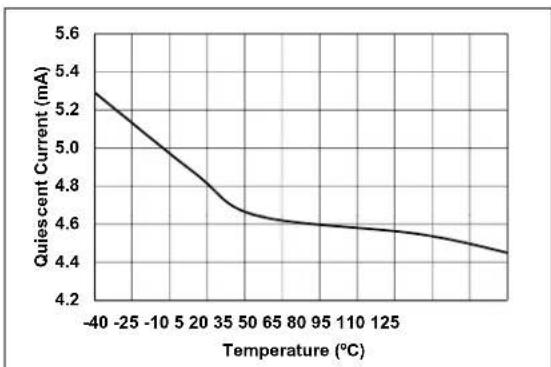
line
| Temperature (°C) | Quiescent Current (mA) | | ---------------- | ---------------------- | | -40 | 5.3 | | -25 | 5.1 | | -10 | 4.9 | | 5 | 4.7 | | 20 | 4.6 | | 35 | 4.6 | | 50 | 4.6 | | 65 | 4.6 | | 80 | 4.6 | | 95 | 4.6 | | 110 | 4.5 | | 125 | 4.4 |FIGURE 7-1: I Q vs. Temperature.

line
| CODE | INL (LSB) | | ---- | --------- | | 0 | 0.0 | | 2 | -0.1 | | 4 | -0.2 | | 6 | -0.3 | | 8 | -0.4 | | 10 | -0.2 | | 12 | -0.1 | | 14 | 0.0 | | 16 | 0.4 | | 18 | 0.2 | | 20 | 0.1 | | 22 | -0.1 | | 24 | 0.3 | | 26 | 0.2 | | 28 | 0.1 | | 30 | 0.0 | | 32 | 0.0 |FIGURE 7-4: OVFCON DAC INL vs. Code and Temperature (-40°C to +125°C).
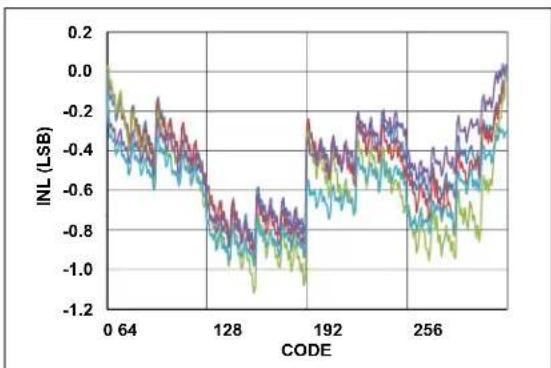
line
| CODE | INL (LSB) | | ---- | --------- | | 0 | -0.2 | | 64 | -0.3 | | 128 | -0.7 | | 192 | -0.4 | | 256 | -0.6 | | 271 | -0.1 |FIGURE 7-2: OVCCON DAC INL vs. Code and Temperature (-40°C to +125°C).
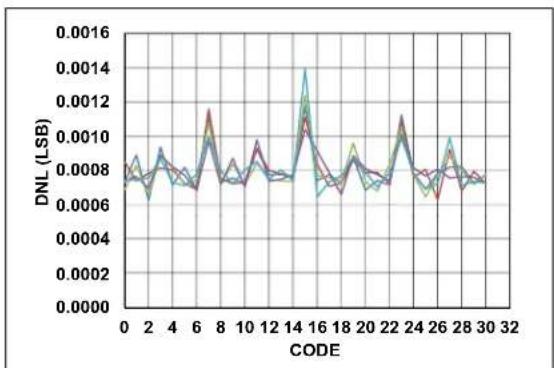
line
| CODE | DNL (LSB) | | ---- | --------- | | 0 | 0.0008 | | 2 | 0.0007 | | 4 | 0.0009 | | 6 | 0.0011 | | 8 | 0.0008 | | 10 | 0.0009 | | 12 | 0.0010 | | 14 | 0.0014 | | 16 | 0.0011 | | 18 | 0.0008 | | 20 | 0.0010 | | 22 | 0.0011 | | 24 | 0.0009 | | 26 | 0.0010 | | 28 | 0.0011 | | 30 | 0.0008 | | 32 | 0.0008 |FIGURE 7-5: OVFCON DAC DNL vs. Code and Temperature (-40°C to +125°C).

line
| CODE | DNL (LSB) | | ---- | --------- | | 0 | 0.015 | | 64 | 0.015 | | 128 | 0.027 | | 192 | 0.015 | | 256 | 0.015 |FIGURE 7-3: OVCCON DAC DNL vs. Code and Temperature (-40°C to +125°C).
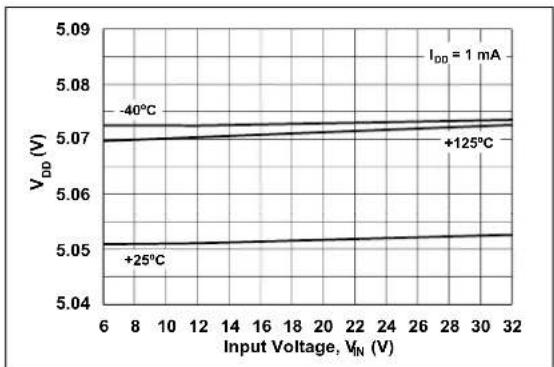
line
| Input Voltage, V_IN (V) | V_DD (V) at -40°C | V_DD (V) at +125°C | | ----------------------- | ----------------- | ------------------ | | 6 | 5.07 | 5.07 | | 8 | 5.07 | 5.07 | | 10 | 5.07 | 5.07 | | 12 | 5.07 | 5.07 | | 14 | 5.07 | 5.07 | | 16 | 5.07 | 5.07 | | 18 | 5.07 | 5.07 | | 20 | 5.07 | 5.07 | | 22 | 5.07 | 5.07 | | 24 | 5.07 | 5.07 | | 26 | 5.07 | 5.07 | | 28 | 5.07 | 5.07 | | 30 | 5.07 | 5.07 | | 32 | 5.07 | 5.07 |FIGURE 7-6: V DD vs. Input Voltage.
Note: Unless otherwise indicated, V_IN = 12V , F_SW = 300 kHz , T_A = +25^ .

line
| Current (mA) | +125°C V_DD (V) | -40°C V_DD (V) | | ------------ | --------------- | -------------- | | 0 | 5.06 | 5.03 | | 2 | 5.05 | 5.02 | | 4 | 5.04 | 5.01 | | 6 | 5.03 | 5.00 | | 8 | 5.02 | 4.99 | | 10 | 5.01 | 4.99 | | 12 | 5.00 | 4.99 | | 14 | 4.99 | 4.99 | | 16 | 4.99 | 4.99 | | 18 | 4.99 | 4.99 | | 20 | 4.99 | 4.99 |FIGURE 7-7: V _DD vs. Output Current.
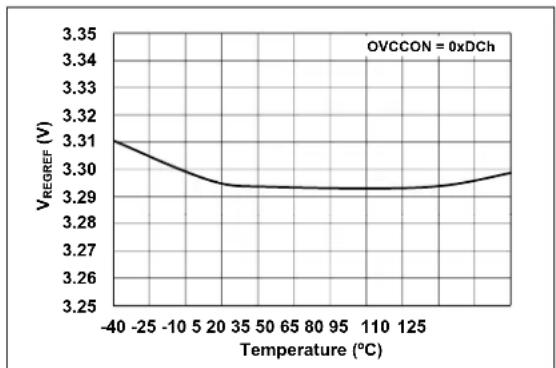
line
| Temperature (°C) | V_REGREF (V) | | ---------------- | ------------ | | -40 | 3.31 | | -25 | 3.30 | | -10 | 3.29 | | 5 | 3.29 | | 20 | 3.29 | | 35 | 3.29 | | 50 | 3.29 | | 65 | 3.29 | | 80 | 3.29 | | 95 | 3.29 | | 110 | 3.29 | | 125 | 3.30 |FIGURE 7-10: V REGREF vs. Temperature ( V_REGREF = 3.3V ).

line
| Temperature (°C) | V_REGREF (V) | | ---------------- | ------------ | | -40 | 0.60 | | -25 | 0.60 | | -10 | 0.60 | | 5 | 0.60 | | 20 | 0.60 | | 35 | 0.60 | | 50 | 0.60 | | 65 | 0.60 | | 80 | 0.60 | | 95 | 0.60 | | 110 | 0.60 | | 125 | 0.60 |FIGURE 7-8: V REGREF vs. Temperature (V_REGREF = 0.6V) .
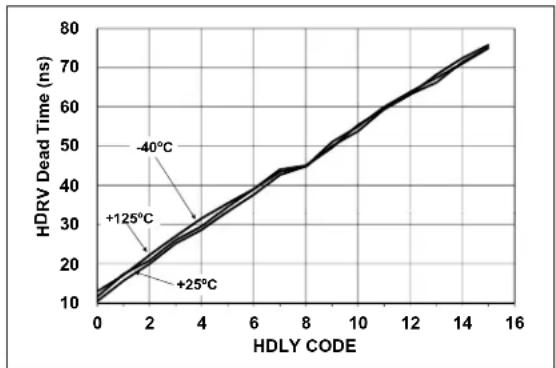
line
| HDLY CODE | HDRV Dead Time (ns) | | --------- | ------------------- | | 0 | 10 | | 2 | 20 | | 4 | 30 | | 6 | 40 | | 8 | 50 | | 10 | 60 | | 12 | 70 | | 14 | 75 | | 16 | 80 |FIGURE 7-11: HDRV Dead Time vs. HDLY Code.

line
| Temperature (°C) | V_REREF (V) | | ---------------- | ----------- | | -40 | 1.81 | | -25 | 1.805 | | -10 | 1.80 | | 5 | 1.80 | | 20 | 1.80 | | 35 | 1.80 | | 50 | 1.80 | | 65 | 1.80 | | 80 | 1.80 | | 95 | 1.80 | | 110 | 1.80 | | 125 | 1.805 |FIGURE 7-9: V REGREF vs. Temperature (V_REGREF = 1.8V) .
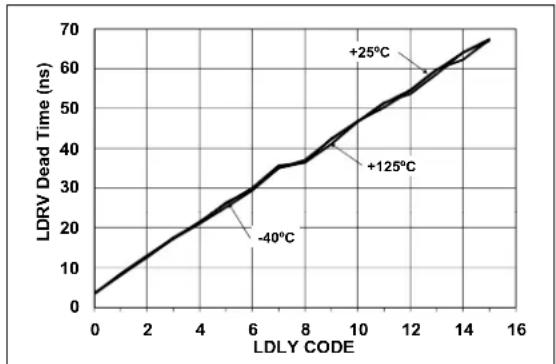
line
| LDLY CODE | LDRV Dead Time (ns) | | --------- | ------------------- | | 0 | 0 | | 6 | 30 | | 8 | 35 | | 12 | 55 | | 14 | 65 | | 16 | 70 |FIGURE 7-12: LDRV Dead Time vs. LDLY Code.
Note: Unless otherwise indicated, V_IN = 12V , F_SW = 300 kHz , T_A = +25^ .
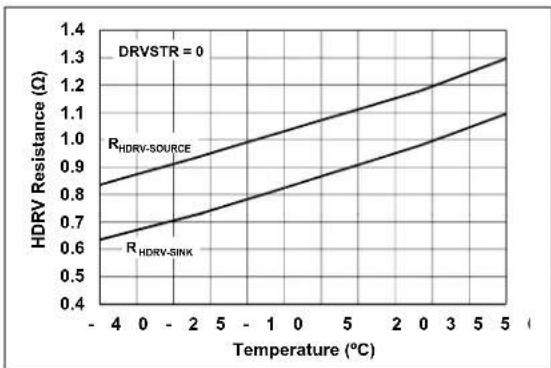
line
| Temperature (°C) | HDRV Resistance (Ω) - R_HDRV-SOURCE | HDRV Resistance (Ω) - R_HDRV-SINK | | ---------------- | ------------------------------------ | ---------------------------------- | | -4 | 0.85 | 0.65 | | 0 | 0.95 | 0.75 | | 2 | 1.05 | 0.85 | | 5 | 1.15 | 0.95 | | 10 | 1.25 | 1.05 | | 20 | 1.35 | 1.15 | | 50 | 1.45 | 1.25 |FIGURE 7-13: HDRV R DSon VS. Temperature.

line
| Temperature (°C) | Oscillator Frequency (MHz) | | ---------------- | --------------------------- | | -4 | 7.96 | | 0 | 7.97 | | 2 | 7.98 | | 5 | 7.99 | | 1 | 8.00 | | 5 | 8.01 | | 2 | 8.02 | | 3 | 8.03 | | 5 | 8.04 | | 0 | 8.04 |FIGURE 7-16: Oscillator Frequency vs. Temperature.
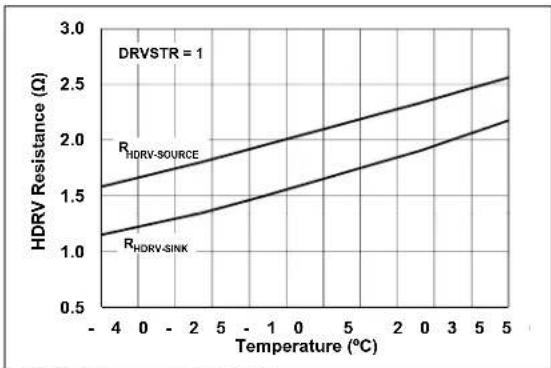
line
| Temperature (°C) | HDRV Resistance (Ω) for R_HDRV-SOURCE | HDRV Resistance (Ω) for R_HDRV-SINK | | ---------------- | -------------------------------------- | ------------------------------------ | | -4 | 1.6 | 1.2 | | 0 | 1.8 | 1.3 | | 5 | 2.0 | 1.5 | | 10 | 2.2 | 1.7 | | 20 | 2.4 | 1.9 | | 30 | 2.5 | 2.0 | | 50 | 2.6 | 2.2 |FIGURE 7-14: HDRV R DSon vs. Temperature.
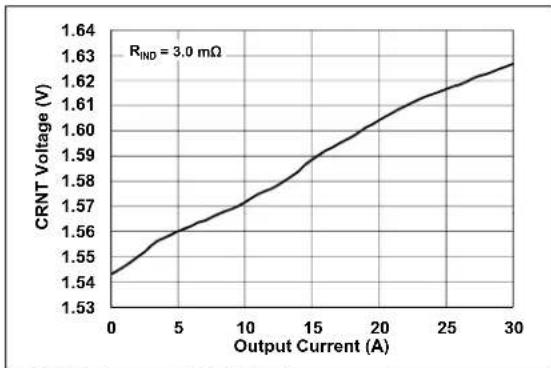
line
| Output Current (A) | CRNT Voltage (V) | | ------------------ | ---------------- | | 0 | 1.54 | | 5 | 1.56 | | 10 | 1.57 | | 15 | 1.59 | | 20 | 1.60 | | 25 | 1.62 | | 30 | 1.63 |FIGURE 7-17: CRNT Voltage vs. Output Current.

line
| Temperature (°C) | R_LDRV-SOURCE | R_LDRV-SINK | | ---------------- | -------------- | ----------- | | -4 | 1.0 | 0.5 | | 5 | 1.4 | 0.7 |FIGURE 7-15: LDRV R DSon vs. Temperature.

bar
| CMRR (dB) | Percentage of Occurrences | | --------- | ------------------------- | | 30 | 0% | | 38 | 0% | | 47 | 8% | | 56 | 22% | | 64 | 9% | | 73 | 4% | | 81 | 2% | | 90 | 1% | | 100 | 0% |FIGURE 7-18: Remote Sense Amplifier CMRR.
NOTES:
To allow for easier system design and bench testing, the MCP19118/19 family of devices features a multiplexer used to output various internal analog signals. These signals can be measured on the GPA0 pin through a unity gain buffer. The configuration control of the GPA0 pin is found in the ATSTCON register.
Control of the signals present at the output of the unity gain buffer is found in the BUFFCON register.
8.1 Analog Bench Test Control
8.1.1 ATSTCON REGISTER
The ATSTCON register contains the bits used to disable the MOSFET drivers and configure the GPA0 pin as the unity gain buffer out.
Note 1: The DRVDIS bit is reset to '1' so the high-side and low-side drivers are in a known state after reset. This bit must be cleared by software for normal operation.
2: For proper operation, bit 7 must always be set to '1'.
REGISTER 8-1: ATSTCON: ANALOG BENCH TEST CONTROL REGISTER
| R/W-1 U-0 U-0 U-0 R/W-0 R/W-0 | R/W-0 | R/W-1 | |||||
| Reserved | — | — | Reserved | HIDIS | LODIS | BNCHEN | DRVDIS |
| bit 7 bit 0 | |||||||
Legend:
| R = Readable bit | W = Writable bit | U = Unimplemented bit, read as '0' |
| -n = Value at POR | '1' = Bit is set | '0' = Bit is cleared x = Bit is unknown |
bit 7 Reserved: Bit 7 must always be set to '1'.
bit 6-5 Unimplemented: Read as '0'
bit 4 Reserved
bit 3 HIDIS: High-side driver control bit
1 = High-side driver is disabled
0 = High-side driver is enabled
bit 2 LODIS: Low-side driver control bit
1 = Low-side driver is disabled
0 = Low-side driver is enabled
bit 1 BNCHEN: GPA0 bench test configuration control bit
1 = GPA0 is configured for analog bench test output
0 = GPA0 is configured for normal operation
bit 0 DRVDIS: MOSFET driver disable control bit
1 = High-side and low-side drivers are set low, PHASE pin is floating
0 = High-side and low-side drivers are set for normal operation
8.2 Unity Gain Buffer
The unity gain buffer module is used during a multi-phase application and while operating in Bench Test mode.
When the ATSTCON
When measuring signals with the unity gain buffer, the buffer offset must be added to the measured signal. The factory-measured buffer offset can be read from memory location 2087h. Refer to Section 11.1.1 "Reading Program Memory as Data" for more information.
REGISTER 8-2: BUFFCON: UNITY GAIN BUFFER CONTROL REGISTER
| R/W-0 R/W-0 R/W-0 R/W-0 R/W-0 R/W-0 R/W-0 R/W-0 | |||||||
| MLTPH2 ML | LTPH1 ML | TPH0 | ASEL4 | ASEL3 | ASEL2 ASE | L1 ASEL0 | |
| bit 7 bit 0 | |||||||
| Legend: | |||
| R = Readable bit | W = Writable bit | U = Unimplemented bit, read as ‘0’ | |
| -n = Value at POR | ‘1’ = Bit is set | ‘0’ = Bit is cleared | x = Bit is unknown |
bit 7-5 MLTPH<2:0>: System configuration bits
000 = Device set as stand-alone unit
001 = Device set as multiple output MASTER
010 = Device set as multiple output SLAVE
011 = Device set as multi-phase MASTER
100 = Device set as multi-phase SLAVE

bit 4-0 ASEL<4:0>: Multiplexer output control bit
00000 = Voltage proportional to current in the inductor
00001 = Error amplifier output plus slope compensation, input to PWM comparator
00010 = Input to slope compensation circuitry
00011 = Band gap reference
00100 = Output voltage reference
00101 = Output voltage after internal differential amplifier
00110 = Unimplemented
00111 = Voltage proportional to the internal temperature
01000 = Internal ground for current sense circuitry, see Section 6.5 “Voltage for Zero Current”
01001 = Output overvoltage comparator reference
01010 = Output undervoltage comparator reference
01011 = Error amplifier output
01100 = For a multi-phase SLAVE, error amplifier signal received from MASTER
01101 = For multi-phase SLAVE, error signal received from MASTER with gain, see Section 6.8 “MASTER Error Signal Gain”
01110 = VIN divided down by 1/13
01111 = DC inductor valley current
10000 = Unimplemented
.
.
.
.
11100 = Unimplemented
11101 = Overcurrent reference
11110 = Unimplemented
11111 = Unimplemented
9.0 DEVICE CALIBRATION
Read-only memory locations 2080h through 208Fh contain factory calibration data. Refer to Section 18.0 "Flash Program Memory Control" for information on how to read from these memory locations.
9.1 Calibration Word 1
The DOV<3:0> bits at memory location 2080h set the offset calibration for the output voltage remote sense differential amplifier. Firmware must read these values and write them to the DOVCAL register for proper calibration.
The FCAL<6:0> bits at memory location 2080h set the internal oscillator calibration. Firmware must read these values and write them to the OSCCAL register for proper calibration.
REGISTER 9-1: CALWD1: CALIBRATION WORD 1 REGISTER
| U-0 U-0 R/P-1 R/P-1 R/P-1 R/P-1 | ||
| —— | D O | |
| bit 13 bit 8 | ||
| U-0 | R/P-1 | R/P-1 | R/P-1 | R/P-1 | R/P-1 | R/P-1 | R/P-1 |
| — | FCAL<6:0> | ||||||
| bit 7 | bit 0 | ||||||
Legend:
| R = Readable bit | P = Programmable bit | U = Unimplemented bit, read as '0' |
| -n = Value at POR | '1' = Bit is set | '0' = Bit is cleared x = Bit is unknown |
bit 13-12 Unimplemented: Read as '0'
bit 11-8 DOV<3:0>: Output voltage remote sense differential amplifier offset calibration bits
bit 7 Unimplemented: Read as '0'
bit 6-0 FCAL<6:0>: Internal oscillator calibration bits
9.2 Calibration Word 2
The VRO<3:0> bits at memory location 2081h calibrate the offset of the buffer amplifier of the output voltage regulation reference set point. This effectively changes the band gap reference. Firmware must read these values and write them to the VROCAL register for proper calibration.
The BGR<3:0> bits at memory location 2081h calibrate the internal band gap. Firmware must read these values and write them to the BGRCAL register for proper calibration.
REGISTER 9-2: CALWD2: CALIBRATION WORD 2 REGISTER
| U-0 U-0 R/P-1 R/P-1 R/P-1 R/P-1 | |||
| — — | V | R | |
| bit 13 bit 8 | |||
| U-0 U-0 U-0 U-0 R/P-1 R/P-1 R/P-1 R/P-1 | ||||
| — | — | — — | B G | |
| bit 7 bit 0 | ||||
| Legend: | |||
| R = Readable bit | P = Programmable bit | U = Unimplemented bit, read as ‘0’ | |
| -n = Value at POR | ‘1’ = Bit is set | ‘0’ = Bit is cleared | x = Bit is unknown |
bit 13-12 Unimplemented: Read as '0'
bit 11-8 VRO<3:0>: Reference voltage offset calibration bits
bit 7-4 Unimplemented: Read as '0'
bit 3-0 BGR<3:0>: Internal band gap calibration bits
9.3 Calibration Word 3
The TTA<3:0> bits at memory location 2082h calibrate the overtemperature shutdown threshold point. Firmware must read these values and write them to the TTACAL register for proper calibration.
The ZRO<3:0> bits at memory location 2082h calibrate the offset of the error amplifier. Firmware must read these values and write them to the ZROCAL register for proper calibration.
REGISTER 9-3: CALWD3: CALIBRATION WORD 3 REGISTER
| U-0 U-0 R/P-1 R/P-1 R/P-1 R/P-1 | |||
| —— | T | T | |
| bit 13 bit 8 | |||
| U-0 | U-0 | U-0 U-0 R/P-1 R/P-1 R/P-1 R/P-1 | ||
| — | — | — | — | ZRO<3:0> |
| bit 7 | bit 0 | |||
Legend:
| R = Readable bit | P = Programmable bit | U = Unimplemented bit, read as '0' |
| -n = Value at POR | '1' = Bit is set | '0' = Bit is cleared x = Bit is unknown |
bit 13-12 Unimplemented: Read as '0'
bit 11-8 TTA<3:0>: Overtemperature shutdown threshold calibration bits
bit 7-4 Unimplemented: Read as '0'
bit 3-0 ZRO<3:0>: Error amplifier offset voltage calibration bits
9.4 Calibration Word 4 and Calibration Word 5
The data stored in the CALWD4 and CALWD5 registers can be used by firmware to provide a more accurate internal temperature sensor ADC reading. The coefficients for a straight line equation can be generated by manipulation of the values stored in these calibration words. These calibration words contain all gains and offsets associated with reading the input voltage with the internal ADC.
9.4.1 CALWD4: INTERNAL TEMPERATURE READING GAIN TERM
The CALWD4 register is located at program memory location 2083h and represents the coefficient, Z, used in Equation 9-1. This coefficient is used to calculate the gain of the internal temperature reading by the ADC.
EQUATION 9-1: CALCULATING GAIN
| m = Z × 2^N |
| Where: |
| m = gain |
| Z = 14-bit integer |
| N = 12 |
9.4.2 CALWD5: INTERNAL TEMPERATURE READING OFFSET VOLTAGE TERM
The CALWD5 register is located at program memory location 2084h and represents the coefficient, W, used in Equation 9-2. This coefficient is used to calculate the offset voltage of the internal temperature reading by the ADC.
EQUATION 9-2: CALCULATING OFFSET VOLTAGE
| b = W × 2 |
| Where: |
| b = offset voltage |
| W = 14-bit two's complement integer |
| N = 4 |
REGISTER 9-4: CALWD4: CALIBRATION WORD 4 REGISTER
| R/P-1 | R/P-1 | R/P-1 | R/P-1 | R/P-1 | R/P-1 |
| TANAM<138> | |||||
| bit 13 | bit 8 | ||||
| R/P-1 | R/P-1 | R/P-1 | R/P-1 | R/P-1 | R/P-1 | R/P-1 | R/P-1 |
| TANAM<7:0> | |||||||
| bit 7 | bit 0 | ||||||
| Legend: | |||
| R = Readable bit | P = Programmable bit | U = Unimplemented bit, read as ‘0’ | |
| -n = Value at POR | ‘1’ = Bit is set | ‘0’ = Bit is cleared | x = Bit is unknown |
bit 13-0 TANAM<13:0>: Coefficient used to find the gain when reading the internal temperature with the ADC
REGISTER 9-5: CALWD5: CALIBRATION WORD 5 REGISTER
| R/P-1 | R/P-1 | R/P-1 | R/P-1 | R/P-1 | R/P-1 |
| TANAI<13:8> | |||||
| bit 13 | bit 8 | ||||
| R/P-1 | R/P-1 | R/P-1 | R/P-1 | R/P-1 | R/P-1 | R/P-1 | R/P-1 |
| TANAI<7.0> | |||||||
| bit 7 | bit 0 | ||||||
| Legend: | |||
| R = Readable bit | P = Programmable bit | U = Unimplemented bit, read as ‘0’ | |
| -n = Value at POR | ‘1’ = Bit is set | ‘0’ = Bit is cleared | x = Bit is unknown |
bit 13-0 TANAI<13:0>: Coefficient used to find the offset voltage when reading the internal temperature with the ADC
9.5 Calibration Word 6 and Calibration Word 7
The MCP19118/19 has the ability to read and report the system input voltage. Firmware can be written that uses the data stored in the CALWD6 and CALWD7 registers to improve the accuracy of this voltage reading. These calibration words contain the gain and offset voltage associated with reading the input voltage with ADC.
9.5.1 CALWD6: INPUT VOLTAGE READING GAIN TERM
The data stored in the CALWD6 register at program memory location 2085h is an 8-bit number that represents the coefficient, Z, used in Equation 9-3. This coefficient is used to calculate the gain of the input voltage ADC reading circuitry.
EQUATION 9-3: CALCULATING INPUT VOLTAGE READING GAIN
| m = × 2^N |
| Where: |
| m = g a i n |
| Z = 8-bit integer |
| N = 11 |
9.5.2 CALWD7: INPUT VOLTAGE READING OFFSET VOLTAGE
The data stored in the CALWD7 register at program memory location 2086h is an 8-bit two's complement integer that represents the offset voltage of the input voltage reading circuitry.
REGISTER 9-6: CALWD6: CALIBRATION WORD 6 REGISTER
| R/P-1 | R/P-1 | R/P-1 | R/P-1 | R/P-1 | R/P-1 | R/P-1 | R/P-1 |
| GIVAN<7:0> | |||||||
| bit 7 | bit 0 | ||||||
Legend:
| R = Readable bit | P = Programmable bit | U = Unimplemented bit, read as '0' |
| -n = Value at POR | '1' = Bit is set | '0' = Bit is cleared x = Bit is unknown |
bit 13-8 Unimplemented: Read as '0'
bit 7-0 GIVAN<7:0>: Reading input voltage gain term
REGISTER 9-7: CALWD7: CALIBRATION WORD 7 REGISTER
| R/P-1 | R/P-1 | R/P-1 | R/P-1 | R/P-1 | R/P-1 | R/P-1 | R/P-1 |
| VOIVAN<7:0> | |||||||
| bit 7 | bit 0 | ||||||
Legend:
| R = Readable bit | P = Programmable bit | U = Unimplemented bit, read as '0' |
| -n = Value at POR | '1' = Bit is set | '0' = Bit is cleared x = Bit is unknown |
bit 13-8 Unimplemented: Read as '0'
bit 7-0 VOIVAN<7:0>: Reading input voltage offset voltage term
9.6 Calibration Word 8
The BUFF<7:0> bits at memory location 2087h represent the offset voltage of the unity gain buffer in millivolts. This is an 8-bit two's complement number. The MSB is the sign bit. If the MSB is set to 1, the resulting number is negative.
REGISTER 9-8: CALWD8: CALIBRATION WORD 8 REGISTER
| U-0 U-0 U-0 U-0 U-0 U-0 | |||||
| —— | —— | — | |||
| bit 13 bit 8 | |||||
| R/P-1 | R/P-1 | R/P-1 | R/P-1 | R/P-1 | R/P-1 | R/P-1 | R/P-1 |
| BUFF<7:0> | |||||||
| bit 7 | bit 0 | ||||||
Legend:
| R = Readable bit | P = Programmable bit | U = Unimplemented bit, read as '0' |
| -n = Value at POR | '1' = Bit is set | '0' = Bit is cleared x = Bit is unknown |
bit 13-8 Unimplemented: Read as '0'
bit 7-0 BUFF<7:0>: Unity gain buffer offset voltage calibration bits
9.7 Calibration Word 9 and Calibration Word 10
The information stored in the CALWD9 and CALWD10 registers can be used by firmware to remove the offset and gain of the output differential amplifier. The coefficients for a straight line equation can be generated by using the values stored in these calibration words.
9.7.1 CALWD9: DIFFERENTIAL AMPLIFIER GAIN TERM
The data stored in the CALWD9 register at program memory location 2088h represents the coefficient, Z, used in Equation 9-4. This coefficient is used to calculate the gain of the differential amplifier.
EQUATION 9-4: CALCULATING GAIN
$$ G \quad Z \times = 2 ^ {N} $$
Where:
G = differential amplifier gain
Z = 14-bit integer
N = -12
9.7.2 CALWD10: DIFFERENTIAL AMPLIFIER OFFSET VOLTAGE TERM
The data stored in the CALWD10 register at program memory location 2089h represents the coefficient, V, used in Equation 9-5. This coefficient is used to calculate the offset voltage of the differential amplifier.
EQUATION 9-5: CALCULATING OFFSET VOLTAGE
$$ V O S \not \equiv 2 \times^ {N} $$
Where:
VOS = differential amplifier offset
V = 14-bit integer
N = -12
REGISTER 9-9: CALWD9: CALIBRATION WORD 9 REGISTER
| R/P-1 | R/P-1 | R/P-1 | R/P-1 | R/P-1 | R/P-1 |
| DAGN<13:8> | |||||
| bit 13 | bit 8 | ||||
| R/P-1 | R/P-1 | R/P-1 | R/P-1 | R/P-1 | R/P-1 | R/P-1 | R/P-1 |
| DAGN<7:0> | |||||||
| bit 7 | bit 0 | ||||||
| Legend: | |||
| R = Readable bit | P = Programmable bit | U = Unimplemented bit, read as ‘0’ | |
| -n = Value at POR | ‘1’ = Bit is set | ‘0’ = Bit is cleared | x = Bit is unknown |
bit 13-0 DAGN<13:0>: Differential amplifier gain calibration bits
REGISTER 9-10: CALWD10: CALIBRATION WORD 10 REGISTER
| R/P-1 | R/P-1 | R/P-1 | R/P-1 | R/P-1 | R/P-1 |
| DAI<13:8> | |||||
| bit 13 | bit 8 | ||||
| R/P-1 | R/P-1 | R/P-1 | R/P-1 | R/P-1 | R/P-1 | R/P-1 | R/P-1 |
| DAI<7:0> | |||||||
| bit 7 | bit 0 | ||||||
| Legend: | |||
| R = Readable bit | P = Programmable bit | U = Unimplemented bit, read as ‘0’ | |
| -n = Value at POR | ‘1’ = Bit is set | ‘0’ = Bit is cleared | x = Bit is unknown |
bit 13-0 DAI<13:0>: Differential amplifier offset voltage calibration bits
9.8 Calibration Word 11 and Calibration Word 12
The information stored in the CALWD11 and CALWD12 registers can be used by firmware to remove the offset and gain of ADC measurements.
9.8.1 CALWD11: ADC GAIN TERM
The data stored in the CALWD11 register at program memory location 208Ah represents the gain of the ADC.
9.8.2 CALWD12: ADC OFFSET VOLTAGE TERM
The data stored in the CALWD12 register at program memory location 208Bh is a two's complement number that is used by Equation 9-6 to calculate the offset voltage of the ADC.
EQUATION 9-6: CALCULATING ADC OFFSET VOLTAGE
b W×= 2 Where: b = ADC offset W = Two's complement 14-bit integer N = 6
REGISTER 9-11: CALWD11: CALIBRATION WORD 11 REGISTER
| R/P-1 | R/P-1 | R/P-1 | R/P-1 | R/P-1 | R/P-1 |
| GADC<13:8> | |||||
| bit 13 | bit 8 | ||||
| R/P-1 | R/P-1 | R/P-1 | R/P-1 | R/P-1 | R/P-1 | R/P-1 | R/P-1 |
| GADC<7:0> | |||||||
| bit 7 | bit 0 | ||||||
| Legend: | |||
| R = Readable bit | P = Programmable bit | U = Unimplemented bit, read as ‘0’ | |
| -n = Value at POR | ‘1’ = Bit is set | ‘0’ = Bit is cleared | x = Bit is unknown |
bit 13-0 GADC<13:0>: ADC gain term
REGISTER 9-12: CALWD12: CALIBRATION WORD 12 REGISTER
| R/P-1 | R/P-1 | R/P-1 | R/P-1 | R/P-1 | R/P-1 |
| VOADC<13:8> | |||||
| bit 13 | bit 8 | ||||
| R/P-1 | R/P-1 | R/P-1 | R/P-1 | R/P-1 | R/P-1 | R/P-1 | R/P-1 |
| VOADC<7:0> | |||||||
| bit 7 | bit 0 | ||||||
| Legend: | |||
| R = Readable bit | P = Programmable bit | U = Unimplemented bit, read as ‘0’ | |
| -n = Value at POR | ‘1’ = Bit is set | ‘0’ = Bit is cleared | x = Bit is unknown |
bit 13-0 VOADC<13:0>: Two's complement ADC offset voltage term
10.0 RELATIVE EFFICIENCY MEASUREMENT
With a constant input voltage, output voltage and load current, any change in the high-side MOSFET on time represents a change in the system efficiency. The MCP19118/19 is capable of measuring the on time of the high-side MOSFET. Therefore, the relative efficiency of the system can be measured and optimized by changing the system parameters, such as switching frequency, driver dead time or high-side drive strength.
10.1 Relative Efficiency Measurement Procedure
To measure the relative efficiency, the RELEFF register, the ABECON
- Set the ABECON
bit to enable the measurement circuitry. - Clear the ABECON
bit. - With the ADC, read the RELEFF channel and store this reading as the High.
- With the ADC, read the VZC channel and store this reading as the Low.
- Set the ABECON
bit to initiate a measurement cycle. -
Monitor the RELEFF
bit. When set, it indicates the measurement is complete. -
When the measurement is complete, use the ADC to read the RELEFF channel. This value becomes the Fractional variable in Equation 10-1. This reading should be accomplished approximately 50 ms after the RELESS
bit is set. - Read the value of the RE<6:0> bits in the RELEFF register and store the reading as Whole.
- Clear the ABECON
bit. - The relative efficiency is then calculated by the following equation:
EQUATION 10-1:
| Duty Cycle = ( Whole - Low-()High Low-() )(PR2 + 1) Where:Whole = Value obtained in Step 8 of the measurement procedureFractional = Value obtained in Step 7 of the measurement procedureHigh = Value obtained in Step 3 of the measurement procedureLow = Value obtained in Step 4 of the measurement procedure |
Note 1: The RELEFF
REGISTER 10-1: RELEFF: RELATIVE EFFICIENCY MEASUREMENT REGISTER
| R/W-0 | R/W-0 | R/W-0 | R/W-0 | R/W-0 | R/W-0 | R/W-0 | R/W-0 |
| MSDONE | RE6 | RE5 | RE4 | RE3 | RE2 | RE1 | RE0 |
| bit 7 bit 0 | |||||||
Legend:
| R = Readable bit | W = Writable bit | U = Unimplemented bit, read as '0' |
| -n = Value at POR | '1' = Bit is set | '0' = Bit is cleared x = Bit is unknown |
bit 7
MSDONE: Relative efficiency measurement done bit
1 = Relative efficiency measurement is complete
0 = Relative efficiency measurement is not complete
bit 6-0
RE<6:0>: Whole clock counts for relative efficiency measurement result
NOTES:
11.0 MEMORY ORGANIZATION
There are two types of memory in the MCP19118/19:
- Program Memory
- Data Memory
- Special Function Registers (SFRs)
- General Purpose RAM
11.1 Program Memory Organization
The MCP19118/19 has a 13-bit program counter capable of addressing an 8K x 14 program memory space. Only the first 4K x 14 (0000h-0FFFh) is physically implemented. Addressing a location above this boundary will cause a wrap-around within the first 4K x 14 space. The Reset vector is at 0000h and the interrupt vector is at 0004h (see Figure 11-1). The width of the program memory bus (instruction word) is 14 bits. Since all instructions are a single word, the MCP19118/19 has space for 4K of instructions.
FIGURE 11-1: PROGRAM MEMORY MAP AND STACK FOR MCP19118/19
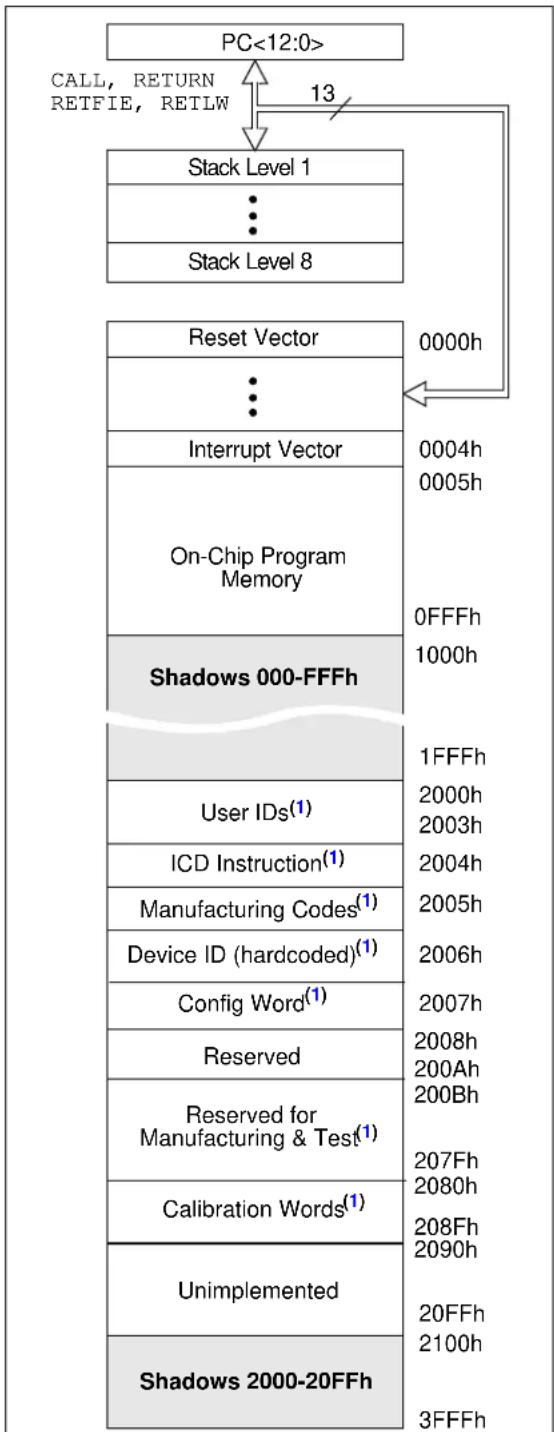
flowchart
graph TD
    A["PC<12:0>"] --> B["Stack Level 1"]
    B --> C["Stack Level 8"]
    C --> D["Reset Vector"]
    D --> E["Interrupt Vector"]
    E --> F["On-Chip Program Memory"]
    F --> G["Shadows 000-FFFh"]
    G --> H["User IDs(1)"]
    H --> I["ICD Instruction(1)"]
    I --> J["Manufacturing Codes(1)"]
    J --> K["Device ID (hardcoded)(1)"]
    K --> L["Config Word(1)"]
    L --> M["Reserved"]
    M --> N["Reserved for Manufacturing & Test(1)"]
    N --> O["Calibration Words(1)"]
    O --> P["Unimplemented"]
    P --> Q["Shadows 2000-20FFh"]
    style A fill:#f9f,stroke:#333
    style B fill:#ccf,stroke:#333
    style C fill:#cfc,stroke:#333
    style D fill:#fcc,stroke:#333
    style E fill:#cff,stroke:#333
    style F fill:#ffc,stroke:#333
    style G fill:#fcf,stroke:#333
    style H fill:#cff,stroke:#333
    style I fill:#ffc,stroke:#333
    style J fill:#ffc,stroke:#333
    style K fill:#ffc,stroke:#333
    style L fill:#ffc,stroke:#333
    style M fill:#ffc,stroke:#333
    style N fill:#ffc,stroke:#333
    style O fill:#ffc,stroke:#333
    style P fill:#ffc,stroke:#333
    style Q fill:#ffc,stroke:#333
Note 1: Not code protected.
11.1.1 READING PROGRAM MEMORY AS DATA
There are two methods of accessing constants in program memory. The first method is to use tables of RETLW instructions. The second method is to set a Files Select Register (FSR) to point to the program memory.
11.1.1.1 RETLW Instruction
The RETLW instruction can be used to provide access to tables of constants. The recommended way to create such a table is shown in Example 11-1.
EXAMPLE 11-1: RETLW INSTRUCTION
constants
    RETLW DATA0 ;Index0 data
    RETLW DATA1 ;Index1 data
    RETLW DATA2
    RETLW DATA3

my_function
    ;... LOTS OF CODE...
    MOVLW DATA_INDEX
    call constants
    ;... THE CONSTANT IS IN W
11.2 Data Memory Organization
The data memory (see Table 11-1) is partitioned into four banks, which contain the General Purpose Registers (GPR) and the Special Function Registers (SFR). The Special Function Registers are located in the first 32 locations of each bank. Register locations 20h-7Fh in Bank 0, A0h-EFh in Bank 1 and 120h-16Fh in Bank 2 are General Purpose Registers, implemented as static RAM. All other RAM is unimplemented and returns '0' when read. The RP<1:0> bits in the STATUS register are the bank select bits.
RP1 RP0
0 0 -> Bank 0 is selected
0 1 -> Bank 1 is selected
1 0 -> Bank 2 is selected
1 1 -> Bank 3 is selected
To move values from one register to another, the value must pass through the W register. This means that, for all register-to-register moves, two instruction cycles are required.
The STATUS register contains:
- the arithmetic status of the ALU (Arithmetic Logic Unit)
- the arithmetic status of the ALU (Arithmetic Logic Unit)
- the Reset status
- the bank select bits for data memory (RAM)
The STATUS register can be the destination for any instruction, like any other register. If the STATUS register is the destination for an instruction that affects the Z, DC or C bits, then the write to these three bits is disabled. These bits are set or cleared according to the device logic. Furthermore, the and bits are not writable. Therefore, the result of an instruction with the STATUS register as destination may be different than intended.
For example, CLRF STATUS will clear the upper three bits and set the Z bit. This leaves the STATUS register as '000u uluu' (where u = unchanged).
Therefore, it is recommended that only BCF, BSF, SWAPF and MOVWF instructions are used to alter the STATUS register, because these instructions do not affect any Status bits. For other instructions not affecting any Status bits, see Section 29.0 "Instruction Set Summary".
Note 1: The C and DC bits operate as Borrow and Digit Borrow out bits, respectively, in subtraction.
REGISTER 11-1: STATUS: STATUS REGISTER
| R/W-0 R/W-0 R/W-0 R-1 R-1 R/W-x R/W-x R/W-x | |||||||
| IRP RP1 | RP0 TO | — | Z | DC | (1) | C(1) | |
| bit 7 bit 0 | |||||||
| Legend: | |||
| R = Readable bit | W = Writable bit | U = Unimplemented bit, read as ‘0’ | |
| -n = Value at POR | ‘1’ = Bit is set | ‘0’ = Bit is cleared | x = Bit is unknown |
bit 7 IRP: Register Bank Select bit (used for Indirect addressing)
1 = Bank 2 & 3 (100h-1FFh)
0 = Bank 0 & 1 (00h-FFh)
bit 6-5 RP<1:0>: Register Bank Select bits (used for Direct addressing)
00 = Bank 0 (00h-7Fh)
01 = Bank 1 (80h-FFh)
10 = Bank 2 (100h-17Fh)
11 = Bank 3 (180h-1FFh)
bit 4 TO: Time-out bit
1 = After power-up, CLRWDT instruction or SLEEP instruction
0 = A WDT time out occurred
bit 3 PD: Power-down bit
1 = After power-up or by the CLRWDT instruction
0 = By execution of the SLEEP instruction
bit 2 Z: Zero bit
1 = The result of an arithmetic or logic operation is zero
0 = The result of an arithmetic or logic operation is not zero
bit 1 DC: Digit Carry/Digit Borrow bit ^(1) (ADDWF, ADDLW, SUBLW, SUBWF instructions)
1 = A carry-out from the 4^th low-order bit of the result occurred
0 = No carry-out from the 4^th low-order bit of the result
bit 0 C: Carry/Borrow bit ^(1) (ADDWF, ADDLW, SUBLW, SUBWF instructions) ^(1)
1 = A carry-out from the Most Significant bit of the result occurred
0 = No carry-out from the Most Significant bit of the result occurred
Note 1: For Borrow, the polarity is reversed. A subtraction is executed by adding the two's complement of the second operand. For rotate (RRF, RLF) instructions, this bit is loaded with either the high-order or low-order bit of the source register.
11.2.1 SPECIAL FUNCTION REGISTERS
The Special Function Registers are registers used by the CPU and peripheral functions for controlling the desired operation of the device (see Table 11-1). These registers are static RAM.
The special registers can be classified into two sets: core and peripheral. The Special Function Registers associated with the microcontroller core are described in this section. Those related to the operation of the peripheral features are described in the associated section for that peripheral feature.
11.3 DATA MEMORY
TABLE 11-1: MCP19118/19 DATA MEMORY MAP
| File Address | File Address | File Address | File Address | ||||
| Indirect addr.(1) | 00h Indirect | addr. (1) | 80h Indirect | addr. (1) | 100h Indirect | addr. (1) | 180h |
| TMR0 01h OP | OPTION_REG | 81h TMR0 101h OP | OPTION_REG | 181h | |||
| PCL | 02h | PCL | 82h | PCL | 102h | PCL | 182h |
| STATUS | 03h | STATUS | 83h | STATUS | 103h | STATUS | 183h |
| FSR | 04h | FSR | 84h | FSR | 104h | FSR | 184h |
| PORTGPA | 05h | TRISGPA | 85h | WPUGPA | 105h | IOCA | 185h |
| PORTGPB | 06h | TRISGPB | 86h | WPUGPB | 106h | IOCB | 186h |
| PIR1 | 07h | PIE1 | 87h | PE1 | 107h | ANSELA | 187h |
| PIR2 | 08h | PIE2 | 88h | BUFFCON | 108h | ANSELB | 188h |
| PCON | 09h | APFCON | 89h | ABECON | 109h | 189h | |
| PCLATH | 0Ah | PCLATH | 8Ah | PCLATH | 10Ah | PCLATH | 18Ah |
| INTCON | 0Bh | INTCON | 8Bh | INTCON | 10Bh | INTCON | 18Bh |
| TMR1L | 0Ch | 8Ch | 10Ch | PORTICD(2) | 18Ch | ||
| TMR1H | 0Dh | 8Dh | 10Dh | TRISICD(2) | 18Dh | ||
| T1CON | 0Eh | 8Eh | 10Eh | ICKBUG (2) | 18Eh | ||
| TMR2 0Fh | 8Fh | 10Fh | BIGBUG (2) | 18Fh | |||
| T2CON | 10h | VINLVL | 90h | SSPADD | 110h | PMCON1 | 190h |
| PR2 | 11h | OCCON | 91h | SSPBUF | 111h | PMCON2 | 191h |
| 12h | 92h | SSPCON1 | 112h | PMADRL | 192h | ||
| PWMPHL | 13h | CSGSCON | 93h | SSPCON2 | 113h | PMADRHH | 193h |
| PWMPHH | 14h | 94h | SSPCON3 | 114h | PMDATL | 194h | |
| PWMRL | 15h | CSDGCON | 95h | SSPMSK | 115h | PMDATH | 195h |
| PWMRH | 16h | 96h | SSPSTAT | 116h | 196h | ||
| 17h | VZCCON | 97h | SSPADD2 | 117h | 197h | ||
| 18h | CMPZCON | 98h | SSPMSK2 | 118h | OSCCAL | 198h | |
| OVCCON | 19h | OUVCON | 99h | 119h | DOVCAL | 199h | |
| OVFCON | 1Ah | OOVCON | 9Ah | 11Ah | TTACAL | 19Ah | |
| OSCTUNE | 1Bh | DEADCON | 9Bh | 11Bh | BGRCAL | 19Bh | |
| ADRESL | 1Ch | SLPCRCON | 9Ch | 11Ch | VROCAL | 19Ch | |
| ADRESH | 1Dh | SLVGNCON | 9Dh | 11Dh | ZROCAL | 19Dh | |
| ADCON0 | 1Eh | RELEFF | 9Eh | 11Eh | 19Eh | ||
| ADCON1 | 1Fh | 9Fh | 11Fh | ATSTCON | 19Fh | ||
| 20h | General Purpose Register 80 Bytes | A0h | General Purpose Register 80 bytes | 120h | 1A0h | ||
| General Purpose Register | |||||||
| 96 Bytes | EFh | 16F | 1EF | ||||
| Accesses Bank 0 | F0h | Accesses Bank 0 | 170h | Accesses Bank 0 | 1F0h | ||
| 7Fh | FFh | 17Fh | 1FFh | ||||
| Bank 0 | Bank 1 | Bank2 | Bank3 | ||||
☐ Unimplemented data memory locations, read as '0'.
Note 1: Not a physical register.
2: Only accessible when DBGEN = 0 and ICKBUG
TABLE 11-2: MCP19118/19 SPECIAL REGISTERS SUMMARY BANK 0
| Adr | Name Bit 7 Bit | 6 Bit 5 Bit | 4 Bit 3 Bit 2 | Bit 1 Bit 0 | Value on POR Reset | Value on all other resets(1) | |||||
| Bank 0 | |||||||||||
| 00h | INDF | Addressing this location uses contents of FSR to address data memory (not a physical register) | xxxx xxxx | xxxx xxxx | |||||||
| 01h | TMR0 | Timer0 Module's Register | xxxx xxxx | uuuu uuuu | |||||||
| 02h | PCL | Program Counter's (PC) Least Significant byte | 0000 0000 | 0000 0000 | |||||||
| 03h | STATUS | IRP | RP1 | RP0 | Z | DC | C | 0001 1xxx | 000q quuu | ||
| 04h | FSR | Indirect data memory address pointer | xxxx xxxx | uuuu uuuu | |||||||
| 05h | PORTGPA | GPA7 | GPA6 | GPA5 | GPA4 | GPA3 | GPA2 | GPA1 | GPA0 | xxxx xxxx | uuuu uuuu |
| 06h | PORTGPB | GPB7 | GPB6 | GPB5 | GPB4 | — | GPB2 | GPB1 | GPB0 | xxx- xxxx | uuu- uuuu |
| 07h | PIR1 | — | ADIF | BCLIF | SSPIF | — | — | TMR2IF | TMR1IF | -000 --00 | -000 --00 |
| 08h | PIR2 UVIF | — | OCIF | OVIF | — | — | VINIF | — | 0-00 --00 | 0-00 --00 | |
| 09h | PCON | — | — | — | — | — | — | ---- -qq- | ---- -uu- | ||
| 0Ah | PCLATH | — | — | — | Write buffer for upper 5 bits of program counter | ---0 0000 | ---0 0000 | ||||
| 0Bh | INTCON | GIE | PEIE | T0IE | INTE | IOCE | T0IF | INTF | IOCF(3) | 0000 000x | 0000 000u |
| 0Ch | TMR1L | Holding register for the Least Significant byte of the 16-bit TMR1 | xxxx xxxx | uuuu uuuu | |||||||
| 0Dh | TMR1H | Holding register for the Most Significant byte of the 16-bit TMR1 | xxxx xxxx | uuuu uuuu | |||||||
| 0Eh | T1CON | — | — | T1CKPS1 | T1CKPS0 | — | — | TMR1CS | TMR1ON | --00 --00 | --uu --uu |
| 0Fh | TMR2 | Timer2 Module Register | 0000 0000 | uuuu uuuu | |||||||
| 10h | T2CON | — | — | — | — | — | TMR2ON | T2CKPS1 | T2CKPS0 | ---- -000 | ---- -000 |
| 11h | PR2 | Timer2 Module Period Register | 1111 1111 | 1111 1111 | |||||||
| 12h | — | Unimplemented | — | — | |||||||
| 13h | PWMPHL | SLAVE Phase Shift Register | xxxx xxxx | uuuu uuuu | |||||||
| 14h | PWMPHH | SLAVE Phase Shift Register | xxxx xxxx | uuuu uuuu | |||||||
| 15h | PWMRL | PWM Register Low Byte | xxxx xxxx | uuuu uuuu | |||||||
| 16h | PWMRH | PWM Register High Byte | xxxx xxxx | uuuu uuuu | |||||||
| 17h | — | Unimplemented | — | — | |||||||
| 18h | — | Unimplemented | — | — | |||||||
| 19h | OVCCON | OVC7 | OVC6 | OVC5 | OVC4 | OVC3 | OVC2 | OVC1 | OVC0 | 0000 0000 | 0000 0000 |
| 1Ah | OVFCON | VOUTEN | — | — | OVF4 | OVF3 | OVF2 | OVF1 | OVF0 | 0--0 0000 | 0--0 0000 |
| 1Bh | OSCTUNE | — | — | — | TUN4 | TUN3 | TUN2 | TUN1 | TUN0 | ---0 0000 | ---0 0000 |
| 1Ch | ADRESL | Least significant 8 bits of the right-shifted result | xxxx xxxx | uuuu uuuu | |||||||
| 1Dh | ADRESH | Most significant 2 bits of right-shifted result | ---- --xx | uuuu uuuu | |||||||
| 1Eh | ADCON0 | — | CHS4 | CHS3 | CHS2 | CHS1 | CHS0 | GO/DONE | ADON | -000 0000 | -000 0000 |
| 1Fh | ADCON1 | — | ADCS2 | ADCS1 | ADCS0 | — | — | — | — | -000 ---- | -000 ---- |
Legend: — = Unimplemented locations read as '0', u = unchanged, x = unknown, q = value depends on condition, shaded = unimplemented
Note 1: Other (non power-up) resets include MCLR Reset and Watchdog Timer Reset during normal operation.
2: IRP & RP1 bits are reserved, always maintain these bits clear.
3: MCLR and WDT reset does not affect the previous value data latch. The IOCF bit will be cleared upon reset but will set again if the mismatch exists.
TABLE 11-3: MCP19118/19 SPECIAL REGISTERS SUMMARY BANK 1
| Addr | Name Bit 7 Bit 6 | Bit 5 Bit 4 Bit 3 Bit 2 Bit 1 Bit 0 | Value on POR Reset | Values on all other resets(1) | |||||||
| Bank 1 | |||||||||||
| 80h | INDF | Addressing this location uses contents of FSR to address data memory (not a physical register) | xxxx xxxx | uuuu uuuu | |||||||
| 81h O | PTION_REG | RAPU | INTEDG | T0CS | T0SE | PSA | PS2 | PS1 | PS0 | 1111 1111 | 1111 1111 |
| 82h | PCL | Program Counter's (PC) Least Significant byte | 0000 0000 | 0000 0000 | |||||||
| 83h S | ATUS | IRP^(2) | RP1^(2) | RP0 | TO | PD | Z | DC | C | 0001 1xxx | 000q quuu |
| 84h | FSR | Indirect data memory address pointer | xxxx xxxx | uuuu uuuu | |||||||
| 85h | TRISGPA | TRISA7 | TRISA6 | TRISA5 | TRISA4 | TRISA3 | TRISA2 | TRISA1 | TRISA0 | 1111 1111 | 1111 1111 |
| 86h | TRISGPB | TRISB7 | TRISB6 | TRISB5 | TRISB4 | — | TRISB2 | TRISB1 | TRISB0 | 1111 1111 | 1111 1111 |
| 87h P | E1 | — | ADIE | BCLIE | SSPIE | — | — | TMR2IE | TMR1IE | -000 --00 | -000 --00 |
| 88h P | E2 | UVIE | — | OCIE | OVIE | — | — | VINIE | — | 0-00 --00 | 0-00 --00 |
| 89h A | PFCON | — | — | — | — | — | — | — | CLKSEL | ---- ---0 | ---- ---0 |
| 8Ah | PCLATH | — | — | — | Write buffer for upper 5 bits of program counter | ---0 0000 | ---0 0000 | ||||
| 8Bh | INTCON | GIE | PEIE | T0IE | INTE | IOCE | T0IF | INTF | IOCF^(4) | 0000 000x | 0000 000u |
| 8Ch | — | Unimplemented | — | — | |||||||
| 8Dh | — | Unimplemented | — | — | |||||||
| 8Eh | — | Unimplemented | — | — | |||||||
| 8Fh | — | Unimplemented | — | — | |||||||
| 90h V | NLVL UVLOEN | — | UVLO5 | UVLO4 | UVLO3 | UVLO2 | UVLO1 | UVLO0 | 0-xx xxxx | 0-uu uuuu | |
| 91h | OCCON | OCEN | OCLEB1 | OCLEB0 | OOC4 | OOC3 | OOC2 | OOC1 | OOC0 | 0xxx xxxx | 0uuu uuuu |
| 92h | — | — | — | Reserved | Reserved | Reserved | Reserved | Reserved | Reserved | --xx xxxx | --uu uuuu |
| 93h C | SGSCON | — | Reserved | Reserved | Reserved | CSGS3 | CSGS2 | CSGS1 | CSGS0 | -xxx xxxx | -uuu uuuu |
| 94h | — | Reserved | Reserved | Reserved | Reserved | Reserved | Reserved | Reserved | Reserved | xxxx xxxx | uuuu uuuu |
| 95h C | SDGCON CSDGEN | — | — | — | — | Reserved | CSDG2 | CSDG1 | CSDG0 | 0--- xxx | 0--- uuuu |
| 96h | — | — | — | — | — | Reserved | Reserved | Reserved | Reserved | ---- xxx | ---- uuuu |
| 97h | VZCCON | VZC7 | VZC6 | VZC5 | VZC4 | VZC3 | VZC2 | VZC1 | VZC0 | xxxx xxxx | uuuu uuuu |
| 98h | CMPZCON | CMPZF3 | CMPZF2 | CMPZF1 | CMPZF0 | CMPZG3 | CMPZG2 | CMPZG1 | CMPZG0 | xxxx xxxx | uuuu uuuu |
| 99h | OUVCON | OUV7 | OUV6 | OUV5 | OUV4 | OUV3 | OUV2 | OUV1 | OUV0 | xxxx xxxx | uuuu uuuu |
| 9Ah | OOVCON | OOV7 | OOV6 | OOV5 | OOV4 | OOV3 | OOV2 | OOV1 | OOV0 | xxxx xxxx | uuuu uuuu |
| 9Bh | DEADCON | HDLY3 | HDLY2 | HDLY1 | HDLY0 | LDLY3 | LDLY2 | LDLY1 | LDLY0 | xxxx xxxx | uuuu uuuu |
| 9Ch | SLPCRCON | SLPG3 | SLPG2 | SLPG1 | SLPG0 | SLPS3 | SLPS2 | SLPS1 | SLPS0 | xxxx xxxx | uuuu uuuu |
| 9Dh | SLVGNCON | — | — | — | SLVGN4 | SLVGN3 | SLVGN2 | SLVGN1 | SLVGN0 | ---x xxx | ---u uuuu |
| 9Eh | RELEFF | MSDONE | RE6 | RE5 | RE4 | RE3 | RE2 | RE1 | RE0 | 0000 0000 | 0000 0000 |
| 9Fh | — | Unimplemented | — | — | |||||||
Legend: — = Unimplemented locations read as '0', u = unchanged, x = unknown, q = value depends on condition, shaded = unimplemented
Note 1: Other (non power-up) resets include MCLR Reset and Watchdog Timer Reset during normal operation.
2: IRP & RP1 bits are reserved, always maintain these bits clear.
3: RA3 pull-up is enabled when pin is configured as MCLRin Configuration Word.
4: MCLR and WDT Reset does not affect the previous value data latch. The IOCF bit will be cleared upon reset but will set again if the mismatch exists.
TABLE 11-4: MCP19118/19 SPECIAL REGISTERS SUMMARY BANK 2
| Adr | Name Bit 7 Bit | 6 Bit 5 Bit | 4 Bit 3 Bit 2 | Bit 1 Bit 0 | Value on POR Reset | Value on all other resets(1) | |||||
| Bank 2 | |||||||||||
| 100h | INDF | Addressing this location uses contents of FSR to address data memory (not a physical register) | xxxx xxxx | xxxx xxxx | |||||||
| 101h | TMR0 Timer0 | Module's Register | |||||||||
| 102h | PCL | Program Counter's (PC) Least Significant byte | 0000 0000 | 0000 0000 | |||||||
| 103h | STATUS | IRP^(2) | RP1^(2) | RP0 | Z | DC | C | 0001 1xxx | 000q quuu | ||
| 104h | FSR | Indirect data memory address pointer | xxxx xxxx | uuuu uuuu | |||||||
| 105h | WPUGPA | — | — | WPUA5 | — WPUA3 | WPUA2 | WPUA1 | WPUA0 | --1- 1111 | --u- uuuu | |
| 106h | WPUGPB WP | UB7 | WPUB6 | WPUB5 | WPUB4 | — | WPUB2 | WPUB1 | — | 1111 -11- | uuuu -uu- |
| 107h | PE1 | DECON | DVRSTR | HDLYBY | LDLYBY | PDEN | PUEN | UVTEE | OVTEE | 0000 1100 | 0000 1100 |
| 108h | BUFFCON | MLTPH2 | MLTPH1 | MLTPH0 | ASEL4 | ASEL3 | ASEL2 | ASEL1 | ASEL0 | 0000 0000 | 0000 0000 |
| 109h | ABECON | OVDCEN | UVDCEN | MEASEN | SLCPBY | CRTMEN | TMPSEN | RECIREN | PATHEN | 0000 0000 | 0000 0000 |
| 10Ah | PCLATH | — | — | — | Write buffer for upper 5 bits of program counter | ---0 0000 | ---0 0000 | ||||
| 10Bh | INTCON | GIE | PEIE | TOIE | INTE | IOCE | TOIF | INTF | IOCF^(3) | 0000 000x | 0000 000u |
| 10Ch | — | Unimplemented | — | — | |||||||
| 10Dh | — | Unimplemented | — | — | |||||||
| 10Eh | — | Unimplemented | — | — | |||||||
| 10Fh | — | Unimplemented | — | — | |||||||
| 110h | SSPADD | ADD<7:0> | 0000 0000 | 0000 0000 | |||||||
| 111h | SSPBUF | Synchronous Serial Port Receive Buffer/Transmit Register | xxxx xxxx | uuuu uuuu | |||||||
| 112h | SSPCON1 | WCOL | SSPOV | SSPEN | CKP | SSPM>3:0> | 0000 0000 | 0000 0000 | |||
| 113h | SSPCON2 | GCEN | ACKSTAT | ACKDT | ACKEN | RCEN | PEN | RSEN | SEN | 0000 0000 | 0000 0000 |
| 114h | SSPCON3 | ACKTIM | PCIE | SCIE | BOEN | SDAHT | SBCDE | AHEN | DHEN | 0000 0000 | 0000 0000 |
| 115h | SSPMSK | MSK<7:0> | 1111 1111 | 1111 1111 | |||||||
| 116h | SSPSTAT | SMP | CKE | D/A | P | S | R/W | UA | BF | — | — |
| 117h | SSPADD2 | ADD2<7:0> | 0000 0000 | 0000 0000 | |||||||
| 118h | SSPMSK2 | MSK2<7:0> | 1111 1111 | 1111 1111 | |||||||
| 119h | — | Unimplemented | — | — | |||||||
| 11Ah | — | Unimplemented | — | — | |||||||
| 11Bh | — | Unimplemented | — | — | |||||||
| 11Ch | — | Unimplemented | — | — | |||||||
| 11Dh | — | Unimplemented | — | — | |||||||
| 11Eh | — | Unimplemented | — | — | |||||||
| 11Fh | — | Unimplemented | — | — | |||||||
Legend: — = Unimplemented locations read as '0', u = unchanged, x = unknown, q = value depends on condition, shaded = unimplemented
Note 1: Other (non power-up) resets include MCLR Reset and Watchdog Timer Reset during normal operation.
2: IRP & RP1 bits are reserved, always maintain these bits clear.
3: MCLR and WDT reset does not affect the previous value data latch. The IOCF bit will be cleared upon reset but will set again if the mismatch exists.
TABLE 11-5: MCP19118/19 SPECIAL REGISTERS SUMMARY BANK 3
| Addr | Name Bit 7 Bit 6 | Bit 5 Bit 4 | Bit 3 Bit 2 | Bit 1 Bit 0 | Value on POR Reset | Values on all other resets^(1) | |||||
| Bank 3 | |||||||||||
| 180h | INDF | Addressing this location uses contents of FSR to address data memory (not a physical register) | xxxx xxxx | uuuu uuuu | |||||||
| 181h | OPTION_REG | RAPU | INTEDG | T0CS | T0SE | PSA | PS2 | PS1 | PS0 | 1111 1111 | 1111 1111 |
| 182h | PCL | Program Counter's (PC) Least Significant byte | 0000 0000 | 0000 0000 | |||||||
| 183h | STATUS | IRP^(2) | RP1^(2) | RP0 | TO | PD | Z | DC | C | 0001 1xxx | 000q quuu |
| 184h | FSR | Indirect data memory address pointer | xxxx xxxx | uuuu uuuu | |||||||
| 185h | IOCA | IOCA7 | IOCA6 | IOCA5 | IOCA4 | IOCA3 | IOCA2 | IOCA1 | IOCA0 | 0000 0000 | 0000 0000 |
| 186h | IOCB IOCB7 | IOCB6 | IOCB5 | IOCB4 | — | IOCB2 | IOCB1 | IOCB0 | 0000 -000 | 0000 -000 | |
| 187h | ANSELA | — | — | — | — | ANSA3 | ANSA2 | ANSA1 | ANSA0 | ---- 1111 | ---- 1111 |
| 188h | ANSELB | — | — | ANSB5 | ANSB4 | — | ANSB2 | ANSB1 | — | --11 -11- | --11 -11- |
| 189h | — | Unimplemented | — | — | |||||||
| 18Ah | PCLATH | — | — | — | Write buffer for upper 5 bits of program counter | ---0 0000 | ---0 0000 | ||||
| 18Bh | INTCON | GIE | PEIE | T0IE | INTE | IOCE | T0IF | INTF | IOCF^(4) | 0000 000x | 0000 000u |
| 18Ch | PORTICD ^(5) | In-Circuit Debug Port Register | |||||||||
| 18Dh | TRISICD ^(5) | In-Circuit Debug TRIS Register | |||||||||
| 18Eh | ICKBUG ^(5) | In-Circuit Debug Register | 0--- ---- | 0--- ---- | |||||||
| 18Fh | BIGBUG ^(5) | In-Circuit Debug Breakpoint Register | ---- ---- | ---- ---- | |||||||
| 190h | PMCON1 | — | CALSEL | — | — | — | WREN | WR | RD | -0-- -000 | -0-- -000 |
| 191h | PMCON2 | Program Memory Control Register 2 (not a physical register) | ---- ---- | ---- ---- | |||||||
| 192h | PMADRL | PMADRL7 | PMADRL6 | PMADRL5 | PMADRL4 | PMADRL3 | PMADRL2 | PMADRL1 | PMADRL0 | 0000 0000 | 0000 0000 |
| 193h | PMADRH | — | — | — | — | PMADRH3 | PMADRH2 | PMADRH1 | PMADRH0 | ---- 0000 | ---- 0000 |
| 194h | PMDATL | PMDATL7 | PMDATL6 | PMDATL5 | PMDATL4 | PMDATL3 | PMDATL2 | PMDATL1 | PMDATL0 | 0000 0000 | 0000 0000 |
| 195h | PMDATH | — | — | PMDATH5 | PMDATH4 | PMDATH3 | PMDATH2 | PMDATH1 | PMDATH0 | --00 0000 | --00 0000 |
| 196h | — | Unimplemented | — | — | |||||||
| 197h | — | Unimplemented | — | — | |||||||
| 198h | OSCCAL | — | FCALT6 | FCALT5 | FCALT4 | FCALT3 | FCALT2 | FCALT1 | FCALT0 | xxxx xxxx | uuuu uuuu |
| 199h | DOVCAL | — | — | — | — | DOVT3 | DOVT2 | DOVT1 | DOVT0 | xxxx xxxx | uuuu uuuu |
| 19Ah | TTACAL | — | — | — | — | TTA3 | TTA2 | TTA1 | TTA0 | xxxx xxxx | uuuu uuuu |
| 19Bh | BGRCAL | Reserved | Reserved | Reserved | Reserved | BGRT3 | BGRT2 | BGRT1 | BGRT0 | xxxx xxxx | uuuu uuuu |
| 19Ch | VROCAL | — | — | — | — | VROT3 | VROT2 | VROT1 | VROT0 | xxxx xxxx | uuuu uuuu |
| 19Dh | ZROCAL | — | — | — | — | ZROT3 | ZROT2 | ZROT1 | ZROT0 | xxxx xxxx | uuuu uuuu |
| 19Eh | — | Unimplemented | — | — | |||||||
| 19Fh | ATSTCON Reserved | — | — | Reserved | HIDIS | LODIS | BNCHEN | DRVDIS | 1--0 0001 | 1--0 0001 | |
Legend: — = Unimplemented locations read as '0', u = unchanged, x = unknown, q = value depends on condition, shaded = unimplemented
Note 1: Other (non power-up) resets include MCLR Reset and Watchdog Timer Reset during normal operation.
2: IRP & RP1 bits are reserved, always maintain these bits clear.
3: RA3 pull-up is enabled when pin is configured as MCLRin Configuration Word.
4: MCLR and WDT Reset does not affect the previous value data latch. The IOCF bit will be cleared upon reset but will set again if the mismatch exists.
5: Only accessible when DBGEN = 0 and ICKBUG
The OPTION_REG register is a readable and writable register, which contains various control bits to configure:
- Timer0/WDT prescaler
• External GPA2/INT interrupt - Timer 0
- Weak pull-ups on PORTGPA and PORTGPB
| Note 1: To achieve a 1:1 prescaler assignment for Timer0, assign the prescaler to the WDT by setting PSA bit in the OPTION_REG register to ‘1’. See Section 23.1.3“Software-Programmable Prescaler”. |
REGISTER 11-2: OPTION_REG: OPTION REGISTER (Note 1)
| R/W-1 | R/W-1 | R/W-1 | R/W-1 | R/W-1 | R/W-1 | R/W-1 | R/W-1 |
| RAPU | INTEDG T0 | CS | T0SE | PSA | PS2 | PS1 | PS0 |
| bit 7 bit 0 | |||||||
Legend:
| R = Readable bit | W = Writable bit | U = Unimplemented bit, read as '0' |
| -n = Value at POR | '1' = Bit is set | '0' = Bit is cleared x = Bit is unknown |
bit 7 RAPU: Port GPx Pull-Up Enable bit
1 = Port GPx pull-ups are disabled
0 = Port GPx pull-ups are enabled
bit 6 INTEDG: Interrupt Edge Select bit
0 = Interrupt on rising edge of INT pin
1 = Interrupt on falling edge of INT pin
bit 5 T0CS: TMR0 Clock Source Select bit
1 = Transition on T0CKI pin
0 = Internal instruction cycle clock
bit 4 TOSE: TMR0 Source Edge Select bit
1 = Increment on high-to-low transition on T0CKI pin
0 = Increment on low-to-high transition on T0CKI pin
bit 3 PSA: Prescaler Assignment bit
1 = Prescaler is assigned to WDT
0 = Prescaler is assigned to the Timer0 module
bit 2-0 PS<2:0>: Prescaler Rate Select bits
| Bit Value | TMR0 Rate | WDT Rate |
| 000 | 1: 2 1: 1 | |
| 001 | 1: 4 1: 2 | |
| 010 | 1: 8 1: 4 | |
| 011 | 1: 16 1: 8 | |
| 100 | 1: 32 | 1: 16 |
| 101 | 1: 64 | 1: 32 |
| 110 1: 128 | 1: 64 | |
| 111 1: 256 | 1: 128 |
Note 1: Individual WPUx bit must also be enabled.
11.4 PCL and PCLATH
The Program Counter (PC) is 13-bit wide. The low byte comes from the PCL register, which is a readable and writable register. The high byte (PC<12:8>) is not directly readable or writable and comes from PCLATH. On any Reset, the PC is cleared. Figure 11-2 shows the two situations for loading the PC. The upper example in Figure 11-2 shows how the PC is loaded on a write to PCL (PCLATH<4:0> → PCH). The lower example in Figure 11-2 shows how the PC is loaded during a CALL or GOTO instruction (PCLATH<4:3> → PCH).
FIGURE 11-2: LOADING OF PC IN DIFFERENT SITUATIONS
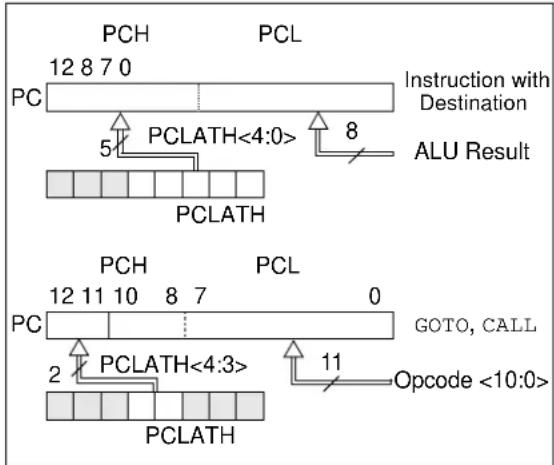
text_image
PCH 12 8 7 0 PC Instruction with Destination 5 PCLATH<4:0> 8 ALU Result PCLATH PCH 12 11 10 8 7 PC GOTO, CALL 2 PCLATH<4:3> 11 Opcode <10:0> PCLATH11.4.1 MODIFYING PCL
Executing any instruction with the PCL register as the destination simultaneously causes the Program Counter PC<12:8> bits (PCH) to be replaced by the contents of the PCLATH register. This allows the entire content of the program counter to be changed by writing the desired upper five bits to the PCLATH register. When the lower eight bits are written to the PCL register, all 13 bits of the program counter will change to the values contained in the PCLATH register and those being written to the PCL register.
11.4.2 COMPUTED GOTO
A computed GOTO is accomplished by adding an offset to the program counter (ADDWF PCL). Care should be exercised when jumping into a look-up table or program branch table (computed GOTO) by modifying the PCL register. Assuming that PCLATH is set to the table start address, if the table length is greater than 255 instructions or if the lower eight bits of the memory address rolls over from 0xFFh to 0X00h in the middle of the table, then PCLATH must be incremented for each address rollover that occurs between the table beginning and the table location within the table.
For more information, refer to Application Note AN556 – “Implementing a Table Read” (DS00556).
11.4.3 COMPUTED FUNCTION CALLS
A computed function CALL allows programs to maintain tables of functions and provides another way to execute state machines or look-up tables. When performing a table read using a computed function CALL, care should be exercised if the table location crosses a PCL memory boundary (each 256-byte block).
If using the CALL instruction, the PCH<2:0> and PCL registers are loaded with the operand of the CALL instruction. PCH<6:3> is loaded with PCLATH<6:3>.
11.4.4 STACK
The MCP19118/19 has an 8-level x 13-bit wide hardware stack (refer to Figure 11-1). The stack space is not part of either program or data space and the Stack Pointer is not readable or writable. The PC is PUSHed onto the stack when a CALL instruction is executed or an interrupt causes a branch. The stack is POPed in the event of a RETURN, RETLW or a RETFIE instruction execution. PCLATH is not affected by a PUSH or POP operation.
The stack operates as a circular buffer. This means that after the stack has been PUSHed eight times, the ninth push overwrites the value that was stored from the first push. The tenth push overwrites the second push (and so on).
Note 1: There are no Status bits to indicate Stack Overflow or Stack Underflow conditions.
2: There are no instructions/mnemonics called PUSH or POP. These are actions that occur from the execution of the CALL, RETURN, RETLW and RETFIE instructions or the vectoring to an interrupt address.
11.5 Indirect Addressing, INDF and FSR Registers
The INDF register is not a physical register. Addressing the INDF register will cause indirect addressing.
Indirect addressing is possible by using the INDF register. Any instruction using the INDF register actually accesses data pointed to by the File Select Register (FSR). Reading INDF itself indirectly will produce 00h. Writing to the INDF register directly results in no operation being performed (although Status bits may be affected). An effective 9-bit address is obtained by concatenating the 8-bit FSR and the IRP bit in the STATUS register, as shown in Figure 11-3.
A simple program to clear RAM location 40h-7Fh using indirect addressing is shown in Example 11-2.
EXAMPLE 11-2: INDIRECT ADDRESSING
MOVLW 0x40 ;initialize pointer
MOVWF FSR ;to RAM
NEXT CLRF INDF ;clear INDF register
INCF FSR ;inc pointer
BTFSS FSR,7 ;all done?
GOTO NEXT ;no clear next
CONTINUE ;yes continue
FIGURE 11-3: DIRECT/INDIRECT ADDRESSING
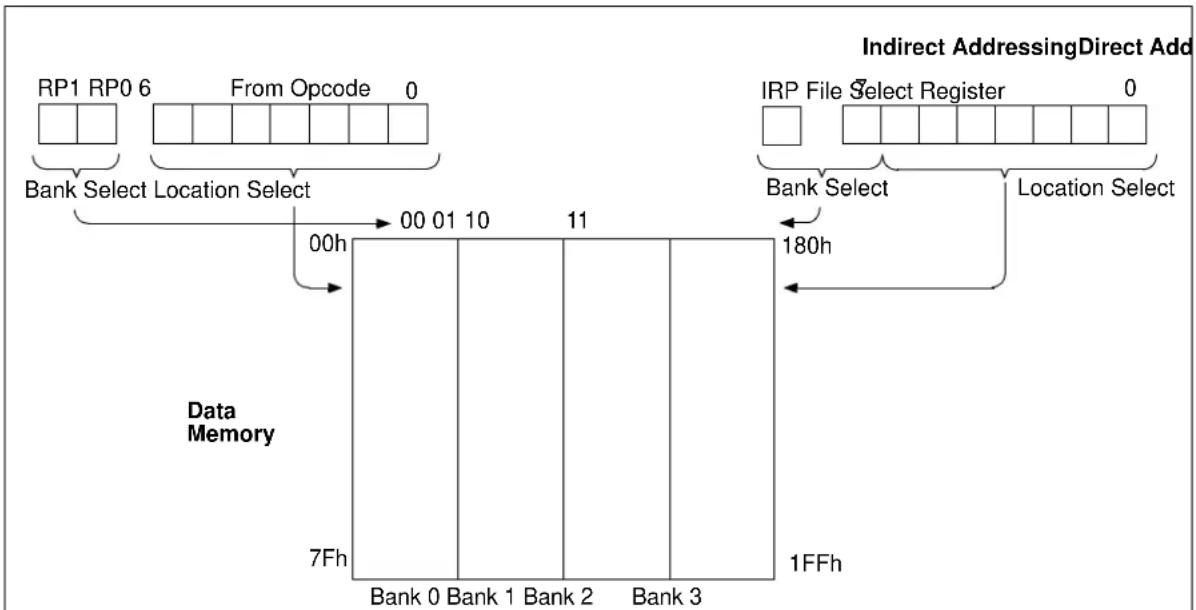
flowchart
graph TD
    A["RP1 RP0 6"] --> B["Bank Select Location Select"]
    C["From Opcode 0"] --> B
    B --> D["00h"]
    D --> E["00 01 10"]
    E --> F["11"]
    F --> G["180h"]
    G --> H["Location Select"]
    I["IRP File Select Register 0"] --> J["Bank Select"]
    K["Indirect AddressingDirect Add"] --> L["Data Memory"]
    M["7Fh"] --> N["Bank 0"]
    O["Bank 1"] --> P["Bank 2"]
    Q["Bank 3"] --> R["Bank 3"]
    S["1FFh"] --> T["180h"]
Note: For memory map detail, see Figure 11-2.
NOTES:
12.0 DEVICE CONFIGURATION
Device Configuration consists of Configuration Word and Code Protection.
12.1 Configuration Word
There are several Configuration Word bits that allow different timers to be enabled and memory protection options. These are implemented as Configuration Word at 2007h.
Note: The DBGEN bit in Configuration Word is managed automatically by device development tools, including debuggers and programmers. For normal device operation, this bit should be maintained as a '1'.
REGISTER 12-1: CONFIG: CONFIGURATION WORD REGISTER
| R/P-1 U-1 R/P-1 R/P-1 U-1 U-1 | |||||
| DBGEN | — | W | R | T | 1 |
| bit 13 bit 8 | |||||
| U-1 | R/P-1 | R/P-1 | R/P-1 | R/P-1 | U-1 | U-1 | U-1 |
| — | MCLRE | WDTE | — | — | — | ||
| bit 7 bit 0 | |||||||
Legend:
| R = Readable bit | P = Programmable bit | U = Unimplemented bit, read as '0' |
| -n = Value at POR | '1' = Bit is set | '0' = Bit is cleared x = Bit is unknown |
bit 13 DBGEN: ICD Debug bit
1 = ICD debug mode disabled
0 = ICD debug mode enabled
bit 12 Unimplemented: Read as '1'
bit 11-10 WRT<1:0>: Flash Program Memory Self Write Enable bit
11 = Write protection off
10 = 000h to 3FFh write protected, 400h to FFFh may be modified by PMCON1 control
01 = 000h to 7FFh write protected, 800h to FFFh may be modified by PMCON1 control
00 = 000h to FFFh write protected, entire program memory is write protected
bit 9-7 Unimplemented: Read as '1'
bit 6 CP: Code Protection
1 = Program memory code protection is disabled
0 = Program memory code protection is enabled
bit 5 MCLRE: MCLR Pin Function Select
1 = MCLR pin is MCLR function and weak internal pull-up is enabled
0 = MCLR pin is alternate function, MCLR function is internally disabled
bit 4 PWRTE: Power-Up Timer Enable bit
1 = PWRT disabled
0 = PWRT enabled
bit 3 WDTE: Watchdog Timer Enable bit
1 = WDT enabled
0 = WDT disabled
bit 2-0 Unimplemented: Read as '1'
12.2 Code Protection
Code protection allows the device to be protected from unauthorized access. Internal access to the program memory is unaffected by any code protection setting.
12.2.1 PROGRAM MEMORY PROTECTION
The entire program memory space is protected from external reads and writes by the bit in the Configuration Word. When = 0 , external reads and writes of the program memory are inhibited and a read will return all '0's. The CPU can continue to read program memory, regardless of the protection bit settings. Writing the program memory is dependent upon the write protection setting. See Section 12.3 "Write Protection" for more information.
12.3 Write Protection
Write protection allows the device to be protected from unintended self-writes. Applications, such as bootloader software, can be protected while allowing other regions of the program memory to be modified.
The WRT<1:0> bits in the Configuration Word define the size of the program memory block that is protected.
12.4 ID Locations
Four memory locations (2000h-2003h) are designated as ID locations where the user can store checksum or other code identification numbers. These locations are not accessible during normal execution but are readable and writable during Program/Verify mode. Only the Least Significant seven bits of the ID locations are reported when using MPLAB Integrated Development Environment (IDE).
13.0 OSCILLATOR MODES
The MCP19118/19 has one oscillator configuration which is an 8 MHz internal oscillator.
13.1 Internal Oscillator (INTOSC)
The Internal Oscillator module provides a system clock source of 8 MHz. The frequency of the internal oscillator can be trimmed with a calibration value in the OSCTUNE register.
13.2 Oscillator Calibration
The 8 MHz internal oscillator is factory-calibrated. The factory calibration values reside in the read-only Calibration Word 1 register. These values must be read from the Calibration Word 1 register and stored in the OSCCAL register. Refer to Section 18.0 "Flash Program Memory Control" for the procedure on reading from program memory.
| Note 1: The FCAL<6:0> bits from the Calibration Word 1 register must be written into the OSCCAL register to calibrate the internal oscillator. |
13.3 Frequency Tuning in User Mode
In addition to the factory calibration, the base frequency can be tuned in the user's application. This frequency tuning capability allows the user to deviate from the factory-calibrated frequency. The user can tune the frequency by writing to the OSCTUNE register (Register 13-1).
REGISTER 13-1: OSCTUNE: OSCILLATOR TUNING REGISTER
| U-0 | U-0 | U-0 | R/W-0 | R/W-0 | R/W-0 | R/W-0 | R/W-0 |
| — | — | — | TUN<4:0> | ||||
| bit 7 | bit 0 | ||||||
| Legend: | |||
| R = Readable bit | W = Writable bit | U = Unimplemented bit, read as '0' | |
| -n = Value at POR | '1' = Bit is set | '0' = Bit is cleared | x = Bit is unknown |
bit 7-5 Unimplemented: Read as '0'
bit 4-0 TUN<4:0>: Frequency Tuning bits
01111 = Maximum frequency
01110 =
.
.
.
00001 =
00000 = Center frequency. Oscillator Module is running at the calibrated frequency.
11111 =
.
.
.
10000 = Minimum frequency
13.3.1 OSCILLATOR DELAY UPON POWER-UP, WAKE-UP AND BASE FREQUENCY CHANGE
In applications where the OSCTUNE register is used to shift the frequency of the internal oscillator, the application should not expect the frequency of the internal oscillator to stabilize immediately. In this case, the frequency may shift gradually toward the new value. The time for this frequency shift is less than eight cycles of the base frequency.
On power-up, the device is held in reset by the power-up time, if the power-up timer is enabled.
Following a wake-up from Sleep mode or POR, an internal delay of 10 s is invoked to allow the memory bias to stabilize before program execution can begin.
TABLE 13-1: SUMMARY OF REGISTERS ASSOCIATED WITH CLOCK SOURCES
| Name Bit | 7 Bit 6 Bit | 5 Bit 4 Bit | 3 Bit 2 Bit | 1 Bit 0 | Register on Page | ||||
| OSCTUNE | — | — | — | TUN4 | TUN3 | TUN2 | TUN1 | TUN0 | 83 |
Legend: — = unimplemented locations read as '0'. Shaded cells are not used by clock sources.
TABLE 13-2: SUMMARY OF CALIBRATION WORD ASSOCIATED WITH CLOCK SOURCES
| Name | Bits | Bit -/7 | Bit -/6 | Bit 13/5 | Bit 12/4 | Bit 11/3 | Bit 10/2 | Bit 9/1 | Bit 8/0 | Register on Page |
| CALWD1 | 13:8 | — | — | — | — | DOV3 | DOV2 | DOV1 | DOV0 | 59 |
| 7:0 | — | FCAL6 | FCAL5 | FCAL4 | FCAL3 | FCAL2 | FCAL1 | FCAL0 |
Legend: — = unimplemented locations read as '0'. Shaded cells are not used by clock sources.
14.0 RESETS
The reset logic is used to place the MCP19118/19 into a known state. The source of the reset can be determined by using the device status bits.
There are multiple ways to reset this device:
• Power-On Reset (POR)
• Overtemperature Reset (OT)
• M C LReSet
- WDT Reset
To allow V_DD to stabilize, an optional power-up timer can be enabled to extend the Reset time after a POR event.
Some registers are not affected in any Reset condition; their status is unknown on POR and unchanged in any other Reset. Most other registers are reset to a Reset state on:
- Power-On Reset
- M C Reset
• M C Reset during Sleep - WDT Reset
WDT wake-up does not cause register resets in the same manner as a WDT Reset, since wake-up is viewed as the resumption of normal operation. TO and PD bits are set or cleared differently in different Reset situations, as indicated in Table 14-1. Software can use these bits to determine the nature of the Reset. See Table 14-2 for a full description of Reset states of all registers.
A simplified block diagram of the On-Chip Reset Circuit is shown in Figure 14-1.
The MCLR Reset path has a noise filter to detect and ignore small pulses. See Section 5.0 “Digital Electrical Characteristics” for pulse width specifications.
FIGURE 14-1: SIMPLIFIED BLOCK DIAGRAM OF ON-CHIP RESET CIRCUIT
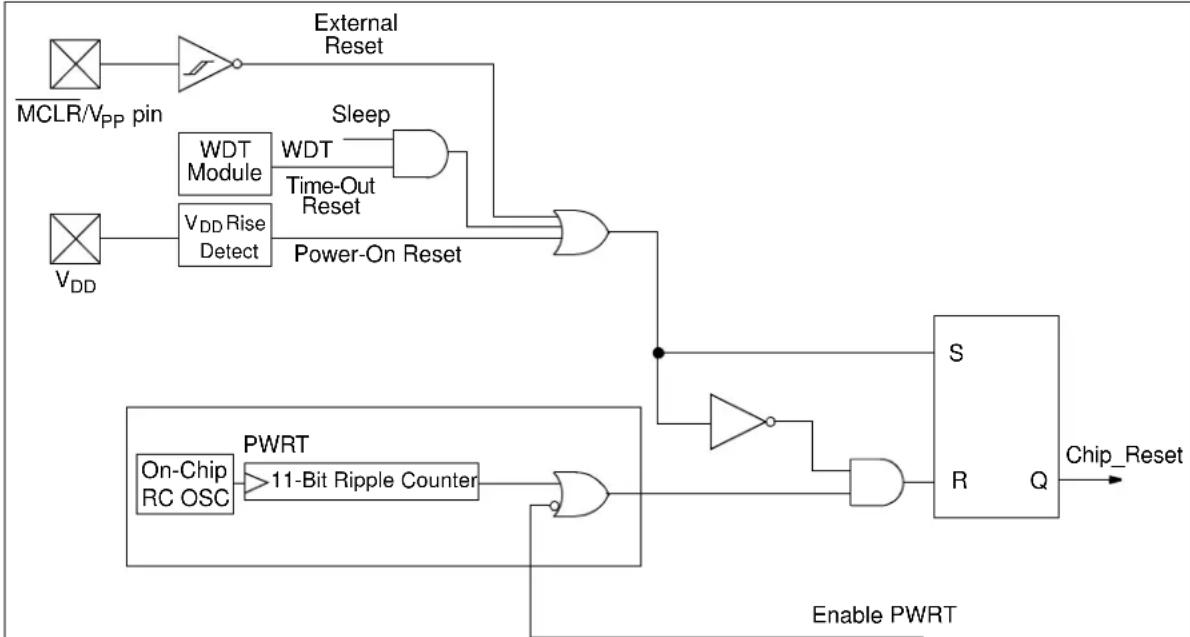
flowchart
graph TD
    A["MCLR/VPP pin"] --> B["AND"]
    B --> C["External Reset"]
    D["V_DD"] --> E["WDT Module"]
    E --> F["Time-Out Reset"]
    F --> G["Power-On Reset"]
    G --> H["AND"]
    I["On-Chip RC OSC"] --> J["PWRT"]
    J --> K["11-Bit Ripple Counter"]
    K --> L["AND"]
    M["Enable PWRT"] --> N["S"]
    N --> O["R"]
    O --> P["Q"]
    P --> Q["Chip_Reset"]
    R["Sleep"] --> S["AND"]
    S --> T["Power-On Reset"]
    U["External Reset"] --> V["External Reset"]
    W["Power-On Reset"] --> X["External Reset"]
    Y["Enable PWRT"] --> Z["Power-On Reset"]
Note 1: Refer to the Configuration Word register (Register 12-1).
TABLE 14-1: TIME OUT IN VARIOUS SITUATIONS
| Power-Up | Wake-Up from Sleep | |
| = 0 | = 1 | |
| T_PWRT | — | — |
TABLE 14-2: STATUS/PCON BITS AND THEIR SIGNIFICANCE
| POR TO | PD Condition | ||
| 0 | 1 | 1 | Power-On Reset |
| u | 0 | u | WDT Reset |
| u | 0 | 0 | WDT Wake-Up |
| u | u | u | MCReSet during normal operation |
| u | 1 | 0 | MCReSet during Sleep |
Legend: u = unchanged, x = unknown
14.1 Power-On Reset (POR)
The on-chip POR circuit holds the chip in Reset until V_DD has reached a high enough level for proper operation. To take advantage of the POR, simply connect the MCLR pin through a resistor to V_DD . This will eliminate external RC components usually needed to create Power-On Reset.
Note: The POR circuit does not produce an internal Reset when V_DD declines. To re-enable the POR, V_DD must reach V_SS for a minimum of 100 s.
When the device starts normal operation (exits the Reset condition), device operating parameters (i.e., voltage, frequency, temperature, etc.) must be met to ensure proper operation. If these conditions are not met, the device must be held in Reset until the operating conditions are met.
14.2 MCLR
MCP19118/19 has a noise filter in the MCLR Reset path. The filter will detect and ignore small pulses.
It should be noted that a WDT Reset does not drive MCLR pin low.
Voltages applied to the MCLR pin that exceed its specification can result in both MCLR Resets and excessive current beyond the device specification during the ESD event. For this reason, Microchip recommends that the MCLR pin no longer be tied directly to V_DD . The use of an RC network, as shown in Figure 14-2, is suggested.
An internal option is enabled by clearing the MCLRE bit in the Configuration Word register. When MCLRE = 0, the Reset signal to the chip is generated internally. When MCLRE = 1, the pin becomes an external Reset input. In this mode, the pin has a weak pull-up to V_DD .
FIGURE 14-2: RECOMMENDED MCLR CIRCUIT
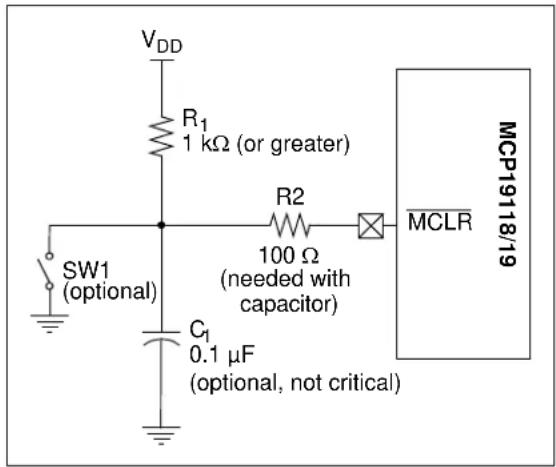
text_image
VDD R1 1 kΩ (or greater) SW1 (optional) C1 0.1 μF (optional, not critical) R2 100 Ω -needed with capacitor MCLR MCP19118/1914.3 Power-Up Timer (PWRT)
The Power-Up Timer provides a fixed 64 ms (nominal) time out on power-up only, from POR Reset. The Power-Up Timer operates from an internal RC oscillator. The chip is kept in Reset as long as PWRT is active. The PWRT delay allows the V_DD to rise to an acceptable level. A Configuration bit, PWRTE, can disable (if set) or enable (if cleared or programmed) the Power-Up Timer.
The Power-Up Timer delay will vary from chip to chip due to:
- V_DD variation
• Temperature variation - Process variation
Note: Voltage spikes below V SS at the MCLR pin, inducing currents greater than 80 mA, may cause latch-up. Thus, a series resistor of 50-100Ω should be used when applying a "low" level to the MCLR pin, rather than pulling this pin directly to V SS .
14.4 Watchdog Timer (WDT) Reset
The Watchdog Timer generates a Reset if the firmware does not issue a CLRMDT instruction within the time-out period. The TO and PD bits in the STATUS register are changed to indicate the WDT Reset. See Section 17.0 "Watchdog Timer (WDT)" for more information.
14.5 Power-Up Timer
The Power-Up Timer optionally delays device execution after a POR event. This timer is typically used to allow V_DD to stabilize before allowing the device to start running.
The Power-Up Timer is controlled by the PWRTE bit of Configuration Word.
14.6 Start-Up Sequence
Upon the release of a POR, the following must occur before the device begins executing:
• Power-Up Timer runs to completion (if enabled)
- Oscillator start-up timer runs to completion
- M C must be released (if enabled)
The total time out will vary based on the PWRTE bit status. For example, with PWRTE bit erased (PWRT disabled), there will be no time out at all. Figures 14-3, 14-4 and 14-5 depict time-out sequences.
Since the time outs occur from the POR pulse, if MCLR is kept low long enough, the time outs will expire. Then, bringing MCLR high will begin execution immediately (see Figure 14-4). This is useful for testing purposes or to synchronize more than one MCP19118/19 device operating in parallel.
14.6.1 POWER CONTROL (PCON) REGISTER
The Power Control (PCON) register (address 8Eh) has two Status bits to indicate what type of Reset occurred last.
FIGURE 14-3: TIME-OUT SEQUENCE ON POWER-UP (DELAYED MCLR): CASE 1
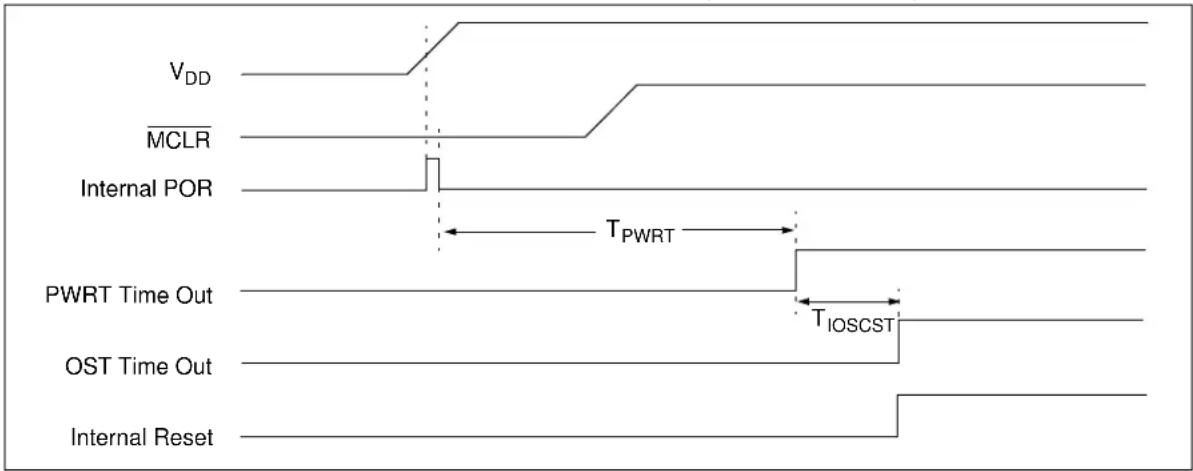
text_image
VDD MCLR Internal POR TPWRT PWRT Time Out TIOSCST OST Time Out Internal ResetFIGURE 14-4: TIME-OUT SEQUENCE ON POWER-UP (DELAYED MCLR): CASE 2

text_image
VDD MCLR Internal POR TPWRT PWRT Time Out TIOSCST OST Time Out Internal ResetFIGURE 14-5: TIME-OUT SEQUENCE ON POWER-UP (MCLR WITH V_DD )

text_image
VDD MCLR Internal POR TPWRT PWRT Time Out TIOSCST OST Time Out Internal ResetTABLE 14-3: INITIALIZATION CONDITION FOR REGISTERS
| Register Address | Power-On Reset | MCLR ResetWDT Reset | Wake-Up from Sleep through InterruptWake-Up from Sleep through WDT Time Out | |
| W | — | xxxx | xxxx uuuu uuuu uuuu uuuu | |
| INDF 00h/80h/100h/180h | xxxx xxxx | xxxx xxxx uuuu uuuu | ||
| TMR0 01h/101h | xxxx xxxx | uuuu uuuu uuuu | uuuu | |
| PCL 02h/82h/102h/182h | 0000 0000 0000 0000 PC + 1 | (3) | ||
| STATUS 03h/83h/103h/183h | 0001 1xxx | 000q quuu^(4) | uuug quuu^(4) | |
| FSR | 04h/84h/104h/184h | xxxx xxxx | uuu uuuu uuuu uuuu | |
| PORTGPA | 05h | xxxx xxxx | uuuu uuuu | uuuu uuuu |
| PORTGPB | 06h | xxx- xxxx | uuu- uuuu | uuu- uuuu |
| PIR1 | 07h | -000 --00 | -000 --00 | -uuu --uu |
| PIR2 | 08h | 0-00 --00 | 0-00 --00 | u-uu --uu |
| PCON | 09h | ---- -qq- | ---- -uu- | ---- -uu- |
| PCLATH | 0Ah/8Ah/10Ah/18Ah | ---0 0000 | ---0 0000 ---u uuuu | |
| INTCON | 0Bh/8Bh/10Bh/18Bh | 0000 000x | 0000 000u | uuuu uuuu (2) |
| TMR1L | 0Ch | xxxx xxxx | uuuu uuuu | uuuu uuuu |
| TMR1H | 0Dh | xxxx xxxx | uuuu uuuu | uuuu uuuu |
| T1CON 0Eh | --00 --00 | --uu --uu | --uu --uu | |
| TMR2 | 0Fh | 0000 0000 | uuuu uuuu | uuuu uuuu |
| T2CON | 10h | ---- -000 | ---- -000 | ---- -uuu |
| PR2 | 11h | 1111 1111 | 1111 1111 uuuu uuuu | |
| PWMPHL | 13h | xxxx xxxx | uuuu uuuu | uuuu uuuu |
| PWMPHH | 14h | xxxx xxxx | uuuu uuuu | uuuu uuuu |
| PWMRL | 15h | xxxx xxxx | uuuu uuuu | uuuu uuuu |
| PWMRH | 16h | xxxx xxxx | uuuu uuuu | uuuu uuuu |
| OVCCON | 19h | 0000 0000 | 0000 0000 | uuuu uuuu |
| OVFCON | 1Ah | 0--0 0000 | 0--0 0000 | u--u uuuu |
| OSCTUNE 1Bh | ---0 | 0000 ---0 0000 | 0 ---u uuuu | |
| ADRESL(1) | 1Ch | xxxx xxxx | uuu uuuu uuuu uuuu | |
| ADRESH(1) | 1Dh | ---- --xx | ---- --uu | ---- --uu |
| ADCON0(1) | 1Eh | -000 0000 | -000 0000 -uuu uuuu | |
| ADCON1(1) | 1Fh | -000 ---- | -000 ---- -uuu ---- | |
| OPTION_REG | 81h/181h | 1111 1111 1111 | 1111 uuuu uuuu | |
| TRISGPA | 85h | 1111 1111 | 1111 1111 | uuuu uuuu |
| TRISGPB | 86h | 1111 1111 | 1111 1111 | uuuu uuuu |
Legend: u = unchanged, x = unknown, - = unimplemented bit, reads as '0', q = value depends on condition.
Note 1: If V_DD goes too low, Power-On Reset will be activated and registers will be affected differently.
2: One or more bits in the INTCON and/or PIRx registers will be affected (to cause wake-up).
3: When the wake-up is due to an interrupt and the GIE bit is set, the PC is loaded with the interrupt vector (0004h).
4: See Table 14-5 for Reset value for specific condition.
TABLE 14-3: INITIALIZATION CONDITION FOR REGISTERS (CONTINUED)
| Register | Address | Power-On Reset | MCLR ResetWDT Reset | Wake-Up from Sleep through InterruptWake-Up from Sleep through WDT Time Out |
| PIE1 87h -000 | --00 -000 | --00 -uuu --uu | ||
| PIE2 88h 0-00 | --00 0-00 | --00 u-uu --uu | ||
| APFCON 89h | ---- ---0 | ---- ---0 ---- | ---u | |
| VINLVL 90h 0-xx xxxx 0-uu uuuu u-uu uuuu | ||||
| OCCON 91h 0-xx xxxx 0-uu uuuu uuuu uuuu | ||||
| CSGSCON 93h | -xxx xxxx | -uuu uuuu -uuu uuuu | ||
| CSDGCON 95h | 0--- xxxx | 0--- uuuu u--- uuuu | ||
| VZCCON 97h | xxxx xxxx | uuuu uuuu uuuu uuuu | ||
| CMPZCON 98h | xxxx xxxx | uuuu uuuu uuuu uuuu | ||
| OUVCON 99h | xxxx xxxx | uuuu uuuu uuuu uuuu | ||
| OOVCON 9Ah | xxxx | xxxx uuuu uuuu uuuu uuuu | ||
| DEADCON 9Bh | xxxx | xxxx uuuu uuuu uuuu uuuu | ||
| SLPCRCON | 9Ch | xxxx xxxx | uuuu uuuu | uuuu uuuu |
| SLVGNCON | 9Dh | ---x xxxx | ---u uuuu | ---u uuuu |
| RELEFF | 9Eh | 0000 0000 | 0000 0000 | uuuu uuuu |
| WPUGPA | 105h | --1- 1111 | --u- uuuu | --u- uuuu |
| WPUGPB | 106h | 1111 -11- | uuuu -uu- | uuuu -uu- |
| PE1 107h | 0000 1100 | 0000 1100 uuuu uuuu | ||
| BUFFCON 108h | 000- | 0000 000- 0000 uuu- uuuu | ||
| ABECON 109h | 0000 | 0000 0000 0000 uuuu uuuu | ||
| SSPADD | 110h | 0000 0000 | 0000 0000 | uuuu uuuu |
| SSPBUF 111h | xxxx | xxxx uuuu uuuu | uuuu uuuu | |
| SSPCON1 | 112h | 0000 0000 | 0000 0000 | uuuu uuuu |
| SSPCON2 | 113h | 0000 0000 | 0000 0000 | uuuu uuuu |
| SSPCON3 | 114h | 0000 0000 | 0000 0000 | uuuu uuuu |
| SSPMSK | 115h | 1111 1111 1111 1111 uuuu uuuu | ||
| SSPSTAT | 116h | |||
| SSPADD2 | 117h | 0000 0000 | 0000 0000 | uuuu uuuu |
| SSPMSK2 | 118h | 1111 1111 | 1111 1111 | uuuu uuuu |
| IOCA | 185h | 0000 0000 | 0000 0000 | uuuu uuuu |
| IOCB | 186h | 0000 -000 | 0000 -000 | uuuu -uuu |
| ANSELA 187h | ---- 1111 ---- 1111 ---- uuuu | |||
| ANSELB 188h | --11 -11- --11 -11- --uu -uu- | |||
| PMCON1 | 190h | -0-- -000 | -0-- -000 | -u-- -uuu |
| PMCON2 | 191h | ---- ---- | ---- ---- | ---- ---- |
| PMADRL | 192h | 0000 0000 | 0000 0000 | uuuu uuuu |
| PMADRH | 193h | ---- -000 | ---- -000 | ---- -uuu |
| PMDATL | 194h | 0000 0000 | 0000 0000 | uuuu uuuu |
Legend: u = unchanged, x = unknown, - = unimplemented bit, reads as '0', q = value depends on condition.
Note 1: If V_DD goes too low, Power-On Reset will be activated and registers will be affected differently.
2: One or more bits in the INTCON and/or PIRx registers will be affected (to cause wake-up).
3: When the wake-up is due to an interrupt and the GIE bit is set, the PC is loaded with the interrupt vector (0004h).
4: See Table 14-5 for Reset value for specific condition.
TABLE 14-3: INITIALIZATION CONDITION FOR REGISTERS (CONTINUED)
| Register | Address | Power-On Reset | ResetWDT Reset | Wake-Up from Sleep through InterruptWake-Up from Sleep through WDT Time Out |
| PMDATH 195h | --00 0000 | --00 0000 --uu | uuuu | |
| OSCCAL 198h | -xxx xxxx | -uuu uuuu -uuu | uuuu | |
| DOVCAL 199h | ---- xxxx | ---- uuuu ---- | uuuu | |
| TTACAL 19Ah | ---- xxxx | ---- uuuu ---- | uuuu | |
| BGRCAL 19Bh | ---- xxxx | ---- uuuu ---- | uuuu | |
| VROCAL 19Ch | ---- xxxx | ---- uuuu ---- | uuuu | |
| ZROCAL 19Dh | ---- xxxx | ---- uuuu ---- | uuuu | |
| ATSTCON | 19F | 1--- 0001 | 1--- 0001 | u--- uuuu |
Legend: u = unchanged, x = unknown, - = unimplemented bit, reads as '0', q = value depends on condition.
Note 1: If V_DD goes too low, Power-On Reset will be activated and registers will be affected differently.
2: One or more bits in the INTCON and/or PIRx registers will be affected (to cause wake-up).
3: When the wake-up is due to an interrupt and the GIE bit is set, the PC is loaded with the interrupt vector (0004h).
4: See Table 14-5 for Reset value for specific condition.
14.7 Determining the Cause of a Reset
Upon any Reset, multiple bits in the STATUS and PCON registers are updated to indicate the cause of the Reset. Tables 14-4 and 14-5 show the Reset conditions of these registers.
TABLE 14-4: RESET STATUS BITS AND THEIR SIGNIFICANCE
| Condition | |||
| 0 | 1 | 1 | Power-On Reset |
| u | 0 | u | WDT Reset |
| u | 0 | 0 | WDT Wake-Up from Sleep |
| u | 1 | 0 | Interrupt Wake-Up from Sleep |
| u | u | u | Reset during normal operation |
| u | 1 | 0 | Reset during Sleep |
| 0 | 0 | x | Not allowed. is set on POR |
| 0 | x | 0 | Not allowed. is set on POR |
TABLE 14-5: RESET CONDITION FOR SPECIAL REGISTERS (Note 2)
| Condition | Program Counter | STATUS Register | PCON Register |
| Power-On Reset | 0000h | 0001 1xxx | ---- -u0- |
| Reset during normal operation | 0000h | 000u uuuu | ---- -uu- |
| Reset during Sleep | 0000h | 0001 0uuu | ---- -uu- |
| WDT Reset | 0000h | 0000 uuuu | ---- -uu- |
| WDT Wake-Up from Sleep | PC + 1 | uuu0 0uuu | ---- -uu- |
| Interrupt Wake-Up from Sleep | PC + 1(1) | uuu1 0uuu ---- | -uu- |
Legend: u = unchanged, x = unknown, - = unimplemented bit, reads as '0'.
Note 1: When the wake-up is due to an interrupt and the Global Interrupt Enable (GIE) bit is set, the return address is pushed on the stack and PC is loaded with the interrupt vector (0004h) after execution of PC + 1.
2: If a Status bit is not implemented, that bit will be read as '0'.
14.8 Power Control (PCON) Register
The Power Control (PCON) register contains flag bits to differentiate between a:
- Power-On Reset (POR)
- Overtemperature (OT)
The PCON register bits are shown in Register 14-1.
REGISTER 14-1: PCON: POWER CONTROL REGISTER
| U-0 U-0 U-0 U-0 R/W-0 R/W-0 U-0 | |||||||
| — | — | — | — | — | — | ||
| bit 7 bit 0 | |||||||
Legend:
| R = Readable bit | W = Writable bit | U = Unimplemented bit, read as '0' |
| -n = Value at POR | '1' = Bit is set | '0' = Bit is cleared x = Bit is unknown |
bit 7-3 Unimplemented: Read as '0'
bit 2 OT : Overtemperature Reset Status bit
1 = No Overtemperature Reset occurred
0 = An Overtemperature Reset occurred (must be set in software after an Overtemperature occurs)
bit 1 POR : Power-On Reset Status bit
1 = No Power-On Reset occurred
0 = A Power-On Reset occurred (must be set in software after a Power-On Reset occurs)
bit 0 Unimplemented: Read as '0'
TABLE 14-6: SUMMARY OF REGISTERS ASSOCIATED WITH RESETS
| Name | Bit 7 | Bit 6 | Bit 5 | Bit 4 | Bit 3 | Bit 2 | Bit 1 | Bit 0 | Register on Page |
| PCON | — | — | — | — | — | — | 92 | ||
| STATUS | IRP | RP1 | RP0 | Z | DC | C | 71 |
Legend: — = unimplemented bit, reads as '0'. Shaded cells are not used by Resets.
Note 1: Other (non Power-Up) Resets include MCLR Reset and Watchdog Timer Reset during normal operation.
15.0 INTERRUPTS
The MCP19118/19 has multiple sources of interrupt:
- External Interrupt (INT pin)
- Interrupt-On-Change (IOC) Interrupts
- Timer0 Overflow Interrupt
- Timer1 Overflow Interrupt
- Timer2 Match Interrupt
- ADC Interrupt
- System Overvoltage Error
- System Undervoltage Error
- System Overcurrent Error
• SSP
• BCL - System Input Undervoltage Error
The Interrupt Control (INTCON) register and Peripheral Interrupt Request (PIRx) registers record individual interrupt requests in flag bits. The INTCON register also has individual and global interrupt enable bits.
The Global Interrupt Enable (GIE) bit in the INTCON register enables (if set) all unmasked interrupts or disables (if cleared) all interrupts. Individual interrupts can be disabled through their corresponding enable bits in the INTCON register and PIEx registers. GIE is cleared on Reset.
When an interrupt is serviced, the following actions occur automatically:
- The GIE is cleared to disable any further interrupt.
- The return address is pushed onto the stack.
• The PC is loaded with 0004h.
The firmware within the Interrupt Service Routine (ISR) should determine the source of the interrupt by polling the interrupt flag bits. The interrupt flag bits must be cleared before exiting the ISR, to avoid repeated interrupts. Because the GIE bit is cleared, any interrupt that occurs while executing the ISR will be recorded through its interrupt flag, but will not cause the processor to redirect to the interrupt vector.
Note 1: Individual interrupt flag bits are set, regardless of the status of their corresponding mask bit or the GIE bit.
2: When an instruction that clears the GIE bit is executed, any interrupts that were pending for execution in the next cycle are ignored. The interrupts which were ignored are still pending to be serviced when the GIE bit is set again.
The RETFIE instruction exits the ISR by popping the previous address from the stack, restoring the saved context from the shadow registers and setting the GIE bit.
For additional information on a specific Interrupt's operation, refer to its Peripheral chapter.
15.1 Interrupt Latency
For external interrupt events, such as the INT pin or PORTGPx change interrupt, the interrupt latency will be three or four instruction cycles. The exact latency depends upon when the interrupt event occurs (see Figure 15-2). The latency is the same for one or two-cycle instructions.
15.2 GPA2/INT Interrupt
The external interrupt on the GPA2/INT pin is edge-triggered either on the rising edge, if the INTEDG bit in the OPTION_REG register is set or on the falling edge, if the INTEDG bit is cleared. When a valid edge appears on the GPA2/INT pin, the INTF bit in the INTCON register is set. This interrupt can be disabled by clearing the INTE control bit in the INTCON register. The INTF bit must be cleared by software in the Interrupt Service Routine before re-enabling this interrupt. The GPA2/INT interrupt can wake-up the processor from Sleep, if the INTE bit was set prior to going into Sleep. See Section 16.0 "Power-Down Mode (Sleep)" for details on Sleep and Section 16.1 "Wake-Up from Sleep" for timing of wake-up from Sleep through GPA2/INT interrupt.
Note: The ANSELx registers must be initialized to configure an analog channel as a digital input. Pins configured as analog inputs will read '0' and cannot generate an interrupt.
FIGURE 15-1: INTERRUPT LOGIC

flowchart
graph TD
    A["UVIF"] --> B["OR"]
    C["OVIF"] --> B
    D["OCIF"] --> E["OR"]
    F["VINIF"] --> E
    B --> E
    E --> G["AND"]
    H["ADIF"] --> I["AND"]
    J["ADIE"] --> I
    K["BCLIF"] --> L["AND"]
    M["BCLIE"] --> L
    I --> N["AND"]
    O["SSPIF"] --> P["AND"]
    Q["SSPIE"] --> P
    N --> R["OR"]
    S["TMR2IF"] --> T["AND"]
    U["TMR2IE"] --> T
    V["TMR1IF"] --> W["AND"]
    X["TMR1IE"] --> W
    R --> Y["AND"]
    Z["GIE"] --> AA["AND"]
    AB["T0IF"] --> AC["AND"]
    AD["T0IE"] --> AC
    AE["INTF"] --> AF["AND"]
    AG["INTE"] --> AF
    AH["IOCF"] --> AI["AND"]
    AJ["IOCE"] --> AI
    AK["PEIF"] --> AL["AND"]
    AM["PEIE"] --> AL
    AC --> AN["AND"]
    AF --> AO["AND"]
    AI --> AP["AND"]
    AL --> AQ["AND"]
    AM --> AR["AND"]
    AS["Wake-Up (If in Sleep mode)"] --> AT["AND"]
    AU["Interrupt to CPU"] --> AV["AND"]
FIGURE 15-2: INT PIN INTERRUPT TIMING
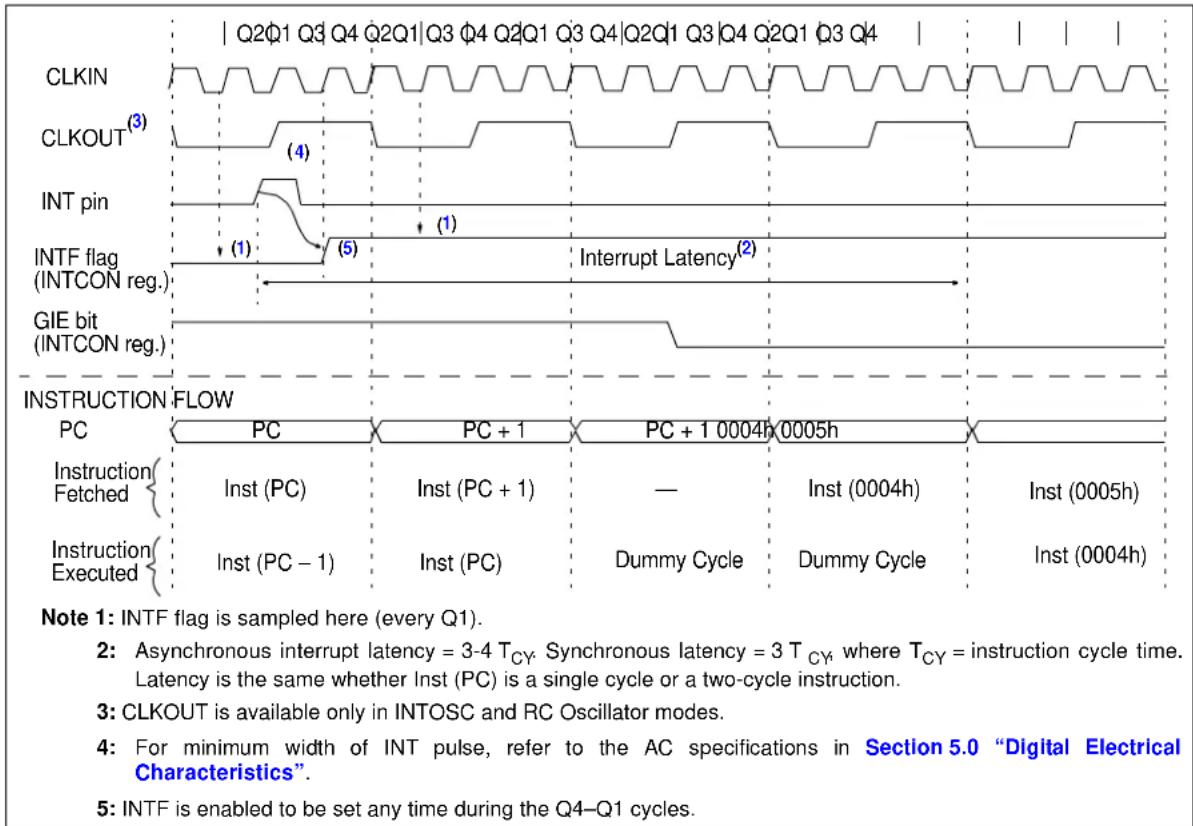
15.3 Interrupt Control Registers
15.3.1 INTCON REGISTER
The INTCON register is a readable and writable register that contains the various enable and flag bits for the TMR0 register overflow, interrupt-on-change and external INT pin interrupts.
Note: Interrupt flag bits are set when an interrupt condition occurs, regardless of the state of its corresponding enable bit or the Global Interrupt Enable (GIE) bit in the INTCON register. User software should ensure the appropriate interrupt flag bits are clear prior to enabling an interrupt.
REGISTER 15-1: INTCON: INTERRUPT CONTROL REGISTER
| R/W-0 R/W-0 R/W-0 R/W-0 R/W-0 R/W-0 R/W-x | |||||||
| GIE | PEIE | TOIE | INTE | IOCE | TOIF | INTF | IOCF |
| bit 7 bit 0 | |||||||
Legend:
| R = Readable bit | W = Writable bit | U = Unimplemented bit, read as '0' |
| -n = Value at POR | '1' = Bit is set | '0' = Bit is cleared x = Bit is unknown |
bit 7 GIE: Global Interrupt Enable bit
1 = Enables all unmasked interrupts
0 = Disables all interrupts
bit 6 PEIE: Peripheral Interrupt Enable bit
1 = Enables all unmasked peripheral interrupts
0 = Disables all peripheral interrupts
bit 5 TOIE: TMR0 Overflow Interrupt Enable bit
1 = Enables the TMR0 interrupt
0 = Disables the TMR0 interrupt
bit 4 INTE: INT External Interrupt Enable bit
1 = Enables the INT external interrupt
0 = Disables the INT external interrupt
bit 3 IOCE: Interrupt-on-Change Enable bit ^(1)
1 = Enables the interrupt-on-change
0 = Disables the interrupt-on-change
bit 2 TOIF: TMR0 Overflow Interrupt Flag bit ^(2)
1 = TMR0 register overflowed (must be cleared in software)
0 = TMR0 register did not overflow
bit 1 INTF: External Interrupt Flag bit
1 = The external interrupt occurred (must be cleared in software)
0 = The external interrupt did not occur
bit 0 IOCF: Interrupt-on-Change Interrupt Flag bit
1 = When at least one of the interrupt-on-change pins changed state
0 = None of the interrupt-on-change pins changed state
Note 1: The IOCx registers must also be enabled.
2: T0IF bit is set when TMR0 rolls over. TMR0 is unchanged on Reset and should be initialized before clearing T0IF bit.
The PIE1 register (Register 15-2) contains the
Peripheral Interrupt Enable bits.
Note 1: The PEIE bit in the INTCON register must be set to enable any peripheral interrupt.
REGISTER 15-2: PIE1: PERIPHERAL INTERRUPT ENABLE REGISTER 1
| U-0 R/W-0 R/W-0 R/W-0 U-0 U-0 R/W-0 R/W-0 | |||||||
| — | ADIE | BCLIE | SSPIE | — | — | TMR2IE | TMR1IE |
| bit 7 bit 0 | |||||||
Legend:
| R = Readable bit | W = Writable bit | U = Unimplemented bit, read as ‘0’ |
| -n = Value at POR | ‘1’ = Bit is set | ‘0’ = Bit is cleared x = Bit is unknown |
bit 7 Unimplemented: Read as '0'
bit 6 ADIE: ADC Interrupt Enable bit
1 = Enables the ADC interrupt
0 = Disables the ADC interrupt
bit 5 BCLIE: MSSP Bus Collision Interrupt Enable bit
1 = Enables the MSSP Bus Collision Interrupt
0 = Disables the MSSP Bus Collision Interrupt
bit 4 SSPIE: Synchronous Serial Port (MSSP) Interrupt Enable bit
1 = Enables the MSSP interrupt
0 = Disables the MSSP interrupt
bit 3-2 Unimplemented: Read as '0'
bit 1 TMR2IE: Timer2 Interrupt Enable
1 = Enables the Timer2 interrupt
0 = Disables the Timer2 interrupt
bit 0 TMR1IE: Timer1 Interrupt Enable
1 = Enables the Timer1 interrupt
0 = Disables the Timer1 interrupt
The PIE2 register (Register 15-3) contains the Peripheral Interrupt Enable bits.
Note 1: The PEIE bit in the INTCON register must be set to enable any peripheral interrupt.
REGISTER 15-3: PIE2: PERIPHERAL INTERRUPT ENABLE REGISTER 2
| U-0 U-0 R/W-0 R/W-0 U-0 U-0 R/W-0 U-0 | |||||||
| UVIE | — | OCIE | OVIE | — | — | VINIE | — |
| bit 7 bit 0 | |||||||
Legend:
| R = Readable bit | W = Writable bit | U = Unimplemented bit, read as '0' |
| -n = Value at POR | '1' = Bit is set | '0' = Bit is cleared x = Bit is unknown |
bit 7 UVIE: Output Undervoltage Interrupt enable bit
1 = Enables the UV interrupt
0 = Disables the UV interrupt
bit 6 Unimplemented: Read as '0'
bit 5 OCIE: Output Overcurrent Interrupt enable bit
1 = Enables the OC interrupt
0 = Disables the OC interrupt
bit 4 OVIE: Output Overvoltage Interrupt enable bit
1 = Enables the OV interrupt
0 = Disables the OV interrupt
bit 3-2 Unimplemented: Read as '0'
bit 1 VINIE: V IN UVLO Interrupt Enable
1 = Enables the V_IN UVLO interrupt
0 = Disables the V_IN UVLO interrupt
bit 0 Unimplemented: Read as '0'
15.3.1.3 PIR1 Register
The PIR1 register (Register 15-4) contains the Peripheral Interrupt Flag bits.
Note 1: Interrupt flag bits are set when an interrupt condition occurs, regardless of the state of its corresponding enable bit or the Global Interrupt Enable (GIE) bit in the INTCON register. User software should ensure the appropriate interrupt flag bits are clear prior to enabling an interrupt.
REGISTER 15-4: PIR1: PERIPHERAL INTERRUPT FLAG REGISTER 1
| U-0 R/W-0 R/W-0 R/W-0 U-0 U-0 R/W-0 R/W-0 | |||||||
| — | ADIF | BCLIF | SSPIF | — | — | TMR2IF | TMR1IF |
| bit 7 bit 0 | |||||||
| Legend: | |||
| R = Readable bit | W = Writable bit | U = Unimplemented bit, read as ‘0’ | |
| -n = Value at POR | ‘1’ = Bit is set | ‘0’ = Bit is cleared | x = Bit is unknown |
bit 7 Unimplemented: Read as '0'
bit 6 ADIF: ADC Interrupt Flag bit
1 = ADC conversion complete
0 = ADC conversion has not completed or has not been started
bit 5 BCLIF: MSSP Bus Collision Interrupt Flag bit
1 = Interrupt is pending
0 = Interrupt is not pending
bit 4 SSPIF: Synchronous Serial Port (MSSP) Interrupt Flag bit
1 = Interrupt is pending
0 = Interrupt is not pending
bit 3-2 Unimplemented: Read as '0'
bit 1 TMR2IF: Timer2 to PR2 Match Interrupt Flag
1 = Timer2 to PR2 match occurred (must be cleared in software)
0 = Timer2 to PR2 match did not occur
bit 0 TMR1IF: Timer1 Interrupt Flag
1 = Timer1 rolled over (must be cleared in software)
0 = Timer1 did not roll over
15.3.1.4 PIR2 Register
The PIR2 register (Register 15-5) contains the Peripheral Interrupt Flag bits.
Note 1: Interrupt flag bits are set when an interrupt condition occurs, regardless of the state of its corresponding enable bit or the Global Interrupt Enable (GIE) bit in the INTCON register. User software should ensure the appropriate interrupt flag bits are clear prior to enabling an interrupt.
REGISTER 15-5: PIR2: PERIPHERAL INTERRUPT FLAG REGISTER 2
| R/W-0 U-0 R/W-0 R/W-0 U-0 U-0 R/W-0 U-0 | |||||||
| UVIF | — | OCIF | OVIF | — | — | VINIF | — |
| bit 7 bit 0 | |||||||
| Legend: | |||
| R = Readable bit | W = Writable bit | U = Unimplemented bit, read as '0' | |
| -n = Value at POR | '1' = Bit is set | '0' = Bit is cleared | x = Bit is unknown |
| bit 7 | UVIF: Output undervoltage error interrupt flag bit1 = Output undervoltage error has occurred0 = Output undervoltage error has not occurred |
| bit 6 | Unimplemented: Read as '0' |
| bit 5 | OCIF: Output overcurrent error interrupt flag bit1 = Output overcurrent error has occurred0 = Output overcurrent error has not occurred |
| bit 4 | OVIF: Output overvoltage error interrupt flag bit1 = Output overvoltage error has occurred0 = Output overvoltage error has not occurred |
| bit 3-2 | Unimplemented: Read as '0' |
| bit 1 | VINIF: V_IN Status bit1 = V_IN is below acceptable level0 = V_IN is at acceptable level |
| bit 0 | Unimplemented: Read as '0' |
TABLE 15-1: SUMMARY OF REGISTERS ASSOCIATED WITH INTERRUPTS
| Name | Bit 7 | Bit 6 | Bit 5 | Bit 4 | Bit 3 | Bit 2 | Bit 1 | Bit 0 | Register on Page |
| INTCON | GIE | PEIE | T0IE | INTE | IOCE | T0IF | INTF | IOCF | 95 |
| OPTION_REG | INTEDG | T0CE | T0SE | PSA | PS2 | PS1 | PS0 | 77 | |
| PIE1 | — | ADIE | BCLIE | SSPIE | — | — | TMR2IE | TMR1IE | 96 |
| PIE2 | UVIE | — | OCIE | OVIE | — | — | VINIE | — | 97 |
| PIR1 | — | ADIF | BCLIF | SSPIF | — | — | TMR2IF | TMR1IF | 98 |
| PIR2 | UVIF | — | OCIF | OVIF | — | — | VINIF | — | 99 |
Legend: — = unimplemented locations read as '0'. Shaded cells are not used by Interrupts.
15.4 Context Saving During Interrupts
During an interrupt, only the return PC value is saved on the stack. Typically, users may wish to save key registers during an interrupt (e.g., W and STATUS registers). This must be implemented in software.
Temporary holding registers W_TEMP and STATUS_TEMP should be placed in the last 16 bytes of GPR (see Figure 11-2). These 16 locations are common to all banks and do not require banking. This makes context save and restore operations simpler. The code shown in Example 15-1 can be used to:
- Store the W register
- Store the STATUS register
- Execute the ISR code
- Restore the Status (and Bank Select Bit) register
- Restore the W register
Note: The MCP19118/19 device does not require saving the PCLATH. However, if computed GOTOS are used in both the ISR and the main code, the PCLATH must be saved and restored in the ISR.
EXAMPLE 15-1: SAVING STATUS AND W REGISTERS IN RAM
MOVWF W_TEMP ;Copy W to TEMP register
SWAPF STATUS,W ;Swap status to be saved into W
;Swaps are used because they do not affect the status bits
MOVWF STATUS_TEMP ;Save status to bank zero STATUS_TEMP register
:
:(ISR) ;Insert user code here
:
SWAPF STATUS_TEMP,W ;Swap STATUS_TEMP register into W
;(sets bank to original state)
MOVWF STATUS ;Move W into STATUS register
SWAPF W_TEMP,F ;Swap W_TEMP
SWAPF W_TEMP,W ;Swap W_TEMP into W
16.0 POWER-DOWN MODE (SLEEP)
The Power-Down mode is entered by executing a SLEEP instruction.
Upon entering Sleep mode, the following conditions exist:
- WDT will be cleared but keeps running, if enabled for operation during Sleep.
- The PD bit in the STATUS register is cleared.
- The TO bit in the STATUS register is set.
- CPU clock is not disabled.
- The Timer1 oscillator is unaffected and peripherals that operate from it may continue operation in Sleep.
- The ADC is unaffected.
- The I/O ports maintain the status they had before SLEEP was executed (driving high, low or high-impedance).
- Resets other than WDT are not affected by Sleep mode.
- Analog circuitry is unaffected by execution of SLEEP instruction.
Refer to individual chapters for more details on peripheral operation during Sleep.
To minimize current consumption, the following conditions should be considered:
• I/O pins should not be floating
- External circuitry sinking current from I/O pins
- Internal circuitry sourcing current from I/O pins
- Current draw from pins with internal weak pull-ups
- Modules using Timer1 oscillator
I/O pins that are high-impedance inputs should be pulled to V_DD or GND externally to avoid switching currents caused by floating inputs.
The SLEEP instruction does not affect the analog circuitry. The enable state of the analog circuitry does not change with the execution of the SLEEP instruction.
Examples of internal circuitry that might be sourcing current include modules, such as the DAC. See Section 22.0 “Analog-to-Digital Converter (ADC) Module” for more information on this module.
16.1 Wake-Up from Sleep
The device can wake-up from Sleep through one of the following events:
- External Reset input on MCLR pin, if enabled
- POR Reset
- Watchdog Timer, if enabled
- Any external interrupt
- Interrupts by peripherals capable of running during Sleep (see individual peripheral for more information)
The first two events will cause a device Reset. The last three events are considered a continuation of program execution. To determine whether a device Reset or Wake-Up event occurred, refer to Section 14.7 "Determining the Cause of a Reset".
The following peripheral interrupts can wake the device from Sleep:
- Timer1 interrupt. Timer1 must be operating as an asynchronous counter.
- A/D conversion
- Interrupt-on-change
- External Interrupt from the INT pin
When the SLEEP instruction is being executed, the next instruction (PC + 1) is prefetched. For the device to wake-up through an interrupt event, the corresponding interrupt enable bit must be enabled. Wake-up will occur regardless of the state of the GIE bit. If the GIE bit is disabled, the device continues execution at the instruction after the SLEEP instruction. If the GIE bit is enabled, the device executes the instruction after the SLEEP instruction, the device will then call the Interrupt Service Routine. In cases where the execution of the instruction following SLEEP is not desirable, the user should have an NOP after the SLEEP instruction.
The WDT is cleared when the device wakes up from Sleep, regardless of the source of wake-up.
16.1.1 WAKE-UP USING INTERRUPTS
When global interrupts are disabled (GIE cleared) and any interrupt source has both its interrupt enable bit and interrupt flag bit set, one of the following will occur:
- If the interrupt occurs before the execution of a SLEEP instruction:
- SLEEP instruction will execute as an NOP
- WDT and WDT prescaler will not be cleared
- T h e bIt iThe STATUS register will not be set
- The bit in the STATUS register will not be cleared
- If the interrupt occurs during or after the execution of a SLEEP instruction:
- SLEEP instruction will be completely executed
- The device will immediately wake-up from Sleep
- WDT and WDT prescaler will be cleared
- T h e bIt iOthe STATUS register will be set
- The bR in the STATUS register will be cleared
Even if the flag bits were checked before executing a SLEEP instruction, it may be possible for flag bits to become set before the SLEEP instruction completes. To determine whether a SLEEP instruction executed, test the bit. If the bit is set, the SLEEP instruction was executed as an NOP.
FIGURE 16-1: WAKE-UP FROM SLEEP THROUGH INTERRUPT
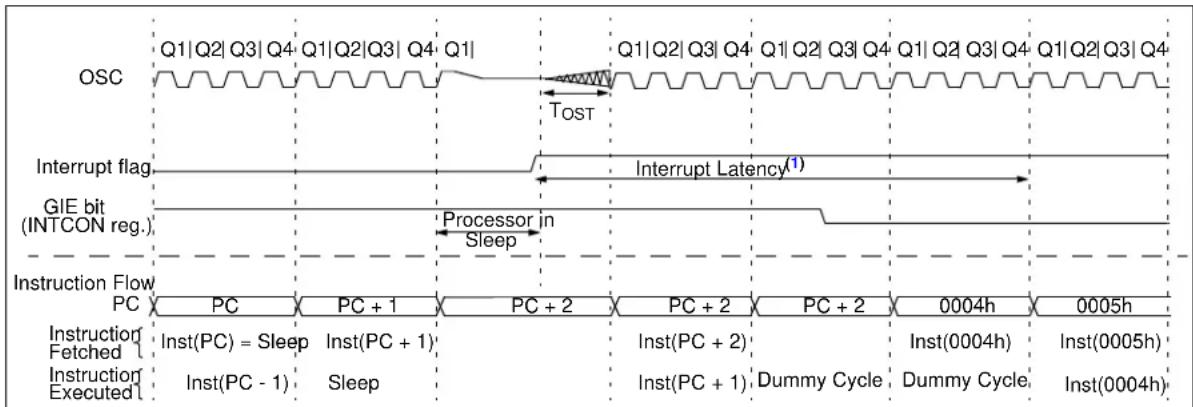
text_image
OSC Q1|Q2|Q3|Q4 Q1|Q2|Q3| Q4 Q1| Interrupt flag Interrupt Latency(1) GIE bit (INTCON reg.) Processor in Sleep Instruction Flow PC PC PC + 1 PC + 2 PC + 2 PC + 2 0004h 0005h Instruction Fetched Inst(PC) = Sleep Inst(PC + 1) Inst(PC + 2) Inst(0004h) Inst(0005h) Instruction Executed Inst(PC - 1) Sleep Inst(PC + 1) Dummy Cycle Dummy Cycle Inst(0004h)Note 1: GIE = 1 assumed. In this case, after wake-up, the processor calls the ISR at 0004h. If GIE = 0, execution will continue in-line.
TABLE 16-1: SUMMARY OF REGISTERS ASSOCIATED WITH POWER-DOWN MODE
| Name Bit | 7 Bit 6 Bit | 5 Bit 4 Bit | 3 Bit 2 Bit | 1 Bit 0 | Register on Page | ||||
| INTCON | GIE | PEIE | T0IE | INTE | IOCE | T0IF | INTF | IOCF | 95 |
| IOCA | IOCA7 | IOCA6 | IOCA5 | IOCA4 | IOCA3 | IOCA2 | IOCA1 | IOCA0 | 122 |
| IOCB | IOCB7 | IOCB6 | IOCB5 | IOCB4 | — | IOCB2 | IOCB1 | IOCB0 | 122 |
| PIE1 | — | ADIE | BCLIE | SSPIE | — | — | TMR2IE | TMR1IE | 96 |
| PIE2 | UVIE | — | OCIE | OVIE | — | — | VINIE | — | 97 |
| PIR1 | — | ADIF | BCLIF | SSPIF | — | — | TMR2IF | TMR1IF | 98 |
| PIR2 | UVIF | — | OCIF | OVIF | — | — | VINIF | — | 99 |
| STATUS | IRP | RP1 | RP0 | Z | DC | C | 71 |
Legend: — = unimplemented, read as '0'. Shaded cells are not used in Power-Down mode.
17.0 WATCHDOG TIMER (WDT)
The Watchdog Timer is a free-running timer. The WDT is enabled by setting the WDTE bit in the Configuration Word (default setting).
During normal operation, a WDT time out generates a device Reset. If the device is in Sleep mode, a WDT time out causes the device to wake-up and continue with normal operation.
The WDT can be permanently disabled by clearing the WDTE bit in the Configuration Word register. See Section 12.1 "Configuration Word" for more information.
17.1 Watchdog Timer (WDT) Operation
During normal operation, a WDT time out generates a device Reset. If the device is in Sleep mode, a WDT time out causes the device to wake-up and continue with normal operation; this is known as a WDT wake-up. The WDT can be permanently disabled by clearing the WDTE configuration bit.
The postscaler assignment is fully under software control and can be changed during program execution.
17.2 WDT Period
The WDT has a nominal time-out period of 18 ms (with no prescaler). The time-out periods vary with temperature, V_DD and process variations from part to part (see Table 5-4). If longer time-out periods are desired, a prescaler with a division ratio of up to 1:128 can be assigned to the WDT under software control by writing to the OPTION_REG register. Thus, time-out periods up to 2.3 seconds can be realized.
The CLRWDT and SLEEP instructions clear the WDT and the prescaler, if assigned to the WDT, and prevent it from timing out and generating a device Reset.
The TO bit in the STATUS register will be cleared upon a Watchdog Timer time out.
17.3 WDT Programming Considerations
Under worst-case conditions (i.e., V_DD = M i n i m u m, Temperature = Maximum, Maximum WDT prescaler), it may take several seconds before a WDT time out occurs.
FIGURE 17-1: WATCHDOG TIMER WITH SHARED PRESCALER BLOCK DIAGRAM
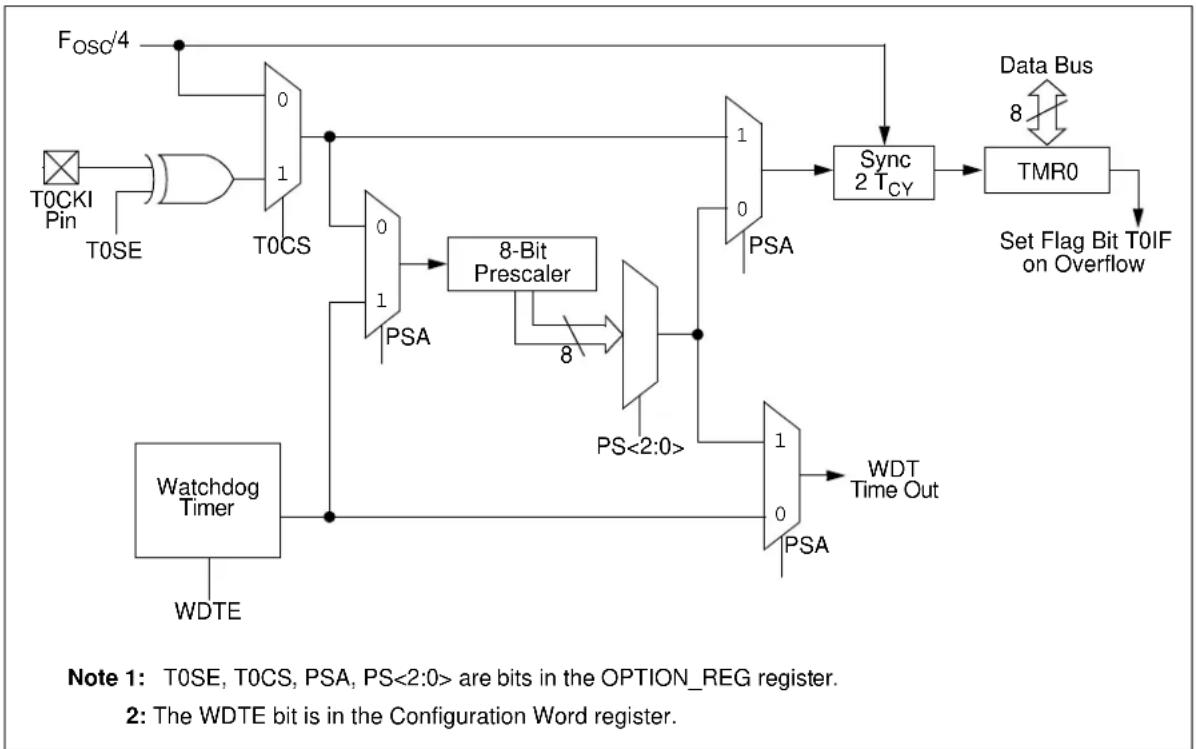
flowchart
graph TD
    A["Watchdog Timer"] --> B["T0SE"]
    B --> C["AND Gate"]
    C --> D["0/1 T0CS"]
    D --> E["0/1 PSA"]
    E --> F["8-Bit Prescaler"]
    F --> G["PSA"]
    G --> H["1/0 WDT Time Out"]
    H --> I["PSA"]
    I --> J["7/0 WDT Time Out"]
    J --> K["Sync 2 TCY"]
    K --> L["TMR0"]
    L --> M["Set Flag Bit T0IF on Overflow"]
    N["Fosc/4"] --> C
    O["WDTE"] --> F
    P["Data Bus 8"] --> L
    Q["Note 1: T0SE, T0CS, PSA, PS<2:0> are bits in the OPTION_REG register."]
    R["Note 2: The WDTE bit is in the Configuration Word register."]
TABLE 17-1: WDT STATUS
| Conditions WDT | |
| WDTE = 0 | ClearedCLRWDT Command |
| Exit Sleep |
TABLE 17-2: SUMMARY OF REGISTERS ASSOCIATED WITH WATCHDOG TIMER
| N a | m | e B | i | t 7 | B | i t | 6 | B i | Register on Page 5 |
| OPTION_REG | INTEDG | T0CS | T0SE | PSA | PS2 | PS1 | PS0 | 77 |
Legend: Shaded cells are not used by the Watchdog Timer.
TABLE 17-3: SUMMARY OF CONFIGURATION WORD ASSOCIATED WITH WATCHDOG TIMER
| Name | Bits | Bit -/7 | Bit -/6 | Bit 13/5 | Bit 12/4 | Bit 11/3 | Bit 10/2 | Bit 9/1 | Bit 8/0 | Register on Page |
| CONFIG | 13:8 | — | — | DBGEN | — | WRT1 | WRT0 | — | — | 81 |
| 7:0 | — | MCLRE | WDTE | — | — | — |
Legend: — = unimplemented location, read as '1'. Shaded cells are not used by Watchdog Timer.
18.0 FLASH PROGRAM MEMORY CONTROL
The Flash program memory is readable and writable during normal operation (full V_IN range). This memory is not directly mapped in the register file space. Instead, it is indirectly addressed through the Special Function Registers (SFR) (see Registers 18-1 to 18-5). There are six SFRs used to read and write this memory:
• P M C O N 1
• P M C O N 2
• P M D A T L
• P M D A T H
• PMADRL
• PMADRH
When interfacing the program memory block, the PMDATL and PMDATH registers form a two-byte word, which holds the 14-bit data for read/write, while the PMADRL and PMADRH registers form a two-byte word, which holds the 13-bit address of the FLASH location being accessed. These devices have 4K words of program Flash with an address range from 0000h to 0FFFh.
The program memory allows single-word read and a four-word write. A four-word write automatically erases the row of the location and writes the new data (erase before write).
The write time is controlled by an on-chip timer. The write/erase voltages are generated by an on-chip charge pump rated to operate over the voltage range of the device for byte or word operations.
When the device is code-protected, the CPU may continue to read and write the Flash program memory.
Depending on the settings of the Flash Program Memory Enable (WRT<1:0>) bits, the device may or may not be able to write certain blocks of the program memory. However, reads of the program memory are allowed.
When the Flash Program Memory Code Protection (CP) bit is enabled, the program memory is code-protected and the device programmer (ICSP) cannot access data or program memory.
18.1 PMADRH and PMADRL Registers
The PMADRH and PMADRL registers can address up to a maximum of 4K words of program memory.
When selecting a program address value, the Most Significant Byte (MSB) of the address is written to the PMADRH register and the Least Significant Byte (LSB) is written to the PMADRL register.
18.2 PMCON1 and PMCON2 Registers
PMCON1 is the control register for the data program memory accesses.
Control bits RD and WR initiate read and write, respectively. These bits cannot be cleared, only set in software. They are cleared in hardware at completion of the read or write operation. The inability to clear the WR bit in software prevents the accidental premature termination of a write operation.
The WREN bit, when set, will allow a write operation. On power-up, the WREN bit is clear.
The CALSEL bit allows the user to read locations in test memory in case there are calibration bits stored in the calibration word locations that need to be transferred to SFR trim registers. The CALSEL bit is only for reads and, if a write operation is attempted with CALSEL = 1, no write will occur.
PMCON2 is not a physical register. Reading PMCON2 will read all '0's. The PMCON2 register is used exclusively in the flash memory write sequence.
18.3 Flash Program Memory Control Registers
REGISTER 18-1: PMDATL: PROGRAM MEMORY DATA LOW BYTE REGISTER
| R/W-0 R/W-0 R/W-0 R/W-0 R/W-0 R/W-0 R/W-0 R/W-0 |
| PMDATL<7:0> |
| bit 7 bit 0 |
Legend:
| R = Readable bit W = Writable bit | U = Unimplemented bit, read as '0' | ||
| -n = Value at POR | '1' = Bit is set | '0' = Bit is cleared | x = Bit is unknown |
bit 7-0 PMDATL<7:0>: 8 Least Significant Data Bits Read from Program Memory
REGISTER 18-2: PMADRL: PROGRAM MEMORY ADDRESS LOW BYTE REGISTER
| R/W-0 R/W-0 R/W-0 R/W-0 R/W-0 R/W-0 R/W-0 R/W-0 |
| PMADRL<7:0> |
| bit 7 bit 0 |
Legend:
| R = Readable bit W = Writable bit | U = Unimplemented bit, read as '0' | ||
| -n = Value at POR | '1' = Bit is set | '0' = Bit is cleared | x = Bit is unknown |
bit 7-0 PMADRL<7:0>: 8 Least Significant Address Bits for Program Memory Read/Write Operation
REGISTER 18-3: PMDATH: PROGRAM MEMORY DATA HIGH BYTE REGISTER
| U-0 | U-0 | R/W-0 R/W-0 R/W-0 R/W-0 R/W-0 R/W-0 |
| — | — | PMDATH<5:0> |
| bit 7 bit 0 | ||
Legend:
| R = Readable bit W = Writable bit | U = Unimplemented bit, read as '0' | ||
| -n = Value at POR | '1' = Bit is set | '0' = Bit is cleared | x = Bit is unknown |
bit 7-6 Unimplemented: Read as '0'
bit 5-0 PMDATH<5:0>: 6 Most Significant Data Bits Read from Program Memory
REGISTER 18-4: PMADRH: PROGRAM MEMORY ADDRESS HIGH BYTE REGISTER
| U-0 U-0 U-0 U-0 R/W-0 R/W-0 R/W-0 R/W-0 | |||
| — — — | — PMADRH<3:0> | ||
| bit 7 bit 0 | |||
Legend:
| R = Readable bit | W = Writable bit | U = Unimplemented bit, read as ‘0’ |
| -n = Value at POR | ‘1’ = Bit is set | ‘0’ = Bit is cleared x = Bit is unknown |
bit 7-4 Unimplemented: Read as '0'
bit 3-0 PMADRH<3:0>: Specifies the 4 Most Significant Address bits or High bits for Program Memory Reads.
REGISTER 18-5: PMCON1: PROGRAM MEMORY CONTROL REGISTER 1
| U-1 | R/W-0 | U-0 | U-0 | U-0 | R/W-0 | R/S-0 | R/S-0 |
| — | CALSEL | — | — | — | WREN | WR | RD |
| bit 7 bit 0 | |||||||
Legend:
| R = Readable bit | W = Writable bit | U = Unimplemented bit, read as '0' |
| -n = Value at POR | '1' = Bit is set | '0' = Bit is cleared x = Bit is unknown |
| S = Bit can only be set |
bit 7 Unimplemented: Read as '1'
bit 6 CALSEL: Program Memory calibration space select bit
1 = Select test memory area for reads only (for loading calibration trim registers)
0 = Select user area for reads
bit 5-3 Unimplemented: Read as '0'
bit 2 WREN: Program Memory Write Enable bit
1 = Allows write cycles
0 = Inhibits write to the Flash Program Memory
bit 1 WR: Write Control bit
1 = Initiates a write cycle to program memory. (The bit is cleared by hardware when write is complete. The WR bit can only be set (not cleared) in software.)
0 = Write cycle to the Flash memory is complete
bit 0 RD: Read Control bit
1 = Initiates a program memory read. (The read takes one cycle. The RD is cleared in hardware; the RD bit can only be set (not cleared) in software).
0 = Does not initiate a Flash memory read
18.3.1 READING THE FLASH PROGRAM MEMORY
To read a program memory location, the user must write two bytes of the address to the PMADRL and PMADRH registers and then set control bit RD (PMCON1<0>). Once the read control bit is set, the program memory Flash controller will use the second instruction cycle after setting the control bit to read the data. This causes the second instruction immediately following the "BSF PMCON1,RD" instruction to be ignored. The data is available, in the very next cycle, in the PMDATL and PMDATH registers; it can be read as two bytes in the following instructions. PMDATL and PMDATH registers will hold this value until another read or until it is written to by the user (during a write operation).
EXAMPLE 18-1: FLASH PROGRAM READ
BANKSELPM_ADR; Change STATUS bits RP1:0 to select bank with PMADR
MOVLWMS_PROG_PM_ADDR;
MOVWFPMADRH; MS Byte of Program Address to read
MOVLWLS_PROG_PM_ADDR;
MOVWFPMADRL; LS Byte of Program Address to read
BANKSELPMCON1; Bank to containing PMCON1
BSF PMCON1, RD; EE Read

NOP ; First instruction after BSF PMCON1, RD executes normally

NOP ; Any instructions here are ignored as program
    ; memory is read in second cycle after BSF PMCON1, RD
    ;
BANKSELPMDATL; Bank to containing PMADRL
MOVFPMDATL, W; W = LS Byte of Program PMDATL
MOVFPMDATH, W; W = MS Byte of Program PMDATL
FIGURE 18-1: FLASH PROGRAM MEMORY READ CYCLE EXECUTION – NORMAL MODE
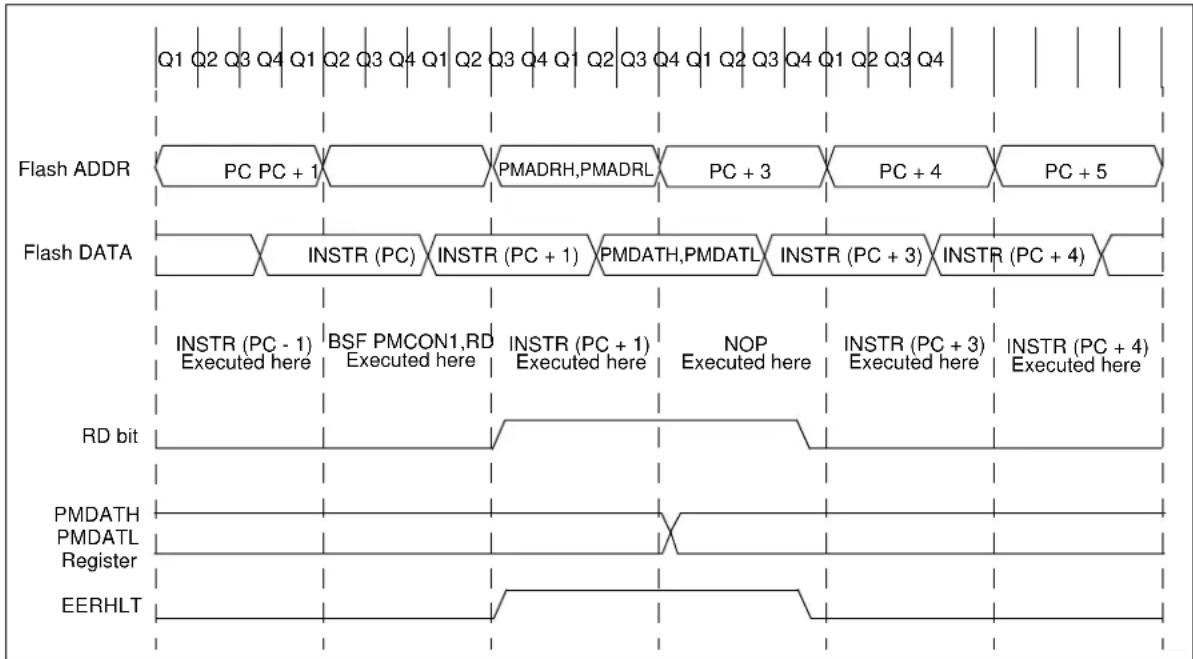
flowchart
graph TD
    A["Flash ADDR"] --> B["PC PC + 1"]
    B --> C["PMADRH,PMADRL"]
    C --> D["PC + 3"]
    D --> E["PC + 4"]
    E --> F["PC + 5"]
    G["Flash DATA"] --> H["INSTR (PC)"]
    H --> I["INSTR (PC + 1)"]
    I --> J["PMDATH,PMDATL"]
    J --> K["INSTR (PC + 3)"]
    K --> L["INSTR (PC + 4)"]
    M["RD bit"] --> N["INSTR (PC - 1) Executed here"]
    N --> O["BSF PMCON1,RD Executed here"]
    O --> P["INSTR (PC + 1) Executed here"]
    P --> Q["NOP Executed here"]
    Q --> R["INSTR (PC + 3) Executed here"]
    R --> S["INSTR (PC + 4) Executed here"]
18.3.2 WRITING TO THE FLASH PROGRAM MEMORY
A word of the Flash program memory may only be written to if the word is in an unprotected segment of memory, as defined in Section 12.1 "Configuration Word" (bits WRT<1:0>).
Note: The write-protect bits are used to protect the users' program from modification by the user's code. They have no effect when programming is performed by ICSP. The code-protect bits, when programmed for code protection, will prevent the program memory from being written via the ICSP interface.
Flash program memory must be written in four-word blocks. See Figures 18-2 and 18-3 for more details. A block consists of four words with sequential addresses, with a lower boundary defined by an address, where PMADRL<1:0>=00. All block writes to program memory are done as 16-word erase by four-word write operations. The write operation is edge-aligned and cannot occur across boundaries.
To write program data, the WREN bit must be set and the data must first be loaded into the buffer registers (see Figure 18-2). This is accomplished by first writing the destination address to PMADRL and PMADR H and then writing the data to PMDATL and PMDATH. After the address and data have been set, the following sequence of events must be executed:
- Write 55h, then AAh, to PMCON2 (Flash programming sequence).
- Set the WR control bit in the PMCON1 register.
All four buffer register locations should be written to with correct data. If less than four words are being written to in the block of four words, then a read from the program memory location(s) not being written to must be performed. This takes the data from the program memory location(s) not being written and loads it into the PMDATL and PMDATH registers. Then the sequence of events to transfer data to the buffer registers must be executed.
To transfer data from the buffer registers to the program memory, the PMADRL and PMADRH registers must point to the last location in the four-word block (PMADRL<1:0> = 11). Then the following sequence of events must be executed:
- Write 55h, then AAh, to PMCON2 (Flash programming sequence).
- Set the WR control bit in the PMCON1 register to begin the write operation.
The user must follow the same specific sequence to initiate the write for each word in the program block, writing each program word in sequence (000, 001, 010, 011). When the write is performed on the last word (PMADRL<1:0>=11), a block of sixteen words is automatically erased and the content of the four-word buffer registers are written into the program memory.
After the "BSF PMCON1, WR" instruction, the processor requires two cycles to set up the erase/write operation. The user must place two NOP instructions after the WR bit is set. Since data is being written to buffer registers, the writing of the first three words of the block appears to occur immediately. The processor will halt internal operations for the typical 4 ms, only during the cycle in which the erase takes place (i.e., the last word of the sixteen-word block erase). This is not Sleep mode, as the clocks and peripherals will continue to run. After the four-word write cycle, the processor will resume operation with the third instruction after the PMCON1 write instruction. The above sequence must be repeated for the higher 12 words.
Note: An erase is only initiated for the write of four words, just after a row boundary; or PMCON1
Refer to Figure 18-2 for a block diagram of the buffer registers and the control signals for test mode.
18.3.3 PROTECTION AGAINST SPURIOUS WRITE
There are conditions when the device should not write to the program memory. To protect against spurious writes, various mechanisms have been built in. On power-up, WREN is cleared. Also, the Power-Up Timer (72 ms duration) prevents program memory writes.
The write initiate sequence and the WREN bit help prevent an accidental write during a power glitch or software malfunction.
18.3.4 OPERATION DURING CODE PROTECT
When the device is code-protected, the CPU is able to read and write unscrambled data to the program memory. The test mode access is disabled.
18.3.5 OPERATION DURING WRITE PROTECT
When the program memory is write-protected, the CPU can read and execute from the program memory. The portions of program memory that are write-protected cannot be modified by the CPU using the PMCON registers. The write protection has no effect in ICSP mode.
FIGURE 18-2: BLOCK WRITES TO 4K FLASH PROGRAM MEMORY

flowchart
graph TD
    A["7 5 0 7 0"] --> B["6 PMDATH"]
    A --> C["8 PMDATL"]
    B --> D["14"]
    C --> E["14 14 14"]
    D --> F["Buffer Register"]
    E --> G["Buffer Register"]
    F --> H["Program Memory"]
    G --> I["Buffer Register"]
    H --> J["Buffer Register"]
    style A fill:#ccc,stroke:#333
    note right of A: If at new row sixteen words of Flash are erased, then four buffers are transferred to Flash automatically after this word is written
    note right of D: First word of block to be written
    note right of F: PMADRL<1:0>=0.0
    note right of G: PMADRL<1:0>=0.1
    note right of G: PMADRL<1:0>=10
    note right of G: PMADRL<1:0>=11
FIGURE 18-3: FLASH PROGRAM MEMORY LONG WRITE CYCLE EXECUTION

flowchart
graph TD
    A["Flash ADDR"] --> B["PC + 1"]
    B --> C["PMADR H, PMADRL"]
    C --> D["PC + 2"]
    D --> E["PC + 3 PC + 4"]
    F["Flash DATA"] --> G["INSTR (PC)"]
    G --> H["INSTR (PC + 1)"]
    H --> I["ignored read"]
    I --> J["PMDATH, PMDATL"]
    J --> K["INSTR (PC+2)"]
    K --> L["INSTR (PC+3)"]
    M["BSF PMCON1, WR Executed here"] --> N["INSTR (PC + 1) Executed here"]
    O["Processor halted EE Write Time"] --> P["NOP Executed here"]
    Q["INSTR (PC + 2) NOP Executed here"] --> R["INSTR (PC + 3) Executed here"]
19.0 I/O PORTS
In general, when a peripheral is enabled, that pin may not be used as a general purpose I/O pin.
Each port has two registers for its operation. These registers are:
• TRISGPx registers (data direction register)
- PORTGPx registers (read the levels on the pins of the device)
Some ports may have one or more of the following additional registers. These registers are:
• ANSELx (analog select)
- WPUx (weak pull-up)
Ports with analog functions also have an ANSELx register, which can disable the digital input and save power. A simplified model of a generic I/O port, without the interfaces to other peripherals, is shown in Figure 19-1.
FIGURE 19-1: GENERIC I/O PORTGPX OPERATION
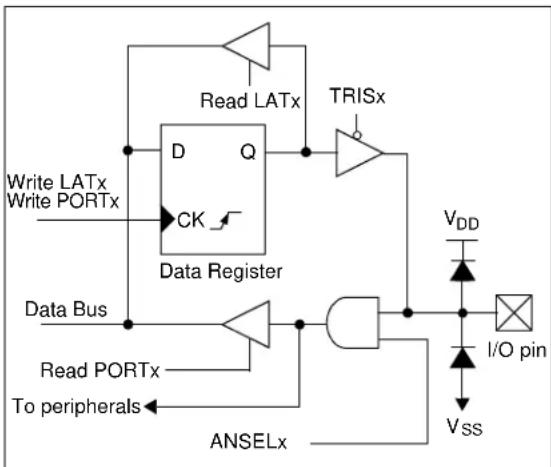
flowchart
graph TD
    A["Write LATx"] --> B["Data Register"]
    C["Write PORTx"] --> B
    B --> D["TRISx"]
    D --> E["I/O pin"]
    E --> F["V_DD"]
    G["Data Bus"] --> H["AND Gate"]
    H --> I["AND Gate"]
    I --> J["AND Gate"]
    J --> K["AND Gate"]
    L["Read PORTx"] --> M["AND Gate"]
    M --> N["AND Gate"]
    O["To peripherals"] --> P["AND Gate"]
    P --> Q["AND Gate"]
    R["ANSELx"] --> S["AND Gate"]
    S --> T["AND Gate"]
    U["Write LATx"] --> V["TRISx"]
    W["Write PORTx"] --> X["AND Gate"]
    Y["Data Bus"] --> Z["AND Gate"]
    AA["AND Gate"] --> AB["AND Gate"]
    AC["TRISx"] --> AD["AND Gate"]
    AE["V_DD"] --> AF["I/O pin"]
    AG["V_SS"] --> AH["AND Gate"]
EXAMPLE 19-1: INITIALIZING PORTA
; This code example illustrates
; initializing the PORTGPA register. The
; other ports are initialized in the same
; manner.

BANKSEL PORTGPA;
CLRF PORTGPA; Init PORTA
BANKSEL ANSELA;
CLRF ANSELA; digital I/O
BANKSEL TRISGPA;
MOVLW B'00011111'; Set GPA<4:0> as
; inputs
MOVWF TRISGPA; and set GPA<7:6> as
; outputs
19.1 Alternate Pin Function
The Alternate Pin Function Control (APFCON) register is used to steer specific peripheral input and output functions between different pins. The APFCON register is shown in Register 19-1. For the MCP19119 device, the following function can be moved between different pins:
• Frequency Synchronization Clock Input/Output
This bit has no effect on the values of any TRIS register. PORT and TRIS overrides will be routed to the correct pin. The unselected pin will be unaffected.
REGISTER 19-1: APFCON: ALTERNATE PIN FUNCTION CONTROL REGISTER
| U-0 U-0 U-0 U-0 U-0 U-0 R/W-0 | |||||||
| — | — | — | — | — | — | — | CLKSEL |
| bit 7 bit 0 | |||||||
Legend:
| R = Readable bit | W = Writable bit | U = Unimplemented bit, read as '0' |
| -n = Value at POR | '1' = Bit is set | '0' = Bit is cleared x = Bit is unknown |
bit 7-1 Unimplemented: Read as '0'
bit 0 CLKSEL: Pin Selection bit
1 = Multi-phase or multiple output clock function is on GPB5
0 = Multi-phase or multiple output clock function is on GPA1
19.2 PORTGPA and TRISGPA Registers
PORTGPA is an 8-bit wide, bidirectional port consisting of five CMOS I/O, two open-drain I/O and one open-drain input-only pin. The corresponding data direction register is TRISGPA (Register 19-3). Setting a TRISGPA bit (= 1) will make the corresponding PORTGPA pin an input (i.e., disable the output driver). Clearing a TRISGPA bit (= 0) will make the corresponding PORTGPA pin an output (i.e., enables output driver). The exception is GPA5, which is input only and its TRISGPA bit will always read as '1'. Example 19-1 shows how to initialize an I/O port.
Reading the PORTGPA register (Register 19-2) reads the status of the pins, whereas writing to it will write to the PORT latch. All write operations are read-modify-write operations.
The TRISGPA register (Register 19-3) controls the PORTGPA pin output drivers, even when they are being used as analog inputs. The user must ensure the bits in the TRISGPA register are maintained set when using them as analog inputs. I/O pins configured as analog input always read '0'. If the pin is configured for a digital output (either port or alternate function), the TRISGPA bit must be cleared in order for the pin to drive the signal and a read will reflect the state of the pin.
19.2.1 INTERRUPT-ON-CHANGE
Each PORTGPA pin is individually configurable as an interrupt-on-change pin. Control bits IOCA<7:0> enable or disable the interrupt function for each pin. The interrupt-on-change feature is disabled on a Power-On Reset. Refer to Section 20.0 "Interrupt-on-Change" for more information.
19.2.2 WEAK PULL-UPS
PORTGPA <3:0> and PORTGPA5 have an internal weak pull-up. PORTGPA<7:6> are special ports for the SSP module and do not have weak pull-ups. Individual control bits can enable or disable the internal weak pull-ups (see Register 19-4). The weak pull-up is automatically turned off when the port pin is configured as an output, an alternative function or on a Power-On Reset setting the RAPU bit in the OPTION_REG register. The weak pull-up on GPA5 is enabled when configured as MCLR pin by setting bit 5 in the Configuration Word register and disabled when GPA5 is an I/O. There is no software control of the MCLR pull-up.
19.2.3 ANSELA REGISTER
The ANSELA register (Register 19-5) is used to configure the Input mode of an I/O pin to analog. Setting the appropriate ANSELA bit high will cause all digital reads on the pin to be read as '0' and allows analog functions on the pin to operate correctly.
The state of the ANSELA bits has no effect on the digital output functions. A pin with TRISGPA clear and ANSELA set will still operate as a digital output, but the Input mode will be analog. This can cause unexpected behavior when executing read-modify-write instructions on the affected port.
Note: The ANSELA bits default to the Analog mode after Reset. To use any pins as digital general purpose or peripheral inputs, the corresponding ANSELA bits must be initialized to '0' by user software.
19.2.4 PORTGPA FUNCTIONS AND OUTPUT PRIORITIES
Each PORTGPA pin is multiplexed with other functions. The pins, their combined functions and their output priorities are shown in Table 19-1. For additional information, refer to the appropriate section in this data sheet.
PORTGPA pins GPA7 and GPA4 are true open-drain pins with no connection back to V_DD .
When multiple outputs are enabled, the actual pin control goes to the peripheral with the highest priority.
Analog input functions, such as ADC, are not shown in the priority lists. These inputs are active when the I/O pin is set for Analog mode using the ANSELA register. Digital output functions may control the pin when it is in Analog mode with the priority shown in Table 19-1.
TABLE 19-1: PORTGPA OUTPUT PRIORITY
| Pin Name Function Priority (1) | |
| GPA0 GPA | 0AN0ANALOG_TEST |
| GPA1 GPA | 1AN1CLKPIN |
| GPA2 GPA | 2AN2T0CKIINT |
| GPA3 GPA | 3AN3 |
| GPA4 GPA | 4 (open-drain input/output) |
| GPA5 GPA | 5 (open-drain data input only) |
| GPA6 GPA | 6ICSPDAT (MCP19118 Only) |
| GPA7 GPA | 7 (open-drain output)SCLICSPCLK (MCP19118 Only) |
Note 1: Priority listed from highest to lowest.
REGISTER 19-2: PORTGPA: PORTGPA REGISTER
| R/W-x | R/W-x | R-x | R-x | R/W-x | R/W-x | R/W-x | R/W-x |
| GPA7 | GPA6 | GPA5 | GPA4 | GPA3 | GPA2 | GPA1 | GPA0 |
| bit 7 bit 0 | |||||||
Legend:
| R = Readable bit | W = Writable bit | U = Unimplemented bit, read as '0' |
| -n = Value at POR | '1' = Bit is set | '0' = Bit is cleared x = Bit is unknown |
bit 7 GPA7: General Purpose Open-Drain I/O pin.
bit 6 GPA6: General Purpose I/O pin.
1 = Port pin is > V _IH
0 = Port pin is < V _IL
bit 5 GPA5/MCLR: General Purpose Open-Drain I/O pin.
bit 4 GPA4: General Purpose Open-Drain I/O pin.
bit 3-0 GPA<3:0>: General Purpose I/O pin.
1 = Port pin is > V _IH
0 = Port pin is < V _IL
REGISTER 19-3: TRISGPA: PORTGPA TRI-STATE REGISTER
| R/W-1 R/W-1 R-1 R/W-1 R/W-1 R/W-1 R/W-1 R/W-1 | |||||||
| TRISA7 | TRISA6 | TRISA5 | TRISA4 | TRISA3 | TRISA2 | TRISA1 | TRISA0 |
| bit 7 bit 0 | |||||||
Legend:
| R = Readable bit | W = Writable bit | U = Unimplemented bit, read as '0' |
| -n = Value at POR | '1' = Bit is set | '0' = Bit is cleared x = Bit is unknown |
bit 7-6 TRISA<7:6>: PORTGPA Tri-State Control bit
1 = PORTGPA pin configured as an input (tri-stated)
0 = PORTGPA pin configured as an output
bit 5 TRISA5: GPA5 Port Tri-State Control bit
This bit is always '1' as GPA5 is an input only
bit 4-0 TRISA<4:0>: PORTGPA Tri-State Control bit
1 = PORTGPA pin configured as an input (tri-stated)
0 = PORTGPA pin configured as an output
REGISTER 19-4: WPUGPA: WEAK PULL-UP PORTGPA REGISTER
| U-0 U-0 R/W-1 U-0 R/W-1 R/W-1 R/W-1 R/W-1 | |||||||
| — | — | WPUA5 | — | WPUA3 | WPUA2 | WPUA1 | WPUA0 |
| bit 7 bit 0 | |||||||
Legend:
| R = Readable bit | W = Writable bit | U = Unimplemented bit, read as '0' |
| -n = Value at POR | '1' = Bit is set | '0' = Bit is cleared x = Bit is unknown |
bit 7-6 Unimplemented: Read as '0'
bit 5 WPUA5: Weak Pull-Up Register bit
1 = Pull-up enabled.
0 = Pull-up disabled.
bit 4 Unimplemented: Read as '0'
bit 3-0 WPUA<3:0>: Weak Pull-Up Register bit
1 = Pull-up enabled.
0 = Pull-up disabled.
Note 1: The weak pull-up device is enabled only when the global bit is enabled, the pin is in input mode (TRISGPA = 1), the individual WPUA bit is enabled (WPUA = 1) and the pin is not configured as an analog input.
2: GPA5 weak pull-up is also enabled when the pin is configured as MCLR in the Configuration Word register.
REGISTER 19-5: ANSELA: ANALOG SELECT PORTGPA REGISTER
| U-0 U-0 U-0 R/W-1 R/W-1 R/W-1 R/W-1 R/W-1 | |||||
| ——— | — | A | N | S | |
| bit 7 bit 0 | |||||
| Legend: | |||
| R = Readable bit | W = Writable bit | U = Unimplemented bit, read as ‘0’ | |
| -n = Value at POR | ‘1’ = Bit is set | ‘0’ = Bit is cleared | x = Bit is unknown |
bit 7-4 Unimplemented: Read as '0'
bit 3-0 ANSA<3:0>: Analog Select PORTGPA Register bit
1 = Analog input. Pin is assigned as analog input.(1)
0 = Digital I/O. Pin is assigned to port or special function.
Note 1: Setting a pin to an analog input automatically disables the digital input circuitry, weak pull-ups and interrupt-on-change, if available. The corresponding TRIS bit must be set to Input mode in order to allow external control of the voltage on the pin.
TABLE 19-2: SUMMARY OF REGISTERS ASSOCIATED WITH PORTGPA
| Name | Bit 7 | Bit 6 | Bit 5 | Bit 4 | Bit 3 | Bit 2 | Bit 1 | Bit 0 | Register on Page |
| ANSELA | — | — | — | — | ANSA3 | ANSA2 | ANSA1 | ANSA0 | 115 |
| APFCON | — | — | — | — | — | — | — | CLKSEL | 112 |
| OPTION_REG | INTEDG | T0CS | T0SE | PSA | PS2 | PS1 | PS0 | 77 | |
| PORTGPA | GPA7 | GPA6 | GPA5 | GPA4 | GPA3 | GPA2 | GPA1 | GPA0 | 113 |
| TRISGPA | TRISA7 | TRISA6 | TRISA5 | TRISA4 | TRISA3 | TRISA2 | TRISA1 | TRISA0 | 114 |
| WPUGPA | — | — | WPUA5 | — | WPUA3 | WPUA2 | WPUA1 | WPUA0 | 114 |
Legend: — = unimplemented locations read as '0'. Shaded cells are not used by PORTGPA.
19.3 PORTGPB and TRISGPB Registers
PORTGPB is an 8-bit wide, bidirectional port consisting of seven general purpose I/O ports. The corresponding data direction register is TRISGPB (Register 19-7). Setting a TRISGPB bit (= 1) will make the corresponding PORTGPB pin an input (i.e., disable the output driver). Clearing a TRISGPB bit (= 0) will make the corresponding PORTGPB pin an output (i.e., enable the output driver). Example 19-1 shows how to initialize an I/O port.
Some pins for PORTGPB are multiplexed with an alternate function for the peripheral or a clock function. In general, when a peripheral or clock function is enabled, that pin may not be used as a general purpose I/O pin.
Reading the PORTGPB register (Register 19-6) reads the status of the pins, whereas writing to it will write to the PORT latch. All write operations are read-modify-write operations.
The TRISGPB register (Register 19-7) controls the PORTGPB pin output drivers, even when they are being used as analog inputs. The user should ensure the bits in the TRISGPB register are maintained set when using them as analog inputs. I/O pins configured as analog input always read '0'. If the pin is configured for a digital output (either port or alternate function), the TRISGPB bit must be cleared in order for the pin to drive the signal and a read will reflect the state of the pin.
19.3.1 INTERRUPT-ON-CHANGE
Each PORTGPB pin is individually configurable as an interrupt-on-change pin. Control bits IOCB<7:4> and IOCB<2:0> enable or disable the interrupt function for each pin. The interrupt-on-change feature is disabled on a Power-On Reset. Refer to Section 20.0 "Interrupt-on-Change" for more information.
19.3.2 WEAK PULL-UPS
Each of the PORTGPB pins has an individually configurable internal weak pull-up. Control bits WPUB<7:4> and WPUB<2:1> enable or disable each pull-up (see Register 19-8). Each weak pull-up is automatically turned off when the port pin is configured as an output. All pull-ups are disabled on a Power-On Reset by the RAPU bit in the OPTION_REG register.
19.3.3 ANSELB REGISTER
The ANSELB register (Register 19-9) is used to configure the Input mode of an I/O pin to analog. Setting the appropriate ANSELB bit high will cause all digital reads on the pin to be read as '0' and allows analog functions on the pin to operate correctly.
The state of the ANSELB bits has no effect on the digital output functions. A pin with TRISGPB clear and ANSELB set will still operate as a digital output, but the Input mode will be analog. This can cause unexpected behavior when executing read-modify-write instructions on the affected port.
Note: The ANSELB bits default to the Analog mode after Reset. To use any pins as digital general purpose or peripheral inputs, the corresponding ANSELB bits must be initialized to '0' by the user's software.
19.3.4 PORTGPB FUNCTIONS AND OUTPUT PRIORITIES
Each PORTGPB pin is multiplexed with other functions. The pins, their combined functions and their output priorities are shown in Table 19-3. For additional information, refer to the appropriate section in this data sheet.
PORTGPB pin GPB0 is a true open-drain pin with no connection back to V_DD .
When multiple outputs are enabled, the actual pin control goes to the peripheral with the highest priority.
Analog input functions, such as ADC, and some digital input functions are not included in the list below. These inputs are active when the I/O pin is set for Analog mode using the ANSELB registers. Digital output functions may control the pin when it is in Analog mode, with the priority shown in Table 19-3.
TABLE 19-3: PORTGPB OUTPUT PRIORITY
| Pin Name Function Priority (1) | |
| GPB0 GPB0 (open-drain input/output)SDA | |
| GPB1 GPB1AN4EAPIN | |
| GPB2 GPB2AN5 | |
| GPB4 GPB4AN6ICSPDAT/ICDDAT (MCP19119 Only) | |
| GPB5 GPB5AN7ICSPCLK/ICDCLK (MCP19119 Only)ALT_CLKPIN (MCP19119 Only) | |
| GPB6 GPB6 | |
| GPB7 GPB7 |
Note 1: Priority listed from highest to lowest.
REGISTER 19-6: PORTGPB: PORTGPB REGISTER
| R/W-x R/W-x R/W-x R/W-x U-x R/W-x R/W-x R/W-x | |||||||
| GPB7^(1) | GPB6^(1) | GPB5^(1) | GPB4^(1) | — GPB2 | GPB1 GPB0 | ||
| bit 7 bit 0 | |||||||
| Legend: | |||
| R = Readable bit W = Writable bit | U = Unimplemented bit, read as '0' | ||
| -n = Value at POR | ‘1’ = Bit is set | ‘0’ = Bit is cleared | x = Bit is unknown |
bit 7-4 GPB<7:4>: General Purpose I/O Pin bit
1 = Port pin is > V _IH
0 = Port pin is < V_IL
bit 3 Unimplemented: Read as '0'
bit 2-0 GPB<2:0>: General Purpose I/O Pin bit
1 = Port pin is > V_IH
0 = Port pin is < V_IL
Note 1: Not implemented on MCP19118.
REGISTER 19-7: TRISGPB: PORTGPB TRI-STATE REGISTER
| R/W-1 | R/W-1 | R/W-1 | R/W-1 | U-1 | R/W-1 | R/W-1 | R/W-1 |
| TRISB7(1) | TRISB6(1) | TRISB5(1) | TRISB4(1) | — | TRISB2 | TRISB1 | TRISB0 |
| bit 7 bit 0 | |||||||
| Legend: | |||
| R = Readable bit W = Writable bit | U = Unimplemented bit, read as ‘0’ | ||
| -n = Value at POR | ‘1’ = Bit is set | ‘0’ = Bit is cleared | x = Bit is unknown |
bit 7-4 TRISB<7:4>: PORTGPB Tri-State Control bit
1 = PORTGPB pin configured as an input (tri-stated)
0 = PORTGPB pin configured as an output
bit 3 Unimplemented: Read as '1'
bit 2-0 TRISB<2:0>: PORTGPB Tri-State Control bit
1 = PORTGPB pin configured as an input (tri-stated)
0 = PORTGPB pin configured as an output
Note 1: Not implemented on MCP19118.
REGISTER 19-8: WPUGPB: WEAK PULL-UP PORTGPB REGISTER
| R/W-1 R/W-1 R/W-1 R/W-1 U-0 R/W-1 R/W-1 U-0 | |||||||
| WPUB7(2) | WPUB6(2) | WPUB5(2) | WPUB4(2) | — WPU | B2 WPUB1 — | ||
| bit 7 bit 0 | |||||||
Legend:
| R = Readable bit W = Writable bit | U = Unimplemented bit, read as '0' | ||
| -n = Value at POR | '1' = Bit is set | '0' = Bit is cleared | x = Bit is unknown |
bit 7-4 WPUB<7:4>: Weak Pull-Up Register bit
1 = Pull-up enabled
0 = Pull-up disabled
bit 3 Unimplemented: Read as '0'
bit 2-1 WPUB<2:1>: Weak Pull-Up Register bit
1 = Pull-up enabled
0 = Pull-up disabled
bit 0 Unimplemented: Read as '0'
Note 1: The weak pull-up device is enabled only when the global RAPU bit is enabled, the pin is in Input mode (TRISGPA = 1), the individual WPUB bit is enabled (WPUB = 1) and the pin is not configured as an analog input.
2: Not implemented on MCP19118.
REGISTER 19-9: ANSELB: ANALOG SELECT PORTGPB REGISTER
| U-0 | U-0 R/W-1 R/W-1 U-0 R/W-1 | R/W-1 U-0 | ||||||
| — | — | ANSB5^(2) | ANSB4^(2) | — ANSB2 | ANSB1 | — | ||
| bit 7 bit 0 | ||||||||
Legend:
| R = Readable bit | W = Writable bit | U = Unimplemented bit, read as '0' |
| -n = Value at POR | ‘1’ = Bit is set | ‘0’ = Bit is cleared x = Bit is unknown |
bit 7-6 Unimplemented: Read as '0'
bit 5-4 ANSB<5:4>: Analog Select PORTGPB Register bit
1 = Analog input. Pin is assigned as analog input ^1 .
0 = Digital I/O. Pin is assigned to port or special function.
bit 3 Unimplemented: Read as '0'
bit 2-1 ANSB<2:1>: Analog Select PORTGPB Register bit
1 = Analog input. Pin is assigned as analog input ^1 .
0 = Digital I/O. Pin is assigned to port or special function.
bit 0 Unimplemented: Read as '0'
Note 1: Setting a pin to an analog input automatically disables the digital input circuitry, weak pull-ups and interrupt-on-change if available. The corresponding TRIS bit must be set to Input mode in order to allow external control of the voltage on the pin.
2: Not implemented on MCP19118.
TABLE 19-4: SUMMARY OF REGISTERS ASSOCIATED WITH PORTGPB
| Name Bit 7 | Bit 6 Bit 5 | Bit 4 Bit 3 | Bit 2 Bit 1 | Bit 0 | Register on Page | ||||
| ANSELB | — — | ANSB5 AN | B4 — AN | B2 ANSB1 | — 118 | ||||
| APFCON | — | — | — | — | — | — | — | CLKSEL | 112 |
| OPTION_REG | INTEDG | T0CS | T0SE | PSA | PS2 | PS1 | PS0 | 77 | |
| PORTGPB | GPB7 | GPB6 | GPB5 | GPB4 | — | GPB2 | GPB1 | GPB0 | 117 |
| TRISGPB | TRISB7 | TRISB6 | TRISB5 | TRISB4 | — | TRISB2 | TRISB1 | TRISB0 | 117 |
| WPUGPB | WPUB7 | WPUB6 | WPUB5 | WPUB4 | — | WPUB2 | WPUB1 | — | 118 |
Legend: — = unimplemented locations read as '0'. Shaded cells are not used by PORTGPB.
NOTES:
20.0 INTERRUPT-ON-CHANGE
Each PORTGPA and PORTGPB pin is individually configurable as an interrupt-on-change pin. Control bits IOCA and IOCB enable or disable the interrupt function for each pin. Refer to Registers 20-1 and 20-2. The interrupt-on-change is disabled on a Power-On Reset.
The interrupt-on-change on GPA5 is disabled when configured as MCLR pin in the Configuration Word register.
For enabled interrupt-on-change pins, the values are compared with the old value latched on the last read of PORTGPA or PORTGPB. The mismatched outputs of the last read of all the PORTGPA and PORTGPB pins are OR'ed together to set the Interrupt-on-Change Interrupt Flag bit (IOCF) in the INTCON register.
20.1 Enabling the Module
To allow individual port pins to generate an interrupt, the IOCIE bit in the INTCON register must be set. If the IOCIE bit is disabled, the edge detection on the pin will still occur, but an interrupt will not be generated.
20.2 Individual Pin Configuration
To enable a pin to detect an interrupt-on-change, the associated IOCAx or IOCBx bit in the IOCA or IOCB register is set.
20.3 Clearing Interrupt Flags
The user, in the Interrupt Service Routine, clears the interrupt by:
a) Any read of PORTGPA or PORTGPB AND Clear flag bit IOCF. This will end the mismatch condition;
OR
b) Any write of PORTGPA or PORTGPB AND Clear flag bit IOCF will end the mismatch condition.
A mismatch condition will continue to set flag bit IOCF. Reading PORTGPA or PORTGPB will end the mismatch condition and allow flag bit IOCF to be cleared. The latch holding the last read value is not affected by a MCLR Reset. After this Reset, the IOCF flag will continue to be set if a mismatch is present.
Note: If a change on the I/O pin should occur when any PORTGPA or PORTGPB operation is being executed, then the IOCF interrupt flag may not get set.
20.4 Operation in Sleep
The interrupt-on-change interrupt sequence will wake the device from Sleep mode, if the IOCE bit is set.
20.5 Interrupt-on-Change Registers
REGISTER 20-1: IOCA: INTERRUPT-ON-CHANGE PORTGPA REGISTER
| R/W-0 R/W-0 R/W-0 R/W-0 R/W-0 R/W-0 R/W-0 R/W-0 | |||||||
| IOCA7 IOCA6 IOCA5 IOCA4 IOCA3 IOCA2 IOCA1 IOCA0 | |||||||
| bit 7 bit 0 | |||||||
Legend:
| R = Readable bit | W = Writable bit | U = Unimplemented bit, read as '0' |
| -n = Value at POR | '1' = Bit is set | '0' = Bit is cleared x = Bit is unknown |
bit 7-6 IOCA<7:6>: Interrupt-on-Change PORTGPA Register bits.
1 = Interrupt-on-change enabled on the pin.
0 = Interrupt-on-change disabled on the pin.
bit 5 IOCA<5>: Interrupt-on-Change PORTGPA Register bits ^(1) .
1 = Interrupt-on-change enabled on the pin.
0 = Interrupt-on-change disabled on the pin.
bit 4-0 IOCA<4:0>: Interrupt-on-Change PORTGPA Register bits.
1 = Interrupt-on-change enabled on the pin.
0 = Interrupt-on-change disabled on the pin.
Note 1: The Interrupt-on-change on GPA5 is disabled if GPA5 is configured as MCLR.
REGISTER 20-2: IOCB: INTERRUPT-ON-CHANGE PORTGPB REGISTER
| R/W-0 R/W-0 R/W-0 R/W-0 U-0 | R/W-0 R/W-0 R/W-0 | ||||||
| IOCB7^(1) | IOCB6^(1) | IOCB5^(1) | IOCB4^(1) | — | IOCB2 IOC | B1 IOCB0 | |
| bit 7 bit 0 | |||||||
Legend:
| R = Readable bit | W = Writable bit | U = Unimplemented bit, read as ‘0’ |
| -n = Value at POR | ‘1’ = Bit is set | ‘0’ = Bit is cleared x = Bit is unknown |
bit 7-4 IOCB<7:4>: Interrupt-on-Change PORTGPB Register bits.
1 = Interrupt-on-change enabled on the pin.
0 = Interrupt-on-change disabled on the pin.
bit 3 Unimplemented: Read as '0'
bit 2-0 IOCB<2:0>: Interrupt-on-Change PORTGPB Register bits.
1 = Interrupt-on-change enabled on the pin.
0 = Interrupt-on-change disabled on the pin.
Note 1: Not implemented on MCP19119.
TABLE 20-1: SUMMARY OF REGISTERS ASSOCIATED WITH INTERRUPT-ON-CHANGE
| Name | Bit 7 | Bit 6 | Bit 5 | Bit 4 | Bit 3 | Bit 2 | Bit 1 | Bit 0 | Register on Page |
| ANSELA | — | — | — | — | ANSA3 | ANSA2 | ANSA1 | ANSA0 | 115 |
| ANSELB | — | — | ANSB5 | ANSB4 | — | ANSB2 | ANSB1 | — | 118 |
| INTCON | GIE | PEIE | T0IE | INTE | IOCE | T0IF | INTF | IOCF | 96 |
| IOCA | IOCA7 | IOCA6 | IOCA5 | IOCA4 | IOCA3 | IOCA2 | IOCA1 | IOCA0 | 122 |
| IOCB | IOCB7 | IOCB6 | IOCB5 | IOCB4 | — | IOCB2 | IOCB1 | IOCB0 | 122 |
| TRISGPA | TRISA7 | TRISA6 | TRISA5 | TRISA4 | TRISA3 | TRISA2 | TRISA1 | TRISA0 | 114 |
| TRISGPB | TRISB7 | TRISB6 | TRISB5 | TRISB4 | — | TRISB2 | TRISB1 | TRISB0 | 117 |
Legend: — = unimplemented locations read as '0'. Shaded cells are not used by interrupt-on-change.
21.0 INTERNAL TEMPERATURE INDICATOR MODULE
The MCP19118/19 is equipped with a temperature circuit designed to measure the operating temperature of the silicon die. The circuit's operating temperature range is -40^ to +125^ . The output is a voltage that is proportional to the device temperature. The output of the temperature indicator is internally connected to the device ADC.
21.1 Circuit Operation
The TMPSEN bit in the ABECON register (Register 6-15) is set to enable the internal temperature measurement circuit. The MCP19118/19 overtemperature shutdown feature is NOT controlled by this bit.
FIGURE 21-1: TEMPERATURE CIRCUIT DIAGRAM
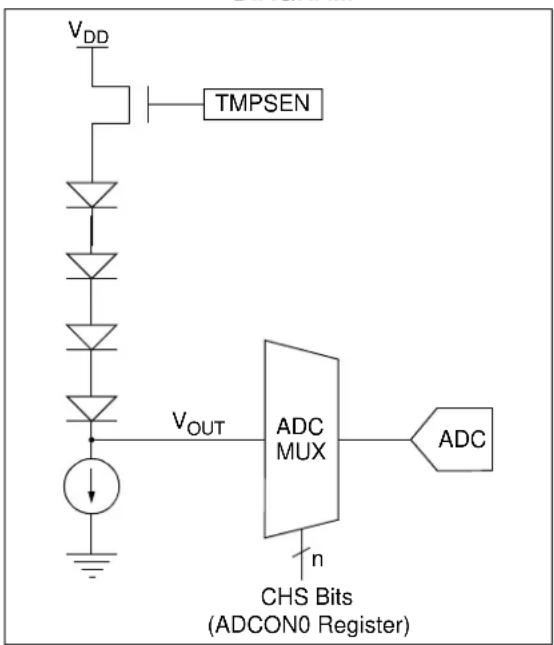
text_image
VDD TMPSEN VOUT ADC MUX n CHS Bits (ADCON0 Register)21.2 Temperature Output
The output of the circuit is measured using the internal analog-to-digital converter. Channel 10 is reserved for the temperature circuit output. Refer to Section 22.0 "Analog-to-Digital Converter (ADC) Module" for detailed information.
The temperature of the silicon die can be calculated by the ADC measurement by using Equation 21-1.
EQUATION 21-1: SILICON DIE TEMPERATURE
$$ T E M P _ D I E \quad \frac {A D C R E A D I N G 1 . 7 5 -}{1 3 . 3 m V / ^ {\circ} C} = $$
NOTES:
22.0 ANALOG-TO-DIGITAL CONVERTER (ADC) MODULE
The Analog-to-Digital Converter (ADC) allows conversion of an analog input signal to a 10-bit binary representation of that signal. This device uses analog inputs, which are multiplexed into a single sample and hold circuit. The output of the sample and hold is connected to the input of the converter. The converter generates a 10-bit binary result via successive approximation and stores the right justified conversion result into the ADC result registers (ADRESH:ADRESL register pair). Figure 22-1 shows the block diagram of the ADC.
The internal band gap supplies the voltage reference to the ADC.
The ADC can generate an interrupt upon completion of a conversion. This interrupt can be used to wake-up the device from Sleep.
FIGURE 22-1: ADC BLOCK DIAGRAM

flowchart
graph TD
    A["V_IN_ANA"] --> B["00000"]
    C["V_REF"] --> D["00001"]
    E["OV_REF"] --> F["00010"]
    G["UV_REF"] --> H["00011"]
    I["V_BGR"] --> J["00100"]
    K["V_OUT"] --> L["00101"]
    M["CRT"] --> N["00110"]
    O["VZC"] --> P["00111"]
    Q["DEMAND"] --> R["01000"]
    S["RELEFF"] --> T["01001"]
    U["TEMP_ANA"] --> V["01010"]
    W["ANA_IN"] --> X["01011"]
    Y["DCI"] --> Z["01100"]
    AA["GPA0"] --> AB["10000"]
    AC["GPA1"] --> AD["10001"]
    AE["GPA2"] --> AF["10010"]
    AG["GPA3"] --> AH["10011"]
    AI["GPB1"] --> AJ["10100"]
    AK["GPB2"] --> AL["10101"]
    AM["GPB4^(3)"] --> AN["10110"]
    AO["GPB5^(3)"] --> AP["10111"]
    B --> AQ["ADC"]
    D --> AQ
    F --> AQ
    H --> AQ
    N --> AQ
    P --> AQ
    R --> AQ
    V --> AQ
    X --> AQ
    Z --> AQ
    AB --> AQ
    AD --> AQ
    AH --> AQ
    AI --> AQ
    AJ --> AQ
    AL --> AQ
    AN --> AQ
    AP --> AQ
    AQ --> AS["GO/DONE"]
    AQ --> AT["ADON"]
    AQ --> AU["V_SS"]
    AQ --> AV["ADRESH ADRESL"]
Note 1: When ADON = 0, all multiplexer inputs are disconnected.
2: See the ADCON0 register (Register 22-1) for detailed analog channel selection per device.
3: Not implemented on MCP19118.
22.1 ADC Configuration
When configuring and using the ADC, the following functions must be considered:
- Port configuration
- Channel selection
• ADC conversion clock source - Interrupt control
- Result formatting
22.1.1 PORT CONFIGURATION
The ADC can be used to convert both analog and digital signals. When converting analog signals, the I/O pin should be configured for analog by setting the associated TRIS and ANSEL bits. Refer to Section 19.0 "I/O Ports" for more information.
Note: Analog voltages on any pin that is defined as a digital input may cause the input buffer to conduct excess current.
22.1.2 CHANNEL SELECTION
There are up to 19 channel selections available on the MCP19118 and 21 channel selections available on the MCP19119:
- AN<6:0> pins
• VIN_ANA: 1/13 of the input voltage ( V_IN )
• V R E G R_OUT Reference voltage - OV_REF: reference for OV comparator
- UV_REF: reference for UV comparator
• VBGR: band gap reference
• VOUT: output voltage - CRT: voltage proportional to the AC inductor current
• VZC: an internal ground, Voltage for Zero Current - DEMAND: input to slope compensation circuitry
- RELEFF: relative efficient measurement channel
- TMP_ANA: voltage proportional to silicon die temperature
- ANA_IN: for a multi-phase slave, error amplifier signal received from master
• DCI: DC inductor valley current
The CHS<4:0> bits in the ADCON0 register determine which channel is connected to the sample and hold circuit.
When changing channels, a delay is required before starting the next conversion. Refer to Section 22.2 "ADC Operation" for more information.
22.1.3 ADC CONVERSION CLOCK
The source of the conversion clock is software-selectable via the ADCON1
- F_OSC / 8
- F_OSC / 16
- F_OSC / 32
- F_OSC / 64
- F_RC (clock derived from internal oscillator with a divisor of 16)
The time to complete one bit conversion is defined as T_AD . One full 10-bit conversion requires 11 T_AD periods, as shown in Figure 22-2.
For a correct conversion, the appropriate T_AD specification must be met. Refer to the A/D conversion requirements in Section 5.0 “Digital Electrical Characteristics” for more information. Table 22-1 gives examples of appropriate ADC clock selections.
Note: Unless using the F_RC , any changes in the system clock frequency will change the ADC clock frequency, which may adversely affect the ADC result.
TABLE 22-1: ADC CLOCK PERIOD (T AD) vs. DEVICE OPERATING FREQUENCIES
| ADC Clock Period (TAD) | Device Frequency (F osc) | |
| ADC Clock Source | ADCS<2:0> 8 MHz | |
| F_OSC/8 | 001 | 1.0 μs(2) |
| F_OSC/16 | 101 | 2.0 μs |
| F_OSC/32 | 010 | 4.0 μs |
| F_OSC/64 | 110 | 8.0 μs(3) |
| F_RC | x11 | 2.0-6.0 μs(1,4) |
Legend: Shaded cells are outside of recommended range.
Note 1: The F_RC source has a typical T_AD time of 4 s for V_DD > 3.0V .
2: These values violate the minimum required T_AD time.
3: For faster conversion times, the selection of another clock source is recommended.
4: The F_RC clock source is only recommended if the conversion will be performed during Sleep.
FIGURE 22-2: ANALOG-TO-DIGITAL CONVERSION T
AD CYCLES

flowchart
graph TD
    A["Start"] --> B["Conversion starts"]
    B --> C["Holding capacitor is disconnected from analog input (typically 100 ns)"]
    C --> D["Set GO/DONE bit"]
    D --> E["On the following cycle: ADRESH:ADRESL is loaded, GO bit is cleared, ADIF bit is set, holding capacitor is connected to analog input"]
22.1.4 INTERRUPTS
The ADC module allows for the ability to generate an interrupt upon completion of an Analog-to-Digital conversion. The ADC Interrupt Flag is the PIR1
Note 1: The ADIF bit is set at the completion of every conversion, regardless of whether or not the ADC interrupt is enabled.
2: The ADC operates during Sleep only when the F_RC oscillator is selected.
This interrupt can be generated while the device is operating or while in Sleep. If the device is in Sleep, the interrupt will wake-up the device. Upon waking from Sleep, the next instruction following the SLEEP instruction is always executed. If the user is attempting to wake-up from Sleep and resume in-line code execution, the INTCON
22.1.5 RESULT FORMATTING
The 10-bit A/D conversion result is supplied in right justified format only.
Figure 22-3 shows the output format.
FIGURE 22-3: 10-BIT A/D RESULT FORMAT

text_image
(ADFM = 1) MSB LSB bit 7 bit 0 bit 7 bit 0 Read as '0' 10-bit A/D Result22.2 ADC Operation
22.2.1 STARTING A CONVERSION
To enable the ADC module, the ADCON0
Note: The GO/DONE bit should not be set in the same instruction that turns on the ADC. Refer to Section 22.2.5 "A/D Conversion Procedure".
22.2.2 COMPLETION OF A CONVERSION
When the conversion is complete, the ADC module will:
- Clear the GO/DONE bit
- Set the ADIF Interrupt Flag bit
- Update the ADRESH:ADRESL registers with new conversion result
22.2.3 TERMINATING A CONVERSION
If a conversion must be terminated before completion, the GO/DONE bit can be cleared in software. The ADRESH:ADRESL registers will not be updated with the partially complete Analog-to-Digital conversion sample. Instead, the ADRESH:ADRESL register pair will retain the value of the previous conversion. Additionally, a two T_AD delay is required before another acquisition can be initiated. Following the delay, an input acquisition is automatically started on the selected channel.
Note: A device Reset forces all registers to their Reset state. Thus, the ADC module is turned off and any pending conversion is terminated.
22.2.4 ADC OPERATION DURING SLEEP
The ADC module can operate during Sleep. This requires the ADC clock source to be set to the F_RC option. When the F_RC clock source is selected, the ADC waits one additional instruction before starting the conversion. This allows the SLEEP instruction to be executed, which can reduce system noise during the conversion. If the ADC interrupt is enabled, the device will wake-up from Sleep when the conversion completes. If the ADC interrupt is disabled, the ADC module is turned off after the conversion completes, although the ADON bit remains set.
When the ADC clock source is something other than F_RC , a SLEEP instruction causes the present conversion to be aborted and the ADC module is turned off, although the ADON bit remains set.
22.2.5 A/D CONVERSION PROCEDURE
This is an example procedure for using the ADC to perform an Analog-to-Digital conversion:
-
Configure Port:
-
Disable pin output driver (Refer to the TRIS register)
-
Configure pin as analog (Refer to the ANSEL register)
-
Configure the ADC module:
-
Select ADC conversion clock
- Select ADC input channel
-
Turn on ADC module
-
Configure ADC interrupt (optional):
-
Clear ADC interrupt flag
- Enable ADC interrupt
- Enable peripheral interrupt
-
Enable global interrupt (1)
-
Wait the required acquisition time (2) .
-
Start conversion by setting the GO/DONE bit.
-
Wait for ADC conversion to complete by one of the following:
-
Polling the GO/DONE bit
-
Waiting for the ADC interrupt (interrupts enabled)
-
Read ADC Result.
-
Clear the ADC interrupt flag (required if interrupt is enabled).
Note 1: The global interrupt can be disabled if the user is attempting to wake-up from Sleep and resume in-line code execution.
2: Refer to Section 22.4 "A/D Acquisition Requirements".
EXAMPLE 22-1: A/D CONVERSION
;This code block configures the ADC
;for polling, Frc clock and ANO input.
;
;Conversion start & polling for completion ;
are included.
;
BANKSEL ADCON1 ;
MOVLW B'01110000' ;Frc clock
MOVWF ADCON1 ;
BANKSEL TRISGPA ;
BSF TRISGPA,0 ;Set GPA0 to input
BANKSEL ANSELA ;
BSF ANSELA,0 ;Set GPA0 to analog
BANKSEL ADCON0 ;
MOVLW B'01000001' ;Select channel ANO
MOVWF ADCON0 ;Turn ADC On
CALL SampleTime ;Acquisition delay
BSF ADCON0,1 ;Start conversion
BTFSC ADCON0,1 ;Is conversion done?
GOTO $-1 ;No, test again
BANKSEL ADRESH ;
MOVF ADRESH,W ;Read upper 2 bits
MOVWF RESULTHI ;store in GPR space
BANKSEL ADRESL ;
MOVF ADRESL,W ;Read lower 8 bits
MOVWF RESULTLO ;Store in GPR space
22.3 ADC Register Definitions
The following registers are used to control the operation of the ADC:
REGISTER 22-1: ADCON0: A/D CONTROL REGISTER 0
| U-0 R/W-0 R/W-0 R/W-0 R/W-0 R/W-0 R/W-0 R/W-0 | ||||||
| — CHS4 | CHS3 CHS2 | CHS1 CHS0 GO/DONE ADON | — | |||
| bit 7 bit 0 | ||||||
Legend:
| R = Readable bit W = Writable bit U = Unimplemented bit, read as '0' | |||
| -n = Value at POR | '1' = Bit is set | '0' = Bit is cleared | x = Bit is unknown |
bit 7 Unimplemented: Read as '0'
bit 6-2 CHS<4:0>: Analog Channel Select bits
00000 = VIN_ANA (analog voltage proportional to 1/13 of V_IN )
00001 = VREGREF (reference voltage for V_REG output)
00010 = OV_REF (reference for overvoltage comparator)
00011 = UV_REF (reference for undervoltage comparator)
00100 = VBGR (band gap reference)
00101 = INT_VREG (internal version of the V_REG load voltage)
00110 = CRT (voltage proportional to the current in the inductor)
00111 = VZC (an internal ground, Voltage for Zero Current)
01000 = DEMAND (input to current loop, output of demand mux)
01001 = RELEFF (analog voltage proportional to duty cycle)
01010 = TMP_ANA (analog voltage proportional to temperature)
01011 = ANA_IN (demanded current from the remote master)
01100 = DCI (dc inductor valley current)
01101 = Unimplemented
01110 = Unimplemented
01111 = Unimplemented
10000 = GPA0 (i.e. ADDR1)
10001 = GPA1 (i.e. ADDR0)
10010 = GPA2 (i.e. Temperature Sensor Input)
10011 = GPA3 (i.e. Tracking Voltage)
10100 = GPB1
10101 = GPB2
10110 = GPB4(1)
10111 = GPB5(1)
11000 = Unimplemented
11001 = Unimplemented
11011 = Unimplemented
11100 = Unimplemented
11101 = Unimplemented
11110 = Unimplemented
11111 = Unimplemented
bit 1 GO/DONE: A/D Conversion Status bit
1 = A/D conversion cycle in progress. Setting this bit starts an A/D conversion cycle.
This bit is automatically cleared by hardware when the A/D conversion has completed.
0 = A/D conversion completed/not in progress
bit 0 ADON: ADC Enable bit
1 = ADC is enabled
0 = ADC is disabled and consumes no operating current
Note 1: Not implemented on MCP19118.
REGISTER 22-2: ADCON1: A/D CONTROL REGISTER 1
| U-0 R/W-0 R/W-0 R/W-0 U-0 U-0 U-0 U-0 | ||||
| — ADCS | <2:0> — — — — | |||
| bit 7 bit 0 | ||||
Legend:
| R = Readable bit | P = Programmable bit | U = Unimplemented bit, read as ‘0’ |
| -n = Value at POR | ‘1’ = Bit is set | ‘0’ = Bit is cleared x = Bit is unknown |
bit 7 Unimplemented: Read as '0'
bit 6-4 ADCS<2:0>: A/D Conversion Clock Select bits
000 = Reserved
001 = F_OSO / 8
010 = F _OSO /32
x11 = F_RC (clock derived from internal oscillator with a divisor of 16)
100 = Reserved
101 = F _OSO /16
110 = F _OSC /64
bit 3-0 Unimplemented: Read as '0'
REGISTER 22-3: ADRESH: ADC RESULT REGISTER HIGH (ADRESH)
| R = Readable bit | W = Writable bit | U = Unimplemented bit, read as ‘0’ |
| -n = Value at POR | ‘1’ = Bit is set | ‘0’ = Bit is cleared x = Bit is unknown |
bit 7-2 Unimplemented: Read as '0'
bit 1-0 ADRES<9:8>: Most Significant A/D Results
REGISTER 22-4: ADRESL: ADC RESULT REGISTER LOW (ADRESL)
| R-x | R-x | R-x | R-x | R-x | R-x | R-x | R-x |
| ADRES<7:0> | |||||||
| bit 7 | bit 0 | ||||||
Legend:
| R = Readable bit | W = Writable bit | U = Unimplemented bit, read as ‘0’ |
| -n = Value at POR | ‘1’ = Bit is set | ‘0’ = Bit is cleared x = Bit is unknown |
bit 7-0 ADRES<7:0>: Least Significant A/D results
22.4 A/D Acquisition Requirements
For the ADC to meet its specified accuracy, the charge holding capacitor ( C_HOLD ) must be allowed to fully charge to the input channel voltage level. The Analog Input model is shown in Figure 22-4. The source impedance ( R_S ) and the internal sampling switch ( R_SS ) impedance directly affect the time required to charge the capacitor C_HOLD . The sampling switch ( R_SS ) impedance varies over the device voltage ( V_DD ); refer to Figure 22-4.
The maximum recommended impedance for analog sources is 10 k . As the source impedance is decreased, the acquisition time may be decreased. After the analog input channel is selected (or changed), an A/D acquisition must be done before the conversion can be started. To calculate the minimum acquisition time, Equation 22-1 may be used. This equation assumes that 1/2 LSb error is used (1,024 steps for the ADC). The 1/2 LSb error is the maximum error allowed for the ADC to meet its specified resolution.
EQUATION 22-1: ACQUISITION TIME EXAMPLE
Assumptions: Temperature = +50°C and external impedance of 10 kΩ 5.0V V_DD
$$ T _ {A C Q} = \text {Amplifier Settling Time} + \text {Hold Capacitor Charging Time} + \text {Temperature Coefficient} $$
$$ T _ {A M P} + T _ {C} + T _ {C \bar {\sigma} F F} $$
$$ 2 \text { μs } T + C + [ (T e m p e r a t u r e - 2 5 ^ {\circ} C) (0. 0 5 \mu s / ^ {\circ} C) ] $$
The value for T_C can be approximated with the following equations:
$$ \begin{array}{l} V _ {A P P L I E D} \left(1 - \frac {1}{\left(2 ^ {n + 1}\right) - 1}\right) = V _ {C H O L D} \quad ; [ 1 ] V _ {C H O L D} \text { charged to within } 1 / 2 \text { lsb } \ V _ {A P P L I E D} \left(1 - e ^ {\frac {- T _ {C}}{R C}}\right) = V _ {C H O L D}; [ 2 ] V _ {C H O L D} \text { charge response to } V _ {A P P L I E D} \ V _ {A P P L I E D} \left(1 - e ^ {\frac {- T _ {C}}{R C}}\right) = V _ {A P P L I E D} \left(1 - \frac {1}{\left(2 ^ {n + 1}\right) - 1}\right) \quad ; c o m b i n i n g [ 1 ] a n d [ 2 ] \ \end{array} $$
Note: Where n = number of bits of the ADC.
Solving for T_C :
$$ \begin{array}{l} T _ {C} = - C _ {H O L D} \left(R _ {I C} + R _ {S S} + R _ {S}\right) \ln (1 / 2 0 4 7) \ = - 1 0 p F (1 k \Omega + 7 k \Omega + 1 0 k \Omega) \ln (0. 0 0 0 4 8 8 5) \ = 1. 3 7 \mu s \ \end{array} $$
Therefore:
$$ T _ {A C Q} = 2 \mu s + 1. 3 7 \mu s + [ (5 0 ^ {\circ} C - 2 5 ^ {\circ} C) (0. 0 5 \mu s / ^ {\circ} C) ] $$
$$ = 4. 6 7 \mu s $$
Note 1: The charge holding capacitor ( C_HOLD ) is not discharged after each conversion.
2: The maximum recommended impedance for analog sources is 10 kΩ. This is required to meet the pin leakage specification.
FIGURE 22-4: ANALOG INPUT MODEL

text_image
Analog Input pin VDD VT ≈0.6V RIC ≤ 1k Sampling Switch SS RSS VA CPIN 5 pF VT ≈0.6V ILEAKAGE(1) CHOLD = 10 pF VSS/VREF-Legend:
C_HOLD = Sample/Hold Capacitance
C_PIN = Input Capacitance
I_LEAKAGE = Leakage current at the pin due to various junctions
R_IC = Interconnect Resistance
R_SS = Resistance of Sampling Switch
SS = Sampling Switch
V_T = Threshold Voltage

line
| Sampling Switch (kΩ) | V_DD | |---|---| | 5 | 6V | | 6 | 5V | | 7 | 4V | | 8 | 3V | | 9 | 2V | | 10 | - | | 11 | - | R_SSNote 1: Refer to Section 5.0 "Digital Electrical Characteristics".
FIGURE 22-5: ADC TRANSFER FUNCTION
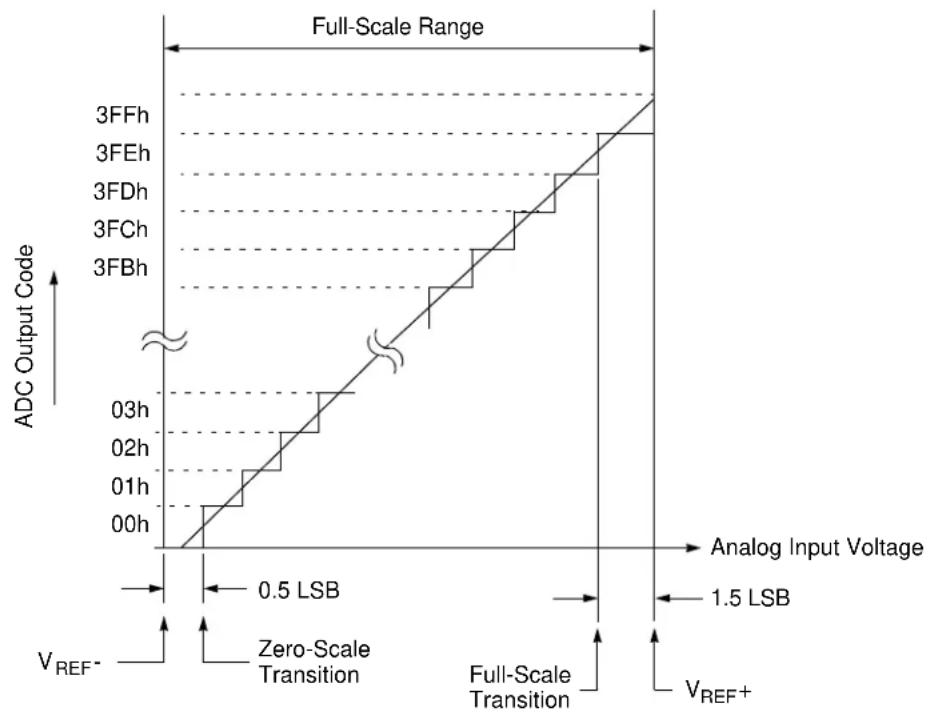
line
| Analog Input Voltage | ADC Output Code | |----------------------|----------------| | 0.5 LSB | 00h | | 1.5 LSB | 3FFh | | Full-Scale Range | 3FFh | | Full-Scale Range | 3FEh | | Full-Scale Range | 3FDh | | Full-Scale Range | 3FCh | | Full-Scale Range | 3FBh |TABLE 22-2: SUMMARY OF REGISTERS ASSOCIATED WITH ADC
| Name Bit | 7 Bit 6 Bit | 5 Bit 4 Bit 3 | Bit 2 Bit 1 | Bit 0 | Register on Page | ||||
| ADCON0 | — CH$4 | CHS3 | CHS2 | CHS1 | CHS0 GO/DONE ADON 129 | —— | |||
| ADCON1 | — ADCS2 | ADCS1 | ADCS0 — | — — — 130 | |||||
| ADRESH | — | — | — | — | — | — | ADRES9 | ADRES8 | 130 |
| ADRESL | ADRES7 | ADRES6 | ADRES5 | ADRES4 | ADRES3 | ADRES2 | ADRES1 | ADRES0 | 130 |
| ANSELA | — | — | — | — | ANSA3 | ANSA2 | ANSA1 | ANSA0 | 115 |
| ANSELB | — | — | ANSB5 | ANSB4 | — | ANSB2 | ANSB1 | — | 118 |
| INTCON | GIE | PEIE | T0IE | INTE | IOCE | T0IF | INTF | IOCF | 95 |
| PIE1 | — | ADIE | BCLIE | SSPIE | — | — | TMR2IE | TMR1IE | 96 |
| PIR1 | — | ADIF | BCLIF | SSPIF | — | — | TMR2IF | TMR1IF | 98 |
| TRISGPA | TRISA7 | TRISA6 | TRISA5 | TRISA4 | TRISA3 | TRISA2 | TRISA1 | TRISA0 | 114 |
| TRISGPB | TRISB7 | TRISB6 | TRISB5 | TRISB4 | — | TRISB2 | TRISB1 | TRISB0 | 117 |
Legend: — = unimplemented read as '0'. Shaded cells are not used for ADC module.
NOTES:
23.0 TIMER0 MODULE
The Timer0 module is an 8-bit timer/counter with the following features:
• 8-bit timer/counter register (TMR0)
- 8-bit prescaler (independent of Watchdog Timer)
- Programmable internal or external clock source
- Programmable external clock edge selection
- Interrupt on overflow
Figure 23-1 is a block diagram of the Timer0 module.
FIGURE 23-1: BLOCK DIAGRAM OF TIMER0
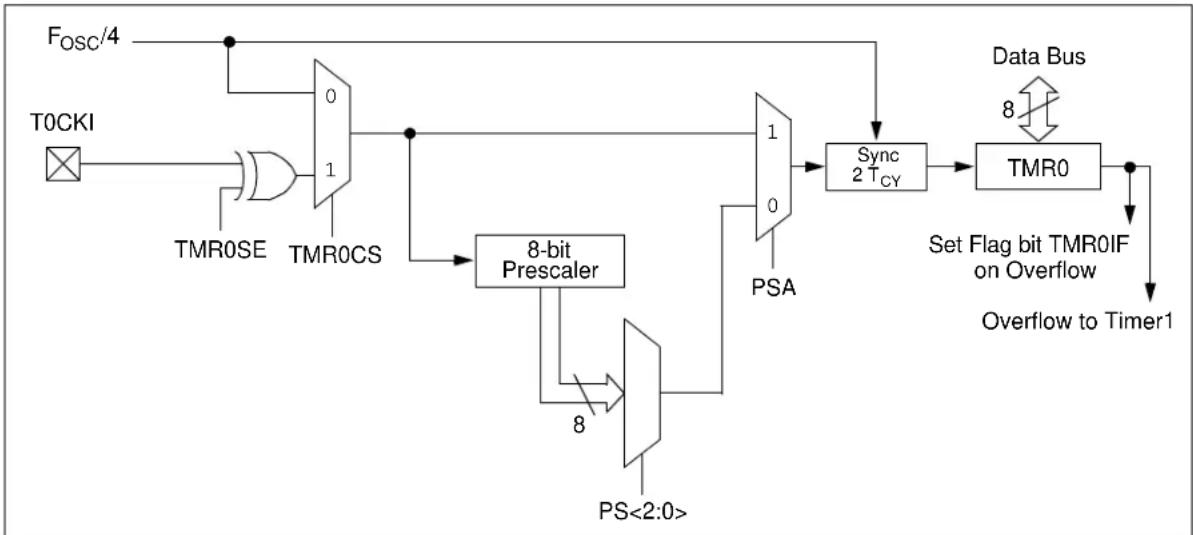
flowchart
graph TD
    A["T0CKI"] --> B["AND Gate"]
    B --> C["0/1 TMROSE"]
    C --> D["8-bit Prescaler"]
    D --> E["PS<2:0>"]
    E --> F["0/1 PSA"]
    F --> G["Sync 2 TCY"]
    G --> H["TMR0"]
    H --> I["Set Flag bit TMR0IF on Overflow"]
    I --> J["Overflow to Timer1"]
    K["Fosc/4"] --> C
    L["Data Bus"] --> M["8"]
    M --> H
23.1 Timer0 Operation
The Timer0 module can be used as either an 8-bit timer or an 8-bit counter.
23.1.1 8-BIT TIMER MODE
The Timer0 module will increment every instruction cycle, if used without a prescaler. 8-Bit Timer mode is selected by clearing the T0CS bit in the OPTION_REG register.
When TMR0 is written, the increment is inhibited for two instruction cycles immediately following the write.
Note: The value written to the TMR0 register can be adjusted, in order to account for the two-instruction cycle delay when TMR0 is written.
23.1.2 8-BIT COUNTER MODE
In 8-Bit Counter mode, the Timer0 module will increment on every rising or falling edge of the T0CKI pin. The incrementing edge is determined by the OPTION_REG
8-Bit Counter mode using the T0CKI pin is selected by setting the OPTION_REG
23.1.3 SOFTWARE-PROGRAMMABLE PRESCALER
A single software-programmable prescaler is available for use with either Timer0 or the Watchdog Timer (WDT), but not both simultaneously. The prescaler assignment is controlled by the OPTION_REG
There are eight prescaler options for the Timer0 module ranging from 1:2 to 1:256. The prescale values are selectable via the PS<2:0> bits in the OPTION_REG register. In order to have a 1:1 prescaler value for the Timer0 module, the prescaler must be disabled by setting the OPTION_REG
The prescaler is not readable or writable. When assigned to the Timer0 module, all instructions writing to the TMR0 register will clear the prescaler.
23.1.4 SWITCHING PRESCALER
BETWEEN TIMER0 AND WDT MODULES
As a result of having the prescaler assigned to either Timer0 or the WDT, it is possible to generate an unintended device Reset when switching prescaler values. When changing the prescaler assignment from Timer0 to the WDT module, the instruction sequence shown in Example 23-1 must be executed.
EXAMPLE 23-1: CHANGING PRESCALER
(TIMER0 → WDT)
BANKSEL TMRO ;
CLRWDT ;Clear WDT
CLRF TMRO ;Clear TMRO and
;prescaler
BANKSEL OPTION_REG ;
BSF OPTION_REG,PSA ;Select WDT
CLRWDT ;
;
MOVLW b'11111000';Mask prescaler
ANDWF OPTION_REG,W ;bits
IORLW b'00000101';Set WDT prescaler
MOVWF OPTION_REG ;to 1:32
When changing the prescaler assignment from the WDT to the Timer0 module, the following instruction sequence must be executed (see Example 23-2).
EXAMPLE 23-2: CHANGING PRESCALER
(WDT → TIMER0)
CLRWDT ;Clear WDT and
;prescaler
BANKSEL OPTION_REG ;
MOVLW b'11110000' ;Mask TMRO select and
ANDWF OPTION_REG,W ;prescaler bits
IORLW b'00000011' ;Set prescale to 1:16
MOVWF OPTION_REG ;
23.1.5 TIMER0 INTERRUPT
Timer0 will generate an interrupt when the TMR0 register overflows from FFh to 00h. The INTCON
Note: The Timer0 interrupt cannot wake the processor from Sleep since the timer is frozen during Sleep.
23.1.6 USING TIMER0 WITH AN
EXTERNAL CLOCK
When Timer0 is in Counter mode, the synchronization of the T0CKI input and the Timer0 register is accomplished by sampling the prescaler output on the Q2 and Q4 cycles of the internal phase clocks. Therefore, the high and low periods of the external clock source must meet the timing requirements, as shown in Section 5.0 "Digital Electrical Characteristics".
23.1.7 OPERATION DURING SLEEP
Timer0 cannot operate while the processor is in Sleep mode. The contents of the TMR0 register will remain unchanged while the processor is in Sleep mode.
TABLE 23-1: SUMMARY OF REGISTERS ASSOCIATED WITH TIMER0
| Name | Bit 7 | Bit 6 | Bit 5 | Bit 4 | Bit 3 | Bit 2 | Bit 1 | Bit 0 | Register on Page |
| INTCON | GIE | PEIE | T0IE | INTE | IOCIE | T0IF | INTF | IOCIF | 96 |
| OPTION_REG | INTEDG | T0CS | T0SE | PSA | PS2 | PS1 | PS0 | 77 | |
| TMR0 | Timer0 Module Register | 135* | |||||||
| TRISGPA | TRISA7 | TRISA6 | TRISA5 | TRISA4 | TRISA3 | TRISA2 | TRISA1 | TRISA0 | 114 |
Legend: — = Unimplemented locations, read as '0'. Shaded cells are not used by the Timer0 module.
* Page provides register information.
24.0 TIMER1 MODULE WITH GATE CONTROL
The Timer1 module is a 16-bit timer with the following features:
• 16-bit timer register pair (TMR1H:TMR1L)
- Readable and Writable (both registers)
- Selectable internal clock source
- 2-bit prescaler
- Interrupt on overflow
Figure 24-1 is a block diagram of the Timer1 module.
FIGURE 24-1: TIMER1 BLOCK DIAGRAM
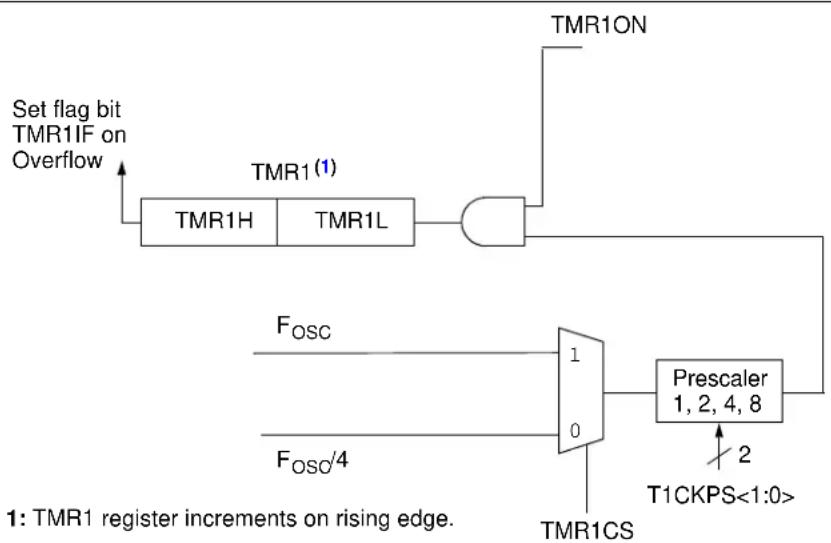
flowchart
graph TD
    A["Set flag bit TMR1IF on Overflow"] --> B["TMR1H"]
    B --> C["TMR1L"]
    C --> D["AND"]
    D --> E["TMR1ON"]
    E --> F["Prescaler 1, 2, 4, 8"]
    F --> G["T1CKPS<1:0>"]
    H["F_OSC"] --> I["1"]
    I --> J["0"]
    K["F_OSO/4"] --> L["0"]
    L --> M["TMR1CS"]
    N["1: TMR1 register increments on rising edge."] --> O["TMR1CS"]
24.1 Timer1 Operation
The Timer1 module is a 16-bit incrementing timer which is accessed through the TMR1H:TMR1L register pair. Writes to TMR1H or TMR1L directly update the counter. The timer is incremented on every instruction cycle.
Timer1 is enabled by configuring the T1CON
24.2 Clock Source Selection
The T1CON
24.2.1 INTERNAL CLOCK SOURCE
The TMR1H:TMR1L register pair will increment on multiples of F_OSC or F_OSC/4 as determined by the Timer1 prescaler.
As an example, when the F_OSC internal clock source is selected, the Timer1 register value will increment by four counts every instruction clock cycle.
TABLE 24-1: CLOCK SOURCE SELECTIONS
| TMR1CS Clock Source | |
| 1 8 MHz system clock (F OSC) | |
| 0 2 MHz instruction clock (F OSC/4) |
24.3 Timer1 Prescaler
Timer1 has four prescaler options allowing 1, 2, 4 or 8 divisions of the clock input. The T1CON
24.4 Timer1 Interrupt
The Timer1 register pair (TMR1H:TMR1L) increments to FFFFh and rolls over to 0000h. When Timer1 rolls over, the Timer1 interrupt flag bit in the PIR1 register is set. To enable the interrupt on rollover, you must set these bits:
- T1CON
bit - PIE1
bit - INTCON
bit - INTCON
bit
The interrupt is cleared by clearing the TMR1IF bit in the Interrupt Service Routine.
Note: The TMR1H:TMR1L register pair and the TMR1IF bit should be cleared before enabling interrupts.
24.5 Timer1 in Sleep
Unlike other standard mid-range Timer1 modules, the MCP19118/19 Timer1 module only clocks from an internal system clock and thus does not run during Sleep mode, nor can it be used to wake the device from this mode.
24.6 Timer1 Control Register
The Timer1 Control (T1CON) register is used to control Timer1 and select the various features of the Timer1 module.
REGISTER 24-1: T1CON: TIMER1 CONTROL REGISTER
| U-0 U-0 R/W-0 R/W-0 U-0 U-0 R/W-0 R/W-0 | |||||||
| — | — | T1CKPS1 | T1CKPS0 | — | — | TMR1CS | TMR1ON |
| bit 7 bit 0 | |||||||
Legend:
| R = Readable bit | W = Writable bit | U = Unimplemented bit, read as '0' |
| -n = Value at POR | ‘1’ = Bit is set | ‘0’ = Bit is cleared x = Bit is unknown |
bit 7-6 Unimplemented: Read as '0'
bit 5-4 T1CKPS<1:0>: Timer1 Input Clock Prescale Select bits
11 = 1:8 Prescale value
10 = 1:4 Prescale value
01 = 1:2 Prescale value
00 = 1:1 Prescale value
bit 3-2 Unimplemented: Read as '0'
bit 1 TMR1CS: Timer1 Clock Source Control bit
1 = 8 MHz system clock ( F_OSC )
0 = 2 MHz instruction clock (Fosc)
bit 0 TMR1ON: Timer1 On bit
1 = Enables Timer1
0 = Stops Timer1, Clears Timer1 gate flip-flop
TABLE 24-2: SUMMARY OF REGISTERS ASSOCIATED WITH TIMER1
| Name Bit | 7 Bit 6 Bit | 5 Bit 4 Bit 3 | Bit 2 Bit 1 | Bit 0 | Register on Page | ||||
| INTCON GIE | PEIE | T0IE | INTE | IOCE | T0IF | INTF | IOCF | 95 | |
| PIE1 | — | ADIE | BCLIE | SSPIE | — | — | TMR2IE | TMR1IE | 95 |
| PIR1 | — | ADIF | BCLIF | SSPIF | — | — | TMR2IF | TMR1IF | 98 |
| TMR1H | Holding Register for the Most Significant Byte of the 16-bit TMR1 Register | 137* | |||||||
| TMR1L | Holding Register for the Least Significant Byte of the 16-bit TMR1 Register | 137* | |||||||
| T1CON | — | — | T1CKPS1 | T1CKPS0 | — | — | TMR1CS | TMR1ON | 138 |
Legend: — = unimplemented, read as '0'. Shaded cells are not used by the Timer1 module.
* Page provides register information.
25.0 TIMER2 MODULE
The Timer2 module is an 8-bit timer with the following features:
• 8-bit timer register (TMR2)
• 8-bit period register (PR2)
- Interrupt on TMR2 match with PR2
- Software-programmable prescaler (1:1, 1:4, 1:16)
See Figure 25-1 for a block diagram of Timer2.
25.1 Timer2 Operation
The clock input to the Timer2 module is the system clock ( F_OSC ). The clock is fed into the Timer2 prescaler, which has prescaler options of 1:1, 1:4 or 1:16. The output of the prescaler is then used to increment the TMR2 register.
The values of TMR2 and PR2 are constantly compared to determine when they match. TMR2 will increment from 00h until it matches the value in PR2. When a match occurs, TMR2 is reset to 00h on the next increment cycle.
The match output of the Timer2/PR2 comparator is used to set the PIR1
The TMR2 and PR2 registers are both fully readable and writable. On any Reset, the TMR2 register is set to 00h and the PR2 register is set to FFh.
Timer2 is turned on by setting the T2CON
The Timer2 prescaler is controlled by the T2CON
• A write to TMR2 occurs
• A write to T2CON occurs
- Any device Reset occurs (Power-On Reset, MCLR Reset, Watchdog Timer Reset or Brown-Out Reset)
Note: TMR2 is not cleared when T2CON is written.
FIGURE 25-1: TIMER2 BLOCK DIAGRAM
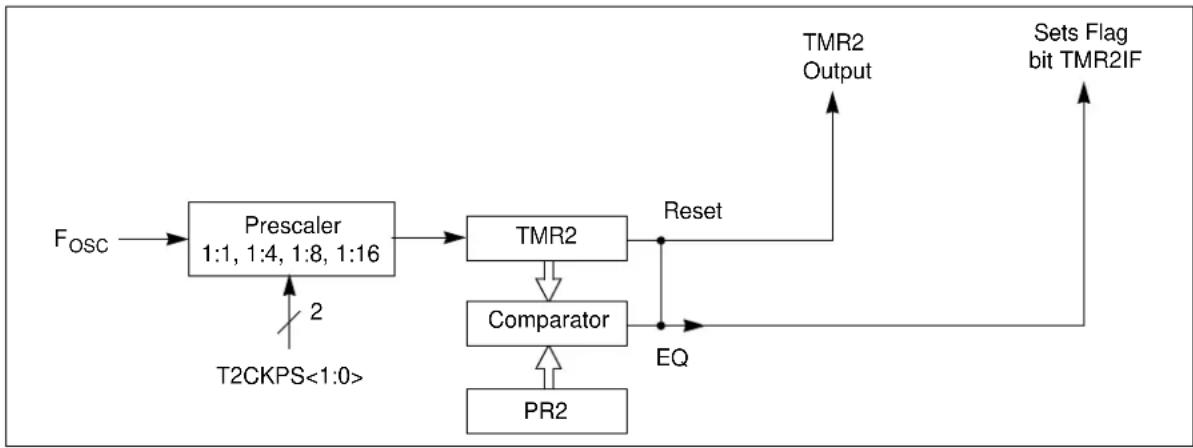
flowchart
graph TD
    A["Fosc"] --> B["Prescaler 1:1, 1:4, 1:8, 1:16"]
    B --> C["TMR2"]
    C --> D["Comparator"]
    D --> E["PR2"]
    E --> F["Reset"]
    F --> G["TMR2 Output"]
    G --> H["Sets Flag bit TMR2IF"]
    I["T2CKPS<1:0>"] --> B
    J["2"] --> B
    K["EQ"] --> D
25.2 Timer2 Control Register
REGISTER 25-1: T2CON: TIMER2 CONTROL REGISTER
| U-0 U-0 U-0 U-0 R/W-0 R/W-0 R/W-0 | |||||||
| — | — | — | — | — | TMR2ON | T2CKPS1 | T2CKPS0 |
| bit 7 bit 0 | |||||||
| Legend: | |||
| R = Readable bit | W = Writable bit | U = Unimplemented bit, read as ‘0’ | |
| -n = Value at POR | ‘1’ = Bit is set | ‘0’ = Bit is cleared | x = Bit is unknown |
bit 7-3 Unimplemented: Read as '0'
bit 2 TMR2ON: Timer2 On bit
1 = Timer2 is on
0 = Timer2 is off
bit 1-0 T2CKPS<1:0>: Timer2 Clock Prescale Select bits
00 =Prescaler is 1
01 =Prescaler is 4
10 =Prescaler is 8
11 =Prescaler is 16
TABLE 25-1: SUMMARY OF REGISTERS ASSOCIATED WITH TIMER2
| Name | Bit 7 | Bit 6 | Bit 5 | Bit 4 | Bit 3 | Bit 2 | Bit 1 | Bit 0 | Register on Page |
| INTCON | GIE | PEIE | T0IE | INTE | IOCE | T0IF | INTF | IOCF | 95 |
| PIE1 | — | ADIE | BCLIE | SSPIE | — | — | TMR2IE | TMR1IE | 96 |
| PIR1 | — | ADIF | BCLIF | SSPIF | — | — | TMR2IF | TMR1IF | 98 |
| PR2 | Timer2 Module Period Register | 140* | |||||||
| T2CON | — | — | — | — | — | TMR2ON | T2CKPS1 | T2CKPS0 | 141 |
| TMR2 | Holding Register for the 8-bit TMR2 Time Base | 140* | |||||||
Legend: — = unimplemented read as '0'. Shaded cells are not used for Timer2 module.
* Page provides register information.
NOTES:
26.0 PWM MODULE
The CCP module implemented on the MCP19118/19 is a modified version of the CCP module found in standard mid-range microcontrollers. In the MCP19118/19, the PWM module is used to generate the system clock or system oscillator. This system clock will control the MCP19118/19 switching frequency, as well as set the maximum allowable duty cycle. The PWM module does not continuously adjust the duty cycle to control the output voltage. This is accomplished by the analog control loop and associated circuitry.
26.1 Standard Pulse-Width Modulation (PWM) Mode
The PWM module output signal is used to set the operating switching frequency and maximum allowable duty cycle of the MCP19118/19. The actual duty cycle on the HDRV and LDRV is controlled by the analog PWM control loop. However, this duty cycle cannot be greater than the value in the PWMRL register.
There are two modes of operation that concern the system clock PWM signal. These modes are stand-alone (nonfrequency synchronization) and frequency synchronization.
26.1.1 STAND-ALONE (NONFREQUENCY SYNCHRONIZATION) MODE
When the MCP19118/19 is running stand-alone, the PWM signal functions as the system clock. It is operating at the programmed switching frequency with a programmed maximum duty cycle ( D_CLOCK ). The programmed maximum duty cycle is not adjusted on a cycle-by-cycle basis to control the MCP19118/19 system output. The required duty cycle ( D_BUCK ) to control the output is adjusted by the MCP19118/19 analog control loop and associated circuitry. D_CLOCK does, however, set the maximum allowable D_BUCK .
EQUATION 26-1:
$$ D _ {B U C K} < 1 - D _ {C L O C K} $$
26.1.2 SWITCHING FREQUENCY SYNCHRONIZATION MODE
The MCP19118/19 can be programmed to be a switching frequency MASTER or SLAVE device. The MASTER device functions as described in Section 26.1.1 “Stand-Alone (NonFrequency Synchronization) Mode” with the exception of the system clock also being applied to GPA1.
A SLAVE device will receive the MASTER system clock on GPA1. This MASTER system clock will be OR'ed with the output of the TIMER2 module. This OR'ed signal will latch PWMRL into PWMRH and PWMPHL into PWMPHH.
Figure 26-1 shows a simplified block diagram of the CCP module in PWM mode.
The PWMPHL register allows for a phase shift to be added to the SLAVE system clock.
It is desired to have the MCP19118/19 SLAVE device's system clock start point shifted by a programmed amount from the MASTER system clock. This SLAVE phase shift is specified by writing to the PWMPHL register. The SLAVE phase shift can be calculated by using the following equation.
EQUATION 26-2:
$$ \text { SLAVE PHASE SHIFT } = \text { PWMPHL } \cdot \text { TOSC } \cdot (\text { T2 PRESCALE VALUE }) $$
FIGURE 26-1: SIMPLIFIED PWM BLOCK DIAGRAM
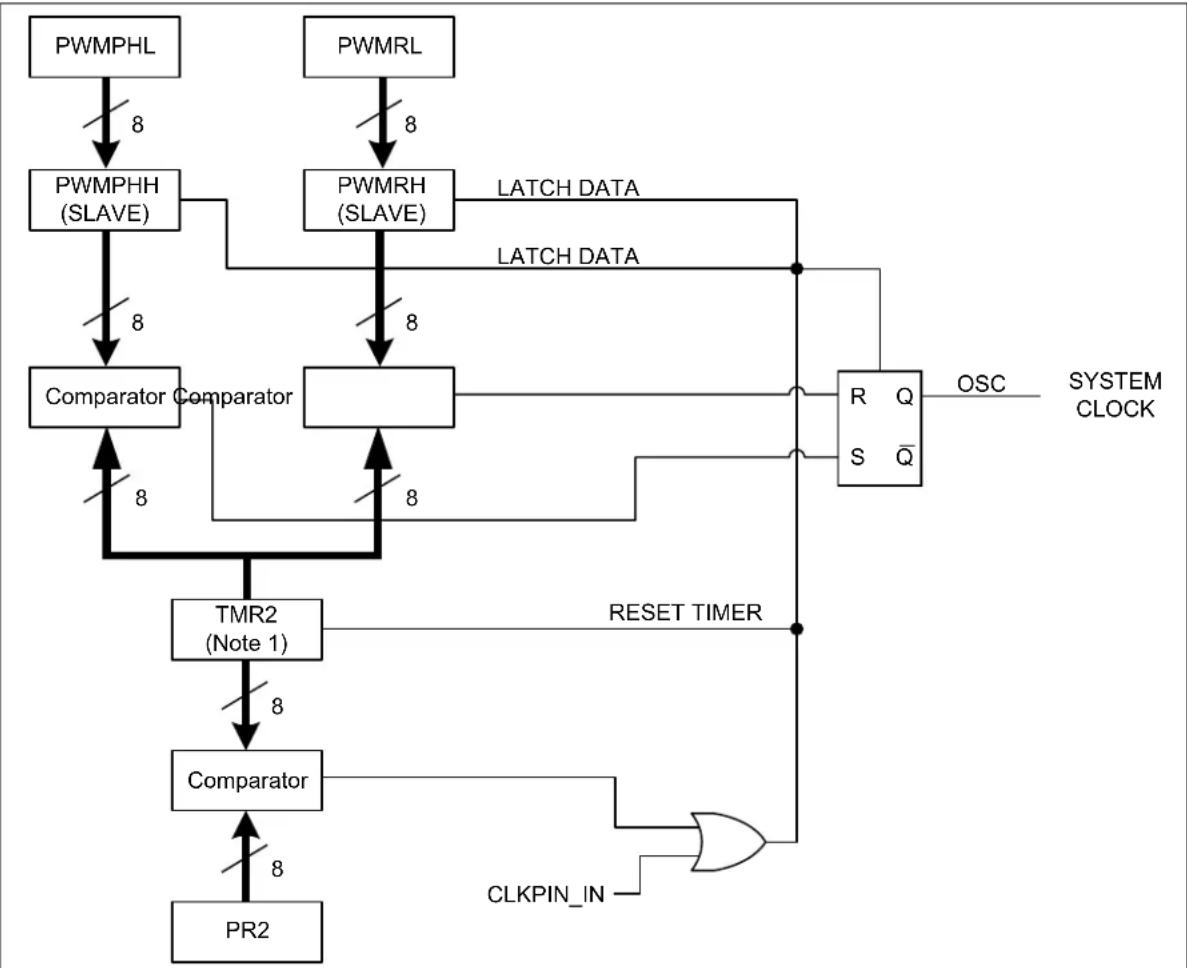
flowchart
graph TD
    A["PWMPHL"] -->|8| B["PWMPHH (SLAVE)"]
    C["PWMRL"] -->|8| D["PWMRH (SLAVE)"]
    B -->|8| E["Comparator Comparator"]
    D -->|8| E
    E -->|8| F["TMR2 (Note 1)"]
    F -->|8| G["Comparator"]
    G -->|8| H["PR2"]
    I["R Q OSC SYSTEM CLOCK"] --> J["Q̅ S"]
    J --> K["RESET TIMER"]
    L["CLKPIN_IN"] --> M["OR"]
    M --> G
    style A fill:#f9f,stroke:#333
    style C fill:#f9f,stroke:#333
    style I fill:#f9f,stroke:#333
    style L fill:#f9f,stroke:#333
    style J fill:#ccf,stroke:#333
    style K fill:#ccf,stroke:#333
    style M fill:#ccf,stroke:#333
Note 1: TIMER 2 should be clocked by F _OSC (8 MHz).
A PWM output (Figure 26-2) has a time base (period) and a time that the output stays high (duty cycle). The frequency of the PWM is the inverse of the period (1/period).
FIGURE 26-2: PWM OUTPUT
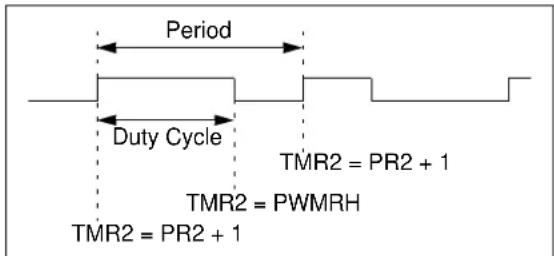
text_image
Period Duty Cycle TMR2 = PR2 + 1 TMR2 = PWMRH TMR2 = PR2 + 126.1.3 PWM PERIOD
The PWM period is specified by writing to the PR2 register. The PWM period can be calculated using the following equation:
EQUATION 26-3:
$$ P W M \text { PERIOD } = [ (P R 2) + I ] x T _ {O S C} x (T 2 \quad P R E S C A L E V A L U B $$
When TMR2 is equal to PR2, the following two events occur on the next increment cycle:
• TMR2 is cleared
- The PWM duty cycle is latched from PWMRL into PWMRH
26.1.4 PWM DUTY CYCLE (D CLOCK)
The PWM duty cycle ( D_CLOCK ) is specified by writing to the PWMRL register. Up to 8-bit resolution is available. The following equation is used to calculate the PWM duty cycle ( D_CLOCK ):
EQUATION 26-4:
$$ P W M D U T Y C Y C L E = P W M R L x T _ {O S C} x (T 2 \text { PRESCALE VALU } $$
The PWMRL bits can be written to at any time, but the duty cycle value is not latched into PWMRH until after a match between PR2 and TMR2 occurs.
26.2 Operation during Sleep
When the device is placed in Sleep, the allocated timer will not increment and the state of the module will not change. If the CLKPIN pin is driving a value, it will continue to drive that value. When the device wakes up, it will continue from this state.
TABLE 26-1: SUMMARY OF REGISTERS ASSOCIATED WITH PWM MODULE
| Name Bit | 7 Bit 6 Bit | 5 Bit 4 Bit | 3 Bit 2 Bit | 1 Bit 0 | Register on Page | ||||
| APFCON | — | — | — | — | — | — | — | CLKSEL | 112 |
| T2CON | — | — | — | — | — | TMR2ON | T2CKPS1 | T2CKPS0 | 141 |
| PR2 | Timer2 Module Period Register | 140* | |||||||
| PWMRL | PWM Register Low Byte | 143* | |||||||
| PWMPHL | SLAVE Phase Shift Byte | 143* | |||||||
| BUFFCON | MLTPH2 | MLTPH1 | MLTPH0 | ASEL4 | ASEL3 | ASEL2 | ASEL1 | ASEL0 | 58 |
Legend: — = Unimplemented locations, read as '0'. Shaded cells are not used by Capture mode.
* Page provides register information.
NOTES:
27.0 MASTER SYNCHRONOUS SERIAL PORT (MSSP) MODULE
27.1 Master SSP (MSSP) Module Overview
The Master Synchronous Serial Port (MSSP) module is a serial interface useful for communicating with other peripheral or microcontroller devices. These peripheral devices may be Serial EEPROMs, shift registers, display drivers, A/D converters, etc. The MSSP module only operates in Inter-Integrated Circuit (PC) mode.
The I²C interface supports the following modes and features:
- Master mode
- Slave mode
- Byte NACKing (Slave mode)
- Limited Multi-Master support
- 7-bit and 10-bit addressing
- Start and Stop interrupts
- Interrupt masking
- Clock stretching
- Bus collision detection
- General call address matching
- Dual Address masking
- Address Hold and Data Hold modes
- Selectable SDA hold times
Figure 27-1 is a block diagram of the PC interface module in Master mode. Figure 27-2 is a diagram of the I²C interface module in Slave mode.
FIGURE 27-1: MSSP BLOCK DIAGRAM (I ^2 C MASTER MODE)
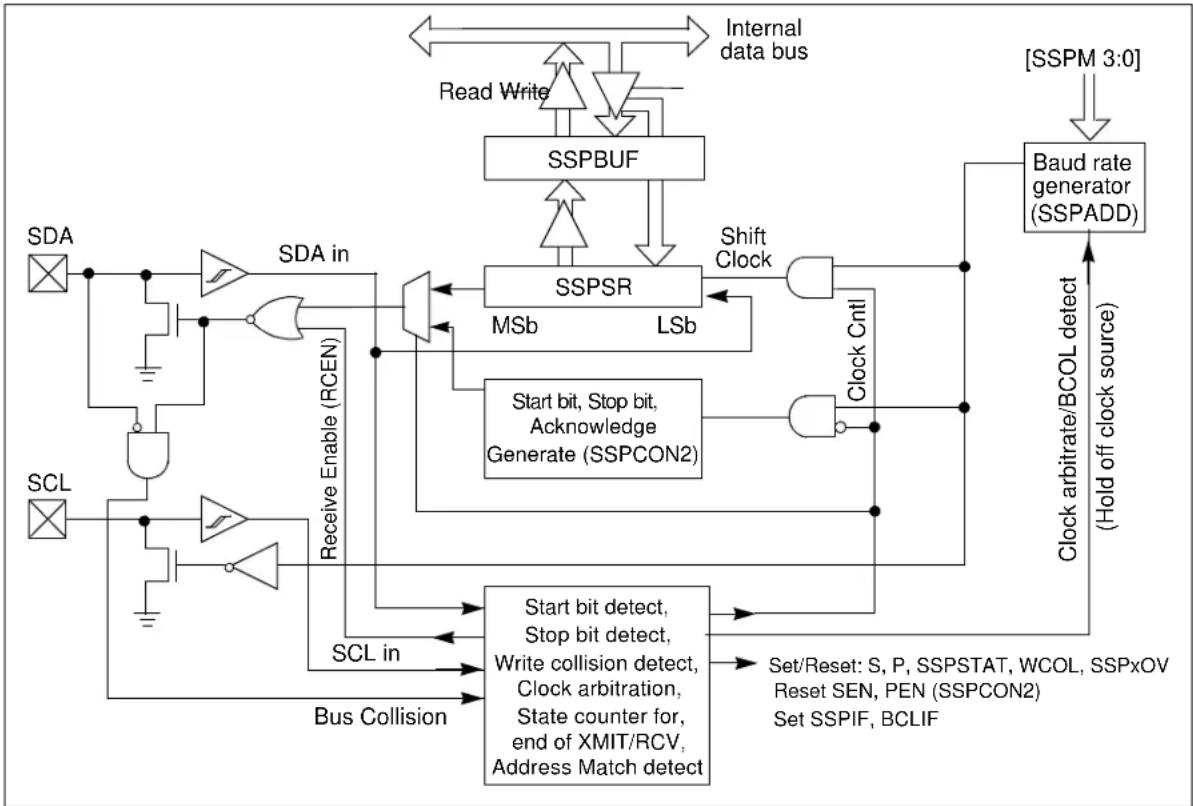
flowchart
graph TD
    A["SDA"] --> B["AND Gate"]
    C["SCL"] --> D["AND Gate"]
    B --> E["OR Gate"]
    D --> F["OR Gate"]
    E --> G["SSPSR"]
    F --> H["Shift Clock"]
    G --> I["MSb"]
    G --> J["LSb"]
    H --> K["Clock Cntl"]
    I --> L["Clock arbitrate/BCOL detect (Hold off clock source)"]
    J --> M["Start bit, Stop bit, Acknowledge Generate (SSPCON2)"]
    K --> N["Start bit detect, Stop bit detect, Write collision detect, Clock arbitration, State counter for, end of XMIT/RCV, Address Match detect"]
    L --> O["Set/Reset: S, P, SSPSTAT, WCOL, SSPxOV"]
    M --> P["Set SSPIF, BCLIF"]
    Q["Internal data bus"] --> R["Read Write"]
    R --> S["SSPBUF"]
    S --> T["Shift Clock"]
    T --> U["Clock Cntl"]
    U --> V["Baud rate generator (SSPADD)"]
    V --> W["[SSPM 3:0"]]
    W --> X["Baud rate generator (SSPADD)"]
    Y["SDA in"] --> Z["SDA in"]
    AA["SCL in"] --> AB["Bus Collision"]
    AC["Receive Enable (RCEN)"] --> AD["AND Gate"]
    AE["Start bit, Stop bit, Acknowledge Generate (SSPCON2)"] --> AF["Clock Arbitrate/BCOL Detect"]
FIGURE 27-2: MSSP BLOCK DIAGRAM (I ^2 C SLAVE MODE)
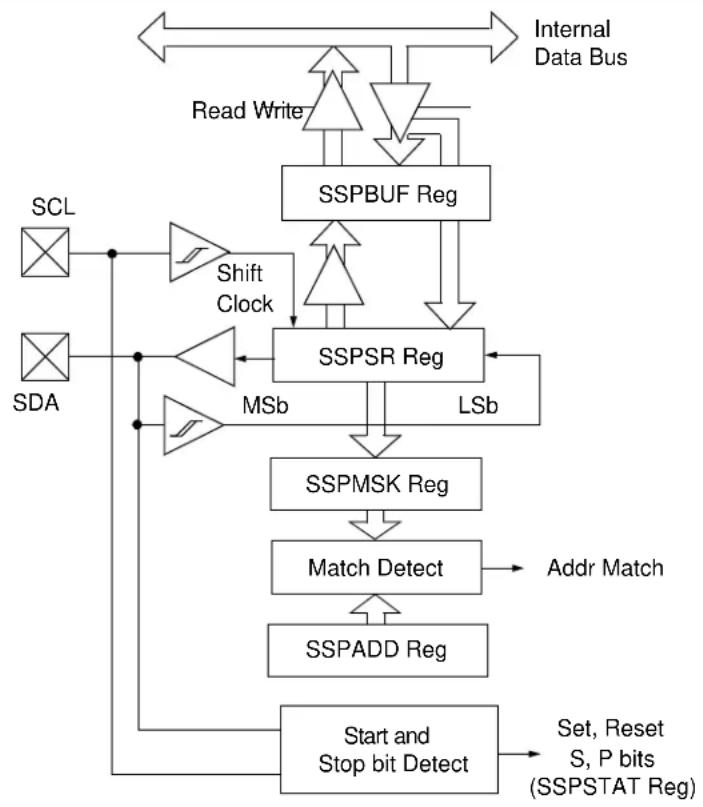
flowchart
graph TD
    A["SCL"] --> B["Shift Clock"]
    C["SDA"] --> D["Shift Clock"]
    B --> E["SSPSR Reg"]
    D --> E
    E --> F["SSPBUF Reg"]
    F --> G["Read Write"]
    G --> H["Internal Data Bus"]
    E --> I["MSb"]
    I --> J["SSPMSK Reg"]
    J --> K["Match Detect"]
    K --> L["Addr Match"]
    L --> M["SSPADD Reg"]
    M --> N["Start and Stop bit Detect"]
    N --> O["Set, Reset S, P bits (SSPSTAT Reg)"]
    style A fill:#f9f,stroke:#333
    style C fill:#f9f,stroke:#333
    style E fill:#ccf,stroke:#333
    style K fill:#cff,stroke:#333
    style M fill:#ffc,stroke:#333
27.2 I ^2 C MODE OVERVIEW
The Inter-Integrated Circuit Bus (I²C) is a multi-master serial data communication bus. Devices communicate in a master/slave environment, where the master devices initiate the communication. A slave device is controlled through addressing.
The MSSP module has eight registers for I^2C operation. They are the:
• MSSP Status Register (SSPSTAT)
• MSSP Control Register1 (SSPCON1)
• MSSP Control Register2 (SSPCON2)
• MSSP Control Register3 (SSPCON3)
- Serial Receive/Transmit Buffer (SSPBUF)
- MSSP Shift Register (SSPSR) – Not directly accessible
- MSSP Address Register (SSPADD)
- MSSP Address Register2 (SSPADD2)
• MSSP Address Mask Register1 (SSPMSK)
• MSSP Address Mask Register2 (SSPMSK2)
The SSPCON1 register is used to define the I^2C mode. Four selection bits (SSPCON1<3:0>) allow one of the following I^2C modes to be selected:
- I²C Slave mode (7-bit address)
- I²C Slave mode (10-bit address)
- I²C Master mode, clock = OSC/4 (SSPADD +1)
- I ^2 C firmware controlled Master mode (Slave idle)
The SSPSTAT register gives the status of the data transfer. This information includes detection of a START or STOP bit, specifies if the data received byte was data or address, if the next byte is completion of the 10-bit address and if this will be a read or write data transfer.
The SSPBUF is the register to which transfer data is written to or read from. The SSPSR register shifts the data in or out of the device. In receive operation, the SSPBUF and SSPSR create a double buffer receiver. This allows reception of the next byte to begin before reading the last byte of received data. When the complete byte is received before the SSPBUF register is read, a receiver overflow has occurred, the SSPOV bit (SSPCON1<6>) is set and the byte in the SSPSR is lost.
The I²C bus specifies two signal connections:
- Serial Clock (SCL)
- Serial Data (SDA)
Both the SCL and SDA connections are bidirectional open-drain lines, each requiring pull-up resistors for the supply voltage. Pulling the line to ground is considered a logical zero; letting the line float is considered a logical one.
Before selecting any I ^2 C mode, the SCL and SDA pins must be programmed to inputs by setting the appropriate TRIS bits. Selecting I ^2 C mode, by setting the SSPEN bit, enables the SCL and SDA pins to be used as clock and data lines in PC mode.
Figure 27-3 shows a typical connection between two devices configured as master and slave.
FIGURE 27-3: I ^2 C MASTER/SLAVE CONNECTION
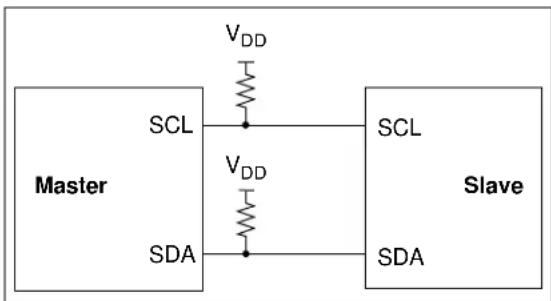
text_image
Master VDD SCL VDD SDA SCL Slave SDAThe I ^2 C bus can operate with one or more master devices and one or more slave devices.
There are four potential modes of operation for a given device:
- Master Transmit mode (master is transmitting data to a slave)
- Master Receive mode (master is receiving data from a slave)
- Slave Transmit mode (slave is transmitting data to a master)
- Slave Receive mode (slave is receiving data from the master)
To begin communication, a master device starts out in Master Transmit mode. The master device sends out a Start bit followed by the address byte of the slave it intends to communicate with. This is followed by a single Read/Write bit, which determines whether the master intends to transmit to or receive data from the slave device.
If the requested slave exists on the bus, it will respond with an Acknowledge bit, otherwise known as an ACK The master then continues in either Transmit mode or Receive mode and the slave continues in the complement, either in Receive mode or Transmit mode, respectively.
A Start bit is indicated by a high-to-low transition of the SDA line while the SCL line is held high. Address and data bytes are sent out, Most Significant bit (MSb) first. The Read/Write bit is sent out as a logical one when the master intends to read data from the slave and is sent out as a logical zero when it intends to write data to the slave.
The Acknowledge (ACK) bit is an active-low signal, which holds the SDA line low to indicate to the transmitter that the slave device has received the transmitted data and is ready to receive more.
The transition of a data bit is always performed while the SCL line is held low. Transitions that occur while the SCL line is held high are used to indicate Start and Stop bits.
If the master intends to write to the slave, then it repeatedly sends out a byte of data, with the slave responding after each byte with an ACK bit. In this example, the master device is in Master Transmit mode and the slave is in Slave Receive mode.
If the master intends to read from the slave, then it repeatedly receives a byte of data from the slave and responds after each byte with an ACK bit. In this example, the master device is in Master Receive mode and the slave is Slave Transmit mode.
On the last byte of data communicated, the master device may end the transmission by sending a Stop bit. If the master device is in Receive mode, it sends the Stop bit in place of the last ACK bit. A Stop bit is indicated by a low-to-high transition of the SDA line, while the SCL line is held high.
In some cases, the master may want to maintain control of the bus and reinitiate another transmission. If so, the master device may send another Start bit in place of the Stop bit or last ACKbit when it is in Receive mode.
The I ^2 C bus specifies three message protocols:
- Single message where a master writes data to a slave
- Single message where a master reads data from a slave
- Combined message where a master initiates a minimum of two writes, or two reads, or a combination of writes and reads, to one or more slaves
When one device is transmitting a logical one or letting the line float and a second device is transmitting a logical zero or holding the line low, the first device can detect that the line is not a logical one. This detection, when used on the SCL line, is called clock stretching. Clock stretching gives slave devices a mechanism to control the flow of data. When this detection is used on the SDA line, it is called arbitration. Arbitration ensures that there is only one master device communicating at any single time.
27.2.1 CLOCK STRETCHING
When a slave device has not completed processing data, it can delay the transfer of more data through the process of Clock Stretching. An addressed slave device may hold the SCL clock line low after receiving or sending a bit, indicating that it is not yet ready to continue. The master that is communicating with the slave will attempt to raise the SCL line in order to transfer the next bit, but will detect that the clock line has not yet been released. Because the SCL connection is open-drain, the slave has the ability to hold that line low until it is ready to continue communicating.
Clock stretching allows receivers that cannot keep up with a transmitter to control the flow of incoming data.
27.2.2 ARBITRATION
Each master device must monitor the bus for Start and Stop bits. If the device detects that the bus is busy, it cannot begin a new message until the bus returns to an Idle state.
However, two master devices may try to initiate a transmission on or about the same time. When this occurs, the process of arbitration begins. Each transmitter checks the level of the SDA data line and compares it to the level that it expects to find. The first transmitter to observe that the two levels don't match loses arbitration and must stop transmitting on the SDA line.
For example, if one transmitter holds the SDA line to a logical one (lets it float) and a second transmitter holds it to a logical zero (pulls it low), the result is that the SDA line will be low. The first transmitter then observes that the level of the line is different than expected and concludes that another transmitter is communicating.
The first transmitter to notice this difference is the one that loses arbitration and must stop driving the SDA line. If this transmitter is also a master device, it also must stop driving the SCL line. It then can monitor the lines for a Stop condition before trying to reissue its transmission. In the meantime, the other device that has not noticed any difference between the expected and actual levels on the SDA line continues with its original transmission. It can do so without any complications, because so far, the transmission appears exactly as expected with no other transmitter disturbing the message.
Slave Transmit mode can also be arbitrated, when a master addresses multiple slaves, but this is less common.
If two master devices are sending a message to two different slave devices at the address stage, the master sending the lower slave address always wins arbitration. When two master devices send messages to the same slave address and addresses can sometimes refer to multiple slaves, the arbitration process must continue into the data stage.
Arbitration usually occurs very rarely, but it is a necessary process for proper multi-master support.
27.3 I ^2 C MODE OPERATION
All MSSP I²C communication is byte-oriented and shifted out MSb first. Six SFR registers and two interrupt flags interface the module with the PIC microcontroller and user software. Two pins, SDA and SCL, are exercised by the module to communicate with other external I²C devices.
27.3.1 BYTE FORMAT
All communication in is done in 9-bit segments. A byte is sent from a master to a slave or vice-versa, followed by an Acknowledge bit sent back. After the 8^th falling edge of the SCL line, the device outputting data on the SDA changes that pin to an input and reads in an acknowledge value on the next clock pulse.
The clock signal, SCL, is provided by the master. Data is valid to change while the SCL signal is low and sampled on the rising edge of the clock. Changes on the SDA line while the SCL line is high define special conditions on the bus, explained below.
27.3.2 DEFINITION OF I ^2 C TERMINOLOGY
There is language and terminology in the description of I²C communication that have definitions specific to I²C. That word usage is defined below and may be used in the rest of this document without explanation. This table was adapted from the Philips I²C specification.
27.3.3 SDA AND SCL PINS
On the MCP19118/19, the SCL and SDA pins are always open-drain. These pins should be set by the user to inputs by setting the appropriate TRIS bits.
Note: Data is tied to output zero when an I ^2 C mode is enabled.
27.3.4 SDA HOLD TIME
The hold time of the SDA pin is selected by the SSP-CON3
TABLE 27-1: I ^2 C BUS TERMS
| TERM Description | |
| Transmitter The device which shifts data out onto the bus. | |
| Receiver The device which shifts data in from the bus. | |
| Master The device that initiates a transfer, generates clock signals and terminates a transfer. | |
| Slave The device addressed by the master. | |
| Multi-Master A bus with more than one device that can initiate data transfers. | |
| Arbitration Procedure to ensure that only one master at a time controls the bus. Winning arbitration ensures that the message is not corrupted. | |
| Synchronization Procedure to synchronize the clocks of two or more devices on the bus. | |
| Idle | No master is controlling the bus and both SDA and SCL lines are high. |
| Active | Any time one or more master devices are controlling the bus. |
| Addressed Slave | Slave device that has received a matching address and is actively being clocked by a master. |
| Matching Address | Address byte that is clocked into a slave that matches the value stored in SSPADDx. |
| Write Request | Slave receives a matching address with R/Wbit clear and is ready to clock in data. |
| Read Request | Master sends an address byte with the R/W bit set, indicating that it wishes to clock data out of the slave. This data is the next and all following bytes until a Restart or Stop. |
| Clock Stretching | When a device on the bus holds SCL low to stall communication. |
| Bus Collision | Any time the SDA line is sampled low by the module while it is outputting and expected high state. |
27.3.5 START CONDITION
The I^2C specification defines a Start condition as a transition of SDA from a high to a low state, while SCL line is high. A Start condition is always generated by the master and signifies the transition of the bus from an Idle to an Active state. Figure 27-4 shows the wave forms for Start and Stop conditions.
A bus collision can occur on a Start condition if the module samples the SDA line low before asserting it low. This does not conform to the PC Specification that states no bus collision can occur on a Start.
27.3.6 STOP CONDITION
A Stop condition is a transition of the SDA line from a low state to a high state while the SCL line is high.
Note: At least one SCL low time must appear before a Stop is valid. Therefore, if the SDA line goes low then high again while the SCL line stays high, only the Start condition is detected.
27.3.7 RESTART CONDITION
A Restart is valid any time that a Stop would be valid. A master can issue a Restart if it wishes to hold the bus after terminating the current transfer. A Restart has the same effect on the slave that a Start would, resetting all slave logic and preparing it to clock in an address. The master may want to address the same or another slave.
In 10-bit Addressing Slave mode, a Restart is required for the master to clock data out of the addressed slave. Once a slave has been fully addressed, matching both high and low address bytes, the master can issue a Restart and the high address byte with the R/W bit set. The slave logic will then hold the clock and prepare to clock out data.
After a full match with R/W clear in 10-bit mode, a prior match flag is set and maintained. Until a Stop condition, a high address with R/W clear or a high address match fails.
27.3.8 START/STOP CONDITION
INTERRUPT MASKING
The SSPCON3
FIGURE 27-4: I ^2 C START AND STOP CONDITIONS
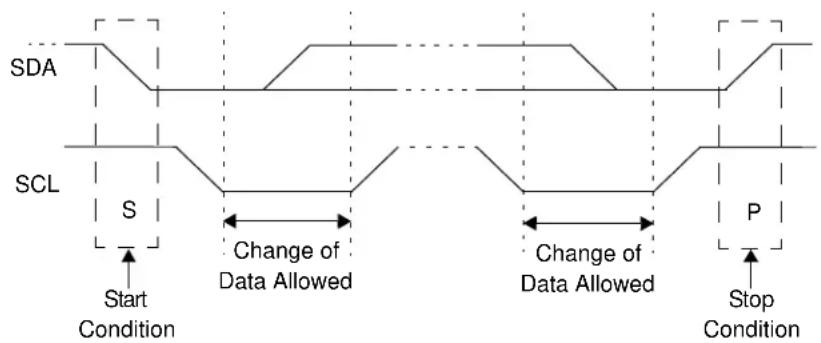
text_image
SDA SCL S Start Condition Change of Data Allowed Change of Data Allowed P Stop ConditionFIGURE 27-5: I ^2 C RESTART CONDITION

text_image
Change of Data Allowed Sr Restart Condition Change of Data AllowedThe 9^th SCL pulse for any transferred byte in I^2C is dedicated as an Acknowledge. It allows receiving devices to respond back to the transmitter by pulling the SDA line low. The transmitter must release control of the line during this time to shift in the response. The Acknowledge (ACK) is an active-low signal, pulling the SDA line low indicates to the transmitter that the device has received the transmitted data and is ready to receive more.
The result of an is placed in the SSPCON2
Slave software, when the AHEN and DHEN bits are set, allows the user to set the ACK value sent back to the transmitter. The SSPCON2
Slave hardware will generate an ACK response if the SSPCON3
There are certain conditions where an ACK will not be sent by the slave. If the SSPSTAT
When the module is addressed, after the 8^th falling edge of SCL on the bus, the SSPCON3
27.4 I ^2 C SLAVE MODE OPERATION
The MSSP Slave mode operates in one of the four modes selected in the SSPCON1
Modes with Start and Stop bit interrupts operate the same as the other modes. The exception is the SSPIF bit getting set upon detection of a Start, Restart or Stop condition.
27.4.1 SLAVE MODE ADDRESSES, SSPADD
The SSPADD register contains the Slave mode address. The first byte received after a Start or Restart condition is compared against the value stored in this register. If the byte matches, the value is loaded into the SSPBUF register and an interrupt is generated. If the value does not match, the module goes idle and no indication is given to the software that anything happened.
The SSPMSK register affects the address matching process. See Section 27.4.10 "SSPMSKx Register" for more information.
The SSPADD2 register contains a second Slave mode address. To enable the use of this second Slave mode address, bit 0 must be set. The first byte received after a Start or Restart condition is compared against the value stored in this register. If the byte matches, the value is loaded into the SSPBUF register and an interrupt is generated. If the value does not match, the module goes Idle and no indication is given to the software that anything happened.
The SSPMSK2 register affects the address matching process. See Section 27.4.10 "SSPMSKx Register" for more information.
27.4.2.1 I ^2 C Slave 7-Bit Addressing Mode
In 7-bit Addressing mode, the LSb of the received data byte is ignored when determining if there is an address match.
27.4.2.2 I ^2 C Slave 10-Bit Addressing Mode
In 10-bit Addressing mode, the first received byte is compared to the binary value of '1 1 1 1 0 A9 A8 0'. A9 and A8 are the two MSb of the 10-bit address and stored in bits 2 and 1 in the SSPADDx register.
After the acknowledge of the high byte, the UA bit is set and SCL is held low until the user updates SSPADDx with the low address. The low address byte is clocked in and all eight bits are compared to the low address value in SSPADDx. Even if there is no address match, SSPIF and UA are set and SCL is held low until SSPADDx is updated to receive a high byte again. When SSPADDx is updated, the UA bit is cleared. This ensures the module is ready to receive the high address byte on the next communication.
A high and low address match as a write request is required at the start of all 10-bit addressing communication. A transmission can be initiated by issuing a Restart once the slave is addressed and clocking in the high address with the R/W bit set. The slave hardware will then acknowledge the read request and prepare to clock out data. This is only valid for a slave after it has received a complete high and low address byte match.
27.4.3 SLAVE RECEPTION
When the R/ bit of a matching received address byte is clear, the SSPSTAT
When an overflow condition exists for a received address, then a Not Acknowledge is given. An overflow condition is defined as either SSPSTAT
An MSSP interrupt is generated for each transferred data byte. Flag bit, SSPIF, must be cleared by software.
When the SSPCON2
27.4.3.1 7-Bit Addressing Reception
This section describes a standard sequence of events for the MSSP module configured as an I²C slave in 7-bit Addressing mode, all decisions made by hardware or software and their effect on reception. Figures 27-6 and 27-7 are used as a visual reference for this description.
This is a step-by-step process of what typically must be done to accomplish I^2C communication.
- Start bit detected.
- SSPSTAT
bit is set; SSPIF is set if Interrupt-on-Start detect is enabled. - Matching address with R/W bit clear is received.
- The slave pulls SDA low, sending an ACK to the master, and sets SSPIF bit.
- Software clears the SSPIF bit.
- Software reads received address from SSPBUF, clearing the BF flag.
- If SEN = 1, slave software sets CKP bit to release the SCL line.
- The master clocks out a data byte.
- Slave drives SDA low, sending an ACK to the master, and sets SSPIF bit.
- Software clears SSPIF.
- Software reads the received byte from SSPBUF, clearing BF.
- Steps 8–12 are repeated for all received bytes from the master.
- Master sends Stop condition, setting SSPSTAT
bit, and the bus goes Idle.
27.4.3.2 7-Bit Reception with AHEN and DHEN
Slave device reception with AHEN and DHEN set operates the same as without these options, with extra interrupts and clock stretching added after the 8^th falling edge of SCL. These additional interrupts allow the slave software to decide whether it wants to ACK the receive address or data byte, rather than the hardware. This functionality adds support for PMBus that was not present on previous versions of this module.
This list describes the steps that need to be taken by slave software to use these options for I^2C communication. Figure 27-8 displays a module using both address and data holding. Figure 27-9 includes the operation with the SSPCON2
- SSPSTAT
bit is set; SSPIF is set if interrupt on Start detect is enabled. - Matching address with R/W ^™ bit clear is clocked in. SSPIF is set and CKP cleared after the 8 ^th falling edge of SCL.
- Slave clears the SSPIF.
- Slave can look at the SSPCON3
bit to determine if the SSPIF was after or before the ACK. - Slave reads the address value from SSPBUF, clearing the BF flag.
- Slave sets ACK value clocked out to the master by setting ACKDT.
- Slave releases the clock by setting CKP.
- SSPxIF is set after an ACK, not after a NACK.
- If SEN = 1 the slave hardware will stretch the clock after the ACK.
- Slave clears SSPIF.
Note: SSPIF is still set after the 9 ^th falling edge of SCL even if there is no clock stretching and BF has been cleared. Only if NACKis sent to master is SSPIF not set.
- SSPIF set and CKP cleared after 8 ^th falling edge of SCL for a received data byte.
- Slave looks at SSPCON3
bit to determine the source of the interrupt. - Slave reads the received data from SSPBUF clearing BF.
- Steps 7–14 are the same for each received data byte.
- Communication is ended by either the slave sending an ACK = 1 or the master sending a Stop condition. If a Stop is sent and Interrupt on Stop Detect is disabled, the slave will only know by polling the SSTSTAT
bit.
FIGURE 27-6: I ^2 C SLAVE, 7-BIT ADDRESS, RECEPTION (SEN = 0, AHEN = 0, DHEN = 0)
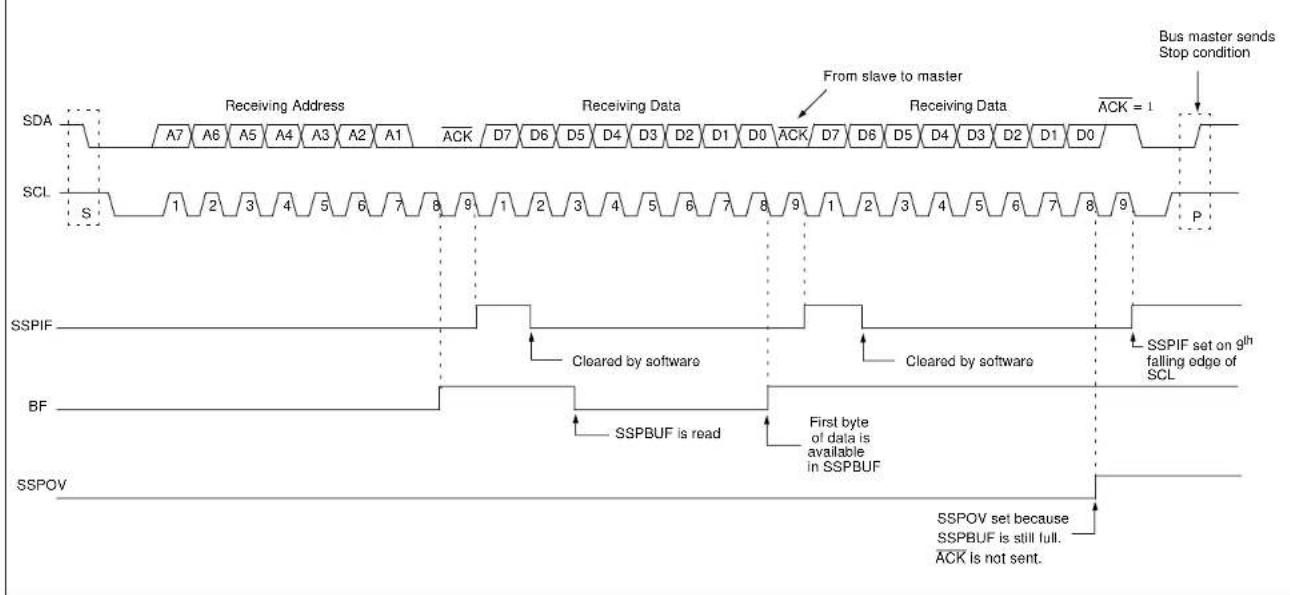
flowchart
graph TD
    A["Receiving Address"] --> B["Receiving Data"]
    B --> C["From slave to master"]
    C --> D["Receiving Data"]
    D --> E["ACK = 1"]
    F["SDA"] --> G["A7 A6 A5 A4 A3 A2 A1 ACK D7 D6 D5 D4 D3 D2 D1 D0 ACK D7 D6 D5 D4 D3 D2 D1 D0"]
    H["SCL"] --> I["S 1 2 3 4 5 6 7 8 9 1 2 3 4 5 6 7 8 9 1 2 3 4 5 6 7 8 9"]
    J["SSPIF"] --> K["Cleared by software"]
    L["BF"] --> M["First byte of data is available in SSPBUF"]
    N["SSPOV"] --> O["SSPOV set because SSPBUF is still full. ACK is not sent."]
    P["Bus master sends Stop condition"] --> Q["P"]
    style A fill:#f9f,stroke:#333
    style H fill:#f9f,stroke:#333
    style J fill:#f9f,stroke:#333
    style L fill:#f9f,stroke:#333
    style N fill:#f9f,stroke:#333
    style P fill:#f9f,stroke:#333
    style Q fill:#f9f,stroke:#333
FIGURE 27-7: I ^2 C SLAVE, 7-BIT ADDRESS, RECEPTION (SEN = 1, AHEN = 0, DHEN = 0)

flowchart
graph TD
    A["Receive Address"] --> B["SDA"]
    B --> C["SCL"]
    C --> D["SSPIF"]
    D --> E["BF"]
    E --> F["SSPOV"]
    F --> G["CKP"]

    subgraph SDA
        H["A7"] --> I["A6"] --> J["A5"] --> K["A4"] --> L["A3"] --> M["A2"] --> N["A1"] --> O["R/W=ACK"]
    end

    subgraph SCL
        P["S"] --> Q["1"] --> R["2"] --> S["3"] --> T["4"] --> U["5"] --> V["6"] --> W["7"] --> X["8"] --> Y["9"] --> Z["SEN SFW"]

    end

    subgraph SSPIF
        AA["Cleared by software"] --> AB["SSPIF set on 9th falling edge of SCL"]
    end

    subgraph BF
        AC["First byte of data is available in SSPBUF"]
        AD["SSPOV set because SSPBUF is still full. ACK is not sent."]
    end

    subgraph SSPOV
        AE["CKP is written to '2' in software, releasing SCL"]
        AF["CKP is written to 1 in software, releasing SCL"]
        AG["SCL is not held low because ACK = 1"]
    end

    subgraph CKP
        AH["Clock is held low until CKP is set to '1'"]
    end

    I --> I
    J --> J
    K --> K
    L --> K
    M --> K
    N --> K
    O --> O
    P --> P
    Q --> Q
    R --> R
    S --> S
    T --> T
    U --> U
    V --> V
    W --> W
    X --> W
    Y --> Y
    Z --> Z
    AA --> AA
    AB --> AB
    AC --> AC
    AD --> AD
    AE --> AE
    AF --> AF
    AG --> AG
    AH --> AH
FIGURE 27-8: I ^2 C SLAVE, 7-BIT ADDRESS, RECEPTION (SEN = 0, AHEN = 1, DHEN = 1)

flowchart
graph TD
    subgraph SDA
        A7["A7"] -->|Receiving Address Receiving Data Received Data| D7["D7"]
        A6["A6"] -->|Receiving Address Receiving Data Received Data| D6["D6"]
        A5["A5"] -->|Receiving Address Receiving Data Received Data| D5["D5"]
        A4["A4"] -->|Receiving Address Receiving Data Received Data| D3["D3"]
        A3["A3"] -->|Receiving Address Receiving Data Received Data| D2["D2"]
        A2["A2"] -->|Receiving Address Receiving Data Received Data| D1["D1"]
        A1["A1"] -->|Receiving Address Receiving Data Received Data| S
    end

    subgraph SCL
        S["S"] -->|S1 1 2 3 4 5 6 7 8 9 10 11 12 13 14 15 16 17 18 19 20 21 22 23 24 25 26 27 28 29 30 31 32 33 34 35 36 37 38 39 40 41 42 43 44 45 46 47 48 49 50 51 52 53 54 55 56 57 58 59 60 61 62 63 64 65 66 67 68 69 70 71 72 73 74 75 76 77 78 79 80
    end

    subgraph SSPIF
        SSPIF["If AHEN = 1: SSPIF is set"] --> SSPIF["SSPIF is set on 9th falling edge of SCL, after ACK"]
        SSPIF --> SSPIF["SSPIF is set on 9th falling edge of SCL, after ACK"]
        SSPIF --> SSPIF["SSPIF is set on 9th falling edge of SCL, after ACK"]
        SSPIF --> SSPIF["SSPIF is set on 9th falling edge of SCL, after ACK"]
        SSPIF --> SSPIF["SSPIF is set on 9th falling edge of SRL, after ACK"]
        SSPIF --> SSPIF["SSPIF is set on 9th falling edge of SRL, after ACK"]
        SSPIF --> SSPIF["SSPIF is set on 9th falling edge of SRL, after ACK"]
        SSPIF --> SSPIF["SSPIF is set on 9th falling edge of SRL, after ACK"]
        SSPIF --> SSPIF["SSPIF is set ON SSBUF"]
        SSPIF --> SSPIF["SSPIF is set ON SSBUF"]
        SSPIF --> SSPIF["SSPIF is set ON SSBUF"]
        SSPIF --> SSPIF["SSPIF is set ON SSBUF"]
        SSPIF --> SSPIF["SSPIF is set ON SSBUF"]
        SSPIF --> SSPIF["SSPIF is set ON SSBUF"]
        SSPIF --> SSPIF["Cleared by software"]
        SSPIF --> SSPIF["Cleared by software"]
        SSPIF --> SSPIF["Cleared by software"]
        SSPIF --> SSPIF["Cleared by software"]
        SSPIF --> SSPIF["Cleared by software"]
        SSPIF --> SSPIF["Cleared by software"]
        SSPIF --> SSPIF["Cleared by software"]
        SSPIF --> SSPIF["Cleared by software"]
        SSPIF --> SSPIE["No interrupt after NACK from slave"]
        SSPIE --> SSPIE["Cleared by software"]
        SSPIE --> SSPIE["Cleared by software"]
        SSPIE --> SSPIE["Cleared by software"]
        SSPIE --> SSPIE["Cleared by software"]
        SSPIE --> SSPIE["Cleared by software"]
        SSPIE --> SSPIE["Cleared by software"]
        SSPIE --> SSPIE["Cleared by software"]
        SSPIE --> SSPT["Slave software sets ACKDT to NACK"]
    end

    subgraph ACKDT
        ACKDT["Slave software clears ACKDT to ACK the received byte"] --> ACKDT
    end

    subgraph CKP
        CKP["When AHEN-1: CKP is cleared by hardware and SCL is stretched"] --> CKP
        CKP --> CKP
        CKP --> CKP
        CKP --> CKP
    end

    subgraph ACKTIM
        ACKTIM["ACKTIM set by hardware on 8th falling edge of SCL"] --> ACKTIM
        ACKTIM --> ACKTIM
        ACKTIM --> ACKTIM
    end

    subgraph ACKTIM_Cleared
        ACKTIM_Cleared["ACKTIM cleared by hardware in 9th rising edge of SCL"] --> ACKTIM_Cleared
        ACKTIM_Cleared["ACKTIM cleared by hardware in 9th rising edge of SCL"] --> ACKTIM_Cleared
        ACKTIM_Cleared["ACKTIM cleared by hardware in 9th rising edge of SCL"] --> ACKTIM_Cleared
    end

    subgraph ACKTIM_Silde
        ACKTIM_Silde["S"] --> ACKTIM_Pilde["P"]
    end
FIGURE 27-9: I ^2 C SLAVE, 7-BIT ADDRESS, RECEPTION (SEN = 1, AHEN = 1, DHEN = 1)

flowchart
graph TD
    A["Receiving Address"] --> B["ACK"]
    C["Master releases SDA to slave for ACK sequence"] --> D["ACK"]
    E["SDA"] --> F["A7-A1, SCL"]
    G["SCL"] --> H["S, P"]
    I["SSPIF"] --> J["ACK"]
    K["BF"] --> L["Received address is loaded into SSPBUF"]
    M["ACKDT"] --> N["Slave software clears ACKDT to ACK the received byte"]
    O["CKP"] --> P["When AHEN = 1; on the 8th falling edge of SCL of an address byte, CKP is cleared"]
    Q["ACKTIM"] --> R["ACKTIM is set by hardware on 8th falling edge of SCL"]
    S["S"] --> T["P"]
    U["CNPS"] --> V["ACKTIM is cleared by hardware on 9th rising edge of SCL"]
    W["D7-D0"] --> X["ACK"]
    Y["D7-D0"] --> Z["ACK"]
    AA["D7-D0"] --> AB["ACK"]
    AC["D7-D0"] --> AD["ACK"]
    AE["D7-D0"] --> AF["ACK"]
    AG["D7-D0"] --> AH["ACK"]
    AI["D7-D0"] --> AJ["ACK"]
    AK["D7-D0"] --> AL["ACK"]
    AM["D7-D0"] --> AN["ACK"]
    AO["D7-D0"] --> AP["ACK"]
    AQ["D7-D0"] --> AR["ACK"]
    AS["D7-D0"] --> AT["ACK"]
    AU["D7-D0"] --> AV["ACK"]
    AW["D7-D0"] --> AX["ACK"]
    AY["D7-D0"] --> AZ["ACK"]
    BA["D7-D0"] --> BB["ACK"]
    BC["D7-D0"] --> BD["ACK"]
    BE["D7-D0"] --> BF["ACK"]
    BG["D7-D0"] --> BH["ACK"]
    BI["D7-D0"] --> BJ["ACK"]
    BK["D7-D0"] --> BL["ACK"]
    BM["D7-D0"] --> BN["ACK"]
    BO["D7-D0"] --> BP["ACK"]
    BQ["D7-D0"] --> BR["ACK"]
    BS["D7-D0"] --> BT["ACK"]
    BU["D7-D0"] --> BV["ACK"]
    BW["D7-D0"] --> BX["ACK"]
    BY["D7-D0"] --> BZ["ACK"]
    CA["D7-D0"] --> CB["ACK"]
    CC["D7-D0"] --> CD["ACK"]
    CE["D7-D0"] --> CF["ACK"]
    CG["D7-D0"] --> CH["ACK"]
    CI["D7-D0"] --> CJ["ACK"]
    CKD["D7-D0"] --> CL["ACK"]
    CM["D7-D0"] --> CN["ACK"]
    CO["D7-D0"] --> CP["ACK"]
    COB["D7-D0"] --> CPB["ACK"]
    CS["D7-D0"] --> CSB["ACK"]
    CT["D7-D0"] --> CU["ACK"]
    CV["D7-D0"] --> CVB["ACK"]
    CW["D7-D0"] --> CX["ACK"]
    CY["D7-D0"] --> CYB["ACK"]
    CZ["D7-D0"] --> CZC["ACK"]
    DA["S"] --> DC["S, P"]
27.4.4 SLAVE TRANSMISSION
When the R/W bit of the incoming address byte is set and an address match occurs, the SSPSTAT
Following the ACK, slave hardware clears the CKP bit and the SCL pin is held low (see Section 27.4.7 "Clock Stretching" for more details). By stretching the clock, the master will be unable to assert another clock pulse until the slave is done preparing the transmit data.
The transmit data must be loaded into the SSPBUF register which also loads the SSPSR register. Then the SCL pin should be released by setting the SSPCON1
The ACK pulse from the master-receiver is latched on the rising edge of the 9th SCL input pulse. This ACK value is copied to the SSPCON2
An MSSP interrupt is generated for each data transfer byte. The SSPIF bit must be cleared by software and the SSPSTAT register is used to determine the status of the byte. The SSPIF bit is set on the falling edge of the 9^th clock pulse.
27.4.4.1 Slave Mode Bus Collision
A slave receives a Read request and begins shifting data out on the SDA line. If a bus collision is detected and the SSPCON3
27.4.4.2 7-Bit Transmission
A master device can transmit a read request to a slave and then clock data out of the slave. The list below outlines what software for a slave will need to do to accomplish a standard transmission. Figure 27-10 can be used as a reference to this list.
- Master sends a Start condition on SDA and SCL.
- SSPSTAT
bit is set; SSPIF is set if Interrupt-on-Start detect is enabled. - Matching address with R/W bit set is received by the slave setting SSPIF bit.
- Slave hardware generates an ACK and sets SSPIF.
- SSPIF bit is cleared by user.
- Software reads the received address from SSPBUF, clearing BF.
- R/W is set so CKP was automatically cleared after the ACK.
- The slave software loads the transmit data into SSPBUF.
- CKP bit is set releasing SCL, allowing the master to clock the data out of the slave.
- SSPIF is set after the ACK response from the master is loaded into the ACKSTAT register.
- SSPIF bit is cleared.
- The slave software checks the ACKSTAT bit to see if the master wants to clock out more data.
Note 1: If the master ACKs, the clock will be stretched.
2: ACKSTAT is the only bit updated on the rising edge of SCL ( 9^th ) rather than the falling.
- Steps 9-13 are repeated for each transmitted byte.
- If the master sends a NACK, the clock is not held, but SSPIF is still set.
- The master sends a Restart condition or a Stop.
- The slave is no longer addressed.
FIGURE 27-10: I ^2 C SLAVE, 7-BIT ADDRESS, TRANSMISSION (AHEN = 0)

flowchart
graph TD
    A["Receiving Address Automatic Transmitting Data"] --> B["SDA"]
    B --> C["SCL"]
    C --> D["SSPIF"]
    D --> E["BF"]
    E --> F["CKP"]
    F --> G["ACKSTAT"]
    G --> H["R/W"]
    H --> I["D/A"]
    I --> J["S"]
    J --> K["P"]

    subgraph Time Points
        L["Receiving Address Automatic Transmitting Data"] --> M["SDA"]
        M --> N["SCL"]
        N --> O["SSPIF"]
        O --> P["BF"]
        P --> Q["CKP"]
    end

    style A fill:#f9f,stroke:#333
    style B fill:#ccf,stroke:#333
    style C fill:#cfc,stroke:#333
    style D fill:#fcc,stroke:#333
    style E fill:#ffc,stroke:#333
    style F fill:#fcc,stroke:#333
    style G fill:#ffc,stroke:#333
    style H fill:#fcc,stroke:#333
    style I fill:#ffc,stroke:#333
    style J fill:#fcc,stroke:#333
    style K fill:#fcc,stroke:#333

    note right of A: Master sends Stop condition
    note right of M: Master sends Stop condition
    note right of NACK is not held for NACK

    subgraph Time Points
        O["Received address is read from SSPBUF"]
        P["Data to transmit is loaded into SSPBUF"]
        Q["Set by software"]
        R["BF is automatically cleared after 8th falling edge of SCL"]
        S["CKP is not held for NACK"]
    end

    subgraph Time Points
        T["R/W is copied from the matching address byte"]
        U["Indicates an address has been received"]
    end
27.4.4.3 7-Bit Transmission with Address Hold Enabled
Setting the SSPCON3
Figure 27-11 displays a standard waveform of a 7-bit Address Slave Transmission with AHEN enabled.
- Bus starts Idle.
- Master sends Start condition; the SSPSTAT
bit is set; SSPIF is set if Interrupt-on-Start detect is enabled. - Master sends matching address with R/W bit set. After the 8^th falling edge of the SCL line, the CKP bit is cleared and SSPIF interrupt is generated.
- Slave software clears SSPIF.
- Slave software reads SSPCON3
bit and SSPSTAT and SSPSTAT bits to determine the source of the interrupt. - Slave reads the address value from the SSPBUF register clearing the BF bit.
- Slave software decides from this information if it wishes to ACK or NACK and sets SSPCON2
bit accordingly. - Slave sets the CKP bit releasing SCL.
- Master clocks in the ACK value from the slave.
- Slave hardware automatically clears the CKP bit and sets SSPIF after the ACK if the R/W bit is set.
- Slave software clears SSPIF.
- Slave loads value to transmit to the master into SSPBUF setting the BF bit.
Note: SSPBUF cannot be loaded until after the ACK.
-
Slave sets CKP bit releasing the clock.
-
Master clocks out the data from the slave and sends an ACK value on the 9^th SCL pulse.
-
Slave hardware copies the ACK value into the SSPCON2
bit. -
Steps 10–15 are repeated for each byte transmitted to the master from the slave.
-
If the master sends a NA CK, the slave releases the bus, allowing the master to send a Stop and end the communication.
Note: Master must send a NACK on the last byte to ensure that the slave releases the SCL line to receive a Stop.
FIGURE 27-11: I ^2 C SLAVE, 7-BIT ADDRESS, TRANSMISSION (AHEN = 1)

flowchart
graph TD
    A["Receiving Address Automatic Transmitting Data"] --> B["SDA"]
    B --> C["SCL"]
    C --> D["ACK"]
    D --> E["ACK"]
    E --> F["ACK"]
    F --> G["ACK"]
    G --> H["ACK"]
    H --> I["ACK"]

    subgraph SDA
        J["A7"] --> K["A6"] --> L["A5"] --> M["A4"] --> N["A3"] --> O["A2"] --> P["A1"]
    end

    subgraph SCL
        Q["S"] --> R["S1"] --> S2["S2"] --> T["S3"] --> U["S4"] --> V["S5"] --> W["S6"] --> X["S7"] --> Y["S8"] --> Z["S9"] --> AA["P"]

    end

    subgraph SSPIF
        AB["1"] --> AC["2"] --> AD["3"] --> AE["4"] --> AF["5"] --> AG["6"] --> AH["7"] --> AI["8"]
    end

    subgraph BF
        AJ["Received address is read from SSPBUF"]
        AK["Data to transmit is loaded into SSPBUF"]
        AL["BF is automatically cleared after 8th falling edge of SCL"]
    end

    subgraph ACKDT
        AM["Slave clears ACKDT to ACK address"]
        AN["ACKSTAT"]
        AO["ACKP"]
        AP["ACKTIM"]
        AQ["R/W"]
        AR["D/A"]
    end

    subgraph ACKSTAT
        AS["Master's ACK response is copied to SSPSTAT"]
        AT["CKP not cleared after NACK"]
        AU["ACKTIM is set on 8th falling edge of SCL"]
        AV["ACKTIM is cleared on 9th rising edge of SCL"]
    end

    subgraph CKP
        AW["When AHEN = 1; CKP is cleared by hardware after receiving matching address."]
        AX["When R/W = 1; CKP is always cleared after ACK"]
        AY["Set by software, releases SCL"]
    end

    subgraph ACKTIM
        AZ["ACKTIM is set on 8th falling edge of SCL"]
        BA["ACKTIM is cleared on 9th rising edge of SCL"]
    end

    subgraph R/W
        BB["D/A"]
    end

    subgraph D/A
        BC["D/A"]
    end

    style A fill:#f9f,stroke:#333
    style B fill:#ccf,stroke:#333
    style C fill:#cfc,stroke:#333
    style D fill:#fcc,stroke:#333
    style AE fill:#cff,stroke:#333
    style AF fill:#ffc,stroke:#333
    style AG fill:#fcc,stroke:#333
    style AH fill:#ffc,stroke:#333
    style AI fill:#fcc,stroke:#333
    style AJ fill:#fcc,stroke:#333
    style AK fill:#fcc,stroke:#333
    style AL fill:#fcc,stroke:#333
    style AM fill:#fcc,stroke:#333
    style AN fill:#fcc,stroke:#333
    style AO fill:#fcc,stroke:#333
    style AP fill:#fcc,stroke:#333
    style AQ fill:#fcc,stroke:#333
    style AR fill:#fcc,stroke:#333
27.4.5 SLAVE MODE 10-BIT ADDRESS RECEPTION
This section describes a standard sequence of events for the MSSP module configured as an I²C slave in 10-bit Addressing mode.
Figure 27-12 is used as a visual reference for this description.
This is a step-by-step process of what must be done by slave software to accomplish I ^2 C communication.
- Bus starts Idle.
- Master sends Start condition; SSPSTAT
bit is set; SSPIF is set if Interrupt-on-Start detect is enabled. - Master sends matching high address with R/W bit clear; SSPSTAT
bit is set. - Slave sends ACK and SSPIF is set.
- Software clears the SSPIF bit.
- Software reads received address from SSPBUF, clearing the BF flag.
- Slave loads low address into SSPADDx, releasing SCL.
- Master sends matching low-address byte to the slave; UA bit is set.
Note: Updates to the SSPADDx register are not allowed until after the ACK sequence.
- Slave sends ACK and SSPIF is set.
Note: If the low address does not match, SSPIF and UA are still set so that the slave software can set SSPADDx back to the high address. BF is not set because there is no match. CKP is unaffected.
- Slave clears SSPIF.
- Slave reads the received matching address from SSPBUF clearing BF.
- Slave loads high address into SSPADD.
- Master clocks a data byte to the slave and clocks out the slave's ACK on the 9 ^th SCL pulse; SSPIF is set.
- If SSPCON2
bit is set, CKP is cleared by hardware and the clock is stretched. - Slave clears SSPIF.
- Slave reads the received byte from SSPBUF clearing BF.
- If SEN is set, the slave sets CKP to release the SCL.
- Steps 13–17 repeat for each received byte.
- Master sends Stop to end the transmission.
27.4.6 10-BIT ADDRESSING WITH ADDRESS OR DATA HOLD
Reception using 10-bit addressing with AHEN or DHEN set is the same as with 7-bit modes. The only difference is the need to update the SSPADDx register using the UA bit. All functionality, specifically when the CKP bit is cleared and the SCL line is held low, are the same. Figure 27-13 can be used as a reference of a slave in 10-bit addressing with AHEN set.
Figure 27-14 shows a standard waveform for a slave transmitter in 10-bit Addressing mode.
FIGURE 27-12: I ^2 C SLAVE, 10-BIT ADDRESS, RECEPTION (SEN = 1, AHEN = 0, DHEN = 0)
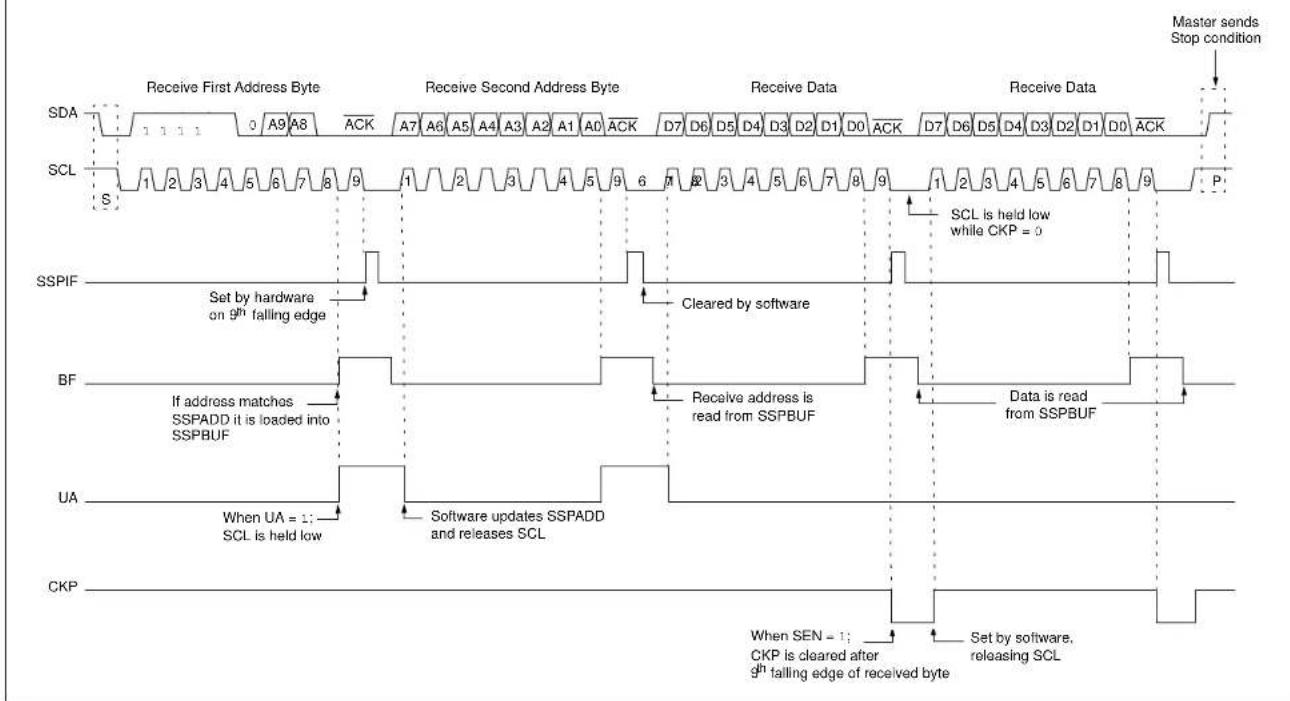
flowchart
graph TD
    A["Receive First Address Byte"] --> B["Receive Second Address Byte"]
    B --> C["Receive Data"]
    C --> D["Receive Data"]
    D --> E["Master sends Stop condition"]

    subgraph SDA
        A1["1 1 1 0 A9 A8 ACK"] --> A2["1 2 3 4 5 6 7 8 9"]
    end

    subgraph SCL
        S1["1 2 3 4 5 6 7 8 9"] --> S2["1 2 3 4 5 6 7 8 9"]
    end

    subgraph SSPIF
        SSIP["Set by hardware on 9th falling edge"] --> SSIPF["Set by hardware on 9th falling edge"]
        SSIPF --> BF["If address matches SSPADD it is loaded into SSPBUF"]
        BF --> UA["When UA = 1; SCL is held low"]
        BF --> CKP["Software updates SSPADD and releases SCL"]
    end

    subgraph BF
        BF1["Receive address is read from SSPBUF"] --> BF2["Data is read from SSPBUF"]
        BF2 --> CKP2["When SEN = 1; CKP is cleared after 9th falling edge of received byte"]
        BF2 --> CKP3["Set by software, releasing SCL"]
    end

    subgraph UA
        UA1["When UA = 1; SCL is held low"] --> UA2["Software updates SSPADD and releases SCL"]
        UA2 --> CKP4["When SEN = 1; CKP is cleared after 9th falling edge of received byte"]
        UA2 --> CKP5["Set by software, releasing SCL"]
    end

    subgraph CKP
        CKP1["Set by software, releasing SCL"] --> CKP2["When SEN = 1; CKP is cleared after 9th falling edge of received byte"]
        CKP2 --> CKP3["Set by software, releasing SCL"]
    end
FIGURE 27-13: I ^2 C SLAVE, 10-BIT ADDRESS, RECEPTION (SEN = 0, AHEN = 1, DHEN = 0)

flowchart
graph TD
    subgraph SDA
        A1["Receive First Address Byte"] --> B1["A9 A8 A7 A6 A5 A4"]
        B1 --> C1["ACK2 A1 A0 D7 D6 D5 D4 D3 D2 D1 D0 D7 D6 D5"]
        C1 --> D1["ACK"]
    end
    subgraph SCL
        E["S 1 2 3 4 5 6 7 8"] --> F["S 1 2 3 4 5 6 7 8"]
        F --> G["S 1 2 3 4 5 6 7 8"]
        G --> H["S 1 2 3 4 5 6 7 8"]
        H --> I["S 1 2 3 4 5 6 7 8"]
        I --> J["S 1 2 3 4 5 6 7 8"]
        J --> K["S 1 2 3 4 5 6 7 8"]
        K --> L["S 1 2 3 4 5 6 7 8"]
        L --> M["S 1 2 3 4 5 6 7 8"]
        M --> N["S 1 2 3 4 5 6 7 8"]
        N --> O["S 1 2 3 4 5 6 7 8"]
        O --> P["S 1 2 3 4 5 6 7 8"]
        P --> Q["S 1 2 3 4 5 6 7 8"]
        Q --> R["S 1 2 3 4 5 6 7 8"]
        R --> S["S 1 2 3 4 5 6 7 8"]
        S --> T["S 1 2 3 4 5 6 7 8"]
        T --> U["S 1 2 3 4 5 6 7 8"]
        U --> V["S 1 2 3 4 5 6 7 8"]
        V --> W["S 1 2 3 4 5 6 7 8"]
        W --> X["S 1 2 3 4 5 6 7 8"]
        X --> Y["S 1 2 3 4. Cleared by software"]
    end

    subgraph SSPIF
        Z["Set by hardware on \( {9}^{\text{th }} \) falling edge"] --> AA["Cleared by software"]
        AA --> AB["Cleared by software"]
    end

    subgraph BF
        AC["SSPBUF can be read anytime before the next received byte"] --> AD["SSPBUF can be read anytime before the next received byte"]
        AD --> AE["Received data is read from SSPBUF"]
    end

    subgraph ACKDT
        AF["Slave software clears ACKDT to ACK the received byte"] --> AG["Update to SSPADD is not allowed until \( {9}^{\text{th }} \) falling edge of SCL"]
        AG --> AH["Update of SSPADD, clears UA and releases SCL"]
    end

    subgraph UA
        AI["If when AHEN = ?; on the \( {8}^{\text{th }} \) falling edge of SCL of an address byte, CKP is cleared"] --> AJ["Set CKP with software releases SCL"]
    end

    subgraph CKP
        AK["ACKTIM is set by hardware on \( {8}^{\text{th }} \) falling edge of SCL"] --> AL["ACKTIM is set by hardware on \( {8}^{\text{th }} \) falling edge of SCL"]
    end
FIGURE 27-14: I ^2 C SLAVE, 10-BIT ADDRESS, TRANSMISSION (SEN = 0, AHEN = 0, DHEN = 0)

Clock stretching occurs when a device on the bus holds the SCL line low, effectively pausing communication. The slave may stretch the clock to allow more time to handle data or prepare a response for the master device. A master device is not concerned with stretching, as anytime it is active on the bus and not transferring data it is stretching. Any stretching done by a slave is invisible to the master software and handled by the hardware that generates SCL.
The SSPCON1
27.4.7.1 Normal Clock Stretching
Following an ACK, if the SSPSTAT
Note 1: The BF bit has no effect on whether the clock will be stretched or not. This is different than previous versions of the module that would not stretch the clock or clear CKP, if SSPBUF was read before the 9 ^th falling edge of SCL.
2: Previous versions of the module did not stretch the clock for a transmission if SSPBUF was loaded before the 9^th falling edge of SCL. It is now always cleared for read requests.
27.4.7.2 10-Bit Addressing Mode
In 10-bit Addressing mode, when the UA bit is set, the clock is always stretched. This is the only time the SCL is stretched without CKP being cleared. SCL is released immediately after a write to SSPADDx.
Note: Previous versions of the module did not stretch the clock if the second address byte did not match.
When SSPCON3
Stretching after the 8^th falling edge of SCL allows the slave to look at the received address or data and decide if it wants to ACK the received data.
27.4.8 CLOCK SYNCHRONIZATION AND THE CKP BIT
Any time the CKP bit is cleared, the module will wait for the SCL line to go low and then hold it. However, clearing the CKP bit will not assert the SCL output low until the SCL output is already sampled low. Therefore, the CKP bit will not assert the SCL line until an external I²C master device has already asserted the SCL line. The SCL output will remain low until the CKP bit is set and all other devices on the I²C bus have released SCL. This ensures that a write to the CKP bit will not violate the minimum high time requirement for SCL (see Figure 27-15).
FIGURE 27-15: CLOCK SYNCHRONIZATION TIMING
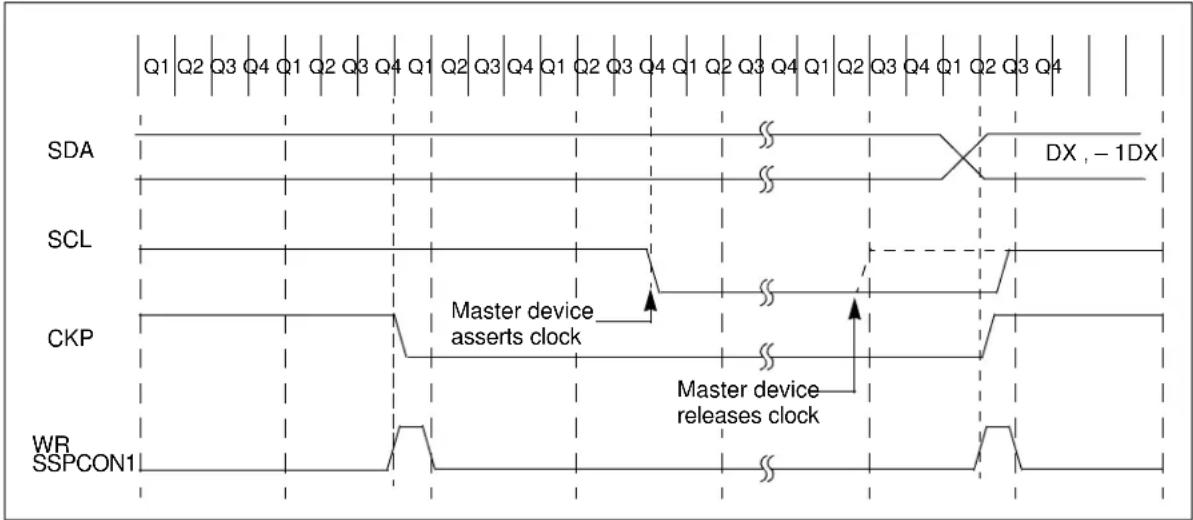
text_image
Q1 Q2 Q3 Q4 Q1 Q2 Q3 Q4 Q1 Q2 Q3 Q4 Q1 Q2 Q3 Q4 Q1 Q2 Q3 Q4 Q1 Q2 Q3 Q4 SDA SCL CKP WR SSPCON1 Master device asserts clock Master device releases clock DX , - 1DX27.4.9 GENERAL CALL ADDRESS SUPPORT
The addressing procedure for the PC bus is such that the first byte after the Start condition usually determines which device will be the slave addressed by the master device. The exception is the general call address, which can address all devices. When this address is used, all devices will, in theory, respond with an acknowledge.
The general call address is a reserved address in the I²C protocol, defined as address 0x00. When the SSPCON2
In 10-bit Address mode, the UA bit will not be set on the reception of the general call address. The slave will prepare to receive the second byte as data, just as it would in the 7-bit mode.
If the SSPCON3
FIGURE 27-16: SLAVE MODE GENERAL CALL ADDRESS SEQUENCE
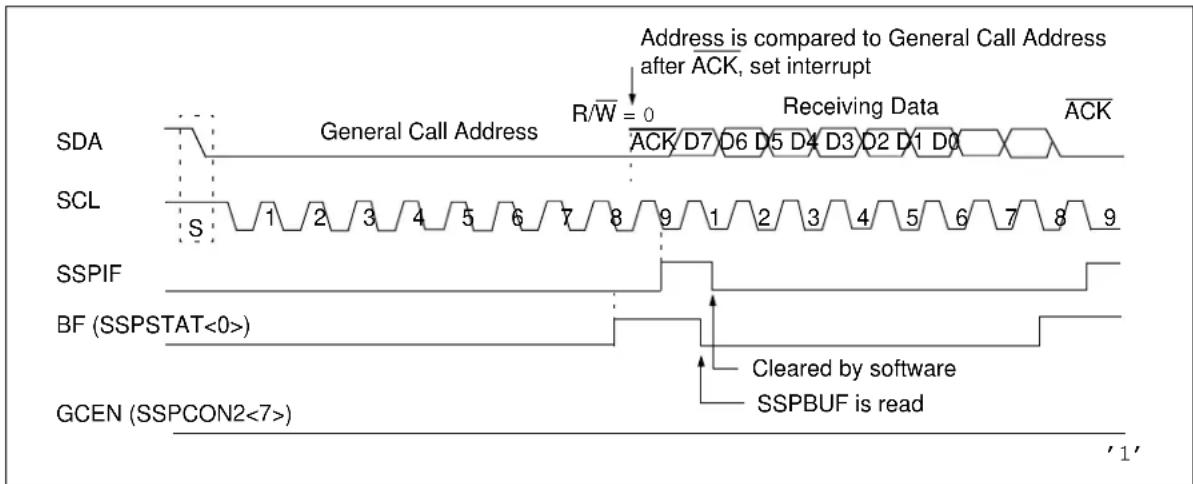
text_image
Address is compared to General Call Address after ACK, set interrupt R/W = 0 Receiving Data ACK General Call Address SDA SCL SSPIF BF (SSPSTAT<0>) GCEN (SSPCON2<7>) Cleared by software SSPBUF is read '1'27.4.10 SSPMSKX REGISTER
An SSP Mask (SSPMSKx) register (Registers 27-6 and 27-8) is available in I ^2 C Slave mode as a mask for the value held in the SSPSRx register during an address comparison operation. A zero ('0') bit in the SSPMSKx register has the effect of making the corresponding bit of the received address a "don't care".
This register is reset to all '1's upon any Reset condition and, therefore, has no effect on standard SSP operation until written with a mask value.
The SSP Mask register is active during:
- 7-bit Address mode: address compare of A<7:1>
- 10-bit Address mode: address compare of A<7:0> only. The SSP mask has no effect during the reception of the first (high) byte of the address
27.5 I ^2 C Master Mode
Master mode is enabled by setting and clearing the appropriate SSPCON1
Master mode of operation is supported by interrupt generation on the detection of the Start and Stop conditions. The Stop (P) and Start (S) bits are cleared from a Reset or when the MSSP module is disabled. Control of the I^2C bus may be taken when the P bit is set or the bus is Idle.
In Firmware Controlled Master mode, user code conducts all I^2C bus operations based on Start and Stop bit condition detection. Start and Stop condition detection is the only active circuitry in this mode. All other communication is done by the user software directly manipulating the SDA and SCL lines.
The following events will cause the SSP Interrupt Flag bit, SSPIF, to be set (SSP interrupt, if enabled):
- Start condition detected
- Stop condition detected
• Data transfer byte transmitted/received - Acknowledge transmitted/received
• Repeated Start generated
Note 1: The MSSP module, when configured in I²C Master mode, does not allow queuing of events. For instance, the user is not allowed to initiate a Start condition and immediately write the SSPBUF register to initiate transmission before the Start condition is complete. In this case, the SSPBUF will not be written to and the WCOL bit will be set, indicating that a write to the SSPBUF did not occur.
2: When in Master mode, Start/Stop detection is masked and an interrupt is generated when the SEN/PEN bit is cleared and the generation is complete.
27.5.1 I ^2 C MASTER MODE OPERATION
The master device generates all of the serial clock pulses and the Start and Stop conditions. A transfer is ended with a Stop condition or with a Repeated Start condition. Since the Repeated Start condition is also the beginning of the next serial transfer, the ?C bus will not be released.
In Master Transmitter mode, serial data is output through SDA, while SCL outputs the serial clock. The first byte transmitted contains the slave address of the receiving device (7 bits) and the Read/Write(R/W) bit. In this case, the R/W bit will be logic '0'. Serial data is transmitted eight bits at a time. After each byte is transmitted, an Acknowledge bit is received. Start and Stop conditions are output to indicate the beginning and the end of a serial transfer.
In Master Receive mode, the first byte transmitted contains the slave address of the transmitting device (7 bits) and the R/W bit. In this case, the R/W bit will be logic '1'. Thus, the first byte transmitted is a 7-bit slave address followed by a '1' to indicate the receive bit. Serial data is received via SDA, while SCL outputs the serial clock. Serial data is received eight bits at a time. After each byte is received, an Acknowledge bit is transmitted. Start and Stop conditions indicate the beginning and the end of transmission.
A Baud Rate Generator is used to set the clock frequency output on SCL. See Section 27.6 "Baud Rate Generator" for more details.
Clock arbitration occurs when the master, during any receive, transmit or Repeated Start/Stop condition, releases the SCL pin (SCL allowed to float high). When the SCL pin is allowed to float high, the Baud Rate Generator (BRG) is suspended from counting until the SCL pin is actually sampled high. When the SCL pin is sampled high, the Baud Rate Generator is reloaded with the contents of SSPADD<7:0> and begins counting. This ensures that the SCL high time will always be at least one BRG rollover count in the event that the clock is held low by an external device (Figure 27-17).
FIGURE 27-17: BAUD RATE GENERATOR TIMING WITH CLOCK ARBITRATION

flowchart
graph TD
    A["SDA"] --> B["DX, -1DX"]
    B --> C["SCL"]
    C --> D["SCL allowed to transition high"]
    D --> E["SCL deasserted but slave holds"]
    E --> F["SCL low (clock arbitration)"]
    F --> G["BRG decrements on Q2 and Q4 cycles"]
    G --> H["BRG Value 03h 02h 01h 00h (hold off) 03h 02h"]
    H --> I["SCL is sampled high, reload takes place and BRG starts its count"]
    I --> J["BRG Reload"]
27.5.3 WCOL STATUS FLAG
If the user writes the SSPBUF when a Start, Restart, Stop, Receive or Transmit sequence is in progress, the WCOL is set and the contents of the buffer are unchanged (the write does not occur). Any time the WCOL bit is set, it indicates that an action on SSPBUF was attempted while the module was not Idle.
Note: Because queuing of events is not allowed, writing to the lower five bits in the SSPCON2 register is disabled until the Start condition is complete.
27.5.4 I ^2 C MASTER MODE START CONDITION TIMING
To initiate a Start condition, the user sets the Start Enable (SEN) bit in the SSPCON2 register. If the SDA and SCL pins are sampled high, the Baud Rate Generator is reloaded with the contents of SSPADD<7:0> and starts its count. If SCL and SDA are both sampled high when the Baud Rate Generator times out ( T_BRG ), the SDA pin is driven low. The action
of the SDA being driven low while SCL is high is the Start condition and causes the SSPSTAT bit to be set. Following this, the Baud Rate Generator is reloaded with the contents of SSPADD<7:0> and resumes its count. When the Baud Rate Generator times out ( T_BRG ), the SSPCON2
Note 1: If at the beginning of the Start condition the SDA and SCL pins are already sampled low, or if during the Start condition the SCL line is sampled low before the SDA line is driven low, a bus collision occurs, the Bus Collision Interrupt Flag, BCLIF, is set, the Start condition is aborted and the PC module is reset into its Idle state.
2: The Philips I ^2 C Specification states that a bus collision cannot occur on a Start.
FIGURE 27-18: FIRST START BIT TIMING

text_image
Write to SEN bit occurs here Set S bit (SSPSTAT<3>) SDA = 1, SCL = 1 T_BRG T_BRG At completion of Start bit, hardware clears SEN bit and sets SSPIF bit Write to SSPBUF occurs here 1st bit 2nd bit SDA SCL S T_BRG T_BRG27.5.5 I ^2 C MASTER MODE REPEATED START CONDITION TIMING
A Repeated Start condition occurs when the SSPCON2 bit will be set. The SSPIF bit will not be set until the Baud Rate Generator has timed out.
Note 1: If RSEN is programmed while any other event is in progress, it will not take effect.
2: A bus collision during the Repeated Start condition occurs if:
- SDA is sampled low when SCL goes from low-to-high.
- SCL goes low before SDA is asserted low. This may indicate that another master is attempting to transmit a data '1'.
FIGURE 27-19: REPEAT START CONDITION WAVEFORM
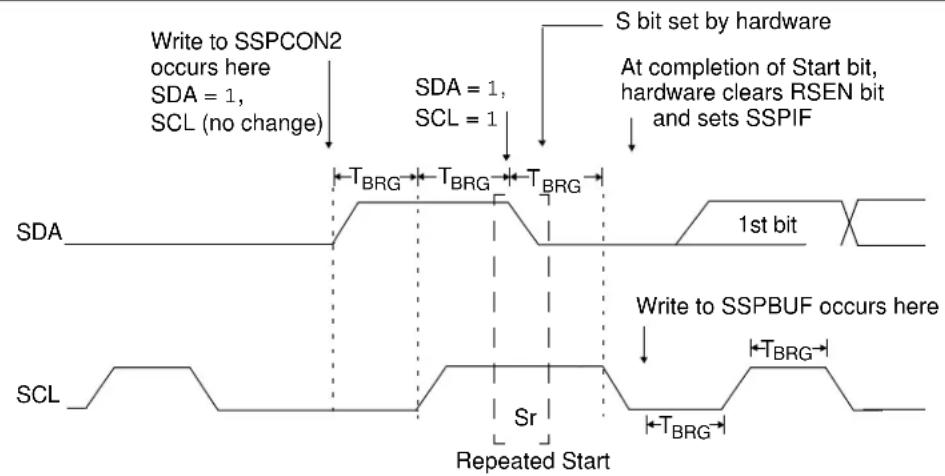
text_image
Write to SSPCON2 occurs here SDA = 1, SCL (no change) SDA = 1, SCL = 1 S bit set by hardware At completion of Start bit, hardware clears RSEN bit and sets SSPIF T_BRG T_BRG T_BRG 1st bit Write to SSPBUF occurs here Sr Repeated Start SCL27.5.6 I ^2 C MASTER MODE TRANSMISSION
Transmission of a data byte, a 7-bit address or the other half of a 10-bit address is accomplished by simply writing a value to the SSPBUF register. This action will set the Buffer Full (BF) flag bit and will allow the Baud Rate Generator to begin counting and start the next transmission. Each bit of address/data will be shifted out onto the SDA pin after the falling edge of SCL is asserted. SCL is held low for one Baud Rate Generator rollover count ( T_BRG ). Data should be valid before SCL is released high. When the SCL pin is released high, it is held that way for T_BRG . The data on the SDA pin must remain stable for that duration and some hold time after the next falling edge of SCL. After the 8^th bit is shifted out (the falling edge of the 8^th clock), the BF flag is cleared and the master releases the SDA. This allows the slave device being addressed to respond with an ACK bit during the 9^th bit time if an address match occurred or if data was received properly. The status of ACK is written into the ACKSTAT bit on the rising edge of the 9^th clock. If the master receives an Acknowledge, the Acknowledge Status (ACKSTAT) bit is cleared. If not, the bit is set. After the 9^th clock, the SSPIF bit is set and the master clock (Baud Rate Generator) is suspended until the next data byte is loaded into the SSPBUF, leaving SCL low and SDA unchanged (Figure 27-20).
After the write to the SSPBUF, each bit of the address will be shifted out on the falling edge of SCL until all seven address bits and the R/W bit are completed. On the falling edge of the 8^th clock, the master will release the SDA pin, allowing the slave to respond with an Acknowledge. On the falling edge of the 9^th clock, the master will sample the SDA pin to see if the address was recognized by a slave. The status of the ACK bit is loaded into the SSPCON2
27.5.6.1 BF Status Flag
In Transmit mode, the SSPSTAT
27.5.6.2 WCOL Status Flag
If the user writes the SSPBUF when a transmit is already in progress (i.e., SSPSR is still shifting out a data byte), the WCOL is set and the contents of the buffer are unchanged (the write does not occur).
WCOL must be cleared by software before the next transmission.
27.5.6.3 ACKSTAT Status Flag
In Transmit mode, the SSPCON2
27.5.6.4 Typical Transmit Sequence
- The user generates a Start condition by setting the SSPCON2
bit. - SSPIF is set by hardware on completion of the Start.
- SSPIF is cleared by software.
- The MSSP module will wait the required start time before any other operation takes place.
- The user loads the SSPBUF with the slave address to transmit.
- Address is shifted out the SDA pin until all eight bits are transmitted. Transmission begins as soon as SSPBUF is written to.
- The MSSP module shifts in the ACK bit from the slave device and writes its value into the SSPCON2
bit. - The MSSP module generates an interrupt at the end of the 9^th clock cycle by setting the SSPIF bit.
- The user loads the SSPBUF with eight bits of data.
- Data is shifted out the SDA pin until all eight bits are transmitted.
- The MSSP module shifts in the ACK bit from the slave device and writes its value into the SSPCON2
bit. - Steps 8-11 are repeated for all transmitted data bytes.
- The user generates a Stop or Restart condition by setting the SSPCON2
or SSPCON2 bits. Interrupt is generated once the Stop/Restart condition is complete.
FIGURE 27-20: I ^2 C MASTER MODE WAVEFORM (TRANSMISSION, 7 OR 10-BIT ADDRESS)
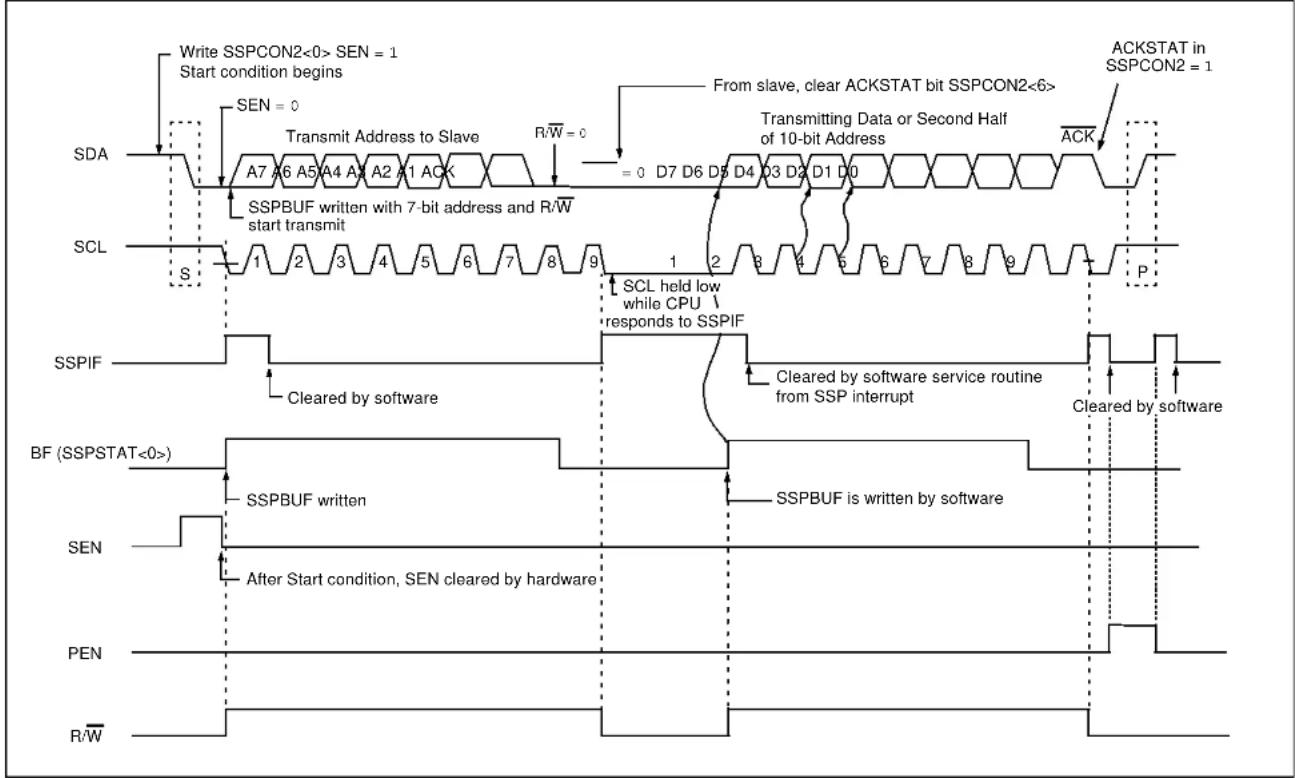
flowchart
graph TD
    A["Write SSPCON2<0> SEN = 1\nStart condition begins"] --> B["SEN = 0"]
    B --> C["Transmit Address to Slave"]
    C --> D["R/W = 0"]
    D --> E["= 0 D7 D6 D5 D4 D3 D2 D1 D0"]
    E --> F["From slave, clear ACKSTAT bit SSPCON2<6>"]
    F --> G["ACKSTAT in SSPCON2 = 1"]
    H["SDA"] --> I["A7 A6 A5 A4 A3 A2 A1 ACK"]
    I --> J["SSPBUF written with 7-bit address and R/W start transmit"]
    J --> K["SSPIF"]
    K --> L["Cleared by software"]
    L --> M["SCL held low while CPU responds to SSPIF"]
    M --> N["Cleared by software service routine from SSP interrupt"]
    N --> O["Cleared by software"]
    P["SCL"] --> Q["S"]
    Q --> R["1 2 3 4 5 6 7 8 9"]
    R --> S["P"]
    T["BF (SSPSTAT<0>)"] --> U["SSPBUF written"]
    U --> V["After Start condition, SEN cleared by hardware"]
    V --> W["SSPBUF is written by software"]
    X["SEN"] --> Y["After Start condition, SEN cleared by hardware"]
    Y --> Z["PEN"]
    AA["R/W"] --> AB["End"]
27.5.7 I ^2 C MASTER MODE RECEPTION
Master mode reception is enabled by programming the Receive Enable (RCEN) bit in the SSPCON2 register.
Note: The MSSP module must be in an Idle state before the RCEN bit is set or the RCEN bit will be disregarded.
The Baud Rate Generator begins counting and on each rollover the state of the SCL pin changes (high-to-low/low-to-high) and data is shifted into the SSPSR. After the falling edge of the 8^th clock, the receive enable flag is automatically cleared, the contents of the SSPSR are loaded into the SSPBUF, the BF flag bit is set, the SSPIF flag bit is set and the Baud Rate Generator is suspended from counting, holding SCL low. The MSSP is now in idle state awaiting the next command. When the buffer is read by the CPU, the BF flag bit is automatically cleared. The user can then send an Acknowledge bit at the end of reception by setting the Acknowledge Sequence Enable (ACKEN) bit in the SSPCON2 register.
27.5.7.1 BF Status Flag
In receive operation, the BF bit is set when an address or data byte is loaded into SSPBUF from SSPSR. It is cleared when the SSPBUF register is read.
27.5.7.2 SSPOV Status Flag
In receive operation, the SSPOV bit is set when eight bits are received into the SSPSR and the BF flag bit is already set from a previous reception.
27.5.7.3 WCOL Status Flag
If the user writes the SSPBUF when a receive is already in progress (i.e., SSPSR is still shifting in a data byte), the WCOL bit is set and the contents of the buffer are unchanged (the write does not occur).
27.5.7.4 Typical Receive Sequence
- The user generates a Start condition by setting the SSPCON2
bit. - SSPIF is set by hardware on completion of the Start.
- SSPIF is cleared by software.
- The user writes SSPBUF with the slave address to transmit and the R/W bit set.
- Address is shifted out the SDA pin until all eight bits are transmitted. Transmission begins as soon as SSPBUF is written to.
- The MSSP module shifts in the ACK bit from the slave device and writes its value into the SSPCON2
bit. - The MSSP module generates an interrupt at the end of the 9^th clock cycle by setting the SSPIF bit.
- User sets the SSPCON2
bit and the master clocks in a byte from the slave. - After the 8 ^th falling edge of SCL, SSPIF and BF are set.
- Master clears SSPIF and reads the received byte from SSPBUF, clears BF.
- Master sets ACK value sent to slave in SSPCON2
bit and initiates the ACK by setting the ACKEN bit. - Master's ACK is clocked out to the slave and SSPIF is set.
- The user clears SSPIF.
- Steps 8–13 are repeated for each received byte from the slave.
- Master sends a NACK or Stop to end communication.
FIGURE 27-21: I ^2 C MASTER MODE WAVEFORM (RECEPTION, 7-BIT ADDRESS)

flowchart
graph TD
    A["Write to SSPCON2<0> (SEN = 1), begin Start condition"] --> B["Write to SSPBUF occurs here, start XMIT"]
    B --> C["Transmit Address to slave"]
    C --> D["A7 A6 A5 A4 A3 A2 A"]
    D --> E["ACK from slave"]
    E --> F["D7 D6 D5 D4 D3 D2 D1 D0"]
    F --> G["ACK"]
    G --> H["D7 D6 D5 D4 D3 D2 D1 D0"]
    H --> I["ACK from master"]
    I --> J["SDA - ACKDT = 0"]
    J --> K["ACKEN - start Acknowledge sequence"]
    K --> L["SDA - ACKDT = 1"]
    L --> M["PEN bit = 1 written here"]
    M --> N["ACK is not sent"]
    N --> O["Bus master terminates transfer"]
    P["SCL"] --> Q["S"]
    Q --> R["1 2 3 4 5 6 7 8 9"]
    R --> S["1 2 3 4 5 6 7 8 9"]
    S --> T["Data shifted in on falling edge of CLK"]
    T --> U["Set SSPIF at end of receive"]
    U --> V["Set SSPIF interrupt at end of Acknowledge sequence"]
    V --> W["Set SSPIF at end of software"]
    W --> X["Set P bit (SSPSTAT<4>) and SSPIF"]
    Y["SSPIF"] --> Z["Cleared by software"]
    Z --> AA["Cleared by software"]
    AA --> AB["Set SSPIF interrupt at end of receive"]
    AB --> AC["Cleared by software"]
    AC --> AD["Set SSPIF interrupt at end of Acknowledge sequence"]
    AD --> AE["Cleared by software"]
    AE --> AF["Last bit is shifted into SSPSR and contents are unloaded into SSPBUF"]
    AF --> AG["SSPOV is set because SSPBUF is still full"]
    AH["BF (SSPSTAT<0>"] --> AI["Master configured as a receiver by programming SSPCON2<3> (RCEN = 1)"]
    AI --> AJ["RCCEN cleared automatically"]
    AJ --> AK["ACK from master"]
    AK --> AL["SDA = ACKDT = 0"]
    AL --> AM["RCCEN cleared automatically"]
27.5.8 ACKNOWLEDGE SEQUENCE TIMING
An Acknowledge sequence is enabled by setting the Acknowledge Sequence Enable (ACKEN) bit in the SSPCON2 register. When this bit is set, the SCL pin is pulled low and the contents of the Acknowledge data bit are presented on the SDA pin. If the user wishes to generate an Acknowledge, then the ACKDT bit should be cleared. If not, the user should set the ACKDT bit before starting an Acknowledge sequence. The Baud Rate Generator then counts for one rollover period ( T_BRG ) and the SCL pin is deasserted (pulled high). When the SCL pin is sampled high (clock arbitration), the Baud Rate Generator counts for T_BRG . The SCL pin is then pulled low. Following this, the ACKEN bit is automatically cleared, the Baud Rate Generator is turned off and the MSSP module then goes into Idle mode (Figure 27-22).
27.5.8.1 WCOL Status Flag
If the user writes the SSPBUF when an Acknowledge sequence is in progress, then WCOL is set and the contents of the buffer are unchanged (the write does not occur).
27.5.9 STOP CONDITION TIMING
A Stop bit is asserted on the SDA pin at the end of a receive/transmit by setting the Stop Sequence Enable (PEN) in the SSPCON2 register. At the end of a receive/transmit, the SCL line is held low after the falling edge of the 9 ^th clock. When the PEN bit is set, the master will assert the SDA line low. When the SDA line is sampled low, the Baud Rate Generator is reloaded and counts down to '0'. When the Baud Rate Generator times out, the SCL pin will be brought high and, one T_BRG (Baud Rate Generator rollover count) later, the SDA pin will be deasserted. When the SDA pin is sampled high while SCL is high, the SSPSTAT
bit is set. A T_BRG later, the PEN bit is cleared and the SSPIF bit is set (Figure 27-23).
27.5.9.1 WCOL Status Flag
If the user writes the SSPBUF when a Stop sequence is in progress, then the WCOL bit is set and the contents of the buffer are unchanged (the write does not occur).
flowchart
graph TD
    A["ACKEN automatically cleared"] --> B["ACKEN = 1, ACKDT = 0"]
    B --> C["D0"]
    C --> D["SDA"]
    D --> E["ACK"]
    F["SCL"] --> G["8"]
    G --> H["9"]
    H --> I["SSPIF"]
    I --> J["SSPIF set at the end of receive"]
    J --> K["Cleared in software"]
    K --> L["SSPIF set at the end of Acknowledge sequence"]
    M["Note: T_BRG = one Baud Rate Generator period."] --> N["SSPIF set at the end of receive"]
FIGURE 27-23: STOP CONDITION RECEIVE OR TRANSMIT MODE
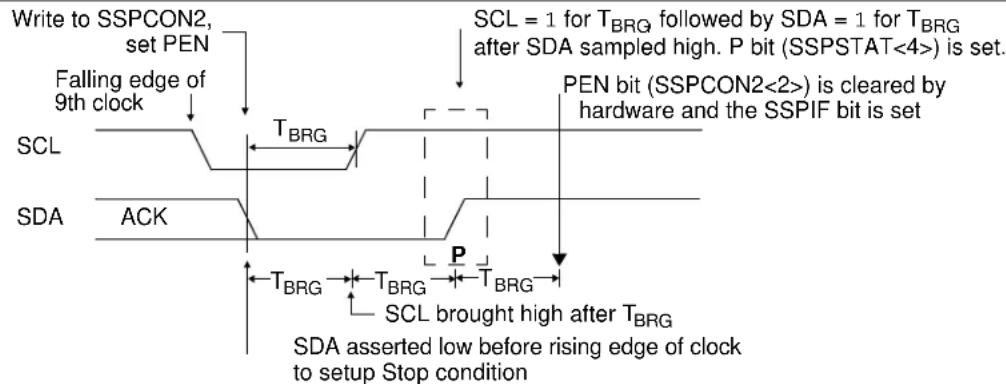
text_image
Write to SSPCON2, set PEN Falling edge of 9th clock SCL = 1 for T_BRG followed by SDA = 1 for T_BRG after SDA sampled high. P bit (SSPSTAT<4>) is set. SCL T_BRG PEN bit (SSPCON2<2>) is cleared by hardware and the SSPIF bit is set SDA ACK T_BRG T_BRG T_BRG SCL brought high after T_BRG SDA asserted low before rising edge of clock to setup Stop conditionNote: T BRG = one Baud Rate Generator period.
While in Sleep mode, the I^2C slave module can receive addresses or data and, when an address match or complete byte transfer occurs, wakes the processor from Sleep (if the MSSP interrupt is enabled).
27.5.11 EFFECTS OF A RESET
A Reset disables the MSSP module and terminates the current transfer.
27.5.12 MULTI-MASTER MODE
In Multi-Master mode, the interrupt generation on the detection of the Start and Stop conditions allows the determination of when the bus is free. The Stop (P) and Start (S) bits are cleared from a Reset or when the MSSP module is disabled. Control of the I²C bus may be taken when the P bit in the SSPSTAT register is set or the bus is Idle, with both the S and P bits clear. When the bus is busy, enabling the SSP interrupt will generate the interrupt when the Stop condition occurs.
In multi-master operation, the SDA line must be monitored for arbitration to see if the signal level is the expected output level. This check is performed by hardware with the result placed in the BCLIF bit.
The states where arbitration can be lost are:
- Address Transfer
- Data Transfer
- A Start Condition
• A Repeated Start Condition
• An Acknowledge Condition
27.5.13 MULTI-MASTER COMMUNICATION, BUS COLLISION AND BUS ARBITRATION
Multi-Master mode support is achieved by bus arbitration. When the master outputs address/data bits onto the SDA pin, arbitration takes place when the master outputs a '1' on SDA, by letting SDA float high and another master asserts a '0'. When the SCL pin floats high, data should be stable. If the expected data on SDA is a '1' and the data sampled on the SDA pin is '0', then a bus collision has taken place. The master will set the Bus Collision Interrupt Flag (BCLIF) and reset the I²C port to its Idle state (Figure 27-24).
If a transmit was in progress when the bus collision occurred, the transmission is halted, the BF flag is cleared, the SDA and SCL lines are deasserted and the SSPBUF can be written to. When the user services the bus collision Interrupt Service Routine and if the I^2C bus is free, the user can resume communication by asserting a Start condition.
If a Start, Repeated Start, Stop or Acknowledge condition was in progress when the bus collision occurred, the condition is aborted, the SDA and SCL lines are deasserted and the respective control bits in the SSPCON2 register are cleared. When the user services the bus collision Interrupt Service Routine and if the I²C bus is free, the user can resume communication by asserting a Start condition.
The master will continue to monitor the SDA and SCL pins. If a Stop condition occurs, the SSPIF bit will be set.
A write to the SSPBUF will start the transmission of data at the first data bit, regardless of where the transmitter left off when the bus collision occurred.
In Multi-Master mode, the interrupt generation on the detection of Start and Stop conditions allows the determination of when the bus is free. Control of the PC bus can be taken when the P bit is set in the SSPSTAT register or the bus is Idle and the S and P bits are cleared.
FIGURE 27-24: BUS COLLISION TIMING FOR TRANSMIT AND ACKNOWLEDGE
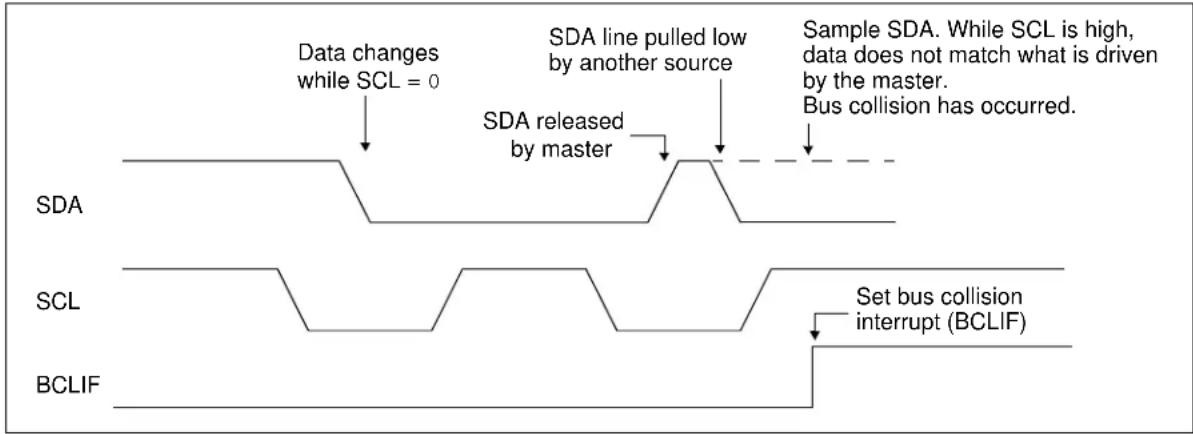
flowchart
graph TD
    A["Data changes while SCL = 0"] --> B["SDA released by master"]
    B --> C["SDA line pulled low by another source"]
    C --> D["Sample SDA. While SCL is high, data does not match what is driven by the master. Bus collision has occurred."]
    E["SCL"] --> F["Set bus collision interrupt (BCLIF)"]
    G["BCLIF"] --> H["End"]
27.5.13.1 Bus Collision During a Start Condition
During a Start condition, a bus collision occurs if:
a) SDA or SCL are sampled low at the beginning of the Start condition (Figure 27-25).
b) SCL is sampled low before SDA is asserted low (Figure 27-26).
During a Start condition, both the SDA and the SCL pins are monitored.
If the SDA pin is already low or the SCL pin is already low, then all of the following occur:
• the Start condition is aborted
- the BCLIF flag is set
- the MSSP module is reset to its Idle state (Figure 27-25)
The Start condition begins with the SDA and SCL pins deasserted. When the SDA pin is sampled high, the Baud Rate Generator is loaded and counts down. If the SCL pin is sampled low while SDA is high, a bus collision occurs because it is assumed that another master is attempting to drive a data '1' during the Start condition.
If the SDA pin is sampled low during this count, the BRG is reset and the SDA line is asserted early (Figure 27-27). If, however, a '1' is sampled on the SDA pin, the SDA pin is asserted low at the end of the BRG count. The Baud Rate Generator is then reloaded and counts down to zero; if the SCL pin is sampled as '0' during this time, a bus collision does not occur. At the end of the BRG count, the SCL pin is asserted low.
Note: The reason that bus collision is not a factor during a Start condition is that no two bus masters can assert a Start condition at the exact same time. Therefore, one master will always assert SDA before the other. This condition does not cause a bus collision because the two masters must be allowed to arbitrate the first address following the Start condition. If the address is the same, arbitration must be allowed to continue into the data portion, Repeated Start or Stop conditions.
FIGURE 27-25: BUS COLLISION DURING START CONDITION (SDA ONLY)
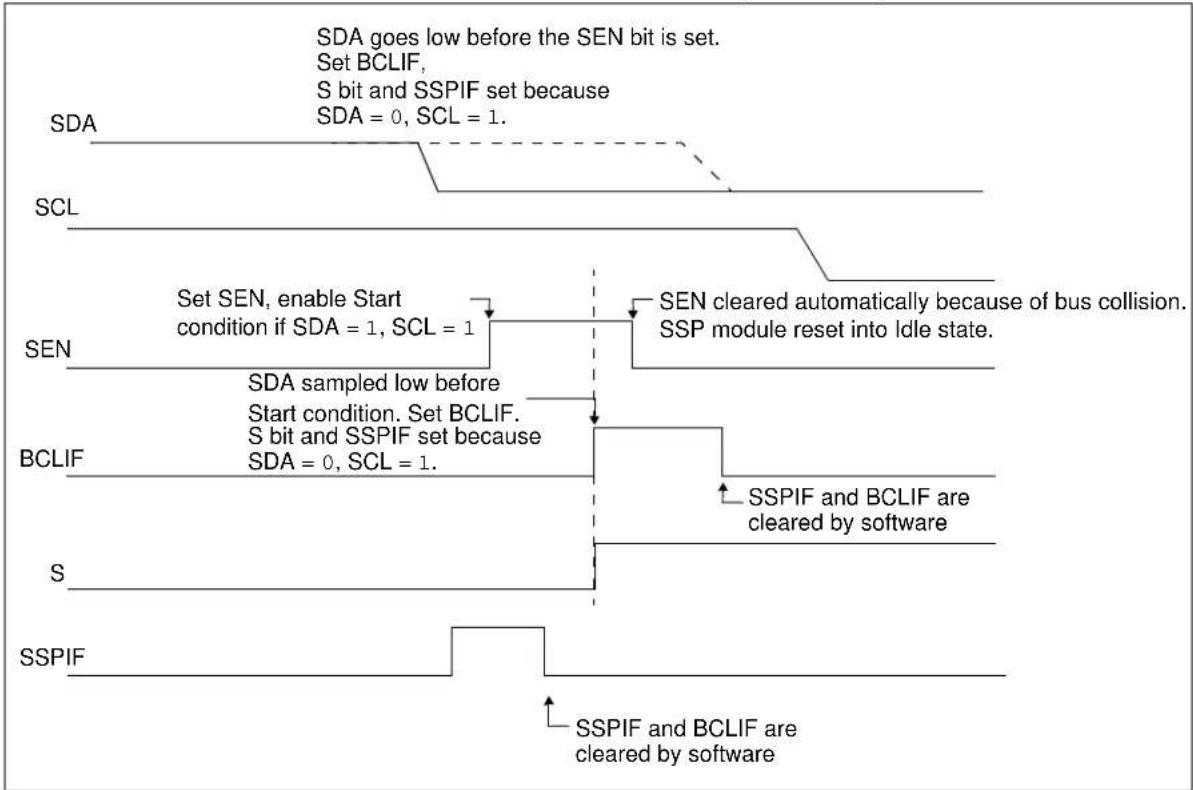
flowchart
graph TD
    A["SDA"] --> B["SCL"]
    B --> C["SEN"]
    C --> D["BCLIF"]
    D --> E["S"]
    E --> F["SSPIF"]
    F --> G["SSPIF and BCLIF are cleared by software"]
    C --> H["Set SEN, enable Start condition if SDA = 1, SCL = 1"]
    H --> I["Set BCLIF. S bit and SSPIF set because SDA = 0, SCL = 1"]
    I --> J["SSPIF and BCLIF are cleared by software"]
    J --> K["SSPIF and BCLIF are cleared by software"]
    style A fill:#f9f,stroke:#333
    style B fill:#f9f,stroke:#333
    style C fill:#f9f,stroke:#333
    style D fill:#f9f,stroke:#333
    style E fill:#f9f,stroke:#333
    style F fill:#f9f,stroke:#333
    style G fill:#f9f,stroke:#333
    style H fill:#f9f,stroke:#333
    style I fill:#f9f,stroke:#333
    style J fill:#f9f,stroke:#333
    style K fill:#f9f,stroke:#333
FIGURE 27-26: BUS COLLISION DURING START CONDITION (SCL = 0)

flowchart
graph TD
    A["SDA"] --> B["SCL"]
    B --> C["SEN"]
    C --> D["BCLIF"]
    D --> E["S"]
    E --> F["SSPIF"]
    style A fill:#f9f,stroke:#333
    style B fill:#ccf,stroke:#333
    style C fill:#cfc,stroke:#333
    style D fill:#fcc,stroke:#333
    style E fill:#cff,stroke:#333
    style F fill:#ffc,stroke:#333
    note1["Set SEN, enable Start sequence if SDA = 1, SCL = 1"] --> B
    note2["SCL = 0 before SDA = 0, bus collision occurs. Set BCLIF"]
    note3["Interrupt cleared by software"]
    note4["SDA = 0, SCL = 1"]
    note5["T_BRG"]
    note6["T_BRG"]
    note7["SCL = 0 before BRG time out, bus collision occurs. Set BCLIF"]
FIGURE 27-27: BRG RESET DUE TO SDA ARBITRATION DURING START CONDITION
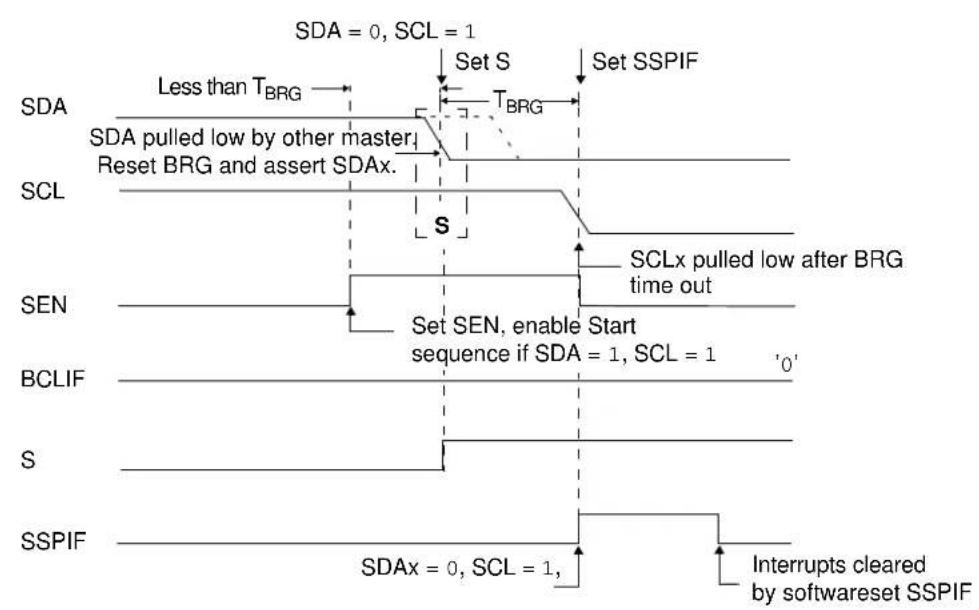
flowchart
graph TD
    A["SDA"] --> B["Less than T_BRG"]
    B --> C["SDA pulled low by other master"]
    C --> D["Reset BRG and assert SDAx."]
    D --> E["SCLx pulled low after BRG time out"]
    E --> F["SCL"]
    G["BCLIF"] --> H["Set SEN, enable Start sequence if SDA = 1, SCL = 1"]
    I["S"] --> J["Interrupts cleared by softwareset SSPIF"]
    K["SSPIF"] --> L["SDAx = 0, SCL = 1"]
    M["SDA = 0, SCL = 1"] --> N["Set S"]
    N --> O["Set SSPIF"]
27.5.13.2 Bus Collision during a Repeated Start Condition
During a Repeated Start condition, a bus collision occurs if:
a) A low level is sampled on SDA when SCL goes from low level to high level.
b) SCL goes low before SDA is asserted low, indicating that another master is attempting to transmit a data '1'.
When the user releases SDA and the pin is allowed to float high, the BRG is loaded with SSPADD and counts down to zero. The SCL pin is then deasserted and, when sampled high, the SDA pin is sampled.
If SDA is low, a bus collision has occurred (i.e., another master is attempting to transmit a data '0', Figure 27-28). If SDA is sampled high, the BRG is reloaded and begins counting. If SDA goes from high-to-low before the BRG times out, no bus collision occurs because no two masters can assert SDA at exactly the same time.
If SCL goes from high-to-low before the BRG times out and SDA has not already been asserted, a bus collision occurs. In this case, another master is attempting to transmit a data '1' during the Repeated Start condition (see Figure 27-29.)
If, at the end of the BRG time out, both SCL and SDA are still high, the SDA pin is driven low and the BRG is reloaded and begins counting. At the end of the count, regardless of the status of the SCL pin, the SCL pin is driven low and the Repeated Start condition is complete.
FIGURE 27-28: BUS COLLISION DURING A REPEATED START CONDITION (CASE 1)
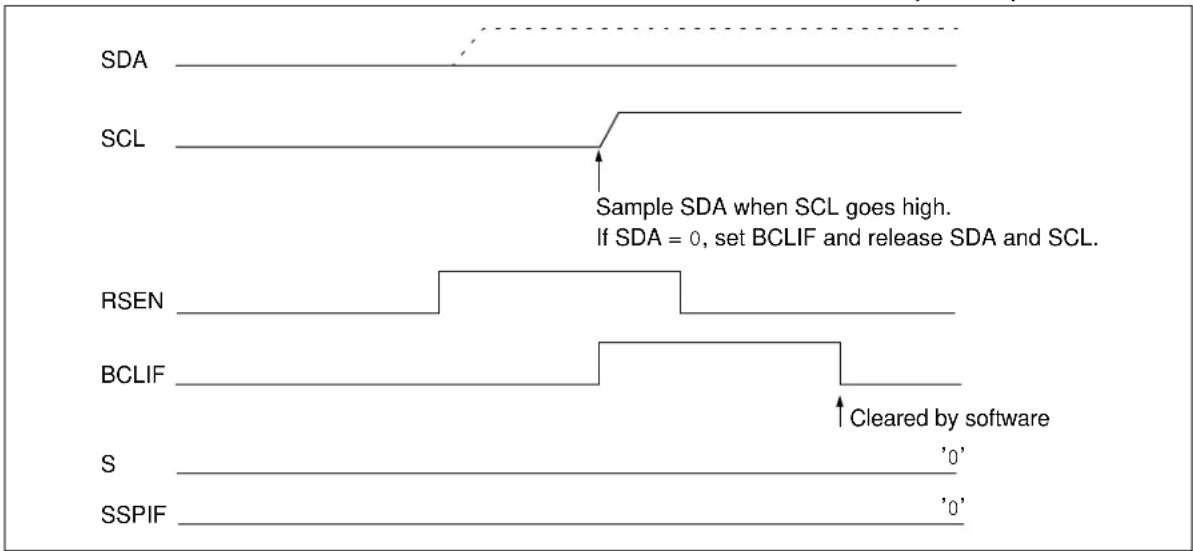
text_image
SDA SCL Sample SDA when SCL goes high. If SDA = 0, set BCLIF and release SDA and SCL. RSEN BCLIF ↑ Cleared by software S 'SSPIF '0' '0'FIGURE 27-29: BUS COLLISION DURING A REPEATED START CONDITION (CASE 2)
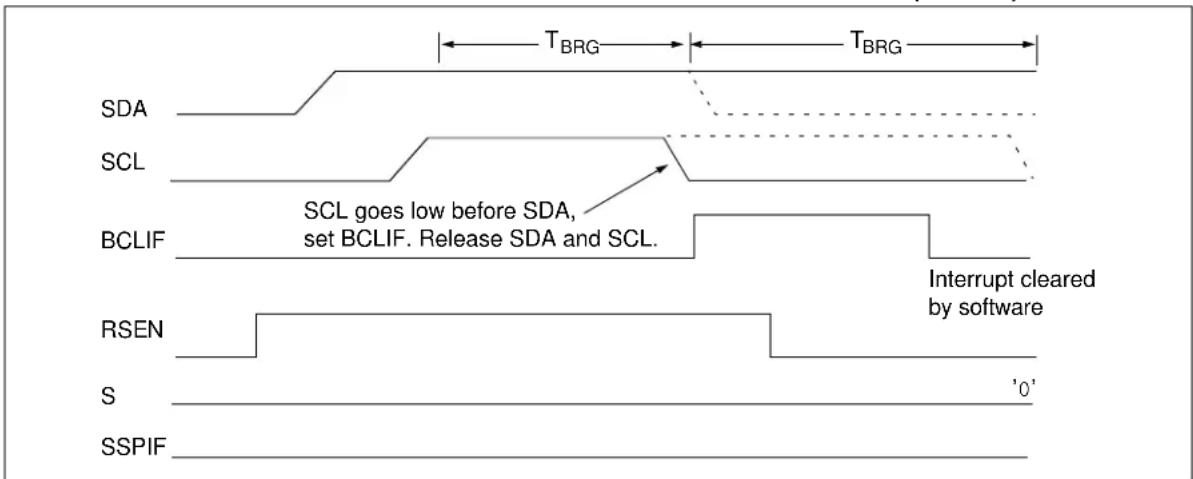
text_image
T_BRG T_BRG SDA SCL SCL goes low before SDA, set BCLIF. Release SDA and SCL. BCLIF Interrupt cleared by software RSEN S 'S0' SSPIF27.5.13.3 Bus Collision During a Stop Condition
Bus collision occurs during a Stop condition if:
a) After the SDA pin has been deasserted and allowed to float high, SDA is sampled low after the BRG has timed out.
b) After the SCL pin is deasserted, SCL is sampled low before SDA goes high.
The Stop condition begins with SDA asserted low. When SDA is sampled low, the SCL pin is allowed to float. When the pin is sampled high (clock arbitration), the Baud Rate Generator is loaded with SSPADD and counts down to 0. After the BRG times out, SDA is sampled. If SDA is sampled low, a bus collision has occurred. This is due to another master attempting to drive a data '0' (Figure 27-30). If the SCL pin is sampled low before SDA is allowed to float high, a bus collision occurs. This is another case of another master attempting to drive a data '0' (Figure 27-31).
FIGURE 27-30: BUS COLLISION DURING A STOP CONDITION (CASE 1)
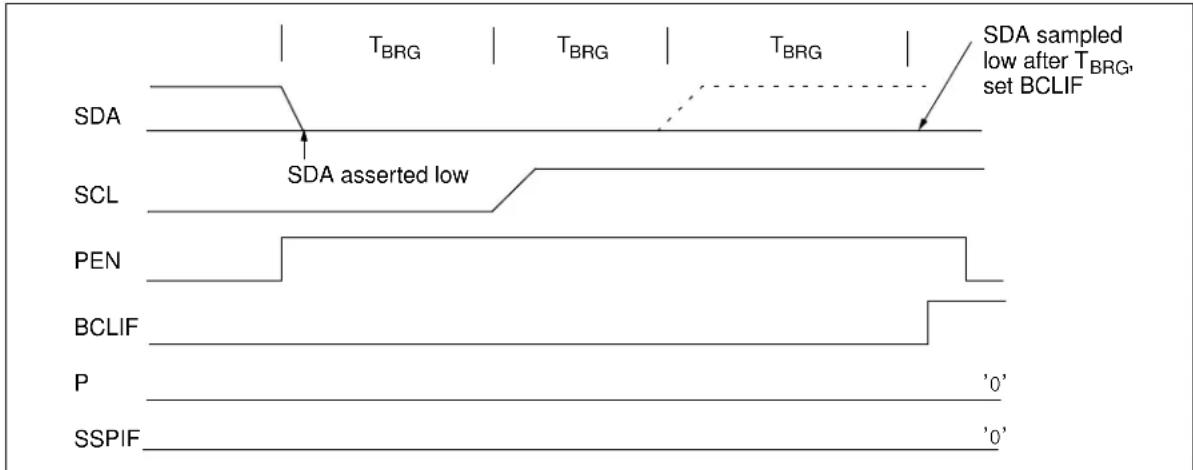
text_image
SDA SDA asserted low SCL PEN BCLIF P SSPIF T_BRG T_BRG T_BRG SDA sampled low after T_BRG, set BCLIF '0' '0'FIGURE 27-31: BUS COLLISION DURING A STOP CONDITION (CASE 2)

text_image
TBRG TBRG TBRG SDA SCL Assert SDA SCL goes low before SDA goes high, set BCLIF PEN BCLIF P '0' SSPIF '0'TABLE 27-1: SUMMARY OF REGISTERS ASSOCIATED WITH I ^2 C OPERATION
| Name Bit | 7 Bit 6 Bit | 5 Bit 4 Bit | 3 Bit 2 Bit 1 | Bit 0 | Reset Values on Page: | ||||
| INTCON | GIE PE | E | TOIE | INTE | IOCE | T0IF | INTF | IOCF | 95 |
| PIE1 | — | ADIE | BCLIE | SSPIE | — | — | TMR2IE | TMR1IE | 96 |
| PIR1 | — | ADIF | BCLIF | SSPIF | — | — | TMR2IF | TMR1IF | 98 |
| TRISGPA | TRISA7 | TRISA6 | TRISA5 | TRISA4 | TRISA3 | TRISA2 | TRISA1 | TRISA0 | 114 |
| TRISGPB | TRISB7 | TRISB6 | TRISB5 | TRISB4 | — | TRISB2 | TRISB1 | TRISB0 | 117 |
| SSPADD | ADD7 | ADD6 | ADD5 | ADD4 | ADD3 | ADD2 | ADD1 | ADD0 | 189 |
| SSPBUF | Synchronous Serial Port Receive Buffer/Transmit Register | 148* | |||||||
| SSPCON1 | WCOL | SSPOV | SSPEN | CKP | SSPM3 | SSPM2 | SSPM1 | SSPM0 | 186 |
| SSPCON2 | GCEN | ACKSTAT | ACKDT | ACKEN | RCEN | PEN | RSEN | SEN | 187 |
| SSPCON3 | ACKTIM | PCIE | SCIE | BOEN | SDAHT | SBCDE | AHEN | DHEN | 188 |
| SSPMSK | MSK7 | MSK6 | MSK5 | MSK4 | MSK3 | MSK2 | MSK1 | MSK0 | 189 |
| SSPSTAT | SMP | CKE | D/ | P | S | R/ | UA | BF | 185 |
| SSPMSK2 | MSK27 | MSK26 | MSK25 | MSK24 | MSK23 | MSK22 | MSK21 | MSK20 | 190 |
| SSPADD2 | ADD27 | ADD26 | ADD25 | ADD24 | ADD23 | ADD22 | ADD21 | ADD20 | 190 |
Legend: - = unimplemented, read as '0'. Shaded cells are not used by the MSSP module in I²C mode.
* Page provides register information.
27.6 BAUD RATE GENERATOR
The MSSP module has a Baud Rate Generator available for clock generation in PC Master mode. The Baud Rate Generator (BRG) reload value is placed in the SSPADD register. When a write occurs to SSPBUF, the Baud Rate Generator will automatically begin counting down.
Once the given operation is complete, the internal clock will automatically stop counting and the clock pin will remain in its last state.
An internal signal “Reload” in Figure 27-32 triggers the value from SSPADD to be loaded into the BRG counter. This occurs twice for each oscillation of the module clock line. The logic dictating when the reload signal is asserted depends on the mode the MSSP is being operated in.
Table 27-2 demonstrates clock rates based on instruction cycles and the BRG value loaded into SSPADD.
EQUATION 27-1:
$$ F _ {C L O C K} \quad \frac {F _ {O S C}}{(S S P A D D + 1) (4)} = $$
FIGURE 27-32: BAUD RATE GENERATOR BLOCK DIAGRAM

flowchart
graph TD
    A["SSPM<3:0>"] --> B["SSPADD<7:0>"]
    C["SSPM<3:0>"] --> D["Reload Control"]
    E["SCL"] --> D
    D --> F["RELOAD"]
    F --> G["BRG Down Counter"]
    G --> H["SSPCLK"]
    G --> I["Fosc/2"]
Note: Values of 0x00, 0x01 and 0x02 are not valid for SSPADD when used as a Baud Rate Generator for I²C. This is an implementation limitation.
TABLE 27-2: MSSP CLOCK RATE W/BRG
| F_osc | F_CY | BRG Value | F_CLOCK (2 Rollovers of BRG) |
| 8 MHz 2 MHz 04h | 400 kHz | (1) | |
| 8 MHz | 2 MHz | 0Bh | 166 kHz |
| 8 MHz 2 MHz 13h | 100 kHz | ||
Note 1: The I ^2 C interface does not conform to the 400 kHz I ^2 C specification (which applies to rates greater than 100 kHz) in all details, but may be used with care where higher rates are required by the application.
REGISTER 27-2: SSPSTAT: SSP STATUS REGISTER
| R/W-0 R/W-0 R-0 R-0 R-0 R-0 R-0 | |||||||
| SMP CKE | D/A | — | P | S | R— | / | W |
| bit 7 bit 0 | |||||||
| Legend: | |||
| R = Readable bit | W = Writable bit | U = Unimplemented bit, read as '0' | |
| -n = Value at POR | ‘1’ = Bit is set | ‘0’ = Bit is cleared | x = Bit is unknown |
| bit 7 | SMP: Data Input Sample bit1 = Slew rate control disabled for standard speed mode (100 kHz and 1 MHz)0 = Slew rate control enabled for high speed mode (400 kHz) |
| bit 6 | CKE: Clock Edge Select bit1 = Enable input logic so that thresholds are compliant with SMBus specification0 = Disable SMBus specific inputs |
| bit 5 | D/A: Data/Address bit1 = Indicates that the last byte received or transmitted was data0 = Indicates that the last byte received or transmitted was address |
| bit 4 | P: Stop bit(This bit is cleared when the MSSP module is disabled, SSPEN is cleared.)1 = Indicates that a Stop bit has been detected last (this bit is '0' on Reset)0 = Stop bit was not detected last |
| bit 3 | S: Start bit(This bit is cleared when the MSSP module is disabled, SSPEN is cleared.)1 = Indicates that a Start bit has been detected last (this bit is '0' on Reset)0 = Start bit was not detected last |
| bit 2 | R/W: Read/Write bit informationThis bit holds the R/W bit information following the last address match. This bit is only valid from the address match to the next Start bit, Stop bit or NACK bit.In I2C Slave mode:1 = Read0 = WriteIn I2C Master mode:1 = Transmit is in progress0 = Transmit is not in progressOR-ing this bit with SEN, RSEN, PEN, RCEN or ACKEN will indicate if the MSSP is in Idle mode. |
| bit 1 | UA: Update Address bit (10-bit I2C mode only)1 = Indicates that the user needs to update the address in the SSPADD register0 = Address does not need to be updated |
| bit 0 | BF: Buffer Full Status bitReceive:1 = Receive complete, SSPBUF is full0 = Receive not complete, SSPBUF is emptyTransmit:1 = Data transmit in progress (does not include the ACK and Stop bits), SSPBUF is full0 = Data transmit complete (does not include the ACK and Stop bits), SSPBUF is empty |
REGISTER 27-3: SSPCON1: SSP CONTROL REGISTER 1
| R/C/HS-0 R/C/HS-0 R/W-0 R/W-0 R/W-0 R/W-0 R/W-0 R/W-0 | |||||||
| WCOL SSPOV SSPEN C | KP SSPM3 SSPM2 SSPM1 | SSPM0 | |||||
| bit 7 bit 0 | |||||||
Legend:
| R = Readable bit | W = Writable bit | U = Unimplemented bit, read as '0' |
| -n = Value at POR | '1' = Bit is set | '0' = Bit is cleared x = Bit is unknown |
| HS = Bit is set by hardware | C = User cleared |
bit 7 WCOL: Write Collision Detect bit
Master mode:
1 = A write to the SSPBUF register was attempted while the I²C conditions were not valid for a transmission to be started
0 = No collision
Slave mode:
1 = The SSPBUF register is written while it is still transmitting the previous word (must be cleared in software) 0 = No collision
bit 6 SSPOV: Receive Overflow Indicator bit (1)
1 = A byte is received while the SSPBUF register is still holding the previous byte. SSPOV is a "don't care" in Transmit mode (must be cleared in software).
0 = No overflow
bit 5 SSPEN: Synchronous Serial Port Enable bit
In both modes, when enabled, these pins must be properly configured as input or output
1 = Enables the serial port and configures the SDA and SCL pins as the source of the serial port pins (2)
0 = Disables serial port and configures these pins as I/O port pins
bit 4 CKP: Clock Polarity Select bit
In I²C Slave mode:
SCL release control
1 = Enable clock
0 = Holds clock low (clock stretch). (Used to ensure data setup time.)
In I²C Master mode:
Unused in this mode
bit 3-0 SSPM<3:0>: Synchronous Serial Port Mode Select bits
0000 = Reserved
0001 = Reserved
0010 = Reserved
0011 = Reserved
0100 = Reserved
0101 = Reserved
0110 = I²C Slave mode, 7-bit address
0111 = I²C Slave mode, 10-bit address
1000 = I²C Master mode, clock = F_OSC/(4 × (SSPADD+1)) ^(3)
1001 = Reserved
1010 = Reserved
1011 = I²C firmware controlled Master mode (Slave idle)
1100 = Reserved
1101 = Reserved
1110 = I²C Slave mode, 7-bit address with Start and Stop bit interrupts enabled
1111 = I²C Slave mode, 10-bit address with Start and Stop bit interrupts enabled
Note 1: In Master mode, the overflow bit is not set since each new reception (and transmission) is initiated by writing to the SSPBUF register.
2: When enabled, the SDA and SCL pins must be configured as inputs.
3: SSPADD values of 0, 1 or 2 are not supported for I²C Mode.
REGISTER 27-4: SSPCON2: SSP CONTROL REGISTER 2
| R/W-0/0 R-0/0 R/W-0/0 R/S/HS-0/0 R/S/HS-0/0 R/S/HS-0/0 R/S/HS-0/0 R/W/HS-0/0 | |||||||
| GCEN | ACKSTAT | ACKDT | ACKEN | RCEN | PEN | RSEN | SEN |
| bit 7 bit 0 | |||||||
| Legend: | ||
| R = Readable bit | W = Writable bit | U = Unimplemented bit, read as ‘0’ |
| ‘1’ = Bit is set | ‘0’ = Bit is cleared | x = Bit is unknown |
| H = Bit is set by hardware | S = User set | -n/n = Value at POR/Value at all other resets |
| bit 7 | GCEN: General Call Enable bit (in I^2C Slave mode only)1 = Enable interrupt when a general call address (0x00 or 00h) is received in the SSPSR0 = General call address disabled |
| bit 6 | ACKSTAT: Acknowledge Status bit1 = Acknowledge was not received0 = Acknowledge was received |
| bit 5 | ACKDT: Acknowledge Data bitIn Receive mode:Value transmitted when the user initiates an Acknowledge sequence at the end of a receive1 = Not Acknowledge0 = Acknowledge |
| bit 4 | ACKEN: Acknowledge Sequence Enable bit (in I^2C Master mode only)In Master Receive mode:1 = Initiate Acknowledge sequence on SDA and SCL pins and transmit ACKDT data bit. Automatically cleared by hardware.0 = Acknowledge sequence Idle |
| bit 3 | RCEN: Receive Enable bit (in I^2C Master mode only)1 = Enables Receive mode for I^2C 0 = Receive Idle |
| bit 2 | PEN: Stop Condition Enable bit (in I^2C Master mode only)SCK Release Control:1 = Initiate Stop condition on SDA and SCL pins. Automatically cleared by hardware0 = Stop condition Idle |
| bit 1 | RSEN: Repeated Start Condition Enabled bit (in I^2C Master mode only)1 = Initiate Repeated Start condition on SDA and SCL pins. Automatically cleared by hardware0 = Repeated Start condition Idle |
| bit 0 | SEN: Start Condition Enabled bit (in I^2C Master mode only)In Master mode:1 = Initiate Start condition on SDA and SCL pins. Automatically cleared by hardware0 = Start condition IdleIn Slave mode:1 = Clock stretching is enabled for both slave transmit and slave receive (stretch enabled)0 = Clock stretching is disabled |
Note 1: For bits ACKEN, RCEN, PEN, RSEN, SEN: If the I²C module is not in the Idle mode, this bit may not be set (no spooling) and the SSPBUF may not be written (or writes to the SSPBUF are disabled).
REGISTER 27-5: SSPCON3: SSP CONTROL REGISTER 3
| R-0/0 R/W-0/0 R/W-0/0 R/W-0/0 R/W-0/0 R/W-0/0 R/W-0/0 R/W-0/0 | ||||||
| ACKTIM PCIE SCIE BOEN SDAHT SBCDE AHEN DHEN | ||||||
| bit 7 bit 0 | ||||||
Legend:
| R = Readable bit | W = Writable bit | U = Unimplemented bit, read as ‘0’ |
| -n/n = Value at POR/Value at all other resets | ‘1’ = Bit is set | ‘0’ = Bit is cleared x = Bit is unknown |
bit 7
ACKTIM: Acknowledge Time Status bit ^(2)
1 = Indicates the bus is in an Acknowledge sequence, set on the 8^th falling edge of SCL clock 0 = Not an Acknowledge sequence, cleared on the 9^th rising edge of SCL clock
bit 6
PCIE: Stop Condition Interrupt Enable bit
1 = Enable interrupt on detection of Stop condition 0 = Stop detection interrupts are disabled ^(1)
bit 5
SCIE: Start Condition Interrupt Enable bit
1 = Enable interrupt on detection of Start or Restart conditions 0 = Start detection interrupts are disabled ^(1)
bit 4
BOEN: Buffer Overwrite Enable bit
In I²C Master mode: This bit is ignored.
In I²C Slave mode:
1 = SSPBUF is updated and ACK is generated for a received address/data byte, ignoring the state of the SSPOV bit only if the BF bit = 0. 0 = SSPBUF is only updated when SSPOV is clear
bit 3
SDAHT: SDA Hold Time Selection bit
1 = Minimum of 300 ns hold time on SDA after the falling edge of SCL
0 = Minimum of 100 ns hold time on SDA after the falling edge of SCL
bit 2
SBCDE: Slave Mode Bus Collision Detect Enable bit (I²C Slave mode only)
If on the rising edge of SCL, SDA is sampled low when the module is outputting a high state, the BCLIF bit in the PIR2 register is set, and bus goes Idle
1 = Enable slave bus collision interrupts
0 = Slave bus collision interrupts are disabled
bit 1
AHEN: Address Hold Enable bit (I²C Slave mode only)
1 = Following the 8^th falling edge of SCL for a matching received address byte; CKP bit in the SSPCON1 register will be cleared and the SCL will be held low.
0 = Address holding is disabled
bit 0
DHEN: Data Hold Enable bit (I²C Slave mode only)
1 = Following the 8^th falling edge of SCL for a received data byte; slave hardware clears the CKP bit in the SSPCON1 register and SCL is held low.
0 = Data holding is disabled
Note 1: This bit has no effect in slave modes where Start and Stop condition detection is explicitly listed as enabled.
2: The ACKTIM Status bit is only active when the AHEN bit or DHEN bit is set.
REGISTER 27-6: SSPMSK: SSP MASK REGISTER 1
| R/W-1 R/W-1 R/W-1 R/W-1 R/W-1 R/W-1 R/W-1 R/W-1 | |||||||
| MSK7 MSK | 6 | MSK5 | MSK4 | MSK3 | MSK2 | MSK1 | MSK0 |
| bit 7 bit 0 | |||||||
Legend:
| R = Readable bit | W = Writable bit | U = Unimplemented bit, read as '0' |
| -n = Value at POR | '1' = Bit is set | '0' = Bit is cleared x = Bit is unknown |
bit 7-1 MSK<7:1>: Mask bits
1 = The received address bit n is compared to SSPADD
0 = The received address bit n is not used to detect I^2C address match
bit 0 MSK<0>: Mask bit for I²C Slave mode, 10-bit Address
I^2C Slave mode, 10-bit address (SSPM<3:0>=0111 or 1111):
1 = The received address bit 0 is compared to SSPADD<0> to detect I²C address match
0 = The received address bit 0 is not used to detect FC address match
I^2C Slave mode, 7-bit address, the bit is ignored
REGISTER 27-7: SSPADD: MSSP ADDRESS AND BAUD RATE REGISTER 1
| R = Readable bit | W = Writable bit | U = Unimplemented bit, read as '0' |
| -n = Value at POR | ‘1’ = Bit is set | ‘0’ = Bit is cleared x = Bit is unknown |
Master mode:
bit 7-0 ADD<7:0>: Baud Rate Clock Divider bits
SCL pin clock period = ((ADD<7:0> + 1) × 4)/Fosc
10-Bit Slave mode — Most Significant Address byte;
bit 7-3 Not used: Unused for Most Significant Address byte. Bit state of this register is a "don't care". Bit pattern sent by master is fixed by specification and must be equal to '11110'. However, those bits are compared by hardware and are not affected by the value in this register.
bit 2-1 ADD<2:1>: Two Most Significant bits of 10-bit address
bit 0 Not used: Unused in this mode. Bit state is a "don't care"
10-Bit Slave mode — Least Significant Address byte:
bit 7-0 ADD<7:0>: Eight Least Significant bits of 10-bit address
7-Bit Slave mode:
bit 7-1 ADD<7:1>: 7-bit address
bit 0 Not used: Unused in this mode. Bit state is a "don't care"
REGISTER 27-8: SSPMSK2: SSP MASK REGISTER 2
| R/W-1 R/W-1 R/W-1 R/W-1 R/W-1 R/W-1 R/W-1 | |||||||
| MSK27 MS | K26 MSK25 MS | SK24 MSK23 | MSK22 MSK21 | MSK20 | |||
| bit 7 bit 0 | |||||||
Legend:
| R = Readable bit | W = Writable bit | U = Unimplemented bit, read as ‘0’ |
| -n = Value at POR | ‘1’ = Bit is set | ‘0’ = Bit is cleared x = Bit is unknown |
bit 7-1
MSK2<7:1>: Mask bits
1 = The received address bit n is compared to SSPADD2
0 = The received address bit n is not used to detect I^2C address match
bit 0
MSK2<0>: Mask bit for I²C Slave mode, 10-bit Address
I²C Slave mode, 10-bit address (SSPM<3:0> = 0111 or 1111):
1 = The received address bit 0 is compared to SSPADD2<0> to detect I²C address match
0 = The received address bit 0 is not used to detect I^2C address match
I^2C Slave mode, 7-bit address, the bit is ignored
| R = Readable bit | W = Writable bit | U = Unimplemented bit, read as '0' |
| -n = Value at POR | ‘1’ = Bit is set | ‘0’ = Bit is cleared x = Bit is unknown |
Master mode:
bit 7-0
ADD2<7:0>: Baud Rate Clock Divider bits
SCL pin clock period = ((ADD<7:0> + 1) *4)/Fosc
10-Bit Slave mode — Most Significant Address byte;
bit 7-3
Not used: Unused for Most Significant Address byte. Bit state of this register is a "don't care". Bit pattern sent by master is fixed by PC specification and must be equal to '11110'. However, those bits are compared by hardware and are not affected by the value in this register.
bit 2-1
ADD2<2:1>: Two Most Significant bits of 10-bit address
bit 0
1 = Enable address matching with SSPADD2
0 = Disable address matching with SSPADD2
10-Bit Slave mode — Least Significant Address byte:
bit 7-0
ADD2<7:0>: Eight Least Significant bits of 10-bit address
7-Bit Slave mode:
bit 7-1
ADD2<7:1>: 7-bit address
bit 0
1 = Enable address matching with SSPADD2
0 = Disable address matching with SSPADD2
28.0 IN-CIRCUIT SERIAL PROGRAMMING™ (ICSP™)
ICSP programming allows customers to manufacture circuit boards with unprogrammed devices. Programming can be done after the assembly process, allowing the device to be programmed with the most recent firmware or a custom firmware. Five pins are needed for ICSP programming:
In Program/Verify mode, the Program Memory, User IDs and the Configuration Words are programmed through serial communications. The ICSPDAT pin is a bidirectional I/O used for transferring the serial data and the ICSPCLK pin is the clock input. The device is placed into a Program/Verify mode by holding the ICSPDAT and ICSPCLK pins low, while raising the MCLR pin from V_IL to V_IHH .
28.1 Common Programming Interfaces
Connection to a target device is typically done through an ICSP header. A commonly found connector on development tools is the RJ-11 in the 6P6C (6-pin, 6-connector) configuration. See Figure 28-1.
FIGURE 28-1: ICD RJ-11 STYLE
CONNECTOR INTERFACE

text_image
Pin Description 1 = 1 = MCLR 2 = 2 Target 3 = 3 SS (ground) 4 = 4 = ICSPDAT 5 = 5 = ICSPCLK 6 = 6 = No ConnectAnother connector often found in use with the PICkit™ programmers is a standard 6-pin header with 0.1 inch spacing. Refer to Figure 28-2.
FIGURE 28-2: PICKIT™ PROGRAMMER-STYLE CONNECTOR INTERFACE
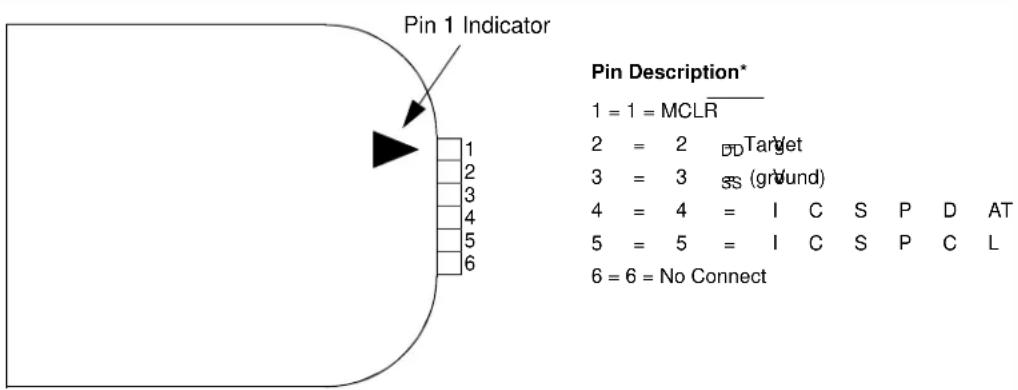
text_image
Pin 1 Indicator 1 = 1 = MCLR 2 = 2 Target 3 = 3 SS (ground) 4 = 4 = I C S P D AT 5 = 5 = I C S P C L 6 = 6 = No Connect* The 6-pin header (0.100" spacing) accepts 0.025" square pins.
For additional interface recommendations, refer to your specific device programmer manual prior to PCB design.
It is recommended that isolation devices be used to separate the programming pins from other circuitry. The type of isolation is highly dependent on the specific application and may include devices, such as resistors, diodes or even jumpers. See Figure 28-3 for more information.
FIGURE 28-3: TYPICAL CONNECTION FOR ICSP PROGRAMMING
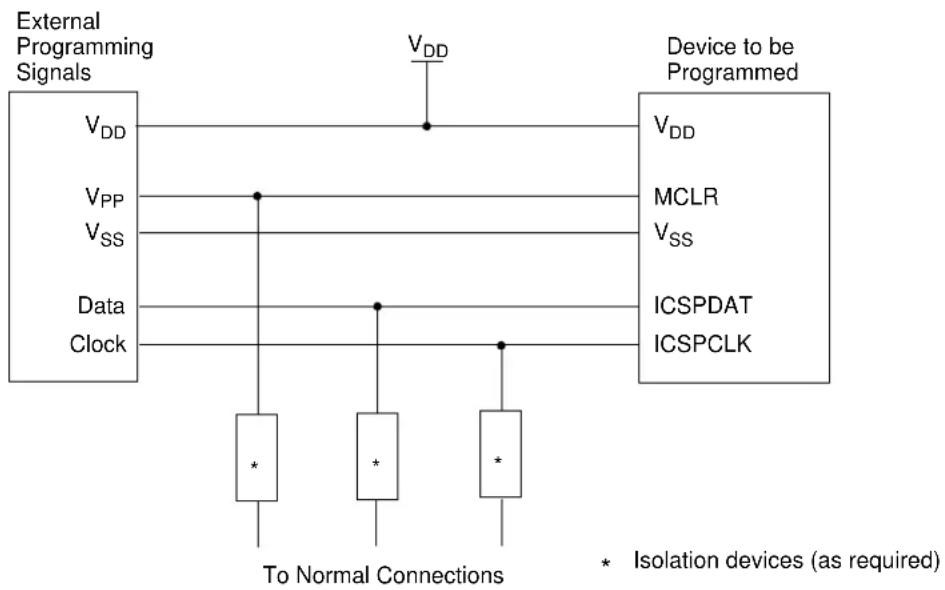
flowchart
graph TD
    A["External Programming Signals"] --> B["V_DD"]
    A --> C["V_PP"]
    A --> D["V_SS"]
    A --> E["Data"]
    A --> F["Clock"]
    G["Device to be Programmed"] --> H["V_DD"]
    G --> I["MCLR"]
    G --> J["V_SS"]
    G --> K["ICSPDAT"]
    G --> L["ICSPCLK"]
    M["To Normal Connections"] --> N["*"]
    M --> O["*"]
    M --> P["*"]
    style M fill:#f9f,stroke:#333
    note right of M: Isolation devices (as required)
28.2 In-Circuit Debugger
In-circuit debugging requires access to the ICDCLK, ICDDATA and MCLR pins. These pins are only available on the MCP19119 device.
29.0 INSTRUCTION SET SUMMARY
The MCP19118/19 instruction set is highly orthogonal and is comprised of three basic categories:
- Byte-oriented operations
- Bit-oriented operations
• Literal and control operations
Each instruction is a 14-bit word divided into an opcode, which specifies the instruction type, and one or more operands, which further specify the operation of the instruction. The formats for each of the categories are presented in Figure 29-1, while the various opcode fields are summarized in Table 29-1.
Table 29-2 lists the instructions recognized by the MPASM™ assembler.
For byte-oriented instructions, 'f' represents a file register designator and 'd' represents a destination designator. The file register designator specifies which file register is to be used by the instruction.
The destination designator specifies where the result of the operation is to be placed. If 'd' is zero, the result is placed in the W register. If 'd' is one, the result is placed in the file register specified in the instruction.
For bit-oriented instructions, 'b' represents a bit field designator, which selects the bit affected by the operation, while 'f' represents the address of the file in which the bit is located.
For literal and control operations, 'k' represents an 8-bit or 11-bit constant, or literal value.
One instruction cycle consists of four oscillator periods; for an oscillator frequency of 4 MHz, this gives a normal instruction execution time of 1 s. All instructions are executed within a single instruction cycle, unless a conditional test is true, or the program counter is changed as a result of an instruction. When this occurs, the execution takes two instruction cycles, with the second cycle executed as an NOP.
All instruction examples use the format '0xhh' to represent a hexadecimal number, where 'h' signifies a hexadecimal digit.
29.1 Read-Modify-Write Operations
Any instruction that specifies a file register as part of the instruction performs a Read-Modify-Write (RMW) operation. The register is read, the data is modified, and the result is stored according to either the instruction or the destination designator 'd'. A read operation is performed on a register even if the instruction writes to that register.
For example, a CLRF PORTA instruction will read PORTGPA, clear all the data bits, then write the result back to PORTGPA. This example would have the unintended consequence of clearing the condition that set the IOCF flag.
TABLE 29-1: OPCODE FIELD DESCRIPTIONS
| Field | Description |
| f Register file address (0x00 to 0x7F) | |
| W | Working register (accumulator) |
| b | Bit address within an 8-bit file register |
| k Literal field, constant data or label | |
| x | Don't care location (= 0 or 1).The assembler will generate code with x = 0.It is the recommended form of use for compatibility with all Microchip software tools. |
| d | Destination select; d = 0: store result in W,d = 1: store result in file register f.Default is d = 1 . |
| PC | Program Counter |
| Time Out bit | |
| C Carry bit | |
| DC | Digit carry bit |
| Z | Zero bit |
| Power-Down bit | |
FIGURE 29-1: GENERAL FORMAT FOR INSTRUCTIONS
| Byte-Oriented file register operations | ||
| 13 8 7 6 0 | ||
| OPCODE | d | f (FILE #) |
| d = 0 for destination Wd = 1 for destination ff = 7-bit file register address | ||
| Bit-Oriented file register operations | ||
| 13 10 9 7 6 0 | ||
| OPCODE | b (BIT #) | f (FILE #) |
| b = 3-bit bit addressf = 7-bit file register address | ||
| Literal and control operations | ||
| General | ||
| 13 8 7 0 | ||
| OPCODE | k (literal) | |
| k = 8-bit immediate value | ||
| CALL and GOTO instructions only | ||
| 13 11 10 0 | ||
| OPCODE | k (literal) | |
| k = 11-bit immediate value | ||
TABLE 29-2: MCP19118/19 INSTRUCTION SET
| Mnemonic, Operands | Description Cycles | 14-Bit Opcode | Status Affected | Notes | |||||
| MSb LSb | |||||||||
| BYTE-ORIENTED FILE REGISTER OPERATIONS | |||||||||
| ADDWF | f, d | Add W and f | 1 | 00 | 0111 | dfff | ffff | C, DC, Z | 1, 2 |
| ANDWF | f, d | AND W with f | 1 | 00 | 0101 | dfff | ffff | Z | 1, 2 |
| CLRF | f | Clear f | 1 | 00 | 0001 | lfff | ffff | Z | 2 |
| CLRW | - | Clear W | 1 | 00 | 0001 | 0xxx | xxxx | Z | |
| COMF | f, d | Complement f | 1 | 00 | 1001 | dfff | ffff | Z | 1, 2 |
| DECF | f, d | Decrement f | 1 | 00 | 0011 | dfff | ffff | Z | 1, 2 |
| DECFSZ | f, d | Decrement f, Skip if 0 | 1(2) | 00 | 1011 | dfff | ffff | 1, 2, 3 | |
| INCF | f, d | Increment f | 1 | 00 | 1010 | dfff | ffff | Z | 1, 2 |
| INCFSZ | f, d | Increment f, Skip if 0 | 1(2) | 00 | 1111 | dfff | ffff | 1, 2, 3 | |
| IORWF | f, d | Inclusive OR W with f | 1 | 00 | 0100 | dfff | ffff | Z | 1, 2 |
| MOVF | f, d | Move f | 1 | 00 | 1000 | dfff | ffff | Z | 1, 2 |
| MOVWF | f | Move W to f | 1 | 00 | 0000 | lfff | ffff | ||
| NOP | - | No Operation | 1 | 00 | 0000 | 0xx0 | 0000 | ||
| RLF | f, d | Rotate Left f through Carry | 1 | 00 | 1101 | dfff | ffff | C | 1, 2 |
| RRF | f, d | Rotate Right f through Carry | 1 | 00 | 1100 | dfff | ffff | C | 1, 2 |
| SUBWF | f, d | Subtract W from f | 1 | 00 | 0010 | dfff | ffff | C, DC, Z | 1, 2 |
| SWAPF | f, d | Swap nibbles in f | 1 | 00 | 1110 | dfff | ffff | 1, 2 | |
| XORWF | f, d | Exclusive OR W with f | 1 | 00 | 0110 | dfff | ffff | Z | 1, 2 |
| BIT-ORIENTED FILE REGISTER OPERATIONS | |||||||||
| BCF | f, b | Bit Clear f | 1 | 01 | 00bb | bfff | ffff | 1, 2 | |
| BSF | f, b | Bit Set f | 1 | 01 | 01bb | bfff | ffff | 1, 2 | |
| BTFSC | f, b | Bit Test f, Skip if Clear | 1 (2) | 01 | 10bb | bfff | ffff | 3 | |
| BTFSS | f, b | Bit Test f, Skip if Set | 1 (2) | 01 | 11bb | bfff | ffff | 3 | |
| LITERAL AND CONTROL OPERATIONS | |||||||||
| ADDLW | k | Add literal and W | 1 | 11 | 111x | kkkk | kkkk | C, DC, Z | |
| ANDLW | k | AND literal with W | 1 | 11 | 1001 | kkkk | kkkk | Z | |
| CALL | k | Call Subroutine | 2 | 10 | 0kkk | kkkk | kkkk | ||
| CLRWDT | - | Clear Watchdog Timer | 1 | 00 | 0000 | 0110 | 0100 | TO, PD | |
| GOTO | k | Go to address | 2 | 10 | 1kkk | kkkk | kkkk | ||
| IORLW | k | Inclusive OR literal with W | 1 | 11 | 1000 | kkkk | kkkk | Z | |
| MOVLW | k | Move literal to W | 1 | 11 | 00xx | kkkk | kkkk | ||
| RETFIE | - | Return from interrupt | 2 | 00 | 0000 | 0000 | 1001 | ||
| RETLW | k | Return with literal in W | 2 | 11 | 01xx | kkkk | kkkk | ||
| RETURN | - | Return from Subroutine | 2 | 00 | 0000 | 0000 | 1000 | ||
| SLEEP | - | Go into Standby mode | 1 | 00 | 0000 | 0110 | 0011 | TO, PD | |
| SUBLW | k | Subtract W from literal | 1 | 11 | 110x | kkkk | kkkk | C, DC, Z | |
| XORLW | k | Exclusive OR literal with W | 1 | 11 | 1010 | kkkk | kkkk | Z | |
Note 1: When an I/O register is modified as a function of itself (e.g., MOVF PORTA, 1), the value used will be that value present on the pins themselves. For example, if the data latch is '1' for a pin configured as input and is driven low by an external device, the data will be written back with a '0'.
2: If this instruction is executed on the TMR0 register (and where applicable, d = 1), the prescaler will be cleared if assigned to the Timer0 module.
3: If the Program Counter (PC) is modified, or a conditional test is true, the instruction requires two cycles. The second cycle is executed as an NOP.
29.2 Instruction Descriptions
ADDLW Add literal and W
| Syntax: [label] ADDLW k |
| Operands: 0 ≤ k ≤ 255 |
| Operation: (W) + k → (W) |
| Status Affected: C, DC, Z |
| Description: The contents of the W register are added to the eight-bit literal ‘k’ and the result is placed in the W register. |
ADDWF Add W and f
| Syntax: [label] ADDWF f,d | |
| Operands: 0 ≤ f ≤ 127d ∈ [0,1] | |
| Operation: (W) + (f) → (destination) | |
| Status Affected: C, DC, Z | |
| Description: Add the contents of the W register with register ‘f’. If ‘d’ is ‘0’, the result is stored in the W register. If ‘d’ is ‘1’, the result is stored back in register ‘f’. |
ANDLW AND literal with W
| Syntax: [label] ANDLW k | |
| Operands: | 0 ≤ k ≤ 255 |
| Operation: | (W) .AND. (k) → (W) |
| Status Affected: Z | |
| Description: The contents of W register areAND'ed with the eight-bit literal‘k’. The result is placed in the Wregister. | |
ANDWF AND W with f
| Syntax: [label] ANDWF f,d | |
| Operands: 0 ≤ f ≤ 127d ∈ [0,1] | |
| Operation: (W) .AND. (f) → (destination) | |
| Status Affected: Z | |
| Description: AND the W register with register ‘f’. If ‘d’ is ‘0’, the result is stored in the W register. If ‘d’ is ‘1’, the result is stored back in register ‘f’. |
BCF Bit Clear f
| Syntax: [ label ] BCF f,b | |
| Operands: 0 ≤ f ≤ 1270 ≤ b ≤ 7 | |
| Operation: 0 → (f) | |
| Status Affected: None | |
| Description: Bit ‘b’ in register ‘f’ is cleared. |
BSF Bit Set f
| Syntax: [ label ] BSF f,b | |
| Operands: 0 ≤ f ≤ 1270 ≤ b ≤ 7 | |
| Operation: 1 → (f) | |
| Status Affected: None | |
| Description: Bit 'b' in register 'f' is set. |
BTFSC Bit Test f, Skip if Clear
| Syntax: [ label ] BTFSC f,b | |
| Operands: | 0 ≤ f ≤ 1270 ≤ b ≤ 7 |
| Operation: | skip if (f) = 0 |
| Status Affected: | None |
| Description: | If bit 'b' in register 'f' is '1', the next instruction is executed.If bit 'b' in register 'f' is '0', the next instruction is discarded, and an NOP is executed instead, making this a two-cycle instruction. |
BTFSS Bit Test f, Skip if Set
| Syntax: [ label ] BTFSS f,b |
| Operands: | 0 ≤ f ≤ 127 |
| 0 ≤ b < 7 |
| Operation: skip if (f<b>) = 1 |
| Status Affected: None |
| Description If bit ‘b’ in register ‘f’ is ‘0’, the next instruction is executed.If bit ‘b’ is ‘1’, then the next instruction is discarded and an NOP is executed instead, making this a two-cycle instruction. |
CALL Call Subroutine
| Syntax: [ label ] CALL k |
| Operands: | 0 ≤ k ≤ 2047 |
| Operation: (PC)+ 1→ TOS, |
| k → PC<10:0>, |
| (PCLATH<4:3>) → PC<12:11> |
| Status Affected: None |
| Description: Call Subroutine. First, return address (PC + 1) is pushed onto the stack. The eleven-bit immediate address is loaded into PC bits <10:0>. The upper bits of the PC are loaded from PCLATH. CALL is a two-cycle instruction. |
CLRF Clear f
| Syntax: | [ label ] CLRF | f |
| Operands: | 0 ≤ f ≤ 127 |
| Operation: | 00h → (f) |
| 1 → Z |
| Status Affected: | Z |
| Description: | The contents of register ‘f’ are cleared and the Z bit is set. |
CLRW Clear W
| Syntax: [ label ] | CLRW |
| Operands: None |
| Operation: | 00h → (W) |
| 1 → Z |
| Status Affected: Z |
| Description: W register is cleared. Zero bit (Z) is set. |
CLRWDT Clear Watchdog Timer
| Syntax: [ label ] | CLRWDT |
| Operands: None |
| Operation: 00h → WDT |
| 0 → WDT prescaler, |
| 1 → TO |
| 1 → PD |
| Status Affected: | TO, PD |
| Description: CLRWDT instruction resets the Watchdog Timer. It also resets the prescaler of the WDT. Status bits and are set. |
COMF Complement f
| Syntax: | [ label ] | COMF | f,d |
| Operands: | 0 ≤ f ≤ 127 |
| d ∈ [0,1] |
| Operation: | () (destination) |
| Status Affected: Z |
| Description: | The contents of register ‘f’ are complemented. If ‘d’ is ‘0’, the result is stored in W. If ‘d’ is ‘1’, the result is stored back in register ‘f’. |
DECF Decrement f
| Syntax: | [ label ] | DECF f,d |
| Operands: | 0 ≤ f ≤ 127 |
| d ∈ [0,1] |
| Operation: | (f) - 1 → (destination) |
| Status Affected: Z |
| Description: | Decrement register ‘f’. If ‘d’ is ‘0’, the result is stored in the W register. If ‘d’ is ‘1’, the result is stored back in register ‘f’. |
DECFSZ Decrement f, Skip if 0
| Syntax: [label] | DECFSZ f,d |
| Operands: | 0 ≤ f ≤ 127d ∈ [0,1] |
| Operation: (f) - 1 → (destination);skip if result = 0 | |
Status Affected: None
Description: The contents of register 'f' are decremented. If 'd' is '0', the result is placed in the W register. If 'd' is '1', the result is placed back in register 'f'. If the result is '1', the next instruction is executed. If the result is '0', then an NOP is executed instead, making it a two-cycle instruction.
GOTO Unconditional Branch
| Syntax: [ label ] | GOTO k |
| Operands: | 0 ≤ k ≤ 2047 |
| Operation: k → PC<10:0> | |
| PCLATH<4:3> → PC<12:11> | |
Status Affected: None
Description: GOTO is an unconditional branch. The eleven-bit immediate value is loaded into PC bits <10:0>. The upper bits of PC are loaded from PCLATH<4:3>. GOTO is a two-cycle instruction.
INCF Increment f
| Syntax: | [ label] INCF f,d |
| Operands: | 0 ≤ f ≤ 127d ∈ [0,1] |
| Operation: | (f) + 1 → (destination) |
| Status Affected: | Z |
| Description: | The contents of register ‘f’ are incremented. If ‘d’ is ‘0’, the result is placed in the W register. If ‘d’ is ‘1’, the result is placed back in register ‘f’. |
INCFSZ Increment f, Skip if 0
| Syntax: [label] | INCFSZ f,d |
| Operands: | 0 ≤ f ≤ 127d ∈ [0,1] |
| Operation: | (f) + 1 → (destination),skip if result = 0 |
Status Affected: None
Description: The contents of register 'f' are incremented. If 'd' is '0', the result is placed in the W register. If 'd' is '1', the result is placed back in register 'f'. If the result is '1', the next instruction is executed. If the result is '0', an NOP is executed instead, making it a two-cycle instruction.
IORLW Inclusive OR literal with W
| Syntax: | [ label] IORLW k |
| Operands: | 0 ≤ k ≤ 255 |
| Operation: | (W) .OR. k → (W) |
| Status Affected: | Z |
| Description: | The contents of the W register are OR'ed with the eight-bit literal 'k'. The result is placed in the W register. |
IORWF Inclusive OR W with f
| Syntax: | [ label ] IORWF f,d |
| Operands: | 0 ≤ f ≤ 127d ∈ [0,1] |
| Operation: (W) .OR. (f) → (destination) | |
| Status Affected: | Z |
| Description: | Inclusive OR the W register with register ‘f’. If ‘d’ is ‘0’, the result is placed in the W register. If ‘d’ is ‘1’, the result is placed back in register ‘f’. |
MOVF Move f
| Syntax: [ label ] | MOVF | f,d |
| Operands: | 0 ≤ f ≤ 127 |
| d ∈ [0,1] |
Operation: (f) → (dest)
Status Affected: Z
Description: The contents of register 'f' is
moved to a destination dependent upon the status of 'd'. If d = 0, destination is W register. If d = 1, the destination is file register 'f' itself. d = 1 is useful to test a file register since Status flag Z is affected.
Words: 1
Cycles: 1
Example: MOVF FSR, 0
After Instruction
W = value in
FSR register
Z = 1
MOVLW Move literal to W
| Syntax: | [ label] | MOVLW | k |
Operands: 0 ≤ k ≤ 255
Operation: k (W)
Status Affected: None
Description: The eight-bit literal 'k' is loaded into W register. The "don't cares" will assemble as '0's.
Words: 1
Cycles: 1
Example: MOVLW 0x5A
After Instruction
W = 0×5A
MOVWF Move W to f
| Syntax: [ label ] | MOVWF | f |
Operands: 0 ≤ f ≤ 127
Operation: (W) → (f)
Status Affected: None
Description: Move data from W register to register 'f'.
Words: 1
Cycles: 1
Example: MOVW OPTION F
Before Instruction
OPTION = 0xFF
W = 0x4F
After Instruction
OPTION = 0x4F
W = 0x4F
NOP No Operation
| Syntax: [ label ] | NOP |
Operands: None
Operation: No operation
Status Affected: None
Description: No operation.
Words: 1
Cycles: 1
Example: NOP
RETFIE Return from Interrupt
| Syntax: [ label ] | RETFIE |
| Operands: None | |
| Operation: TOS → PC,1 → GIE | |
| Status Affected: None | |
| Description: Return from Interrupt. Stack is POPed and Top-of-Stack (TOS) is loaded in the PC. Interrupts are enabled by setting Global Interrupt Enable bit, GIE (INT-CON<7>). This is a two-cycle instruction. | |
| Words: 1 | |
| Cycles: 2 | |
| Example: | RETFIE |
| After InterruptPC = TOSGIE = 1 | |
| RETLW | Return with literal in W |
| Syntax: [label] | RETLW k |
| Operands: | 0 ≤ k ≤ 255 |
| Operation: k → (W);TOS → PC | |
| Status Affected: None | |
| Description: The W register is loaded with the eight-bit literal ‘k’. The program counter is loaded from the top of the stack (the return address).This is a two-cycle instruction. | |
| Words: 1 | |
| Cycles: 2 | |
| Example: | CALL TABLE;W contains ;table offset ;valueGOTO DONE |
| TABLE | ••ADDWF PC ;W = offsetRETLW k1 ;Begin tableRETLW k2 ;•••RETLW kn ;End of table |
| DONE | Before InstructionW = 0x07After InstructionW = value of k8 |
| RETURN | Return from Subroutine |
| Syntax: [label] | RETURN |
| Operands: | None |
| Operation: | TOS → PC |
| Status Affected: | None |
| Description: | Return from subroutine. The stack is POPed and the top of the stack (TOS) is loaded into the program counter. This is a two-cycle instruction. |
RLF Rotate Left f through Carry
| Syntax: [ label ] RLF f,d | |
| Operands: | 0 ≤ f ≤ 127d ∈ [0,1] |
| Operation: See description below | |
| Status Affected: C | |
| Description: The contents of register ‘f’ are rotated one bit to the left through the Carry flag. If ‘d’ is ‘0’, the result is placed in the W register.If ‘d’ is ‘1’, the result is stored back in register ‘f’. | |

Words: 1
Cycles: 1
Example:
RLF REG1,0
Before Instruction
$$ \text { REG1 } = 1 1 1 0 $$
$$ 0 1 1 0 $$
$$ \mathrm{C} \quad = 0 $$
After Instruction
$$ \mathrm{REG1} = 1 1 1 0 $$
$$ 0 1 1 0 $$
$$ W = 1 1 0 0 $$
$$ 1 1 0 0 $$
$$ \mathrm{C} \quad = 1 $$
RRF Rotate Right f through Carry
| Syntax: | [ label] RRF f,d |
| Operands: | 0 ≤ f ≤ 127d ∈ [0,1] |
| Operation: | See description below |
| Status Affected: | C |
| Description: | The contents of register ‘f’ are rotated one bit to the right through the Carry flag. If ‘d’ is ‘0’, the result is placed in the W register.If ‘d’ is ‘1’, the result is placed back in register ‘f’. |

SLEEP Enter Sleep mode
| Syntax: | [ label] SLEEP |
| Operands: | None |
| Operation: | 00h → WDT,0 → WDT prescaler,1 → TO,0 → PD |
| Status Affected: | TO, PD |
| Description: | The power-down Status bit, PD is cleared. Time-out Status bit, TO is set. Watchdog Timer and its prescaler are cleared.The processor is put into Sleep mode with the oscillator stopped. |
SUBLW Subtract W from literal
| Syntax: | [ label] SUBLW k |
| Operands: | 0 ≤ k ≤ 255 |
| Operation: | k - (W) → (W) |
| Status Affected: | C, DC, Z |
| Description: The W register is subtracted (two's complement method) from the eight-bit literal 'k'. The result is placed in the W register. | |
| Result | Condition |
| C = 0 | W > k |
| C = 1 | W ≤ k |
| DC = 0 | W<3:0> > k<3:0> |
| DC = 1 | W<3:0> ≤ k<3:0> |
SUBWF Subtract W from f
Syntax: [label] SUBWF f,d
Operands: 0 ≤ f ≤ 127
$$ d \in [ 0, 1 ] $$
Operation: (f) - (W) → (destination)
Status Affected: C, DC, Z
Description: Subtract (two's complement
method) W register from register 'f'. If 'd' is '0', the result is stored in the W register. If 'd' is '1', the result is stored back in register 'f'.
| C = 0 | W > f |
| C = 1 | W ≤ f |
| DC = 0 | W<3:0> > f<3:0> |
| DC = 1 | W<3:0> ≤ f<3:0> |
XORWF Exclusive OR W with f
Syntax: [label] XORWF f,d
Operands: 0 ≤ f ≤ 127
$$ \mathsf {d} \in [ 0, 1 ] $$
Operation: (W). XOR. (f) → (destination)
Status Affected: Z
Description: Exclusive OR the contents of the W register with register 'f'. If 'd' is '0', the result is stored in the W register. If 'd' is '1', the result is stored back in register 'f'.
SWAPF Swap Nibbles in f
Syntax: [label] SWAPF f,d
Operands: 0 ≤ f ≤ 127
$$ \mathsf {d} \in [ 0, 1 ] $$
Operation: (f<3:0>) → (destination<7:4>),
$$ (f < 7: 4 >) \rightarrow (\text { destination } < 3: 0 >) $$
Status Affected: None
Description: The upper and lower nibbles of register 'f' are exchanged. If 'd' is '0', the result is placed in the W register. If 'd' is '1', the result is placed in register 'f'.
XORLW Exclusive OR literal with W
Syntax: [label] XORLW k
Operands: 0 ≤ k ≤ 255
Operation: (W). XOR. k → (W)
Status Affected: Z
Description: The contents of the W register are XOR'ed with the eight-bit literal 'k'. The result is placed in the W register.
NOTES:
30.0 DEVELOPMENT SUPPORT
The PIC ^® microcontrollers (MCU) and dsPIC ^® digital signal controllers (DSC) are supported with a full range of software and hardware development tools:
- Integrated Development Environment - MPLAB ^® X IDE Software
- Compilers/Assemblers/Linkers
- MPLAB XC Compiler
- MPASM ^TM Assembler
- M P L ^TM Object Linker/MPLIB ^TM Object Librarian
- MPLAB Assembler/Linker/Librarian for Various Device Families
- Simulators
- MPLAB X SIM Software Simulator
- Emulators
- MPLAB REAL ICE™ In-Circuit Emulator
• In-Circuit Debuggers/Programmers
- MPLAB ICD 3
- PICkit™ 3
• Device Programmers
- MPLAB PM3 Device Programmer
- Low-Cost Demonstration/Development Boards, Evaluation Kits and Starter Kits
• Third-party Development Tools
30.1 MPLAB X Integrated Development Environment Software
The MPLAB X IDE is a single, unified graphical user interface for Microchip and third-party software, and hardware development tool that runs on Windows ^® , Linux and Mac OS ^® X. Based on the NetBeans IDE, MPLAB X IDE is an entirely new IDE with a host of free software components and plug-ins for high-performance application development and debugging. Moving between tools and upgrading from software simulators to hardware debugging and programming tools is simple with the seamless user interface.
With complete project management, visual call graphs, a configurable watch window and a feature-rich editor that includes code completion and context menus, MPLAB X IDE is flexible and friendly enough for new users. With the ability to support multiple tools on multiple projects with simultaneous debugging, MPLAB X IDE is also suitable for the needs of experienced users.
Feature-Rich Editor:
• Color syntax highlighting
- Smart code completion makes suggestions and provides hints as you type
• Automatic code formatting based on user-defined rules
• Live parsing
User-Friendly, Customizable Interface:
- Fully customizable interface: toolbars, toolbar buttons, windows, window placement, etc.
- Call graph window
Project-Based Workspaces:
- Multiple projects
- Multiple tools
- Multiple configurations
- Simultaneous debugging sessions
File History and Bug Tracking:
- Local file history feature
• Built-in support for Bugzilla issue tracker
30.2 MPLAB XC Compilers
The MPLAB XC Compilers are complete ANSI C compilers for all of Microchip's 8, 16, and 32-bit MCU and DSC devices. These compilers provide powerful integration capabilities, superior code optimization and ease of use. MPLAB XC Compilers run on Windows, Linux or MAC OS X.
For easy source level debugging, the compilers provide debug information that is optimized to the MPLAB X IDE.
The free MPLAB XC Compiler editions support all devices and commands, with no time or memory restrictions, and offer sufficient code optimization for most applications.
MPLAB XC Compilers include an assembler, linker and utilities. The assembler generates relocatable object files that can then be archived or linked with other relocatable object files and archives to create an executable file. MPLAB XC Compiler uses the assembler to produce its object file. Notable features of the assembler include:
- Support for the entire device instruction set
- Support for fixed-point and floating-point data
- Command-line interface
- Rich directive set
- Flexible macro language
- MPLAB X IDE compatibility
30.3 MPASM Assembler
The MPASM Assembler is a full-featured, universal macro assembler for PIC10/12/16/18 MCUs.
The MPASM Assembler generates relocatable object files for the MPLINK Object Linker, Intel® standard HEX files, MAP files to detail memory usage and symbol reference, absolute LST files that contain source lines and generated machine code, and COFF files for debugging.
The MPASM Assembler features include:
• Integration into MPLAB X IDE projects
- User-defined macros to streamline assembly code
- Conditional assembly for multipurpose source files
- Directives that allow complete control over the assembly process
30.4 MPLINK Object Linker/MPLIB Object Librarian
The MPLINK Object Linker combines relocatable objects created by the MPASM Assembler. It can link relocatable objects from precompiled libraries, using directives from a linker script.
The MPLIB Object Librarian manages the creation and modification of library files of precompiled code. When a routine from a library is called from a source file, only the modules that contain that routine will be linked in with the application. This allows large libraries to be used efficiently in many different applications.
The object linker/library features include:
- Efficient linking of single libraries instead of many smaller files
- Enhanced code maintainability by grouping related modules together
- Flexible creation of libraries with easy module listing, replacement, deletion and extraction
30.5 MPLAB Assembler, Linker and Librarian for Various Device Families
MPLAB Assembler produces relocatable machine code from symbolic assembly language for PIC24, PIC32 and dsPIC DSC devices. MPLAB XC Compiler uses the assembler to produce its object file. The assembler generates relocatable object files that can then be archived or linked with other relocatable object files and archives to create an executable file. Notable features of the assembler include:
- Support for the entire device instruction set
- Support for fixed-point and floating-point data
- Command-line interface
- Rich directive set
- Flexible macro language
- MPLAB X IDE compatibility
30.6 MPLAB X SIM Software Simulator
The MPLAB X SIM Software Simulator allows code development in a PC-hosted environment by simulating the PIC MCUs and dsPIC DSCs on an instruction level. On any given instruction, the data areas can be examined or modified and stimuli can be applied from a comprehensive stimulus controller. Registers can be logged to files for further run-time analysis. The trace buffer and logic analyzer display extend the power of the simulator to record and track program execution, actions on I/O, most peripherals and internal registers.
The MPLAB X SIM Software Simulator fully supports symbolic debugging using the MPLAB XC Compilers, and the MPASM and MPLAB Assemblers. The software simulator offers the flexibility to develop and debug code outside of the hardware laboratory environment, making it an excellent, economical software development tool.
30.7 MPLAB REAL ICE In-Circuit Emulator System
The MPLAB REAL ICE In-Circuit Emulator System is Microchip's next generation high-speed emulator for Microchip Flash DSC and MCU devices. It debugs and programs all 8, 16 and 32-bit MCU, and DSC devices with the easy-to-use, powerful graphical user interface of the MPLAB X IDE.
The emulator is connected to the design engineer's PC using a high-speed USB 2.0 interface and is connected to the target with either a connector compatible with in-circuit debugger systems (RJ-11) or with the new high-speed, noise tolerant, Low-Voltage Differential Signal (LVDS) interconnection (CAT5).
The emulator is field upgradeable through future firmware downloads in MPLAB X IDE. MPLAB REAL ICE Incircuit emulator offers significant advantages over competitive emulators including full-speed emulation, runtime variable watches, trace analysis, complex breakpoints, logic probes, a ruggedized probe interface and long (up to three meters) interconnection cables.
30.8 MPLAB ICD 3 In-Circuit Debugger System
The MPLAB ICD 3 In-Circuit Debugger System is Microchip's most cost-effective, high-speed hardware debugger/programmer for Microchip Flash DSC and MCU devices. It debugs and programs PIC Flash microcontrollers and dsPIC DSCs with the powerful, yet easy-to-use graphical user interface of the MPLAB IDE.
The MPLAB ICD 3 In-Circuit Debugger probe is connected to the design engineer's PC using a high-speed USB 2.0 interface and is connected to the target with a connector compatible with the MPLAB ICD 2 or MPLAB REAL ICE systems (RJ-11). MPLAB ICD 3 supports all MPLAB ICD 2 headers.
30.9 PICkit 3 In-Circuit Debugger/Programmer
The MPLAB PICkit 3 In-Circuit Debugger allows debugging and programming of PIC and dsPIC Flash microcontrollers at a most affordable price point using the powerful graphical user interface of the MPLAB IDE. The MPLAB PICkit 3 In-Circuit Debugger is connected to the design engineer's PC using a full-speed USB interface and can be connected to the target via a Microchip debug (RJ-11) connector (compatible with MPLAB ICD 3 and MPLAB REAL ICE In-Circuit Emulator). The connector uses two device I/O pins and the Reset line to implement in-circuit debugging and In-Circuit Serial Programming™ (ICSP™).
30.10 MPLAB PM3 Device Programmer
The MPLAB PM3 Device Programmer is a universal, CE compliant device programmer with programmable voltage verification at VDDMIN and VDDMAX for maximum reliability. It features a large LCD display (128 x 64) for menus and error messages, and a modular, detachable socket assembly to support various package types. The ICSP cable assembly is included as a standard item. In Stand-Alone mode, the MPLAB PM3 Device Programmer can read, verify and program PIC devices without a PC connection. It can also set code protection in this mode. The MPLAB PM3 Device Programmer connects to the host PC via an RS-232 or USB cable. The MPLAB PM3 Device Programmer has high-speed communications and optimized algorithms for quick programming of large memory devices, and incorporates an MMC card for file storage and data applications.
30.11 Demonstration/Development Boards, Evaluation Kits and Starter Kits
A wide variety of demonstration, development and evaluation boards for various PIC MCUs and dsPIC DSCs allows quick application development on fully functional systems. Most boards include prototyping areas for adding custom circuitry and provide application firmware and source code for examination and modification.
The boards support a variety of features, including LEDs, temperature sensors, switches, speakers, RS-232 interfaces, LCD displays, potentiometers and additional EEPROM memory.
The demonstration and development boards can be used in teaching environments, for prototyping custom circuits and for learning about various microcontroller applications.
In addition to the PICDEM™ and dsPICDEM™ demonstration/development board series of circuits, Microchip has a line of evaluation kits and demonstration software for analog filter design, KEELOQ® security ICs, CAN, IrDA®, PowerSmart battery management, SEEVAL® evaluation system, Sigma-Delta ADC, flow rate sensing, plus many more.
Also available are starter kits that contain everything needed to experience the specified device. This usually includes a single application and debug capability, all on one board.
Check the Microchip web page (www.microchip.com) for the complete list of demonstration, development and evaluation kits.
30.12 Third-Party Development Tools
Microchip also offers a great collection of tools from third-party vendors. These tools are carefully selected to offer good value and unique functionality.
• Device Programmers and Gang Programmers from companies, such as SoftLog and CCS
- Software Tools from companies, such as Gimpel and Trace Systems
- Protocol Analyzers from companies, such as Saleae and Total Phase
- Demonstration Boards from companies, such as MikroElektronika, Digilent® and Olimex
- Embedded Ethernet Solutions from companies, such as EZ Web Lynx, WIZnet and IPLogika®
31.0 PACKAGING INFORMATION
31.1 Package Marking Information
24-Lead QFN (4x4x0.9 mm) (MCP19118 only) Example
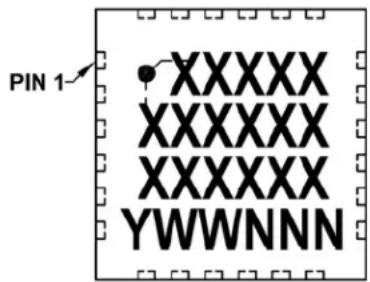
text_image
PIN 1 XXXXXX XXXXXX XXXXXX YWWNNN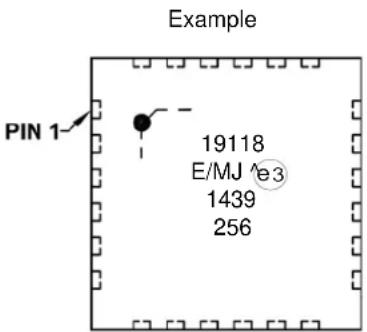
text_image
Example PIN 1 19118 E/MJ e3 1439 25628-Lead QFN (5x5x0.9 mm) (MCP19119 only) Example

text_image
PIN 1-PIN 1 XXXXXXXX XXXXXXXX XXXXXXXX YYWWNNN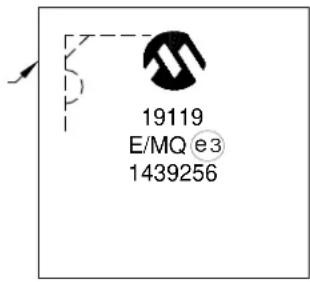
text_image
19119 E/MQ e3 1439256Legend: XX...X Customer-specific information
Y Year code (last digit of calendar year)
YY Year code (last 2 digits of calendar year)
WW Week code (week of January 1 is week '01')
NNN Alphanumeric traceability code
e3 RoHS Compliant JEDEC® designator for Matte Tin (Sn)
This package is RoHS Compliant. The RoHS Compliant
JEDEC designator (e3) can be found on the outer packaging
for this package.
Note: In the event the full Microchip part number cannot be marked on one line, it will be carried over to the next line, thus limiting the number of available characters for customer-specific information.
24-Lead Plastic Quad Flat, No Lead Package (MJ) - 4x4x0.9 mm Body [QFN]
Note: For the most current package drawings, please see the Microchip Packaging Specification located at http://www.microchip.com/packaging
![Microchip MCP19119 - 24-Lead Plastic Quad Flat, No Lead Package (MJ) - 4x4x0.9 mm Body [QFN] - 1](/content/2026/06/1214550/images/874821d0dbd6c69a40f47341b7d9e3b4b7ef5c8c295da53812464b45be1ed572.jpg)
text_image
D EXPOSED PAD D2 E 2 1 N TOP VIEW NOTE 1 E2 2 1 N BOTTOM VIEW L K b e D![Microchip MCP19119 - 24-Lead Plastic Quad Flat, No Lead Package (MJ) - 4x4x0.9 mm Body [QFN] - 2](/content/2026/06/1214550/images/93f625d5b3d5179c8c90505885c57819a0414de977bfd67e5feedb1bcd8eea6b.jpg)
text_image
A A3 A1 A![Microchip MCP19119 - 24-Lead Plastic Quad Flat, No Lead Package (MJ) - 4x4x0.9 mm Body [QFN] - 3](/content/2026/06/1214550/images/51a10519c32f079af636f6ca95b0340eae7fc1c2b0ace746df2e4ef86797381d.jpg)
natural_image
Isometric line drawing of a rectangular electronic component with square holes on both sides (no text or symbols)| Units | MILLIMETERS | |||
| Dimension Limits | MIN | NOM | MAX | |
| Number of Pins | N | 24 | ||
| Pitch | e | 0.50 BSC | ||
| Overall Height | A | 0.80 | 0.85 | 0.90 |
| Standoff | A1 | 0.00 | 0.02 | 0.05 |
| Contact Thickness | A3 | 0.20 REF | ||
| Overall Width | E | 4.00 BSC | ||
| Exposed Pad Width | E2 | 2.40 | 2.50 | 2.60 |
| Overall Length | D | 4.00 BSC | ||
| Exposed Pad Length | D2 | 2.40 | 2.50 | 2.60 |
| Contact Width | b | 0.20 | 0.25 | 0.30 |
| Contact Length | L | 0.30 | 0.40 | 0.50 |
| Contact-to-Exposed Pad | K | 0.20 | - | - |
Notes:
- Pin 1 visual index feature may vary, but must be located within the hatched area.
- Package is saw singulated.
- Dimensioning and tolerancing per ASME Y14.5M. BSC: Basic Dimension. Theoretically exact value shown without tolerances. REF: Reference Dimension, usually without tolerance, for information purposes only.
Microchip Technology Drawing C04-143A
24-Lead Plastic Quad Flat, No Lead Package (MJ) - 4x4 mm Body [QFN]
Note: For the most current package drawings, please see the Microchip Packaging Specification located at http://www.microchip.com/packaging
![Microchip MCP19119 - 24-Lead Plastic Quad Flat, No Lead Package (MJ) - 4x4 mm Body [QFN] - 1](/content/2026/06/1214550/images/178846bf1a1ce566c6335f620d4d593b63d55ef52ad361a0c935fe63a34b45de.jpg)
text_image
C1 W2 C2 T2 E Y1 X1 SILK SCREENRECOMMENDED LAND PATTERN
| Units | MILLIMETERS | |||
| Dimension Limits | MIN | NOM | MAX | |
| Contact Pitch | E | 0.50 BSC | ||
| Optional Center Pad Width | W2 | 2.60 | ||
| Optional Center Pad Length | T2 | 2.60 | ||
| Contact Pad Spacing | C1 | 3.90 | ||
| Contact Pad Spacing | C2 | 3.90 | ||
| Contact Pad Width | X1 | 0.30 | ||
| Contact Pad Length | Y1 | 0.85 | ||
Notes:
1. Dimensioning and tolerancing per ASME Y14.5M
BSC: Basic Dimension. Theoretically exact value shown without tolerances.
Microchip Technology Drawing No. C04-2143B
28-Lead Plastic Quad Flat, No Lead Package (MQ) - 5x5x0.9 mm Body [QFN or VQFN]
Note: For the most current package drawings, please see the Microchip Packaging Specification located at http://www.microchip.com/packaging
![Microchip MCP19119 - 28-Lead Plastic Quad Flat, No Lead Package (MQ) - 5x5x0.9 mm Body [QFN or VQFN] - 1](/content/2026/06/1214550/images/09024115a70e0e7cf041a806ec136ca6dcf7693972bee8651bf3ab0dfc8c21c9.jpg)
text_image
NOTE 1 N 1 2 (DATUM B) (DATUM A) 2X 0.10 C E 2X 0.10 C TOP VIEW SEATING PLANE C A A3 // 0.10 C A1 SIDE VIEW 28X 0.08 C D2 0.10 A B E2 28X K NOTE 1 N 28X L e 28X b BOTTOM VIEW 0.10 A B 0.05Microchip Technology Drawing C04-140C Sheet 1 of 2
28-Lead Plastic Quad Flat, No Lead Package (MQY) - 5x5x0.9 mm Body [QFN or VQFN]
Note: For the most current package drawings, please see the Microchip Packaging Specification located at http://www.microchip.com/packaging
![Microchip MCP19119 - 28-Lead Plastic Quad Flat, No Lead Package (MQY) - 5x5x0.9 mm Body [QFN or VQFN] - 1](/content/2026/06/1214550/images/d95dd605ef67c3073157a5cf8ea70a6c5a107d0fdf2ca3440cbbba1c7c75425d.jpg)
natural_image
Two isometric line drawings of an integrated circuit chip with square and rectangular components (no text or symbols)| Units | MILLIMETERS | |||
| Dimension Limits | MIN | NOM | MAX | |
| Number of Pins N | 2 | 8 | ||
| Pitch | e | 0.50 BSC | ||
| Overall Height A 0.90 | 0.80 | 1.00 | ||
| Standoff A1 0.02 | 0.00 | 0.05 | ||
| Contact Thickness | A3 | 0.20 REF | ||
| Overall Width | E | 5.00 BSC | ||
| Exposed Pad Width | E2 | 3.15 | 3.25 | 3.35 |
| Overall Length | D | 5.00 BSC | ||
| Exposed Pad Length | D2 | 3.15 | 3.25 | 3.35 |
| Contact Width | b | 0.18 | 0.25 | 0.30 |
| Contact Length | L | 0.35 | 0.40 | 0.45 |
| KContact-to-Exposed Pad 0.20 | - | |||
Notes:
- Pin 1 visual index feature may vary, but must be located within the hatched area.
- Package is saw singulated.
- Dimensioning and tolerancing per ASME Y14.5M. BSC: Basic Dimension. Theoretically exact value shown without tolerances. REF: Reference Dimension, usually without tolerance, for information purposes only.
Microchip Technology Drawing C04-140C Sheet 2 of 2
28-Lead Plastic Quad Flat, No Lead Package (MQ) - 5x5 mm Body [QFN] Land Pattern With 0.55 mm Contact Length
Note: For the most current package drawings, please see the Microchip Packaging Specification located at http://www.microchip.com/packaging
![Microchip MCP19119 - 28-Lead Plastic Quad Flat, No Lead Package (MQ) - 5x5 mm Body [QFN] Land Pattern With 0.55 mm Contact Length - 1](/content/2026/06/1214550/images/fef42767c8919356e5586f28f1895188e11e96e7084624f62f049288fa09bb09.jpg)
text_image
C1 W2 E C2 T2 Y1 X1 SILK SCREENRECOMMENDED LAND PATTERN
| Units | MILLIMETERS | |||
| Dimension Limits | MIN | NOM | MAX | |
| Contact Pitch | E | 0.50 BSC | ||
| Optional Center Pad Width | W2 | 3.35 | ||
| Optional Center Pad Length | T2 | 3.35 | ||
| Contact Pad Spacing | C1 | 4.90 | ||
| Contact Pad Spacing | C2 | 4.90 | ||
| Contact Pad Width (X28) | X1 | 0.30 | ||
| Contact Pad Length (X28) | Y1 | 0.85 | ||
Notes:
1. Dimensioning and tolerancing per ASME Y14.5M
BSC: Basic Dimension. Theoretically exact value shown without tolerances.
Microchip Technology Drawing C04-2140A
APPENDIX A: REVISION HISTORY
Revision A (October 2014)
• Original Release of this Document.
NOTES:
INDEX
A
A/D
Specifications....3, 5, 33
A/D Conversion....127
Requirements.... 34
Timing....34, 35
Absolute Maximum Ratings 23
AC Characteristics 30
ACKSTAT 172
ACKSTAT Status Flag 172
ADC 125
Acquisition Requirements 131
Associated Registers....133
Block Diagram....125
Calculating Acquisition Time....131
Channel Selection....126
Configuration....126
Configuring Interrupt 128
Conversion Clock....126
Conversion Procedure 128
Internal Sampling Switch(Rss) IMPEDANCE 131
Interrupts....127
Operation 128
Operation during Sleep....128
Port Configuration....126
Register Definitions....129
Source Impedance....131
Special Event Trigger....128
ADCON0 Register....129
ADCON1 Register....130
ADRESH Register (ADFM = 0)....130
ADRESL Register (ADFM = 0)....130
Alternate Pin Function....112
Analog Blocks Enable Control ....51
Analog Peripheral Control.... 49
Analog-to-Digital Converter. See ADC
ANSELA Register 115
ANSELB Register 118
APFCON Register....112
Assembler
MPASM Assembler....204
B
Bench Testing
Analog Bench Test Control....57
System....57
BF 172, 174
BF Status Flag 172, 174
Block Diagrams
ADC 125
ADC Transfer Function....132
Analog Input Model....132
Generic I/O Port....111
Interrupt Logic....94
MCLR Circuit....86
MCP19118/19 Synchronous Buck Block Diagram.....10
MSSP (I²C Master Mode) 147
MSSP (I²C Slave Mode)....148
On-Chip Reset Circuit....85
Simplified PWM....144
Timer0....135
Timer1....137
Timer2....140
Watchdog Timer....103
C
C Compilers
MPLAB C18....204
Calibration Word
Associated Registers.... 84
Capture/Compare/PWM 143, 145
Clock Switching 84
Code Examples
A/D Conversion 128
Assigning Prescaler to Timer0.... 136
Assigning Prescaler to WDT.... 136
Initializing PORTA 111
Saving Status and W Registers in RAM.... 100
Compensation 18
Compensation Setting 43
Computed Function Calls 78
Computed GOTO....78
Current
Measurement Control....51
Current Sense 18,40,41
Customer Change Notification Service.... 221
Customer Notification Service 221
Customer Support.... 221
D
Data Memory 70
Data Memory Map 72
DC and AC Characteristics.... 53
Graphs and Tables.... 53
DC Characteristics.... 30
Development Support.... 203
Device
Configuration 37,81
Code Protection.... 82
Configuration Word.... 81
ID Locations 82
Write Protection....82
Device Calibration.... 59
Calibration Word 1....59
Calibration Word 10....65
Calibration Word 11....66
Calibration Word 12....66
Calibration Word 2....60
Calibration Word 3....61
Calibration Word 4....62
Calibration Word 5....62
Calibration Word 6.... 63
Calibration Word 7....63
Calibration Word 8....64
Calibration Word 9....65
Device Overview....9
Digital Electrical Characteristics 29
Diode Emulation Mode 49
E
ECCP/CCP. See Enhanced Capture/Compare/PWM
Electrical Characteristics 23, 24
Errata....7
External Clock.... 30
F
Features
Miscellaneous.... 21
Protection 20
Synchronous Buck ....1
Firmware Instructions....193
Flash Program Memory Control....105
Operation During Code Protect....109
Operation during write Protect 109
Protecting....109
Reading....108
Writing to....109
Flash Program Memory Control Registers....106
H
High-Side Drive Strength 49
|
I/O
Ports....111
I^2C Mode (MSSP)
Acknowledge Sequence Timing....176
Associated Registers 183
Bus Collision
During a Repeated Start Condition....181
During a Start Condition....178
During a Stop Condition....182
Effects of a Reset....177
I²C Clock Rate w/BRG....184
Master Mode....169
Clock Arbitration....169
Operation 169
Reception....174
Start Condition Timing ....170, 171
Transmission....172
Multi-Master Communication, Bus Collision and Arbitra-
tion....177
Multi-Master Mode 177
Operation 150
Read/Write Bit Information (R/W Bit) 153
Slave Mode
10-Bit Address Reception....163
Operation 153
Sleep Operation....177
Stop Condition Timing....176
I²C Mode (MSSPx)
Acknowledge Sequence 152
Overview....148
Slave Mode
Bus Collision....159
Clock Synchronization 167
General Call Address Support 168
SSPMSKx Register....168
Transmission....159
In-Circuit Serial Programming (ICSP) 191
Common Programming Interfaces....191
In-Circuit Debugger....192
Indirect Addressing 78
Input 24
Type....12
Undervoltage Lockout 20,37
Instruction Format....193
Instruction Set 193
ADDLW....195
ADDWF....195
ANDLW....195
ANDWF....195
BCF 195
BSF....195
BTFSC 195
BTFSS....196
CALL.... 196
CLRF 196
CLRW....196
CLRWDT 196
COMF....196
DECF....196
DECFSZ 197
GOTO 197
INCF 197
INCFSZ....197
IORLW....197
IORWF....197
MOVF 198
MOVLW....198
MOVWF....198
NOP....198
RETFIE....199
RETLW 199
RETURN.... 199
RLF 200
RRF 200
SLEEP 200
SUBLW....200
SUBWF....201
SWAPF....201
XORLW 201
XORWF 201
Summary Table 194
Internal Sampling Switch (RSS) IMPEDANCE 131
Internal Synchronous Driver 17
Internal Temperature Indicator Module.... 123
Circuit Operation.... 123
Temperature Output 123
Internal Temperature Measurement Control.... 51
Internet Address 221
Interrupt-on-Change 121
Associated Registers.... 122
Clearing Interrupt Flags.... 121
Enabling the Module.... 121
Operation in Sleep.... 12
Pin Configuration 121
Registers 122
Interrupts
ADC....128
Associated Registers.... 99
Context Saving 100
Control Registers.... 95
RA2/INT....93
TMR1.... 138
L
Linear Regulators 17
M
MASTER Error Signal Gain 45
Master Synchronous Serial Port. See MSSP
MCLR 86
Internal....86
Memory Organization 69
Data 70
Program....69
Microchip Internet Web Site.... 221
MOSFET....15, 16, 17, 46, 49, 57, 67
Driver Dead Time.... 17
MOSFET Driver
Dead Time 49
Programmable Dead Time....46
MPLAB ASM30 Assembler, Linker, Librarian ....204
MPLAB Integrated Development Environment Software .. 203
MPLAB PM3 Device Programmer 205
MPLAB REAL ICE In-Circuit Emulator System......205
MPLINK Object Linker/MPLIB Object Librarian 204
MSSP....147
Arbitration....150
Baud Rate Generator.... 184
Clock Stretching....150
I²C Bus Terms 151
I²C Master Mode....169
I²C Mode....148
I²C Mode Operation....150
I²C Slave Mode Operation....153
Module Overview 147
Multi-Phase System....22
0
OPCODE Field Descriptions....193
Oscillator....83
Associated Registers....84
Calibration....83
Delay upon Power-Up....84
Frequency Tuning....83
Internal Oscillator....83
Oscillator Module 84
Output 49
Multiple System....22
Overcurrent....20, 38, 39
Overvoltage....20, 25, 48
Overvoltage Enable 51
Power Good....22
Type....12
Under Voltage....20,48
Under Voltage Accelerator....49
Under Voltage Enable....51
Undervoltage....25
Voltage....18
Soft-Start....22
Tracking....22
Voltage Configuration 47
Voltage Sense Pull-Up/Pull-Down 49
Overcurrent....39
Overvoltage Accelerator 49
P
Packaging 207
Marking....207
Specifications....208
PCL....78
Modifying....78
PCLATH....78
PCON Register 87,92
Pin Diagram
24-Pin QFN 2
28-Pin QFN....4
Pinout Description
Summary....3,5
Pinout Description Table.... 12
PIR1 Register....98
PIR2 Register....99
PMADRH Register....105
PMADRL Register....105, 106
PMCON1 Register 105, 107
PMCON2 Register.... 105
PMDATH Register.... 106
PMDATL Register.... 106
PMDRH Register.... 107
PORTB
Additional Pin Functions
Weak Pull-Up.... 117
Pin Descriptions and Diagrams 119
PORTGPA....112, 121
ANSELA Register....113
Associated Registers.... 115
Functions and Output Priorities 113
Interrupt-on-Change 112
Weak Pull-Ups.... 112
PORTGPA Register.... 112
PORTGPB.... 116, 121
ANSELB Register.... 116
Associated Registers.... 119
Functions and Output Priorities 116
Interrupt-on-Change 116
P1B/P1C/P1D.Capture/Compare/PWM 116
Weak Pull-Ups.... 116
PORTGPB Register.... 116, 117
Power-Down Mode (Sleep).... 101
Associated Registers.... 102
Power-On Reset (POR).... 86
Power-Up Timer (PWRT) 87
Prescaler, Timer1
Select (T1CKPS1:T1CKPS0 Bits) 46
Product Identification System 223
Program Memory....69
Map and Stack (MCP19118/19) 69
Program Memory Protection 82
Programming, Device Instructions.... 193
Pulse-Width Modulation 33
Associated Registers.... 145
Duty Cycle.... 145
Module....143
Operating during Sleep.... 145
Period 144
Stand-Alone Mode.... 143
Standard Mode 143
Switching Frequency Synchronization Mode...... 143
R
Read-Modify-Write Operations 193
Register
OVFCON (Output Voltage Set Point Fine Control)..... 47
Registers
ABECON (Analog Block Enable Control) 52
ADCON0 (ADC Control 0) 129
ADCON1 (ADC Control 1) 130
ADRESH (ADC Result High) with ADFM = 0 ...... 130
ADRESL (ADC Result Low) with ADFM = 0...... 130
ANSELA (Analog Select GPA) 115
ANSELB (Analog Select GPB) 118
APFCON (Alternate Pin Function Control) 112
ATSTCON (Analog Bench Test Control).... 57
BUFFCON (Unity Gain Buffer Control).... 58
CALWD1 (Calibration Word 1) 59
CALWD10 (Calibration Word 10) 65
CALWD11 (Calibration Word 11) 66
CALWD12 (Calibration Word 12) 66
CALWD2 (Calibration Word 2) 60
CALWD3 (Calibration Word 3) 61
CALWD4 (Calibration Word 4) 62
CALWD5 (Calibration Word 5)....62
CALWD6 (Calibration Word 6)....63
CALWD7 (Calibration Word 7)....63
CALWD8 (Calibration Word 8)....64
CALWD9 (Calibration Word 9)....65
CMPZCON (Compensation Setting Control) .....43
CONFIG (Configuration Word)....81
CSDGCON (Voltage For Zero Current Control).....41
CSGSCON (Current Sense AC Gain Control)......40
DEADCON (Driver Dead Time Control)....46
INTCON (Interrupt Control)....95
IOCA (Interrupt-on-Change PORTGPA)....122
IOCB (Interrupt-on-Change PORTGPB).....122
LPCRCON (Slope Compensation Ramp Control).....44
OCCON (Output Overcurrent Control).... 39
OOVCON (Output Overvoltage Detect Level Control) 48
PE1 (Analog Peripheral Enable 1 Control) .....50
PIE1 (Peripheral Interrupt Enable 1)....96
PIE2 (Peripheral Interrupt Enable 2)....97
PIR1 (Peripheral Interrupt Flag)....98
PIR2 (Peripheral Interrupt Flag)....99
PMADRL (Program Memory Address).... 106
PMCON1 (Program Memory Control)....107
PMDATH (Program Memory Data)....106
PMDATL (Program Memory Data)....106
PMDRH (Program Memory Address)....107
PORTGPA 113
PORTGPB 117
RELEFF (Relative Efficiency Measurement) 67
Reset Values....89
SLVGNCON (MASTER Error Signal Input Gain Control) 45
Special Registers Summary....73, 74, 75, 76
SSPADD (MSSP Address and Baud Rate, I²C Mode) ... 189, 190
SSPCON1 (MSSPx Control 1)....186
SSPCON1 (SSP Control)....186
SSPCON2 (SSP Control 2)....187
SSPCON3 (SSP Control 3)....188
SSPMSK (SSP Mask)....189
SSPMSK2 (SSP Mask)....190
SSPSTAT (SSP Status)....185
STATUS....71
T1CON (Timer1 Control)....138
TRISA (Tri-State PORTA)....114
TRISGPB (PORTGPB Tri-State) 117
TXCON 141
VINLVL (Input Under Voltage Lockout Control)......37
VZCCON (Voltage for Zero Current Control) .....42
WPUGPA (Weak Pull-Up PORTGPA) 114
WPUGPB (Weak Pull-Up PORTGPB) 118
Relative Efficiency Circuitry Control 51
Relative Efficiency Measurement....67
Procedure 67
Relative Efficiency Measurement Control ....51
Reset....85
Determining Causes 91
Resets....85
Associated Registers 92
Revision History....213
S
Signal Chain Control.... 51
Sleep
Wake-Up from.... 101
Wake-Up Using Interrupts 102
Slope Compensation 18,44
Slope Compensation Control.... 51
Software Simulator (MPLAB SIM) 205
Special Event Trigger 128
Special Function Registers.... 71
Special Registers Summary
Bank 0 73
Bank 1 74
Bank 2 75
Bank 3 76
SSPADD Register.... 189, 190
SSPCON1 Register.... 186
SSPCON2 Register.... 187
SSPCON3 Register 188
SSPMSK Register 189
SSPMSK2 Register 190
SSPOV 174
SSPOV Status Flag 174
SSPSTAT Register 185
R/W Bit 153
Stack....78
Start-Up Sequence 87
STATUS Register 71
Switching Frequency 18
System Bench Testing.... 22, 57
T
T1CON Register 138
T1CKPS1:T1CKPS0 Bits.... 46
Temperature Indicator Module.... 123
Thermal Specifications 28
Timer Requirements
RESET, Watchdog Timer, Oscillator Start-Up Timer and Power-Up.... 32
Timer0.... 135, 141
Associated Registers.... 136
External Clock.... 136
Operation.... 135
Operation During Sleep.... 136
T0CKI 136
Timer0 Module.... 135
Timer1.... 137
Associated Registers.... 139
Associated registers 139
Clock Source Selection.... 137
Control Register.... 138
Interrupt 138
Operation.... 137
Operation During Sleep.... 138
Prescaler 138
Sleep 138
TMR1H Register.... 137
TMR1L Register.... 137
Timer1 Module.... 137
Timer2
Associated Registers.... 141
Control Register.... 141
Operation.... 140
Timer2 Module.... 140
Timer2/4/6
Associated Registers....141
Timers
Timer1
T1CON....138
Timer2/4/6
TXCON 141
Timing Diagrams
Acknowledge Sequence 176
Baud Rate Generator with Clock Arbitration......170
BRG Reset due to SDA Arbitration during Start Condition 180
Bus Collision during a Repeated Start Condition (Case 1) 181
Bus Collision during a Repeated Start Condition (Case 2) 181
Bus Collision during a Start Condition (SCL = 0).....179
Bus Collision during a Stop Condition (Case 1)...... 182
Bus Collision during a Stop Condition (Case 2)...... 182
Bus Collision during Start Condition (SDA only).....179
Bus Collision for Transmit and Acknowledge......178
Capture/Compare/PWM....33
Clock Synchronization 167
First Start Bit Timing 170
I²C Master Mode (7 or 10-Bit Transmission) .....173
I²C Master Mode (7-Bit Reception)....175
I²C Stop Condition Receive or Transmit Mode ..... 177
INT Pin Interrupt....94
Power-Up Timer....31
Repeat Start Condition....171
Reset....31
Start-Up Timer 31
Time-Out Sequence
Case 1 87
Case 2 88
Case 3 88
Timer0 32
Timer1 32
Wake-Up from Interrupt 102
Watchdog Timer 31
Timing Parameter Symbology....29
Timing Requirements
CLKOUT and I/O....31
External Clock....30
TRISA Register....114
TRISGPA 112
TRISGPA Register....112
TRISGPB Register.... 116, 117
TXCON (Timer2/4/6) Register 141
Typical Application Circuit....9
Typical Performance Curves....53
U
Undervoltage Lockout
Input....37
Unity Gain Buffer....58
V
Voltage For Zero Current....42
W
Watchdog Timer (WDT)....87, 103
Associated Registers....104
Configuration Word w/ Watchdog Timer....104
Operation 103
Period....103
Programming Considerations.... 103
WCOL.... 170, 172, 174, 176
WCOL Status Flag.... 170, 172, 174, 176
WPUGPA Register 114
WPUGPB Register 118
WWW Address 221
WWW, On-Line Support 7
Microchip provides online support via our web site at www.microchip.com. This web site is used as a means to make files and information easily available to customers. Accessible by using your favorite Internet browser, the web site contains the following information:
- Product Support – Data sheets and errata, application notes and sample programs, design resources, user's guides and hardware support documents, latest software releases and archived software
- General Technical Support – Frequently Asked Questions (FAQ), technical support requests, online discussion groups, Microchip consultant program member listing
- Business of Microchip – Product selector and ordering guides, latest Microchip press releases, listing of seminars and events, listings of Microchip sales offices, distributors and factory representatives
CUSTOMER CHANGE NOTIFICATION SERVICE
Microchip's customer notification service helps keep customers current on Microchip products. Subscribers will receive e-mail notification whenever there are changes, updates, revisions or errata related to a specified product family or development tool of interest.
To register, access the Microchip web site at www.microchip.com. Under “Support”, click on “Customer Change Notification” and follow the registration instructions.
CUSTOMER SUPPORT
Users of Microchip products can receive assistance through several channels:
• Distributor or Representative
- Local Sales Office
• Field Application Engineer (FAE)
- Technical Support
Customers should contact their distributor, representative or Field Application Engineer (FAE) for support. Local sales offices are also available to help customers. A listing of sales offices and locations is included in the back of this document.
Technical support is available through the web site at: http://www.microchip.com/support
NOTES:
PRODUCT IDENTIFICATION SYSTEM
To order or obtain information, e.g., on pricing or delivery, refer to the factory or the listed sales office.

text_image
PART NO. X /XX[X](1) Device Tape and Reel Option Range PackageTemperatureDevice: MCP19118: Digitally Enhanced Power Analog Controller with Integrated Synchronous Driver
MCP19119: Digitally Enhanced Power Analog Controller with Integrated Synchronous Driver
Tape and Reel Blank = Standard packaging (tube) Option: T = Tape and Reel
Temperature E = -40°C to +125°C (Extended) Range:
Package: MJ = 24-lead Plastic Quad Flat, No Lead Package - 4x4x0.9 mm body (QFN)
MQ = 28-lead Plastic Quad Flat, No Lead Package - 5x5x0.9 mm body (QFN)
Examples:
a) MCP19118-E/MJ: Extended temperature, 24LD QFN 4x4 package
b) MCP19118T-E/MJ: Tape and Reel, Extended temperature, 24LD QFN 4x4 package
a) MCP19119-E/MQ: Extended temperature, 28LD QFN 5x5 package
b) MCP19119T-E/MQ: Tape and Reel, Extended temperature, 28LD QFN 5x5 package
Note 1: Tape and Reel identifier only appears in the catalog part number description. This identifier is used for ordering purposes and is not printed on the device package. Check with your Microchip Sales Office for package availability with the Tape and Reel option.
NOTICE TO CUSTOMERS
This product is subject to a license from Power-One ^® , Inc. related to digital power technology (DPT) patents owned by Power-One, Inc. This license does not extend to stand-alone power supply products.
Note the following details of the code protection feature on Microchip devices:
• Microchip products meet the specification contained in their particular Microchip Data Sheet.
- Microchip believes that its family of products is one of the most secure families of its kind on the market today, when used in the intended manner and under normal conditions.
- There are dishonest and possibly illegal methods used to breach the code protection feature. All of these methods, to our knowledge, require using the Microchip products in a manner outside the operating specifications contained in Microchip's Data Sheets. Most likely, the person doing so is engaged in theft of intellectual property.
- Microchip is willing to work with the customer who is concerned about the integrity of their code.
- Neither Microchip nor any other semiconductor manufacturer can guarantee the security of their code. Code protection does not mean that we are guaranteeing the product as "unbreakable."
Code protection is constantly evolving. We at Microchip are committed to continuously improving the code protection features of our products. Attempts to break Microchip's code protection feature may be a violation of the Digital Millennium Copyright Act. If such acts allow unauthorized access to your software or other copyrighted work, you may have a right to sue for relief under that Act.
Information contained in this publication regarding device applications and the like is provided only for your convenience and may be superseded by updates. It is your responsibility to ensure that your application meets with your specifications. MICROCHIP MAKES NO REPRESENTATIONS OR WARRANTIES OF ANY KIND WHETHER EXPRESS OR IMPLIED, WRITTEN OR ORAL, STATUTORY OR OTHERWISE, RELATED TO THE INFORMATION, INCLUDING BUT NOT LIMITED TO ITS CONDITION, QUALITY, PERFORMANCE, MERCHANTABILITY OR FITNESS FOR PURPOSE. Microchip disclaims all liability arising from this information and its use. Use of Microchip devices in life support and/or safety applications is entirely at the buyer's risk, and the buyer agrees to defend, indemnify and hold harmless Microchip from any and all damages, claims, suits, or expenses resulting from such use. No licenses are conveyed, implicitly or otherwise, under any Microchip intellectual property rights.
QUALITY MANAGEMENT SYSTEM CERTIFIED BY DNV = ISO/TS 16949=
Trademarks
The Microchip name and logo, the Microchip logo, dsPIC, FlashFlex, flexPWR, JukeBlox, KEELOQ, KEELOQ logo, Kleer, LANCheck, MediaLB, MOST, MOST logo, MPLAB, OptoLyzer, PIC, PICSTART, PIC ^32 logo, RightTouch, SpyNIC, SST, SST Logo, SuperFlash and UNI/O are registered trademarks of Microchip Technology Incorporated in the U.S.A. and other countries.
The Embedded Control Solutions Company and mTouch are registered trademarks of Microchip Technology Incorporated in the U.S.A.
Analog-for-the-Digital Age, BodyCom, chipKIT, chipKIT logo, CodeGuard, dsPICDEM, dsPICDEM.net, ECAN, In-Circuit Serial Programming, ICSP, Inter-Chip Connectivity, KleerNet, KleerNet logo, MiWi, MPASM, MPF, MPLAB Certified logo, MPLIB, MPLINK, MultiTRAK, NetDetach, Omniscient Code Generation, PICDEM, PICDEM.net, PICkit, PICtail, RightTouch logo, REAL ICE, SQL, Serial Quad I/O, Total Endurance, TSHARC, USBCheck, VariSense, ViewSpan, WiperLock, Wireless DNA, and ZENA are trademarks of Microchip Technology Incorporated in the U.S.A. and other countries.
SQTP is a service mark of Microchip Technology Incorporated in the U.S.A.
Silicon Storage Technology is a registered trademark of Microchip Technology Inc. in other countries.
GestIC is a registered trademarks of Microchip Technology Germany II GmbH & Co. KG, a subsidiary of Microchip Technology Inc., in other countries.
All other trademarks mentioned herein are property of their respective companies.
© 2014, Microchip Technology Incorporated, Printed in the U.S.A., All Rights Reserved.
ISBN: 978-1-63276-693-9
Microchip received ISO/TS-16949:2009 certification for its worldwide headquarters, design and wafer fabrication facilities in Chandler and Tempe, Arizona; Gresham, Oregon and design centers in California and India. The Company's quality system processes and procedures are for its PIC® MCUs and dsPIC® DSCs, KEELoo® code hopping devices, Serial EEPROMs, microperipherals, nonvolatile memory and analog products. In addition, Microchip's quality system for the design and manufacture of development systems is ISO 9001:2000 certified.
Worldwide Sales and Service
AMERICAS
Corporate Office
2355 West Chandler Blvd.
Chandler, AZ 85224-6199
Tel: 480-792-7200
Fax: 480-792-7277
Technical Support:
http://www.microchip.com/
support
Web Address:
www.microchip.com
Atlanta
Duluth, GA
Tel: 678-957-9614
Fax: 678-957-1455
Austin, TX
Tel: 512-257-3370
Boston
Westborough, MA
Tel: 774-760-0087
Fax: 774-760-0088
Chicago
Itasca, IL
Tel: 630-285-0071
Fax: 630-285-0075
Cleveland
Independence, OH
Tel: 216-447-0464
Fax: 216-447-0643
Dallas
Addison, TX
Tel: 972-818-7423
Fax: 972-818-2924
Detroit
Novi. MI
Tel: 248-848-4000
Houston, TX
Tel: 281-894-5983
Indianapolis
Noblesville, IN
Tel: 317-773-8323
Fax: 317-773-5453
Los Angeles
Mission Viejo, CA
Tel: 949-462-9523
Fax: 949-462-9608
New York, NY
Tel: 631-435-6000
San Jose, CA
Tel: 408-735-9110
Canada - Toronto
Tel: 905-673-0699
Fax: 905-673-6509
ASIA/PACIFIC
Asia Pacific Office
Suites 3707-14, 37th Floor
Tower 6. The Gateway
Harbour City, Kowloon
Hong Kong
Tel: 852-2943-5100
Fax: 852-2401-3431
Australia - Sydney
Tel: 61-2-9868-6733
Fax: 61-2-9868-6755
China - Beijing
Tel: 86-10-8569-7000
Fax: 86-10-8528-2104
China - Chengdu
Tel: 86-28-8665-5511
Fax: 86-28-8665-7889
China - Chongqing
Tel: 86-23-8980-9588
Fax: 86-23-8980-9500
China - Hangzhou
Tel: 86-571-8792-8115
Fax: 86-571-8792-8116
China - Hong Kong SAR
Tel: 852-2943-5100
Fax: 852-2401-3431
China - Nanjing
Tel: 86-25-8473-2460
Fax: 86-25-8473-2470
China - Qingdao
Tel: 86-532-8502-7355
Fax: 86-532-8502-7205
China - Shanghai
Tel: 86-21-5407-5533
Fax: 86-21-5407-5066
China - Shenyang
Tel: 86-24-2334-2829
Fax: 86-24-2334-2393
China - Shenzhen
Tel: 86-755-8864-2200
Fax: 86-755-8203-1760
China - Wuhan
Tel: 86-27-5980-5300
Fax: 86-27-5980-5118
China - Xian
Tel: 86-29-8833-7252
Fax: 86-29-8833-7256
China - Xiamen
Tel: 86-592-2388138
Fax: 86-592-2388130
China - Zhuhai
Tel: 86-756-3210040
Fax: 86-756-3210049
ASIA/PACIFIC
India - Bangalore
Tel: 91-80-3090-4444
Fax: 91-80-3090-4123
India - New Delhi
Tel: 91-11-4160-8631
Fax: 91-11-4160-8632
India - Pune
Tel: 91-20-3019-1500
Japan - Osaka
Tel: 81-6-6152-7160
Fax: 81-6-6152-9310
Japan - Tokyo
Tel: 81-3-6880-3770
Fax: 81-3-6880-3771
Korea - Daegu
Tel: 82-53-744-4301
Fax: 82-53-744-4302
Korea - Seoul
Tel: 82-2-554-7200
Fax: 82-2-558-5932 or
82-2-558-5934
Malaysia - Kuala Lumpur
Tel: 60-3-6201-9857
Fax: 60-3-6201-9859
Malaysia - Penang
Tel: 60-4-227-8870
Fax: 60-4-227-4068
Philippines - Manila
Tel: 63-2-634-9065
Fax: 63-2-634-9069
Singapore
Tel: 65-6334-8870
Fax: 65-6334-8850
Taiwan - Hsin Chu
Tel: 886-3-5778-366
Fax: 886-3-5770-955
Taiwan - Kaohsiung
Tel: 886-7-213-7830
Taiwan - Taipei
Tel: 886-2-2508-8600
Fax: 886-2-2508-0102
Thailand - Bangkok
Tel: 66-2-694-1351
Fax: 66-2-694-1350
EUROPE
Austria - Wels
Tel: 43-7242-2244-39
Fax: 43-7242-2244-393
Denmark - Copenhagen
Tel: 45-4450-2828
Fax: 45-4485-2829
France - Paris
Tel: 33-1-69-53-63-20
Fax: 33-1-69-30-90-79
Germany - Dusseldorf
Tel: 49-2129-3766400
Germany - Munich
Tel: 49-89-627-144-0
Fax: 49-89-627-144-44
Germany - Pforzheim
Tel: 49-7231-424750
Italy - Milan
Tel: 39-0331-742611
Fax: 39-0331-466781
Italy - Venice
Tel: 39-049-7625286
Netherlands - Drunen
Tel: 31-416-690399
Fax: 31-416-690340
Poland - Warsaw
Tel: 48-22-3325737
Spain - Madrid
Tel: 34-91-708-08-90
Fax: 34-91-708-08-91
Sweden - Stockholm
Tel: 46-8-5090-4654
UK - Wokingham
Tel: 44-118-921-5800
Fax: 44-118-921-5820
03/25/14