SY88822V - Electronic component Microchip - Free user manual and instructions
Find the device manual for free SY88822V Microchip in PDF.


User questions about SY88822V Microchip
0 question about this device. Answer the ones you know or ask your own.
Ask a new question about this device
Download the instructions for your Electronic component in PDF format for free! Find your manual SY88822V - Microchip and take your electronic device back in hand. On this page are published all the documents necessary for the use of your device. SY88822V by Microchip.
USER MANUAL SY88822V Microchip
The SY88822V features:
■ Single 3.3V or 5V power supply
■ Up to 155Mbps operation
■ Modulation current to 30mA
■ PECL output enable
■ Differential PECL inputs
■ Available in a tiny 10-pin (3mm · 3mm) MSOP
The SY88822V evaluation board features:
■ User adjustable potentiometer to adjust modulation current
■ 50Ω equivalent input network termination
■ AC-coupled I/O with SMA connectors
AVAILABLE MEASUREMENTS
■ Frequency performance
■ Output eye pattern generation
■ Mask testing
■ Jitter
■ Output rise/fall time
■ BER testing
EVALUATION BOARD
natural_image
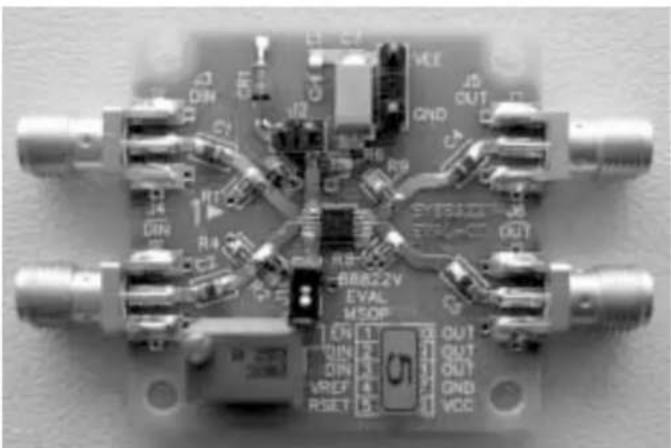
Close-up of a printed circuit board with various connectors and components (no readable text or symbols)Figure 1. SY88822V Evaluation Board
DESCRIPTION
The SY88822V is a high-speed current switch for driving a semiconductor laser diode in optical transmission applications. The modulation current ( I_OUT ) is controlled by the current ( I_RSET ) through the external resistor R_SET . The output OUT is HIGH and no current flows through OUT when output enable is HIGH.
The device incorporates complementary open-collector outputs with a 30mA maximum current driving capability. The external resistor R_EXT must be placed between /OUT and V_CC to dissipate the worst case power. R_SER is recommended to compensate for laser diode matching issues. Pin 9 and pin 10 should be connected to achieve better performance.
This manual provides information on the SY88822V evaluation board. It should be used in conjunction with the SY88822V datasheet, which contains full specifications for the SY88822V.
The SY88822V evaluation board enables fast and thorough electrical evaluation of the SY88822V 155Mbps laser diode driver with output enable. The board is an easy-to-use, single-layer, high-speed microstrip design. It is designed to be driven by a high-speed 155Mbps pattern generator and provides on-board 50Ω equivalent terminations for the generator's outputs. The input termination network also provides the SY88822V's required input bias of VCC-1.3V.
The board is intended to be terminated to a 50Ω scope and provides for simple user adjustability of the modulation current through the adjustment of an on-board potentiometer. With the amplitude of the voltage waveform displayed on the scope, the user can verify that the desired modulation current is obtained through the equation: I_mod(mA) = V_amp(V) / 0.025 k .
All data sheets and support documentation can be found on Micrel's web site at www.micrel.com.
MEASUREMENT SETUP
Equipment used for measurements:
- Agilent 83752A Synthesized Sweeper
- Agilent 70004A Display
-
Agilent 70843B Error Performance Analyzer
-
Agilent 86100A Wide-Bandwidth Oscilloscope
- Agilent E3620A DC Power Supply
- Matched High-Speed Cables w/SMA Connectors
Note:
Items 1 through 3 constitute the BERT stack.
flowchart
graph TD
    subgraph Agilent 83752A_Synthesized Sweeper
        A["RFOUT"] --> B["AGilent 70004A Display"]
        C["DATA OUT"] --> D["AGilent 70843B Error Performance Analyzer"]
        E["/DATA OUT"] --> F["SY88822V"]
    end

    subgraph Agilent 86100A_Wide-Bandwidth Oscilloscope
        G["CH1 CH2"] --> H["SMA"]
        I["TRIGGER IN"] --> J["SMA"]
        K["AGilent E3620A Power Supply"] --> L["Agilent 83752A Synthesized Sweeper"]
    end

    B --> M["CLOCK INPUT"]
    D --> N["CLOCK INPUT"]
    F --> O["CLOCK INPUT"]
    M --> P["R3 83Ω R2 83Ω"]
    N --> Q["R1 125Ω R4 125Ω"]
    P --> R["C1 0.1×F"]
    Q --> S["C2 0.1×F"]
    R --> T["V_EE"]
    S --> U["V_EE"]
    T --> V["J1"]
    U --> W["J2"]
    V --> X["V_EE"]
    W --> Y["V_EE"]
    X --> Z["V_EE"]
    Y --> AA["V_EE"]
    Z --> AB["V_EE"]
    AA --> AC["V_EE"]
    AB --> AD["V_EE"]
    AC --> AE["V_EE"]
    AD --> AF["V_EE"]
    AE --> AG["V_EE"]
    AF --> AH["V_EE"]
    AG --> AI["V_EE"]
    AH --> AJ["V_EE"]
    AI --> AK["V_EE"]
    AJ --> AL["V_EE"]
    AK --> AM["V_EE"]
    AL --> AN["V_EE"]
    AM --> AO["V_EE"]
    AN --> AP["V_EE"]
    AO --> AQ["V_EE"]
    AP --> AR["V_EE"]
    AQ --> AS["V_EE"]
    AR --> AT["V_EE"]
    AS --> AU["V_EE"]
    AT --> AV["V_EE"]
    AU --> AW["V_EE"]
    AV --> AX["V_EE"]
    AW --> AY["V_EE"]
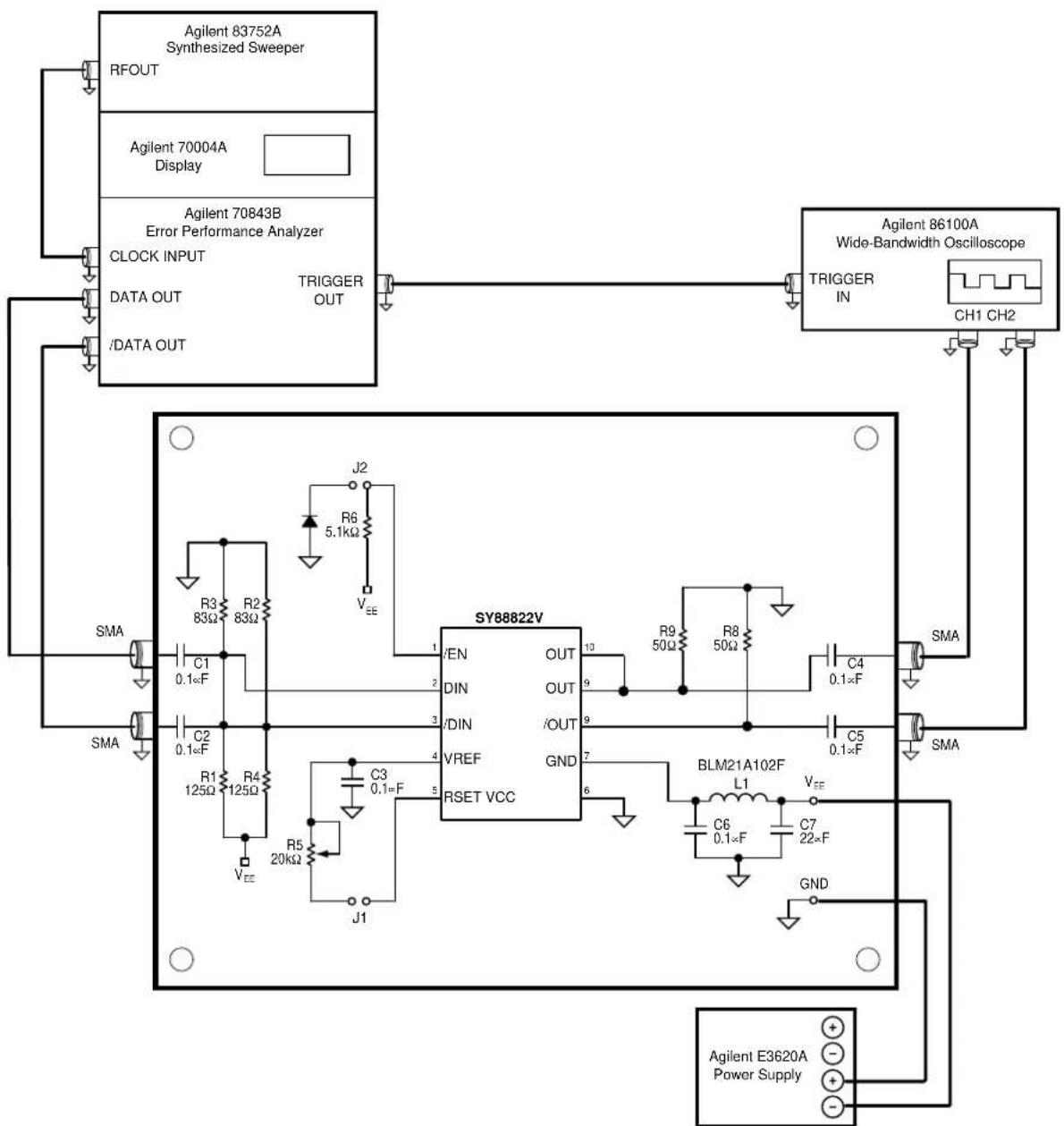
Figure 2. Setup for Measurements
SETUP FOR MEASUREMENTS
This section explains how to connect and setup the SY88822V evaluation board per Figure 2. Ensure proper ESD precautionary measures are taken before handling sensitive electronic equipment, including the SY88822V evaluation board itself.
- Set E3620A to output 3.3V and then turn off E3620A. Connect E3620A's positive lead to GND post and negative lead to V_EE post. Note that the board uses a negative supply; ensure that the power supply polarity is correct.
- Configure Agilent BERT stack:
a) Set the 83752A Synthesized Sweeper to 155MHz.
b) From the 70004A's Pattern menu, choose the PRBS 2^31-1 pattern.
c) From the 70004A's Trigger menu:
i. Choose clock as trigger output
ii. Choose CLK/8 for divider
d) From the 70004A's Data menu select:
i. External Termination = DC termination 0V
ii. Amplitude = 800mV (1600mV pp)
iii. Hi-Level = 0V
iv. Tracking = ON
v. Attenuation = 0dB
vi. Data Output = ON
vii. Polarity = NORMAL
viii. Crossing = 0
- Connect 70843V's trigger output to 86100A's trigger input.
- Short J1; open J2 on SY88822V evaluation board.
- Connect DIN and /DIN on SY88822V evaluation board to 70843V's data outputs.
- Connect OUT and /OUT on SY88822V evaluation board to 86100A's inputs.
- Turn on E3620A. Typical power supply current should be \~48mA, including the SY88822V's current and current through the on-board 50Ω equivalent termination network at 3.3V supply voltage. Excessive current usually means the power supply leads have been connected backwards. Be aware of this!
- Configure 86100A oscilloscope.
a) Verify a trigger signal is present by checking that the Trigger Source button is lit.
i. Depress this button to choose external source if necessary.
ii. Adjust trigger level if necessary.
b) Press Eye/Mask Mode on front panel.
c) Choose NRZ Eye Measurements from on-screen display.
d) Choose RMS Jitter, Rise Time, Fall Time, and Eye Amplitude measurements from on-screen selection list.
MEASUREMENTS
The SY88822V evaluation board assumes the use of a 50Ω scope to terminate the SY88822V. This, in parallel with the on-board 50Ω output pull-up resistors, creates a 25Ω output load. The current passing through this load creates a voltage swing which can be used to measure various performance parameters of the SY88822V. The current is adjustable through the use of potentiometer R5. The SY88822V evaluation board can measure:
- Eye pattern generation including jitter, rise/fall times, and modulation current verification:
a) Adjust R5 to give 750mV (1.25V pp) output amplitude ( I_mod=30mA=1.25V/0.025k ). R5 should be approximately 1kΩ. The power supply needs to be turned off to get a correct reading of the potentiometer's resistance.
b) Press Autoscale on oscilloscope. The eye pattern should automatically display on the scope. If not, verify the steps listed in the "Setup for Measurements" section are completed. Sometimes the waveform needs to be manually adjusted to fit the display. Use the Time Scale and Voltage Scale knobs on the front panel of the scope to adjust this.
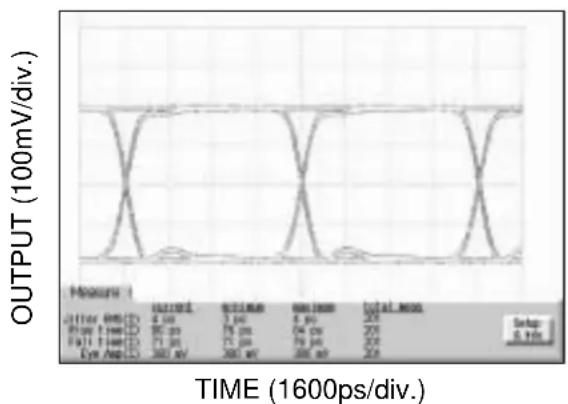
c) Observe measurements on scope's display. The rise and fall times should be less than 1000ps, amplitude around 750mV, and jitter around 10ps_rms .
d) Adjust R5 to give 125mV (250mV pp) output amplitude ( I_mod=5mA=0.125V/0.025k ) and repeat above. R5 should be around 8k .
line
| Measurement | Time (ps) | | ----------- | --------- | | Current | 4.0 | | Voltage | 80.0 | | Current | 75.0 | | Voltage | 75.0 | | Current | 300.0 | | Voltage | 300.0 | | Current | 250.0 | | Voltage | 250.0 | | Current | 250.0 | | Voltage | 250.0 | | Current | 250.0 | | Voltage | 250.0 | | Current | 250.0 | | Voltage | 250.0 | | Current | 250.0 | | Voltage | 250.0 | | Current | 250.0 | | Voltage | 250.0 | | Current | 250.0 | | Voltage | 250.0 | | Current | 250.0 | | Voltage | 250.0 | | Current | 250.0 | | Voltage | 250.0 | | Current | 250.0 | | Voltage | 250.0 | | Current | 250.0 | | Voltage | 250.0 | | Current | 250.0 | | Voltage | 250.0 | | Current | 250.0 | | Voltage | 250.0 | | Current | 249.99 | | Voltage | 249.99 | | Current | 249.99 | | Voltage | 249.99 | | Current | 249.99 | | Voltage | 249.99 | | Current | 249.99 | | Voltage | 249.99 | | Current | 249.99 | | Voltage | 250.0 | | Current | 250.0 | | Voltage | 250.0 | | Current | 250.0 | | Voltage | 250.0 | | Current | 250.0 | | Voltage | 250.0 | | Current | 249.99 | | Voltage | 249.99 | | Current | 249.99 | | Voltage | 249.99 | | Current | 249.99 | | Voltage | 249.99 | | Current | 249,99 | | Voltage | 249,99 | | Current | 249,99 | | Voltage | 249,99 | | Current | 249,99 | | Voltage | 249,99 | | Current | 249,99 | | Voltage | 249,99 | | Current | 249,99 | | Voltage | 248,99 | | Current | 248,99 | | Voltage | 248,99 | | Current | 248,99 | | Voltage | 248,99 | | Current | 248,99 | | Voltage | 248,99 | | Current | 248,99 | | Voltage | 248,99 | | Current - Input Data: Time (1600ps/div.) Current Data: Time (1600ps/div.) Voltage Data: Time (1600ps/div) Current Data: Time (1600ps/div) Current Data: Time (1600ps/div) Current Data: Time (1600ps/div) Current Data: Time (1600ps/div) Current Data: Time (1600ps/div) Current Data: Time (1600ps/div) Current Data: Time (1600ps/div) Current Data: Time (1600ps/div) Current Data: Time(1600ps/div) Current Data: Time(1600ps/div) Current Data: Time(1600ps/div) Current Data: Time(1600ps/div) Current Data: Time(1600ps/div) Current Data: Time(1600ps/div) Current Data: Time(1600ps/div) Current Data: Time(1600ps/div) Current Data: Time(160Figure 3. Typical SY88822V Eye Diagram
- Mask testing:
a) Press Eye/Mask Mode on front panel of scope.
b) Choose Mask Testing from on-screen display.
c) Choose Open Mask from on-screen selection list.
i. Select and open the OC-3 mask.
d) Choose Start Mask Testing from on-screen selection list. Waveform should automatically display with appropriate mask regions and testing will start. If not, verify the steps listed in the "Setup for Measurements" section are completed.
3. BER testing:
a) Since the SY88822V is designed to drive a laser, where an optical HIGH means the laser is conducting, the SY88822V will electrically be LOW. Hence the output polarity is opposite of the input polarity. Since this is the case, it is recommended to feedback the SY88822V evaluation board's /OUT output to the 70843B's BERT data input. The alternative is to feedback the SY88822V evaluation board's OUT output to the 70843V's BERT data input, but to select inverted polarity from the 70004A's Data menu.
b) Feedback the 70843V's Clock output to the 70843V's BERT Clock input.
c) Set the 88822V's modulation current to a desired value using R5 as described in Section 1 of this page. Remember, I_mod(mA) = V_amp(V) / 0.025 k .
d) From the 70004A's Gating menu:
i. Choose a gate condition. The options are: gate by time, errors or bits. Choose bits, but this is of no relevance because there should be no errors, and the test will run forever Âutil manually interrupted if gate by errors is chosen.
ii. Choose single gating period.
iii. Choose run gating.
iv. 70004A will reset error count and synchronize SY88822V's transmitted bitstream to 70843V's generated bitstream. If synchronization does not occur, it is sometimes due to cable length. Try using different length cables to achieve synchronization. If this is unavailable, another trick is to adjust the 83752A's frequency to a slightly higher or lower value.
v. At end of gating period, there should be no errors.
FREQUENTLY ASKED QUESTIONS
I just got my SY88822V evaluation board and I cannot get anything to work! Where should I start?
First, check the power supplies. Remember, the board is V_CC referenced and uses a negative supply. Typical power supply current should be \~48mA, including the SY88822V's current and current through the on-board 50Ω equivalent termination network at 3.3V supply voltage. Excessive current usually means the power supply leads have been connected backwards. Be careful!
After checking the power supplies, ensure the input amplitude is large enough to drive the SY88822V. PECL amplitudes, which are typically 800mV (1600mV _pp ). This is a good starting point, and you can reduce or enlarge the swing from here, depending on your application. Another not so obvious setting is the modulation current. Ensure that you've set it to output a current! If the SY88822V is disabled (by shorting J2) or RSET is too large (make sure to short J1), then you won't get an output on the scope.
If the above are okay and there's still nothing displaying on the scope, then there's most likely a trigger setup issue with the scope. Look on the scope's front panel and verify that the instrument is triggered. The Trigger Source button should be lit if a trigger signal is present. If not, press the button until the external trigger is selected. Also, try adjusting the level until a signal is found. If this does not work, verify the 70004A is set to output a CLK/8 trigger signal as described in the "Setup for Measurements" section of this document.
Why is the OUT output LOW when I set the Data input HIGH?
The SY88822V is a laser driver and is meant to conduct current through the laser diode during the high state. This means that, with a resistive load, the output will be LOW when the input is HIGH. But optically, the output will be HIGH when the input is HIGH.
Can you suggest a bypass/decoupling scheme?
Figure 2 shows the power supply decoupling scheme used for the SY88822V evaluation board. The "Bill of Materials" at the end of this document lists the supplier and component values. We have found this arrangement to be an excellent starting point.
What layout tips do you have?
- Establish controlled impedance stripline, microstrip or coplanar construction techniques for high-speed signal paths.
- All differential paths are critical timing paths and skew should be matched to within ±10ps .
- Signal trace impedance should not vary more than ±5% . If in doubt, perform Time Domain Reflectometry (TDR) analysis of signal traces.
- Place power supply decoupling capacitors as close as possible to the device's power pins.
- Make sure to short both OUT pins. This will help minimize inductive overshoots during transient current switching through the laser diode.
What is Time Domain Reflectometry (TDR)?
TDR is used to verify impedance continuity along a signal path. Many interconnects, such as SMA, if not launched correctly onto the PCB, will exhibit inductive-like resonance with an abrupt capacitive discontinuity. This discontinuity will subtract signal from the inputs and outputs, effectively closing the resulting data eye. The 86100A allows TDR testing and is a useful tool to help evaluate your PCB.
I still have questions. Who should I contact?
Micrel's HBW Applications helpline is available to assist you. Please call (408) 955-1690 or e-mail hbwhelp@micrel.com for assistance.
BILL OF MATERIALS
| Item Part Number | Manufacturer Description | Qty | ||
| C1, C2, C3, PC | C1762CT-ND Panasonic | (1) | 0.1 × F surface mount capacitor, size 0603 6 | |
| C4, C5, C6 | ||||
| C7 P11317CT-ND Panasonic | (1) | 22 × F surface mount capacitor, size C 1 | ||
| J1, J2, GND/VEE | TSW-103-07-S-S | Samtec(2) | 0.1mil center through hole terminal strip 3 | |
| L1 BLM21A102F Murata | (3) | ferrite bead, size 0603 1 | ||
| R1, R4 | P125GCT-ND | Panasonic(1) | 125 surface mount resistor, size 0603 | 2 |
| R2, R3 | P83LCT-ND | Panasonic(1) | 83 surface mount resistor, size 0603 | 2 |
| R5 3269W-1-203G | Bourns | (4) | 20k trimmer 1 | |
| R6 P5.1KGCT-ND | Panasonic | (1) | 5.1k surface mount resistor, size 0603 | 1 |
| R8, R9 | P49.9LCT-ND | Panasonic(1) | 49.9 surface mount resistor, size 0603 | 2 |
| S1, S2, S3, S4 | 142-0701-851 | Johnson(5) | end launch SMA | 4 |
| U1 SY88822V | Micrel, Inc. | (6) | 155Mbps laser diode driver | 1 |
Notes:
-
Panasonic tel: 800-344-2112
-
Samtec tel: 800-726-8329
-
Murata tel: 770-436-1300
-
Bourns tel: 877-426-8767
-
Johnson tel: 800-247-8256
-
Micrel, Inc. tel: 408-944-0800
MICREL, INC. 1849 FORTUNE DRIVE SAN JOSE, CA 95131 USA
TEL + 1 (408) 944-0800 FAX + 1 (408) 474-1000 WEB http://www.micrel.com
The information furnished by Micrel in this data sheet is believed to be accurate and reliable. However, no responsibility is assumed by Micrel for its use. Micrel reserves the right to change circuitry and specifications at any time without notification to the customer.
Micrel Products are not designed or authorized for use as components in life support appliances, devices or systems where malfunction of a product can reasonably be expected to result in personal injury. Life support devices or systems are devices or systems that (a) are intended for surgical implant into the body or (b) support or sustain life, and whose failure to perform can be reasonably expected to result in a significant injury to the user. A Purchaser's use or sale of Micrel Products for use in life support appliances, devices or systems is at Purchaser's own risk and Purchaser agrees to fully indemnify
Micrel for any damages resulting from such use or sale.
© 2004 Micrel, Incorporated.