
PowerTube - Amplifier Radial Engineering - Free user manual and instructions
Find the device manual for free PowerTube Radial Engineering in PDF.


| Product Type | 500 Series Vacuum Tube Microphone Preamplifier |
| Model | PowerTube |
| Brand | Radial Engineering |
| Tube Type | 12AX7 (select low-noise, includes additional Tonebone tube) |
| Input Transformer | Premium Jensen transformer |
| Inputs | XLR mic input (front panel and rear rack), Omniport 1/4" TRS instrument input (when used with Workhorse) |
| Output | XLR via 500 series rack |
| Phantom Power | 48V DC, 10mA (as supplied by 500 frame), recessed switch with LED indicator |
| Gain (Mic) | +63dB |
| Gain (Instrument) | +55dB |
| Frequency Response | 20Hz – 20kHz ±1dB |
| Maximum Output | +28dBu |
| Equivalent Input Noise (EIN) | -122dBu (mic, max gain) |
| Dynamic Range | >93dB |
| THD+N | 0.03% (mic preamp) |
| Controls | TRIM, GAIN, 180° polarity reverse, AIR switch (8kHz boost), HPF switch (100Hz high-pass), phantom power switch, ground lift switch, power assign switch |
| Metering | 10-segment LED VU meter with peak hold |
| Power Requirements | 500 series rack power (16V DC), 235mA max draw |
| Dimensions (W x H x D) | 1.5" x 5.25" x 6.6" (38.1 x 133.4 x 167.6 mm) |
| Weight | 0.7 lb (316 g) |
| Warranty | 3 years, transferable |
| Safety Warning | High voltage tube device – do not hot-swap; opening only by qualified technician |
| Maintenance | Tube replacement possible; use care when removing tube from socket |
| Included Accessories | Second Tonebone tube for experimentation |
Frequently Asked Questions - PowerTube Radial Engineering
User questions about PowerTube Radial Engineering
0 question about this device. Answer the ones you know or ask your own.
Ask a new question about this device
Download the instructions for your Amplifier in PDF format for free! Find your manual PowerTube - Radial Engineering and take your electronic device back in hand. On this page are published all the documents necessary for the use of your device. PowerTube by Radial Engineering.
USER MANUAL PowerTube Radial Engineering
X◆◆ *◆□◆◆▲ *◆◆◆ ★◆○□
*▲□ ◆✿✿
Radial®
*□◆※▼□▼※☆◆▲※
[Non-Text]
WARNING NOTICE TO USER:
The PowerTube is a high voltage tube device designed for professional use only. Although preventative safety measures have been designed into Radial 500 series products we strictly advise against hot-swapping modules or plugging and unplugging them when the Workhorse or other 500 series rack is powered on. Hot swapping can cause connection sparks at the card-edge connector that could send damaging transients to other equipment. This also greatly reduces the life span of the contacts. Damage due to hot swapping is not covered under warranty.
There are no spare or replacement parts inside and opening the unit should only be done by a technician familiar with 500 series modules, their operation or those experienced at replacing tubes.
* * * * * * * * * * * * * * * * * * * * * * * * * * * * * * * * * * * * * * * * * * *
X◆◆ *◆□◆◆▲★◆◇◆☆◆○□
Table of Contents Page
Overview....1
Features 2
Making Connections....3
Getting Started 4
Filters....5
Hidden Switches....6
Ominiport....7
Specifications 8
Block Diagram 8
Radial Limited Warranty ....Back Cover
Thank you for investing in a Radial PowerTube microphone amplifier. We are very excited about this product and are confident that once you get it hooked up, the excitement will be contagious! So get ready to enjoy one of the best sounding tube preamps ever made!
Before you start revving up this vacuum tube wonder, we kindly ask that you take a few moments to read this manual and familiarize yourself with the many features that are built in. For instance... did you know that there is a miniature switch inside that that enables you to safely connect up to eight PowerTubes in a Workhorse without overtaxing the power supply? How about the hidden ground lift switch that can accidentally turn phantom power off? This is important stuff and well worth reading!
Then, after you are done, you will likely have some questions. To address these, we invite you to visit the PowerTube FAQ page on our web site. This is where we post the latest news and of course questions from users. If you do not find the answers you need, we invite you to send an email to info@radialeng.com and we will do our very best to reply promptly.
Now get ready to tear up the airwaves with the sound of high voltage tube magic.
Overview
The Radial PowerTube is a vacuum tube amplifier designed to elevate the relatively low level signal of a microphone to a +4dB professional line level. Once at line level, the signal can then be processed by a various pieces of equipment such as compressors, limiters and equalizers or be sent to the line level input of a recording system.
![graph LR A["BALANCED INPUT"] --> B["JENSEN TRANSFORMER"] C["OMMPORT INSTRUMENT INPUT"] --> B B --> D["12A7"] D --> E["HIGH PASS FILTER"] E --> F["DUAL CLASS A GAIN STAGE"] F --> G["DUAL CLASS A OUTPUT BUFFER"] E --> H["HIGH PASS FILTER SWITCH"] H --> I["AIR SWITCH"] I --> F](/content/2026/06/1214071/images/da00e5f6887a92756abf5d4e9c3007b8de5a750e346f763a26cdd960f0e544fc.jpg)
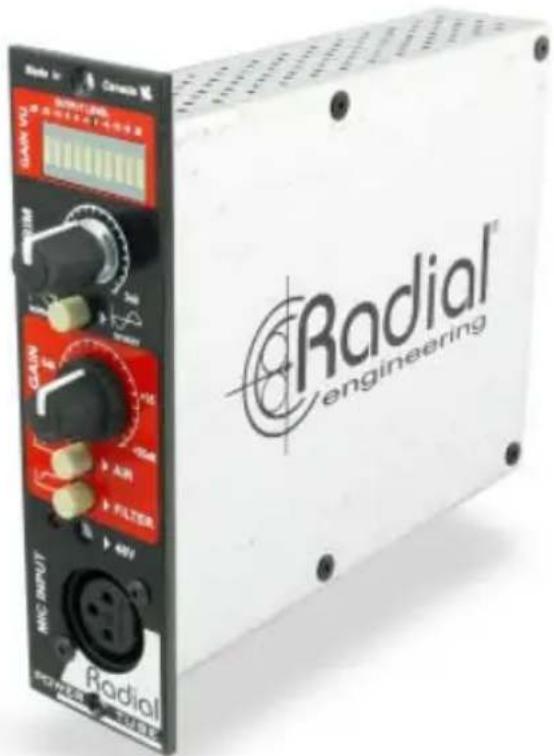
Like most mic preamps, the PowerTube features common functions such as a mic input, trim control, gain control and 48 volt phantom power. Some of the extras that are not so common include a 10 bar LED VU meter, polarity reverse switch, a high pass filter and an air control for added presence. Some of the truly unique features include the use of a premium Jensen input transformer, fully discrete class-A output buffers and of course a select 12AX7 tube. Together these features truly deliver more than the sum of their parts. And we are confident that once you start experimenting, you find the PowerTube will sound absolutely amazing in just about any situation.
![graph LR A["Speaker"] --> B["Power Tube MICPRE"] B --> C["Q3 EQ"] C --> D["KOMIT COMPRESSOR"] D --> E["Output"]](/content/2026/06/1214071/images/3dd1832b284c64aa3bd83f71bc977c110663f5ba180b5c2585aa61d4e3d151cd.jpg)
TYPICAL SETUP
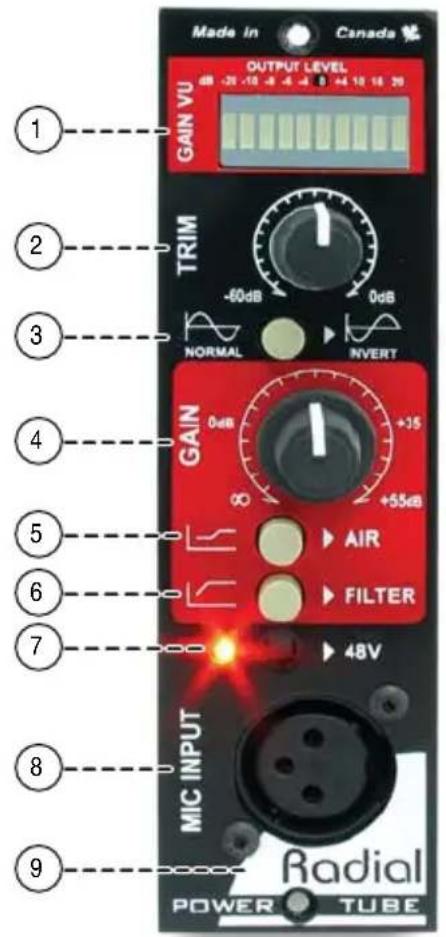
FEATURE SET
-
GAIN VU: 10 Segment LED bar provides visual signal status by simulating the natural ballistics of a VU meter. Single f1 oating LED with peak hold lowers power demand for greater effi ciency.
-
TRIM: Control lets you set the input sensitivity going to the tube and class-A circuit. Set high to add harmonic content and character.
-
180°: Polarity reverse used to phase-align two microphones or as a creative element when recording.
-
GAIN: Control lets you adjust the overall drive circuit. When pushed hard, the PowerTube adds character and harmonics to the signal path.
-
AIR: High frequency boost at 8kHz for clarity, presence and shimmer.
-
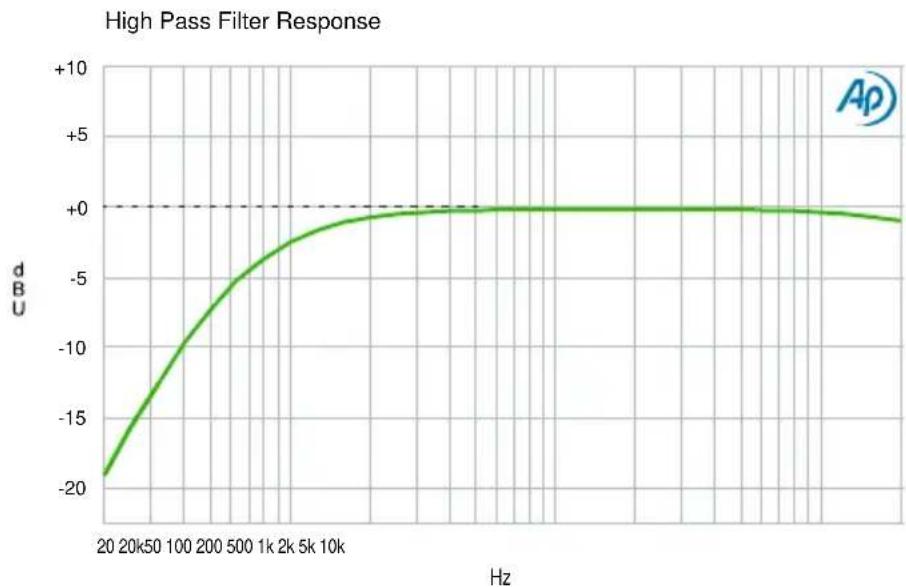
FILTER: 100Hz high pass filter removes low frequencies to help eliminate excessive bass that can cause rumble. This also helps clean up the recorded track by reducing 'mud' and is particularly useful when layering acoustic instruments.
-
48V: Phantom power for condenser microphones is equipped with power-on LED and recessed switch to prevent accidental use that could damage ribbon microphones.
-
MIC INPUT: XLR female connector is conveniently located on the front panel and placed at the bottom to keep the cable out of the way. Wired pin-2 hot following AES standard.
-
OMNIPORT: Rear mounted 1/4 " connector designated as an instrument input to allow guitar and bass to be recorded direct. Available when used with the Workhorse.
-
GROUND LIFT: Disconnects pin-1 ground on the XLR input to eliminate ground loops. This special feature should only be used when interfacing the PowerPre with electrically powered instruments like a keyboard.
-
12AX7 TUBE: The PowerPre employs a select low-noise 12AX7 tube with a non-radiating 140V charge pump to deliver the performance of a high voltage tube preamp.
-
POWER ASSIGN SWITCH: Lets you toggle the input supply from the positive or negative rail. This enables multiple PowerTubes to be used together without power sag.

MAKING CONNECTIONS
Before making any connections, start by turning off your audio system and turning all volume levels down. This helps protect equipment from turn-on transients that could damage loudspeakers and other sensitive equipment. We recommend using a power bar with an on-off switch as this makes it easy to turn on and off the 500 series rack, monitors and so on, using a single switch. Carefully plug the PowerTube into your 500 series rack making sure to avoid excessive stress on the card edge connector. Screw the module in to ensure it does not accidentally get dislodged.
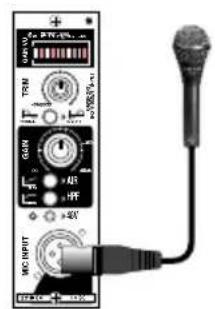
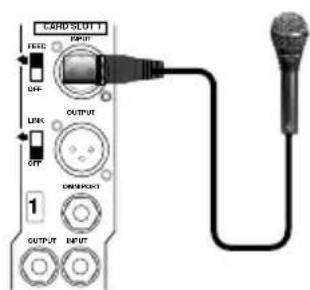
Your microphones can connect to the PowerTube via the front panel XLR jack or at the rear panel of your 500 series rack. Connecting the PowerTube output is done at the rear panel. Most 500 series racks are equipped with XLR connectors. When you plug the PowerTube into your 500 series rack, it will automatically route the input and output to the module and connect 48V phantom power. With the Workhorse, this is augmented with 1/4 "TRS connectors, D-Subs and a signal to feed the Workhorse mixer. Using the PowerTube with the Workhorse also activates the Omniport. With the PowerTube, the Omniport turns into a DI input for high impedance instrument pickups.
Connect your microphone to the PowerTube using a standard 3-pin XLR cable. You can use either the front or rear panel XLR as the input - both are wired in parallel. The PowerTube follows the AES standard with pin-1 ground and pin-2 hot. Most devices are wired this way but older vintage equipment should be checked to confirm compatibility. To ensure the lowest noise always use a high quality balanced cable from a reputable manufacturer.
FRONT PANEL MIC INPUT
REAR PANEL INPUT (WORKHORSE)

REAR PANEL INPUT (500 SERIES RACK)
Depending on what type of microphone you are using, you may or may not need to engage the 48V phantom power. This is designed for condenser microphones. If you are using a dynamic microphone or ribbon microphone, leave the phantom power off. The switch is recessed as a means to prevent accidentally turning it on which could harm some ribbon microphones. An easy to see LED indicator tells you if phantom is on.
Connect the XLR output on the back of your 500 series power rack to your recording system so that you can audition the PowerTube. We recommend that you first listen to the PowerTube without running it through other audio signal processors until you have had a chance to familiarize yourself with the sound and functions. Using your own voice to test is always best as it really gives you a familiar starting place.
GETTING STARTED
Although the PowerTube is extremely easy to use, we suggest you follow these simple instructions before using it. As with all audio equipment, always ensure all levels are turned down or equipment turned off before making any connections or plugging the PowerTube into a 500 series power rack. This common practice ensures turn-on transients will not damage more sensitive components such as tweeters.
There are two rotary controls on the PowerTube named TRIM and GAIN. Start by setting the TRIM control to 12 o'clock and the GAIN all the way counter-clockwise to the minimum setting. Make sure the polarity invert switch is in the normal (out) position and turn off the AIR and HPF controls by also setting these to the out position.

Start point:
- Set the TRIM control to 12 o'clock
- Make sure the 180° is off (switch outward).
- Gain control should be off (fully counter-clockwise).
- HPF should be turned off (switch outward).
- AIR should be turned off (switch outward).
Plug in your microphone. If you are using a dynamic microphone, you are set to go. If you are using a condenser, you will likely need to turn the 48V phantom power on unless it is equipped with an internal battery. Using a tweaker or small screwdriver, turn on the phantom power by pushing in the recessed switch. The LED indicator will illuminate when on. The switch is purposely recessed to protect older ribbon microphones from accidental turn on.
Turn up the GAIN control until it gets to a relatively low listening level. Testing at low levels prevents accidental damage to sensitive components due to turn on transients and of course reduces opportunity for feedback. Test by reducing the GAIN control and increasing the TRIM so that you get a sense of the dynamic range and a feel for how the PowerTube controls work. You will find that the range is quite extensive and that even when you drive the PowerTube into the red, it will still sound relatively clean.
AIR
This switch introduces high end to accentuate harmonics. Adding air to a signal is often done to hype a male vocal track or add breath the a female singer so that it cuts through the mix. Another common use is adding shimmer to an acoustic guitar to accentuate the harmonics and attack of the picking. You may even use it to add shimmer to cymbals. Experiment. When not needed, simply turn it off.

HPF FILTER
A high-pass filter (low cut) is generally used in the studio to clean up excessive bottom end that can render recordings muddy and cause some instruments to become indistinct. Bass frequencies are so much longer and more powerful than highs, so controlling them can often be very advantageous. Live sound engineers will often reduce the low end from acoustic instruments to reduce resonance and prevent run-away feedback. Test the high-pass filter so that you get a feel to how it works. You may find it works really well on certain voices, acoustic guitar and bass.
THE HIDDEN SWITCHES
There are two mini slider switches located above and below the 15-pin card edge connector plate. The lower one is used to balance the power supply current draw for the 12AX7 heater when multiple PowerTubes are being used. The upper one is used to lift the ground at the input. These ‘set and forget’ switches are only used in special situations.
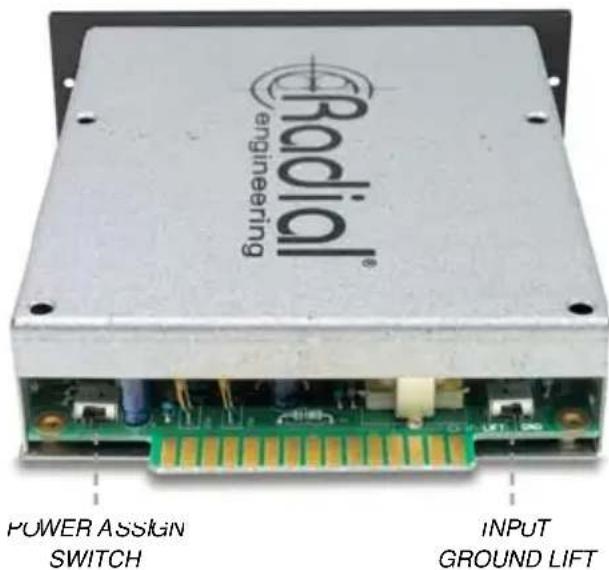
Power assign switch
This switch is used to select the (+) or (-) from the 16V power rails inside a Workhorse or API Lunchbox equivalent racks when multiple PowerTubes are used together. The intent is to balance the power draw on the supply to reduce opportunity for brown outs which of course would limit the PowerTube performance. The Power Assign switch comes factory set in the up (- 16V) position. The switch position is not critical when only one PowerTube is being used. When using multiple PowerTubes, simply toggle the switches with one down (-16V) and the next up (+16V) so that they even out the power draw.
Ground lift switch
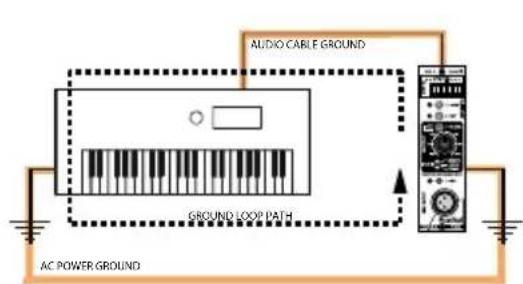
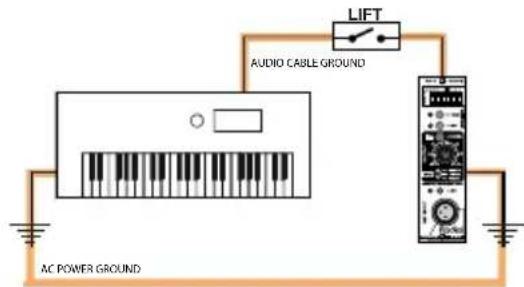
In many ways, a ground lift switch is somewhat superfluous on the input of a microphone preamp as lifting the ground will disconnect the 48V phantom. This of course means that if you lift the ground, phantom power will no longer be able to feed the microphone or power an active direct box. Make sure that the ground lift switch is set in the up position before you insert the module into your rack. So why have it? Tubes can make just about anything sound warmer. When connecting a keyboard or pre-recorded track to the PowerTube to add excitement and character leave the ground lift in the up position, unless you encounter noise caused by a ground loop.
Omniport™ instrument input
If you are using a Radial Workhorse, Cube or Powerstrip, these are equipped with a 1/4 " TRS jack identified as Omniport. This jack changes function depending on which module is connected.
With the PowerTube, the Omniport is an unbalanced instrument input. This input has been purposely 'tamed' to sound good when recording an instrument like electric bass or acoustic guitar direct. In other words, we have rounded out the frequency response to warm it up. If you want more of a glassy tone, simply compensate by depressing the AIR switch.
As soon as you plug in the instrument to the Omniport, it will engage a relay that will shut off the XLR mic input. This ensures only one input is active at any one time. Disconnect when done and the PowerTube will automatically revert to normal 'mic' mode.
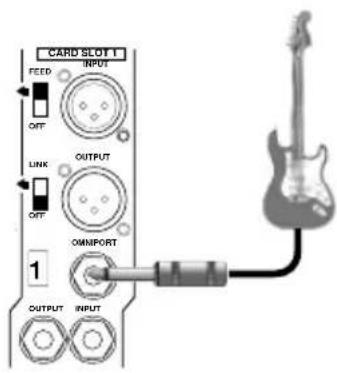
OMNIPORT INPUT (WORKHORSE)
Changing the tube
Inside the PowerTube is a 12AX7 tube. This is mounted on a separate circuit board so that it can fit within the limited space afforded inside a 500 series module housing. Removing the tube is easy. Carefully wiggle the tube out of the socket by gently moving it back and forth as you pull it away from the socket. If you are not familiar with changing tubes, we suggest you bring your PowerTube to your dealer and have them show you how it is done.
Changing the tube will of course change the character of the sound. The PowerTube comes shipped with a select low noise tube. We also include a second Tonebone distortion pedal tube for fun. These changes are often subtle as tube performance varies greatly. Try different tubes and see how they sound. Whatever you do – do not tell anyone how you got your secret sauce! This is part of the fun with owning a PowerTube.
RADIAL POWERTUBE 500 SPECIFICATIONS*
Microphone Input
Circuit Type: 100% discrete tube class-A preamplifi er
Frequency Response: 20Hz \~ 20KHz +0dB/-1dB
Input Impedance: 2.2k Ohms
Mic Preamp Gain: +63dB
Maximum Output: +28dBu
Output Impedance: 150 Ohms nominal
Equivalent Input Noise (EIN): -122dBu @ maximum gain
Dynamic Range: >93dB
Total Harmonic Distortion (THD+N): 0.03%
Intermodulation Distortion (IMD): 0.012%
Instrument Input
Omniport Input Impedance: 150k Ohms, unbalanced*
Instrument Preamp Gain: +55dB
Equivalent Input Noise (EIN): -95dBu
Total Harmonic Distortion (THD+N): 0.015%
Phantom Power: 48VDC - 10mA (as supplied by 500 frame)
XLR Configuration: Follows AES spec: pin-1 ground, pin-2 (+), pin-3 (-)
Current Draw: 235mA (maximum draw)
Size: 5.25" x 1.5" x 6.6" (13.34 x 3.81 x 16.75cm)
Weight: 0.7 lb (316 g)
Warranty: 3 years, transferable
* Refers to use with Radial Workhorse rack and mixer. All specifications average depending on tube or termination. Please see web page for further details.
![graph TD A["Ground LFT"] --> B["Automatic OMNIPORT SWITCH"] B --> C["JENSEN TRANSFORMER"] C --> D["TRIM VARI-PAD"] D --> E["12AX7"] E --> F["HIGH IMPEDANCE CLASS A BUFFER"] F --> G["HIGH PASS FILTER"] G --> H["High Pass FILTER SWITCH"] H --> I["DUAL CLASS A GAIN STAGE"] I --> J["AIR SWITCH"] J --> K…](/content/2026/06/1214071/images/abc5662f803b866eee1c47b3606f354dee0c7013fd1183a353d2b4d7a25ba278.jpg)
THREE YEAR TRANSFERABLE LIMITED WARRANTY
RADIAL ENGINEERING LTD. ("Radial") warrants this product to be free from defects in material and workmanship and will remedy any such defects free of charge according to the terms of this warranty. Radial will repair or replace (at its option) any defective component(s) of this product (excluding finish and wear and tear on components under normal use) for a period of three (3) years from the original date of purchase. In the event that a particular product is no longer available, Radial reserves the right to replace the product with a similar product of equal or greater value. In the unlikely event that a defect is uncovered, please call 604-942-1001 or email service@radialeng.com to obtain an RA number (Return Authorization number) before the 3 year warranty period expires. The product must be returned prepaid in the original shipping container (or equivalent) to Radial or to an authorized Radial repair center and you must assume the risk of loss or damage. A copy of the original invoice showing date of purchase and the dealer name must accompany any request for work to be performed under this limited and transferable warranty. This warranty shall not apply if the product has been damaged due to abuse, misuse, misapplication, accident or as a result of service or modification by any other than an authorized Radial repair center.
THERE ARE NO EXPRESSED WARRANTIES OTHER THAN THOSE ON THE FACE HEREOF AND DESCRIBED ABOVE. NO WARRANTIES WHETHER EXPRESSED OR IMPLIED, INCLUDING BUT NOT LIMITED TO, ANY IMPLIED WARRANTIES OF MERCHANTABILITY OR FITNESS FOR A PARTICULAR PURPOSE SHALL EXTEND BEYOND THE RESPECTIVE WARRANTY PERIOD DESCRIBED ABOVE OF THREE YEARS. RADIAL SHALL NOT BE RESPONSIBLE OR LIABLE FOR ANY SPECIAL, INCIDENTAL OR CONSEQUENTIAL DAMAGES OR LOSS ARISING FROM THE USE OF THIS PRODUCT. THIS WARRANTY GIVES YOU SPECIFIC LEGAL RIGHTS, AND YOU MAY ALSO HAVE OTHER RIGHTS, WHICH MAY VARY DEPENDING ON WHERE YOU LIVE AND WHERE THE PRODUCT WAS PURCHASED.

This product is intended for professional use only.
The user should be familiar and experienced with the 500 series rack and module format

Radial Engineering Ltd.
1588 Kebet Way, Port Coquitlam BC V3C 5M5
tel: 604-942-1001 • fax: 604-942-1010
info@radialeng.com • www.radialeng.com

- WARNING NOTICE TO USER
- X◆◆ *◆□◆◆▲★◆◇◆☆◆○
- TABLE OF CONTENTS PAGE
- OVERVIEW
- FEATURE SET
- MAKING CONNECTIONS
- GETTING STARTED
- START POINT
- AIR
- HPF FILTER
- THE HIDDEN SWITCHES
- POWER ASSIGN SWITCH
- GROUND LIFT SWITCH
- OMNIPORT™ INSTRUMENT INPUT
- CHANGING THE TUBE
- RADIAL POWERTUBE 500 SPECIFICATIONS
- MICROPHONE INPUT
- INSTRUMENT INPUT
- THREE YEAR TRANSFERABLE LIMITED WARRANTY
Brand : Radial Engineering
Model : PowerTube
Category : Amplifier