
AS-1210 - Amplifier Galaxy Audio - Free user manual and instructions
Find the device manual for free AS-1210 Galaxy Audio in PDF.


| Product Type | Wireless In-Ear Monitor System |
| Model | AS-1210 |
| Brand | Galaxy Audio |
| Frequency Band | UHF (210 selectable frequencies) |
| Frequency Range | Code D: 584-607 MHz / Code N: 518-542 MHz |
| Operating Range | Up to 300 feet (92 meters) under typical conditions |
| Transmitter Dimensions (HxWxD) | 1.5 x 8.3 x 3.78 inches (38 x 212 x 96 mm) |
| Transmitter Weight | 22 oz (635 g) |
| Receiver Dimensions (HxWxD) | 3.73 x 2.54 x 1 inches (95 x 65 x 25 mm) |
| Receiver Weight | 3.2 oz (90 g) without batteries |
| Power Supply (Transmitter) | 12-18V DC at 300mA (external power supply included) |
| Battery (Receiver) | 2 x AA alkaline or rechargeable (approx. 5 hours life) |
| Audio Inputs | 2 x XLR/1/4" combo jacks (line level) |
| Audio Outputs | 1/4" stereo headphone jack (transmitter), 1/8" stereo headphone jack (receiver) |
| Modulation | FM Stereo |
| RF Output Power | 10 mW |
| Audio Frequency Response | 70 Hz - 13.5 kHz (±3 dB) |
| Total Harmonic Distortion | <1% @ 1 kHz |
| Signal-to-Noise Ratio | >80 dBA |
| Dynamic Range | >88 dB A-weighted |
| Operating Temperature | 14°F to 122°F (-10°C to +50°C) |
| Mounting | EIA standard half-rack (single/dual rack kit included) |
| Warranty | Three-year limited warranty |
Frequently Asked Questions - AS-1210 Galaxy Audio
User questions about AS-1210 Galaxy Audio
0 question about this device. Answer the ones you know or ask your own.
Ask a new question about this device
Download the instructions for your Amplifier in PDF format for free! Find your manual AS-1210 - Galaxy Audio and take your electronic device back in hand. On this page are published all the documents necessary for the use of your device. AS-1210 by Galaxy Audio.
USER MANUAL AS-1210 Galaxy Audio
Rack Mounting AS-1200....3
AS-1200T Transmitter Features....4
AS-1200R Receiver Features....5
System Setup Transmitter....6
System Setup Receiver....7
Specifications....8
Parts and Accessories....8
Wireless Tips....9
Introduction
Thank you for choosing a Galaxy Audio professional wireless in-ear monitor system. You have joined the ranks of countless satisfied customers. Our years of professional experience in design and manufacturing ensure our products' quality, performance and reliability.
1. Introduction
- EIA-standard metal materials half - rack transmitter chassis.
- Durable, ergonomic plastic body Receiver with soft-touch controls.
- 210 Selectable UHF frequencies
- Designed to provide incredible audio quality and reliable performance for artists, broadcasters and other demanding audio environments.
2. Transmitter Installation and Connections
Installation
- For better operation the transmitter should be at least 3ft. (1m) above the ground and at least 3ft. away from a wall or metal surface to minimize reflections.
- Keep antennas away from noise sources such as computer, digital equipment, motors, automobiles and neon lights, as well as away from large metal objects.
- Antenna are normally positioned 45^ from vertical for best transmission.
- Keep open space between the receiver and transmitter for better reception.
- The transmitter should be at least 6ft. (2m) from the receiver.
Connections:
- Power to the unit is controlled by the front panel power switch.
- There are two line level audio inputs on the rear panel: 1/L and 2/R audio INPUTS. Suitable for an XLR balanced audio input connector or a balanced/unbalanced 1/4" (6.3mm) input connector. The two audio inputs simultaneous feed from two different outputs. Use the appropriate shielded audio cable for connections between the transmitter and the output(s) of the mixer or other audio output equipment.

WARNING!
USING THIS SYSTEM AT EXCESSIVE VOLUMES CAN CAUSE PERMANENT HEARING DAMAGE. USE AS LOW A VOLUME AS POSSIBLE.
In order to use this system safely, avoid prolonged listening at excessive sound pressure levels. Please use the following guidelines established by the Occupational Safety Health Administration (OSHA) on maximum time exposure to sound pressure levels before hearing damage occurs.
90 dB SPL at 8 hours
95 dB SPL at 4 hours
100 dB SPL at 2 hours
105 dB SPL at 1 hour
110 dB SPL at 12 hour
115 dB SPL at 15 minutes
120 dB SPL — avoid or damage may occur
It is difficult to measure the exact Sound Pressure Levels (SPL) present at the eardrum in live applications. In addition to the volume setting on the Personal Monitors, the SPL in the ear is affected by ambient sound from floor wedges or other devices. The isolation provided by the fit of quality earpieces is also an important factor in determining the SPL.
Here are some general tips to follow in the use of this product to protect your ears from damage.
- Turn up the volume control only far enough to hear properly.
- Ringing in the ears may indicate that the gain levels are too high. Try lowering the gain levels.
- Have your ears checked by an audiologist on a regular basis. If you experience wax buildup in your ears, stop using the system until an audiologist has examined your ears.
- Wipe the ear molds with an antiseptic before and after use to avoid infections. Stop using the earphones if they are causing great discomfort or infection.
! IMPORTANT SAFETY INSTRUCTIONS!
READ these instructions.
2. KEEP these instructions.
3. HEED all warnings.
4. FOLLOW all instructions.
5. DO NOT use this apparatus near water.
6. CLEAN ONLY with dry cloth.
7. DO NOT block any ventilation openings. Install in accordance with the manufacturer's instructions.
8. DO NOT install near any heat sources such as radiators, heat registers, stoves, or other apparatus (including amplifiers) that produce heat.
9. DO NOT defeat the safety purpose of the polarized or grounding-type plug. A polarized plug has two blades with one wider than the other. A grounding type plug has two blades and a third grounding prong. The wider blade or the third prong are provided for your safety. If the provided plug does not fit into your outlet, consult an electrician for replacement of the obsolete outlet.
10. PROTECT the power cord from being walked on or pinched, particularly at plugs, convenience receptacles, and the point where they exit from the apparatus.
- ONLY USE attachments/accessories specified by the manufacturer.1.
- UNPLUG this apparatus during lightning storms or when unused for long periods of time.
- REFER all servicing to qualified service personnel. Servicing is required when the apparatus has been damaged in any way, such as power-supply cord or plug is damaged, liquid has been spilled or objects have fallen into the apparatus, the apparatus has been exposed to rain or moisture, does not operate normally, or has been dropped.
- DO NOT expose the apparatus to dripping and splashing. DO NOT put objects filled with liquids, such as vases, on the apparatus.
- Remove the batteries from the receiver if the system will not be used for a long period of time. This will avoid any damage resulting from a defective, leaking battery.
- DO NOT throw used batteries into a fire. Be sure to dispose of or recycle used batteries in accordance with local waste disposal laws.
LICENSING INFORMATION
THIS RADIO EQUIPMENT IS INTENDED FOR USE IN PROFESSIONAL ENTERTAINMENT AND SIMILAR APPLICATIONS.
Changes or modifications not expressly approved by Galaxy Audio Incorporated could void your authority to operate the equipment. Licensing of Galaxy Audio wireless microphone equipment is the user's responsibility, and licensability depends on the user's classification and application, and on the selected frequency. Galaxy Audio strongly urges the user to contact the appropriate telecommunications authority concerning proper licensing, and before choosing and ordering frequencies.
NOTE: THIS EQUIPMENT MAY BE CAPABLE OF OPERATING ON SOME FREQUENCIES NOT AUTHORIZED IN YOUR REGION. PLEASE CONTACT YOUR NATIONAL AUTHORITY TO OBTAIN INFORMATION ON AUTHORIZED FREQUENCIES FOR WIRELESS MICROPHONE PRODUCTS IN YOUR REGION
Licensing: Note that a ministerial license to operate this equipment may be required in certain areas. Consult your national authority for possible requirements.
FCC Consumer Alert for Wireless Microphones (U.S.)
Most users do not need a license to operate this wireless microphone system. Nevertheless, operating this microphone system without a license is subject to certain restrictions: the system may not cause harmful interference; it must operate at a low power level (not in excess of 50 milliwatts); and it has no protection from interference received from any other device. Purchasers should also be aware that the FCC is currently evaluating use of wireless microphone systems, and these rules are subject to change.
For more information, call the FCC at 1-888-CALL-FCC (TTY: 1-888-TELL-FCC) or visit the FCC's wireless microphone website at www.fcc.gov/cgb/wirelessmicrophones
System Components
All AS-1200 systems include the following components:
AS-1200T Transmitter
AS-1200R Receiver
Power Supply
One Pair EB4 Ear Buds
One Antenna
Single/Dual Rack Kit
Quickstart Guide

EB4
Ear Buds

AS-1200T Transmitter

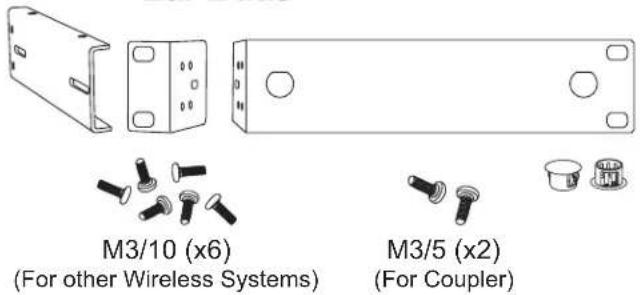
MREWD Single/Dual Rack Kit
natural_image
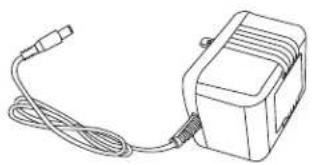
Line drawing of a portable electronic device with cable and connector (no text or symbols)PS-13.5-.35.5 Power Supply

Quick Start Guide
Attaching the Rack Ears
What You Need for Rack Mounting:
(Not Included)
- Rack Screws 10/32 x 0.75", Phillips Truss Head Screws
-
2 Phillips Head Screwdriver

For Racking a Single Unit:
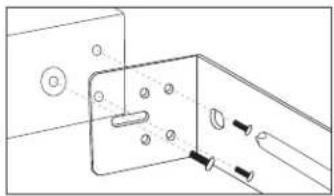
- Attach the long and short rack ears to either side of choice using the provided screws.

natural_image
Technical line drawing of a mechanical bracket with mounting holes and a tool inserted (no text or symbols)- Align the unit up evenly. Turn the screw but leave room to adjust. Once all three screws are in place, tighten securely.
natural_image
Technical line drawing of a mechanical bracket with mounting holes and a tool inserted (no text or symbols)For Racking a Two Units:
- Attach the short rack ear to either side of choice using the provided screws.

natural_image
Technical line drawing of a mechanical bracket with mounting holes and a tool inserted (no text or symbols)- After removing the screw from the side of the unit, attach the coupler half to the other side using the provided screws.

natural_image
Technical line drawing of a metal bracket with mounting holes and a tool, no text or symbols present- Align the two units so that the couplers overlap and the holes align. Using the provided coupler screws (M3/5), screw the couplers together securely.


natural_image
Line drawing of a dual-chamber electronic device with ports and connectors (no text or symbols)AS-1200 Wireless In-Ear Monitor System Transmitter
Transmitter Features:
Front Panel

① Power Switch: Press to switch on, LCD Display will light up. Press again to switch off.
② Channel Select: Up ▲ and Down ▼ Buttons
③- Settings Button
④- LCD Screen Channel Display
⑤- 1/4" 6.35 mm Stereo Headphone Jack
⑥- Headphone Output Volume Control: Left turn for output level decrease, right turn for output level increase.
NOTE: POWER ON Indicator:
When the Power switch is activated on the AS-1200 transmitter, the LCD Display front of the unit will light up, indicating power has been applied. The transmitter will not be locked immediately upon powering on, however if there has been no interaction to settings within about 16 seconds, it will go into locked mode by default.
Back Panel

① - DC Power Input Jack.
② - Left Channel XLR/1/4" Combo Input Jack.
③ - Right Channel XLR/1/4" Combo Input Jack.
④ - Left Channel Input Level Control.
⑤ - Right Channel Input Level Control.
⑥ - Antenna Jack. 50 ohms.
AS-1200 Wireless In-Ear Monitor Body Pack Receiver
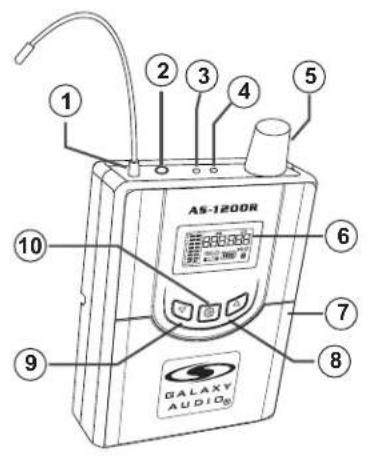
Body Pack Receiver Features:

natural_image
Pure technical line drawing of a mechanical device with no text, numbers, or symbols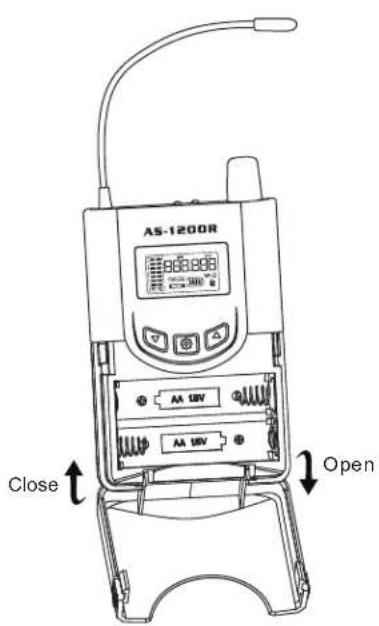
Features:
① Antenna
② Stereo Headphone Jack 1/8" (3.5 mm)
③ RF Signal LED: Lights up when RF Signal is Received.
④ Stereo LED: LED Lights up when transmitter stereo switch is on
⑤ Audio Output Control and On/Off Switch
⑥ LCD Screen: Displays Group/Channel, AF/RF, Battery Life, Mono/Stereo
⑦ Battery Compartment: Insert batteries here. (Two AA 1.5VDC Alkaline recommended)
⑧ Channel UP Button
⑨ Channel DOWN Button
⑩- Settings Button
Wearing the Body Pack Receiver
Belt Clip: For best results, clip the receiver onto a belt by pushing the receiver down onto the belt as far as possible.
Changing Batteries
Expected life for two AA Alkaline batteries is approximately 5 hours. When the battery indicator has no bars but the outline is flashing, the batteries should be replaced asap.
System Setup - Transmitter
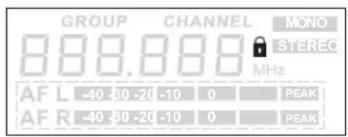
Fig. 1
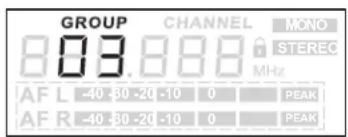
Fig. 2

Fig. 3

Fig. 4

Fig. 5

Fig. 6
Transmitter Programming:
Unlock the Transmitter:
Press button until the lock symbol disappears. Fig 1 and hold the Settings
Select a Group and/or Channel, and Mono or Stereo:
Press the Settings button while the system is unlocked. Group number will flash. While Group number is flashing, press or button to select a group as shown in Fig 2. Then press the Settings button again. While Channel number is flashing, press or button to select a Channel, as shown in . Then press the Fig 3 Settings button again. While either Mono or Stereo is flashing, press or button to select Mono or Stereo, as shown in . If it is already set to your choice, Fig 4 simply press Settings again and you are done.
Note: When using multiple systems, for optimum results set all of the systems to the same group number and select a different channel number for each system in that group.
Audio Input Level Display:
Fig 5Displays left and right cl
Full Display:
Displays left and right channel audio input levels, Mode, Lock, and selected frequency, as shown in .Fig 6
Adjust audio input levels to peak on only the loudest signals. Note:
System Setup - Receiver

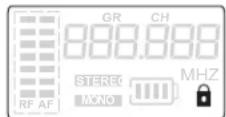
Fig. 2

Fig. 3

Fig. 4
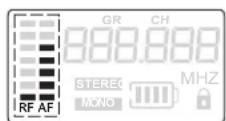
Fig. 5

Fig. 6

Fig. 7
Body Pack Receiver Programming:
Power On:
Turn the Body Pack on by turning the volume control clock-wise. The LCD display will light up as shown in .Fig 1
Unlock the Receiver:
Press and hold the Settings button until the lock symbol disappears. Fig 2
Select a Group and/or Channel to Match Transmitter:
Press the Settings button while the system is unlocked. Group number will flash. While Group number is flashing, press or ▲button to select a group as shown in Fig 3. Then press the Settings button again. While Channel number is flashing, press ▲or button to select a Channel, as shown in Fig 4.
Audio Input Level Display:
Displays audio input level, as shown in Fig 5.
RF Signal Level Display:
Displays RF signal level, as shown in Fig 5.
Battery Indicator Display:
Displays 4 Bar Battery life indicator, as shown in Fig 6.
Full Display:
Displays AF audio input levels, RF levels, Lock, Battery Life, and selected frequency, as shown in Fig 7.
Stereo/Mono:
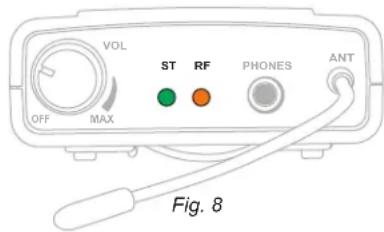
If the transmitter is set to Stereo, the stereo LED indicator will light green as shown in Fig 8.
RF Signal Indication:
If the Receiver receives an RF signal, the RF LED indicator will light orange as shown in Fig 8.
Specifications
System
Band: UHF
Frequencies: 210 Selectable Frequencies
Frequency Range: CODE D: 584 - 607 MHz
CODE N: 518 - 542 MHz
10 mWTransmitter Output Level:
Under Typical Conditions 300' (92m) Operating Range:
Note: actual range depends on RF signal absorption,
reflection, interference, and battery characteristics
70Hz - 13.5Khz (±3db)Audio Frequency RespDrInput: Impedance balanced
Total Harmonic Distortion: <1% @ 1kHz
Signal to Noise: >80dBA
Maximum Deviation Range: ±15kHz
Dynamic Range: >88dB A-weighted
Operating Temperature Range: 14°F to 122°F (-10°C to +50°C)
Note: battery characteristics may limit this range
Transmitter
Main Frame Size: EIA STANDARD 1/2U
Modulation Mode: FM Stereo Modulation
RF Output: 10 mW
Max Audio Input Level: +6dBV
Gain Adjustment Range: 40dB
Input Impedance: 100kΩ
Controls: Headphone Volume, Up/Down, Settings, and Power Button
Audio Input: Line Level x 2, XLR/1/4" Combo Jack
Audio Output: 1/4" Headphone Out
pdrR input: Impedance balanced
Pin: 1 Ground (cable shield)
Pin: 2 Audio +
Pin: 3 No Audio -
Dimensions: 1.5" x 8.3" x 3.78" (38 x 212 x 96 mm) (HxWxD)
Weight: 22 oz. (635 g)
12-18 V DC at 300mA supplied by Power Supplied By: external power supply
GALAXY AUDIO
Frequency Page

Please click or scan the QR for the most current frequency information.
http://www.galaxyaudio.com/support/schematics-and-frequency-charts
Receiver
Audio Output Level: >65mW x 2 Earphone Out with Volume Control
Sensitivity: -92dBm at 30dB
Stereo Separation: 40dB (at 1kHz)
Output Connector: 1/8" (3.5mm) Stereo Earphone Connector
Controls: Volume, Up, Down, Settings
Indicators: LCD Display, Stereo LED, RF LED
Dimensions: 3.73" x 2.54" x 1" (95 x 65 x 25 mm) (HxWxD)
Weight: 3.2 oz (90 g) without batteries
2 (AA) size alkaline or rechargeable batteries Power Suppli
Battery Life: About 5 hours (alkaline)
Parts and Accessories
Many of these parts and accessories may be found and purchased from the Galaxy Audio website in the Galaxy Store ( ).www.galaxyaudio.com/parts-and-accessories

EXTBNC - BNC Cable for front mounting the antennas on the AS-950. For lengths available: 18", 25', 50', 100'

CN-BNCPM - BNC Connector for front mounting the antennas on the AS-950.

ANT-PDL - Directional antenna used to decrease interference to other equipment. Frequency range 500-900MHz The UHF wide-band (500-900 MHz) directional LPDA (log periodic dipole array) antenna reduces outside interference while providing increased send/receive signal range. Each antenna paddle is matched to 50 ohms impedance with a low-loss BNC connector; 7dBi gain. For permanent or temporary installation; mounts to 5/8"-27 threads.

AS-ANT - Replacement BNC Antenna for use with Galaxy Audio Wireless Personal Monitors. (Part number will vary based on the Frequency Code of specific unit)

AS-CLIP1576 - Replacement Belt Clip for AS-950R, MBP76R, and MBP77R Body Packs

BATTCVRBP76 - Replacement Battery Cover for AS-950R, MBP76R, and MBP77R Body Pack.
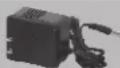
PS-13.5-.35.5 - 600mA Replacement Power Supply for AS-900, AS-950 AS-1100, AS-1400, EDX, ECM, PSE, & DHX.

AS-UA12-14.5 - 1000mA Universal Power Supply for Replacement Power Supply for AS-900, AS-950 AS-1100, AS1400, AS-1800, EDX, ECM, PSE, DHX, DHXR4, & CTS. Includes adapters for most other countries.

EB4 - Ear buds which come standard with our Wireless Personal Monitor Systems with 1/8" - 3.5mm Jack.

EB4S - Replacement Sleeves for EB4 Ear Buds. 5 pair in each pack. Available in Small, Medium, or Large.

MREWD - Replacement Single/Dual Rack Kit for AS-900, AS-950, AS-1100, & AS-1400
Wireless Tips
Maintain line of sight between the transmitter and receiver antennas.
Do not have walls, metal objects, large crowds, etc. blocking the line of sight between the transmitter and receiver.
Antennas on the stationary equipment should be kept 6-8' above the ground.
Antennas can be mounted on stands or walls using brackets such as the ANT-LB.
On body pack receivers/transmitters, avoid putting them in your pocket, and/or folding the antenna under the pack. The antenna should hang freely and openly.
Keep the distance between transmitters and receivers as short as possible.
If distances above 20-30' are unavoidable, directional antennas such as the ANT-PDL can improve reception by rejecting signals outside their pickup angle.
Find out what TV stations are broadcasting in your area and avoid the channels they are on.
This information is available from many sources on line, such as www.tvfool.com.
If your receiver is showing that it is receiving RF when your transmitter is turned off, you need to move to another frequency.
If you are using several systems, you can contact service@galaxyaudio.com for assistance in frequency coordination.
Make certain you are using fresh batteries, rechargeable batteries may be used, but they discharge at a much faster rate than alkaline.
(This page is intentionally left blank)

Superior Sound For You

Superior Sound For You

www.galaxyaudio.com
THREE YEAR LIMITED WARRANTY
WARRANTY Information can be viewed online at https://www.galaxyaudio.com/support/warranty

www.galaxyaudio.com/support/warranty
AS-1200
USER'S MANUAL
Specifications in this manual are subject to change without notice. For the most up to date manual and information visit www.galaxyaudio.com.
1-800-369-7768
www.galaxyaudio.com
© Copyright Galaxy Audio 2021
- Introduction
- Introduction
- Transmitter Installation and Connections
- Installation
- Connections:
- WARNING!
- USING THIS SYSTEM AT EXCESSIVE VOLUMES CAN CAUSE PERMANENT HEARING DAMAGE. USE AS LOW A VOLUME AS POSSIBLE.
- ! IMPORTANT SAFETY INSTRUCTIONS!
- LICENSING INFORMATION
- THIS RADIO EQUIPMENT IS INTENDED FOR USE IN PROFESSIONAL ENTERTAINMENT AND SIMILAR APPLICATIONS.
- NOTE: THIS EQUIPMENT MAY BE CAPABLE OF OPERATING ON SOME FREQUENCIES NOT AUTHORIZED IN YOUR REGION. PLEASE CONTACT YOUR NATIONAL AUTHORITY TO OBTAIN INFORMATION ON AUTHORIZED FREQUENCIES FOR WIRELESS MICROPHONE PRODUCTS IN YOUR REGION
- System Components
- All AS-1200 systems include the following components:
- Attaching the Rack Ears
- What You Need for Rack Mounting:
- Phillips Head Screwdriver
- For Racking a Single Unit:
- For Racking a Two Units:
- AS-1200 Wireless In-Ear Monitor System Transmitter
- Transmitter Features:
- NOTE: POWER ON Indicator:
- AS-1200 Wireless In-Ear Monitor Body Pack Receiver
- Body Pack Receiver Features:
- Features:
- Wearing the Body Pack Receiver
- Changing Batteries
- System Setup - Transmitter
- Transmitter Programming:
- Unlock the Transmitter:
- Select a Group and/or Channel, and Mono or Stereo:
- Audio Input Level Display:
- Full Display:
- System Setup - Receiver
- Body Pack Receiver Programming:
- Power On:
- Unlock the Receiver:
- Select a Group and/or Channel to Match Transmitter:
- RF Signal Level Display:
- Battery Indicator Display:
- Stereo/Mono:
- RF Signal Indication:
- Specifications
- System
- Transmitter
- Receiver
- Parts and Accessories
- Wireless Tips
- THREE YEAR LIMITED WARRANTY
- AS-1200
- USER'S MANUAL
Brand : Galaxy Audio
Model : AS-1210
Category : Amplifier