
iAG840 - Telephony OpenVox - Free user manual and instructions
Find the device manual for free iAG840 OpenVox in PDF.


| Product Type | Analog VoIP Gateway |
| Model | iAG840 (4 FXS ports) / iAG880 (8 FXS ports) |
| Dimensions (W x D x H) | 21 cm x 21 cm x 3.6 cm |
| Weight | 580 g |
| Power Supply | 12V DC, 4A (max 16W) |
| Operating Temperature | 0°C to 40°C |
| Storage Temperature | -20°C to 70°C |
| Operating Humidity | 10% to 90% non-condensing |
| LAN Ports | 1 x Ethernet (10/100 Mbps) |
| Analog Interfaces | 4 or 8 FXS ports (RJ11) |
| USB Interface | 1 x USB 2.0 |
| Protocols | SIP (RFC3261), IMS/NGN compatible |
| Codecs | G.711a/u, G.729, G.722, G.723, iLBC |
| Fax Support | T.38 fax relay, T.30 fax transparent |
| Voice Features | Echo cancellation, VAD/CNG, DTMF relay, MWI |
| Management | Web GUI, SSH, Asterisk CLI, AMI |
| Default IP | 172.16.99.1 |
| Default Login | Username: admin, Password: admin |
| Warranty | 2 years |
Frequently Asked Questions - iAG840 OpenVox
User questions about iAG840 OpenVox
0 question about this device. Answer the ones you know or ask your own.
Ask a new question about this device
Download the instructions for your Telephony in PDF format for free! Find your manual iAG840 - OpenVox and take your electronic device back in hand. On this page are published all the documents necessary for the use of your device. iAG840 by OpenVox.
USER MANUAL iAG840 OpenVox
IAG840/IAG880 User Manual
natural_image
White OpenVox network device on a blue abstract background with flowing blue light effects (no text or symbols on device)Address: 10/F, Building 6-A, Baoneng Science and Technology Industrial Park, Longhua New District, Shenzhen, Guangdong, China 518109
Tel: +86-755-82535461, 82535095, 82535362
Fax: +86-755-83823074
Business Contact: sales@openvox.cn
Technical Support: support@openvox.com.cn
Business Hours: 09:00-18:00 (GMT+8) from Monday to Friday
URL: www. openvox. cn
Version1.0 (2016-03-03)
Copyright
Copyright ® 2013 OpenVox Inc. All rights reserved. No part of this document may be reproduced without prior written permission.
Condenality
Informaon contained herein is of a highly sensitive nature and is condenal and proprietary to OpenVox Inc. No part may be distributed, reproduced or disclosed orally or in wrien form to any party other than the direct recipients without the express wrien consent of OpenVox Inc.
Disclaimer
OpenVox Inc. reserves the right to modify the design, characteriscs, and products at any me without nocaon or obligaon and shall not be held liable for any error or damage of any kind resulting from the use of this document.
OpenVox has made every eort to ensure that the informaon contained in this document is accurate and complete; however, the contents of this document are subject to revision without noce. Please contact OpenVox to ensure you have the latest version of this document.
Trademarks
All other trademarks menoned in this document are the property of their respective owners.
Table of Contents
1. Overview....1
What is iAG840/880 ? 1
Sample Applicaon 2
Product Appearance 2
Main Features 4
Physical Informaon 4
Soware 5
2. System 6
Status 6
Time 6
Login Sengs 7
General, Tools and Informaon 8
Language Sengs 8
Scheduled Reboot 9
Reboot Tools 9
Informaon 11
3. Analog....12
Channel Sengs 12
Dial Matching Table 13
Global Sengs 14
4. SIP....18
SIP Endpoints 18
Main Endpoint Sengs 18
Advanced: Registraon Opons 21
Call Sengs 22
Advanced: Signaling Sengs 22
Advanced: Timer Sengs 23
Media Sengs 24
Batch SIP Endpoint 24
Advanced SIP Sengs 25
Networking 25
NAT Sengs 25
Advanced: NAT Sengs 26
Parsing and Compatibility 27
Security 28
Media 29
5. Network, Advanced and Logs....30
Network 30
Network Sengs 30
OpenVPN Sengs 32
DDNS Sengs 33
Toolkit 34
Advanced 34
Asterisk API 34
Asterisk CLI 36
Asterisk File Editor 37
Logs 38
1. Overview
What is iAG840/880?
This document is to explain the quad-FXS module of analog gateway.
OpenVox Analog Gateway is an open source asterisk-based Analog VoIP Gateway soluon for SMBs and SOHOs. With friendly GUI and unique modular design, users may easily setup their customized Gateway. Also secondary development can be completed through AMI (Asterisk Management Interface).
There are four models with Analog Gateway, the 4FXS, 8FXS, 4FXO and 8FXO, and there are 4/8 ports in iAG840/880. The Modular Design Analog Gateways are developed for interconnecng the PSTN networks with a wide selecon of codecs and signaling protocol, including G.711A, G.711U, G.729, G.722, G.723, ILBC to quickly reduce communicaon expenses and maximize cost-savings.
The Analog gateway use standard SIP protocol and compatible with Leading IMS/NGN plaorm, IPPBX and SIP servers, support most of the VoIP operang plaorms such as Asterisk, Elasx, 3CX, FreeSWITCH, Broadso etc.
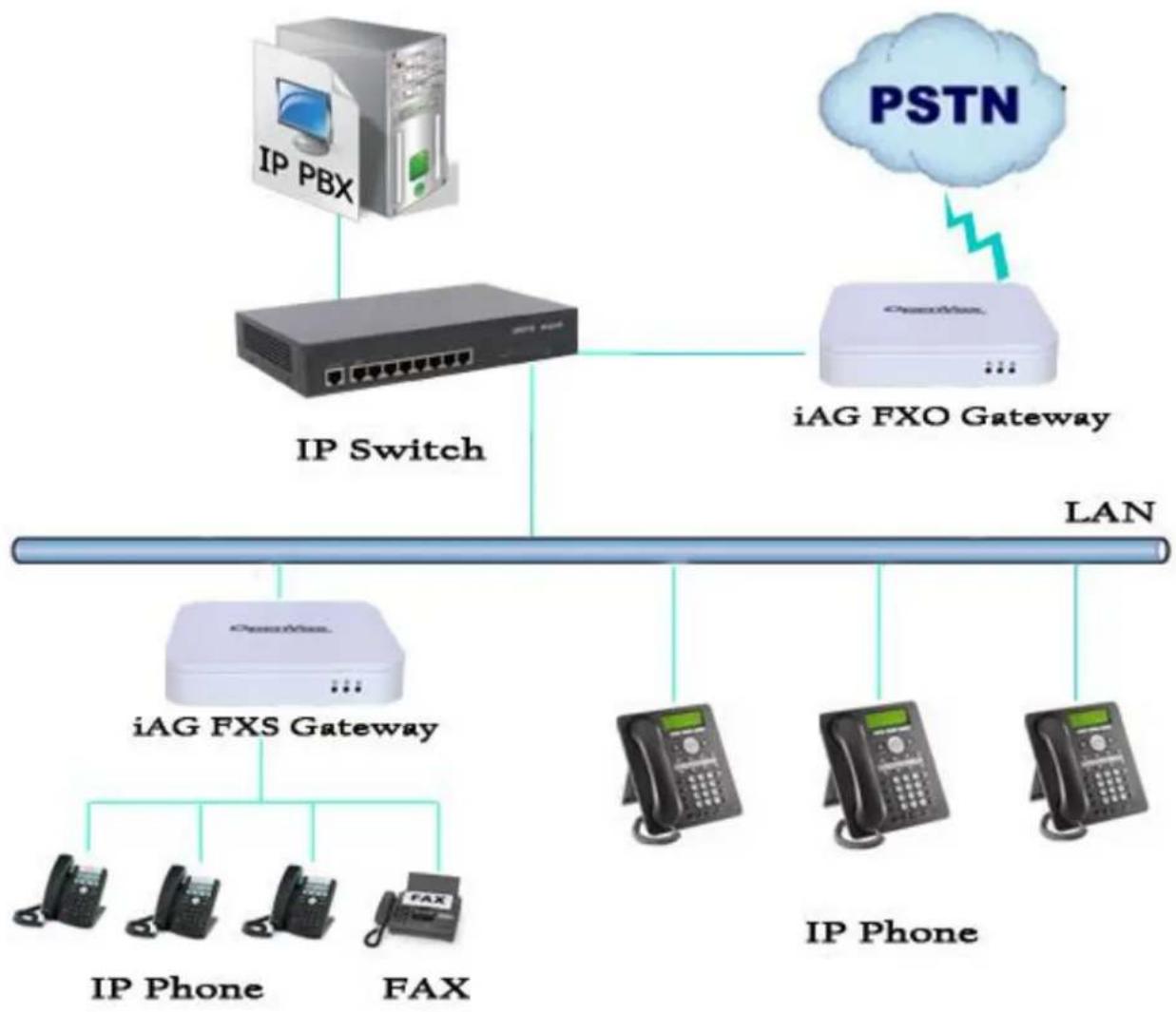
Sample Application
flowchart
graph TD
    A["IP PBX"] --> B["IP Switch"]
    C["PSTN"] --> D["iAG FXO Gateway"]
    B --> D
    D --> E["LAN"]
    F["iAG FXS Gateway"] --> G["IP Phone"]
    F --> H["FAX"]
    I["IP Phone"] --> G
    J["IP Phone"] --> H
    K["IP Phone"] --> L["IP Phone"]
Figure 1-2-1 Topological Graph
Product Appearance
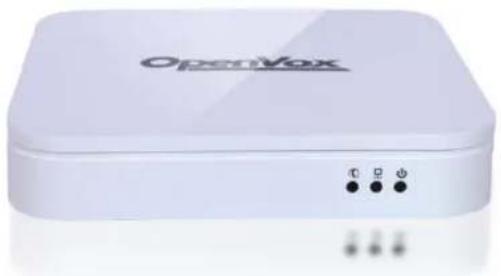
The picture below is appearance of Analog Series Gateway.
natural_image
White OpenVox device with indicator lights and ports (no readable text or symbols beyond branding)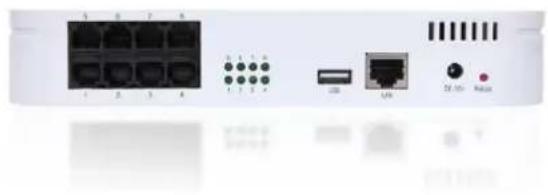
natural_image
Front view of a network switch device showing ports, connectors, and ports (no visible text or labels)Figure 1-3-1 Product Appearance

Figure 1-3-2 Front Panel
1 : System LED
2 : Network interface LED
3: Power Indicator

Figure 1-3-4 Back Panel
1 : Analog Telephone Interface (8)
2 : Channel indicator (8)
3: USB Interface(1)
4 : Ethernet ports (1)
5: Fan vent
6 : Power socket
7: Reload buon
Main Features
Modular design
Based on Asterisk OR
▶ Editable Asterisk OR conguraon le
Support T.38 fax relay and T.30 fax transparent, can connually fax mulple page
Echo cancellaon and Stac jier buer
Wide selecon of codecs and signaling protocol
DTMF relay
➢ Ring cadence and frequency seng
MWI(Message waing indicator)
DHCP, DNS/DDNS, NAT Network
VAG and CNG
All hot-swap
➢ Stable performance, exible dialing, friendly GUI
▶ Two-year me warranty
Physical Information
Table 1-5-1 Description of Physical Information
| Weight | 580g |
| Size | 21cm*21cm*3.6cm |
| Temperature | -20~70°C (Storage) |
| 0~40°C (Operaon) | |
| Operaon humidity | 10%~90% non-condensing |
| Power source | 12V DC/4A |
| Max power | 16W |
| LAN port | 1 |
Software
Default IP: 172.16.99.1
Username: admin
Password: admin
Please enter the default IP in your browser to scan and congure the module you want.

Figure 1-6-1 LOGIN Interface
2. System
Status
On the "Status" page, you will see Port/SIP/Network informaon and status.
| Port | Type | Caller ID | Sip Account | Port Status |
| 1 | FXS | 305 | 305 | OnHook |
| 2 | FXS | 306 | 306 | OnHook |
| 3 | FXS | 8003 | OnHook | |
| 4 | FXS | 8004 | OnHook | |
| 5 | FXS | 8005 | OnHook | |
| 6 | FXS | 8006 | OnHook | |
| 7 | FXS | 8007 | OnHook | |
| 8 | FXS | 8008 | OnHook |
| Endpoint Name | User Name | Host | Registration | SIP Status |
| 305 | 305 | 172.16.99.97 | client | Registered |
| 306 | 306 | 172.16.99.97 | client | Registered |
| Network Information | ||||||
| Name | MAC Address | IP Address | Mask | Gateway | RX Packets | TX Packets |
| LAN | A0:98:05:01:15:67 | 172.16.9.125 | 255.255.0.0 | 172.16.0.1 | 15175 | 1019 |
Figure 2-1-1 System Status
Time
Table 2-2-1 Description of Time Settings
| Opons | Denion |
| System Time | Your gateway system me. |
| Time Zone | The world me zone. Please select the one which is the same or the closest as your city. |
| POSIX TZ String | Posix me zone strings. |
| NTP Server 1 | Time server domain or hostname. For example, [me.asia.apple.com]. |
| NTP Server 2 | The rst reserved NTP server. For example, [me.windows.com]. |
| NTP Server 3 | The second reserved NTP server. For example, [me.nist.gov]. |
| Auto-Sync from NTP | Whether enable automacally synchronize from NTP server or not. ON is enable, OFF is disable this funcon. |
| Sync from NTP | Sync me from NTP server. |
| Sync from Client | Sync me from local machine. |
For example, you can congure like this:
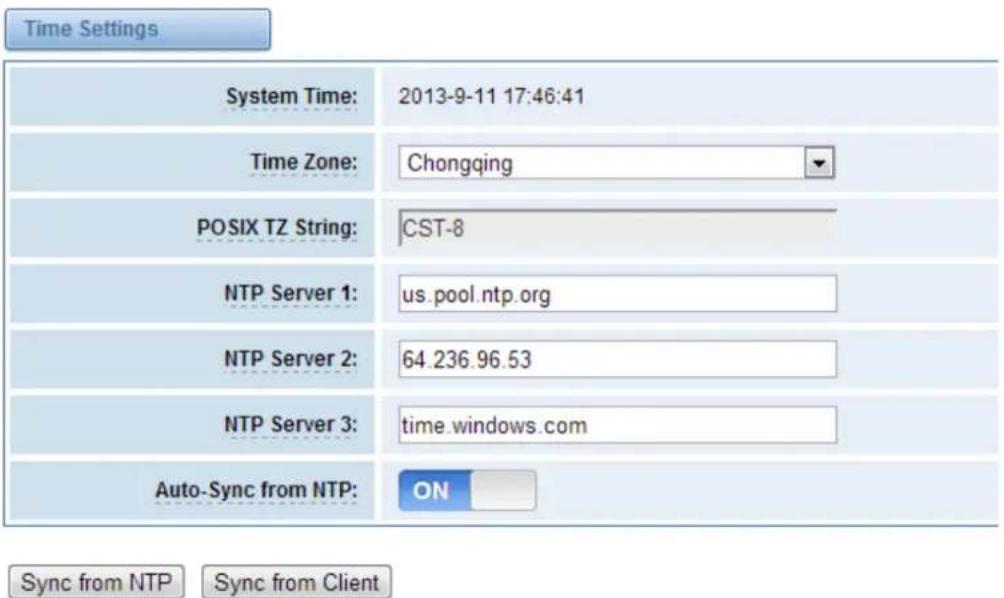
Figure 2-2-1 Time Settings
You can set your gateway me Sync from NTP or Sync from Client by pressing dierent buons.
Login Settings
Your gateway doesn't have administraon role. All you can do here is to reset what new username and password to manage your gateway. And it has all privileges to operate your gateway. You can modify both your "Web Login Sengs" and "SSH Login Sengs". If you have changed these sengs, you don't need to log out, just rewring your new user name and password will be OK.
Table 2-3-1 Description of Login Settings
| Opons | Denion |
| User Name | Dene your username and password to manage your gateway, without space here. Allowed characters"-+_+. <>&0-9a-zA-Z". Length: 1-32 characters. |
| Password | Allowed characters "-+_+. <>&0-9a-zA-Z".Length: 4-32 characters. |
| ConrmPassword | Please input the same password as 'Password' above. |

Figure 2-3-1 Login Settings
Notice: Whenever you do some changes, do not forget to save your conguraon.
General, Tools and Information
Language Settings
You can choose dierent languages for your system. If you want to change language, you can switch "Advanced" on, then "Download" your current language package. Aer that, you can modify the package with the language you need. Then upload your modified packages, "Choose File" and "Add", those will be ok.
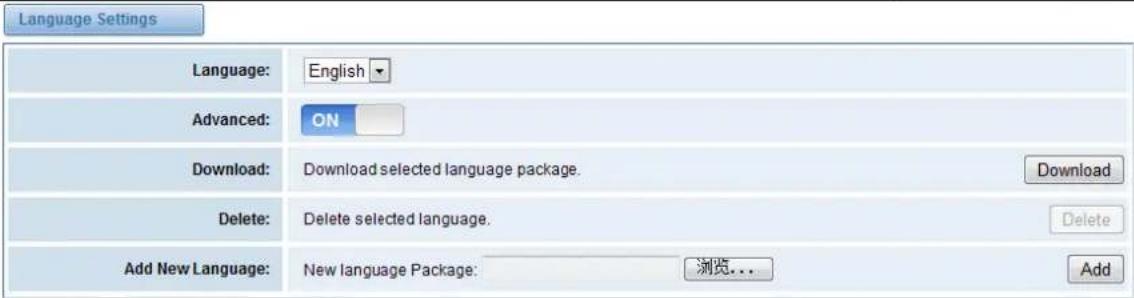
Figure 2-4-1 Language Settings
Scheduled Reboot
If switch it on, you can manage your gateway to reboot automacally as you like. There are four reboot types for you to choose, "By Day, By Week, By Month and By Running Time".

Figure 2-4-2 Reboot Types
If use your system frequently, you can set this enable, it can helps system work more ecient.
Reboot Tools
On the "Tools" pages, there are reboot, update, upload, backup and restore toolkits. You can choose system reboot and Asterisk reboot separately.

Figure 2-4-3 Reboot Prompt
If you press "Yes", your system will reboot and all current calls will be dropped. Asterisk Reboot is the same.
Table 2-4-1 Instruction of reboots
| Opons | Denion |
| System Reboot | This will turn o your gateway and then turn it back on. This will drop all current calls. |
| Asterisk Reboot | This will restart Asterisk and drop all current calls. |
We oer two kinds of update types for you, you can choose System Update or System Online Update. System Online Update is an easier way to update your system.

Figure 2-4-4 Update Firmware
If you want to store your previous conguraon, you can rst backup conguraon, then you can upload conguraon directly. That will be very convenient for you.

Figure 2-4-5 Upload and Backup
Sometimes there is something wrong with your gateway that you don't know how to solve it, mostly you will select factory reset. Then you just need to press a buon, your gateway will be reset to the factory status.

Figure 2-4-6 Factory Reset
Information
On the “Informaon” page, there shows some basic informaon about the analog gateway. You can see soware and hardware version, storage usage, memory usage and some help informaon.
| Model Name: | YS-AGU-E2M0800 |
| $software Version: | 1.1.0 |
| Hardware Version: | 1.0.0 |
| Slot Number: | 1 |
| Storage Usage: | 1.7M/63.5M (3%) |
| Memory Usage: | 59.067 % Memory Clean |
| Build Time: | 2016-03-01 17:26:17 |
| Contact Address: | 10/F, Building 6-A, Baoneng Science and Technology Industrial Park, Longhua New District Shenzhen, Guangdong, China 518109 |
| Tel: | +86-755-82535461 |
| Fax: | +86-755-83823074 |
| E-Mail: | support@openvox.cn |
| Web Site: | www.openvox.cn |
| System Time: | 2016-3-3 14:32:39 |
| System Uptime: | 0 days 03:59:26 |
Figure 2-4-7 System Information
3. Analog
You can see much informaon about your ports on this page.
Channel Settings
| Port | Type | Caller ID | Sip Account | Port Status | Actions |
| 1 | FXS | 301 | 301 | OnHook | |
| 2 | FXS | 8002 | None | OnHook | |
| 3 | FXS | 8003 | None | OnHook | |
| 4 | FXS | 8004 | None | OnHook | |
| 5 | FXS | 8005 | None | OnHook | |
| 6 | FXS | 8006 | None | OnHook | |
| 7 | FXS | 8007 | None | OnHook | |
| 8 | FXS | 8008 | None | OnHook |
Figure 3-1-1 Channel System
On this page, you can see every port status, and click acon buon to congure the port.

Figure 3-1-2 Port Configure
Dial Matching Table
Dialing rules is used to eecvely judge whether the received number sequence is complete, in order to mely end receiving number and send out number
The correct use of dial-up rules, helps to shorten the turn-on me of phone call
_01[358]XXXXXXXXX
_010XXXXXXXXX
_02XXXXXXXXX
_0[3-9]XXXXXXXXX
_11[02-9]
_111XX
_9[56]XXX
_100XX
_10[1-9]
_12[0-24-9]
_1[358]XXXXXXXXX
_[235-7]XXXXXXXXX
_[48][1-9]XXXXX
_[48]0[1-9]XXXXX
_[48]00XXXXXXXXX
_#XX
_*XX
##
_X.
Dial Matching rule may be numbers, letters, or combinations thereof. If an rule is prefixed by a '_' character, it is interpreted as a pattern rather than a literal. In patterns, some characters have special meanings:
X - any digit from 0-9
Z - any digit from 1-9
N - any digit from 2-9
[1235-9] - any digit in the brackets (in this example, 1,2,3,5,6,7,8,9)
! - wildcard, causes the matching process to complete as soon as ;it can unambiguously determine that no other matches are possible
For example, the rule _NXXXXXXXX would match normal 7 digit dialings, while _1NXXXXXXXX would represent an area code plus phone number preceded by a one.
Figure 3-2-1 Port Configure
Global Settings
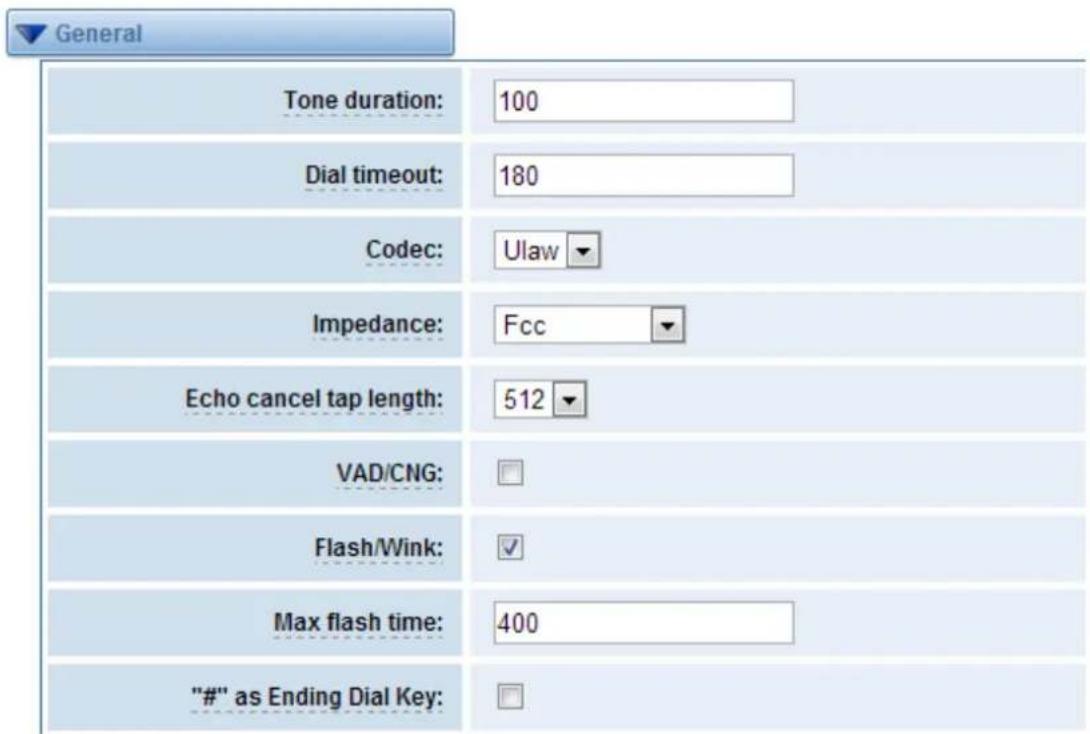
Figure 3-3-1 General Configuration
Table 3-3-1 Instruction of General
| Opons | Denion |
| Tone duraon | How long generated tones (DTMF and MF) will be played on the channel. (in milliseconds) |
| Dial meout | Species the number of seconds we aempt to dial the specied devices. |
| Codec | Set the global encoding : mulaw, alaw. |
| Impedance | Conguraon for impedance. |
| Echo cancel tap length | Hardware echo canceler tap length. |
| VAD/CNG | Turn on/o VAD/CNG. |
| Flash/Wink | Turn on/o Flash/wink. |
| Max ash me | Max ash me.(in milliseconds). |
| “#”as Ending Dial Key | Turn on/o Ending Dial Key. |

Figure 3-3-2 Caller ID
Table 3-3-2 Instruction of Caller ID
| Opons | Denion |
| The paern of sending CID | Some countries(UK) have ring tones with dierent ring tones(ring-ring), which means the caller ID needs to be set later on, and not just aer the rst ring, as per the default(1). |
| Waing me before sending CID | How long we will waing before sending the CID on the channel.(in milliseconds). |
| Sending polarity reversal(DTMF Only) | Send polarity reversal before sending the CID on the channel. |
| Start code(DTMF Only) | Start code. |
| Stop code(DTMF Only) | Stop code. |
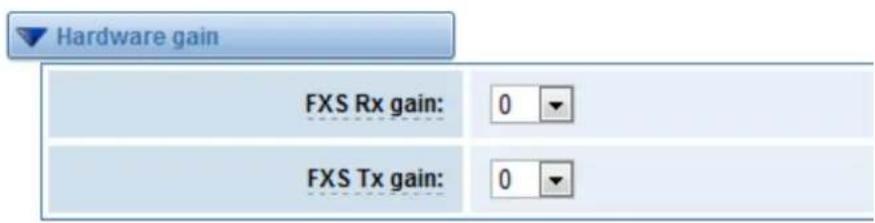
Figure 3-3-3 Hardware Gain
Table 3-3-3 Instruction of Hardware gain
| Opons | Denion |
| FXS Rx gain | Set the FXS port Rx gain. Range: -35, 0 or 35. |
| FXS Tx gain | Set the FXS port Tx gain. Range: -35, 0 or 35. |

Figure 3-3-4 Fax Configuration
Table 3-3-4 Definition of Fax
| Opons | Denion |
| Mode | Set the transmission mode. |
| Rate | Set the rate of sending and receiving. |
| Ecm | Enable/disable T.30 ECM (error correcon mode) by default. |
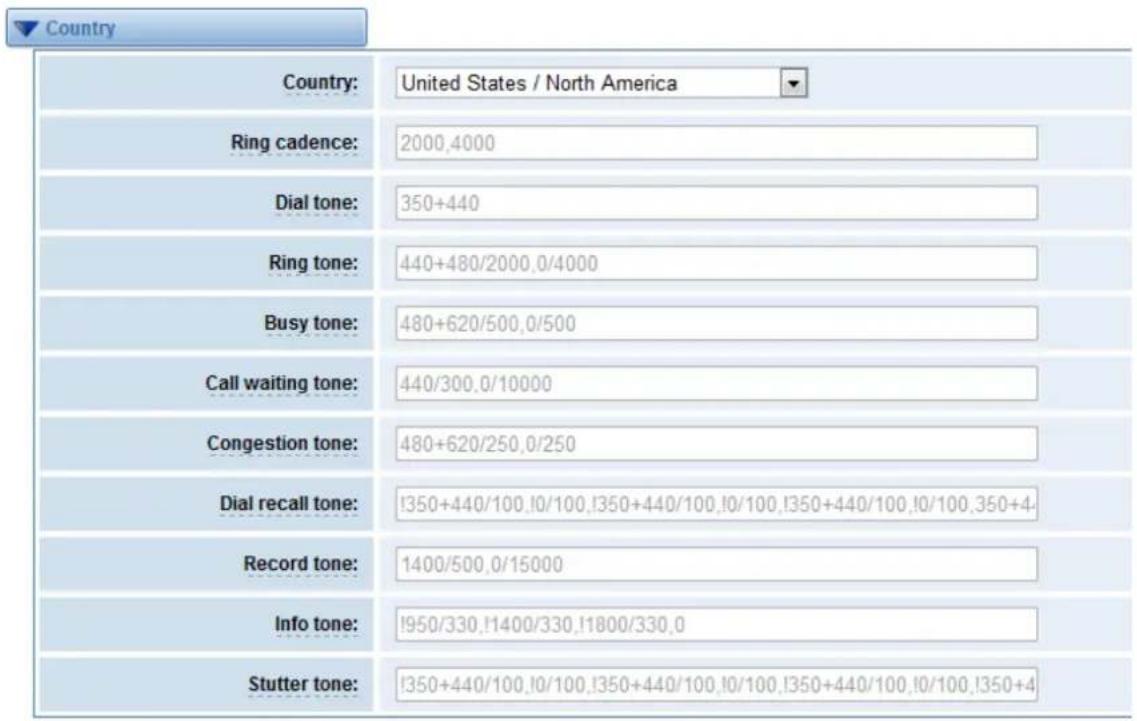
Figure 3-3-5 Country Configuration
Table 3-3-5 Definition of Country
| Opons | Denion |
| Country | Conguraon for locaon specic tone indicaons. |
| Ring cadence | List of duraons the physical bell rings. |
| Dial tone | Set of tones to be played when one picks up the hook. |
| Ring tone | Set of tones to be played when the receiving end is ringing. |
| Busy tone | Set of tones played when the receiving end is busy. |
| Call waing tone | Set of tones played when there is a call waing in the background. |
| Congeson tone | Set of tones played when there is some congeson. |
| Dial recall tone | Many phone systems play a recall dial tone aer hook ash. |
| Record tone | Set of tones played when call recording is in progress. |
| Info tone | Set of tones played with special informaon messages (e.g., number is out of service.) |
| Stuer tone |
4. SIP
SIP Endpoints
This page shows everything about your SIP, you can see status of each SIP.

Figure 4-1-1 SIP Status
You can click buon to add a new SIP endpoint, and if you want to modify
existed endpoints, you can click buon.
Main Endpoint Settings
There are 3 kinds of registraon types for choose. You can choose "Anonymous, Endpoint registers with this gateway or This gateway registers with the endpoint".
You can congregate as follows:
If you set up a SIP endpoint by registraon "None" to a server, then you can't register other SIP endpoints to this server. (If you add other SIP endpoints, this will cause Out-band Routes and Trunks confused.)
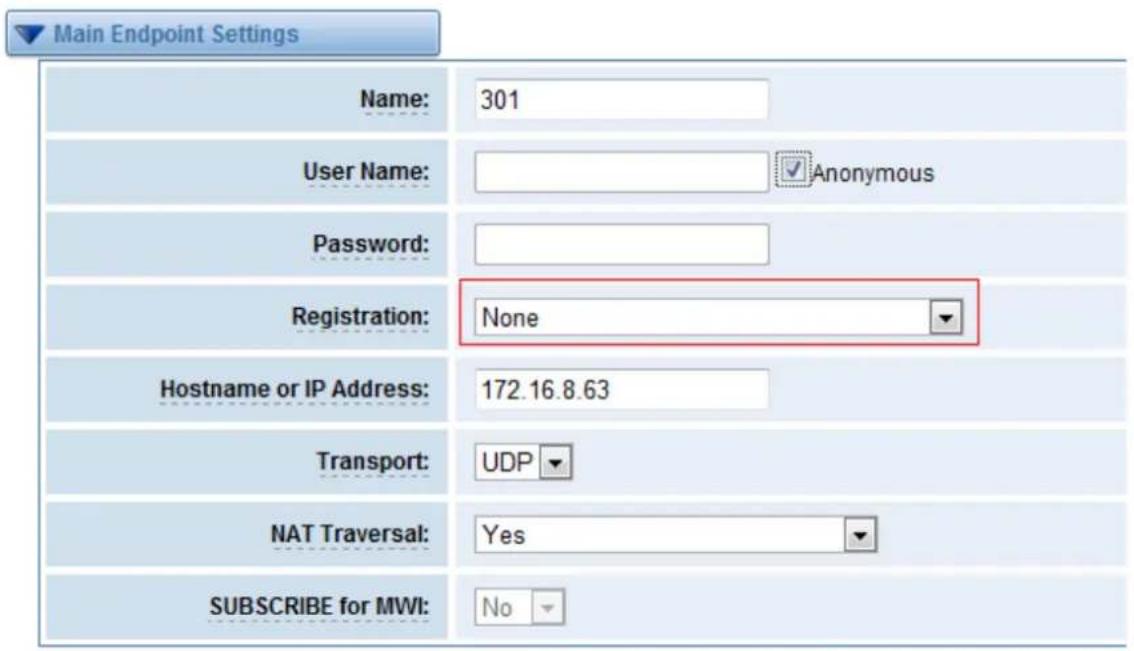
Figure 4-1-2 Anonymous Registration
For convenience, we have designed a method that you can register your SIP endpoint to your gateway, thus your gateway just work as a server.
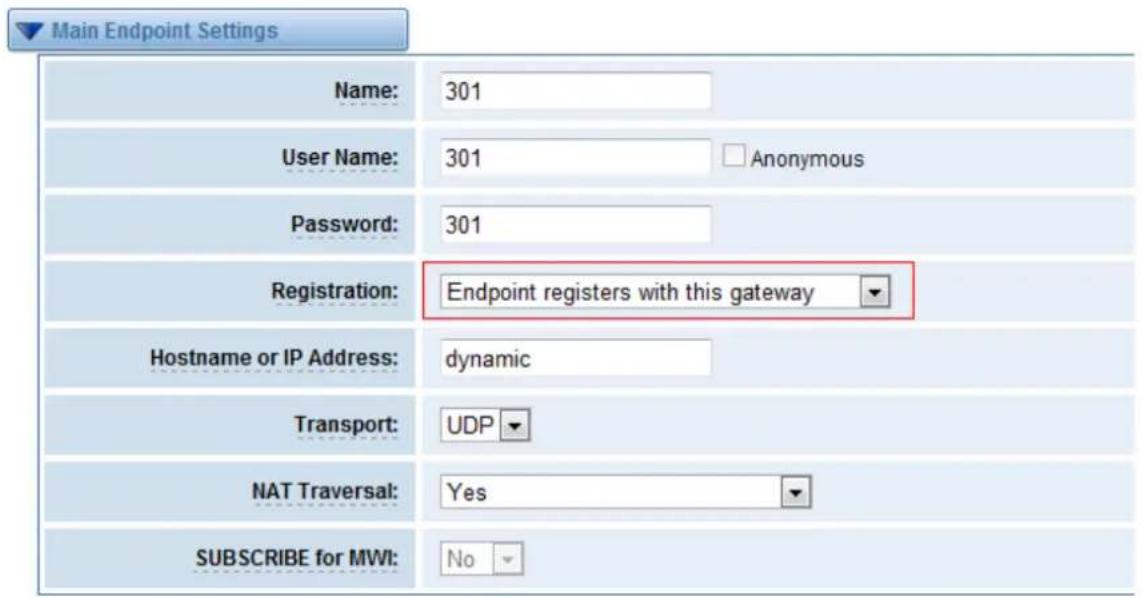
Figure 4-1-3 Register to Gateway
Also you can choose registraon by "This gateway registers with the endpoint", it's the same with
"None", except name and password.

Figure 4-1-4 Register to Server
Table 4-1-1 Definition of SIP Options
| Opons | Denion |
| Name | A name which is able to read by human. And it's only used for user's reference. |
| Username | User Name the endpoint will use to authenticate with the gateway. |
| Password | Password the endpoint will use to authenticate with the gateway. Allowed characters. |
| Registraon | None---Not registering;Endpoint registers with this gateway---When register as this type, it means the GSM gateway acts as a SIP server, and SIP endpoints register to the gateway;This gateway registers with the endpoint---When register as this type, it means the GSM gateway acts as a client, and the endpoint should be register to a SIP server; |
| Hostname or IP Address | IP address or hostname of the endpoint or 'dynamic' if the endpoint has a dynamic IP address. This will require registraon. |
| Transport | This sets the possible transport types for outgoing. Order of usage, when the respective transport protocols are enabled, is UDP, TCP, TLS. The rst enabled transport type is only used for outbound messages until a Registraon takes place. During the peer Registraon the transport type may change to another supported type if the peer requests so. |
| NAT Traversal | Addresses NAT-related issues in incoming SIP or media sessions.No---Use Rport if the remote side says to use it.Force Rport on---Force Rport to always be on.Yes---Force Rport to always be on and perform comedia RTP handling.Rport if requested and comedia---Use Rport if the remote side says to use it and perform comedia RTP handling. |
Advanced: Registration Options
Table 4-1-2 Definition of Registration Options
| Opons | Denion |
| AuthencaonUser | A username to use only for registraon. |
| Register Extension | When Gateway registers as a SIP user agent to a SIP proxy (provider), calls from this provider connect to this local extension. |
| From User | A username to identify the gateway to this endpoint. |
| From Domain | A domain to identify the gateway to this endpoint. |
| Remote Secret | A password which is only used if the gateway registers to the remote side. |
| Port | The port number the gateway will connect to at this endpoint. |
| Quality | Whether or not to check the endpoint's conncon status. |
| Qualify Frequency | How oen, in seconds, to check the endpoint's conncon status. |
Call Settings
Table 4-1-3 Definition of Call Options
| Opons | Denion |
| DTMF Mode | Set default DTMF Mode for sending DTMF. Default: rfc2833.Other opons: 'info', SIP INFO message (applicaon/dtmf-relay);'Inband', Inband audio (require 64kbit codec -alaw, ulaw). |
| Call Limit | Seng a call-limit will cause calls above the limit not to be accepted. |
| TrustRemote-Party-ID | Whether or not the Remote-Party-ID header should be trusted. |
| SendRemote-Party-ID | Whether or not to send the Remote-Party-ID header. |
| Remote Party IDFormat | How to set the Remote-Party-ID header: from Remote-Party-ID or from P-Asserted-Identity. |
| Caller IDPresentaon | Whether or not to display Caller ID. |
Advanced: Signaling Settings
Table 4-1-4 Definition of Signaling Options
| Opons | Denion |
| Progress Inband | Set default DTMF Mode for sending DTMF. Default: rfc2833.Other opons: 'info', SIP INFO message (applicaon/dtmf-relay);'inband', Inband audio (require 64kbit codec -alaw, ulaw). |
| Allow Overlap Dialing | Allow Overlap Dialing: Whether or not to allow overlap dialing. Disabled by default. |
| Append user=phone to URI | Whether or not to add ‘; user=phone’ to URIs that contain a valid phone number. |
| Add Q.850 Reason Headers | Whether or not to add Reason header and to use it if it is available. |
| Honor SDP Version | By default, the gateway will honor the session version number in SDP packets and will only modify the SDP session if the version number change. Turn this opon o to force the gateway to ignore the SDP session version number and treat all SDP data as new data. This is required for devices that send non-standard SDP packets (observed with Microso OCS). By default this opon is on. |
| Allow Transfers | Whether or not to globally enable transfers. Choosing 'no' will disable all transfers (unless enabled in peers or users). Default is enabled. |
| Allow Promiscuous Redirects | Whether or not to allow 302 or REDIR to non-local SIP address.Note that promiscredir when redirects are made to the local system will cause loops since this gateway is incapable of performing a "hairpin" call. |
| Max Forwards | Seng for the SIP Max-Forwards header (loop prevenon). |
| Send TRYING on REGISTER | Send a 100 Trying when the endpoint registers. |
| Outbound Proxy | A proxy to which the gateway will send all outbound signaling instead of sending signaling directly to endpoints. |
Advanced: Timer Settings
Table 4-1-5 Definition of Timer Options
| Opons | Denion |
| Default T1 Timer | This mer is used primarily in INVITE transacons. The default for Timer T1 is 500ms or the measured run-trip me between the gateway and the device if you have qualify=yes for the device. |
| Call Setup Timer | If a provisional response is not received in this amount of me, the call will auto-congest. Defaults to 64 mes the default T1 mer. |
| Session Timers | Session-Timers feature operates in the following three modes: originate, Request and run session-mers always; accept, run session-mers only when requested by other UA; refuse, do not run session mers in any case. |
| Minimum Session Refresh Interval | Minimum session refresh interval in seconds. Default is 90secs. |
| Maximum Session Refresh Interval | Maximum session refresh interval in seconds. Defaults to 1800secs. |
| Session Refresher | The session refresher, uac or uas. Defaults to uas. |
Media Settings
Table 4-1-6 Definition of Media Settings
| Opons | Denion |
| Media Sengs | Select codec from the drop down list. Codecs should be dierent for each Codec Priority. |
Batch SIP Endpoint
If you want add batch Sip accounts, you can congregate this page. Look out: this is only used when "This gateway registers with the endpoint" work mode.
| Port | User Name | Password | Hostname or IP Address | Codec Priority |
| 1 | G.711 u-law ▼ | |||
| 2 | G.711 u-law ▼ | |||
| 3 | G.711 u-law ▼ | |||
| 4 | G.711 u-law ▼ | |||
| 5 | G.711 u-law ▼ | |||
| 6 | G.711 u-law ▼ | |||
| 7 | G.711 u-law ▼ | |||
| 8 | G.711 u-law ▼ |
Figure 4-2-1 Batch SIP Endpoint
Advanced SIP Settings
Networking
Table 4-3-1 Definition of Networking Options
| Opons | Denion |
| UDP Bind Port | Choose a port on which to listen for UDP trac. |
| Enable TCP | Enable server for incoming TCP conncon (default is no). |
| TCP Bind Port | Choose a port on which to listen for TCP trac. |
| TCP AuthencaonTimeout | The maximum number of seconds a client has to authenticate. If the client does not authenticate before this meout expires, the client will be disconnected.(default value is: 30 seconds). |
| TCP AuthencaonLimit | The maximum number of unauthenticated sessions that will be allowed to connect at any given me(default is:50). |
| Enable HostnameLookup | Enable DNS SRV lookups on outbound calls Note: the gateway only uses the rst host in SRV records Disabling DNS SRV lookups disables the ability to place SIP calls based on domain names to some other SIP users on the Internet specifying a port in a SIP peer denion or when dialing outbound calls with suppress SRV lookups for that peer or call. |
| Enable Internal SIPCall | Whether enable the internal SIP calls or not when you select the registraon opon "Endpoint registers with this gateway". |
| Internal SIP CallPrex | Specify a prex before round the internal calls. |
NAT Settings
Table 4-3-2 Definition of NAT Settings
| Opons | Denion |
| Local Network | Format:192.168.0.0/255.255.0.0 or 172.16.0.0./12. A list of IP address or IP ranges which are located inside a NATed network.This gateway will replace the internal IP address in SIP and SDP messages with the external IP address when a NAT exists between the gateway and other endpoints. |
| Local Network List | Local IP address list that you added. |
| Subscribe Network Change Event | Through the use of the test_stun_monitor module, the gateway has the ability to detect when the perceived external network address has changed. When the stun_monitor is installed and congured, chan_sip will renew all outbound registraons when the monitor detects any sort of network change has occurred. By default this opon is enabled, but only takes eect once res_stun_monitor is congured. If res_stun_monitor is enabled and you wish to not generate all outbound registraons on a network change, use the opon below to disable this feature. |
Advanced: NAT Settings
Table 4-3-3 Definition of NAT Settings Options
| Opons | Denion |
| Start of RTP Port Range | Start of range of port numbers to be used for RTP. |
| End of RTP port Range | End of range of port numbers to be used for RTP. |
| RTP Timeout |
Parsing and Compatibility
Table 4-3-4 Instruction of Parsing and Compatibility
| Opons | Denion |
| Strict RFCInterpretaon | Check header tags, character conversion in URIs, and mulline headers for strict SIP compatibility(default is yes) |
| Send CompactHeaders | Send compact SIP headers |
| SDP Owner | Allows you to change the username led in the SDP owner string.This led MUST NOT contain spaces. |
| Disallowed SIPMethods | The external hostname (and oponal TCP port) of the NAT. |
| Shrink Caller ID | The shrinkcallerid funcon removes '(', '', ')', non-trailing '.', and '-' not in square brackets. For example, the caller id value 555.5555 becomes 5555555 when this opon is enabled. Disabling this opon results in no modicaon of the caller id value, which is necessary when the caller id represents something that must be preserved. By default this opon is on. |
| MaximumRegistraon Expiry | Maximum allowed me of incoming registraons and subscripons (seconds). |
| MinimumRegistraon Expiry | Minimum length of registraons/subscripons (default 60). |
| DefaultRegistraon Expiry | Default length of incoming/outgoing registraon. |
| RegistraonTimeout | How oen, in seconds, to retry registraon calls. Default 20 seconds. |
| Number ofRegistraonAempts Enter '0'for unlimited | Number of registraon aempts before we give up. 0 = connue forever, hammering the other server unl it accepts the registraon. Default is 0 tries, connue forever. |
Security
Table 4-3-5 Instruction of Security
| Opons | Denion |
| Match AuthUsername | If available, match user entry using the 'username' eld from the authencaon line instead of the 'from' eld. |
| Realm | Realm for digest authencaon. Realms MUST be globally unique according to RFC 3261. Set this to your host name or domain name. |
| Use Domain as Realm | Use the domain from the SIP Domains seng as the realm. In this case, the realm will be based on the request 'to' or 'from' header and should match one of the domain. Otherwise, the congured 'realm' value will be used. |
| Always AuthReject | When an incoming INVITE or REGISTER is to be rejected, for any reason, always reject with an identical response equivalent to valid username and invalid password/hash instead of leng the requester know whether there was a matching user or peer for their request. This reduces the ability of an acker to scan for valid SIP usernames. This opon is set to 'yes' by default. |
| AuthencateOpons Requests | Enabling this opon will authenticate OPTIONS requests just like INVITE requests are. By default this opon is disabled. |
| Allow Guest Calling | Allow or reject guest calls (default is yes, to allow). If your gateway is connected to the Internet and you allow guest calls, you want to check which services you oer everyone out there, by enabling them in the default context. |
Media
Table 4-3-6 Instruction of Media
| Opons | Denion |
| Premature Media | Some ISDN links send empty media frames before the call is in ringing or progress state. The SIP channel will then send 183 indicang early media which will be empty - thus users get no ring signal. Seng this to "yes" will stop any media before we have call progress (meaning the SIP channel will not send 183 Session Progress for early media). Default is 'yes'. Also make sure that the SIP peer is congured with progressinband=never. In order for 'noanswer' applicaons to work, you need to run the progress() applicaon in the priority before the app. |
| TOS for SIP Packets | Sets type of service for SIP packets |
| TOS for RTP Packets | Sets type of service for RTP packets |
5. Network, Advanced and Logs
Network
On "Network" page, there are "Network Setngs", "DDNS Sengs", and "Toolkit".
Network Settings
There are three types of LAN port IP, Factory, Stac and DHCP. Factory is the default type, and it is 172.16.99.1. When you Choose LAN IPv4 type is "Factory", this page is not editable.
A reserved IP address to access in case your gateway IP is not available. Remember to set a similar network segment with the following address of your local PC.
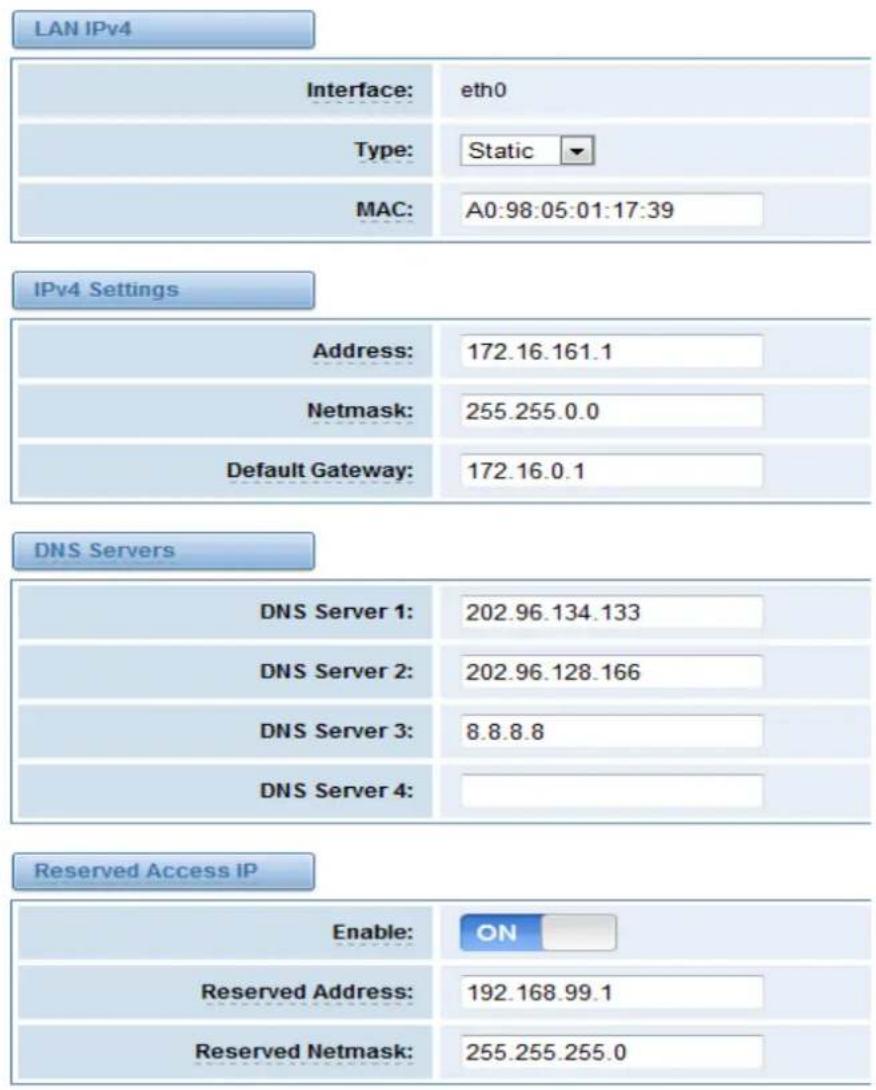
Figure 5-1-1 LAN Settings Interface
Table 5-1-1 Definition of Network Settings
| Opons | Denion |
| Interface | The name of network interface. |
| Type | The method to get IP.Factory: Geng IP address by Slot Number (System → informaon to check slot number).Stac: manually set up your gateway IP.DHCP: automacally get IP from your local LAN. |
| MAC | Physical address of your network interface. |
| Address | The IP address of your gateway. |
| Netmask | The subnet mask of your gateway. |
| Default Gateway | Default getaway IP address. |
| Reserved Access IP | A reserved IP address to access in case your gateway IP is not available. Remember to set a similar network segment with the following address of your local PC. |
| Enable | A switch to enable the reserved IP address or not.ON(enabled), OFF(disabled) |
| Reserved Address | The reserved IP address for this gateway. |
| Reserved Netmask | The subnet mask of the reserved IP address. |
Basically this info is from your local network service provider, and you can ll in four DNS servers.
| DNS Servers | |
| DNS Server 1: | 221.179.38.7 |
| DNS Server 2: | |
| DNS Server 3: | |
| DNS Server 4: | |
Figure 5-1-2 DNS Interface
Table 5-1-2 Definition of DNS Settings
| Opons | Denion |
| DNS Servers | A list of DNS IP address. Basically this info is from your local network service provider. |
OpenVPN Settings
You can upload the OpenVPN client conguraon, if success, you can see a VPN virtual network card on SYSTEM status page. About the congure format you can refer to the Noce and Sample conguraon.
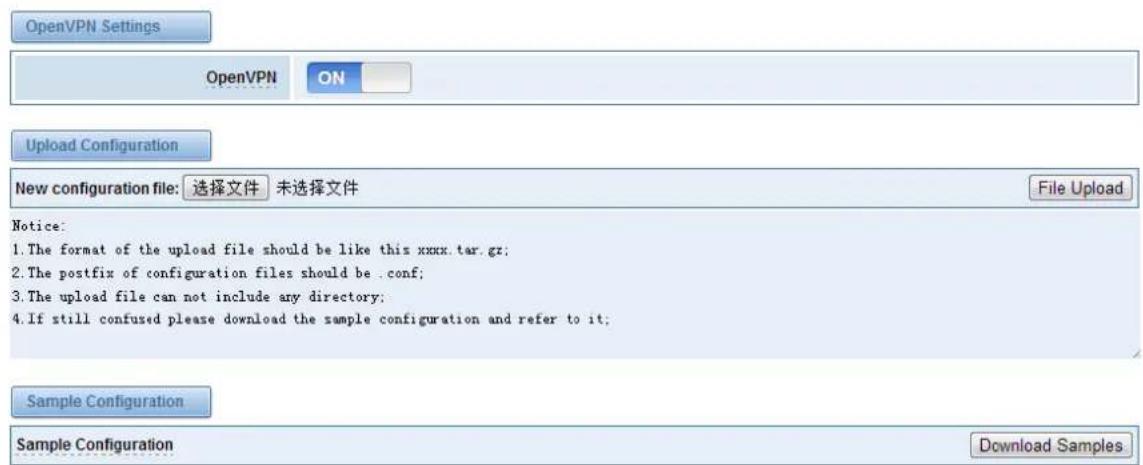
Figure 5-1-3 OpenVPN Interface
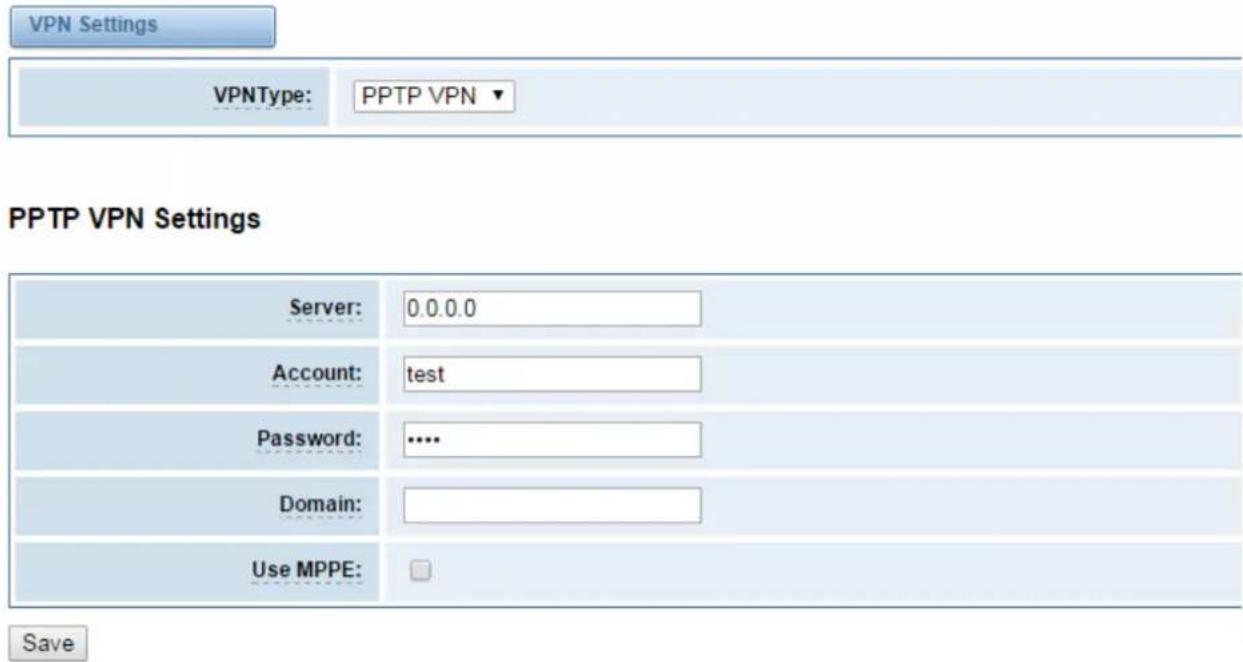
Figure 5-1-4 PPTP VPN Interface
DDNS Settings
You can enable or disable DDNS (dynamic domain name server).

Figure 5-1-5 DDNS Interface
Table 5-1-3 Definition of DDNS Settings
| Opons | Denion |
| DDNS | Enable/Disable DDNS(dynamic domain name server) |
| Type | Set the type of DDNS server. |
| Username | Your DDNS account's login name. |
| Password | Your DDNS account's password. |
| Your domain | The domain to which your web server will belong. |
Toolkit
It is used to check network connectivity. Support Ping command on web GUI.

Output
![ping -l 172.16.179.1 -c 4 google.com PING google.com (173.194.72.101) from 172.16.179.1: 56 data bytes 64 bytes from 173.194.72.101: icmp_seq=1 ttl=46 time=596.6 ms 64 bytes from 173.194.72.101: icmp_seq=3 ttl=46 time=600.5 ms --- google.com ping statistics --- 4 packets transmitted, 2 packets received, 50% packet loss round-trip min/avg/max = 596.6/598.5/600.5 ms Result Successfully ping [ google.com ] .](/content/2026/06/1213940/images/a47bf960472e3e19bb9ad0279f5ead0a778ee0ea97bca3db4267b2b46b52e915.jpg)
Figure 5-1-6 Network Connectivity Checking
Advanced
Asterisk API
When you make "Enable" switch to "on", this page is available.
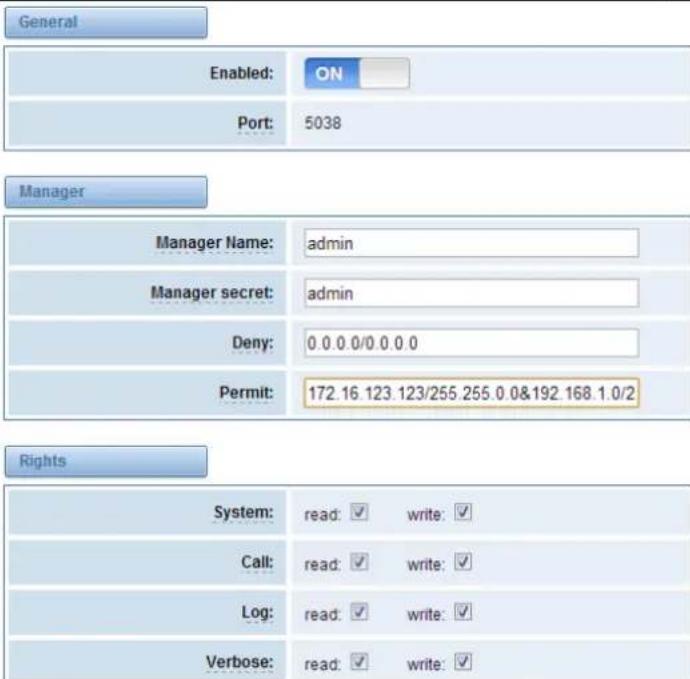
Figure 5-2-1 API Interface
Table 5-2-1 Definition of Asterisk API
| Opons | Denion |
| Port | Network port number |
| Manager Name | Name of the manager without space |
| Manager secret | Password for the manager. Characters: Allowed characters “-_+.<>&0-9a-zA-Z”. Length:4-32 characters. |
| Deny | If you want to deny many hosts or networks, use char & as separator.Example: 0.0.0.0/0.0.0.0 or 192.168.1.0/255.255.255.0&10.0.0.0/255.0.0.0 |
| Permit | If you want to permit many hosts or network, use char & as separator.Example: 0.0.0.0/0.0.0.0 or 192.168.1.0/255.255.255.0&10.0.0.0/255.0.0.0 |
| System | General informaon about the system and ability to run system management commands,such as Shutdown, Restart, and Reload. |
| Call | Informaon about channels and ability to set informaon in a running channel. |
| Log | Logging informaon. Read-only. (Dened but not yet used.) |
| Verbose | Verbose informaon. Read-only. (Dened but not yet used.) |
| Command | Permission to run CLI commands. Write-only. |
| Agent | Informaon about queues and agents and ability to add queue members to a queue. |
| User | Permission to send and receive UserEvent. |
| Cong | Ability to read and write conguraon les. |
| DTMF | Receive DTMF events. Read-only. |
| Reporng | Ability to get informaon about the system. |
| CDR | Output of cdr, manager, if loaded. Read-only. |
| Dialplan | Receive NewExten and Varset events. Read-only. |
| Originate | Permission to originate new calls. Write-only. |
| All | Select all or deselect all. |
Once you set like the above gure, the host 172.16.123.123/255.255.0.0 is allowed to access the gateway API. Please refer to the following gure to access the gateway API by puy. 172.16.123.123 is the gateway's IP, and 5038 is its API port.
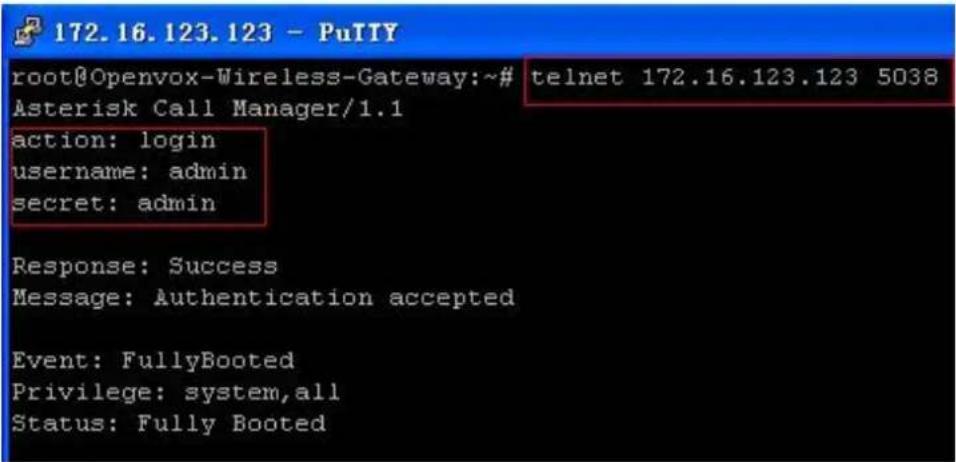
Figure 5-2-2 Putty Access
Asterisk CLI
In this page, you are allowed to run Asterisk commands.

Output:
! Execute a shell command agi dump html Dumps a list of AGI commands in HTML format agi exec Add AGI command to a channel in Async AGI agi set debug [on|off] Enable/Disable AGI debugging agi show commands [topic] List AGI commands or specific help aoc set debug enable cli debugging of AOC messages cc cancel Kill a CC transaction cc report status Reports CC stats cdr show status Display the CDR status cel show status Display the CEL status channel request hangup Request a hangup on a given channel
Figure 5-2-3 Asterisk Command Interface
Table 5-2-2 Definition of Asterisk API
| Opons | Denion |
| Command | Type your Asterisk CLI commands here to check or debug your gateway. |
If you type "help" or "?" and execute it, the page will show you the executable commands.
Asterisk File Editor
On this page, you are allowed to edit and create conguraon les. Click the le to edit.
| File Name | File Size |
| aaa conf | 11474 |
| agents conf | 2136 |
| alarmreceiver conf | 2227 |
| asterisk conf | 247 |
| cdr conf | 572 |
| cdr custom conf | 388 |
| cdr manager conf | 59 |
| chan extra conf | 283 |
| codecs conf | 1655 |
| dns mqr conf | 190 |
Figure 5-2-4 Configuration Files List
Click "New Conguraon File" to create a new conguraon le. Aer eding or creang, please reload Asterisk.
Logs
On the “Log Sengs” page, you should set the related logs on to scan the responding logs page. For example, set “System Logs” on like the following, then you can turn to “System” page for system logs, otherwise, system logs is unavailable. And the same with other log pages.

Figure 5-3-1 System Logs Control
![[2016/03/30 08:56:05] Restart logfile_monitor (keeper). [2016/03/30 08:58:05] Restart logfile_monitor (keeper). [2016/03/30 09:00:05] Restart logfile_monitor (keeper). [2016/03/30 09:02:06] Restart logfile_monitor (keeper). [2016/03/30 09:04:06] Restart logfile_monitor (keeper). [2016/03/30 09:06:06] Restart logfile_monitor (keeper). [2016/03/30 09:08:06] Restart logfile_monitor (keeper). [2016/03/30 09:10:06] Restart logfile_monitor (keeper). [2016/03/30 09:12:07] Restart logfile_monitor (keeper). [2016/03/30 09:14:07] Restart logfile_monitor (keeper). [2016/03/30 09:16:07] Restart logfile_monitor (keeper). [2016/03/30 09:18:07] Restart logfile_monitor (keeper). [2016/03/30 09:20:07] Restart logfile_monitor (keeper). [2016/03/30 09:22:07] Restart logfile_monitor (keeper). [2016/03/30 09:24:08] Restart logfile_monitor (keeper). [2016/03/30 09:26:08] Restart logfile_monitor (keeper). [2016/03/30 09:28:08] Restart logfile_monitor (keeper). [2016/03/30 09:30:08] Restart logfile_monitor (keeper). [2016/03/30 09:32:08] Restart logfile_monitor (keeper). [2016/03/30 09:34:09] Restart logfile_monitor (keeper). [2016/03/30 09:36:09] Restart logfile_monitor (keeper). [2016/03/30 09:38:09] Restart logfile_monitor (keeper). [2016/03/30 09:39:04] System Update [2016/03/30 09:39:15] Power off [1970/01/01 07:01:24] Power on [1970/01/01 07:01:47] Restore configuration files [1970/01/01 07:01:54] Power off [1970/01/01 00:00:13] Auto restore configuration files [1970/01/01 07:01:19] Power on Refresh Rate: Off Refresh Clean Up](/content/2026/06/1213940/images/8d0e00b21ff6e4f7276484f5d968d20302d50c7befd767f4541adb749e869c6d.jpg)
Figure 5-3-2 System Logs Output
Noce: The same to Asterisk Logs and SIP Logs.
Table 5-3-1 Definition of LOG
| Opons | Denion |
| System Logs | Whether enable or disable system log. |
| Auto clean(System Logs) | switch on :when the size of log le reaches the max size,the system will cut a half of the le. New logs will be retained.switch o :logs will remain, and the le size will increase gradually.default on, max size=1MB. |
| Verbose | Asterisk console verbose message switch. |
| Noce | Asterisk console noce message switch. |
| Warning | Asterisk console warning message switch. |
| Debug | Asterisk console debug message switch. |
| Error | Asterisk console error message switch. |
| DTMF | Asterisk console DTMF info switch. |
| Auto clean:(asterisk logs) | switch on:when the size of log le reaches the max size,the system will cut a half of the le. New logs will be retained.switch o:logs will remain, and the le size will increase gradually.default on, max size=100KB. |
| SIP Logs: | Whether enable or disable SIP log. |
| Auto clean:(SIP logs) | switch on:when the size of log le reaches the max size,the system will cut a half of the le. New logs will be retained.switch o:logs will remain, and the le size will increase gradually.default on, default size=100KB. |
Thank You for Choosing OpenVox Products!


- IAG840/IAG880 User Manual
- Copyright
- Condenality
- Disclaimer
- Trademarks
- Table of Contents
- Overview....1
- System 6
- Analog....12
- SIP....18
- Network, Advanced and Logs....30
- Overview
- What is iAG840/880?
- Sample Application
- Product Appearance
- Main Features
- Physical Information
- Software
- System
- Status
- Time
- Login Settings
- General, Tools and Information
- Language Settings
- Scheduled Reboot
- Reboot Tools
- Information
- Analog
- Channel Settings
- Dial Matching Table
- Global Settings
- SIP
- SIP Endpoints
- Main Endpoint Settings
- Advanced: Registration Options
- Call Settings
- Advanced: Signaling Settings
- Advanced: Timer Settings
- Media Settings
- Batch SIP Endpoint
- Advanced SIP Settings
- Networking
- NAT Settings
- Advanced: NAT Settings
- Parsing and Compatibility
- Security
- Media
- Network, Advanced and Logs
- Network
- Network Settings
- OpenVPN Settings
- DDNS Settings
- Toolkit
- Output
- Advanced
- Asterisk API
- Asterisk CLI
- Output:
- Asterisk File Editor
- Logs
- Thank You for Choosing OpenVox Products!
Brand : OpenVox
Model : iAG840
Category : Telephony