
G18NHC - Washing machine LG - Free user manual and instructions
Find the device manual for free G18NHC LG in PDF.


| Brand | LG |
| Model | G18NHC |
| Product Type | Wall-mounted air conditioner (split system) |
| Operation Modes | Cooling, Heating, Healthy Dehumidification |
| Special Functions | Jet Cool, Sleep Mode, Forced Operation, CHAOS swing |
| Remote Control | Wireless, AAA batteries (1.5 V) |
| Temperature Range | 16°C – 30°C (60°F – 86°F) for cooling/heating |
| Fan Speeds | Low, Medium, High, CHAOS (natural wind) |
| Air Filter | Washable, clean every 2 weeks |
| Optional Filters | 3M Filter (clean with vacuum, replace every 6 months) |
| Self-Diagnosis | Error indication via blinking lamp |
| Power Supply | Dedicated circuit, grounded outlet required |
| Installation | Indoor unit wall-mounted, outdoor unit with piping |
| Safety Features | Grounding, overcurrent protection, auto restart after power failure |
| Refrigerant | Refer to product label (not specified in manual) |
Frequently Asked Questions - G18NHC LG
User questions about G18NHC LG
0 question about this device. Answer the ones you know or ask your own.
Ask a new question about this device
Download the instructions for your Washing machine in PDF format for free! Find your manual G18NHC - LG and take your electronic device back in hand. On this page are published all the documents necessary for the use of your device. G18NHC by LG.
USER MANUAL G18NHC LG
The equipment complies with requirements of the Technical Regulation, in terms of restrictions for use of certain dangerous substances in electrical and electronic equipment
Please read this manual carefully before operating your set and retain it for future reference.
TYPE : WALL MOUNTED
TIPS FOR SAVING ENERGY
Here are some tips that will help you minimize the power consumption when you use the air conditioner. You can use your air conditioner more efficiently by referring to the instructions below:
- Do not cool excessively indoors. This may be harmful for your health and may consume more electricity.
- Block sunlight with blinds or curtains while you are operating the air conditioner.
- Keep doors or windows closed tightly while you are operating the air conditioner.
- Adjust the direction of the air flow vertically or horizontally to circulate indoor air.
- Speed up the fan to cool or warm indoor air quickly, in a short period of time.
- Open windows regularly for ventilation as the indoor air quality may deteriorate if the air conditioner is used for many hours.
- Clean the air filter once every 2 weeks. Dust and impurities collected in the air filter may block the air flow or weaken the cooling / dehumidifying functions.
This appliance is not intended for use by persons (including children) with reduced physical, sensory or mental capabilities, or lack of experience and knowledge, unless they have been given supervision or instruction concerning use of the appliance by a person responsible for their safety.
Children should be supervised to ensure that they do not play with the appliance.
WARNING: Before accessing the terminals, all power circuits must be disconnected.
WARNING: Fixed installations will incorporate disconnect means in accordance with installation rules.
WARNING: This device will not be accessible to public.
WARNING: The appliance must be installed in accordance with national regulations for electrical installations.
For your records
Staple your receipt to this page in case you need it to prove the date of purchase or for warranty purposes. Write the model number and the serial number here:
Model number :
Serial number :
You can find them on a label on the side of each unit.
Dealer's name :
Date of purchase :
IMPORTANT SAFETY INSTRUCTIONS
READ ALL INSTRUCTIONS BEFORE USING THE APPLIANCE.
Always comply with the following precautions to avoid dangerous situations and ensure peak performance of your product

WARNING
It can result in serious injury or death when the directions are ignored

CAUTION
It can result in minor injury or product damage when the directions are ignored

WARNING
• Always use a power plug and socket with a ground terminal. There is a risk of electric shock.
- Do not use a defective or underrated circuit breaker. Use the correctly rated breaker and fuse. There is risk of fire or electric shock.
- Do not use a multi consent. Always use this appliance on a dedicated circuit and breaker. Otherwise it can cause electric shock or fire.
- For electrical work, contact the dealer, seller, a qualified electrician, or an Authorized Service Center. Do not disassemble or repair the product by yourself. There is risk of fire or electric shock.
- Always ground the product as per the wiring diagram. Do not connect the ground wire to gas or water pipes lightening rod or telephone ground wire. There is risk of fire or electric shock.
- Install the panel and the cover of control box securely. There is risk of fire or electric shock due to dust, water etc.
- Use the correctly rated breaker or fuse. There is risk of fire or electric shock.
- Do not modify or extend the power cable. If the power cable or cord has scrathes or skin peeled off or deteriorated then it must be replaced. There is risk of fire or electric shock.
- For installation, removal or reinstall, always contact the dealer or an Authorized Service Center. There is risk of fire, electric shock, explosion, or injury.
- Do not install the product on a defective installation stand. Be sure that the installation area does not deteriorate with age. It may cause product to fall.
- Never install the outdoor unit on a moving base or a place from where it can fall down. The falling outdoor unit can cause damage or injury or even death of a person.
- When the product is soaked (flooded or submerged) in water, contact an Authorized Service Center for repair before using it again. There is risk of fire or electric shock.
- In outdoor unit the step-up capacitor supplies high voltage electricity to the electrical components. Be sure to discharge the capacitor completely before conducting the repair work. An charged capacitor can cause electrical shock.
- When installing the unit, use the installation kit provided with the product. Otherwise the unit may fall and cause severe injury.
- Be sure to use only those parts which are listed in the svc parts list. Never attempt to modify the equipment. The use of inappropriate parts can cause an electrical shock, excessive heat generation or fire.
- Indoor/outdoor wiring connections must be secured tightly and the cable should be routed properly so that there is no force pulling the cable from the connection terminals. Improper or loose connections can cause heat generation or fire.
- Safely dispose off the packing materials. Like screws, nails, batteries, broken things etc after installation or svc and then tear away and throw away the plastic packaging bags. Children may play with them and cause injury.
- Make sure to check that the power cable plug is not dirty, loose or broken and then only insert the plug completely. Dirty, loose or broken power plug can cause electric shock or fire.
- Be sure to check the refrigerant to the used. Please read the label on the product. Incorrect refrigerant used can prevent the normal operation of the unit.
- Don't use a power cord, a plug or a loose socket which is damaged. Otherwise it may cause a fire or electrical shock.
- Do not touch, operate, or repair the product with wet hands. Hold the plug by hand when taking out. There is risk of electric shock or fire.
- Do not place a heater or other heating appliances near the power cable. There is risk of fire and electric shock.
- Do not allow water to run into electric parts. Install the unit away from water sources. There is risk of fire, failure of the product, or electric shock.
- Do not store or use or even allow flammable gas or combustibles near the product. There is risk of fire.
- Do not use the product in a tightly closed space for a long time. Perform ventilation regularly. Oxygen deficiency could occur and hence harm your health.
- Do not open the front grille of the product during operation. (Do not touch the electrostatic filter, if the unit is so equipped.) There is risk of physical injury, electric shock, or product failure.
- If strange sounds, smell or smoke comes from product. Immediately turn the breaker off or disconnect the power supply cable. There is risk of electric shock or fire.
- Ventilate the product room from time to time when operating it together with a stove, or heating element etc. Oxygen deficiency can occur and hence harm your health.
- Turn the main power off and unplug the unit when cleaning or repairing the product. There is risk of electric shock.
- When the product is not to be used for a long time, disconnect the power supply plug or turn off the breaker. There is risk of product damage or failure, or unintended operation.
- Take care to ensure that nobody especially kids could step on or fall onto the outdoor unit. This could result in personal injury and product damage.
- Take care to ensure that power cable could not be pulled out or damaged during operation. There is risk of fire or electric shock.
- Do not place ANYTHING on the power cable. There is risk of fire or electric shock.
- Do not plug or unplug the power supply plug to turn the unit ON/OFF. There is risk of fire or electric shock.
- When flammable gas leaks, turn off the gas and open a window for ventilation before turn the product on. Do not use the telephone or turn switches on or off. There is risk of explosion or fire.
- For inner cleaning, contact an Authorized Service Center or a dealer. Do not use harsh detergent that causes corrosion or damage on the unit. Harsh detergent may also cause failure of product, fire, or electronic shock.

CAUTION
- Two or more people must lift and transport the product. Avoid personal injury.
- Do not install the product where it will be exposed to sea wind (salt spray) directly. It may cause corrosion on the product.
• Install the drain hose to ensure that the condensed water is drained away properly. A bad connection may cause water leakage.
- Keep level even when installing the product. To avoid vibration or noise.
- Do not install the product where the noise or hot air from the outdoor unit could damage or disturb the neighborhoods. It may cause a problem for your neighbors and hence dispute.
- Always check for gas (refrigerant) leakage after installation or repair of product. Low refrigerant levels may cause failure of product.
- Do not use the product for special purposes, such as preserving foods, works of art, etc. It is a consumer air conditioner, not a precision refrigeration system. There is risk of damage or loss of property.
- Do not block the inlet or outlet of air flow. It may cause product failure.
- Use a soft cloth to clean. Do not use harsh detergents, solvents or splashing water etc. There is risk of fire, electric shock, or damage to the plastic parts of the product.
- Do not touch the metal parts of the product when removing the air filter. There is risk of personal injury.
- Do not step on or put anything on the product. (outdoor units) There is risk of personal injury and failure of product.
- Always insert the filter securely after cleaning. Clean the filter every two weeks or more often if necessary. A dirty filter reduces the efficiency.
- Do not insert hands or other objects through the air inlet or outlet while the product is operating. There are sharp and moving parts that could cause personal injury.
- Be cautious when unpacking and installing the product. Sharp edges could cause injury.
- If the refrigerant gas leaks during the repair, do not touch the leakaing refrigerant gas. The refrigerant gas can cause frostbite (cold burn)
- Do not tilt the unit when removing or uninstalling it. The condensed water inside can spill.
- Do not mix air or gas other than the specified refrigerant used in the system. If air enters the refrigerant system, an excessively high pressure results, causing equipment damage or injury.
- If the refrigerant gas leaks during the installation, ventilate the area immediately. Otherwise it can be harmful for your health.
- Dismantling the unit, treatment of the refrigerant oil and eventual parts should be done in accordance with local and national standards. Replace the all batteries in the remote control with new ones of the same type. Do not mix old and new batteries or different types of batteries. There is risk of fire or product failure.
- Do not recharge or disassemble the batteries. Do not dispose off batteries in a fire. They may burn or explode.
- If the liquid from the batteries gets onto your skin or clothes, wash it well with clean water. Do not use the remote if the batteries have leaked. The chemicals in batteries could cause burns or other health hazards.
- Do not let the air conditioner run for a long time when the humidity is very high and a door or a window is left open. Moisture may condense and wet or damage furniture.
- Do not expose your skin or kids or plants to the cool or hot air draft. This could harm to your health.
- If you eat the liquid from the batteries, brush your teeth and see doctor. Do not use the remote if the batteries have leaked. The chemicals in batteries could cause burns or other health hazards.
- Do not drink the water drained from the product. It is not sanitary and could cause serious health issues.
- Use a firm stool or ladder when cleaning, maintaining or repairing the product at an height. Be careful and avoid personal injury.
TABLE OF CONTENTS
2 TIPS FOR SAVING ENERGY
3 IMPORTANT SAFETY INSTRUCTIONS
7 ELECTRICAL SAFETY
7 Temporary Use of an Adapter
7 Temporary Use of an Extension Cord
7 Symbols used in this Manual
8 BEFORE USE
8 Components
9 Using the remote control
10 Inserting batteries
11 BASIC FUNCTIONS
11 Cooling your room (Cooling operation)
11 Heating your room (Heating operation)
12 Healthy Dehumidification Operation
12 ADVANCED FUNCTIONS
12 Jet Cool Operation
13 Forced operation
14 Sleep Mode
14 Vertical/horizontal Airflow Direction Control (Optional)
15 MAINTENANCE
16 Cleaning the air filter
16 Cleaning the 3M Filter (Optional)
17 TROUBLESHOOTING
17 Self-diagnosis function
17 Before requesting service
ELECTRICAL SAFETY

WARNING
- This appliance must be properly grounded. To minimize the risk of electric shock, you must always plug into a grounded outlet.
- Do not cut or remove the grounding prong from the power plug.
- Attaching the adapter ground terminal to the wall receptacle cover screw does not ground the appliance unless the cover screw is metal and not insulated, and the wall receptacle is grounded through the house wiring.
- If you have any doubt whether the air conditioner is properly grounded, have the wall receptacle and circuit checked by a qualified electrician.
Temporary Use of an Adapter
We strongly discourage the use of an adapter due to potential safety hazards. For temporary connections, use only a genuine adapter, available from most local hardware stores. Ensure that the large slot in the adapter is aligned with the large slot in the receptacle for a proper polarity connection.
To disconnect the power cord from the adapter, use one hand on each to avoid damaging the ground terminal. Avoid frequently unplugging the power cord as this can lead to eventual ground terminal damage.

WARNING
- Never use the appliance with a broken adapter.
Temporary Use of an Extension Cord
We strongly discourage the use of an extension cord due to potential safety hazards.

WARNING
- This appliance should be installed in accordance with national wiring regulations. This guide acts as a guide to help to explain product features.
Symbols used in this Manual

This symbol alerts you to the risk of electric shock.

This symbol alerts you to hazards that may cause harm to the air conditioner.

This symbol indicates special notes.
BEFORE USE
Components
Indoor unit

* The feature can be changed according a type of model.

NOTE
The number of operation lamps and their locations may vary, depending on the model of the air conditioner.
Outdoor unit

* The feature can be changed according a type of model.
Using the remote control
You can operate the air conditioner more conveniently with the remote control.
Wireless remote control
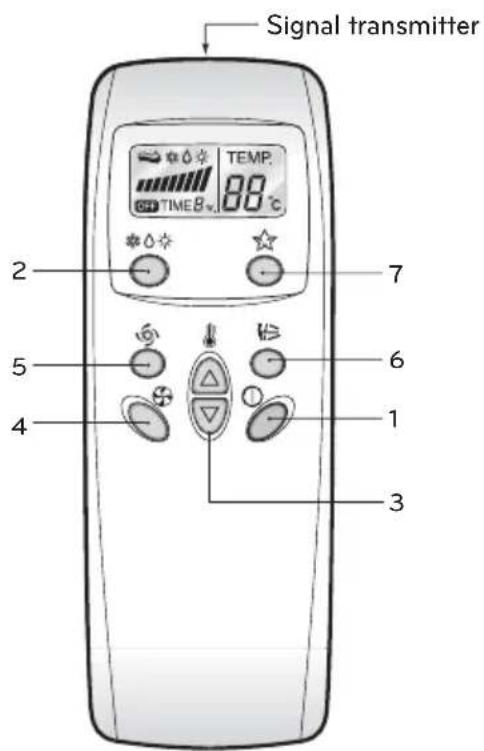
1 START/STOP BUTTON
Used to turn off/on the unit.
2 OPERATION MODE SELECTION BUTTON
Used to select the operation mode.
3 ROOM TEMPERATURE SETTING BUTTONS
Used to select the room temperature.
4 INDOOR FAN SPEED SELECTOR BUTTON
Used to select fan speed in four steps low, medium, high and CHAOS.
5 JET COOL BUTTON
Used to start or stop the speed cooling.
(It operates fan in super high speed in cooling mode)
6 CHAOS SWING BUTTON
Used to stop or start louver movement and set the desired up/down airflow direction.
7 SLEEP MODE AUTO BUTTON
Used to set sleep mode auto operation.
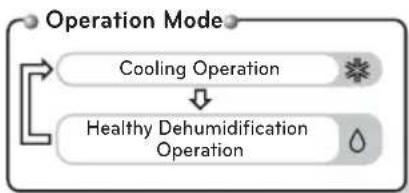
flowchart
graph TD
    A["Operation Mode"] --> B["Cooling Operation"]
    B --> C["Healthy Dehumidification Operation"]
    C --> D["Feedback Loop"]
(Cooling Model)

flowchart
graph TD
    A["Operation Mode"] --> B["Cooling Operation"]
    B --> C["Healthy Dehumidification Operation"]
    C --> D["Heating Operation"]
(Heat pume Model)
Inserting batteries
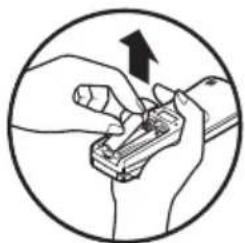
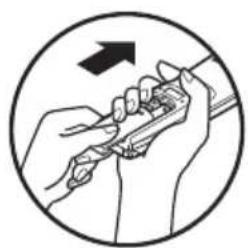
Insert batteries before using the remote control. The battery type used is AAA (1.5 V).
1 Remove the battery cover.

natural_image
Illustration of a hand holding a tool inside a car dashboard, with an arrow indicating direction (no text or symbols present)2 Insert the new batteries and make sure that the + and - terminals of the batteries are installed correctly.

natural_image
Illustration of hands using a tool to adjust or install a component, enclosed in a circle (no text or symbols)3 Reattach the battery cover.
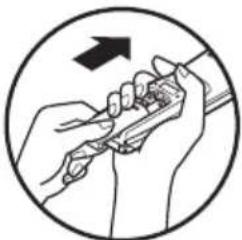
natural_image
Illustration of hands using a tool to interact with a pen, enclosed in a circle (no text or symbols)
NOTE
If the display screen of the remote control starts to fade, replace the batteries.
Installing the remote control holder
Install the holder where there is no direct sunlight to protect the remote control.
1 Choose a safe and easily-accessible place.
2 Fix the holder by fastening the 2 screws firmly with a screwdriver.
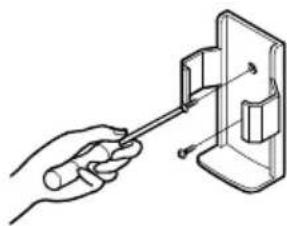
natural_image
Illustration of a hand using a screwdriver to adjust or install a component into a device (no text or symbols present)3 Slide the remote control into the holder.

natural_image
Illustration of two mobile phone holders with control buttons, showing a change from left to right (no text or symbols present)Operating method
Point the remote control towards the signal receiver at the bottom of the air conditioner to operate it.

natural_image
Line drawing of a car air conditioner unit with a hand pointing to the front panel (no text or symbols)
NOTE
- The remote control may operate other electronic devices if pointed towards them. Make sure to point the remote control towards the signal receiver of the air conditioner.
- For proper operation, use a soft cloth to clean the signal transmitter and receiver.
BASIC FUNCTIONS
Cooling your room (Cooling operation)
1 Press to turn on the power.
2 Press repeatedly to select the heating operation.
- *is displayed on the display screen.

3 Press or to set the desired temperature.
- The temperature range is 16 °C(60 °F)-30 °C(86 °F).
4 Set the fan speed.
- Select the fan speed in four steps-low, medium, high or CHAOS.
• Each time the button is pressed, the fan speed mode is shifted.
• The display shows high fan speed.
Heating your room (Heating operation)
1 Press to turn on the power.
2 Press repeatedly to select the heating operation.
- -☀is displayed on the display screen.

3 Press or to set the desired temperature.
- The temperature range is 16 °C(60 °F)-30 °C(86 °F).
4 Set the fan speed again with the door of the remote control still closed. You can select the fan speed in four steps – low, medium, high, or Chaos. Each time the button is pressed, the fan speed mode is shifted.
Natural wind by the CHAOS logic
For fresher felling, press the selector and set to CHAOS mode.
In the mode, the wind blows like a natural breeze by automatically changing fan speed according to the CHAOS logic.
Healthy Dehumidification Operation
During Healthy Dehumidification Operation
1 If you select the Dehumidification mode on the ☐ the product starts to run the De-humidification function. It automatically sets the room temperature and airflow volume to the best condition for Dehumidification, based on the sensed current room temperature. In this case, however, the setting temperature is not displayed on the remote controller and you are not able to control the room temperature either.
2 During the healthy Dehumidification function, the airflow volume is automatically set according to the optimization algorithm responding to the current room temperature status, so that the room condition is kept healthy and comfortable even in the very humid season.

natural_image
Simple diagram with a droplet symbol and two vertical bars, no text or labels presentTo run the healthy Dehumidification mode follow steps 1, and 2 and 4 (See operation mode)
ADVANCED FUNCTIONS
Jet Cool Operation
1 Jet cool function can be used to cool the room quickly in hot summer. When this function is turned on, the air conditioner runs in cooling operation mode with super high fan speed and 18 °C setting temperature for 30 minutes for fast and effective cooling.
2 You can activate this operation by pressing the ⏻.
To charge from jet cool mode to high fan speed cooling mode, press the 🌐 or the 🏠 again.


NOTE
- Jet cool function cannot be activated during heating or auto changeover operations.
- In case of Inverter, Art Cool and Art Cool Wide (non-Deluxe) model, you can use jet heat function by pressing for heating operation.
- Art Cool and Art Cool Wide models close the side discharges during jet cool/heat operation, for strong cooling and heating.
Forced operation
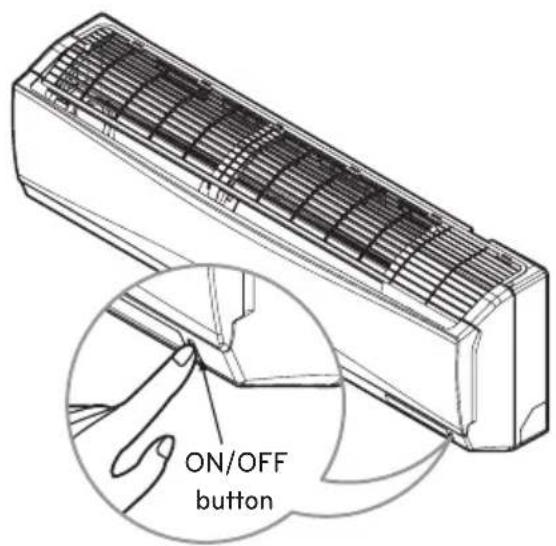
Forced operation is used when the remote controller can't be used. The operation will be started if the ON/OFF button is pressed. If you want to stop the operation, re-press the button.
| Cooling Model | Heat pump Model | |||
| Room Temp. ≥24°C | 21°C ≤Room Temp. < 24°C | Room Temp. < 21°C | ||
| Operating mode Cooling | Cooling Cooling | Healthy Dehumidification Heating | ||
| Indoor FAN Speed High | High High High High | |||
| Setting Temperature 22 °C | 22 °C 23 °C | 24 °C | ||
Test operation
During the TEST OPERATION, the unit operates in cooling mode at high speed fan, regardless of room temperature and resets in 18 minutes. During test operation, if remote controller signal is received, the unit operates as remote controller sets. If you want to use this operation, Press and hold the ON/OFF button for 3\~5 seconds, then the buzzer sound 1 'beep'. If you want to stop the operation, re-press the button.
Sleep Mode
1 Press the to set the time when you want the unit to stop automatically.
2 The timer is programmed in one-hour increments by pressing the ⚙ to 7 times. To alter the time period in steps of 1 hour, press the ⚙ while aiming at air conditioner.
3 (In case of non-Inverter Model) Make sure the sleep mode LED lights up. To cancel the sleep mode, press the ⚙ several times until the sleep mode LED lights off.
(In case of Inverter Model)
Make sure the Timer LED lights up. To cancel the sleep mode, press the ⚙ several times until the Timer LED lights off.

NOTE
- The sleep mode will operate indoor fan at slow speed in cooling mode and at medium speed in heating mode for pleasant sleep.
- Art Cool and Art Cool Wide (non-Deluxe) close the lower discharge partially in sleep mode for pleasant sleep.
In cooling mode or healthy dehumidification mode:
The setting temperature will rise automatically two times by 1 °C over next consecutive 30 minutes (2 °C in 1 hour) for a comfortable sleep. Now this will be the final setting temperature as long as sleep mode is functioning.
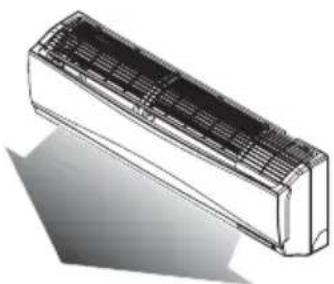
Vertical/horizontal Airflow Direction Control (Optional)
Tue up/down airflow (Vertical airflow) can be adjusted by using the remote controller.
1 Press the to start the unit.
2 Press
3 The louvers will swing up & sown automatically.

natural_image
Line drawing of a car air conditioner unit with airflow direction indicated (no text or symbols)4 To stop the louver at a desired angle, press again.

natural_image
3D rendering of a rectangular air conditioner unit with ventilation grilles and cooling fins (no text or symbols)MAINTENANCE
Clean the product regularly to maintain optimal performance and to prevent possible breakdown.
* This may not be provided, depending on the model.
* The feature can be changed according a type of model.
| Item Cleaning interval Cleaning method | ||
| Air filter 2 weeks See “Cleaning air filter.” | ||
| Triple Filter 3 months | See “Cleaning 3M Filter and Triple Filter.” | |
| 3M Filter 1 months | ||
| Indoor unit surface Regularly | Use a soft, dry cloth. Do not use bleach or abrasives. | |
| Outdoor unit Regularly | Use steam to clean the heat exchanger coils and the panel vents (consult with technician). | |

CAUTION
- Turn off the power and unplug the power cord before you perform any maintenance; otherwise it may cause electric shock.
- Never use water that is hotter than 40^ when you clean the filters. It may cause deformation or discoloration.
- Never use volatile substances when you clean the filters. They may damage the surface of the product.
- Do not washed the 3M filter with water, because the filter can be damaged.

NOTE
- The location and shape of the filters may differ, depending on the model.
- Make sure to clean the heat exchanger coils of the outdoor unit regularly, as dirt collected in the coils may decrease the operational efficiency or increase energy costs.
Cleaning the air filter
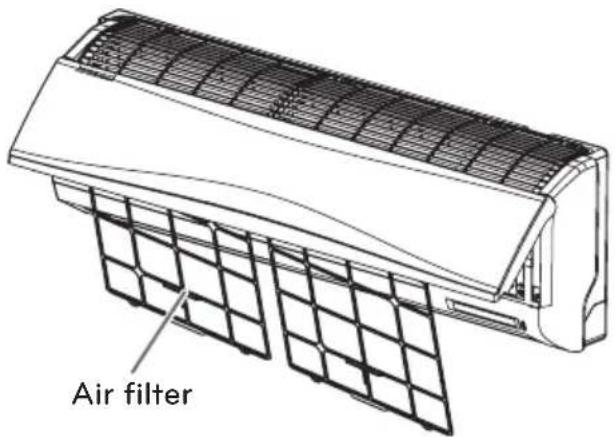
Clean the air filter once every 2 weeks or more if necessary.
1 Turn off the power and unplug the power cord.
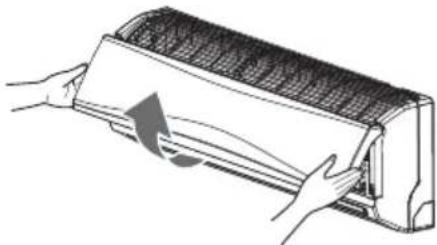
2 Open the front grille.
- Lift up both sides of the cover slightly.
natural_image
Illustration of hands installing or adjusting a wall-mounted air conditioner unit (no text or symbols visible)* The feature can be changed according to type of model.
3 Hold the knob of the air filter, lift it up slightly and remove it from the unit.

natural_image
Illustration of a car air conditioner unit being lifted by hands, showing airflow direction (no text or symbols)* The feature can be changed according to type of model.
4 Clean the filter with a vacuum cleaner or with warm water.
- If dirt is difficult to remove, wash the filter in lukewarm water with detergent.
5 Dry the filter in the shade.
NOTE
- For inner cleaning, contact an Authorized Service center or a dealer. Do not use harsh detergent that causes corrosion or damage on the unit. Harsh detergent may also cause failure of product, fire, or electronic shock.
Cleaning the 3M Filter (Optional)
1 Turn off the power and unplug the power cord.
2 Open the front cover and remove the air filter (see "Cleaning air filter").
3 Pull out the 3M Filter.

natural_image
Cross-sectional diagram of a refrigerated air conditioner unit with internal compartments and ventilation ducts (no text or labels)* The feature can be changed according to type of model.
4 Use a vacuum cleaner to remove dirt, Do not wash the 3M Filter with Water, because the filter can be damaged.
NOTE
• We suggest changing the 3M Filter and Triple Filter every 6 Months.
- The location of the filters may differ, depending on the model.
- If you need more filters, please contact the LG service center. (Refer to the warranty card.)
TROUBLESHOOTING
Self-diagnosis function
This product has a built-in self-diagnosis function. If an error occurs, the lamp of the indoor unit will blink in 2 second intervals. If this occurs, contact your local dealer or service center.
Before requesting service
Please check the following before you contact the service center. If the problem persists, contact your local service center.
| Problem Possible | causes Corrective action | |
| There is a burning smell and a strange sound coming from the unit. | - | Turn off the air conditioner, unplug the power cord and contact the service center. |
| Water leaks from the indoor unit even when the humidity level is low. | ||
| The power cord is damaged or generating excessive heat. | ||
| A switch, a circuit breaker (safety, ground) or a fuse is not operated properly. | ||
| The air conditioner does not work. | The air conditioner is unplugged. | Check whether the power cord is plugged into the outlet. |
| A fuse is blown or the power supply is blocked. | Replace the fuse or check if the circuit breaker has tripped. | |
| A power failure has occurred. | Turn off the air conditioner when a power failure occurs. When the power is restored, wait 3 minutes, and then turn on the air conditioner. | |
| The voltage is too high or too low. | Check if the circuit breaker has tripped. | |
| The air conditioner turned off automatically at a preset time. | Press the power button again. | |
| The air conditioner does not generate cool air. | Air is not circulating properly. | Make sure that there are no curtains, blinds or furniture blocking the front of the air conditioner. |
| The air filter is dirty. | Clean the air filter once every 2 weeks. See “Cleaning Air Filter” for more information. | |
| The room temperature is too high. | In summer, it may take some time to cool indoor air. In this case, select the jet cool operation to cool indoor air quickly. | |
| Cold air is escaping from the room. | Make sure that no cold air is escaping through ventilation points in the room. | |
| The desired temperature is higher than the set temperature. | Set the desired temperature to a level lower than the current temperature. | |
| There is a heating source nearby. | Avoid using a heat generator such as an electric oven or a gas burner while the air conditioner is in operation. | |
| Air circulation operation is selected. | In the air circulation operation, air blows from the air conditioner without cooling or heating the indoor air. Switch the operation mode to the cooling operation. | |
| It is not possible to adjust the fan speed. | The auto operation, jet operation or dehumidifying operation is selected. | In some operation modes, such as the jet or dehumidifying operation modes, you cannot adjust the fan speed. Select an operation mode in which you can adjust the fan speed. |
| It is not possible to adjust the temperature. | The air circulation operation or jet operation is selected. | In some operation modes, such as the air circulation or jet operation mode, you cannot adjust the temperature. Select an operation mode in which you can adjust the temperature. |
Operation ranges
For Heat & Cool model, heating operation range follows the below table.
| Heatingoperation range | Outdoor temperature |
| 1 ~ 24°C |
* When the outdoor temperature drops below 1°C, heating capacity may drop slightly depending on the operation condition.
FOYDALANUVCHI QO'LLANMASI
HAVO KONDITSIONERI
Elektr va elektron jihozlarda ba'zi bir xavfli moddalardan foydalanish uchun cheklovlar asosida jihoz Texnik tartiblarning talablariga javob beradi.
Iltimos, konditsionerdan foydalanishdan avval ushbu qo'llanmani diqqat bilan o'qib chiqing va kelajakda foydalanish uchun saqlab qo'ying.
TURI : DEVORGA O'RNATILADIGAN
ENERGIYANI TEJASH BO'YICHA MASLAHATLAR
11 ASOSIY FUNKSIYALAR
11 Xonani sovutish (Sovutish rejimi)
11 Xonani isitish (Isitish rejimi)
12 Sog'lom namsizlantirish rejimi
12 QO'SHIMCHA FUNKSIYALAR
12 Oqimli sovutish rejimi
13 Majburiy ishlatish
14 Uyqu rejimi
14 Vertikal/gorizontal havo oqimini boshqarish (lxtiyoriy)
15 TEXNIK XIZMAT KO'RSATISH
16 Havo filtrini tozalash
16 3M filtri tozalash(lxtiyoriy)
17 NOSOZLIKLARNI BARTARAF QILISH
17 O'z-o'zini tashxislash funksiyasi
17 Xizmat ko'rsatish markaziga murojaat qilishdan avval
ELEKTR XAVFSIZLIGI

OGOHLANTIRISH
- Bu qurilma yerga to'g'ri ulangan bo'linishi kerak. Elektr tokining urishi xavfini kamaytirish uchun siz vilkani doimo yerga ulangan rozetkaga ulashingiz kerak.
- Yerga ulash tishchasini qirqmang yoki vilkadan olib tashlamang.
- Adapterning yerga ulash terminalini devor rozetkasi qopqog'i burama mixiga biriktirish qurilmani yerlashtirmaydi, qopqoq burama mixi metall bo'lgan va izolyatsiyaga ega bo'lgan hamda devor rozetkasi uydagi zanjir orqali yerga ulangan hollar bundan mustasno.
- Agar siz havo konditsionerining yerga to'g'ri ulanganligiga shubha qilsangiz, devordagi rozetka va elektr zanjirini malakali elektrikka tekshirtiring.
Adapterdan vaqtinchalik foydalanish
Xavfsizlikka nisbatan xatarlar bo'lganligi uchun biz adapterdan foydalanishni maslahat bermaymiz. Vaqtinchalik ulanishlar uchun faqat ko'pchilik mahalliy xo'jalik mollari do'konlarida mavjud bo'lgan haqiqiy adapterdan foydalaning. To'g'ri qutblangan holda ulanishi uchun adapterdagi kattaroq slotning rozetkadagi katta slot bilan tenglashtirilganligiga ishonch hosil qiling.
Elektr tarmog'iga ulash shnurini adapterdan uzishda yerga ulash terminalini shikastlamaslik uchun har birini bittadan qo'l bilan ushlang. Elektr tarmog'iga ulash shnurini tez-tez uzib qo'ymang, chunki bu yerga ulash terminalining shikastlanishiga olib kelishi mumkin.

OGOHLANTIRISH
- Hech qachon quirilmadan singan adapter bilan foydalanmang.
Uzaytirma shnurdan vaqtinchalik foydalanish
Xavfsizlikka nisbatan xatarlar bo'lganligi uchun biz uzaytirma shnurdan foydalanishni maslahat bermaymiz.

OGOHLANTIRISH
FOYDALANISHDAN AVVAL
Komponentlar
Ichki blok

natural_image
Illustration of a hand holding a tool inside a car, with an arrow indicating direction (no text or symbols present)2 Yangi batareyalarni soling va batareyalarning + va - terminallari to'g'ri o'rnatilganligiga ishonch hosil qiling.
natural_image
Illustration of hands using a tool to adjust or install a component, enclosed in a circle (no text or symbols)natural_image
Illustration of hands using a tool to adjust or install a component, enclosed in a circle (no text or symbols)
ESLATMA
Agar masofadan boshqarish pultining display ekrani so'na boshlasa, batareyalarni almashtiring.
Masofadan boshqarish pulti ushlagichini o'rnatish
Masofadan boshqarish pultini himoyalash uchun ushlagichni to'g'ridan-to'g'ri quyosh nurlari tushmaydigan joyga o'rnating.
1 Xavfsiz va oson yetish mumkin bo'lgan joyni tanlang.
2 Otvyortka bilan 2 ta burama mixni mahkam qotirgan holda ushlagichni qotiring.

natural_image
Hand holding a screwdriver inserted into a plastic housing (no text or symbols visible)3 Masofadan boshqarish pultini ushlagich ichiga suring.

natural_image
Illustration of two mobile phone holders with control buttons, showing device shift (no text or symbols)Ishlatish usuli
natural_image
Line drawing of a car air conditioner unit with a sensor attached (no text or symbols)
ESLATMA
1 Yoqish uchun tugmasini bosing.
2 Isitish rejimini tanlash uchun tugmasini qayta-qayta bosing.
1 Yoqish uchun tugmasini bosing.
2 Isitish rejimini tanlash uchun tugmasini qayta-qayta bosing.
natural_image
Simple diagram with a droplet symbol and two vertical bars, no text or labels present
ESLATMA
- Oqimli sovutish funksiyasini isitish yoki avtomatik o'zgartirish rejimlarida faollashtirib bo'lmaydi.
- Inverter, Art Cool va Art Cool Wide (Delyuks emas) modeli holatida siz isitish rejimi uchun fugmasini bosish orqali oqimli isitish funksiyasidan foydalanishingiz mumkin.
- Art Cool va Art Cool Wide modellari kuchli sovutish va isitish uchun oqimli sovutish/isitish rejimi davomida yon tomondagi chiqishlarni yopadi.
Majburiy ishlatish
natural_image
3D rendering of a rectangular air conditioner unit with a curved arrow indicating rotation (no text or symbols)4 Jalyuzani kerakli burchakda to'xtatish uchun yana tugmasini bosing.
natural_image
3D rendering of a rectangular air conditioner unit with ventilation grilles and cooling fins (no text or symbols)TEXNIK XIZMAT KO'RSATISH
Optimal ishlashini ta'minlash va buzilishining oldini olish uchun mahsulotni muntazam tozalab boring.
* Modelga bog'liq ravishda bu mahsulot bilan birga berilmasligi mumkin.

2 Old panjarani oching.
- Qopqoqning har ikkala tomonini biroz ko'taring.

natural_image
Illustration of hands installing or adjusting a wall-mounted air conditioner (no text or symbols present)* The feature can be changed according a type of model.
3 Hold the knob of the air filter, lift it up slightly and remove it from the unit.

natural_image
Illustration of a car air conditioner unit being placed on a grid panel, with hands adjusting the panel (no text or symbols)* The feature can be changed according a type of model.
4 Clean the filter with a vacuum cleaner or with warm water.
- If dirt is difficult to remove, wash the filter in lukewarm water with detergent.
5 Dry the filter in the shade.
NOTE
- For inner cleaning, contact an Authorized Service center or a dealer. Do not use harsh detergent that causes corrosion or damage on the unit. Harsh detergent may also cause failure of product, fire, or electronic shock.
natural_image
Cross-sectional diagram of an air conditioner unit showing internal components and airflow direction (no text or labels)NOSOZLIKLARNI BARTARAF QILISH
O'z-o'zini tashxislash funksiyasi
Ushbu mahsulot ichki qurilgan o'z-o'zini tashxislash funksiyasi bilan jihozlangan. Agar xatolik yuz bersa, ichki blok lampasi 2 soniya oraliq bilan miltillay boshlaydi. Agar bunday xatolik yuz bersa, mahalliy dileringiz yoki xizmat ko'rsatish markaziga murojaat qiling.
natural_image
Illustration of a hand holding a tool inside a car's dashboard, with an arrow indicating direction (no text or symbols present)natural_image
Illustration of hands using a tool to adjust or install a component, enclosed in a circle (no text or symbols)3 Установите крышку на место.
natural_image
Illustration of hands using a tool to adjust or install a component, enclosed in a circle with an arrow indicating direction (no text or symbols present)! ПРИМЕЧАНИЕ
natural_image
Illustration of a hand using a screwdriver to adjust or install a component into a device (no text or symbols present)natural_image
Two identical line drawings of a handheld device with control buttons, shown in side and top views (no text or symbols)Способ эксплуатации
natural_image
Line drawing of a wall-mounted air conditioner unit with a cable inserted, showing no text or symbols! ПРИМЕЧАНИЕ
natural_image
Simple diagram with a droplet symbol and two vertical bars, no text or labels presentnatural_image
3D rendering of a rectangular air conditioner unit with a curved arrow indicating rotation (no text or symbols)natural_image
3D rendering of a rectangular air conditioner unit with mesh grille and cooling effect (no text or symbols)natural_image
Illustration of hands installing or adjusting a wall-mounted air conditioner unit (no text or symbols visible)natural_image
Illustration of hands installing or adjusting a grid-patterned air conditioner cover (no text or symbols)natural_image
Architectural cross-section diagram of a multi-level building or storage unit with no visible text or symbols- TIPS FOR SAVING ENERGY
- For your records
- IMPORTANT SAFETY INSTRUCTIONS
- READ ALL INSTRUCTIONS BEFORE USING THE APPLIANCE.
- WARNING
- CAUTION
- TABLE OF CONTENTS
- TIPS FOR SAVING ENERGY
- IMPORTANT SAFETY INSTRUCTIONS
- ELECTRICAL SAFETY
- BEFORE USE
- BASIC FUNCTIONS
- ADVANCED FUNCTIONS
- MAINTENANCE
- TROUBLESHOOTING
- ELECTRICAL SAFETY
- Temporary Use of an Adapter
- Temporary Use of an Extension Cord
- Symbols used in this Manual
- BEFORE USE
- Components
- Indoor unit
- NOTE
- Outdoor unit
- Using the remote control
- Wireless remote control
- Inserting batteries
- Installing the remote control holder
- Operating method
- BASIC FUNCTIONS
- Cooling your room (Cooling operation)
- Heating your room (Heating operation)
- Healthy Dehumidification Operation
- ADVANCED FUNCTIONS
- Jet Cool Operation
- Forced operation
- Test operation
- Sleep Mode
- Vertical/horizontal Airflow Direction Control (Optional)
- MAINTENANCE
- Cleaning the air filter
- Cleaning the 3M Filter (Optional)
- TROUBLESHOOTING
- Self-diagnosis function
- Before requesting service
- Operation ranges
- FOYDALANUVCHI QO'LLANMASI
- HAVO KONDITSIONERI
- ENERGIYANI TEJASH BO'YICHA MASLAHATLAR
- ASOSIY FUNKSIYALAR
- QO'SHIMCHA FUNKSIYALAR
- TEXNIK XIZMAT KO'RSATISH
- NOSOZLIKLARNI BARTARAF QILISH
- ELEKTR XAVFSIZLIGI
- OGOHLANTIRISH
- Adapterdan vaqtinchalik foydalanish
- Uzaytirma shnurdan vaqtinchalik foydalanish
- FOYDALANISHDAN AVVAL
- Komponentlar
- Ichki blok
- ESLATMA
- Masofadan boshqarish pulti ushlagichini o'rnatish
- Ishlatish usuli
- Majburiy ishlatish
- TEXNIK XIZMAT KO'RSATISH
- NOSOZLIKLARNI BARTARAF QILISH
- O'z-o'zini tashxislash funksiyasi
- ! ПРИМЕЧАНИЕ
- Способ эксплуатации
Brand : LG
Model : G18NHC
Category : Washing machine