IBS-20 - Système de diffusion IP Portech - Free user manual and instructions
Find the device manual for free IBS-20 Portech in PDF.


User questions about IBS-20 Portech
0 question about this device. Answer the ones you know or ask your own.
Ask a new question about this device
Download the instructions for your Système de diffusion IP in PDF format for free! Find your manual IBS-20 - Portech and take your electronic device back in hand. On this page are published all the documents necessary for the use of your device. IBS-20 by Portech.
USER MANUAL IBS-20 Portech
1. IP Broadcast System Hardware and Operating System Demands
1.1 Lowest Demands of Computer Hardware
I. C→U : Intel Core Quad 3.0GHz
II. RAM : 4GB
III. Standard sound card with microphone input
IV. Network card above 100M
- SSD 128G (Recommended)
1.2 Operating system demands
I. It supports Windows X→ / Windows 7 / Windows 8 / Windows 10
II. According to the language of the operating system, the software supports Chinese/English display interface
1.3 Network bandwidth demands
Calculating according to a single broadcast point, the bandwidth of the broadcast system is about 150k bits,
The bandwidth of the broadcast system is about 1.5M bits if it is calculated according to 10 broadcast points, and so on
2. IP Broadcast System Installation Flow
Step 1
Execute I→ Broadcast.exe installation file, and wait until the installation picture occurs, press [Next] to continue the installation flow, as shown in the following picture

IPBroadcast


natural_image
Close-up of a CD or DVD disc with an inset showing its disc (no visible text or symbols)Welcome to IPBroadcast Setup program. This program will install IPBroadcast on your computer.
It is strongly recommended that you exit all Windows programs before running this Setup Program.
Click Cancel to quit Setup and close any programs you have running. Click Next to continue with the Setup program.
WARNING: This program is protected by copyright law and international treaties.
Unauthorized reproduction or distribution of this program, or any portion of it, may result in severe civil and criminal penalties, and will be prosecuted to the maximum extent possible under law.


Step 2
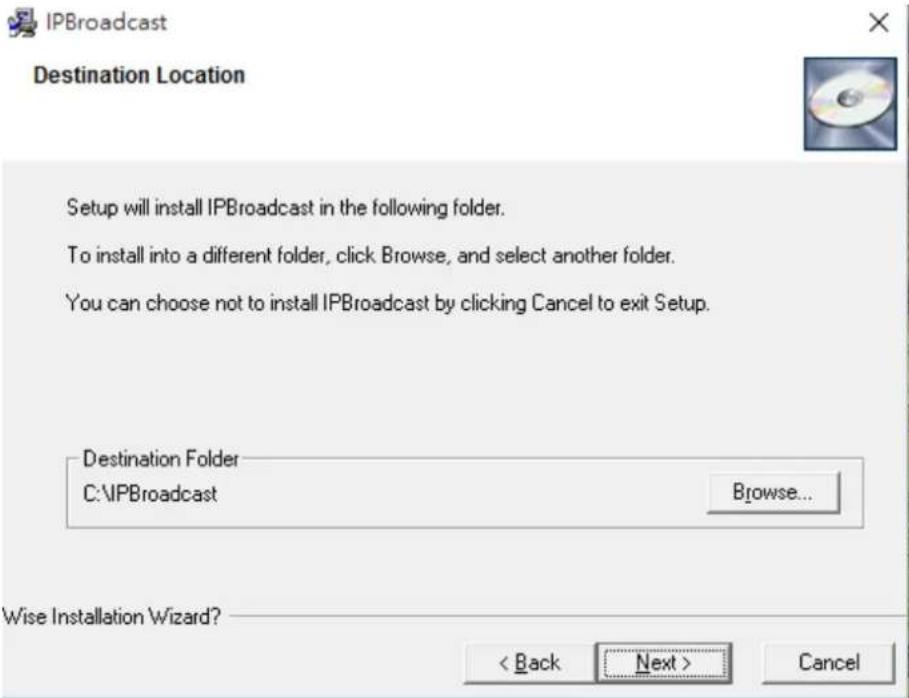
The name of the program preset path and file folder is C:\I→Broadcast, please press [Next] to continue the installation flow if you do not change the path, as shown in the following picture
(Attention: please select the program installation path in the root directory of the disc due to access of the system's file folder, to avoid problems during execution of the program)
text_image
IPBroadcast Destination Location Setup will install IPBroadcast in the following folder. To install into a different folder, click Browse, and select another folder. You can choose not to install IPBroadcast by clicking Cancel to exit Setup. Destination Folder C:\IPBroadcast Browse... Wise Installation Wizard? < Back Next > CancelStep 3
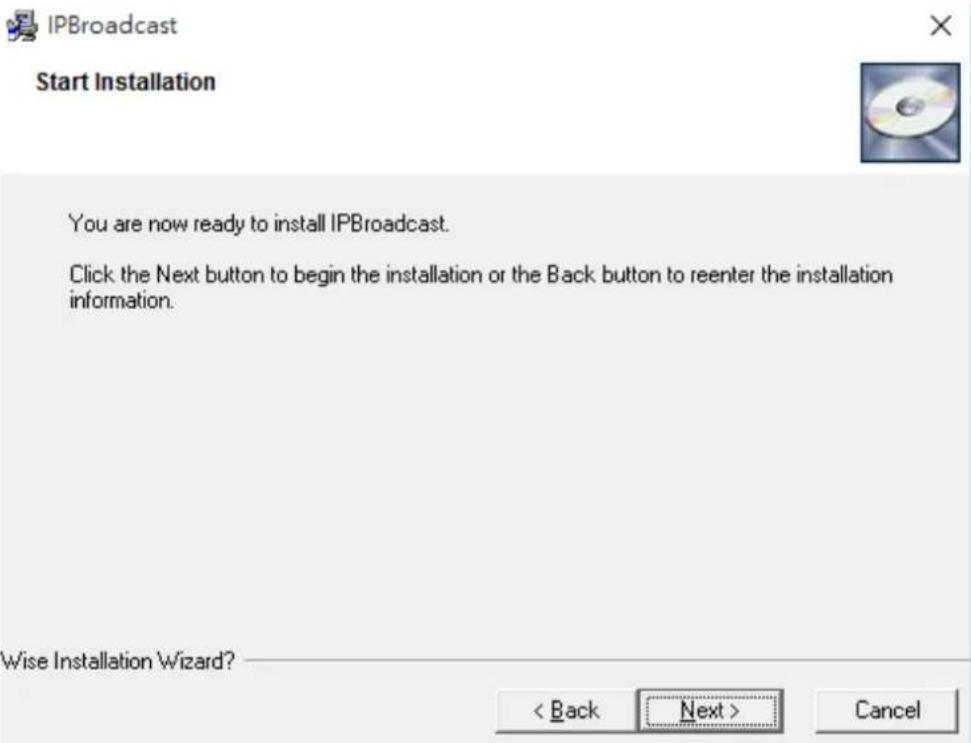
Confirm whether to start program installation, if there is no problem, please press [Next] to continue the installation flow, as shown in the following picture
text_image
IPBroadcast Start Installation You are now ready to install IPBroadcast. Click the Next button to begin the installation or the Back button to reenter the installation information. Wise Installation Wizard? < Back Next > CancelStep 4
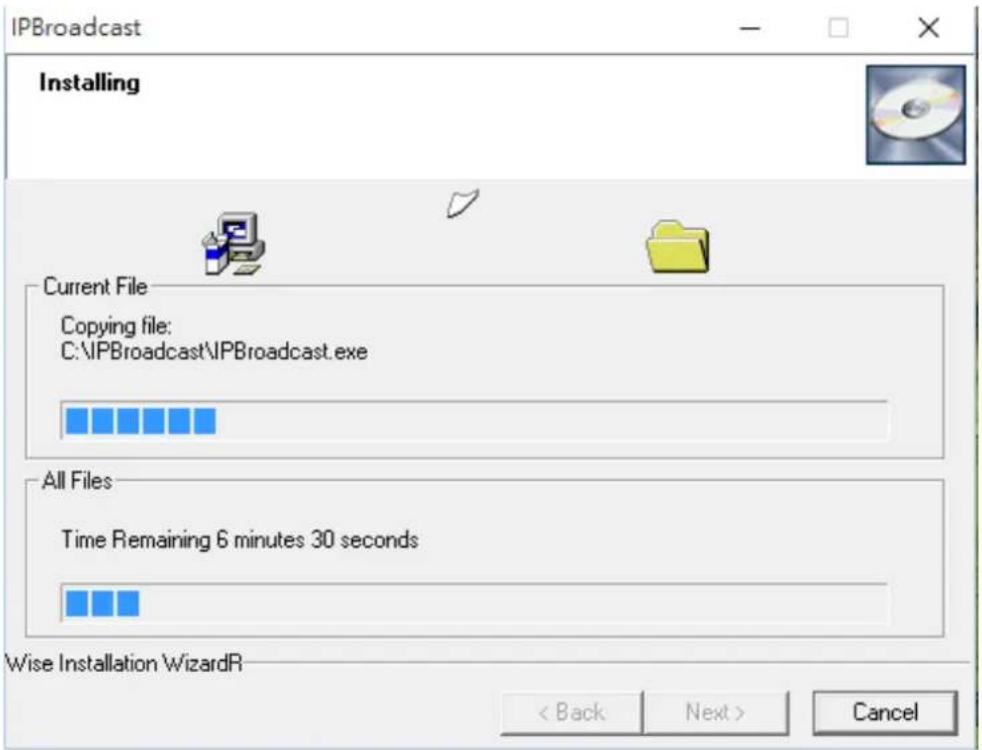
Installing, please wait patiently@as shown in the following picture
text_image
IPBroadcast Installing Current File Copying file: C:\IPBroadcast\IPBroadcast.exe All Files Time Remaining 6 minutes 30 seconds Wise Installation WizardR < Back Next > CancelStep 5
The program is installed, please press [Finish] to finish the installation flow, as shown in the following picture

IPBroadcast

natural_image
Close-up of a CD or DVD disc with an inset showing its disc (no text or symbols visible)IPBroadcast has been successfully installed.
Click the Finish button to exit this installation.

3. Start/Login System Interface
3.1. Before starting the program, please confirm whether the host's sound card is connected with the microphone device and whether the network is connected correctly, and set the main sound card as the preset device in the operating system
(Attention: since the system framework is Server, please set the host's I→ to be fixed virtual I→ or real I→, to make the loudspeaker connected to the system)
3.2. Execute I→Broadcast.exe
3.3. Input the preset user's name and password: admin/123456 in the following login interface.
User's name is the system's preset admin, thus the user cannot change it.
3.4 Specification of program interface
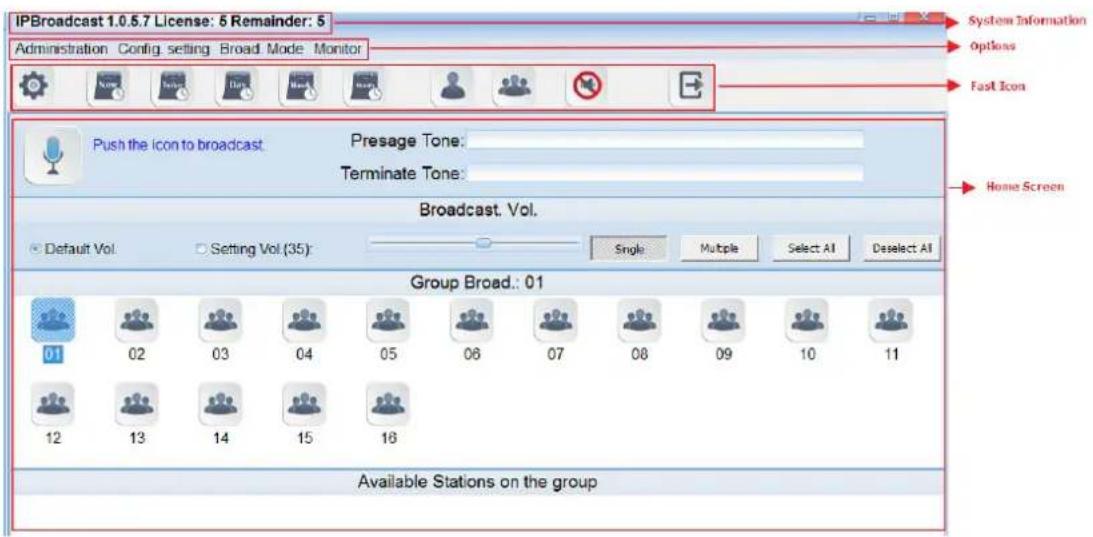
text_image
IPBroadcast 1.0.5.7 License: 5 Remainder: 5 Administration Config. setting Broad Mode Monitor System Information Options Fast Icon Push the icon to broadcast Presage Tone: Terminate Tone: Broadcast, Vol. Default Vol Setting Vol (35): Single Multiple Select AI Deselect AI Group Broad.: 01 01 02 03 04 05 06 07 08 09 10 11 12 13 14 15 16 Available Stations on the group4. System Management
4.1 System Setting
Click [Administration]-->[Setting] to show/change the system's I→ Address, communication port and microphone volume adjustment
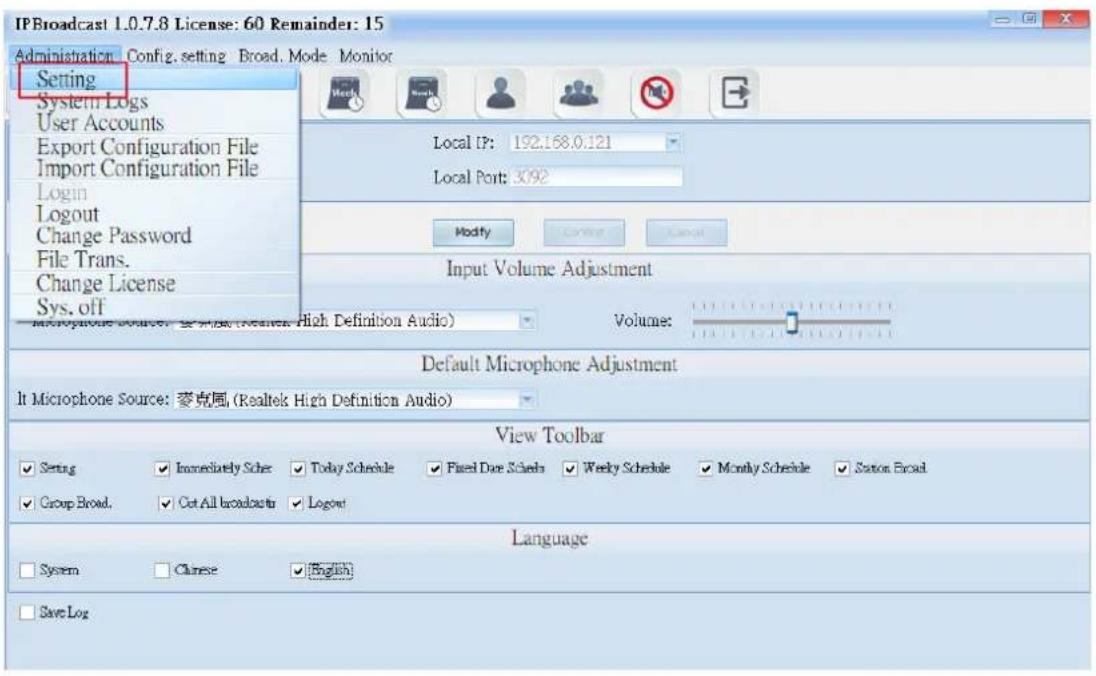
text_image
IP Broadcast 1.0.7.8 License: 60 Remainder: 15 Administration Config. setting Broad. Mode Monitor Setting System Logs User Accounts Export Configuration File Import Configuration File Login Logout Change Password File Trans. Change License Sys. off Microphone Source: 麦克風 (Realtek High Definition Audio) Local IP: 192.168.0.121 Local Port: 3092 Modify Cancel Cancel Input Volume Adjustment Volume: Default Microphone Adjustment It Microphone Source: 麦克風 (Realtek High Definition Audio) View Toolbar ✓ Setting ✓ Immediately Schar ✓ Today Schedule ✓ Fixed Due Schedule ✓ Weekly Schedule ✓ Monthly Schedule ✓ Station Broad ✓ Group Broad ✓ Cut All broadcasts ✓ Logout Language ✓ System ✓ Chinese ✓ English ✓ Save Log| Column | Specification |
| Local Computer's I→ | Show the current system's I→ address. |
| Local Computer's →ort | Show the current system's default of the communication port. |
| Input the volume adjustment | |
| The Selection of Sound Effect Devices | Select the name of current system's audio card device. |
| Volume | Adjust the selected audio device for the input volume; the default is 10, the adjustment range is 0~20. |
| The selection of microphone sound source | |
| The Selection of Sound Effect Devices | Select the name of audio device of microphone. |
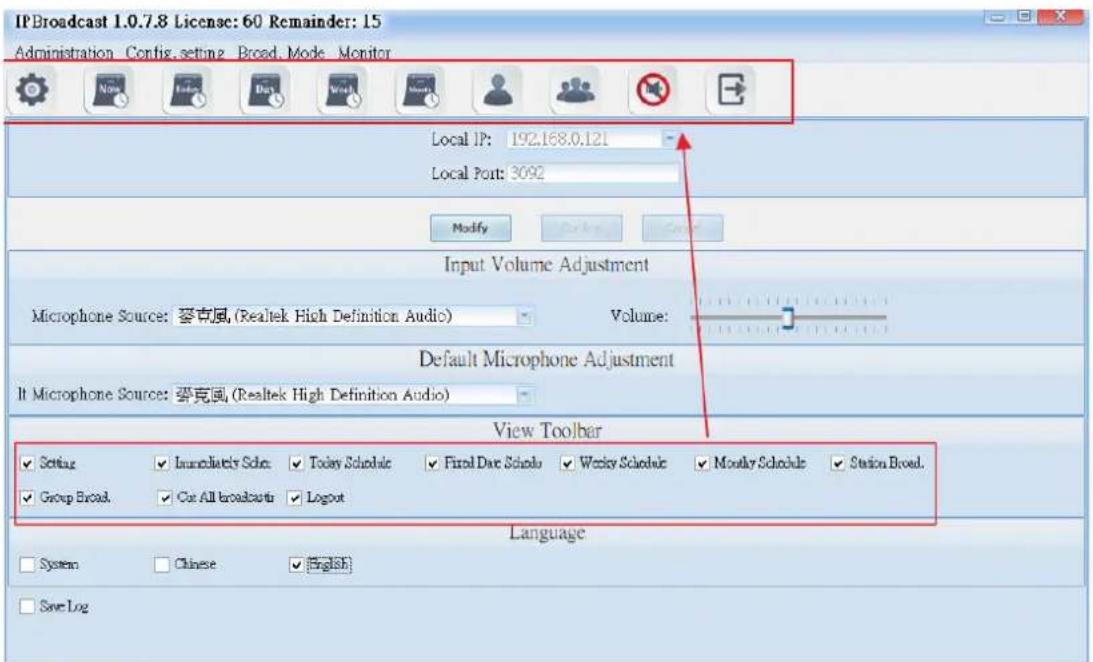
text_image
IP Broadcast 1.0.7.8 License: 60 Remainder: 15 Administration Config. setting Broad. Mode Monitor Local IP: 192.168.0.121 Local Port: 3092 Modify Input Volume Adjustment Microphone Source: 萝克風 (Realtek High Definition Audio) Volume: Default Microphone Adjustment It Microphone Source: 萝克風 (Realtek High Definition Audio) View Toolbar ✓ Setting ✓ Immediately Sdn: ✓ Today Sdndu: ✓ Final Date Sdndu: ✓ Weekly Sdndu: ✓ Monthly Sdndu: ✓ Station Broad. ✓ Group Broad: ✓ Cur All broadcasts: ✓ Logout Language System ✓ Chinese ✓ English Save LogDisplay the Toolbar
Select the function options on the toolbar displayed on the top of the Home Screen

text_image
IPBroadcast 1.0.7.8 License: 60 Remainder: 15 Administration Config. setting Broad. Mode Monitor Local IP: 192.168.0.121 Local Port: 3092 Modify Input Volume Adjustment Microphone Source: 麥克風 (Realtek High Definition Audio) Volume: Default Microphone Adjustment It Microphone Source: 麥克風 (Realtek High Definition Audio) View Toolbar Setting Immediately Scler Today Schedule Fired Date Scler Weekly Scler Monthly Scler Station Broad. Group Broad Cut All broadcast Logout Language System Cause English Save LogLanguage Selection
Select the display language of broadcast system. If selecting
*** If you want to change the data in the columns, please press the “modify” in the following pages to modify the data and then press “enter” to save the changes of the setting. ***
4.2 System Logs
→ress the “Administration” and then “System Logs” to display the records, such as login and logout time of all login accounts, the modification of the schedule, execution of the broadcast, etc.
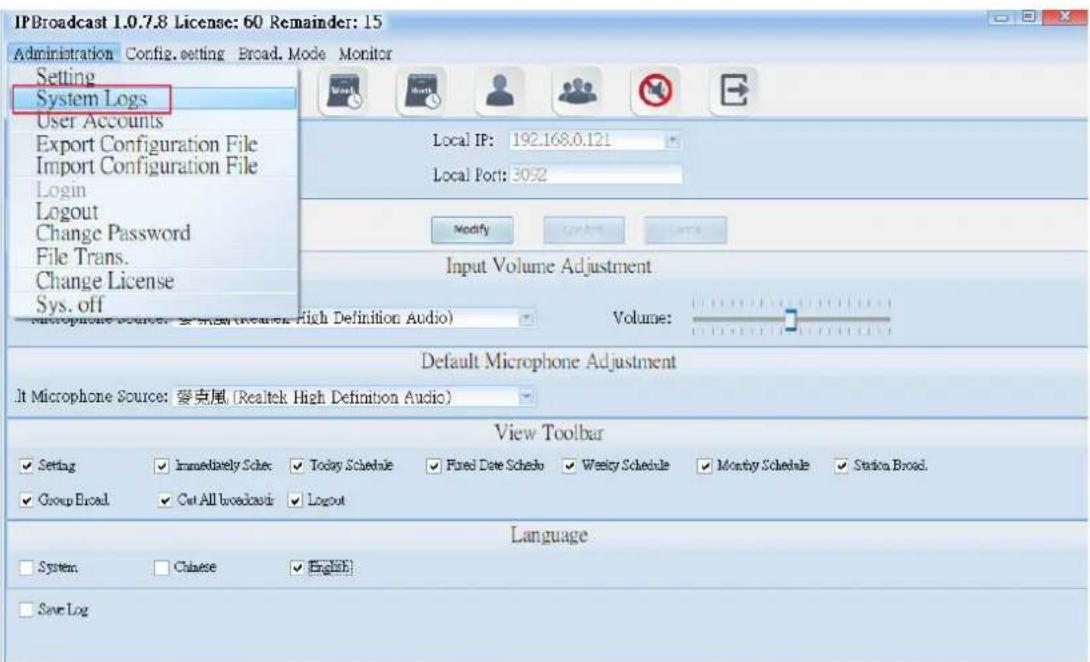
text_image
IPBroadcast 1.0.7.8 License: 60 Remainder: 15 Administration Config. setting Broad. Mode Monitor Setting System Logs User Accounts Export Configuration File Import Configuration File Login Logout Change Password File Trans. Change License Sys. off Local IP: 192.168.0.121 Local Port: 3052 Modify Input Volume Adjustment Volume: Default Microphone Adjustment It Microphone Source: 雙克尾 (Realtek High Definition Audio) View Toolbar Setting Immediately Scler Today Sclerled Fixed Date Sclerled Weekly Sclerled Monthly Sclerled Station Broad. Group Broad Cut All broadcast Logout Language System Chinese English Save Log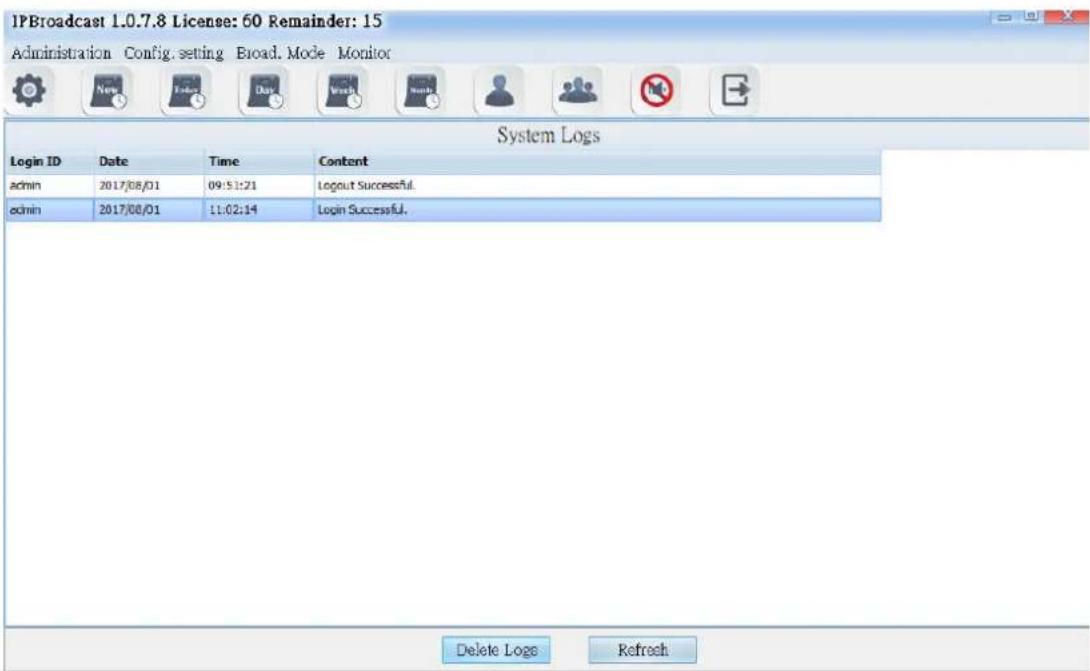
text_image
IPBroadcast 1.0.7.8 License: 60 Remainder: 15 Administration Config. setting Broad. Mode Monitor System Logs Login ID Date Time Content admin 2017/08/01 09:51:21 Logout Successful. admin 2017/08/01 11:02:14 Login Successful. Delete Logs RefreshIf you want to delete the records, you can click single button or press the "Shift" to select multiple records and then press the "Delete Logs" below the screen to finish the process of deleting logs.
4.3 User Accounts
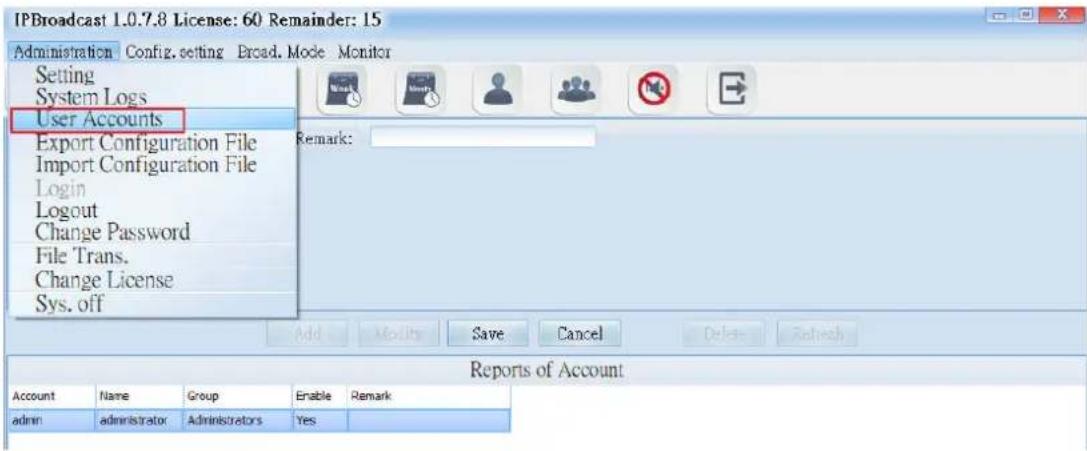
Click the "Administration" and then "User Account" button to set up or modify the passwords and access permission of all accounts. The levels of access can be divided into Administrator's and User's. Administrator can set up all functions in the system, but the users can only execute single point/group broadcast, and monitor the connection situations of every broadcast point.
text_image
IPBroadcast 1.0.7.8 License: 60 Remainder: 15 Administration Config. setting Broad. Mode Monitor Setting System Logs User Accounts Export Configuration File Import Configuration File Login Logout Change Password File Trans. Change License Sys. off Remark: Add Modify Save Cancel Delete Refresh Reports of Account Account Name Group Enable Remark admin administrator Administrators Yes
text_image
IPBroadcast 1.0.7.8 License: 60 Remainder: 15 Administration Config. setting Broad. Mode Monitor Account: admin Remark: Name: administrator Password: ************ Group: Administrators Enable: Add Modify Save Cancel Delete Refresh Reports of Account Account Name Group Enable Remark admin administrator Administrators Yes| Column | Specification |
| Account | Set the account for accessing system |
| Name | Set the name of the account |
| →assworc | Set the password of the account |
| Group | Assign the access permission for the accounts, administrators or users |
| Enable | Select whether the account is enable or not |
| Remark | Input the remark data |
4.4. Export Configuration File
Click the "Administration" and then "Export Configuration File,"you can back up the parameters data preset in the system to the appointed directory. (The directory can produce two files: config. backup and history. backup.) In the future, when there is the need for system rebuilding, you don't need to reset all parameters but just import the previous back up files.
4.5. Import Configuration File
Click the "Administration" and then "Import Configuration File," and you can restore the original back-up system parameter data by selecting original back-up directory import system.
4.6. Logout
Click [Administration]-->[Logout] to log out the system. Except extension broadcast and scheduling broadcast function in the background, other function setting cannot be operated.

text_image
IPBroadcast 1.0.7.8 License: 60 Remainder: 60 Administration Config. setting Broad. Mode Monitor Setting System Logs User Accounts Export Configuration File Import Configuration File Login Logout Change Password File Trans. Change License Sys. off4.7 Change Password
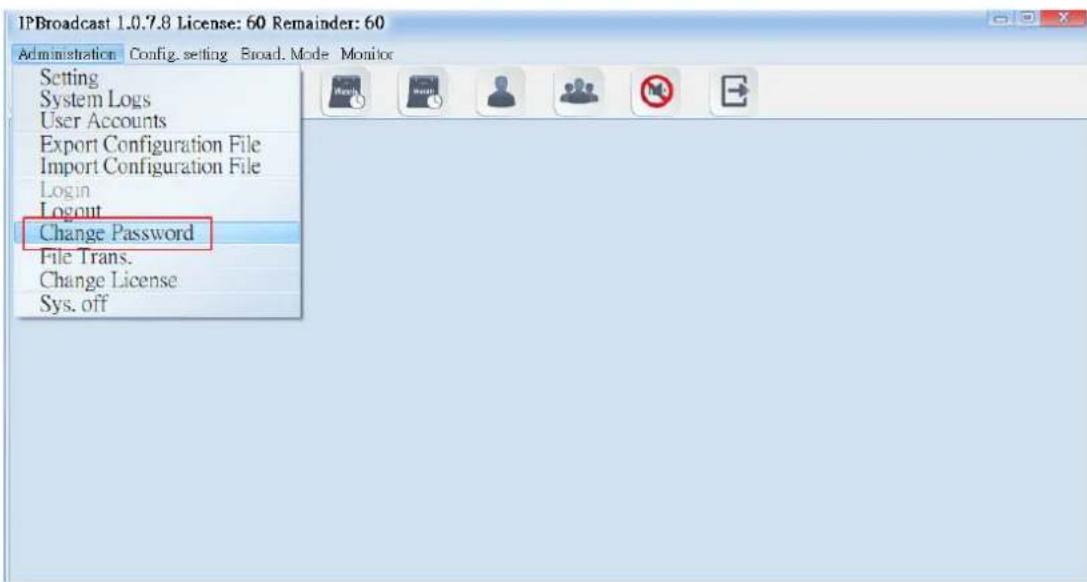
Click [Administration]-->[Change →assword] to pop up a password change window, through which can the system login password can be changed
text_image
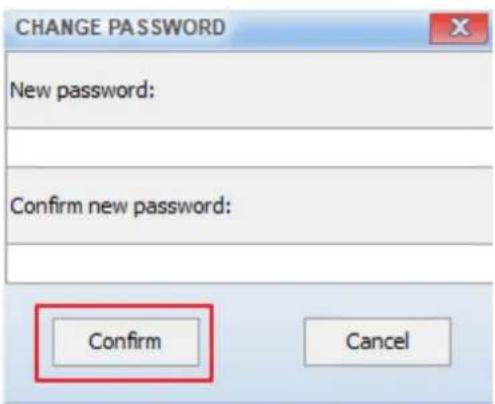
IPBroadcast 1.0.7.8 License: 60 Remainder: 60 Administration Config. setting Broad. Mode Monitor Setting System Logs User Accounts Export Configuration File Import Configuration File Login Logout Change Password File Trans. Change License Sys. off*** Input the new system password in the two columns directly in the following two password modification interfaces, press [Confirm] to execute storage modification setting ***
text_image
CHANGE PASSWORD New password: Confirm new password: Confirm Cancel4.8 Conversion Tool
Click [Administration]-->[File Trans.] to convert the WAVE or M→3 to the which can be played by the system, and be able to adjust DB of the sound

text_image
IPBroadcast 1.0.7.8 License: 60 Remainder: 60 Administration Config. setting Broad. Mode Monitor Setting System Logs User Accounts Export Configuration File Import Configuration File Login Logout Change Password File Trans. Change License Sys. off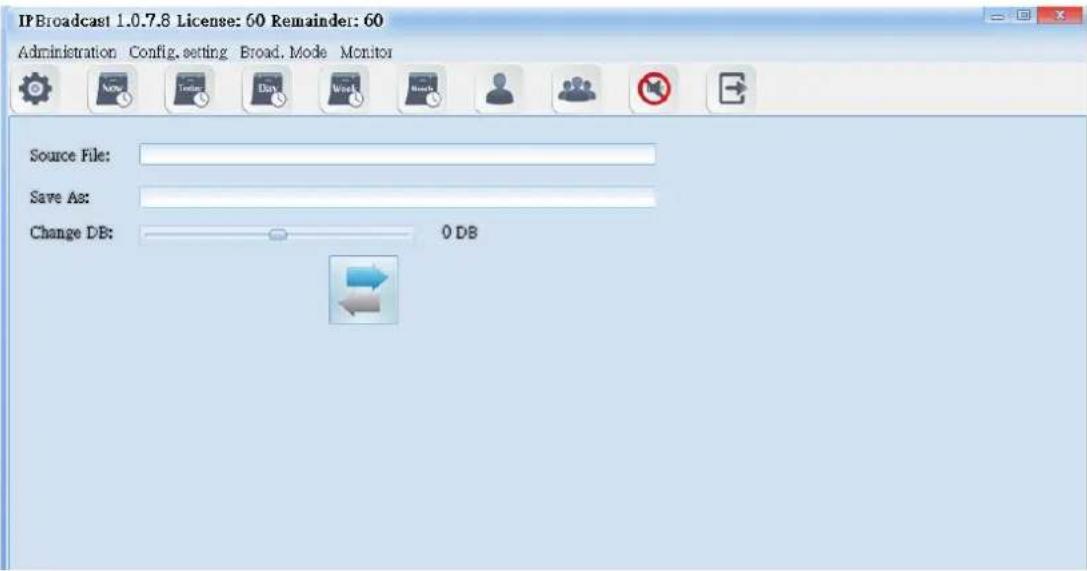
text_image
IP Broadcast 1.0.7.8 License: 60 Remainder: 60 Administration Config, setting Broad, Mode Monitor Source File: Save As: Change DB: 0 DB| Column | Specification |
| Source File | Select WAVE or M→3 format sound storage paths to be converted |
| Save As | Select the transformed WAVE sound storage path |
| Change DB | Adjust DB of the sound to be converted; the adjustable range of DB is -60DB-60DB |
*** After selecting source and purpose sound, press sound format ***

4.9 Modification Authorization
Click [Administration]-->[Change License] to upgrade the authorization number of broadcast points. →lease contact the company's business unit about the detailed upgrading method.

text_image
IPBroadcast 1.0.7.8 License: 60 Remainder: 60 Administration Config. setting Broad. Mode Monitor Setting System Logs User Accounts Export Configuration File Import Configuration File Login Logout Change Password File Trans. Change License Sys. off Change License ID: 421.512116x44d6f8edab800562fa166 IF: 59.125.1.190:1895 Upgrade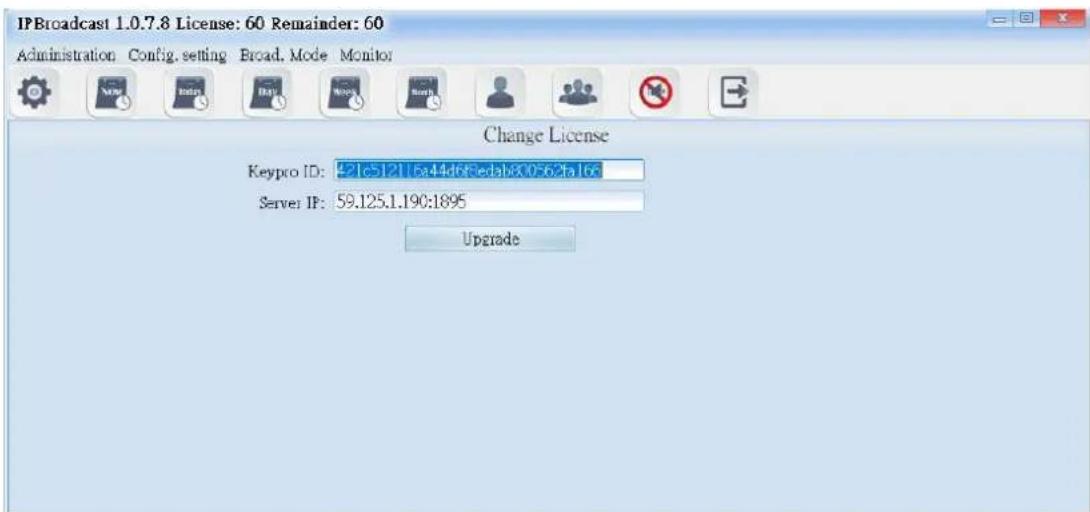
text_image
IPBroadcast 1.0.7.8 License: 60 Remainder: 60 Administration Config. setting Broad. Mode Monitor Change License Keypro ID: 521c5121 5a44d63edab800562ta16c Server IP: 59.125.1.190:1895 Upgrade4.10 Quit the System
Click [Administration]--> [Sys.off] to pop up a confirmation window of close the program, press [OK] to close the program

text_image
IPBroadcast 1.0.7.8 License: 60 Remainder: 60 Administration Config. setting Broad. Mode Monitor Setting System Logs User Accounts Export Configuration File Import Configuration File Login Logout Change Password File Trans. Change License Sys. off Change License ID: 421c-512116a44e683edab800562fa16c IP: 59.125.1.190:1895 Upgrade IPBroadcast Unload IPBroadcast.Are you sure? 确定 取消5. Setting Management
5.1. Setting of Broadcast Points
5.1.1 Establishment of broadcast points
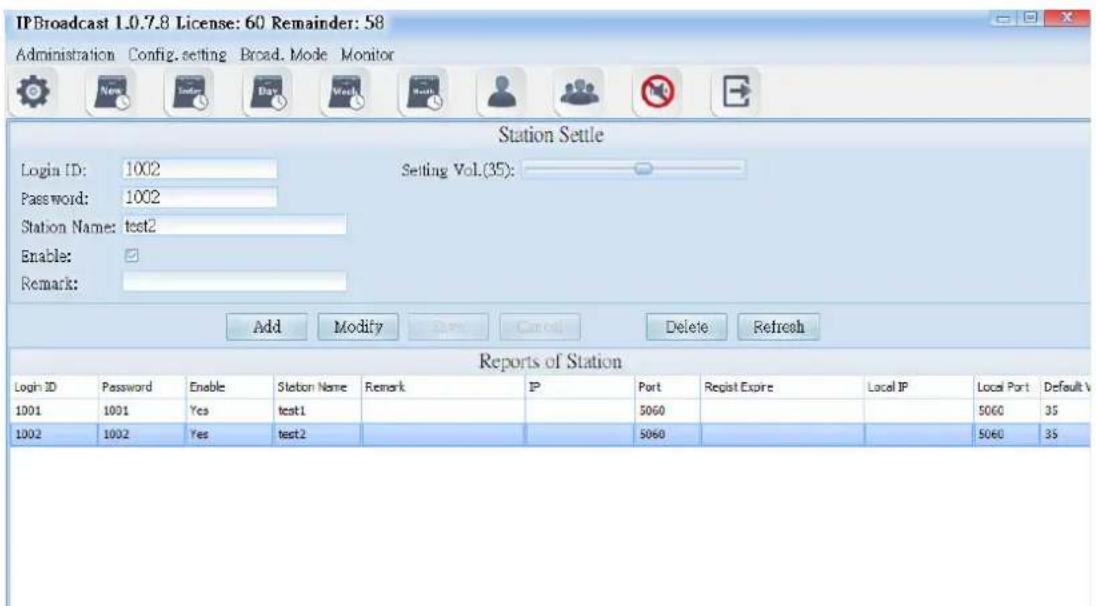
Click [Config.setting]-->[Station Set.]
Establish the verification account/password and name of broadcast points in the system, and so on
text_image
IPBroadcast 1.0.7.8 License: 60 Remainder: 58 Administration Config. setting Broad. Mode Monitor Station Settle Login ID: 1002 Password: 1002 Station Name: test2 Enable: Remark: Setting Vol.(35): Add Modify Cancel Delete Refresh Reports of Station Login ID Password Enable Station Name Remark IP Port Regist Expire Local IP Local Port Default V 1001 1001 Yes test1 1002 1002 Yes test2 5060 5060 5060 5060 5060 5060 35| Column | Specification |
| Login ID | Establish the registration name of the broadcast point; the data can only be the digit above 3 codes |
| →as:word | Establish the registration password of the broadcast point; input digit or word string |
| Station Name | Input the customized name of broadcast points |
| Enable | Select whether to start the broadcast point |
| Remark | Input remark materials |
| Default Vol. | Define the preset volume of the broadcast point; the setting range is 64-0 |
5.1.2 Information List of Broadcast Points
The list shows the registration information of the established broadcast points
| Column | Specification |
| Login ID | It shows the registration account of the established broadcast point |
| →asswor | It shows the registration password of the established broadcast point |
| Enable | It shows whether to start the broadcast point |
| Station Name | It shows the name of the broadcast point input |
| Remark | It shows the remark materials input |
| I- | It shows the broadcast point's I→ Addres: |
| →or | It shows the broadcast point's communication port |
| Regist Expire | It shows the broadcast point's login period |
| Local I- | It shows the system's I→ Addres: |
| Local →or | It shows the system's communication port |
| Default Vol. | It shows the broadcast point's volume |
[Setting range]
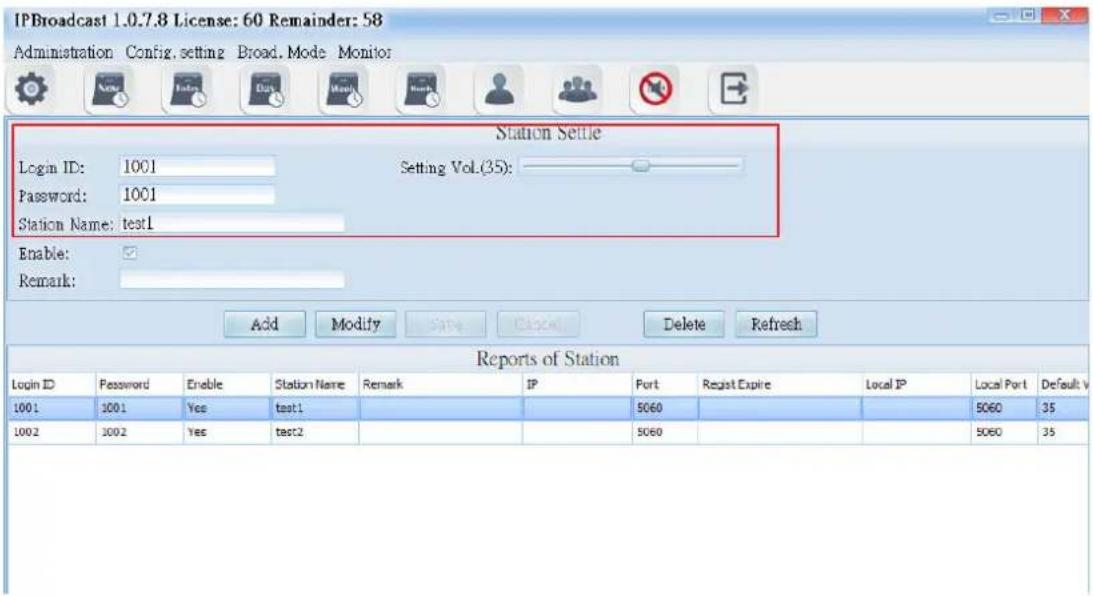
Step 1
Establish a group accounts and passwords registered by broadcast points in the broadcast system, and set the name and volume of the broadcast point
text_image
IPBroadcast 1.0.7.8 License: 60 Remainder: 58 Administration Config, setting Broad, Mode Monitor Station Settle Login ID: 1001 Setting Vol.(35): Password: 1001 Station Name: test1 Enable: Remark: Add Modify Save Cancel Delete Refresh Reports of Station Login ID Password Enable Station Name Remark IP Port Regist Expire Local IP Local Port Default V 1001 1001 Yes test1 1002 1002 Yes test2 5060 5060 5060 5060 5060 5060 5060 5060 5060 5060 5060 5060 5060Step 2
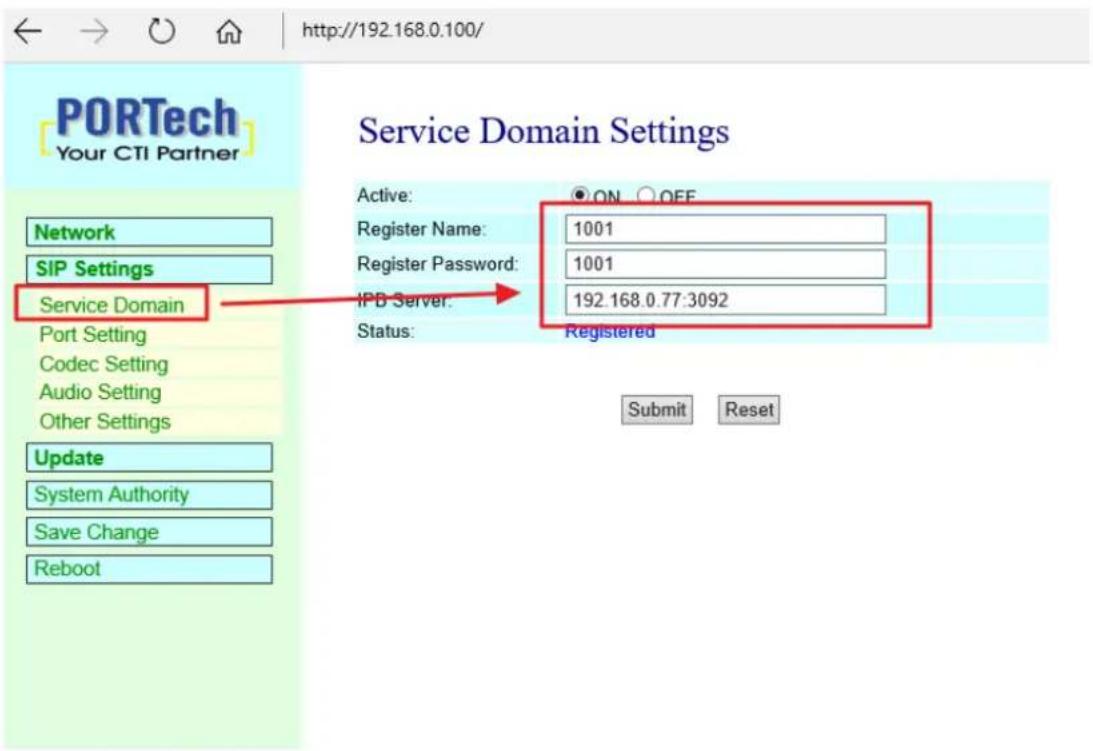
Log in I→Speaker WEB interface, click [SI→Settings]-->[Service Domain] fill the broadcast point account, password, the broadcast system's host I→ and port number in corresponding columns of the program of the broadcast system
text_image
PORTech Your CTI Partner Service Domain Settings Network SIP Settings Service Domain Port Setting Codec Setting Audio Setting Other Settings Update System Authority Save Change Reboot Active: ON OFF Register Name: 1001 Register Password: 1001 IPB Server: 192.168.0.77:3092 Status: Registered Submit ResetStep 3
→ress [Submit]-->[Save Change] until I→Speaker restarts, to register the broadcast system program.
Users can also check the online state of the broadcast point in the broadcast System

text_image
PORTech Your CTI Partner Service Domain Settings Active: ON OFF Register Name: 1001 Register Password: 1001 IPB Server: 192.168.0.77:3092 Status: Registered Submit Reset Network SIP Settings Service Domain Port Setting Codec Setting Audio Setting Other Settings Update System Authority Save Change Reboot5.2. Group Name
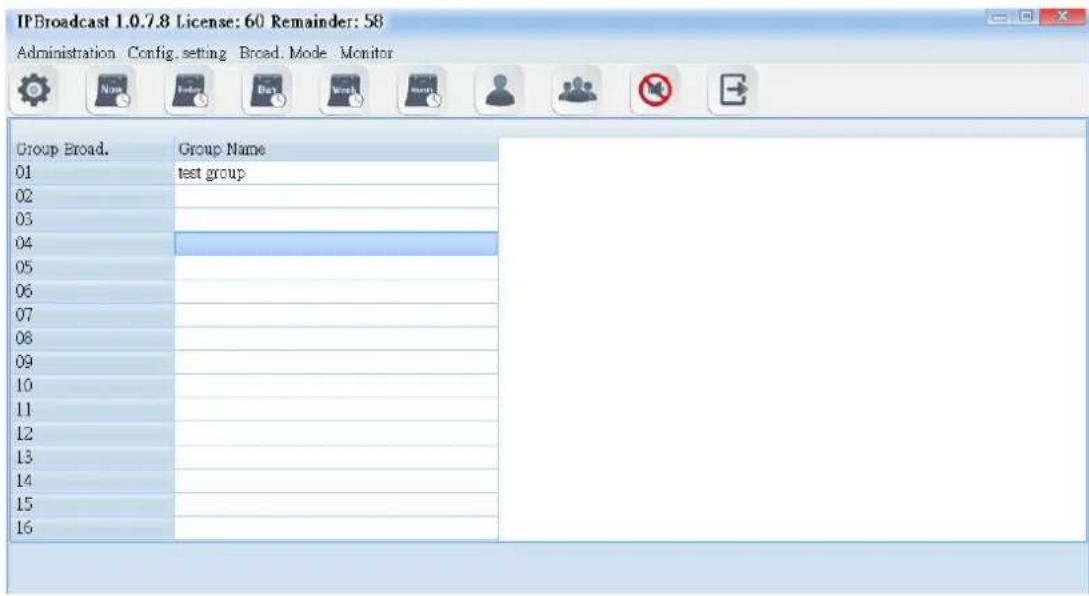
Click [Config.setting]-->[Group Naming]
The system has arranged 16 broadcast groups in advance, thus users can define the name of each broadcast group independently
*** In the following group name page, input the group name in each column according to group code, and then press enter ***
text_image
IPBroadcast 1.0.7.8 License: 60 Remainder: 58 Administration Config. setting Broad. Mode Monitor Group Broad. Group Name 01 test group 02 03 04 05 06 07 08 09 10 11 12 13 14 15 165.3. Group Setting
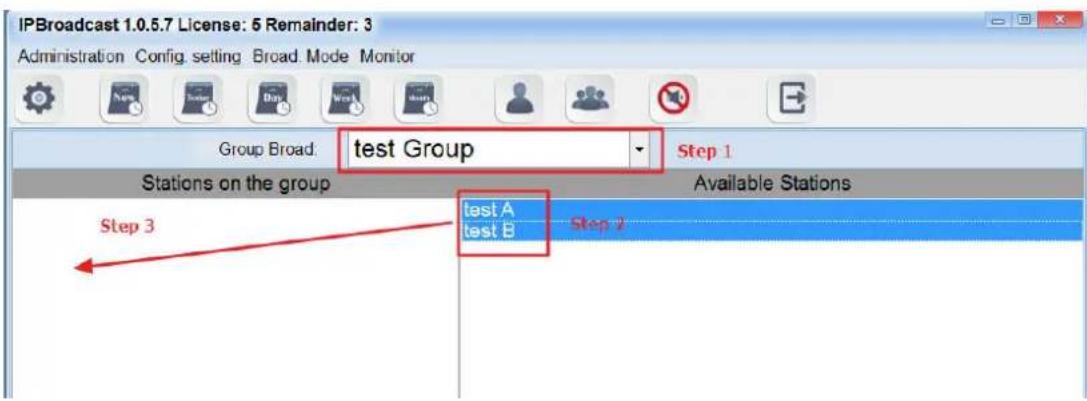
Click [Config.setting]-->[Group Set.]
Steps of editing groups:
Step 1. Select the broadcast group name to be set
Step 2. Select the broadcast group names to be added into the group in the column of broadcast points
Step 3. Select a single or press shift on the keyboard to select multiple broadcast point names, and then press the left key of the mouse and move it to the column of group broadcast points to finish the setting of adding groups to the broadcast points. On the contrary, to delete the existing broadcast points in the group, select them from the group broadcast point column and press the left key of the mouse, and move it to the column of group broadcast points to finish the setting of deleting broadcast points in the group
text_image
IPBroadcast 1.0.5.7 License: 6 Remainder: 3 Administration Config setting Broad Mode Monitor Group Broad: test Group Step 1 Stations on the group Available Stations Step 3 test A test B Step 2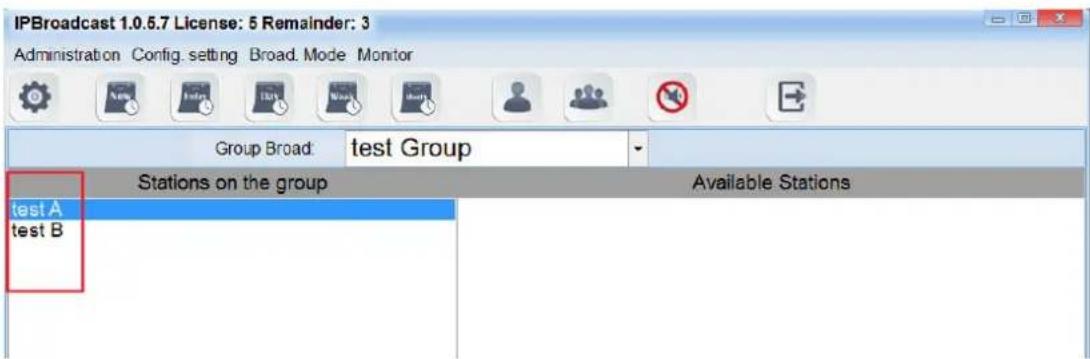
text_image
IPBroadcast 1.0.6.7 License: 5 Remainder: 3 Administration Config. setting Broad. Mode Monitor Group Broad: test Group Stations on the group Available Stations test A test B5.4. Extension Broadcast Setting
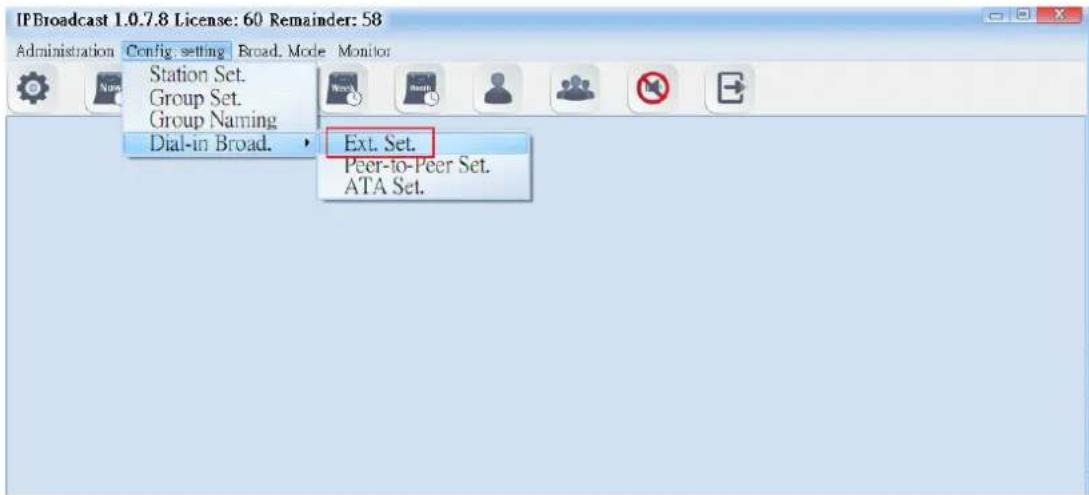
Select [Config.setting]-->[Ext.Set.]
The system can become an extension number of I→IBX through the method for registering I→IBX. Through dialing the extension number from other extensions and via IVR voice interaction, single point or group broadcast function can be executed
text_image
IPBroadcast 1.0.7.8 License: 60 Remainder: 58 Administration Config. setting Broad. Mode Monitor Station Set. Group Set. Group Naming Dial-in Broad. Ext. Set. Peer-to-Peer Set. ATA Set.5.4.1 Display column of registration state

text_image
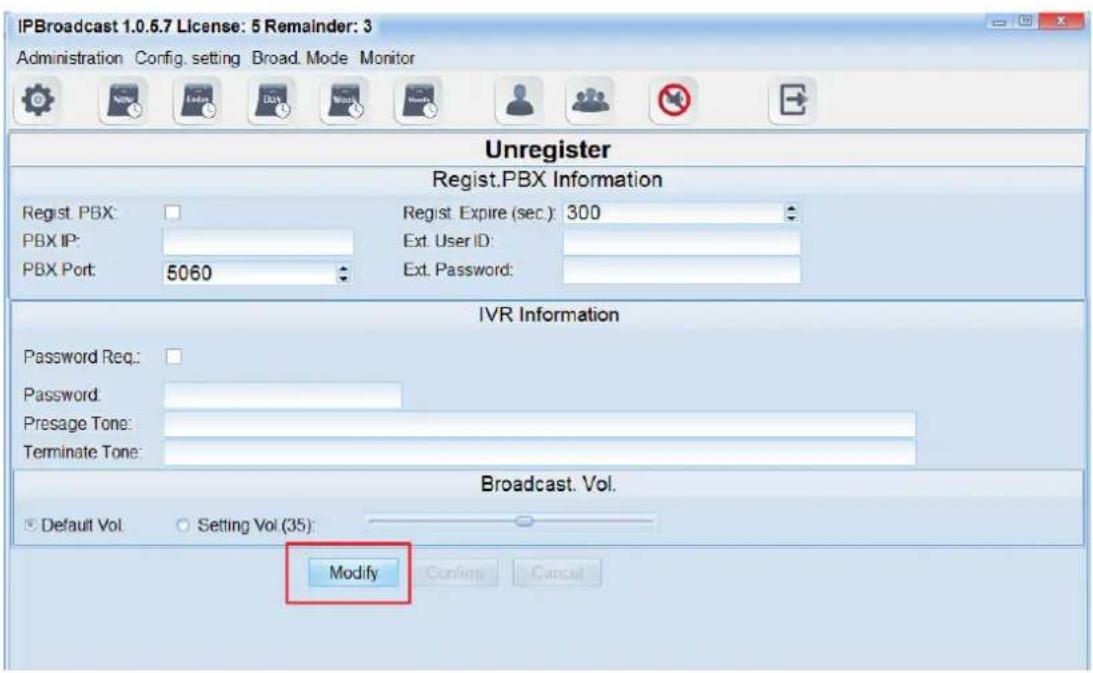
Unregister Regist.PBX Information Regist. PBX: PBX IP: PBX Port: 5060 Regist. Expire (sec.): 300 Ext. User ID: Ext. Password:5.4.2 Login PBX data

text_image
Regist.PBX Information Regist PBX: PBX IP: PBX Port: 5060 Regist Expire (sec): 300 Ext. User ID: Ext. Password:| Column | Specification |
| Regist.→B) | Select whether to register I→→B |
| →BX I- | Set I→ address of I→ IBX to ente |
| →BX →o | Set communication port of I→ IBX to enter; setting is 506i |
| Regist.Expire | →period of system registration I→→BX; setting is 30 |
| Ext.UserID | Set the extension number of I→ IBX to ente |
| Ext.→asswor | Set the extension number of I→ IBX to ente |
5.4.3 Access IVR data

text_image
IVR Information Password Req: Password: Presage Tone: Terminate Tone:| Column | Specification |
| →assword Rec | Select whether the extension broadcast function requires password verification flow |
| →assword | Input the password of the verification flow; the password can only be digits |
| →resage Tone | Select the path storing the prelude sound and file name; the words of the folder names of the sound file and storage path shall have no space, the sound file format is M→3 or WAV |
| Terminate Tone | Select the path and file name of ending sound file storage: the words of the folder names of the sound file |
5.4.4 Broadcast point volume

text_image
Broadcast. Vol. Default Vol. Setting Vol.(35).| Column | Specification |
| Default Vol. | Select the preset volume in establishing the broadcast point |
| Setting Vol. | Select to use the appointed volume; setting range is 64-0 |
*** To change the column data, please press[Modify] to change the data, and then press [Confirm] to execute storage change setting ***
text_image
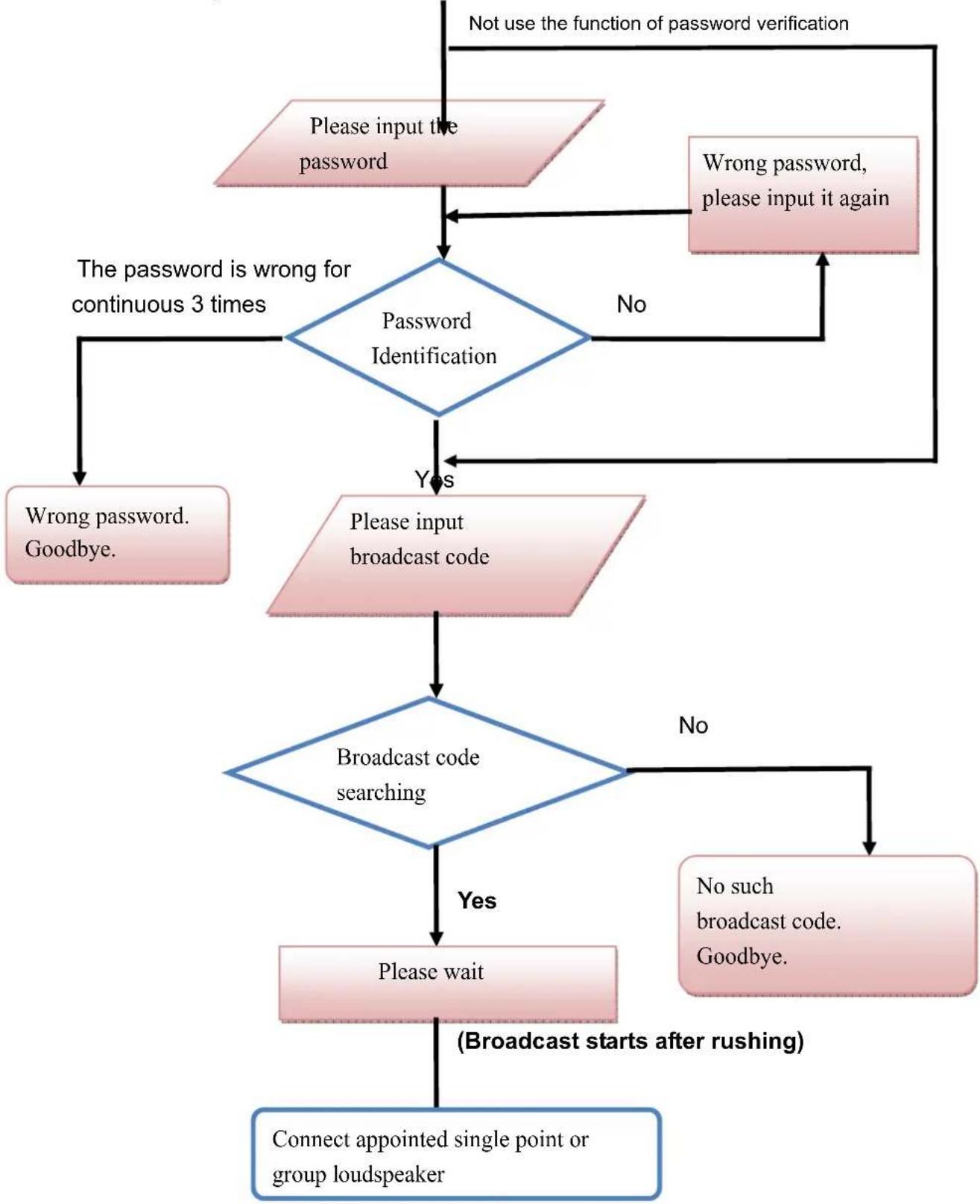
IPBroadcast 1.0.6.7 License: 5 Remainder: 3 Administration Config. setting Broad. Mode Monitor Unregister Regist.PBX Information Regist. PBX: PBX IP: PBX Port: 5060 Regist. Expire (sec): 300 Ext. User ID: Ext. Password: IVR Information Password Req: Password: Presage Tone: Terminate Tone: Broadcast. Vol. Default Vol Setting Vol (35) Modify Confirm Cancel5.4.5 IVR voice interaction flow chart
Extension dial-in, the voice interaction starts after connection
flowchart
graph TD
    A["Please input the password"] --> B{Password Identification}
    B -->|No| C["Wrong password, please input it again"]
    B -->|Yes| D["Wrong password. Goodbye."]
    C --> E{Password is wrong for continuous 3 times}
    D --> F["Please input broadcast code"]
    E --> G{Broadcast code searching}
    F --> G
    G -->|No| H["No such broadcast code. Goodbye."]
    G -->|Yes| I["Please wait"]
    H --> J["(Broadcast starts after rushing)"]
    I --> K["Connect appointed single point or group loudspeaker"]
    J --> L["Not use the function of password verification"]
    K --> L
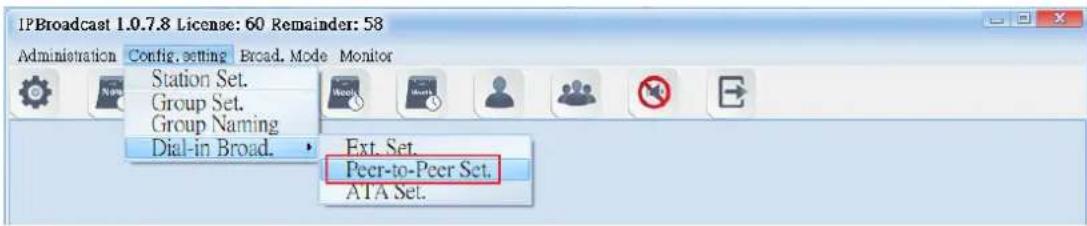
a. Select "Configuration Setting"--> "Dial-in Broadcast"--> "→eer- to- →eer Setting," and broadcast initiators can use the I→ transmission to dial in the broadcast system. After the system verifies the source of I→, it will be extended to assigned single broadcast point or group.
Example:
Set the SI→ trunck through the I→ switchboard and send the assigned speaker codes and broadcast system I→ to broadcast system. After the system verifies the I→, the speaker can get connected. The broadcast initiators can begin to broadcast after hearing the beep.
text_image
IPBroadcast 1.0.7.8 License: 60 Remainder: 58 Administration Config. setting Broad. Mode Monitor Station Set. Group Set. Group Naming Dial-in Broad. Ext. Set. Peer-to-Peer Set. ATA Set.b. Setting Specification
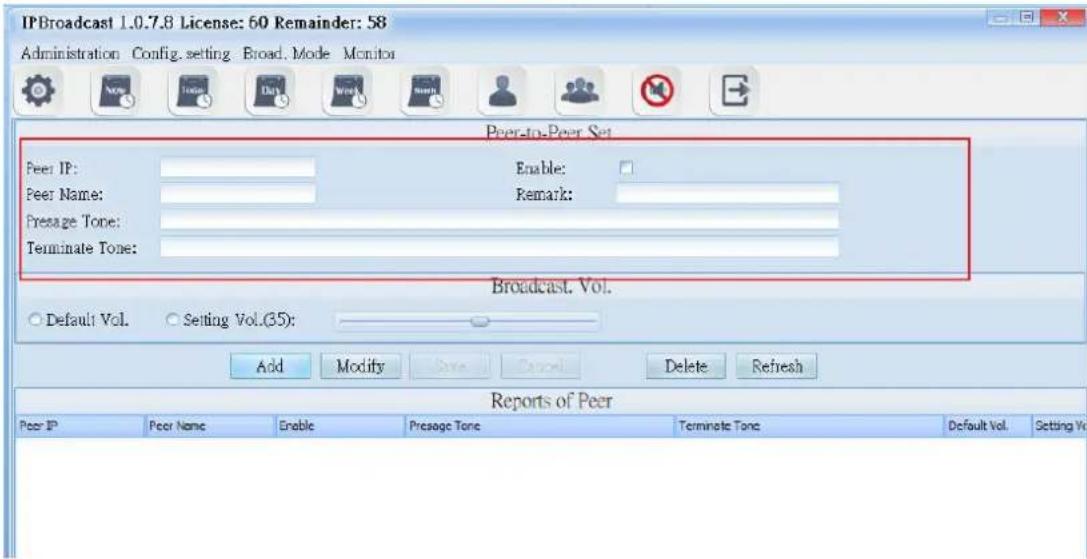
text_image
IPBroadcast 1.0.7.8 License: 60 Remainder: 58 Administration Config. setting Broad. Mode Monitor Peer-to-Peer Set Peer IP: Enable: Peer Name: Remark: Presage Tone: Terminate Tone: Broadcast. Vol. Default Vol. Setting Vol.(35): Add Modify Save Cancel Delete Refresh Reports of Peer Peer IP Peer Name Enable Presage Tone Terminate Tone Default Vol. Setting Vol.| Column | Specification |
| →eer I- | Set the dial-in I→ Address for system's verifying. |
| →eer Name | Set the name of the dial-in side. |
| →resage Tone | Select the names of storage paths and files of the presag tone; the sound format is M→3or WAV. |
| Terminate Tone | Select the names of storage pathsand files of the terminate tone; sound format is M→3or WAV. |
| Enable | Select whether the schedule is enable or not; the default enable. |
| Remark | Input the remark data. |
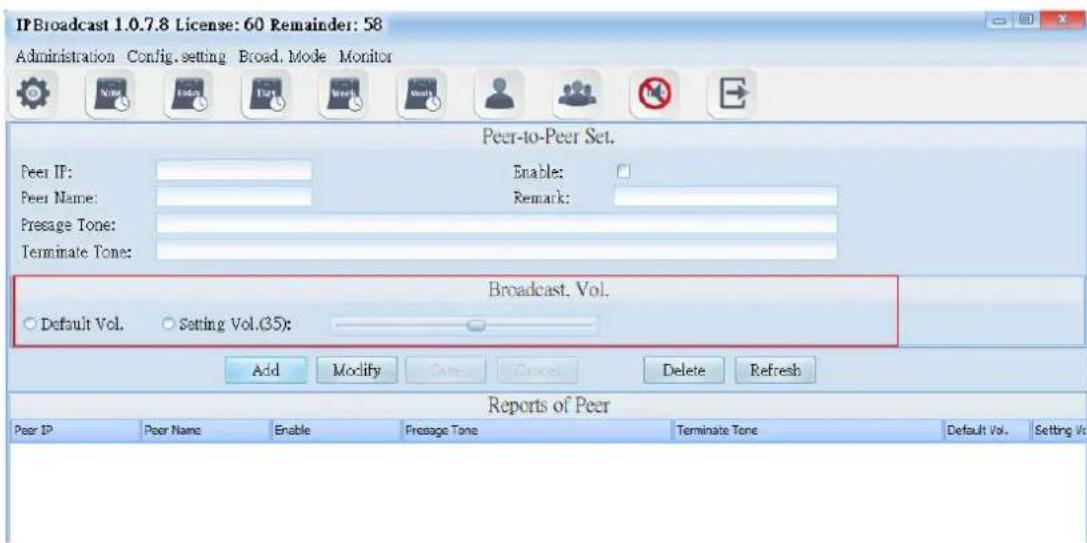
text_image
IPBroadcast 1.0.7.8 License: 60 Remainder: 58 Administration Config. setting Broad. Mode Monitor Peer-to-Peer Set. Peer IP: Enable: Peer Name: Remark: Presage Tone: Terminate Tone: Broadcast. Vol. Default Vol. Setting Vol.(35): Add Modify Save Delete Refresh Reports of Peer Peer IP Peer Name Enable Presage Tone Terminate Tone Default Vol. Setting Vo| Column | Specification |
| Default Volume | Select the default volume when the broadcast point is established |
| Setting Volumn | Select the setting volume: the setting range is from 64~0 |
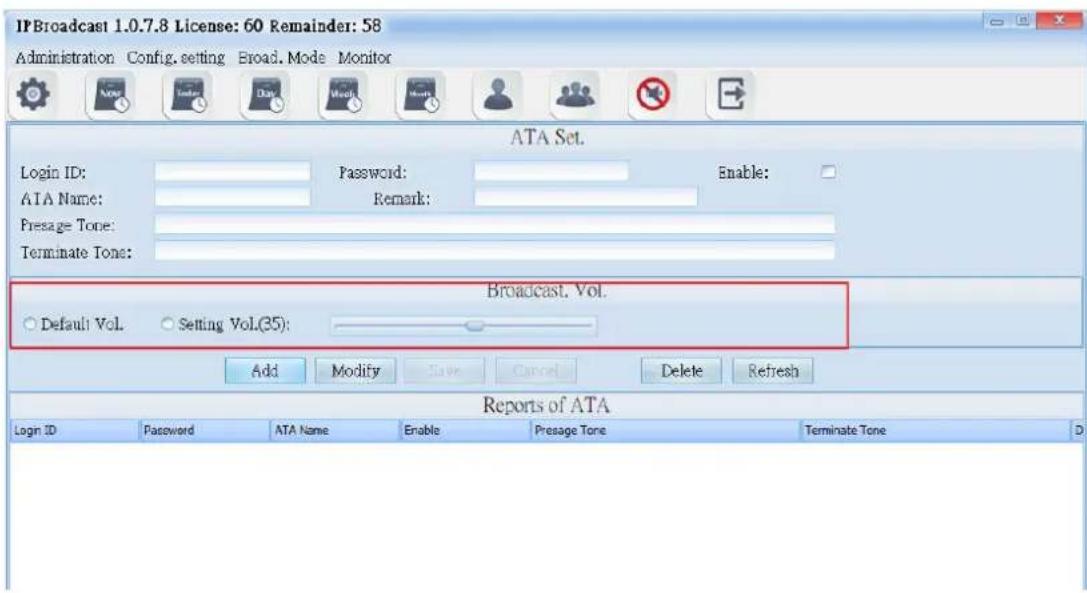
c. ATA Setting
(1) Select "Dial-in Broadcast" → "ATA Setting"
Through the method of registration, the broadcast initiators can be transmitted to the assigned single broadcast point or group after the system verify the accounts and passwords.
Example1:
Through the IP switchboard to set IP exterior line and to register the broadcast system, you can catch the assigned exterior dial-in single speaker codes or group codes to connect the speakers by any extensions under the switchboard. The initiators can begin to broadcast after hearing the beep.
Example 2:
Use one IP phone to register the broadcast system. After registering, you can take the phone directly and dial single speaker codes or group codes to connect the speaker. The initiators can begin to broadcast after hearing the beep.
Example 3:
Use one ATA gateway to register the broadcast system and then connect to the traditional phone. Later, you can take the phone directly and dial single speaker codes or group codes to connect the speaker. The initiators can begin to broadcast after hearing the beep.
Example 4:
Use one ATA gateway to register the broadcast system and connect to the FXO which is assigned by the traditional switchboard. You can catch assigned exterior dial-in single speaker codes or group codes to connect the speakers by any extensions under the switchboard. The initiators can begin to broadcast after hearing the beep.
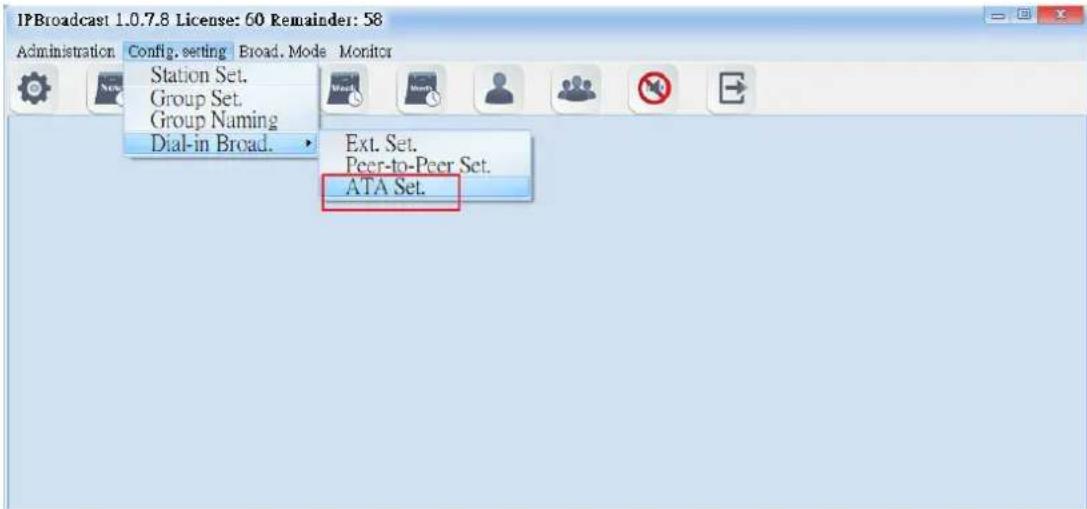
text_image
IPBroadcast 1.0.7.8 License: 60 Remainder: 58 Administration Config. setting Broad. Mode Monitor Station Set. Group Set. Group Naming Dial-in Broad. Ext. Set. Peer-to-Peer Set. ATA Set.(2).Setting Specification
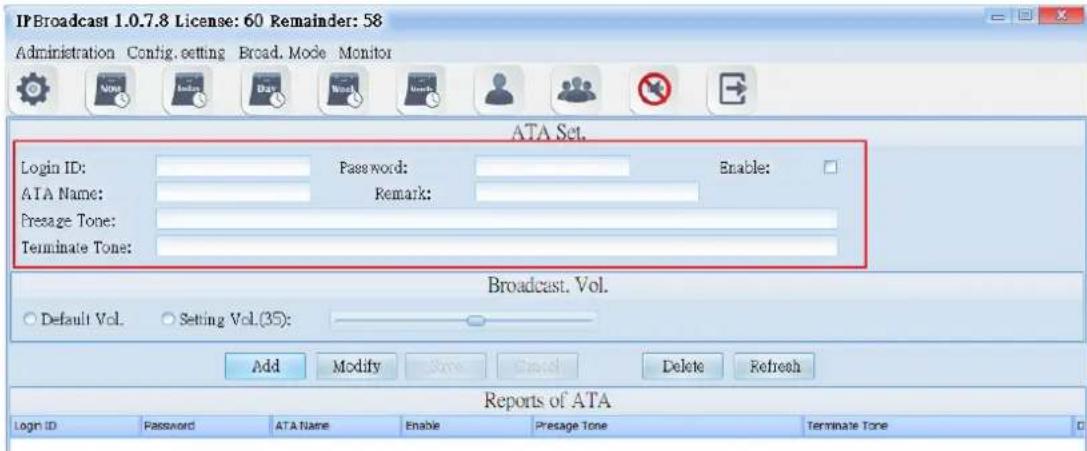
text_image
IPBroadcast 1.0.7.8 License: 60 Remainder: 58 Administration Config. setting Broad. Mode Monitor ATA Set. Login ID: Password: Enable: ATA Name: Remark: Presage Tone: Terminate Tone: Broadcast. Vol. Default Vol. Setting Vol.(35): Add Modify Save Cancel Delete Refresh Reports of ATA Logn ID Password ATA Name Enable Presage Tone Terminate Tone| Column | Specification |
| Login ID | Set the accounts for the IP phone or ATA gateway to verify the login. |
| Password | Set the passwords for the IP phone or ATA gateway to verify the login. |
| ATA Name | Set the dial-in name. |
| Presage Tone | Select the names of storage paths and files of the presage tone; the sound format is MP3or WAV. |
| Terminate Tone | Select the names of storage paths and files of the terminate tone; sound format is MP3or WAV. |
| Enable | select whether to enable this schedule; it is enabled by default |
| Remark | input remarks |
text_image
JPBroadcast 1.0.7.8 License: 60 Remainder: 58 Administration Config. setting Broad. Mode Monitor ATA Set. Login ID: Password: Enable: ATA Name: Remark: Presage Tone: Terminate Tone: Broadcast. Vol. Default Vol. Setting Vol.(35): Add Modify Save Cancel Delete Refresh Reports of ATA Login ID Password ATA Name Enable Presage Tone Terminate Tone| Column | Specification |
| Default Volume | Select the default volume when the broadcast point is established. |
| Setting Volume | Select the setting volume; the setting range is from 64~0. |
6. Broadcast Mode
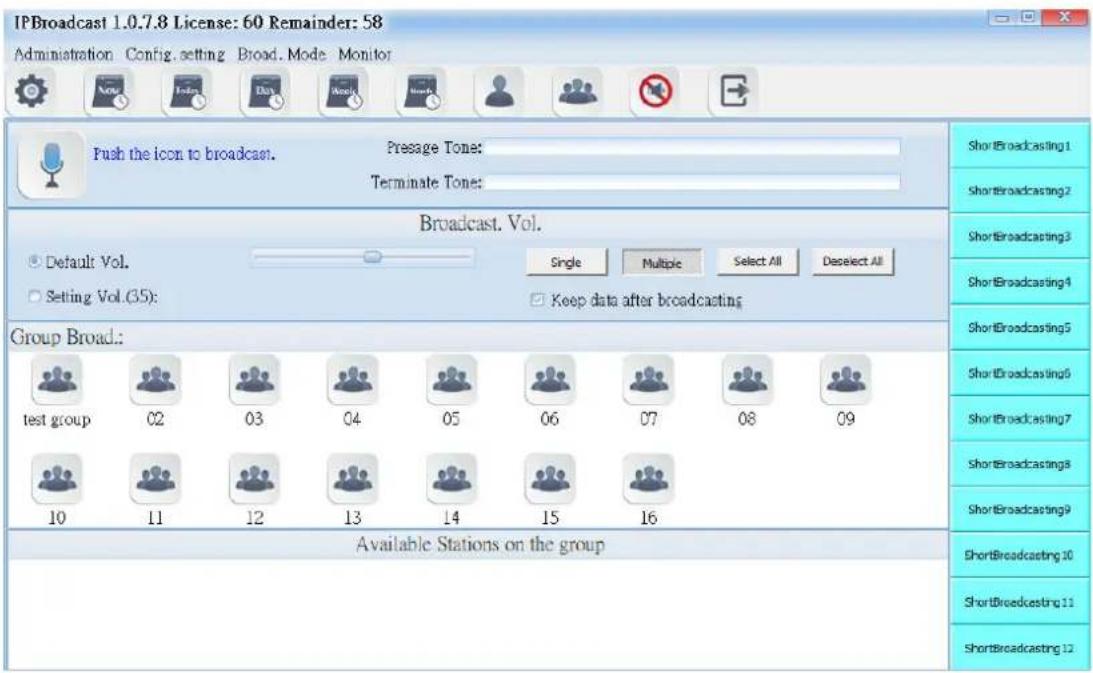
6.1. Group Broadcast
Select [Broad.Mode]-->[Group Broad.]
Users can conduct broadcast to a single or multiple groups
text_image
IPBroadcast 1.0.7.8 License: 60 Remainder: 58 Administration Config. setting Broad. Mode Monitor Push the icon to broadcast. Presage Tone: Terminate Tone: Broadcast. Vol. Default Vol. Single Multiple Select All Deselect All Setting Vol.(35): Keep data after broadcasting Group Broad.: test group 02 03 04 05 06 07 08 09 10 11 12 13 14 15 16 Available Stations on the group Short Broadcasting 1 Short Broadcasting 2 Short Broadcasting 3 Short Broadcasting 4 Short Broadcasting 5 Short Broadcasting 6 Short Broadcasting 7 Short Broadcasting 8 Short Broadcasting 9 Short Broadcasting 10 Short Broadcasting 11 Short Broadcasting 126.1.1 Broadcast startup diagram and sound file setting
text_image
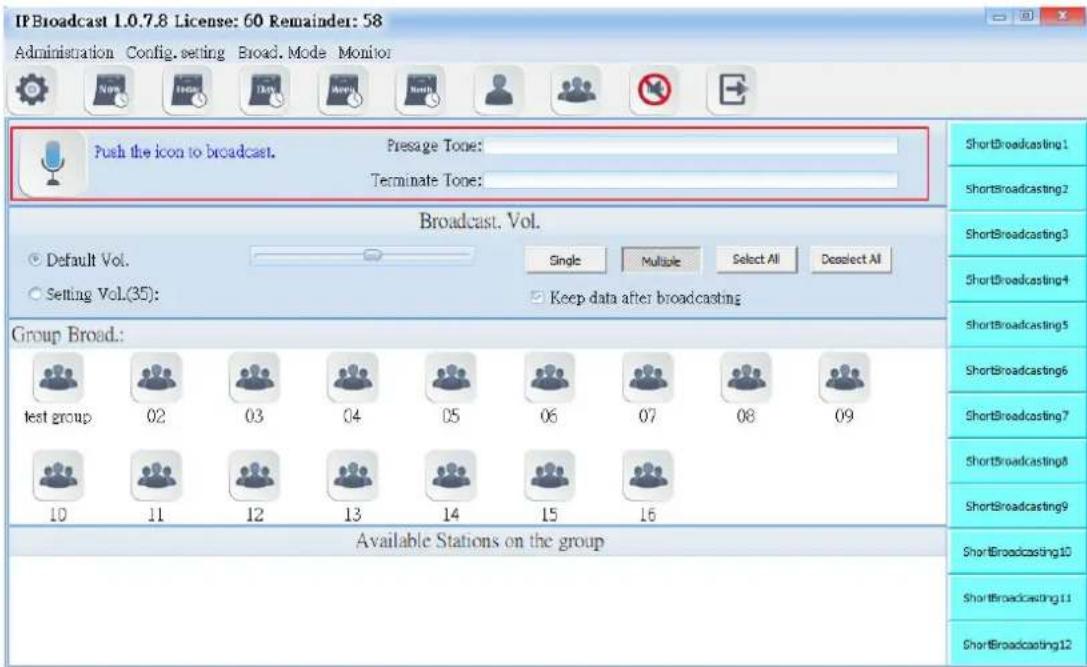
IF Broadcast 1.0.7.8 License: 60 Remainder: 58 Administration Config. setting Broad. Mode Monitor Push the icon to broadcast. Presage Tone: Terminate Tone: Broadcast. Vol. Default Vol. Setting Vol.(35): Single Multiple Select All Doselect All Keep data after broadcasting Group Broad.: test group 02 03 04 05 06 07 08 09 10 11 12 13 14 15 16 Available Stations on the group ShortBroadcasting1 ShortBroadcasting2 ShortBroadcasting3 ShortBroadcasting4 ShortBroadcasting5 ShortBroadcasting6 ShortBroadcasting7 ShortBroadcasting8 ShortBroadcasting9 ShortBroadcasting10 ShortBroadcasting11 ShortBroadcasting12 | Group broadcast startup diagram | ||
| Broadcast point connecting diagram | |||
| Diagram of being able to start broadcast | |||
| →resage Tone | Select the path storing the prelude sound and file name;the words of the folder names of the sound file andstorage path shall have no space, the sound file format is M→3 or WAV | ||
| Terminate Tone | Select the path and file name of ending sound file storage; the words of the folder names of the sound file and storage path shall have no space, the sound file format is M→3 or WAV | ||
6.1.2 Broadcast Point Volume
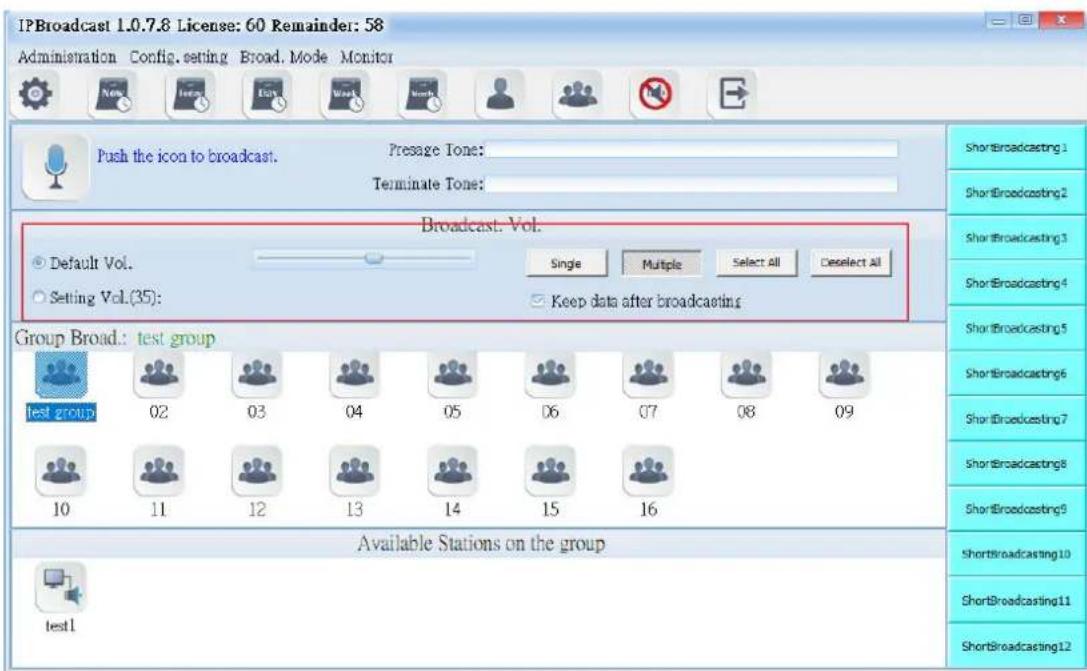
Set the broadcast point volume of group broadcast to be preset volume or the user's appointed volume (setting range is 64\~0)
text_image
IPBroadcast 1.0.7.8 License: 60 Remainder: 58 Administration Config. setting Broad. Mode Monitor Push the icon to broadcast. Pressage Tone: Terminate Tone: Broadcast. Vol. Default Vol. Single Multiple Select All Deselect All Setting Vol.(35): Keep data after broadcasting Group Broad.: test group test group 02 03 04 05 06 07 08 09 10 11 12 13 14 15 16 Available Stations on the group test1 ShortBroadcasting1 ShortBroadcasting2 ShortBroadcasting3 ShortBroadcasting4 ShortBroadcasting5 ShortBroadcasting6 ShortBroadcasting7 ShortBroadcasting8 ShortBroadcasting9 ShortBroadcasting10 ShortBroadcasting11 ShortBroadcasting12| Column | Specification |
| Default Vol. | Select the preset volume when the user's broadcast point is established |
| Setting Vol. | Select the user's appointed volume; the setting range is 64-0 |
6.1.3 Broadcast Group
The system has arranged 16 groups in advance. Users can press [Single] or [Multiple] to select the needed group diagram according to the mode
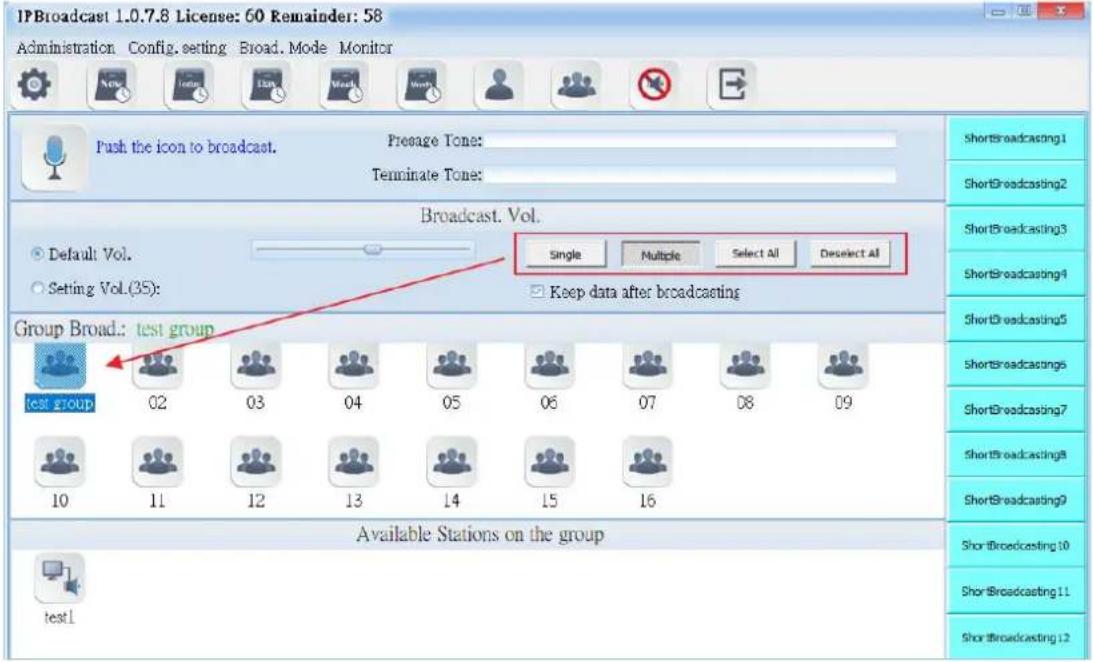
text_image
IPBroadcast 1.0.7.8 License: 60 Remainder: 58 Administration Config. setting Broad. Mode Monitor Push the icon to broadcast. Presage Tone: Terminate Tone: Broadcast. Vol. Default Vol. Setting Vol.(35): Single Multiple Select All Deselect All Keep data after broadcasting Group Broad.: test group test group 02 03 04 05 06 07 08 09 10 11 12 13 14 15 16 Available Stations on the group test1 ShortBroadcasting1 ShortBroadcasting2 ShortBroadcasting3 ShortBroadcasting4 ShortBroadcasting5 ShortBroadcastings ShortBroadcasting7 ShortBroadcastings8 ShortBroadcasting9 ShortBroadcasting10 ShortBroadcasting11 ShortBroadcasting126.1.4 Broadcast Point Available for Group
It shows that the selected group bottom has registered online broadcast point names at present. The broadcast points not registered are not shown
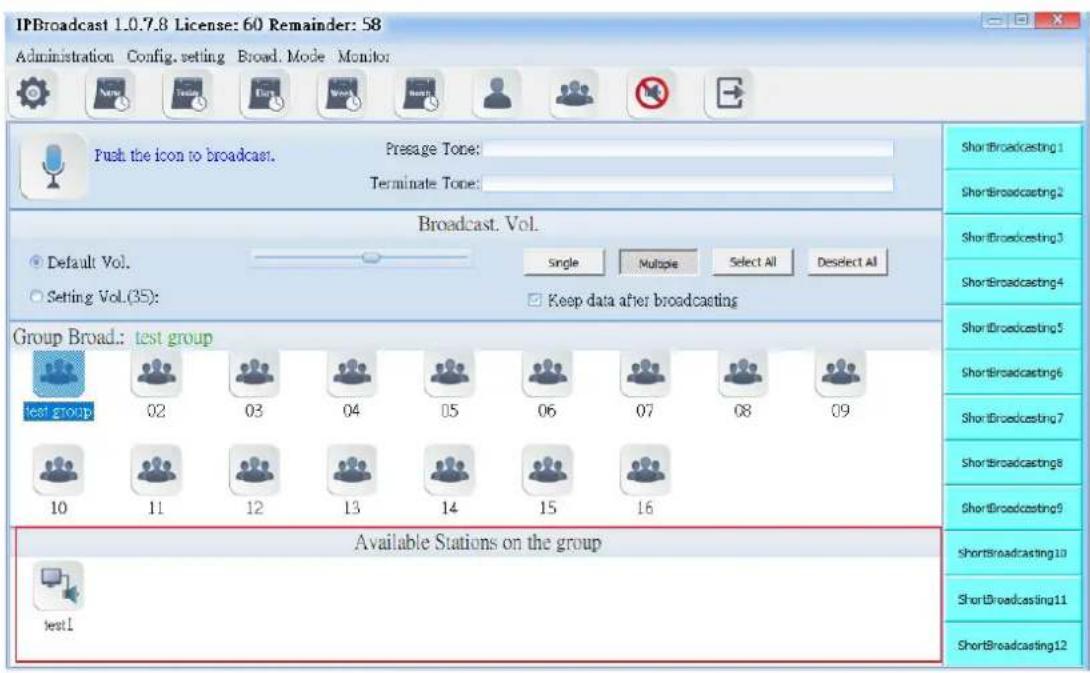
text_image
IPBroadcast 1.0.7.8 License: 60 Remainder: 58 Administration Config. setting Broad. Mode Monitor Push the icon to broadcast. Presage Tone: Terminate Tone: Broadcast. Vol. Default Vol. Single Multiple Select All Deselect All Setting Vol.(35): Keep data after broadcasting Group Broad.: test group test group 02 03 04 05 06 07 08 09 10 11 12 13 14 15 16 Available Stations on the group test1 ShortBroadcasting1 ShortBroadcasting2 ShortBroadcasting3 ShortBroadcasting4 ShortBroadcasting5 ShortBroadcasting6 ShortBroadcasting7 ShortBroadcasting8 ShortBroadcasting9 ShortBroadcasting10 ShortBroadcasting11 ShortBroadcasting12Using steps of group broadcast
Step 1. Set the path of prelude sound file or ending sound file and volume of the broadcast point
Step 2. →ress [Single] or [Multiple]
Step 3. Select the required group according to the selected mode
Step 4. →ress to start group broadcast, wait until occurs, start
broadcast (if the sound card of C is connected with a loudspeaker, it
will have rushing sound synchronously when occurs); repress to end broadcast

text_image
IPBroadcast 1.0.7.8 License: 60 Remainder: 58 Administration Config setting Broad Mode Monitor Push the icon to broadcast. Presage Tone: Terminate Tone: step 1 step 4 Broadcast. Vol. Default Vol. Setting Vol.(35): Single Multiple Select All Deselect All Keep data after broadcasting step 2 Group Broadcast: test group test group 02 step 3 04 05 06 07 08 09 10 11 12 13 14 15 16 Available Stations on the group test1 ShortBroadcasting1 ShortBroadcasting2 ShortBroadcasting3 ShortBroadcasting4 ShortBroadcasting5 ShortBroadcasting6 ShortBroadcasting7 ShortBroadcasting8 ShortBroadcasting9 ShortBroadcasting10 ShortBroadcasting11 ShortBroadcasting126.2. Single Point Broadcast
Select [Broad.Mode]-->[Station Broad.]
Users can conduct broadcast to a single or multiple broadcast points
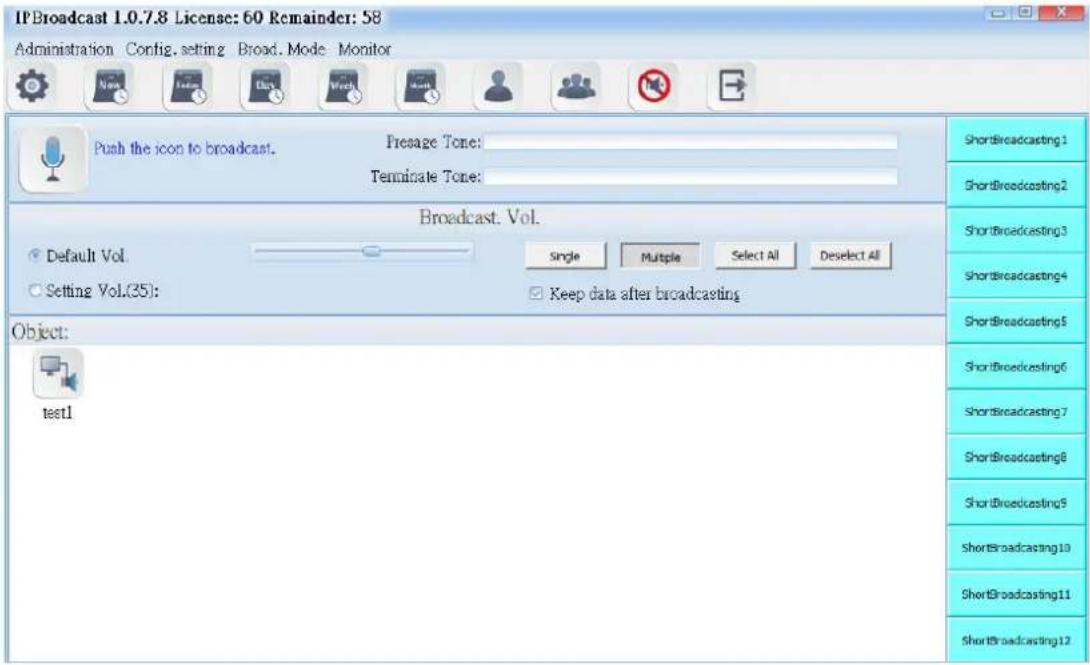
text_image
IPBroadcast 1.0.7.8 License: 60 Remainder: 58 Administration Config. setting Broad. Mode Monitor Push the icon to broadcast. Presage Tone: Terminate Tone: Broadcast. Vol. Default Vol. Setting Vol.(35): Single Multiple Select All Deselect All Keep data after broadcasting Object: test1 ShortBroadcasting 1 ShortBroadcasting 2 ShortBroadcasting 3 ShortBroadcasting 4 ShortBroadcasting 5 ShortBroadcasting 6 ShortBroadcasting 7 ShortBroadcasting 8 ShortBroadcasting 9 ShortBroadcasting 10 ShortBroadcasting 11 ShortBroadcasting 126.2.1 Broadcast Startup Diagram and Sound File Setting
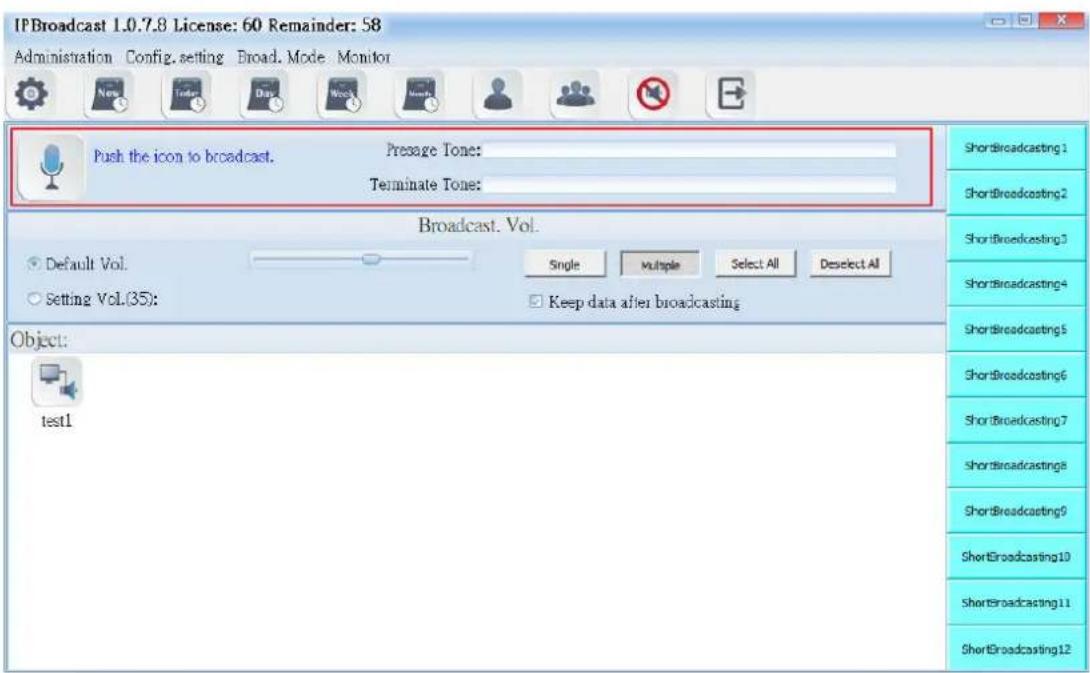
text_image
IPBroadcast 1.0.7.8 License: 60 Remainder: 58 Administration Config. setting Broad. Mode Monitor Push the icon to broadcast. Presage Tone: Terminate Tone: Broadcast. Vol. Default Vol. Setting Vol.(35): Single Multiple Select All Deselect All Keep data after broadcasting Object: test1 ShortBroadcasting 1 ShortBroadcasting 2 ShortBroadcasting 3 ShortBroadcasting 4 ShortBroadcasting 5 ShortBroadcasting 6 ShortBroadcasting 7 shortbroadcastings ShortBroadcasting 8 ShortBroadcasting 9 ShortBroadcasting 10 ShortBroadcasting 11 ShortBroadcasting 12| Startup key diagram of single point broadcast | |
 | Connecting diagram of broadcast point |
| The diagram of being able to start the broadcast point | |
| →resage Tone | Select the path storing the prelude sound and file name; the words of the folder names of the sound file and storage path shall have no space, the sound file format is M→3 or WAV |
| Terminate Tone | Select the path and file name of ending sound file storage; the words of the folder names of the sound file and storage path shall have no space, the sound file format is M→3 or WAV |
6.2.2 Broadcast Point Volume
Set the single point broadcast volume to be preset volume or the user's appointed volume (setting range is 64-0)

text_image
IPBroadcast 1.0.7.8 License: 60 Remainder: 58 Administration Config, setting Broad, Mode Monitor Push the icon to broadcast. Presage Tone: Terminate Tone: Broadcast Vol. Default Vol. Setting Vol.(35): Single Multiple Select All Deselect All Keep data after broadcasting Object: test1 ShortBroadcasting 1 ShortBroadcasting 2 ShortBroadcasting 3 ShortBroadcasting 4 ShortBroadcasting 5 ShortBroadcasting 6 ShortBroadcasting 7 ShortBroadcasting 8 ShortBroadcasting 9 ShortBroadcasting 10 ShortBroadcasting 11 ShortBroadcasting 12| Column | Specification |
| Default Vd. | Select the preset volume when the broadcast point is established |
| Setting Vol. | Select to use the appointed volume; setting range is 64-0 |
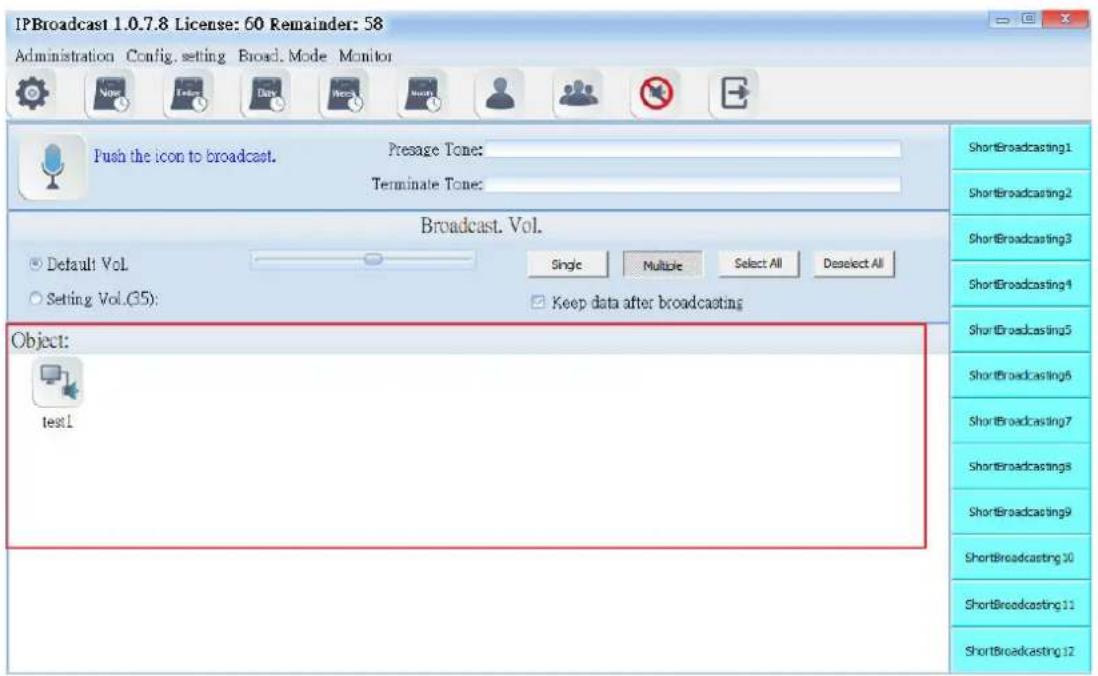
6.2.3 Broadcast Object
It shows that the selected group bottom has registered online broadcast point names at present. The broadcast points not registered are not shown
text_image
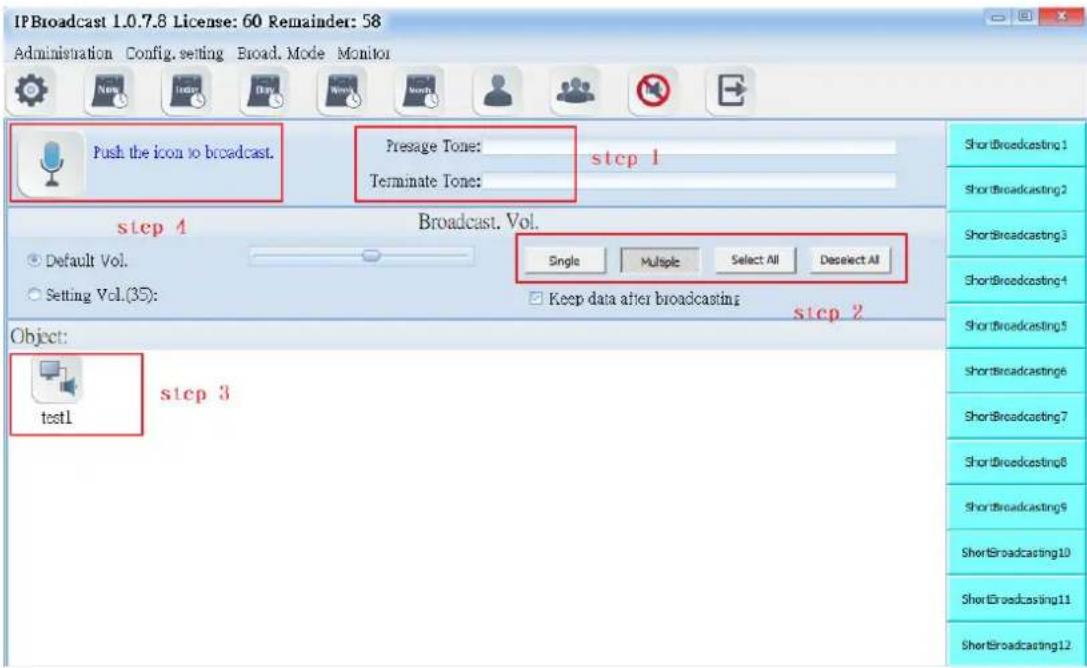
IPBroadcast 1.0.7.8 License: 60 Remainder: 58 Administration Config. setting Broad Mode Monitor Push the icon to broadcast. Presage Tone: Terminate Tone: Broadcast. Vol. Default Vol. Setting Vol.(35): Single Multiple Select All Deselect All Keep data after broadcasting Object: test1 ShortBroadcasting1 ShortBroadcasting2 ShortBroadcasting3 ShortBroadcasting4 ShortBroadcasting5 ShortBroadcasting6 ShortBroadcasting7 ShortBroadcastings ShortBroadcasting9 ShortBroadcasting10 ShortBroadcasting11 ShortBroadcasting12Using steps of a single point broadcast
Step 1. Set the path of prelude sound file or ending sound file and volume of the broadcast point
Step 2. →ress [Single] or [Multiple]
Step 3. Select the required broadcast point according to the selected mode
Step 4. →ress to start group broadcast, wait until occurs, start broadcast (if the sound card of →C is connected with a loudspeaker, it
will have rushing sound synchronously when (occurs); repress to end broadcast
text_image
IPBroadcast 1.0.7.8 License: 60 Remainder: 58 Administration Config. setting Broad. Mode Monitor Push the icon to broadcast. Presage Tone: step 1 Terminate Tone: step 4 Broadcast. Vol. Default Vol. Setting Vol.(35): Single Multiple Select All Deselect All Keep data after broadcasting step 2 Object: test1 step 3 ShortBroadcasting 1 ShortBroadcasting 2 ShortBroadcasting 3 ShortBroadcasting 4 ShortBroadcasting 5 ShortBroadcasting 6 ShortBroadcasting 7 ShortBroadcasting 8 ShortBroadcasting 9 ShortBroadcasting 10 ShortBroadcasting 11 ShortBroadcasting 126.3.Broadcast Record
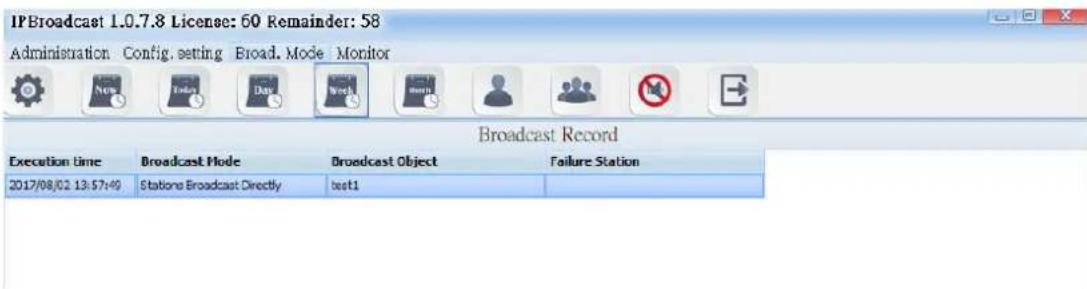
Click "Broadcast Mode"--> "Broadcast Record"
Broadcast system will record the broadcast process, including the broadcast time, broadcast mode, broadcast object, and failure stations. The failure station is the failed connection of the broadcast point in the system.
text_image
IPBroadcast 1.0.7.8 License: 60 Remainder: 58 Administration Config. setting Broad. Mode Monitor Broadcast Record Execution time Broadcast Mode Broadcast Object Failure Station 2017/08/02 13:57:49 Stations Broadcast Directly test1If you want to delete the records, you can click single button or press down the "Shift" button to select multiple records and then press the "Delete Logs" button below the screen to finish the process of deleting logs.
If you want to export the record to the files, press the "export record" button below the screen and select the place where to store the files. After finishing the action of exporting files, which has the filename extension. CSV, you can open them in the normal text files.
6.4. Schedule Broadcast
Click "Broadcast Mode"--> "Schedule Broadcast"--> "Schedule Summary." Schedule summary will record all the schedules which have already been set.

text_image
IPBroadcast 1.0.7.8 License: 60 Remainder: 58 Administration Config. setting Broad. Mode Monitor Schedule Summary Schedule No Schedule Type scheduled To Broadcast. Object Broadcast. Source test On Mondays,Tuesdays,Wednesdays,Thursdays,Firdays,Saturdays,Sundays 09:04:30 test group Identity Contents:C:\test.mp3 Refresh6.5. Monthly Schedule
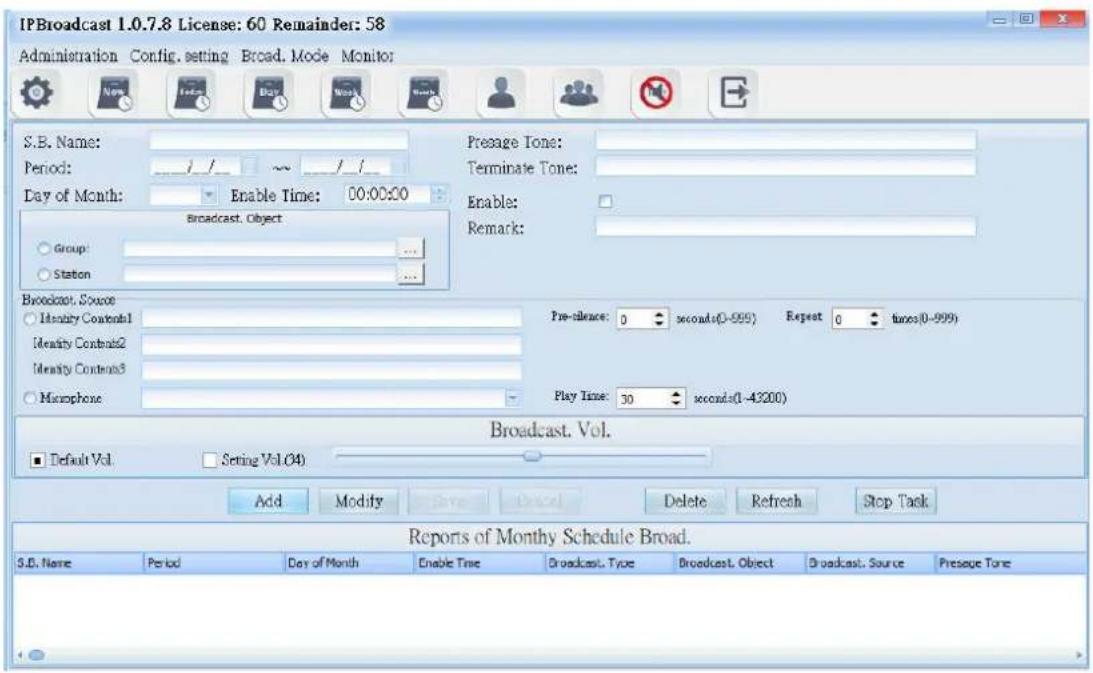
Select [Broad.Mode] -->[ Scheduled broadcasts]--> [Monthly Schedule] Users can arrange a single execution day in every month, to conduct broadcast to a single or group broadcast points. The broadcast source can be sound file or external sound source
text_image
IPBroadcast 1.0.7.8 License: 60 Remainder: 58 Administration Config. setting Broad. Mode Monitor S.B. Name: Period: ______/__/__/__/__/__/__/__/__/__/__/__/__/__/__/__/__/__/__/__/__/__/__/__/__/__/__/__/__/__/__/__/__/__/__/__/__/__/__/__/__/__/__/__/__/__/__/__/__/__/__/__/__/__/__/__/__/__/__/__/__/__/__/__/__/__/__/__/__/__/__/__/__/__/__/__/__/__/__/__/__/__/__/__/__/__/__/__/__/__/__/__/__/__/__/__/__/__/__/__/__/cular Day of Month: Enable Time: 00:00:00 Broadcast. Object Group: ... Station ... Broadcast. Source Identity Content1 Identity Content2 Identity Content3 Macphone Pre-silence: 0 seconds(0-999) Repeat 0 times(0-999) Play Time: 30 seconds(0-43200) Broadcast. Vol. Default Vol Setting Vol.(4) Add Modify Save Delete Refresh Stop Task Reports of Monthly Schedule Broad. S.D. Name Period Day of Month Enable Time Broadcast. Type Broadcast. Object Broadcast. Source Pressure Tone6.5.1 Schedule Date and Prelude/Ending Sound Setting
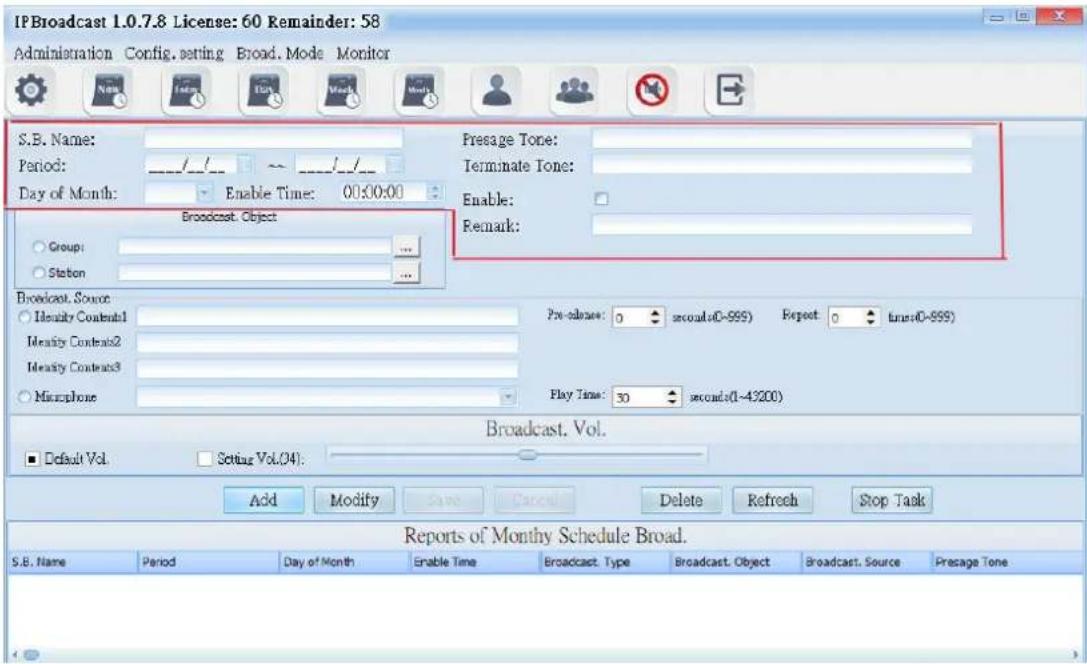
text_image
IPBroadcast 1.0.7.8 License: 60 Remainder: 58 Administration Config. setting Broad. Mode Monitor S.B. Name: Period: ______/__/__/__/__/__/__/__/__/__/__/__/__/__/__/__/__/__/__/__/__/__/__/__/__/__/__/__/__/__/__/__/__/__/__/__/__/__/__/__/__/__/__/__/__/__/__/__/__/__/__/__/__/__/__/__/__/__/__/__/__/__/__/__/__/__/__/__/__/__/__/__/__/__/__/__/__/__/__/__/__/__/__/__/__/__/__/__/__/__/__/__/__/__/__/__/__/__/__/__/__/cular Day of Month: Enable Time: 00:00:00 Broadcast. Object Group: .... Station ... Broadcast. Source Identity Contents1 Identity Contents2 Identity Contents3 Mixture Pre-release: 0 seconds(0-999) Repeat: 0 true(0-999) Play Time: 30 seconds(0-43200) Broadcast. Vol. Default Vol Setting Vol.(24): Add Modify Save Cancel Delete Refresh Stop Task Reports of Monthly Schedule Broad. S.B. Name Period Day of Month Enable Time Broadcast. Type Broadcast. Object Broadcast. Source Presage Tone| Column | Specification |
| S.B.Name | Input the schedule name to be established |
| →erioc | Select the effective starting and ending dates of the schedule |
| Day of Month | Select the date of each month to execute the schedule |
| Enable Time | Input the schedule's execution time; the time is 24-hour system |
| →resage Ton | Select the path storing the prelude sound and file name; the words of the folder names of the sound file and storage path shall have no space, the sound file format is M→3 or WAV |
| Terminate Tone | Select the path and file name of ending sound file storage; the words of the folder names of the sound file and storage path shall have no space, the sound file |
6.5.2 Broadcast Object Setting
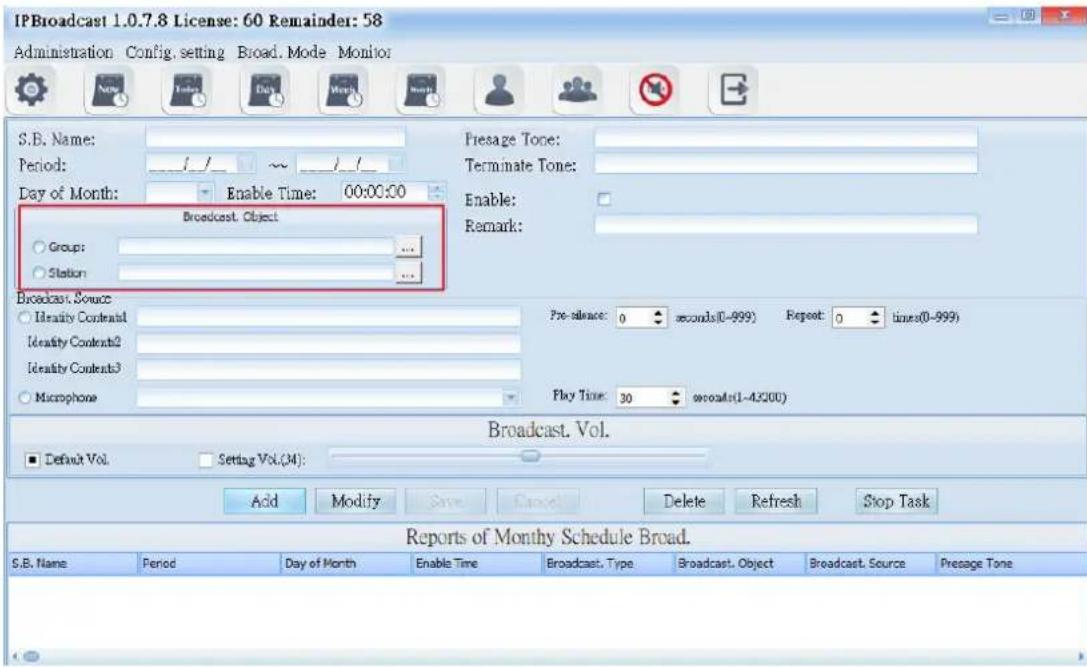
text_image
IPBroadcast 1.0.7.8 License: 60 Remainder: 58 Administration Config, setting Broad, Mode Monitor S.B. Name: Period: _/_/ _ ~ _/_/ Day of Month: Enable Time: 00:00:00 Broadcast Object Group: ... Station: ... Presage Tone: Terminate Tone: Enable: Remark: Broadcast Source Identity Contents1 Identity Contents2 Identity Contents3 Microphone Pre-reliance: 0 seconds(0-999) Repeat: 0 times(0-999) Play Time: 30 seconds(1-4.5200) Broadcast. Vol. Default Vol. Setting Vol.(M): Add Modify Save Cancel Delete Refresh Stop Task Reports of Monthly Schedule Broad. S.B. Name Period Day of Month Enable Time Broadcast. Type Broadcast. Object Broadcast. Source Presage Tone| Column | Specification |
| Broadcast.Object | Select a single or group broadcast point as the broadcast object |
6.5.3 Broadcast Source setting
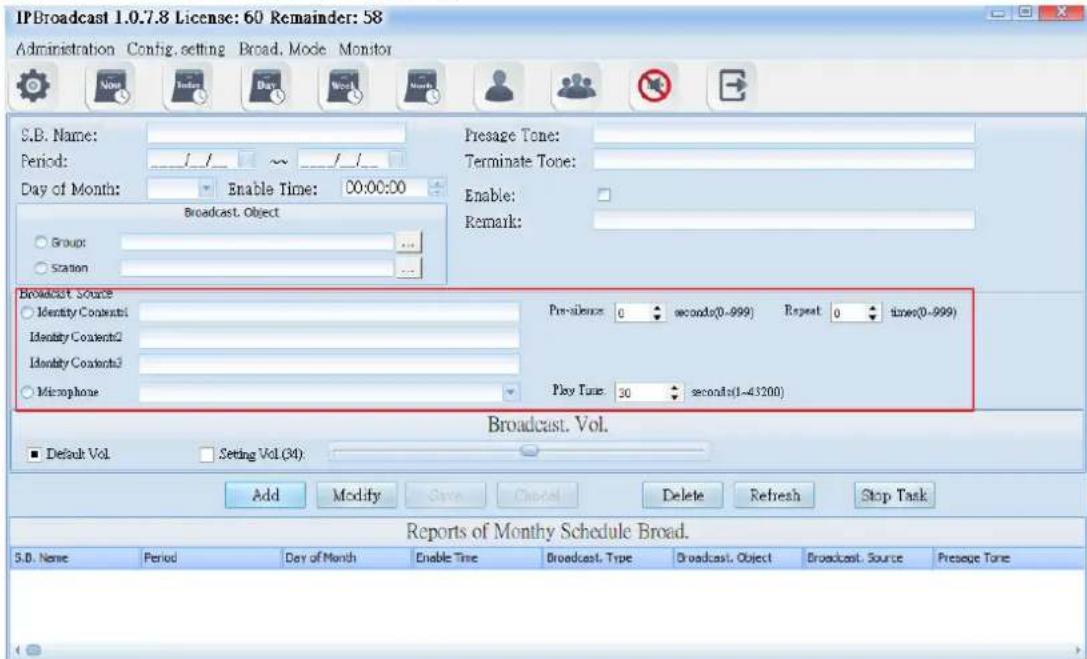
text_image
IPBroadcast 1.0.7.8 License: 60 Remainder: 58 Administration Config. setting Broad. Mode Monitor S.B. Name: Period: _/_ ~ _/_ Day of Month: Enable Time: 00:00:00 Broadcast. Object Group: Station Presage Tone: Terminate Tone: Enable: Remark: Broadcast Source Identity Contents1 Identity Contents2 Identity Contents3 Microphone Pre-Valence: 0 seconds(0~999) Repeat 0 times(0~999) Play Time: 30 seconds(1~43200) Broadcast. Vol. Default Vol Setting Vol (34) Add Modify Save Cancel Delete Refresh Stop Task Reports of Monthly Schedule Broad. S.B. Name Period Day of Month Enable Time Broadcast. Type Broadcast. Object Broadcast. Source Presage Tone| Column | Specification |
| Identity Contents | Select the path storing the prelude sound and file name; the words of the folder names of the sound file and storage path shall have no space, the sound file format is M→3 or WAV |
| →re-silence | Set the mute seconds before playing the sound file; it is preset to be 0; setting range is 0-999 seconds |
| Repeat | Set the circular play times of the sound file; it is preset to be 0; setting range is 0-999 times |
| Microphone | Select the sound source input of other sound devices as play source |
| →lay Tim | Set the play time of other sound sources; it is preset to be 30; setting range is 1-3600 seconds Column |
6.5.4 Broadcast Point Volume
Set the schedule broadcast point volume to be the preset volume or user's appointed volume (setting range is 64-0)
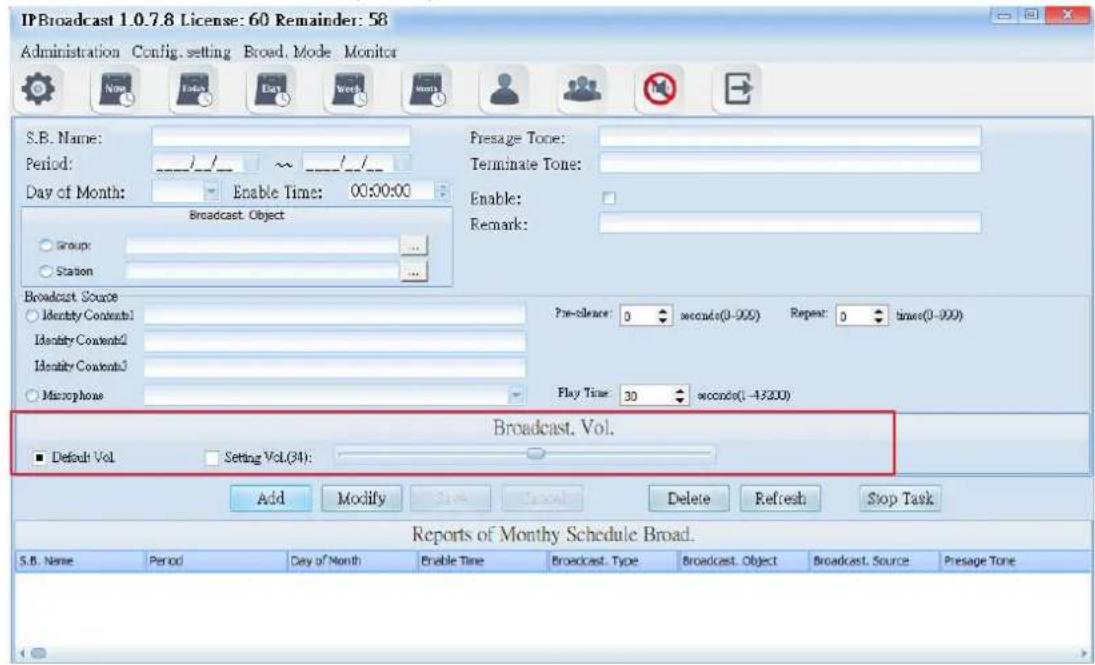
text_image
IPBroadcast 1.0.7.8 License: 60 Remainder: 58 Administration Config, setting Broad, Mode Monitor S.B. Name: Period: ______/__/__/__/__/__/__/__/__/__/__/__/__/__/__/__/__/__/__/__/__/__/__/__/__/__/__/__/__/__/__/__/__/__/__/__/__/__/__/__/__/__/__/__/__/__/__/__/__/__/__/__/__/__/__/__/__/__/__/__/__/__/__/__/__/__/__/__/__/__/__/__/__/__/__/__/__/__/__/__/__/__/__/__/__/__/__/__/__/__/__/__/__/__/__/__/__/__/__/__/__/cular Day of Month: Enable Time: 00:00:00 Broadcast Object Group: Station Broadcast Source Identity Contents1 Identity Contents2 Identity Contents3 Macrophase Pre-clearce: 0 seconds(0-999) Repeat: 0 times(0-999) Play Time: 30 seconds(1-43200) Broadcast. Vol. Default Vol Setting Vol.(34): Add Modify Save Cancel Delete Refresh Stop Task Reports of Monthly Schedule Broad. S.B. Name Period Day of Month Enable Time Broadcast. Type Broadcast. Object Broadcast. Source Presage Tone| Column | Specification |
| Default Vol. | Select the preset volume when the broadcast point is established |
| Setting Vol. | Select to use the appointed volume; setting range is 64-0 |
Using steps of schedule broadcast/Monthly schedule
Step 1. →ress [Add] to start setting
Step 2. Set effective date, the date of each month and preset time
Step 3. Select the object to be broadcasted as the single or group broadcast point
Step 4. Select the play source as sound file or sound source input of other sound devices
Step 5. Select the broadcast point volume of the broadcast object as preset volume or appointed volume
Step 6. →ress [ Save ] to finish monthly schedule setting
* To change or delete schedule, select the established schedule in the
list and press [ Modify ] or [ Delete ] to finish schedule change/deletion *
6.6. Weekly Schedule
Select [Broad.Mode] -->[Scheduled broadcasts]-->[Weekly Schedule]
Users can arrange the execution day of each month to conduct broadcast to a single or group broadcast point. The broadcast source can be sound file or external sound source
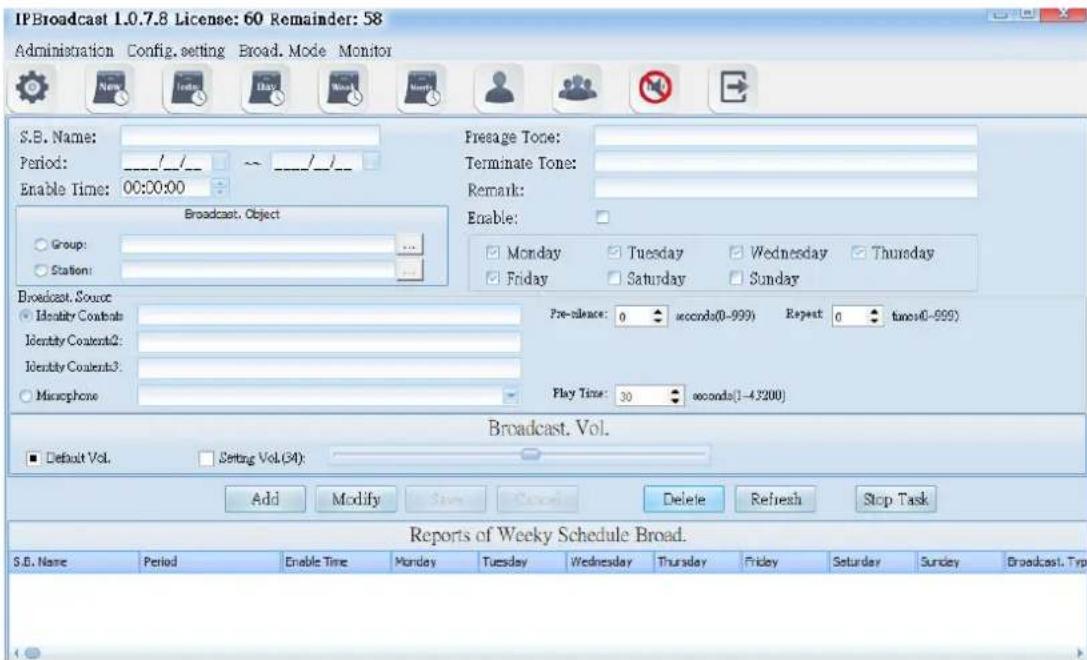
text_image
IPBroadcast 1.0.7.8 License: 60 Remainder: 58 Administration Config. setting Broad. Mode Monitor S.B. Name: Period: _/_/_ Enable Time: 00:00:00 Broadcast. Object Group: Station: Freeage Tone: Terminate Tone: Remark: Enable: Monday Tuesday Wednesday Thursday Friday Saturday Sunday Broadcast. Source Identity Contents Identity Contents2: Identity Contents3: Microphone Pre-sleeve: 0 seconds(0-999) Repeat 0 seconds(0-999) Play Time: 30 seconds(1-43200) Broadcast. Vol. Default Vol. Setting Vol.(34): Add Modify Save Cancel Delete Refresh Stop Task Reports of Weekly Schedule Broad. S.B. Name Period Enable Time Monday Tuesday Wednesday Thursday Friday Saturday Sunday Broadcast. Typ6.6.1 Schedule Date and Prelude/Ending Sound Setting
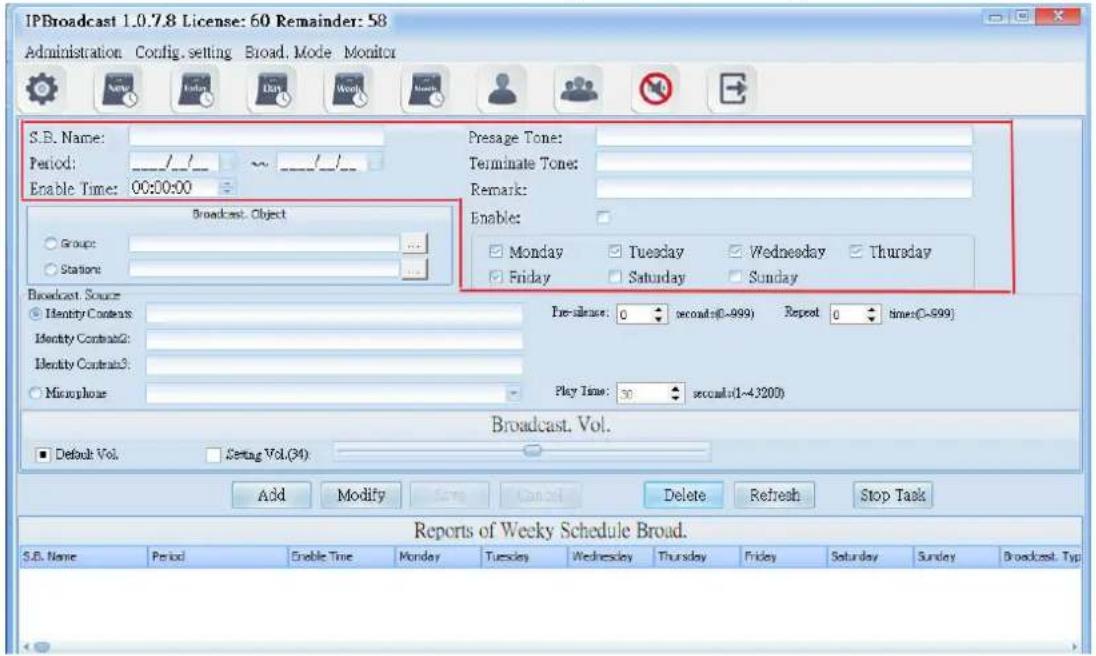
text_image
IPBroadcast 1.0.7.8 License: 60 Remainder: 58 Administration Config. setting Broad. Mode Monitor S.B. Name: Period: _/_/_ Enable Time: 00:00:00 Presage Tone: Terminate Tone: Remark: Enable: □ Group: □ Station: Broadcast Object □ Monday □ Tuesday □ Wednesday □ Thursday □ Friday □ Saturday □ Sunday Broadcast Source □ Identity Context: Identity Contrast2: Identity Contrast3: □ Microphone Pre-silence: 0 seconds(0~999) Repeat 0 times(0~999) Play Time: 30 seconds(1~4200) Broadcast. Vol. ■ Default Vol. □ Setting Vol.(34) Add Modify Save Cancel Delete Refresh Stop Task Reports of Weekly Schedule Broad. S.B. Name Period Enable Time Monday Tuesday Wednesday Thursday Friday Saturday Sunday Broadcast. Typ| Column | Specification |
| S.B.Name | Input the schedule name to be established |
| →erio | Start the effective starting and ending dates of the schedule |
| Enable Time | Input the schedule's execution time; the time is 24-hour system |
| →resage Ton | Select the path storing the prelude sound and file name; the words of the folder names of the sound file and storage path shall have no space, the sound file format is M→3 or WAV |
| Terminate Tone | Select the path and file name of ending sound file storage; the words of the folder names of the sound file and storage path shall have no space, the sound file format is M→3 or WAV |
| Enable | Select whether to start the schedule; it is preset to start |
| Remark | Input remark materials |
6.6.2 Broadcast Object Setting
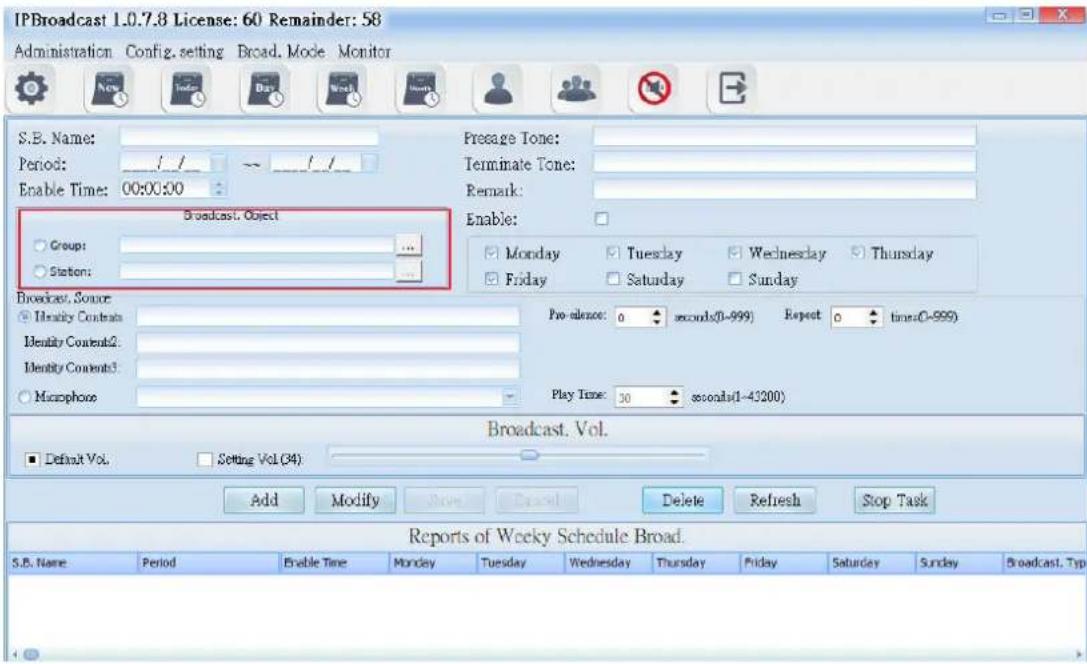
text_image
IPBroadcast 1.0.7.8 License: 60 Remainder: 58 Administration Config. setting Broad. Mode Monitor S.B. Name: Period: / / → / / Enable Time: 00:00:00 Presage Tone: Terminate Tone: Remark: Enable: □ Group: ... □ Station: ... □ Monday □ Tuesday □ Wednesday □ Thursday □ Friday □ Saturday □ Sunday Broadcast. Source: Identity Contents Identity Contents2: Identity Contents3: Macrophoe Pre silence: 0 seconds(0-999) Repeat 0 times(0-999) Play Time: 30 seconds(1-43200) Broadcast. Vol. ■ Default Vol. Setting Vol.(34) Add Modify Remove Delete Refresh Stop Task Reports of Weekly Schedule Broad. S.B. Name Period Enable Time Monday Tuesday Wednesday Thursday Friday Saturday Sunday Broadcast. Typ| Column | Specification |
| Broadcast.Object | Select a single or group broadcast point as the broadcast object |
6.6.3 Broadcast Source Setting

text_image
IPBroadcast 1.0.7.8 License: 60 Remainder: 58 Administration Config. setting Broad. Mode Monitor S.E. Name: Period: _/_/ _/_/ _ Enable Time: 00:00:00 Broadcast. Object Group: Station: Presage Tone: Terminate Tone: Remark: Enable: Monday Tuesday Wednesday Thursday Friday Saturday Sunday Broadcast. Source Identity Contexts Identity Contexts2: Identity Contexts3: Microphone Pre-alonce: 0 seconds(0-999) Repeat: 0 times(0-999) Play Time: 30 seconds(1-43200) Broadcast. Vol. Default Vol. Setting Vol.(34) Add Modify Save Cancel Delete Refresh Stop Task Reports of Weekly Schedule Broad. S.B. Name Period Enable Time Monday Tuesday Wednesday Thursday Friday Saturday Sunday Broadcast. Typ| Column | Specification |
| Identity Contents | Select the path storing the prelude sound and file name; the words of the folder names of the sound file and storage path shall have no space, the sound file format is M→3 or WAV |
| →r-silence | Set the mute seconds before playing the sound file; it is preset to be 0; setting range is 0-999 seconds |
| Repeat | Set the circular play times of the sound file; it is preset to be 0; setting range is 0-999 times |
| Microphone | Select the sound source input of other sound devices as play source |
| →lay Time | Set the play time of other sound sources; it is preset to be 30; setting range is 1-3600 seconds |
6.6.4 Broadcast Point Volume
Set the broadcast point volume of schedule to be preset volume or appointed volume (setting range is 64\~0)
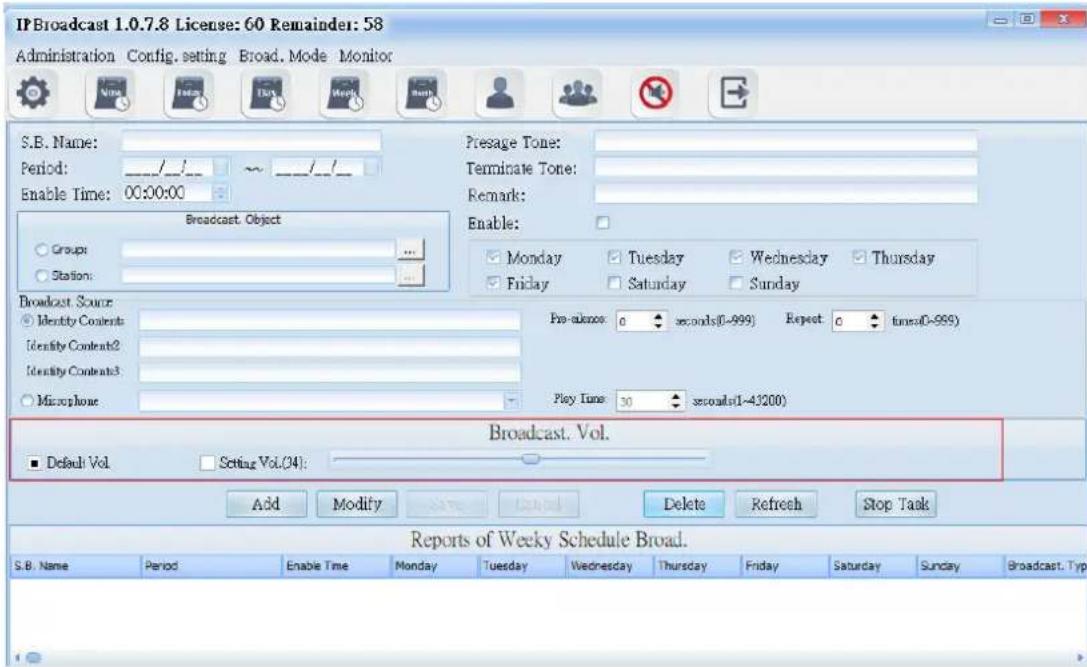
text_image
IPBroadcast 1.0.7.8 License: 60 Remainder: 58 Administration Config. setting Broad. Mode Monitor S.B. Name: Period: ______/__/__/_ Enable Time: 00:00:00 Presage Tone: Terminate Tone: Remark: Enable: □ Groups □ Station: □ Broadcast Object □ Broadcast Source ○ Identity Contents Identity Contents2 Identity Contents3 ○ Microphone □ Pre-alonce: 0 seconds(0-999) Repeat: 0 seconds(0-999) Play Time: 30 seconds(1-43200) Broadcast. Vol. ■ Default Vol. □ Setting Vol.(24): Add Modify Delete Refresh Stop Task Reports of Weekly Schedule Broad. S.B. Name Period Enable Time Monday Tuesday Wednesday Thursday Friday Saturday Sunday Broadcast. Typ| Column | Specification |
| Default Vol. | Select the preset volume when the broadcast point is established |
| Setting Vol. | Select to use appointed volume; setting range is 64-0 |
Using steps of schedule broadcast/Weekly schedule
Step 1. →ress [Add] to start setting
Step 2. Set effective date, the date of each month and preset time
Step 3. Select the object to be broadcasted as the single or group broadcast point
Step 4. Select the play source as sound file or sound source input of other sound devices
Step 5. Select the broadcast point volume of the broadcast object as preset volume or appointed volume
Step 6. →ress [ Save ] to finish monthly schedule setting
* * * To change or delete schedule, select the established schedule in the list
and press [ Modify ] or [ Delete ] to finish schedule change/deletion * * *
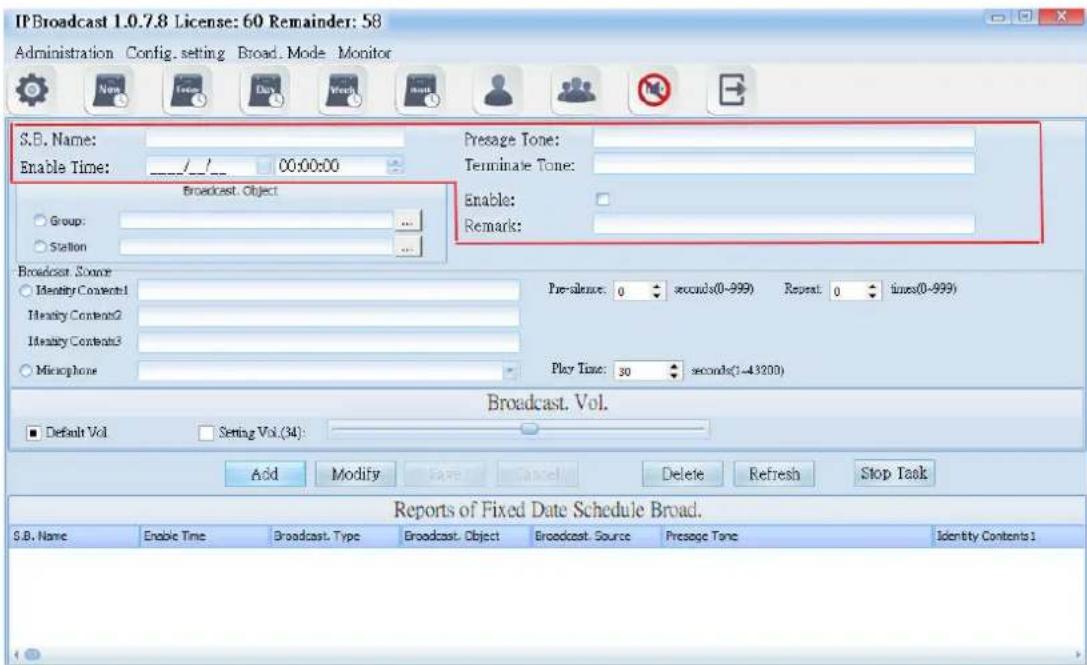
6.7 Schedule of Special Day
Select [Broad.Mode] -->[Scheduled broadcasts]-->[Fixed Date]
Users can arrange a certain special festival (day), to conduct broadcast to a single or group broadcast. The broadcast source can be sound file or external sound source

text_image
IPBroadcast 1.0.7.8 License: 60 Remainder: 58 Administration Config. setting Broad. Mode Monitor S.B. Name: Enable Time: 00:00:00 Broadcast. Object Group: ... Station: Broadcast. Source Identity Contents1 Identity Contents2 Identity Contents3 Macrophore Presage Tone: Terminate Tone: Enable: Remark: Pre-silence: 0 seconds(0-999) Repeat 0 time(0-999) Play Time: 30 seconds(1-42200) Broadcast. Vol. Default Vol. Setting Vol (34) Add Modify Save Cancel Delete Refresh Stop Task Reports of Fixed Date Schedule Broad. S.E. Name Enable Time Broadcast. Type Broadcast. Object Broadcast. Source Presage Tone Identity Contents16.7.1 Schedule Date and Prelude/Ending Setting
text_image
IP Broadcast 1.0.7.8 License: 60 Remainder: 58 Administration Config. setting Broad. Mode Monitor S.B. Name: Enable Time: 00:00:00 Broadcast Object Group: Station Presage Tone: Terminate Tone: Enable: Remark: Broadcast Source Identity Contents1 Identity Contents2 Identity Contents3 Microphone Pre-silence: 0 seconds(0-999) Repeat: 0 times(0-999) Play Time: 30 seconds(1-43200) Broadcast. Vol. Default Vol Setting Vol.(34): Add Modify Save Cancel Delete Refresh Stop Task Reports of Fixed Date Schedule Broad. S.B. Name Enable Time Broadcast. Type Broadcast. Object Broadcast. Source Presage Tone Identity Contents1| Column | Specification |
| S.B.Name | Input the schedule name to be established |
| Enable Time | Input the schedule's execution time; the time is 24-hour system |
| →resage Ton | Select the path storing the prelude sound and file name; the words of the folder names of the sound file and storage path shall have no space, the sound file format is M→3 or WAV |
| Terminate Tone | Select the path and file name of ending sound file storage; the words of the folder names of the sound file and storage path shall have no space, the sound file format is M→3 or WAV |
| Enable | Select whether to start the schedule; it is preset to start |
| Remark | Input remark materials |
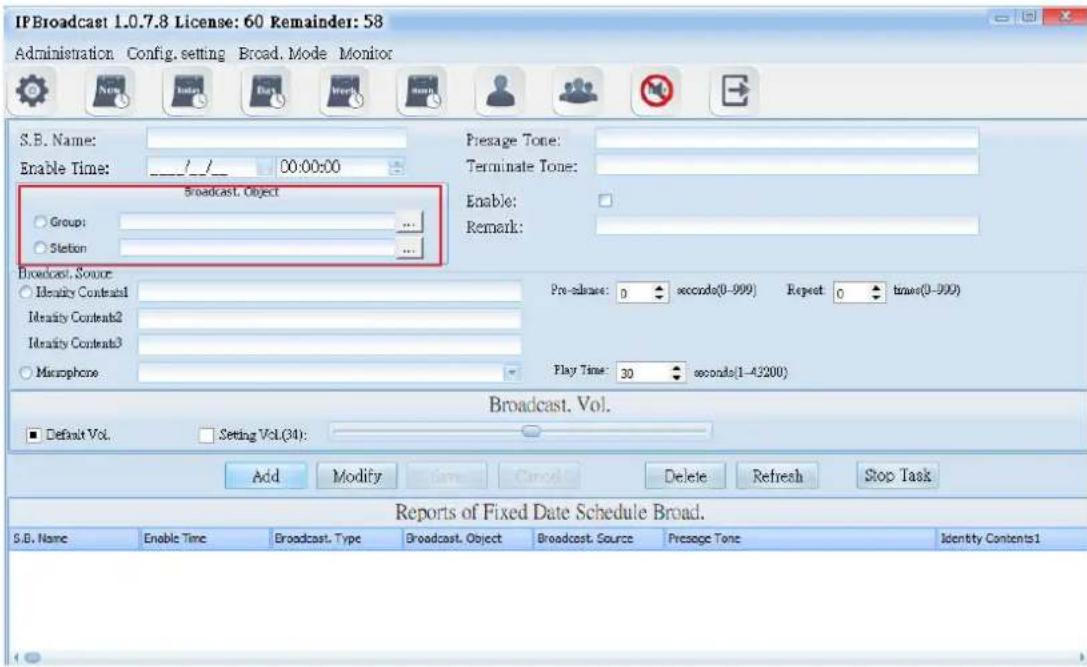
6.7.2 Broadcast Object Setting
text_image
IFBroadcast 1.0.7.8 License: 60 Remainder: 58 Administration Config. setting Broad. Mode Monitor S.B. Name: Enable Time: 00:00:00 Broadcast. Object Group: Station Presage Tone: Terminate Tone: Enable: Remark: Broadcast. Source Identity Context1 Identity Context2 Identity Context3 Macrophone Pre-clone: 0 seconds(0-999) Repeat 0 times(0-999) Play Time: 30 seconds(1-4200) Broadcast. Vol. Default Vol. Setting Vol.(31): Add Modify Cancel Delete Refresh Stop Task Reports of Fixed Date Schedule Broad. S.B. Name Enable Time Broadcast. Type Broadcast. Object Broadcast. Source Presage Tone Identity Contents1| Column | Specification |
| Broadcast.Object | Select a single or group broadcast point as the broadcast object |
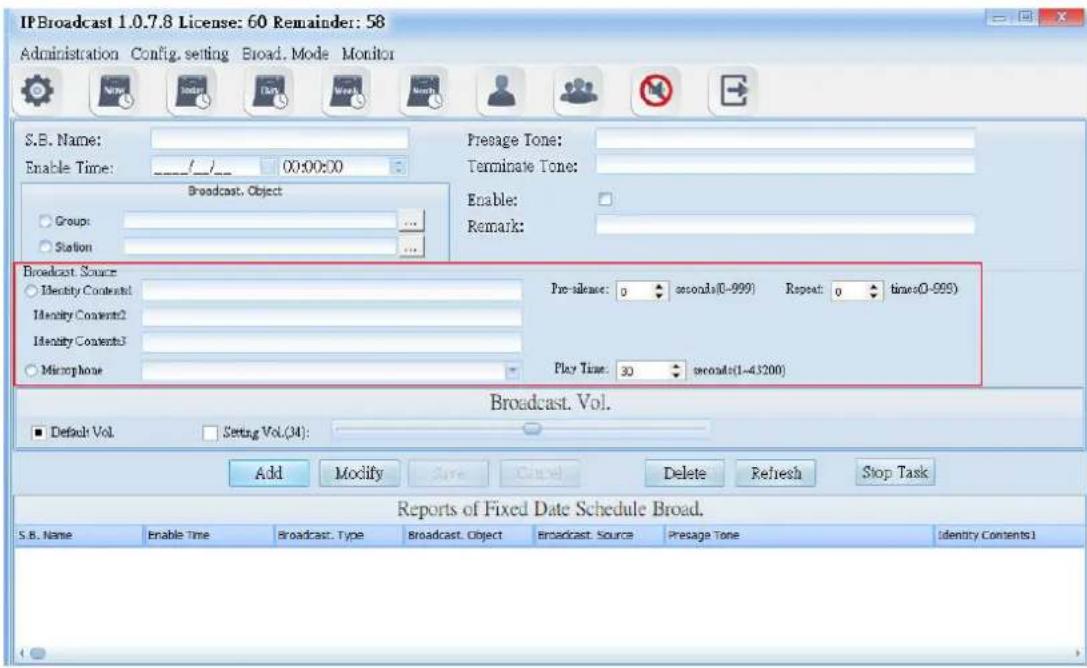
6.7.3 Broadcast Source setting
text_image
IP Broadcast 1.0.7.8 License: 60 Remainder: 58 Administration Config. setting Broad. Mode Monitor S.B. Name: Enable Time: 00:00:00 Broadcast. Object Group: ... Station: Broadcast Source Identity Content1 Identity Content2 Identity Content3 Microphone Pre-silence: 0 seconds(0-999) Repeat: 0 times(0-999) Play Time: 30 seconds(1-43200) Broadcast. Vol. Default Vol. Setting Vol.(34): Add Modify Save Cancel Delete Refresh Stop Task Reports of Fixed Date Schedule Broad. S.B. Name Enable Time Broadcast. Type Broadcast. Object Broadcast. Source Presage Tone Identity Contents1| Column | Specification Input remark materials |
| Identity Contents | Select the path storing the prelude sound and file name; the words of the folder names of the sound file and storage path shall have no space, the sound file format is M→3 or WAV |
| →e-silence | Set the mute seconds before playing the sound file; it is preset to be 0; setting range is 0-999 seconds |
| Repeat | Set the circular play times of the sound file; it is preset to be 0; setting range is 0-999 times |
| Microphone | Select the sound source input of other sound devices as play source |
| →lay Tim | Set the play time of other sound sources; it is preset to be 30; setting range is 1-3600 seconds |
6.7.4 Broadcast Point Volume
Set the broadcast point volume of schedule to be the preset volume or appointed volume (setting range is 64-0)

text_image
IP Broadcast 1.0.7.8 License: 60 Remainder: 58 Administration Config. setting Broad. Mode Monitor S.B. Name: Enable Time: 00:00:00 Broadcast. Object Group: ... Statlon Broadcast. Source Identity Context1 Identity Contrast2 Identity Contrast3 Macrophone Presage Tone: Terminate Tone: Enable: Remark: Pre-ounce: 0 seconds(0-999) Repeat 0 time(0-999) Play Time: 30 seconds(1-43200) Broadcast. Vol. Default Vol. Setting Vol (34): Add Modify Save Cancel Delete Refresh Stop Task Reports of Fixed Date Schedule Broad. S.B. Name Enable Time Broadcast. Type Broadcast. Object Broadcast. Source Presage Tone Identity Contents1| Column | Specification |
| Default Vol. | Select the preset volume when the broadcast point is established |
| Setting Vol. | Select to use appointed volume; setting range is 64-0 |
Using steps of schedule broadcast/special day schedule
Step 1. →ress [Add] to start setting
Step 2. Set preset date and time
Step 3. Select the object to be broadcasted as the single or group broadcast point
Step 4. Select the play source as sound file or sound source input of other sound devices
Step 5. Select the broadcast point volume of the broadcast object as preset volume or appointed volume
Step 6. →ress [ Save ] to finish monthly schedule setting
* * * To change or delete schedule, select the established schedule in
the list and press [Modify] or [Delete] to finish schedule change/deletion
* * *
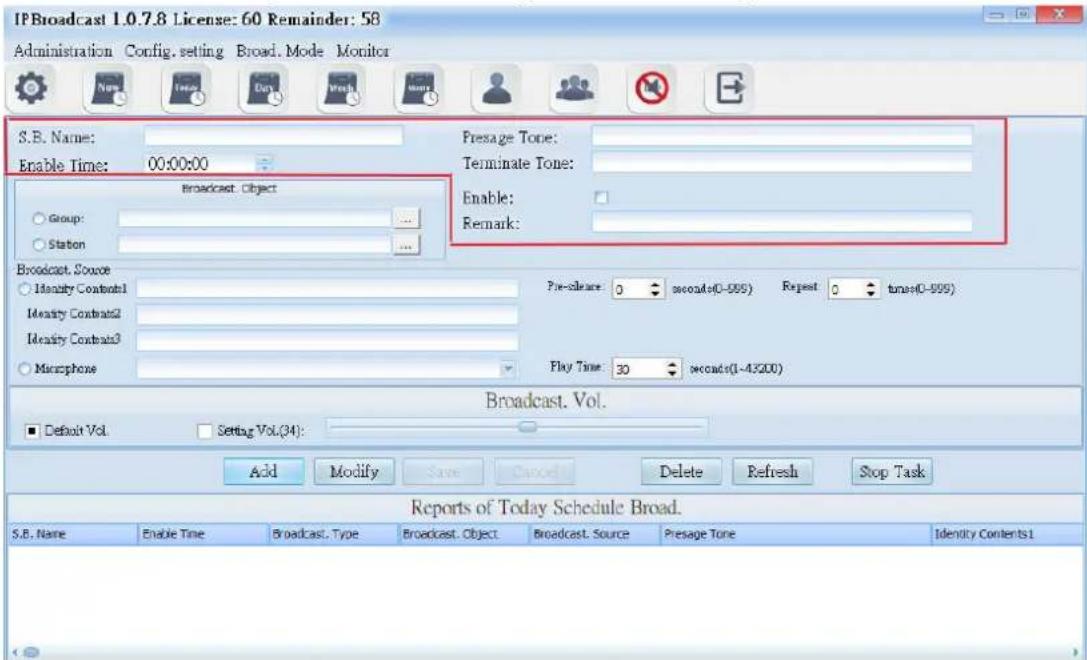
6.8 Today Schedule
Select [Broad.Mode] -->[Scheduled broadcasts]-->[Today Schedule]
Select [Broad.Mode]-->[Today Schedule]
Users can arrange to conduct broadcast to a single or group broadcast points on current day. The broadcast source can be sound file or external sound sources

text_image
IPBroadcast 1.0.7.8 License: 60 Remainder: 58 Administration Config. setting Broad. Mode Monitor S.B. Name: Enable Time: 00:00:00 Broadcast. Object Group: ... Station: Broadcast. Source Identity Context1 Identity Context2 Identity Context3 Microphone Presage Tone: Terminate Tone: Enable: Remark: Par-albance: 0 seconds(0-999) Expect 0 times(0-999) Play Time: 30 seconds(0-43200) Broadcast. Vol. Default Vol. Setting Vol (34) Add Modify Save Cancel Delete Refresh Stop Task Reports of Today Schedule Broad. S.B. Name Enable Time Broadcast. Type Broadcast. Object Broadcast. Source Presage Tone Identity Contents16.8.1 Schedule Day, Prelude/Ending Sound Setting
text_image
IPBroadcast 1.0.7.8 License: 60 Remainder: 58 Administration Config. setting Broad. Mode Monitor S.B. Name: Enable Time: 00:00:00 Broadcast Object Group: ... Statlon Presage Tone: Terminate Tone: Enable: Remark: Broadcast. Source Identity Contrast1 Identity Contrast2 Identity Contrast3 Macrophone Pre-clear: 0 seconds(0-999) Repeat 0 times(0-999) Play Time: 30 seconds(1-43200) Broadcast. Vol. Default Vol Setting Vol.(34): Add Modify Save Cancel Delete Refresh Stop Task Reports of Today Schedule Broad. S.B. Name Enable Time Broadcast. Type Broadcast. Object Broadcast. Source Presage Tone Identity Contents1| Column | Specification |
| S.B.Name | Input the schedule name to be established |
| Enable Time | Input the schedule's execution time; the time is 24-hour system |
| →resage Tone | Select the path storing the prelude sound and file name; the words of the folder names of the sound file and storage path shall have no space, the sound file format is M→3 or WAV |
| Terminate Tone | Select the path and file name of ending sound file storage; the words of the folder names of the sound file and storage path shall have no space, the sound file format is M→3 or WAV |
| Enable | Select whether to start the schedule; it is preset to start |
| Remark | Input remark materials |
6.8.2 Broadcast Object Setting

text_image
IPBroadcast 1.0.7.8 License: 60 Remainder: 58 Administration Config. setting Broad. Mode Monitor S.B. Name: Enable Time: 00:00:00 Broadcast. Object Group: ... Station Presage Tone: Terminate Tone: Enable: Remark: Broadcast. Source Identity Contents1 Identity Contents2 Identity Contents3 Microphone Pre-schedule: 0 seconds(0-999) Repeat 0 times(0-999) Play Time: 30 seconds(0-43200) Broadcast. Vol. Default Vol. Setting Vol (34) Add Modify Save Cancel Delete Refresh Stop Task Reports of Today Schedule Broad. S.B. Name Enable Time Broadcast. Type Broadcast. Object Broadcast. Source Presage Tone Identity Contents1| Column | Specification |
| Broadcast.Object | Select a single or group broadcast points as the broadcast object |
6.8.3 Display source setting
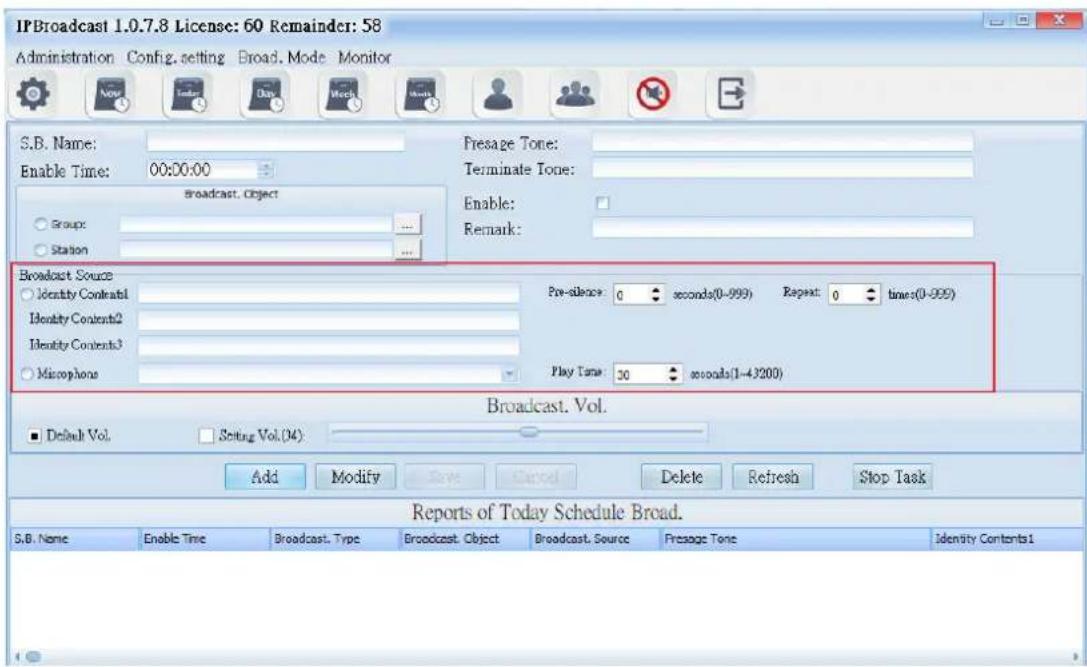
text_image
IPBroadcast 1.0.7.8 License: 60 Remainder: 58 Administration Config. setting Broad. Mode Monitor S.B. Name: Enable Time: 00:00:00 Broadcast. Object Group: ... Station Presage Tone: Terminate Tone: Enable: Remark: Broadcast Source Identity Contents1 Identity Contents2 Identity Contents3 Microphone Pre-silence: 0 seconds(0-999) Repeat: 0 times(0-999) Play Time: 30 seconds(1-43200) Broadcast. Vol. Default Vol. Setting Vol.(34): Add Modify Save Cancel Delete Refresh Stop Task Reports of Today Schedule Broad. S.B. Name Enable Time Broadcast. Type Broadcast. Object Broadcast. Source Presage Tone Identity Contents1| Column | Specification |
| Identity Contents | Select the path storing the prelude sound and file name; the words of the folder names of the sound file and storage path shall have no space, the sound file format is M→3 or WAV |
| →r←silence | Set the mute seconds before playing the sound file; it is preset to be 0; setting range is 0-999 seconds |
| Repeat | Set the circular play times of the sound file; it is preset to be 0; setting range is 0-999 times |
| Microphone | Select the sound source input of other sound devices as play source |
| →lay Tim | Set the play time of other sound sources; it is preset to be 30; setting range is 1-3600 seconds |
6.8.4 Broadcast Point Volume
Set the broadcast point volume of group broadcast to be preset volume or appointed volume (setting range is 64\~0)
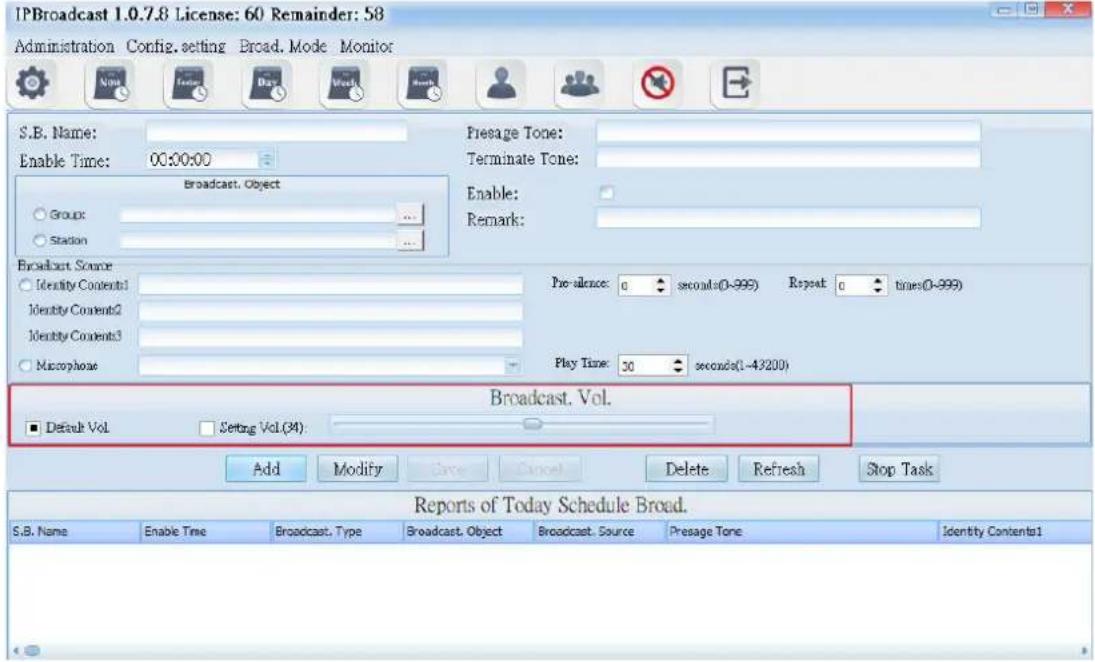
text_image
IPBroadcast 1.0.7.8 License: 60 Remainder: 58 Administration Config. setting Broad. Mode Monitor S.B. Name: Enable Time: 00:00:00 Broadcast. Object Group: Station Presage Tone: Terminate Tone: Enable: Remark: Broadcast Source Identity Contents1 Identity Contents2 Identity Contents3 Macrophase Pre- silence: 0 seconds(0-999) Repeat 0 times(0-999) Play Time: 30 seconds(1-43200) Broadcast. Vol. Default Vol Setting Vol(34) Add Modify Create Cancel Delete Refresh Stop Task Reports of Today Schedule Broad. S.B. Name Enable Time Broadcast. Type Broadcast. Object Broadcast. Source Presage Tone Identity Contents1| Column | Specification |
| Default Vol. | Select the preset volume when the broadcast point is established |
| Setting Vol. | Select to use appointed volume; setting range is 64-0 |
Using steps of schedule broadcast/today schedule
Step 1. →ress [Add] to start setting
Step 2. Set preset date and time
Step 3. Select the object to be broadcasted as the single or group broadcast point
Step 4. Select the play source as sound file or sound source input of other sound devices
Step 5. Select the broadcast point volume of the broadcast object as preset volume or appointed volume
Step 6. →ress [ Save ] to finish monthly schedule setting
* * * To change or delete schedule, select the established schedule in the list and press [ Modify ] or [ Delete ] to finish schedule change/deletion
* * *
6.9 Immediate Execution of Schedule
Select [Broad.Mode] --> [Scheduled broadcasts] --> [Immediately Schedule] Users can arrange to conduct broadcast to a single or group broadcast point immediately. The broadcast source can be sound file or external sound
sources
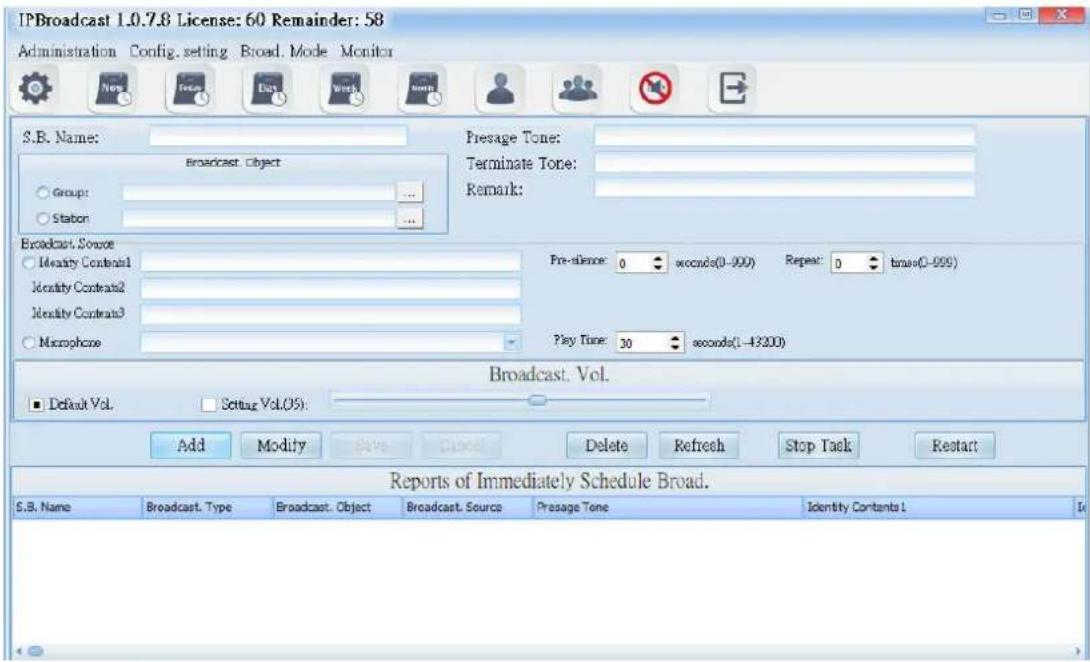
text_image
IPBroadcast 1.0.7.8 License: 60 Remainder: 58 Administration Config. setting Broad. Mode Monitor S.B. Name: Broadcast. Object Group: ... Stabon Presage Tone: Terminate Tone: Remark: Broadcast. Source Identity Content1 Identity Content2 Identity Content3 Macrophore Pre-stance: 0 seconds(0-999) Repeat: 0 times(0-999) Play Time: 30 seconds(1-43200) Broadcast. Vol. Default Vol. Setting Vol.(05): Add Modify Save Cancel Delete Refresh Stop Task Restart Reports of Immediately Schedule Broad. S.B. Name Broadcast. Type Broadcast. Object Broadcast. Source Presage Tone Identity Content16.9.1 Prelude/Ending Sound Setting
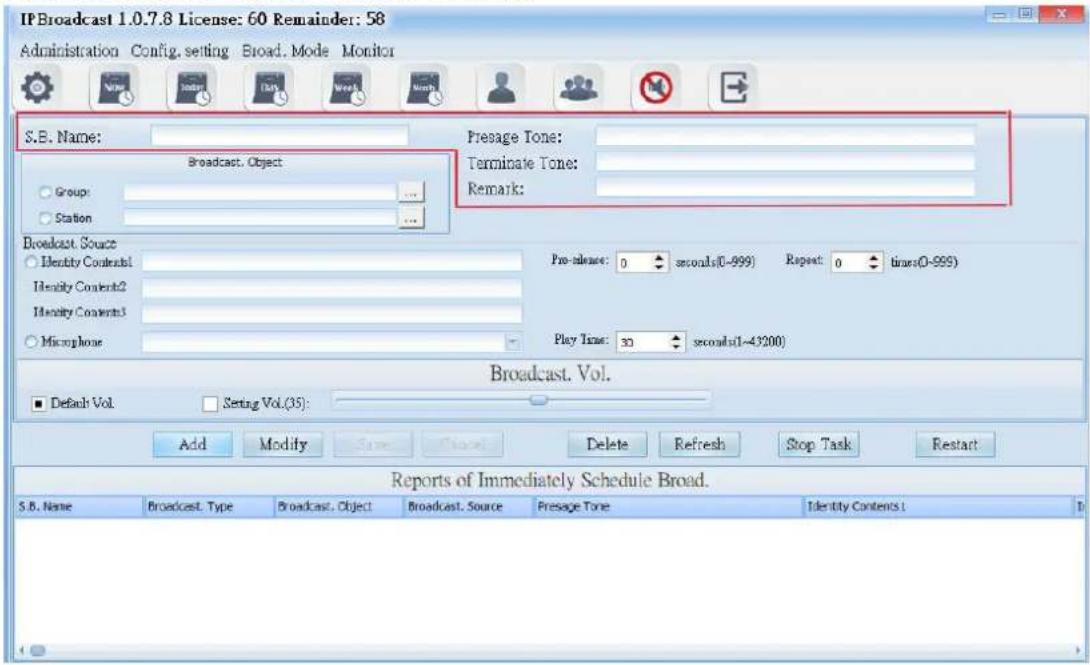
text_image
IPBroadcast 1.0.7.8 License: 60 Remainder: 58 Administration Config, setting Broad, Mode Monitor S.B. Name: Broadcast. Object Group: ... Station: Presage Tone: Terminate Tone: Remark: Broadcast. Source Identity Contents1 Identity Contents2 Identity Contents3 Microphone Pre-release: 0 seconds(0-999) Repeat: 0 times(0-999) Play Time: 30 seconds(1-43200) Broadcast. Vol. Default Vol. Setting Vol.(35): Add Modify Save Delete Refresh Stop Task Restart Reports of Immediately Schedule Broad. S.B. Name Broadcast. Type Broadcast. Object Broadcast. Source Presage Tone Identity Contents:| Column | Specification |
| S.B.Name | Input the schedule name to be established |
| →resage Tone | Select the path storing the prelude sound and file name; the words of the folder names of the sound file and storage path shall have no space, the sound file format is M→3 or WAV |
| Terminate Tone | Select the path and file name of ending sound file storage; the words of the folder names of the sound file and storage path shall have no space, the sound file format is M→3 or WAV |
| Remark | Input remark materials |
6.9.2 Broadcast Object Setting
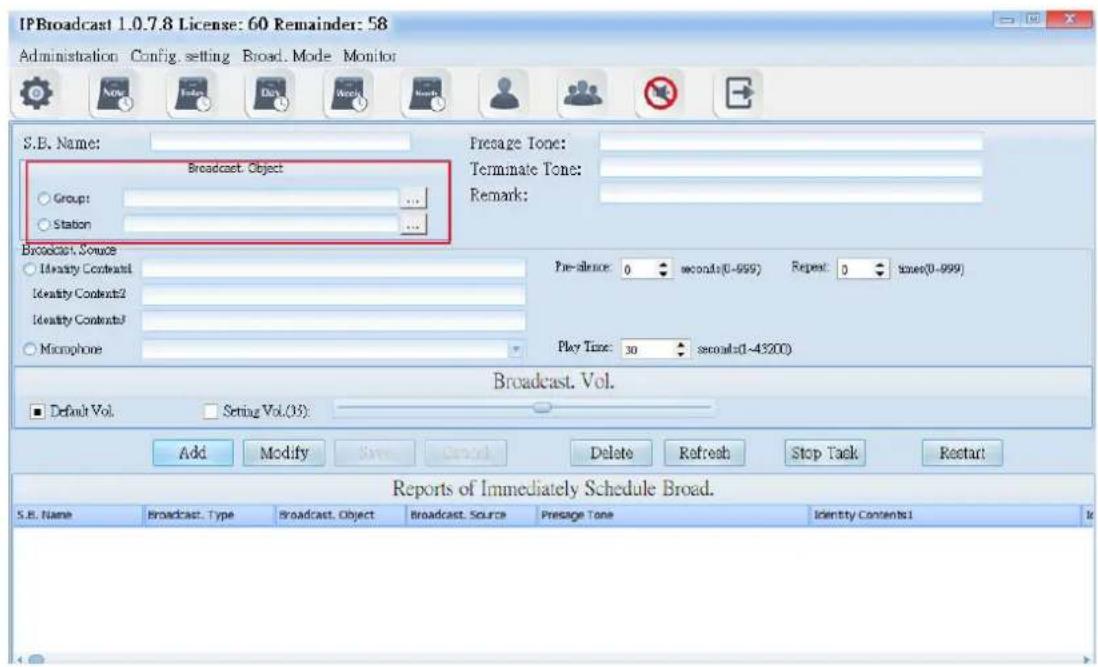
text_image
IPBroadcast 1.0.7.8 License: 60 Remainder: 58 Administration Config setting Broad Mode Monitor S.B. Name: Broadcast Object Group: Stabon Presage Tone: Terminate Tone: Remark: Broadcast Source Identity Content1 Identity Content2 Identity Content3 Microphone Pre- silence: 0 seconds(0-999) Repeat: 0 times(0-999) Play Time: 30 seconds(0-43200) Broadcast. Vol. Default Vol. Setting Vol.(3): Add Modify Save Delete Refresh Stop Task Restart Reports of Immediately Schedule Broad. S.B. Name Broadcast. Type Broadcast. Object Broadcast. Source Presage Tone Identity Contents1| Column | Specification |
| Broadcast.Object | Select a single or group broadcast point as the broadcast object |
6.9.3 Broadcast Source Setting

text_image
IPBroadcast 1.0.7.8 License: 60 Remainder: 58 Administration Config. setting Broad. Mode Monitor S.B. Name: Broadcast. Object Groups ... Station ... Fresage Tone: Terminate Tone: Remark: Broadcast. Source Identity Contrast1 Identity Contrast2 Identity Contrast3 Macrophore Pre-clence: 0 seconds(0-999) Repeat 0 times(0-999) Play Time: 30 seconds(1-43200) Broadcast. Vol. Default Vol. Setting Vol (35) Add Modify Save Cancel Delete Refresh Stop Task Restart Reports of Immediately Schedule Broad. S.D. Name Broadcast. Type Broadcast. Object Broadcast. Source Presage Tone Identity Contents1| Column | Specification |
| Identity Contents | Select the path storing the prelude sound and file name; the words of the folder names of the sound file and storage path shall have no space, the sound file format is M→3 or WAV |
| →r←silence | Set the mute seconds before playing the sound file; it is preset to be 0; setting range is 0-999 seconds |
| Repeat | Set the circular play times of the sound file; it is preset to be 0; setting range is 0-999 times |
| Microphone | Select the sound source input of other sound devices as play source |
| →lay Tim | Set the play time of other sound sources; it is preset to be 30; setting range is 1-3600 seconds |
6.9.4 Broadcast Point Volume
Set the broadcast point volume of group broadcast to be preset volume or the user's appointed volume (setting range is 64\~0)
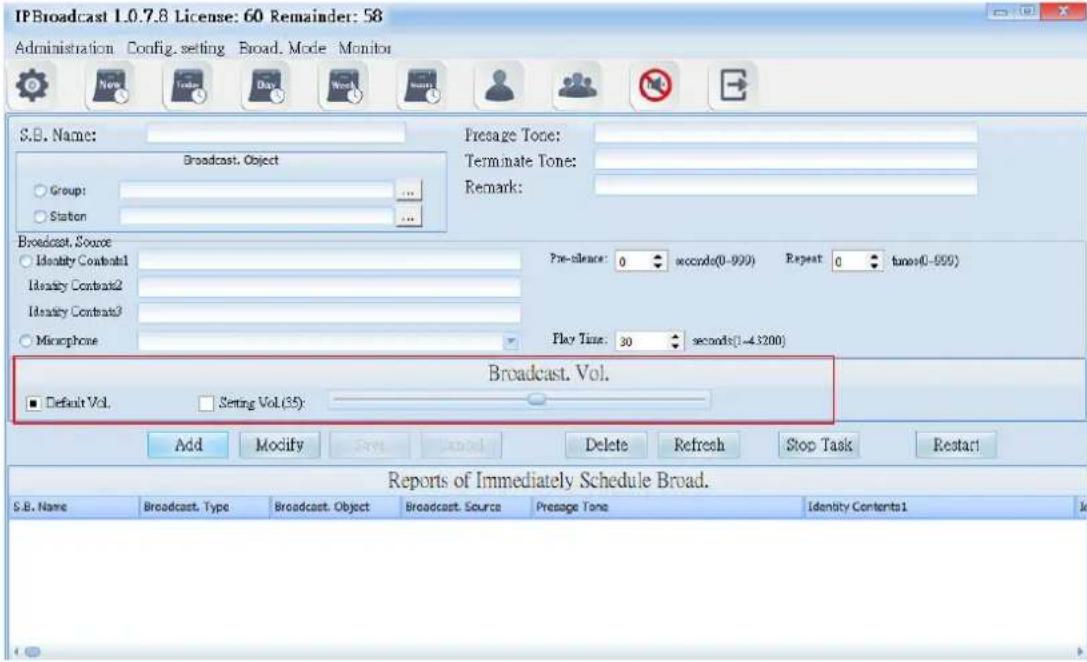
text_image
IPBroadcast 1.0.7.8 License: 60 Remainder: 58 Administration Config. setting Broad. Mode Monitor S.B. Name: Broadcast. Object Group: ... Station Presage Tone: Terminate Tone: Remark: Broadcast. Source Identity Contract1 Identity Contract2 Identity Contract3 Microphone Pre-slice: 0 seconds(0-999) Repeat: 0 times(0-999) Play Time: 30 seconds(1-43200) Broadcast. Vol. Default Vol. Setting Vol.(35): Add Modify Reset Cancel Delete Refresh Stop Task Restart Reports of Immediately Schedule Broad. S.B. Name Broadcast. Type Broadcast. Object Broadcast. Source Presage Tone Identity Contents1| Column | Specification |
| Default Vol. | Select the preset volume when the broadcast point is established |
| Setting Vol. | Select to use appointed volume; setting range is 64-0 |
Using steps of schedule broadcast/immediate execution of schedule
Step 1. →ress [Add] to start setting
Step 2. Select the object to be broadcasted as the single or group broadcast point
Step 3. Select the play source as sound file or sound source input of other sound devices
Step 4. Select the broadcast point volume of the broadcast object as preset volume or appointed volume
Step 5. →ress [ Save ] to finish immediate execution of schedule setting. The
system will execute the schedule immediately. Select the schedule to be executed in the list, and then press [Restart] to execute the schedule
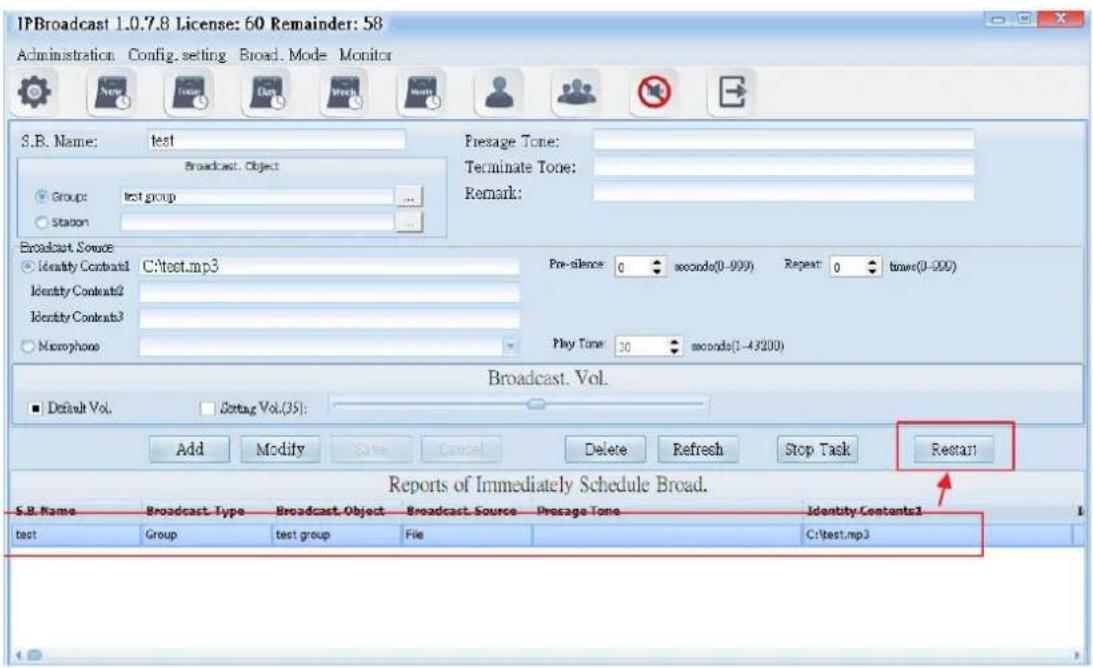
text_image
IPBroadcast 1.0.7.8 License: 60 Remainder: 58 Administration Config. setting Broad. Mode Monitor S.B. Name: test Broadcast. Object Groups: test group Station Presage Tone: Terminate Tone: Remark: Broadcast Source Identity Context1 C:\test.mp3 Identity Context2 Identity Context3 Microphone Pre-silence: 0 seconds(0-999) Repeat: 0 times(0-999) Play Tone: 30 seconds(1-4200) Broadcast. Vol. Default Vol. Reset Vol.(35): Add Modify Sate Cancel Delete Refresh Stop Task Restart Reports of Immediately Schedule Broad. S.B. Name Broadcast Type Broadcast Object Broadcast Source Presage Tone Identity Contexts1 test Group test group File C:\test.mp3* * * To change or delete schedule, select the established schedule inthe list and press [ Modify ] or [ Delete ] to finish schedule change/deletion
7. Monitoring
Equipment Station
Select [Monitor]-->[Station Monitor]
The equipment station can show whether the present broadcast points are normally connected with the system. When the broadcast system is operating, operators can judge whether the remote loudspeaker sends sound normally from the volume change in the diagram, so as to learn the state of broadcast points.
The following picture shows the meaning of each diagram
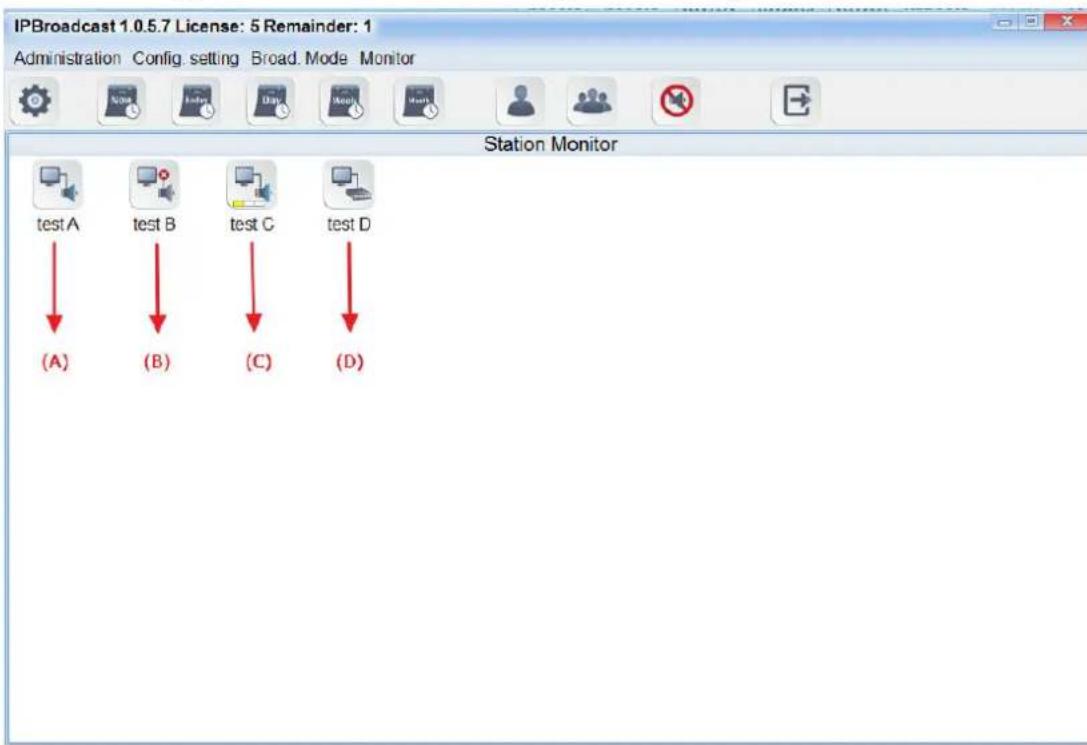
text_image
IPBroadcast 1.0.5.7 License: 5 Remainder: 1 Administration Config. setting Broad. Mode Monitor Station Monitor test A test B test C test D (A) (B) (C) (D)(A) diagram: the broadcast point is normally connected with the system at present
(B) diagram: the broadcast point is abnormally connected with the system at present
(C) diagram: the broadcast point is working and the loudspeaker has normal sound production
(D) diagram: the broadcast point is working and it is an Audio gateway ***Note: IS-381,IS-382,IS-3840 is I→Audio gateway. When the broadcast is working, it cannot be judged whether the terminal loudspeaker connected with gateway has normal sound production ***

text_image
IPBroadcast 1.0.7.8 License: 60 Remainder: 58 Administration Config. setting Broad. Mode Monitor Push the icon to broadcast. Presage Tone: Terminate Tone: Broadcast. Vol. Default Vol. Setting Vol.(35): Single Multiple Select All Deselect All Keep data after broadcasting Group Broad.: test group test group 02 03 04 05 06 07 08 09 10 11 12 13 14 15 16 Available Stations on the group test1 ai test1 test2 ShortBroadcasting1 ShortBroadcasting5 ShortBroadcasting6 ShortBroadcasting7 ShortBroadcastings ShortBroadcasting9 ShortBroadcasting10 ShortBroadcasting11 ShortBroadcasting12Set the method of keyboard shortcuts
Step 1
Select broadcast points or groups added to the keyboard shortcuts.

text_image
IPBroadcast 1.0.7.8 License: 60 Remainder: 58 Administration Config, setting Broad, Mode Monitor Push the icon to broadcast. Presage Tone: Terminate Tone: Broadcast. Vol. Default Vol. Setting Vol.(35): Single Multiple Select All Deselect All Keep data after broadcasting Group Broad.: test group test group 02 03 04 05 06 07 08 09 10 11 12 13 14 15 16 Available Stations on the group Pick a group or a single broadcast point test1Step 2
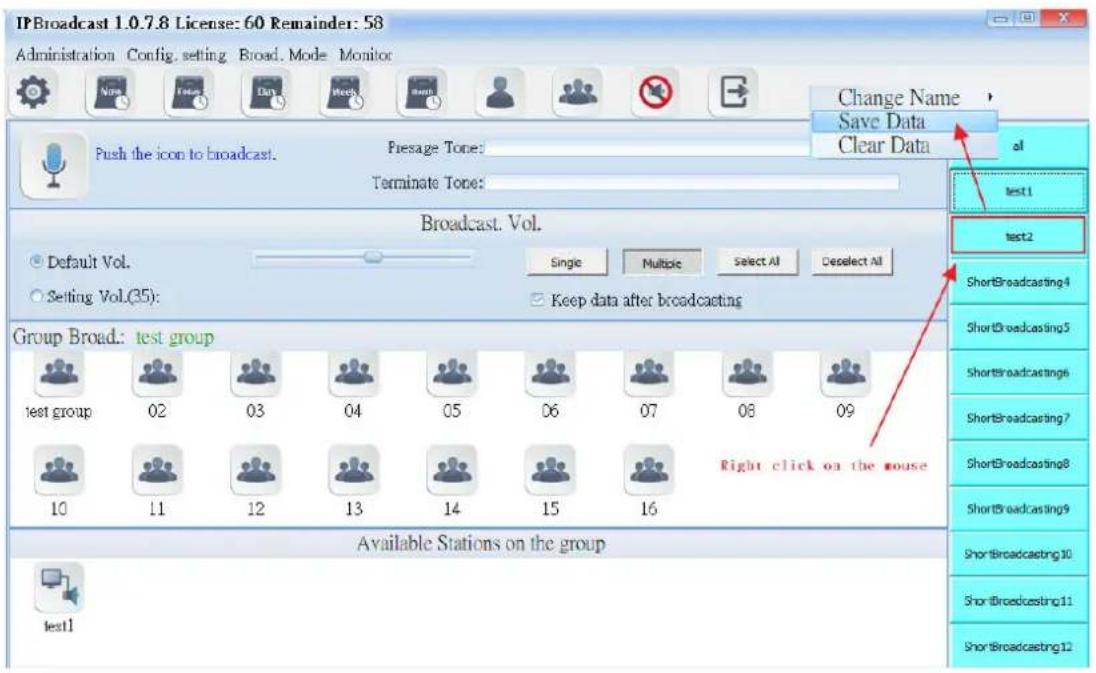
From the short broadcasting list on the right side, select one of them. And then click "Save Data" with right click of the mouse. After being confirmed, the key will remember these selected broadcast points or groups. Also, you can change their names or clear their data.