VM-99-HCS-R - Batterie pour caméra Watson - Free user manual and instructions
Find the device manual for free VM-99-HCS-R Watson in PDF.


User questions about VM-99-HCS-R Watson
0 question about this device. Answer the ones you know or ask your own.
Ask a new question about this device
Download the instructions for your Batterie pour caméra in PDF format for free! Find your manual VM-99-HCS-R - Watson and take your electronic device back in hand. On this page are published all the documents necessary for the use of your device. VM-99-HCS-R by Watson.
USER MANUAL VM-99-HCS-R Watson
Li-ion Battery with LED
and 3-Stud or V-Mount
Thank you for choosing Watson Pro
Please read this user manual carefully, and keep it for reference before using the battery.
SAFETY INSTRUCTIONS
• Make sure the battery is fully charged before use.
- When not in use, remove the battery from its device. Some electronic equipment will draw current even when the switch is off.
- Do not short-circuit the terminals. This battery is protected with an internal self-resetting fuse, but short circuits may still cause severe damage to the battery.
- Do not attempt to open the battery case under any circumstances.
- Do not remove the battery from any equipment that is powered on. Always power off your equipment before removing the battery.
- Use the battery under proper environmental conditions: 14°F to 122°F (-10°C to 50°C) with a Relative Humidity (RH) less than 85%.
- The battery may be warm during use or recharging. This is normal.
- The battery should be charged up to 40% for storage longer than one month, and should be charged every 6 months.
- Keep the battery away from fire, heat, and high pressure.
- Do not expose the battery to rain or moisture.
- Do not drop the battery or subject it to strong shocks.
- Keep this unit away from water and any flammable gases or liquids.
- Clean the battery and terminals with only a clean, soft, and dry cloth.
- When operation time has noticeably decreased, the battery may need to be replaced.
- Keep this product away from children.
- Store the battery in a cool, dry place.
OVERVIEW
- Battery-level LED meter
Shows remaining capacity of the battery. When capacity reaches less than 9%, the leftmost LED will flash.
2 Battery-level check button
3 D-tap output 12 V, 10 A max
4 USB output Press the battery-level check button to start charging or to power your USB device.
5 Mounting interface: 3-stud or V-mount
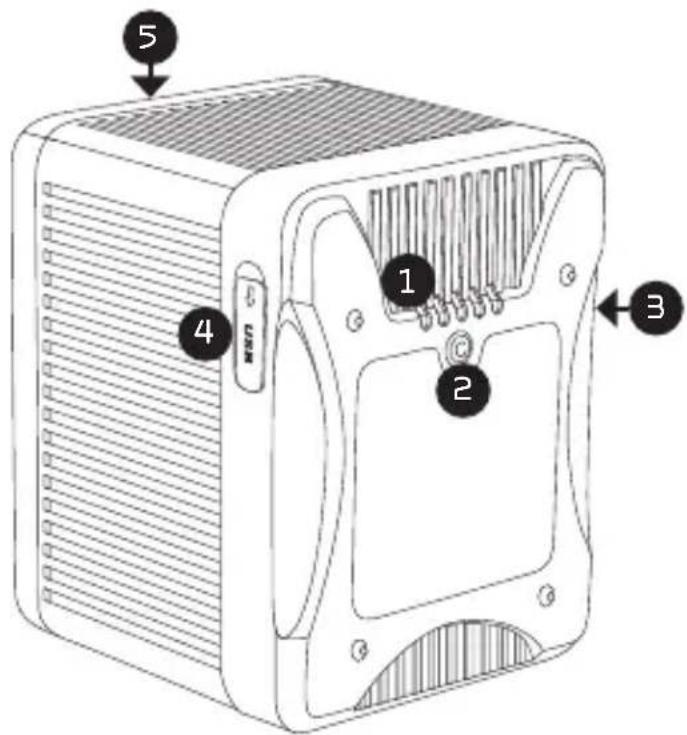
text_image
5 4 1 2 3PRODUCT FEATURES
- High-powered li-ion cells provide constant output up to 180 W and 15 A.
- Battery-level LED indicators for remaining battery capacity.
• Built-in D-tap connector powers your camera accessories. - 5 V/1 A USB 2.0 output for USB-powered devices.
• Built-in intelligent control circuit protects against damage from current or voltage overload, overheating, or short circuits.
SPECIFICATIONS
| Mount type | 3-Stud AM-99-HCS-R AM-148-HCS-R | |
| V-Mount VM-99-HCS-R VM-148-HCS-R | ||
| Capacity 98.78 Wh, 6.86 Ah 148.18 Wh, 10.29 Ah | ||
| Voltage 14.4 V 14.4 V | ||
| Max output power 180 W 180 W | ||
| Max output current 15 A 15 A | ||
| Average run-time | 60 min. @ 100 W | |
| Weight | 1.8 lb. (0.8 kg) | |
| Dimensions (H × W × D) | 3-Stud | 4.5 × 3.6 × 3.0 in.(11.5 × 9.2 × 7.7 cm) |
| V-Mount | 4.5 × 3.6 × 2.7 in.(11.5 × 9.2 × 6.9 cm) | |
CHARGING TIME
| Battery Single channel Dual channel Four channel | |||
| AM-99-HCS-RVM-99-HCS-R | 300 min. 240 min. 240 min. | ||
| AM-148-HCS-RVM-148-HCS-R | 470 min. | 360 min.190 min. | 360 min. |
BATTERY STORAGE
| Up to one month | Up to three months | Up to one year | |
| Storage environment | -4°F to 122°F(-20°C to 50°C) | -4°F to 104°F(-20°C to 40°C) | 23°F to 86°F(-5°C to 30°C) |
| Relative humidity | 45% to 75% | 45% to 75% | 45% to 75% |