
VTC-IRA24F - Video camera Vitek - Free user manual and instructions
Find the device manual for free VTC-IRA24F Vitek in PDF.


| Product Type | Surveillance Camera |
| Image Sensor | 1/3" High-Resolution Inter-Line CCD (960H) with Effio-A DSP |
| Resolution | 750 TVL (960H) |
| Minimum Illumination | 0.003 Lux (0 Lux with IR on) |
| Infrared LEDs | 24 Dynamic IR LEDs |
| IR Distance | 65 ft (20 m) |
| Built-in Lens | 3.6mm IR Corrected Lens |
| Day/Night | Auto (Color/B&W) |
| WDR | E-WDR by ATR-EX (Adaptive Tone Reproduction) |
| Noise Reduction | 3DNR (2D + 3D filtering) |
| White Balance | ATW / Push / User1 / User2 / Manual / Push Lock |
| Motion Detection | Yes, up to 4 areas programmable |
| Privacy Masking | Up to 15 programmable mask areas |
| Water Resistance | IP67 rated |
| Power Supply | 12 VDC (±10%) |
| Power Consumption | 70 mA (IR off) / 240 mA (IR on) |
| Operating Temperature | 14°F to +140°F (-10°C to +60°C) |
| Dimensions (W x H x D) | 2.80" x 7.09" x 2.58" (71 x 180 x 65.5 mm) |
| Weight | Approx. 0.5 kg (estimated) |
| Mounting | 3-axis concealed bracket, cable feed through |
| OSD Control | Joystick on OSD board/cable |
| Warranty | 3 years limited |
Frequently Asked Questions - VTC-IRA24F Vitek
User questions about VTC-IRA24F Vitek
0 question about this device. Answer the ones you know or ask your own.
Ask a new question about this device
Download the instructions for your Video camera in PDF format for free! Find your manual VTC-IRA24F - Vitek and take your electronic device back in hand. On this page are published all the documents necessary for the use of your device. VTC-IRA24F by Vitek.
USER MANUAL VTC-IRA24F Vitek
natural_image
Exterior view of a VITEK surveillance camera with dual-mounted sensor (no text or symbols visible on body)• 1/3" High Density Sony Super HAD CCD (960H) w/Effio-A DSP
• 750 TV Lines of Resolution (960H)
• E-WDR by ATR-EX (Adaptive Tone Reproduction)
- Lens Shading Compensation
• 24 Dynamic Infrared LEDs with up to 65' Range
• 0.003 Lux / 0 Lux with IR LEDs On
- IR Corrected 3.6mm Electronic Iris Lens / Smart IR / Mirror
• D-WDR / Backlight & Highlight Compensation
• 3DNR Noise Reduction
• Privacy Masking / Motion
• ATW / Push / User1 / User2 / MANUAL / Push Lock
- OSD (On Screen Display) menu and Camera ID
• 3-Axis Concealed Bracket
• IP-67 Rated Water Resistance
• Cable Feed Through Mount for tamper resistance
• 12 VDC Operation


CAUTION:
To reduce the risk of electric shock, do not expose this apparatus to rain or moisture. Only operate this apparatus from the type of power source indicated on the label. The company shall not be liable for any damages arising out of any improper use, even if we have been advised of the possibility of such damages.
The lightning flash with an arrowhead symbol, within an equilateral triangle is intended to alert the user to the presence of non-insulated dangerous voltage within the product's enclosure that may be of sufficient magnitude to constitute a risk of electric shock to persons.

The exclamation point within an equilateral triangle is intended to alert the user to the presence of important operating and maintenance (servicing) instructions in the literature accompanying the appliance.
INFORMATION this equipment has been tested and found to comply with limits for a Class A digital device, pursuant to part 15 of the FCC Rules. These Limits are designed to provide reasonable protection against harmful interference when the equipment is operated in a commercial environment. This equipment generates, uses, and can radiate radio frequency energy and, if not installed and used in accordance with the instruction manual, may cause harmful interference to radio communications.
WARNING Changes or modifications not expressly approved by the manufacturer could void the user's authority to operate the equipment.
CAUTION To prevent electric shock and risk of fire hazards
Do NOT use power sources other than that specifie
- Do NOT expose this appliance to rain or moisture
This installation should be made by a qualified service person and should conform to all local codes.
TABLE OF CONTENTS
Warnings 3
Precautions 4
Features 5
OSD Setup Menu Tree...... 6
Setup Menu (OSD) 11
- Scene Select ...... 12
1.1 Shutter/AGC .....12
1.2 White Bal .....13
1.3 HLC/BLC .....14
1.4 ATR/EX 15
1.5 DNR 15
1.6 Day/Night .....16
1.7 IR Optimizer .....18
-
Pict Adjust 19
-
EZOOM 20
-
DIS 20
-
Privacy Mask 21
-
Motion Detection ...... 22
-
Sys Setting ...... 23
7.1 Communication .. 23
7.2 Camera ID ...... 24
-
Language 24
-
Version 24
-
Maintenance 25
10.1 W.Pix Mask ..... 25
- Exit 26
Dimensions 27
Specifications 28
Spire Series 29
Warranty 30
Warnings
The camera needs periodic inspection.
- Contact an authorized technician for inspection.
Stop using camera if there is a malfunction.
- If your using your camera around smoke or inusual heat for a long time, fire may be caused.
Do not install the camera on a surface that can not support it.
- Unless the surface is suitable, injury or other hazards may occur.
Do not disassemble the camera.
- It may result in fire, electric shock or other hazards.
Do not hold plug with wet hands.
- It could cause an electric shock.
Do not use the camera close to a gas or oil leak.
- It may result in fire or hazards.
Precautions
∅ Do not install the camera in extreme temperature conditions.
- Only use the camera under conditions where temperatures are between -14^ and +122^ .
- Be especially careful to provide ventilation when operating under high temperatures.
∅ Do not drop the camera or subject it to physical shocks.
- It may cause malfunctions to occur.
∅ Never point camera into a strong light source, such as the sun or bright spotlight.
- It can damage the CMOS Sensor.
∅ Do not expose the camera to radioactivity.
- This will damage the CMOS sensor.
NOTE
- If the camera is exposed to spotlight or object reflecting strong light, smear or blooming may occur.
- Please check power specs before connecting power.
FEATURES
- 1/3" High Density Sony Super HAD CCD (960H) w/Effio-A DSP
• High Resolution of 750 TVL
• E-WDR by ATR-EX (Adaptive Tone Reproduction)
• 24 Dynamic Infrared LEDs with up to 65' Range
• 0.003 Lux / 0 Lux with IR LEDs On - IR Corrected 3.6mm Electronic Iris Lens / Smart IR / Mirror
- Auto Day/Night
• DIS(Digital Image Stabilizer), LSC (Lens shading compensation)
• BLC / HLC / Flickerless - Anti-Color Rolling
- De-Fog
- Motion Detection
- Privacy Masking
- Advanced Digital Noise Reduction(2D + 3D)
- OSD (On Screen Display) menu and Camera ID
• IP67 Rated Water Resistance
• 12VDC Operation
[OSD Setup Menu]
| SETUP |
| SCENE SELECT |
| PICT ADJUST |
| EZOOM |
| DIS |
| PRIVACY MASK |
| MOTION DET |
| SYS SETTING |
| LANGUAGE |
| VERSION |
| MAINTENANCE |
| EXIT |
| MAIN MENU | SUB MENU I | SUB MENU II | ADJUSTMENT | ||
| SCENE SELECT | CUSTOM /FULL AUTO /INDOOR /OUTDOOR /BACKLIGHT /ITS | SHUTTER/AGC | AUTO | AE LEVEL | 1 ~ 250 |
| AGC MAX | 6 ~ 44.8 DB | ||||
| SENS UP | AUTO / OFF | ||||
| RETURN | |||||
| MANUAL | SHUTTER | 2 ~ 256 FLD, 1/50 ~1/10000 | |||
| AGC MAX | 6 ~ 44.8 DB | ||||
| RETURN | |||||
| FIX | SHUTTER | 2 ~ 256 FLD, 1/50 ~1/10000 | |||
| AGC | 0 ~ 44.8 DB | ||||
| RETURN | |||||
| WHITE BAL | ATW | SPEED | 0 ~ 255 | ||
| DELAY CNT | 0 ~ 255 | ||||
| ATWFRAME | 0 ~ 255 | ||||
| ENVIRONMENT | ATUO / INDOOR /SUNNY / SHADE | ||||
| RETURN | |||||
| PUSH | |||||
| USER1 | B-GAIN | 0 ~ 255 | |||
| R-GAIN | 0 ~ 255 | ||||
| RETURN | |||||
| USER2 | B-GAIN | 0 ~ 255 | |||
| R-GAIN | 0 ~ 255 | ||||
| RETURN | |||||
| MANUAL | LEVEL | 0 ~ 63 | |||
| RETURN | |||||
| PUSH LOCK | |||||
| HLC/BLC | HLC | CLIP LEVEL | 0 ~ 255 | ||
| RETURN | |||||
| BLC | |||||
| OFF | |||||
OSD MENU TREE
| MAIN MENU | SUB MENU I | SUB MENU II | ADJUSTMENT | ||||
| SCENE SELECT | CUSTOM /FULL AUTO /INDOOR /OUTDOOR /BACKLIGHT /ITS | ATR-EX | ON | CONTRAST | LOW / MID / HIGH | ||
| CLEAR FACE | OFF / LOW / MID / HIGH | ||||||
| RETURN | |||||||
| OFF | |||||||
| DNR | LEVEL 0~6 | ||||||
| RETURN | |||||||
| DAY/NIGHT | AUTO | BURST | ON / OFF | ||||
| CNTL SIGNAL | INT / EXT1 / EXT2 | ||||||
| DELAY CNT | 0~255 | ||||||
| DAY→NIGHT | 0~255 | ||||||
| NIGHT→DAY | 0~255 | ||||||
| RETURN | |||||||
| DAY | |||||||
| NIGHT | BURST | ON / OFF | |||||
| RETURN | |||||||
| IROPTIMIZER | ON | MODE AUTO / CENTER | |||||
| IR AREA | TOP | 0~6 | |||||
| BOTTOM | 0~6 | ||||||
| LEFT | 0~8 | ||||||
| RIGHT | 0~8 | ||||||
| WEIGHT | 0~15 | ||||||
| RETURN | |||||||
| LEVEL 0~12 | |||||||
| IR LED | DAY/NIGHT | LEVELMIN | 0~255 | ||||
| LEVELMAX | 0~255 | ||||||
| RETURN | |||||||
| FIX | LEVEL | 0~255 | |||||
| RETURN | |||||||
| OFF | |||||||
| COLORNIGHT | ON | COLORGAIN | LOW/MID/HIGH | ||||
| RETURN | |||||||
| OFF | |||||||
OSD MENU TREE
| MAIN MENU | SUB MENU I | SUB MENU II ADJUSTMENT | |||||
| SCENE SELECT | CUSTOM /FULL AUTO /INDOOR /OUTDOOR /BACKLIGHT /ITS | IR OPTIMIZER | ON | IR SHADECOMP | ON | PATTERN | SET 1~3 |
| POSH 0~959 | |||||||
| POSV 0~959 | |||||||
| LEVEL | OFF/LOW/MID/HIGH | ||||||
| RETURN | |||||||
| OFF | |||||||
| RETURN | |||||||
| OFF | |||||||
| LENS SHDCOMP | ON | PATTERN | SET 1~3 | ||||
| POSH | 0~959 | ||||||
| POSV | 0~959 | ||||||
| RETURN | |||||||
| OFF | |||||||
| DEFOG | ON | LEVEL | LOW/MID/HIGH | ||||
| RETURN | |||||||
| OFF | |||||||
| FLK LESS | AUTO | MODE | SHUTTER FIX/GAIN CNTL | ||||
| RETURN | |||||||
| ON | MODE | SHUTTER FIX/GAIN CNTL | |||||
| RETURN | |||||||
| OFF | |||||||
| ANTI CR | AUTO/ON/OFF | ||||||
| RETURN | |||||||
| PICTADJUST | BRIGHTNESS 0~255 | ||||||
| CONTRAST 0~63 | |||||||
| SHARPNESS 0~15 | |||||||
| HUE 0~127 | |||||||
| COLOR GAIN 0~255 | |||||||
| RETURN | |||||||
| EZOOM | ON | MAG 0~255 | |||||
| PAN 0~1023 | |||||||
| TILT 0~51 | |||||||
| RETURN | |||||||
| OFF | |||||||
OSD MENU TREE
| MAIN MENU | SUB MENU I | SUB MENU II | ADJUSTMENT | |
| DIS | ON / OFF | |||
| PRIVACY MASK | AREA SEL | 1/15 ~ 15/15 | ||
| DISPLAY | ON / OFF | |||
| POSITION | ||||
| COLOR | BLUE / YELLOW / CYAN / MAGENTA / WHITE / BLACK / RED / GREEN | |||
| TRANSP | 0.00 ~ 1.00 | |||
| MOSAIC | ON / OFF | |||
| RETURN | ||||
| MOTION DET | ON | DETECT SENSE | 0 ~ 127 | |
| INTERVAL | 0 ~ 127 | |||
| BLOCK DISP | ON / OFF | |||
| MASK AREA | 1 ~ 96 | |||
| RETURN | ||||
| MONITOR AREA | AREA SEL | 1/4 ~ 4/4 | ||
| AREA MODE | ON /OFF | |||
| TOP | 0 ~ 15 | |||
| BOTTOM | ||||
| LEFT | ||||
| RIGHT | ||||
| RETURN | ||||
| RETURN | ||||
| OFF | ||||
| SYS SETTING | SYNC MODE | INT | ||
| LENS | AUTO | TYPE | DC / VIDEO | |
| MODE | AUTO | |||
| OPEN | ||||
| CLOSE | ||||
| ADJUST | ENTER TO CANCEL | |||
| SPEED | 0 ~ 255 | |||
| MANUAL | ||||
OSD MENU TREE
| MAIN MENU | SUB MENU I | SUB MENU II | ADJUSTMENT | |
| SYS SETTING | FLIP | V / H / HV / OFF | ||
| LCD/CRT | LCD / CRT | |||
| COMMUNICATION | PROTOCOL | PELCO-D | ||
| ADDRESS | 1 ~ 255 | |||
| BAUDRATE | 2400 / 4800 / 9600 / 19200 / 38400 / 57600 / 115200 | |||
| DATABIT | 8 BIT | |||
| PARITY | ODD / EVEN / OFF | |||
| STOPBIT | 1 BIT | |||
| RETURN | ||||
| CAMERA ID | ON / OFF | |||
| RETURN | ||||
| LANGUAGE | ENGLISH / ESPAÑOL / РУССКИЙ / PORTUGUÊS / DEUTSCH / FRANCAIS / 日本語 | |||
| VERSION | ||||
| MAINTENANCE | W.PIX MASK | MANUAL | REGISTRATION | |
| REG.POINT | WHITE / BLACK / OFF | |||
| CURSOR COLOR | WHITE / BLACK / RED / GREEN / BLUE | |||
| BLINK | ON /OFF | |||
| REG.NUMBER | ||||
| RETURN | ||||
| AUTO | LEVEL 1 | 0 ~ 255 | ||
| LEVEL 2 | 0 ~ 255 | |||
| AUTO | ||||
| RETURN | ||||
| DATA CLEAR | ||||
| CAMERA RESET | ||||
| RETURN | ||||
| EXIT | SAVE / NOT SAVE / CANCEL / BACK | |||
SETUP MENU (OSD)
[HOW TO OPERATE OSD JOYSTICK]
![Vitek VTC-IRA24F - [HOW TO OPERATE OSD JOYSTICK] - 1](/content/2026/06/1213788/images/c476fdc33c94d54cfe93cb9fdb4dfba94fd099d14197ae35889b9b368f8873ae.jpg)
OSD menu is controlled by OSD joystick in OSD Board or OSD Cable
-▲ (UP), ▼ (DOWN), ◀ (LEFT), ▶ (RIGHT), ● (SET / ENTER)
[OSD SET UP]
Press Enter button of the OSD Joystick to enter into OSD main menu.
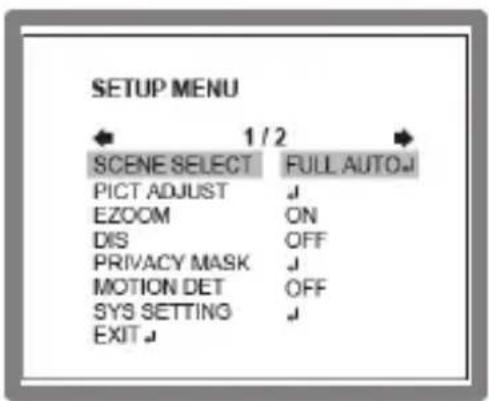
SETUP MENU (OSD)
1. SCENE SELECT
You can select options according to the environment: FULL AUTO, INDOOR, OUTDOOR, BACKLIGHT, ITS (Traffic Monitoring) and CUSTOM (User defined).
1.1. SHUTTER/AGC

This function can set the SHUTTER/AGC level to AUTO, MANUAL or FIX.
| SHUTTER/AGC DESCRIPTION | |
| AUTO | Video level is automatically controlled by settings of AE LEVEL, AGC, MAX and SENS UP. Under lowest light level, AGC is maximized by automatic gain controller Also can set SENS UP, ON or OFF. |
| MANUAL | Video level is manually controlled by the settings of SHUTTER, AGC MAX. Available DC Auto Iris Lens only in this mode. |
| FIX | Video level is fixed. |
SETUP MENU (OSD)
1.2. WHITE BAL

You can choose from different white balance modes: ATW, PUSH, USER1, USER2, MANUAL and PUSHLOCK.
Only when you choose the CUSTOM mode in the SCENE SELECT menu will the 'WHITE BALANCE' sub-menu ATW/ PUSH/ USER1/ USER2/ MANUAL/PUSH LOCK appear, you can now adjust the mode.
Otherwise the white balance is fixed. The other mode in the SCENE SELECT sub menu is a fixed ATW setting only.
1.2.1. ATW (AUTO WHITE BALANCE)
You can set the SPEED, DELAY CNT, ATW FRAME and ENVIRONMENT.
| ATW DESCRIPTION | |
| SPEED | Set the AWB compensating speed |
| DELAY CNT | Adjusts the AWB compensation delay to next update of AWB. |
| ATW FRAME | Determines the ATW range with respect to the fundamental range. |
| ENVIRONMENT | Select INDOOR, SUNNY, SHADE or AUTO. |
SETUP MENU (OSD)
1.3. HLC/BLC
HLC (HIGHLIGHT COMPENSATION)
This function is used to black out highlighted areas in order to enable a clear visual image of objects, such as the license plates of an oncoming vehicle or other objects that may be obstructed by bright headlamps.

natural_image
Close-up of a car's front wheel and side wheel with a license plate (no visible text or symbols)HSBLC ON

natural_image
Blurred grayscale image with no discernible text, symbols, or identifiable objectsHSBLC OFF
BLC (BACKLIGHT COMPENSATION) :
This is a useful function that brightens an image in the foreground with a highly lite area behind it such as sunlight thus eliminating the affect of a silhouette.

natural_image
Black-and-white photo of a person standing indoors, wearing patterned clothing (no visible text or symbols)BLC ON

natural_image
Black-and-white photo of a person standing indoors, no visible text or symbolsBLC OFF
SETUP MENU (OSD)
1.4. ATR-EX (Adaptive Tone Reproduction-EX)

Set to enable or disable ATR (Adaptive Tone Reproduction) compensation for a better dynamic range (D-WDR) of the image. This function provides gradation compensation to improve the contrast of subjects whose gradation has been lost in cases where both low-luminance and high-luminance areas exist in the same picture.
1.4.1. ATR-EX SETUP
User can select CONTRAST and CLEAR FACE values from LOW / MID / HIGH to achieve the best image quality.
1.5. DNR

You can adjust the level of noise reduction, the bigger the value, the higher the noise reduction level. DNR (Digital Noise Reduction) removes the temporal noise reduction by 3D filtering while using frame memory spatial noise is reduced by the 2D filtering. Setting a higher level of noise reduction may result in the loss of sharpness and the tail effect of a comet may occur.
SETUP MENU (OSD)
1.6. DAY/NIGHT
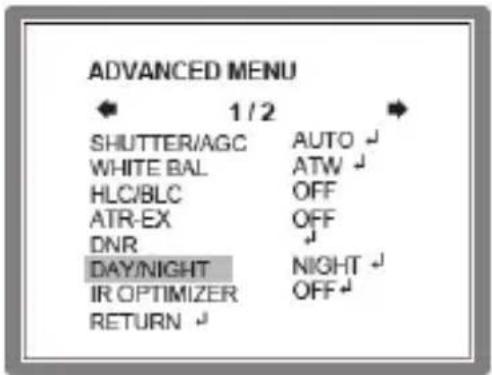
Day/night function is for the user to use the camera for different occasions. There are three modes, DAY, NIGHT and AUTO
| DAY/NIGHT | DESCRIPTION |
| AUTO | This function controls the camera output Color or B&W image according to the strength of the light. You Can set the parameter according to the environment. Camera decides DAY or NIGHT through in coming light level itself. |
| DAY | Video is always in Color. |
| NIGHT | Video is always in Black & White. |
SETUP MENU (OSD)
1.7. IR OPTIMIZER
This is a useful function for IR LED cameras in night mode only.
If subjects which can cause overexposure are located near the monitored area, you can adjust IR OPTIMIZER level or area by Selecting ON or OFF.
If IR OPTIMIZER is set to "ON",
| IR OPTIMIZER | DESCRIPTION |
| MODE | Select AUTO or CENTER to reduce over-saturation.AUTO: Reducing the over-saturation is automatically adjusted along with the location of the subject. |
| IR AREA | Sets the IR OPTIMIZER AREA and the function works selected area in ‘CUSTOM preset only. |
| LEVEL | This function is used to adjust the overall when IR OPTIMIZER is working. If the LEVEL is too high, the over-saturation could occur. |
| IR LED | Set the IR LED ON/OFFDAY/NIGHT : Follows the setting automatically DAY/NIGHT function.OFF : Turn IR LED off.FIX : Fixes the brightness of IR LED in any condition. |
| COLOR NIGHT | Displays night video in color. |
| IR SHADE COMP | This function is used to compensate for IR shade of the side area on screen when IR LED is ON. You can adjust the shading PATTERN, POSITION and LEVEL.If the LEVEL is high, the screen noise could be increased at the side area. |
| MODE | DESCRIPTION |
| LENS SHD COMP | Lens shading compensation. This function is used to calculate the compensation data for lens shading. The convex shape of the lens causes the light to enter the camera unevenly and typically makes the center of the screen brighter than the rest. It is used to compensate for this undesirable effect and make the screen more even.Set to ‘ON’, you can adjust the shading PATTERN and POSITION. |
| DEFOG | You can choose the Defog function according to the environment.The visibility of the camera can be enhanced in any weather condition. You can select from Off/Low/Middle/High to display.If set to ON, the WDR/BLC function will be deactivated. |
| FLK LESS | This function is used to remove the flickering on screen due to differences in light and electric frequencies. Selects AUTO, OFF or ON. |
| ANTI-CR | This mode can minimize the problems related to color rolling caused by differences between the flicker of fluorescent lights and the frequency of the camera. Selects AUTO, OFF or ON |
SETUP MENU (OSD)
2. PICT ADJUST

bar
PICT ADJUST | Category | Value | |---|---| | BRIGHTNESS | 000 | | CONTRAST | 00 | | SHARPNESS | 08 | | HUE | 095 | | COLOR GAIN | 118 | RETURN#| PIC ADJUST | DESCRIPTION |
| BRIGHTNESS | Increases or decreases the brightness of the picture.Do not increase this too much this will cause the dynamic range for the highlighted areas to decrease. |
| CONTRAST | Adjust the strength of the image Contrast. If Contrast is set to too high, the dark area may lose detail and the high luminance area may be saturated. |
| SHARPNESS | Increase or decreases the Sharpness of the picture.Setting the Sharpness too high will cause more noise and a harsh image. |
| HUE | Adjusts hue for NTSC version only. |
| COLOR GAIN | Increases or decreases the Color Saturation. |
SETUP MENU (OSD)
3. EZOOM
Sets the maximum digital zoom magnification. E.ZOOM function enlarges the pixel itself, which can cause deterioration of the picture quality.

You can setup according to the needs of area size and position.
| EZOOM | DESCRIPTION |
| MAG | MAG is the magnification ratio of the electronic zoom. Sets from x000 to x255. |
| PAN | When MAG is greater than 0, the electronic pan is available. 000 is the left most pan and 1023 is the right most pan. |
| TILT | When MAG is greater than 0, the electronic tilt is available. 000 is the upper most tilt and 511 is the lower most tilt. |
4. DIS (Digital Image Stabilization)
This function is used to reduce and stabilizes the shaky image from a camera installed in the vibrated area. FOV(Field of view) will be reduced if set to ON.

SETUP MENU (OSD)
5. PRIVACY MASK
Sets ON/OFF for enabling/disabling PRIVACY. Up to 15 privacy areas are available and each area is programmable in size, position, color and transparency of the chosen area.
• The privacy areas are masked with the color selected by PRIVACY MASK>COLOR.

| PRIVACY MASK | DESCRIPTION |
| AREA SEL | Select the area to be masked AREA1~AREA15 to be adjusted. |
| DISPLAY | Choose ON / OFF for the masked areas which you selected ‘AREA SEL’. |
| POSITION | Adjust the masked area positions by UP/DOWN/LEFT/RIGHT. |
| COLOR: | Selects one of 8 colors (Red, Green, Blue, Yellow, Cyan, Magenta, White and Black) for selected mask window at ‘AREA SEL’. |
| TRANSP | Transparency rate for the mask can be adjusted. |
| MOSAIC | Enables or disables the mosaic effect for the selected mask window at ‘AREA SEL’. |
SETUP MENU (OSD)
6. MOTION DETECTION
Up to 4 Motion Detection areas are available settings include DETECTION SENSE / INTERVAL / BLOCK DISP / MASK AREA / MONITOR AREA and each area is programmable in size and location.
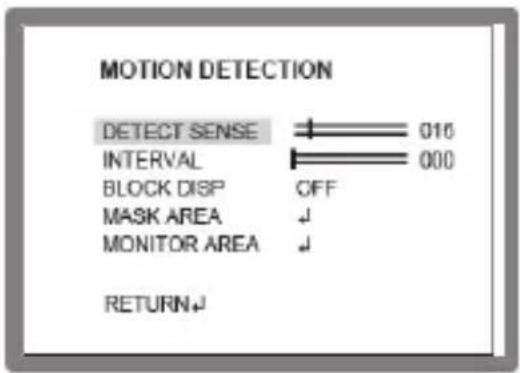
| MOTION DETECTION | DESCRIPTION |
| DETECT SENSE | Adjust the sensitivity level for detecting motion. A higher value is more sensitive. |
| INTERVAL | Set the interval time from the starting motion operation until being ready for the next motion operation. |
| BLOCK DISP | Enables or disables displaying blocks for the area which the motion is detected. |
| MASK AREA | Sets MASK AREA for disabling MOTION DETECTION. Selects number of area cells to set the area you need. |
| MONITOR AREA | Sets the MOTION DETECTION area on screen. For visual surveillance area and you can adjust the parameter values to adjust the surveillance area location. |
6.1. BLOCK DISP
The motion is displayed by means of blocks when MOTION DET and MOTION DET>BLOCK DISP are ON.
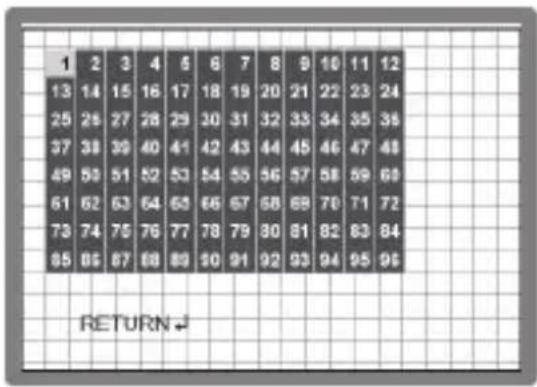
SETUP MENU (OSD)
7. SYS SETTING

| SYS SETTING | DESCRIPTION |
| LENS | Selects the lens type: AUTO or MANUAL.AUTO |
| FLIP | Use to inverse the pictures coming from the camera.V : Vertical Flips the video signal verticallyH : Horizontal Flips the video signal horizontallyHV : Horizontal and Vertical Flips the video signal horizontally and vertically. |
| LCD/CRT | Select the correct type of viewing monitor CRT or LCD this will ensure the most optimal picture. |
| COMMUNICATION | Set up COMMUNICATION related functions PROTOCOL / ADDRESS / BAUD RATE / DATAIT / PARITY / STOPBIT according to your needs. |
| CAMERA ID | Set the camera ID as numbers, uppercase letters, and related symbols. |
7.1. COMMUNICATION
Set up COMMUNICATION related functions PROTOCOL / ADDRESS / BAUD RATE / DATAIT / PARITY / STOPBIT according to your needs.

SETUP MENU (OSD)
7.2. CAMERA ID
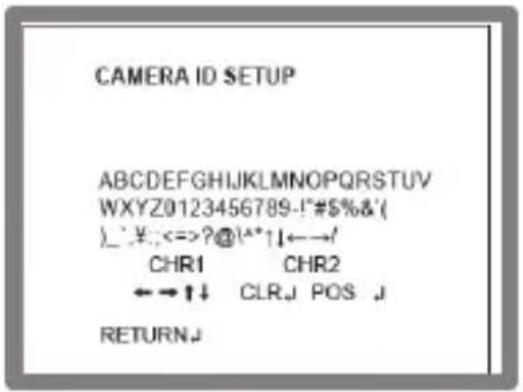
Set the camera ID as numbers, uppercase letters, and related symbols.
• ←↑↓→ : Up/Down, Left/Right
- CLR: clear camera name
- POS : for position.
- RETURN": return to the upper menu.
8. LANGUAGE
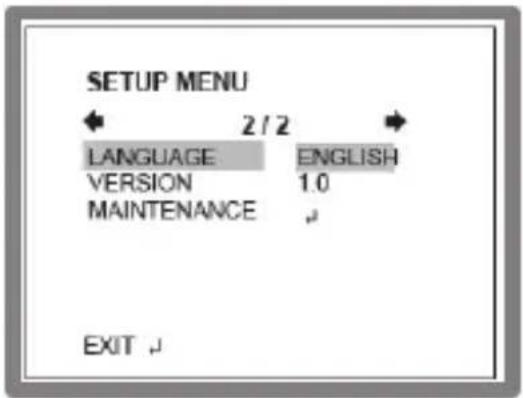
Select from 8 languages: ENGLISH, SPANISH, RUSSIAN, PORTUGUESE, GERMAN, FRENCH, CHINESE and JAPANESE.
9. VERSION
The camera firmware version is displayed.
SETUP MENU (OSD)
10. MAINTENANCE
Set up functions for WHITE PIXEL MASK and CAMERA RESET.

10.1. W.PIX MASK
This function is used to compensate white pixels. When used camera in high-temperature environment, there might be dead pixel on image CCD sensor. With this function ON the dead pixel is to be masked so as to improve the picture quality. There are three settings: MANUAL / AUTO / DATA CLEAR.

| MAINTENANCE | MODE | DESCRIPTION |
| MANUAL COMP | REGISTRATION | Detect each white pixel using the cursor. |
| REG. POINT | Displays detected white pixels in color. | |
| CURSOR COLOR | Select cursor color: WHITE / BLACK / RED / GREEN / BLUE | |
| BLINK | Set the cursor to blink or not blink. | |
| REG. NUMBER | Display quantity of detected white pixels. | |
| AUTO COMP | LEVEL1 | Sets the threshold to detect white pixels. |
| LEVEL2 | Sets the threshold to detect very large white pixels. | |
| AUTO | Start automatic detection of white pixels. | |
| DATA CLEAR | Clear the W.PIX data or not. | |
| CAMERA RESET | This function is used to RESET to the factory defaults of the camera settings. You should confirm before using this operation. |
SETUP MENU (OSD)
11. EXIT
Exits SETUP MENU and returns to the normal display.

| EXIT MODE | DESCRIPTION |
| SAVE | Saves all the settings before exiting the setup menu. |
| NOT SAVE | Exit the setup menu without saving. |
| CANCEL Cancel | the exit mode. |
| BACK | Go back to the previous menu mode. |
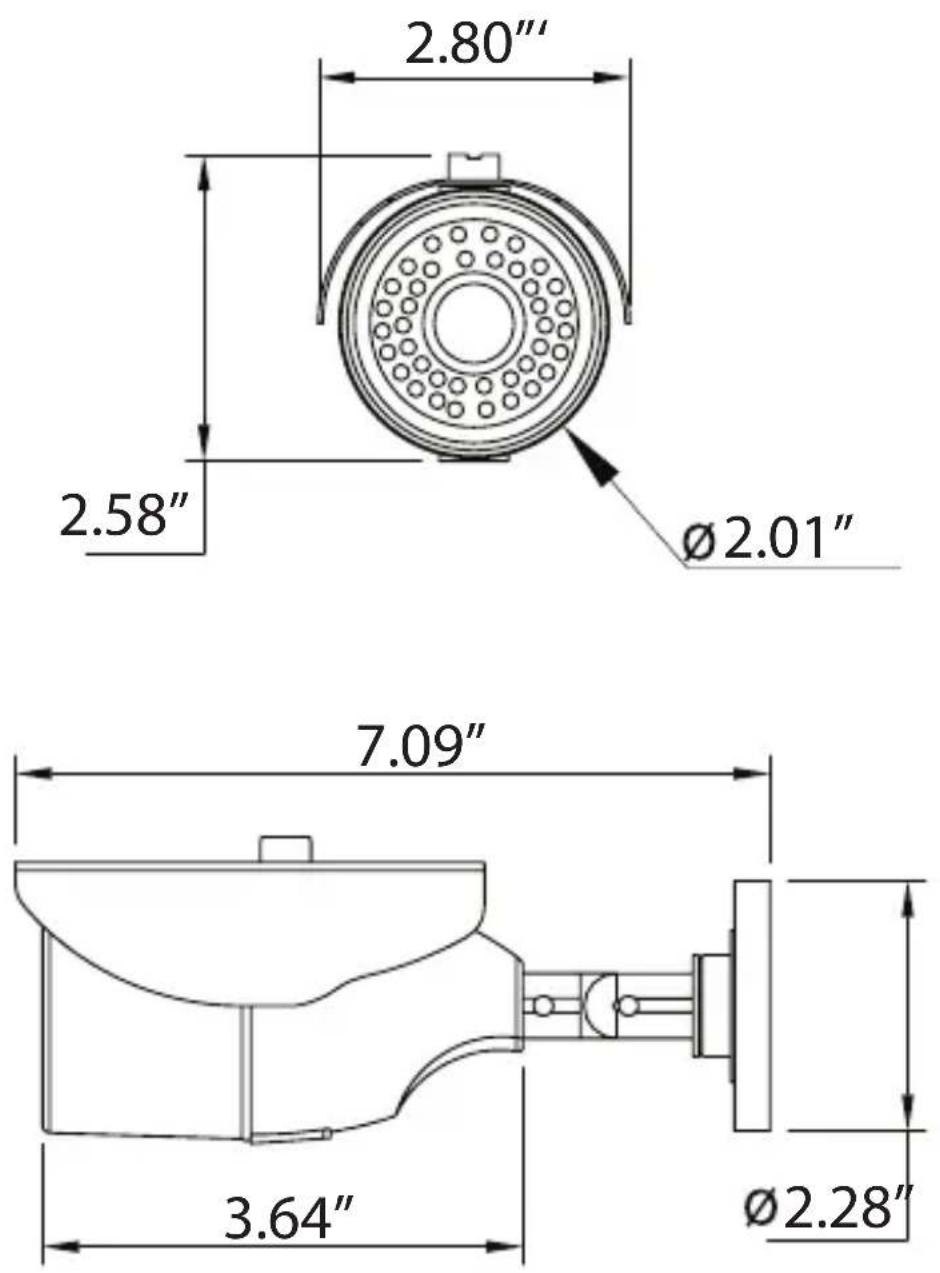
Dimensions
(unit: inches)
Specifications
| Image Device | 1/3" High-Resolution Inter-Line CCD (960H) w/ Effio A |
| Resolution | 750 TVL (960H) |
| Effective Pixels | 976(H) x 494(V) |
| Minimum illumination | 0.003 Lux (O Lux with LED ON) |
| Infrared LEDs | 24 Dynamic IR LEDs |
| IR Distance | 65' (20m) |
| Day/Night | Auto |
| Built-In Lens | 3.6mm IR Corrected Lens |
| Light Compensation | HLC (Highlight Compensation) / BLC (Backlight Compensation) |
| Noise Reduction | 3DNR |
| White Balance | ATW / Push / User1 / User2 / MANUAL / Push Lock |
| E-WDR | E-WDR by ATR-EX |
| Lens Shading Compensation | YES |
| Motion Detection | YES |
| Privacy Masking / Motion | UP to 15 Programmable Mask Areas |
| Water Resistance | IP67 |
| Power Source | DC12V (±10%) |
| Power Consumption | 70mA / 240mA (IR OFF/ON) |
| Operating Conditions | 14°F to +140°F (-10°C to +60°C) @ 85% RH |
| Dimensions | 2.80" x 7.09" x 2.58" (71 x 180 x 65.5mm) |
OTHER PRODUCTS FROM VITEK
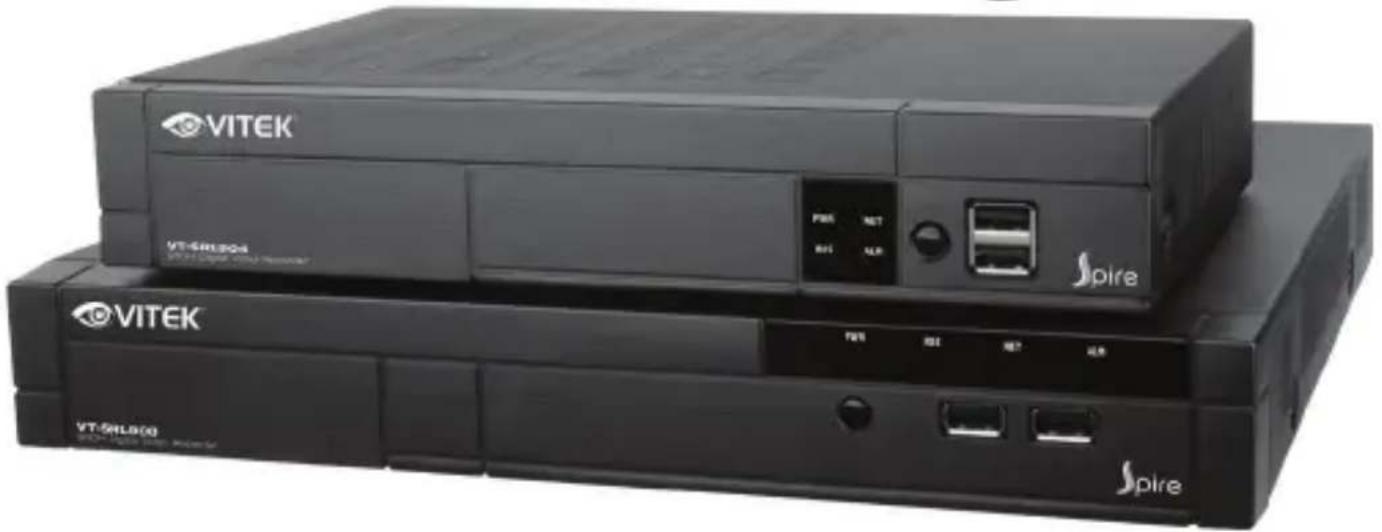
Spire Series 960H Digital Video Recorders

natural_image
Two black VITEK and Spire networking devices with ports and control buttons (no visible text or symbols on the devices themselves)VT-SRL Series
Spire Series 4, 8, & 16 Channel 960H Digital Video Recorders
• Supports High Resolution 960H Cameras
• 4, 8 or 16 Video Inputs with 1 HDMI, 1 Spot Monitor Output, and 1 VGA output
• H.264 Compression
- Up to 480fps Live Display & 480fps Recording (VT-SRL916) / 240/240 (VT-SRL908) / 120/120 (VT-SRL904)
• Supports both Dynamic and Static IP Addresses
• 4 Alarm Inputs / 1 Relay Out
• Supports two internal Hard Drives (VT-SRL908/VT-SRL916) / One internal Hard Drive (VT-SRL904)
- Remote Viewing over the Internet, LAN, Explorer, Safari, Firefox, Opera and Chrome
- Applications for iPhone, iPad, iTouch and Android Devices
• Mac OSX Client & PC CMS Central Management Software Included
- Thumbnail Search
• Automatic sending of Health & Event notifications via email
• Control locally via USB Mouse or with the Included IR Remote control
• PTZ Control over RS-485
VITeK LIMITeD PRODUCT WARRANTY
VITEK products carry a three (3) year limited warranty. VITEK warrants to the purchaser that products manufactured by VITEK are free of any rightful claim of infringement or the like, and when used in the manner intended, will be free of defects in materials and workmanship for a period of three (3) years, or as otherwise stated above, from the date of purchase by the end user. This warranty is non-transferable and extends only to the original buyer or end user customer of a Vitek Authorized Reseller.
The product must have been used only for its intended purpose, and not been subjected to damage by misuse, willful or accidental damage, caused by excessive voltage or lightning.
The product must not have been tampered with in any way then the guarantee will be considered null and void.
This guarantee does not affect your statutory rights.
Contact your local VITEK Reseller should servicing become necessary.
Vitek makes no warranty or guarantee whatsoever with respect to products sold or purchased through unauthorized sales channels. Warranty support is available only if product is purchased through a Vitek Authorized Reseller.

28492 CONSTELLATION ROAD VALENCIA, CA 91355
WWW.VITEKCCTV.COM | 888-VITEK-70
- TABLE OF CONTENTS
- Warnings
- Precautions
- ∅ Do not install the camera in extreme temperature conditions.
- ∅ Do not drop the camera or subject it to physical shocks.
- ∅ Never point camera into a strong light source, such as the sun or bright spotlight.
- ∅ Do not expose the camera to radioactivity.
- NOTE
- FEATURES
- SETUP MENU (OSD)
- [HOW TO OPERATE OSD JOYSTICK]
- [OSD SET UP]
- SCENE SELECT
- SHUTTER/AGC
- WHITE BAL
- ATW (AUTO WHITE BALANCE)
- HLC/BLC
- HLC (HIGHLIGHT COMPENSATION)
- BLC (BACKLIGHT COMPENSATION) :
- ATR-EX (Adaptive Tone Reproduction-EX)
- ATR-EX SETUP
- DNR
- DAY/NIGHT
- IR OPTIMIZER
- PICT ADJUST
- EZOOM
- DIS (Digital Image Stabilization)
- PRIVACY MASK
- MOTION DETECTION
- BLOCK DISP
- SYS SETTING
- COMMUNICATION
- CAMERA ID
- LANGUAGE
- VERSION
- MAINTENANCE
- W.PIX MASK
- EXIT
- Dimensions
- OTHER PRODUCTS FROM VITEK
- Spire Series 960H Digital Video Recorders
- VT-SRL Series
- VITeK LIMITeD PRODUCT WARRANTY
Brand : Vitek
Model : VTC-IRA24F
Category : Video camera