VTC-C960WS - Security Camera Vitek - Free user manual and instructions
Find the device manual for free VTC-C960WS Vitek in PDF.


User questions about VTC-C960WS Vitek
0 question about this device. Answer the ones you know or ask your own.
Ask a new question about this device
Download the instructions for your Security Camera in PDF format for free! Find your manual VTC-C960WS - Vitek and take your electronic device back in hand. On this page are published all the documents necessary for the use of your device. VTC-C960WS by Vitek.
USER MANUAL VTC-C960WS Vitek
natural_image
Two VITEK camera modules with black lenses and control knobs, shown from different angles (no visible text or symbols on the devices themselves)• VTC-C960DS: 750 TVL 960H True Day/Night CCD Camera w/Effio-A Processing
• VTC-C960WS: 750 TVL 960H WDR Day/Night CCD Camera w/Effio-V Processing
• 1/3" High density Sony CCD (960H)
• High Resolution of 750 Horizontal Lines
- Small scale design to fit in 5" dome enclosures such as the Pelco DF5 Housing
• E-WDR by ATR-EX (Adaptive Tone Reproduction) (VTC-C960DS)
• True WDR (Wide Dynamic Range) (VTC-C960WS)
• Sensitivity of 0.0005 Lux
- XD-DNR (2D+3D DNR) Advanced Digital Noise Reduction
• True Day/Night by ICR - Infrared Cut Removal
• Built-in Motion Detection with a 24x16 Grid
- Privacy Mask function with up to 15 programmable mask areas
• 12VDC / 24VAC Dual Voltage Operation
- Lenses Sold Separately
• To prevent fire or shock hazard, do not expose the unit to rain or moisture.
- To prevent electric shocks and risk of fire hazards, do NOT use other than specific power source.

CAUTION
RISK OF ELECTRIC SHOCK. DO NOT OPEN

CAUTION: TO REDUCE THE RISK OF ELECTIC SHOCK, DO NOT REMOVE COVER (OR BACK). NO USER SERVICEABLE PARTS INSIDE. REFER SERVICING TO QUALIFIED SERVICE PERSONNEL
The symbol is intended to alert the user to the presence of uninsulated "dangerous voltage" within the product's enclosure that may be of sufficient magnitude to constitute a risk of electric shock to persons.

The symbol is intended to alert the user to the presence of important operating and maintenance(servicing) instructions in the literature accompanying the unit.
- Warning :
This equipment has been tested and found to comply with the limits for a Class A digital device, pursuant to part 15 of the FCC Rules. These limits are designed to provide reasonable protection against harmful interference when the equipment is operated in a commercial environment. This equipment generates, uses, and can radiate radio frequency energy and, if not installed and used in accordance with the instruction manual, may cause harmful interference to radio communications. Operation of this equipment in a residential area is likely to cause harmful interference in which case the user will be required to correct the interference at his own expense.
- Caution :
Any changes or modifications in construction of this device which are not expressly approved by the party responsible for compliance could void the user's authority to operate the equipment.
Mains power quality should be that of a typical commercial environment. If the user of the model requires continued operation during power mains interruptions, it is recommended that the model be powered from an uninterruptible power supply (UPS) or a battery.

NOTICE
- The image used in this instruction manual are processed to help comprehension and may differ from actual appearance of the camera.
- Avoid installing areas where has shock or vibration which results in the problems.
- Pay attention to safety when laying the connection cable and observe that the cable is not subjected to heavy loads, kinks or damage and no moisture can get in.
- Never open the device such as boards. The warranty becomes void if repairs are undertaken by unauthorized persons.
- Maintenance and repair have to be carried out only by authorized service centers.
• Use only a mild detergent to clean the housing. - The camera should never be operated beyond the technical specifications. This can lead to destruction.
• The camera should never be operated in water.
p.03\~04
Safety Precaution
p.05
Contents
p.06
Features
p.07
Composition
p.07
Dimensions
p.08
Part Names
p.09\~10
Installation Instructions
p.11\~28
Operating Instructions
p.29\~30
Specifications
Key Features
• VTC-C960DS: 750 TVL 960H True Day/Night CCD Camera w/Effio-A Processing
• VTC-C960WS: 750 TVL 960H WDR Day/Night CCD Camera w/Effio-V Processing
• 1/3" High density Sony CCD (960H)
• High Resolution of 750 Horizontal Lines
- Small scale design to fit in 5" dome enclosures such as the Pelco DF5 Housing
• E-WDR by ATR-EX (Adaptive Tone Reproduction) (VTC-C960DS)
- True WDR (Wide Dynamic Range) (VTC-C960WS)
• Sensitivity of 0.0005 Lux
- XD-DNR (2D+3D DNR) Advanced Digital Noise Reduction
• True Day/Night by ICR - Infrared Cut Removal
• Built-in Motion Detection with a 24x16 Grid
- Privacy Mask function with up to 15 programmable mask areas
• 12VDC / 24VAC Dual Voltage Operation
- Lenses Sold Separately
General Description
This is an ultra-clear resolution camera which realizes over 750TVL resolution and a crisp color reproduction with SONY 960H CCD and Effio-V(Effio-A) Enhanced image signal processor.
- With Effio-V/A series Enhanced digital imaging system,
- Delivers the crystal clear images providing 750TVL resolution in conjunction with SONY 960H High density CCD.
- VTC-C960WS is provided 'TRUE WDR' function
- VTC-C960DS is provided 'D-WDR by ATR-EX' function
- Color signal processing provides the optimum balance between the luminance and chroma signals for high color reproducibility even for the detail scene which contains very high spatial frequency.
- Incorporates 2D+3DNR signal processing.
- With ICR mechanism,
- Enhances its sensitivity about 10x at night time
- Can accepts the infrared light
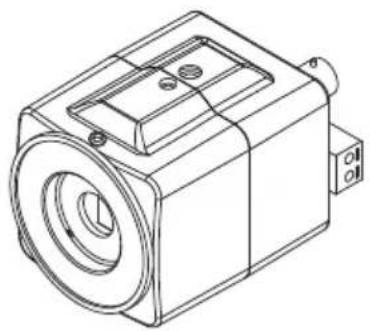
natural_image
Technical line drawing of a mechanical component with mounting holes and a central circular housing (no text or symbols)Camera

Operating Instruction
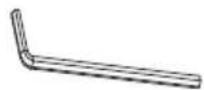
L- Wrench: 1.5mm (1pc)

Dust Protection Cap (1pc)
Dimensions
(unit : mm)

text_image
1.89" Ø1.81" 1.73" 2.09"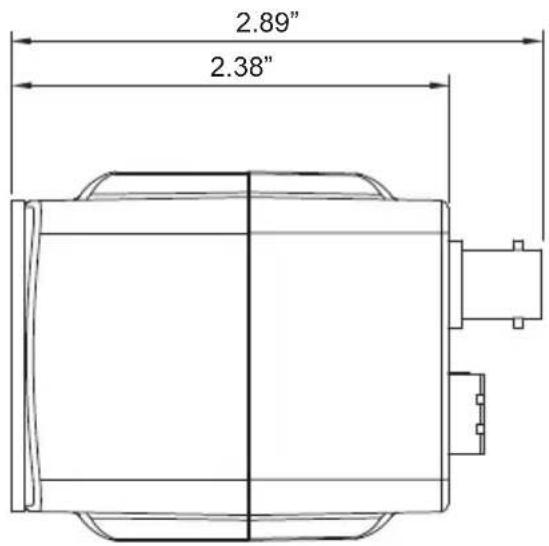
text_image
2.89" 2.38"
text_image
Mount Holes (Top / Bottom) Flange Lock screw L-Wrench Dust Protection Cap Back focus adjusting Flange Rear Case Front CaseREAR VIEW
text_image
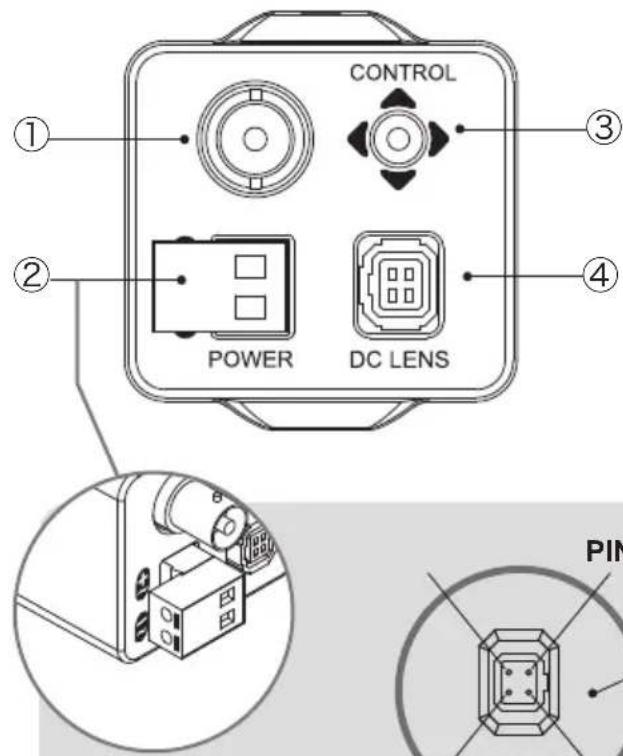
CONTROL POWER DC LENS PIN① Video out connector(BNC)
② Power input terminal
③ OSD Control Joy stick
④ DC Auto Iris Lens connector
PIN 2PIN 4

text_image
DC LENS PINLens Connector for Auto Iris lenses
| No. | DC Iris |
| 1 | Damp(-) |
| 2 | Damp(+) |
| 3 | Drive(+) |
| 4 | GND |
Installation and commissioning Instructions
- Make sure the power is removed before the installation.
- Follow the order for applying power.
First connect the low voltage (DC12V or AC24V), then plug the AC adapter to AC outlets to avoid an improper reset from power jitter and a damage from the surge voltage when no load.
- Remove the dust protection cap from the lens mount.
- Screw the lens onto the camera firmly.
- Plug the lens plug into the lens connector on the rear of camera case.
- Mount the camera to the wall or ceiling with a corresponding mounting bracket through the camera mount holes (1/4" thread insert) on its top or bottom.

CAUTION
- Care should be taken the cable is NOT to be damaged, kinked or exposed in the hazardous area.
- Do not expose the camera directly to a strong light source such as the sun or spot light.
Setting the back focus adjustment
The proper back focus adjustment is essential for the motorized zoom lens to get the all time sharp focus when zooming in and out by the remote control.
For easier and better adjustment, this camera provides FOCUS ADJUST menu which prevents from the mistake of the focus adjustment.
With enabling FOCUS ADJUST menu, follow the procedure to get the best back focus adjustment.
- Set the lens for the zoom position to WIDE and the focus position to INFINITE( ).
- Shoot the object departing from about 10Meters.
- Adjust 'Back focus adjusting Flange' until the optimum focus is achieved.
- Set the lens for zoom position to TELE and adjust the lens focus for best focus.
- Set the lens for zoom position to WIDE again, check if the focus adjustment was the best. If not, re-adjust 'Back focus Flange' slightly.
- After the setting, tighten the 'Flange lock screw' with L-wrench supplied.
Start up
When the camera is powered properly, it starts up with initializing the internal parameters.
Using OSD Controller
Setup menu can be accessed and controlled by OSD control joy stick on the rear of the camera unit.
Five commands are available with the joy stick.
The design of rear panel could be different according to the camera models.

Description of the joystick operation
1) SET Key (●): Access to the menu or enter the setting.
To enter the main menu, press the Set Key down.
2) UP/DOWN Key (▲/▼): Choose the desired sub-menu and to move the cursor up or down.
3) LEFT/RIGHT Key (◄/►): Set up the value of the selected menu. Used to adjust the desired menu selection and to move the cursor left or right.
OSD menu Startup
Press the 'OSD menu SET key' down to access the setup menu mode.
• ↕ / ➤ : Selects previous page or next page.
- EXIT : Enters 'EXIT' menu.
- RETURN : Returns to the previous menu.
SETUP MENU
| SCENE SELECT | FULL AUTO |
| PICT ADJUST | |
| EZOOM | OFF |
| DIS | OFF |
| PRIVACY MASK | |
| MOTION DET | OFF |
| SYS SETTING | |
| EXIT |
SETUP MENU
| ← | 2/2 | → |
| LANGUAGE | ENGLISH | |
| VERSION | 1.0 | |
| MAINTENANCE | ↓ | |
EXIT
OSD menu Table
| SETUP MENU | ADVANCED MENU | CONFIGURATION | ||
| SCENE SELECT | FULL AUTO/ INDOOR/ OUTDOOR/ BACKLIGHT/ ITS/ CUSTOM | |||
| SHUTTER/AGC | AUTO | AE LEVEL | 100 | |
| AGC MAX | 42DB | |||
| SENS UP | OFF | |||
| MANUAL | SHUTTER | 1/50(1/60) | ||
| AGC MAX | 42DB | |||
| FIX | SHUTTER | 1/50(1/60) | ||
| AGC MAX | 42DB | |||
| WHITE BAL | ATW | SPEED | 127 | |
| DELAY CNT | 30 | |||
| ATW FRAME | 200 | |||
| ENVIRONMENT | INDOOR | |||
| HLC / BLC | OFF | |||
| HLC | CLIP LEVEL | 10 | ||
| SCENE SELECT | WDR / ATR-EX | WDR for VTC-C960WS, ATR-EX for VTC-C960DS | ||
| DNR | LEVEL | 3 | ||
| DAY/NIGHT | AUTO | BURST | OFF | |
| CNTL SIGNAL | INT | |||
| DELAY CNT | 3 | |||
| DAY->NIGHT | 80 | |||
| NIGHT->DAY | 120 | |||
| IR OPTIMIZER | ON | MODE | AUTO | |
| IR AREA | --- | |||
| LEVEL | 3 | |||
| IR LED | DAY/NIGHT | |||
| COLOR NIGHT | ON/OFF | |||
| OFF (default) | ||||
| LENS SHD COMP | OFF | |||
| ON | PATTERN | SET1/2/3 | ||
| POSH | 480 | |||
| POSV | 290 | |||
| DEFOG | OFF | |||
| ON | LEVEL | MID | ||
| FLK LESS | OFF | |||
| AUTO | MODE | GAIN CNTL | ||
| ON | MODE | GAIN CNTL | ||
| ANTI CR | AUTO / OFF / ON | |||
| PICT ADJUST | BRIGHTNESS | 128 | ||
| CONTRAST | 32 | |||
| SHARPNESS | 8 | |||
| HUE | 64 | |||
| COLOR GAIN | 128 | |||
| EZOOM | OFF | |||
| ON | MAG | 0 | ||
| PAN | 512 | |||
| TILT | 256 | |||
| DIS | OFF / ON | |||
| PRIVACY MASK | AREA SEL | 1/15 | ||
| DISPLAY | OFF | |||
| POSITION | ||||
| COLOR | ||||
| PRIVACY MASK | TRANSP | |||
| MOSAIC | ||||
| MOTION DET | OFF | |||
| ON | DETECT SENSE | 111 | ||
| INTERVAL | 0 | |||
| BLOCK DISP | OFF | |||
| MASK AREA | ||||
| MONITOR AREA | AREA SEL | 1/4 | ||
| AREA MODE | OFF | |||
| TOP | ||||
| BOTTOM | ||||
| LEFT | ||||
| RIGHT | ||||
| SYS SETTING | LENS | AUTO | TYPE | DC |
| MODE | AUTO | |||
| ADJUST | ||||
| SPEED | 30 | |||
| FLIP | OFF / V / H / HV | |||
| LCD / CRT | CRT | |||
| CAMERA ID | ||||
| LANGUAGE | English/ Spanish/ Russian/ Portuguese/ German/ French/ Chinese/ Japanese | |||
| VERSION | 1.01 | |||
| MAINTENANCE | W.PIX MASK | MANUAL COMP | REGISTRATION | |
| REG. POINT | ||||
| CURSOR COLOR | ||||
| BLINK | ||||
| REG. NUMBER | ||||
| AUTO COMP | LEVEL1 / LEVEL2 / AUTO | |||
| DATA CLEAR | YES / NO | |||
| CAMERA RESET | ||||
| EXIT | SAVE / NOT SAVE / CANCEL / BACK | |||
OSD menu Setup
Press the OSD menu SET key down to access the setup menu mode.

text_image
SETUP MENU ← 1 / 2 → SCENE SELECT FULL AUTO↓ PICT ADJUST ↓ EZOOM OFF DIS OFF PRIVACY MASK ↓ MOTION DET OFF SYS SETTING ↓ EXIT↓
ADVANCED MENU

text_image
1 / 2 SHUTTER/AGC WHITE BAL HLC/BLC WDR/ATR-EX DNR DAY/NIGHT IR OPTIMIZER RETURN AUTO ATW OFF WDR ↓ NIGHT ON1. SCENE SELECT
These options have been pre-configured at the factory for optimal performance. You can chose one of FULL AUTO, INDOOR, OUTDOOR, BACKLIGHT, ITS and CUSTOM according to the environments.
Each SCENE preset offers how to set SHUTTER +AGC, WHITE BAL, HLC/BLC, WDR/ATR-EX2, DNR, DAY/NIGHT, IR OPTIMIZER, LENS SHD COMP, DEFOG, FLK LESS, and ANTI CR functions to get the best image for the SCENE SELECT.
FULL AUTO: Optimized for the general scene.
INDOOR: Optimized of indoor environment.
OUTDOOR: Optimized of outdoor environment.
BACKLIGHT: Optimized for backlight condition such as near the window in daylight.
ITS: Optimized for the environment on traffic roads.
CUSTOM: Setting for user customized environment.
If the selected preset does not seem to be the best choice, the further adjustments are available in each preset.
1-1. SHUTTER/AGC
Sets the SHUTTER/AGC level to AUTO, MANUAL or FIX.
1-1-1. AUTO:
Video level is automatically controlled to follow the settings of AE LEVEL, AGC MAX, SENS UP. In this mode, 'DC Auto Iris Lens' and 'Fixed Lens' are available.
1-1-2. MANUAL:
Video level is manually controlled by the settings of SHUTTER, AGC MAX. In this mode, 'DC Auto Iris Lens' is only available.
1-1-3. FIX:
Video level is fixed in any conditions by the setting of SHUTTER, AGC MAX.
1-2. WHITE BAL
Can set the WHITE BALANCE mode.
1-2-1. ATW (Auto Trace White Balance):
Automatically tracks the changes of color temperature and continuously adjusts the white balance. The white balance range is 1,800^ K\~ 10,500^ K.
Note: If you set to 'CUSTOM' mode in 'SCENE SELECT' menu, the 'WHITE BAL' sub-menu will be appeared 'ATW/ PUSH/ USER1/ USER2/ MANUAL/ PUSH LOCK' functions that you can select one.
Other modes in 'SCENE SELECT' menu, the 'WHITE BAL' sub-menu is only 'ATW' function.
ATW
| SPEED | 200 |
| DELAY CNT | 020 |
| ATW FRAME | 200 |
| ENVIRONMENT | INDOOR |
RETURN
- SPEED (default: 200):
Sets the AWB(Automatic White Balance) compensating speed. Lower value makes AWB faster. * Too fast AWB may make the color oscillation.
- DELAY CNT (default: 20):
Adjusts the AWB compensation delay to next update of AWB. The smaller value will update AWB more frequently (faster).
- ATW FRAME (default: 200):
Determines the ATW range with respect to the fundamental range. Higher value extends the ATW range at lower and higher color temperature.
• ENVIRONMENT (default: INDOOR):
Selects INDOOR, SUNNY, SHADE or AUTO Their ATW is optimized for the limited application and can not cover
INDOOR : Optimized for Indoor installation and more easily compensates ATW for low color temperature such as incandescent lights.
SUNNY : Optimized for outdoor sunlight applications and more easily compensates ATW for high color temperature such as sunlight.
SHADE : Optimized for shade area compensation.
AUTO : Optimized for general scene.
1-3. HLC/BLC
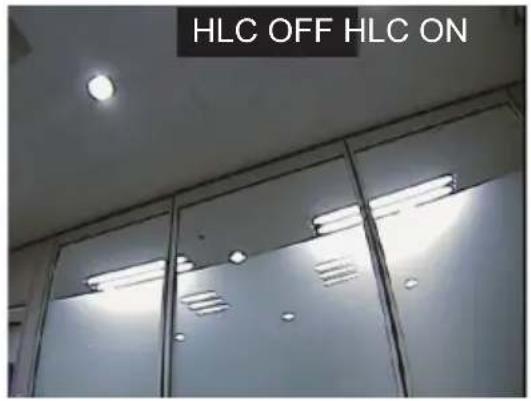
HLC (Highlight Cut out) :
This function is used to black out highlighted areas, in order to enable a clear visual image of objects, such as the license plates of an oncoming vehicle or other objects that may be obstructed by headlamps.
text_image
HLC OFF HLC ON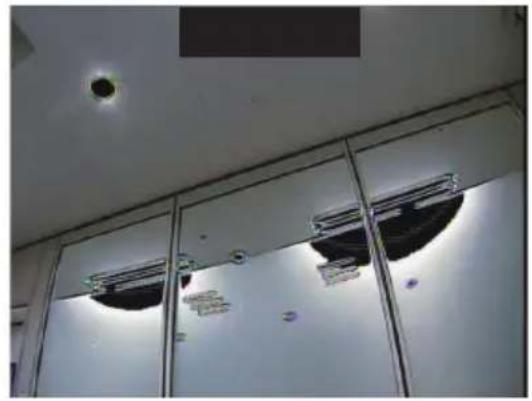
natural_image
Interior view of a double-door refrigerator with recessed lighting and a circular ceiling fixture (no visible text or symbols)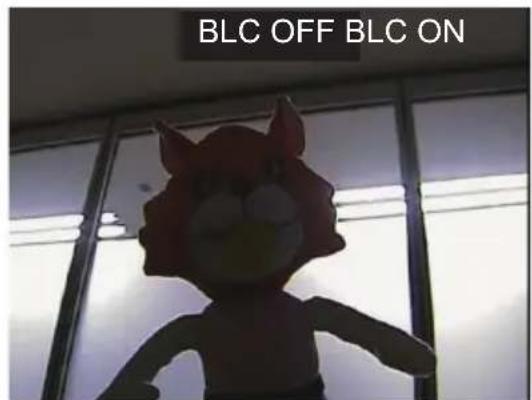
text_image
BLC OFF BLC ON
natural_image
Animated character with red hair and large eyes, standing in front of a window (no text or symbols visible)BLC (Backlight Compensation):
This function is used to brighten an image in the foreground with a highly light area behind it such as sunlight, limiting the affect of silhouette.
1-3-1. OFF: Disables HLC and BLC functions.
1-3-2. HLC:
HLC clips out the highlight area and masks it as black color.
Video will be clipped out and masked for the area which exceeds CLIP LEVEL.
- CLIP LEVEL (default: 10):
Defines the threshold level for HLC. Lower value masks more.
1-3-3. BLC: Sets BLC function enables or disables
Note: BLC is available only in 'CUSTOM' scene preset.
1-4. WDR/ATR-EX
1-4-1. WDR(Wide Dynamic Range): (VTC-C960WS)
This function is extended the gain range of the screen that is mostly useful if camera takes a simultaneous picture of both indoor and outdoor nearby window. It improves contrast of the picture in outdoor scenery as well as indoor.
Video outputs image processed from two images by dual shutter (long and short shutter) in a field to provide the best dynamic range. Highlight area is compensated by the short shutter and dark area is compensated by the long shutter.
Final video may have less contrast compared to the conventional camera which does not have WDR function.
- CONTRAST (default: MID): It can be selected only in 'CUSTOM' scene preset.
- CLEAR FACE (default: MID): Selects one of 'LOW/MID/HIGH'
Note: WDR is fixed except 'CUSTOM' scene preset.
Selects one of 'WDR/ATR-EX/OFF' is only in 'CUSTOM' scene preset.
1-4-2. ATR-EX (Adaptive Tone Reproduction-EX): (VTC-C960DS)
Sets enabling/disabling ATR compensation for the better dynamic range (D-WDR) of the image.
ATR feature improves the dynamic range and the visibility of the image by providing the optimal gradation compensation of the image in one field. This is achieved by two ways of image processing, luminance compression and contrast enhancement, so that the tone can be enhanced at highlight and dark area.
1-5. DNR
DNR(Digital Noise Reduction) function improves picture quality by filtering out signal noise which is generated under the low light conditions. It is 3DNR(3-dimensional noise reduction) which reduces the noise by the multi frames. Noise Reduction is effective at low light. Setting high level is strength of noise reduction but the result may occur in loss of sharpness and the tail effect of a comet.
1-6. DAY/NIGHT
This function is used to control the setting during day-time and night-time operation.
1-6-1. AUTO
AUTO mode in DAY/NIGHT is used only for a camera which does not have a light sensor. Camera switches DAY from/to NIGHT automatically along with the amount of light through the lens.
D/N AUTO SETUP
BURST determines whether a color burst signal keeps output or eliminated when camera switches to B/W.
If set to ON, B/W video signal contains color burst signal and is compatible with the color equipment but shows the same resolution as color video.
If set OFF, the color burst signal is removed from B/W video and shows better resolution but rarely the compatibility problem may occur with the color equipment.
• CNTL SIGNAL (default: INT):
DAY/NIGHT is switched by amount of light through the lens. Selects one of 'INT/EXT1/EXT2'
- DELAY CNT (default: 3)
DELAY CNT is time in second while camera maintains its status before Day↔ Night switches. DELAY can avoid the unwanted/frivolous switching by a short term lights such as light from the passing car.
DAY→NIGHT is a threshold level which determines to switch from DAY to NIGHT. Lower(Higher) value makes the camera switch from Day to Night at lower(higher) illumination. If it stays in Day(Color) mode at night time, increase DAY→NIGHT threshold value until it just switches to Night.
* Examine and verify Day/Night operation according to IMPORTANT ACTIVITY
NIGHT→DAY is a threshold level which determines to switch from NIGHT to DAY. Lower(Higher) value makes the camera switched from Night to Day at lower (higher) illumination. If it stays in Night(B/W) mode at day time, decrease NIGHT->DAY threshold value until it just switches to Day
* Examine and verify Day/Night operation according to IMPORTANT ACTIVITY
1-6-2. DAY : The camera is always in Color mode.
1-6-3. NIGHT : The camera is always in B/W mode.
- BURST (default: OFF) :
Sets the BURST option ON/OFF to output burst signal in B/W mode.
IMPORTANT ACTIVITY
DAY->NIGHT and NIGHT->DAY operations must be examined and verified at the final installation.
Block the lens for a few seconds for NIGHT mode and release and let it return to DAY mode. If camera stays at NIGHT mode more than 10sec, decrease NIGHT->DAY THRES a little and repeat the fore-mentioned steps. If the scene is too dim or lens iris was adjusted too low(near close), it may not return to DAY.
CAUTION
- Verify 'DAY/NIGHT' after completing all settings of lens for zoom and focus.
- If the gap between DAY->NIGHT and NIGHT->DAY is too small, camera may repeat switching DAY from/to NIGHT. If NIGHT->DAY is decreased from the Factory default, the same amount is recommended for DAY->NIGHT to avoid repeating DAY<->NIGHT unintentionally.
1-7. IR OPTIMIZER
This function is effective built-in LED models in NIGHT mode only.
If subjects which can cause overexposure are located near the monitored area, you can adjust IR OPTIMIZER level or area.
IR OPTIMIZER SETUP
| MODE | AUTO |
| IR AREA | --- |
| LEVEL | 002 |
| IR LED | DAY/NIGHT |
| COLOR NIGHT | OFF |
| IR SHADE COMP | OFF |
| RETURN |

IR LED AUTO
Reducing the over-saturation is automatically adjusted along with the location of the subject.
1-7-2. IR AREA :
Sets the IR OPTIMIZER AREA and the function works selected area in 'CUSTOM' preset only.
1-7-3. LEVEL (default: 002):
This function is used to adjust the overall brightness when IR OPTIMIZER is working. If the LEVEL is too high, the over-saturation could occur.
1-7-4. IR LED: Sets the IR LED ON/OFF controlling
- DAY/NIGHT : Follows the setting of DAY/NIGHT function.
- OFF : Turns IR LED off.
• FIX : Fixes the brightness of IR LED in any condition.
1-7-5. COLOR NIGHT (default: OFF): Displays night video in color.
1-7-6. IR SHADE COMP (default: OFF):
This function is used to compensate for IR shade of the side area on screen when IR LED is ON. You can adjust the shading PATTERN, POSITION and LEVEL.
If the LEVEL is high, the screen noise could be increased at the side area.
IR SHADE COMP SETUP
| PATTERN | SET1 |
| POSH | 006 |
| POSV | 255 |
| LEVEL | MID |
RETURN ↓
1-8. LENS SHD COMP (default: OFF)
This function is used to calculate the compensation data for lens shading.
Convex shape of the lens causes the light to enter the camera unevenly and typically makes the center of the screen brighter than the rest. It is used to compensate for this undesirable effect and make the screen more even.
Set to 'ON', you can adjust the shading PATTERN and POSITION.
LENS SHD COMP
PATTERN
POSH
POSV
SET1


RETURN ↘
1-9. DEFOG (default: ON)
This function is used to carry out defog function. Sets LEVEL to eliminate amount of fog on screen.
If the DEFOG is set to ON, the WDR/BLC function will be deactivated.
1-10. FLK LESS (default: AUTO)
This function is used to remove the flickering on screen due to differences in light and electric frequencies.
1-11. ANTI-CR (default: AUTO)
This mode can minimize the problems related to color rolling caused by differences between the flicker of fluorescent lights and the frequency of the camera.
2. PICT ADJUST
PICT ADJUST
BRIGHTNESS
CONTRAST
SHARPNESS
HUE
COLOR GAIN





RETURN ↩
2-1. BRIGHTNESS (default: 120):
Increases or decreases the brightness of the picture.
This is different from that of DC iris lens and simply increases or decreases the digital gain of video. Do not increase this too much, the dynamic range for the highlight area will decrease.
2-2. CONTRAST (default: 033):
Adjusts the strength of the image contrast. If set to too high, the dark area may loss detail and the high luminance area may saturate.
2-3. SHARPNESS (default: 008):
Increases or decreases the sharpness of the picture.
Too much sharpness can make image harsh and show more noise as well as line flicker at the edge of object in the picture.
2-4. HUE (default: 064): Adjusts hue for NTSC version only.
2-5. COLOR GAIN (default: 128): Increases or decreases the color saturation.
3. EZOOM
Sets the maximum digital zoom magnification. E.ZOOM function enlarges the pixel itself, which can cause deterioration of the picture quality.
3-1. MAG (default: 000):
MAG is the magnification ratio of the electronic zoom. Sets from x000 to x255.
3-2. PAN (default: 512):
When MAG is greater than 0, the electronic pan is available.
000 is the left most pan and 1023 is the right most pan.
3-3. TILT (default: 256):
When MAG is greater than 0, the electronic tilt is available.
000 is the upper most tilt and 511 is the lower most tilt.
4. DIS (Digital Image Stabilization)
This function is used to reduce and stabilizes the shaky image from a camera installed in the vibrated area. FOV(Field of view) will be reduced if set to ON.
5. PRIVACY MASK
Sets ON/OFF for enabling/disabling PRIVACY.
Up to 15 privacy areas are available and each area is programmable in size and location. The number of privacy areas is limited to four when MOTION DET > MONITOR AREA is ON.
The privacy areas are masked with the color selected by PRIVACY MASK>COLOR.
PRIVACY MASK SETUP
| AREA SEL | 1/15 |
| DISPLAY | ON |
| POSITION | |
| COLOR | RED |
| TRAMSP | 1.00 |
| MOSAIC | ---- |
RETURN ↓
5-1. AREA SEL (default: 1/15): Selects one of AREA1\~AREA15 to be adjusted.
5-2. DISPLAY (default: OFF)
Displays OFF/ON for the mask area which you selected 'AREA SEL'
5-3. POSITION : Adjusts the mask area X,Y-Axis position which you selected 'AREA SEL'
- TOP/BOTTOM: ◀button moves up and ▶button moves down the top (bottom) border of the selected window at AREA SEL.
- LEFT/RIGHT: ◀button moves left and ▶button moves right the left (right) border of the selected window at AREA SEL.
5-4. COLOR : Selects one of 8 colors (Red, Green, Blue, Yellow, Cyan, Magenta, White, Black) for the selected mask window at AREA SEL.
5-5. TRANSP : Transparency rate for the mask can be adjusted.
0.00 - Mask is fully transparent and not visible.
0.50 - Mask is 50% transparent.
0.75 - Mask is 25% transparent.
1.00 - Mask is not transparent.
5-6. MOSAIC
Enables or disables the mosaic effect for the selected mask window at AREA SEL
6. MOTION DET
Up to 4 motion detection areas are available and each area is programmable in size and location. The motion is displayed by means of blocks when MOTION DET and MOTION DET>BLOCK DISP are ON.
MOTION DETECTION
| DETECT SENSE | 111 |
| INTERVAL | 000 |
| BLOCK DISP | OFF |
| MASK AREA | ↓ |
| MONITOR AREA | ↓ |
| RETURN ↓ |
6-1. DETECT SENSE (default: 111)
Adjusts the sensitivity for detecting motion. Higher value is more sensitive.
6-2. INTERVAL (default: 0)
Sets the interval time from the starting of motion operation until being ready for the next motion operation.
6-3. BLOCK DISP (default: OFF)
Enables or disables displaying blocks for the area which the motion is detected
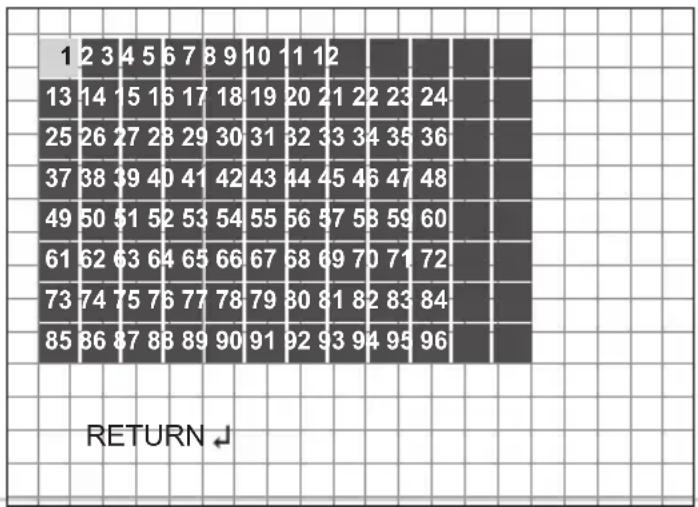
6-4. MASK AREA
Sets MASK AREA for disabling MOTION DETECTION.
Selects number of area sets to set the area you need.
text_image
1 2 3 4 5 6 7 8 9 10 11 12 13 14 15 16 17 18 19 20 21 22 23 24 25 26 27 28 29 30 31 32 33 34 35 36 37 38 39 40 41 42 43 44 45 46 47 48 49 50 51 52 53 54 55 56 57 58 59 60 61 62 63 64 65 66 67 68 69 70 71 72 73 74 75 76 77 78 79 80 81 82 83 84 85 86 87 88 89 90 91 92 93 94 95 96 RETURN ↓6-5. MONITOR AREA
Sets the MOTION DETECTION area on screen.

bar
MONITOR AREA | Category | Value | |---|---| | AREA SEL | 1/4 | | AREA MODE | ON | | TOP | 03 | | BOTTOM | 04 | | LEFT | 04 | | RIGHT | 08 | | RETURN | Note: The chart displays a single bar for TOP at 03, the other bars for BOTTOM, LEFT, and RIGHT at 04 are shorter than the top bar, indicating a comparison of two or more items. The box label 'MONITOR AREA' is highlighted in red.6-5-1. AREA SEL (default: 1/4): Selects one of AREA1\~AREA4 to be adjusted. Each area is displayed with the color. AREA1-Red, AREA2-Green, AREA3-Blue, AREA4-Yellow
6-5-2. AREA MODE (default: OFF): Setting ON is activated the AREA SEL which you selected.
Sets the AREA SEL box sizes and positions with four direction points.
- TOP/BOTTOM: ◀button moves up and ▶button moves down the top (bottom) border of the selected window at AREA SEL.
- LEFT/RIGHT: ◀button moves left and ▶button moves right the left (right) border of the selected window at AREA SEL.
7. SYS SETTING
Sets the system related functions.
SYSTEM SETTING
| LENS | AUTO↓ |
| FLIP | OFF |
| LCD/CRT | CRT |
| CAMERA ID | OFF |
RETURN ↓
7-1. LENS
Selects the lens type, AUTO or MANUAL. AUTO supports DC auto-iris lens only.
7-1-1. AUTO
- TYPE (default: DC): This camera does NOT support video type auto iris lens. MUST BE SET TO DC ONLY.
- MODE (default: AUTO): Lens iris is automatically controlled according to the scene light level.
- ADJUST : Adjusts lens open control regardless of the light level.
- SPEED (default: 30): Adjusts the iris control speed. The lower value is the faster speed. If the speed is too slow or fast, the iris control may be unstable.
7-2. FLIP : This function is used to inverse the pictures coming from the camera.
- V : Flips the video signals vertically.
- H : Flips the video signals horizontally.
- HV : Flips the video signals horizontally and vertically.
7-3. LCD/CRT (default: CRT):
Selects the correct type of viewing monitor will ensure the most optimal picture.
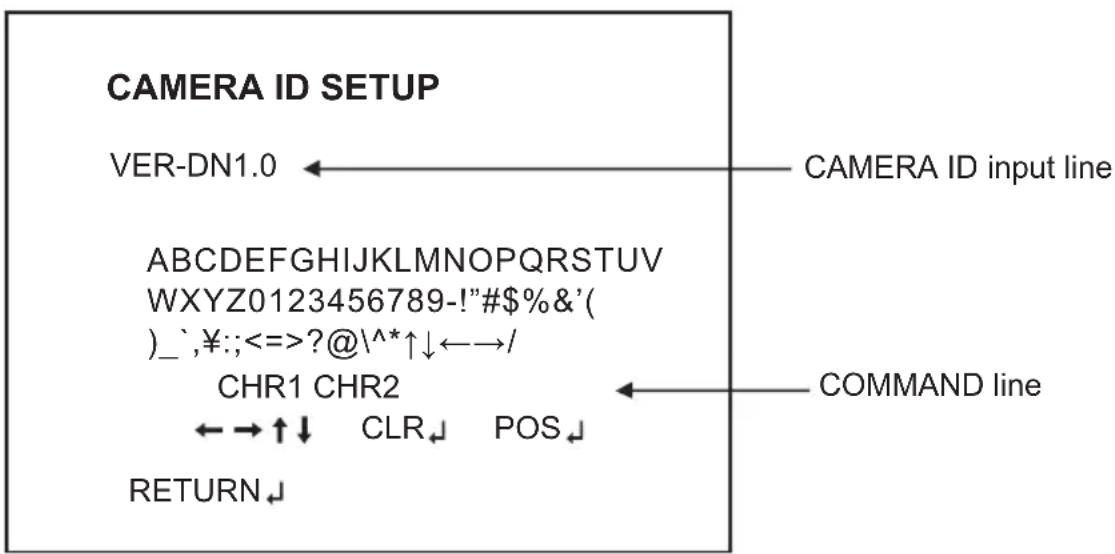
7-4. CAMERA ID
Sets ON/OFF for enabling/disabling of ID display. Factory default ID is Software version of camera. User programmed camera ID will be lost and restored with factory default ID by CAMERA RESET.
Up to 40 characters can be input for camera ID.
text_image
CAMERA ID SETUP VER-DN1.0 ← ABCDEFGHIJKLMNOPQRSTUV WXYZ0123456789-!"#$%&' (_` ,¥;;<=>?@^\*↑↓←→/ CHR1 CHR2 ← → ↑↓ CLR↓ POS↓ RETURN↓ CAMERA ID input line COMMAND line- Use four direction buttons (▲/▼/◄/►) to move a block cursor in character table and press a set button (☐) to input the selected character.
To move the character input position on CAMERA ID input line, move a cursor to ← or → on COMMAND LINE and press a set button on ← or →.
- CLR : To clear CAMERA ID input line, move a cursor to CLR on COMMAND LINE and press a set button (☐).
- POS : To set the location of CAM TITLE to be displayed on the monitor, move a cursor to POS and press a set button (☐) and then the OSD menu disappears and CAMERA ID will be displayed on the monitor.
Move CAMERA ID where desired position by using four direction buttons (▲/▼/◄/►) then press a set button (☐) to fix. The OSD Menu will appear again.
8. LANGUAGE
8 languages, ENGLISH, SPANISH, RUSSIAN, PORTUGUESE, GERMAN, FRENCH, CHINESE and JAPANESE are available.
9. VERSION
The camera firmware version is displayed.
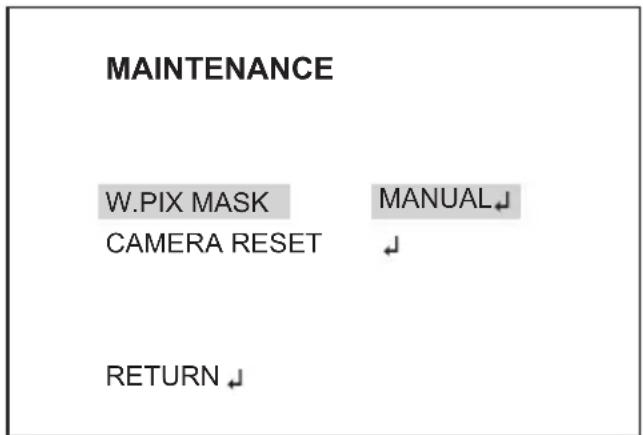
10. MAINTENANCE
Sets the OSD menu user environments and Camera reset.
text_image
MAINTENANCE W.PIX MASK CAMERA RESET MANUAL RETURN ↓10-1-1. MANUAL COMP
: Setting for white pixel(defective pixels) compensation manually.
- REGISTRATION : Detects each white pixel using the cursor.
- REG. POINT : Displays white pixels on color which you detected.
- CURSOR COLOR : Selects cursor color one of green, red, or blue.
- BLINK : Sets the cursor blink or not.
- REG. NUMBER : Displays quantity of detected white pixels.
10-1. W.PIX MASK
This function is used to compensate white pixels(defective pixels).
MANUAL COMP
REGISTRATION
| REG.POINT | OFF |
| CURSOR COLOR | WHITE |
| BLINK | OFF |
| REG. NUMBER | 3 / 64 |
RETURN
AUTO COMP
| LEVEL1 | 003 |
| LEVEL2 | 255 |
| AUTO |
RETURN
10-1-2. AUTO COMP
: Setting for white pixels(defective pixels) compensation automatically.
- LEVEL1: Sets the threshold of the detection for white pixels.
- LEVEL2 : Sets the threshold of the detection for very large white pixels.
- AUTO: Starts the automatic detection of white pixels.
10-2. CAMERA RESET
This function is used to reset to the factory defaults of the camera settings.
11. EXIT
Exits SETUP MENU and returns to the normal display.
11-1. SAVE : Save all the setting before exit the setup menu.
11-2. NOT SAVE : Exit the setup menu without save.
11-3. CANCEL : Cancel the exit mode.
11-4. BACK : Go back to the previous menu mode.
VTC-C960DS
| Image Device | 1/3" High density Sony CCD (960H) |
| Resolution | 750TV Lines |
| Effective Pixels | 976(H) x 494(V) |
| Minimum Illumination | 0.0005 Lux (Sens-up Off) |
| Lens mount | CS Mount |
| Day/Night | True Day/Night by ICR |
| WDR | E-WDR by ATR-EX |
| Noise Reduction | XD-DNR (2D+3D DNR) |
| Motion Detection | 24x16 Grid |
| Privacy Mask | Up to 15 programmable mask areas |
| White Balance | ATW / PUSH / USER1 / USER2 / MANUAL / PUSH LOCK |
| Auto Iris Control | DC drive iris control. Level control is fixed internally. |
| Light Compensation | HLC/BLC |
| FLIP | Off, H, V, H/V Flip |
| S/N Ratio | 52dB with AGC OFF at 50 IRE |
| Flicker reduction | Yes |
| OSD Language | English, Spanish, Portuguese, German, French, Russian, Chinese |
| OSD Functions | DIS (Digital Image Stabilizer), Digital Zoom, Defective Pixel Compensation,Motion detection, Flickerless, Defog, LSC (Lens Shading Compensation),ANTI-CR (Anti-Color Rolling), Scene preset select |
| Power Source | 12VDC / 24VAC |
| Power Consumption | 220mA |
| Operating condition | 14°F~122°F (-10°C~50°C) @ 85%RH |
| Dimensions (W x H x D) | 1.89" x 2.09" x 2.89" (48 x 53 x 73.5mm) |
| Weight | 5.43 Oz. (154g) |
VTC-C960WS
| Image Device | 1/3" High density double scan Sony CCD (960H) |
| Resolution | 750TV Lines |
| Effective Pixels | 976(H) x 494(V) |
| Minimum Illumination | 0.001 Lux (Sens-up Off) |
| Lens mount | CS mount |
| Day/Night | True Day/Night by ICR |
| WDR | True WDR |
| Noise Reduction | XD-DNR (2D+3D DNR) |
| Motion Detection | 24x16 Grid |
| Privacy Mask | Up to 15 programmable mask areas |
| White Balance | ATW / PUSH / USER1 / USER2 / MANUAL / PUSH LOCK |
| Auto Iris Control | DC drive iris control. Level control is fixed internally. |
| Light Compensation | HLC/BLC |
| FLIP | Off, H, V, H/V Flip |
| S/N Ratio | 52dB with AGC OFF at 50 IRE |
| Flicker reduction | Yes |
| OSD Language | English, Spanish, Portuguese, German, French, Russian, Chinese |
| OSD Functions | DIS (Digital Image Stabilizer), Digital Zoom, Defective Pixel Compensation,Motion detection, Flickerless, Defog, LSC (Lens Shading Compensation),ANTI-CR (Anti-Color Rolling), Scene preset select |
| Power Source | 12VDC / 24VAC |
| Power Consumption | 250mA |
| Operating condition | 14°F~122°F (-10°C~50°C) @ 85%RH |
| Dimensions (W x H x D) | 1.89" x 2.09" x 2.89" (48 x 53 x 73.5mm) |
| Weight | 5.43 Oz. (154g) |
Spire
OTHER PRODuCTS FROm VITEK
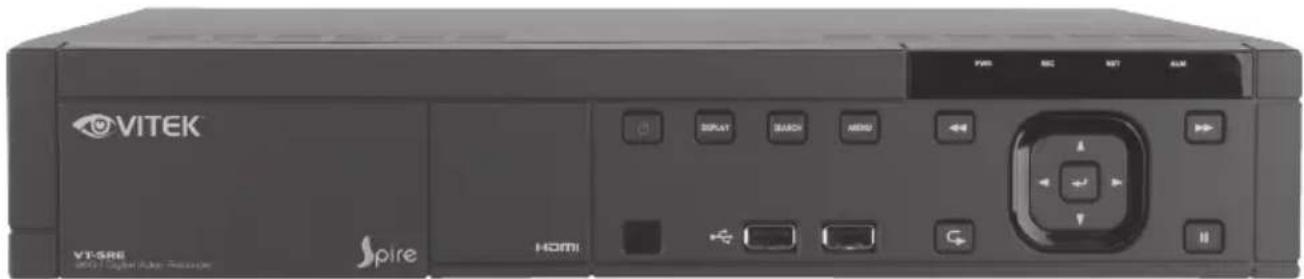
SPIRE Elite Series
960H Digital Video Recorders
text_image
VITEK VT-SRE Spire HOMI PWR REC NET SUMVT-SRE Series
Spire Series 4, 8, & 16 Channel 960H Digital Video Recorders
• Supports High Resolution 960H Cameras
• 4, 8 or 16 Video Inputs with 1 HDMI, 1 Spot Monitor Output and 1 VGA output
• H.264 Compression
- Up to 480fps Live Display & 480fps Recording (VT-SRE916) / 240/240 (VT-SRE908) / 120/120 (VT-SRE904)
• Supports both Dynamic and Static IP Addresses
• 4 Audio Inputs / 1 Audio Out
• 4 Alarm Inputs / 2 Relays Out
• Supports Four internal Hard Drives (VT-SRE908/VT-SRE916) / Two internal Hard Drive (VT-SRE904)
• Supports 4TB Hard Drives
- Remote Viewing over the Internet via Web Browser or LAN
- Applications for iPhone, iPad, iTouch and Android Devices
- "Quick Search" Function for automatic review
• Mac OSX Client & CMS Central Management Software Included
• Automatic sending of Health & Event notifications via email
- Control locally via Front Panel Controls, USB Mouse or with the Included IR Remote control
• PTZ Control over RS-485
- Rack Mountable (Optional VT-SRE-RK Rack Kit)
VITEK LIMITED PRODUCT WARRANTY
VITEK products carry a three (3) year limited warranty. Digital recording and storage products are also warranted for 3 years except for the hard drives which carry their own independent factory warranty from the hard drive manufacturer. VITEK warrants to the purchaser that products manufactured by VITEK are free of any rightful claim of infringement or the like, and when used in the manner intended, will be free of defects in materials and workmanship for a period of three (3) years, or as otherwise stated above, from the date of purchase by the end user. This warranty is non-transferable and extends only to the original buyer or end user customer of a Vitek Authorized Reseller.
This warranty shall not apply to repairs or replacements necessitated by any cause beyond the control of VITEK, including but not limited to, acts of nature, improper installation, excess moisture, misuse, lack of proper maintenance, accident, voltage fluctuations, or any unauthorized tampering, repairs or modifications. This warranty becomes VOID in the event of alteration, defacement, or removal of serial numbers.
Within the first 6 months of purchase, VITEK will replace or credit any defective product at the request of the customer (subject to availability) with a new product that equals or exceeds the performance of the original product purchased.
Within the first 6 months of purchase, at its sole discretion, VITEK may issue an advance replacement for a defective product; however, all related costs including, but not limited to shipping and/or delivery charges will be the responsibility of the customer. If upon return inspection a product is determined to be in good working order or shows evidence of misuse, the customer will be responsible for full payment of the original product purchased as well as the replacement product.
Beyond the first 6 month period for the remainder of the warranty, VITEK'S responsibility shall be limited to repairing the defective product, including all necessary parts and related labor costs. At its sole discretion, VITEK may choose to either exchange a defective product or issue a merchandise credit towards future product purchases. Any replacement parts furnished in connection with this warranty shall be warranted for a period not to exceed the remaining balance of the original equipment warranty.
A Return Authorization number or “RA” number must be obtained prior to the return of any item for repair, replacement, or credit. VITEK requires that this “RA” number be clearly printed on the outside of the shipping carton to avoid refusal of said shipment. The Return Authorization number expires after 30 days. Products returned after the 30 day period will be subject to refusal. Shipping charges, if any, must be prepaid. A copy of the bill of sale (or invoice of purchase), together with a complete written explanation of the problem must accompany all returns.
Vitek makes no warranty or guarantee whatsoever with respect to products sold or purchased through unauthorized sales channels. Warranty support is available only if product is purchased through a Vitek Authorized Reseller.