VTC-TTAT2HR2V - Security Camera Vitek - Free user manual and instructions
Find the device manual for free VTC-TTAT2HR2V Vitek in PDF.


User questions about VTC-TTAT2HR2V Vitek
0 question about this device. Answer the ones you know or ask your own.
Ask a new question about this device
Download the instructions for your Security Camera in PDF format for free! Find your manual VTC-TTAT2HR2V - Vitek and take your electronic device back in hand. On this page are published all the documents necessary for the use of your device. VTC-TTAT2HR2V by Vitek.
USER MANUAL VTC-TTAT2HR2V Vitek
natural_image
Exterior view of two white surveillance cameras with visible lens and camera modules (no text or symbols on the main image)FEATURES
• 1/3" 2.1 MegaPixel CMOS Sensor
• HD-TVI & AHD/CVBS Video Output
- 2.8\~12mm Varifocal Lens (VTC-TTAT2HR2V) or 3.6mm Fixed Lens Options (VTC-TTAT28R2F)
- 2 High Power Infrared LED's with 100' IR Range (VTC-TTAT2HR2V) or 28 Infrared LED's with 70' IR Range (VTC-TTAT28R2F)
• Digital Wide Dynamic Range (D-WDR)
• True Mechanical Day/Night function by ICR
• 3D-DNR Noise Reduction
• IP66 Weather Resistance
• Supports Up The COAX Control
• Over 1500' HD Video Transmission (Depending on cable characteristics and integrity)
- Optional Junction Box Mount Available (VT-TJB01) / Wall Mount (VT-TWM03) Also Available for VTC-TTAT2HR2V
• Available in Ivory or Charcoal Gray
- 12VDC Operation
Safety Precaution
- To prevent electrical shock and risk of fire hazards, do not expose this unit to rain or moisture and only use specified power source..

text_image
CAUTION RISK OF ELECTRIC SHOCK . DO NOT OPEN CAUTION: TO REDUCE THE RISK OF ELECTICAL SHOCK, DO NOT REMOVE COVER (OR BACK). NO USER SERVICEABLE PARTS INSIDE. REFER SERVICING TO QUALIFIED SERVICE PERSONNEL
The symbol is intended to alert the user to the presence of uninsulated "dangerous voltage" within the product's enclosure that may be of sufficient magnitude to constitute a risk of electrical shock.

The symbol is intended to alert the user to the presence of important operating and maintenance (servicing) instructions in the literature accompanying the unit.
- Warning :
This equipment has been tested and found to comply with the limits for a Class A digital device, pursuant to part 15 of the FCC Rules. These limits are designed to provide reasonable protection against harmful interference when the equipment is operated in a commercial environment. This equipment generates, uses, and can radiate radio frequency energy and, if not installed and used in accordance with the instruction manual, may cause harmful interference to radio communications. Operation of this equipment in a residential area is likely to cause harmful interference in which case the user will be required to correct the interference at their own expense.
- Caution :
Any changes or modifications in construction of this device which are not expressly approved by the party responsible for compliance could void the user's authority to operate the equipment.
Main power quality should be that of a typical commercial environment. If the user of the model requires continued operation during power interruptions, it is recommended that the device be powered from an uninterruptible power supply (UPS).
Components and Accessories
| Camera |  | Hex Wrench | ||
| User Manual |  | Mounting Plate | ||
| Screws |  |
Overview
This camera series supports both fixed and varifocal lenses. Please note that the zoom and focus features mentioned below are not features of the fixed lens version.

text_image
1 2 Focus Zoom 3 4 5 6 7 8| 1 | Lens | 5 | Power Cable |
| 2 | Focus* | 6 | AHD/CVBS Switch |
| 3 | Zoom* | 7 | AHD/CVBS Output |
| 4 | Lock Screws | 8 | HD-TVI Output |
*VTC-TTAT2HR2V Only
Video Connection
Connect the HD-TVI Video or AHD/CVBS video connector to a BNC patch cable, then to DVR. HD-TVI DVR Monitor
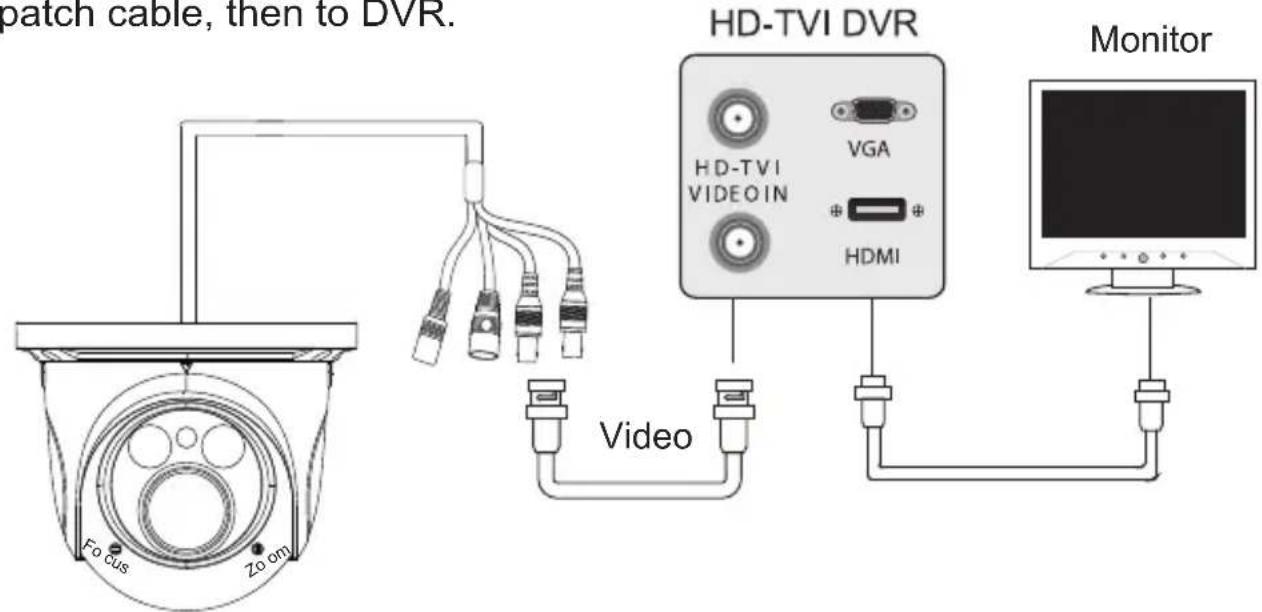
text_image
patch cable, then to DVR. HD-TVI DVR VGA HDMI Video Monitor Focus Zo omAHD/CVBS Switch:
Switch to CVBS Mode: Press & Hold the Switch for 5 seconds
Switch to AHD Mode: Press & Release the Switch quickly
Power Connection
Connect the power connector to a 12 VDC power adaptor.

text_image
Power 12VDC - - +Installation
Before you begin, please make sure that the wall or ceiling is strong enough to withstand 3 times the weight of the camera. The mounting steps are as follows:
-
Attach the drill template to the place where you want to install the camera, then drill 3 screw holes and 1 cable hole (if you want to route the cables through the mounting base) according to the drill template
-
Route the cables and connect the power & video cables, then secure the mounting base to the ceiling or wall with screws.
-
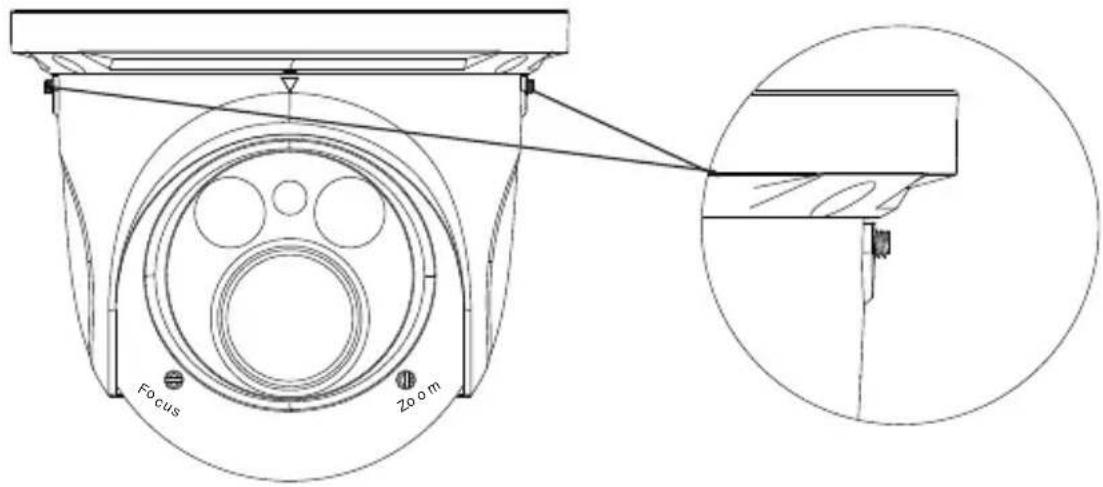
Loosen the lock screws, then adjust the camera to obtain the optimism viewing angle. Confirm the correct viewing angle with a monitor. (See next page for location of lock screws)

natural_image
Pure geometric diagram of a circular mechanical or electrical component with internal gear-like shapes and mounting holes (no text or symbols)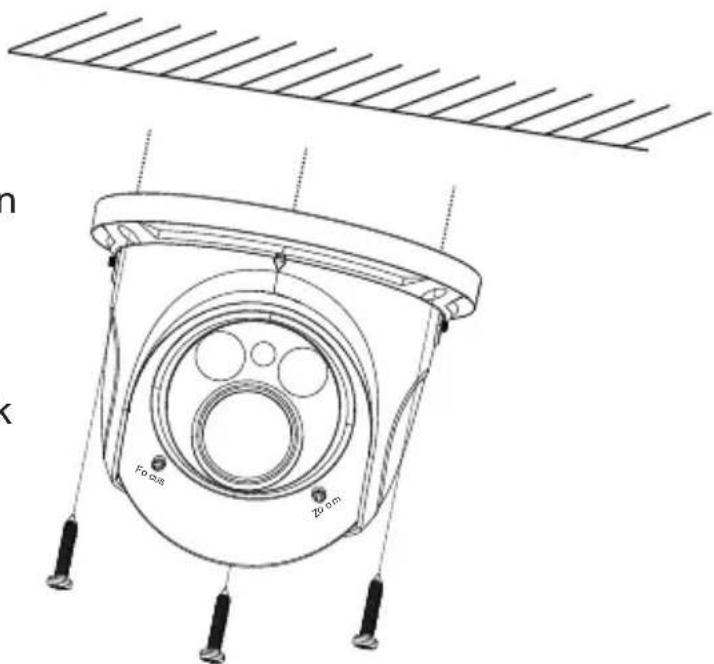
text_image
n k Fo dB 20 cmInstallation
- Tighten the lock screws to secure the viewing angle adjustments.
text_image
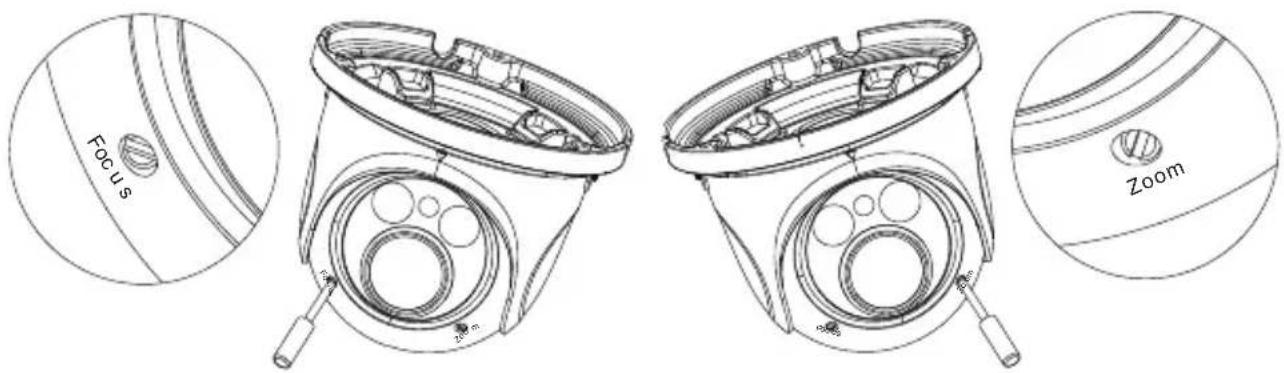
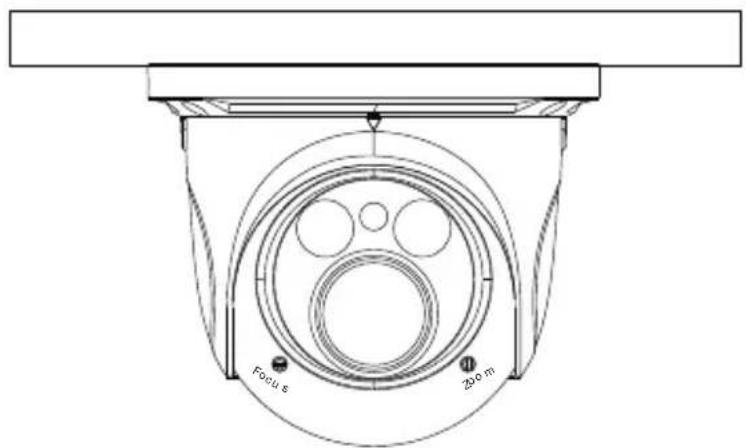
Focus Zoom- Adjust the Focus and Zoom screws to achieve a clear image (if your camera has a fixed lens, please skip this step).
text_image
Focus Zoom- Carefully remove the protective film from the lens to complete the installation.
text_image
Focus s 200 mCamera OSD Menu
The Transcendent HD-TVI/AHD camera series must be connected to a DVR which supports HD-TVI/AHD video signal input and COC protocol to access the OSD setup menu. Different DVRs manufacturers may have different modes of menu operation.
The following menu toolbar will pop up by right-clicking the mouse when using VITEK Transcendent Series HD-TVI DVRs.

text_image
Screenshot of a software toolbar with icons for file, grid, media, and options like IPC, REC, and navigation buttons.You will see the following interface by clicking the button.

text_image
01 02 03 04 05 06 07 08 09 10 11 12 13 14 15 16 All Zoom + Focus + Iris + Preset preset095 Cruise Start Track Start Auto Scan Start Cruise Speed: 5Click "Iris +" to go to the main menu. You can also select preset NO.95, then click the ↗ button (call preset NO.95) to go to the following main menu.
| MAIN MENU | |
| 1. LENS | MANUAL |
| 2. EXPOSURE | |
| 3. BACKLIGHT | OFF |
| 4. WHITE BAL | AWB |
| 5. DAY&NIGHT | EXT ↙ |
| 6. NR | |
| 7. SPECIAL | |
| 8. ADJUST | |
| 9. EXIT | SAVE&END ↙ |
You can select the menu by clicking ▲ (U) or ▼ (D) key on the direction area. Click □ (L) or ▶ (R) key to select the menu on the left. The menu with arrow icon which means it has sub-menu. You can select the menu and click “Iris +” or call preset NO.95 to enter the sub-menu. To return to the previous menu or exit the main menu, please select “RET” or “Save & END” by clicking U or D key and then click “Iris +” or call preset NO.95.
Detailed Specifications VTC-TTAT28R2F VTC-TTAT2HR2V
| Image Sensor | 1/3" 2.1 MegaPixel CMOS Sensor | |
| Resolution | 1080p (2.1 MegaPixel) | |
| Effective Pixels | 1920(H) x 1080(V) | |
| Signal System | PAL/NTSC | |
| Video Output | 1x HD-TVI (BNC) & 1 AHD/CVBS (BNC) | |
| Lens | 3.6mm Fixed | 2.8~12mm (Vari-Focal) |
| Day/Night | True Day/Night by ICR | |
| S/N Ratio | >52dB (AGC OFF) | |
| Auto Gain Control | OFF ~ 44.8dB | |
| Min Illumination | 0 Lux (LED ON) | |
| IR LEDs | 28 | 2 x High Power |
| IR Distance | 70' | 100' |
| Color-B/W Auto Switch | Yes | |
| Electronic Shutter | 1/50s~ 1/67500s | |
| White Balance | AWB | |
| WB Range | 2300~9600K | |
| BLC | Yes | |
| WDR | Digital WDR | |
| Transmission Distance | Up to 1500' (Depending on cable characteristics & integrity) | |
| Up the COAX Control | YES | |
| Noise Reduction | Yes | |
| Weather Resistance | IP66 | |
| Power Supply | 12VDC | |
| Working Environment | -4~122 / 10%~90% Humidity | |
| Weight | 13.05 oz. / 0.82 lbs. / 370g | 24.30 oz. / 1.52 lbs. / 689g |
| Dimensions | 3.43" x 4.25" (87 × 108mm) Dia x H | 4.29" x 5.12" (109 × 130mm) Dia x H |

natural_image
White industrial lamp or fixture component with curved and flat surfaces (no text or symbols visible)VT-TWM03
Optional Wall Mount
with cable feed
through (for VTC-
TTAT2HR2V only)
LIMITED PRODUCT WARRANTY
VITEK products carry a three (3) year limited warranty. VITEK warrants to the purchaser that products manufactured by VITEK are free of any rightful claim of infringement or the like, and when used in the manner intended, will be free of defects in materials and workmanship for a period of three (3) years, or as otherwise stated above, from the date of purchase by the end user. This warranty is nontransferable and extends only to the original buyer or end user customer of a VITEK Authorized Reseller.
The product must have been used only for its intended purpose, and not been subjected to damage by misuse, willful or accidental damage, caused by excessive voltage or lightning.
The product must not have been tampered with in any way or the guarantee will be considered null and void.
This guarantee does not affect your statutory rights.
Contact your local VITEK Reseller should servicing become necessary.
VITEK makes no warranty or guarantee whatsoever with respect to products sold or purchased through unauthorized sales channels. Warranty support is available only if product is purchased through a VITEK Authorized Reseller.