VTC-C2NZ - Security Camera Vitek - Free user manual and instructions
Find the device manual for free VTC-C2NZ Vitek in PDF.


User questions about VTC-C2NZ Vitek
0 question about this device. Answer the ones you know or ask your own.
Ask a new question about this device
Download the instructions for your Security Camera in PDF format for free! Find your manual VTC-C2NZ - Vitek and take your electronic device back in hand. On this page are published all the documents necessary for the use of your device. VTC-C2NZ by Vitek.
USER MANUAL VTC-C2NZ Vitek
text_image
3x OPTICAL FULL HD ZOOM CAMERA 13.0 - 9.0 1.2 - 2.1 VITEK VTC-C2/NZ 2.1MP Smart Mirror HOR Camera• 1/2.9" Sony CMOS
• 2.1 MegaPixel
- Up to 30fps live view @ 1920x1080 (1080p)
- MegaPixel IR Corrected 3-9mm (VTC-C2NZ39) / 9-22mm (VTC-C2NZ922) with Auto-Focus Motorized Optical Zoom
• H.264/MJPEG Dual Streaming
• 16:9 Video format
- On-board Intelligence (OBI Technology) delivers Auto-Focus-Zoom by tracking motion, then optically zooming in to that area of the frame
- Onvif Compliance
- Integrated Cooling Fan
• SD memory card slot for Local recording
• Mechanical IR Cut Filter (True Day/Night)
- Motion Activated Pointing Zoom, Defog, BLC/HLC, Motion Deblur, Pixel Defect Compensation, Mirror, Flip, Pixel Defect Compensation
• 12VDC/24VAC & PoE (Power over Ethernet) Operation
Safety Precaution
- To prevent electrical shock and risk of fire hazards, do not expose this unit to rain or moisture and only use specified power source.

CAUTION
RISK OF ELECTRIC SHOCK, DO NOT OPEN

CAUTION: TO REDUCE THE RISK OF ELECTICAL SHOCK, DO NOT REMOVE COVER (OR BACK). NO USER SERVICEABLE PARTS INSIDE. REFER SERVICING TO QUALIFIED SERVICE PERSONNEL.

The symbol is intended to alert the user to the presence of uninsulated "dangerous voltage" within the product's enclosure that may be of sufficient magnitude to constitute a risk of electrical shock.

The symbol is intended to alert the user to the presence of important operating and maintenance(servicing) instructions in the literature accompanying the unit.
- Warning :
This equipment has been tested and found to comply with the limits for a Class A digital device, pursuant to part 15 of the FCC Rules. These limits are designed to provide reasonable protection against harmful interference when the equipment is operated in a commercial environment. This equipment generates, uses, and can radiate radio frequency energy and, if not installed and used in accordance with the instruction manual, may cause harmful interference to radio communications. Operation of this equipment in a residential area is likely to cause harmful interference in which case the user will be required to correct the interference at their own expense.
- Caution :
Any changes or modifications in construction of this device which are not expressly approved by the party responsible for compliance could void the user's authority to operate the equipment.
Main power quality should be that of a typical commercial environment. If the user of the model requires continued operation during power interruptions, it is recommended that the device be powered from an uninterruptible power supply (UPS).
Safety Precaution

NOTICE
- The image used in this instruction manual are processed to help comprehension and may differ from actual video of the camera.
- Avoid installing in areas where shock or vibration may occur.
- Pay attention to safety when running the connection cables and make sure that the cables are not subject to heavy loads, kinks, moisture or damage.
- Never open the device (no user serviceable parts inside).
The warranty becomes void if repairs are undertaken by unauthorized persons. - Maintenance and repair have to be carried out only by authorized service centers.
• Use only a mild detergent to clean the housing. - The camera should never be operated beyond the technical specifications.
This can lead to damaging the device and void the warranty.
• The camera should never be operated in water.
Contents
p.01\~02
Safety Precaution
p.03
Contents
p.04\~05
Features
p.06
Part Names
p.07
Installation Instructions
p.08\~16
Operating Instructions
p.17\~18
Specifications
p. 19
Warranty
Key Features
• Full HD, 2Mega Pixel Network Camera, 1920x1080(30p/25p)
• ONVIF & PSIA Conformance
• True WDR(Wide Dynamic Range)
- Improved Noise reduction with the enhanced 3D-NR
- VTC-C2ZN/39: f=3\~9mm, F1.2\~F2.1 Day&Night zoom lens (Optical 3x Auto focus zoom / Digital 32x zoom)
VTC-C2ZN/922: f=9\~22mm, F1.6\~F2.3 Day&Night zoom lens (Optical 2.4x Auto focus zoom / Digital 32x zoom)
- Focusing Status Indicator on Screen
- ★(Blue) Focusing in process
- ★(White) Focusing Completed
- Pointing Zoom which enables the zooming of any area within the FOV.
- Smart Motion Zoom in combining with Pointing Zoom.
- Motion Detection, Privacy Mask, Defog, Sens-up, BLC/HLC, H/V/HV Flip, Motion Deblur, Pixel Defect Compensation
- Lens Refresh / Lens Initializing Set / LSC(Lens Shade Compensation)
• ID / TITLE / ZOOM RATIO DISPLAY
• Enhanced low light Sensitivity by DSS technology
• H.264/MJPEG dual streaming with TI DM365/368 engine
• Full duplex 2 way Audio, Alarm IN/OUT
• Max 30fps live view @ 1920x1080p
- Slot for Standard SD memory card verified up to 64GB
- Zoom & Menu Control via either Local Joystick or WEB
- OSD menu & CVBS Video output BNC for easy installation & maintenance
- Built-in cooling Fan
- Circuit protection against reversed connection in power polarity
- Isolated power supply against ground loop problem
• PoE(IEEE Std. 802.3af), 24VAC/12VDC
Features
General Description
This camera realizes the natural and crisp image as you see the scene in front of you by adopting Auto Focus Full HD(1920x1080p) camera module.
- With ICR mechanism,
- Enhances its sensitivity about 10x at night time
- Can accept infrared light
- With 24VAC/12VDC dual power & PoE(Power Over Ethernet) design
- Offers the flexibility of installation
- Ensures the reliability
Composition
Camera
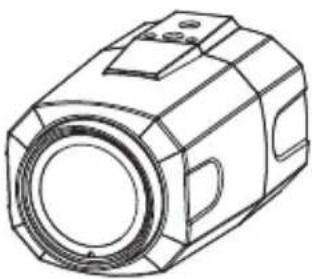
natural_image
Technical line drawing of a mechanical component with no visible text or symbols
Operating Instruction
Dimensions
unit : inches (mm)
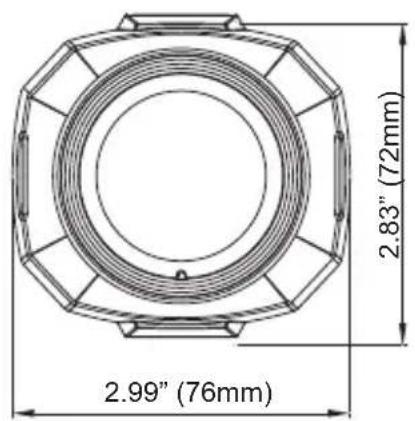
text_image
2.83" (72mm) 2.99" (76mm)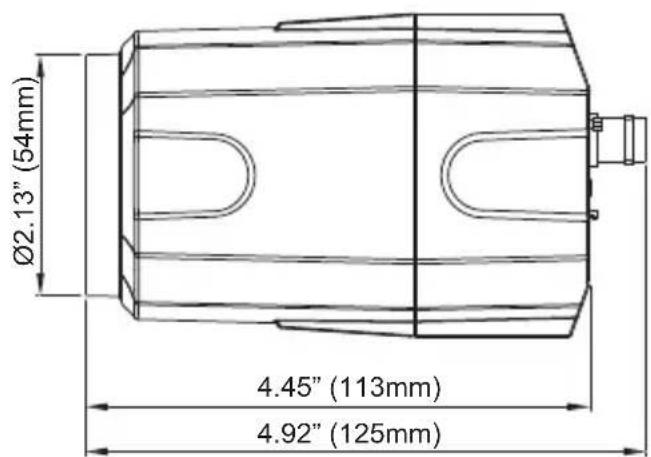
text_image
Ø2.13" (54mm) 4.45" (113mm) 4.92" (125mm)Part Names
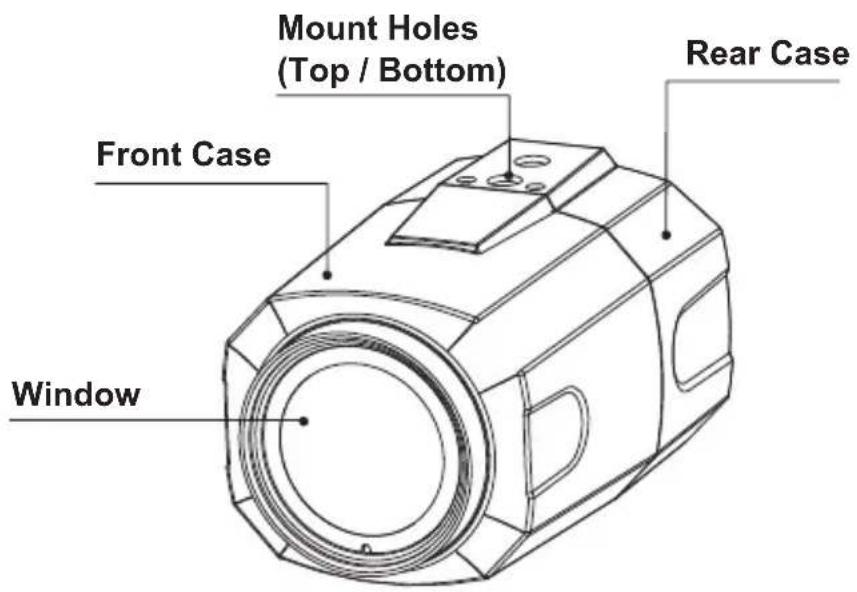
text_image
Mount Holes (Top / Bottom) Rear Case Front Case Window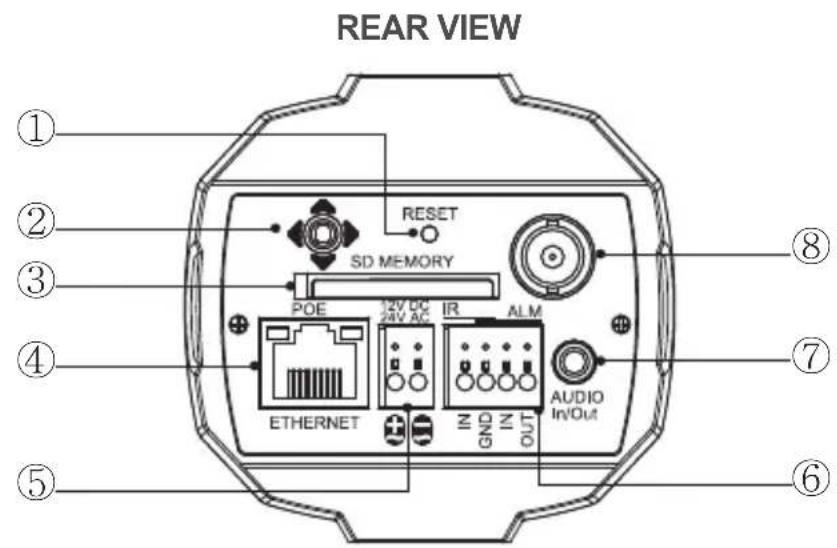
text_image
REAR VIEW ① ② ③ ④ ⑤ RESET SD MEMORY POE 12V DC 24V AC IR ALM ETHERNET IN GND IN OUT AUDIO In/Out ⑧ ⑦ ⑥① IP Reset Button
② OSD Control Joy stick
③ SD Memory card Slot
④ RJ-45 Ethernet Port
⑤ Power Input terminal
⑥ Alarm Input / Output terminal
⑦ Audio Input / Output Jack (3.5mm)
⑧ Video Output connector (BNC)

CAUTION
- Extreme care should be taken NOT to scratch the window in front of lens.
- Care should be taken the cable is NOT damaged, kinked or exposed in a hazardous area.
- Do not point the camera lens directly at a strong light source such as the sun or spot light.
Installation Instructions
Installation Instructions
- Make sure the power is removed before installation.
• After all connections are properly finished, follow this order for applying power.
a) Plug the network cable into the RJ-45 Ethernet Port on the back of the camera. If PoE is the unique power, there will be no need to connect Power terminals.
b) When DC12V or AC24V Local power is necessary, first connect the low voltage wires to the camera, then plug the AC/DC adapter to AC outlet to avoid damage.
※ When PoE and Local power are connected, Local power has priority
- The camera has a 1/4" thread insert on top and bottom for mounting the camera to a wall or ceiling with a corresponding mount.
Power Supply Connections
This camera can work with PoE (IEEE Std. 802.3af) or with 24VAC or 12VDC, (dual voltage power). It does NOT require polarity-matched connection for 12VDC supply. Primary and secondary grounds are completely isolated to avoid possible ground-loop problems. It's extremely wide operating voltage range of 10.5V-30V for DC and 12-28.8V for AC gives extra flexibility with the installation.
Using OSD controller

Description of the joystick operation
1) SET Key (●): Access to the menu or enter the setting.
To enter the main menu, press the Set Key down for about 1.5sec
2) UP/DOWN Key (▲/▼): Choose the desired sub-menu and to move the cursor up or down.
3) LEFT/RIGHT Key (◄/►): Set up the value of the selected menu.
Used to adjust the desired menu selection and to move the cursor left or right.
4) ‘ ’ denotes a long press down for about 2 seconds

Description of the ZOOM&FOCUS adjustment
1) ▲ : Zoom In
3) ◀ : Focus Near
2) ▼ : Zoom Out
4) ▶ : Focus Far
Operating Instructions
Direct Control menu
| SPECIAL | DEFAULT | DESCRIPTION |
| TV SYSTEM | US or EU | Selects HDTV standards for US(60HZ) or EU(50HZ).By this selection, 2nd analog video output switches to NTSC or PAL accordingly. |
| FOCUS MODE | ZOOM PUSH | ZOOM PUSH, AUTO and MANUAL modes are available for focusing.ZOOM PUSH– Focusing is activated only when zoom in/out is working.AUTO– Focusing is always working.MANUAL– Focusing can only be adjusted by ▲,▼ of OSD control joystick or Focus Near/Far button on WEB. |
| D-ZOOM | OFF | D-ZOOM(Digital zoom) is available up to 32x.D-ZOOM starts working when the optical zoom reaches its maximum tele-position. Zoom ratio is displayed on the right bottom corner of the monitor if DISPLAY ZOOM RATIO is set to ON. |
| EXPOSURE MODE | AUTO | Can set EXPOSURE MODE to AUTO, IRIS Priority, SHUT.Priority, MANUAL and FlickerlessAUTO– Optimizes the video level by controlling the iris and the shutter speed automatically.IRIS Priority– Selects to fix IRIS in a certain aperture and the video level is controlled by an automatic shutter control. IRIS Level menu is activated when EXPOSURE MODE is set to IRIS Priority. Lower IRIS LEVEL will close the iris more and increase the field of depth in the daytime but significantly decrease the low light performance. To Low of the IRIS LEVEL will result in foggy video by the diffusion from the lens iris.SHUT. Priority- Select to fix SHUTTER to a certain speed then the video level is controlled by the automatic iris control. This mode is useful when color rolling occurs under fluorescent lighting. It is not recommended for outdoor in the daytime.MANUAL– Iris and Shutter can be set to a fixed value.Flickerless– Reduces the flicker in video when US(60Hz) / EU (50Hz) mode is used in 50Hz/60Hz fluorescent lighting respectively.SHUT. Priority, MANUAL and Flickerless modes disable SENS-UP and MOTION BLUR functions. |
| BRIGHTNESS | 10 Adjusts the brightness of video(0~20). | |
| SENS-UP AUTO | Brighter video can be obtained by increasing the exposure time at night with SENS-UP. SENS-UP is the maximum integration of frames by DSS(Digital Slow Shutter) in low light. | |
Operating Instructions
| Day & Night Threshold | HIGH | D<-->N Threshold is a threshold level and Gap to switch from DAY to NIGHT.Low: The camera enters night mode at a lower light level.High: The camera exits the night mode at a higher light level. |
| AGC 12 | AGC amplifies the video gain for brighter video but noise and white pixel will increase.AGC level less than 12 disables AUTO in DAY/NIGHT | |
| WHITE BAL | ATW | ATW, ONE PUSH and MANUAL are available for the white balance modes.ATW – White balance is continuously working along with the color temperature changes in the range of 2,000K~8,500K.ONE PUSH – White balance works only when ONE PUSH is selected.MANUAL – This mode can be used only when the color temperature does not vary. White balance is fixed to the settings by R_GAIN and B-GAIN |
| WB Manual R-Gain/ B-Gain | 10 | Activates when WHITE BALANCE is set to MANUAL.Adjustable 0~20. |
| SHARPNESS | 10 | Adjusts the sharpness of video. |
| COLOR GAIN | 10 Adjusts the color level of video. | |
| GAMMA 0.5 | Adjusts the gamma of video. | |
| MIRROR / FLIP | NO | Reverses the video left and right and/or up and down by MIRROR/FLIP.No Mirror, No Flip : Normal display without mirroring or flippingNo Mirror, Flip : Video is reversed upside down.Mirror, No Flip Ver. : Video is reversed left and right.Mirror, Flip HV : Video is reversed left and right and upside down.When the video is reversed by Ver. or HV, then the joystick directions are reversed accordingly. This feature is very useful when a camera is installed upside down. |
| DEFOG OFF | AUTO – | Enhances foggy video automatically according to status of sceneMANUAL –Set to enhance foggy video manually regardless of status of scene |
| DEFOG Weight | MID | LEVEL – LOW, MID, HIGHVideo quality can be less in normal environments. |
Operating Instructions
| DISPLAY Zoom Ratio | OFF | ON enables to display the Zoom Ratio on the bottom right corner. OZx.x appears during the optical zoom and DZx.x will display by multiplying the optical zoom ratio and the actual digital zoom ratio. |
| DISPLAY FOCUS INDICATOR | ON | ON enables to display the Focus Indicator on Monitor |
| DISPLAY ID | OFF | ON enables to display Camera ID on Monitor. |
| DISPLAY Title | OFF | ON enables to display Camera Title on Monitor. |
| IR LED MODE | OFF | IR LED Control(AUTO/OFF) is available with IR LED model only. If IR LED is set to OFF, IR LED will be turned OFF but DAY or NIGHT is still determined by the built-in light photo sensor. IR LED Mode is available with IR LED built-in model only. |
| LENS INITIALIZE | Lens initialization is necessary at the end of the installation to align the position data with the mechanical position. Lens elements may have moved and deviate from its calibrated position by shock or vibration, for example, during shipment. LENS INIT checks the positions for zoom and focus at both of the end positions and saves them for references. Lens initialization is automatically executed upon power up.[CAUTION]It is necessary to execute LENS INIT in cases below;1) At the final step of installation.2) When focus becomes out of control by shock or vibration. |
Operating Instructions
Advanced Camera OSD menu
Click 'ADVANCED CAMERA MENU' bar at CAMERA CONTROL menu to activate the camera OSD menu.
Click Up/Down/Left/Right bars to navigate or change the parameters.
These options have been pre-configured at the factory for optimal performance.
MENU V 3.12
| 1. PRIVACY | ☒ |
| 2. MOTION | OFF☒ |
| 3. TITLE SET | ☒ |
| 4. SMART IR | |:::| 0 |
| 5. MOTION DEBLUR | ON |
| 6. HLC LEVEL | |:::| 10 |
| 7. BLC POSITION | SET |
| 8. POINTING ZOOM | ☒ |
| 9. EXIT | SAVE&EXIT☒ |
1. PRIVACY (default: OFF)
10 Privacy zones which can be enabled individually by ZONE DISP are available to mask the video.
- ZONE NUMBER – Set a number to select a privacy zone from 1\~10.
- ZONE DISP – ON enables a relevant privacy zone.
- H-POS, V-POS, H-SIZE and V-SIZE – Adjust the size and position of zone.
- COLOR – Select the color used for masking the zone form eight colors.
- TRANSPARENCY – Defines the transparency for the masked zone.
2. MOTION (default: OFF)
MOTION - can detect the movement in the motion window and displays the results in blocks and/or a text message.
- SENSITIVITY - Adjusts the detection sensitivity for motion. Higher value increases the sensitivity to detect small motion easier. Too high of sensitivity will cause the erratic detection of tree leaves or light level changes and too low setting will fail in detecting motion.
- H-POS, V-POS, H-SIZE, V-SIZE - Adjust the size and position of the detection window
- BLOCK DISP – ON enables to display the blocks for the detected area.
- MOTION OSD – ON enables to display a text message, MOVING !!!
- SMART MOTION ZOOM– ON enables to Automatic Zoom IN/OUT when motion is detected and also enables MOTION OSD to ON.
Operating Instructions
Area to be zoomed in by SMART MOTION ZOOM can be set at MOTION> SMART MOTION ZOOM>ZOOM TARGET. Clicking Up/ Down/ Left/ Right or Enter bar for ZOOM TARGET varies the viewing angle to be zoomed when motion occurs.
Set the video left and right and/or up and down by MIRROR/FLIP.
(See description of "SMART MOTION ZOOM" for detail)
- STAY ZOOMING – Sets the duration time for zooming by Motion.
※ SMART MOTION ZOOM does not work in low light and B/W mode.

CAUTION
Set the direction of video by MIRROR/FLIP before SMART MOTION ZOOM setting. Otherwise the zoom target could be different from your intention.
3. TITLE SET
Camera title(name) can be set and editable up to 15 alpha numeric and symbol characters from ASCII codes(ENGLISH only).
Clicking the Up/ Down/ Left/ Right bars to move the cursor for choosing characters and click the Enter bar to select them. The selected characters are added and displayed on the top left corner and the cursor moves right automatically for next input.
- SP - Space is inserted when clicked
• BS - Cursor moves back when clicked - CLR - Clears all the characters on input line when clicked
- POS - Sets the title position by using four direction bars and enter bar
4. SMART IR (default: 0)
SMART IR can be set to reduce the saturation of strong IR illumination at night in any menu of EXT, AUTO and B/W(NIGHT). Setting SMART IR in any menu is identically applied to other menus. Zero(0) turns off SMART IR and High setting avoids saturation but the corners will be darker accordingly.
5. MOTION DEBLUR (default: ON)
ON enables MOTION DEBLUR to reduce the motion blur in certain indoor environment. Noise or color rolling can increase.
6. HLC LEVEL (default: 10)
Cuts out the bright area with a black mask and excludes it from compensation. Lower HLC LEVEL the more sensitive it is too bright light. HLC LEVEL is adjustable in ADVANCED CAMERA MENU>HLC LEVEL
Operating Instructions
7. BLC POSITION (default: SET)
Improves the visibility of dark objects caused by bright
back light. Outside area of BLC window can be over saturated.
BLC has a target window for compensation and its size and position can be set by H-POS, V-POS, H-SIZE and V-SIZE
8. POINTING ZOOM (default: ON)
ON enables to set off-centered location to be the center of zoom.
- H-POINTER, V-POINTER- Able to set the location of zoom center D-Zoom is available \~x32. (See description of "POINTING ZOOM" for detail)

CAUTION
Set the direction of video by MIRROR/FLIP before POINTING ZOOM setting. Otherwise location of zoom center could be different from your intention.
9. EXIT
SAVE & EXIT – Exits the menu after saving the parameters.
Detail Function Description
SMART MOTION ZOOM
SMART MOTION ZOOM enlarges the area defined by a yellow window to a full size image when motion is detected in the black window.
SMART MOTION ZOOM window can be re-sized by adjusting D-ZOOM RATIO and moved by H-POINTER and V-POINTER.
SMART MOTION ZOOM
H-POINTER 10
V-POINTER 10
O-ZOOM RATIO OX2.0
D-ZOOM RATIO DX1.5
MOTION CHK COUNT 2
RETURN RET
Operating Instructions
Unlike conventional zoom which can zoom in/out the center area of an image only, the flexible SMART MOTION ZOOM differentiates its usefulness from others. Example, a conventional camera installed in the corner of the ceiling can zoom into the center of the floor in the room and lose the image of a door on the side wall. However, SMART MOTION ZOOM can be set to see the door side and zoom in that area without missing the IMPORTANT security point.
- H-POINTER (10) - Moves MOTION ZOOM area(Yellow window) horizontally
• V-POINTER (10) - Moves MOTION ZOOM area(Yellow window) vertically - O-ZOOM RATIO (OX2.0) - Sets the area size to be Optical zoomed when motion occurs in the black window
- D-ZOOM RATIO (DX1.5) - Sets the area size to be Digital zoomed when motion occurs in the black window
- MOTION CHK COUNT (2) - SMART MOTION ZOOM is activated after the # of motions in MOTION CHK COUNT are detected in a certain period.
For example, "SMART MOTION ZOOM is activated after set # of triggers by motion.
POINTING ZOOM
This camera has a very useful and powerful feature, POINTING ZOOM, which can zoom in/out of any area in the FOV.
Unlike conventional zoom which can zoom in/out the center area of an image only, the flexible POINTING ZOOM differentiates its usefulness from others.
Example, a conventional camera installed in the corner of the ceiling can zoom into the center of the floor in the room and lose the image of a door on the side wall. However, POINTING ZOOM can be set to see the door side and zoom in that area without missing the IMPORTANT security point.
POINTING ZOOM can be activated by the joystick operations of ▲ for zoom in and ▼ for zoom out or via web viewer.
If Zoom ratio becomes out of optical zoom ratio, it automatically turns to Digital Zoom.
Operating Instructions
Set D-Zoom Pointer
POINTING ZOOM OFF
H-POINTER 10
V-POINTER 10
RETURN RET
- POINTING ZOOM (OFF) -
ON enables to set off-centered location to be the center of zoom
• H-POINTER (10) -
Sets the horizontal location of area to be zoomed by POINTING ZOOM.
• V-POINTER (10) -
Sets the vertical location of area to be zoomed by POINTING ZOOM
* EXAMPLE OF SMART MOTION & POINTING ZOOM
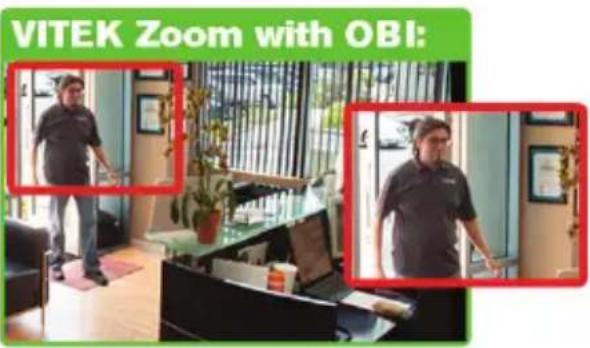
text_image
VITEK Zoom with OBI: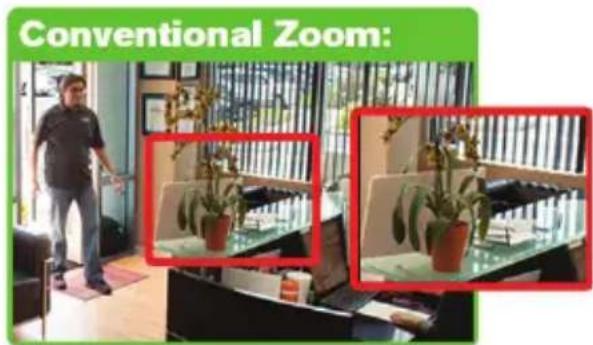
text_image
Conventional Zoom:Specifications
| VTC-C2ZN/39 VTC-C2ZN/922ITEM | ||
| Sensor | 1/2.9" Sony® CMOS | |
| Resolution | 2.1 MegaPixel (1080p / 720p) | |
| Video Encoding | H.264 / MJPEG Dual Streaming | |
| Video Output | Ethernet (RJ45) Female & CVBS (BNC) | |
| Frame Rate | 30fps max | |
| S/N | More than 50 dB (AGC Off) | |
| External IR Input | Low active TTL input from External IR illuminator to avoid undesirable ICR switch | |
| Lens | MegaPixel IR Corrected3-9mm Auto-FocusMotorized Optical Zoom | MegaPixel IR Corrected9-22mm Auto-FocusMotorized Optical Zoom |
| Auto-Focus-Zoom | YES - 3x Smart Motion Zoom YES | - 2.4x Smart Motion Zoom |
| Auto-Focus-Zoom | True Day & Night by ICR | |
| Digital Zoom | 0 ~ x32 | |
| Minimum Illumination | 0.0008 Lux (@AGC Max. DSS x2) | |
| Day/Night | Mechanical IR Cut Filter (True Day/Night) | |
| Electronic Shutter Speed | Auto (1/ 30sec ~ 1/ 60,000sec) | |
| White Balance | ATW / ATWext / One Push / Manual | |
| Brightness | YES | |
| DSS (Sens-Up) | OFF / AUTO | |
| Noise Reduction | 3D-DNR | |
| WDR | YES | |
| Privacy | YES (10 Zones) | |
| Motion Detection | YES | |
| ACE (Adaptive Color Enhancement) | YES | |
| Advanced OSD Functions | Motion Activated Pointing Zoom, Defog, Dynamic IR, BLC/HLC,Motion Deblur, Pixel Defect Compensation, Title Set, Mirror, Flip | |
Specifications
NETWORK SPECIFICATION
| Memory Card | Standard SD - up to 64GB |
| Connectivity | Up to 16 simultaneous user connections |
| Audio / Alarm I/O | 2-way Audio & Alarm in/out |
| Operating Conditions | 14°~122°F (-10°~ +50°C) < 80% RH |
| Input Voltage | 12VDC / 24VAC (Dual Voltage) |
| Power Consumption (12VDC) | 600mA (7.2Watt) |
| Power Consumption (24VAC) | 500mA (6Watt) |
| Power Consumption (PoE) | 115mA |
| Dimensions | 2.99" x 2.83" x 4.92" (W x H x L) |
(*) Design and specifications are subject to change for product improvements without prior notice.
LIMITED PRODUCT WARRANTY
VITEK products carry a three (3) year limited warranty. VITEK warrants to the purchaser that products manufactured by VITEK are free of any rightful claim of infringement or the like, and when used in the manner intended, will be free of defects in materials and workmanship for a period of three (3) years, or as otherwise stated above, from the date of purchase by the end user. This warranty is nontransferable and extends only to the original buyer or end user customer of a VITEK Authorized Reseller.
The product must have been used only for its intended purpose, and not been subjected to damage by misuse, willful or accidental damage, caused by excessive voltage or lightning.
The product must not have been tampered with in any way or the guarantee will be considered null and void.
This guarantee does not affect your statutory rights.
Contact your local VITEK Reseller should servicing become necessary.
VITEK makes no warranty or guarantee whatsoever with respect to products sold or purchased through unauthorized sales channels. Warranty support is available only if product is purchased through a VITEK Authorized Reseller.
NETWORK AF ZOOM CAMERA
NETWORK AF ZOOM CAMERA
NETWORK AF ZOOM CAMERA
CLASS A DIGITAL DEVICE (INDUSTRIAL & COMMERCIAL ENVIRONMENT)
This equipment has been tested and found to comply with the limits for a Class A digital device, pursuant to CE and FCC Rules. These limits are designed to provide reasonable protection against harmful interference when the equipment is operated in a commercial environment. This equipment generates, uses and can radiate radio frequency energy and, if not installed and used in accordance with the instruction manual, may cause harmful interference to radio communications. Operation of this equipment in a residential area is likely to cause harmful interference in which case the user will be required to correct the interference at his own expense.

text_image
VITEK® INDUSTRIAL VIDEO PRODUCTS, INC.28492 CONSTELLATION ROAD VALENCIA, CA 91355
WWW.VITEKCCTV.COM
Version 1.0
Oct 2014