
WWSSDTAM - Computer accessory Tripp Lite - Free user manual and instructions
Find the device manual for free WWSSDTAM Tripp Lite in PDF.


| Product Type | Height-Adjustable Sit-Stand Desktop Workstation |
| Model | WWSSDTAM |
| Brand | Tripp Lite |
| Category | Computer Accessory |
| Weight Capacity (Workstation Top) | 29 lb (13 kg) |
| Weight Capacity (Keyboard Tray) | 4.4 lb (2 kg) |
| Height Adjustment Range | 6.3 in to 17.5 in (16 cm to 44.5 cm) |
| Adjustment Mechanism | Paddle release, gas spring assist |
| Antimicrobial Coating | Yes (inhibits bacteria, viruses, fungi, mold, mildew) |
| Included Components | Workstation, Keyboard Tray, Hinge, 6 Screws, 2 Bumpers, Hex Wrench |
| Warranty | 5-Year Limited |
| Product Registration | Available at tripplite.com/warranty |
| Safety Compliance | UL listed (implied) |
| Construction Material | Steel frame, antimicrobial coated surfaces |
| Color | Black (typical, not specified) |
Frequently Asked Questions - WWSSDTAM Tripp Lite
User questions about WWSSDTAM Tripp Lite
0 question about this device. Answer the ones you know or ask your own.
Ask a new question about this device
Download the instructions for your Computer accessory in PDF format for free! Find your manual WWSSDTAM - Tripp Lite and take your electronic device back in hand. On this page are published all the documents necessary for the use of your device. WWSSDTAM by Tripp Lite.
USER MANUAL WWSSDTAM Tripp Lite
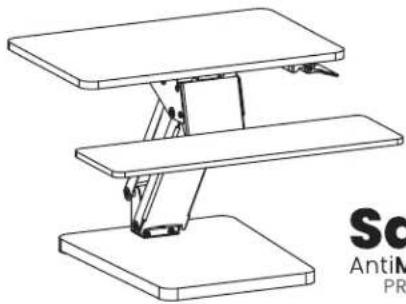
Height-Adjustable Sit-Stand Desktop Workstation with Antimicrobial Coating\*
Model: WWSSDTAM
natural_image
Technical line drawing of a three-tiered mechanical assembly with no visible text or symbolsSafe-IT
AntiMICROBIAL
PRODUCTS
*Antimicrobial coating inhibits the growth of bacteria, viruses, fungi, mold and mildew

CAUTION: DO NOT EXCEED MAXIMUM LISTED WEIGHT CAPACITY (29 lb. / 13 kg). SERIOUS INJURY OR PROPERTY DAMAGE MAY OCCUR!
Register your product today and be automatically entered to win an ISOBAR® surge protector in our monthly drawing!
tripplite.com/warranty


Manufacturing Excellence.
1111 W. 35th Street, Chicago, IL 60609 USA • tripplite.com/support
Copyright © 2021 Tripp Lite. All rights reserved.
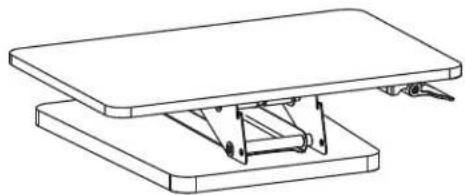
Component Checklist

IMPORTANT: Ensure all parts according to the component checklist have been received prior to installation. If any parts are missing or faulty, visit tripplite.com/support for service.
natural_image
Technical line drawing of a mechanical assembly with two stacked plates and a central support bracket (no text or symbols)A
(x1) Workstation

B
(x1) Keyboard Tray

C
(x1) Hinge

D
(x6) Screws

E
(x2) Bumpers

F
(x1) Hex Wrench
Assembly
- Remove Workstation A from carton. Press the paddle to adjust height.

Assembly
- Attach the Hinge C to the Keyboard Tray B using the included Screws D and Hex Wrench F. Attach the Bumpers E.

- Attach the Keyboard Tray to the Workstation.

natural_image
Technical line drawing of a mechanical assembly with a zoomed-in detail view (no text or symbols)Assembly
- Raise the Workstation to a 45^ angle. At the rear of the Workstation, use the Hex Key to adjust the tension. Add more tension for heavier items and less tension for lighter items.

natural_image
Technical line drawing of a mechanical assembly with a zoomed-in detail view showing internal components (no text or symbols)Assembly
- You may adjust the height of the Workstation from 6.3 in. to 17.5 in. (16 cm to 44.5 cm). The Keyboard Tray supports a maximum weight of 4.4 lb. (2 kg).

natural_image
Line drawing of a desktop computer workstation with monitor, keyboard, mouse, and stand (no text or symbols)Warranty and Product Registration
5-Year Limited Warranty
Seller warrants this product, if used in accordance with all applicable instructions, to be free from original defects in material and workmanship for a period of 5 years from the date of initial purchase. If the product should prove defective in material or workmanship within that period, Seller will repair or replace the product, at its sole discretion.
THIS WARRANTY DOES NOT APPLY TO NORMAL WEAR OR TO DAMAGE RESULTING FROM ACCIDENT, MISUSE, ABUSE OR NEGLECT. SELLER MAKES NO EXPRESS WARRANTIES OTHER THAN THE WARRANTY EXPRESSLY SET FORTH HEREIN. EXCEPT TO THE EXTENT PROHIBITED BY APPLICABLE LAW, ALL IMPLIED WARRANTIES, INCLUDING ALL WARRANTIES OF MERCHANTABILITY OR FITNESS, ARE LIMITED IN DURATION TO THE WARRANTY PERIOD SET FORTH ABOVE; AND THIS WARRANTY EXPRESSLY EXCLUDES ALL INCIDENTAL AND CONSEQUENTIAL DAMAGES. (Some states do not allow limitations on how long an implied warranty lasts, and some states do not allow the exclusion or limitation of incidental or consequential damages, so the above limitations or exclusions may not apply to you. This warranty gives you specific legal rights, and you may have other rights which vary from jurisdiction to jurisdiction.)
WARNING: The individual user should take care to determine prior to use whether this device is suitable, adequate or safe for the use intended. Since individual applications are subject to great variation, the manufacturer makes no representation or warranty as to the suitability or fitness of these devices for any specific application.
Product Registration
Visit tripplite.com/warranty today to register your new Tripp Lite product. You'll be automatically entered into a drawing for a chance to win a FREE Tripp Lite product!*
* No purchase necessary. Void where prohibited. Some restrictions apply. See website for details.
Tripp Lite has a policy of continuous improvement. Specifications are subject to change without notice. Photos and illustrations may differ slightly from actual products.


1111 W. 35th Street, Chicago, IL 60609 USA • tripplite.com/support
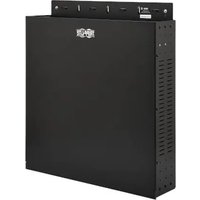

Brand : Tripp Lite
Model : WWSSDTAM
Category : Computer accessory