
SRDUCTN7009 - Unspecified Tripp Lite - Free user manual and instructions
Find the device manual for free SRDUCTN7009 Tripp Lite in PDF.


| Product Type | Uninterruptible Power Supply (UPS) |
| Power Rating | 700 VA / 490 W |
| Input Voltage | 120 V AC |
| Output Voltage | 120 V AC |
| Number of Outlets | 6 (NEMA 5-15R) |
| Battery Type | Sealed Lead-Acid, maintenance-free |
| Typical Battery Runtime | 10-15 minutes at half load |
| Dimensions (H x W x D) | 12.2 x 7.2 x 8.9 inches |
| Weight | 21.5 lbs |
| Surge Protection | 960 Joules, UL 1449 rating |
| EMI/RFI Filtering | Yes, >20 dB reduction |
| Audible Alarms | On battery, low battery, overload |
| Communication Port | USB (HID compliant) |
| Safety Certifications | UL, cUL, FCC Class B |
| Operating Temperature | 32°F to 95°F (0°C to 35°C) |
| Battery Replacement | User-replaceable, hot-swappable |
| Warranty | 3 years connected equipment warranty |
Frequently Asked Questions - SRDUCTN7009 Tripp Lite
User questions about SRDUCTN7009 Tripp Lite
0 question about this device. Answer the ones you know or ask your own.
Ask a new question about this device
Download the instructions for your Unspecified in PDF format for free! Find your manual SRDUCTN7009 - Tripp Lite and take your electronic device back in hand. On this page are published all the documents necessary for the use of your device. SRDUCTN7009 by Tripp Lite.
USER MANUAL SRDUCTN7009 Tripp Lite
Assembly Instructions
SmartRack® Wide-Rack Air Inlet Duct Kit for Nexus 7 Series Switches

Model: SRDUCTN7009
Pg. 2-3
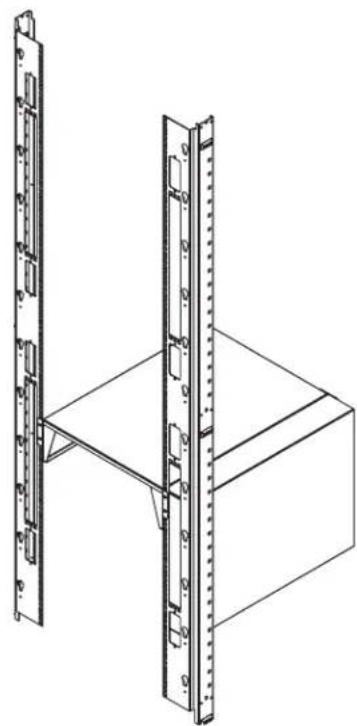
Model: SRDUCTN7004
Pg. 3-4
PROTECT YOUR INVESTMENT!
Register your product for quicker service and ultimate peace of mind.
You could also win an ISOBARGULTRA surge protector—a \$100 value!
www.tripplite.com/warranty



1111 W. 35th Street, Chicago, IL 60609 USA • www.tripplite.com/support
Copyright © 2017 Tripp Lite. All Rights Reserved. All trademarks are the property of their respective owners.
Parts List - SRDUCTN7009

Inlet Box Top Tray BottExhaust Box
M6 Cup Washer (x16)
Rear Plate (x2)
Assembly - SRDUCTN7009
1 Use two (2) M4 screws to secure the Rear Plate to the Inlet Box and one (1) M4 screw to secure the other Rear Plate to the Exhaust Box.
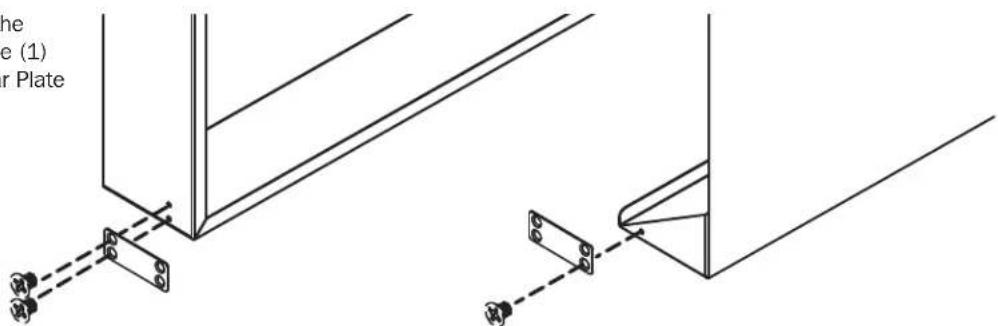
2 Attach the Exhaust Box to the Left Rail.

3 Attach the Inlet Box to the Right Rail.
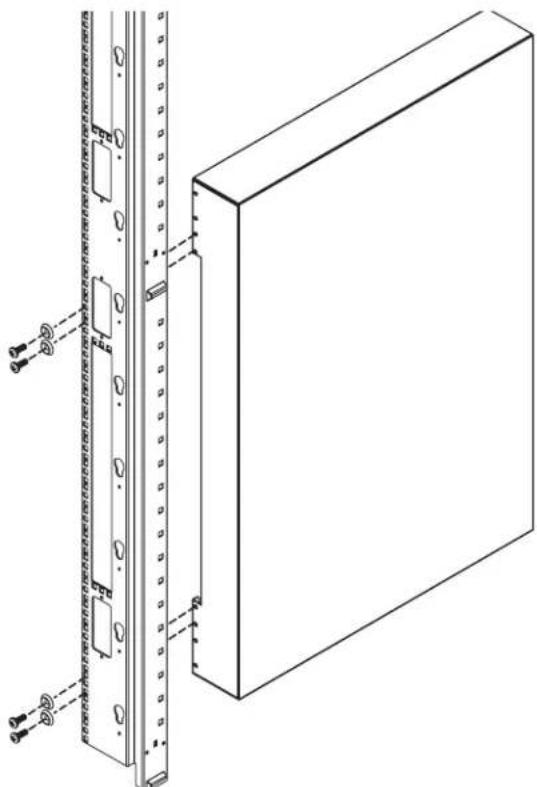
Assembly - SRDUCTN7009

Attach the Bottom Tray to the rail assemblies.
5 On the back of the unit, use four (4) M4 screws to secure the Bottom Tray to the Inlet Box and Exhaust Box.

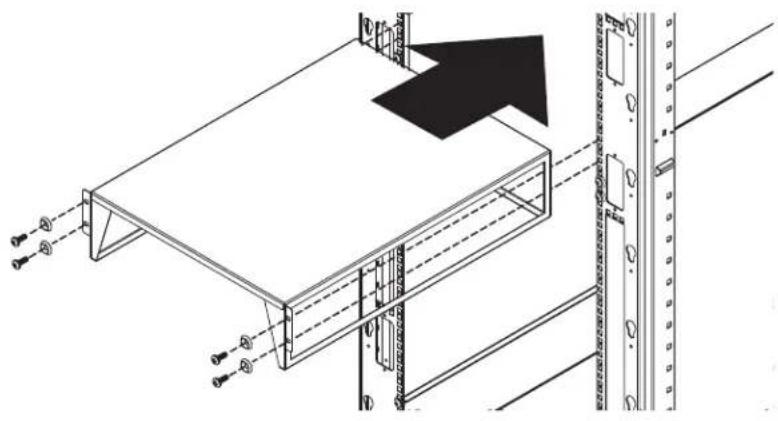
6 Attach the Top Tray to the rail assemblies.
Parts List - SRDUCTN7004

Inlet Box Top Tray M6 x 16 Screw (x8) M4 Screw (x4) M6 Cup Washer (x8) Rear Plate
Assembly - SRDUCTN7004

1111 W. 35th Street, Chicago, IL 60609 USA • www.tripplite.com/support


Brand : Tripp Lite
Model : SRDUCTN7009
Category : Unspecified