Rapide W86-RU-S - Vacuum Cleaner VAX - Free user manual and instructions
Find the device manual for free Rapide W86-RU-S VAX in PDF.


User questions about Rapide W86-RU-S VAX
0 question about this device. Answer the ones you know or ask your own.
Ask a new question about this device
Download the instructions for your Vacuum Cleaner in PDF format for free! Find your manual Rapide W86-RU-S - VAX and take your electronic device back in hand. On this page are published all the documents necessary for the use of your device. Rapide W86-RU-S by VAX.
USER MANUAL Rapide W86-RU-S VAX
text_image
Rapide Ultra CARPET WASHER
natural_image
Line drawing of a vacuum cleaner with mounted equipment (no text or symbols)Get Cleaning...
What's your Vax model number? (Located on the top flap of the packaging)
e.g. W 9 0- R U - B
What's your serial number? (Located on the base of the machine)

text_image
Image containing a single horizontal line with a minus sign, likely representing a minus sign in a document or form.Note these down in case you need them in future. Please keep instructions for further use.
vax.co.uk
Rapide Ultra series
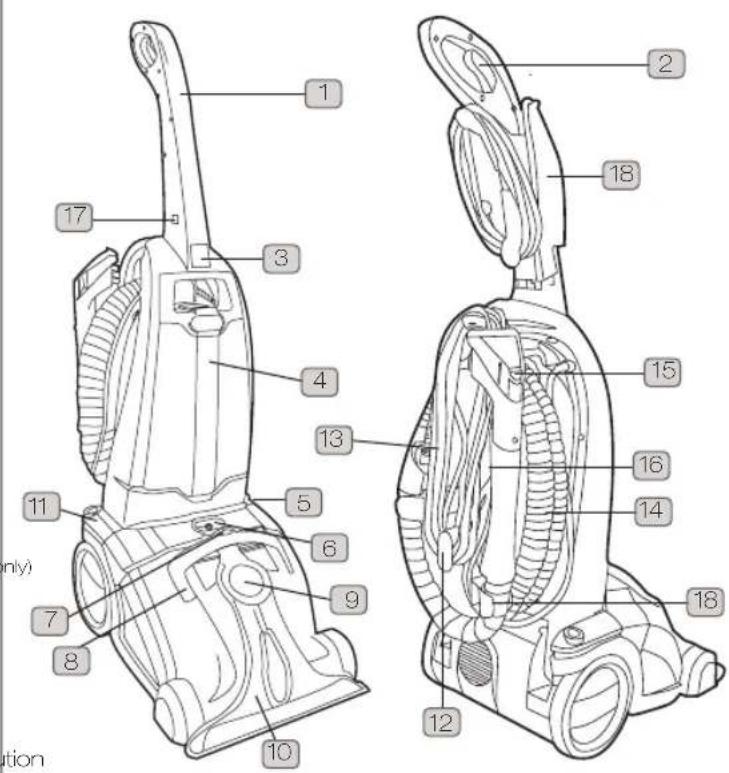
Machine Overview
1 Handle
2 Solution trigger
3 Clean water tank release button
4 Clean water tank
5 Recline pedahidden)
6 Solution tube port
7 Dirty water tank release lever
8 Dirty water tank carry handle
9 Hose port
10 Rotating brushbar (hidden)
11 On/off pedal
12 Power cord release lock
13 Power cord
14 Hose
15 Wash tool
16 Wash tool solution trigger
17 Handle locking pin
18 Accessory holder
19 Vax pre-treatment carpet cleaning solutions (some models only)
20 Pre-treatment wand (some models only)
21 Pre-treatment wand holder (some models only)
22 Vax carpet cleaning solution
23 Vax pet carpet cleaning solution (some models only)
24 Vax Carpet Guard treatment solution (some models only)
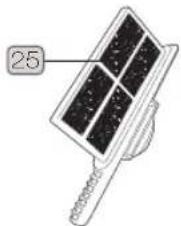
25 Float chamber filter
PLEASE NOTE: some parts may vary according to model. Please check inside flap of box for more details. Unit
text_image
1 2 3 4 5 6 7 8 9 10 11 12 13 14 15 16 17 18 only tionUnit
Accessories
items shown packaged separately

text_image
Diagram showing various spray cleaning products with numbered labels, including a spray gun, hose, and carpet guard.Filter
Pre-assembled in machine
text_image
25General Safety Information
When using the carpet washer, basic safety precautions always be observed, including the following:
- Keep the unit on the floor.
ons. should use an extension cord.
-
Do not attempt to remove blockages with share objects as they may cause damage.
-
Store indoors put away after use to prevent tri accidents.
supervised to 20. Using improper voltage may result in damage to motor and possible injury to the user. The con
s (including is listed on the rating label.
-
A hazard may occur if the carpet washer runs the power supply cord.
-
To prevent dirty water from running into the m on not hold the appliance upside-down or lay on Use appliance in normal cleaning position.
-
Use extra care when cleaning on stairs.
-
Do not carry appliance while motor is running.
WARNING: Always switch off and unplug you machine from the electrical outlet before filling emptying the clean water tank, emptying the dirty before assembling, opening, before connecting/
disconnecting the attachments, or carrying out maint or troubleshooting checks.
KEEP NOTE: Carpets should be dry vacuumed thore before washing.
IMPORTANT: If the hose or tools are blocked off the carpet washer and remove the block before re-starting your machine. See maintenance.
IMPORTANT: Cleaning filters maintains cleaning performance. Vax recommends that your filters should be checked and cleaned periodically. If your washable make sure they are completely dry before inserting back into the machine.
This machine is intended for household use only, a water NOT for commercial or industrial use.
PLEASE KEEP THESE INSTRUCTIONS FOR FURTHER USE.
they may
-
Do not leave the carpet washer unattended when plugged in. Unplug it from socket when not in,
-
To prevent electric shock do not use outdoors.
-
Not to be used as a toy. Children should be supervised to use using improper voltage may result in damage to ensure that they do not play with the appliance. motor and possible injury to the user. The cor
-
This appliance is not intended for use by persons (inovoltage) is listed on the rating label. children) with reduced physical, sensory or mental. A hazard may occur if the carpet washer runs capabilities, or lack of experience and knowledge, the power supply cord. unless they have been given supervision or instruction.
-
To prevent dirty water from running into the m concerning the use of the appliance by a person not hold the appliance upside-down or lay on responsible for their safety.
-
Use only as described in this manual.
-
Do not use the carpet washer if it has been dropped, damaged, left outdoors or dropped water. Do not use the carpet washer with a damaged cord or plug. If the supply cord is must be replaced by the manufacturer or a recommended Service Agent to avoid hazard invalidating the guarantee.
-
Do not pull or carry by cord/hose. Do not use cord/hose as a handle, close a door on the or pull cord/hose around sharp edges or come not run the carpet washer over the cord/hose, the cord away from heated surfaces.
-
Do not unplug by pulling on the cord.
-
Do not handle the plug or carpet washer with hands.
-
Do not put any objects into openings or open openings blocked, keep them free of anything may reduce airflow.
-
Keep heir, loose clothing, fingers and all parts body away from openings and moving parts.
-
Do not use the carpet washer on any glowing, burning or smoking particles.
-
Do not use without the solution tank and dirty tank in place.
-
Turn off all controls before unplugging.
-
Do not use to pick up flammable or combustible liquids such as petrol, or use in areas where they may be present.
Operation
Assembling your carpet washer handle

text_image
1 Press 2
text_image
Diagram showing a hand using a sewing machine with labeled parts and directional arrows indicating movement or force.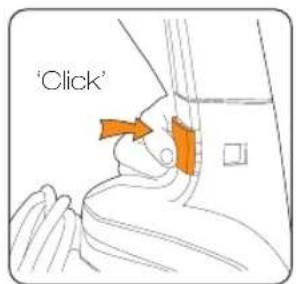
text_image
'Click'Locate locking pin airdert handle and re-fibicking pin will 'click' press in points showing pin. when in place. to remove.
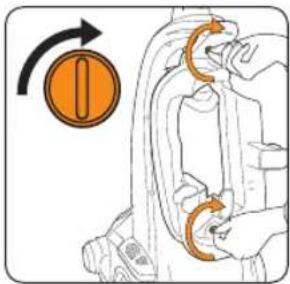
Assembling your tool caddy and hose

natural_image
Illustration of a hand adjusting a mechanical component with an orange arrow indicating the step (no text or symbols present)Ensure locking tabs are horizontal.

text_image
Diagram illustrating a mechanical or electrical process with labeled components and directional arrowRotate tabs 90° clockwise to lock caddy onto unit.

natural_image
Diagram of a car suspension system with hoses and a hand holding a valve (no text or labels)Fit hose connector end in first.
natural_image
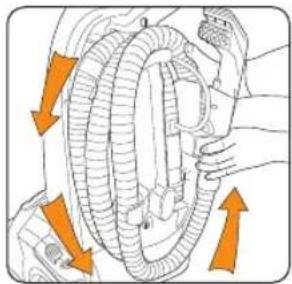
Diagram of a car wheel assembly with orange arrows indicating rotational direction (no text or labels)Wrap hose around caddy tightly anti-clockwise. Clip in the last wrap the hose and wash tool as shown.
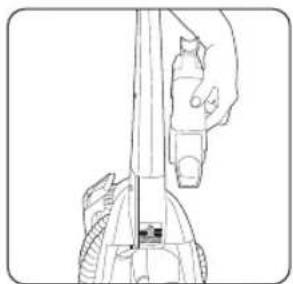
Attach caddy to unit top first.
Assembling your pre-treatment kit (some models only)
natural_image
Technical line drawing of a mechanical device with no visible text or symbols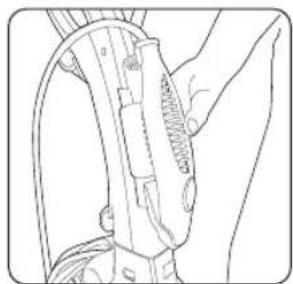
natural_image
Line drawing of a mechanical device with no visible text or symbols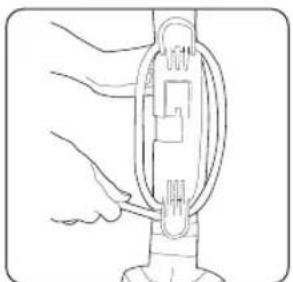
natural_image
Line drawing of a mechanical device with hands operating it (no text or symbols)Wrap solution tube around holder for storage.
Operation
Before you begin cleaning

NOTE: Do not over saturate your carpet.
• Vacuum your carpets thoroughly.
- Test for colourfastness - Wet a white absorbent cloth with the solution. In a small, thicker area of your carpet, gently rub the surface with the dampened cloth. Wait ten minutes and check for colour removal or bleed with white paper towel or cloth. If your carpet has more than one colour, check all colours.
- When cleaning an entire room, move furniture out of the area to be cleaned. In the fur too heavy to move, place aluminium foil or wax paper under legs. This will prevent wood finishes from staining your carpet. Pin up furniture skirts and curtains.

IMPORTANT: Only use Vax carpet cleaning solution. Using other solutions may excess foaming. Excessive foam will prevent the machine from working effectively working solutions will invalidate the guarantee.
Operation
Operating your pre-treatment wand (some models only)
NOTE: Pre-treating your carpet before washing will help to remove stubborn stains. NOTE: Do not over saturate your carpet.

natural_image
Line drawing of hands cleaning a cup and using a tool (no text or symbols)
text_image
40°C max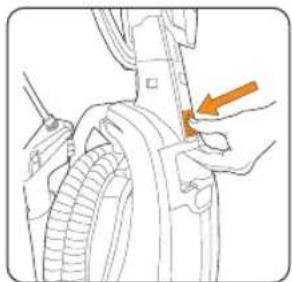
natural_image
Line drawing of a mechanical component with an orange arrow pointing to a specific part (no text or symbols present)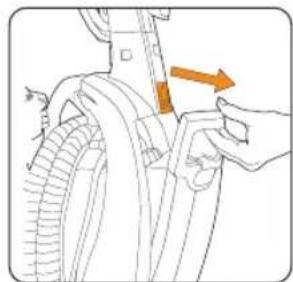
natural_image
Diagram of a hand holding a tool interacting with a car tire, showing motion direction (no text or symbols)Pour required dose mix solution with wall remove clean water pre-treatment solution water. (max 40°C) tank. (approx. 40ml per 1L of water).

natural_image
Line drawing of a hand holding a cup and a wrist strap, no text or symbols present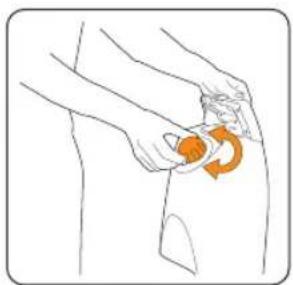
natural_image
Illustration of a person performing a circular massage or grip motion on the hip area (no text or symbols)
natural_image
Illustration of a person holding an orange object with a circular arrow indicating rotation (no text or symbols)
natural_image
Diagram showing a hand holding an electrical outlet connected to a device with wires, no text or symbols presentFill clean water tank Tighten cap before with solution mix. returning tank to unit.
Unwrap power cord and plug unit in.
natural_image
Technical line drawing of a mechanical component with an orange arrow indicating a specific part (no text or symbols present)
natural_image
Line drawing of a mechanical tool or device with no visible text or symbols
natural_image
Illustration of a hand using a tool to adjust or install a mechanical component, with no visible text or symbols.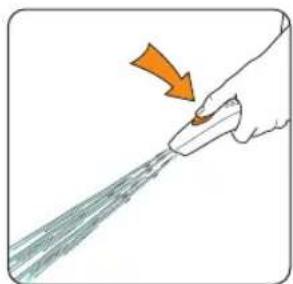
natural_image
Illustration of a hand using a tool to spray liquid onto a surface, with an orange arrow indicating the motion (no text or symbols present)Spray evenly onto desired areas.
NOTE: Leave pre-treatment solution to work for 10-15 minutes then wash carpets a described on page 6 of Operation.

IMPORTANT: Before setting the machine up to wash, ensure the clean water rinsed thoroughly of pre-treatment solution.
Operation
Operating your carpet washer
NOTE: Your dirty water tank is fitted with a float. When the dirty water tank is full or the floor head is not in contact with the carpet the float will shut off the suction at the floor n to hear if this has happened as the motor noise on the unit will increase. Once activated, empty the dirty water tank if full. If the dirty water tank is not full then machine at the power switch and wait for the float to settle before re-starting.
natural_image
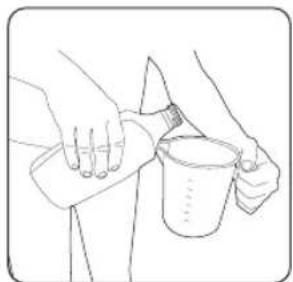
Line drawing of hands using a tool to lift a cup (no text or symbols)Pour required dose cleaning solution (approx. 40ml per of water).
text_image
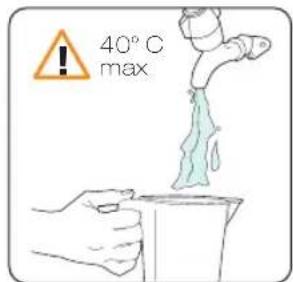
40° C maxMix solution with wall remove clean water. (max. 40°C) tank.
natural_image
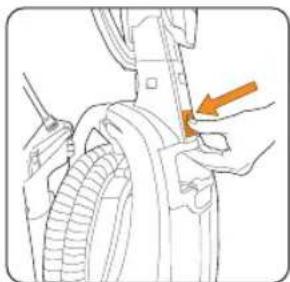
Line drawing of a person using a tool to adjust or install a mechanical component (no text or symbols visible)Remove clean water tank.
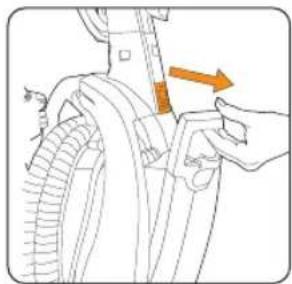
natural_image
Illustration of a hand holding a tool interacting with a mechanical component, showing orange arrows indicating direction (no text or symbols present)
natural_image
Illustration of a hand holding a tool interacting with a mechanical component, showing orange arrows indicating direction (no text or symbols present)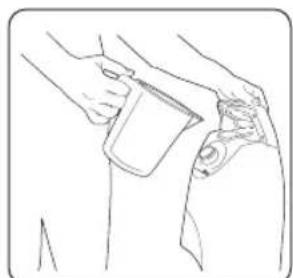
natural_image
Line drawing of a person holding a cup and a bottle, no text or symbols presentFill clean water tank with solution mix.
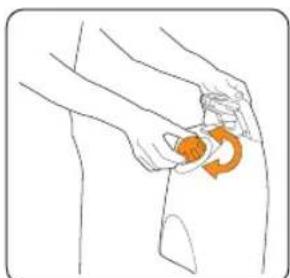
natural_image
Illustration of a person performing a circular massage or grip motion on the hip (no text or symbols)Tighten cap before returning tank to unit.
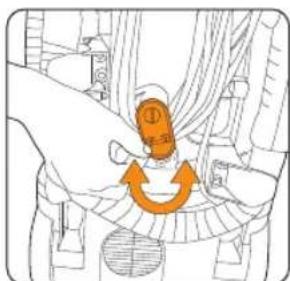
text_image
Diagram showing a hand pressing a button labeled '①' with an orange arrow indicating clockwise motion around the button.Unwrap power cord and plug unit in.
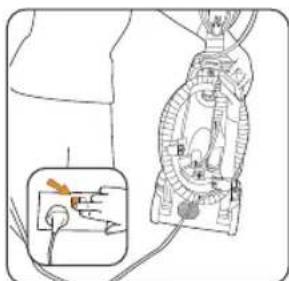
text_image
Diagram showing a device with labeled components and an inset schematic illustrating wiring connections.cord and plug unit in.
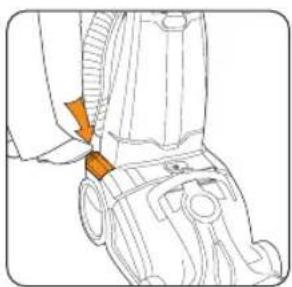
natural_image
Technical line drawing of a mechanical component with an orange arrow indicating a joint or connection point (no text or symbols present)
natural_image
Diagram of a hand operating a car interior with an orange arrow indicating direction (no text or symbols present)Recline the machine. Press trigger to NOTE: When release solution.
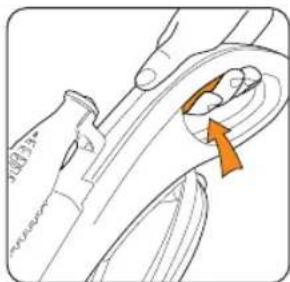
natural_image
Technical line drawing of a mechanical component with an orange arrow indicating direction (no text or symbols)Press trigger to release solution.
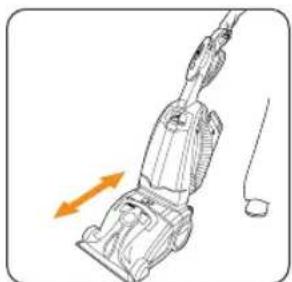
natural_image
Line drawing of a vacuum cleaner with orange motion arrows indicating airflow direction (no text or symbols)For best results apply solution on the forward stroke and and release the trigger to recover solution on the backward stroke.
Operation
Picking up spills
natural_image
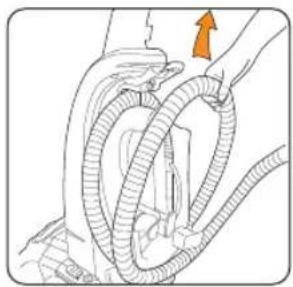
Illustration of hands connecting hoses to a vehicle (no text or symbols)Remove hose.
natural_image
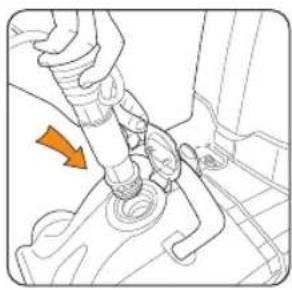
Mechanical assembly diagram showing a hand connecting hoses to a car trunk with an orange arrow indicating direction (no text or symbols present)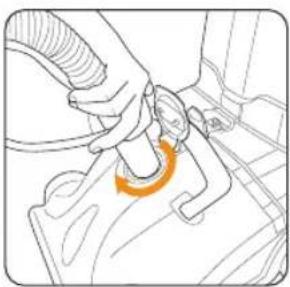
natural_image
Line drawing of a mechanical assembly with an orange curved arrow indicating motion (no text or symbols)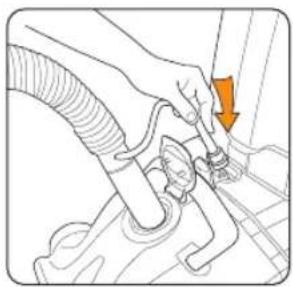
natural_image
Line drawing of a hand using a tool to adjust or install a component, with an orange arrow indicating the action (no text or symbols present)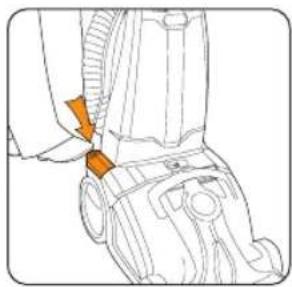
natural_image
Technical line drawing of a mechanical component with an orange arrow indicating a specific part (no text or symbols present)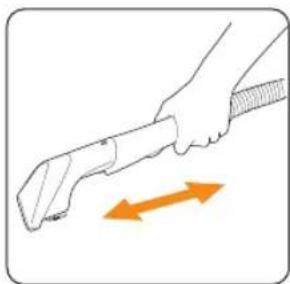
natural_image
Illustration of a hand holding a tool with an orange double-headed arrow indicating motion (no text or symbols)Pull wash tool back over spill to pick up liquid.
Using the wash tool
NOTE: Do not over saturate your upholstery.
NOTE: The clean water tank will need to be filled with solution and water before
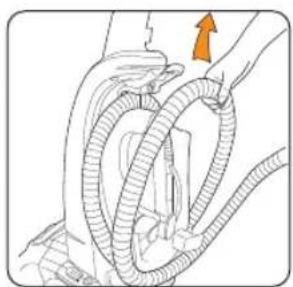
natural_image
Illustration of hands connecting a coiled tube with an orange arrow indicating direction (no text or symbols)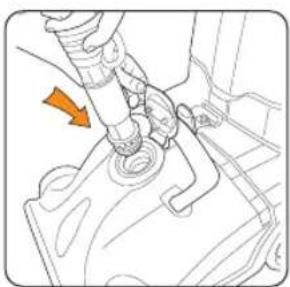
natural_image
Mechanical assembly diagram showing a valve inserted into a housing component with an orange arrow indicating direction (no text or symbols present)
natural_image
Line drawing of a mechanical component with an orange curved line indicating a step or motion (no text or symbols present)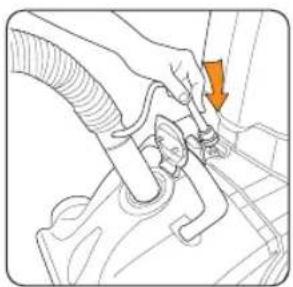
natural_image
Line drawing of a hand holding a hose and valve, with an orange arrow indicating direction (no text or symbols)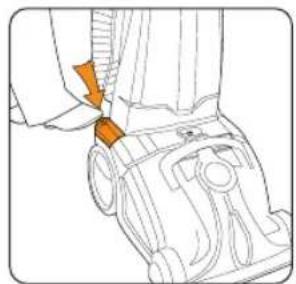
natural_image
Line drawing of a mechanical device with an orange arrow pointing to a component (no text or symbols)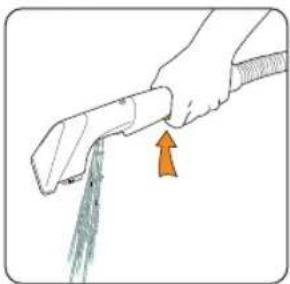
natural_image
Illustration of a hand holding a tool with a green tool, showing an orange arrow pointing to the tool (no text or symbols present)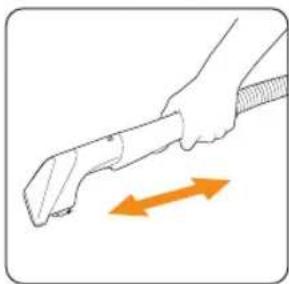
natural_image
Illustration of a hand holding a tool with an orange double-headed arrow indicating motion (no text or symbols)For best results apply solution on the forward stroke and release the trigger to recover on backward stroke.
Press trigger to release solution.
Operation
Protecting your carpets
NOTE: Using Vax Carpet Guard solution will protect your carpets from future stains.
NOTE: Do not over saturate your carpets.
- Hold the Vax Guard solution approximately 1 metre away from the desired area
- Leave to dry for 30 minutes.
Maintenance
(Keep your Vax as good as new)

WARNING: To reduce the risk of electric shock, turn the machine off and u from electrical outlet before performing maintenance/troubleshooting checks.
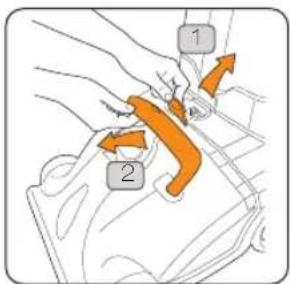
Emptying the dirty water tank
NOTE: Rinse out tank with clean water and leave to air dry before storing your
text_image
Diagram showing two orange arrows labeled '1' and '2' pointing to a mechanical component or assembly, with arrows indicating direction.
natural_image
Illustration of a hand using a tool to lift a component, showing orange arrows indicating motion (no text or symbols)
natural_image
Illustration of a hand holding a circular object with an orange arrow indicating rotation (no text or symbols)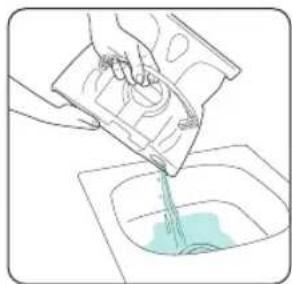
natural_image
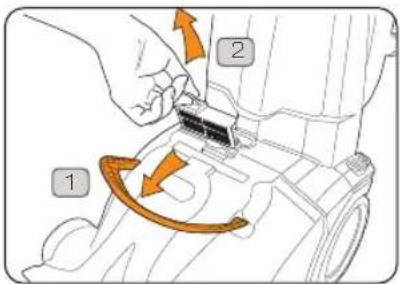
Illustration of a hand pouring liquid into a basin (no text or symbols)Cleaning the float chamber filter
text_image
Diagram showing mechanical assembly with labeled parts and directional arrows indicating motion or movement
text_image
40° C maxRinse under water to remove debris (max 40°C). Allow to dry completely before replacing or storing away your machine.
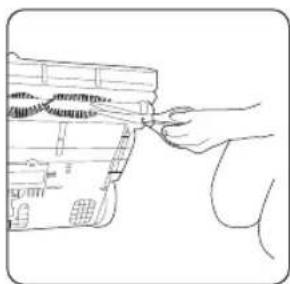
Removing blockages from the brushbar

WARNING: To reduce the risk of electric shock, turn the machine off and u from electrical outlet before performing maintenance/troubleshooting checks.
natural_image
Line drawing of a hand inserting a card into a device (no text or symbols)Threads caught in the brushbar can be cut.
Maintenance
(Keep your Vax as good as new)
Replacing the belt
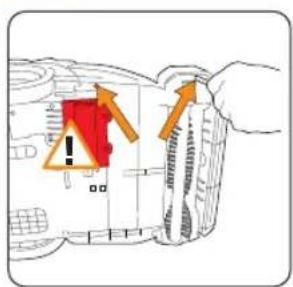
!
WARNING: DO NOT OPEN THE MOTOR COVER.
text_image
Diagram showing a warning sign with red and orange arrows pointing to a vehicle, indicating hazard or hazard status.Use a crosshead screwdriver to remove two (2) screws.
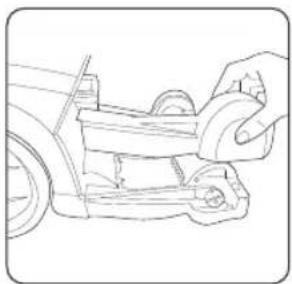
natural_image
Line drawing of a hand using a tool to adjust or install a vehicle component (no text or symbols visible)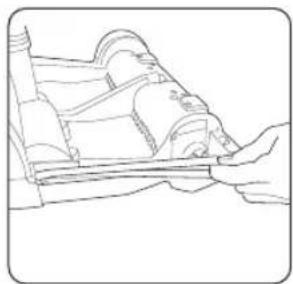
natural_image
Line drawing of a hand holding a wooden object, possibly a tool or device (no text or symbols visible)Remove damaged/broken belt off the spindles.
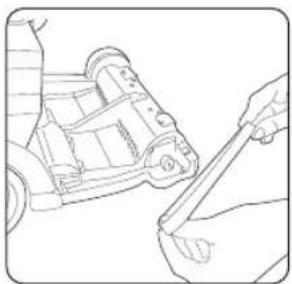
natural_image
Line drawing of a mechanical device with a hand operating it (no text or symbols)Replace new belt on spindles and secure the belt cover.
Storage
• Empty and rinse out clean and dirty water tanks and leave to air dry before replacing
- You can remove the handle and tool caddy for convenient storage.
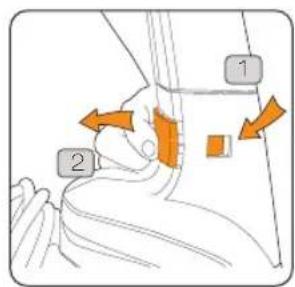
text_image
Diagram showing two labeled parts (1 and 2) with arrows indicating movement or force direction, likely illustrating a physical or medical procedure.
text_image
Diagram showing a mechanical device with labeled parts and directional arrows indicating movement or force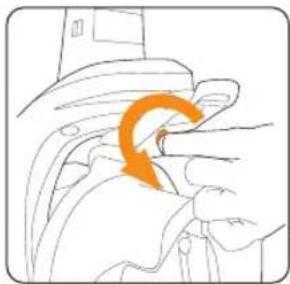
natural_image
Illustration of a hand holding a car with an orange arrow indicating motion (no text or symbols)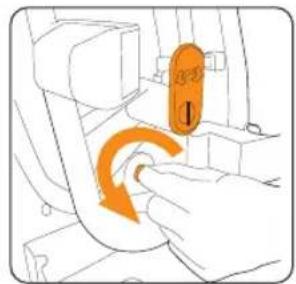
natural_image
Illustration of a hand inserting a device into a seat, showing orange motion arrows (no text or symbols)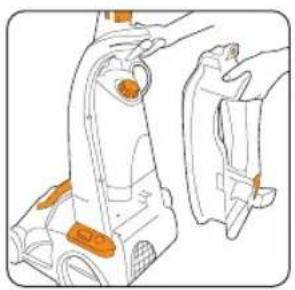
natural_image
Line drawing of a mechanical device with orange components, no text or symbols presentFAQS

WARNING: To reduce the risk of personal injury, unplug the carpet washer before performing maintenance/troubleshooting checks.
Is there an accessory missing?
Why won't the solution/clean water dispense?
- Check the 'Parts Overview' page in this make sure the part is definitely included unit.
guide • ensure the clean water tank is fitted secure in your. The solution/clean water tank may be empt
- Ensure dirty water tank is fitted securely.
Why won't the carpet washer turn on?
- It may not be plugged into the electrical correctly: ensure that the plug is pushed in securely and switched on.
• The power button on the unit hasn't been fully depressed.
- If unit cuts out during use, disconnect the unit from the wall socket, allow to cool for one hour, clean the filter and empty the dirty water tank and check hose, brushbar for blockages.
Why won't the brushes rotate?
• The brushes will only rotate when the unit reclined and turned on.
Check the float chamber filter and clean if necessary.
Belt may be broken - replace if necessary
Why won't the cleaner pick up solution/spills?
- The float in the dirty water tank may have been activated. Empty the dirty water tank if full. If the dirty water tank is not full then switch the machine off and wait for the float to settle before re-starting your machine.
- The dirty water tank may be full and the auto shut off engaged. Empty the dirty water tank.
- Ensure the dirty water tank is fitted correctly and the tank cap is securely fitted.
- Check the hose for blockages.
- Check the brushbar for blockages.

we ♥ to help
Don't take me back to the shop, simply call us
(UK) 0844 412 8455 vax.co.uk (ROI) 1-800 928 308 vaxireland.ie
This does not affect your statutory rights.
Other Information
UK Service & Help
Vax Careline:
(UK) 0844 412 8455
(ROI) 1-800 928 308
Monday-Friday 8.30am to 6.30pm
Saturday-Sunday 9.00am to 5.00pm
If you have queries or concerns about using your Vax, call the Vax Careline. Calls are charged at the UK local rate. Please make a note of the serial number and model number of the vacuum cleaner before calling. For the nearest Service Agent, please call the Vax Customer Careline or visit vax.co.uk
Consumables
To purchase spares and accessories, please visit vax.co.uk
Float chamber filter kit 1-9-130494-00
Belt kit 1-9-130510-00
Technical Specification
Voltage: 220-240V \~50Hz
Wattage: 1000 W
Capacity: Clean water tank 4.5L
Dirty water tank 3.0L
Cord length: 8m
Weight: 10.2kg (dependant on model)
Filter: Float chamber filter
Subject to technical change without notice.

EEC Statement of Compliance
Manufacturer/EEC importer: Vax Limited, hereby on our own responsibility, declare that the Rapide Ultra series is manufactured in compliance with the following Directives:
Safety: 2006/95/EC Low Voltage Directive
EMC: 2004/108/EC Electromagnetic Compatibility Directive

Waste electrical products should not be disposed of with household waste. Please recycle where facilities exist. Check with your Local Authority or retailer for recycling advice.
Notes
Notes
vax.co.uk

text_image
vax®we

clean
Vax Ltd., Kingswood Road, Hampton Lovett, Droitwich, Worcestershire, WR9 OQH, UK email: info@vax.co.uk - website: vax.co.uk
Version 1.4