PAS22BK - Subwoofer Pyle - Free user manual and instructions
Find the device manual for free PAS22BK Pyle in PDF.


| Product Type | Wireless CarPlay & Android Auto iA Box |
| Brand | Pyle |
| Model | PAS22BK |
| CPU | Qualcomm Snapdragon SDM450, 8-core 2.0GHz |
| RAM | 4GB LPDDR3 |
| Storage | 64GB eMMC |
| WiFi | Dual-band 2.4GHz/5GHz |
| Bluetooth | Dual BT: BT 4.2 (primary) + BT 5.0 (secondary) |
| SIM Card Support | 4G/3G/2G (LTE-FDD bands, UMTS, GSM) |
| Navigation | GPS/GLONASS/Beidou |
| Wireless CarPlay | Built-in Wireless Apple CarPlay |
| Wireless Android Auto | Built-in Wireless Android Auto |
| Screen Mirroring | AOA Protocol Screen Mirror |
| Video Output | 4K Full HD, H.265 |
| Operating System | Android (with Google Play Store) |
| External Storage | Micro SD Card up to 128GB |
| Connectivity | USB 3.0 Type-C |
| Power Input | DC 5V |
| Dimensions (L x W x H) | 3.54 x 3.35 x 0.71 inches |
| Weight | Approx. 0.2 lbs (estimate) |
| Operating Temperature | -20°C to +75°C |
| Languages | More than 100 |
| Maintenance | Clean with soft, dry cloth; avoid liquids |
| Safety | Use only in vehicles with original CarPlay; follow local traffic laws |
| Spare Parts / Repairability | Not user-serviceable; contact support for issues |
Frequently Asked Questions - PAS22BK Pyle
User questions about PAS22BK Pyle
0 question about this device. Answer the ones you know or ask your own.
Ask a new question about this device
Download the instructions for your Subwoofer in PDF format for free! Find your manual PAS22BK - Pyle and take your electronic device back in hand. On this page are published all the documents necessary for the use of your device. PAS22BK by Pyle.
USER MANUAL PAS22BK Pyle
natural_image
Black square electronic device with a circular logo and grid of dots, no visible text or symbols on the body.
natural_image
Abstract black and white logo resembling a stylized letter 'P' (no text or symbols)PAS22BK
Wireless Carplay & Android System iA Box
4GB RAM 64GB ROM, 2.4GHz/5GHz
Dual-Band WiFi BT Quad-Core 64Bits D/4K
Full HD/H.265/USB3.0 Android Box, Screen Mirroring,
Install Android Apps (Black)
USER GUIDE
User Interface
Assistive Touch Bar
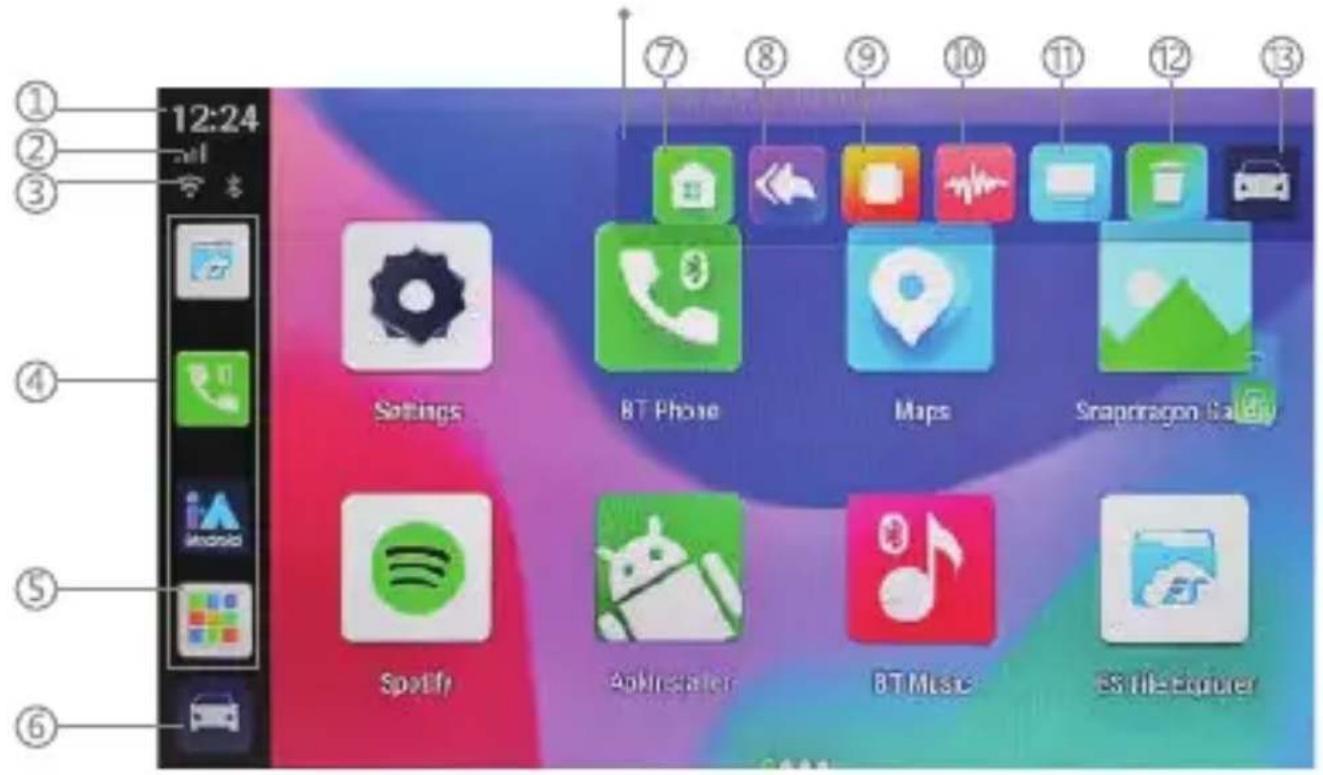
- Clock
- SIM card status
- WiFi & BT status
- Recent apps
- All apps
-
- Back to factory head unit system
-
Home
- Back
- Recents
- Voice assistant
- Split screen
- Clear
Interface

NOTE!
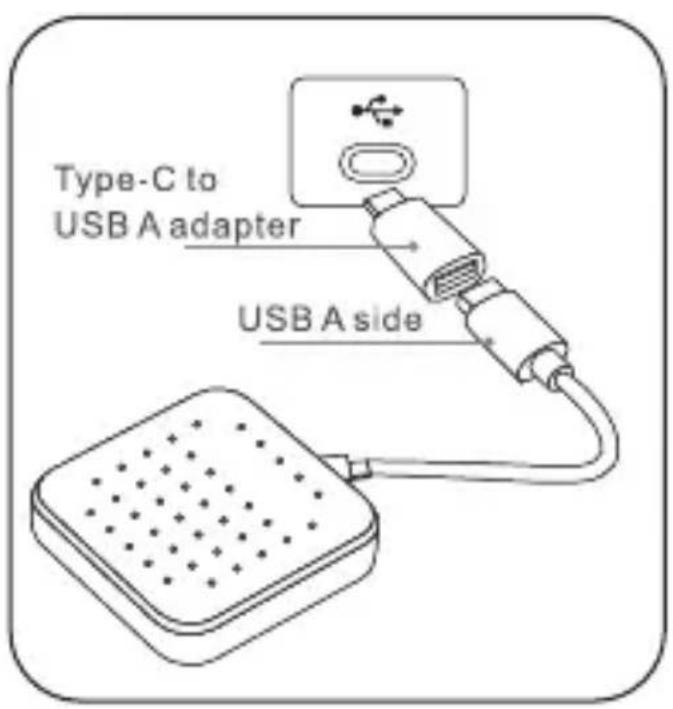
Follow the instruction below if your car is equipped with a Type-C port for CarPlay.
What's in the Box:
- iA Box
- USB Cable
- USB Adaptor
How to Use Wireless Apple CarPlay/Android Auto
Wireless Apple Carplay:
After connecting your iPhone to the BT, open the "SpeedPlay" app in the iA box interface. Next, tap "Use CarPlay" on your iPhone notification. It will connect to wireless CarPlay after a few seconds.
Wireless Android Auto:
Before using Android Auto, please make sure the latest Android Auto app is installed on your smartphone. First, make sure you have enabled wireless projection on Android Auto app settings.
Open "SpeedPlay" app on iA box interface after your Android phone has connected to the BT, next confirm the notifications on your phone to use wireless Android Auto.
Wireless BT Streaming
Dual BT Module:
• Primary BT4.2 (for external BT mouse, remote controller, HID, OBD devices)
- Secondary BT 5.0 (for iPhone/Android smartphone hands-free calling & audio streaming)
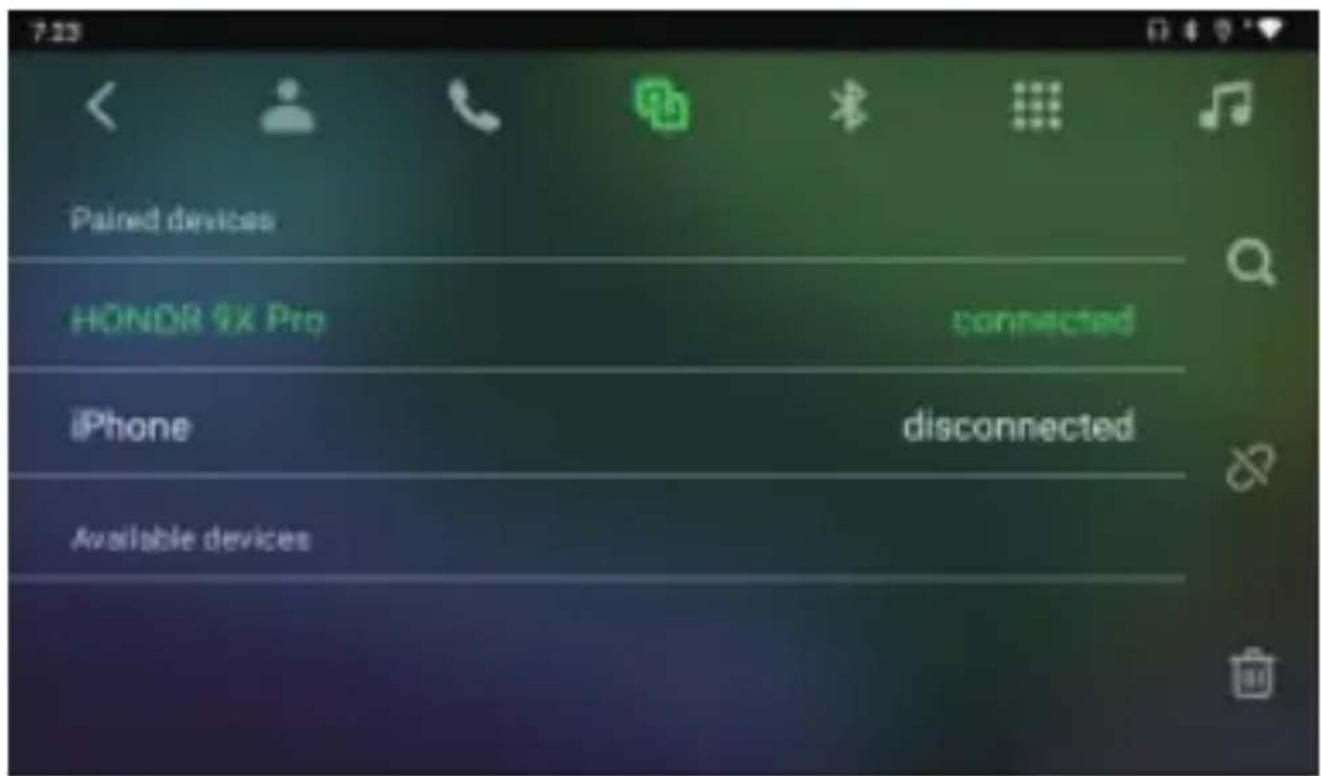
BT app allows BT pairing with compatible devices for making calls and music playback. To pair your phone, ensure BT is enabled in your phone's system settings and that you are disconnected from all other devices.
Open your phone BT, search and find the device named "PYLEUSA", then pair and connect.
Note: Once your phone is paired, you can use the other functions within the radio's BT app.
- Select the icon to connect or disconnect BT.
- Select the icon to dial out using the radio's number pad
- Select the 📁 icon to display your phone's contact list. You will need to import your contact list using the "download" icon.
- Select the 📞 icon to see a log of incoming and outgoing calls
- Select the 📂 icon for music playback controls
Tips:
- In order to adapt to the factory display, the iA box Android system will automatically restart once at the first time connecting to the car.
-
Software Update: It is not recommended to upgrade software when the iA box works well.
-
Prepare a TF/MicroSD card and format it into FAT32.
- Copy firmware named update. zip to the root directory of TF/MicroSD card.
-
Insert the TF/MicroSD card into the iA box and power on.
-
Wait for 2 minutes, when the red indicator starts to flash, take out the TF/MicroSD card.
- Now the box will start to upgrade automatically and the whole process takes about 7 minutes.
• After the upgrade complete, the red light will be always on, and the blue light will flash.
3. How to save log file:
After inserting the TF/MicroSD card into the iA box, it will automatically copy the log file to the card, and display "Log copy complete".
If "Log copy complete" does not display after inserting the TF/MicroSD card, go to Settings of iA box, tap "Copy log file to SD Card" to copy the log file manually. Any issue while using this iA box, you can save the log file and email to us.
Features:
• +iAndroid Smart Link iA box
- Designed for the Cars Equipped with Original Carplay
- Dual Wireless BT module
- Navigation System Supports GPS/GLONASS/Beidou System
• 8-core, 2.0Ghz, 14nm, FinFET
• GPS/WiFi: Built-in GPS Antenna, Built-in WiFi Antenna, Built-in 5G, Completely Hidden
- Wireless Carplay: Built-in Wireless Carplay
- Wireless Android Auto: Built-in Wireless Android Auto
- Screen Mirroring: AOA Protocol Screen Mirror
- Low Power Consumption, High Performance
- External Storage, Micro SD Card Supports up to 128GB
• SIM card (standard version and customized version)
- Comes with 2G/3G/4G Network Support, Insert Local Operator SIM Card, Support Local Phone, and 4G Mobile Network
- Flash Built-in Storage
- Android System, Compatible with GMS Service Framework
• High-specification Configuration with Large Memory and Large Storage Space
- Provides Google Play Store, Download and Install Software for Free
- Provides Wired CarPlay to Wireless CarPlay
• Automatic Wireless CarPlay to Android Functions
Technical Specs:
• CPU: Qualcomm Snapdragon SDM450
• RAM/ROM: 4GB DDR; 64G eMMC
- WiFi: 2.4G/5G
- SIM Card: 4G/3G/2G
• Band of Cellular Data:
• 4G: LTE-FDD B1/B3/B5/B7/B8/B20/B28; LTE-TDD B38/B40/B41
• 3G: UMTS B1/B2/B5/B8
• 2G: GSM/EDGE 850/900/1800/1900MHz
- Sockets: Type-C Female
• TF/Micro SD Card Slot: Max 128GB
• Language: More than 100 Kinds
- Operating Voltage: DC 5V
- Working Temperature: -20 +75^ (-4°F \~ 167°F)
- Memory (Default): 4GB LPDDR3 RAM +64GB eMMC
- Product Dimensions (L x W x H): 3.54" x 3.35" x 0.71" -inches
PYLE
PyleUSA.com
Questions? Comments?
We are here to help!
Phone: (1) 718-535-1800
Email: support@pyleusa.com
- PAS22BK
- Wireless Carplay & Android System iA Box
- User Interface
- Interface
- NOTE!
- What's in the Box:
- How to Use Wireless Apple CarPlay/Android Auto
- Wireless Apple Carplay:
- Wireless Android Auto:
- Wireless BT Streaming
- Dual BT Module:
- Tips:
- How to save log file:
- Features:
- Technical Specs:
- PYLE
- PyleUSA.com
Brand : Pyle
Model : PAS22BK
Category : Subwoofer