P100S - Labeler DYMO - Free user manual and instructions
Find the device manual for free P100S DYMO in PDF.


User questions about P100S DYMO
0 question about this device. Answer the ones you know or ask your own.
Ask a new question about this device
Download the instructions for your Labeler in PDF format for free! Find your manual P100S - DYMO and take your electronic device back in hand. On this page are published all the documents necessary for the use of your device. P100S by DYMO.
USER MANUAL P100S DYMO
natural_image
Exterior view of a gray electronic device with ventilation grilles and a digital timer showing 10, 24, and 0.58 (no readable text or symbols beyond measurement indicators)DYMO by Pelouze Mechanical Shipping Scale
Your new Mechanical Shipping Scale weighs items in one pound increments. This User Guide provides instructions for using the scale.
Locking and Unlocking the Scale
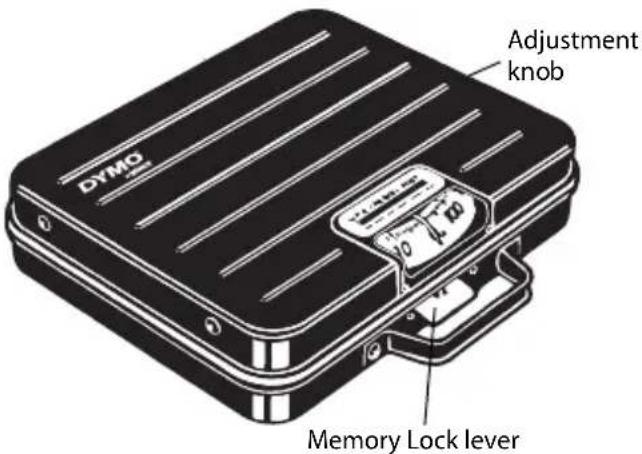
The scale is equipped with a Memory Lock ^™ lever. When an item being weighed extends over the front of the scale and you cannot see the display, you can lock the display using the Memory Lock lever.
The scale is shipped with the Memory Lock lever in the locked position.
text_image
DYMO Adjustment knob Memory Lock lever! Unlock the scale before placing an item on the scale or turning the adjustment knob.
To unlock the scale
♦ Push the Memory Lock lever up.
To lock the scale
♦ Push the Memory Lock lever down.
The scale display now remains locked in position until you unlock the scale.
Adjusting the Scale to Zero
Complete the following procedure before using the scale for the first time.
To adjust the scale to zero
- Place the scale on a firm, flat surface.
- Turn the adjustment knob until the indicator line aligns with zero on the scale display.
Perform this procedure from time to time to ensure the scale continues to produce accurate readings.
Using the Scale
Always make sure that the indicator line is aligned with zero on the scale display before placing an item on the scale platform. If the indicator line is not aligned correctly, adjust the scale as described in "Adjusting the Scale to Zero".
To weigh an item
◆ Place an item on the scale platform.
Caring for the Scale
With proper care and handling, your scale will give you years of service. Keep the following in mind when using your scale:
- Your scale works best when operated and stored at normal room temperature. Avoid lengthy exposure to extreme heat or cold.
- Only operate the scale on a stable, vibration free surface.
- Exposure to dust, dirt, moisture, vibration, and air currents can affect the reliability and accuracy of your scale.
- Although this scale is designed to be quite durable, gently place items to be weighed on the platform. Avoid rough treatment, as this may permanently damage the scale and void your warranty.
- You can permanently damage the scale by placing significantly overweight items on the scale platform.
- Avoid shaking, dropping, or otherwise shocking the scale. This is a precision instrument and MUST BE HANDLED WITH EXTREME CARE.
Technical Specifications
Model Capacity Resolution Units Operating Temperature
P100S 100 pounds 1 pound pounds 32° - 104° F (0° - 40° C)
P250S 250 pounds 1 pound pounds 32^ - 104^ F (0^ - 40^ C)
For information about our other scale products, visit www.dymo.com. To obtain support, contact Technical Support at (877) 724-8324. You can also obtain support at www.dymo.com.
Warranty
Your DYMO® Scale comes with a warranty against defects in materials, design, or workmanship, for one year from the original date of purchase, when used in accordance with all operating instructions. Normal wear and tear is not covered, nor is excessive use, abuse or damage caused by a user either intentionally or accidentally.
EXCEPT AS PROVIDED HEREIN, DYMO MAKES NO OTHER WARRANTIES, EXPRESS OR IMPLIED, AND DYMO SPECIFICALLY EXCLUDES WARRANTIES OF MERCHANTABILITY AND FITNESS FOR A PARTICULAR PURPOSE. DYMO'S LIABILITY UNDER THIS WARRANTY SHALL BE LIMITED TO REPAIR OR REPLACEMENT OF THE SCALE. DYMO SHALL NOT BE RESPONSIBLE FOR ANY INCIDENTAL OR CONSEQUENTIAL DAMAGES. WHETHER OR NOT FORESEEABLE.
THIS WARRANTY GIVES YOU SPECIFIC LEGAL RIGHTS, AND YOU MAY ALSO HAVE OTHER RIGHTS WHICH VARY FROM STATE TO STATE AND COUNTRY TO COUNTRY.
In the event of a product failure, please visit www.dymo.com/support or contact DYMO Technical Support to obtain a Return Material Authorization (RMA) number and further instructions to return your product.
DYMO®
A Newell Rubbermaid Company
Produced by:
DYMO, Stamford, CT
800-426-7827: www.dymo.com
© 2008 Sanford, L.P.