DCM-751BWH - Ice machine Hoshizaki - Free user manual and instructions
Find the device manual for free DCM-751BWH Hoshizaki in PDF.


User questions about DCM-751BWH Hoshizaki
0 question about this device. Answer the ones you know or ask your own.
Ask a new question about this device
Download the instructions for your Ice machine in PDF format for free! Find your manual DCM-751BWH - Hoshizaki and take your electronic device back in hand. On this page are published all the documents necessary for the use of your device. DCM-751BWH by Hoshizaki.
USER MANUAL DCM-751BWH Hoshizaki
Hoshizaki America, Inc.
Cubelet Icemaker/Dispenser
Models
DCM-75 | BAH(-OS)
DCM-75IBWH(-OS)

"A Superior Degree of Reliability"
www.hoshizaki.com
SERVICE MANUAL

Number: 73184
Issued: 8-31-2012
Revised: 9-24-2014
WARNING
Only qualified service technicians should install and service the appliance. To obtain the name and phone number of your local Hoshizaki Certified Service Representative, visit www.hoshizaki.com. No service should be undertaken until the technician has thoroughly read this Service Manual. Failure to service and maintain the appliance in accordance with this manual will adversely affect safety, performance, component life, and warranty coverage and may result in costly water damage. Proper installation is the responsibility of the installer. Product failure or property damage due to improper installation is not covered under warranty.
Hoshizaki provides this manual primarily to assist qualified service technicians in the service and maintenance of the appliance.
Should the reader have any questions or concerns which have not been satisfactorily addressed, please call, send an e-mail message, or write to the Hoshizaki Technical Support Department for assistance.
Phone: 1-800-233-1940; (770) 487-2331
Fax: 1-800-843-1056; (770) 487-3360
E-mail: techsupport@hoshizaki.com
618 Highway 74 South
Peachtree City, GA 30269
Attn: Hoshizaki Technical Support Department
Web Site: www.hoshizaki.com
NOTE: To expedite assistance, all correspondence/communication MUST include the following information:
- Model Number ____
- Serial Number
- Complete and detailed explanation of the problem.
IMPORTANT
This manual should be read carefully before the appliance is serviced. Read the warnings and guidelines contained in this manual carefully as they provide essential information for the continued safe use, service, and maintenance of the appliance. Retain this manual for any further reference that may be necessary.
CONTENTS
Important Safety Information 5
I. Construction and Water/Refrigeration Circuit Diagrams 7
A. Construction....7
1. DCM-751BAH(-OS)....7
2. DCM-751BWH(-OS) 8
3. Ice Making Unit....9
B. Water/Refrigeration Circuit Diagrams.... 10
II. Sequence of Operation and Service Diagnosis.... 12
A. Sequence of Operation Flow Chart.... 12
B. Service Diagnosis 13
C. Control Board Check.... 18
D. Bin Control Check 26
E. Float Switch Check and Cleaning 27
F. Diagnostic Tables 29
-
No Ice Production....29
-
Ice/Water Dispensing....31
III. Controls and Adjustments 32
A. Control Board Layout 33
- DCM-751B_H 33
- DCM-751B_H-OS....34
B. LED Lights and Audible Alarm Safeties....35
C. Settings and Adjustments....36
-
Default Dip Switch Settings 36
-
Infrared Sensor Shutdown Delay (S1 dip switch 1, 2, 3) 36
-
Drain Frequency Control (S1 dip switch 4) 36
-
Continuous Dispensing Timer (S1 dip switch 5 & 6)....37
-
Bin Control Selector (S1 dip switch 7) 37
-
Bin Control Shutdown Delay (S1 dip switch 8) 37
-
Factory Use (S1 Dip Switch 9 & 10) 37
D. Power Switch, Control Switch, and Dispense Mode Switch 38
IV. Removal and Replacement of Components 40
A. Service for Refrigerant Lines.... 40
- Refrigerant Recovery 41
- Brazing 41
- Evacuation and Recharge (R-404A) 41
B. Important Notes for Component Replacement....42
C. Icemaking Unit 44
- Upper Bearing Wear Check 44
- Removal and Replacement of Extruding Head 45
- Removal and Replacement of Auger 45
- Removal and Replacement of Evaporator 46
- Removal and Replacement of Mechanical Seal and Lower Housing 47
- Removal and Replacement of Gear Motor 48
D. Dispense Components....49
- Dispense Auger and Agitator 49
- Dispense and Agitating Motors 49
V. Maintenance 50
VI. Preparing the Appliance for Periods of Non-Use 51
VII. Disposal....53
VIII. Technical Information....54
A. Specification Sheets....54
- DCM-751BAH 54
- DCM-751BAH-OS 55
- DCM-751BWH 56
- DCM-751BWH-OS 57
B. Performance Data 58
- DCM-751BAH(-OS)....58
- DCM-751BWH(-OS) 59
C. Wiring Diagrams....60
- DCM-751B_H 60
- DCM-751B_H-OS....61
Important Safety Information
Throughout this manual, notices appear to bring your attention to situations which could result in death, serious injury, damage to the appliance, or damage to property.
⚠ WARNING Indicates a hazardous situation which could result in death or serious injury.
NOTICE Indicates a situation which could result in damage to the appliance or property.
IMPORTANT Indicates important information about the use and care of the appliance.
WARNING
The appliance should be destined only to the use for which it has been expressly conceived. Any other use should be considered improper and therefore dangerous. The manufacturer cannot be held responsible for injury or damage resulting from improper, incorrect, and unreasonable use. Failure to service and maintain the appliance in accordance with this manual will adversely affect safety, performance, component life, and warranty coverage and may result in costly water damage.
To reduce the risk of death, electric shock, serious injury, or fire, follow basic precautions including the following:
- Only qualified service technicians should install and service the appliance.
- The appliance must be installed in accordance with applicable national, state, and local codes and regulations
- Electrical connection must be hard-wired and must meet national, state, and local electrical code requirements. Failure to meet these code requirements could result in death, electric shock, serious injury, fire, or damage to equipment.
- The appliance requires an independent power supply of proper capacity. See the nameplate for electrical specifications. Failure to use an independent power supply of proper capacity can result in a tripped breaker, blown fuse, damage to existing wiring, or component failure. This could lead to heat generation or fire.
- THE APPLIANCE MUST BE GROUNDED. Failure to properly ground the appliance could result in death, serious injury, or damage to equipment.
- To reduce the risk of electric shock, do not touch the power switch or control switch with damp hands.
- Before servicing, move the power switch and control switch to the "OFF" position, then turn off the power supply. Lockout/Tagout to prevent the power supply from being turned back on inadvertently.
- Do not make any alterations to the appliance. Alterations could result in electric shock, injury, fire, or damage to the appliance.
- Do not place fingers or any other objects into the ice discharge opening.
- The appliance is not intended for use by persons (including children) with reduced physical, sensory, or mental capabilities, or lack of experience and knowledge, unless they have been given supervision or instruction concerning use of the appliance by a person responsible for their safety.
⚠ WARNING, continued
- Children should be properly supervised around the appliance.
- Do not climb, stand, or hang on the appliance or allow children or animals to do so. Serious injury could occur or the appliance could be damaged.
- Do not use combustible spray or place volatile or flammable substances near the appliance. They might catch fire.
- Keep the area around the appliance clean. Dirt, dust, or insects in the appliance could cause harm to individuals or damage to the appliance.
NOTICE
- Follow the instructions in this manual carefully to reduce the risk of costly water damage.
- In areas where water damage is a concern, install in a contained area with a floor drain.
- Install the appliance in a location that stays above freezing. Normal operating ambient temperature must be within 45^ to 100^ (7°C to 38°C).
- Do not leave the appliance on during extended periods of non-use, extended absences, or in sub-freezing temperatures. To properly prepare the appliance for these occasions, follow the instructions in "V.D. Preparing the Appliance for Periods of Non-Use."
- Keep ventilation openings, in the appliance enclosure or in the built-in structure, clear of obstruction.
- Do not place objects on top of the appliance.
- The storage bin is for ice use only. Do not store anything else in the storage bin.
I. Construction and Water/Refrigeration Circuit Diagrams
A. Construction
1. DCM-751BAH(-OS)
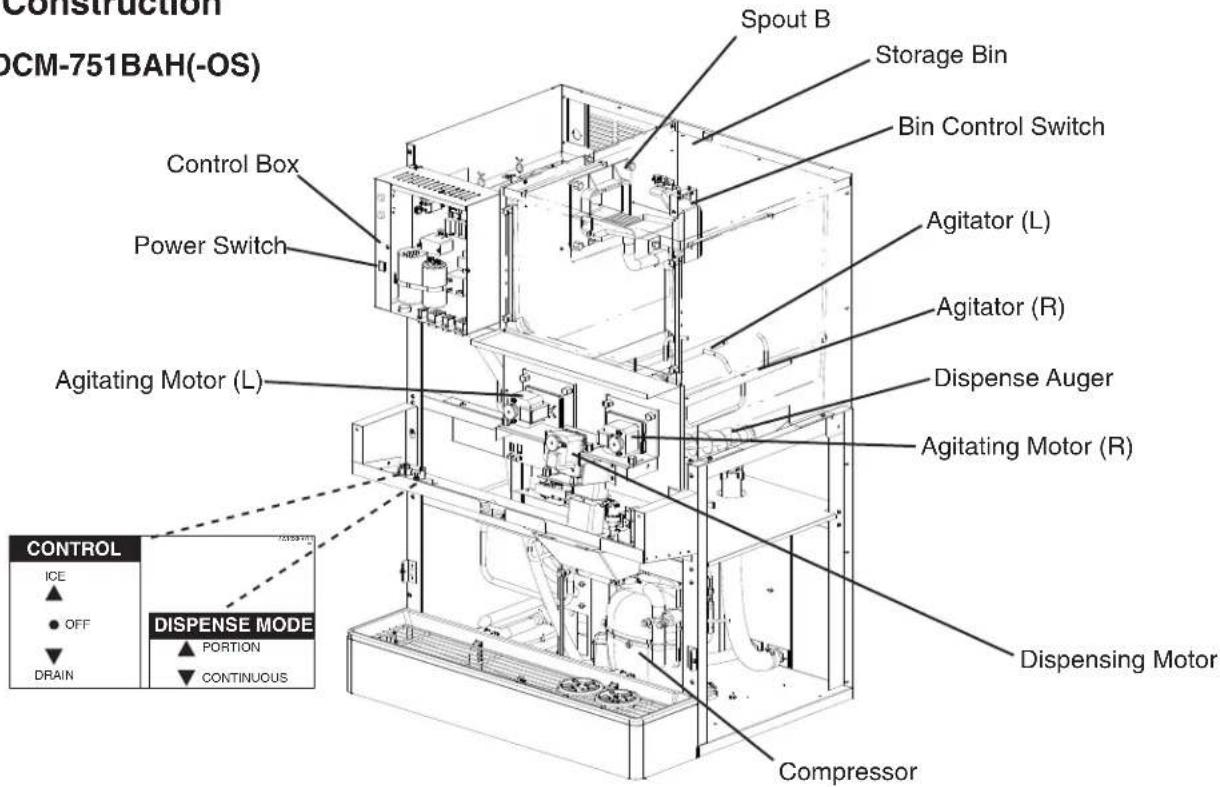
text_image
CONSTRUCTION OCM-751BAH(-OS) Control Box Power Switch Agitating Motor (L) Spout B Storage Bin Bin Control Switch Agitator (L) Agitator (R) Dispense Auger Agitating Motor (R) Disperse Mode Compressor DISPENSING MOTOR CONTROL ICE OFF DRAIN PORTION CONTINUOUS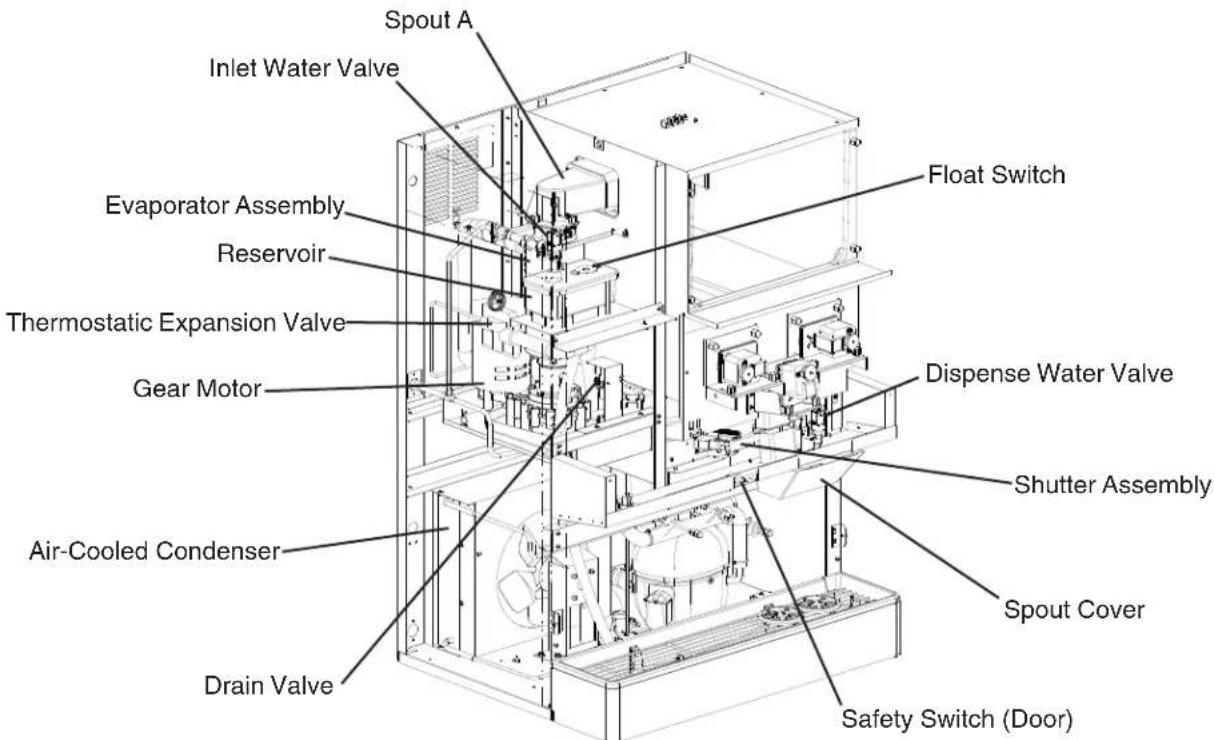
text_image
Spout A Inlet Water Valve Evaporator Assembly Reservoir Thermostatic Expansion Valve Gear Motor Air-Cooled Condenser Drain Valve Float Switch Dispense Water Valve Shutter Assembly Spout Cover Safety Switch (Door)- DCM-751BWH(-OS)
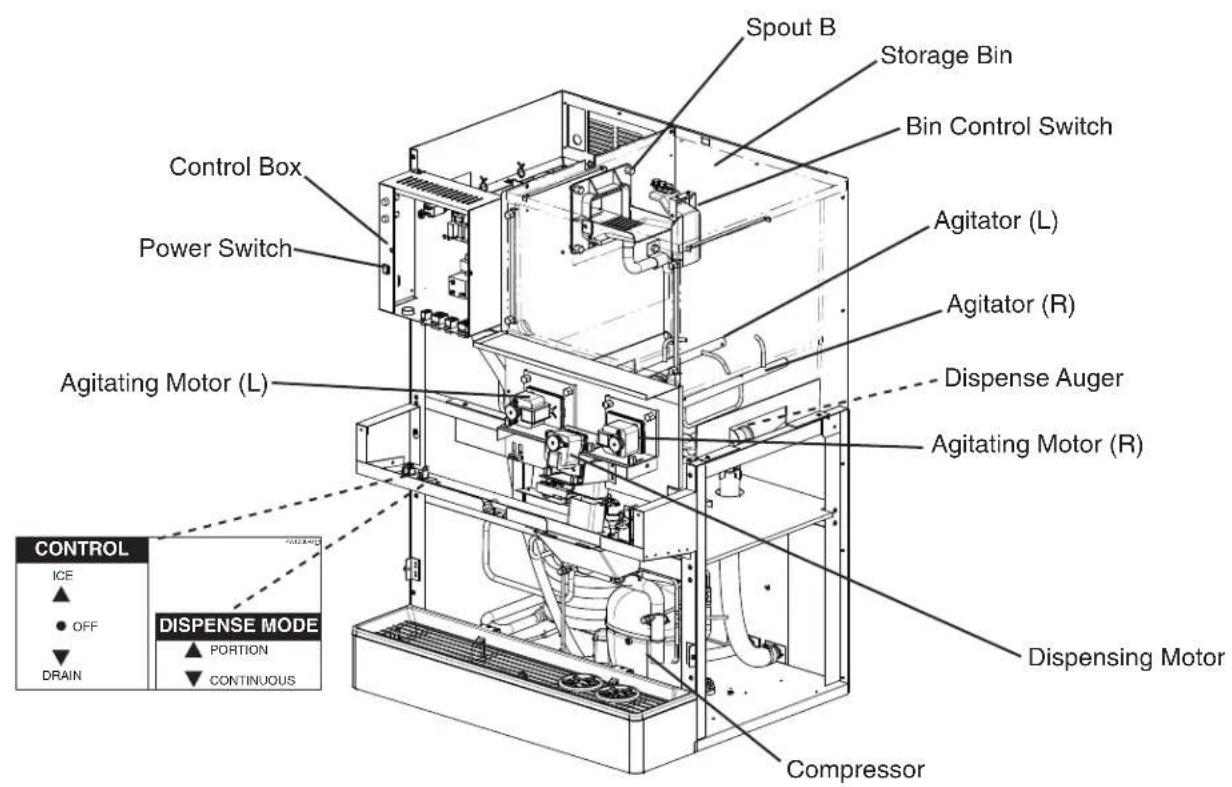
text_image
Spout B Storage Bin Bin Control Switch Control Box Power Switch Agitating Motor (L) Agitator (L) Agitator (R) Dispense Auger Agitating Motor (R) DISPENSE MODE DCRAIN COMPRESSOR Dispersing Motor ICE OFF PORTION CONTINUOUS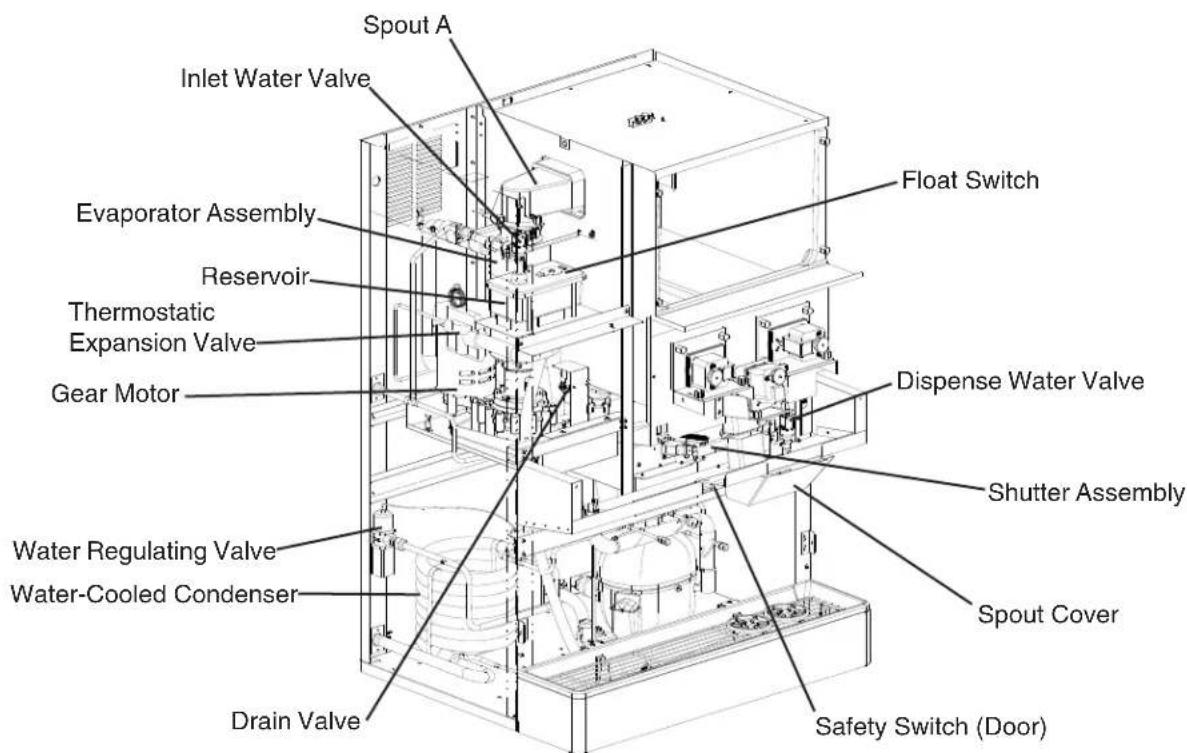
text_image
Spout A Inlet Water Valve Evaporator Assembly Reservoir Thermostatic Expansion Valve Gear Motor Float Switch Disperse Water Valve Shutter Assembly Water Regulating Valve Water-Cooled Condenser Drain Valve Spout Cover Safety Switch (Door)3. Ice Making Unit
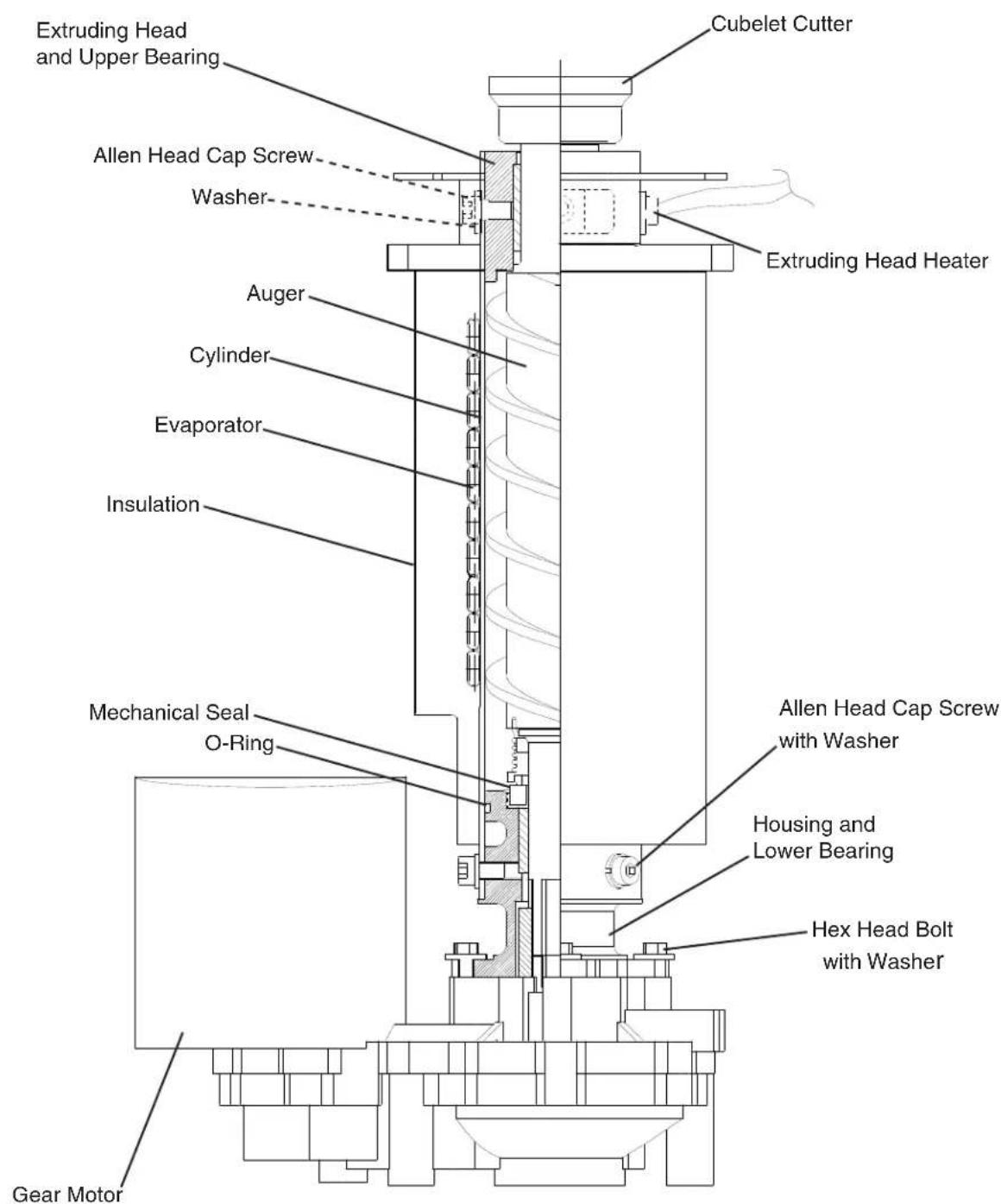
text_image
Extruding Head and Upper Bearing Cubelet Cutter Allen Head Cap Screw Washer Extruding Head Heater Auger Cylinder Evaporator Insulation Mechanical Seal O-Ring Hex Head Bolt with Washer Allen Head Cap Screw with Washer Housing and Lower Bearing Gear MotorB. Water/Refrigeration Circuit Diagrams
1. DCM-751BAH(-OS)
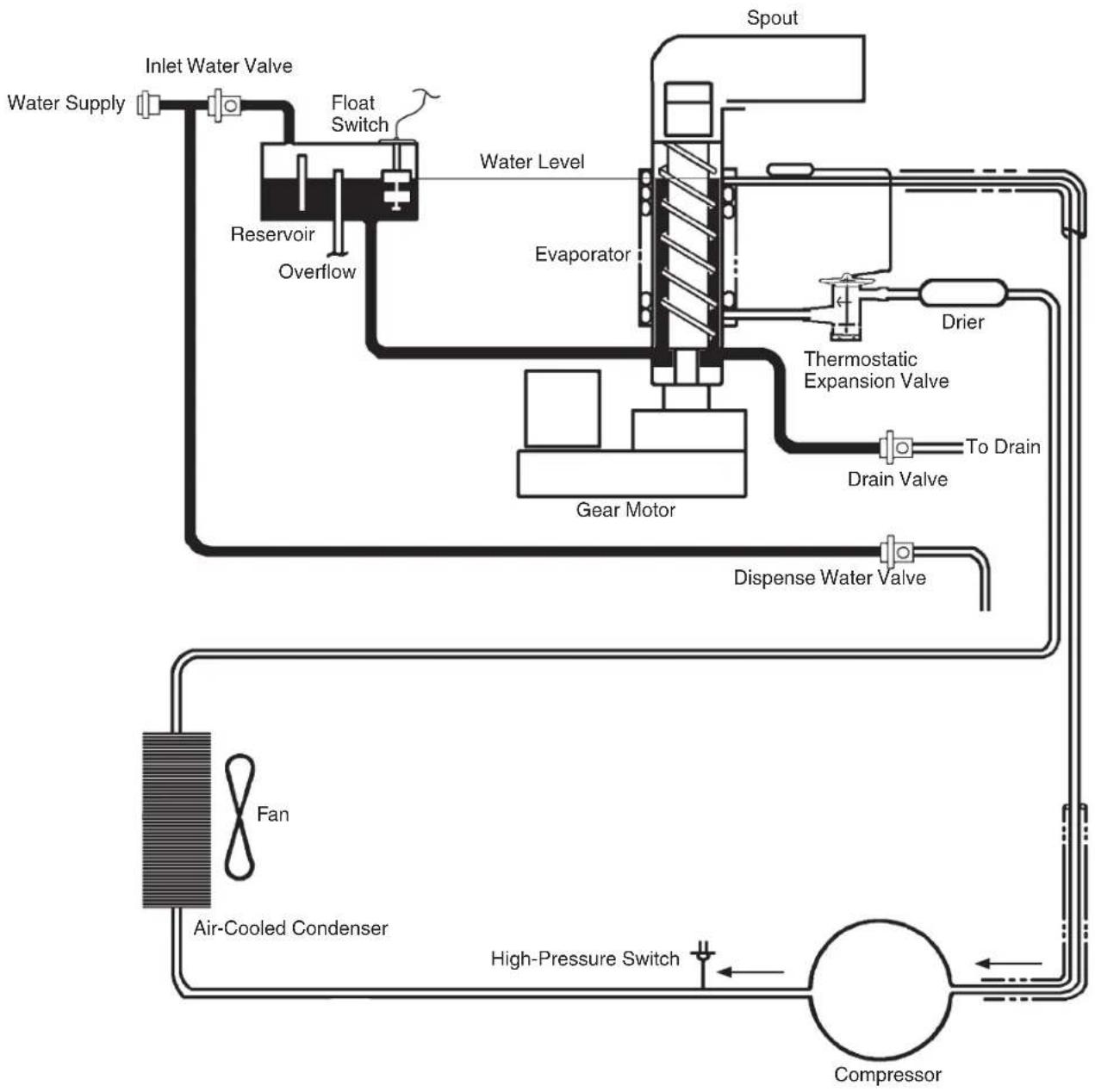
flowchart
graph TD
    A["Water Supply"] --> B["Inlet Water Valve"]
    B --> C["Reservoir"]
    C --> D["Overflow"]
    D --> E["Float Switch"]
    E --> F["Water Level"]
    F --> G["Evaporator"]
    G --> H["Spout"]
    H --> I["Drier"]
    I --> J["Thermostatic Expansion Valve"]
    J --> K["To Drain"]
    K --> L["Drain Valve"]
    L --> M["Gear Motor"]
    M --> N["Dispense Water Valve"]
    N --> O["Air-Cooled Condenser"]
    O --> P["Fan"]
    P --> Q["High-Pressure Switch"]
    Q --> R["Compressor"]
    R --> S["Condenser"]

Refrigeration Circuit
Water Circuit
2. DCM-751BWH(-OS)
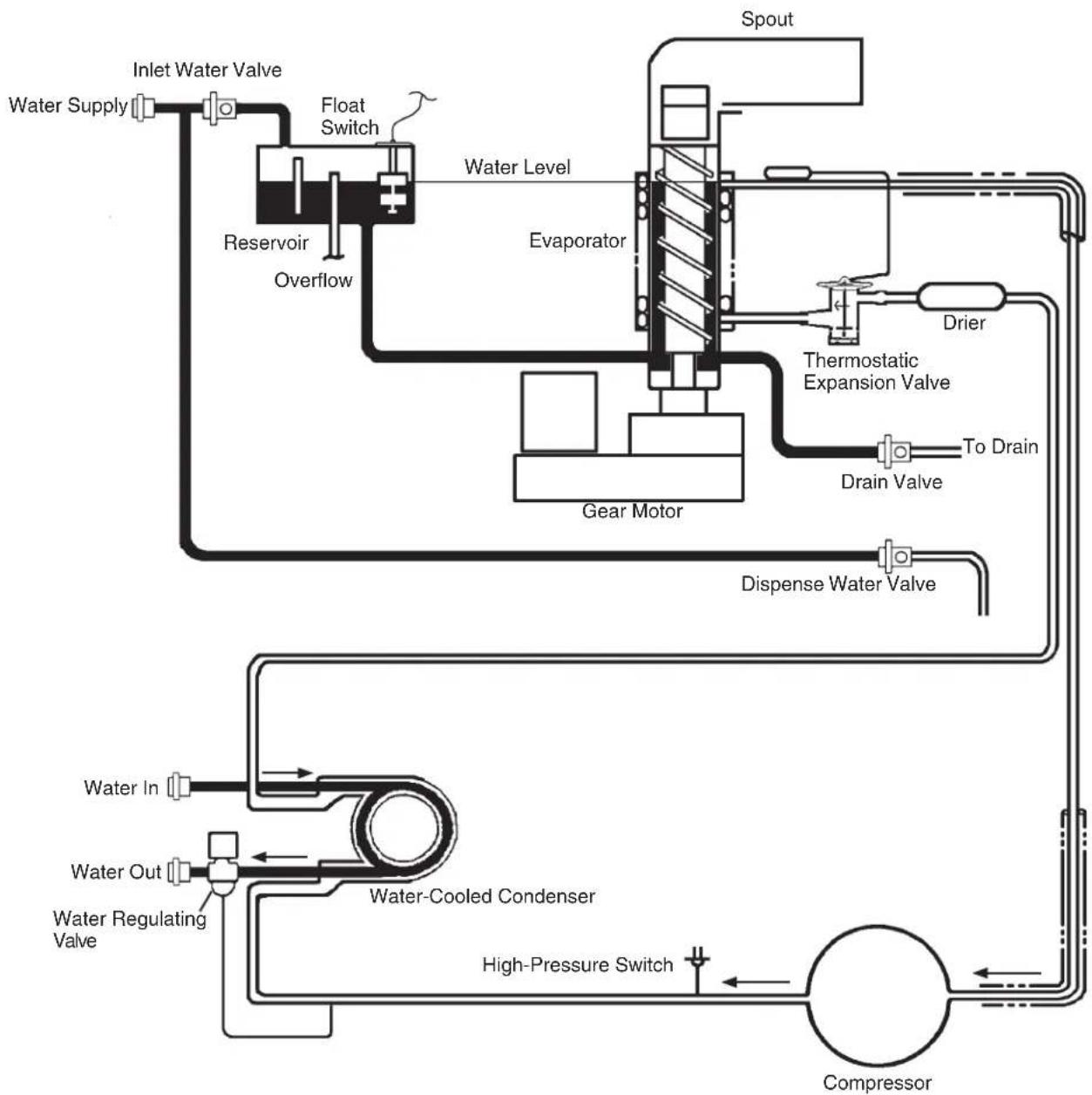
flowchart
graph TD
    A["Water Supply"] --> B["Inlet Water Valve"]
    B --> C["Reservoir"]
    C --> D["Overflow"]
    D --> E["Float Switch"]
    E --> F["Water Level"]
    F --> G["Evaporator"]
    G --> H["Spout"]
    H --> I["Drier"]
    I --> J["Thermostatic Expansion Valve"]
    J --> K["To Drain"]
    K --> L["Drain Valve"]
    L --> M["Gear Motor"]
    M --> N["Dispense Water Valve"]
    N --> O["Compressor"]
    O --> P["High-Pressure Switch"]
    P --> Q["Water-Cooled Condenser"]
    Q --> R["Water Out"]
    R --> S["Water Regulating Valve"]
    S --> T["Water In"]

Refrigeration Circuit

Water Circuit
II. Sequence of Operation and Service Diagnosis
A. Sequence of Operation Flow Chart
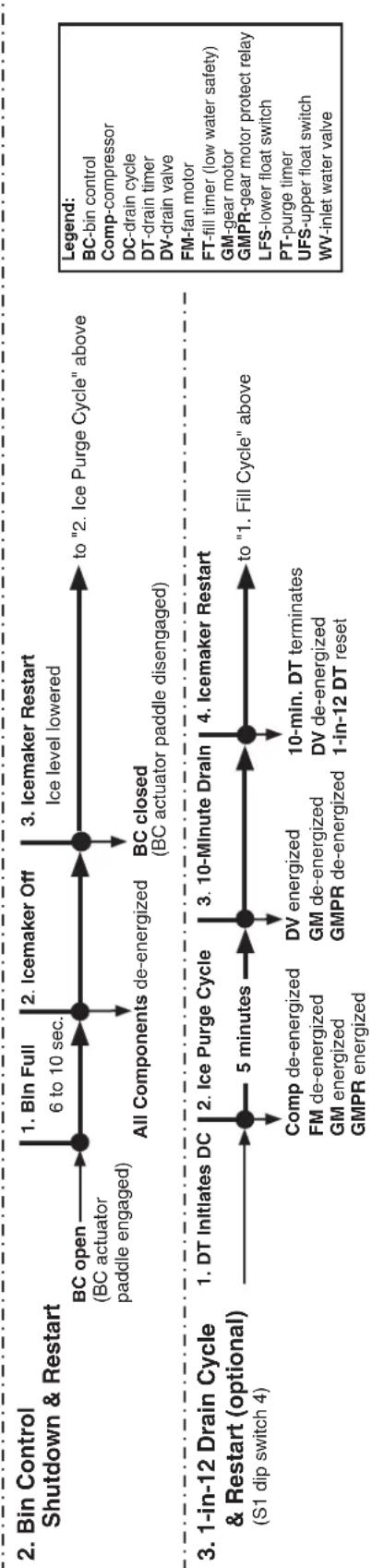
"F-A" Control Board Sequence Flow Chart
DCM-751B_H(-OS)
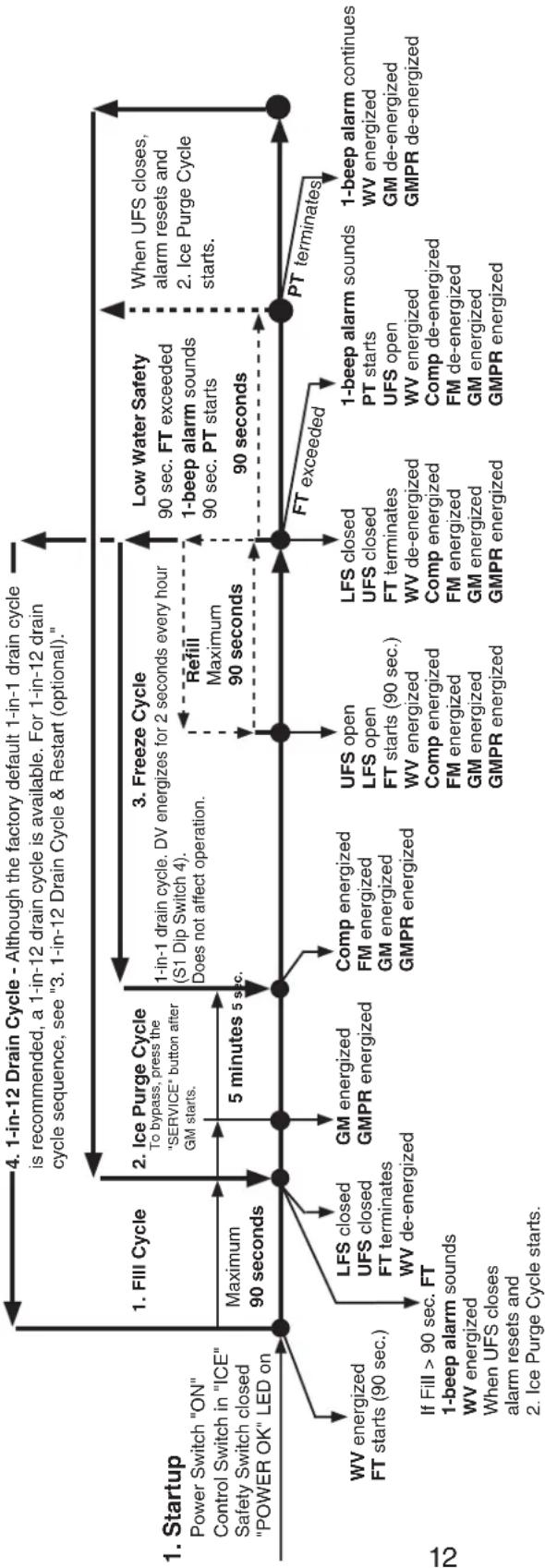
flowchart
graph TD
    A["1. Startup Power Switch "ON" Control Switch in "ICE" Safety Switch closed "POWER OK" LED on"] --> B["1. FIII Cycle"]
    B --> C["2. Ice Purge Cycle"]
    C --> D["3. Freeze Cycle"]
    D --> E["4. 1-in-12 Drain Cycle - Although the factory default 1-in-1 drain cycle is recommended, a 1-in-12 drain cycle is available. For 1-in-12 drain cycle sequence, see "3. 1-in-12 Drain Cycle & Restart (optional).""]
    B --> F["5 minutes 90 seconds"]
    C --> G["5 minutes 5 sec"]
    D --> H["5 minutes 90 seconds"]
    F --> I["WV energized FT starts (90 sec.)"]
    G --> J["LFS closed UFS closed FT terminates WV de-energized"]
    G --> K["GM energized GMPR energized"]
    G --> L["Comp energized FM energized GM energized GMPR energized"]
    H --> M["UFS open LFS open FT starts (90 sec.) WV energized Comp energized FM energized GM energized GMPR energized"]
    H --> N["LFS closed UFS closed FT terminates WV de-energized Comp energized FM energized GM energized GMPR energized"]
    H --> O["Low Water Safety 90 sec. FT exceeded 1-beep alarm sounds 90 sec. PT starts 90 seconds"]
    H --> P["PT terminates When UFS closes, alarm resets and 2. Ice Purge Cycle starts."]
    P --> Q["1-beep alarm continues WV energized GM de-energized GMPR de-energized"]
    style A fill:#f9f,stroke:#333
    style B fill:#ccf,stroke:#333
    style C fill:#cfc,stroke:#333
    style D fill:#fcc,stroke:#333
    style E fill:#cff,stroke:#333
    style F fill:#ffc,stroke:#333
    style G fill:#ffc,stroke:#333
    style H fill:#ffc,stroke:#333
    style I fill:#fff,stroke:#333
    style J fill:#fff,stroke:#333
    style K fill:#fff,stroke:#333
    style L fill:#fff,stroke:#333
    style M fill:#fff,stroke:#333
    style N fill:#fff,stroke:#333
    style O fill:#fff,stroke:#333
    style P fill:#fff,stroke:#333
    style Q fill:#fff,stroke:#333
flowchart
graph TD
    A["2. Bin Control Shutdown & Restart"] --> B["BC open (BC actuator paddle engaged)"]
    B --> C["1. Bln Full 6 to 10 sec."]
    C --> D["2. Icmemaker Off"]
    D --> E["3. Icmemaker Restart Ice level lowered"]
    E --> F["BC closed (BC actuator paddle disengaged)"]
    F --> G["4. Icmemaker Restart 10-min. DT terminates"]
    G --> H["5. 10-Minute Drain"]
    H --> I["6. 1-in-12 DT reset"]
    I --> J["7. 1-in-12 Drain Cycle & Restart (optional) (S1 dip switch 4)"]
    J --> K["8. 1-in-12 Drain Cycle & Restart (optional) (S1 dip switch 4)"]

    style A fill:#f9f,stroke:#333
    style B fill:#ccf,stroke:#333
    style C fill:#cfc,stroke:#333
    style D fill:#cfc,stroke:#333
    style E fill:#cfc,stroke:#333
    style F fill:#cfc,stroke:#333
    style G fill:#cfc,stroke:#333
    style H fill:#cfc,stroke:#333
    style I fill:#cfc,stroke:#333
    style J fill:#cfc,stroke:#333
    style K fill:#fcc,stroke:#333
B. Service Diagnosis
WARNING
- The appliance should be diagnosed and repaired only by qualified service personnel to reduce the risk of death, electric shock, serious injury, or fire.
- Risk of electric shock. Use extreme caution and exercise safe electrical practices.
- Moving parts (e.g., fan blade) can crush and cut. Keep hands clear.
- CHOKING HAZARD: Ensure all components, fasteners, and thumbscrews are securely in place after the appliance is serviced. Make sure that none have fallen into the storage bin.
- Make sure all food zones in the appliance are clean after service. For cleaning procedures, see the instruction manual or the maintenance label.
1. Ice Production Check
To check production, prepare a bucket or pan to catch the ice and a set of scales to weigh the ice. After the appliance has operated for 10 to 20 minutes, catch the ice production for 10 minutes. Weigh the ice to establish the batch weight. Multiply the batch weight by 144 to calculate 24hr production. When confirming production or diagnosing low production, see "VIII.B. Performance Data."
2. Diagnostic Procedure
This diagnostic procedure is a sequence check that allows you to diagnose the electrical system and components. Before proceeding, check for correct installation, proper voltage per unit nameplate, and adequate water supply. Check that the 24VAC 1A fuse and GM 115VAC 3A fuse are good. When checking high-voltage (115VAC), always choose a neutral (W) to establish a good neutral connection. When checking low-voltage (24VAC), always choose a neutral (LBU) from CT to establish a good neutral connection. When checking CB DC-voltage (5VDC), use CB red K4 connector pin closest to CB black K3 connector for DC ground (GND). CB "POWER" LED remains on unless power supply is interrupted. Check CB using the steps in "II.C. Control Board Check." IMPORTANT! Appliance will not start unless the safety switch is engaged.
1) Turn on the power supply. Remove the front panel. Move the power switch to the "ON" position, then move the control switch to the "DRAIN" position. Engage the safety switch.
2) Allow the water system to drain for 5 minutes. If water does not drain, see step 12.
3) Disengage the safety switch, then move the control switch to the "OFF" position.
4) Move the power switch to the "OFF" position.
5) Remove the control box cover.
6) Engage the safety switch.
7) Startup—"POWER OK" LED is on: Move the power switch to the "ON" position, then move the control switch to the "ICE" position. CB "POWER OK" LED is on. "POWER OK" LED Diagnosis: Check that CB "POWER" LED is on. If not, check for proper power supply voltage (115VAC) input to CT. If 115VAC is not present, check the breaker, power switch, and safety switch. Next, check that the power protect relay is de-energized and contacts between terminals #6 (BR) and #2 (BK) are closed. Check for proper control voltage (24VAC) output from CT. Next, check the 24VAC 1A fuse. If open, replace. Check for 24VAC at CB K8 connector pin #1 (W/R) to CB K8 connector pin #2 (LBU). If 24VAC is not present at CB K8 connector pin #1 (W/R) but is present at 1A fuse (W/R), check continuity of control switch. If open, replace. If 24VAC is present between CB K8 connector pin #1 (W/R) and pin #2 (LBU), and "POWER OK" LED is off, replace CB.
BC Diagnosis: Check that the actuator paddle is properly positioned. Check for continuity across BC proximity switch. When BC proximity switch is closed 0VDC is read across CB K8 connector pin #3 (GY) and #4 (GY). 5VDC is present between CB K8 connector pin #3 (GY) or #4 (GY) to CB red K4 connector pin closest to CB black K3 black connector (5VDC GND). If 5VDC is not present, replace CB.
HPS Diagnosis: HPS automatically resets when refrigeration circuit high-side pressure is within an acceptable range. 5VDC is supplied from CB K9 connector pin #3 (Y) and back onto CB K9 connector pin #4 (Y). If 5VDC is not present at CB K9 connector pin #3 (Y) to CB red K4 connector pin closest to CB black K3 connector (5VDC GND) and CB "POWER OK" LED is on, replace CB. If refrigerant pressures have returned to an acceptable range and HPS does not close, replace HPS. If pressures have not equalized, and refrigeration circuit high-side pressure does not drop, recover, evacuate, and recharge if necessary. On air-cooled model, check that the condenser is not dirty or clogged, check for proper FM operation and fan blade for binding. On water-cooled model, check WRV and water flow in and out of condenser. Check for refrigeration circuit refrigerant restriction (TXV and drier).
8) Fill Cycle—"WTRIN" LED is on: WV energizes. 90-sec. FT starts. LFS closes. Nothing happens at this time. Reservoir continues to fill. UFS closes, WV de-energizes, 90-sec. FT terminates. Diagnosis: If the reservoir is empty, LFS open, "WTRIN" LED on, and WV off, check for 24VAC at CB K2 connector pin #8 (W/BR) to a neutral (LBU). If 24VAC is not present, confirm 24VAC power supply at CB K2 connector pin #7 (W/R) to a neutral (LBU). If 24VAC is not present on CB K2 connector pin #7 (W/R), check wiring connections from CT. If 24VAC is present on CB K2 connector pin #7 (W/R) and not on CB K2 connector pin #8 (W/BR), replace CB. If 24VAC is present on CB K2 connector pin #8 (W/BR), check for 24VAC at WV solenoid. If 24VAC is present, replace WV. If WV is energized and fill/refill exceeds 90-sec. FT with no water in the reservoir, check for clogged WV screen or DV leaking. Note: If UFS remains open 90 seconds after LFS opens (WV energized), a 1-beep alarm sounds (90 sec. FT). This alarm resets automatically once UFS closes. If reservoir is full and overflowing, check for open UFS. See "II.E. Float Switch Check and Cleaning." If WV de-energizes and water continues to fill the reservoir, replace WV.
9) Ice Purge Cycle—"GM" LED is on. UFS closes (WV de-energizes) and "WTRIN" LED turns off. 5-sec. GM delay timer and 30-min. FZT start. 5-sec. GM delay timer terminates. GM and GMPR energize. 5-min. IPT starts. GM runs for 5 min. to clear any ice from the evaporator. Diagnosis: If "GM" LED is off, check that UFS closed. If UFS is closed and "GM" LED does not turn on, replace CB. If "GM" LED is on and GM is off, confirm 115VAC at CB K1 connector pin #2 (BR) to neutral (W). Check for 115VAC at CB K1 connector pin #3 (DBU) to a neutral (W). If no voltage is present at CB K1 connector pin #2 (BR), check wiring connections. If no voltage is present at CB K1 connector pin #3 (DBU), replace CB. If 115VAC is present, check 115VAC 3A GM fuse, GM internal protector, GM windings, capacitor, and GM coupling between auger and GM. If GM internal protector is open, allow to cool and reset. If reset does not occur, replace GM. If Comp energizes at the same time GM energizes, check CB. See "II.C. Control Board Check."
10) Freeze Cycle—"COMP" and "GM" LEDs are on. 5 min. IPT terminates. GM continues. CB confirms GM operation through GMPR terminal #3 (W/O) and terminal #5 (W/O). Comp and FM energize. Ice production begins 4 to 6 min. after Comp and FM energize depending on ambient and water temperature conditions. Diagnosis: 5 min. after GM energizes, confirm Comp LED turns on and Comp and FM energize. If not, check that GMPR is energized (115VAC). Next, check continuity between GMPR terminal #3 (W/O) and terminal #5 (W/O). If open, GMPR is de-energized or defective. If closed, and "COMP" LED is not on, replace CB. If "COMP" LED turns on and Comp and FM do not energize, confirm 115VAC at CB Comp X1 relay (BR) to a neutral (W). If 115VAC is not present, check connections. If 115VAC is present, confirm 115VAC at CB Comp X1 relay (R) to a neutral (W). If 115VAC is not present and "COMP" LED is on, replace CB. If 115VAC is present, check Comp external protector (overload), allow to cool and reset. If reset does not occur, replace external protector. Check Comp start and run capacitors, Comp start relay, and Comp windings. If FM does not energize, check FM run capacitor, that the fan blade is not binding, and that FM windings are good.
11) Refill/Low Water Safety—"COMP," "GM," and "WTRIN" are on. As ice is produced, the water level in the reservoir drops. UFS opens. Nothing happens at this time. When LFS opens, 90-sec. FT starts. WV energizes. Comp, FM, and GM continue. As water fills the reservoir, LFS closes. Nothing happens at this time. When UFS closes, WV de-energizes, 90-sec. FT terminates, and 30-min. FZT resets. This continues until BC shuts down the appliance or power is turned off to the appliance. Diagnosis: Confirm that the water level has dropped and UFS and LFS are open. See "II.E. Float Switch Check and Cleaning." Check for dirty or sticking float switches, clogged WV screen, defective WV coil, or DV leaking by. If UFS remains open 90 seconds after LFS opens (WV energized), a 1-beep alarm sounds (90 sec. FT). This alarm resets automatically once UFS closes. Comp and FM de-energize. GM de-energizes 90 sec. later. WV and alarm continue until UFS closes.
Note: Each time UF/S closes, 30-minute FZT starts. 30-minute FZT resets when UF/S closes again. If UF/S does not close again within 30 minutes, CB shuts down the appliance and sounds a 5-beep alarm every 5 seconds. See "III.B. LED Lights and Audible Alarm Safeties."
12) Drain Cycle—"FLUSH" (drain) LED is on. IMPORTANT! Drain valve will not energize unless the safety switch is engaged. The appliance is factory set to drain the evaporator and reservoir once every hour for 2 seconds. A manual drain is provided when cleaning the appliance by moving the control switch from the "ICE" position to the "DRAIN" position. A 1-in-12 drain cycle is also available. For further details, see "III.C. 3. Drain Frequency Control (S1 dip switch 4)."
a) Automatic Drain Cycle: A drain cycle occurs once every hour for 2 seconds.
DCT terminates and DVT starts. Once DVT terminates, DCT resets and DV de-energizes. DCT resets every time the power supply is turned off and on again.
Diagnosis: Once DCT terminates, DV energizes. If not, check for 24VAC from K2 connector pin #10 (W/BU) to a neutral (LBU). If 24VAC is not present, replace CB. If 24VAC is present, check for 24VAC at DV. If 24VAC is present and DV does not energize, check DV solenoid continuity.
b) Manual Drain: Move control switch to the "OFF" position, pause momentarily, then move to the "DRAIN" position. DV energizes.
DV continues until control switch is moved to "OFF" or "ICE" position or power is turned off.
Note: a) A momentary pause in the "OFF" position is necessary to de-energize the control board when moving the control switch between "ICE" and "DRAIN." Otherwise there is a delay of several minutes before the new selection takes effect.
b) If the control switch is left in the "DRAIN" position for 10 minutes or more, a 2-beep alarm sounds every 5 seconds. Move the control switch out of the "DRAIN" position to clear the alarm.
Diagnosis: DV energizes. If not, check for 24VAC at CB K2 connector pin #10 (W/BU) to a neutral (LBU). If 24VAC is not present, confirm 24VAC power supply to CB K2 connector pin #9 (W/R) to a neutral (LBU). If 24VAC is present on CB K2 connector pin #9 (W/R) and not on CB K2 connector pin #10 (W/BU), check for 5VDC at CB K9 connector pin #1 (W/BK) to CB red K4 connector pin closest to CB black K3 connector. If 5VDC is not present on CB K9 connector pin #1 (W/BK), replace CB. If 5VDC is present on CB K9 connector pin #1 (W/BK), check for 5VDC at CB K9 connector pin #2 (W/BK) to CB red K4 connector pin closest to CB black K3 connector. If 5VDC is not present on pin #2 (W/BK), check continuity of control switch. If open, place in "DRAIN" position or replace control switch.
If 24VAC is present at CB K2 connector pin #10 (W/BU), check for 24VAC at DV. If 24VAC is present and DV does not energize, check DV solenoid continuity.
13) Shutdown-Bin fills and ice engages BC actuator paddle. 6 to 10-sec. shutdown sequence begins. Diagnosis: Check that BC actuator paddle is activated and not sticking. Check BC proximity switch continuity to confirm BC proximity switch is open. If BC actuator is engaged and BC proximity switch is closed, replace BC proximity switch. If BC proximity switch is open and Comp, FM, and GM do not de-energize, replace CB. See "II.C. Control Board Check."
Legend: AM-agitating motor; BC-bin control; CB-control board; Comp-compressor; CT-control transformer; DCT-drain cycle timer (1-hr.); DV-drain valve; DVT-drain valve timer (2-sec.); FM-fan motor; FT-fill timer (90-sec. low water safety); FZT-freeze timer; GM-gear motor; GMPR-gear motor protect relay; HPS-high-pressure switch; IPT-ice purge timer; LFS-lower float switch; TXV-thermostatic expansion valve; UFS-upper float switch; WRV-water regulating valve; WV-inlet water valve
C. Control Board Check
Before replacing a CB that does not show a visible defect and that you suspect is bad, always conduct the following check procedure. This procedure will help you verify your diagnosis. Before proceeding, check for proper voltage per appliance nameplate. Check that the 24VAC 1A fuse and 115VAC 3A GM fuse are good.
- Check the S1 dip switch settings to assure that they are in the factory default position. For factory default settings, see "III.C.1. Default Dip Switch Settings." S1 dip switch 7 determines bin control application. WARNING! Do not adjust S1 dip switch 7 out of the factory default position. This dip switch must be left in the factory default position or the appliance will not operate correctly.
- When checking for 115VAC high-voltage (primary), always choose a 115VAC neutral (W) to establish a good neutral connection.
- When checking for 24VAC low-voltage (secondary), always choose a 24VAC neutral (LBU) to establish a good neutral connection. If the appliance is in alarm, see "III.B. LED Lights and Audible Alarm Safeties."
- When checking for 5VDC, use CB red K4 connector pin closest to CB black K3 connector for DC ground (GND).
1) Startup-"POWER OK" LED on: Move control switch to "ICE" position, then move power switch to "ON" position. "POWER OK" LED turns on. "POWER" LED remains on unless power supply is interrupted. NOTICE! Appliance will not start unless the safety switch is engaged. Diagnosis: Check that "POWER OK" LED is on. If not, check for proper 115VAC supply voltage to CT (main breaker or fuse and power switch). Next, check for proper 24VAC output from CT. Next, check that 1A fuse is good. Check for 24VAC from CB K8 connector pin #1 (W/R) to CB K8 connector pin #2 (LBU). If 24VAC is present and "POWER OK" LED is off, replace CB.
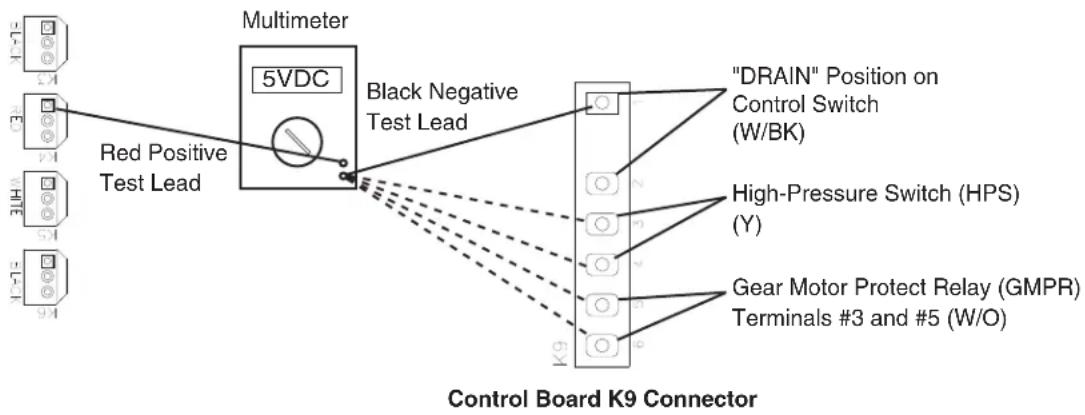
2) 5VDC Output Checks: There are seven 5VDC circuits on the appliance, "DRAIN" position through control switch, high-pressure switch (HPS), gear motor protect relay (GMPR), bin control (BC), float switch (FS), ice dispense switch, and water dispense switch.
- 5VDC CB K9 Connector: See Fig. 1.
| 5VDC CB K9 Connector | |
| Component Pin # (Wire Color) | |
| "DRAIN" Position Through Control Switch | #1 (W/BK) and #2 (W/BK) |
| High-Pressure Switch (HPS) #3 (Y) and #4 | (Y) |
| Gear Motor Protect Relay (GMPR)(terminals #3 and #5) | #5 (W/O) and #6 (W/O) |
Red positive test lead to red K4 connector pin closest to black K3 connector
flowchart
graph TD
    A["Red Positive Test Lead"] --> B["5VDC"]
    B --> C["Black Negative Test Lead"]
    C --> D[""DRAIN" Position on Control Switch (W/BK)"]
    C --> E["High-Pressure Switch (HPS) (Y)"]
    C --> F["Gear Motor Protect Relay (GMPR) Terminals #3 and #5 (W/O)"]
    B --> G["Multimeter"]
    style A fill:#f9f,stroke:#333
    style B fill:#ccf,stroke:#333
    style C fill:#cfc,stroke:#333
    style D fill:#fcc,stroke:#333
    style E fill:#cff,stroke:#333
    style F fill:#ffc,stroke:#333
    style G fill:#fff,stroke:#333
Fig. 1
a. "DRAIN" Position on Control Switch CB K9 connector pins #1 and #2 (W/BK):
- When control switch is in the "ICE" position, CB K9 connector pin #1 and pin #2 are open. 5VDC is present between CB K9 connector pin #1 (W/BK) and pin #2 (W/BK). If not, confirm 5VDC between pin #1 (W/BK) and CB red K4 connector, pin closest to CB black K3 connector. If 5VDC is not present, replace CB.
- When control switch is in the "DRAIN" position, CB K9 connector pin #1 (W/BK) and pin #2 (W/BK) are closed. 5VDC is present between both CB K9 connector pin #1 (W/BK) and pin #2 (W/BK) to CB red K4 connector, pin closest to CB black K3 connector. If 5VDC is not present, replace CB.
b. High-Pressure Switch (HPS)
CB K9 connector pins #3 (Y) and #4 (Y): When HPS is closed, 5VDC is present between both CB K9 connector pins #3 (Y) and pin #4 (Y) to CB red K4 connector pin closest to CB black K3 connector. If 5VDC is not present on pin #3 (Y) or pin #4 (Y), replace CB. If 5VDC is present on CB K9 connector pin #3 (Y) and not on CB K9 connector pin #4 (Y), HPS is most likely open. CB sounds a 3-beep alarm. Check HPS continuity. If HPS is open and CB is not in alarm, replace CB.
c. Gear Motor Protect Relay (GMPR)
CB K9 connector pins #5 (W/O) and #6 (W/O): When GMPR is de-energized, GMPR terminals #3 and #5 are open and 5VDC is present between CB K9 connector pin #5 (W/O) and CB red K4 connector pin closest to CB black K3 connector. If 5VDC is not present, replace CB. When GMPR is energized, GMPR terminals #3 and #5 are closed and 5VDC is present between CB K9 connector pin #5 (W/O) and pin #6 (W/O) to CB red K4 connector pin closest to CB black K3 connector. If GM is energized and GMPR terminals #3 & #5 are open, an 8-beep alarm occurs. See "III.B. LED Lights and Audible Alarm Safeties."
- 5VDC CB K8 Connector: See Fig. 2.
| 5VDC CB K8 Connector | |
| Component Pin # (Wire Color) | |
| Bin Control (BC) #3 (GY) and | #4 (GY) |
| Float Switch (FS) Common #5 | (BK) Common |
| Upper Float Switch (UFS) #6 (R) | |
| Lower Float Switch (LFS) #7 (DBU) | |
d. Bin Control (BC)
CB K8 connector pins #3 (GY) and #4 (GY): When BC is closed (calling for ice), 5VDC is present between CB K8 connector pin #3 (GY) and pin #4 (GY) to CB red K4 connector pin closest to CB black K3 connector. If 5VDC is not present on either pin, replace CB. If 5VDC is present on pin #3 (GY) and not on pin #4 (GY), BC is open. See "II.D. Bin Control Check."
e. Float Switch (FS): CB K8 connector pins #5 common (BK), #6 UFS (R), and #7 LFS (DBU): 5VDC is present between CB K8 connector pin #5 common (BK) and CB red K4 connector pin closest to CB black K3 connector at all times. If 5VDC is not present, replace CB. For further oat switch diagnostics, see "II.E. Float Switch Check and Cleaning."

text_image
Red positive test lead to red K4 connector pin closest to black K3 connector Red Positive Test Lead Multimeter 5VDC Black Negative Test Lead Control Board K8 Connector Lower Float Switch (LFS) (DBU) Bin Control (GY) Float Switch (FS) Common (BK) Upper Float Switch (UFS) (R) Fig. 2Fig. 2
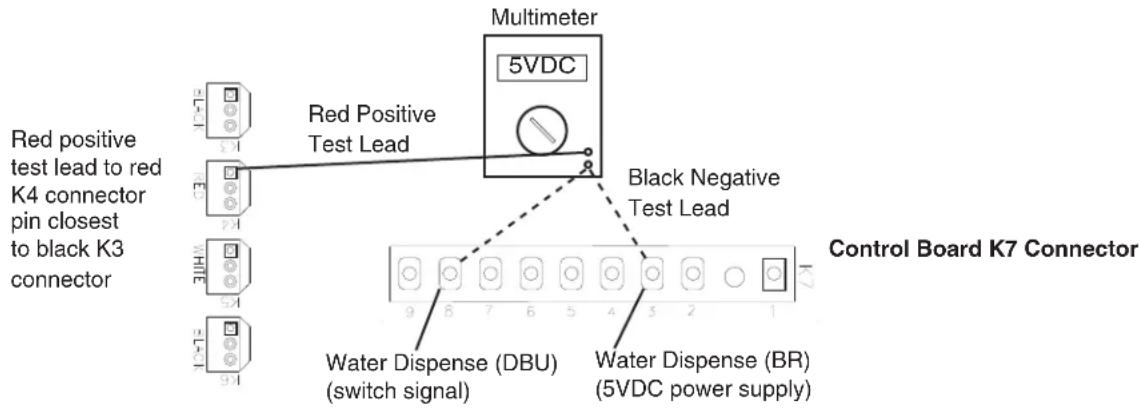
- 5VDC CB K7 Connector: See Figs. 3, 4, 5, and 6.
• Water Dispense Switch/Water Dispense Sensor
f. Push Button Model—"WTRDP" LED is on: Before engaging the water dispense switch, check for the correct VDC from the locations given in the "Disengaged" column in the table below. If the VDC is different than in the table, replace CB. If the VDC is correct, engage the water dispense switch. "WTRDP" LED turns on. If not, confirm that the water dispense signal VDC matches the "Engaged" column in the table below. If not, check the water dispense switch continuity when engaged (closed). If the water dispense switch is open when engaged, replace the water dispense switch. If the VDC matches the "Engaged" column below and the "WTRDP" LED does not turn on, replace CB.
| 5VDC CB K7 Connector | |||||
| Component Pin # (Wire Color) To CB VDC | Ground Disengaged Engaged | ||||
| 5VDC Power Supply #3 | (BR) | CTo | Red K4 pin closest to black K3 | 5VDC 5VDC | |
| Water Dispense Signal #8 (DBU) 0VDC 5VD | |||||
text_image
Red positive test lead to red K4 connector pin closest to black K3 connector Red Positive Test Lead Multimeter 5VDC Black Negative Test Lead Control Board K7 Connector Water Dispense (DBU) (switch signal) Water Dispense (BR) (5VDC power supply)Fig. 3
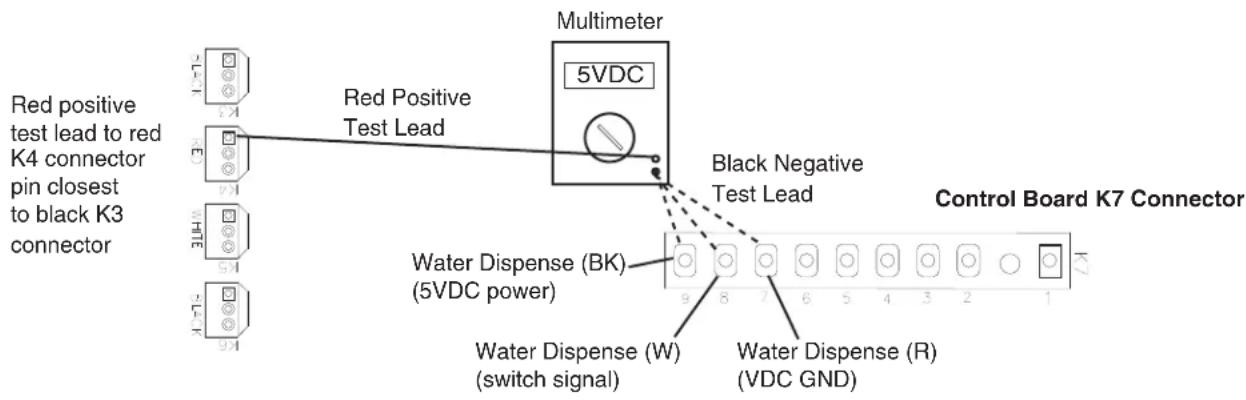
g. Opti-Serve Model—"WTRDP" LED is on: Before engaging the water dispense Opti-Serve sensor, check for the correct VDC from the locations given in the "Disengaged" column in the table below. If the VDC is different than in the table, replace CB. If the VDC is correct, engage the Opti-Serve sensor. "WTRDP" LED turns on. If not, confirm that the water dispense signal VDC matches the "Engaged" column in the table below. If not, replace the Opti-Serve sensor. If the VDC matches the "Engaged" column below and the "WTRDP" LED does not turn on, replace CB.
| 5VDC CB K7 Connector | |||||
| Component Pin # (Wire) | Color) To CB VDC G | Ground | Disengaged Engaged | ||
| VDC Sensor Ground #7 | (R) | To | Red K4 pin closest to black K3 | 0VDC 0VDC | |
| Water Dispense Signal # | 8 (W) 0VDC 5VDC | ||||
| 5VDC Power Supply #9 | (BK) 5VDC 5VDC | ||||
text_image
Red positive test lead to red K4 connector pin closest to black K3 connector Red Positive Test Lead Multimeter 5VDC Black Negative Test Lead Control Board K7 Connector Water Dispense (BK) (5VDC power) Water Dispense (W) (switch signal) Water Dispense (R) (VDC GND)Fig. 4
- Ice Dispense Switch/Ice Dispense Sensor:
h. Push Button Model—"ICE" and "AM" LEDs are on: Before engaging the ice dispense switch, check for the correct VDC from the locations given in the "Disengaged" column in the table below. If the VDC is different than in the table, replace CB. If the VDC is correct, engage the ice dispense switch. "ICE" LED turns on. If not, confirm position of dispense mode switch and that the portion and continuous VDC matches the "Engaged" column in the table below. If not, check the ice dispense switch continuity when engaged (closed) and the dispense mode switch continuity. If dispense switch is open when engaged, replace. If dispense mode switch is open, replace. If the VDC matches the "Engaged" column below and the "ICE" LED does not turn on, replace CB.
Note: "AM" LED turns on .6 sec. for every 12 sec. of cumulative dispense time.
| 5VDC CB K7 Connector | |||||
| Component Pin # (Wire Color) To CB VDC Ground Disengaged Engaged | |||||
| Portion Signal #5 (R) | To | Red K4 pin closest to black K3 | 0VDC 5VDC | ||
| 5VDC Power Supply #3 | (BR) 5VDC 5VDC | ||||
| Continuous Signal #2 (Y) | 0VDC 5VDC | ||||

text_image
Red positive test lead to red K4 connector pin closest to black K3 connector Red Positive Test Lead Multimeter 5VDC Black Negative Test Lead Control Board K7 Connector Ice Dispense (R) (portion signal) Ice Dispense (Y) (continuous signal) Ice Dispense (BR) (5VDC power supply)Fig. 5
i. Opti-Serve Model—"ICE" and "AM" LEDs are on: Before engaging the ice dispense Opti-Serve sensor, check for the correct VDC from the locations given in the "Disengaged" column in the table below. If the VDC is different than in the table, replace CB. If the VDC reading is correct, engage the Opti-Serve sensor. "ICE" LED turns on. If not, confirm position of dispense mode switch and that the portion and continuous VDC matches the "Engaged" column in the table below. If not, check the dispense mode switch continuity. If open, replace. If dispense mode switch is closed (portion or continuous), replace the Opti-Serve sensor. If the VDC matches the "Engaged" column below and the "ICE" LED does not turn on, replace CB. Note: "AM" LED turns on .6 sec. for every 12 sec. of cumulative dispense time.
| 5VDC CB K7 Connector | |||||
| Component Pin # (Wire | Color) To CB VDC G | Ground | Disengaged Engaged | ||
| 5VDC Power Supply #3 | (W/BK) | To | Red K4 pin closest to black K3 | 5VDC 5VDC | |
| VDC Sensor Ground #1 | (W/R) 0VDC 0VDC | ||||
| Continuous Signal #2 (W) | 0VDC 5VDC | ||||
| Portion Signal #5 (W/O) | 0VDC 5VDC | ||||

flowchart
graph TD
    A["Red positive test lead to red K4 connector pin closest to black K3 connector"] --> B["Red Positive Test Lead"]
    B --> C["Multimeter 5VDC"]
    C --> D["Black Negative Test Lead"]
    D --> E["Control Board K7 Connector"]
    E --> F["Ice Dispense (W/R) (VDC ground)"]
    E --> G["Ice Dispense (W) (continuous signal)"]
    E --> H["Ice Dispense (W/BK) (5VDC power supply)"]
    E --> I["Ice Dispense (W/O) (portion signal)"]
Fig. 6
3) Fill Cycle—"WTRIN" LED is on: "WTRIN" LED turns on only when the reservoir water level is low enough to open LFS. Diagnosis: Confirm LFS is open. If "WTRIN" LED is off and LFS is open and the control switch is in the "ICE" position (open), replace CB. If "WTRIN" LED is on and water is not filling the reservoir, check for 24VAC at CB K2 connector between pin #8 (W/BR) and a neutral (LBU). If the "WTRIN" LED is on and 24VAC is not present between CB K2 connector pin #8 (W/BR) and neutral (LBU), confirm 24VAC at CB K2 connector between pin #7 (W/R) and a neutral (LBU). If 24VAC is present between CB K2 connector pin #7 (W/R) and a neutral (LBU) and not between CB K2 connector pin #8 (W/BR) and a neutral (LBU), replace CB.
| 24VAC CB K2 Connector | |||||
| Connector Pin # (Wire Color) To Neutral (LBU) | LFS Open | LFS Closed | |||
| K2 (CB input power) Pin #7 (W/R) | To | K8 pin #2 (LBU) | 24VAC 24 | VAC | |
| K2 (WV power) Pin #8 (W/BR) 0VAC 24VAC | |||||
4) Ice Purge Cycle—"GM" LED is on: "GM" LED turns on once UFS closes (reservoir full). If UFS is closed and "GM" LED is off, replace CB. If "GM" LED is on but GM does not start, check for 115VAC from CB K1 connector pin #3 (DBU) to a neutral (W). If 115VAC is not present, confirm 115VAC from CB K1 connector pin #2 (BR) to a neutral (W). If 115VAC is present on CB K1 connector pin #2 (BR) but not on CB K1 connector pin #3 (DBU), replace CB.
5) Freeze Cycle—"GM" and "COMP" LED are on: 5-minute ice purge timer terminates or press the "SERVICE" button on CB after the "GM" LED turns on to bypass ice purge cycle. WARNING! Risk of electric shock. Care should be taken not to touch live terminals. After 5-minute ice purge timer terminates, "COMP" LED turns on. If not, replace CB. If "COMP" LED turns on and Comp does not start, check for 115VAC from the CB X1 relay (BR) and (R) to a neutral (W). If 115VAC is present on CB X1 relay (BR) and not on CB X1 relay (R), replace CB.
Legend: AM-agitating motor; BC-bin control; CB-control board; Comp-compressor; CT-control transformer; DCT-drain cycle timer (1-hr.); DV-drain valve; DVT-drain valve timer (2-sec.); FM-fan motor; FT-fill timer (90-sec. low water safety); GM-gear motor; GMPR-gear motor protect relay; IPT-ice purge timer; LFS-lower float switch; UFS-upper float switch; WV-inlet water valve
D. Bin Control Check
When the actuator paddle is not engaged, BC is closed and the appliance produces ice. S1 dip switch 7 must be in the "OFF" position. When ice fills the chute and engages the actuator paddle, BC opens and CB shuts down the appliance within 10 seconds.
NOTICE! Do not place S1 dip switch 7 in the "ON" position. For details, see "III.C.1. Default Dip Switch Settings."
1) Remove the front and top panels.
2) Remove the storage bin cover. If necessary, dispense ice or remove ice manually so that the BC actuator paddle is not engaged.
IMPORTANT! Appliance will not start unless the safety switch is engaged. WARNING! Keep hands, hair, and loose clothing clear of the agitator rotating inside of the storage bin.
3) Move the control switch to the "OFF" position.
4) Move the power switch to the "OFF" position.
5) Turn off the power supply.
6) Disconnect BC connector from the back of the control box.
7) Check for continuity across BC proximity switch. If BC actuator is not engaged and BC proximity switch is open, replace BC proximity switch.
8) Press and hold BC actuator paddle. While BC actuator is engaged, check for continuity across BC proximity switch. If BC actuator is engaged and BC proximity switch is open, replace BC proximity switch.
9) Disengage BC actuator paddle.
10) Reconnect BC connector. Remove the control box cover.
11) Turn on the power supply. Move the power switch to the "ON" position.
12) Move the control switch to the "ICE" position.
13) Engage the safety switch to start the automatic icemaking process.
14) Make sure the "GM" LED is on. There is a delay of at least 5 seconds before the "GM" LED turns on after power-up. After the "GM" LED turns on, press the "SERVICE" button on CB to bypass the 5-minute compressor delay. WARNING! Risk of electric shock. Care should be taken not to touch live terminals. The "COMP" LED turns on.
15) When Comp starts, press and hold BC actuator paddle.
16) Comp and GM should de-energize within 10 seconds. Diagnosis: If not, and BC is found open and the appliance continues to run, replace CB.
17) Move the power switch to the "OFF" position and turn off the power supply.
18) Move the power switch to the "ON" position.
19) Replace the storage bin cover, control box cover, top panel, and front panel in their correct positions.
20) Turn on the power supply to start the automatic icemaking process.
Legend: BC-bin control; CB-control board; Comp-compressor; GM-gear motor
E. Float Switch Check and Cleaning
1. Float Switch Check
1) Remove the front panel and move the control switch to the "DRAIN" position.
2) Press and hold the safety switch to start draining the appliance.
IMPORTANT! Appliance will not start unless the safety switch is engaged.
3) Allow the water to drain from the reservoir, then release the safety switch. Move the control switch to the "ICE" position.
4) Remove the FS molex plug from the control box and check continuity across FS wires. Black (BK) to red (R) for the upper float and black (BK) to dark blue (DBU) for the lower float. See Fig. 7. With the water reservoir empty, the float switches are open. If open, continue to step 5. If closed, follow the steps in "II.E.2. Float Switch Cleaning." After cleaning the float switches, check them again. Replace if necessary.
5) Replace the FS molex plug on the control box.
6) Press and hold the safety switch to start filling the reservoir.
7) Once the reservoir is full and GM starts, release the safety switch.
8) Remove the FS molex plug from the control box and check continuity across FS wires. Black (BK) to red (R) for the upper float and black (BK) to dark blue (DBU) for the lower float. They should be closed. If open, follow the steps in "II.E.2. Float Switch Cleaning." After cleaning the float switches, check them again. Replace if necessary.
2. Float Switch Cleaning
Depending on water conditions, scale may build up on FS. Scale on the switch can cause the floats to stick. In this case, FS should be cleaned and checked.
1) Remove the front panel and move the control switch to the "DRAIN" position.
2) Press and hold the safety switch to start draining the appliance.
3) Allow the water to drain from the reservoir, then release the safety switch.
4) Turn off the power supply.
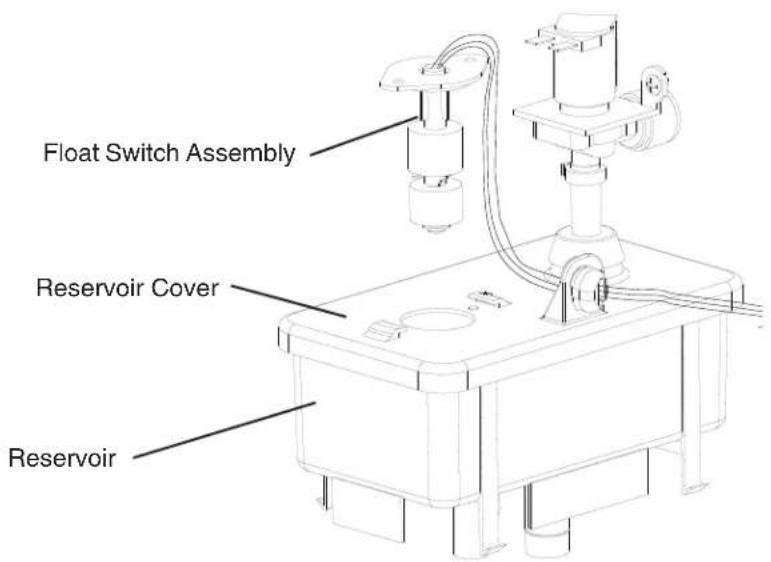
5) Remove FS assembly from the reservoir cover. See Fig. 8.
6) Wipe down FS assembly with a mixture of 1 part Hoshizaki Scale Away and 25 parts warm water. Rinse the FS assembly thoroughly with clean water.
7) While not necessary, the floats can be removed from the shaft during cleaning. If you remove them, note that the blue float is on top. The floats must be installed with the magnets inside them towards the top of the switch. See Fig. 8. Installing the floats upside down will affect the timing of FS operation.
8) Rinse FS assembly thoroughly with clean water and replace in its original position.
9) Replace the front panel in its correct position.
10) Move the control switch to the "ICE" position.
11) Turn on the power supply to start the automatic icemaking process.
Legend: Comp-compressor; FS-float switch; GM-gear motor

text_image
Red (R) (upper float switch) Black (BK) (common) Dark Blue (DBU) (lower float switch) Magnet (towards top) Upper Float (blue) Spring Retainer Clip Magnet (towards top) Lower Float (white) Plastic Retainer ClipFig. 7
text_image
Float Switch Assembly Reservoir Cover ReservoirFig. 8
F. Diagnostic Tables
Before consulting the diagnostic tables, check for correct installation, proper voltage per appliance nameplate, and adequate water pressure (10 to 113 PSIG). Check control board using the steps in "II.C. Control Board Check."
- No Ice Production
| No Ice Production - Possible Cause | |
| Startup | |
| 1. Power Supply a) Off, blown fuse, | br tripped breaker. |
| b) Loose connection. | |
| c) Not within specifications. | |
| 2. Power Switch a) "OFF" position. | |
| b) Defective. | |
| 3. Safety Switch a) Safety switch not engaged. | |
| b) Defective. | |
| 4. Power Protect Relay a) Energized. | Voltage not within specifications. |
| b) Defective. | |
| 5. Control Transformer | a) Coil winding open or shorted. |
| 6. 1A 24VAC Fuse (Control Box) a) | Blown. |
| 7. Control Board See "II.C. Control Board Check" | a) In alarm. See "III.B. LED Lights and Audible Alarm Safeties." |
| b) Defective. | |
| 8. Control Switch | a) In "DRAIN" position. |
| b) Bad contacts. | |
| 9. Bin Control | a) Tripped with bin filled with ice. |
| b) Proximity switch defective. | |
| c) Actuator paddle does not move freely. | |
| 10. High-Pressure Switch | a) Control board in 3 or 4-beep alarm. See "III.B. LED Lights and Audible Alarm Safeties." |
| Fill Cycle | |
| 1. Control Board | a) No power to inlet water valve. |
| b) No power to float switch or not reading float switch condition. | |
| 2. Inlet Water Valve | a) Screen or orifice clogged. |
| b) Coil winding. | |
| 3. Water Supply a) Water supply off | or improper water pressure. |
| b) External water filters clogged. | |
| 4. Float Switch | a) Float does not move freely. |
| b) Defective. | |
| 5. Drain Valve | a) Sticking. |
| Ice Purge Cycle | |
| 1. Control Board | a) No power to gear motor. |
| b) No power to gear motor protect relay circuit (5VDC). | |
| 2. Gear Motor | a) 3A fuse blown. |
| b) Internal protector open. | |
| c) Motor winding. | |
| d) Mechanical failure. | |
| 3. Coupling | a) Defective. |
| 4. Gear Motor Protect Relay | a) Defective. |
| Freeze Cycle | |
| 1. Control Board a) Defective. | |
| 2. Start Relay a) Defective. | |
| 3. Start Capacitor or Run Capacitor | a) Defective. |
| 4. Compressor a) External protector. | |
| b) Motor winding. | |
| c) Mechanical failure. | |
| 5. High-Pressure Switch Activates | a) Dirty condenser. |
| b) Ambient temperature too warm. | |
| c) Fan motor not operating. | |
| d) Refrigerant overcharged. | |
| e) Defective. | |
| f) Refrigerant lines or components restricted. | |
| 6. Fan Motor a) Capacitor defective. | |
| b) Motor winding. | |
| c) Bearing worn out or locked rotor. | |
| 7. Evaporator a) Dirty. | |
| b) Damaged or defective. | |
| 8. Thermostatic Expansion Valve (TXV) | a) Bulb loose. |
| b) Operating erratically. | |
| 9. Refrigerant Charge | a) Low. |
| 10. Drain Valve | a) Dirty, leaking by. |
| b) Defective coil. | |
| c) Defective control board. | |
| 11. Water System a) Water leaks. | |
| Refill | |
| 1. Water Supply | a) Off. |
| 2. Control Board a) No power to float switch or not reading float switch condition. | |
| b) No power to inlet water valve. | |
| 3. Float Switch | a) Float does not move freely. |
| b) Defective. | |
| 4. Inlet Water Valve | a) Clogged or defective. |
| Shutdown | |
| 1. Bin Control | a) Actuator paddle sticking open. |
| b) Proximity switch defective. | |
| 2. Control Board a) Defective. | |
- Ice/Water Dispensing
| Ice Dispense-Push Button | |
| 1. Power Supply a) Off, blown fuse, | or tripped breaker. |
| 2. Control Board a) Ice dispense sw | itch circuit open or no power (5VDC) from control board. |
| b) No power (115VAC) to ice dispense solenoid, ice dispense motor, or agitating motor. | |
| 3. Ice Dispense Switch a) Defective | |
| 4. Dispense Mode Switch a) Defective. | |
| 5. Ice Dispense Motor a) Motor windings. | |
| b) Mechanical failure. | |
| 6. Ice Dispense Solenoid a) Defective or loose connection. | |
| 7.Shutter Assembly a) Defective. | |
| 8. Agitating Motor a) Motor windings. | |
| b) Mechanical failure. | |
| Ice Dispense-Opti-Serve | |
| 1. Power Supply a) Off, blown fuse, | or tripped breaker. |
| 2. Control Board a) No power to dispense mode switch. | |
| b) Dispense mode switch circuit open. | |
| c) No power to ice dispense solenoid, ice dispense motor, or agitating motor. | |
| 3. Infrared Sensor a) Defective. | |
| 4. Dispense Mode Switch a) Defective (open). | |
| 5. Ice Dispense Motor a) Motor windings. | |
| b) Mechanical failure. | |
| 6. Ice Dispense Solenoid a) Defective or loose connection. | |
| 7.Shutter Assembly a) Defective. | |
| 8. Agitating Motor a) Motor windings. | |
| b) Mechanical failure. | |
| Water Dispense-Push Button | |
| 1. Power Supply a) Off, blown fuse, | or tripped breaker. |
| 2. Water Dispense Switch a) Defective. | |
| 3. Water Dispense Valve | a) Water supply turned off. |
| b) Defective. | |
| Water Dispense-Opti-Serve | |
| 1. Power Supply a) Off, blown fuse, | or tripped breaker. |
| 2. Infrared Sensor a) Defective. | |
| 3. Control Board a) No power to infrared sensor. | |
| b) No power to water dispense valve. | |
| 4. Water Dispense Valve | a) Water supply turned off. |
| b) Defective. | |
III. Controls and Adjustments
- A Hoshizaki exclusive control board is employed in the DCM-751 series.
- All models are pretested and factory set.
- For a control board check procedure, see "II.C. Control Board Check."
NOTICE
- Fragile, handle very carefully.
- The control board contains integrated circuits, which are susceptible to failure due to static discharge. It is especially important to touch the metal part of the appliance when handling or replacing the control board.
- Do not touch the electronic devices on the control board or the back of the control board.
- Do not change wiring and connections. Do not misconnect terminals.
- Do not short out power supply to test for voltage.
- Always replace the whole control board assembly if it goes bad.
A. Control Board Layout
- DCM-751B_H
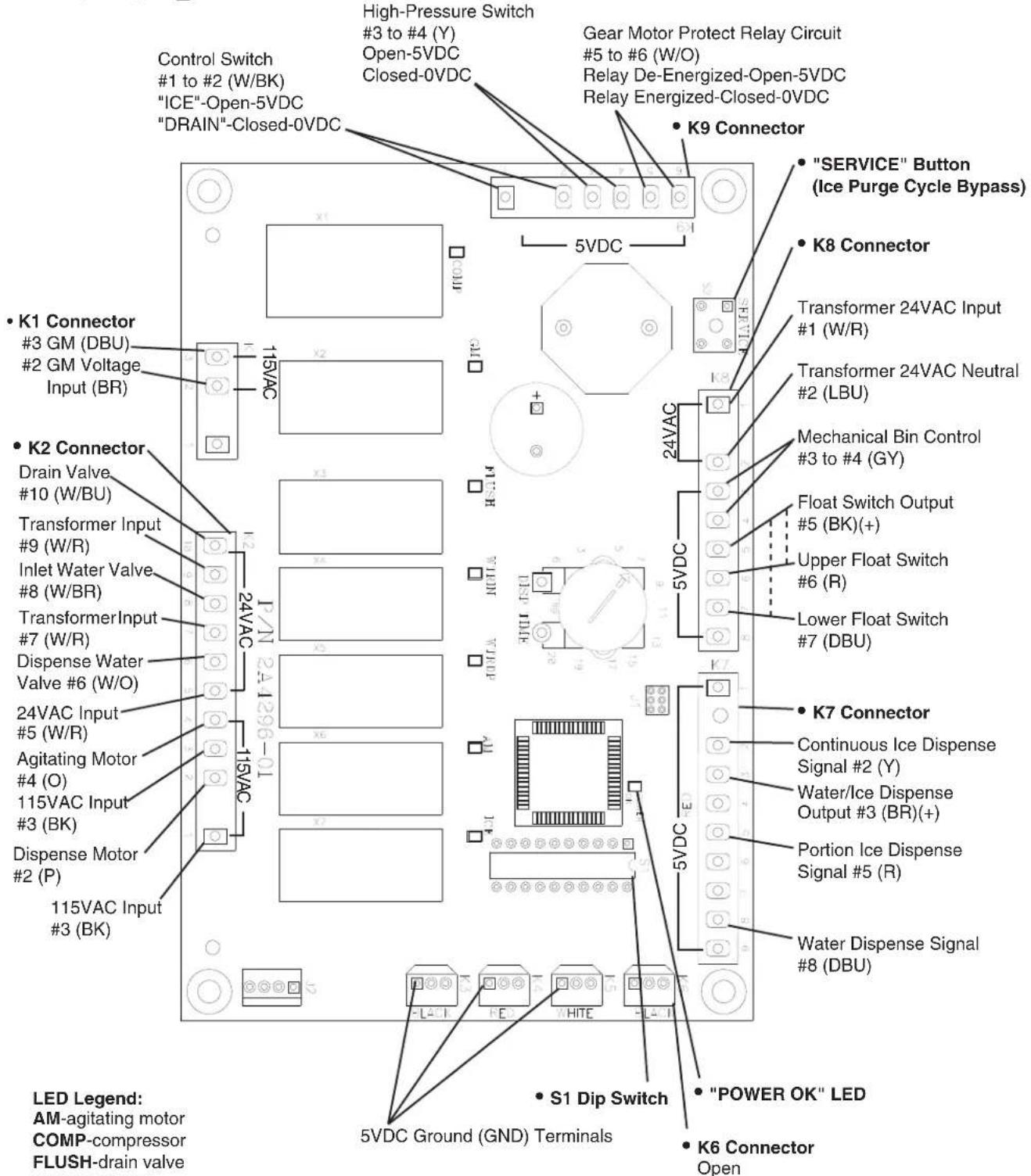
text_image
Control Switch #1 to #2 (W/BK) "ICE"-Open-5VDC "DRAIN"-Closed-0VDC High-Pressure Switch #3 to #4 (Y) Open-5VDC Closed-0VDC Gear Motor Protect Relay Circuit #5 to #6 (W/O) Relay De-Energized-Open-5VDC Relay Energized-Closed-0VDC • K9 Connector • "SERVICE" Button (Ice Purge Cycle Bypass) • K8 Connector Transformer 24VAC Input #1 (W/R) Transformer 24VAC Neutral #2 (LBU) Mechanical Bin Control #3 to #4 (GY) Float Switch Output #5 (BK)(+) Upper Float Switch #6 (R) Lower Float Switch #7 (DBU) • K7 Connector Continuous Ice Dispense Signal #2 (Y) Water/Ice Dispense Output #3 (BR)(+) Portion Ice Dispense Signal #5 (R) Water Dispense Signal #8 (DBU) • S1 Dip Switch • "POWER OK" LED • K6 Connector Open LED Legend: AM-agitating motor COMP-compressor FLUSH-drain valveFig. 9a
- DCM-751B_H-OS
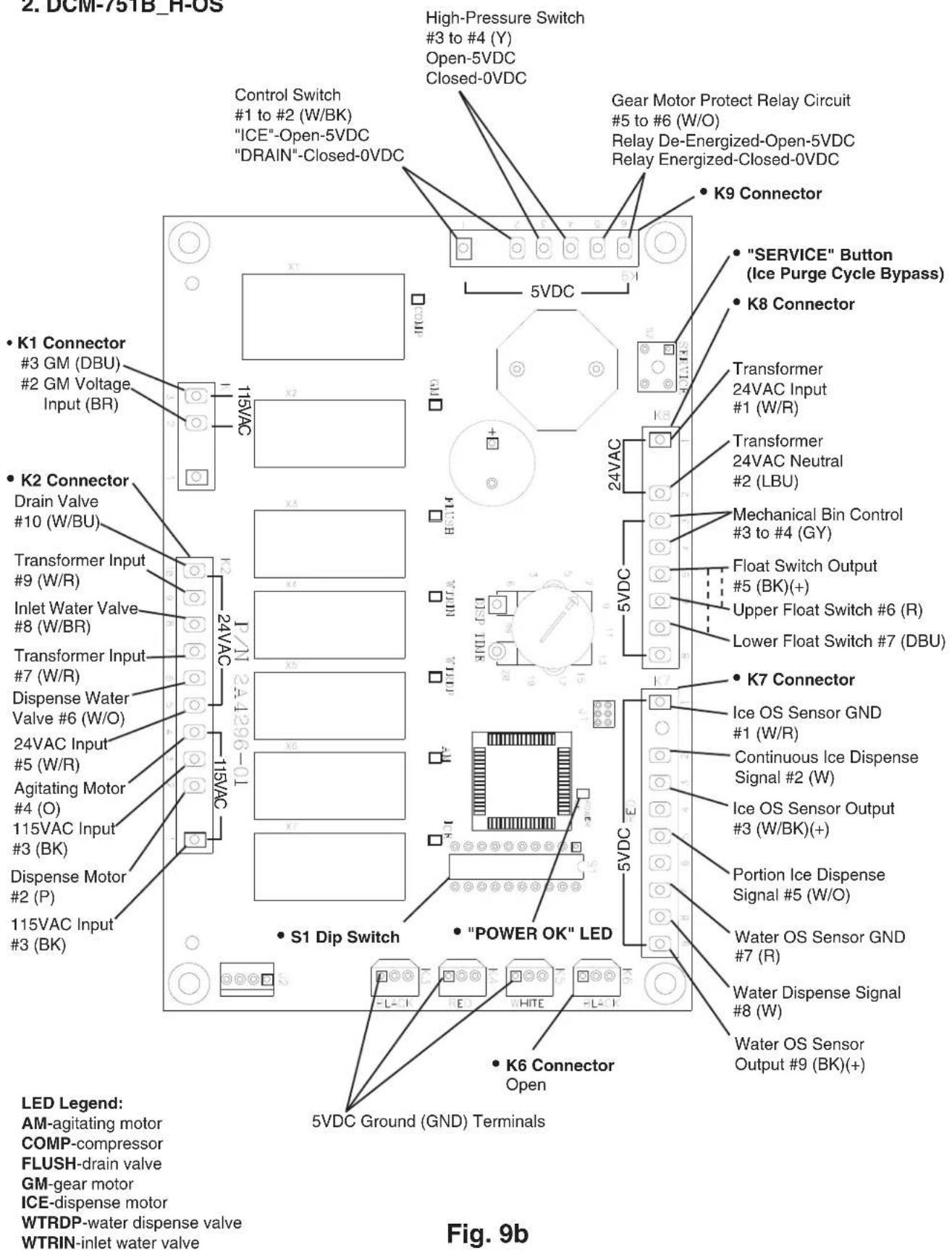
text_image
2. DCM-751B_H-OS Control Switch #1 to #2 (W/BK) "ICE"-Open-5VDC "DRAIN"-Closed-0VDC High-Pressure Switch #3 to #4 (Y) Open-5VDC Closed-0VDC Gear Motor Protect Relay Circuit #5 to #6 (W/O) Relay De-Energized-Open-5VDC Relay Energized-Closed-0VDC K9 Connector "SERVICE" Button (Ice Purge Cycle Bypass) K8 Connector Transformer 24VAC Input #1 (W/R) Transformer 24VAC Neutral #2 (LBU) Mechanical Bin Control #3 to #4 (GY) Float Switch Output #5 (BK)(+) Upper Float Switch #6 (R) Lower Float Switch #7 (DBU) K7 Connector Ice OS Sensor GND #1 (W/R) Continuous Ice Dispense Signal #2 (W) Ice OS Sensor Output #3 (W/BK)(+) Portion Ice Dispense Signal #5 (W/O) Water OS Sensor GND #7 (R) Water Dispense Signal #8 (W) Water OS Sensor Output #9 (BK)(+) S1 Dip Switch "POWER OK" LED K6 Connector Open 5VDC Ground (GND) Terminals LED Legend: AM-agitating motor COMP-compressor FLUSH-drain valve GM-gear motor ICE-dispense motor WTRDP-water dispense valve WTRIN-inlet water valve 115VAC 24VAC 115VAC 115VAC Input #3 (BK) 24VAC Input #5 (W/R) Agitating Motor #4 (O) 115VAC Input #3 (BK) 115VAC Input Drain Valve #10 (W/BU) Transformer Input #9 (W/R) Inlet Water Valve #8 (W/BR) Transformer Input #7 (W/R) Dispense Water Valve #6 (W/O) 24VAC Input #5 (W/R) Disperse Motor #2 (P) 115VAC Input #3 (BK)B. LED Lights and Audible Alarm Safeties
The "POWER" LED indicates proper control voltage and will remain on unless a control voltage problem occurs. For further details, see "II. Sequence of Operation and Service Diagnosis."
| Icemaking Sequence | |||||
| Sequence Step | LED | Energized Components | Min. Max. | ||
| Fill Cycle WTRIN | WV - On until UFS | closes. Alarm sounds | after 90 sec. | ||
| Ice Purge Cycle | GM GM, FM 5 min. 5 | min. | |||
| Freeze Cycle (with refill) | GM, WTRIN* (refill), COMP | GM, Comp, FM, WV* (refill) | - *On until UFS closes. Alarmsounds after 90 sec. | ||
| Drain Cycle | FLUSH (Drain) | DV | 2 sec. | 10 min. | |
| Dispensing Sequence | |||||
| Sequence Step | LED | Energized Components | Time LEDs are on | **Dispense Mode Switch | |
| Continuous | Portion | ||||
| Ice Dispense Activation | ICE, AM* | IDS**, IDM**, AM* | *AM energizes .6 sec. every 12 sec. of cumulative dispense time | 60 sec. per activation | Adjustable between 0.2 sec. and 20 sec. |
| Dispense Water Valve Activation | WTRDP | DispWV | |||
The built-in alarm safeties shut down the appliance.
| No. of Beeps (every 5 sec.) | Type of Alarm | Reset Options |
| 1 | Low Water SafetyUFS open >90 seconds after WV energized. | Automatic reset once water supply is restored and UFS closes. |
| 2 | Control SwitchIn "DRAIN" position longer than 15 minutes. | Automatic reset once the control switch is moved to the "ICE" position. |
| 3 | High-Pressure SwitchFirst and second activation in 1 hour. | Automatic reset once pressure drops below the high pressure threshold and the high-pressure switch closes. |
| 4 | High-Pressure SwitchThird activation in 1 hour. | Call for service. To avoid possible catastrophic failure, it is recommended to leave the appliance off until this alarm is resolved.Manual reset. Turn power off and on again. |
| 5 | Freeze TimerWV off >30 minutes since last WV activation. | Manual reset. Turn power off and on again. |
| 6 | Low Voltage(92Vac ±5% or less) | "POWER OK" LED turns off if voltage protection operates.The control voltage safeties automatically reset when voltage is corrected. |
| 7 | High Voltage(147Vac ±5% or more) | |
| 8 | Gear MotorGMPR contacts fail to close. | Manual reset. Turn power off and on again. |
| 9 | Infrared Sensor (S1 dip switch 7)(Not used on this model) | Manual reset. Turn power off and on again. |
Legend: AM-agitating motors, Comp-compressor; DispWV-dispense water valve; DV-drain valve; EH-evaporator heater; FM-fan motor; GM-gear motor; GMPR-gear motor protect relay; IDM-ice dispensing motor; IDS-ice dispensing shutter solenoid; UFS-upper float switch; WV-inlet water valve
C. Settings and Adjustments
| NOTICE |
| Dip switches are factory set. Failure to maintain factory settings may adversely affect performance and warranty coverage. For more information, contact Hoshizaki Technical Support at 1-800-233-1940. |
1. Default Dip Switch Settings
The S1 dip switch settings are factory-set to the following positions:
| Dip Switch No. 1 2 3 4 5 6 7 8 9 10 | |||||||||||
| DCM-751B_H OFF | OFF | OFF | OFF | ON | ON | OFF | ON | OFF | OFF | ||
| DCM-751B_H(-OS) | OFF | OFF | OFF | OFF | OFF | ON | OFF | ON | OFF | OFF | |

text_image
Normally off (factory use) Mechanical Bin Control Shutdown Delay Bin Control Selector Continuous Dispensing Timer (DCM models only, do not adjust on modular appliances) Drain Frequency Control Infrared Sensor Shutdown Delay2. Infrared Sensor Shutdown Delay (S1 dip switch 1, 2, 3)
| NOTICE |
| Do not adjust. Setting not used on this model. When dip switch 7 is off, 1, 2, and 3 are ignored. |
Factory set. DCM-751B_H(-OS) does not use an infrared sensor bin control. The appliance uses a mechanical bin control for ice level control.
3. Drain Frequency Control (S1 dip switch 4)
The appliance is factory set for optimum performance with the 1-in-1 drain cycle (S1 dip switch 4 in the "OFF" position). This setting allows for removal of sediment from the evaporator without interrupting the icemaking process. 1-in-12 drain cycle is available.
| S1 Dip Switch SettingNo. 4 | Drain Timer Interval | Drain Valve Open |
| OFF (1-in-1) 1 Hour 2 Seconds | ||
| ON (1-in-12) | 11 Hours 45 Minutes | 10 Minutes |
4. Continuous Dispensing Timer (S1 dip switch 5 & 6)
The dispense mode switch must be in the "CONTINUOUS" position for this setting to apply. The factory setting allows ice to be dispensed continuously on push button models and for a maximum of 60 sec. on Opti-Serve models.
| S1 Dip Switch Setting | Dispense Time | |
| No. 5 No. 6 | ||
| OFF OFF No Limit | ||
| ON OFF 20 Seconds | ||
| OFF ON 60 Seconds | ||
| ON ON No Limit | ||
5. Bin Control Selector (S1 dip switch 7)
The appliance is factory set for mechanical bin control operation. No adjustment is required. In the factory default position (S1 dip switch 7 in the off position), the gear motor delay after the upper float switch closes is 5 seconds. WARNING! Do not adjust S1 dip switch 7 out of the factory default position. This dip switch must be left in the factory default position or the appliance will not operate correctly.
| S1 Dip Switch Setting | Bin Control Application Gear Motor Delay | |
| No. 7 | ||
| OFF Mechanical Bin Control 5 seconds | ||
| ON | Infrared Sensor withMechanical Bin Control Backup | 30 seconds |
6. Bin Control Shutdown Delay (S1 dip switch 8)
Factory set for normal operation. No adjustment is required. The shutdown delay is the time between the mechanical bin control proximity switch opening and the control board shutting off the appliance.
| S1 Dip Switch Setting | Bin Control #1 Shutdown Delay |
| No. 8 | |
| OFF 0.25 Seconds | |
| ON | 6.7 Seconds |
7. Factory Use (S1 Dip Switch 9 & 10)
Factory set for optimum performance. Do not adjust.
D. Power Switch, Control Switch, and Dispense Mode Switch
The power switch, control switch, and dispense mode switch are used to control the operation of the appliance.
1. Power Switch
WARNING! The power switch does not turn off all power supply to the unit. 115VAC power supply is present on control board K1 connector pin #2 (BR) and control board X1 relay (BR) when the power switch is in the "OFF" position.
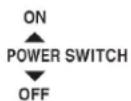
Fig. 10
2. Control Switch
The control switch has 3 positions, "ICE," "OFF," and "DRAIN." See Fig. 11.
a) ICE
When the control switch is in the "ICE" position, 24VAC is directed to control board K8 connector pin #1. 24VAC is present between control board K8 connector pins #1 (power) and pin #2 (neutral).
b) OFF
When the control switch is in the "OFF" position, 24VAC is broken to control board K8 connector pin #1.
c) DRAIN
When the control switch is in the "DRAIN" position, 24VAC is directed to control board K8 connector pin #1. 24VAC is present between control board K8 connector pins #1 (power) and pin #2 (neutral). Also, a 5VDC circuit is closed on control board K9 connector pins #1 and #2. This energizes an internal relay on the control board which allows 24VAC to the drain valve from control board connector K2 pin #10.

Fig. 11
3. Dispense Mode Switch
The dispense mode switch has 2 positions, "CONTINUOUS" and "PORTION." See Fig. 12.
a) CONTINUOUS
When the dispense mode switch is in the "CONTINUOUS" position, ice dispenses as follows:
Push Button: Ice dispenses continuously with button engaged.
OS: Ice dispenses for a maximum of 60 seconds per activation.
b) PORTION
When the dispense mode switch is in the "PORTION" position, ice dispenses for the amount of time determined by the ice dispense time setting.
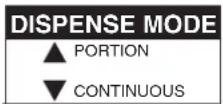
Fig. 12
The ice dispense time control is located on the control board. The dial indicates dispense time in seconds and is adjustable between 0.6 and 20 seconds. When shipped, the ice dispense time control is set to the minimum dispense time of 0.6 sec. (approximately 0.72 oz.).

text_image
Ice Dispense Time Control Fig. 13IV. Removal and Replacement of Components
WARNING
- The appliance should be diagnosed and repaired only by qualified service personnel to reduce the risk of death, electric shock, serious injury, or fire.
- Move the control switch and the power switch to the "OFF" position and turn off the power supply before servicing. Lockout/Tagout to prevent the power supply from being turned back on inadvertently.
- CHOKING HAZARD: Ensure all components, fasteners, and thumbscrews are securely in place after the equipment is serviced. Make sure that none have fallen into the storage bin.
- Make sure all food zones in the appliance and storage bin are clean after the appliance is serviced.
- When replacing evaporator assembly and water circuit components, make sure there are no water leaks after the repair is complete.
A. Service for Refrigerant Lines
WARNING
- Repairs requiring the refrigeration circuit to be opened must be performed by properly trained and EPA-certified service personnel.
- Always recover the refrigerant and store it in an approved container. Do not discharge the refrigerant into the atmosphere.
- Use an electronic leak detector or soap bubbles to check for leaks. Add a trace of refrigerant to the system (if using an electronic leak detector), and then raise the pressure using nitrogen gas (140 PSIG). Do not use R-404A as a mixture with pressurized air for leak testing.
NOTICE
- Do not leave the system open for longer than 15 minutes when replacing or servicing parts. The Polyol Ester (POE) oils used in R-404A appliances can absorb moisture quickly. Therefore it is important to prevent moisture from entering the system when replacing or servicing parts.
- Always install a new drier every time the sealed refrigeration system is opened.
- Do not replace the drier until after all other repair or replacement has been made. Install the new drier with the arrow on the drier in the direction of the refrigerant flow.
- When brazing, protect the drier by using a wet cloth to prevent the drier from overheating. Do not allow the drier to exceed 250^ (121°C).
1. Refrigerant Recovery
The appliance is provided with refrigerant access valves. Using proper refrigerant practices, recover the refrigerant from the access valves and store it in an approved container. Do not discharge the refrigerant into the atmosphere.
2. Brazing
WARNING
- R-404A itself is not flammable at atmospheric pressure and temperatures up to 176^ (80°C).
- R-404A itself is not explosive or poisonous. However, when exposed to high temperatures (open flames), R-404A can be decomposed to form hydrofluoric acid and carbonyl fluoride both of which are hazardous.
- Do not use silver alloy or copper alloy containing arsenic.
1) Braze all fittings while purging with nitrogen gas flowing at a pressure of 3 to 4 PSIG.
NOTICE
- Always install a new drier every time the sealed refrigeration system is opened.
- Do not replace the drier until after all other repair or replacement has been made. Install the new drier with the arrow on the drier in the direction of the refrigerant flow.
- When brazing, protect the drier by using a wet cloth to prevent the drier from overheating. Do not allow the drier to exceed 250^ (121°C).
2) Use an electronic leak detector or soap bubbles to check for leaks. Add a trace of refrigerant to the system (if using an electronic leak detector), and then raise the pressure using nitrogen gas (140 PSIG). WARNING! Do not use R-404A as a mixture with pressurized air for leak testing.
3. Evacuation and Recharge (R-404A)
1) Attach a vacuum pump to the system. Be sure to connect charging hoses to both high and low-side access valves.
IMPORTANT
The vacuum level and vacuum pump may be the same as those for current refrigerants. However, the rubber hose and gauge manifold to be used for evacuation and refrigerant charge should be exclusively for POE oils.
2) Turn on the vacuum pump. Open the gauge manifold valves. Never allow the oil in the vacuum pump to flow backwards.
3) Allow the vacuum pump to pull down to a 29.9" Hg vacuum. Evacuating period depends on pump capacity.
4) Close the low-side valve and high-side valve on the gauge manifold.
5) Disconnect the gauge manifold hose from the vacuum pump and attach it to a refrigerant service cylinder. Remember to loosen the connection and purge the air from the hose. See the nameplate inside the appliance for the required refrigerant charge. Hoshizaki recommends only virgin refrigerant or reclaimed refrigerant which meets ARI Standard 700 (latest edition) be used.
6) A liquid charge is required for charging an R-404A system (to prevent fractionation). Place the service cylinder on the scales: if the service cylinder is not equipped with a dip tube, invert the service cylinder, then place it on the scales. Open the high-side valve on the gauge manifold.
7) Allow the system to charge with liquid until the proper charge weight is met.
8) If necessary, add any remaining charge to the system through the low-side. NOTICE! To prevent compressor damage, use a throttling valve or liquid dispensing device to add the remaining liquid charge through the low-side service valve with the appliance running.
9) Close the high and low-side gauge manifold valves, then disconnect the gauge manifold hoses.
10) Cap the access valves to prevent a possible leak.
B. Important Notes for Component Replacement
| NOTICE |
| When replacing a component listed below, see the notes to help ensure proper operation. See Fig. 14. |
| Component Notes | |
| Compressor • Inst | all a new drier, start capacitor, run capacitor, and start relay. |
| Thermostatic Expansion Valve | • Install a new drier.• Attach the thermostatic expansion valve bulb to the suction line in the same location as the previous bulb.• The bulb should be between the 10 and 2 o'clock positions on the tube.• Secure the bulb with the clamp and holder, then insulate it. |
| Fan Motor • Insta | a new fan motor capacitor. |
| Evaporator Assembly Components. See Fig. 14. | |
| Upper and Lower Bearings | • Inspect the upper bearing for wear. See "IV.C.1. Upper Bearing Wear Check." Replace if necessary.• When replacing the upper bearing it is advised to also change the lower bearing at the same time. |
| Evaporator • Insta | all a new drier.• Inspect the mechanical seal and O-ring prior to installing the new evaporator. If worn, cracked, or scratched, the mechanical seal should also be replaced. |
| Gear Motor • Insta | all a new gear motor capacitor. |
| Extruding Head Bolts | • Extruding head allen head cap screws (with seals) are not reusable. New allen head cap screws (with seals) must be used. |
Evaporator Assembly

text_image
Evaporator Assembly Spout A Spout B Power Switch Cutter Extruding Head and Upper Bearing Auger Evaporator Heater Washer Allen Head Cap Screw (with seal) Not reusable Evaporator Allen Head Cap Screw with Washer Mechanical Seal "O" Ring Housing and Lower Bearing Hex Head Bolt with Washer Spline Coupling Gear Motor DISPENSE MODE CONTROLS ICE OFF DRAIN PORTION CONTINUOUS Safety Switch Fig. 14C. Icemaking Unit
1. Upper Bearing Wear Check
To ensure that the bearing inside the extruding head does not exceed the wear tolerance of .02", follow the instructions below. See Fig. 15.
1) Move the control switch to the "OFF" position, then turn off the power supply. Remove the front and top panels, then move the power switch to the "OFF" position.
2) Remove the storage bin cover. Remove spout B, then remove spout A and the cutter.
See Fig. 14.
3) Grasp the top of the auger and move the auger towards you, then try to insert a .02" round stock or pin gauge in between the back side of the auger shaft and the bearing surface. Check several locations around the auger shaft. If the gauge goes between the shaft and the bearing at any point or if the bearing is scratched or cracked, both the top bearing in the extruding head and the lower bearing in the housing should be replaced. Instructions for removing the extruding head and housing are located later in this procedure.

text_image
.02" Round Stock or Pin Gauge Auger Extruding Head Fig. 15Note: Replacing the bearing requires a bearing press adaptor. If one is not available, replace the whole extruding head and housing.
4) Replace the cutter, spout A, spout B, and the storage bin cover in their correct positions.
5) Move the power switch to the "ON" position, then replace the panels in their correct positions.
6) Turn on the power supply, then move the control switch to the "ICE" position to start the automatic icemaking process.
2. Removal and Replacement of Extruding Head
1) Move the control switch to the "DRAIN" position and drain all of the water from the evaporator.
2) After the water has stopped draining, move the control switch to the "OFF" position, then turn off the power supply. Remove the front and top panels, then move the power switch to the "OFF" position.
3) Remove the storage bin cover. Remove spout B, then remove spout A and the cutter. See Fig. 14.
4) Remove the apron panel, then remove the left side panel.
5) Remove the allen head cap screws (with seals) securing the extruding head and discard. NOTICE! The allen head cap screws (with seals) are not reusable. New allen head cap screws (with seals) must be used.
6) Lift off the extruding head.
7) Place the new extruding head in place and tighten down with new allen head cap screws.
8) Replace the cutter in its correct position.
9) Replace spout A, spout B, and the storage bin cover in their correct positions.
10) Move the power switch to the "ON" position, then replace the panels in their correct positions.
11) Turn on the power supply, then move the control switch to the "ICE" position to start the automatic icemaking process.
3. Removal and Replacement of Auger
1) Move the control switch to the "DRAIN" position and drain all of the water from the evaporator.
2) After the water has stopped draining, move the control switch to the "OFF" position, then turn off the power supply. Remove the front and top panels, then move the power switch to the "OFF" position.
3) Remove the storage bin cover. Remove spout B, then remove spout A. See Fig. 14.
4) Remove the apron panel, then remove the left side panel.
5) Remove the allen head cap screws (with seals) securing the extruding head and discard. Using the cutter, lift out the auger assembly.
6) Remove the cutter, extruding head, and upper part of the mechanical seal from the auger and place them on the new auger. NOTICE! To help prevent water leaks, be careful not to damage the surfaces of the O-ring or mechanical seal.
7) Install the new auger assembly with the upper part of the mechanical seal attached. Secure the auger assembly using new allen head cap screws.
8) Replace spout A, spout B, and the storage bin cover in their correct positions.
9) Move the power switch to the "ON" position, then replace the panels in their correct positions.
10) Turn on the power supply, then move the control switch to the "ICE" position to start the automatic icemaking process.
4. Removal and Replacement of Evaporator
NOTICE
- Always install a new drier every time the sealed refrigeration system is opened.
- Do not replace the drier until after all other repair or replacement has been made. Install the new drier with the arrow on the drier in the direction of the refrigerant flow.
- When brazing, protect the drier by using a wet cloth to prevent the drier from overheating. Do not allow the drier to exceed 250^ (121°C).
1) Move the control switch to the "DRAIN" position and drain all of the water from the evaporator.
2) After the water has stopped draining, move the control switch to the "OFF" position, then turn off the power supply. Remove the front and top panels, then move the power switch to the "OFF" position.
3) Remove the apron panel, then remove the left side panel.
4) Recover the refrigerant and store it in an approved container.
5) Remove the storage bin cover. Remove spout B, then remove spout A. See Fig. 14.
6) Remove the extruding head heater and the allen head cap screws securing the extruding head and discard the allen head cap screws. Using the cutter, lift out the auger assembly.
7) Remove the evaporator bracket and disconnect the water hoses.
8) Disconnect the inlet and outlet tubing.
9) Remove the allen head cap screws securing the evaporator to the lower housing.
10) Lift off the evaporator.
11) Inspect the mechanical seal and O-ring prior to installing the new evaporator. The mechanical seal consists of two parts. One moves along with the auger, and the other is fixed on the lower housing. NOTICE! If the contact surfaces of these two parts are worn, cracked, or scratched, the mechanical seal may cause water leaks and should be replaced. Instructions for removing the mechanical seal and lower housing are located later in this procedure.
12) Make sure the lower mechanical seal is in place, then place the new evaporator in position. Secure the evaporator to the lower housing using the allen head cap screws.
13) Remove the drier, then place the new drier in position.
14) Braze all fittings while purging with nitrogen gas flowing at a pressure of 3 to 4 PSIG.
15) Use an electronic leak detector or soap bubbles to check for leaks. Add a trace of refrigerant to the system (if using an electronic leak detector), and then raise the pressure using nitrogen gas (140 PSIG). Do not use R-404A as a mixture with pressurized air for leak testing.
16) Evacuate the system, and charge it with refrigerant. See the nameplate for the required refrigerant charge.
17) Install the new auger assembly with the upper part of the mechanical seal attached. Secure the auger assembly using new allen head cap screws.
18) Replace the evaporator bracket and reconnect the water hoses.
19) Replace spout A, spout B, and the storage bin cover in their correct positions.
20) Move the power switch to the "ON" position, then replace the panels in their correct positions.
21) Turn on the power supply, then move the control switch to the "ICE" position to start the automatic icemaking process.
5. Removal and Replacement of Mechanical Seal and Lower Housing
5a. Mechanical Seal
1) Move the control switch to the "DRAIN" position and drain all of the water from the evaporator.
2) After the water has stopped draining, move the control switch to the "OFF" position, then turn off the power supply. Remove the front and top panels, then move the power switch to the "OFF" position.
3) Remove storage bin cover. Remove spout B, then remove spout A. See Fig. 14.
4) Remove the apron panel, then remove the left side panel.
5) Remove the extruding head heater and the allen head cap screws securing the extruding head and discard the allen head cap screws.
6) Using the cutter, lift out the auger assembly, then remove the evaporator bracket.
7) The mechanical seal consists of two parts. One moves along with the auger, and the other is fixed on the lower housing. NOTICE! If the contact surfaces of these two parts are worn, cracked, or scratched, the mechanical seal may cause water leaks and should be replaced.
8) Remove the allen head cap screws securing the evaporator to the lower housing.
9) Raise the evaporator up to access the lower housing.
10) Remove the mechanical seal from the housing. If only replacing the mechanical seal, proceed to step 13. NOTICE! To help prevent water leaks, be careful not to damage the surfaces of the O-ring or mechanical seal.
5b. Lower Housing
11) Remove the O-ring and the bolts securing the housing to the gear motor and remove the housing from the gear motor. If inspection of the upper bearing inside the extruding head (see "IV.C.1. Upper Bearing Wear Check") indicates that it is out of tolerance, replace both it and the bearing inside the lower housing.
Note: Replacing the bearing requires a bearing press adaptor. If one is not available, replace the whole extruding head and housing.
12) Install the O-ring and mount the lower housing on the gear motor.
13) Install the lower part of the mechanical seal on the lower housing.
14) Lower the evaporator down and secure it to the lower housing.
15) Install the auger assembly with the upper part of the mechanical seal attached. Secure the auger assembly using new allen head cap screws.
16) Replace the evaporator bracket in its correct position.
17) Replace spout A, spout B, and the front cover of the storage bin in their correct positions.
18) Move the power switch to the "ON" position, then replace the panels in their correct positions.
19) Turn on the power supply, then move the control switch to the "ICE" position to start the automatic icemaking process.
6. Removal and Replacement of Gear Motor
1) Move the control switch to the "DRAIN" position and drain all of the water from the evaporator.
2) After the water has stopped draining, move the control switch to the "OFF" position, then turn off the power supply. Remove the front and top panels, then move the power switch to the "OFF" position.
3) Remove the storage bin cover. Remove spout B, then remove spout A. See Fig. 14.
4) Remove the apron panel, then remove the left side panel.
5) Remove the evaporator bracket.
6) Remove the bolts securing the lower housing to the gear motor. Lift the evaporator up slightly.
7) Remove the 3 gear motor bolts.
8) Disconnect the wiring from the gear motor, then remove the gear motor.
9) Remove the spline coupling from the old gear motor and attach to the new gear motor.
10) Place the new gear motor in the drain pan.
11) Secure the gear motor.
12) Connect the gear motor wires.
13) Lower the evaporator down and secure it to the gear motor.
14) Replace the evaporator bracket in its correct position.
15) Replace spout A, spout B, and the front cover of the storage bin in their correct positions.
16) Move the power switch to the "ON" position, then replace the panels in their correct positions.
17) Turn on the power supply, then move the control switch to the "ICE" position to start the automatic icemaking process.
D. Dispense Components
1. Dispense Auger and Agitator
1) Move the control switch to the "OFF" position, then turn off the power supply. Remove the front and top panels, then move the power switch to the "OFF" position.
2) Remove the storage bin cover.
3) Remove the thumbscrews from the vertical plane, then loosen the thumbscrews from the horizontal plane of the motor bracket. Slide the motor back.
Note: Hold the dispense auger/agitator to prevent it from dropping when sliding back the motor. See Fig. 16.
4) Replace the dispense auger/agitator with the new one.
5) Assemble the removed parts in the reverse order of which they were removed.
6) Move the power switch to the "ON" position, then replace the panels in their correct positions.
7) Turn on the power supply, then move the control switch to the "ICE" position to start the automatic icemaking process.
2. Dispense and Agitating Motors
1) Move the control switch to the "OFF" position, then turn off the power supply. Remove the front and top panels, then move the power switch to the "OFF" position.
2) Remove the storage bin cover.
3) Remove the thumbscrews from the vertical plane, then loosen the thumbscrews from the horizontal plane of the motor bracket. Slide the motor back.
Note: Hold the dispense auger/agitator to prevent it from dropping when sliding back the motor. See Fig. 16.
4) Remove the thumbscrews from the horizontal plane of the motor bracket.
5) Remove the motor from the bracket.
6) Install the new motor.
7) Assemble the removed parts in the reverse order of which they were removed.
8) Move the power switch to the "ON" position, then replace the panels in their correct positions.
9) Turn on the power supply, then move the control switch to the "ICE" position to start the automatic icemaking process.
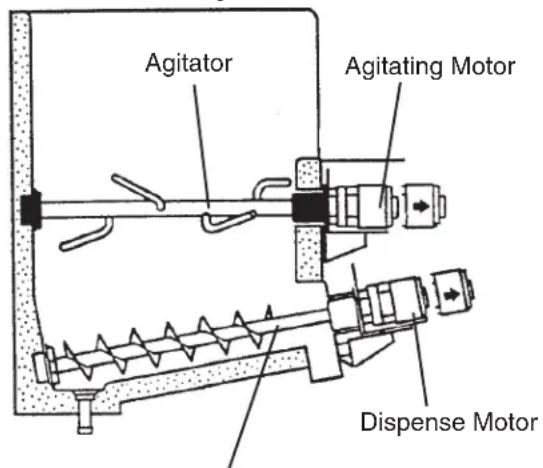
text_image
Agitator Agitating Motor Dispense MotorFig. 16
Dispense Auger
V. Maintenance
The maintenance schedule below is a guideline. More frequent maintenance may be required depending on water quality, the appliance's environment, and local sanitation regulations.
WARNING
- Only qualified service technicians should service the appliance.
- Move the control switch and power switch to the "OFF" positions, then turn off the power supply before servicing. Lockout/Tagout to prevent the power supply from being turned back on inadvertently.
| Maintenance Schedule | ||
| Frequency | Area Task | |
| Every 2 Weeks | Air Filter Inspect. W | ash with warm water and neutral cleaner if dirty. |
| Monthly External Water Filters | Check for proper pressure and change if necessary. | |
| Appliance Exterior V | Wipe down with a clean, soft cloth. Use a damp cloth containing a neutral cleaner to wipe off oil or dirt build up. Clean any chlorine staining (rust colored spots) using a non-abrasive cleaner. | |
| Every 6 Months | Icemaker and Storage Bin | Clean and sanitize per the cleaning and sanitizing instructions provided in the instruction manual or maintenance label on the appliance. |
| Evaporator Condensate Drain Pan and Gear Motor Drain Pan | Wipe down with a clean cloth and warm water. Dilute 0.82 fl. oz. (25 ml) of a 5.25% sodium hypochlorite solution (chlorine bleach) with 1.6 gal. (6.0 l) of warm water. Slowly pour one cup of sanitizing solution into the evaporator condensate drain pan. Be careful not to overflow the pan. This solution will flow down to the gear motor drain pan and out the drain line to sanitize these areas. Repeat with a cup of clean water to rinse. | |
| Icemaker, Storage Bin, and Drip Tray Drains | Check to make sure they are clear. | |
| Yearly Inlet | Water Valve and Drain Valve | Close the water supply line shut-off valve and drain the water system. Clear the inlet water valve screen and clean and inspect the drain valve. |
| Water Hoses Inspect | the water hoses and clean/replace if necessary. | |
| Condenser Inspect. | Clean if necessary by using a brush or vacuum cleaner. | |
| Appliance Inspect for oil spots, loose components, fasteners, and wires. | ||
| Upper Bearing (extruding head) | Check for wear using .02" round stock or pin gauge. Replace both upper bearing and lower bearing if wear exceeds factory recommendations. See "IV.C.1. Upper Bearing Wear Check". | |
| After 3 Years, then Yearly | Upper Bearing (extruding head); Lower Bearing and O-Ring (lower housing); Mechanical Seal; Evaporator Cylinder; Auger | Inspect. Replace both upper bearing and lower bearing if wear exceeds factory recommendations. Replace the mechanical seal if the seal's contact surfaces are worn, cracked, or scratched. |
VI. Preparing the Appliance for Periods of Non-Use
NOTICE
When storing the appliance for an extended time or in sub-freezing temperatures, follow the instructions below to prevent damage.
When the appliance is not used for two or three days under normal conditions, it is sufficient to only move the control switch to the "OFF" position. When storing the appliance for extended time or in sub-freezing temperatures, follow the instructions below.
1. Remove the ice from the storage bin, drain the water system, and remove the water from the icemaker/water dispenser water supply line:
1) Close the icemaker water supply line shut-off valve and open the icemaker water supply line drain valve.
2) Move the control switch to the "OFF" position, pause momentarily, then move to the "DRAIN" position. Allow the water system to drain for 5 minutes.
Note: a) A momentary pause in the "OFF" position is necessary to de-energize the control board when moving the control switch between "ICE" and "DRAIN." Otherwise there is a delay of several minutes before the new selection takes effect. b) If the control switch is left in the "DRAIN" position for 10 minutes or more, a 2-beep alarm sounds every 5 seconds. Move the control switch out of the "DRAIN" position to clear the alarm.
3) Move the dispense mode switch to the "CONTINUOUS" position, then dispense all of the ice from the storage bin.
Note: Ice dispenses continuously for a maximum of 60 seconds per activation.
4) Attach a compressed air or carbon dioxide supply to the icemaker water supply line drain valve.
5) While engaging the water dispense switch, blow out the water dispense valve using the compressed air or carbon dioxide supply. After blowing out the water dispense valve, leave the compressed air or carbon dioxide supply flowing. Move the control switch to the "OFF" position, pause momentarily, then move to the "ICE" position to open the inlet water valve and briefly blow out the inlet water valve. After blowing out the inlet water valve, move the control switch to the "OFF" position.
6) Close the icemaker water supply line drain valve.
7) Turn off the power supply, then remove the front panel and move the power switch to the "OFF" position.
8) Remove the storage bin cover. Clean the storage bin liner and the storage bin cover using a neutral cleaner. Rinse thoroughly after cleaning. Replace the storage bin cover and the front panel in their correct positions.
Note: If your unit has a water-cooled condenser, leave the front panel off and go to the next section.
2. On water-cooled model only, remove the water from the water-cooled condenser:
1) Make sure the control switch and the power switch are in the "OFF" position and that the power supply is off. Remove the top, apron, and left side panels.
2) Close the condenser water supply line shut-off valve. If connected to a closed loop system, also close the condenser return line shut-off valve.
3) Open the condenser water supply line drain valve. If connected to a closed loop system, also open the condenser return line drain valve.
4) Attach a compressed air or carbon dioxide supply to the condenser water supply line drain valve.
5) Open the water regulating valve by using a screwdriver to pry up on the spring retainer underneath the spring. While holding the valve open, blow out the condenser using the compressed air or carbon dioxide supply until water stops coming out.
6) Close the drain valve(s).
7) Replace the panels in their correct positions..
VII. Disposal
The appliance contains refrigerant and must be disposed of in accordance with applicable national, state, and local codes and regulations. Refrigerant must be recovered by properly certified service personnel.
VIII. Technical Information
A. Specification Sheets
1. DCM-751BAH
AC SUPPLY VOLTAGE 115/60/1
COMPRESSOR 115 V 77 LRA 11.0 RLA
GEAR MOTOR 115 V 3.0 FLA 1/4 HP
FAN MOTOR 115 V 1.0 FLA 50 W
AGITATING MOTOR 120 V 1.8 FLA (TOTAL) 110 W (TOTAL)
DISPENSING MOTOR 115 V 0.9 FLA 55 W
OTHER 115 V 0.6 A
MAXIMUM FUSE SIZE 20 A
MAX. HACR BREAKER (USA ONLY) 20 A
MAX. CIRC. BREAKER (CANADA ONLY) 20 A
MINIMUM CIRCUIT AMPACITY 20 A
APPROXIMATE ICE PRODUCTION
PER 24 HR.
lbs./day (kg/day)
Reference without *marks
| Ambient Temp.(°F) | WATER TEMP. (°F) | ||
| 50 | 70 | 90 | |
| 70 | *801 (363) | 757 (343) | 725 (329) |
| 80 | 695 (315) | 666 (302) | 639 (290) |
| 90 | 612 (278) | *583 (265) | 562 (255) |
| 100 | 539 (245) | 517 (234) | *490 (222) |
SHAPE OF ICE
ICE HARDNESS FACTOR
APPROXIMATE STORAGE CAPACITY
ELECTRIC & WATER CONSUMPTION
ELECTRIC W (kWH/100 lbs.)
POTABLE WATER
gal./24HR (gal./100 lbs.)
EXTERIOR DIMENSIONS (WxDxH)
EXTERIOR FINISH
WEIGHT
CONNECTIONS - ELECTRIC
- WATER SUPPLY
- DRAIN
Cubelet
90% (90/70°F, Conductivity 200 μs/cm)
95 lbs.
90/70°F 70/50°F
1388 (5.94) 1292 (4.08)
70 (12.0) 96 (12.0)
34-1/16" x 28-1/2" x 48-1/16" (865 x 723 x 1221 mm) (No legs)
Stainless Steel; Galvanized Steel (Rear)
Net 300 lbs. (136 kg), Shipping 345 lbs. (156 kg)
Permanent Connection
Inlet 1/2" FPT
Drip Tray Drain Outlet 3/4" FPT
Storage Bin Drain Outlet 3/4" FPT
ICE MAKING SYSTEM Auger Type
HARVESTING SYSTEM
ICE MAKING WATER CONTROL
DISPENSER CONTROL SYSTEM
BIN CONTROL SYSTEM
COMPRESSOR Hermetic, Model RST61C1E-CFA-202
CONDENSER
EVAPORATOR
REFRIGERANT CONTROL
REFRIGERANT CHARGE
DESIGN PRESSURE
P.C. BOARD CIRCUIT PROTECTION
COMPRESSOR PROTECTION
GEAR MOTOR PROTECTION
REFRIGERANT CIRCUIT PROTECTION
LOW WATER PROTECTION
ACCESSORIES - SUPPLIED
- OPTIONAL
OPERATING CONDITIONS
Direct Driven Auger (1/4 HP Gear Motor)
Float Switch
Push Button
Mechanical Bin Control and Timer
Air-Cooled, Fin and Tube Type
Copper Tube on Cylinder
Thermostatic Expansion Valve
R-404A, 1 lb. 10 oz. (737 g)
High 460 PSIG, Low 290 PSIG
High Voltage Power Protect Relay
Auto-Reset Internal Protector
Auto-Reset Internal Protector and Fuse (3A)
Auto-Reset High Pressure Switch
Float Switch and Timer
Spare Fuse (2-3A), Legs
HS-5003, Apron kit when drip tray removed
VOLTAGE RANGE 104-127 V
AMBIENT TEMP. 45-100° F
WATER SUPPLY TEMP. 45-90° F
WATER SUPPLY PRESSURE 10-113 PSIG
Note: We reserve the right to make changes in specifications and design without prior notice.
2. DCM-751BAH-OS
| AC SUPPLY VOLTAGE 115/60/1 | ||||
| COMPRESSOR 115 V 77 LRA 11.0 RLA | ||||
| GEAR MOTOR 115 V 3.0 FLA 1/4 HP | ||||
| FAN MOTOR 115 V 1.0 FLA 50 W | ||||
| AGITATING MOTOR 120 V 1.8 FLA (TOTAL) 110 W (TOTAL) | ||||
| DISPENSING MOTOR 115 V 0.9 FLA 55 W | ||||
| OTHER 115 V 0.6 A | ||||
| MAXIMUM FUSE SIZE 20 A | ||||
| MAX. HACR BREAKER (USA ONLY) | 20 A | |||
| MAX. CIRC. BREAKER (CANADA ONLY) | 20 A | |||
| MINIMUM CIRCUIT AMPACITY | 20 A | |||
| APPROXIMATE ICE PRODUCTION | Ambient Temp.(°F) | WATER TEMP. (°F) | ||
| PER 24 HR. | 50 | 70 | 90 | |
| Ibs./day (kg/day) | 70 | *801 (363) | 757 (343) | 725 (329) |
| Reference without *marks | 80 | 695 (315) | 666 (302) | 639 (290) |
| 90 | 612 (278) | *583 (265) | 562 (255) | |
| 100 | 539 (245) | 517 (234) | *490 (222) | |
| SHAPE OF ICE | Cubelet | |||
| ICE HARDNESS FACTOR | 90% (90/70°F, Conductivity 200 μs/cm) | |||
| APPROXIMATE STORAGE CAPACITY | 95 Ibs. | |||
| ELECTRIC & WATER CONSUMPTION | 90/70°F | 70/50°F | ||
| ELECTRIC W (kWH/100 Ibs.) | 1388 (5.94) | 1292 (4.08) | ||
| POTABLE WATERgal./24HR (gal./100 Ibs.) | 70 (12.0) | 96 (12.0) | ||
| EXTERIOR DIMENSIONS (WxDxH) | 34-1/16" x 28-1/2" x 48-1/16" (865 x 723 x 1221 mm) (No legs) | |||
| EXTERIOR FINISH | Stainless Steel; Galvanized Steel (Rear) | |||
| WEIGHT | Net 300 Ibs. (136 kg), Shipping 345 Ibs. (156 kg) | |||
| CONNECTIONS - ELECTRIC | Permanent Connection | |||
| - WATER SUPPLY | Inlet 1/2" FPT | |||
| - DRAIN | Drip Tray Drain Outlet 3/4" FPT | |||
| Storage Bin Drain Outlet 3/4" FPT | ||||
| ICE MAKING SYSTEM Auger Type | ||||
| HARVESTING SYSTEM | Direct Driven Auger (1/4 HP Gear Motor) | |||
| ICE MAKING WATER CONTROL | Float Switch | |||
| DISPENSER CONTROL SYSTEM | Photoelectric Sensor (Infrared) | |||
| BIN CONTROL SYSTEM | Mechanical Bin Control and Timer | |||
| COMPRESSOR Hermetic, Model RST61C1E-CFA-202 | ||||
| CONDENSER | Air-Cooled, Fin and Tube Type | |||
| EVAPORATOR | Copper Tube on Cylinder | |||
| REFRIGERANT CONTROL | Thermostatic Expansion Valve | |||
| REFRIGERANT CHARGE | R-404A, 1 lb. 10 oz. (737 g) | |||
| DESIGN PRESSURE | High 460 PSIG, Low 290 PSIG | |||
| CONTROL BOARD CIRCUIT PROTECTION | High Voltage Power Protect Relay | |||
| COMPRESSOR PROTECTION | Auto-Reset Internal Protector | |||
| GEAR MOTOR PROTECTION | Auto-Reset Internal Protector and Fuse (3A) | |||
| REFRIGERANT CIRCUIT PROTECTION | Auto-Reset High Pressure Switch | |||
| LOW WATER PROTECTION | Float Switch and Timer | |||
| ACCESSORIES - SUPPLIED | Spare Fuse (2-3A), Legs | |||
| - OPTIONAL | HS-5002, Apron kit when drip tray removed | |||
| OPERATING CONDITIONS | VOLTAGE RANGE | 104-127VAC | ||
| AMBIENT TEMP. | 45-100°F | |||
| WATER SUPPLY TEMP. | 45-90°F | |||
| WATER SUPPLY PRESSURE | 10-113 PSIG | |||
Note: We reserve the right to make changes in specifications and design without prior notice.
3. DCM-751BWH
AC SUPPLY VOLTAGE 115/60/1
COMPRESSOR 115 V 77 LRA 11.0 RLA
GEAR MOTOR 115 V 3.0 FLA 1/4 HP
AGITATING MOTOR 120 V 1.8 FLA (TOTAL) 110 W (TOTAL)
DISPENSING MOTOR 115 V 0.9 FLA 55 W
OTHER 115 V 0.6 A
MAXIMUM FUSE SIZE 20 A
MAX. HACR BREAKER (USA ONLY) 20 A
MAX. CIRC. BREAKER (CANADA ONLY) 20 A
MINIMUM CIRCUIT AMPACITY 20 A
APPROXIMATE ICE PRODUCTION
PER 24 HR
lb./day (kg/day)
Reference without *marks
| Ambient Temp.(°F) | WATER TEMP. (°F) | ||
| 50 | 70 | 90 | |
| 70 | *800 (363) | 779 (353) | 758 (344) |
| 80 | 738 (335) | 719 (326) | 700 (317) |
| 90 | 681 (309) | *685 (311) | 646 (293) |
| 100 | 629 (285) | 612 (278) | *563 (255) |
SHAPE OF ICE
ICE HARDNESS FACTOR
APPROXIMATE STORAGE CAPACITY
ELECTRIC & WATER CONSUMPTION
ELECTRIC W (kWH/100 lb.)
POTABLE WATER
WATER-COOLED CONDENSER
gal./24HR (gal./100 lb.)
EXTERIOR DIMENSIONS (WxDxH)
EXTERIOR FINISH
WEIGHT
CONNECTIONS - ELECTRIC
- WATER SUPPLY
- DRAIN
Cubelet
90% (90/70°F, Conductivity 200 μs/cm)
95 lb.
90/70°F 70/50°F
1281 (4.77) 1274 (3.86)
82 (12.0) 96 (12.0)
517 (76) 380 (47)
34-1/16" x 28-1/2" x 48-1/16" (865 x 723 x 1221 mm) (No legs)
Stainless Steel; Galvanized Steel (Rear)
Net 300 lb. (136 kg), Shipping 345 lb. (156 kg)
Permanent Connection
Inlet 1/2" FPT Condenser Inlet 1/2" FPT
Drip Tray Drain Outlet 3/4" FPT Condenser Outlet 3/8" FPT
Storage Bin Drain Outlet 3/4" FPT
ICE MAKING SYSTEM Auger Type
HARVESTING SYSTEM
ICE MAKING WATER CONTROL
DISPENSER CONTROL SYSTEM
COOLING WATER CONTROL
BIN CONTROL SYSTEM
COMPRESSOR Hermetic, Model RST61C1E-CFA-202
CONDENSER
EVAPORATOR
REFRIGERANT CONTROL
REFRIGERANT CHARGE
DESIGN PRESSURE
P.C. BOARD CIRCUIT PROTECTION
COMPRESSOR PROTECTION
GEAR MOTOR PROTECTION
REFRIGERANT CIRCUIT PROTECTION
LOW WATER PROTECTION
ACCESSORIES - SUPPLIED
- OPTIONAL
OPERATING CONDITIONS
Direct Driven Auger (1/4 HP Gear Motor)
Float Switch
Push Button
Water Regulating Valve
Mechanical Bin Control and Timer
Water Cooled, Tube in Tube Type
Copper Tube on Cylinder
Thermostatic Expansion Valve
R-404A, 1 lb. 6 oz. (624 g)
High 460 PSIG, Low 290 PSIG
High Voltage Power Protect Relay
Auto-Reset Internal Protector
Auto-Reset Internal Protector and Fuse (3A)
Auto-Reset High Pressure Switch
Float Switch and Timer
Spare Fuse (2-3A), Legs
HS-5003, Apron kit when drip tray removed
VOLTAGE RANGE 104-127 VAC
AMBIENT TEMP. 45-100° F
WATER SUPPLY TEMP. 45-90° F
WATER SUPPLY PRESSURE 10-113 PSIG
Note: We reserve the right to make changes in specifications and design without prior notice.
4. DCM-751BWH-OS
AC SUPPLY VOLTAGE 115/60/1
COMPRESSOR 115 V 77 LRA 11.0 RLA
GEAR MOTOR 115 V 3.0 FLA 1/4 HP
AGITATING MOTOR 120 V 1.8 FLA (TOTAL) 110 W (TOTAL)
DISPENSING MOTOR 115 V 0.9 FLA 55 W
OTHER 115 V 0.6 A
MAXIMUM FUSE SIZE 20 A
MAX. HACR BREAKER (USA ONLY) 20 A
MAX. CIRC. BREAKER (CANADA ONLY) 20 A
MINIMUM CIRCUIT AMPACITY 20 A
| APPROXIMATE ICE PRODUCTIONPER 24 HR. | AmbientTemp.(°F) | WATER TEMP. (°F) | ||
| 50 | 70 | 90 | ||
| lb./day (kg/day) | 70 | *800 (363) | 779 (353) | 758 (344) |
| Reference without *marks | 80 | 738 (335) | 719 (326) | 700 (317) |
| 90 | 681 (309) | *685 (311) | 646 (293) | |
| 100 | 629 (285) | 612 (278) | *563 (255) | |
| SHAPE OF ICE | Cubelet | |||
| ICE HARDNESS FACTOR | 90% (90/70°F, Conductivity 200 μs/cm) | |||
| APPROXIMATE STORAGE CAPACITY | 95 lb. | |||
| ELECTRIC & WATER CONSUMPTION | 90/70°F | 70/50°F | ||
| ELECTRIC W (kWH/100 lb.) | 1281 (4.77) | 1274 (3.86) | ||
| POTABLE WATER | 82 (12.0) | 96 (12.0) | ||
| WATER-COOLED CONDENSERgal./24HR (gal./100 lb.) | 517 (76) | 380 (47) | ||
| EXTERIOR DIMENSIONS (WxDxH) | 34-1/16" x 28-1/2" x 48-1/16" (865 x 723 x 1221 mm) (No legs) | |||
| EXTERIOR FINISH | Stainless Steel; Galvanized Steel (Rear) | |||
| WEIGHT | Net 300 lb. (136 kg), Shipping 345 lb. (156 kg) | |||
| CONNECTIONS - ELECTRIC | Permanent Connection | |||
| - WATER SUPPLY | Inlet 1/2" FPT | Condenser Inlet 1/2" FPT | ||
| - DRAIN | Drip Tray Drain Outlet 3/4" FPT | Condenser Outlet 3/8" FPT | ||
| Storage Bin Drain Outlet 3/4" FPT | ||||
| ICE MAKING SYSTEM Auger Type | ||||
| HARVESTING SYSTEM | Direct Driven Auger (1/4 HP Gear Motor) | |||
| ICE MAKING WATER CONTROL | Float Switch | |||
| DISPENSER CONTROL SYSTEM | Photoelectric Sensor (Infrared) | |||
| COOLING WATER CONTROL | Water Regulating Valve | |||
| BIN CONTROL SYSTEM | Mechanical Bin Control and Timer | |||
| COMPRESSOR Hermetic, Model RST61C1E-CFA-202 | ||||
| CONDENSER | Water Cooled, Tube in Tube Type | |||
| EVAPORATOR | Copper Tube on Cylinder | |||
| REFRIGERANT CONTROL | Thermostatic Expansion Valve | |||
| REFRIGERANT CHARGE | R-404A, 1 lb. 6 oz. (624 g) | |||
| DESIGN PRESSURE | High 460 PSIG, Low 290 PSIG | |||
| P.C. BOARD CIRCUIT PROTECTION | High Voltage Power Protect Relay | |||
| COMPRESSOR PROTECTION | Auto-Reset Internal Protector | |||
| GEAR MOTOR PROTECTION | Auto-Reset Internal Protector and Fuse (3A) | |||
| REFRIGERANT CIRCUIT PROTECTION | Auto-reset High Pressure Switch | |||
| LOW WATER PROTECTION | Float Switch and Timer | |||
| ACCESSORIES - SUPPLIED | Spare Fuse (2-3A), Legs | |||
| - OPTIONAL | HS-5002, Apron kit when drip tray removed | |||
| OPERATING CONDITIONS | VOLTAGE RANGE | 104-127 VAC | ||
| AMBIENT TEMP. | 45-100°F | |||
| WATER SUPPLY TEMP. | 45-90°F | |||
| WATER SUPPLY PRESSURE | 10-113 PSIG | |||
Note: We reserve the right to make changes in specifications and design without prior notice.
B. Performance Data
1. DCM-751BAH(-OS)
| APPROXIMATE AmbientICE PRODUCTION Temp. (°F)PER 24 HR. 70 801363757 343 725 lb./day kg/day | Water Temp. (°F) | ||||||
| 50 | 70 | 90 | |||||
| 329 | — | — | — | ||||
| 80 695 | 315 666 302 | 639 290 | — | — | |||
| 90 612 | 278 583265 | 562 255 | — | — | |||
| 100 539 | 245 517 234 | 490222 | — | — | |||
| APPROXIMATE ELECTRIC CONSUMPTIONwatts | 70 | 1292 | -- | 1306 | -- | 1319 | -- |
| 80 | 1333 | -- | 1347 | -- | 1361 | -- | |
| 90 | 1374 | -- | 1388 | -- | 1401 | -- | |
| 100 | 1414 | -- | 1426 | -- | 1439 | -- | |
| APPROXIMATE WATER CONSUMPTION PER 24 HR.gal./day l/day | 70 | 96 | 364 | 91 | 344 | 87 | 330 |
| 80 | 83 | 316 | 80 | 303 | 77 | 290 | |
| 90 | 73 | 278 | 70 | 265 | 68 | 256 | |
| 100 65 | 245 | 62 | 235 59223 | — | — | ||
| EVAPORATOR OUTLET TEMP.°F °C | 70 | 14 | -10 | 14 | -10 | 14 | -10 |
| 80 | 14 | -10 | 18 | -8 | 18 | -8 | |
| 90 | 18 | -8 | 18 | -8 | 20 | -7 | |
| 100 | 20 | -7 | 20 | -7 | 20 | -7 | |
| HEAD PRESSUREPSIG kg/cm2G | 70 | 217 | 15.3 | 217 | 15.3 | 217 | 15.3 |
| 80 | 253 | 17.8 | 253 | 17.8 | 253 | 17.8 | |
| 90 | 289 | 20.3 | 289 | 20.3 | 289 | 20.3 | |
| 100 | 327 | 23.0 | 327 | 23.0 | 327 | 23.0 | |
| SUCTION PRESSUREPSIG kg/cm2G | 70 | 32 | 2.2 | 32 | 2.2 | 32 | 2.2 |
| 80 | 34 | 2.4 | 34 | 2.4 | 34 | 2.4 | |
| 90 | 36 | 2.5 | 36 | 2.5 | 36 | 2.5 | |
| 100 | 38 | 2.7 | 38 | 2.7 | 38 | 2.7 | |
| TOTAL HEAT OF REJECTION 9,300 BTU/h (AT 90°F /WT 70°F) | |||||||
Note:
-
The data not in bold should be used for reference only.
-
We reserve the right to make changes in specifications and design without prior notice.
2. DCM-751BWH(-OS)
| APPROXIMATE AmbientICE PRODUCTION Temp. (°F)PER 24 HR. 70 800363lb./day kg/day | Water Temp. (°F) | ||||||
| 50 | 70 | 90 | |||||
| — | 779 353 | 758 344 | — | ||||
| 80 738 | 335 719 326 | 700 317 | — | — | |||
| 90 681 | 309 6853116 | 46 293 | — | — | |||
| 100 629 | 285 612 278 | 563255 | — | — | |||
| APPROXIMATE ELECTRICCONSUMPTIONwatts | 70 | 1274 | -- | 1275 | -- | 1276 | -- |
| 80 | 1277 | -- | 1278 | -- | 1279 | -- | |
| 90 | 1280 | -- | 1281 | -- | 1284 | -- | |
| 100 | 1286 | -- | 1289 | -- | 1291 | -- | |
| APPROXIMATE WATERCONSUMPTION PER 24 HR.gal./day l/day | 70 474 | 1.79 | — | 513 | 1.94 | 686 | 2.60 |
| 80 | 504 | 1.91 | 565 | 2.14 | 804 | 3.04 | |
| 90 | 513 | 1.94 | 609 | 2.31 | 823 | 3.11 | |
| 100 | 623 | 2.36 | 659 | 2.49 | 1019 | 3.86 | |
| EVAPORATOR OUTLET TEMP.°F °C | 70 | 12 | -11 | 12 | -11 | 12 | -11 |
| 80 | 12 | -11 | 12 | -11 | 12 | -11 | |
| 90 | 12 | -11 | 12 | -11 | 13 | -10 | |
| 100 | 13 | -10 | 13 | -10 | 13 | -10 | |
| HEAD PRESSUREPSIG kg/cm^2G | 70 | 258 | 18.1 | 258 | 18.1 | 258 | 18.1 |
| 80 | 259 | 18.2 | 259 | 18.2 | 259 | 18.2 | |
| 90 | 260 | 18.3 | 260 | 18.3 | 260 | 18.3 | |
| 100 | 257 | 18.1 | 257 | 18.1 | 257 | 18.1 | |
| SUCTION PRESSUREPSIG kg/cm^2G | 70 | 32 | 2.3 | 32 | 2.3 | 32 | 2.3 |
| 80 | 33 | 2.3 | 33 | 2.3 | 33 | 2.3 | |
| 90 | 33 | 2.3 | 33 | 2.3 | 33 | 2.3 | |
| 100 | 35 | 2.4 | 35 | 2.4 | 35 | 2.4 | |
| WATER FLOW FOR CONDENSER | 20gal/h (AT 90°F /WT 70°F) | ||||||
| PRESSURE DROP OF COOLING WATER LINE | Less than 7 PSIG | ||||||
| HEAT OF REJECTION FROM CONDENSER | 8,100 BTU/h (AT 90°F /WT 70°F) | ||||||
| HEAT OF REJECTION FROM COMPRESSOR | 1,300 BTU/h (AT 90°F /WT 70°F) | ||||||
| HEAT OF REJECTION FROM GEAR MOTOR | 700 BTU/h (AT 90°F /WT 70°F) | ||||||
Note:
- The data not in bold should be used for reference only.
- We reserve the right to make changes in specifications and design without prior notice.
C. Wiring Diagrams
1. DCM-751B\_H

text_image
WIRE COLOR CODE BR -BLACK BR-BROWN DBU-DARK BLUE GY-GRAY LEU-LIGHT BLUE O-ORANGE P-PINK R-RED V-YIOLET W-WHITE T-TELLOW WRH-WHITE/BLACK WRH-WHITE/BROWN WHU-WHITE/BLUE W/O-WHITE/ORANGE WR-WHITE/RED 115-123/6017 B3 POWER SWITCH SACETY SWITCH B4 DRU B5 POWER PROJECT CIVI B6 N/O N/O 24V 24V 24V 24V 24V 24V 24V 24V 24V 24V 24V 24V 24V 24V 24V 24V 24V 24V 24V 24V 24V 24V 24V 24V 24V 24A VAC 1 2 3 4 5 6 7 8 9 10 11 12 13 14 15 16 17 18 19 20 21 22 23 24 25 26 27 28 29 30 31 32 33 34 35 36 37 38 39 40 41 42 43 44 45 46 47 48 49 50 51 52 53 54 55 56 57 58 59 60 61 62 63 64 65 66 67 68 69 70 71 72 73 74 75 76 77 78 79 80 81 82 83 84 85 86 87 88 89 90 91 92 93 94 95 96 97 98 99 100 MOSL RELTRUM STRAW CAP/CONDU CAP/CONDU CAP/CONDU CAP/CONDU CAP/CONDU CAP/CONDU CAP/CONDU CAP/CONDU CAP/CONDU CAP/CONDU CAP/CONDU CAP/CONDU CAP/CONDU CAP/CONDU CAP/CONDU CAP/CONDU CAP/CONDU CAP/CONDU CAP/CONDU CAP/CONDU CAP/CONDU Cap/CONDU CAP/CONDU CAP/CONDU CAP/CONDU CAP/CONDU CAP/CONDU CAP/CONDU CAP/CONDU CAP/CONDU CAP/CONDU CAP/CONDU CAP/CONDU CAP/CONDU CAP/CONDU CAP/CONDU CAP/CONDU CAP/CONDU CAP/CONDU CAP/CONDU CAP/CONDU CAPIE WATER VOLTAGE CONTROL SWITCHER CONTROL SWITCHER CONTROL SWITCHER CONTROL SWITCHER CONTROL SWITCHER CONTROL SWITCHER CONTROL SWITCHER CONTROL SWITCHER CONTROL SWITCHER CONTROL SWITCHER CONTROL SWITCHER CONTROL SWITCHER CONTROL SWITCHER CONTROL SWITCHER CONTROL SWITCHER CONTROL SWITCHER CONTROL SWITCHER CONTROL SWITCHER CONTROL SWITCHER CONTROL SWITCHER CONTROL SWITCHER CONTROL SWITCHER CONTROL SWITCHER CONTROL SWITCHER CONTROL SWITCHER CONTROL SWITCHESR10000000000000000000000000000000000000000000000000000000000000000000000000000000000000000000000000000| S1DIP SWITCH | ||||||||||
| S1DIP SWITCH NO. | 1 | 2 | 3 | 4 | 5 | 6 | 7 | 8 | 9 | 10 |
| DCM-T51B_H | OFF | OFF | OFF | OFF | ON | ON | OFF | ON | OFF | OFF |
| * High Pressure Switch | |
| Air-Cooled Model Water-Cooled Model | |
| Cut-out | 412 ± 210 PSIG 384 ± 210 PSIG |
| Cut-in | 327 ± 21 PSIG 284 ± 21 PSIG |
2. DCM-751B\_H-OS
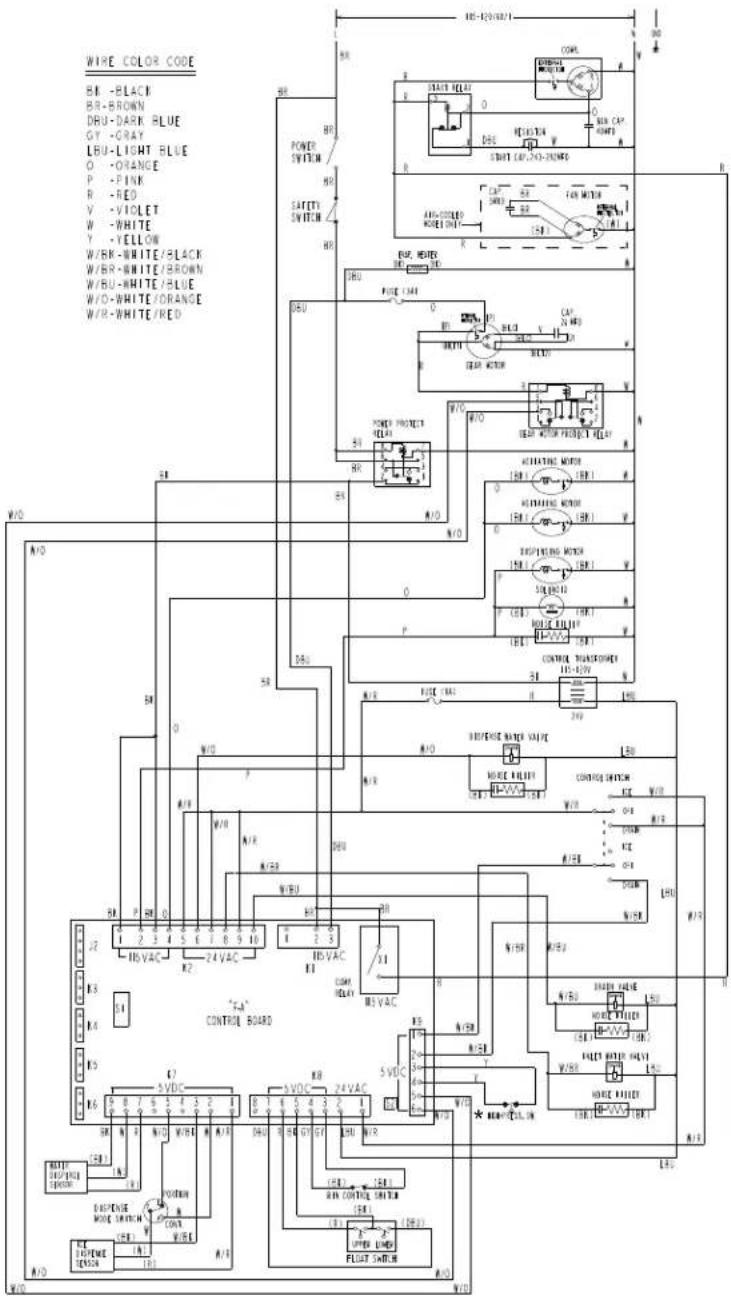
text_image
WIRE COLOR CODE BR -BLACK BR-BROWN DRU-DARK BLUE GY -GRAY LBU-LIGHT BLUE O -ORANGE P -PINK R -RED V -VIOLET W -WHITE Y -YELLOW W/BR-WHITE/BLACK W/BR-WHITE/BROWN W/BU-WHITE/BLUE W/O-WHITE/ORANGE W/R-WHITE/RED W/O A/O 50 N/O M/D A/R W/R A/R M/R W/R R/A P S O 1 2 3 4 5 6 7 8 9 10 H/SVAC K2 "T-A" CONTROL BOARD K3 K4 K5 K6 C1 B 7 6 5 4 3 2 1 R N R N/O W/O W/O W/O W/O W/O W/O W/O W/O W/O W/O W/O W/O W/O W/O W/O W/O W/O W/O W/O W/O W/O W/O W/O W/O W/O W/O W/O W/O W/O W/O W/O W/O W/O W/O W/O W/O W/O W/O W/O W/O W/O W/O W/O W/O W/O W/O W/O W/O W/O W/O R N R N/O W/O W/O W/O W/O W/O W/O W/O W/O W/O W/O W/O W/O W/O W/O W/O W/O W/O W/O W/O W/O W/O W/O W/O W/O W/O W/O W/O W/O W/O W/O W/O W/O W/O W/O W/O W/O W/O R N R N/O W/O W/O W/O W/O W/O W/O W/O W/O W/O R N R N/O W/O W/O W/O W/O W/O W/O W/O R A1 B1 C1 D1 E1 F1 G1 H1 I1 J1 K1 L1 M1 N1 O1 P1 Q1 R1 S1 T1 U1 V1 X1 Y1 Z1 A1 B1 C1 D1 E1 F1 G1 H1 I1 J1 K1 L1 M1 N1 O1 P1 Q1 R1 S1 T1 U1 V1 X1 Y1 Z1 A1 B1 C1D1E1E1E1E1E1E1E1E1E1E1E1E1E1E1E1E1E1E1E1E1E1E1E1E1E1E2 R N R N/C R N R N/C R N R N/C R N R N/C R N R N/C R N R N/C R N R N/C R N R N/C R N R N/C R N R N/C R N R N/C R N R N/C R N R N/C R N R N/C R N R N/C R N R N/C R N R N/C R N S R N S R N S R N S R N S R N S R N S R N S R N S R N S R N S R N S R N S R N S R N S R N S R N S R N S R N S R N S R N S R N S R N S R N S R N S R N O R N O R N O R N O R N O R N O R N O R N O R N O R N O R N O R N O R N O R N O R N O R N O R N O R N O R N O R N O R N O R N O R N O R N O R N O R N S R N S R N S R N S R N S R N S R N S R N S R N S R N S R N S R N S R N S R N S R N S R N S R N S R N S R N S R N S R N S R N S R N S R N S R N T R T T R T T R T T R T T R T T R T T R T T R T T R T T R T T R T T R T T R T T R T T R T T| S1DIP SWITCH | ||||||||||
| S1DIP SWITCH NO. | 1 | 2 | 3 | 4 | 5 | 6 | 7 | 8 | 9 | 10 |
| DCM-75IB_H-OS | OFF | OFF | OFF | OFF | OFF | ON | OFF | ON | OFF | OFF |
| * High Pressure Switch | ||
| Air-Cooled Model | Water-Cooled Model | |
| Cut-out | 412 ± 210 PSIG 384 | ± 210 PSIG |
| Cut-in | 327 ± 21 PSIG 284 | ± 21 PSIG |