95-8734W - Kit voiture Metra - Free user manual and instructions
Find the device manual for free 95-8734W Metra in PDF.


User questions about 95-8734W Metra
0 question about this device. Answer the ones you know or ask your own.
Ask a new question about this device
Download the instructions for your Kit voiture in PDF format for free! Find your manual 95-8734W - Metra and take your electronic device back in hand. On this page are published all the documents necessary for the use of your device. 95-8734W by Metra.
USER MANUAL 95-8734W Metra
natural_image
Interior view of a car dashboard with touchscreen and control panels (no visible text or symbols)Mercedes-Benz S Class 2000-2006
Visit MetraOnline.com for more detailed information about the product and up-to-date vehicle specific applications
KIT FEATURES
• ISO DDIN radio provision
• 95-8734B is scratch resistant matte black
- 95-8734W is woodgrain
KIT COMPONENTS
• A) Radio trim panel • B) Radio brackets • C) Panel brackets • D) #6 x 3/8" Phillips screws (2) • E) Panel clips (2)
AB
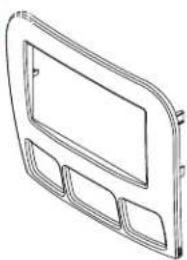
natural_image
Line drawing of a rectangular frame with three recessed cutouts (no text or symbols)
natural_image
Two technical line drawings of mechanical components or brackets, no text or symbols present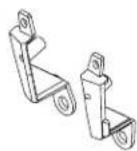

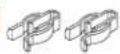
TABLE OF CONTENTS
Dash Disassembly 2
Kit Preparation ....3
Kit Assembly 3
WIRING & ANTENNA CONNECTIONS (sold separately)
Wiring Harness: Visit metraonline.com for harness and interface information
Antenna Adapter: 40-VW12 or 40-EU10
TOOLS REQUIRED
- Panel removal tool
- Phillips screwdriver
- Torx T20 screwdriver
Attention! With the key out of the ignition, disconnect the negative battery terminal before installing this product. Ensure that all installation connections are secure before cycling the ignition to test this product.
DASH DISASSEMBLY
2000-2002
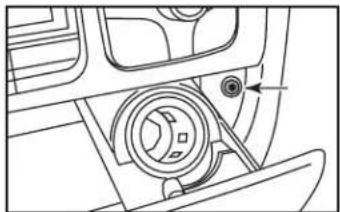
- Open the ashtray compartment door, remove (2) Torx T20 screws securing the ashtray assembly, then remove and unplug the ashtray assembly. (Figure A)
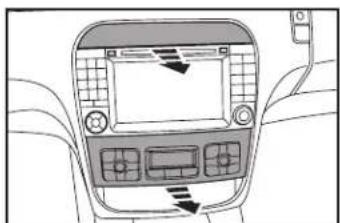
- Unclip, unplug, and remove the climate control panel surrounding the radio, then remove the panel. (Figure B)
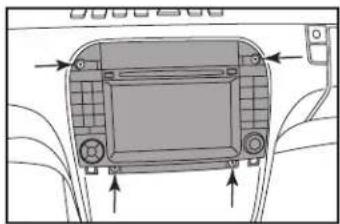
- Remove (4) Torx T20 screws securing the radio, then unplug and remove the radio. (Figure C)

natural_image
Technical line drawing of a mechanical component with a circular feature and arrow indicator (no text or symbols)
natural_image
Interior view of a car dashboard with control panel and directional arrow (no text or symbols)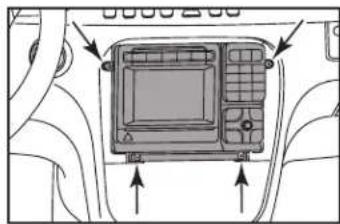
natural_image
Diagram of a device rear panel with arrows pointing to the front panel (no text or symbols present)2003-2006
- Open the ashtray compartment door, remove (2) Torx T20 screws securing the ashtray assembly, then remove and unplug the ashtray assembly. (Figure A)
- Unclip, unplug, and remove the climate control panel, then remove the panel. (Figure B)
- Unclip and remove the trim panel above the radio. (Figure B)
- Remove (4) Torx T20 screws securing the radio, then unplug and remove the radio. (Figure C)
Continue to Kit Preparation
natural_image
Technical line drawing of a mechanical component with no visible text or symbols(Figure A)(Figure A)
natural_image
Interior view of a car dashboard with control panel and directional arrows (no text or symbols)(Figure B)(Figure B)

natural_image
Diagram of a device rear panel with control buttons and directional arrows indicating orientation (no text or symbols)(Figure C)(Figure C)
KIT PREPARATION KIT ASSEMB
- Attach the panel brackets to the radio trim panel with the two supplied #6 x 3/8" Phillips screws. (Figure A)
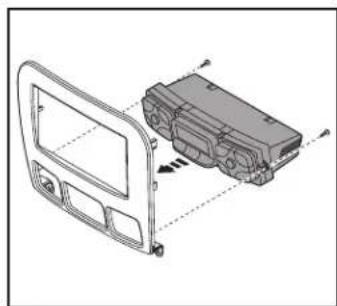
- Secure the climate control to the radio trim panel with the factory screws. (Figure B)
Continue to Kit Assembly

natural_image
Technical line drawing of a vehicle door frame with two small figures and dashed alignment lines (no text or symbols)(Figure A) (Figure A)
natural_image
Technical line drawing of a vehicle door frame with internal components and alignment arrows (no text or symbols)(Figure B) (Figure B)
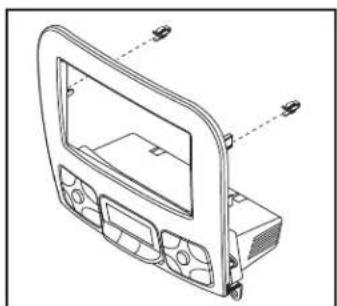
- Attach the (2) supplied panel clips to the radio housing. (Figure A)
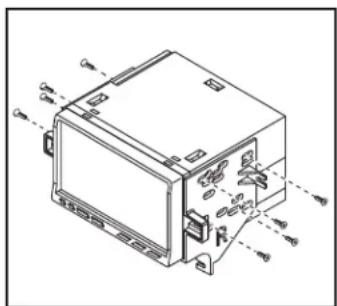
- Attach the radio brackets to the radio using screws supplied with the radio, and then secure into the dash opening. (Figure B)
- Locate the factory wiring harness and antenna connector in the dash, and complete all necessary connections to the radio. Metra recommends using the proper mating adapter from Metra and/or AXXESS. Re-connect the negative battery terminal and test the radio for proper operation.
- Snap the radio trim panel over the radio and reassemble the dash in reverse order of disassembly.
natural_image
Technical line drawing of a car dashboard frame with mounting holes and control panel (no text or symbols)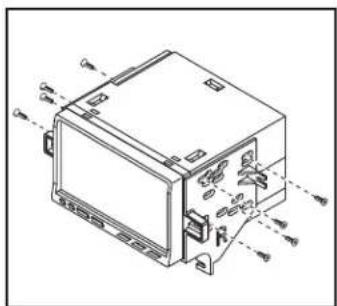
natural_image
Technical line drawing of an electronic device with labeled ports and connectors (no text or symbols present)Having difficulties? We're here to help.

our Tech Support line at:
386-257-1187

mail at:
techsupport@metra-autosound.com
Tech Support Hours (Eastern Standard Time)
Monday - Friday: 9:00 AM - 7:00 PM
Saturday: 10:00 AM - 7:00 PM
Sunday: 10:00 AM - 4:00 PM

KNOWLEDGE IS POWER
Enhance your installation and fabrication skills b enselling in the most recognized and respected
mobile electronics school in our industry.
Log onto www.instellerinstitute.com or call
600-354-8782 for more information and take steps toward a better tomorrow.

Metra recommends MECP certified technicians

natural_image
Interior view of a car dashboard with red and beige panels, no visible text or symbolsMercedes-Benz S Class 2000-2006
natural_image
Line drawing of a rectangular frame with three recessed slots and a central blank space (no text or symbols)
natural_image
Two isometric technical diagrams of metal bracket components with no visible text or symbols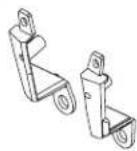


INDICE
natural_image
Technical line drawing of a mechanical component with no visible text or symbols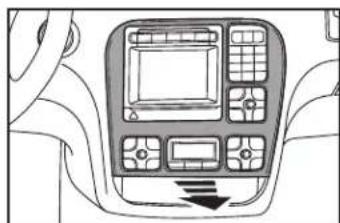
natural_image
Interior view of a vehicle dashboard with control panel and directional arrow (no text or symbols)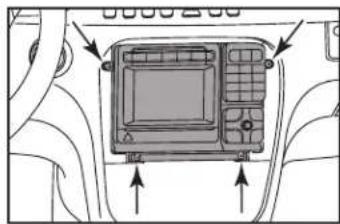
natural_image
Diagram of a device panel with arrows pointing to the front panel (no text or symbols present)2003-2006
natural_image
Technical line drawing of a mechanical component with no visible text or symbols(Figure A)(Figura A)

natural_image
Interior view of a car dashboard with control panels and directional arrows (no text or symbols)(Figure B)(Figura B)
natural_image
Diagram of a car front panel with directional arrows indicating orientation (no text or symbols)(Figure C)(Figura C)
natural_image
Technical line drawing of a door frame with two small objects and dashed alignment lines (no text or symbols)(Figura A)

natural_image
Technical line drawing of a vehicle door panel with internal components and alignment markers (no text or symbols)(Figura B)
natural_image
Technical line drawing of a car dashboard frame with control panel and buttons (no text or symbols)(Figura A)
natural_image
Technical line drawing of an electronic device with mounting holes and internal components (no text or symbols)(Figura B)
Monday - Friday: 9:00 AM - 7:00 PM
Saturday: 10:00 AM - 7:00 PM
Sunday: 10:00 AM - 4:00 PM

KNOWLEDGE IS POWER
Enhance your installation and fabrication skills to enrolling in the most recognized and respected
mobile electronics school in our industry.
Log onto www.installerinstitute.edu or call 386-672-5771 for more information and take steps.
toward a better tomorrow.
