
95-7324 - Car Installation Kit Metra - Free user manual and instructions
Find the device manual for free 95-7324 Metra in PDF.


| Product Type | Car Installation Kit |
| Brand | Metra |
| Model | 95-7324 |
| Compatible Vehicles | Kia Optima (2006.5–2010) |
| Kit Features | Double DIN radio provision, Stacked ISO units provision |
| Components Included | Double DIN trim plate, Double DIN brackets |
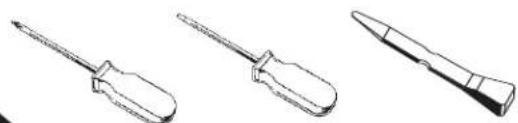
| Required Tools | Phillips screwdriver, Small flat blade screwdriver/panel removal tool |
| Wiring Harness (Sold Separately) | 70-1004 (Hyundai 2006-up/KIA 2004-up), 70-7303 (Hyundai/KIA 2009) |
| Antenna Adapter (Sold Separately) | 40-KI11 (2009-10 Kia Optima) |
| Wiring Color Code | EIA standard (e.g., Red: Ignition, Yellow: Battery, Black: Ground) |
| Installation Difficulty | Moderate – requires basic automotive disassembly and wiring |
| Safety Precautions | Disconnect negative battery terminal before installation |
| Maintenance | Clean with dry cloth; avoid liquids |
| Repair & Parts | Refer to installation instructions; no user-serviceable parts |
Frequently Asked Questions - 95-7324 Metra
User questions about 95-7324 Metra
0 question about this device. Answer the ones you know or ask your own.
Ask a new question about this device
Download the instructions for your Car Installation Kit in PDF format for free! Find your manual 95-7324 - Metra and take your electronic device back in hand. On this page are published all the documents necessary for the use of your device. 95-7324 by Metra.
USER MANUAL 95-7324 Metra
INSTALLATION INSTRUCTIONS FOR PART 95-7324
APPLICATIONS
KIA Optima
2006.5-2010
95-7324
KIT FEATURES
• Double DIN radio provision
- Stacked ISO units provision

natural_image
Interior view of a car dashboard with air filters and a digital display (no visible text or symbols)KIT COMPONENTS
A) Double DIN Trim Plate • B) Double DIN Brackets


WIRING AND ANTENNA CONNECTIONS (Sold Separately) Harness:
• 70-1004 - Hyundai 2006-up/KIA harness 2004-up
• 70-7303 - Hyundai / KIA Harness 2009
Antenna Adapter:
• 40-KI11 - 2009-10 Kia Optima
TOOLS REQUIRED:
Phillips Screwdriver • Small Flat Blade Screwdriver/ Panel Removal Tool
natural_image
Line drawings of three different screwdriver tools (no text or symbols present)TABLE OF CONTENTS
Dash Disassembly
- Kia Optima 2006.5 - 2010 .... 1
Kit Assembly \*
- Double DIN Radio Provision....2
- Stacked ISO Units Provision....3
Final Assembly 4
*Note:
Refer also to the instructions included with the aftermarket radio.
KIA OPTIMA 2006.5-2010
1 Disconnect the negative battery terminal to prevent an accidental short circuit.
2 Unclip and remove the panel surrounding the radio including the a/c vents and climate controls. (Figure A)
3 Remove (4) Phillips screws securing radio. Unplug and remove radio. (Figure B)
Continue to kit assembly.


DOUBLE DIN RADIO PROVISION
*Note: Refer also to the instructions included with the aftermarket radio.
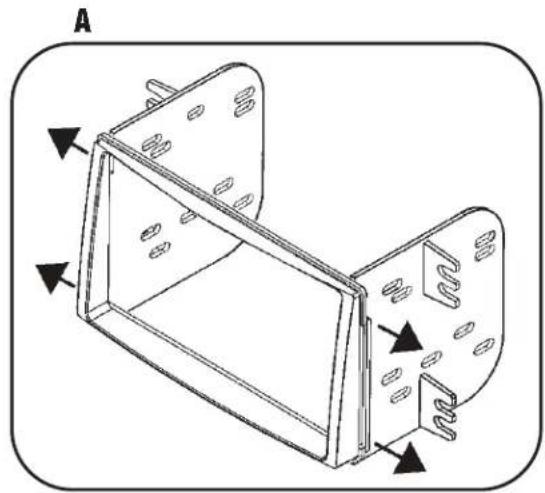
1 Snap the Double DIN brackets to the inside edge of the Double DIN trim plate. (Figure A)
2 Slide the Double DIN radio into the bracket/trim plate assembly and secure the radio to the assembly using the screws supplied with the radio. (Figure B)
Continue to final assembly.
natural_image
Technical line drawing of a mechanical housing component with mounting holes and internal ribs (no text or symbols)
natural_image
Line drawing of a device with labeled components and directional arrows (no text or symbols)STACKED ISO UNITS PROVISION
*Note: Refer also to the instructions included with the aftermarket radio.
1 Snap the Double DIN brackets to the inside edge of the Double DIN trim plate. (Figure A)
2 Slide the stacked ISO units into the bracket/radio housing assembly and secure the units to the kit using the screws supplied with the units. (Figure B)
Continue to final assembly.

natural_image
Technical line drawing of a mechanical housing or panel assembly with mounting holes and internal components (no text or symbols)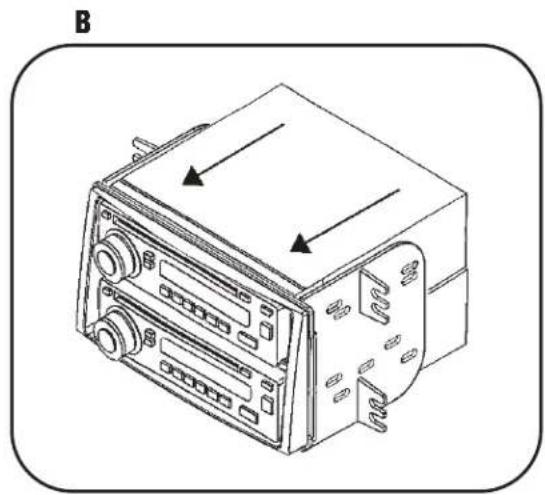
natural_image
Line drawing of a vintage electronic device with control panel and buttons, no text or symbols presentFINAL ASSEMBLY

(A) Strip wire ends back 1/2"
B) Twist ends together
C) Solder
D) Tape
1 Locate the factory wiring harness in the dash. Metra recommends using the proper mating adapter and making connections as shown. (Isolate and individually tape off the ends of any unused wires to prevent electrical short circuit.)
2 Re-connect the negative battery terminal and test the unit for proper operation.
3 Reassemble radio and dash assemblies in reverse order of disassembly.
FINAL WIRING CONNECTIONS
Make wiring connections using the EIA color code chart shown below and the instructions included with the head unit. Metra recommends making connections as shown below; Strip, Splice, Solder, Tape. Isolate and individually tape off ends of any unused wires to prevent electrical short circuit.
METRA / EIA WIRING CODE
| 12V Ignition / Acc. .... . Red | Right Front (+) .... . Gray |
| 12V Batt / Memory.... Yellow | Right Front (-). .... . Gray/ Black |
| Ground.... Black* | Left Front (+) .... . White |
| Power Antenna.... Blue | Left Front (-). .... . White / Black |
| Amp Turn-On.... Blue / White | Right Rear (+) .... . Violet |
| Amp Ground.... Black / White | Right Rear (-) .... . Violet / Black |
| Illumination.... Orange | Left Rear (+) .... . Green |
| Dimmer.... Orange / White | Left Rear (-) .... . Green / Black |
*NOTE: When a Black wire is not present, ground radio to vehicle chassis.
All colors may not be present on all leads due to manufacturer's specifications.
95-7324 INSTRUCTIONS


- INSTALLATION INSTRUCTIONS FOR PART 95-7324
- APPLICATIONS
- KIA Optima
- 2006.5-2010
- 95-7324
- KIT FEATURES
- KIT COMPONENTS
- TABLE OF CONTENTS
- Dash Disassembly
- Kit Assembly \*
- Final Assembly 4
- KIA OPTIMA 2006.5-2010
- DOUBLE DIN RADIO PROVISION
- STACKED ISO UNITS PROVISION
- FINAL ASSEMBLY
- FINAL WIRING CONNECTIONS
Brand : Metra
Model : 95-7324
Category : Car Installation Kit