95-2005B - Kit voiture Metra - Free user manual and instructions
Find the device manual for free 95-2005B Metra in PDF.


User questions about 95-2005B Metra
0 question about this device. Answer the ones you know or ask your own.
Ask a new question about this device
Download the instructions for your Kit voiture in PDF format for free! Find your manual 95-2005B - Metra and take your electronic device back in hand. On this page are published all the documents necessary for the use of your device. 95-2005B by Metra.
USER MANUAL 95-2005B Metra
INSTALLATION INSTRUCTIONS FOR PART 95-2005B
APPLICATIONS
CADILLAC
ELDORADO 1996-2002
SEVILLE 1996-1997/1998-2005
DEVILLE CONCOURS (CONSOLE SHIFT)1996-1999
DEVILLE 2000-2005
95-2005B
KIT FEATURES
• Double DIN Mount Radio Provision
- Stacked ISO Mount Radio Provision

natural_image
Interior view of a car dashboard with air conditioners and a digital display (no visible text or symbols)KIT COMPONENTS
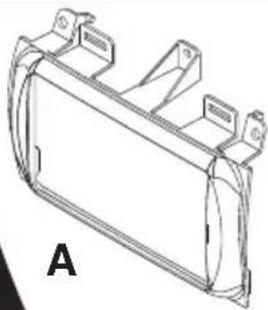
A) Double DIN Housing • B) Double DIN Brackets
natural_image
Technical line drawing of a mechanical bracket or housing component (no text or symbols)
natural_image
Technical line drawing of three mechanical clamping components labeled B (no text or symbols present)WIRING AND ANTENNA CONNECTIONS
(Sold Separately)
Harness:
• GMRC-03 - Cadillac Chime Interface 1996-02
• GMOS-06 - Cadillac ONSTAR/AMP interface 2000-05
• 40-GM10 - GM antenna adapter 1988-up
Antenna Adapter:
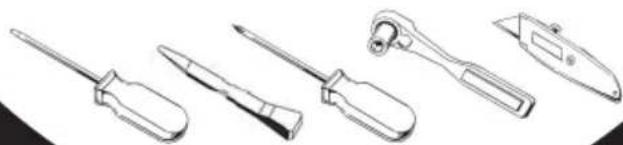
TOOLS REQUIRED:
Small Flat Blade Screwdriver/ Panel Removal Tool
- Phillips Screwdriver • Socket Set • Cutting Tool
natural_image
Line drawings of five different types of screwdrivers and tools (no text or symbols)TABLE OF CONTENTS
- Dash Disassembly
- Cadillac Eldorado 1996-2002 ---- 1
- Cadillac Seville 1996-1997----1
- Cadillac Seville 1998-2005----2
- Cadillac Deville Concours (Console Shift) 1996-1999----2
- Cadillac Deville 2000-2005 ---- 3
- Kit Preparation
- Cadillac Eldorado 1996-2002 ---- 4
- Cadillac Seville 1996-1997----4
- Cadillac Seville 1998-2005 ---- 5
- Cadillac Deville Concours (Console Shift) 1996-1999----5
- Cadillac Deville 2000-2005 ---- 6
- Kit Assembly
- Double DIN Mount Radio Provision----7
- Stacked ISO Mount Radio Provision 7
- Final Assembly 8
- Refer also to the instructions included with the aftermarket radio.
1 Disconnect the negative battery terminal to prevent an accidental short circuit.
2 Remove C-clip on forward facing side of shift knob and pull and remove knob. (Figure A)
3 Remove (2) 9/32 screws on each side of the ashtray assembly and (1) in the middle underneath ashtray insert. (Figure B)
4 Insert a small flat blade screw-driver in between the radio and the switch panel at top of radio and pry up and out to remove switch panel. (Figure C)
5 Remove (4) 9/32 screws
• (2) from the top (Figure D) and
• (2) from the bottom to remove radio. (Figure E)
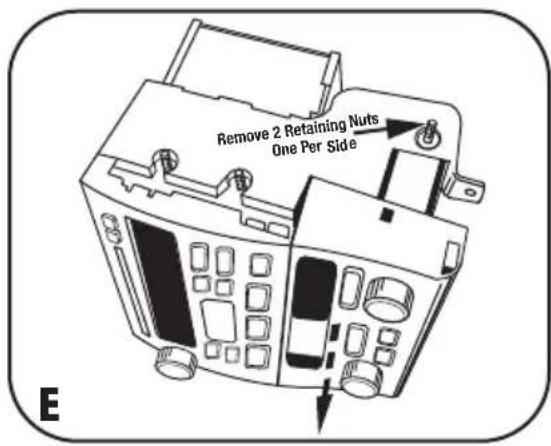
6 Remove the (2) retaining nuts securing the radio and climate control to the factory bracket assembly and slide the climate control outward. (Figure F)
Continue to kit preparation.

text_image
Remove 2 Retaining Nuts One Per Side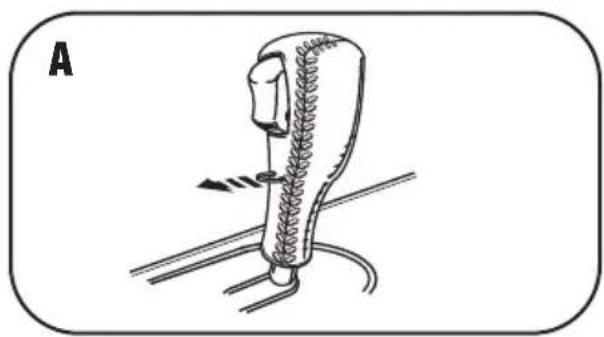
natural_image
Diagram of a mechanical device with spring and rope components, no text or symbols present
natural_image
Interior view of a car air conditioner unit with control panel and buttons (no text or symbols)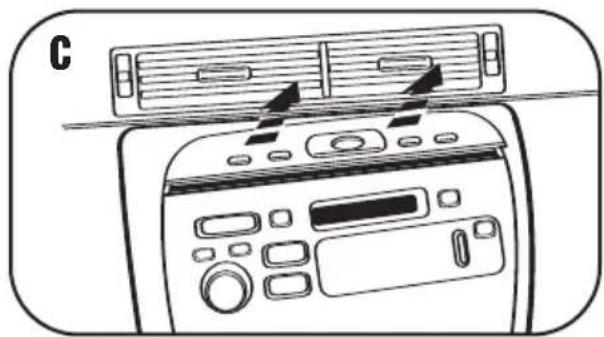
natural_image
Line drawing of a front-mounted air conditioner unit with control panel and ventilation slots (no text or symbols)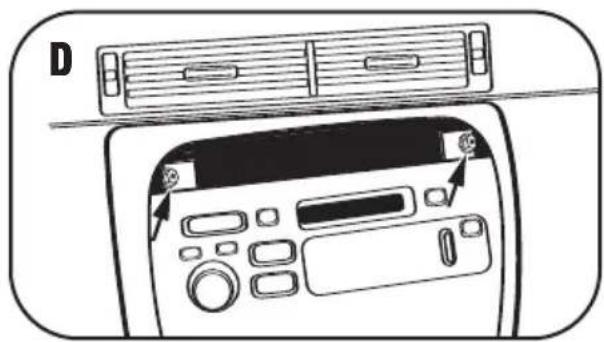
natural_image
Diagram of a computer interface showing front panel, back panel, and control panel with buttons (no text or symbols)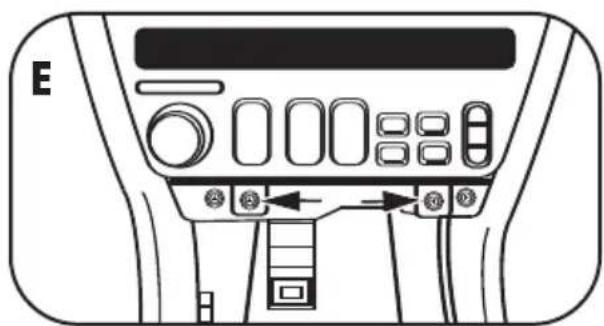
natural_image
Front view of a vehicle air conditioner panel with control buttons and indicator lights (no text or symbols)1 Disconnect the negative battery terminal to prevent an accidental short circuit.
2 Remove (2) 9/32 screws on each side of the ashtray assembly and (1) in the middle underneath ashtray insert. (Figure A)
3 Insert a small flat blade screwdriver in between the radio and the switch panel at top of radio and pry up and out to remove switch panel.
(Figure B)
4 Remove (3) 9/32 screws
• (1) from the top (Figure C) and
• (2) from the bottom to remove radio. (Figure D)
5 Remove the (2) retaining nuts securing the radio and climate control to the factory bracket assembly and slide the climate control outward. (Figure E)
Continue to kit preparation.
text_image
Remove 2 Retaining Nuts One Per Side
natural_image
Diagram of a car air conditioner unit with labeled ports and buttons (no text or symbols beyond labels)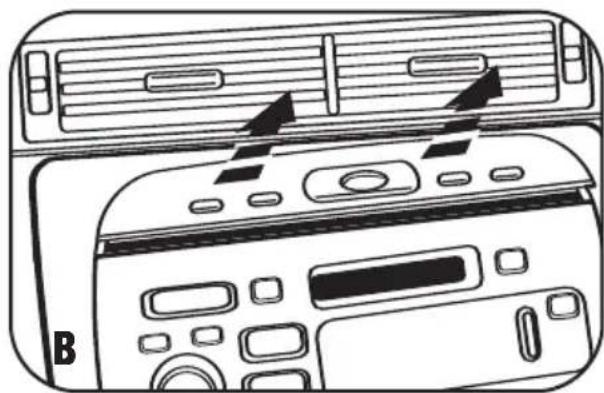
natural_image
Diagram of two air conditioning machines with control panels and ventilation slots (no text or symbols)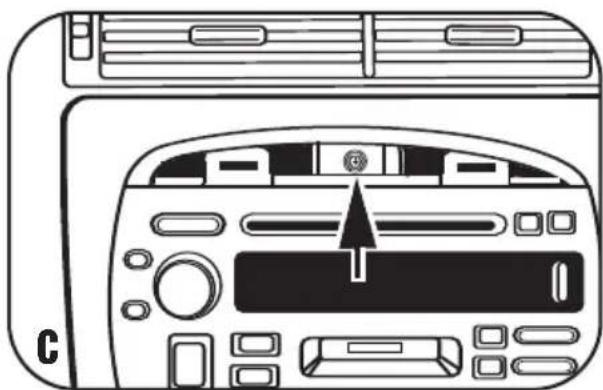
natural_image
Line drawing of a car air conditioner front panel with control buttons and a central indicator (no text or symbols)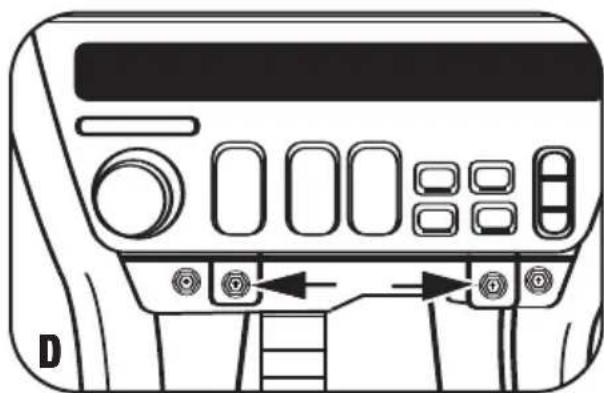
natural_image
Front view of a control panel with buttons and display (no text or symbols visible)1 Disconnect the negative battery terminal to prevent an accidental short circuit.
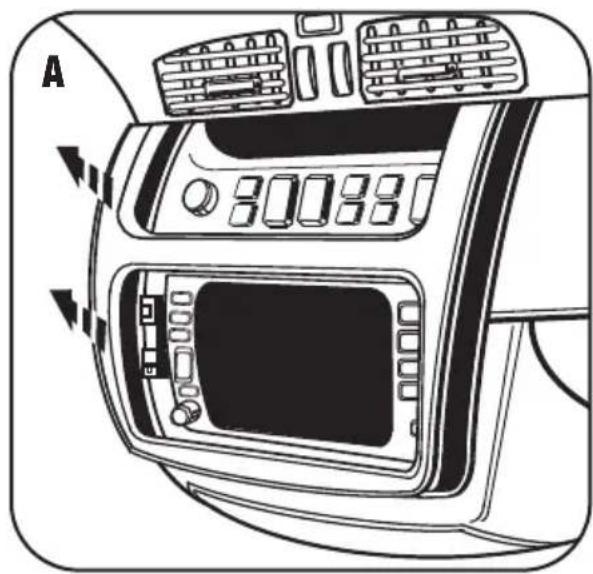
2 Unsnap and remove panel surrounding climate controls and radio. (Figure A)
3 Depress clips on both sides of radio and pull out to remove. (Figure B) Continue to kit preparation.
natural_image
Diagram of a car air conditioning unit with labeled panel and control buttons (no text or symbols beyond labels)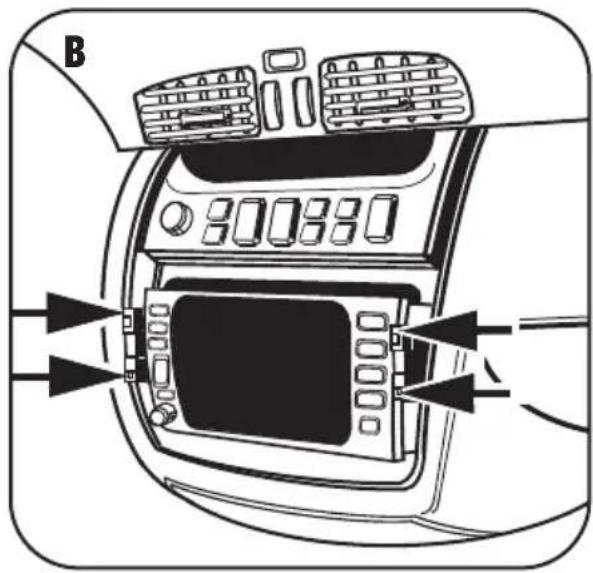
natural_image
Diagram of a car dashboard with control panel and air vent, showing no text or symbolsCADILLAC ELDORADO 1996-2002 CADILLAC SEVILLE 1996-1997
NOTE: Refer also to the instructions included with the aftermarket radio.
1 Cadillac Eldorado 1996-2002 and Cadillac Seville 1996-1997:
Remove all tabs except the ones marked S-E from the radio housing. (Figure A)
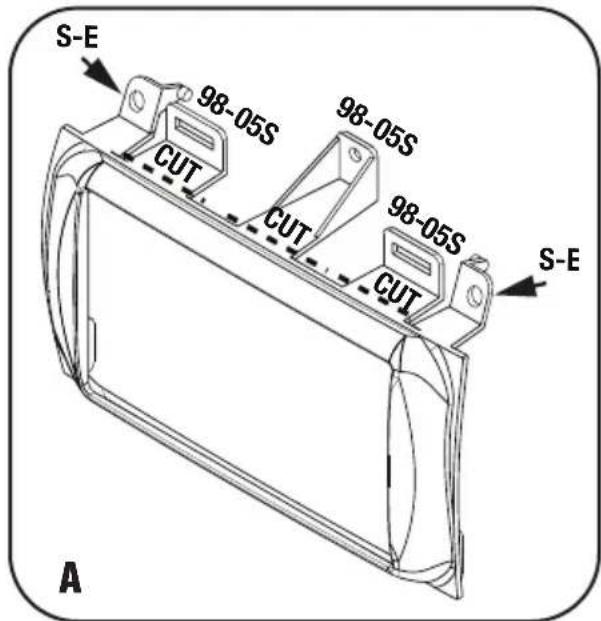
text_image
S-E 98-05S 98-05S CUT CUT 98-05S CUT S-E A2 Cut front tab from bottom of the double DIN armiture on both sides. (Figure B)

text_image
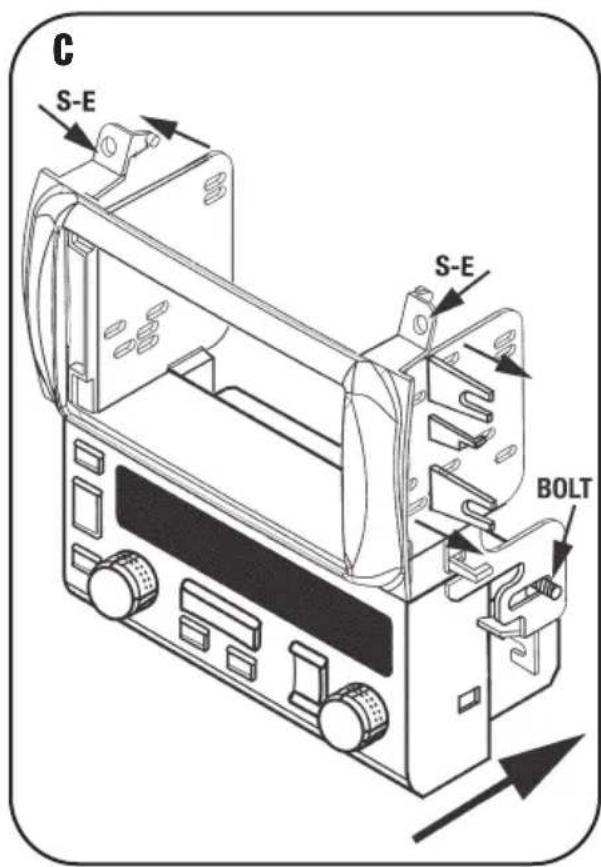
B CUT FRONT TAB HERE3 Attach the double DIN brackets to the double DIN radio housing. (Figure C)
4 Slide the climate control assembly into the bracket/housing assembly and attach with the factory hardware. (Figure C)
Continue to kit assembly.
text_image
C S-E S-E BOLTNOTE: Refer also to the instructions included with the aftermarket radio.
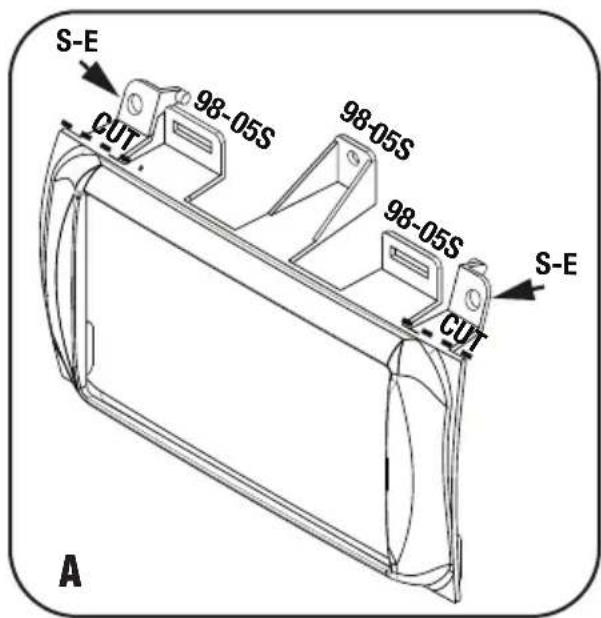
1 Cadillac Seville 1998-2005 and Deville Concours 1996-1999:
Remove all tabs except the ones marked 98-05S from the radio housing. (Figure A)
text_image
S-E 98-05S 98-05S 98-05S S-E CUT A2 Cut rear tab from bottom of the double DIN armiture on both sides. (Figure B)
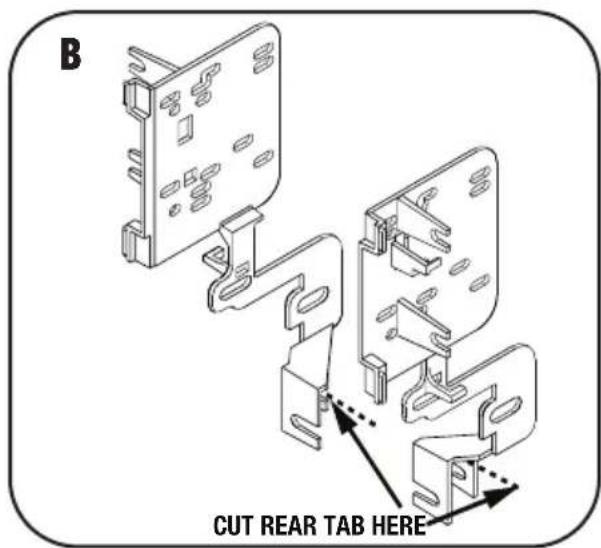
text_image
B CUT REAR TAB HERE3 Attach the double DIN brackets to the double DIN radio housing. (Figure C)
4 Slide the climate control assembly into the bracket/housing assembly and attach with the factory hardware. (Figure C)
Continue to kit assembly.

text_image
C 98-05S 98-05S 98-05S BOLT1 Cadillac Deville 2000-2005 : Remove all tabs from the radio housing top. (Figure A)
2 Attach the double DIN brackets to radio housing. Leave all side tabs on the double DIN brackets attached, but cut plastic armiture off below on each bracket at bottom, both sides. (Figure B)
3 When installing the 95-2005 assembly into the sub dash use the supplied (4) Phillips screws and mount in the locations shown. (Figure C)
Continue to kit assembly.

text_image
A S-E CUT 98-05S CUT 98-05S CUT 98-05S CUT S-E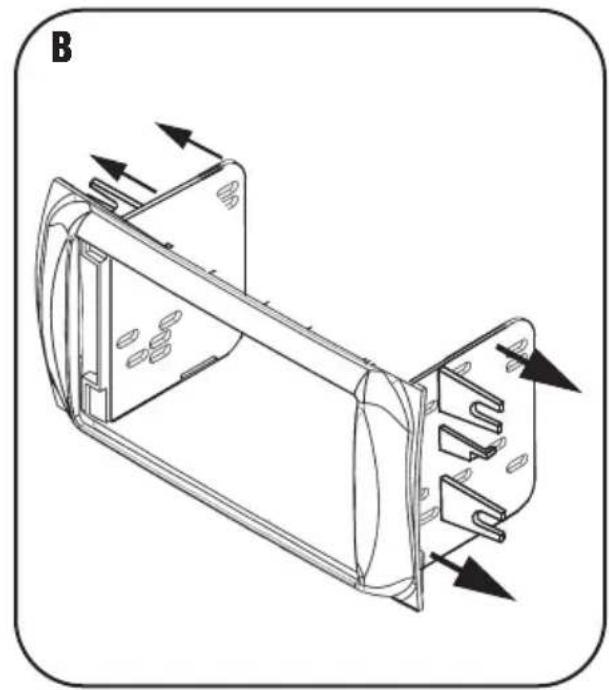
natural_image
Technical line drawing of a mechanical component with directional arrows indicating flow or movement (no text or symbols)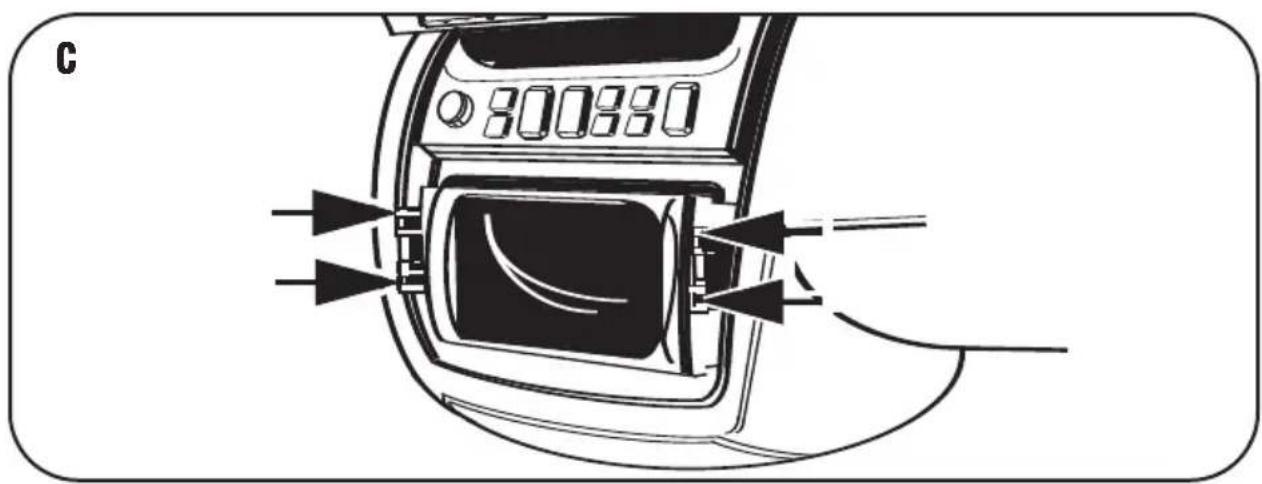
natural_image
Diagram of a device with ports and cables, no visible text or symbolsDOUBLE DIN MOUNT RADIO PROVISION/ STACKED ISO MOUNT UNIT(S) PROVISION
NOTE: Refer also to the instructions included with the aftermarket radio.
1 Slide the Double DIN or stacked ISO mount units into the bracket/radio housing assembly and secure the Double DIN or stacked ISO mount units to the assembly using the screws supplied with the Double DIN or stacked ISO mount units. (Figure A)
Continue to final assembly.

natural_image
Technical line drawing of a mechanical device with internal components and directional arrows indicating motion (no text or symbols)FINAL ASSEMBLY
text_image
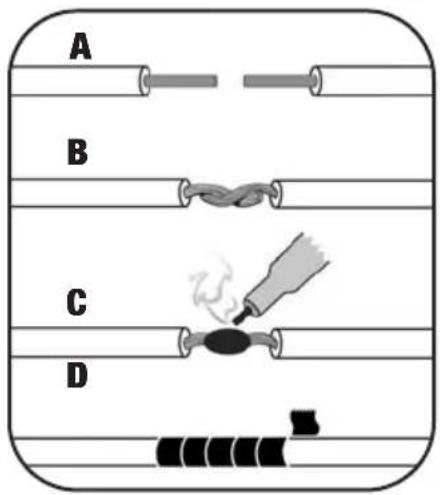
A B C D(A) Strip wire ends back 1/2"
B) Twist ends together
C) Solder
D) Tape
1 Locate the factory wiring harness in the dash. Metra recommends using the proper mating adapter and making connections as shown. (Isolate and individually tape off the ends of any unused wires to prevent electrical short circuit.)
2 Re-connect the negative battery terminal and test the unit for proper operation.
3 Reassemble radio and dash assemblies in reverse order of disassembly.
FINAL WIRING CONNECTIONS
Make wiring connections using the EIA color code chart shown below and the instructions included with the head unit. Metra recommends making connections as shown below; Strip, Splice, Solder, Tape. Isolate and individually tape off ends of any unused wires to prevent electrical short circuit.
METRA / EIA WIRING CODE
| 12V Ignition / Acc. .... . Red | Right Front (+) .... Gray |
| 12V Batt / Memory.... Yellow | Right Front (-). Gray/ Black |
| Ground.... Black* | Left Front (+) .... White |
| Power Antenna.... Blue | Left Front (-). White / Black |
| Amp Turn-On.... Blue / White | Right Rear (+) .... Violet |
| Amp Ground.... Black / White | Right Rear (-) .... Violet / Black |
| Illumination.... Orange | Left Rear (+) .... Green |
| Dimmer.... Orange / White | Left Rear (-) .... Green / Black |
*NOTE: When a Black wire is not present, ground radio to vehicle chassis. All colors may not be present on all leads due to manufacturer's specifications.
NOTES
95-2005B INSTRUCTIONS