EU-PC2C - Unspecified Edimax - Free user manual and instructions
Find the device manual for free EU-PC2C Edimax in PDF.


User questions about EU-PC2C Edimax
0 question about this device. Answer the ones you know or ask your own.
Ask a new question about this device
Download the instructions for your Unspecified in PDF format for free! Find your manual EU-PC2C - Edimax and take your electronic device back in hand. On this page are published all the documents necessary for the use of your device. EU-PC2C by Edimax.
USER MANUAL EU-PC2C Edimax
2 Port USB 2.0 Cardbus
EU-PC2C
User's Manual
EDIMAX
Contents
1.0 USB Port Features ....P.3
2.0 System Requirement ....P.3
3.0 Driver Limitations ..P.3
4.0 Driver Installation (Windows XP) ... ... ... ... ... ... ... ... .P.4
5.0 Driver Installation (Windows 2000)... ... ... ... ... ... .P.10
6.0 Driver Installation (Windows ME)... ... ... ... ... ... ... P.16
7.0 Driver Installation (Windows 98/98SE)... ... ... ... ... P.19
Introduction
Add a USB Cardbus device to your PC
Instantly add USB peripherals to your Notebook. Never open your computer case again after you have your USB Port (PCMCIA) card installed and say good-bye to confusing cables.
The USB Port (Universal Serial Bus) allows you to instantly connect USB devices to your computer. The USB Port will allow you to attach 2 USB devices instantly.
You never have to worry about running out of slots in your computer or those confusing IRQ's again. You can also "Hot Swap" your USB devices. What does this mean? You never have to power down your PC to install hardware again. Gamers can switch joysticks on the fly. Welcome to the USB Revolution.
1.0 USB Port Features
The CardBus is the trade name for an advanced PC Card (also known as PCMCIA card) specification. It fits in a slot like a conventional PC card and 32-bit path is used for data transfer. It supports the following I/O features:
- 2 USB ports (root hub and two or four down stream function ports)
- Auto detect speeds and connections of devices
• Support High Speed Data Transfer Rates of up to 480 Mbps - Integrated physical layer transceivers
- Normal and low power operating modes
- Fully Plug and Play compatible
- OHCI (Open Host Controller Interface) specification V1.0 register compatible
- USB specification V.1.0 compatible
- Provide one USB power cable
** If you use PCMCIA USB card. At normal time, you don't need to use the USB power cable that you connect to USB devices. Only in one case that system request more power and please use that!
2.0 System Requirements
This setup program will install the driver for NEC USB 2.0 Host Controller. Before you start to run the setup program, please make sure your computer is an IBM PC-compatible system.
This driver can be used either the following operating systems:
- Windows98
● Windows98 Second Edition.
● Windows Millennium. - Windows 2000.
- Windows XP.
3.0 Driver Limitations
Current limitations of the driver are: Composite devices and Hi-Speed Isochronous Transfers are currently not supported.
4. Driver Installation (Windows XP)
- Please make sure this PCI/PCMCIA card has been installed on your system correctly.
When starting Windows XP, it will display the follow screen, please select "Install from a list or specific location [Advanced]".
Found New Hardware Wizard

Welcome to the Found New Hardware Wizard
This wizard helps you install software for:
NEC PCI to USB Enhanced Host Controller

If your hardware came with an installation CD or floppy disk, insert it now.
What do you want the wizard to do?
○ Install the software automatically (Recommended)
Install from a list or specific location (Advanced)
Click Next to continue.
< Back
Next>
Cancel
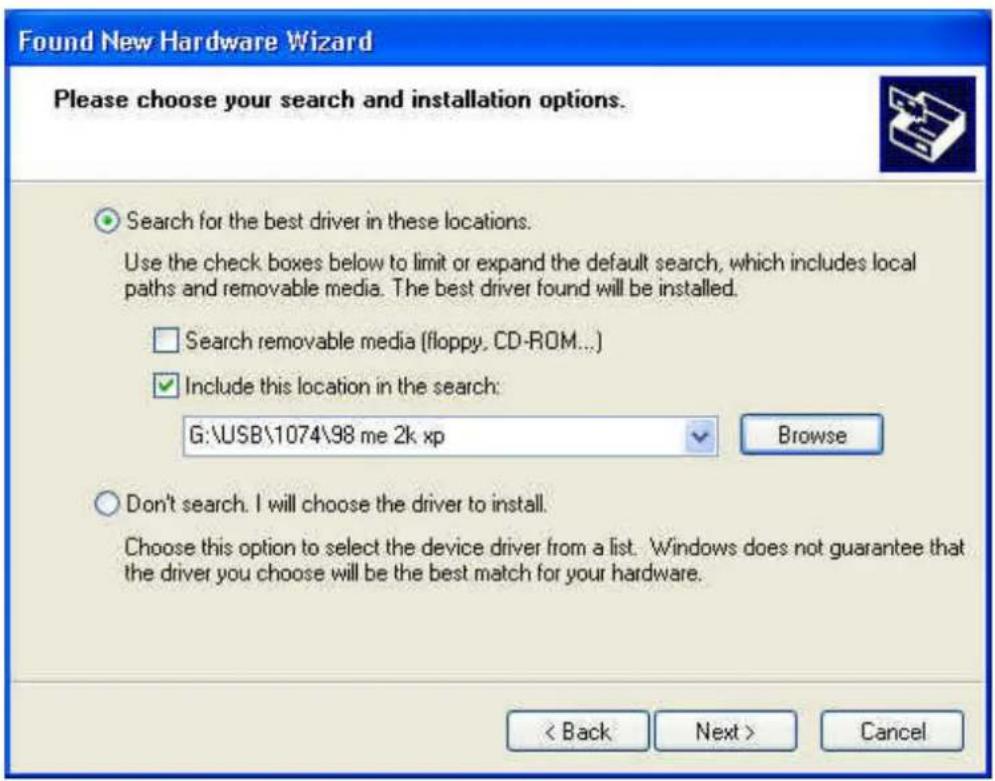
- Insert the "Driver CD" into the CD-ROM and select the "Include this location in the search". Please use the Browse to change the path to "your cdrom driver:\USB\Item\98 me 2k xp".
text_image
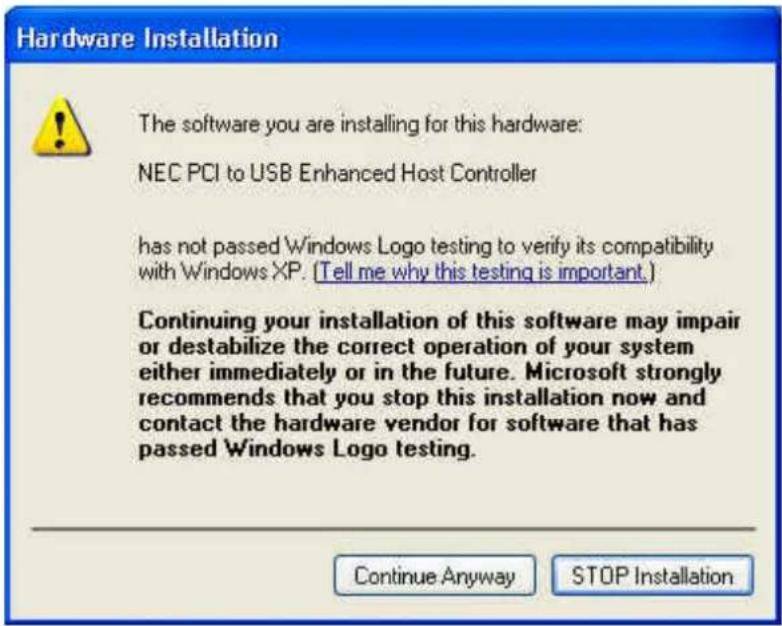
Found New Hardware Wizard Please choose your search and installation options. Search for the best driver in these locations. Use the check boxes below to limit or expand the default search, which includes local paths and removable media. The best driver found will be installed. Search removable media (floppy, CD-ROM...) Include this location in the search: G:\USB\1074\98 me 2k xp Browse Don't search. I will choose the driver to install. Choose this option to select the device driver from a list. Windows does not guarantee that the driver you choose will be the best match for your hardware. < Back Next > Cancel- When display Hardware Installation screen, Press "Continue Anyway".
text_image
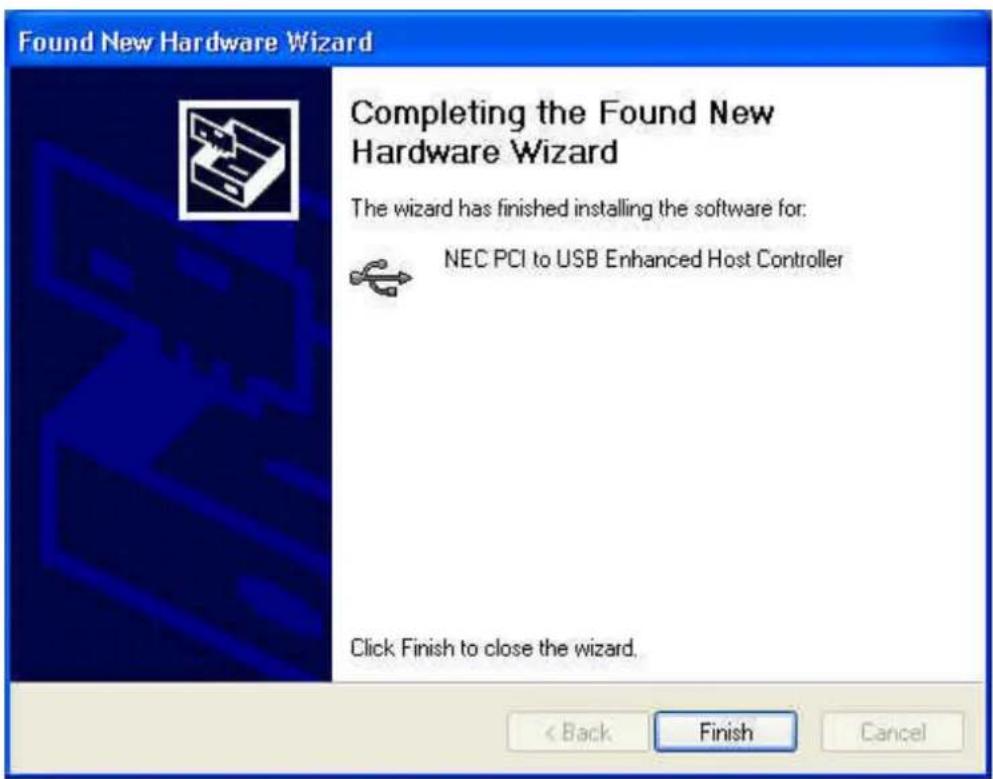
Hardware Installation The software you are installing for this hardware: NEC PCI to USB Enhanced Host Controller has not passed Windows Logo testing to verify its compatibility with Windows XP. (Tell me why this testing is important.) Continuing your installation of this software may impair or destabilize the correct operation of your system either immediately or in the future. Microsoft strongly recommends that you stop this installation now and contact the hardware vendor for software that has passed Windows Logo testing. Continue Anyway STOP Installation- Wait a moment to install files into your system. Then press "Finish".
text_image
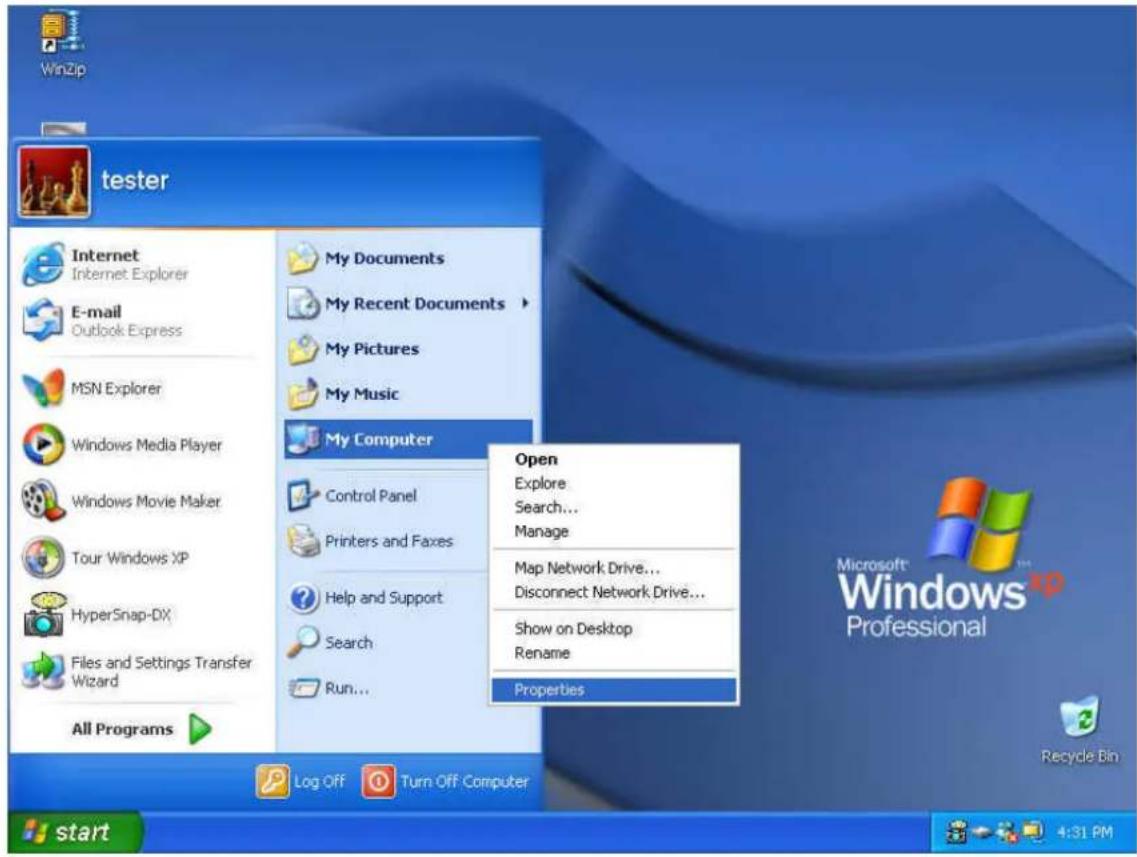
Found New Hardware Wizard Completing the Found New Hardware Wizard The wizard has finished installing the software for: NEC PCI to USB Enhanced Host Controller Click Finish to close the wizard. < Back Finish Cancel- To check your device from "Device Manager". Press "Start? My Computer? Properties".
text_image
WinZip tester Internet Internet Explorer E-mail Outlook Express MSN Explorer Windows Media Player Windows Movie Maker Tour Windows XP HyperSnap-DX Files and Settings Transfer Wizard All Programs My Documents My Recent Documents My Pictures My Music My Computer Control Panel Printers and Faxes Help and Support Search Run... Open Explore Search... Manage Map Network Drive... Disconnect Network Drive... Show on Desktop Rename Properties Log Off Turn Off Computer Microsoft Windows Professional Recycle Bin 4:31 PM- Open "Device Manager" and check if your device works.
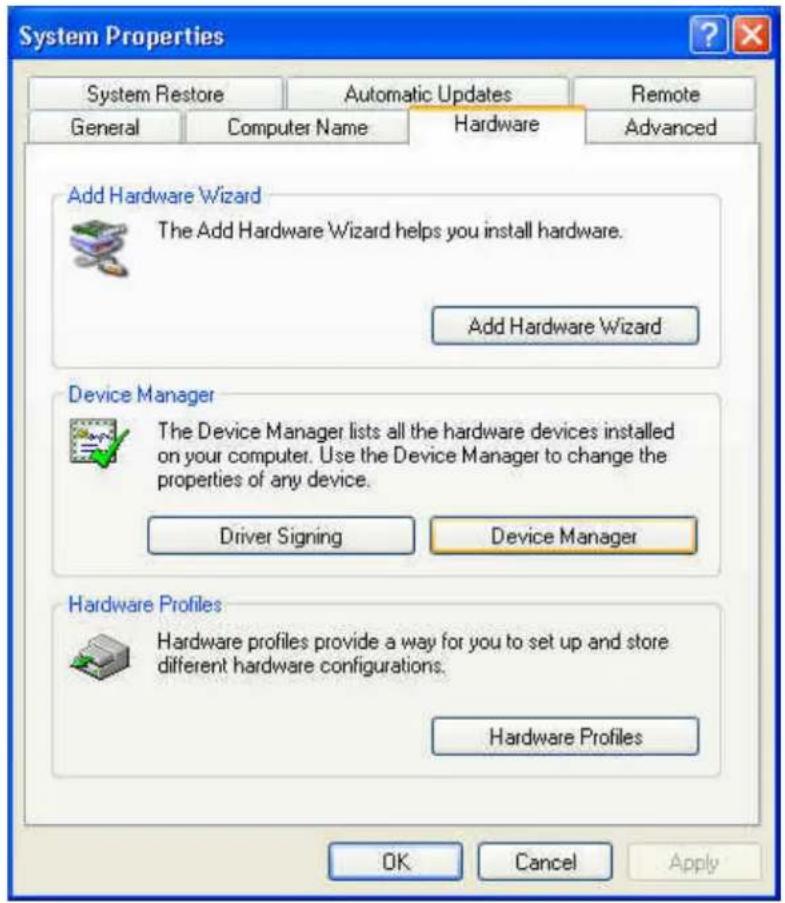
text_image
System Properties System Restore Automatic Updates Remote General Computer Name Hardware Advanced Add Hardware Wizard The Add Hardware Wizard helps you install hardware. Add Hardware Wizard Device Manager The Device Manager lists all the hardware devices installed on your computer. Use the Device Manager to change the properties of any device. Driver Signing Device Manager Hardware Profiles Hardware profiles provide a way for you to set up and store different hardware configurations. Hardware Profiles OK Cancel Apply- Note! If there is a yellow exclamation mark on “NEC PCI to USB Enhanced Host Controller” or “USB 2.0 Root Hub Device”, please remove this item from the “Device Manager” by clicking the “Uninstall” button and click “Refresh” to re-install this driver again.

text_image
IDE ATA/ATAPI controllers Keyboards Mice and other pointing devices Monitors Other devices Ports (COM & LPT) Processors SCSI and RAID controllers Sound, video and game controllers System devices Universal Serial Bus controllers NEC PCI to USB Enhanced Host Controller NEC PCI to USB Open Host Controller NEC PCI to USB Open Host Controller USB 2.0 Root Hub Device USB Root Hub USB Root Hub USB Root Hub USB Root Hub VIA Rev 5 or later USB Universal Host Controller VIA Rev 5 or later USB Universal Host Controller5.0 Driver Installation (Windows 2000)
- Please make sure this PCI/PCMCIA card has been installed on your system correctly.
When starting Windows 2000, the system will find "Universal Serial Bus (USB) Controller".

text_image
Found New Hardware Universal Serial Bus (USB) Controller Installing ...- Press "Next".

text_image
Found New Hardware Wizard Welcome to the Found New Hardware Wizard This wizard helps you install a device driver for a hardware device. To continue, click Next. < Back Next > Cancel- Select "Search for a suitable driver for my device [recommended]" and press "Next".
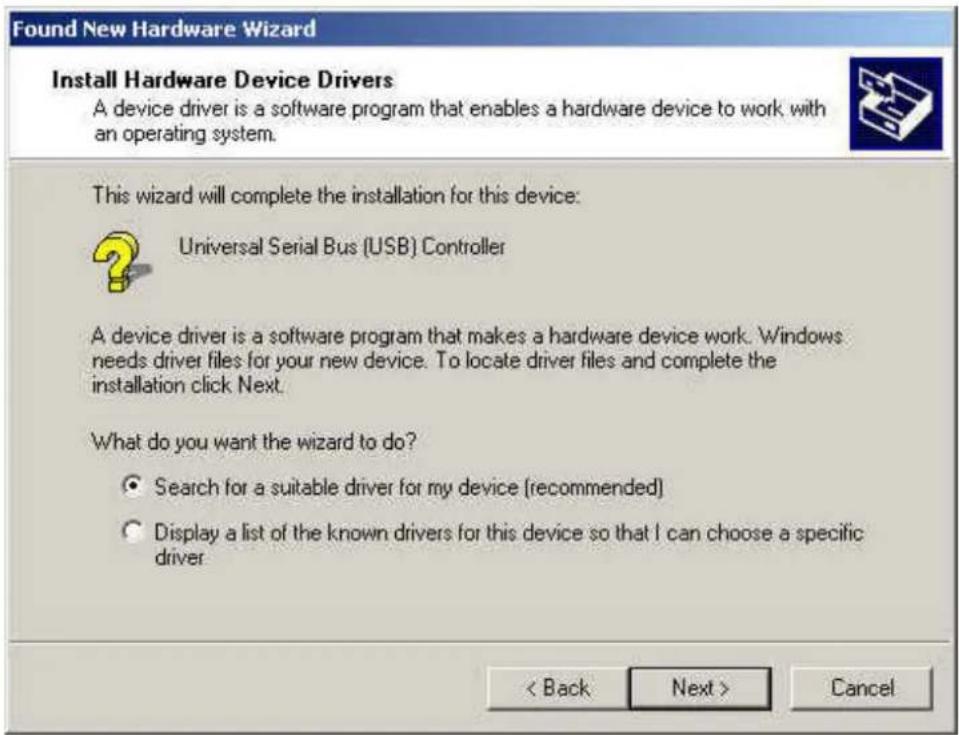
text_image
Found New Hardware Wizard Install Hardware Device Drivers A device driver is a software program that enables a hardware device to work with an operating system. This wizard will complete the installation for this device: Universal Serial Bus (USB) Controller A device driver is a software program that makes a hardware device work. Windows needs driver files for your new device. To locate driver files and complete the installation click Next. What do you want the wizard to do? • Search for a suitable driver for my device (recommended) • Display a list of the known drivers for this device so that I can choose a specific driver < Back Next > Cancel- Select "Specify a location" and press "Next".
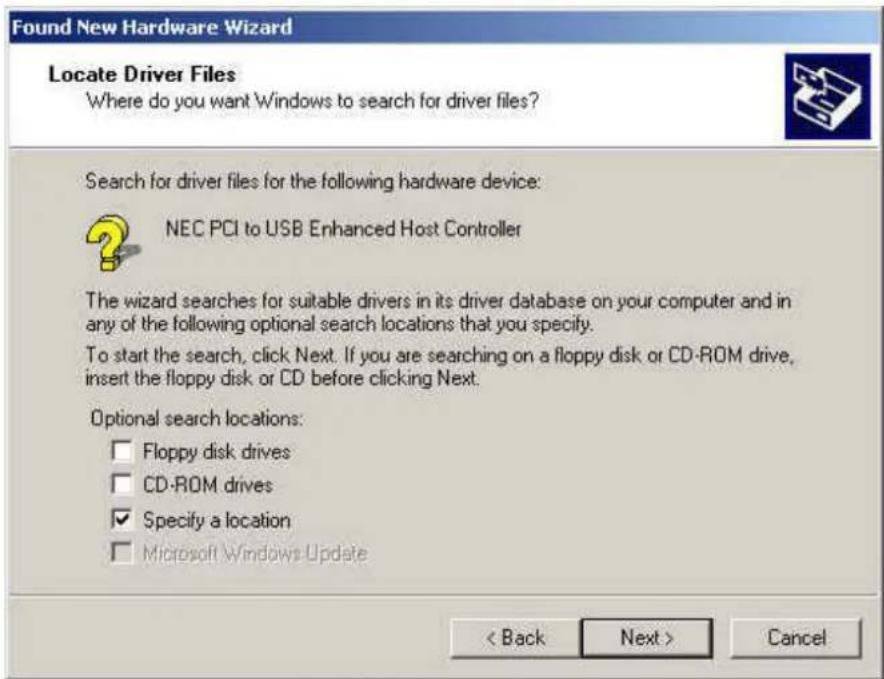
text_image
Found New Hardware Wizard Locate Driver Files Where do you want Windows to search for driver files? Search for driver files for the following hardware device: NEC PCI to USB Enhanced Host Controller The wizard searches for suitable drivers in its driver database on your computer and in any of the following optional search locations that you specify. To start the search, click Next. If you are searching on a floppy disk or CD-ROM drive, insert the floppy disk or CD before clicking Next. Optional search locations: □ Floppy disk drives □ CD-ROM drives ☑ Specify a location □ Microsoft Windows Update < Back Next > Cancel- Insert the "Driver CD" into the CD-ROM and use the Browse to change the path to "your cdrom driver:\USB\Item\98 me 2k xp".
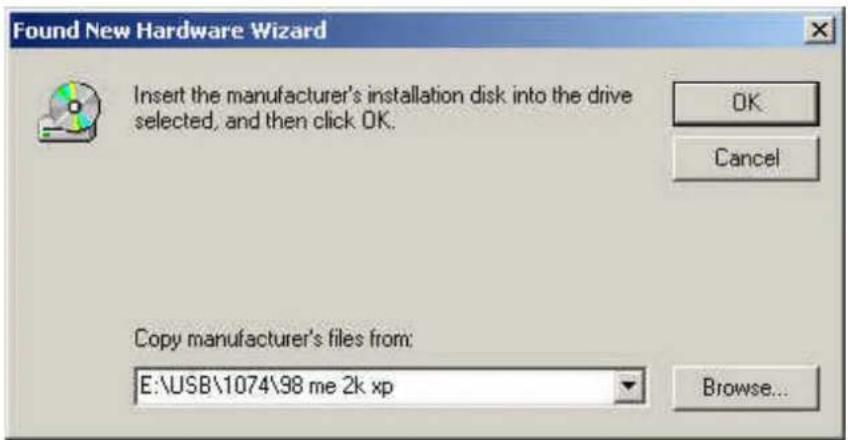
text_image
Found New Hardware Wizard Insert the manufacturer's installation disk into the drive selected, and then click OK. OK Cancel Copy manufacturer's files from: E:\USB\1074\98 me 2k xp Browse...- Choose the "ousb2.inf" file and press "Open".

text_image
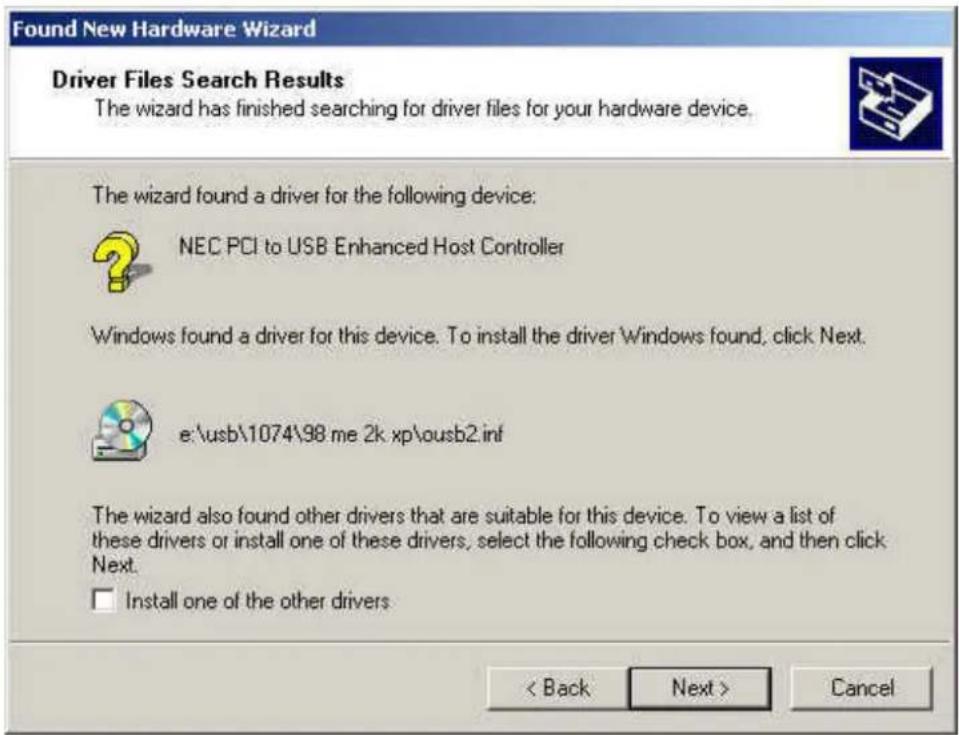
Locate File Look in: 98 me 2k xp ousb2.inf History Desktop My Documents My Computer My Network P... File name: ousb2.inf Files of type: Setup Information (*.inf) Open Cancel7. Press "Next".
text_image
Found New Hardware Wizard Driver Files Search Results The wizard has finished searching for driver files for your hardware device. The wizard found a driver for the following device: NEC PCI to USB Enhanced Host Controller Windows found a driver for this device. To install the driver Windows found, click Next. e:\usb\1074\98 me 2k xp\ousb2.inf The wizard also found other drivers that are suitable for this device. To view a list of these drivers or install one of these drivers, select the following check box, and then click Next. □ Install one of the other drivers. < Back Next > Cancel8. Press "Finish".

text_image
Found New Hardware Wizard Completing the Found New Hardware Wizard NEC PCI to USB Enhanced Host Controller Windows has finished installing the software for this device. To close this wizard, click Finish.- To check your device from "Device Manager". Press "Start? My Computer? Properties".
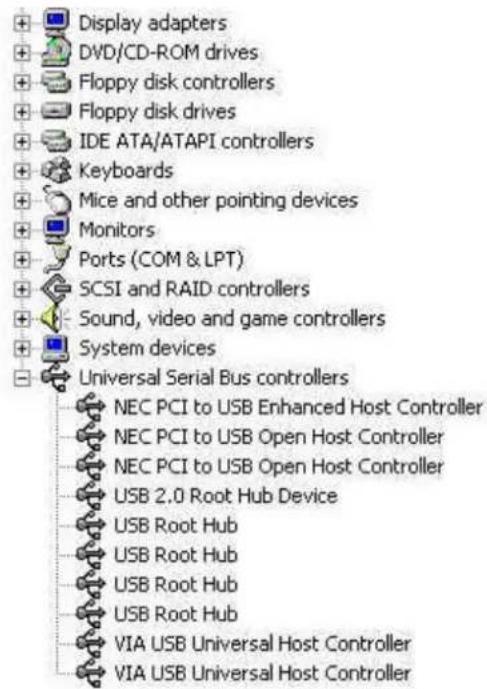
Open "Device Manager" and check if your device works.

text_image
System Properties General | Network Identification | Hardware | User Profiles | Advanced | Hardware Wizard The Hardware wizard helps you install, uninstall, repair, unplug, eject, and configure your hardware. Hardware Wizard... Device Manager The Device Manager lists all the hardware devices installed on your computer. Use the Device Manager to change the properties of any device. Driver Signing... Device Manager... Hardware Profiles Hardware profiles provide a way for you to set up and store different hardware configurations. Hardware Profiles... OK Cancel Apply- Note! If there is a yellow exclamation mark on “NEC PCI to USB Enhanced Host Controller” or “USB 2.0 Root Hub Device”, please remove this item from the “Device Manager” by clicking the “Uninstall” button and click “Refresh” to re-install this driver again.
text_image
Display adapters DVD/CD-ROM drives Floppy disk controllers Floppy disk drives IDE ATA/ATAPI controllers Keyboards Mice and other pointing devices Monitors Ports (COM & LPT) SCSI and RAID controllers Sound, video and game controllers System devices Universal Serial Bus controllers NEC PCI to USB Enhanced Host Controller NEC PCI to USB Open Host Controller NEC PCI to USB Open Host Controller USB 2.0 Root Hub Device USB Root Hub USB Root Hub USB Root Hub VIA USB Universal Host Controller VIA USB Universal Host Controller6. Driver Installation (Windows ME)
- Please make sure this PCI/PCMCIA card has been installed on your system correctly.
When starting Windows ME, it will display the follow screen, please select "Specify the location of the driver [Advanced]".

text_image
Add New Hardware Wizard Windows has found the following new hardware: PCI Universal Serial Bus Windows can automatically search for and install software that supports your hardware. If your hardware came with installation media, insert it now and click Next. What would you like to do? Automatic search for a better driver (Recommended) Specify the location of the driver (Advanced) < Back Next > Cancel- Select "Specify a location". Insert the "Driver CD" into the CD-ROM and use the Browse to change the path to "your cdrom driver:\USB\Item\98 me 2k xp". Press "Next".
Add New Hardware Wizard
natural_image
Illustration of a vintage desktop computer with CDs and memory drives on a teal background (no text or symbols)Windows will search for new drivers in its driver database on your hard drive, and in any of the following selected
- Search for the best driver for your device. (Recommended).
Removable Media (Floppy, CD-ROM...)
Specify a location:
E:\USB\1074\98 me 2k xp

Display a list of all the drivers in a specific location, so you can select the driver you want.
< Back
Next>
Cancel
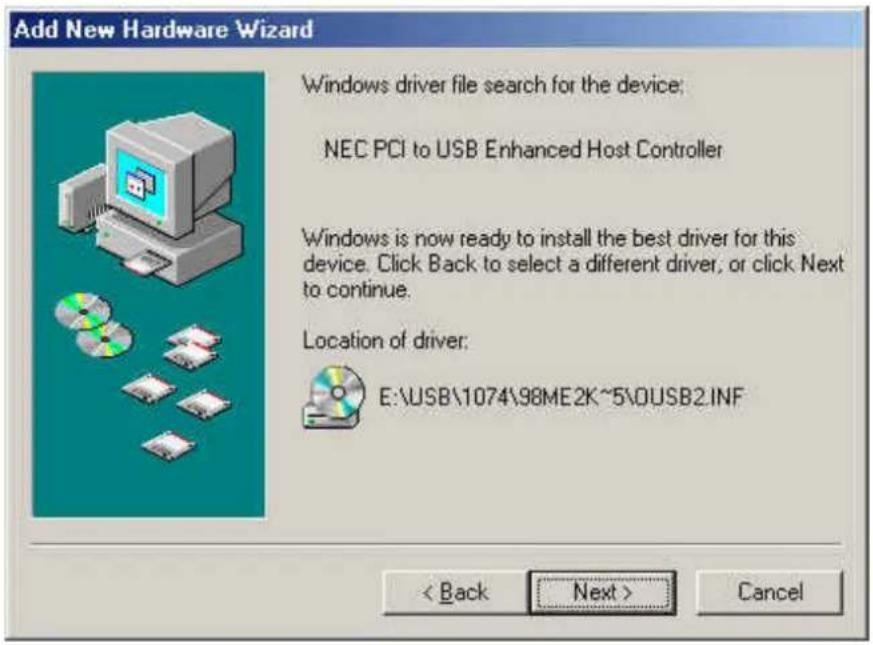
3. Press "Next"
text_image
Add New Hardware Wizard Windows driver file search for the device; NEC PCI to USB Enhanced Host Controller Windows is now ready to install the best driver for this device. Click Back to select a different driver, or click Next to continue. Location of driver: E:\USB\1074\98ME2K~5\0USB2.INF < Back Next > Cancel4. Press "Finish".
Note! This will restart your system. Please remember to close other programs before you click "Finish" button.
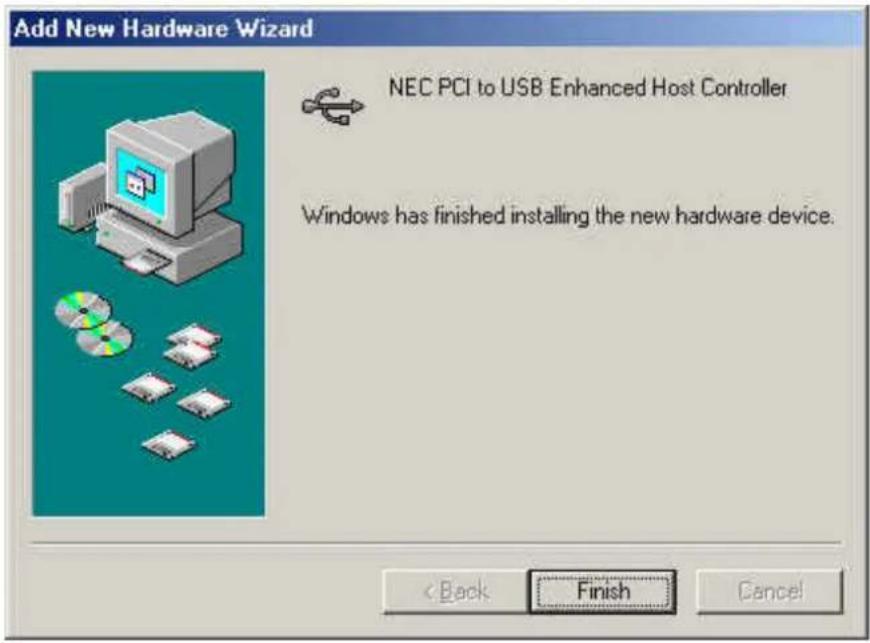
text_image
Add New Hardware Wizard NEC PCI to USB Enhanced Host Controller Windows has finished installing the new hardware device. < Back Finish Cancel- After restarting your system, please check if your device works.
Note:
- Note! If there is a yellow exclamation mark on “NEC PCI to USB Enhanced Host Controller [E13+]” or “USB 2.0 Root Hub Device”, please remove this item from the “Device Manager” by clicking the “Uninstall” button and click “Refresh” to re-install this driver again.

text_image
System Properties General Device Manager Hardware Profiles Performance View devices by type View devices by connection Monitors Mouse Network adapters Ports (COM & LPT) SCSI controllers Sound, video and game controllers System devices Universal Serial Bus controllers NEC PCI to USB Enhanced Host Controller NEC USB Open Host Controller (E13+) NEC USB Open Host Controller (E13+) USB 2.0 Root Hub Device USB Root Hub USB Root Hub USB Root Hub USB Root Hub VIA Tech 2020 PCI to USB Universal Host Controller Properties Refresh Remove Print... OK Cancel7.0 Driver Installation (Windows 98/98SE)
- Please make sure this PCMCIA card has been installed on your system correctly.
When starting Windows 98/98SE, the system will find the new hardware. Press "Next".

text_image
Add New Hardware Wizard This wizard searches for new drivers for: NEC USB Open Host Controller A device driver is a software program that makes a hardware device work. < Back Next > Cancel- Select "Search for the best driver for your device [Recommended] and press "Next".
Add New Hardware Wizard

natural_image
Illustration of a vintage desktop computer with CDs and memory drives (no text or symbols)What do you want Windows to do?
Search for the best driver for your device. (Recommended).
C Display a list of all the drivers in a specific location, so you can select the driver you want.
< Back
Next>
Cancel
- Select "Specify a location". Insert the "Driver CD" into the CD-ROM and use the Browse to change the path to "your cdrom driver:\USB\Item\98 me 2k xp". Press "Next".

text_image
Add New Hardware Wizard Windows will search for new drivers in its driver database on your hard drive, and in any of the following selected locations. Click Next to start the search. Eloppy disk drives CD-ROM drive Microsoft Windows Update Specify a location: E:\USB\1074\98 me 2k xp Browse... < Back Next > Cancel- Press "Next".
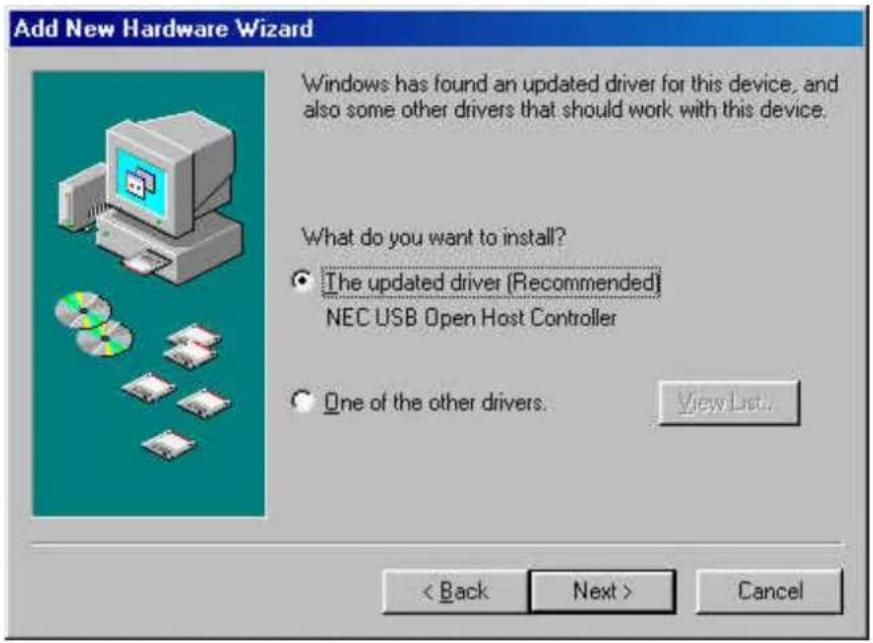
text_image
Add New Hardware Wizard Windows has found an updated driver for this device, and also some other drivers that should work with this device. What do you want to install? ● The updated driver (Recommended) NEC USB Open Host Controller ○ One of the other drivers. View List... < Back Next > Cancel5. Press "Next".

text_image
Add New Hardware Wizard Windows driver file search for the device: NEC USB Open Host Controller Windows is now ready to install the best driver for this device. Click Back to select a different driver, or click Next to continue. Location of driver: C:\WINDOWS\INF\USB.INF < Back Next > Cancel- The system will ask you where is the Windows 98/SE CD-ROM? Please insert the Windows 98/SE CD and use "Browse" item to change the path.

text_image
Copying Files... The file 'openhci.sys' on Windows 98 Second Edition CD-ROM cannot be found. Insert 'Windows 98 Second Edition CD-ROM in the selected drive, and click OK. Copy files from: E:- Press "Finish" and system will find the new hardware again. Please repeat Step 1 to Step 6.

text_image
Add New Hardware Wizard NEC USB Open Host Controller Windows has finished installing the software that your new hardware device requires. Back Finish Cancel- When display the follow screen, press "Next".
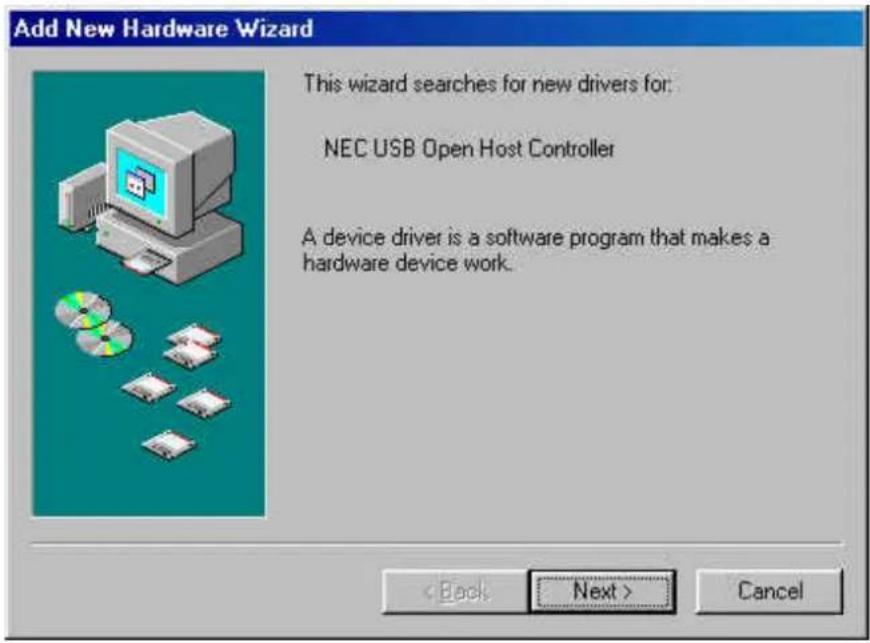
text_image
Add New Hardware Wizard This wizard searches for new drivers for: NEC USB Open Host Controller A device driver is a software program that makes a hardware device work. < Back Next > Cancel- Press "Next" then finished the driver install steps.

text_image
Add New Hardware Wizard This wizard searches for new drivers for: PCI Universal Serial Bus A device driver is a software program that makes a hardware device work. < Back Next > Cancel- After restarting your system, please check if your device works.
Note! If there is a yellow exclamation mark on “NEC PCI to USB 2.0 Enhanced Host Controller” or “USB 2.0 Root Hub Device”, please remove this item from the “Device Manager” by clicking the “Uninstall” button and click “Refresh” to re-install this driver again.
