PJM620 - Projector AV:link - Free user manual and instructions
Find the device manual for free PJM620 AV:link in PDF.


User questions about PJM620 AV:link
0 question about this device. Answer the ones you know or ask your own.
Ask a new question about this device
Download the instructions for your Projector in PDF format for free! Find your manual PJM620 - AV:link and take your electronic device back in hand. On this page are published all the documents necessary for the use of your device. PJM620 by AV:link.
USER MANUAL PJM620 AV:link
Adjustable Ceiling Projector Bracket
Item ref: 129.581UK
User Manual
Thank you for choosing the PJM620 ceiling projector bracket. This bracket is constructed from reinforced steel for mounting a projector up to 8kg. Designed to be easily installed and supplied with all required installation hardware.
Caution:
Please read this manual thoroughly to avoid damage to property or personnel. If unsure of any part of this manual please refer to professional installer for help:
• This product contains small components that could pose a choking hazard if swallowed, please keep out of reach of children.
- This product is designed for mounting on wall studs or concrete wall. Always ensure the mounting surface will be capable of withstanding the combined weight of the TV bracket and TV, reinforcement may be required for aged or weak walls.
- Safety gear such as gloves and safety goggles must be worn during the installation. A minimum of two people are required throughout the installation, failure to do so may result in injury or damage.
• This product is design for indoor use only. The bracket must be inspected at least every two months for loose joints or aged parts.
Contents:
Please check all contents listed below are included inside the box. If anything is missing please return to the retailer or dealer.

text_image
Nylon Grip Piece Metal Grip Piece Hex Screw Ceiling Mount Outer Drop Pole Inner Drop Pole Star Washer Washer Hex Screw Inter Section Bracket Arm
text_image
M4 20mm x 4(1), M5 20mm x 4(2), M6 20mm x 4(3) Plastic Spacer x 4 (4) Allen Key (5) Wall Mount Bolt x 4(6) Washer x 4(7) Wall Mount Plug x 4(8)For this installation you will also require a pencil, tape measure, electric drill, stud finder and a Philips (cross) screw driver.
Step 1—Assemble
Slide the outer drop pole over the inner drop pole and fit the nylon and metal grips as shown in the image below.
Connect the outer drop pole to the ceiling mount as shown below. The tapped square washer goes inside of the outer drop pole and screws through the slit and screw hole.
Connect the inter section to the inner drop pole as shown below. Ensure the star washer goes between the inter section and inner drop pole.

text_image
Nylon Grip Piece Metal Grip Piece Outer Drop Pole Inner Drop Pole Fig 1
text_image
Ceiling Bracket Tapped Square Washer Hex Screw Outer Drop Pole Fig 2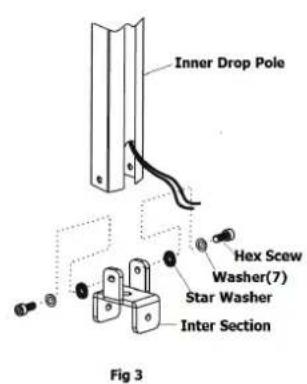
text_image
Inner Drop Pole Hex Screw Washer(7) Star Washer Inter Section Fig 3Step 2 – Fixing bracket to the ceiling
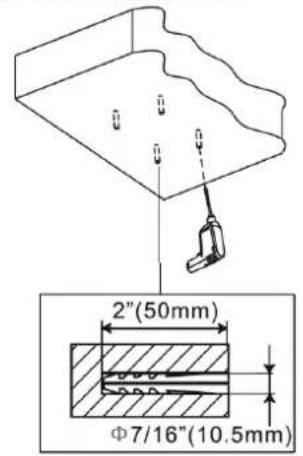
For concrete ceiling installation first work out the position of where the bracket is going to be installed. Hold the bracket against the ceiling and use a pencil to mark where the mounting holes will be. Use an electric drill to drill a hole that is around 10.5mm in diameter and 50mm deep. Insert wall plugs into the holes and install the wall bracket as follows.
text_image
2"(50mm) Φ7/16"(10.5mm)
text_image
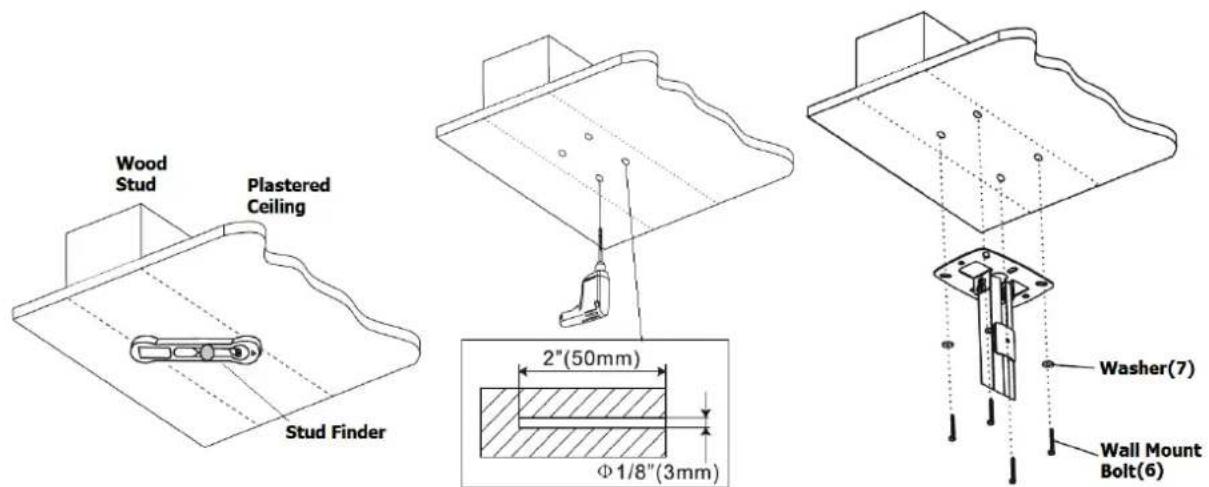
Wall Mount Plug(8) Washer(7) Wall Mount Bolt(6)For plaster ceiling installation first you need to find out where the wood stud is behind the plastered ceiling using a stud finder. Then work out the required position, hold the bracket against the ceiling and use pencil to mark where the mounting holes will be. Use an electric drill to drill a hole that is around 3mm in diameter and 50mm deep. Install the wall bracket as follows.
text_image
Wood Stud Plastered Ceiling Stud Finder 2"(50mm) Φ1/8"(3mm) Washer(7) Wall Mount Bolt(6)Step 3 – Slide the bracket arms until lined up with the projectors mounting holes. Use supplied M4, M5 or M6 screws and plastic spacers to fit the projector on to the bracket. Hook the projector mount on to the drop pole as shown below. Adjust tilt, pan and drop height until desired mounting position is achieved. Lock the position by tightening the hex screw using the provided Allen key.
