404-3556 - Weather Station LA CROSSE TECHNOLOGY - Free user manual and instructions
Find the device manual for free 404-3556 LA CROSSE TECHNOLOGY in PDF.


User questions about 404-3556 LA CROSSE TECHNOLOGY
0 question about this device. Answer the ones you know or ask your own.
Ask a new question about this device
Download the instructions for your Weather Station in PDF format for free! Find your manual 404-3556 - LA CROSSE TECHNOLOGY and take your electronic device back in hand. On this page are published all the documents necessary for the use of your device. 404-3556 by LA CROSSE TECHNOLOGY.
USER MANUAL 404-3556 LA CROSSE TECHNOLOGY
22" Indoor | Outdoor Wall Clock

natural_image
Black-and-white photo of a wall clock with analog clocks and a textured border (no readable text or symbols)Model: 404-3556
DC: 122816
www.lacrossetechnology.com/404-3556
Get Started
- Remove round battery cover to access clock movement and battery compartment(s).
- Insert 1 AA battery into the movement in the center of the clock.
- OPTIONAL: For extended battery life, install two additional batteries, one on either side of the movement.
- Spin the time set wheel to set the time.

text_image
Time set wheel Battery coverPosition Clock
Indoor: Mount the clock on a wall with the hanging hole on the back of the clock.
Outdoor: Choose a location with an overhang to protect the clock from the overhead sun or standing snow or rain.
A shaded location will prevent inaccurate temperature readings. Mount the clock on a wall with the hanging hole on the back of the clock. Be sure the battery cover is on snug.
Temperature and Humidity
The La Crosse Clock Co. wall clock has two analog sensors that measure surrounding temperature and humidity. The temperature information is displayed in degrees Fahrenheit and Celsius, and humidity data is displayed in percentage.
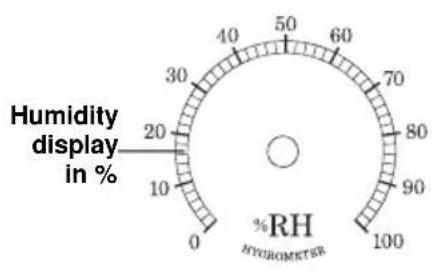
gauge
| Humidity display in % | %RH | | --------------------- | --- | | 20 | 50 |
text_image
Outer ring displays temperature in degrees Fahrenheit Inner ring displays temperature in degrees Celsius 0 20 40 60 80 100 20 30 40 50 60 70 80 90 100 120 °C F THERMOMETERThe thermometer and hygrometer have been calibrated at the factory. To check the sensors accuracy, tune to your local weather forecast information broadcast for the latest weather information. The sensors may be adjusted.
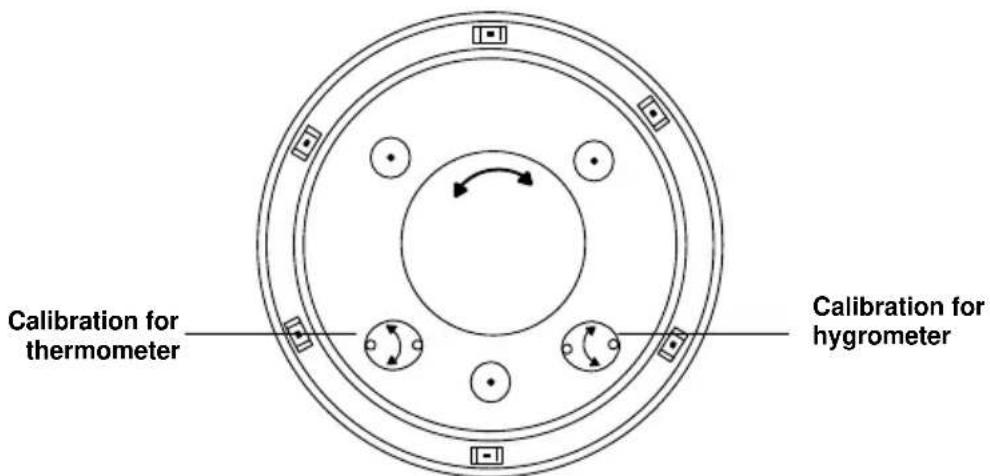
text_image
Calibration for thermometer Calibration for hygrometerTo manually adjust the sensors, gently turn the temperature or humidity sensor adjustment on the back of the clock until desired setting has been reached.
Specifications
Battery Requirements: 1 AA (IEC LR6) required in movement
(Alkaline recommended)
Optional: 2 additional AA (IEC LR6) batteries for extended battery life.
Battery life: 1 battery; over 12 months
3 batteries; over 36 months
Visit Us on Social Media

http://bit.ly/LaxTech_ YouTube

http://bit.ly/LaxTech_Facebook

http://bit.ly/LaxTech Twitter

http://bit.ly/LaxTech Pinterest
Care and Maintenance
• Do not mix old and new batteries
• Do not mix Alkaline, Standard, Lithium or Rechargeable Batteries
• Always purchase the correct size and grade of battery most suitable for intended use.
- Replace all batteries of a set at the same time.
- Clean the battery contacts and also those of the device prior to battery installation.
- Ensure the batteries are installed with correct polarity (+and -).
- Remove batteries from equipment that is not to be used for an extended period of time.
- Promptly remove expired batteries.
Warranty and Support Information
La Crosse McCormick, LLC. provides a 2-year limited warranty (from the date of the original consumer purchase), on this product against manufacturing defects in materials and workmanship. Send \$5.00 with date and proof of purchase to the following address. Please include the model number of your product and your complete address and phone number.
La Crosse McCormick, Warranty Department, 2830 26th St. St., La Crosse, WI 54601
www.lacrossetechnology.com/support