
PTM400S - TV Stand Peerless-AV - Free user manual and instructions
Find the device manual for free PTM400S Peerless-AV in PDF.


| Product Type | Universal Tablet Mount |
| Brand | Peerless-AV |
| Model | PTM400S |
| Color | Black |
| Max Load Capacity | 5 lbs (2.2 kg) |
| Material | Steel and Plastic |
| Adjustability - Height | Yes, adjustable to fit virtually any tablet |
| Adjustability - Width | Yes, adjustable side clamps |
| Tilt Adjustment | 30 degrees |
| Roll Adjustment | 360 degrees |
| Security Kit | Available (ACC954, theft resistant) |
| Cable Management | Yes |
| Mounting Type | Desktop stand |
| Included Parts | Stand, side clamps (2), top clamp, bottom clamp, plastic covers, washers, screws, spacers, adhesive foam pads |
| Tools Required | Phillips screwdriver |
| Assembly Required | Yes |
| Indoor Use Only | Yes |
| Warranty | Limited 5 years |
| Compatibility | Fits virtually any tablet within size range (adjustable) |
Frequently Asked Questions - PTM400S Peerless-AV
User questions about PTM400S Peerless-AV
0 question about this device. Answer the ones you know or ask your own.
Ask a new question about this device
Download the instructions for your TV Stand in PDF format for free! Find your manual PTM400S - Peerless-AV and take your electronic device back in hand. On this page are published all the documents necessary for the use of your device. PTM400S by Peerless-AV.
USER MANUAL PTM400S Peerless-AV
Installation and Assembly: Universal Tablet Mount
Models: PTM400, PTM400S
PTM400-W, PTM400S-W
Max Load Capacity:
5 lbs (2.2 kg)

natural_image
Line drawing of a tablet device with mounting bracket and base plate (no text or symbols)Features:
- Adjustable height and width allows mount to fit virtually any tablet
- Quick and easy installation onto desktop
- 30^ of tilt and 360^ of roll allows for a variety of positions in order to achieve the perfect viewing angle
- Theft resistant security kit available
- Allows for cable management
WARNING
- Do not begin to install your Peerless product until you have read and understood the instructions and warnings contained in this Installation Sheet. If you have any questions regarding any of the instructions or warnings, for US customers please call Peerless customer care at 1-800-865-2112, for all international customers, please contact your local distributor.
- This product should only be installed by someone of good mechanical aptitude, has experience with basic building construction, and fully understands these instructions.
- Make sure that the supporting surface will safely support the combined load of the equipment and all attached hardware and components.
- Never exceed the Maximum Load Capacity. See page one.
- Tighten screws firmly, but do not overtighten. Overtightening can damage the items, greatly reducing their holding power.
- This product is intended for indoor use only. Use of this product outdoors could lead to product failure and personal injury.
Tools Needed for Assembly
- phillips screwdriver
Accessories
• ACC954 (security fasteners kit)
Table of Contents
Parts List....3
Cradle Assembly....4-5
Attaching Cradle Assembly to Mount....6
Before you begin, make sure all parts shown are included with your product.
| Parts List | PTM400 PTM400-W PTM400S | PTM400S- | W | ||||
| Description Qty. Part # Part # Qty. Part # Part # | |||||||
| A | stand 1 021-P1050 021-2050 1 021-P1050 021-2050 | ||||||
| B | side clamp 2 021-P1052 021-2052 2 021-P1052 021-2052 | ||||||
| C | top clamp 1 021-P1054 021-2054 1 021-P1054 021-2054 | ||||||
| D | bottom clamp 1 021-P1069 021-2069 1 021-P1069 021-2069 | ||||||
| E | plastic cover | 2 | 590-1347 | 590-2347 2 590-1347 | 590-2347 | ||
| F | washer | 7 | 540-2003 | 540-2003 7 540-2003 | 540-2003 | ||
| G | M5 x 8mm self tapping phillips screw | 11 | 520-1167 | 520-2167 7 520-1167 | 520-2167 | ||
| H | 1/4" spacer | 3 | 600-1215 | 600-1215 | 3 | 600-1215 | 600-1215 |
| I | adhesive foam pad | 4 | 570-0045 | 570-0045 | 4 | 570-0045 | 570-0045 |
| J | M5 x 8mm socket pin screws | - | - | - | 4 | 520-1062 | 520-2038 |
| K | security allen wrench | - | - | - | 1 | 560-9646 | 560-9646 |
Parts may appear slightly different than illustrated.

1 Fit top clamp (C) and bottom clamp (D) into stand (A) and over pins as shown in figures 1.1 and 1.2.
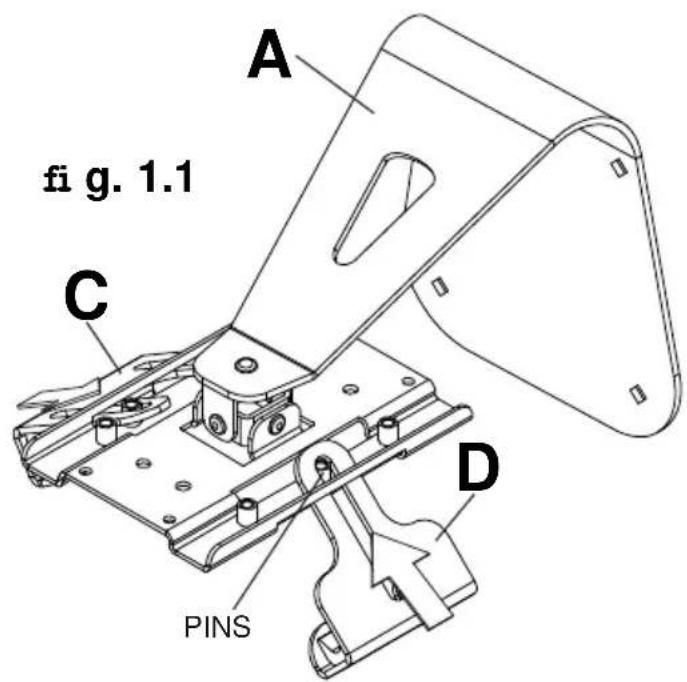
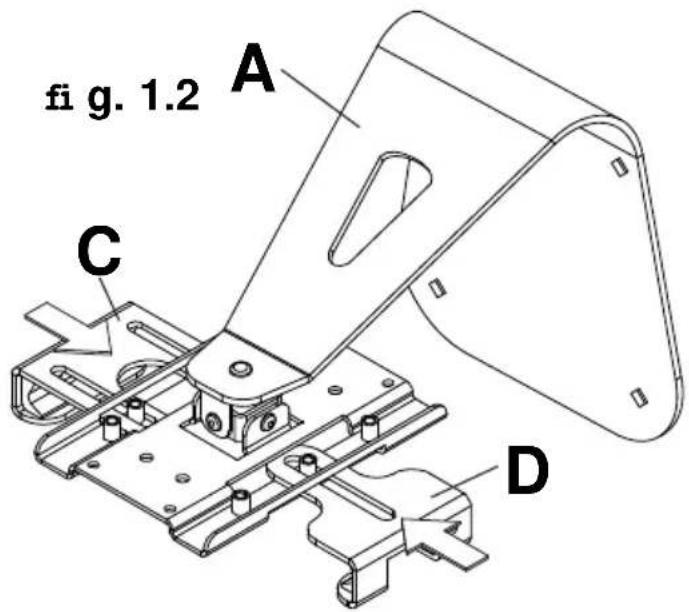
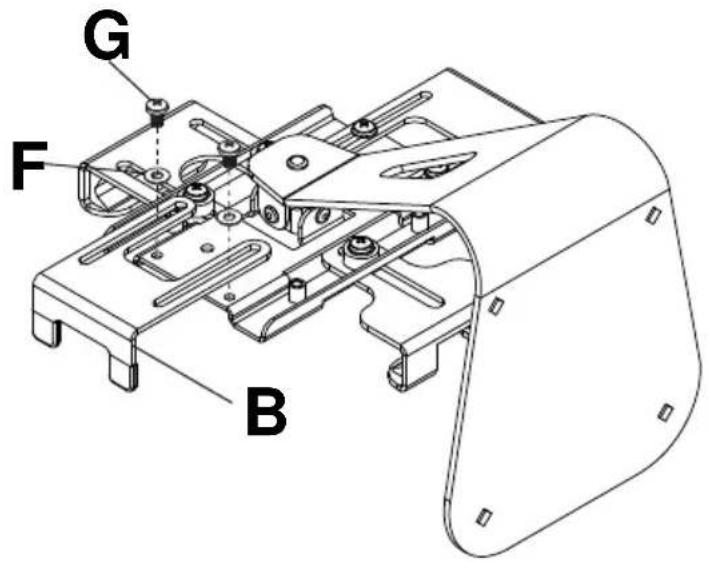
2 Secure with three 1/4" spacers (H), four washers (F) and three M5 x 8 mm self tapping phillips screws (G). Do not tighten screws.

3 Secure two side clamps (B) to back of stand with four washers (F) and four M5 x 8 mm self tapping phillips screws (G). Do not tighten screws.
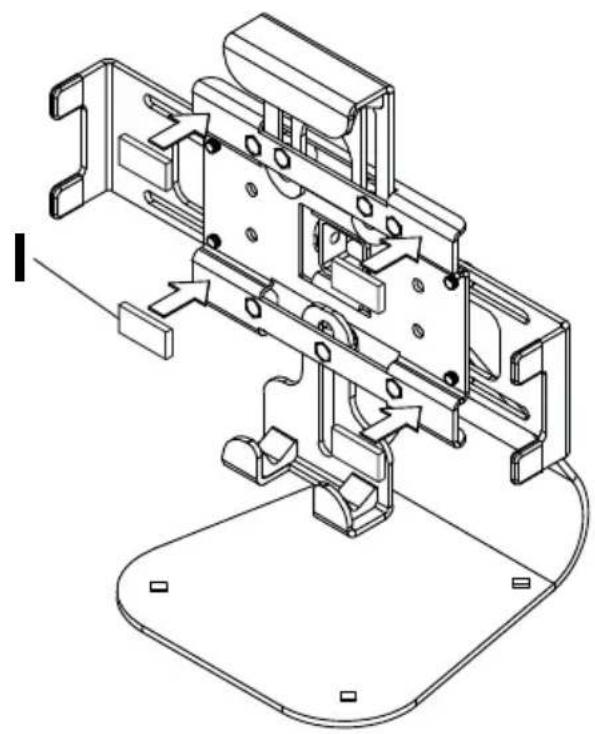
4 Apply four adhesive foam pads (I) to front of stand as shown.
natural_image
Technical line drawing of a mechanical assembly with no visible text or symbols5 To prevent scratching the tablet, set a cloth on a fl at, level surface. Place tablet face side down, adjust clamps around tablet, then tighten all seven screws.
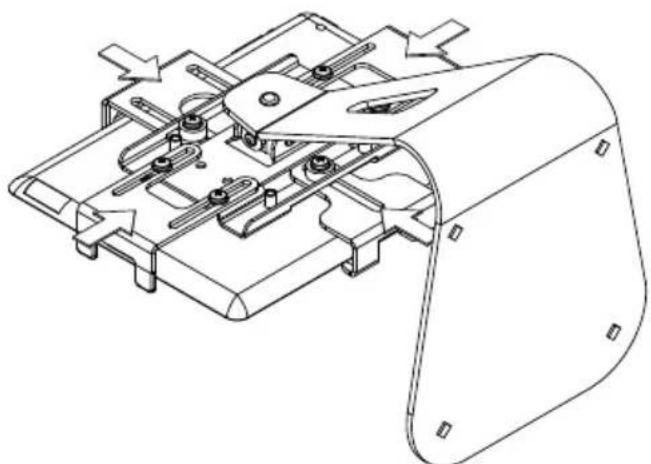
natural_image
Technical line drawing of a mechanical assembly with no visible text or symbols6 Install two plastic covers (E) to back of stand (A) with four M5 x 8mm screws (G). For security installation tighten M5 x 8mm socket pin screw (J) using security allen wrench (K) to lock display to tilt assembly.

THIS PAGE INTENTIONALLY LEFT BLANK
LIMITED FIVE-YEAR WARRANTY
Peerless Industries, Inc. ("Peerless") warrants to original end-users of Peerless® products will be free from defects in material and workmanship, under normal use, for a period of five years from the date of purchase by the original end-user (but in no case longer than six years after the date of the product's manufacture). At its option, Peerless will repair or replace, or refund the purchase price of, any product which fails to conform with this warranty.
In no event shall the duration of any implied warranty of merchantability or fitness for a particular purpose be longer than the period of the applicable express warranty set forth above. Some states do not allow limitations on how long an implied warranty lasts, so the above limitation may not apply to you.
This warranty does not cover damage caused by (a) service or repairs by the customer or a person who is not authorized for such service or repairs by Peerless, (b) the failure to utilize proper packing when returning the product, (c) incorrect installation or the failure to follow Peerless' instructions or warnings when installing, using or storing the product, or (d) misuse or accident, in transit or otherwise, including in cases of third party actions and force majeure.
In no event shall Peerless be liable for incidental or consequential damages or damages arising from the theft of any product, whether or not secured by a security device which may be included with the Peerless® product. Some states do not allow the exclusion or limitation of incidental or consequential
damages, so the above limitation of exclusion may not apply to you.
This warranty is in lieu of all other warranties, expressed or implied, and is the sole remedy with respect to product defects. No dealer, distributor, installer or other person is authorized to modify or extend this Limited Warranty or impose any obligation on Peerless in connection with the sale of any Peerless® product.
This warranty gives specific legal rights, and you may also have other rights which vary from state to state.

www.peerless-av.com
© 2012 Peerless Industries, Inc.

Brand : Peerless-AV
Model : PTM400S
Category : TV Stand