
EXT-18GHDMIWL - AV Accessory KanexPro - Free user manual and instructions
Find the device manual for free EXT-18GHDMIWL KanexPro in PDF.


| Product Type | Wireless HDMI Extender Set (Transmitter + Receiver) |
| Dimensions (each unit) | 76mm (W) x 98mm (D) x 21mm (H) |
| Weight (each unit) | 100g |
| Power Supply | DC 5V/1A via included adapter (AC input 100-240V 50/60Hz) |
| Main Functions | Extends HDMI signal up to 330ft (100m) in open air; supports 1080P@60Hz; H.265 compression; <120ms latency; one-way IR control; plug-and-play; pairing button; EDID copying (receiver) |
| Video Resolution | Up to 1920×1080@60Hz (also supports 1080i, 720p, 720i, 480p, 480i; PC up to 1920×1200@60Hz) |
| Audio Format | PCM 2.0CH at 32/44.1/48 kHz |
| Compliance | HDMI 1.3, HDCP 1.4, DVI 1.0 |
| Antenna | 4x 5G WiFi antennas (2 per unit, detachable) |
| Connections (Transmitter) | 1x HDMI input, 1x IR OUT (3.5mm), 2x antenna ports, 1x SERVICE (Micro USB for update) |
| Connections (Receiver) | 1x HDMI output, 1x IR IN (3.5mm), 2x antenna ports, 1x SERVICE (Micro USB for update) |
| IR Control | One-way IR: transmitter has IR OUT (blaster), receiver has IR IN (receiver cable included) |
| Pairing Method | Press PAIR button on both units simultaneously for 3 seconds; LINK LED indicates status |
| Firmware Update | Via Micro USB port using a USB drive with update file named 'update.bin' |
| Care and Cleaning | Use a dry, soft cloth; avoid liquids; do not block vents |
| Safety Precautions | Keep away from moisture; do not place objects on cables; use only supplied power adapter; do not disassemble |
| Spare Parts and Repairability | Spare parts (antennas, IR cables) may be available through distributor; product has 3-year warranty; no user-serviceable parts inside |
| ESD Protection | Human body model: ±8kV (air-gap discharge) and ±4kV (contact discharge) |
| Housing Material | Plastic enclosure, black |
| Storage Temperature | -20°C to 60°C (-4°F to 140°F) |
| Relative Humidity | 20% to 90% RH (non-condensing) |
Frequently Asked Questions - EXT-18GHDMIWL KanexPro
User questions about EXT-18GHDMIWL KanexPro
0 question about this device. Answer the ones you know or ask your own.
Ask a new question about this device
Download the instructions for your AV Accessory in PDF format for free! Find your manual EXT-18GHDMIWL - KanexPro and take your electronic device back in hand. On this page are published all the documents necessary for the use of your device. EXT-18GHDMIWL by KanexPro.
USER MANUAL EXT-18GHDMIWL KanexPro
natural_image
Two black wireless router devices with two external antennas and labeled ports (no visible text or symbols on the devices themselves)100M Wireless HDMI Extender
All Right Reserved
MPN: EXT-18GHDMIWL
VER 1.0
SAFETY PRECAUTIONS
Please read all instructions before attempting to unpack, install or operate this equipment and before connecting the power supply. Please keep the following in mind as you unpack and install this equipment:
- Always follow basic safety precautions to reduce the risk of fire, electrical shock and injury to persons.
- To prevent fire or shock hazard, do not expose the unit to rain, moisture or install this product near water.
- Never spill liquid of any kind on or into this product.
- Never push an object of any kind into this product through any openings or empty slots in the unit, as you may damage parts inside the unit.
- Do not attach the power supply cabling to building surfaces.
- Use only the supplied power supply unit (PSU). Do not use the PSU if it is damaged.
- Do not allow anything to rest on the power cabling or allow any weight to be placed upon it or any person walk on it.
- To protect the unit from overheating, do not block any vents or openings in the unit housing that provide ventilation and allow for sufficient space for air to circulate around the unit.
Table of Contents
- Introduction......3
- Features....3
- Package Contents....3
- Specifications....4
- Operation Controls and Functions....5
5.1 Transmitter Panel....5
5.2 Receiver Panel....5
5.3 Pairing Instruction....6
5.4 Updating Instruction....6
5.5 5.5 IR Pin Definition....6
-
Application Example....7
-
Customer Service....8
1. Introduction
The KanexPro EXT-18GHDMIWL 100M Wireless extender is a compact HDMI transmitter - receiver set designed to extend HD (1080p) video signals from a source to a display which can be remotely located up to 328 feet away. This wireless system is based on powerful low-bandwidth H.265 compression reducing the latency and signal dropouts. The system is simple, plug and play and it's ready to go. No drivers or complicated installation procedures required.
Wireless extenders offer a convenient and elegant solution to delivering long distance HDMI transmissions without the hassle of running thick unwieldy HDMI cables through walls and furniture. Ideal for use with TV carts.
2. Features
• HDMI 1.3, HDCP 1.4 and DVI 1.0 compliant
• Supports one HDMI HD source to one HDMI HD display via wireless transmission
- With one-way IR control
• Video resolution up to 1080P@60Hz
- Transmission distance: One-to-one connects transmission distance up to 330ft/100m. (An open environment without Wi-Fi interference.)
• Audio format supports PCM 2.0CH 32KHz/44.1KHz/48KHz
• H.265 high performance codec supported, adopting high bit rate mode
• End-to-end delays under 120Ms
- Compact design for easy and flexible installation.
3. Package Contents
- 1x HDMI Wireless Extender (Transmitter)
- 1x HDMI Wireless Extender (Receiver)
- 1x IR Blaster cable (1.5 meters)
- 1x 20-60KHz IR Receiver cable (1.5 meters)
- 4x 5G WiFi Antennas
- 1x 5V/1A Power Adapters
-
1x User Manual
-
Specifications
| Technical | |
| HDMI Compliance | HDMI 1.3 |
| HDCP Compliance | HDCP 1.4 |
| Video Bandwidth | 6.75Gbps |
| Video Resolution | 1080p, 1080i, 720p, 720i, 480p, 480i, the maximum up to 1920×1080@60HzThe PC resolution is up to 1920×1200@60Hz |
| Color Space | RGB/YCbCr 4:4:4, YCbCr 4:2:2, YUV 4:2:0 |
| Color Depth | 8/10/12-bit |
| HDMI Audio Formats | PCM 2.0CH 32KHz/44.1KHz/48KHz |
| ESD Protection | Human body model - 38kV (Air-gap discharge) & 34kV (Contact discharge) |
| Connections | |
| Transmitter | Inputs: 1x HDMI Type A [19-pin female]1x SERVICE [Micro USB, Update port] Outputs: 1x IR OUT [3.5mm Stereo Mini-jack]2x WiFi OUT [WiFi antenna] |
| Receiver | Inputs: 1x IR IN [3.5mm Stereo Mini-jack] 2x WiFi IN [WiFi antenna]1x SERVICE [Micro USB, Update port] Outputs: 1x HDMI Type A [19-pin female] |
| Mechanical | |
| Housing | Plastic Enclosure |
| Color | Black |
| Dimensions | Transmitter / Receiver: 76mm [W] x 98mm [D] x 21mm [H] |
| Weight | Transmitter / Receiver: 100g |
| Power Supply | Input: AC100 - 240V 50/60HzOutput: DC 5V/1A |
| Power Consumption | Transmitter: 2.25W, Receiver: 1.8W |
| Storage Temperature | -4 - 140°F / -20 - 60°C |
| Relative Humidity | 20 - 90% RH (no condensation) |
| Resolution / Cable Length | 1080P60Hz -Feet / Meters |
| HDMI IN / OUT | 42ft / 15M |
| The use of “Premium High-Speed HDMI” cable is highly recommended. | |
5. Operation Controls and Functions
5.1 Transmitter Panel
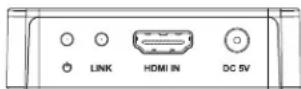
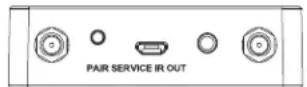
| Name | Function description |
| Power LED | Red LED indicates that the encoder is powered. |
| LINK LED (Green) | ■ Illuminate: Pair success.■ Flicker quickly: The encoder is pairing.■ Flicker slowly: The encoder and decoder are transmitting video signal.■ Off: No pair or paired success but no signal transmission. |
| HDMI IN | HDMI source input. |
| DC 5V | DC 5V for 5V 1A power adapter. |
| Antenna port | Connect to WiFi antenna. |
| PAIR button | ■ Press quickly the button will reset the encoder to factory default status.■ Press the button simultaneously both encoder and decoder for 3 seconds will pair. |
| SERVICE port | Firmware update port. |
| IR OUT | IR port output for control of the source device. |
| Antenna port | Connect to WiFi antenna. |
5.2 Receiver Panel


| Name | Function description |
| Power LED | Red LED indicates that the decoder is powered. |
| LINK LED (Green) | ■Illuminate: Pair success.■Flicker quickly: The decoder is pairing.■Flicker slowly: The encoder and decoder are transmitting video signal.■Off: No pair or paired success but no signal transmission. |
| HDMI OUT | HDMI output for display. |
| DC 5V | DC 5V for 5V 1A power adapter. |
| Antenna port | Connect to WiFi antenna. |
| PAIR button | ■Press quickly the button will copy the EDID of display device to source device.■Press the button simultaneously both encoder and decoder for 3 seconds will pair. |
| SERVICE port | Firmware update port. |
| IR IN | IR port input to receiving the signal of IR remote. |
| Antenna port | Connect to WiFi antenna. |
5.3 Pairing Instruction
Power on the transmitter and receiver then press simultaneously the PAIR button for three seconds, and the LINK LEDs will flicker quickly. If the LINK LEDs change from flicker quickly to indicate that means pair success. Then let go of your hands and the LINK LEDs are off. When the transmitter and receiver have signal transmission then the LINK LEDs will flicker slowly.
| LINK LED status (Green) | Description |
| Flicker quickly | Establish pairing. |
| Illuminate | Paired success. |
| Off | No pair or paired success but no signal transmission. |
| Flicker slowly | Transmitting video signal. |
5.4 Updating Instruction
The update file needs to change the name for update bin then put in the root directory of U disk. The unit is power off status and inserts the U disk to SERVICE port. Hold down the PAIR button and power on the unit simultaneously. The LINK LED indicates when the unit is updating then let go of your hand. If the update has finished, the LINK LED will automatically off.
5.5 IR Pin Definition
IR Receiver and Blaster pin's definition as below:
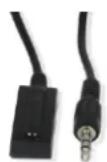
IR RECEIVER

IR BLASTER

IR Blaster Signal Power
NC
IR Signal
Power Grounding
The following is IR system diagram about IR cable use method.
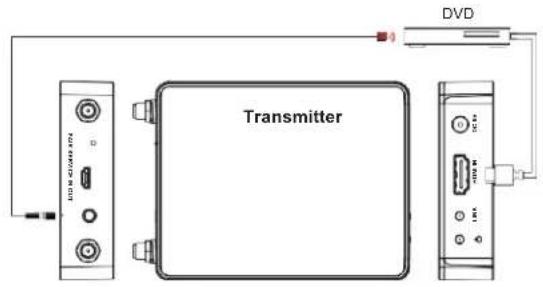

- Application Example
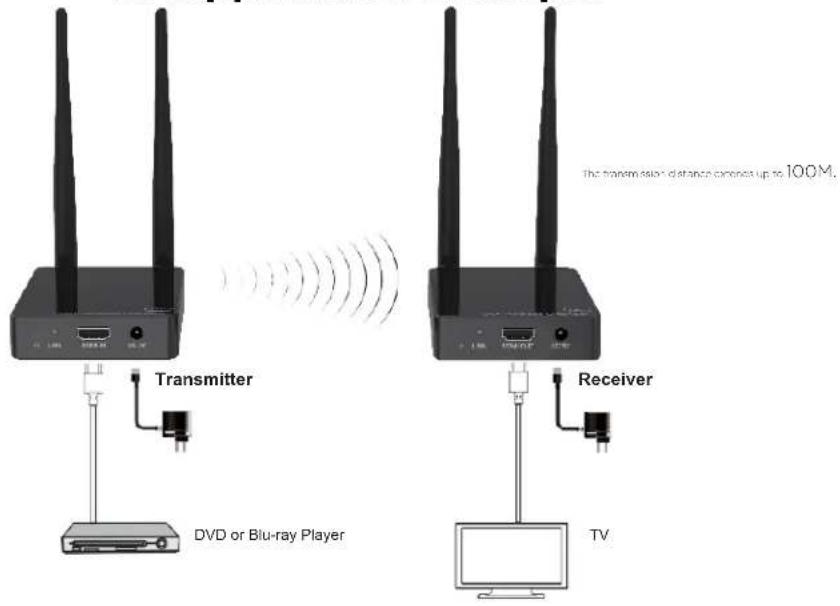
7. Customer Service
The return of a product to our Customer Service implies the full agreement of the terms and conditions hereinafter. There terms and conditions may be changed without prior notice.
① Warranty
The limited warranty period of the product is fixed 3 (three) years.
② Scope
These terms and conditions of Customer Service apply to the customer service provided for the products or any other items sold by authorized distributor only.
③ Warranty Exclusions:
Warranty expiration.
Factory applied serial number has been altered or removed from the product. Damage, deterioration or malfunction caused by:
√ Normal wear and tear.
√ Use of supplies or parts not meeting our specifications.
√ No certificate or invoice as the proof of warranty.
√ The product model showed on the warranty card does not match with the model of the product for repairing or had been altered.
√ Damage caused by force majeure.
√ Servicing not authorized by distributor.
√ Any other causes which does not relate to a product defect.
Shipping fees, installation or labor charges for installation or setup of the product.
④ Documentation:
Customer Service will accept defective product(s) in the scope of warranty coverage at the sole condition that the defeat has been clearly defined, and upon reception of the documents or copy of invoice, indicating the date of purchase, the type of product, the serial number, and the name of distributor.
Remarks: For further assistance or solutions, please contact your local distributor.
Brand : KanexPro
Model : EXT-18GHDMIWL
Category : AV Accessory