VW142SS - Oven CDA - Free user manual and instructions
Find the device manual for free VW142SS CDA in PDF.


User questions about VW142SS CDA
0 question about this device. Answer the ones you know or ask your own.
Ask a new question about this device
Download the instructions for your Oven in PDF format for free! Find your manual VW142SS - CDA and take your electronic device back in hand. On this page are published all the documents necessary for the use of your device. VW142SS by CDA.
USER MANUAL VW142SS CDA
Installation, use and maintenance
Important
This appliance must only be used for the purpose for which it is intended, i.e. warming plates etc. in a domestic environment. Any other use could be dangerous and may lead to premature failure of the appliance.
The CDA Group Ltd cannot be held responsible for injuries or losses caused by incorrect use or installation of this product. Please note that CDA reserve the right to invalidate the guarantee supplied with this product following incorrect installation or misuse of the appliance.
Under no circumstances should any external covers be removed for servicing or maintenance except by suitably qualified personnel.
User information:
- Warming drawers become hot during and immediately after use. Ensure you do not touch any of the internal components.
- The drawer can become very hot during operation. Wear oven gloves or suitable hand protection where appropriate.
• After use, please ensure that the appliance is switched off. - Keep children away from the appliance when in use, and immediately after use.
Appliance information:
Please enter the details on the appliance rating plate below for reference, to assist CDA Customer Care in the event of a fault with your appliance and to register your appliance for guarantee purposes.
| Appliance Model | |
| Serial Number |
CE Declarations of Conformity:
This appliance has been designed, constructed and marketed in compliance with safety requirements of EU Directive 2014/35/EU (LVD) and requirements of EU Directive 2014/30/EU (EMC).
Parts intended to come into contact with food conform to 1935/2004/EC.
IMPORTANT INFORMATION FOR CORRECT DISPOSAL OF THE PRODUCT IN ACCORDANCE WITH EU DIRECTIVE 2012/19/EU.
At the end of its working life, the product must not be disposed of as urban waste. It must be taken to a special local authority differentiated waste collection centre or to a dealer providing this service.
Disposing of a household appliance separately avoids possible negative consequences for the environment and health deriving from inappropriate disposal and enables the constituent materials to be recovered to obtain significant savings in energy and resources. As a reminder of the need to dispose of household appliances separately, the product is marked with a crossed-out wheeled dustbin.
Important
- Do not rest or sit on the drawer when open, as this will damage the telescopic runners.
- Warming drawers become hot during and immediately after use. Ensure you do not touch any of the internal components.
- The maximum capacity of the drawer is 20 kg.
- Do not cover the bottom of the warming drawer with aluminium foil or other objects. Use only the supplied mat.
- Never pour water directly into the warming drawer.
- Do not use this appliance for heating liquids.
- To avoid scratching, do not drag dishes on the bottom of the warming drawer.
- Use suitable containers or crockery.
- Residual condensation could eventually damage the warming drawer and surrounding cabinets. It is advisable to dry any wet parts when the warming drawer is cold.
- Do not store plastic or flammable objects in the warming drawer.
- We recommend the use of oven gloves or adequate protection when removing crockery from the drawer.
- Never insert objects (e.g. Screwdrivers, sharp objects, papers, etc.) in the heating element and ventilation slots.
THE CDA GROUP LTD CANNOT BE HELD RESPONSIBLE FOR EVENTUAL DAMAGES CAUSED BY FAILURE TO OBSERVE THESE INSTRUCTIONS.
Before First Use
Cleaning
Before using the warming drawer for the first time we recommend that you clean it with a damp cloth, then dry thoroughly. Preheat the empty drawer at maximum temperature for at least 1 hour.
A slightly unpleasant smell may be produced, caused by grease remaining on the oven elements from the production process.
Using Your Warming Drawer
text_image
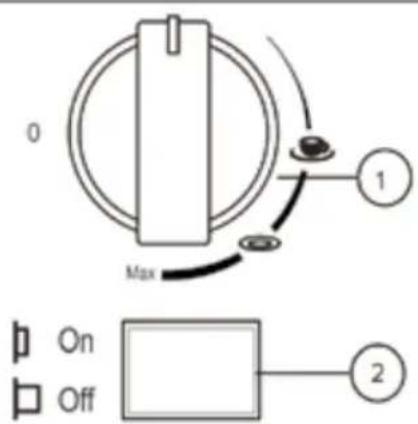
0 Max 1 On Off 2-
Temperature knob
-
ON-OFF switch
text_image
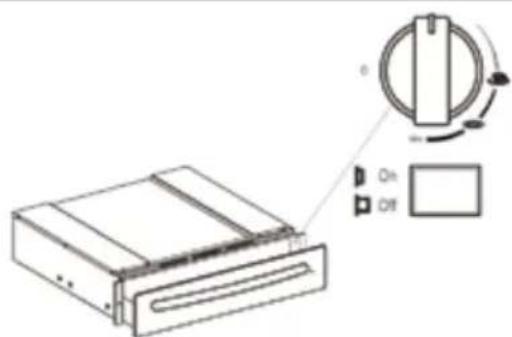
Diagram of a CD-ROM drive with labeled buttons and rotation arrow, showing On/OFF statesWhen the drawer is closed, the power light is visible on the front of the drawer to indicate the drawer is switched on.
Use
- Place the dishes in the drawer.
- Set the required temperature.
- Press the power switch, which will light up to confirm the warming drawer is switched on.
- Close the drawer gently.
- Switch the appliance off, and ensure your hands are suitably protected from heat (i.e. by oven gloves), before removing the warmed dishes.
Selecting the Temperature
- The temperature knob enables a temperature adjustment between approximately 40°C and 80°C.
- Turn the temperature knob to the required position.
- Do not force the temperature knob past the maximum position, to prevent damage to the thermostat.
- The symbols do not indicate absolute temperature values.
| Knob position | Approx. temperature | Usage information |
| Low Approx. 40 | °C To prevent hot drinks from cooling too quickly, use this temperature setting to warm cups to a temperature that is safe to touch. | |
| Medium Approx. 60 | °C To prevent hot food from cooling too quickly, use this temperature setting to warm plates or serving dishes. The use of oven gloves or pot holders is recommended for this setting | |
| Max Approx. 80 | °C The thermostat is set to maximum temperature. The use of oven gloves or pot holders is necessary for this setting. | |
Warming times
The time necessary for warming depends on various factors:
• Material and thickness of the dishes.
• Quantity of dishes to be warmed.
- Arrangement of dishes in the drawer.
• Temperature setting.
Therefore exact warming times cannot be provided.
With use, experience will demonstrate optimal warming times and temperature settings.
Warming drawer capacity
The capacity of the warming drawer is 20kg.
The number of items this includes depends on the size and thickness of your crockery.
Cleaning
IMPORTANT:
- Always disconnect the appliance from the power supply before undertaking any cleaning.
- You should always allow the warming drawer to cool fully after use before undertaking any cleaning.
- Never use high pressure water or steam cleaners.
- Do not use: detergents containing soda, acids or chlorides, abrasive detergents (in powder or lotion), abrasive sponges (e.g. steel wool) or sponges containing residuals of abrasive detergents, descaling detergents, dishwasher detergents, oven sprays.
Warming drawer exterior
- Clean with a damp cloth. If it is very dirty, add a few drops of dish washing detergent to the water. Dry with a dry cloth.
- Do not use corrosive or abrasive detergents, as they can create dull areas. If any of these products accidentally comes into contact with the warming drawer, immediately clean the appliance with a damp cloth.
- Slight colour differences on the front of the appliance are due to the use of different materials, such as glass, plastic and metal.
Front panel
- Use a mild detergent and a soft window cleaning cloth or a micro-fibre cloth that does not leave fibres on the surface. Wipe horizontally, without pressing.
- Do not use corrosive products, hard sponges or rough cloths for cleaning. Clean the aluminium surfaces with a dry cloth.
Cleaning
Glass base
- The glass drawer base can be lifted out to clean the bottom of the drawer. The base can be washed by hand with hot water and a mild detergent. Dry thoroughly.
- Refit the glass base in the drawer only when completely dry.
Drawer base
- It is advisable to clean the bottom of the drawer after every use, making sure to allow it to cool. In this way grime will not accumulate and cleaning is easier.
- Use a clean cloth, absorbent paper and dish hand-wash detergent, or specific products for cleaning the vitroceramic top.
- Remove stubborn cooking grime with specific products.
- Remove any food residuals left on the vitroceramic top; do not leave to harden.
- Foods with a high sugar-content (coffee, fruit juice, jam, etc.) that have boiled over or any sugar stains due to cooking must be immediately removed.
- Do not use abrasive products, bleach, oven cleaning sprays or steel wool.
- It is advisable to periodically treat the vitroceramic glass with the special waxes available on the market.
PLEASE NOTE: Steam cleaners must not be used to clean this appliance.
Do not store flammable material in the warming drawer.
Do not allow grease or food particles to build up around the door.
IMPORTANT:
When correctly installed, your product meets all safety requirements laid down for this type of product. However, special care should be taken around the rear or the underneath of the appliance as these areas are not designed or intended to be touched and may contain sharp or rough edges that could cause injury.
Troubleshooting
If the dishes are not warm enough, make sure:
• The appliance is on.
- The right temperature has been set.
- The heat openings are not covered by large dishes or soup-plates.
- The dishes have been warmed for a long enough time.
- The drawer is closing properly and is not obstructed.
Installation
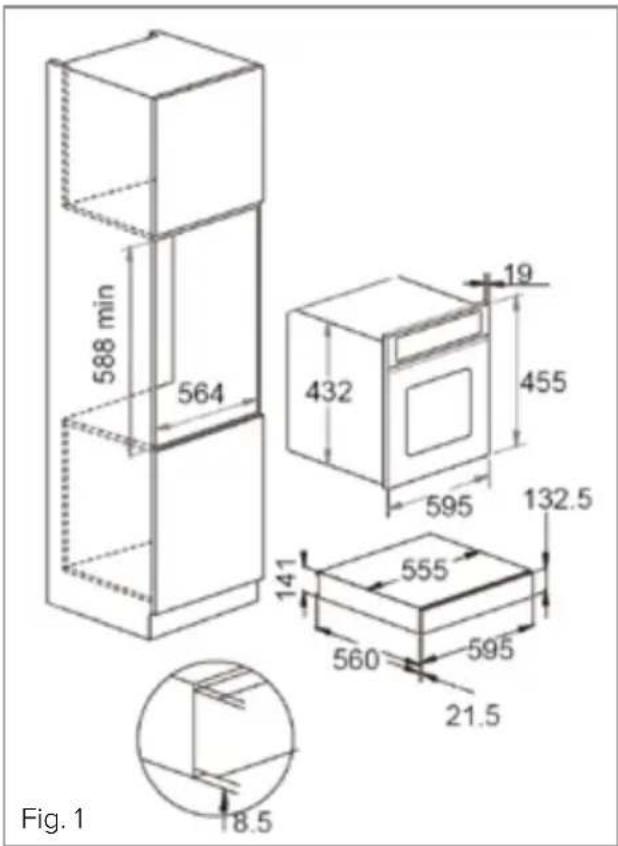
Check the measurements on Fig. 1 to confirm the requirements for your installation. Please note, the oven dimensions show a CDA compact oven and will vary depending on the appliance being installed above the warming drawer.
- Run the mains lead to the switched fused spur outlet to be used and connect to the mains electrical supply. Do not switch on until installation is complete.
text_image
588 min 564 432 19 455 595 132.5 141 555 560 595 21.5 8.5 Fig. 1-
Locate the product centrally on the supporting shelf and fix into position using the fixing screws supplied.
-
Carefully fit the appliance on top of the warming drawer, taking care not to scratch the top stainless edge of the drawer unit. Ensure that the mains connection lead is located near to the power outlet to avoid having to remove the product again to connect the mains electrical supply.
-
Secure the oven into the housing using appropriate fixing screws. The casing of this appliance will get hot. Ensure that any cables that may come into contact with the appliance once installed are suitable for use at 85^ C.
Mains Electricity Connection
Warning! This appliance must be earthed
We recommend that the appliance is connected by a qualified electrician, who is a member of the N.I.C.E.I.C. and who will comply with the I.E.T. and local regulations.
This appliance is intended to be connected to fixed wiring and is not suitable for connection to a 13A plug or 13A supply.
This appliance is intended to be connected to fixed wiring by a double pole switch, having a contact separation of at least 3mm in all poles. The switch must be positioned no further than 2m from the appliance.
This appliance is supplied with a 3 core mains cable; the wires are in accordance with the following code:
Green and Yellow = Earth
Blue = Neutral
Brown = Live
Please note:
- The mains cable r and must be of equivalent or better rating (i.e. 0.5mm2, HO3VV-F).
- The current rating of the fuse or circuit breaker protecting this appliance should be marked on the socket outlet (3A).
- Assembly and electrical connection should be carried out by specialised personnel.
- When installing this product we recommend you seek the help of
another individual.
- The mains isolation switch must be accessible after installation.
Appliance rated electrical power: 440W
DOUBLE POLE SWITCHED
FUSE SPUR OUTLET

text_image
FUSE ONUSE A 3 AMP FUSE
Notes
Notes

text_image
GUARANTEE 5 year parts 2 year labour|C|D|A|
Built for your life
For service or queries relating to your product please contact:
The Customer Care Department on 01949 862 012 or email customer.care@cda.eu
For more information please contact:
The Sales Department on 01949 862 010 or email sales@cda.eu
Customer Care Department. The CDA Group Ltd, Harby Road, Langar, Nottinghamshire, NG13 9HY
T: 01949 862 012 F: 01949 862 003 E: customer.care@cda.eu