LPP075E - Heating DIMPLEX - Free user manual and instructions
Find the device manual for free LPP075E DIMPLEX in PDF.


User questions about LPP075E DIMPLEX
0 question about this device. Answer the ones you know or ask your own.
Ask a new question about this device
Download the instructions for your Heating in PDF format for free! Find your manual LPP075E - DIMPLEX and take your electronic device back in hand. On this page are published all the documents necessary for the use of your device. LPP075E by DIMPLEX.
USER MANUAL LPP075E DIMPLEX
Installation and Operating

natural_image
Line drawing of a rectangular electronic component with six vertical slots, no text or symbols presentDimplex Saletto (LPPE)
Models: LPP050E / LPP075E / LPP100E / LPP150E
These instructions should be read carefully and retained for future use. Note also the information presented on the appliance.
CAUTION: FAILURE TO FOLLOW THESE INSTRUCTIONS MAY CAUSE INJURY AND/OR DAMAGE AND MAY INVALIDATE YOUR GUARANTEE
IMPORTANT SAFETY ADVICE
When using electrical heaters, basic precautions should always be followed to reduce the risk of fire, electrical shock, and injury to persons, including the following:
IMPORTANT: The wall bracket supplied with the heater must be used.
IMPORTANT: All packaging should be disposed of in an appropriate manner.
OVERHEATING WARNING
WARNING: In order to avoid overheating, do not cover or obstruct the heater. Do not place material or garments on the heater, or obstruct the air circulation around the heater, for instance by curtains or furniture, as this could cause overheating and a fire risk. NEVER cover or obstruct in any way the heat outlet slots at the top of the heater or the air inlet slots in the base of the heater.
WARNING: THE SURFACES ON THIS HEATER CAN BE HOT. The heater carries a warning 'DO NOT COVER' to alert the user to the risk of fire that exists if the heater is accidentally covered. DO NOT place combustible items through the heater grille.
CAUTION: Some parts of this product can become very hot and cause burns. Particular attention has to be given where children and vulnerable people are present.
For your safety this heater is fitted with a thermal cut-out. In the event that the product overheats for some reason, the cut-out prevents excessive temperatures on the product by cutting the power to the heater. Once the heater has cooled down, it will reset automatically, it will continue to cycle on and off automatically until the reason for overheating is removed. The display screen may flash red to indicate the product has overheated. To reset the display, remove the obstruction and hold Enter for 10 seconds.
SUITABLE APPLICATIONS
WARNING: This heater is suitable for normal domestic household purposes and should not be used in any other type of environment. This product should only be used in the country where it was purchased from by a recognised commercial retailer. Do not use outdoors.
SERVICING AND REPAIRS
WARNING: Servicing and product repairs should only be undertaken by the manufacturers approved service agent or a similarly trained or qualified person, using only exact manufacturer approved spare parts.
PLEASE NOTE: Household dust, lit cigarettes, candles and oil burners, combined with the convection effect of electric heaters can cause significant soot deposits to build up on the surface directly above and to the sides of the heater. This is not a fault of the heater. Extensive burning of candles or smoking in the operating environment of this product can produce heavy discolouration within a few months of use.
OPERATING WARNINGS
IMPORTANT: Remember to observe all safety warnings and precautions when operating the heater on the automatic or timer modes, either attended or unattended since a fire risk exists when the heater is accidentally covered or displaced.
CAUTION: Do not use if the heater's mains power lead is damaged. If the supply cord is damaged it must be replaced by the installer or an approved Dimplex service partner.
ELECTRICAL INSTALLATION
WARNING: The electrical installation of this heater must be carried out by a suitably qualified or trained electrician, and be in strict accordance with the current wiring Regulations BS 7671. The supply must be connected via a switched fused spur with a fuse rated suitably for the appliances flex. Failure to follow these instructions will mean that the manufacturer's instructions have not been adhered to.
THERE ARE NO EXCEPTIONS.
WARNING: Minimum clearances and IP zone requirements must be adhered to in accordance with the current wiring regulations.
The wires in this mains lead are coloured in accordance with the following code:
GREEN AND YELLOW: EARTH
BLUE: NEUTRAL
BROWN: LIVE
• This heater must be earthed
- Not suitable for connection via a plug top
- Do not locate the heater immediately below a fixed electrical point i.e. socket outlet.
The heater is fitted with a length of flexible cable type H05VV-F size 3 × 1.0mm^2 for 500W to 2kW models for connection to the fixed wiring of the premises through a suitable connection box positioned adjacent to the heater. A means for disconnection must be incorporated in the fixed wiring of the premises in accordance with the current wiring regulations. The supply circuit to the heater must incorporate a double pole isolating switch having a contact separation of at least 3mm. Products that are supplied without a plug are for installation into the fixed wiring of the property, via a suitable double pole switched fused spur with a fuse rated suitably for the appliances flex. Typical fuse ratings for 230V equipment - Up to 700W = 3A, over 700W = 13A.
In installation the supply cord must be cut to the appropriate length for the electrical connection point. Excess cable should not be inserted and stored behind the heater.
WARNING: This heater must not be connected to the electricity supply via an external switching device (such as a timer) or a circuit that is regularly switched on and off by the utility supplier. Failure to follow this warning could result in the heater's thermal cut-off being inadvertently reset and could create a fire hazard. Cables/flexes that are supplied pre-fitted to the product must NOT be extended.
CHILD SAFETY
WARNING: This appliance is not intended for use by persons (including children) with reduced physical, sensory or mental capabilities, or lack of experience and knowledge, unless they have been given supervision or instruction concerning use of appliance by a person responsible for their safety.
This appliance can be used by children from 8 years and above and persons with reduced physical, sensory or mental capabilities or lack of experience and knowledge if they have been given supervision or instruction concerning use of the appliance. Children shall not play with the appliance. Cleaning and user maintenance shall not be made by children without supervision. Children of less than 3 years should be kept away unless continuously supervised.
Children aged from 3 years and less than 8 years shall only switch on/off the appliance provided that it has been placed or installed in its intended normal operating position and they have been given supervision or instruction concerning use of the appliance in a safe way and understand the hazards involved. Children aged from 3 years and less than 8 years shall not regulate and clean the appliance or perform user maintenance. This product contains a replaceable battery.
WARNING: KEEP BATTERIES OUT OF REACH OF CHILDREN.
WARNING: Packaging should be disposed off responsibly as the EPS could be a potential choking hazard for children
Energy Related Product Directive
This product complies with Lot20 of the Energy Efficiency Directive (2015/1188).
| Type of heat output/ room temperature control | |
| With electronic room temperature control | Yes |
| Electronic room temperature control plus week timer Yes | |
| With open window detection | Yes |
| With adaptive start control | Yes |
Technical Details
| Model Identifier(s): | LPP050E | LPP075E | LPP100E | LPP150E | |
| Nominal heat output Pnom 0.5 kW | 0.75 kW 1 kW 1.5 kW | ||||
| Height (mm) 235 235 235 235 | |||||
| Width (mm) 746 746 877 1142 | |||||
| Depth (mm) 100 100 100 100 | |||||
| Minimum heat output (indicative) | Pmin N.A. | N.A. | N.A. | ||
| Maximum continuous heat output | Pmax,c | 0.5 | 0.75 | 1 | 1.5 |
| Auxiliary electricity Consumption | |||||
| At nominal heat output | elmax | 0.00 | 0.00 | 0.00 | 0.00 |
| At minimum heat output | elmin | 0.00 | 0.00 | 0.00 | 0.00 |
| In standby mode | eISB <0.0005 | <0.0005 | <0.0005 | <0.0005 | |
| With open window detection | Yes | ||||
| With adaptive start control | Yes | ||||
| All Models | |
| Controls | Digitally controlled, Electronic Thermostat accurate to (±0.2oC)Timer modes:7 Day Programmable User Timer, Out All Day, Home All Day, HolidayContinuous heat modes:Eco, Manual, Frost Protect, Setback, Runback, Off |
| Controller UI | Graphical display with RGB backlightCapacitive buttons with audio feedbackUser replaceable battery (Coin-Type) |
| Controller Functions | Open window detection, Adaptive-startAdvance time periodAdjustable max setpoint range (7-32°C)Bluetooth for software updatesChild Lock & Landlord Lock (PIN-based) |
| Construction | Durable epoxy-polyester powder coated steel casing with louvered upward facing grilleAdvanced controls with capacitive sense technology for total flexibility of heating |
| Finish / Colour | Metal Chassis, Air Outlet Grille & Control MouldingTraffic White (RAL 9016) |
| Element Compact, finned, mineral filled sheathed element | |
| Installation • Wall bracket | |
| Safety | Thermal cut-out. Auto reset typeOverheat detectionAdvance time period |
| IP Rating IP24 | |
| Battery | 3.3V coin cell battery to backup real time clock. Battery life >5 years. |
| Supply | 1.3 metres fitted, 3 core for fused spur installation, 1/N/PE -230-240 V, 50Hz Class I, with earth wire |
| Approvals CE, BEAB | |
| Warranty 2 years | |
| Country of Origin United Kingdom | |
| Manufacturer Glen Dimplex | Heating & Ventilation (GDC Group Ltd.) |
General Information
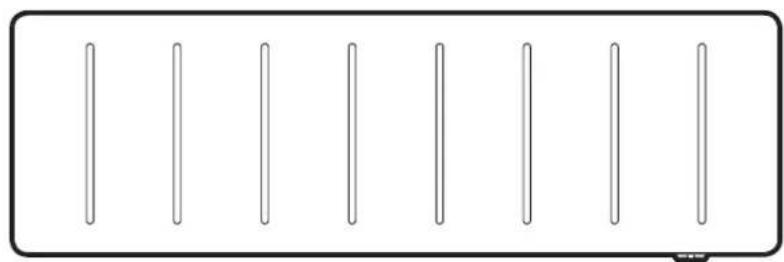
Please read the instructions closely before first using the product, there is also a quick-start guide on page 8 if you need a reminder of how to use the basic functions in the future. The heater is designed for wall mounting using the wall bracket supplied. It should only be operated when in the upright position as shown - see Fig.3 and Fig.4. All models are splash proof to IP24. Before connecting the heater check that the supply voltage is the same as that stated on the heater.
Wall Mounting Instructions

WARNING:
This product is heavy and care should be taken in installation
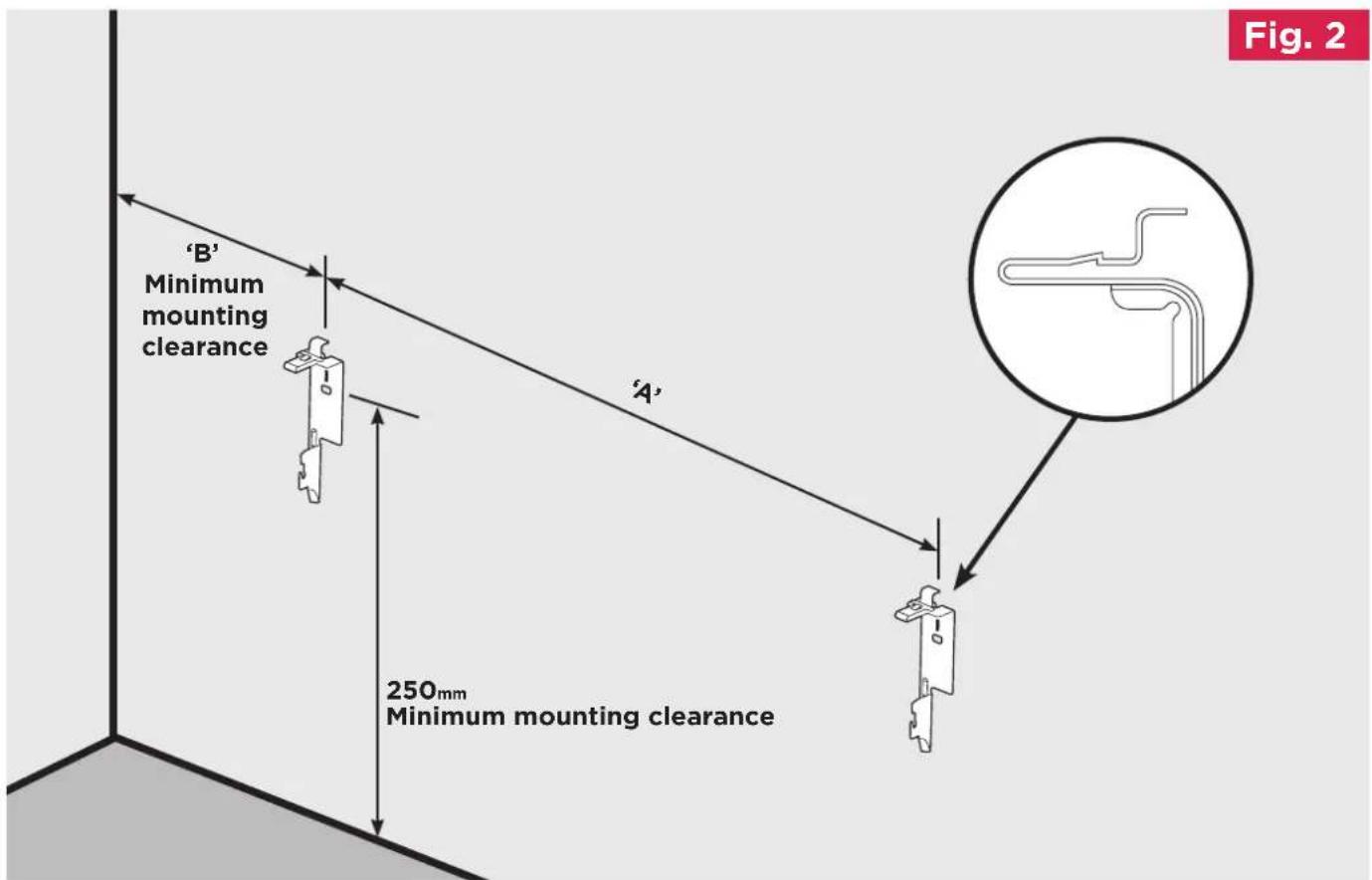
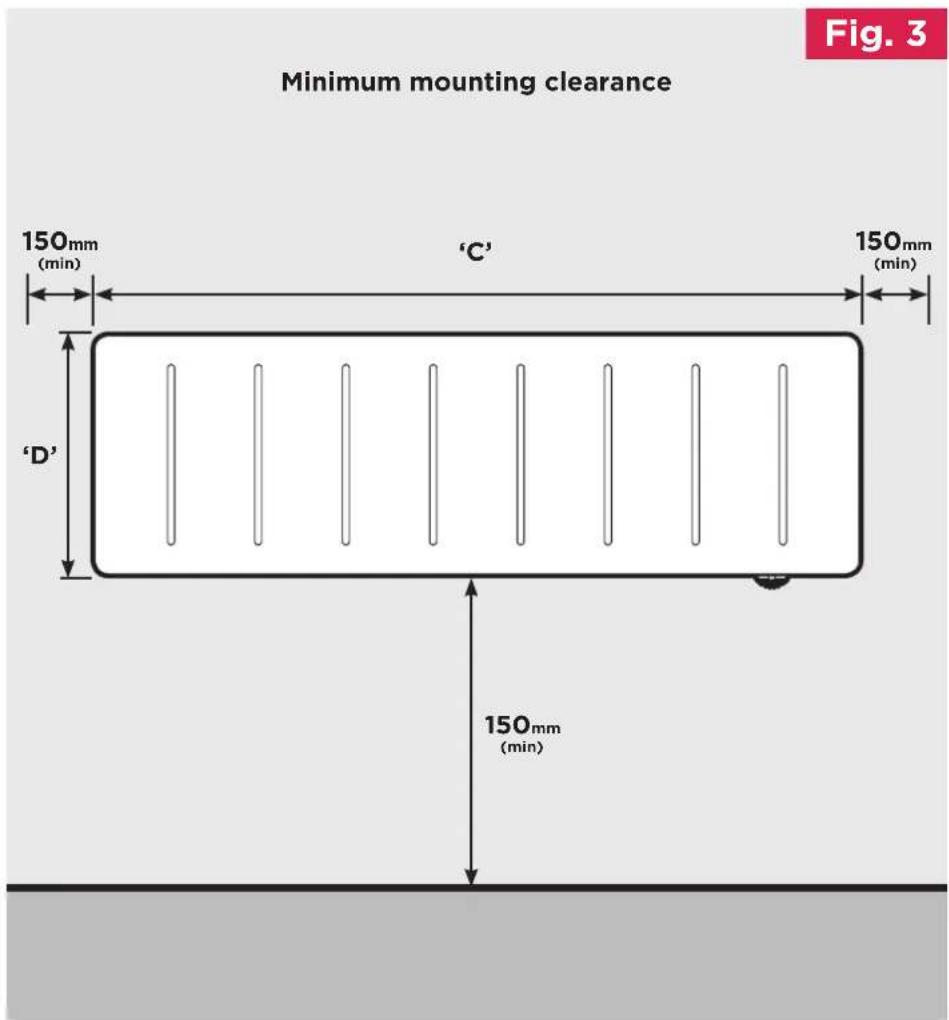
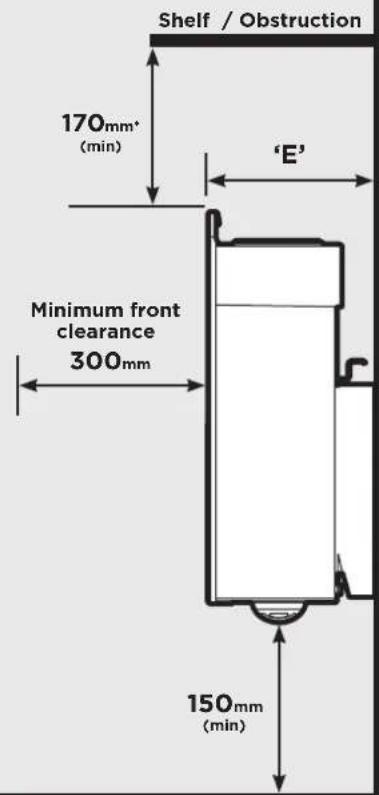
IMPORTANT - The wall bracket supplied with the heater must be used and the heater must be installed in the correct orientation. The fixings should be used to secure the bracket to the particular wall on which the heater will be installed. The heater should be positioned observing the minimum clearances stated around the heater - see Fig. 2,
Fig. 3 and Fig. 4.
MODEL A B C D E
LPP050E 672mm 150mm 746mm 235mm 100mm
LPP075E 672mm 150mm 746mm 235mm 100mm
LPP100E 803mm 150mm 877mm 235mm 100mm
LPP150E 1068mm 150mm 1142mm 235mm 100mm
text_image
Fig. 2 'B' Minimum mounting clearance 'A' 250mm Minimum mounting clearanceTo mount the heater to the wall:
-
Remove wall mounting bracket from the back of the heater by depressing the spring latch at the side of each bracket - see Fig.2.
-
Fix the wall bracket securely to the wall through the four screw holes. Ensure only screw fittings suitable for the particular wall type are used.
-
Present the heater to the wall bracket and engage bottom slots in the back with bracket hooks.
-
Press the top of the heater into locked position and ensure the clips on the top are engaged.
natural_image
Pure diagram of six vertical lines inside a rectangular frame, no text or symbols present
WARNING:
This product is heavy and care should be taken in installation
text_image
Minimum mounting clearance Fig. 3 150mm (min) 'C' 150mm (min) 'D' 150mm (min)Fig. 4
*The minimum distance from the shelf should be 170 minimum if the shelf is wider than 50mm, or 50 minimum if the shelf is 50mm or less.
text_image
Shelf / Obstruction 170mm* (min) 'E' Minimum front clearance 300mm 150mm (min)Please note correct product orientation is with controller facing top right side only
Quick Start Guide
This guide is for quick reference only.
Please refer to the operating section on Page 12 for further information.
How Does the Heater Control Work?
The controller allows you to choose when you want heat and at what temperature. When using a timer mode (see below), Comfort On will display on the home screen to tell you when the heater is maintaining the temperature displayed. Comfort Off will display when the heater is outside of a timed heating period. When Manual, Eco or Frost modes are being used the heater will always maintain the temperature shown on the home screen.
Set the Time
To set the date and time on the heater, press Menu, then press Enter with Time / Date highlighted. Press ▲ or ▼ until the correct value is shown, then press Enter to confirm and move onto the next value. Repeat until all details are correct, and Set displays, then press Back. The time is automatically adjusted in spring and autumn between Greenwich Mean Time (GMT) and British Summer Time (BST).
Set the Temperature
The temperature shown on the display is the room temperature set point (target room temperature). This is the temperature that the heater will maintain during the heating periods. If the room temperature is above this temperature then the heater will not operate. The heater leaves the factory with this temperature set at 21^ C which represents a typical, comfortable room temperature. If you require a different room temperature, use either or until the display shows the temperature you require.
Timer Modes
Your Dimplex LPPE Panel comes pre-programmed with four timer modes. These modes define the periods when the heater will operate in Comfort On mode. The four modes are shown in Fig.5
| Timer Mode Description | Fig. 5 | |
| User timer | Customise times in four periods | |
| Out All Day | 6 hours heating per day in two periods | |
| Home All Day | 13 hours heating per day in one period | |
| Holiday | Set the temperature and number of days for which you are on holiday | |
Which Timer Mode is Best for Me?
The heater leaves the factory set in Out All Day mode. If you are out during the day and only require heat in the mornings and evenings then this mode will likely suit your lifestyle.
If you are in during the day then you should select the Home All Day mode which is a single heating period.
The User Timer mode will give you four periods of heating split throughout the day.
If you are away for an extended period of time then you can use the Holiday mode. This allows you to reduce the heating during the period that you are away, reverting to the previously selected mode on the day you return.
To choose a timer mode press Menu followed by Enter to select Timer Mode. Select the mode required by pressing ▲ or ▼ and then Enter. For options Out All Day, Home All Day and User Timer, three choices are available
Select, Preview and Modify.
Select - Choose this timer option Preview - View the times currently set Modify - Change the times currently set
Please refer to the operating section of this manual for information on how to modify the programmed times

flowchart
graph TD
    A["20°C Out All Day Comfort On"] --> B["Main Menu Date/Time Mode Options"]
    B --> C["Mode Timer Mode Boost Setback"]
    C --> D["Timer Mode Out All Day Home All Day Holiday User Timer"]
    D --> E["OUT All Day Select Preview Modify"]
    E --> F["OUT All Day Selected"]
    F --> G["Back Back"]
    H["Advance"] --> I["Menu"]
    I --> J["ENTER"]
    K["Menu"] --> L["Back"]
    M["Advance"] --> N["Menu"]
    N --> O["ENTER"]
    P["Back"] --> Q["Back"]
    R["Back"] --> S["Back"]
Advance
Sometimes you may be at home when you had not planned to be, or need to leave when you had planned to have the heating on. You can change the way you use your heating temporarily, this temporary change is achieved by using the Advance function.
When a timer has been selected, the Advance function allows you to begin the next period early. If the heater is in a Comfort Off period and you want heat - press the Advance button. If the heater is in Comfort On and you don't want heat, press the Advance button and it will go off until the beginning of the next Comfort On period.
Advance Boost
The Advance button is also used to enter the boost mode which provides temporary heating for one, two, three or four hours. Press the Advance button twice to begin a one hour boost. Continue pressing the Advance button to enter the longer boost periods.

NOTE:
Advance Boost only works when not in timer mode
Operation Manual
WARNING: FAILURE TO FOLLOW THESE OPERATING INSTRUCTIONS MAY RESULT IN INJURY AND/OR DAMAGE.
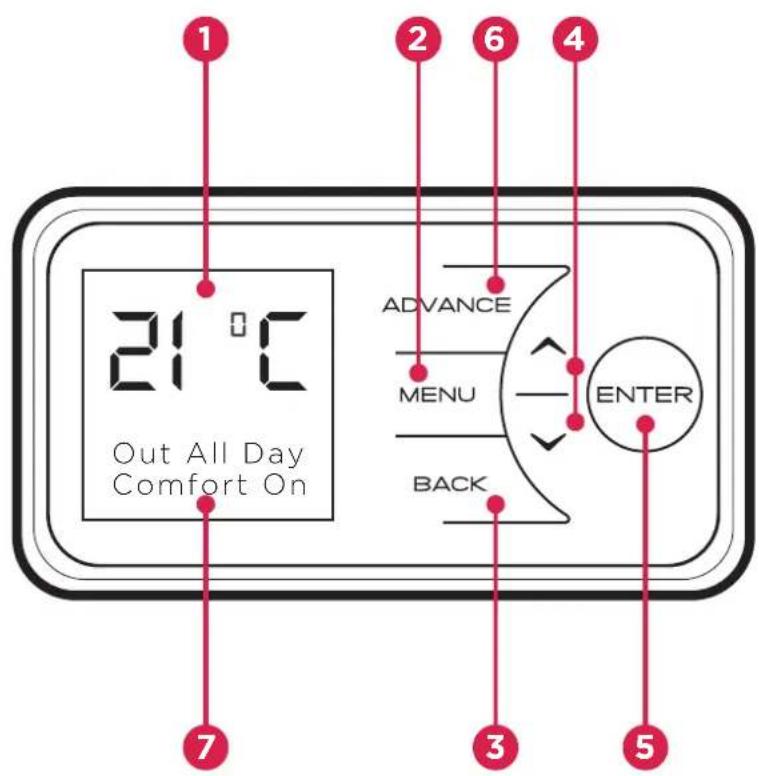
The controls are located on top of the heater. The heater is fitted with an adjustable electronic controller consisting of a display screen and six touch sensitive buttons.
1 Display Screen
2 'Menu' Button
3 'Back' Button
4 'Up and Down' Arrows
5 'Enter' Button
6 'Advance' Button
7 Heating Status
text_image
1 2 6 4 3 5 7 21 °C Out All Day Comfort On ADVANCE MENU BACK ENTERThe heater is fitted with an adjustable thermostat enabling the room temperature to be controlled. The minimum room temperature is 7^ C. The maximum temperature is set to 26^ C by default however this can be increased to 32^ C if required. A temperature of 21^ C represents a normal room temperature.

NOTE:
Your heater may produce some noise during operation. This noise is caused by the expansion and contraction of the element as it changes temperature, and is normal for this type of product. Whilst the noise produced is usually very quiet, certain environmental factors can make it more noticeable, such as hard flooring or minimal furnishings. If you believe that the expansion noise is excessive, please contact us.

NOTE:
Should the heater fail to operate, this may be due to the room temperature being higher than the thermostat setting.
Control Functions
The heater controls can be easily adjusted by using the six buttons on the User Interface.
1 The Display Screen shows the options available at each stage of adjustment.
2 Menu - displays the main options list;
- Date/Time - Set the date and time.
- Mode - Set the mode of operation.
- Options - Temperature units, daylight savings time, lock settings and service information.
3 Back returns to the previous programming stage.
4 The ∧ and ∨ buttons are used to navigate through the menus and alter setting values. The ∧ and ∨ buttons are also used to adjust the required room temperature on the main screen. The screen colour changes based on the temperature selected, showing deep blue through to bright red.
5 Enter is used within the menu options to confirm settings. On the main screen pressing Enter will display the enabled features.
The timed periods during which the heater is providing heat are defined as 'Comfort On' (this is displayed at the bottom of the screen).
Outside of heating periods the heater will not deliver heat and these periods are called 'Comfort Off'.
While constant heat modes are active, the mode of operation is displayed at the bottom of the screen e.g. 'Manual'.
6 The Advance button overrides the heating settings and changes the operational state of the heater. If a timer mode is selected, pressing Advance will cause the heater to remain on until the next Comfort Off period is due, or off until the next Comfort On period is due.
If the heater is in a continuous heat mode of operation, Advance can be used to switch the appliance on and off.
Advance is also used to enter Boost mode. Boost mode delivers heat for between one and four hours if the appliance is in a Timer Mode.
If Runback is enabled and the appliance is in Standby mode, the Advance button is used to enter a timed Runback heating period.
Main Screen
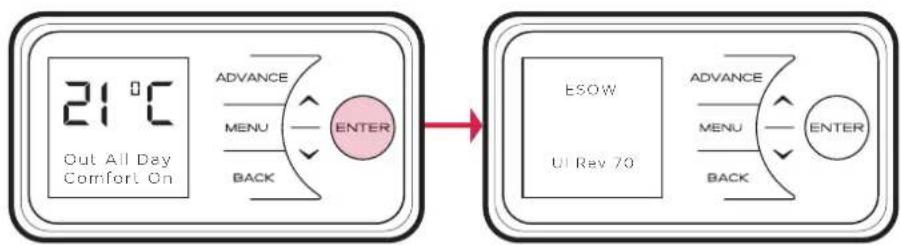
After 30 seconds the heater will default back to the Main Screen. Here the current target temperature (setpoint) is displayed along with the mode of operation. Any use of the Advance function will be displayed here, and pressing Enter will show the functions which are enabled.
When left inactive for a long period of time this display will 'sleep' and the text will disappear. Press any button for its return.
flowchart
graph LR
    A["21°C Out All Day Comfort On"] --> B["ADVICE MENU BACK ENTER"]
    B --> C["ESOW UI Rev 70"]
    C --> D["ADVICE MENU BACK ENTER"]

NOTE:
The display screen will return to the main screen after a period of 30 seconds of inactivity.

NOTE:
Pressing enter will show the functions which are enabled, e.g. ES and OW above. Ref: page 19.
Setting the Date and Time
The heater incorporates a real time clock with calendar function. The time clock has a battery backup that will keep the clock running in the event of a mains power outage.
To adjust the time or date follow the steps below.
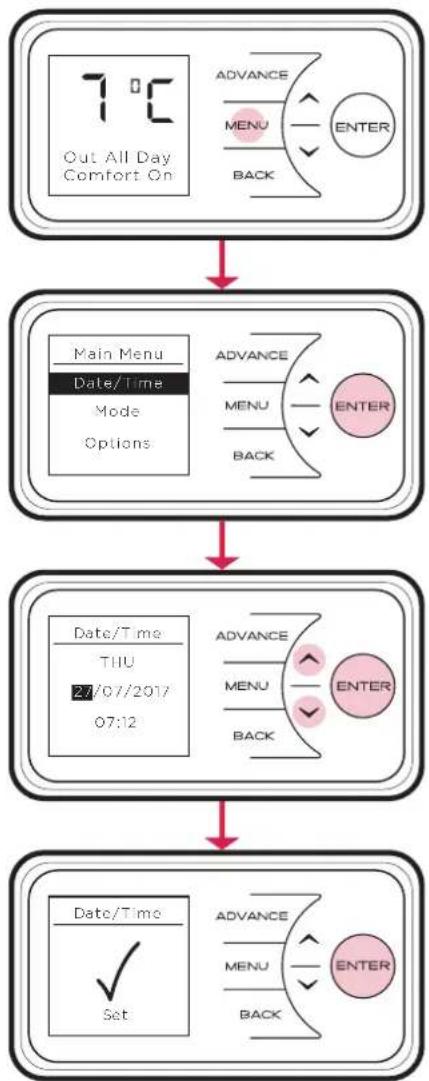
Press the Menu button. Select Date/Time by pressing the Enter button. Press ∧ and ∨ to select the correct day of the month and press Enter to select.
Repeat this operation, until the date and time has been set, ensuring to press Enter to select. Press Back button to return to the Main Screen once Set has been displayed.
flowchart
graph TD
    A["7°C\nOut All Day Comfort On"] --> B["Main Menu\nDate/Time\nMode\nOptions"]
    B --> C["Date/Time\nTHU\n27/07/2017\n07:12"]
    C --> D["Date/Time\n✓\nSet"]
    D --> E["Advance\nMENU\nBACK\nENTER"]
    E --> F["Advance\nMENU\nBACK\nENTER"]
    F --> G["Advance\nMENU\nBACK\nENTER"]
    G --> H["Advance\nMENU\nBACK\nENTER"]
Modes of Operation
The heater comes pre-programmed with a set of heating profiles. The user can change if he / she want to. There are four options available - three pre-programmed and one user adjustable timer;
- User Timer - provides greatest flexibility to the user. Four time slots are available throughout the day and these can be customised for each day of the week.
- Out All Day (pre-programmed) - has the following preset times Monday to Sunday, which can be altered if desired 07.00 until 08.30 17.30 until 22.00
- Home All Day (pre-programmed) - has the following preset times Monday to Sunday, which can be altered if desired; 08.00 until 21.00
- Holiday (pre-programmed for 7 days at 10^ ) - set the number of days required (from 1 to 255) and the temperature required. 7^ is advised if you just want to protect the property from frost while you are away.
The heater can also maintain a constant room temperature using the following modes;
- Manual Mode maintains a comfortable room temperature.
- Eco Mode maintains a room temperature of 18^ C. By reducing the room temperature slightly, significant energy savings can be achieved. The green display colour indicates that the selected temperature provides a comfortable room temperature while reducing energy consumption.
- Frost Protect Mode maintains a room temperature of 7^ C. This mode should be used to provide protection against frost as indicated by the blue display.
Select Standby to switch off the heating element. Heating will not be provided.

NOTE:
In all modes, and can be used to adjust the required room temperature. In timer modes, this change is temporary and the heater will set the room temperature based on the saved heating profiles.

NOTE:
It is recommended that the timer is used as doing so can reduce the running cost. Operating the appliance in the permanent heating modes may result in increased running costs.
Choosing and Setting a Mode
Timer Modes
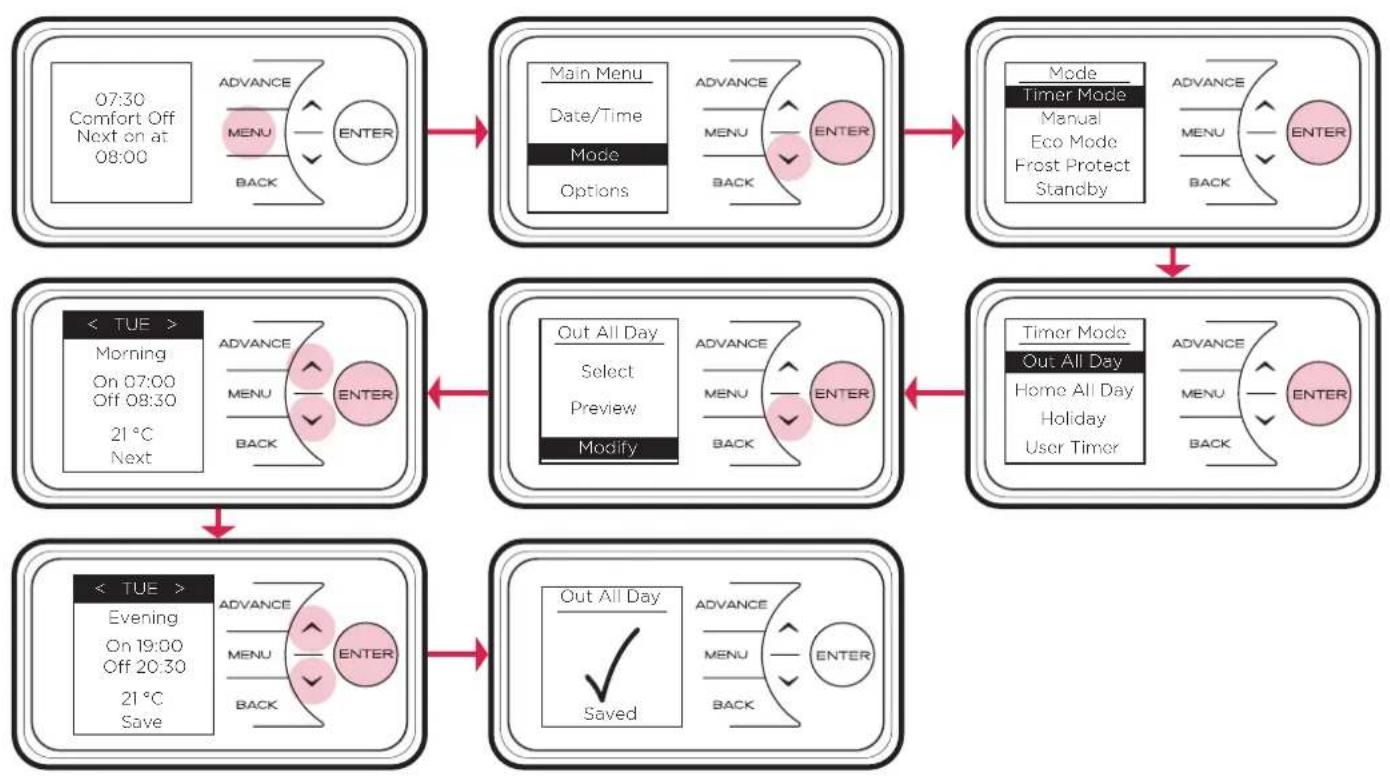
To choose a timer mode press Menu from the home screen, then navigate to 'Timer Mode' using the √button. Press Enter to select.
Select a timer by pressing or followed by Enter.
For Out All Day, Home All Day and User Timer, will show three choices available - Select, Preview and Modify.
- Select - This option will activate the timer.
- Preview - This option allows you to quickly view the times and temperatures currently set
- Modify - This option allows you to modify the times and temperatures.
When Modify is chosen, select and change each option using the ↗ ∨ and Enter buttons. At the end of each heating period, select Next to move to the following heating period. When a day is complete, the following options are available:
- Save - Saves times for one day.
- Copy Next - Copy times from the day shown to the following day.
- Copy All - Copy times from the day shown to all seven days.
- Clear - Remove all times from the day shown.
- Clear All - Remove all times for all seven days.

NOTE:
Once modified a programme must be selected if you want to begin using it.
Example of Modifying the Out All Days timer is shown
flowchart
graph TD
    A["07:30 Comfort Off Next on at 08:00"] --> B["MAIN Menu Date/Time Mode Options"]
    B --> C["Mode Timer Mode Manual Eco Mode Frost Protect Standby"]
    C --> D["Timer Mode Out All Day Home All Day Holiday User Timer"]
    D --> E["OUT All Day Saved"]

    F["Morning On 07:00 Off 08:30 21°C Next"] --> G["OUT All Day Select Preview Modify"]
    G --> H["Advance Menu BACK ENTER"]

    I["Evening On 19:00 Off 20:30 21°C Save"] --> J["OUT All Day Saved"]
    J --> K["Advance Menu BACK ENTER"]
In Holiday mode the number of days that the room will remain unoccupied for can be adjusted together with the required room temperature.
Press and to choose a holiday period between 1 and 255 days, then press the Enter button.
Press ∧ and ∨ to choose a temperature to be maintained during this period and press the Enter button. At the end of the Holiday mode the heater will automatically revert back to the previously selected programme.

NOTE:
If the EcoStart is enabled the heater will maintain the room at the required temperature for the duration of the heating period. To achieve this, the heater will begin heating the room before the start of the heating period to ensure the room is at the required temperature when the period starts.
If EcoStart (ES) is disabled, the heater will not operate until the beginning of the heating period. This should be taken into consideration when setting the heating periods. See page 19 for instruction on enabling/disabling EcoStart.
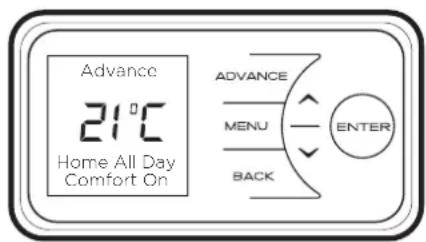
Advance
The Advance function allows the active timer schedule to be changed temporarily. When a timer has been selected, the Advance function is used to begin the next Comfort On mode early. If the heater is in Comfort Off mode and heat is required, press the Advance button.
If the heater is in Comfort On and heat is not required, press the Advance button and the heater and the heater will stop heating until the beginning of the next Comfort On period.
If the heater is in Manual, Eco Mode or Frost Protect, pressing the Advance button will pause that operation. The heater will remain paused until the Advance button is pressed again.
text_image
Advance 21°C Home All Day Comfort On ADVANCE MENU BACK ENTERBoost
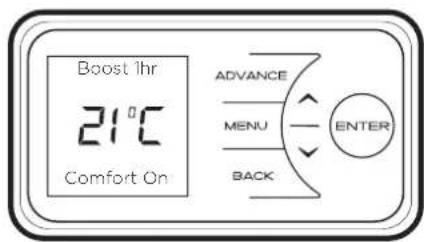
The Advance button is also used to enter the Boost mode which provides temporary heating for one, two, three or four hours.
Press the Advance button twice to begin a one hour boost. Continue pressing the Advance button to set longer boost period.
text_image
Boost 1hr 21°C Comfort On ADVANCE MENU BACK ENTEROptions
The Options menu allows the settings to be modified to suit the user's preferences. These are:
DST Rule - Select your daylight saving setting. The heater clock will automatically adjust for daylight saving time. If no adjustment is required then select none.
Auto Lock - Enable or disable the auto lock feature. This feature locks the interface if left inactive for longer than one minute. To unlock the appliance, press and hold Back and Enter for two seconds.
Sound - Audio feedback can be enabled or disabled.
Service Info - Service information is displayed.
Temp Units - Choose whether your unit displays degrees Centigrade or Fahrenheit.
Comms - Choose to enable or disable Wireless Connectivity.
If additional RF Module is connected, user will have option to enable or disable RF communications.

flowchart
graph TD
    A["Options"] --> B["DST Rule"]
    B --> C["Auto Lock"]
    C --> D["Sound"]
    D --> E["Service Info"]
    E --> F["Temp Units"]
    F --> G["Comms"]
    H["ADVANCE"] --> I["MENU"]
    I --> J["ENTER"]
    K["BACK"] --> J
    style H fill:#f9f,stroke:#333
    style I fill:#ccf,stroke:#333
    style J fill:#cfc,stroke:#333
Child Lock
If you need to lock the controls so that the settings cannot be changed then activate the Child Lock.
To lock the controls press Back and Enter for three seconds. Child Lock will appear at the bottom of the screen. To unlock the control repeat the action of pressing Back and Enter for three seconds.

NOTE:
The controls cannot be adjusted when child lock is active.

text_image
21°C Child Lock ADVANCE MENU BACK ENTERUser Information
User Information
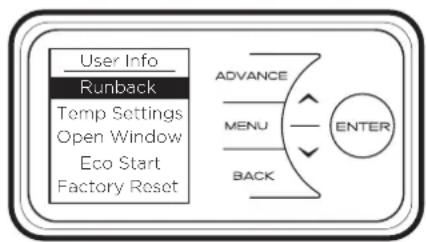
Press and hold Enter for five seconds to display the User Information menu;
Runback, when enabled, allows the user to activate a timed heating period by pressing the Advance button when the appliance is in Standby mode. The settings of the timed heating period, duration and temperature can be configured in Runback Settings. Runback is enabled by default.
Temp Settings allows the user to select the Max Temp to adjust the maximum temperature range of the appliance. Setback allows the user to select a background temperature setting when the product is not in a Timer Mode Comfort On period.
Open Window detection (OW), when enabled, allows the heater to reduce the target room temperature, limiting energy waste. Enabled as default when an open window is detected.
EcoStart (ES) - to achieve the desired temperature at the onset of the timed Comfort On period, the appliance anticipates when it needs to start heating prior to the onset of the timed on period. E.g. room is 16°C, with 21°C at 7am set on the timer. With ES On the control will start to heat the room before 7am, reaching 21°C at this time. With ES off the heater will start to heat the room at 7am and will reach 21°C after this time.
Factory Reset returns all settings to the factory presets.
flowchart
graph TD
    A["User Info"] --> B["Runback"]
    B --> C["Temp Settings"]
    C --> D["Open Window"]
    C --> E["Eco Start"]
    C --> F["Factory Reset"]
    G["ADVANCE"] --> H["MENU"]
    H --> I["ENTER"]
    J["BACK"] --> K["BACK"]
Runback Lock Mode
Introduction
This appliance has a built in runback lock mode, when this mode is activated the user will have limited functionality with no access to the settings of the runback timer. It is possible to limit the maximum operating temperature and runback duration in the runback lock mode. This mode also features a setback function where a non-adjustable setback temperature can be set.
Operation in Runback mode
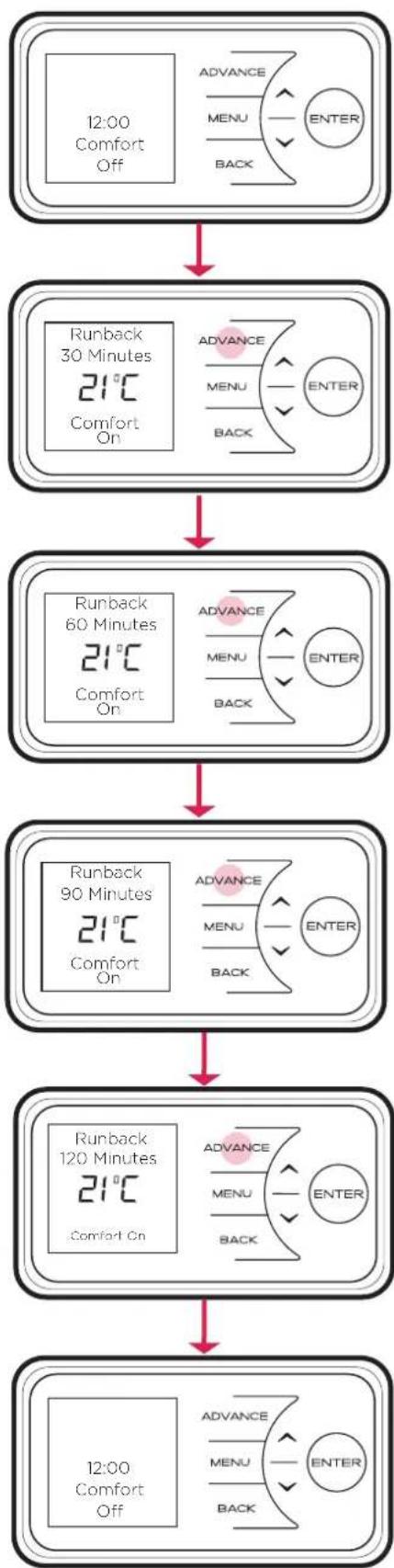
When runback mode is active the appliance settings are locked, it is only possible for the user to activate predetermined runback periods. During these periods the appliance will energise to control the room to a desired temperature. During a runback period the set-point can be adjusted by the user however, it is possible to assign a maximum set-point limit during the runback mode setup. Once the runback period has elapsed the appliance will switch into Comfort off mode or into setback mode if enabled.
To activate a runback period the user must press the Advance button. There will be four runback periods available to chose from which are accessible through sequential presses of the Advance button. A subsequent press of the Advance button will return the appliance to Comfort off mode or Setback mode.
flowchart
graph TD
    A["12:00 Comfort Off"] --> B["Runback 30 Minutes 21°C Comfort On"]
    B --> C["Runback 60 Minutes 21°C Comfort On"]
    C --> D["Runback 90 Minutes 21°C Comfort On"]
    D --> E["Runback 120 Minutes 21°C Comfort On"]
    E --> F["12:00 Comfort Off"]

    subgraph Timeframe
        G["ADVANCE MENU BACK ENTER"]
    end

    style G fill:#f9f,stroke:#333
    style H fill:#ccf,stroke:#333
Accessing Runback Lock Mode
In order to enter the Runback Lock menu; Back, Menu & Enter must be pressed simultaneously and held for 10 seconds. The user will then be prompted to enter the runback lock PIN.

NOTE:
The default PIN code is 0000, the password can be changed from within the runback lock mode menu.
Enabling runback timer mode
From the main Runback lock menu select Runback, and then Enable using Enter. Runback mode will be enabled, normal functionality of the appliance will be disabled allowing only the Runback mode functionality.
Disabling runback timer mode
From the main Runback lock menu select Runback and Disable and confirm using Enter. Runback mode will be disabled and full appliance functionality will be enabled.
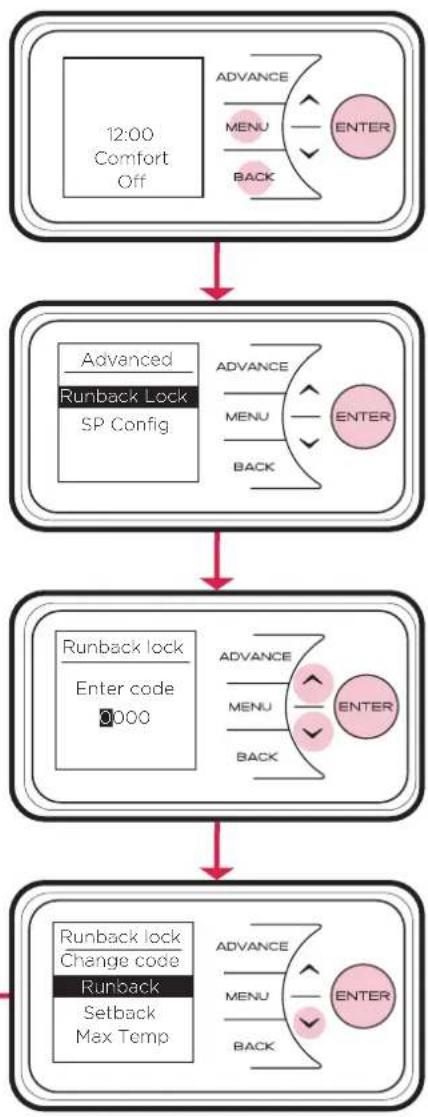
flowchart
graph TD
    A["12:00 Comfort Off"] --> B["Advance MENU BACK ENTER"]
    B --> C["Advanced Runback Lock SP Config"]
    C --> D["Runback lock Enter code 0000"]
    D --> E["Runback lock Change code Runback Setback Max Temp"]
    E --> F["Advance MENU BACK ENTER"]
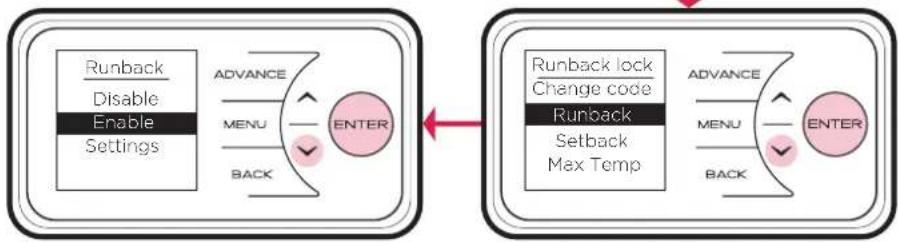
flowchart
graph LR
    A["Runback\nDisable\nEnable\nSettings"] --> B["ADVANCE"]
    B --> C["MENU"]
    C --> D["ENTER"]
    D --> E["Menu"]
    E --> F["BACK"]
    F --> G["ENTER"]
    G --> H["Runback lock\nChange code\nRunback\nSetback\nMax Temp"]
    H --> I["ADVANCE"]
    I --> J["MENU"]
    J --> K["ENTER"]
    K --> L["Menu"]
    L --> M["BACK"]
    M --> N["ENTER"]
Runback Mode Settings
Changing the PIN code
It is possible to set a user defined runback lock PIN code. Once changed, the PIN code will be required to access the runback timer mode menus.
To change the PIN code select "Change code" from the main Runback lock menu. To complete the change, follow the on-screen instructions, it will be necessary to input the current PIN and then set the new PIN code.

flowchart
graph LR
    A["12:00 Comfort Off"] --> B["Runback lock Enter code 0000"]
    B --> C["Runback lock Changecode Runback Setback Max Temp."]
    C --> D["End"]
Runback Duration
During setup it is possible to select from a number of preset runback periods. This is achieved by selecting the maximum runback time. The maximum runback time is subdivided into four periods to deliver options to the user, the maximum time options and corresponding runback periods are shown in the table below.
To set the maximum time period select Runback from the Runback lock menu, then select "Settings" from the Runback menu. The arrow keys can be used to toggle the selection, Enter then confirms the selection. Ensure to select a max duration with runback periods suitable to the application.
| Period | ||||
| Max Duration 1 2 3 4 | ||||
| 30 15 20 25 30 | ||||
| 60 15 30 45 60 | ||||
| 90 15 30 60 90 | ||||
| 120 30 60 90 | 120 | |||
| 240 | 60 | 120 | 180 | 240 |
| 360 | 90 | 180 | 270 | 360 |
| 480 | 120 | 240 | 360 | 480 |
Setback Mode
It is possible to activate a setback mode. This ensures that when the runback lock is enabled (and the appliance is not in a runback period) the appliance maintains a minimum temperature value at all times. The user can still activate runback to boost room temperature as normal. The setback temperature can be set during the runback lock setup.
The setback mode can be enabled or disabled from within the Runback lock settings menu. It is also possible to alter the setback temperature from this menu.
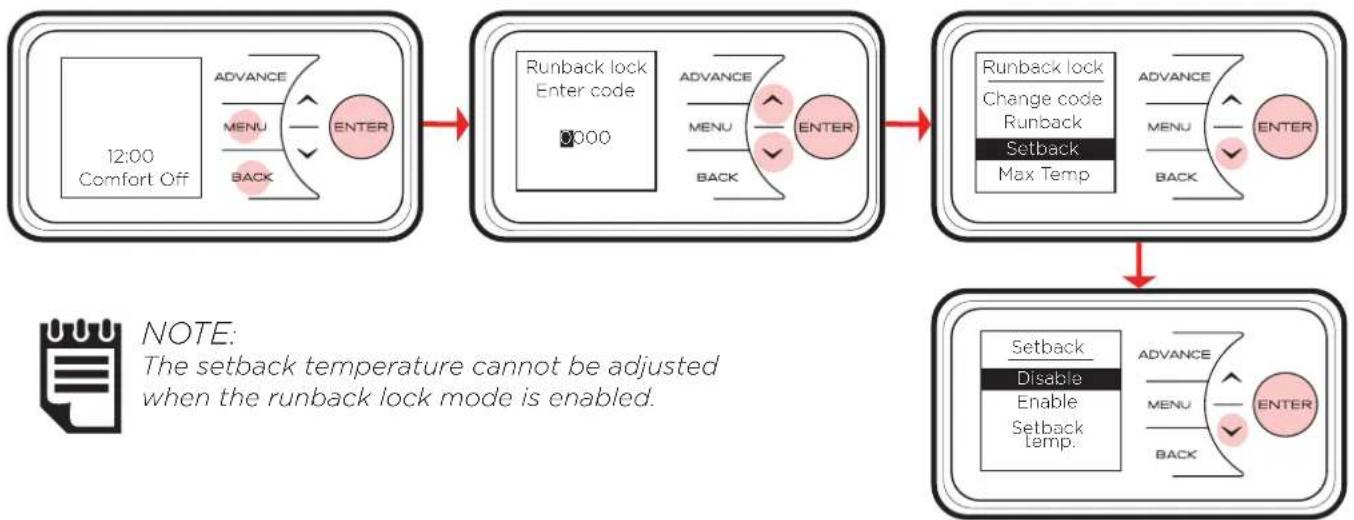
flowchart
graph TD
    A["12:00 Comfort Off"] --> B["Runback lock Enter code 0000"]
    B --> C["Runback lock Change code Runback Setback Max Temp"]
    C --> D["Setback Disable Enable Setback Temp."]
    style A fill:#f9f,stroke:#333
    style B fill:#ccf,stroke:#333
    style C fill:#cfc,stroke:#333
    style D fill:#fcc,stroke:#333
Maximum Temperature
A maximum temperature limit for the room during runback can be applied. This will restrict the users ability to increase the room temperature beyond a set value during a runback period. The maximum temperature can be set by selecting 'Max Temp.' in the Runback lock settings menu. The temperature can be adjusted using the arrow keys and then confirmed using the Enter key.
Battery Replacement
IMPORTANT: Before replacing the battery ensure the heater is isolated from the electricity supply. NOTE - Battery should be disposed of in an appropriate manner
This product is fitted with a replaceable battery in the controls.
To replace the battery, follow the steps below, shown in Fig. 6:
- Unhinge the heater from the wall using the clips shown in Fig. 2 and locate the battery module.
- Slide the catch and pull module from the controls.
- Remove the coin cell battery and replace.
- Slide module back in place, ensuring clip is engaged.
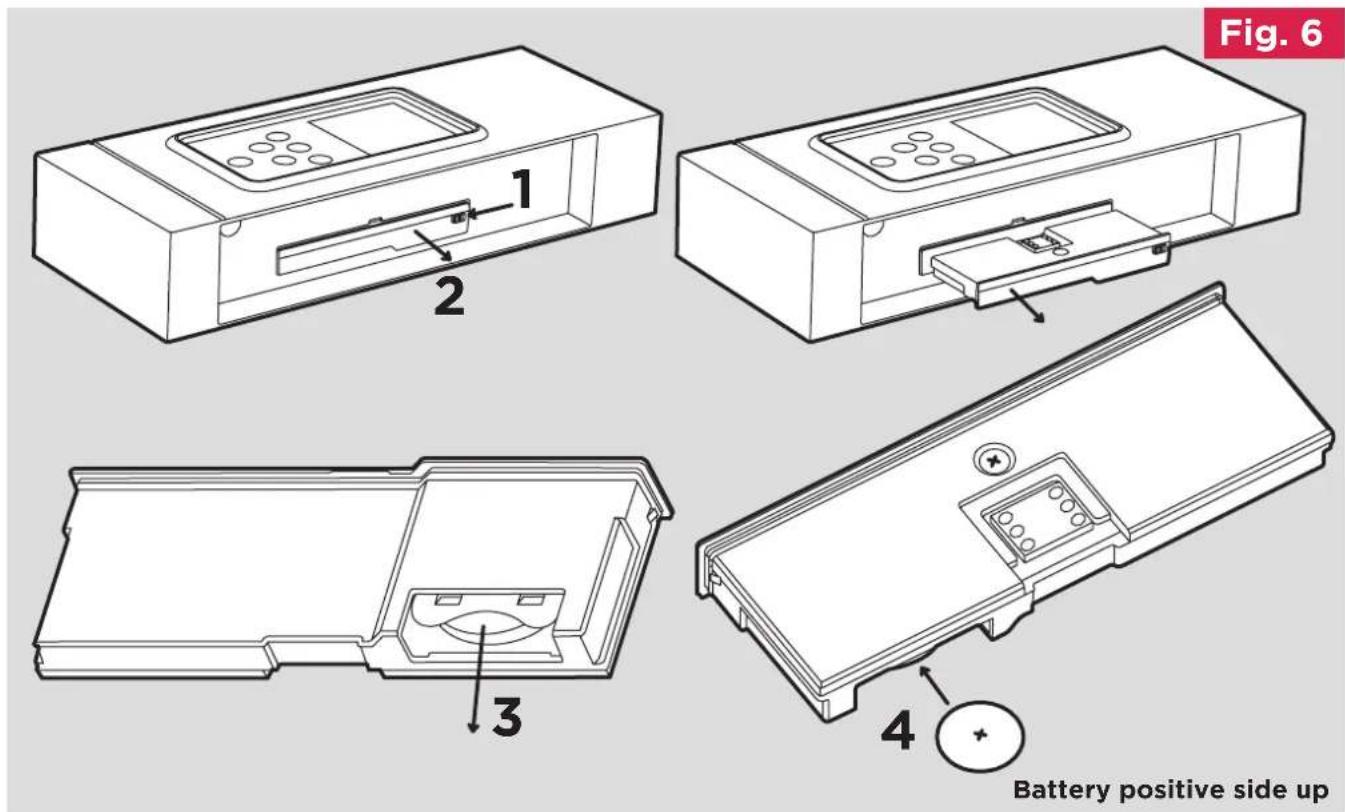
text_image
Fig. 6 1 2 3 4 Battery positive side upImportant
During initial heat-up, some odour may be emitted due to the newness of materials used in manufacture. This is normal and will disappear after a short period of use. It is however advisable to keep the room well ventilated.
Cleaning
WARNING - ALWAYS DISCONNECT FROM THE POWER SUPPLY BEFORE CLEANING THE HEATER.
Before commencing cleaning, isolate the heater from the electrical supply and allow it to cool. The outside can be cleaned by wiping it over with a soft dry cloth. Do not use abrasive cleaning powders or furniture polish, as this can damage the surface finish. To release the heater from the wall bracket for cleaning or redecoration, depress the latch on both brackets (See Fig. 2) and hinge forward.
Energy Saving Tips
The energy we use to heat, light and power our homes contributes over a quarter of the UK's carbon emissions, the principle contributor to climate change. Around half the energy used in the home is for heating and hot water, so using your heating system efficiently will not only help the environment, but also save you money.
Energy efficiency tips for heating and hot water
1. Don't set the temperature to high...
By reducing the thermostat setting by just 1°C can reduce your energy use by as much as 10%. And if you're going away during the winter, leave the thermostat on the frost protection setting to provide protection from freezing at a minimum cost.
2. Use it where you need it...
Set the appropriate temperature on your heaters for the room they are in; for example, leave the thermostat on a heater in a spare bedroom on a lower setting.
3. Use it when you need it...
Use heaters fitted with timers or linked to central controllers to turn the heating on only when you need it and automatically switch it off when you don't.
4. Curtains
Close your curtains at dusk to stop heat escaping through the windows.
5. Windows
Nearly 25% of heat loss can occur through poorly insulated frames and single glazing. If you can't afford to double glaze all your windows, go for the rooms you heat most.
6. Treat your hot water tank...
Give it a jacket. An insulating jacket for hot water tanks costs only a few pounds and pays for itself within months. Fit one that's at least 75mm (3") thick and you could save £10-15 a year.
7. Water
Use a shower if you have one to save time, money and water. Don't set the thermostat too high on your water heater - 60°C/ 140°F is usually adequate for bathing and washing. Put the plug in when running hot water in your sink - leaving hot taps running is both wasteful and expensive. Ensuring dripping taps are repaired quickly. In just one day, you could waste enough water to fill a bath.
Other Energy Saving Tips for Around the Home
1. Lights
Turn off lights whenever you leave a room for more than ten minutes. Use low-energy bulbs wherever you can as they use less than a quarter of the electricity used by ordinary light bulbs and last ten times longer!
2. Cooking
Use the right size pan for food and cooker hob. Keep saucepan lids on - this enables you to turn down the heat. Boil water for cooking in a kettle first.

For electrical products sold within the European Community. At the end of the electrical products useful life it should not be disposed of with household waste. Please recycle where facilities exist. Check with a Local Authority or retailer for recycling advice in your country. Packaging should be recycled where possible.
What does a Dimplex Guarantee cover?
Dimplex designs and manufactures its products to ensure they deliver reliable service for normal, household use in domestic settings. All Dimplex products are individually tested before leaving the factory.
If you are a consumer and you experience a problem with your Dimplex product, which is found to be defective due to faulty materials or workmanship within the Guarantee Period, this Dimplex Guarantee will cover repair or - at the discretion of Dimplex - replacement with a functionally equivalent Dimplex product.
The Dimplex Guarantee Period is two calendar years from the date of purchase of your Dimplex product, or the date of delivery of the product, if later. The Dimplex Guarantee is conditional upon you providing the original purchase receipt as proof of purchase. Please therefore retain your receipt as proof of purchase.
If you do experience a problem with your Dimplex product please call the Helpline on 0344 879 3588 or visit https://www.gdhv.com/contact-us and complete the online form. For ROI please email serviceireland@glendimplex.com or call +353(0)1 842 833. We will need details of your Dimplex product, its serial number and a description of the fault which has occurred. You can find the model number and serial number for your Dimplex product on the heaters side. Once we receive your information and proof of purchase we will contact you to make the necessary arrangements.
If your Dimplex product is not covered by this Dimplex Guarantee there may be a charge to repair your product. However, we will contact you for agreement to any charges before any chargeable service is carried out.
What is not covered by a Dimplex Guarantee?
The Dimplex Guarantee does not cover any of the following:
- Any fault or damage to your Dimplex product due to faulty materials or workmanship occurring outside the two year Guarantee Period.
- Any fault or damage occurring to any pre-owned Dimplex product or to any other equipment or property.
- Accidental damage to your Dimplex product or damage to your Dimplex product from external sources (for example, transit, weather, electrical outages or power surges).
- Fault or damage to your Dimplex product which is:
- Not due to faulty materials or workmanship or which is due to circumstances outside Dimplex's control.
- Caused by use of your Dimplex product for anything other than normal domestic household purposes in the country where it was purchased.
- Caused by any misuse, abuse or negligent use of the Dimplex product, including but not limited to any failure to use it in accordance with the Operating Instructions supplied with the product.
- Caused by any failure to assemble, install clean and maintain your Dimplex product in accordance with the Operating Instructions supplied with the product unless this was carried out by Dimplex or its authorised dealers.
- Caused by repairs or alterations to your Dimplex product not carried out by Dimplex service personnel or its authorised dealer(s).
- Caused by use of any consumables or spare parts for your Dimplex product which are not Dimplex-specified. A full range of Dimplex-specified consumables, parts and accessories is available at http://www.dimplex.co.uk
- Dimplex products sold outside the UK or ROI
Terms and Conditions
- The Dimplex Guarantee is valid for two calendar years from the date of purchase of your Dimplex product from a recognised retailer in the country of purchase and use, or the date of delivery of the product if later, always provided the original receipt has been retained and is produced as proof of purchase.
- You must provide to Dimplex or its authorised agents on request the original receipt as proof of purchase and - if required by Dimplex - proof of delivery. If you are unable to provide this documentation, you will be required to pay for any repair work required.
- Any repair work under the Dimplex Guarantee will be carried out by Dimplex or its authorised dealer(s) and any parts that are replaced will become the property of Dimplex. Any repairs performed under the Dimplex Guarantee will not extend the Guarantee Period.
- Any replacement of your Dimplex product by Dimplex during the Guarantee Period will start the two-year Guarantee Period afresh from the date of delivery of the replacement Dimplex product to you.
- The Dimplex Guarantee does not entitle you to recovery of any indirect or consequential loss or damage including but not limited to loss or damage to any other property.
- The Dimplex Guarantee is in addition to your statutory rights as a consumer and your statutory rights are not affected by this Dimplex Guarantee.
Contact Dimplex
If you have any questions about what the Dimplex Guarantee covers and does not cover or how to claim under the Dimplex Guarantee, please contact us using the information on the back page.
DCDimplex®
Customer Helpline: 0344 879 3588
aftersales@dimplex.co.uk
www.dimplex.co.uk
Glen Dimplex Heating and Ventilation
Millbrook House, Grange Drive, Hedge End, Southampton, SO30 2DF