
FI20 - Loudspeaker Fluance - Free user manual and instructions
Find the device manual for free FI20 Fluance in PDF.


| Product Type | Portable Bluetooth Speaker |
| Brand | Fluance |
| Model | FI20 |
| Power Supply | AC Adapter (included) / Built-in rechargeable battery |
| Battery Life | 24 hours at moderate volume |
| Charging Time | 3.5 hours (8 hours recommended for first charge) |
| Battery Level Indication | Status LED: Green (100-40%), Yellow (39-15%), Red (14-0%) |
| Bluetooth Version | Not specified (Power Class 2, range ~33 ft / 10 m) |
| Bluetooth Range | Approximately 33 feet (10 meters) line of sight |
| Bluetooth Pairing | Auto-pair with last connected device; supports one device at a time |
| Aux Input | 3.5mm stereo jack (cable not included) |
| Speakerphone | Yes, with built-in microphone; best within 2 meters (6.5 ft) |
| Accent Light | LED accent light, toggle on/off via button |
| Handle | Rotatable handle for carrying or stationary use; non-removable |
| Volume Control | 25 steps via +/- buttons on top |
| Auto Power Off | After 15 minutes of inactivity |
| Water Resistance | Not waterproof; avoid water contact |
| Included Accessories | Power adapter, user manual, lifetime customer support |
| Warranty | 2 years (active/powered speakers); battery: 1 year |
| Certifications | FCC Part 15 Class B, IC CAN ICES-3(B)/NMB-3(B) |
| Safety Instructions | Do not use near water; do not block ventilation; keep away from heat sources; use only specified attachments; unplug during storms |
| Battery Replacement | User-replaceable with official Fi20 battery pack only |
| Break-in Period | 10-12 hours of moderate volume play for optimal performance |
| Dimensions | Not specified in manual |
| Weight | Not specified in manual |
Frequently Asked Questions - FI20 Fluance
Bluetooth: White flashing = pairing mode; White solid = paired or Aux connected.
Battery Charging: Green flashing = charging when unit is on; Green pulsing = charging when unit is off.
Battery Check (no power adapter): Green solid = 100-40% battery; Yellow solid = 39-15%; Red solid = 14-0%.
User questions about FI20 Fluance
0 question about this device. Answer the ones you know or ask your own.
Ask a new question about this device
Download the instructions for your Loudspeaker in PDF format for free! Find your manual FI20 - Fluance and take your electronic device back in hand. On this page are published all the documents necessary for the use of your device. FI20 by Fluance.
USER MANUAL FI20 Fluance
Important Safety Instructions
- Read these instructions.
- Keep these instructions.
- Heed all warnings.
- Follow all instructions.
- Do not use this apparatus near water.
- Clean only with dry cloth.
- Do not block any ventilation openings. Install in accordance with the manufacturer's instructions.
- Do not install near any heat sources such as radiators, heat registers, stoves, or other apparatus (including amplifiers) that produce heat.
- Do not defeat the safety purpose of the polarized or grounding-type plug. A polarized plug has two blades with one wider than the other. A grounding type plug has two blades and a third grounding prong. The wide blade or the third prong are provided for your safety. If the provided plug does not fit into your outlet, consult an electrician for replacement of the obsolete outlet.
- Protect the power cord from being walked on or pinched particularly at plugs, convenience receptacles, and the point where they exit from the apparatus.
- Only use attachments/accessories specified by the manufacturer.
- Use only with the cart, stand, tripod, bracket, or table specified by the manufacturer, or sold with the apparatus. When a cart is used, use caution when moving the cart/apparatus combination to avoid injury from tip-over.
- Unplug this apparatus during lightning storms or when unused for long periods of time.
- Refer all servicing to qualified service personnel. Servicing is required when the apparatus has been damaged in anyway, such as power supply cord or plug is damaged, liquid has been spilled or objects have fallen into the apparatus, the apparatus has been exposed to rain or moisture, does not operate normally, or has been dropped.
- Do not place open flame sources on or near the unit.
- Batteries must be disposed of in accordance with local environmental regulations. Please recycle batteries!
- Minimum 5cm around the apparatus for sufficient ventilation.
- The ventilation should not be impeded by covering the ventilation openings with items, such as newspapers, table-cloths, curtains, etc.
- The use of apparatus in tropical climates.
- The Power adapter is used as the disconnect device, the disconnect device shall remain readily operable.
- To reduce the risk of fire or electric shock, do not expose this apparatus to rain or moisture.
- The battery shall not be exposed to excessive heat such as sunshine, fire or the like.
CAUTION
Danger of explosion if battery is incorrectly replaced.
Replace only with the same or equivalent type.

Introduction
Fluance has successfully revolutionized the home audio industry. Fluance develops a broad line of high-fidelity products based on five key aspects: Sound Quality, Solid Construction, Performance, Style, and Value. These distinctive points make Fluance the most reliable and respected name among our fans and ensure your music is heard the way your favorite artist intended.
Today, Fluance expands on this vision and takes its approach to a new level. With our dedicated team, Fluance assures its products meet the most stringent marks of quality control - overseeing each step from design to manufacturing - and has raised the industry bar in customer experience and quality to be second-to-none.
Break-in Period
Our speakers have a Butyl rubber ring surrounding the cone. The break-in period allows the rubber to loosen and stretch, allowing the cone a larger range of movement, which gives a better sound reproduction. We recommend 10-12 hours of play at moderate volume to achieve this.
What's Included
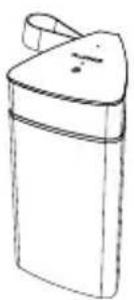
natural_image
Simple line drawing of a cylindrical container with a handle and lid (no text or symbols)Fi20 Speaker
User Manual

Power Adapter

Lifetime
Customer Support

2 Year Warranty
For how-to videos and other helpful resources please visit www.fluance.com
Top & Back Panel Layout
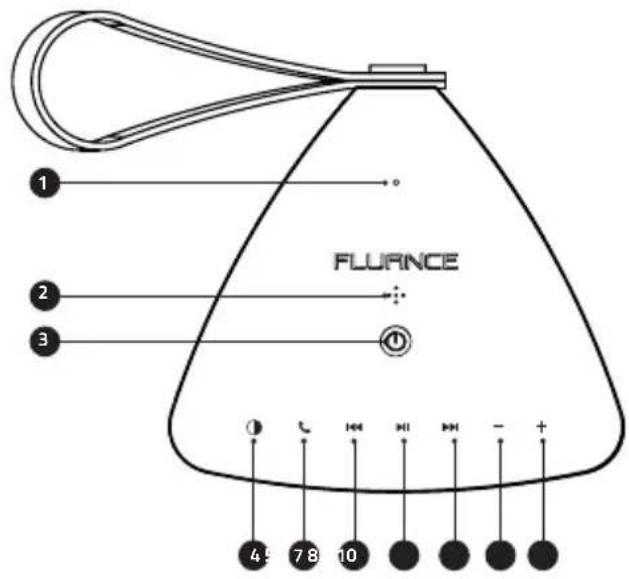
Top
- Status LED
- Microphone
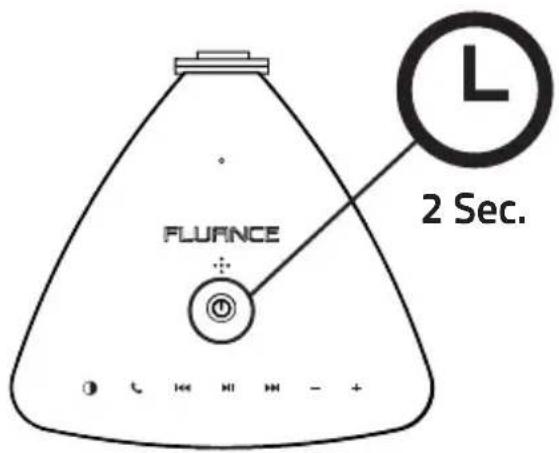
- Power Button Hold: ON/OFF Tap: Battery Check
- Light - ON/OFF
- Speakerphone
- Back
- Play/Pause
- Forward
- Volume Down
- Volume Up
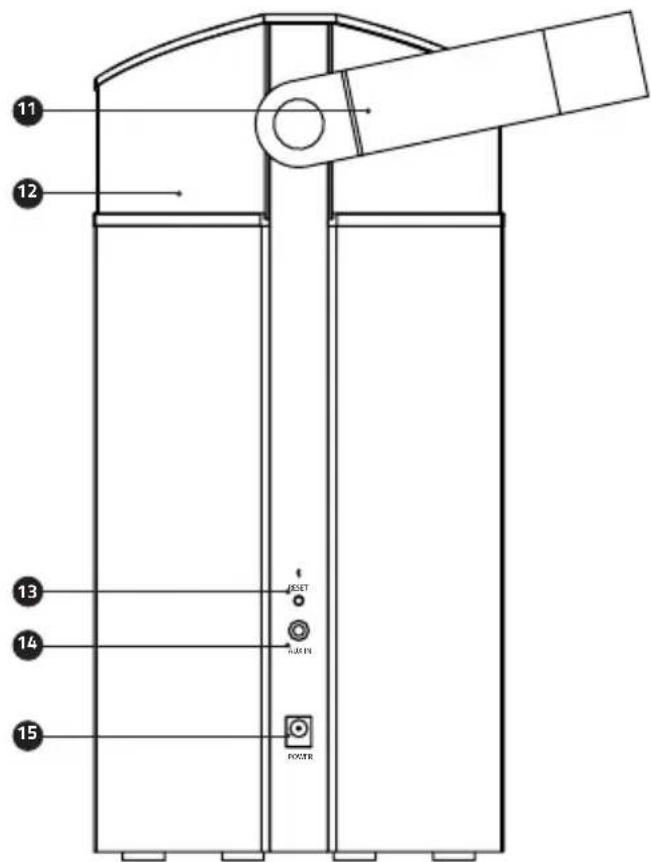
Back
- Handle
- LED Accent Light
- Bluetooth ^® Reset Button
- Aux Input
- Power Input
First Time Use
Power ON
Press and Hold the Power Button for 2 seconds to turn On/Off.
Unit will automatically turn off after 15 minutes of inactivity to preserve battery.
Charging the Battery
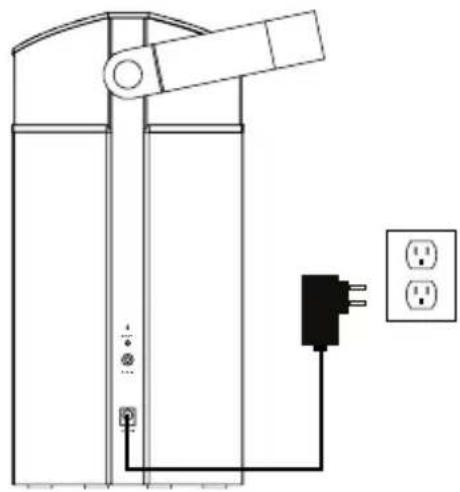
Connect to wall outlet using included Power Adapter. The Status LED will flash Green when Power Adapter is connected.
Tap the Power Button to check on the battery charging status.
- When charging the Status LED will flash green
- When fully charged the Status LED will be solid green
The Fi20 has a charge time of 3.5 hours.
natural_image
Pure electrical circuit lines without any symbolsFor the first time charging it is recommended to charge for 8 hours for best battery performance.
Checking the Battery
Tap the Power Button to check the battery when the unit is on and not connected to power.
• Green: 100% - 40%
• Yellow: 39% - 15%
- Red: 14% - 0%
The Fi20 has 24 hours of battery life when playing music at moderate volume. The Status LED will turn red to let you know when the battery level is critical.

Connecting Bluetooth®
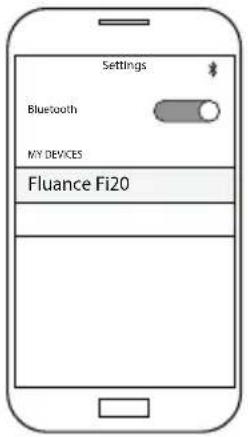
Turn on the Fi20 and pair to "Fluance Fi20" on your source device.
If unable to connect you can reset the Bluetooth ^® function on the Fi20 using the Bluetooth ^® Reset button on the back of the unit.
Aux Playback
Connect to audio source using a 3.5mm aux cable (not included)
Connecting an Aux cable will override the Bluetooth ^ function. To use Bluetooth ^ , the Aux cable must be disconnected.

Speakerphone
When the Fi20 is paired to a smartphone or similar Bluetooth device it can function as a speakerphone.
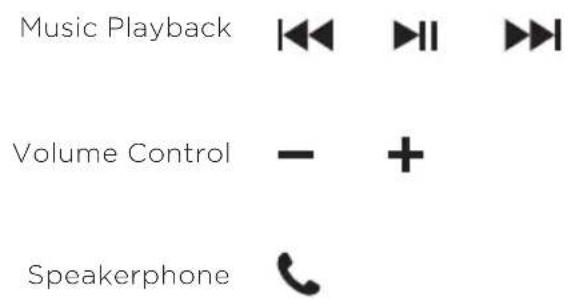
- Press to answer a call on the Fi20
• Talk towards the microphone located on top of the Fi20 - Press to end the call
For best microphone performance it is recommended to be within 2 meters (6.5 feet) of the Fi20 when using speakerphone.

Accent Light
Press ☐ to turn The LED Accent Light On/Off
The LED Accent Light requires that the unit is turned on to operate. If the speaker is not in use the Fi20 will shutoff after 15 minutes.

Frequently Asked Questions
What does the Status LED's color/behavior mean?
Bluetooth
- White (Flashing): Bluetooth® Pairing mode
- White (Solid): Bluetooth® Paired or Aux Connected
Battery Charging
- Green (Flashing): Battery Charging when unit is on
- Green (Pulsing): Battery Charging when unit is off
Battery Check (power adapter not connected)
• Green (Solid): 100% - 40% Battery Level
• Yellow (Solid): 39% - 15% Battery Level
• Red (Solid): 14% - 0% Battery Level
Another device is connected to the Fi20 and I wish to connect my device.
You can reset the Bluetooth® connection by pressing the Bluetooth® Reset button on the back of the Fi20. Please note only one device can be paired at a time.
The Fi20 is not showing as an available device on my Bluetooth® device.
Ensure the Fi20 is not paired to another device. You can reset Bluetooth® using the Bluetooth® Reset button on the back of the Fi20. Next turn Bluetooth® off and back on in your device's Bluetooth® settings. If the Fi20 is still not available you can reboot your device and check again.
What is the range of the Bluetooth® Connection?
The Fi20 operates with Power Class 2 Bluetooth® devices, which have a range of approximately 33 feet (line of sight).
What is "auto-pairing" and how does it work?
Auto-Pairing is a convenient connection feature implemented into all Fluance Bluetooth® Speakers. When the Fi20 is turned on it will automatically connect to the last device that it was connected to. If the connected Bluetooth® enabled device leaves the connection range of the Fi20 and returns at a later time, the device will automatically connect.
Note: The Fluance Fi20 will only Auto-Pair to the last device that it was connected to.
How do I adjust the Volume settings?
Use the +/- buttons on the top of the Fi20 to increase or decrease the volume of the Fi20. There are 25 volume steps on the Fi20. You can also adjust the volume of your source device.
Can I use the Fi20 outdoors?
The Fi20 can be used outdoors but it is not waterproof and should avoid all contact with water. When not in use it is advised to store the Fi20 in a dry indoor environment.
Can I pair more than one Fi20 together?
The Fi20 can only pair to one device at a time and does not support simultaneous playback from multiple Fi20 speakers.
Is the handle designed to rotate?
The handle on the Fi20 is designed to be positioned up for carrying or down for stationary playback. The handle should rotate freely.
Can the handle be removed?
The handle on the Fi2O is not designed to be removed. If the handle is removed it may not be as secure when reinstalled.
Can the battery be replaced?
The battery is replaceable by the user but should only be replaced with the official Fi20 battery pack. If you require a replacement battery please visit www.fluance.com/contact for further assistance.
Certification Information
FCC Statement
This equipment has been tested and found to comply with the limits for a Class B digital device, pursuant to Part 15 of the FCC Rules. These limits are designed to provide reasonable protection against harmful interference in a residential installation. This equipment generates uses and can radiate radio frequency energy and, if not installed and used in accordance with the instructions, may cause harmful interference to radio communications. However, there is no guarantee that interference will not occur in a particular installation. If this equipment does cause harmful interference to radio or television reception, which can be determined by turning the equipment off and on, the user is encouraged to try to correct the interference by one or more of the following measures:
- Reorient or relocate the receiving antenna.
- Increase the separation between the equipment and receiver.
- Connect the equipment into an outlet on a circuit different from that to which the receiver is connected.
- Consult the dealer or an experienced radio/TV technician for help.
This device complies with part 15 of the FCC Rules. Operation is subject to the following two conditions:(1) This device may not cause harmful interference, and (2) this device must accept any interference received, including interference that may cause undesired operation.
Changes or modifications not expressly approved by the party responsible for compliance could void the user's authority to operate the equipment. This equipment complies with FCC radiation exposure limits set forth for an uncontrolled environment. This equipment should be installed and operated with minimum distance 20cm between the radiator & your body.
IC Warning
This device complies with Industry Canada license-exempt RSS standard(s). Operation is subject to the following two conditions: (1) This device may not cause interference, and (2) This device must accept any interference, including interference that may cause undesired operation of the device.
CAN ICES-3(B)/NMB-3(B)
This equipment complies with IC radiation exposure limits set forth for an uncontrolled environment. This equipment should be installed and operated with minimum distance 20cm between the radiator & your body.
Warranty Information
Thank you for choosing Fluance! We guarantee your investment in our products is a solid one. High performance components combined with quality craftsmanship allow us to maintain the highest possible production standards.
All items are guaranteed against defects in materials and craftsmanship. Fluance has outstanding quality control; if something should go wrong with any of our products, we will repair it free of charge within the warranty period. If the product cannot be repaired, we will replace the product. If the product has been discontinued, we will replace the product with either the newest version of said product or current equivalent. In the event that Fluance replaces a product under warranty, the replacement would only carry the original warranty from the original date of purchase.
Warranty Period
The Fluance products below are warranted for parts and labor for the stated period from date of original purchase, and are subject to the terms and conditions of the warranty. Any refurbished products that are discontinued hold a 90 day warranty from the date of original purchase. Fluance warranties are valid for the original owner and are non-transferable.
• Home Audio Passive Speakers: Lifetime Warranty
• Active or Powered Speakers: Two Year Warranty
• HiFi Turntables: Two Year Warranty
- Batteries (For Powered Speakers): One Year Warranty
Warranty Exclusions:
- Products purchased from a dealer not authorized by Fluance.
- Products with the serial number defaced, altered, or missing.
- Defects resulting from disaster, accident, abuse, misuse, lightning, power surges, neglect, unauthorized modification or water damage.
- Defect or damage as a result of repairs performed by a person or party not authorized by Fluance.
- Defects of damage occurring during shipping (claims should be made with the shipping company).
To Obtain Warranty Service
Should your product require warranty service, please contact us at www.fluance.com/contact or call us at 1-888-617-6863 to set up a Return Authorization. Products returned without a valid Return Authorization number will be refused.
Fluance products must be returned in their original packaging. Our products are packaged specially to protect them from any damage during shipping, and without this packaging the return shipment could get damaged.
This warranty does not cover the shipping cost, insurance, or any other incidental charges. Products shipped for warranty service must be pre-paid by the customer, and Fluance will cover the cost to ship the repaired or replaced product back to the customer.
FLUANCE®
Serious Performance.
Thank you for your purchase of this Fluance® product.
We hope you enjoy your experience.
Questions?
Give us a chance to help, we're just a click away.

Fluance.com/resources
Fluance.com/videos

Fluance.com/support

Fluance.com/contact
Don't forget to register your product with us!
Fluance.com/registration
- Important Safety Instructions
- CAUTION
- Introduction
- Break-in Period
- What's Included
- Top & Back Panel Layout
- Top
- Back
- First Time Use
- Power ON
- Charging the Battery
- Checking the Battery
- Connecting Bluetooth®
- Aux Playback
- Speakerphone
- Accent Light
- Frequently Asked Questions
- What does the Status LED's color/behavior mean?
- Another device is connected to the Fi20 and I wish to connect my device.
- The Fi20 is not showing as an available device on my Bluetooth® device.
- What is the range of the Bluetooth® Connection?
- What is "auto-pairing" and how does it work?
- How do I adjust the Volume settings?
- Can I use the Fi20 outdoors?
- Can I pair more than one Fi20 together?
- Is the handle designed to rotate?
- Can the handle be removed?
- Can the battery be replaced?
- Certification Information
- FCC Statement
- IC Warning
- CAN ICES-3(B)/NMB-3(B)
- Warranty Information
- Warranty Period
- Warranty Exclusions:
- To Obtain Warranty Service
- FLUANCE®
Brand : Fluance
Model : FI20
Category : Loudspeaker