
GIC 15STC3- WTA - Refrigerator Godrej - Free user manual and instructions
Find the device manual for free GIC 15STC3- WTA Godrej in PDF.


| Product Type | Split Air Conditioner (Cooling Only) |
| Model | GIC 15STC3-WTA |
| Rated Voltage | 230 V |
| Rated Frequency | 50 Hz / 1 Phase |
| Cooling Capacity | 4350 W |
| Rated Power Input | 1470 W |
| Rated Input Current | 6.70 A |
| Refrigerant | R32 (Flammable) |
| Refrigerant Charge | 0.53 kg |
| Air Flow Volume | 575 CMH |
| Indoor Unit Weight | 9.20 kg |
| Outdoor Unit Weight | 22.10 kg |
| Operating Modes | Auto, Cool, Dry, Fan |
| Inverter Technology | Yes (DC Inverter) |
| Timer Function | ON/OFF timer (0.5-24 hours) |
| Remote Control | Wireless IR remote included |
| Special Features | Turbo, ECO, Swing (vertical/horizontal), Sleep, Self-Clean, Anti-Cold Air |
| Display | LED display with error codes |
| Filter | Washable air filter (clean every 2 weeks) |
| Warranty | 10 years on compressor (inverter), 1 year on other parts |
Frequently Asked Questions - GIC 15STC3- WTA Godrej
User questions about GIC 15STC3- WTA Godrej
0 question about this device. Answer the ones you know or ask your own.
Ask a new question about this device
Download the instructions for your Refrigerator in PDF format for free! Find your manual GIC 15STC3- WTA - Godrej and take your electronic device back in hand. On this page are published all the documents necessary for the use of your device. GIC 15STC3- WTA by Godrej.
USER MANUAL GIC 15STC3- WTA Godrej
On behalf of Godrej Appliances, we welcome you to the Godrej family, and thank you for giving us an opportunity to serve you.
Godrej Appliances is a leading brand not just in technology and performance but also for its excellent customer service, we have more than 660 service centers across India, so that we can be close to our customers and serve them better.
In order to get the maximum out of your superior Air Conditioner, we urge you to go through this detailed user manual, if you need any assistance at any time, do not hesitate to call us on 1800 209 5511 or write to us at smartcare@godrej.com
We again thank you for giving us the privilege to serve you, and look forward to a long and delightful association.
Warm Regards, Team Godrej
PERFORMANCE PARAMETERS
| MODEL NAME | GIC 12FTC3-WSA | GIC 12JTC3-WTA | GIC 12HTC5-WTA | GIC 18FTC3-WTA | GIC 18JTC3-WTA | GIC 18HTC5-WTA | GIC 15STC3-WTA | |
| OPERATING MODE | Cooling | Cooling | Cooling | Cooling | Cooling | Cooling | Cooling | |
| RATED VOLTAGE | 230 V | 230 V | 230 V | 230 V | 230 V | 230 V | 230 V | |
| RATED FREQUENCY/PHASE | 50 Hz/1 ∅ | 50 Hz/1 ∅ | 50 Hz/1 ∅ | 50 Hz/1 ∅ | 50 Hz/1 ∅ | 50 Hz/1 ∅ | 50 Hz/1 ∅ | |
| COOLING CAPACITY | 3580 W | 3600 W | 3518 W | 5050 W | 5050 W | 5150 W | 4350 W | |
| RATED POWER INPUT | 1160 W | 1150 W | 950 W | 1785 W | 1785 W | 1450 W | 1470 W | |
| RATED INPUT CURRENT | 5.30 A | 5.20 A | 4.40 A | 8.20 A | 8.20 A | 6.60 A | 6.70 A | |
| REFRIGERANT | R32 | R32 | R32 | R32 | R32 | R32 | R32 | |
| REFRIGERANT CHARGE | 0.38 kg | 0.38 kg | 0.45 kg | 0.58 kg | 0.58 kg | 0.75 kg | 0.53 kg | |
| AIR FLOW VOLUME | 599 CMH | 599 CMH | 606 CMH | 737 CMH | 737 CMH | 795 CMH | 575 CMH | |
| COMP I.RA | 24.0 A | 24.0 A | 24.0 A | 30.0 A | 30.0 A | 30.0 A | 24.0 A | |
| WEIGHT | IDU | 8.20 kg | 8.20 kg | 8.80 kg | 10.90 kg | 10.90 kg | 11.10 kg | 9.20 kg |
| ODU | 21.50 kg | 21.50 kg | 22.70 kg | 28.30 kg | 28.30 kg | 26.80 kg | 22.10 kg | |
CONTENTS
SAFETY 1
NAME OF PARTS 8
UNIT SPECIFICATIONS AND FEATURES 9
INDICATORS ON LCD 18
HOW TO USE BUTTONS 19
TIMER OPERATIONS 22
EXAMPLE OF TIMER SETTING 24
HANDLING THE REMOTE CONTROL 27
OPERATING MODES 29
IF IT HAPPENS, IT IS NOT A PROBLEM 31
DC INVERTER TESTING PROCEDURE 32
PROTECTION 33
CLEAN & CARE 35
MAINTENANCE 38
TROUBLESHOOTING 39
INSTRUCTIONS FOR INSTALLATION 42
BRANCH ADDRESSED/SERVICE CONNECT ....50
Protection of Environment:
Protection of environment" is one of the core values of Godrej and we seek your co-operation to make sure that the product, packaging and plastic material is not disposed as unsorted municipal waste.

This symbol is known as the "Crossed-out Wheelie Bin Symbol". It means that the product should not be disposed of with your general house-hold waste.
It should be disposed of only through the company's collection points with special treatment so as to prevent any damage to the environment. Please call: 1800 209 5511 for applicable buy back arrangement or visit: www.godrejappliances.com/green-think for details about Godrej Appliances authorised collection points.
In line with the company's policy of continual product improvement, the aesthetic and dimensional characteristics, technical data and accessories of this appliance may be changed without notice.

Appliance filled with flammable gas R32.

Before use the appliance, read the owner's manual first.

Before install the appliance, read the installation manual first.

Before repair the appliance, read the service manual first.
The Refrigerant
- To realize the function of the air conditioner unit, a special refrigerant circulates in the system. The used refrigerant is the fluoride R32, which is specially cleaned. The refrigerant is flammable and inodorous. Furthermore, it can lead to explosions under certain conditions. But the flammability of the refrigerant is very low. It can be ignited only by fire.
- Compared to common refrigerants, R32 is a nonpolluting refrigerant with no harm to the ozonosphere. The influence upon the greenhouse effect is also lower. R32 has got very good thermodynamic features which lead to a really high energy efficiency. The units therefore need a less filling.
WARNING
Do not use means to accelerate the defrosting process or to clean, other than those recommended by the manufacture. Should repair be necessary, contact your nearest authorized Service Centre. Any repairs carried out by an unqualified personnel may be dangerous. The appliance shall be stored in a room without continuously operating ignition sources. (for example: open flames, an operating gas appliance or an operating electric heater.)
Appliance filled with flammable gas R32. For repairs, strictly follow manufacturer's instructions only. Be aware that refrigerants do not have any odou. Read specialist's manual.



PRECAUTIONS

WARNING
Operation and Maintenance
•This appliance can be used by children aged from 8 years and above and individuals with reduced physical, sensory or mental capabilities or lack of experience and knowledge if they have been given supervision or instruction concerning use of the appliance in a safe way and understand the hazards involved.
•Children should not play with the appliance.
- Cleaning and user maintenance should not be done by children without supervision.
- Do not connect the air conditioner to multi-purpose socket. It may lead to a fire hazard.
- Do disconnect power supply when cleaning the air conditioner. Otherwise, it may lead to electrical shocks.
- If the supply cord is damaged, it must be replaced by the manufacturer or their service technicians or similarly qualified persons in order to avoid a hazard.
- Do not wash the air conditioner with water to avoid electric shock.
- Do not spray water on the indoor unit. it may lead to electric shocks or malfunction.
•After removing the filter, do not touch the fins to avoid injury.
- Do not use fire or hair dryer to dry fins filter to avoid deformation or fire hazard.
PRECAUTIONS

WARNING
- Maintenance must be performed by qualified professionals. Otherwise, it may cause personal injury or damage.
- Do not repair the air conditioner by yourself. It may lead to electrical shocks or damage.
- Do not extend fingers or objects into the air inlet or air outlet. It may cause personal injury or damage.
- Do not block air outlet or air inlet. It may cause malfunction.
- Do not spill water on the remote controller, otherwise the remote controller might not work properly.
- When the below phenomenon occurs, please turn off the air conditioner and disconnet the power immediately, and then contact the dealer or qualified professionals, for service.
• Power cord is overheating or damaged. - There's abnormal sound during operation.
• Circuit breaker trips off frequently.
• Air conditioner gives off burning smell. - Indoor units is leaking.
- If the air conditioner operates under abnormal conditions, it may cause malfunction, electric shock or fire hazard.
- When turning on or turning off the unit by emergency operation switch, please press this switch with an insulating object.
- Do not step on the top panel of outdoor unit or put heavy objects. It may cause damage or personal injury.
PRECAUTIONS

WARNING
Attachment
• Installation must be performed by qualified professionals. Otherwise, it may cause personal injury or damage.
- Kindly follow the safety regulations while installing the unit.
- According to the local safety regulations, use qualified power supply circuit and circuit breaker.
- An all-pole disconnection switch having a contact separation of at least 3mm in all poles should be connected in fixed wiring.
• Air Conditioner should be properly grounded. Incorrect grounding may cause electric shocks.
• Make sure the power supply matches with the requirement of air conditioner. Please install proper power supply cables before using the air conditioner.
• Properly connect the live wire, neutral wire and grounding wires.
- Be sure to cut off the power supply before proceeding any work related to electricity for safety.
- Do not supply power to the AC prior to finishing the complete installation.
PRECAUTIONS

WARNING
- If the supply cord is damaged, it must be replaced by the manufacturer or their service agent or similarly qualified persons in order to avoid any hazard.
- The temperature of refrigerant circuit will be high, please keep the interconnection cables away from the copper tube.
- The appliance shall be installed in accordance with national wiring regulations.
• Installation must be performed in accordance with the requirement of NEC and CEC by authorized personnel only. - The air conditioner is the first class electric appliance. It must be properly grounding with specialized grounding device by a professional. Please make sure it is always grounded effectively, otherwise it may lead to electric shocks.
- The yellow-green wire is the grounding wire, which can't be used for other purposes.
- The grounding resistance should comply with national electric safety regulations.
- The appliance must be positioned so that the plug is accessible.
- All wires of indoor unit and outdoor unit should be connected by a professional.
• If the length of any wire is insufficient, please contact the supplier for a new one. Avoid extending the wire by yourself.
PRECAUTIONS

WARNING
- Kindly contact Godrej smart care if you wish to relocate your air conditioner.
- For installing your Air conditioner, kindly select a location that is out of reach for children and pets. If unavoidable, kindly have a fence around the AC for safety purposes.
• The indoor unit should be installed close to the wall - Please notice that the unit is filled with flammable gas R32. Inappropriate treatment of the unit involves the risk of severe injuries to individuals. Details about this refrigerant are found in the chapter named "refrigerant"
- Check whether the maintenance area is well-ventilated.
- Check whether there is any source of fire or potential fire source in the maintenance area.
- Check whether the appliance mark is in good condition.
- Replace the vague or damaged warning mark.
- Please use the flammable gas detector to check before opening the container.
- The air conditioner is not allowed to be used in a room that has running fire (such as fire source, working coal gas ware, operational heater).
- Kindly do not drill any hole or burn the connection pipe.
- Leak test is a must after installation.
- Instructions for installation and use of this product are provided by the manufacturer.
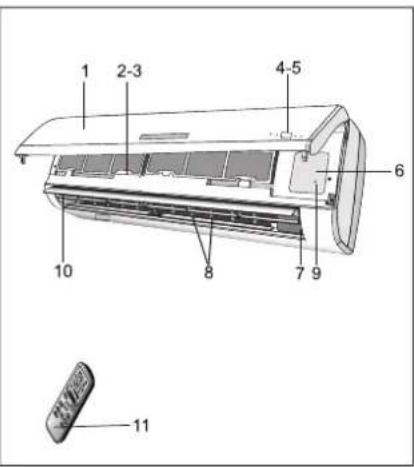
NAME OF THE PARTS
INDOOR UNIT
| No. | Description |
| 1 | Front panel |
| 2 | Air filter |
| 3 | Optional filter (if installed) |
| 4 | LED Display |
| 5 | Signal receiver |
| 6 | Terminal block cover |
| 7 | Ionizer generator (if installed) |
| 8 | Deflectors |
| 9 | Emergency button |
| 10 | Airflow direction flaps |
| 11 | Remote control |
OUTDOOR UNIT
| No. | Description |
| 13 | Air outlet grill |
| 14 | Outdoor unit rating label |
| 15 | Cover |
| 16 | Gas valve |
| 17 | Liquid valve |

WALL AIR-CONDITIONER
- The conditioner is made up of two or more units connected between themselves through copper pipes (properly insulated) and an electrical connecting cable.
- The indoor unit is installed on the walls of the room to be conditioned.
- The outdoor unit is installed on the floor or on the wall on suitable brackets.
- Technical data of the air conditioner are printed on the labels placed on the indoor and outdoor units.
- The remote control has been designed for an easy and fast use.
Note: the above figures are only intended to be a simple diagram of the appliance and may not correspond to the appearance of the units that have been purchased.
UNIT SPECIFICATIONS AND FEATURES
Unit Parts
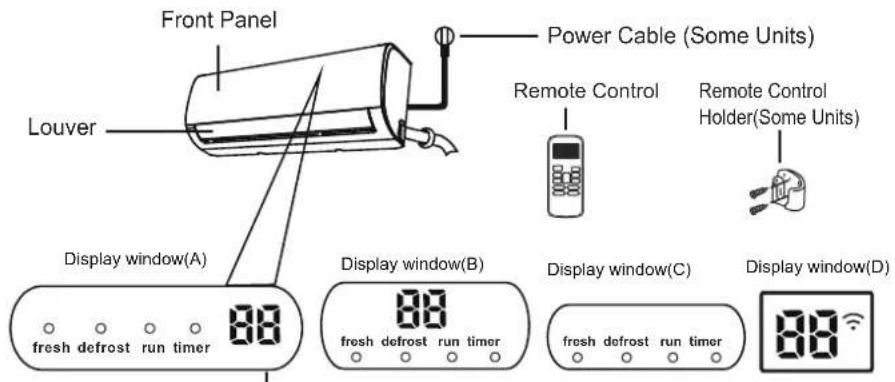
"fresh" when Fresh feature is activated(some units)
"defrost" when defrost feature is activated.
"run" when the unit is on.
"timer when TIMER is set.
“ ” when Wireless Control feature is activated(some units)
88
Displays temperature, operation feature and
Error codes:
When ECO function(some units) is activated, the
'88' illuminates gradually one by one as E--C
--0 --set temperature -- ∈..... in one second interval.
" on" for 3 seconds when:
- TIMER ON is set
• FRESH, SWING, TURBO, or SILENCE feature is turned on
"OF" for 3 seconds when:
- TIMER OFF is set
- FRESH, SWING, TURBO, or SILENCE feature is turned off
cF" when anti-cold air feature is turned on
" dF" when defrosting
"5C" when unit is self-cleaning(some units)
"FP" when 8°C heating feature is turned on(some units)
Display Code Meanings

“” when Fresh feature is activated(some units)
" " when Wireless Control feature is activated(some units)
"⏻" when the unit is on.
“ ℟ ” when TIMER is set
" when defrosting(cooling & heating units).
"26" Displays temperature, operation feature and Error codes:
When ECO function(some units) is activated, the
'88' illuminates gradually one by one as E--C
-0 -set temperature -- E..... in one second interval.
“on” for 3 seconds when:
- TIMER ON is set
- FRESH, SWING, TURBO, or SILENCE feature is turned on
"OF" for 3 seconds when:
- TIMER OFF is set
- FRESH, SWING, TURBO, or SILENCE feature is turned off
“ cF” when anti-cold air feature is turned on
"df" when defrosting
"5C" when unit is self-cleaning
“FP” when 8 C heating feature is turned on
Display Code Meanings
NOTE: Different models have different front panel and display window. Not all the indicators describing below are available for the air conditioner you purchased. Please check the indoor display window of the unit you purchased.
Illustrations in this manual are for explanatory purposes. The actual shape of your indoor unit may be slightly different. The actual shape shall prevail.
This button can be used as an emergency measure to turn on/off unit when remote controller is not available.
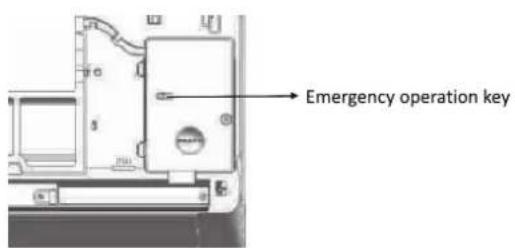
When the remote controller is lost or damaged, use the emergency operation key on the main unit. In such an event, the unit operates in the Auto Mode.
Drain pan: (Applicable for Heat-Cool series models)
The provision of drain pan given in outdoor unit is for draining the water when machine runs in heat mode.
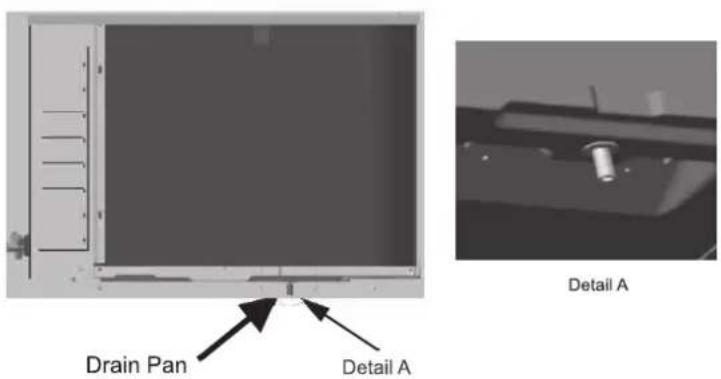
Refer the image for assembled drain pan in outdoor unit.
REMOTE CONTROLLER

Push this button to increase the indoor temperature setting in 1℃ increments to 30℃.
② TEMP DOWN Button
Push this button to decrease the indoor temperature setting in 1°C increments to 17°C.
NOTE : Temperature control is not available in Fan mode.
③ MODE Button
Press this button to modify the air conditioner mode in a sequence of following:
→ AUTO → COOL → DRY → HEAT → FAN
NOTE : Please do not select HEAT mode if the machine you purchased is cooling only type. Heat mode is not supported by the cooling only appliance.
4 SWING/SWING ↓ Button
Used to stop or start vertical louver movement or set the desired up/down air flow direction. The louver changes 6 degree in angle for each press. If keep pushing more than 2 seconds, the louver will swing up and down automatically.
Used to enter the energy efficient mode. Under cooling mode, press this button, the remote controller will adjust the temperature automatically to 24°C, fan speed of Auto to save energy(but only if the set temperature is less than 24°C). If the set temperature is between 24°C and 30°C, press the ECO button, the fan speed will change to Auto, the set temperature will remain unchanged.
NOTE:
- Pressing the TURBO and SLEEP button, modifying the mode or adjusting the set temperature to less than 24℃ will stop ECO operation.
- Under ECO operation, the set temperature should be 24°C or more. it may result in insufficient cooling. If you feel uncomfortable, just press the ECO button again to stop it.
6 SWING/SWING ↔ Button
Used to stop or start horizontal movement or set the desired left/right air flow direction.
Swing←Button(applicable to RG51F1)
Used to stop or start vertical louver movement and set the desired left/right air flow direction. The vertical louver changes 6 degree in angle for each press.
⑦ RESET Button
Once the recessed RESET button is pressed, all of the current settings will be cancelled and the controller will return to the initial settings.
8 LED Button
Disable/Active indoor screen Display. When pushing the button, the indoor screen display is cleared, press it again to light the display.
9 ON/OFF Button
Operation starts when this button is pressed and stops when the button is pressed again.
⑩ FAN SPEED Button
Used to select the fan speed in four steps:

11 TIMER ON Button
Press this button to initiate the auto-on time sequence. Each press will increase the auto-timed setting in 30 minutes increments. When the setting time displays 10.0, each press will
increase the auto-timed setting 60 minutes increments. To cancel the auto-timed program, simply adjust the auto-on time to 0.0.
⑫ TIMER OFF Button
Press this button to initiate the auto-off time sequence. Each press will increase the auto -timed setting in 30 minutes increments. When the setting time displays 10.0, each press will increase the auto-timed setting 60 minutes increments. To cancel the auto-timed program, simply adjust the auto-off time to 0.0.
13 LOCK Button
Press this recessed button to lock all current settings, and the remote controller will not accept any operation except that of the LOCK. Use the LOCK mode when you want to prevent settings from being changed accidentally. Press the LOCK button again to cancel the LOCK function. A lock symbol ⏻ will appear on the remote controller display when the lock function is activated.
Active/Disable Turbo function. Turbo function enables the unit to reach the preset temperature at cooling or heating operation in the shortest time (if the indoor unit does not support this function, there is no corresponding operation happened when pressing this button.)
NOTE:
- Buttons design is based on typical model and might be slightly different from the actual one you purchased, the actual shape shall prevail.
- All the functions described are accomplished by the unit. If the unit has no this feature, there is no corresponding operation happened when press the relative button on the remote controller.
- When there are wide differences between "Remote controller Illustration" and "USER'S MANUAL" on function description, the description of "USER'S MANUAL" shall prevail.
INDICATORS ON LCD
Information are displayed when the remote controller is powered up.

Mode display


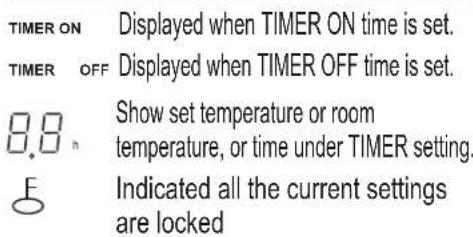
Fan speed indication

NO display Auto fan speed
Note:
All indicators shown in the figure are for the purpose of clear presentation. But during the actual operation only the relative functional signs are shown on the display window.
HOW TO USE THE BUTTONS

Auto operation
Ensure the unit is plugged in and power is available. The OPERATION indicator on the display panel of the indoor unit starts flashing.
- Press the MODE button to select Auto.
- Press the UP/DOWN button to set the desired temperature. The temperature can be set within a range of 17°C2030°C in 1C increments.
- Press the ON/OFFbutton to start the air conditioner.
NOTE
- In the Auto mode, the air conditioner can logically choose the mode of Cooling, Fan, and Heating by sensing the difference between the actual ambient room temperature and the setting temperature on the remote controller.
- In the Auto mode, you can not switch the fan speed. It has already been automatically controlled.
- If the Auto mode is not comfortable for you, the desired mode can be selected manually.
HOW TO USE THE BUTTONS

Cooling /Heating/Fan operation
Ensure the unit is plugged in and power is available.
- Press the MODE button to select COOL, HEAT(cooling & heating models only) or FAN mode.
- Press the UP/DOWN buttons to set the desired temperature. The temperature can be set within a range of 17°C\~30°C in 1C increments.
- Press the FAN button to select the fan speed in four steps- Auto, Low, Med, or High.
- Press the ON/OFF button to start the air conditioner.
NOTE
In the FAN mode, the setting temperature is not displayed in the remote controller and you are not able to control the room temperature either. In this case, only step
1, 3 and 4 may be performed.
HOW TO USE THE BUTTONS

Dehumidifying operation
Ensure the unit is plugged in and power is available. The OPERATION indicator on the display panel of the indoor unit starts flashing.
-
Press the MODE button to select DRY mode.
-
Press the UP/DOWN buttons to set the desired temperature. The temperature can be set within a range of 17C\~30C in 1C increments.
-
Press the ON/OFF button to start the air conditioner.
NOTE
In the Dehumidifying mode, you can not switch the fan speed. It has already been automatically controlled.
TIMER OPERATIONS

Timer operation
Press the TIMER ON button can set the auto-on time of the unit. Press the TIMER OFF button can set the auto-off time of the unit.
To set the Auto-on time.
- Press the TIMER ON button. The remote controller shows TIMER ON, the last Auto-on setting time and the signal "H" will be shown on the LCD display area. Now it is ready to reset the Auto-on time to START the operation.
- Push the TIMER ON button again to set desired Auto-on time. Each time you press the button, the time increases by half an hour between 0 and 10 hours and by one hour between 10 and 24 hours.
- After setting the TIMER ON, there will be a one second delay before the remote controller transmits the signal to the air conditioner. Then, after approximately another 2 seconds, the signal "h" will disappear and the set temperature will re-appear on the LCD display window.
TIMER OPERATIONS
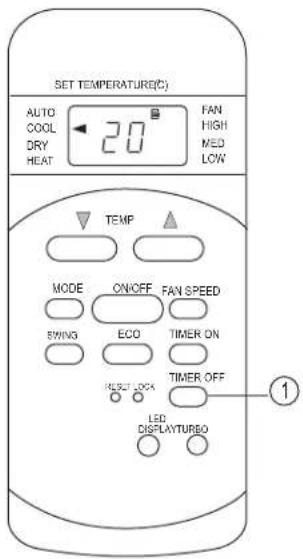
To set the Auto-off time.
- Press the TIMER OFF button. The remote controller shows TIMER OFF, the last Auto-off setting time and the signal "H" will be shown on the LCD display area. Now it is ready to reset the Auto-off time to stop the operation.
- Push the TIMER OFF button again to set desired Auto-off time. Each time you press the button, the time increases by half an hour between 0 and 10 hours and by one hour between 10 and 24 hours.
- After setting the TIMER OFF, there will be a one second delay before the remote controller transmits the signal to the air conditioner. Then, after approximately another 2 seconds, the signal "H" will disappear and the set temperature will re-appear on the LCD display window.
CAUTION
- The effective operation time set by the remote controller for the timer function is limited to the following settings: 0.5, 1.0, 1.5, 2.0, 2.5, 3.0, 3.5, 4.0, 4.5, 5.0, 5.5, 6.0, 6.5, 7.0, 7.5, 8.0, 8.5, 9.0, 9.5, 10, 11, 12, 13, 14, 15, 16, 17, 18, 19, 20, 21, 22, 23 and 24.
EXAMPLE OF TIMER SETTING


TIMER ON
(Auto-on Operation)
The TIMER ON feature is useful when you want the unit to turn on automatically before you return home. The air conditioner will automatically start operating at the set time.
Example:
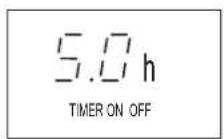
To start the air conditioner in 6 hours.
- Press the TIMER ON button, the last setting of starting operation time and the signal "h" will show on the display area.
- Press the TIMER ON button to display "6.0h" on the TIMER ON display of the remote controller.
- Wait for 3 seconds and the digital display area will show the temperature again. The "TIMER ON" indicator remains on and this function is activated.
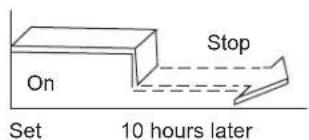
TIMER OFF
(Auto-off Operation)
The TIMER OFF feature is useful when you want the unit to turn off automatically after you go to bed. The air conditioner will stop automatically at the set time.
Example:
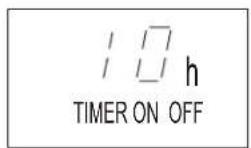
To stop the air conditioner in 10 hours.
- Press the TIMER OFF button, the last setting of stopping operation time and the signal "h" will show on the display area.
EXAMPLE OF TIMER SETTING
-
Press the TIMER OFF button to display "10h" on the TIMER OFF display of the remote controller.
-
Wait for 3 seconds and the digital display area will show the temperature again. The "TIMER OFF" indicator remains on and this function is activated.
COMBINED TIMER
(Setting channel OFF
simultaneously)
(On → Stop → Start operation)
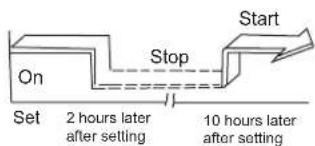
This feature is useful when you want to stop the air conditioner after you go to bed, and start it again in the morning when you wake up or when you return home.
Example:
To stop the air conditioner 2 hours after setting and start it again 10 hours after setting.
- Press the TIMER OFF button.
- Press the TIMER OFF button again to display 2.0H on the TIMER OFF display.
- Press the TIMER ON button.
- Press the TIMER ON button again to display 10H on the TIMER ON display.
- Wait for 3 seconds and the digital display area will show the temperature again.
The "TIMER ON OFF" indicator remains on and this function is activated.
EXAMPLE OF TIMER SETTING
![graph LR A["Start"] --> B["Off"] B --> C["Set"] C --> D["Stop"] D --> E["5 hours later after setting"] style A fill:#f9f,stroke:#333 style B fill:#ccf,stroke:#333 style C fill:#cfc,stroke:#333 style D fill:#fcc,stroke:#333](/content/2026/06/1210827/images/15c917063881966e2c42512517bf844e90d3c747ef213d91d16d992ba4fb773a.jpg)
(Off → Start → Stop operation)
This feature is useful when you want to start the air conditioner before you wake up and stop it after you leave the house.
Example:
To start the air conditioner 2 hours after setting, and stop it 5 hours after setting.
- Press the TIMER ON button.
- Press the TIMER ON button again to display 2.0H on the TIMER ON display.
- Press the TIMER OFF button.
- Press the TIMER OFF button again to display 5.0H on the TIMER OFF display.
- Wait for 3 seconds and the digital display area will show the temperature again.
The "TIMER ON OFF" indicator remains on and this function is activated.
HANDLING THE REMOTE CONTROL
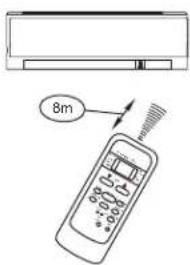

Location of the remote controller.
- Use the remote controller within a distance of 8 meters from the appliance, pointing it towards the receiver. Reception is confirmed by a beep.
CAUTIONS
- The air conditioner will not operate if curtains, doors or other materials block the signals from the remote controller to the indoor unit.
- Prevent any liquid from falling into the remote controller. Do not expose the remote controller to direct sunlight or heat.
- If the infrared signal receiver on the indoor unit is exposed to direct sunlight, the air conditioner may not function properly. Use curtains to prevent the sunlight from falling on the receiver.
- If other electrical appliances react to the remote controller, either move these appliances or consult your local dealer.
- Do not drop the remote controller. Handle with care.
- Do not place heavy objects on the remote controller, or step on it.
Using the remote controller holder(optional)
- The remote controller can be attached to a wall or pillar by using a remote controller holder (not supplied, purchased separately).
- Before installing the remote controller, check that the air conditioner receives the signals properly.
• Install the remote controller with two screws. - For installing or removing the remote controller, move it up or down in the holder.
HANDLING THE REMOTE CONTROL
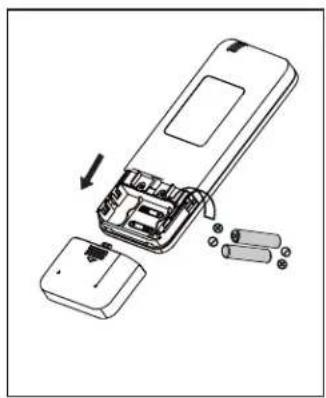
Replacing batteries
The following cases signify exhausted batteries. Replace old batteries with new ones.
- Receiving beep is not emitted when a signal is transmitted.
- Indicator fades away.
The remote controller is powered by two dry batteries (R03/LR03X2) housed in the back rear part and protected by a cover.
(1) Remove the cover in the rear part of the remote controller.
(2) Remove the old batteries and insert the new batteries, placing the(+) and (-) ends correctly.
(3) Install the cover back on.
NOTE: When the batteries are removed, the remote controller erases all programming. After inserting new batteries, the remote controller must be reprogrammed.
CAUTIONS
- Do not mix old and new batteries or batteries of different types.
- Do not leave the batteries in the remote controller if they are not going to be used for 2 or 3 months.
- Do not dispose batteries as unsorted municipal waste. Collection of such waste separately for special treatment is necessary.
OPERATING MODES
AUTO Mode:
- Press 'MODE' button to cyclically step through the AUTO→COOL→DRY→FAN modes and stop when AUTO mode is selected.
- The air conditioner will automatically select cooling, or fan only operation depending on set temperature and the room temperature.
- Setting temperature cannot be changed. By default it will set to 24°C and display on indoor panel. In this mode the fan speed is changeable (Low, Medium, High, and AUTO)
COOL Mode:
- In the cool mode, the compressor is in operation and your AC functions in the standard operating mode, cooling your room to desired set temperature.
- Press 'MODE' button to cyclically step through the AUTO→COOL→DRY→FAN modes and stop when COOL mode is selected.
- The cooling function allows air conditioner to cool the room and at the same time reduces the humidity in the air. In this mode the compressor will run at different frequencies depending on difference between set temp. and room temp. which gives you faster cooling as compared to fixed speed AC.
- Setting temperature range is 17°C to 30°C.
- You can change the fan speed setting by pressing FAN button .(Low , Medium, High, and AUTO)
● TURBO and ECO functions are only available during cooling mode.
Dry Mode:
- In the DRY mode, air conditioner reduces the humidity of the air to make the room more comfortable.
- Press 'MODE' button to cyclically step through the AUTO→COOL→DRY→FAN modes and stop when DRY mode is selected.
- The indoor fan runs at low speed and compressor frequency will vary according to the difference between set and room temperature just to remove extra humidity. In this mode the air conditioner does not blow a lot of cool air, as the intent is just to dry the air and not to cool the room.
- Set temperature and fan speed cannot be change as indoor fan speed is restricted to Low. Indoor display will show the set temp.
OPERATING MODES
Fan Mode:
- Press 'MODE' button to cyclically step through the AUTO→COOL→DRY→FAN modes and stop when FAN mode is selected.
- In this mode compressor and outdoor fan are off and indoor fanspeed can be varied between Low, Medium, High and AUTO speed using remote control.
- Indoor unit displays the indoor room temperature.
Applicable when the AC is operating in Cooling or Dry mode:
If a user has set the AC temperature between 17° C and 23° C using the remote, prior to switching the AC OFF; then when the AC is turned ON, it will start operating at 24° C.
Also, the remote here will display 24°C.
But, if a user has set the AC temperature above 24° C using the remote, prior to switching the AC OFF; then when the AC is turned ON, it will start operating at the set temperature.
IF IT HAPPENS, IT IS NOT A PROBLEM
| If it happen | It is not a problem |
| The unit does not operate | Due to high (> 280) or low (< 140) voltage, it has gone into protection mode and thus stopped. |
| Less cooling | Check whether unit is working in dry mode? |
| The unit does not respond to commands | Check whether LOCK key is activate or not? |
| The indoor display is off | Activate DISPLAY key on remote control |
| If you select 0.5(half hour)timer but IDU display shows 1 (one hour) | Dual digit display limitation. It can't display 0.5, it will display 1 for both Half and one hour. |
| After AC is switched off, if indoor display shows '05' | It may happen that you have selected the BLOW function when AC was ON, and therefore AC is performing BLOW operation after it turned OFF. |
| If you set indoor fan speed at low speed, but sill it is working at high speed | 3 min. delay when fan speed changed from high to low. |
DC INVERTER TESTING PROCEDURE
Testing Frequency Setting Method:- Full Capacity -100%
- Switch on the AC and wait for compressor start working, set the Mode to "Cooling" Mode, Fan speed to "High" and temperature to 17°C by remote controller.
- Press the "TURBO" button on remote controller 6 times continuously in 5 seconds. You will hear 2 beeps from the IDU and IDU will display "C1" which means the AC entered Frequency Locked condition
- Then you can test the rated cooling capacity.
Half Capacity-50%
- Switch on the AC and wait for compressor start working, set the Mode to "Cooling" Mode, Fan speed to "High" and temperature to 19°C by remote controller.
- Press the "TURBO" button on remote controller 6 times continuously in 5 seconds. You will hear 2 beeps from the IDU and IDU will display "C2" which means the AC entered Frequency Locked condition
- Then you can test the rated cooling capacity.
PROTECTION
Inverter Operation :-
Air conditioner automatically calculates the heat load and accordingly it delivers the cooling inside the room, to bring down the temperature equal to set temperature and maintain the comfort temperature at less energy consumption.
In case of any fault in inverter outdoor unit the operation of air conditioner will get stop immediately and corresponding error will appear on the indoor display.
Error Code: Applicable Models-GIC 12FTC3-WSA, GIC 12JTC3-WTA, GIC 18FTC3-WTA, GIC 18JTC3-WTA
ERROR SIGNALS ON THE DISPLAY
| Code Error Description | |
| EH00 Indoor unit EEPROM parameter error | |
| EL01 Indoor / outdoor units communication error | |
| EH02 Zero-crossing signal detection error | |
| EH03 The indoor fan speed is operating outside of the normal range | |
| EC51 Indoor unit EEPROM parameter error (for some models) | |
| EC52 Condensor coil temperature sensor T3 is in open circuit or has short circuited | |
| EC53 | Outdoor room temperature sensor T4 is in open circuit or has short circuited |
| EC54 | Compressor discharge temperature sensor T3 is in open circuit or has short circuited |
| EH60 | Indoor room temperature sensor T1 is in open circuit or has short circuited |
| EH61 Evaporator coil temperature sensor T2 open circuit or short circuit | |
| EC07 | The outdoor fan speed is operating outside of the normal range |
| EH06 | Indoor PCB /Display board communication error |
| EL0C | Refrigerant leak detected |
| PC00 | IPM malfunction or IGBT over-strong current protection |
| PC01 Over voltage or over low voltage protection | |
| PC02 High temperature protection of IPM module or High pressure protection (for some models) | |
| PC04 Inverter compressor drive error | |
| PC08 Current overload protection (for some models) | |
| PC03 Low pressure protection (for some models) | |
PROTECTION
Inverter Operation :-
Air conditioner automatically calculates the heat load and accordingly it delivers the cooling inside the room, to bring down the temperature equal to set temperature and maintain the comfort temperature at less energy consumption.
In case of any fault in inverter outdoor unit the operation of air conditioner will get stop immediately and corresponding error will appear on the indoor display.
Applicable Models: GIC 12HTC5-WTA, GIC 18HTC5-WTA, GIC 15STC3-WTA
ERROR SIGNALS ON THE DISPLAY
| Code Error Description | |
| E0 Indoor unit EEPROM parameter error | |
| E1 Indoor / outdoor units communication error | |
| E2 Zero-crossing signal detection error | |
| E3 The indoor fan speed is operating outside of the normal range | |
| E4 Indoor room temperature sensor T1 is in open circuit or has short circuited | |
| E5 Evaporator coil temperature sensor T2 is in open circuit or has short circuited | |
| E7 Indoor PCB /Display board communication error | |
| EC Refrigerant leak detected | |
| F0 Overload current protection | |
| F1 Outdoor ambient temperature sensor T4 open circuit or short circuit | |
| F2 Condenser coil temperature sensor T3 is in open circuit or has short circuited | |
| F3 Compressor discharge temperature sensor TP open circuit or short circuit | |
| F4 Outdoor unit EEPROM parameter error | |
| F5 The outdoor fan speed is operating outside of the normal range | |
| P0 IPM malfunction or IGBT over-strong current protection | |
| P1 Over voltage or over low voltage protection | |
| P2 High temperature protection of IPM module | |
| P4 Inverter compressor drive error | |
| P6 Low compressor protection (for some models) |
CLEAN AND CARE
Front panel
1. Remove the front panel.
- Open the front panel.
- Slide the front panel to either the left or right and pulling it toward you.
This will disconnect the front panel shaft on one side.

- Disconnect the front panel shaft on the other side in the same manner.

2. Clean the front panel.
• Wipe it with a soft cloth soaked in water.
• Only neutral detergent may be used.
- In case of washing the panel with water, wipe it with dry soft cloth, dry it up in the shade after washing.
3. Attach the front panel.
- Align the front panel shaft on the left and right of the front panel with the slots, then push them all the way in.
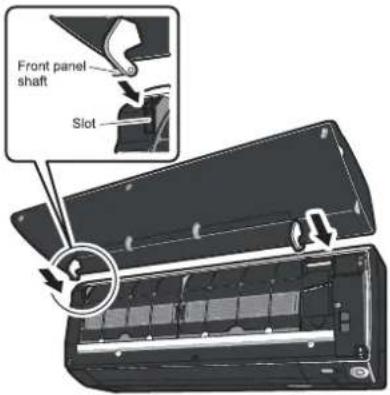
- Close the front panel slowly. (Press the panel at both sides and the central area.)

CAUTION
- When removing or attaching the front panel, use a robust and stable stool and watch your steps carefully.
- When removing or attaching the front panel, support the panel securely with hand to prevent it from falling.
After cleaning, make sure that the front panel is securely fixed.
CLEAN AND CARE
Air filter
1. Pull out the air filters.
- Open the front panel.
- Push a little upwards the filter tab at the center of each air filter, then pull it down.
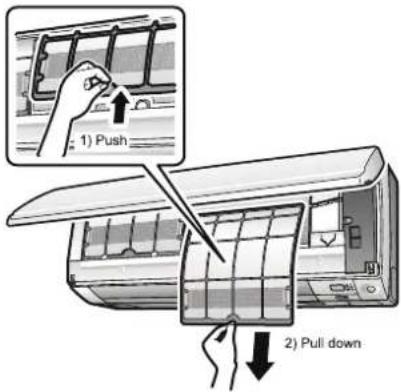
2. Wash the air filters with water or clean them with vacuum cleaner.
- It is recommended to clean the air filters every 2 weeks.
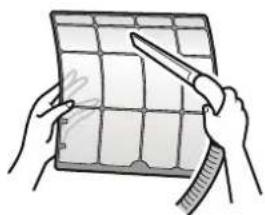
If the dust does not come off easily
- Wash the airfilters with neutral detergent thinned with lukewarm water, then dry them up in the shade.
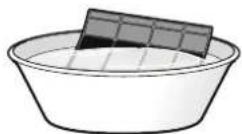
3. Set the filters as they were and close the front panel.
- Press the front panel at both sides and the central area.


CAUTION
- Do not touch the aluminum fins by bare hand at the time of dismounting or mounting the filter.
CLEAN AND CARE
ò Check the units
- Check that the base, stand and other fittings of the outdoor unit are not decayed or corroded.
- Check that nothing blocks the air inlets and the outlets of the indoor unit and the outdoor unit.
- Check that the drain comes smoothly out of the drain hose during COOL or DRY operation.
- If no drain water is seen, water may be leaking from the indoor unit. Stop operation and consult the service shop if this is the case.
ò Before a long idle period
- Operate the "FAN only" for several hours on a fine day to dry out the inside.
-Press MODE and select "♣" operation.
Press □ and start the operation.
- After operation stops, turn off the breaker for the room air conditioner.
- Clean the air filters and set them again.
- Take out batteries from the remote controller.
- When a multi outdoor unit is connected, make sure the heating operation is not used at the other room before you use the fan operation.
ò We recommend periodical maintenance
- In certain operating conditions, the inside of the air conditioner may get foul after several seasons of use, resulting in poor performance. It is recommended to have periodical maintenance by a specialist aside from regular cleaning by the user.
- For specialist maintenance, contact the service shop where you bought the air conditioner.
• The maintenance cost must be born by the user.
MAINTENANCE
| Item | Cleaning interval | Cleaning method |
| Dust filter | 2 Weeks | See “Cleaning Dust filter.” |
| Anti-Bacterial filter* | 3 Months | See “Anti-Bacterial filter.” |
| Indoor Unit | Regularly | Clean the Indoor unit surface by using a soft, dry Cloth. |
| Every 4 Months | Clean the condensate drain pipe. | |
| Once a year | Clean the condensate drain pan. | |
| Once a year | Throughly clean the heat exchanger. | |
| Once a year | Replace the remote control batteries. | |
| Outdoor Unit | Regularly | Use steam to clean the heat exchanger coils and the panel vents. (consult with technician) |
| Once a year | Clean the fan. | |
| Once a year | Clean the condensate drain pan. | |
| Once a year | Verify that all the fan assembly is firmly tightened. | |
| Once a year | Clean the electric components with air. |
TROUBLESHOOTING

CAUTION
Don't attempt to repair the air conditioner by yourself, it can cause an electric shock or fire. Please check the following items before asking for repair, it can save your time and money.
| Phenomenon | Troubleshooting |
Does not operate immediately when the air conditioner is restarted. | ● Once the air conditioner is stopped, Compressor will take approx. 3 minutes to restart. |
There's unusual smell blowing from the outlet after operation is started. | ● The unit has no peculiar smell by itself. If has, that is due to the smell accumulated in the ambient.● Solution method: Cleaning the filter. If the problem still persists, so need to clean air conditioner. (Please contact with the authorized maintenance center.) |
Sound of water flow can be heard during the operation.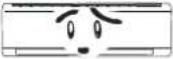  | ● While air conditioner is running for while the compressor get started or stopped, Refrigerated sound can be heard.● This is a normal function. |
In COOL mode, sometimes the mist emitted from the air outlet vent.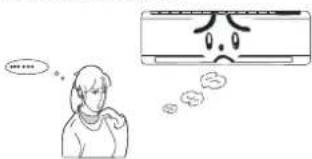 | ● When the indoor temperature and humidity are very high, this phenomenon would happen. This is caused by the room air is swiftly cooled down. After running for a while, indoor temperature and humidity will fall down, the mist will go away. |
Creaking noise can be heard when start or stop the air[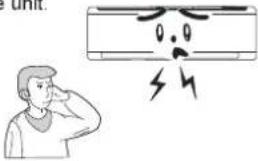 ] ] | ● This is caused by the deformation of plastic due to the changes in temperature. |
TROUBLESHOOTING
| Phenomenon | Troubleshooting |
The unit does not run. 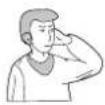 | Has the power been shut down?Is the power plug loose?Is the circuit protection device tripped off or not?Is voltage higher or lower?(Tested by professionals)Is the TIMER correctly used? |
Cooling(Heating) efficiency is not good. 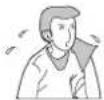 | Is Temp. setting suitable?Were inlet and outlet vents obstructed?Is filter dirty?Are the windows and doors closed?Was Fan speed set at low speed?Is there any heat sources in the room? |
Wireless remote control is not available.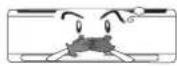 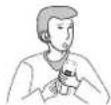 | The unit is interfered by abnormal or frequent functions switchover occasionally the controller cannot operate. At this time, you need to pull out of the plug, and reinsert it.Is it in its receiving range? Or obstructed?check the batteries is charged, otherwise to replace the batteries.Whether the wireless remote control is damaged. |
| If water leakage in the room. | The air humidity is on the high side.Condensing water over flowed.The connection position of indoor unit drainage pipe is loosed. |
| If water leakage in outdoor unit. | When the unit is running in COOL mode, the pipe and connection of pipe would be condensed due to the water cooled down.When the unit is running in Auto Defrosting mode the ice thaws and flows out.When the unit is running in HEAT mode, the water adhered on heat exchanger drips off. |
| Noise from indoor unit emitted. | The sound of fan or compressor relay is switching on or off.When the defrosting is started or stop running, it. That is due to the refrigerant flowed to the reverse direction. Can be the sound of fan on the compressor,switching on and off while defrostin g, as the refrigerant flows in the opposite direction. |
TROUBLESHOOTING
| Phenomenon | Troubleshooting |
| Indoor unit does not blow air. | In HEAT mode, when the temperature of indoor heat exchanger is very low, that will stop deliver air in order to prevent cool air. (Within 2min) |
| (* Applicable for Heat Cool models only.) | In HEAT mode, when the outdoor temperature is low or high humidity, there are much frost formed on the outdoor heat exchanger, that the unit will automatically defrost due to which, indoor unit stop blowing air for 3-12min. During the defrosting, there is water flowing out or vapor be produced.In dehumidifying mode, sometimes indoor fan get stop, in order to avoid condensing water be vaporized again, to restrain temperature from rising. |
| Moisture on air outlet vent. | If unit is running under the high humidity for a long time, the moisture will be condensed on the air outlet grill and drip off. |

Immediately stop all operations and plug out, contact the dealer in following situations.
There is harsh sound during operation.
The terrible odour emitted during operation.
Water is leaking in the room.
Air switch or protection switch often breaks.
Carelessly splash water or something into unit.
There is an abnormal heat in power supply cord and power plug.
Stop running and pull out of the plug.
INSTRUCTION FOR INSTALLATION
【Selection of installation positions for indoor unit】
● To be installed at the position where the air delivered from the unit can reach every corner of the room;
● To avoid being affected by the outdoor air;
● To avoid blockage to the air inlet or outlet of the unit;
● To avoid too much oil smoke or steam;
● To avoid possible generation, inflow, lingering or leakage of flammable gases;
● To avoid high-frequency facilities (such as high frequency arc welders, etc.);
● To avoid the places where acid solutions are frequently used;
● To avoid the places where some special sprayers (sulfides) are frequently used.
● Not to install on top of the musical instruments, TV, computer etc. valuable appliance.
● Not to install a fire alarming device near the air outlet of the unit (during operation, the fire alarm device might be erroneously triggered by the warm air from the unit);
■ Make sure of enough space for installation and maintenance.
● To take into consideration the operational convenience and safety in installation, it is recommended to ensure enough space between the unit and the walls.

Attention: If there are some additional function devices to install on the air conditioner, Be sure add to the installation space for the function devices.
■ Height limits of indoor and outdoor units.
● Either the indoor unit or the outdoor unit can be higher, but the height difference must comply the stated requirements.
● Try to reduce the bending of the piping line as much as possible so as to avoid possible negative impacts upon the performances of the units.
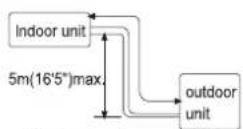
If indoor is at more height
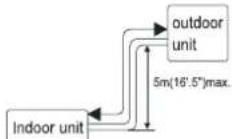
If outdoor is at more height
INSTRUCTION FOR INSTALLATION
【Selection of installation positions for outdoor unit】
● To install the outdoor unit at the places which can stand the load of the machine weight and will not cause big vibrations and noises;
● To install the unit at the places not to be exposed to rain or direct sunshine, and the places with good ventilation;
● The noises generated from the unit will not affect the neighboring places;
- Do not install the unit on non-metal frame;
● Not to install the unit at the places where there might occur the generation, inflow, stay or leakage of inflammable gases;
● Pay attention to the drainage of the condensed water from the base plate during operations;
● To avoid the air outlet being directly against the wind.
Detailed space requirements around the outdoor unit
- When there are obstacles above the unit

- When the front (air outlet) is open
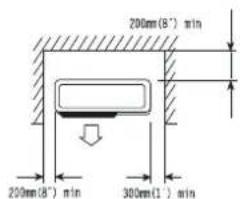
- When there are obstacles only in the front (air outlet)

Space for maintenance
Shown as in the following figure. Keep the maintenance space in front of the unit
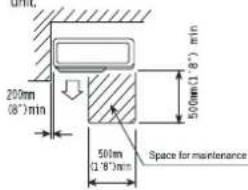
- When there are obstacles at the front and rear sides.

- When there are obstacles all around the unit on four sides.
Although the top side is open, the installation is not to be done if there are obstacles all around.


- At least two sides should be kept open.
INSTRUCTION FOR INSTALLATION
【Installation fixture of indoor unit】
Pipelines can be connected in the directions of ①、②、③ and ④ as indicated in Fig.1. When the pipelines are connected to the directions of ③ and ④, a groove for the pipes has to be opened at the proper place on the base stand.
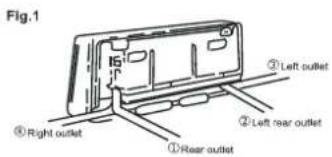
1. Installation of wall-mounting plate
Fix the wall-mounting plate firmly on the wall with screws. Make sure of the leveling of the plate. Slanted wall-mounting plate might jeopardize the smooth discharge of the condensed water.
2. Drill holes on the wall
Drill holes at places slightly below the wall-mounting plate, with hole diameter of 65mm(2-3/5") and the outer edge of the hole 5-10mm(1/5-2/5") lower (Fig.2) so that the condensed water can smoothly flow out. Cut the wall penetrating pipe to proper length according to the thickness of the wall (3-5mm(1/10-1/5") longer than the wall thickness) and insert the pipe as indicated in Fig.2.

3. Installation of drain pipe
Install the pipelines of the indoor unit in accordance with the direction of the wall holes. Wrap tightly the drain pipe and the pipelines with tape. Make sure that the drain pipe is underneath the pipelines. (Fig.3) (When the drain pipe passes the room interior, some condensed water might occur to its surfaces if the humidity is very high).

4. Installation of indoor unit
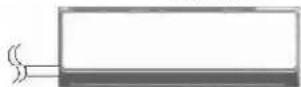
Pass the connection wires, connecting pipelines and drain pipe through the wall hole. Hang the indoor unit on the hooks at the top of the wall-mounting plate so that the hooks at the bottom of the indoor unit match the hooks of the wall-mounting plate. (Fig.4)


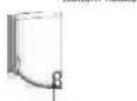
Right outlet. Remove the knockout.
For Right side piping
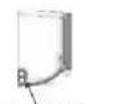
Left outlet. Remove the knockout.
For Left side piping
INSTRUCTION FOR INSTALLATION
Inspections:
a. Check if the hooks at the top and bottom are firmly fixed.
b. Check if the position of the master unit is properly leveled.
c. The drain pipe should not curve upward (Fig.5).
d. The drain pipe should be at the lower part of the wall pipes (Fig. 5).
Fig.5

【Installation fixture of outdoor unit】
● Try to ship the product to the installation location in its original package;
● As the gravity center of the unit is not at the installation center, special caution should be taken when using hoisting cables to lift it up;
● During shipping, the outdoor unit must not be slanted to over 45 degrees (Do not store the unit in a horizontal way).
- Use expansion bolts to fix the mounting supports on the wall;
- Use bolts and nuts to fix the outdoor unit firmly on the supports and keep on the same level;
- If the unit is installed on the wall or at the rooftop, the supports have to be firmly fixed so as to resist earthquake or strong wind.
Dimensions for parallel units installations

【Ordinary pipelines connection & Air purging】
● The following ordinary pipelines connection and air purging procedures are just suitable for non-quick coupler model.
■ Ordinary pipelines connection
No dust, foreign articles, air or moisture should be allowed to enter the air conditioning system. Careful attention should be paid when pipeline connection for outdoor unit is made. Try to avoid repeated curves as much as possible, otherwise hardening or cracks might be caused to the copper pipes. Suitable wrenches should be used when the pipeline connection is done so as to ensure appropriate torque (refer to following torque Table 1). Excessive torque might damage the joints while too little torque might lead to leakage.
INSTRUCTION FOR INSTALLATION
Table 1 Torque based upon the wrench to be used
| Outer diameter of copper pipe | Tightening torque | Strengthened tightening torque |
| ∅ 6.35(1/4") | 160kgf.cm(63kgf.inch) | 200kgf.cm(79kgf.inch) |
| ∅ 9.52(3/8") | 300kgf.cm(118kgf.inch) | 350kgf.cm(138kgf.inch) |
| ∅ 12.7(1/2") | 500kgf.cm(197kgf.inch) | 550kgf.cm(216kgf.inch) |
| ∅ 15.88(5/8") | 750kgf.cm(295kgf.inch) | 800kgf.cm(315kgf.inch) |
| ∅ 19.05(3/4") | 1200kgf.cm(472kgf.inch) | 1400kgf.cm(551kgf.inch) |
■ Air purging with vacuum pump
- Check that pipelines connection have been properly connected, remove the charging port cap, and connect the manifold gauge and the vacuum pump to the charging valve by service hoses as shown Fig.6.
- Open the valve of the low pressure side of manifold gauge, then, run the vacuum pump. Vacuum the indoor unit and the connecting pipes until the pressure in them lowers to below 1.5mmHG (The operation time for vacuuming is about 10 minutes). When the desired vacuum is reached, close the valve of the low pressure of the manifold and stop the vacuum pump.
- Disconnect the service hoses and fit the cap to the charging valve.
- Remove the blank caps, and fully open the spindles of the 2-way and 3-ways valves with a service valve wrench.
- Tighten the blank caps of the 2-way and 3-ways valves, applying the above torque Table 1.
■ Adding refrigerant
Refrigerant must be added if the piping measures more than 5 metres(16'5") in length. This operation can only be performed by a professional technician, for the additional amount, see the table 2 below.
Table 2
| Additional refrigerant amount | |
| Liquid pipe diameter ∅6.35(1/4") | Liquid pipe diameter:∅9.52(3/8") |
| (piping length-5)mx30gor (piping length-16)ftx0.3oz | (piping length-5)mx65gor (piping length-16)ftx0.7oz |
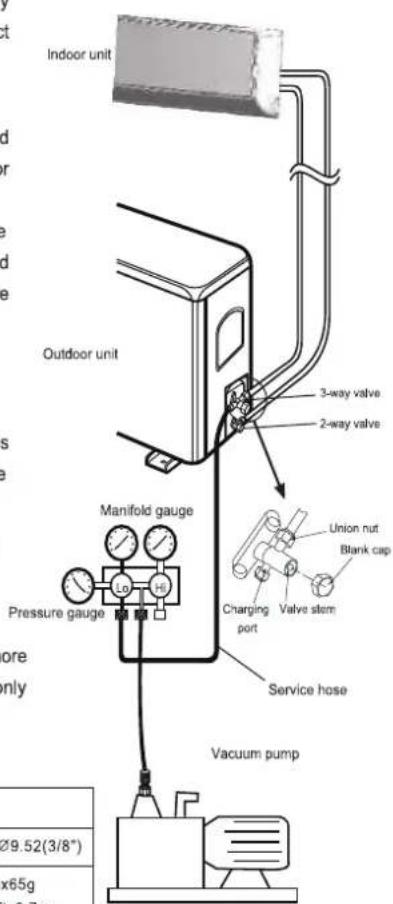
Fig.6
INSTRUCTION FOR INSTALLATION
Gas leakage inspection
After the pipeline connection is done, use a leakage inspection device or soap suds to carefully check if there is any leakage at the joints. This is an important step to ensure the quality of installation. Once a leakage is detected, proper treatment should be taken immediately.
Applicable for coupler series model.
【Pipelines connection for Split type quick coupler model】
- If you purchase the machine for split type quick coupler model, please adopt the following pipeplines connection procedures:
- Remove the dust caps from the indoor and outdoor units, and the connecting pipe.
-
Align the joint counter of connecting pipe with the proper indoor and outdoor joint conic surfaces, tighten the connecting nut manually. Then, make it secure with a wrench as shown Fig. 7, applying to above torque Table 1.
-
Remove the two valve core caps from the outdoor unit.
-
Turn on the high and low pressure valve cores with an socket wrench, then tighten the two valve core caps of the outdoor unit (Fig.8).
-
Finally, wrap the hot insulating cotton around the joints of indoor and outdoor units.


● Notes on installation of quick coupler:
- Connecting pipe bending minimum radius parameters (Table 3)
- Quick coupler assembly and disassembly limit: the assembly and disassembly times are inadvisably more than 7.
Table 3 Minimum bending radius
| Normal diameter(mm) | Minimum bending radius(mm) | cooling capacity |
| DN8(5/16") | 80(3") | 2100-2300W (7000-8000BTU) |
| DN10-12 (1/2") | 100(4") | 2500-5100W (9000-18000BTU) |
| DN14-16 (5/8") | 150(6") | 6100-7000W (22000-24000BTU) |
INSTRUCTION FOR INSTALLATION
【Is the unit installed correctly?】
Suitable Installation Position
- Isn't there anything which prevents ventilation or obstructs operation in front of the indoor unit? Do not install the unit following place.
- Inflammable gases may leak.
- Oil splashes a lot.
- In case where the unit is used in such places as poisonous or sultry gases are generated or seaside district exposed to sea breezes corrosion may cause malfunction. Consult with your distributor,
- Air conditioner body and remote controller must be 1mtrs. (39-3/4") or more away from a TV or a radio. Drain the dehumidified water from the indoor unit to a place which drains well.
■ Pay attention to operation noise
- When installing the unit, choose a place which can stand the weight of the unit well and does not increase the operation noise or vibration. Especially where there is a possibility that vibration be transmitted to the house, fix the unit by inserting attached vibration -proof pads between the unit and fittings.
- Choose the place where hot air and operation noise from the outlet of the outdoor unit do not annoy the neighborhood.
- Things left near the outlet and inlet of the outdoor unit cause malfunction or increased operation noise. Do not leave obstacles near the outlet and inlet.
- If irregular sound is heard during operation, consult with your distributor.
■Inspection and Maintenance
- According to the service conditions and operating environment, the inside of the air conditioner will become dirty after several seasons (3 to 5 years) of service, resulting in decreased operating performance. Inspection and maintenance are recommended in addition to usual cleaning (The air conditioner can be used for a longer period and without anxiety.)
- As to inspection and maintenance, consult your dealer or any one of business offices of dealing companies. (Service charge is required in this case.)
- We recommend to perform inspection and maintenance during an off seasons.
BRANCH ADDRESSES / SERVICE CONNECT
| GODREJ & BOYCE MFG. CO. LTD., Appliances Division | |
| Branch Branch Addresses | |
| Ahmedabad | 4th Floor, APM Shopping Mall Near IOCL Petrol Pump, Shyamal-Karnavati, 100 ft. Road, Satellite, Ahmedabad - 380 015 |
| Bangalore | 3rd Floor, The Karnataka Film Chamber of Commerce Bldg. 28, 1st Main,Crescent Road, High Grounds Nr. Shivanand Circle, Bangalore - 560 001 |
| Bhopal | 217, Zone I, M.P. Nagar, Beh. Jyoti Talkies, Bhopal - 462 011 |
| Bhubaneshwar | Highway Complex, NH-5, Rudrapur, Bhubaneshwar - 752 101 |
| Chandigarh/Mohali | Plot No. A-40, Phase VIII-A, Industrial Area, Mohali - 160 059 |
| Chennai | No. 1, Sidco Industrial Estate, Ambattur, Chennai - 600 098 |
| Coimbatore | No. 585 - 590 3rd Floor, Sathya Towers, DB Road, R S Puram, Coimbatore- 641002 |
| Delhi | Godrej Bhavan, 2nd Floor, Shershah Suri Marg, Mathura Road, Okhla,New Delhi - 110 065 |
| Faridabad | Godrej Bhavan, 2nd Floor, Shershah Suri Marg, Mathura Road, Okhla,New Delhi - 110 065 |
| Ghaziabad | Plot No. 229/230, Sardar Pashu Ahaar, Bulandshahar Road, Village-chaprolla, Ghaziabad |
| Guwahati | Basundhara Enclave, 1st & 2nd Floor Ulubari, Guwahati 781007 |
| Hyderabad | 201 & 202, Lala-1 Land Mark, 5-4-94 to 97, 2nd Floor, Above DigitalShoppy, Ranigunj, M.G. Road, Secunderabad -500 003 |
| Jaipur | 502-506, 5th Floor, Gaurav Towers, Malviya Nagar, Jaipur - 302 017 |
| Kochi | 2nd floor, Angels Arcade, South Kalamasserry, Near CUSAT PO Kochi682022 |
| Kolkata | Plot-30, Block-GN, Sector-V, Salt Lake city, Kolkata - 700 091 |
| Lucknow | C-3/3 & C-3/4, Sanjay Complex, Near All India Radio, Vidhan Sabha Marg,Lucknow-226001 |
| Mumbai | Appliance Division, Plant 4, Pirojshahnagar, Vikhroli, Mumbai - 400 079 |
| Nagpur | Dr. Bhiwapurkar Chamber, 2nd Floor, Opp. Yashwant Stadium, Dhantoli,Nagpur - 440 012 |
| Patna | Grand Plaza 6th Floor, 6001-6004, Dakbunglow Crossing. Frazer Road.Patna-800001 |
| Pune | Apollo Building Square, Plot No. 60, Survey No. 599, Sahaney Sujan Park,Lullanagar, Bibewadi Road, Pune - 411 040 |
| Raipur | 9/1, Besides Bharat Petrol Pump, Opp, Hotel Picadelly, Mahoba Bazaar,G.E. Road, Raipur - 492 001, Chhatisgarh |
| Ranchi | C/o. Surya Motors, Near Krishi Bazaar Samiti Panda, Ranchi (Jharkand) -835 222 |
| Toll-Free : 1800-209-5511 | |
| Website: www.godrejappliances.com & www.godrejsmartcare.comE-mail: smartcare@godrej.com | |
WARRANTY AIR CONDITIONER
The Godrej Air Conditioner comes with a FIVE year warranty on compressor for fixed speed Air conditioners and TEN year warranty on compressor for Inverter Air Conditioners. Along with this, you also get ONE year warranty on all other parts (except grill & plastic parts) from the date of purchase, against defective material or workmanship. In case of any such defect found during the first year from date of purchase, Godrej & Boyce Mfg. Co. Ltd.-Appliance Division will undertake repairs to the warranted part free of charge, subject to terms and conditions below. In the warranty period beyond the first year from date of purchase, only the compressor will be provided free of cost, when necessary. However, the Air Conditioner will repaired on payment of necessary charges. The warranty does not cover the demonstration/installation of the Air Conditioner.
INSTRUCTIONS FOR THE CUSTOMER
-
Kindly ensure that the dealer fills the warranty card correctly and completely.
-
You should retain the warranty card for record and produce the same in the event of any warranty repairs.
- In the event of a defect developing in the product, contact the nearest authorized Godrej & Boyce Service Center for obtaining warranty service and inform the defect, Model details & Serial No.
- Product will function between +/-10% of rated volts at 50Hz. For any fluctuation beyond specified limit, company shall not be responsible and warranty stands terminated.
- In areas where voltage fluctuates below 10% of rated voltage, customer is advised to use a voltage stabilizer which steps up voltage to a minimum of 190V.
- Earthing provision is necessary for safety. Improper domestic wiring leading to hazards such as shock or fire is not covered under this warranty.
- The product must be maintained to ensure hygiene. If there are any insects or rodents in it causing obstruction to the functioning of the product, the company shall not be responsible and in-turn warranty stands terminated.
TERMS AND CONDITIONS
- Repairs and replacement will be carried out by the companies authorized service centers or through authorized dealer's service center.
- All transportation and handling expenses incurred while repairing will be payable by the customer in advance.
- For any Air Conditioner installed beyond the municipal limits of the jurisdiction of the authorized customer service center, charges towards technician's visit will be borne by the customer
- While the company will make every effort to carry out the repairs at the earliest, it however is made expressly clear that the company is under no obligation to do so in a specified period of time.
- The company will retain any part(s), compressor and/or other components when replaced at its discretion.
- Warranty does not cover accessories to the Air Conditioner.
- Refrigeration system gas charging and consumables will be charged for any such repairs after one year from the date of purchase.
- Company will not be liable for any consequential loss or compensation nor refund of purchase price nor replacement of the Air Conditioner.
- Customer must ensure the routine maintenance including cleaning of filter etc. for proper operation.
- Any change in location/damages on handling will be serviced at extra material and labor cost.
- While Company would take all necessary steps to repair the Air Conditioner supplied under the warranty and keep sufficient stock of the spare parts of the Air Conditioner with them, however, in certain cases, at the sole discretion of the Company, the Company may due to non-availability of spare parts of the Air Conditioner, resulting into the Air Conditioner not being repaired by the Company, offer a replacement scheme to the purchasers of such Air Conditioner which cannot be repaired due to non-availability of spare parts of the Air Conditioner, purchased under the warranty, the Company would offer a replacement of the Air Conditioner. The details of the replacement offer is subject to change from year to year and shall also be applicable on the MRP of the product to be purchased as a replacement.
- Two (2) free preventive maintenance service (Labour only) will be provided to the customer during first year warranty period. To avail these free services customer has to register the call at the call center number 1800 209 5511. After expiry of 12 (twelve) months from date of purchase company is not liable for any free service.
Godrej & Boyce Mfg. Co. Ltd.- Appliance Division
CUSTOMER COPY
MODEL NO.
AIR CONDITIONER SERIAL No.:
| CUSTOMER'S NAME & ADDRESS |
| TEL. |
DATE OF PURCHASE
| DEALER'S NAME & ADDRESS |
| TEL. |
Customer's Signature:
This warranty is valid only if it is filled in and stamped by our authorized dealer on the date of purchase.
Warranty Voids If:
- The warranty card is not completed properly at the time of purchase. 2. The completed warranty card is not presented to the authorized personnel at the time of service of the product. 3. The Air Conditioner is not operated and maintained according to instructions given in the 'User Guide'. 4. Defects are caused by improper use, which shall be determined by the company personnel. 5. Unauthorized persons carry out any repair work. 6. Defects are caused by reasons beyond control, like abnormal voltage (exceed 253 V or below 207 V), acts of God, or while in transit to service center or purchaser's residence. 7. The warranty is not valid in case the serial number is deleted, defaced or altered. 8. Damage to the Air Conditioner or any parts due to transportation or shifting is not covered by the warranty. 9. The warranty automatically expires after the stipulated period from the original date of purchase, even if the Air Conditioner may not be in use for any time for whatever reasons.
Service Card
Please fill the warranty card and send it to your nearest branch to avail of 2 free services
| Air CONDITIONERS | Dry | Dry | Wet | smart care | ||
| Bill No. | Date of Sale | Model No. | Sr. No. | |||
| Customer/User's Name | Phone No. | |||||
| Address | Sp. instructions, if any | |||||
| City | Pin Code | |||||
| Dealer/ASP's Name & Address | I confirm that the service has been provided to my satisfaction | |||||
| Customer's Sign & Date | ||||||
| Air CONDITIONERS | Dry | Dry | Wet | smart care | ||
| Bill No. | Date of Sale | Model No. | Sr. No. | |||
| Customer/User's Name | Phone No. | |||||
| Address | Sp. instructions, if any | |||||
| City | Pin Code | |||||
| Dealer/ASP's Name & Address | I confirm that the service has been provided to my satisfaction | |||||
| Customer's Sign & Date | ||||||
| Air CONDITIONERS | Dry | Dry | Wet | smart care | ||
| Bill No. | Date of Sale | Model No. | Sr. No. | |||
| Customer/User's Name | Phone No. | |||||
| Address | Sp. instructions, if any | |||||
| City | Pin Code | |||||
| Dealer/ASP's Name & Address | I confirm that the service has been provided to my satisfaction | |||||
| Customer's Sign & Date | ||||||
Notes
Notes
Notes
Notes
Godrej
Godrej & Boyce Mfg. Co. Ltd. Appliance Division, Plant 11, Pirojshanagar, Vikroli (W), Mumbai 400 079. Disclaimer-The images shown in the manual are representative. Actual products may vary
- CONTENTS
- THE REFRIGERANT
- WARNING
- PRECAUTIONS
- OPERATION AND MAINTENANCE
- ATTACHMENT
- NAME OF THE PARTS
- WALL AIR-CONDITIONER
- DRAIN PAN: (APPLICABLE FOR HEAT-COOL SERIES MODELS)
- ② TEMP DOWN BUTTON
- ③ MODE BUTTON
- 4 SWING/SWING ↓ BUTTON
- NOTE
- 6 SWING/SWING ↔ BUTTON
- ⑦ RESET BUTTON
- 8 LED BUTTON
- 9 ON/OFF BUTTON
- ⑩ FAN SPEED BUTTON
- 11 TIMER ON BUTTON
- ⑫ TIMER OFF BUTTON
- 13 LOCK BUTTON
- INDICATORS ON LCD
- HOW TO USE THE BUTTONS
- AUTO OPERATION
- COOLING /HEATING/FAN OPERATION
- DEHUMIDIFYING OPERATION
- TIMER OPERATIONS
- TIMER OPERATION
- TO SET THE AUTO-ON TIME
- TO SET THE AUTO-OFF TIME
- CAUTION
- EXAMPLE OF TIMER SETTING
- TIMER ON
- (AUTO-ON OPERATION)
- EXAMPLE
- TIMER OFF
- (AUTO-OFF OPERATION)
- COMBINED TIMER
- HANDLING THE REMOTE CONTROL
- LOCATION OF THE REMOTE CONTROLLER
- CAUTIONS
- USING THE REMOTE CONTROLLER HOLDER(OPTIONAL)
- REPLACING BATTERIES
- OPERATING MODES
- AUTO MODE
- COOL MODE
- DRY MODE
- FAN MODE
- APPLICABLE WHEN THE AC IS OPERATING IN COOLING OR DRY MODE
- DC INVERTER TESTING PROCEDURE
- TESTING FREQUENCY SETTING METHOD:- FULL CAPACITY -100
- HALF CAPACITY-50
- PROTECTION
- INVERTER OPERATION
- CLEAN AND CARE
- FRONT PANEL
- REMOVE THE FRONT PANEL
- CLEAN THE FRONT PANEL
- ATTACH THE FRONT PANEL
- AIR FILTER
- PULL OUT THE AIR FILTERS
- WASH THE AIR FILTERS WITH WATER OR CLEAN THEM WITH VACUUM CLEANER
- IF THE DUST DOES NOT COME OFF EASILY
- SET THE FILTERS AS THEY WERE AND CLOSE THE FRONT PANEL
- Ò CHECK THE UNITS
- Ò BEFORE A LONG IDLE PERIOD
- TROUBLESHOOTING
- IMMEDIATELY STOP ALL OPERATIONS AND PLUG OUT, CONTACT THE DEALER IN FOLLOWING SITUATIONS
- INSTRUCTION FOR INSTALLATION
- 【SELECTION OF INSTALLATION POSITIONS FOR INDOOR UNIT】
- MAKE SURE OF ENOUGH SPACE FOR INSTALLATION AND MAINTENANCE
- HEIGHT LIMITS OF INDOOR AND OUTDOOR UNITS
- 【SELECTION OF INSTALLATION POSITIONS FOR OUTDOOR UNIT】
- DETAILED SPACE REQUIREMENTS AROUND THE OUTDOOR UNIT
- 【INSTALLATION FIXTURE OF INDOOR UNIT】
- INSTALLATION OF WALL-MOUNTING PLATE
- DRILL HOLES ON THE WALL
- INSTALLATION OF DRAIN PIPE
- INSTALLATION OF INDOOR UNIT
- INSPECTIONS
- 【INSTALLATION FIXTURE OF OUTDOOR UNIT】
- ORDINARY PIPELINES CONNECTION
- AIR PURGING WITH VACUUM PUMP
- ADDING REFRIGERANT
- GAS LEAKAGE INSPECTION
- 【PIPELINES CONNECTION FOR SPLIT TYPE QUICK COUPLER MODEL】
- ● NOTES ON INSTALLATION OF QUICK COUPLER
- 【IS THE UNIT INSTALLED CORRECTLY?】
- SUITABLE INSTALLATION POSITION
- PAY ATTENTION TO OPERATION NOISE
- INSPECTION AND MAINTENANCE
- WARRANTY AIR CONDITIONER
- INSTRUCTIONS FOR THE CUSTOMER
- TERMS AND CONDITIONS
- GODREJ & BOYCE MFG. CO. LTD.- APPLIANCE DIVISION
- CUSTOMER COPY
- SERVICE CARD
- NOTES
- GODREJ
Brand : Godrej
Model : GIC 15STC3- WTA
Category : Refrigerator