
GSC 12NTC3-WUA - Refrigerator Godrej - Free user manual and instructions
Find the device manual for free GSC 12NTC3-WUA Godrej in PDF.


| Product Type | Split Air Conditioner (Cooling Only) |
| Brand | Godrej |
| Model | GSC 12NTC3-WUA |
| Rated Voltage | 230 V |
| Rated Frequency | 50 Hz / 1 Phase |
| Cooling Capacity | 3350 W |
| Rated Power Input | 950 W |
| Air Flow Volume | 730 CMH |
| Rated Input Current | 4.40 A |
| Refrigerant Type | R-32 |
| Refrigerant Charge | 0.48 kg |
| Compressor LRA | 22.5 A |
| Indoor Unit Weight | 9.00 kg |
| Outdoor Unit Weight | 27.00 kg |
| Operating Modes | Cool, Fan, Dry, Auto |
| Special Functions | Turbo, Sleep, E-Saving, Timer, Swing |
| Remote Control Range | Up to 8 m |
| Filter Cleaning Interval | Every month |
| Safety Features | Auto restart after power failure, child lock (remote), overheat protection |
| Warranty | 1 year on parts, 5 years on compressor (fixed speed models) |
| Customer Support | Toll-free: 1800 209 5511, Email: smartcare@godrej.com |
Frequently Asked Questions - GSC 12NTC3-WUA Godrej
User questions about GSC 12NTC3-WUA Godrej
0 question about this device. Answer the ones you know or ask your own.
Ask a new question about this device
Download the instructions for your Refrigerator in PDF format for free! Find your manual GSC 12NTC3-WUA - Godrej and take your electronic device back in hand. On this page are published all the documents necessary for the use of your device. GSC 12NTC3-WUA by Godrej.
USER MANUAL GSC 12NTC3-WUA Godrej
On behalf of Godrej Appliances, we welcome you to the Godrej family, and thank you for giving us an opportunity to serve you.
Godrej Appliances is a leading brand not just in technology and performance but also for its excellent customer service, we have more than 660 service centers across India, so that we can be close to our customers and serve them better.
In order to get the maximum out of your superior Air Conditioner, we urge you to go through this detailed user manual, if you need any assistance at any time, do not hesitate to call us on 1800 209 5511 or write to us at smartcare@godrej.com
We again thank you for giving us the privilege to serve you, and look forward to a long and delightful association.
Warm Regards, Team Godrej
| PERFORMANCE PARAMETERS | ||
| MODEL NAME | GSC 12NTC3-WUA | |
| OPERATING MODE | Cooling | |
| RATED VOLTAGE | 230 V | |
| RATED FREQUENCY/PHASE | 50 Hz/1 ∅ | |
| COOLING CAPACITY (W) | 3350 W | |
| RATED POWER INPUT (W) | 950 W | |
| AIR FLOW VOLUME | 730 CMH | |
| RATED INPUT CURRENT | 4.40 A | |
| REFRIGERANT | R-32 | |
| REFRIGERANT CHARGE | 0.48 kg | |
| COMP LRA | 22.5 A | |
| WEIGHT | IDU | 9.00 kg |
| ODU | 27.00 kg | |
Content
Operation Notices
Precautions....1
Parts name 6
Screen Operation Guide
Buttons on remote controller 8
Introduction for icons on display screen 9
Introduction for buttons on remote controller 10
Operation guide 14
Replacement of batteries in remote controller 14
Emergency operation 15
Maintenance
Clean and maintenance....16
Malfunction
Malfunction analysis ....18
Installation Notice
Installation dimension diagram 22
Tools for installation 23
Selection of installation location 23
Requirements for electric connection 24
Installation
Installation of indoor unit....25
Installation of outdoor unit 29
Vacuum pumping. 32
Leakage detection 32
Check after installation 33
Test and operation
Test operation 33
Attachment
Configuration of connection pipe....34
Pipe expanding method....36
Testing Frequency setting method 37
Protection of environment
"Protection of environment" is one of the core values of Godrej and we seek your co-operation to make sure that the product, packaging and plastic material is not disposed as unsorted municipal waste.

This symbol is known as the "Crossed-out Wheelie Bin Symbol". It means that the product should not be disposed of with your general house-hold waste.
It should be disposed of only through the company's collection points with special treatment so as to prevent any damage to the environment. Please call: 1800 209 5511 for applicable buy back arrangement or visit: www.godrejappliances.com/green-think for details about Godrej appliances authorised collection points.
In line with the company's policy of continual product improvement, the aesthetic and dimensional characteristics, technical data and accessories of this appliance may be changed without notice.
Explanation of Symbols

DANGER
Indicates a hazardous situation that, if not avoided, will result in death or serious injury.

WARNING
Indicates a hazardous situation that, if not avoided, could result in death or serious injury.

CAUTION
Indicates a hazardous situation that, if not avoided, may result in minor or moderate injury.
NOTICE
Indicates important but not hazard-related information, used to indicate risk of property damage.

Indicates a hazard that would be assigned a signal word WARNING or CAUTION.
Precautions

WARNING
Operation and Maintenance
- This appliance can be used by children aged from 8 years and above and individuals with reduced physical, sensory or mental capabilities or lack of experience and knowledge if they have been given supervision or instruction concerning use of the appliance in a safe way and understand the hazards involved.
•Children should not play with the appliance. - Cleaning and user maintenance should not be done by children without supervision.
- Do not connect the air conditioner to multi-purpose socket. It may lead to a fire hazard.
- Do disconnect power supply when cleaning the air conditioner. Otherwise, it may lead to electrical shocks.
- If the supply cord is damaged, it must be replaced by the manufacturer or their service technicians or similarly qualified persons in order to avoid a hazard.
- Do not wash the air conditioner with water to avoid electric shock.
- Do not spray water on the indoor unit. it may lead to electric shocks or malfunction.
•After removing the filter, do not touch the fins to avoid injury. - Do not use fire or hair dryer to dry fins filter to avoid deformation or fire hazard.
Precautions

WARNING
- Maintenance must be performed by qualified professionals. Otherwise, it may cause personal injury or damage.
- Do not repair the air conditioner by yourself. It may lead to electrical shocks or damage.
- Do not extend fingers or objects into the air inlet or air outlet. It may cause personal injury or damage.
- Do not block air outlet or air inlet. It may cause malfunction.
- Do not spill water on the remote controller, otherwise the remote controller might not work properly.
- When the below phenomenon occurs, please turn off the air conditioner and disconnet the power immediately, and then contact the dealer or qualified professionals, for service.
• Power cord is overheating or damaged. - There's abnormal sound during operation.
- Circuit breaker trips off frequently.
• Air conditioner gives off burning smell. - Indoor units is leaking.
- If the air conditioner operates under abnormal conditions, it may cause malfunction, electric shock or fire hazard.
- When turning on or turning off the unit by emergency operation switch, please press this switch with an insulating object.
- Do not step on the top panel of outdoor unit or put heavy objects. It may cause damage or personal injury.
Precautions

WARNING
Attachment
• Installation must be performed by qualified professionals. Otherwise, it may cause personal injury or damage.
- Kindly follow the safety regulations while installing the unit.
- According to the local safety regulations, use qualified power supply circuit and circuit breaker.
- An all-pole disconnection switch having a contact separation of at least 3mm in all poles should be connected in fixed wiring.
• Air Conditioner should be properly grounded. Incorrect grounding may cause electric shocks.
• Make sure the power supply matches with the requirement of air conditioner. Please install proper power supply cables before using the air conditioner.
• Properly connect the live wire, neutral wire and grounding wires.
- Be sure to cut off the power supply before proceeding any work related to electricity for safety.
- Do not supply power to the AC prior to finishing the complete installation.
Precautions

WARNING
- If the supply cord is damaged, it must be replaced by the manufacturer or their service agent or similarly qualified persons in order to avoid any hazard.
- The temperature of refrigerant circuit will be high, please keep the interconnection cables away from the copper tube.
• The appliance shall be installed in accordance with national wiring regulations.
• Installation must be performed in accordance with the requirement of NEC and CEC by authorized personnel only. - The air conditioner is the first class electric appliance. It must be properly grounding with specialized grounding device by a professional. Please make sure it is always grounded effectively, otherwise it may lead to electric shocks.
- The yellow-green wire is the grounding wire, which can't be used for other purposes.
• The grounding resistance should comply with national electric safety regulations.
• The appliance must be positioned so that the plug is accessible. - All wires of indoor unit and outdoor unit should be connected by a professional.
• If the length of any wire is insufficient, please contact the supplier for a new one. Avoid extending the wire by yourself.
Precautions

WARNING
- Kindly contact Godrej smart care if you wish to relocate your air conditioner.
- For installing your Air conditioner, kindly select a location that is out of reach for children and pets. If unavoidable, kindly have a fence around the AC for safety purposes.
• The indoor unit should be installed close to the wall - Please notice that the unit is filled with flammable gas R32. Inappropriate treatment of the unit involves the risk of severe injuries to individuals. Details about this refrigerant are found in the chapter named "refrigerant"
- Check whether the maintenance area is well-ventilated.
- Check whether there is any source of fire or potential fire source in the maintenance area.
- Check whether the appliance mark is in good condition.
- Replace the vague or damaged warning mark.
- Please use the flammable gas detector to check before opening the container.
- The air conditioner is not allowed to be used in a room that has running fire (such as fire source, working coal gas ware, operational heater).
- Kindly do not drill any hole or burn the connection pipe.
- Leak test is a must after installation.
- Instructions for installation and use of this product are provided by the manufacturer.
Parts Name
Indoor Unit
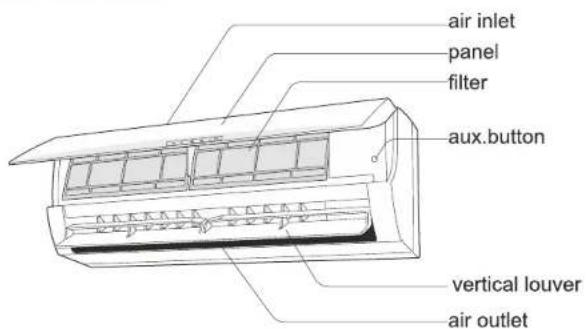
(Display content or position may be different from above graphics, please refer to actual products)
remote control
Outdoor Unit

NOTICE:
Actual product may be different from above graphics, please refer to actual products.
Parts Name
Display

"POWER" indicator : This symbol is ON when the system is in standby mode and blinks during antifungi features.

"TIMER" indicator: This symbol is ON when ON/OFF timer is activated.

"Compressor" indicator : This symbol is ON when the compressor is running.

"Temperature" indicator: This symbol shows the set temperature in °C in COOL/DRY/AUTO mode and room temperature in °C in FAN mode, when the indicator displays Error Codes, it means that there is an issue in the running of the Air Conditioner.
Remarks:
- Flashing of temperature indicator means the air conditioner is running abnormally, please contact the distributor in time.
- Function : The temperature indicator on the display screen can be controlled by "display" button on remote controller.
Display content or position may be different from above graphics, please refer to actual products.
Buttons on Remote Controller

Remarks:
- Temperature can be set between 16°C\~30°C
- The function and display of Heat is not available.
- If user want to make the room air cool quickly, user can press "turbo" button in cool mode initially.
- The above illustration of remote controller is only for reference, it may be slightly different from the actual product you selected.
Introduction for Icons on Display Screen
![graph TD A["Operating Mode Selection Display"] --> B["COOL"] A --> C["FAN"] A --> D["DRY"] A --> E["HEAT"] A --> F["AUTO"] G["Signal Emission Symbol"] --> H["It appears when signal is emitted from remote."] I["Setting temp Display"] --> J["Displayed the set temperature."] K["Clock Display"] --> L["D…](/content/2026/06/1210824/images/53ddb739280140b0de88b52b4712461e668379992d4926067c20dbd5e8dd4d45.jpg)
Instruction for remote controller
- The remote controller uses two AAA alkaline batteries under normal condition, the batteries last for about 6 months. Please use two new batteries of similar type (pay attention to the poles in installing).
● The effective control distance of the remote controller is about 8m. - When using remote controller, please point the signal emitter towards indoor unit receiver; There should be no obstacle between remote controller and indoor unit.
- Pressing two buttons simultaneously may results into malfunction
- Do not use wireless equipment (such as mobile phone) near indoor unit. If interference occurs because of this, please switch off the unit, pull out power plug, then plug again and switch on after a while.
- There should be no direct sunlight to the indoor receiver, or it may not receive the signal from the remote controller.
- Don't cast the remote controller.
- Don't put the remote controller under the sunlight or near the oven.
- Don't sprinkle water or other liquid on the remote controller, use soft cloth for cleaning if it occurs.
● The batteries must be removed from the appliance before it is scrapped.
Introduction for Buttons on Remote Controller
Operating Method
COOL, FAN, DRY, HEAT and AUTO operation
![graph TD A["Switch On\nPress On/Off button to start air conditioner."] --> B["Setting Operation Mode\nCOOL FAN DRY\nHEAT AUTO"] B --> C["Temp Adjustment Buttons\nPress "▼" "▲" buttons to set temp as needed"] C --> D["Airflow selection\nPress "H-Swing" and "V-Swing&…](/content/2026/06/1210824/images/0f60b6f0b06771da1ce1bdcf59d81f4a8051b64309e994f1628c06b4284a0518.jpg)
Remarks:
- When "COOL" mode is set, in accordance with D-Value between indoor room temperature and set temperature, air conditioner will start or stop the cooling operation. User can change fan speed Low, Medium, High and Auto as per requirement.
- When "FAN" mode is set, Set Temperature can't be adjusted, only Fan Speed can be adjust to Low, Medium and High. In this mode, Compressor will always remain off. Display will show indoor room temperature.
- When "DRY" mode is set, in accordance with D-Value between indoor room temperature and set temperature, air conditioner will start or stop the cooling operation and fan speed will change automatically to decrease room humidity. Fan speed cannot be changed in DRY mode.
- When "AUTO" mode is set, in accordance with D-Value between indoor room temperature and set temperature, air conditioner will start or stop the cooling operation. In this, mode Set temperature become 24°C and fan speed become Auto. Set Temperature and Fan speed can't be adjusted.
- When "E-Saving" mode is set (in cool mode), Set temperature become 24°C and Fan speed become Medium. Set Temperature and Fan speed can't be adjusted.
- When "SLEEP" mode is set (in cool mode), "SL" icon will appear on display for 2sec. Sleep Function will run as per following logic:
For first hour Set temp maintains For next 2 hours: Set temp. + 1°C maintains For next 5 hours: Set temp. + 2°C maintains After 8 hours Sleep function gets cancelled. - "HEAT" mode is not applicable.
Introduction for Buttons on Remote Controller
Clock Setting
![graph TD A["1 Press "Set Time" button to select the time you wish to set. The hour clock display will flash"] --> B["2 Press "▼" or "▲" buttons to set hour as needed, each press of "▼" or "▲" button will decrease or increase the time display by 1 hou…](/content/2026/06/1210824/images/e3a19aaf876a4371ac4cac3cdbabedc5e79476b7840d6279637c70065ca11ad3.jpg)
On Timer
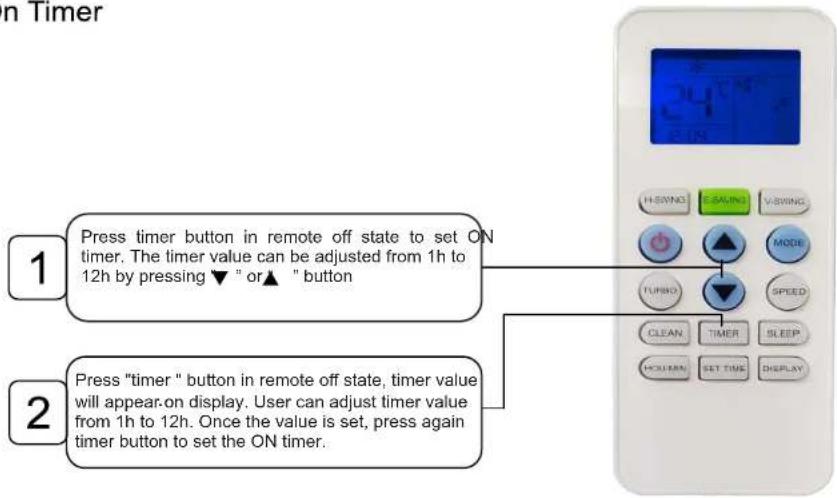
Note:
- When on timer function is set, air conditioner should be in OFF state. It will be turned on at the set time, symbol "ON" will get disappeared. If the set time is as same to the current time, air conditioner will be turned on at this time of next day.
- Press "On/Off" to cancel "On Timer" function, air conditioner will be turned on immediately.
Introduction for Buttons on Remote Controller
Off Timer
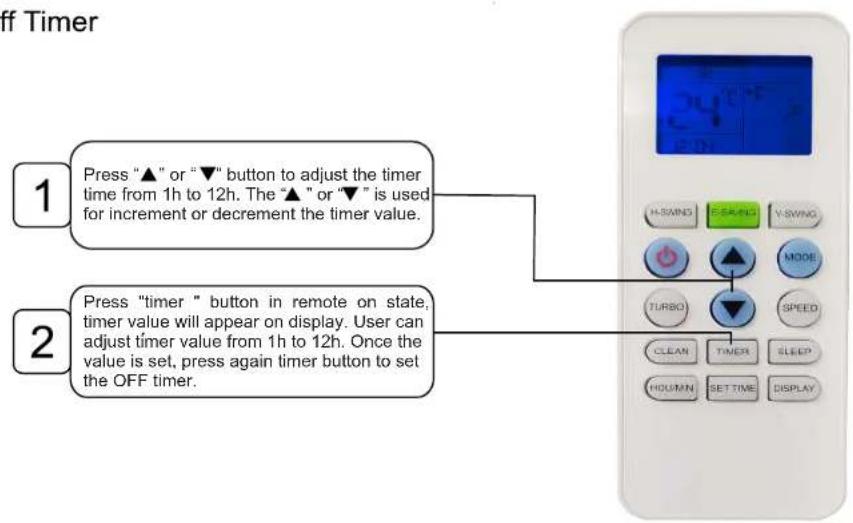
Note:
- When off timer function is set, air conditioner should be in ON state. It will be turned off at the set time, symbol "OFF" will get disappeared. If the set time is as same to the current time, the air conditioner will be turned off at this time of next day.
- Press "On/Off" to cancel "Off Timer" function, air conditioner will be turned off immediately.
Introduction for Buttons on Remote Controller
How to Adjust Air Flow
Horizontal direction
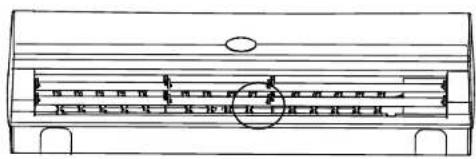
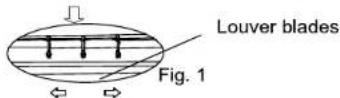
If press the "H-SWING" on the remote controller, horizontal louver blades can be set at the fixed position (Fig. 1) or auto swing.
Warning:
Fan inside;
Keep hands away!
Vertical direction
Press the "V-SWING" on the remote controller repeatedly, louver blades can be set at the fixed position 1-5 (Fig. 2) or auto swing activates. In different modes, louver blades swings repeatedly in the set range.
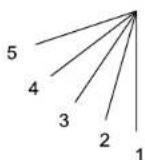
Fig.2
Sleep Operation
- When air conditioner is in ON state, press "SLEEP" button to enter "SLEEP" mode, and display on the remote controller.
- Press "SLEEP" button again, * will disappear on the remote controller, and the sleep function will be cancelled.

Note:
- In sleep mode, the set temperature will be increased after running 1 hour in cool and DRY mode. The set temperature will be controlled between 16° C and 30° C.
Replacement of Batteries in Remote Controller
- Press the back side of remote controller marked with "☐", as shown in the fig, and then push out the cover of battery box along the arrow direction.
- Replace two 7# (AAA 1.5V) dry batteries, and make sure the position of "+" polar and "-" polar are correct.
3.Reinstall the cover of battery box.

NOTICE
- During operation, point the remote control signal sender at the receiving window on indoor unit.
- The distance between signal sender and receiving window should be no more than 8m, and there should be no obstacles between them.
- Signal may be interfered easily in the room where there is fluorescent lamp or wireless telephone; remote controller should be close to indoor unit during operation.
- Replace new batteries of the same model when replacement is required.
- When you don't use remote controller for a long time, please take out the batteries.
- If the display on remote controller is fuzzy or there's no display, please replace batteries.
- If user has set the temperature below 24°C in Cool/Dry mode prior to switching off AC and then if AC is turned on by Remote, AC will start operating at 24°C temperature only.
- If user has set the temperature 24°C or above 24°C in Cool/Dry mode prior to switching off AC and then if AC is turned on by Remote, AC will start operating at previous set temperature set by user.
Emergency Operation
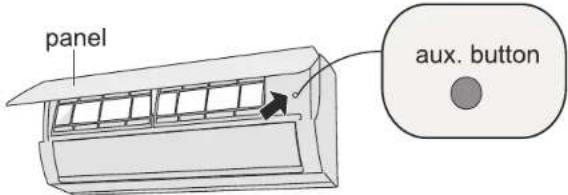
If remote controller is lost or damaged, please use auxiliary button to turn on or turn off the air conditioner. The operation in details are as below: As shown in the fig. Open panel, press aux. button to turn on or turn off the air conditioner. When the air conditioner is turned on, it will operate under auto mode.

WARNING:
Use insulated object to press the aux. button
Clean and maintenance

WARNING
■Turn off the air conditioner and disconnect the power before cleaning the air conditioner to avoid electric shock.
■Do not wash the air conditioner with water to avoid electric shock.
■Do not use volatile liquid to clean the air conditioner.
Clean surface of indoor unit
When the surface of indoor unit is dirty, it is recommended to use a soft dry cloth or wet cloth to wipe it.
NOTICE:
- Do not remove the panel when cleaning it.
Clean and maintenance
Clean filter
1
Open panel
Pull out the panel to a certain angle as shown in the fig.
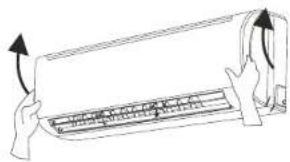
3
Clean filter
- Use dust catcher or water to clean the filter.
- When the filter is very dirty, use the water (below 45°C) to clean it, and then put it in a shady and cool place to dry.
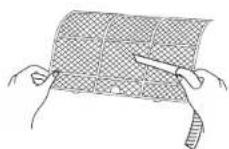
2
Remove filter
Remove the filter as indicated in the fig.
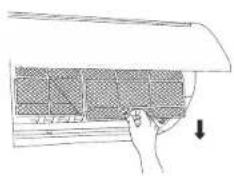
4
Install filter
Install the filter and then close the panel cover tightly.
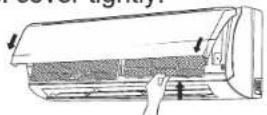

WARNING
■ The filter should be cleaned every months. If there is much dust in the operation environment, cleaning frequency can be increased.
■ After removing the filter, do not touch fins to avoid injury.
■ Do not use fire or hair dryer to dry the filter to avoid deformation or fire hazard.
Clean and maintenance
NOTICE: Checking before use-season
- Check whether air inlets and air outlets are blocked.
- Check whether circuit break, plug and socket are in good condition.
- Check whether filter is clean.
- Check whether mounting bracket for outdoor unit is damaged or corroded. If yes, please contact service provider.
- Check whether drainage pipe is damaged.
NOTICE: Checking after use-season
- Disconnect power supply.
- Clean filter and indoor unit's panel.
- Check whether mounting bracket for outdoor unit is damaged or corroded. If yes, please contact service provider.
Notice for recovery
- Many packing materials are recyclable materials.
Please dispose them in appropriate recycling unit. - If you want to dispose the air conditioner, please contact us on our Toll Free Numbers.
Malfunction analysis
Error Code
- For Fixed Speed Model
| Code | Error Description |
| E1 | Room Sensor short or open |
| E2 | Coil sensor short or open |
| H6 | Fan motor error |
| E6 | Zero crossing error |
| dF | Defrost error |
- For Inverter Model
| Code | Error Description |
| EE | IDU EEPROM fault |
| F0 | IDU Fan motor fault |
| E1 | IDU PCB zero-crossing fault |
| F3 | IDU Evaporator temp. sensor fault |
| F1 | IDU room air temp. sensor fault |
| EF | ODU EEPROM fault |
| F6 | IDU to ODU Communication fault |
| E4 | Compressor starting abonormal |
| E3 | Compressor out-of step abonormal |
| F9 | IMP module fault |
| F5 | Compressor discharge temp. sensor fault |
| E5 | Compressor suction temperature fault |
| F4 | ODU Condenser temp. sensor fault |
| F2 | ODU Ambient temp. sensor fault |
| E2 | ODU DC Fan motor fault |

WARNING
■ When below phenomenon occurs, please turn off air conditioner and disconnect power immediately, and then contact the dealer or qualified professionals for service.
• Power cord is overheating or damaged.
• There is abnormal sound during operation.
- Circuit break trips off frequently.
• Air conditioner gives off burning smell.
- Indoor unit is leaking.
■ Do not repair or refit the air conditioner by yourself.
■ If the air conditioner operates under abnormal conditions, it may cause malfunction, electric shock or fire hazard.
Malfunction analysis
General phenomenon analysis
Please check below items before asking for maintenance. If the malfunction still can't be eliminated, please contact local dealer or qualified professionals.
| Phenomenon | Check items | Solution |
| Indoor unit cannot receive remote controller signal or remote controller has no action. | Whether it's interfered severely (such as static electricity, stable voltage)? | Pull out the plug. Reinsert the plug after about 3min, and then turn on the unit again. |
| Whether remote controller is within the signal receiving range? | Signal receiving range is 8m. | |
| Whether there are obstacles? | Remove obstacles. | |
| Whether remote controller is pointing at the receiving window? | Select proper angle and point the remote controller at the receiving window on indoor unit. | |
| Is sensitivity of remote controller low; fuzzy display and no display? | Check the batteries. If the power of batteries is too low, please replace them. | |
| No display when operating remote controller? | Check whether remote controller appears to be damaged. If yes, replace it. | |
| Fluorescent lamp in room? | Take the remote controller close to indoor unit.Turn off the fluorescent lamp and then try it again. |
| No air emitted from indoor unit | Air inlet or air outlet of indoor unit is blocked? | Eliminate obstacles. |
| Under heating mode, indoor temperature is reached to set temperature? | After reaching to set temperature, indoor unit will stop blowing out air. | |
| Heating mode is turned on just now? | In order to prevent blowing out cold air, indoor unit will be started after delaying for several minutes, which is a normal phenomenon. |
Malfunction analysis
| Phenomenon | Check items | Solution |
| Air conditioner can't operate | Power failure? | Wait until power recovery. |
| Is plug loose? | Reinsert the plug. | |
| Circuit break trips off or fuse is burnt out? | Ask professional to replace circuit break or fuse. | |
| Wiring has malfunction? | Ask professional to replace it. | |
| Unit has restarted immediately after stopping operation? | Wait for 3min, and then turn on the unit again. | |
| Whether the function setting for remote controller is correct? | Reset the function. | |
| Mist is emitted from indoor unit's air outlet | Indoor temperature and humidity is high? | Because indoor air is cooled rapidly. After a while, indoor temperature and humidity will be decrease and mist will disappear. |
| Set temperature can't be adjusted | Unit is operating under auto mode? | Temperature can't be adjusted under auto mode. Please switch the operation mode if you need to adjust temperature. |
| Your required temperature exceeds the set temperature range? | Set temperature range: 16°C ~30°C . | |
| Cooling / heating effect is not good. | Voltage is too low? | Wait until the voltage resumes normal. |
| Filter is dirty? | Clean the filter. | |
| Set temperature is in proper range? | Adjust temperature to proper range. | |
| Door and window are open? | Close door and window. |
Malfunction analysis
| Phenomenon | Check items | Solution |
| Odours are emitted | Whether there is odour source, such as furniture and cigarette, etc. | Eliminate the odour source.Clean the filter. |
| Air conditioner operates abnormally | Whether there is interference, such as thunder, wireless devices, etc. | Disconnect power, put back power, and then turn on the unit again. |
| Outdoor unit has vapor | Heating mode is turned on? | During defrosting under heating mode, it may generate vapor, which is a normal phenomenon. |
| Water flowing noise | Air conditioner is turned on or turned off just now? | The noise is the sound of refrigerant flowing inside the unit, which is a normal phenomenon. |
| Cracking noise | Air conditioner is turned on or turned off just now? | This is the sound of friction caused by expansion and contraction of panel or other parts due to the change of temperature. |
Installation dimension diagram

Tools for installation
| 1 Level meter | 2 Screw driver | 3 Impact drill | |
| 4 Drill head | 5 Pipe expander | 6 Torque wrench | |
| 7 Open-end wrench | 8 Pipe cutter | 9 Leakage detector | |
| 10 Vacuum pump | 11 Pressure meter | 12 Universal meter | |
| 13 Inner hexagon spanner | 14 Measuring tape | ||
Note:
- Please contact us on our Toll Free Number.
- Don't use unqualified power cord.
Selection of installation location
Basic requirement
Installing the unit in the following places may cause malfunction. If it is unavoidable, please consult the local dealer:
- The place with strong heat sources, vapors, flammable or explosive gas, or volatile objects spread in the air.
- The place with high-frequency devices (such as welding machine, medical equipment).
- The place near coast area.
- The place with oil or fumes in the air.
- The place with sulfurated gas.
- Other places with special circumstances.
- Do not use the unit in the immediate surroundings of a laundry, a bath, shower or a swimming pool.
Outdoor unit
- Select a location where the noise and outflow air emitted by the outdoor unit will not affect neighbourhood.
- The location should be well ventilated and dry, in which the outdoor unit won't be exposed directly to sunlight or strong wind.
- The location should be able to withstand the weight of outdoor unit.
- Make sure that the installation follows the requirement of installation dimension diagram.
- Select a location which is out of reach for children and far away from animals or plants. If it is unavoidable, please add the fence for safety purpose.
Requirements for electric connection
Safety precaution
- Must follow the electric safety regulations when installing the unit.
- According to the local safety regulations, use qualified power supply circuit and circuit break.
- Make sure the power supply matches with the requirement of air conditioner. Unstable power supply or incorrect wiring or malfunction. Please install proper power supply cables before using the air conditioner.
- Properly connect the live wire, neutral wire and grounding wire of power socket.
- Be sure to cut off the power supply before proceeding any work related to electricity and safety.
- Do not put through the power before finishing installation.
- If the supply cord is damaged, it must be replaced by the manufacturer, its service agent or similarly qualified persons in order to avoid a hazard.
- The temperature of refrigerant circuit will be high, please keep the interconnection cable away from the copper tube.
- The appliance shall be installed in accordance with national wiring regulations.
- Installation must be performed in accordance with the requirement of NEC and CEC by authorized personnel only
Grounding requirement
- The air conditioner is the first class electric appliance. It must be properly grounding with specialized grounding device by a professional. Please make sure it is always grounded effectively, otherwise it may cause electric shock.
- The yellow-green wire in air conditioner is grounding wire, which can't be used for other purposes.
- The grounding resistance should comply with national electric safety regulations.
- The appliance must be positioned so that the plug is accessible.
- An all-pole disconnection switch having a contact separation of at least 3mm in all poles should be connected in fixed wiring.
- Including an circuit break with suitable capacity, please note the following table. Air switch should be included magnet buckle and heating buckle function, it can protect the circuit-short and overload. (Caution: please do not use the fuse only for protect the circuit)
| Air-conditioner | Circuit break capacity |
| 09K | 10A |
| 12K | 16A |
| 18K/24K | 25A |
Installation of indoor unit
Step one: choosing installation location
Recommend the installation location to the client and then confirm it with the client.
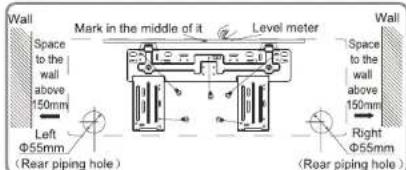
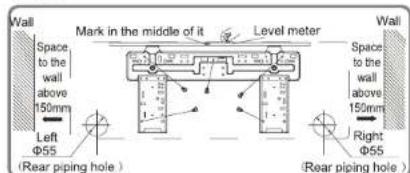
Step two: open piping hole
- Choose the position of piping hole according to the direction of outlet pipe. The position of piping hole should be a little lower than the wall-mounted frame,
09K:
12K:
18K:
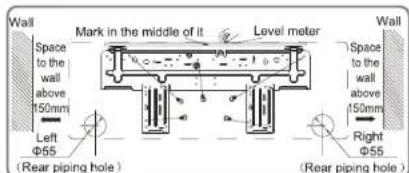
18K/24K:

- Open a piping hole with the diameter of 55 or 70 on the selected outlet pipe position. In order to drain smoothly, slant the piping hole on the wall slightly downward to the outdoor side with the gradient of 5-10° .
Note:
- Pay attention to dust prevention and take relevant safety measures when opening the hole.
- The plastic expansion particles are not provided and should be bought locally.

Installation of indoor unit
Step three: outlet pipe
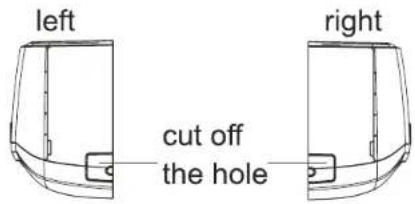
- The pipe can be led out in the direction of right, rear right, left or rear left.

- When select leading out the pipe from left or right, please cut off the corresponding hole on the bottom case.
Step four: connect the pipe of indoor unit
- Aim the pipe joint at the corresponding bellmouth.
- Pretightening the union nut with hand.
- Adjust the torque force by referring to the following sheet. Place the open-end wrench on the pipe joint and place the torque wrench on the union nut. Tighten the union nut with torque wrench.
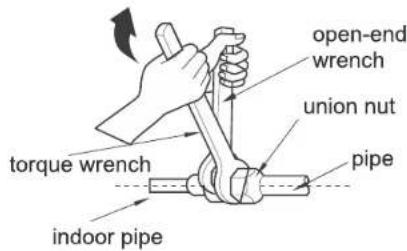
| Hex nut diameter | Tightening torque (N·m) |
| Φ 6.35 | 15~20 |
| Φ 9.52 | 30~40 |
| Φ 12.7 | 45~55 |
| Φ 15.88 | 60~65 |
- Wrap the indoor pipe and joint of connection pipe with insulating pipe, and then wrap it with tape.
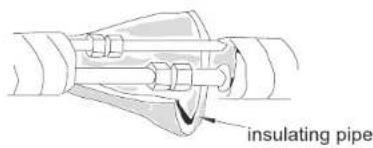
Installation of indoor unit
Step five: install drain hose
-
Connect the drain hose to the outlet pipe of indoor unit.
-
Bind the joint with tape.
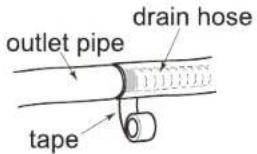

Note:
- Add insulating pipe in the indoor drain hose in order to prevent condensation.
- The plastic expansion particles are not provided.
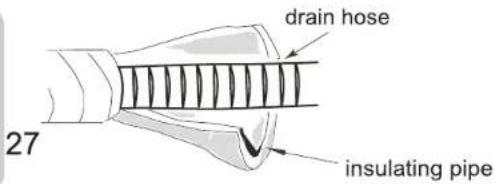
Step six: connect wire of indoor unit
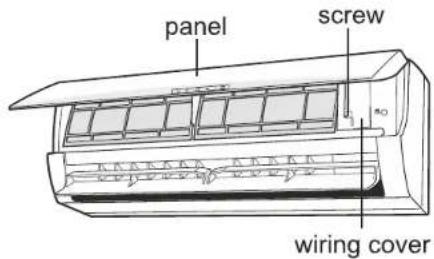
- Open the panel, remove the screw on the wiring cover and then take down the cover.
Installation of indoor unit
Step seven: bind up pipe
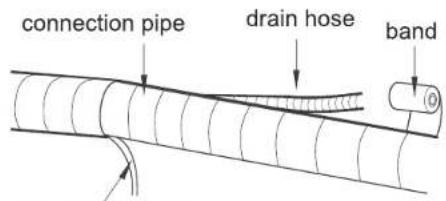
- Bind up the connection pipe, power cord and drain hose with the band.

- Reserve a certain length of drain hose and power cord for installation when binding them. When binding to a certain degree, separate the indoor power and then separate the drain hose.
indoor power cord
- Bind them evenly.
- The liquid pipe and gas pipe should be bound separately at the end.
Note:
- The power cord and control wire can't be crossed or winding.
- The drain hose should be bound at the bottom.
Step eight: hang the indoor unit
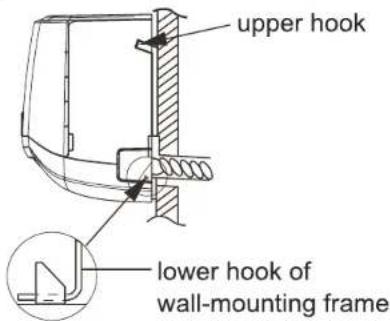
- Put the bound pipes in the wall pipe and then make them pass through the wall hole.
- Hang the indoor unit on the wall-mounting frame.
- Stuff the gap between pipes and wall hole with sealing gum.
- Fix the wall pipe.
- Check if the indoor unit is installed firmly and closed to the wall.

Note:
- Do not bend the drain hose too excessively in order to prevent blocking.
Installation of outdoor unit
Step one: fix the support of outdoor unit
(select it according to the actual installation situation)
- Select installation location according to the house structure.
- Fix the support of outdoor unit on the selected location with expansion screws.
Note:
• Take sufficient protective measures when installing the outdoor unit.
- Make sure the support can withstand at least four times of the unit weight.
- The outdoor unit should be installed at least 3cm above the floor in order to install drain joint.
- For the unit with cooling capacity of 2300W \~5000W, 6 expansion screws are needed; for the unit with cooling capacity of 6000W \~8000W, 8 expansion screws are needed; for the unit with cooling capacity of 10000W \~16000W, 10 expansion screws are needed.

at least 3cm above the floor
Step two: install drain joint
(Only for cooling and heating unit)
- Connect the outdoor drain joint into the hole on the chassis, as shown in the picture below.
- Connect the drain hose into the drain vent.

Step three: fix outdoor unit
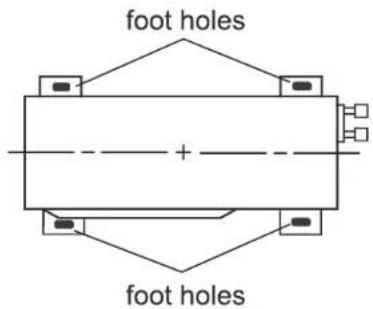
- Place the outdoor unit on the support.
- Fix the foot holes of outdoor unit with bolts.
Installation of outdoor unit
Step four: connect indoor and outdoor pipes
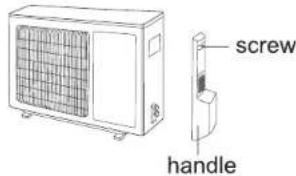
- Remove the screw on the right handle of outdoor unit and then remove the handle.
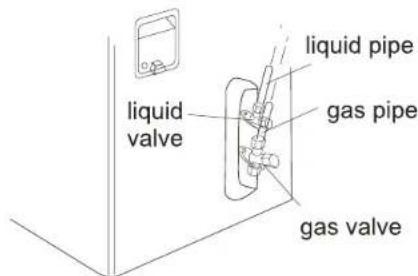
- Remove the screw cap of valve and aim the pipe joint at the bellmouth of pipe.
- Pretightening the union nut with hand.
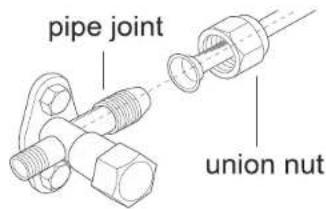
- Tighten the union nut with torque wrench by referring to the sheet below.
| Hex nut diameter | Tightening torque (N·m) |
| Φ 6.35 | 15~20 |
| Φ 9.52 | 30~40 |
| Φ 12.7 | 45~55 |
| Φ 15.88 | 60~65 |
Step five: connect outdoor electric wire
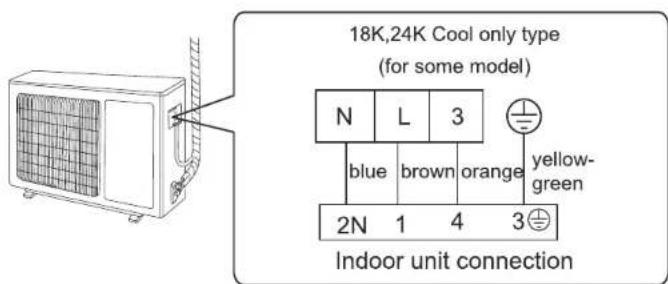
- Remove the wire clip; connect the power connection wire and signal control wire (only for cooling and heating unit) to the wiring terminal according to the color; fix them with screws.
Installation of outdoor unit
- Fix the power connection wire and signal control wire with wire clip (only for cooling and heating unit).
Note:
- After tighten the screw, pull the power cord slightly to check if it is firm.
- Never cut the power connection wire to prolong or shorten the distance.
Step six: neaten the pipes
- The pipes should be placed along the wall, bent reasonably and hidden possibly. Min. semidiameter of bending the pipe is 10cm.
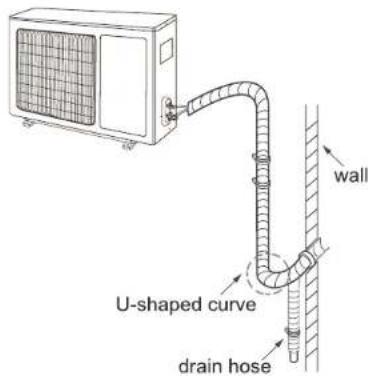
- If the outdoor unit is higher than the wall hole, you must set a U-shaped curve in the pipe before pipe goes into the room, in order to prevent rain from getting into the room.
Note:
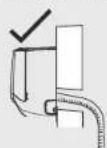
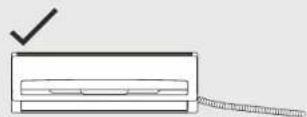
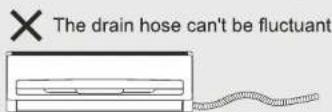
- The through-wall height of drain hose shouldn't be higher than the outlet pipe hole of indoor unit.
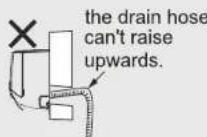
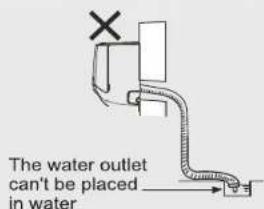
- The water outlet can't be placed in water in order to drain smoothly.
- Slant the drain hose slightly downwards. The drain hose can't be curved, raised and fluctuant, etc.

Vacuum pumping
Use vacuum pump
-
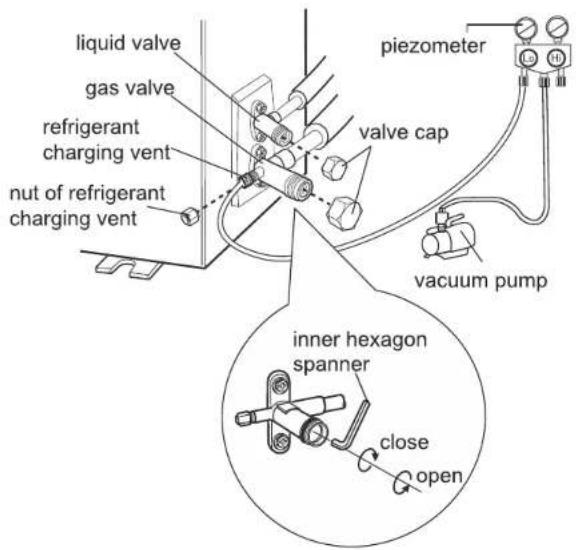
Remove the valve caps on the liquid valve and gas valve and the nut of refrigerant charging vent.
-
Connect the charging hose of piezometer to the refrigerant charging vent of gas valve and then connect the other charging hose to the vacuum pump.
-
Open the piezometer completely and operate for 10-15min to check if the pressure of piezometer remains in -0.1MPa.
-
Close the vacuum pump and maintain this status for 1-2min to check if the pressure of piezometer remains in -0.1MPa. If the pressure
-
Remove the piezometer, open the valve core of liquid valve and gas valve completely with inner hexagon spanner.
-
Tighten the screw caps of valves and refrigerant charging vent.
-
Reinstall the handle.
Leakage detection
-
With leakage detector: Check if there is leakage with leakage detector.
-
With soap water: If leakage detector is not available, please use soap water for leakage detection. Apply soap water at the suspected position and keep the soap water for more than 3min. If there are air bubbles coming out of this position, there's a leakage.
Check after installation
- Check according to the following requirement after finishing installation.
| Items to be checked | Possible malfunction |
| Has the unit been installed firmly? | The unit may drop, shake or emit noise. |
| Have you done the refrigerant leakage test? | It may cause insufficient cooling/heating capacity. |
| Is heat insulation of pipeline sufficient? | It may cause condensation and water dripping. |
| Is water drained well? | It may cause condensation and water dripping. |
| Is the voltage of power supply according to the voltage marked on the nameplate? | It may cause malfunction or damaging the parts. |
| Is electric wiring and pipeline installed correctly? | It may cause malfunction or damaging the parts. |
| Is the unit grounded securely? | It may cause electric leakage. |
| Does the power cord follow the specification? | It may cause malfunction or damaging the parts. |
| Is there any obstruction in the air inlet and outlet? | It may cause insufficient cooling/heating capacity. |
| The dust and sundries caused during installation are removed? | It may cause malfunction or damaging the parts. |
| The gas valve and liquid valve of connection pipe are open completely? | It may cause insufficient cooling/heating capacit |
| Is the inlet and outlet of piping hole whether the operation is normal or not. | It may cause insufficient cooling/heating capacity or waster electricity. |
Test operation
Preparation of test operation
The client approves the air conditioner.
Specify the important notes for air conditioner to the client.
Configuration of connection pipe
-
Standard length of connection pipe • 3.5m
-
Min. length of connection pipe is 3m.
3.Max. length of connection pipe and max. height difference.
| Cooling capacity | Max length of connection pipe(m) | Max height difference (m) |
| 9000Btu/h (0.75T) | 12 | 7 |
| 12000Btu/h (1.0T) | 12 | 7 |
| 18000Btu/h (1.5T) | 12 | 7 |
| 24000Btu/h (2.0T) | 12 | 7 |
- The additional refrigerant oil and refrigerant charging required after prolonging connection pipe
- After the length of connection pipe is prolonged for 10m at the basis of standard length, you should add 5ml of refrigerant oil for each additional 5m of connection pipe.
- The calculation method of additional refrigerant charging amount (on the basis of liquid pipe):
Additional refrigerant charging amount = prolonged length of liquid pipe? additional refrigerant charging amount per meter
- Basing on the length of standard pipe, add refrigerant according to the requirement as shown in the table. The additional refrigerant charging amount per meter is different according to the diameter of liquid pipe. See the following sheet.
Configuration of connection pipe
Additional refrigerant charging amount for R22, R407C, R410A, R32
| Diameter of connection pipe | Outdoor unit throttle | |
| Liquid pipe(mm) | Gas pipe(mm) | Cooling only(g/m) |
| Φ6.35 | Φ9.52 | 20 |
| Φ6.35 | Φ12.7 | 20 |
| Φ6.35 | Φ15.88 | 20 |
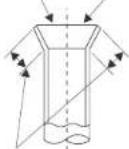
Pipe expanding method
Note:
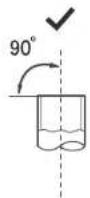
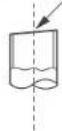
Improper pipe expanding is the main cause of refrigerant leakage. Please expand the pipe according to the following steps:
A: Cut the pipe
- Confirm the pipe length according to the distance of indoor unit and outdoor unit.
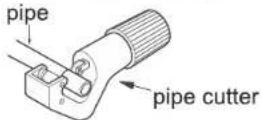
- Cut the required pipe with pipe cutter.
×
leaning
×
uneven

×
burr

B: Remove the burrs
- Remove the burrs with shaper and prevent the burrs from getting into the pipe.

C: Put on suitable insulating pipe
D: Put on the union nut
- Remove the union nut on the indoor connection pipe and outdoor valve; install the union nut on the pipe.
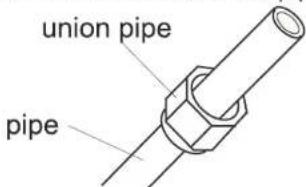
E: Expand the port
- Expand the port with expander.
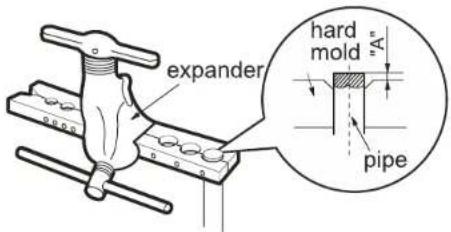
Note:
- "A" is different according to the diameter, please refer to the sheet below:
| Outer diameter (mm) | A(mm) | |
| Max | Min | |
| Φ6.35(1/4") | 1.3 | 0.7 |
| Φ9.52(3/8") | 1.6 | 1.0 |
| Φ12.7(1/2") | 1.8 | 1.0 |
| Φ15.88(5/8") | 2.4 | 2.2 |
F: Inspection
- Check the quality of expanding port. If there is any blemish, expand the port again according to the steps above.
smooth surface
improper expanding

leaning

damaged surface

crack

uneven thickness
the length is equal
BRANCH ADDRESSES / SERVICE CONNECT
| GODREJ & BOYCE MFG. CO. LTD., Appliances Division | |
| Branch | Branch Addresses |
| Ahmedabad | 4th Floor, APM Shopping Mall Near IOCL Petrol Pump, Shyamal-Karnavati, 100 ft. Road, Satellite, Ahmedabad - 380 015 |
| Bangalore | 3rd Floor, The Karnataka Film Chamber of Commerce Bldg. 28, 1st Main,Crescent Road, High Grounds Nr. Shivanand Circle, Bangalore - 560 001 |
| Bhopal | 217, Zone I, M.P. Nagar, Beh. Jyoti Talkies, Bhopal - 462 011 |
| Bhubaneshwar | Highway Complex, NH-5, Rudrapur, Bhubaneshwar - 752 101 |
| Chandigarh/Mohali | Plot No. A-40, Phase VIII-A, Industrial Area, Mohali - 160 059 |
| Chennai | No. 1, Sidco Industrial Estate, Ambattur, Chennai - 600 098 |
| Coimbatore | No. 585 - 590 3rd Floor, Sathya Towers, DB Road, R S Puram, Coimbatore- 641002 |
| Delhi | Godrej Bhavan, 2nd Floor, Shershah Suri Marg, Mathura Road, Okhla,New Delhi - 110 065 |
| Faridabad | Godrej Bhavan, 2nd Floor, Shershah Suri Marg, Mathura Road, Okhla,New Delhi - 110 065 |
| Ghaziabad | Plot No. 229/230, Sardar Pashu Ahaar, Bulandshahar Road, Village-chaprolla, Ghaziabad |
| Guwahati | Basundhara Enclave, 1st & 2nd Floor Ulubari, Guwahati 781007 |
| Hyderabad | 201 & 202, Lala-1 Land Mark, 5-4-94 to 97, 2nd Floor, Above DigitalShoppy, Ranigunj, M.G. Road, Secunderabad -500 003 |
| Jaipur | 502-506, 5th Floor, Gaurav Towers, Malviya Nagar, Jaipur - 302 017 |
| Kochi | 2nd floor, Angels Arcade, South Kalamasserry, Near CUSAT PO Kochi682022 |
| Kolkata | Plot-30, Block-GN, Sector-V, Salt Lake city, Kolkata - 700 091 |
| Lucknow | C-3/3 & C-3/4, Sanjay Complex, Near All India Radio, Vidhan Sabha Marg,Lucknow-226001 |
| Mumbai | Appliance Division, Plant 4, Pirojshahnagar, Vikhroli, Mumbai - 400 079 |
| Nagpur | Dr. Bhiwapurkar Chamber, 2nd Floor, Opp. Yashwant Stadium, Dhantoli,Nagpur - 440 012 |
| Patna | Grand Plaza 6th Floor, 6001-6004, Dakbunglow Crossing. Frazer Road.Patna-800001 |
| Pune | Apollo Building Square, Plot No. 60, Survey No. 599, Sahaney Sujan Park,Lullanagar, Bibewadi Road, Pune - 411 040 |
| Raipur | 9/1, Besides Bharat Petrol Pump, Opp, Hotel Picadelly, Mahoba Bazaar,G.E. Road, Raipur - 492 001, Chhatisgarh |
| Ranchi | C/o. Surya Motors, Near Krishi Bazaar Samiti Panda, Ranchi (Jharkand) -835 222 |
| Toll-Free : 1800-209-5511 | |
| Website: www.godrejappliances.com & www.godrejsmartcare.comE-mail: smartcare@godrej.com | |
Warranty Air Conditioner
The Godrej Air Conditioner comes with a FIVE year warranty on compressor for fixed speed Air conditioners and TEN year warranty on compressor for Inverter Air Conditioners. Along with this, you also get ONE year warranty on all other parts (except grill & plastic parts) from the date of purchase, against defective material or workmanship. In case of any such defect found during the first year from date of purchase, Godrej & Boyce Mfg. Co. Ltd.-Appliance Division will undertake repairs to the warranted part free of charge, subject to terms and conditions below. In the warranty period beyond the first year from date of purchase, only the compressor will be provided free of cost, when necessary. However, the Air Conditioner will repaired on payment of necessary charges. The warranty does not cover the demonstration/installation of the Air Conditioner.
INSTRUCTIONS FOR THE CUSTOMER
- Kindly ensure that the dealer fills the warranty card correctly and completely.
- You should retain the warranty card for record and produce the same in the event of any warranty repairs.
- In the event of a defect developing in the product, contact the nearest authorized Godrej & Boyce Service Center for obtaining warranty service and inform the defect, Model details & Serial No.
- Product will function between +/-10% of rated volts at 50Hz. For any fluctuation beyond specified limit, company shall not be responsible and warranty stands terminated.
- In areas where voltage fluctuates below 10% of rated voltage, customer is advised to use a voltage stabilizer which steps up voltage to a minimum of 190V.
- Earthing provision is necessary for safety. Improper domestic wiring leading to hazards such as shock or fire is not covered under this warranty.
- The product must be maintained to ensure hygiene. If there are any insects or rodents in it causing obstruction to the functioning of the product, the company shall not be responsible and in-turn warranty stands terminated.
TERMS AND CONDITIONS
- Repairs and replacement will be carried out by the companies authorized service centers or through authorized dealer's service center.
- All transportation and handling expenses incurred while repairing will be payable by the customer in advance.
- For any Air Conditioner installed beyond the municipal limits of the jurisdiction of the authorized customer service center, charges towards technician's visit will be borne by the customer
- While the company will make every effort to carry out the repairs at the earliest, it however is made expressly clear that the company is under no obligation to do so in a specified period of time.
- The company will retain any part(s), compressor and/or other components when replaced at its discretion,
- Warranty does not cover accessories to the Air Conditioner.
- Refrigeration system gas charging and consumables will be charged for any such repairs after one year from the date of purchase.
- Company will not be liable for any consequential loss or compensation nor refund of purchase price nor replacement of the Air Conditioner.
- Customer must ensure the routine maintenance including cleaning of filter etc. for proper operation.
- Any change in location/damages on handling will be serviced at extra material and labor cost.
- While Company would take all necessary steps to repair the Air Conditioner supplied under the warranty and keep sufficient stock of the spare parts of the Air Conditioner with them, however, in certain cases, at the sole discretion of the Company, the Company may due to non-availability of spare parts of the Air Conditioner, resulting into the Air Conditioner not being repaired by the Company, offer a replacement scheme to the purchasers of such Air Conditioner which cannot be repaired due to non-availability of spare parts of the Air Conditioner, purchased under the warranty, the Company would offer a replacement of the Air Conditioner. The details of the replacement offer is subject to change from year to year and shall also be applicable on the MRP of the product to be purchased as a replacement.
- Two (2) free preventive maintenance service (Labour only) will be provided to the customer during first year warranty period. To avail these free services customer has to register the call at the call center number 1800 209 5511. After expiry of 12 (twelve) months from date of purchase company is not liable for any free service.
Godrej & Boyce Mfg. Co. Ltd.- Appliance Division
CUSTOMER COPY
MODEL NO.
AIR CONDITIONER SERIAL No.:

DATE OF PURCHASE
Customer's Signature:
This warranty is valid only if it is filled in and stamped by our authorized dealer on the date of purchase.
Warranty Voids If:
- The warranty card is not completed properly at the time of purchase. 2. The completed warranty card is not presented to the authorized personnel at the time of service of the product. 3. The Air Conditioner is not operated and maintained according to instructions given in the 'User Guide'. 4. Defects are caused by improper use, which shall be determined by the company personnel. 5. Unauthorized persons carry out any repair work. 6. Defects are caused by reasons beyond control, like abnormal voltage (exceed 253V or below 207V ), acts of God, or while in transit to service center or purchaser's residence. 7. The warranty is not valid in case the serial number is deleted, defaced or altered. 8. Damage to the Air Conditioner or any parts due to transportation or shifting is not covered by the warranty. 9. The warranty automatically expires after the stipulated period from the original date of purchase, even if the Air Conditioner may not be in use for any time for whatever reasons.
Service Card

Please fill the warranty card and send it to your nearest branch to avail of 2 free services
| Air CONDITIONERS | Dry | Dry | Wet | smart care | ||
| Bill No. | Date of Sale | Model No. | Sr. No. | |||
| Customer/User's Name | Phone No. | |||||
| Address | Sp. instructions, if any | |||||
| City | Pin Code | |||||
| Dealer/ASP's Name & Address | I confirm that the service has been provided to my satisfactionCustomer's Sign & Date | |||||
| Air CONDITIONERS | Dry | Dry | Wet | smart care | ||
| Bill No. | Date of Sale | Model No. | Sr. No. | |||
| Customer/User's Name | Phone No. | |||||
| Address | Sp. instructions, if any | |||||
| City | Pin Code | |||||
| Dealer/ASP's Name & Address | I confirm that the service has been provided to my satisfactionCustomer's Sign & Date | |||||
Notes
Notes
Godrej
Godrej & Boyce Mfg. Co. Ltd. - Appliance Division, Plant I I, Pirojshanagar, Vikroli (W), Mumbai 400 079.
Disclaimer-The images shown in the manual are representative. Actual products may vary
User Manual godrej-12
Wednesday, February 20, 2019 3:53:14 PM
User Manual godrej-12345
Saturday, February 23, 2019 11:02:11 AM
- CONTENT
- OPERATION NOTICES
- SCREEN OPERATION GUIDE
- MAINTENANCE
- MALFUNCTION
- INSTALLATION NOTICE
- INSTALLATION
- TEST AND OPERATION
- ATTACHMENT
- PROTECTION OF ENVIRONMENT
- EXPLANATION OF SYMBOLS
- PRECAUTIONS
- WARNING
- OPERATION AND MAINTENANCE
- PARTS NAME
- NOTICE
- DISPLAY
- REMARKS
- INSTRUCTION FOR REMOTE CONTROLLER
- INTRODUCTION FOR BUTTONS ON REMOTE CONTROLLER
- OPERATING METHOD
- NOTE
- HOW TO ADJUST AIR FLOW
- HORIZONTAL DIRECTION
- VERTICAL DIRECTION
- SLEEP OPERATION
- REPLACEMENT OF BATTERIES IN REMOTE CONTROLLER
- EMERGENCY OPERATION
- CLEAN AND MAINTENANCE
- CLEAN SURFACE OF INDOOR UNIT
- CLEAN FILTER
- 1
- 3
- 2
- 4
- NOTICE: CHECKING BEFORE USE-SEASON
- NOTICE: CHECKING AFTER USE-SEASON
- NOTICE FOR RECOVERY
- MALFUNCTION ANALYSIS
- ERROR CODE
- GENERAL PHENOMENON ANALYSIS
- TOOLS FOR INSTALLATION
- SELECTION OF INSTALLATION LOCATION
- BASIC REQUIREMENT
- OUTDOOR UNIT
- REQUIREMENTS FOR ELECTRIC CONNECTION
- SAFETY PRECAUTION
- GROUNDING REQUIREMENT
- INSTALLATION OF INDOOR UNIT
- STEP ONE: CHOOSING INSTALLATION LOCATION
- STEP TWO: OPEN PIPING HOLE
- STEP THREE: OUTLET PIPE
- STEP FOUR: CONNECT THE PIPE OF INDOOR UNIT
- STEP SEVEN: BIND UP PIPE
- STEP EIGHT: HANG THE INDOOR UNIT
- INSTALLATION OF OUTDOOR UNIT
- STEP ONE: FIX THE SUPPORT OF OUTDOOR UNIT
- STEP TWO: INSTALL DRAIN JOINT
- STEP THREE: FIX OUTDOOR UNIT
- STEP FOUR: CONNECT INDOOR AND OUTDOOR PIPES
- STEP FIVE: CONNECT OUTDOOR ELECTRIC WIRE
- STEP SIX: NEATEN THE PIPES
- VACUUM PUMPING
- USE VACUUM PUMP
- LEAKAGE DETECTION
- CHECK AFTER INSTALLATION
- TEST OPERATION
- CONFIGURATION OF CONNECTION PIPE
- PIPE EXPANDING METHOD
- WARRANTY AIR CONDITIONER
- INSTRUCTIONS FOR THE CUSTOMER
- TERMS AND CONDITIONS
- GODREJ & BOYCE MFG. CO. LTD.- APPLIANCE DIVISION
- CUSTOMER COPY
- SERVICE CARD
- GODREJ
Brand : Godrej
Model : GSC 12NTC3-WUA
Category : Refrigerator