LAC1777 - Car Radio LG - Free user manual and instructions
Find the device manual for free LAC1777 LG in PDF.


User questions about LAC1777 LG
0 question about this device. Answer the ones you know or ask your own.
Ask a new question about this device
Download the instructions for your Car Radio in PDF format for free! Find your manual LAC1777 - LG and take your electronic device back in hand. On this page are published all the documents necessary for the use of your device. LAC1777 by LG.
USER MANUAL LAC1777 LG
Before connecting, operating or adjusting this product, please read this instruction booklet carefully and completely.
The working life of this product is 7 years since the date of purchase.

Table of Contents
INTRODUCTION
Table of Contents 2
Safety Precautions 3
Before Use....4-5
Front Panel....6
PREPARATION
Installation....7
Connections....8-9
OPERATION
Basic Operation 10-11
Turning the unit on....10
Turning the unit off....10
Selecting a source 10
Adjusting the volume 10
Setting the clock 10
Checking the clock....10
SOUND Adjustment 11
Radio Operation 12
Listening to radio stations 12
Auto Search Memory 12
Storing and recalling broadcast frequencies ..... 12
Operation with Audio CD, MP3 Disc 13-14
Playing an Audio CD and MP3 Disc 13
REFERENCE
Troubleshooting 15
Specifications

Disposal of your old appliance
- When this crossed-out wheeled bin symbol is attached to a product it means the product is covered by the European Directive 2003/96/EC
- All electrical and electronic products should be disposed of separately from the municipal waste stream via designated collection facilities appointed by the government or the local authorities.
- The correct disposal of your old appliance will help prevent potential negative consequences for the environment and human health.
- For more detailed information about disposal of your old appliance, please contact your city office, waste disposal service or the shop where you purchased the product.
Safety Precautions

CAUTION
RISK OF ELECTRIC SHOCK DO NOT OPEN


Warning: To reduce the risk of electric shock, do not remove the cover or back of this product. There are no user-serviceable parts inside. Refer servicing to qualified service personnel.

Warning: To reduce the risk of fire or electric shock, do not expose this product to dripping or splashing water, rain, or moisture.

Warning: Due to high temperature outside of the unit, please use the unit only installed in a car.
CAUTION:
This unit employs a Laser System.
To ensure proper use of this product, please read this owner's manual carefully and retain for future reference should the unit require maintenance, contact an authorized service location (see service procedure).
Use of controls, adjustments, or the performance of procedures other than those specified herein may result in hazardous radiation exposure.
To prevent direct exposure to laser beam, do not try to open the enclosure. Visible laser radiation when open. DO NOT STARE INTO BEAM.


Caution: Protect this product from moisture.

Caution: If the battery is disconnected or discharged, the preset memory will be erased and must be reprogrammed.
Before Use
To ensure proper use of this product, please read this owner's manual carefully and retain for future reference.
Symbols Used in this Manual

The lightning flash symbol alerts you to the presence of dangerous voltage within the product enclosure that may constitute a risk of electric shock.

Indicates hazards likely to cause harm to the unit itself or other material damage.
NOTE
Indicates special notes and operating features.
TIP
Indicates tips and hints for making the task easier.
Handling the Unit
- This unit is designed to be operated on a 12 volt DC negative ground electrical system only.
- When replacing the fuse, be sure to use fuseone with an identically rated amperage. Use of a fuse with a higher amperage may cause serious damage to the unit.
• Periodically wipe the contacts on the back of the front panel with a cotton swap moistened with alcohol.
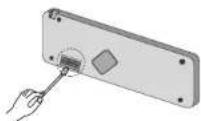
Notes on Discs
Handling Discs
Do not touch the playback side of the disc. Hold the disc by the edges so that fingerprints do not get on the surface. Never stick paper or tape on the disc.


Storing Discs
After playing, store the disc in its case. Do not expose the disc to direct sunlight or sources of heat and never leave it in a parked car exposed to direct sunlight.
Cleaning Discs
Fingerprints and dust on the disc can cause poor picture quality and sound distortion. Before playing, clean the disc with a clean cloth. Wipe the disc from the center out.

Do not use strong solvents such as alcohol, benzine, thinner, commercially available cleaners, or anti-static spray intended for older vinyl records.
This unit cannot be operated with 8cm disc (use 12cm discs only).

Before Use
Protecting your unit from theft
The front panel can be detached from the main body and stored in the protective case provided to discourage theft.
- Press RELEASE ( ) to open the front panel.

text_image
RELEASE (▲)- Grip the left side of the front panel and pull it gently outward.
Take care not to grip it tightly or to drop it.
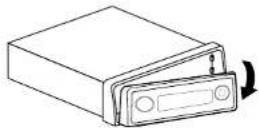
- Put the front panel into the protective case provided for safe keeping.

Attaching the front panel

text_image
Diagram of a file folder with labeled parts and directional arrows indicating movement or orientation.Align the left side of the panel with the stopper, and then push the right side or the panel into the unit until it clicks.
Front Panel
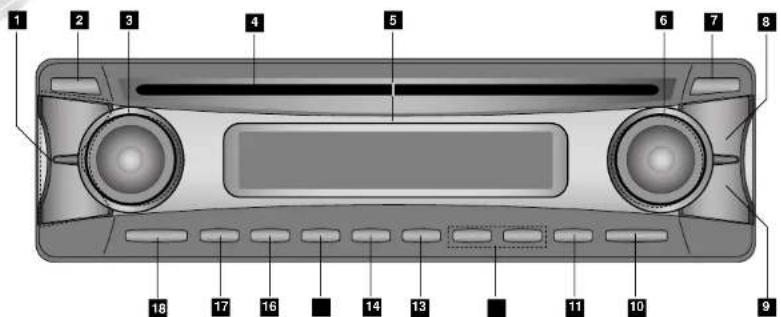
text_image
1 2 3 4 5 6 7 8 18 17 16 14 13 11 10 91 • VOLUME (VOL-/+ ) button
• CONTROL UP/DOWN button
2 EJECT (▲) button
3 • SEEK (-/+) buttons • CD SKIP(按钮)
4 CD disc slot
5 DISPLAY WINDOW
6 • MUTE button
- CD SEARCH( )buttons
• TUNE (-/+) buttons
• DISPLAY (DISP) button
7 RELEASE (button
8 FUNCTION (FUNC) button
9 EQUALIZER/XDSS (EQ/XDSS) button
10 SELECTION (SEL.) button
11 AUTO STORE/PRESET SCAN (AS/PS) button
12 MP3 TRACK -/+10 button
13 SHUFFLE (SHF) button
14 REPEAT (RPT) button
15 INTRO SCAN (SCAN) button
16 CD PLAY/PAUSE (▶ button
17 BAND button
18 PWR button
■, ■, ■, ■, 16 Reset Station buttons. (1-6)
Installation
Basic Installation
Before installing, make sure that the ignition-switch is set to OFF and remove the car battery terminal to avoid short-circuiting.
- Remove the existing receiver unit.
- Make the necessary connections.
- Install the mounting sleeve.
- Install the unit in to the mounting sleeve.
Removing existing receiver unit
If there already is a mounting sleeve for the receiver unit in the dashboard, it must be removed.
When removing the unit from the mounting sleeve
If you need to remove the unit from the mounting sleeve, proceed as follows.
- Remove the rear support from the unit.
- Remove the front panel and trim ring from the unit.
- Insert the lever into the hole on one side of the unit. Perform the same operation on the other side and pull the unit out from the mounting sleeve.
ISO-DIN Installation
- Slide the unit into ISO-DIN frame.
- Install screws removed from old unit.
- Slide the unit and frame into the dash opening.
- Mount the dash panel or adapter plate.
- Mount the trim ring onto the unit.
- Install the faceplate by sliding the right edge into position and then pushing the left edge closed.
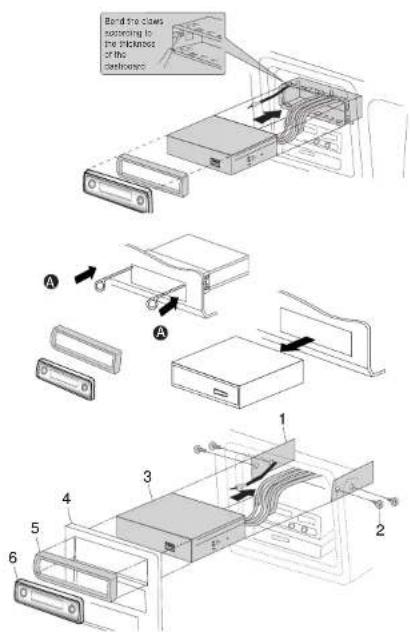
text_image
Bend the claws napping to the thickness of the diameter A A 1 2 3 4 5 6PREPARATION

Connections
Connecting to the Car
Before connecting, make sure that the ignition switch is set to OFF, and remove the battery ⊖ terminal to avoid short circuits.

flowchart
graph TD
    A["Device"] --> B["1 GRID (BLACK)"]
    A --> C["2 PHONE (ORANGE)"]
    A --> D["3 DIMMER (PINK)"]
    A --> E["4 TO CHINTON (RED)"]
    A --> F["5 TO BATTERY + (YELLOW)"]
    A --> G["6 PWR ANT (BLUE)"]
    A --> H["7 REMOTE ON (BLUE/WHITE STRIPE)"]
    B --> I["LOWER SWITCH"]
    C --> I
    D --> I
    E --> I
    F --> I
    G --> I
    H --> J["POWER AMPLIFIER (optional)"]
    I --> K["BATTERY"]
    J --> L["CONTROL RELAY"]
    L --> M["White (FL-1)"]
    L --> N["White: BLACK STRIPE (FL-1)"]
    L --> O["Gray (FR-1)"]
    L --> P["Gray: BLACK STRIPE (FR-1)"]
    L --> Q["Green (FL+1)"]
    L --> R["Green: BLACK STRIPE (FL-1)"]
    L --> S["Violet (FR+1)"]
    L --> T["Violet: BLACK STRIPE (FR-1)"]
Connecting to the Car
A From antenna
B To the wiring of vehicle Colors of leads
1 BLACK : This lead is for the Ground connection.
2 ORANGE : This lead is for the phone line connection.
3 PINK: This lead is for the Dimmer line connection.
4 RED : This lead is for connection to the power supply terminal when the ignition switch is set to ACC.
5 YELLOW : This lead is for connection to the Battery (back-up) terminal from which power is always supplied.
6 BLUE : This lead is for the power antenna connection.
7 BLUE/WHITE STRIPE : This lead is for the remote amplifier on connection.
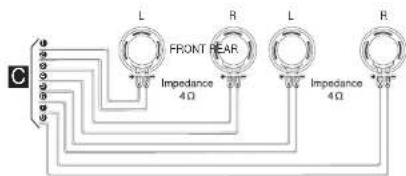
C Speaker Connections
text_image
C L FRONT REAR R L R Impedance 4Ω Impedance 4ΩBasic Operation
Turning the unit on
Press PWR or any other button on the front panel
Turning the unit off
Press PWR on the front panel to turn the unit off.
Selecting a source
You can select a source you want to listen to.
Press FUNC to select a source.
Press FUNC repeatedly to switch between the following sources:
Tuner → CD → Tuner..
NOTE
- When you turn the unit off, the current volume level is automatically memorized. Whenever you turn the unit back on, it will operate at the memorized volume level.
Adjusting the volume
Use VOLUME to adjust the sound level.
Press VOLUME (VOL.+/-) button on the front panel to increase or decrease the volume.
Setting the clock
- Press DISP and press DISP for more than 1 second.
(Clock indicator will be displayed for 5 seconds. Adjust the clock
within 5 seconds.)
-
Press ◆ the front panel to adjust the hour.
-
Press on the front panel to adjust the minute.
-
Press DISP
Checking the clock
You can see the clock pressing DISP.
Basic Operation
SOUND Adjustment
Using the EQ (Equalizer)
The equalizer lets you adjust the equalization to match the acoustic characteristics of the car's interior as desired. There are 3 stored equalizer curves which you can easily recall at any time.
Here is a list of the equalizer curves:
• EQ POP : Reproduces pop music acoustics.
• EQ CLASSIC : Reproduces orchestral music acoustics.
• EQ ROCK : Reproduces rock music acoustics
1. Press EQ/XDSS on the front panel to select the equalizer.
- Press EQ/XDSS repeatedly to choose between the following Equalizer settings.
POP · CLASSIC · ROCK · FLAT (NO display) · POP....
MUTE
- Press MUTE to cut the sound.
- To cancel it press MUTE again.
SELECTION (SEL) Button
- Press the SELECTION (SEL.) repeatedly to select the mode you want to adjust from volume, bass, treble, balance and fader. The mode indicator lights up in the following order.
$$ \boxed {\begin{array}{c}\rightarrow \mathrm{VOL} \rightarrow \mathrm{BAS} \rightarrow \mathrm{TRBBALFAD}\\hline\end{array}} $$
- Press CONTROL UP (VOL+) or DOWN (VOL-) to adjust the sound quality.
| Turn right Turn left | ||
| VOL | Increase the volume level. | Decrease the volume level. |
| BAS | Increase the bass level. | Decrease the bass level. |
| TRB | Increase the Treble level. | Decrease the Treble level. |
| BAL | Decrease the level of the left speaker(s). | Decrease the level of the right speaker(s). |
| FAD | Decrease the level of the front speaker(s). | Decrease the level of the rear speaker(s). |
NOTE
The unit cannot adjust the bass and treble in the EQ/XDSS on mode.
XDSS (Extreme Dynamic Sound System)
Press and hold the EQ/XDSS button to reinforce treble, bass and surround effect.
Radio Operation
Listening to the radio stations
- Press the PWR button to turn the unit on.
- When you select a source the unit is turned on.
- Press the FUNC button to select the tuner.
- Press the BAND button to select a band.
- Press the BAND button until the desired band is displayed. FM1, FM2, FM3, MW(AM).
- To perform seek tuning, press the SEEK(-/+ ) button with quick presses.
- The tuner will scan the frequencies until a broadcast with strong enough reception is found.
- You can cancel seek tuning by pressing the SEEK(-/+ ) button with quick presses.
- To perform manual tuning, press the TUNE(+/+) button with quick presses.
- The frequencies move up or down step by step.
NOTE
- When the selected frequency is being broadcast in stereo, the r^*(r,r) indicator will light.
Auto Search Memory
This function lets you automatically store the six strongest broadcast frequencies.
- Press the FUNC button to select the tuner.
- Press the AS/PS button on the front panel for about 1 second.
- Scanning starts from the currently displayed frequency to higher frequencies and stops when 6 stations have been preset or the receivable frequencies have been scanned once.
NOTES
- The presetting is not performed if there is no station to be tuned in.
- When automatic presetting is performed, the previous preset stations are automatically erased.
• T o stop the automatic presetting, press the BAND or the AS/PS button.
To scan the preset stations
Press the AS/PS button on the front panel. To stop the scanning, press the AS/PS button.
To tune in the preset stations
Press BAND to select the desired band and press the desired number buttons (1-6).
The number of the preset station button is displayed and the preset station is received.
Storing and recalling broadcast frequencies
You can easily store up to six broadcast frequencies for later recall with the touch of a button.
- Select the desired frequency
- Press one of the preset station buttons (1 - 6) for more than 1 seconds. The number of the pressed preset station button is displayed.
- Repeat steps 1 and 2 to preset other stations.
NOTES
- As F1, F2, F3 have the same frequency range, up to 18 station can be preset for FM.
- When a station is preset on the preset station button on which another station of the same band has already been preset, the previously preset station is automatically erased.
Operation with Audio CD, MP3 Disc
Playing an Audio CD and MP3 Disc
The unit can play MP3 formatted recordings on CD-ROM, CD-R or CD-RW discs.
Before playing MP3 recordings, read the notes on MP3 Recordings on page 16.
Pause MP3C
- Press PLAY/PAUSE (▶/II) during playback.
- To return to playback, press PLAY/PAUSE (▶/III) again.
Moving to another Track MP3C
- Press the before playing playback to go to the next track or to return to the beginning of the current track.
- Press price briefly to step back to the previous track. (If playing times is less then 3 seconds this function is not operated.)
Search CD
Press and hold the during playback and then release at the point you want.
Operation with Audio CD, MP3 Disc
Repeat
-
Press RPT during playback. MP3C
The "RPT" appears in the display window.
(All of the music on the disc is played repeatedly) -
Press RPT again.
The "RPT" disappears in the display window.
(All of the music on the discs in the CD changer played repeatedly)
Random
-
Press SHF during playback. MP3C
The "SHF" appears in the display window.
(All of the music on the disc is played randomly) -
Press SHF again.
The "SHF" disappears in the display window.
(All of the music on the discs in the CD changer is played randomly)
NOTE
- During random playback, you can press a button to not repeat the previous track.
MP3 TRACK -10/+10
Durning playback, press the -10 button to go back to the previous 10th track, and press +10 button to go forward to the next 10th track.
For your reference
• Auto Loading
When the disc is ejected by pressing ▲ during playback, it will be loaded automatically after 10 seconds unless you pull out the disc from the unit.
Intro scan
- Press SCAN. MP3C The "SCAN" appears in the display window. (The first 10 seconds of all of the songs on the disc is played)
- Press SCAN again.
The "SCAN" disappears in the display window.
(The intro scan is cancelled.)
ID 3 TAG MP3
When playing a disc containing information, you can see the information (ID3 TAG, Title, Artist and Album) in the display window. If there is no information, "NO TEXT" will be shown in the display window.
Press the DISP button twice during MP3 file playback.
Troubleshooting
| Symptom | Cause | Correction |
| Power doesn't turn on. The unit doesn't operate. | Leads and connectors are not properl connected.The fuse is blown.Noise and other factors are causing the built-in microprocessor to operate incorrectly. | Confirm once more that all connections are correct.Rectify the problem that caused the fuse to blow, and then replace it. Be very sure to install the correct fuse with the same rate.Turn the unit off and then on. |
| Playback is not possible. | The disc is dirty.The loaded disc is of a type this unit cannot play. | Clean disc.Check what type the disc is. |
| No sound is heard. The volume level will not rise. | Cables are not connected correctly. | Connect the cables correctly. |
| There's no sound. | The volume level is low. | Adjust the volume. |
| There's audio skipping. | This unit is not firmly secured. | Secure this unit firmly. |
REFERENCE
Specifications
MP3 Disc compatibility with this unit is limited as follows:
- Sampling Frequency / 8 - 48kHz (MP3)
- Bit rate / within 8 - 320kbps (include VBR) (MP3)
- CD-R/CD-RW physical format should be "ISO 9660"
- If you record MP3 files using software which cannot create a FILE SYSTEM, for example "Direct-CD" etc., it is impossible to playback MP3 files. We recommend that you use "Easy-CD Creator" which creates an ISO9660 file system.
Customers should also note that permission is required in order to download MP3 files and music from the Internet. Our company has no right to grant such permission. Permission should always be sought from the copyright owner.
| General | |
| Output Power | 50W x 4CH(Max.) |
| Power Source | DC 12V |
| Speaker impedance | 4 Ω |
| Ground System | Negative type |
| Dimensions (W x H x D) | 182 x 51 x 173 mm (Without Front Panel) |
| Net Weight (approx.) | 1.8 kg |
| FM tuner | |
| Frequency Range | 87.5-107.9MHz or 87.5-108 MHz or 65-74 MHz, 87.5-108 MHz |
| S/N Ratio | .55 dB |
| Distortion | 1.0% |
| Usable sensitivity | .12 dBμV |
| MW(AM) tuner | |
| Frequency Range | 520-1720kHz or 522-1620 kHz |
| S/N Ratio | .45 dB |
| Distortion | 1.0% |
| Usable sensitivity | .32 dBμV |
| CD | |
| Frequency Response | .40 - 20000 Hz |
| S/N Ratio | .70 dB |
| Distortion | .0.15% |
- Design and specifications are subject to change without notice.