
SW-2 - Smart Mirror Seura - Free user manual and instructions
Find the device manual for free SW-2 Seura in PDF.


| Product Type | Slim Wall Mount |
| Model Number | SW-2 |
| Compatible TV Sizes | 42" - 86" Séura Outdoor TVs |
| Maximum TV Weight | 200 lbs (90.7 kg) |
| Mount Plate Dimensions | 26.25" W x 11.4" H (66.7 cm x 29.0 cm) |
| Finish | Black Powder Coat |
| Material | Acrylic E-Coated Steel |
| Installation Surfaces | Wood stud, concrete, brick, stone, masonry |
| Hardware | Stainless Steel |
| Shipping Dimensions | 12" W x 27.5" L x 2" H (30.5 cm x 69.9 cm x 5.1 cm) |
| Shipping Weight | 10 lbs (4.5 kg) |
| Product Weight | 8 lbs (3.6 kg) |
| Cable Management | Large center cutout for power and cable pass-through |
| Leveling Adjustment | Top leveling screws for tilt adjustment after mounting |
| Security Feature | Optional Torx security screws to lock brackets to TV |
| Wall Support Requirement | Must support 5x combined weight of TV and mount |
| Warranty | 2 years against defects in hardware/workmanship (U.S. and Canada) |
| Maintenance | Check knobs, screws, bolts every 2-6 months |
Frequently Asked Questions - SW-2 Seura
User questions about SW-2 Seura
0 question about this device. Answer the ones you know or ask your own.
Ask a new question about this device
Download the instructions for your Smart Mirror in PDF format for free! Find your manual SW-2 - Seura and take your electronic device back in hand. On this page are published all the documents necessary for the use of your device. SW-2 by Seura.
USER MANUAL SW-2 Seura
WARRANTY REGISTRATION
REGISTER FOR
EXTRA BENEFITS
Activate within 30 days of purchase:
seura.com/activate
OUTDOOR TV
SLIM WALL MOUNT
INSTALLATION GUIDE

SÉURA
Model Number:
SW-2
Compatible with Séura Outdoor TVs:
Shade Series: SHD1-55, SHD1-65, SHD1-75, SHD2-43, SHD2-55, SHD2-65, SHD2-75
Ultra Bright: STM3-55-U, STM3-65-U, STM3-86-U
Safety
Prior to the installation of this product, read all instructions. Keep this manual for future reference.
This product is designed to mount televisions and any accessories weighing up to 200 lbs. to a vertical firm wall.
CAUTION DO NOT EXCEED MAXIMUM LISTED WEIGHT CAPACITY. SERIOUS INJURY OR PROPERTY DAMAGE MAY OCCUR.
Warnings:
- Safety measures must be practiced at all times during the assembly of this product. Use proper safety equipment and tools for the assembly procedure to prevent personal injury.
- At least two qualified people should perform the assembly procedure. Proper installation must be followed as outlined in these installation instructions. Personal injury and/or property damage can result from dropping or mishandling the TV.
- Ensure that there are no missing or defective parts upon receipt. Never use defective parts.
- This product contains small parts that could be a choking hazard.
- The wall you affix the Séura mount to must be capable of supporting five times the weight of the television and the mount combined. A professional installer or structural engineer should inspect or verify the requirements of the wall.
-
Do not use this product for any purpose other than to mount a VESA compliant TV on a vertical surface as outlined in this manual.
-
When mounting in metal stud walls or cinder block walls, an alternative anchor (not included) should used.
- If drilling and/or cutting into the mounting surface, always make sure that the wall is clear of electrical wires. Cutting or drilling into an electrical line may cause serious personal injury.
- Make sure there are no water or natural gas lines inside the wall where the mount is to be located. Cutting or drilling into a water or gas line may cause severe property damage or personal injury.
- Do not install near sources of high heat.
- Do not install on a structure that is prone to vibration, movement or chance of impact.
Note: The included hardware is for mounting on concrete, stone, brick, or wood studs. If you are uncertain about the nature of your wall, please consult your hardware or installation professional for proper mounting to types of walls.
NOTE: RECESSED OUTLET REQUIRED
BECAUSE THE SLIM MOUNT ALLOWS THE TV TO SIT TIGHTLY AGAINST THE WALL, TRADITIONAL WALL OUTLETS DO NOT ALLOW ENOUGH CLEARANCE FOR CABLES. UTILIZE EITHER RECESSED OUTLETS OR REMOTE POWER LOCATIONS THAT ARE COMPLIANT WITH YOUR LOCAL BUILDING CODES.
WARNING: Cancer and Reproductive Harm: www.p65warnings.ca.gov.
Parts Included
Before using the device, please check the following contents of the box for completeness. Illustrations are not to scale. If any parts are missing or damaged, contact Séura.
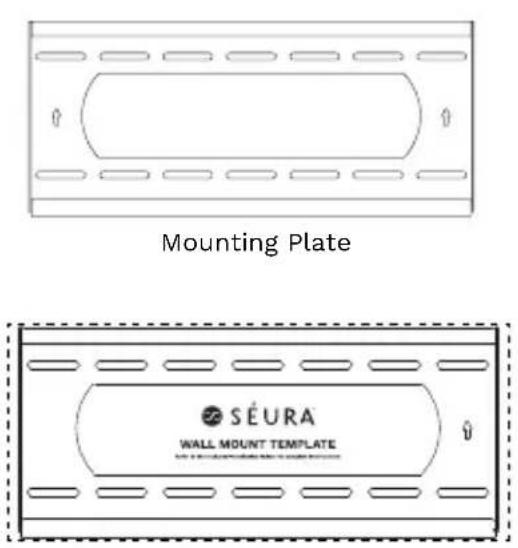
Wall Mounting Template
(located on inside bottom of box)
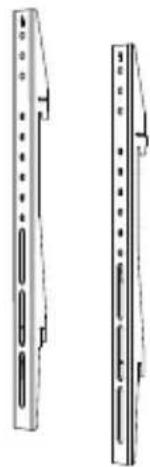
Slim Mount TV Brackets, qty. 2
Manual
Mounting Tools and Hardware

6 Plastic Anchors
3" long
For concrete, brick, and stone installation only

6 Stainless Steel
Lag Screws
5/16", 3" long
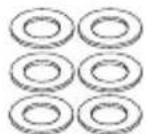
6 Stainless Steel
Flat Washers
5/16"
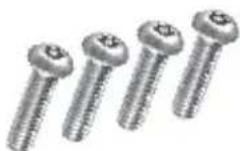
4 Security Torx
Screws
M6 1.0 x 16mm

T27 Security Torx
Screwdriver
Optional security for use to mount brackets to TV
Parts and Tools Required (not included)
The following tools may be required depending on your particular installation. They are not included.

(6mm Allen Wrench
for use with 86"
Ultra Bright TV size)
For Wood Stud Installation
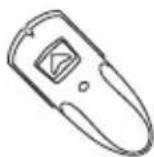
Stud Sensor
(edge-to-edge stud
finder is recommended)

7/32" Drill Bit 7/16" Masonry Drill Bit
For Concrete, Brick and Stone Installation


Hammer
Features

Cable/Electrical Cut Out
Large center cut out is convenient for power and cable pass through with wall plates

IMPORTANT: HANDLE THE TV IN A VERTICAL POSITION TO AVOID DAMAGE TO THE SCREEN. IF PLACING THE TV SCREEN-SIDE DOWN OR LEANING AGAINST A WALL DURING INSTALLATION, COVER THE SCREEN WITH A PROTECTIVE CLOTH OR BLANKET.
Installation
IMPORTANT: THIS PRODUCT MUST BE MOUNTED TO CONCRETE, STONE, BRICK OR WOOD STUDS. The wall must be able to support five times the weight of the television and the mount combined. A professional installer or structural engineer should inspect or verify the requirements of the wall.
Step 1: Hang the Mounting Plate
Wood stud wall mounting:
See page 8 for mounting to concrete, stone or brick
1. Choose mounting location
If mounting a Séura Outdoor TV, reference page 14 for measurements from the edges of the TV to the edges of the mounting template to properly place the template in the desired location on the wall. Note that it is NOT vertically centered on the TV screen.
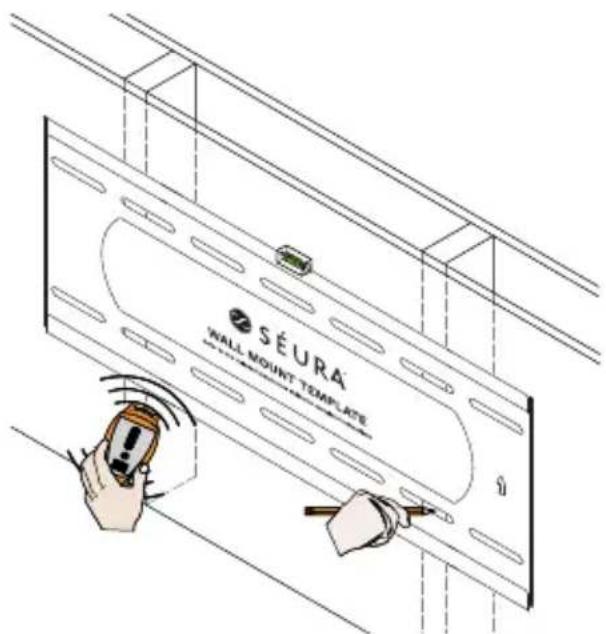
2. Locate studs and mark the wall
All hole locations must be centered on wood studs. Verify the center of the studs using an edge-to-edge stud finder. Level the template on the wall and mark four hole locations in the template slots (2 top and 2 bottom) with a pencil on the wall.
For TV sizes 65" and larger, six fasteners are recommended.
3. Drill pilot holes
Pre-drill the four marked holes on the wall 3-inches deep with a 7/32" drill bit.
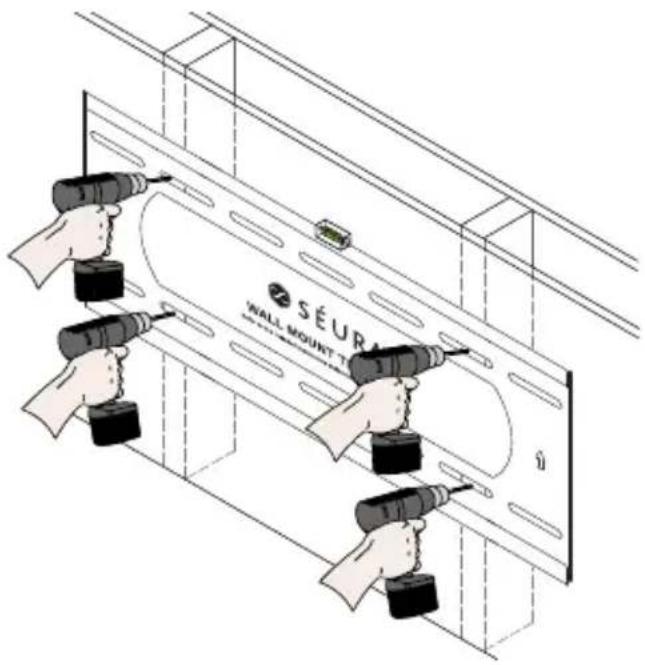
4. Attach mounting plate
Make sure the arrows on the mounting plate point up. Align the mounting plate with the pre-drilled holes. Attach mounting plate to wall using the four lag screws and four flat washers. Do not over tighten the lag screws. Tighten the lag screws only until the washers are pulled firmly against the mounting plate.
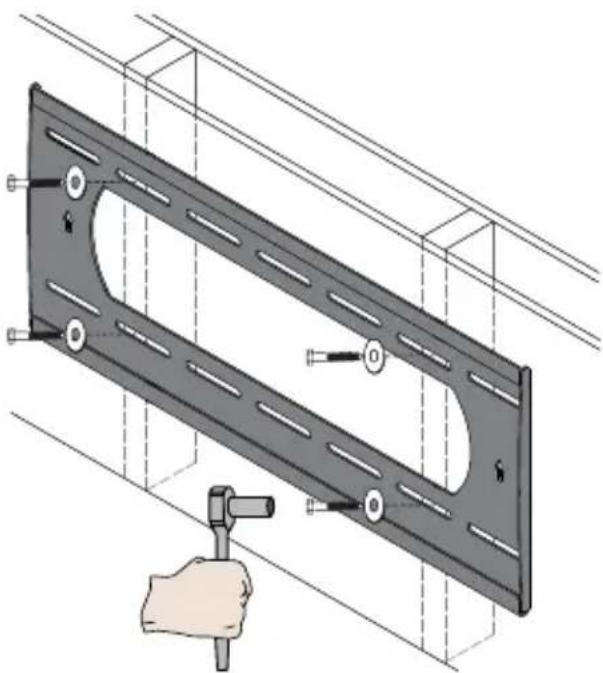
Concrete, stone or brick wall mounting:
See page 6 for mounting to a wood stud wall
1. Choose mounting location
If mounting a Séura Outdoor TV, reference page 14 for measurements from the edges of the TV to the edges of the mounting template to properly place the template in the desired location on the wall. Note that it is NOT vertically centered on the TV screen.
2.Markthewall
Level the template on the wall and mark four hole locations in the template slots (2 top and 2 bottom) with a pencil on the wall.
For TV sizes 65" and larger, mark and utilize six fasteners instead of four.

3. Drill pilot holes
Pre-drill the four marked holes on the wall 3-inches deep with a 7/16" masonry drill bit. Insert a plastic anchor into each of these holes. If necessary, lightly tap each anchor into place with a hammer.

4. Attach mounting plate
Make sure the arrows on the mounting plate point up. Align the mounting plate with the pre-drilled holes. Attach mounting plate to wall using the four lag screws and four flat washers. Tighten all lag screws using a socket wrench and 1/2 " socket. Make sure the anchor is seated completely flush with the concrete surface even if there is another layer of material, such as drywall. Do not over tighten the lag screws. Tighten the lag screws only until the washers are pulled firmly against the mounting plate.
Step 2: Attach Slim Mount TV Brackets to TV
Using a Philips #2 Screwdriver (or 6 mm Allen Wrench for 86" Ultra Bright TV), remove the four VESA mount screws from the back of the TV. Place the two identical Slim Mount TV Brackets flat against the back of the TV with the arrows pointed towards the top of the TV. Line the brackets up with the VESA mount fastener locations. If mounting a Séura Outdoor TV, reference page 14 for the bracket hole that should be used on each Slim Mount TV Bracket. Attach the Slim Mount TV Brackets to the TV using the same four VESA mount screws that you just removed.
If mounting an 86" Ultra Bright TV, replace the VESA mount screws with the four Torx security screws supplied in the hardware kit.
Optional: If additional security is desired for installation with back access such as floor stands or ceiling mounts, use the included torx security screws to attach the brackets to the TV.

Step 3: Hang the TV
IMPORTANT: NEVER TRY TO HANG A TV BY YOURSELF. ALWAYS USE AT LEAST TWO PEOPLE TO LIFT THE TV INTO PLACE.

-
Lift the TV and bring the back of the TV towards the wall, positioning it slightly above the mounting plate.
-
Lower the TV to hook the bottom hooks of the Slim Mount TV Brackets on the lower rail of the mounting plate.
-
Bring the top of the TV closer to the wall to hook the top hooks of the Slim Mount TV Brackets on the top rail of the mounting plate.
-
Make sure the bottom and top rails are fully engaged.
Do not let go of the TV until you are certain that the top and bottom hooks of both mounting brackets are securely engaged on the upper and lower mounting rails of the mounting plate.
Séura recommends checking knobs, screws, and bolts every 2-6 months. Temperature fluctuations, wind, and normal wear and tear can loosen hardware over time.
Step 4: Adjust the TV
Caution: It is possible to dislodge your TV while you level it. Use extreme caution until you tighten the leveling and locking screws.
Séura recommends checking knobs, screws, and bolts every two to six months. Temperature fluctuations, wind, and normal wear and tear can loosen hardware over time.
Top leveling screw adjustment:
If your TV is not level, the two (2) top leveling screws will allow you to compensate for this tilt by adjusting the screws with a star-shaped bit screwdriver.
- Loosen both leveling screws.
- Adjust the tilt of your TV.
- Tighten both leveling screws.
Do not overtighten the leveling screws.


Top Leveling Screw
Allows for leveling adjustments of the TV after mounting.
Séura Outdoor TV Mounting Measurement Guide
If mounting a Séura Outdoor TV model listed in the table below, use the corresponding measurements to locate the mounting plate template in the desired location on the wall as described in Step 1. In addition, use the bracket hole listed to determine which holes on the Slim Mount TV Brackets to line up with the VESA holes on the TV as described in Step 2.
| Séura Outdoor TV Model | Distance From Edges of TV to Edges of Mounting Template(use to place template on back of TV in Step 1) | Top Slim Mount TV Bracket Hole(line up with VESA hole on back of TV in Step 2) | |||
| Top of TV to Top of Mounting Template | Bottom of TV to Bottom of Mounting Template | Left Edge of TV to Left Edge of Mounting Template | Right Edge of TV to Right Edge of Mounting Template | ||
| STM3-49U 7 15/16 | 6 11/16 9 3/16 9 3/16 | Second hole down from top | |||
| STM3-55U 9 7/16 | 8 3/16 11 7/8 11 7/8 | Second hole down from top | |||
| STM3-65U 11 7/8 | 10 5/8 16 3/16 16 3/16 | Second hole down from top | |||
| STM3-86U 17 1/16 | 15 13/16 25 3/8 25 3/8 | Second hole down from top | |||
| SHD1-55 with Soundbar | 21 5/16 | 10 7/16 20 1/4 20 1/4 | Second hole down from top | ||
| SHD1-65 with Soundbar | 10 1/8 16 7/16 | 15 11/16 | 15 11/16 | Second hole down from top | |
| SHD1-75 with Soundbar | 9 1/16 | 12 7/16 11 5/16 | 11 5/16 | Second hole down from top | |
| SHD2-43 with Soundbar | 5 11/16 | 9 5/16 | 5 13/16 | 5 13/16 | Top hole |
| SHD2-55 with Soundbar | 6 3/16 14 13/16 | 11 1/8 | Second hole down from top | ||
| SHD2-65 with Soundbar | 6 3/8 19 1/2 | 20 9/16 | 20 9/16 | Second hole down from top | |
| SHD2-75 with Soundbar | 9 1/16 | 21 5/8 19 3/4 | 19 3/4 | Second hole down from top | |
Example Wall Location
Shown for SHD2-55 with Soundbar
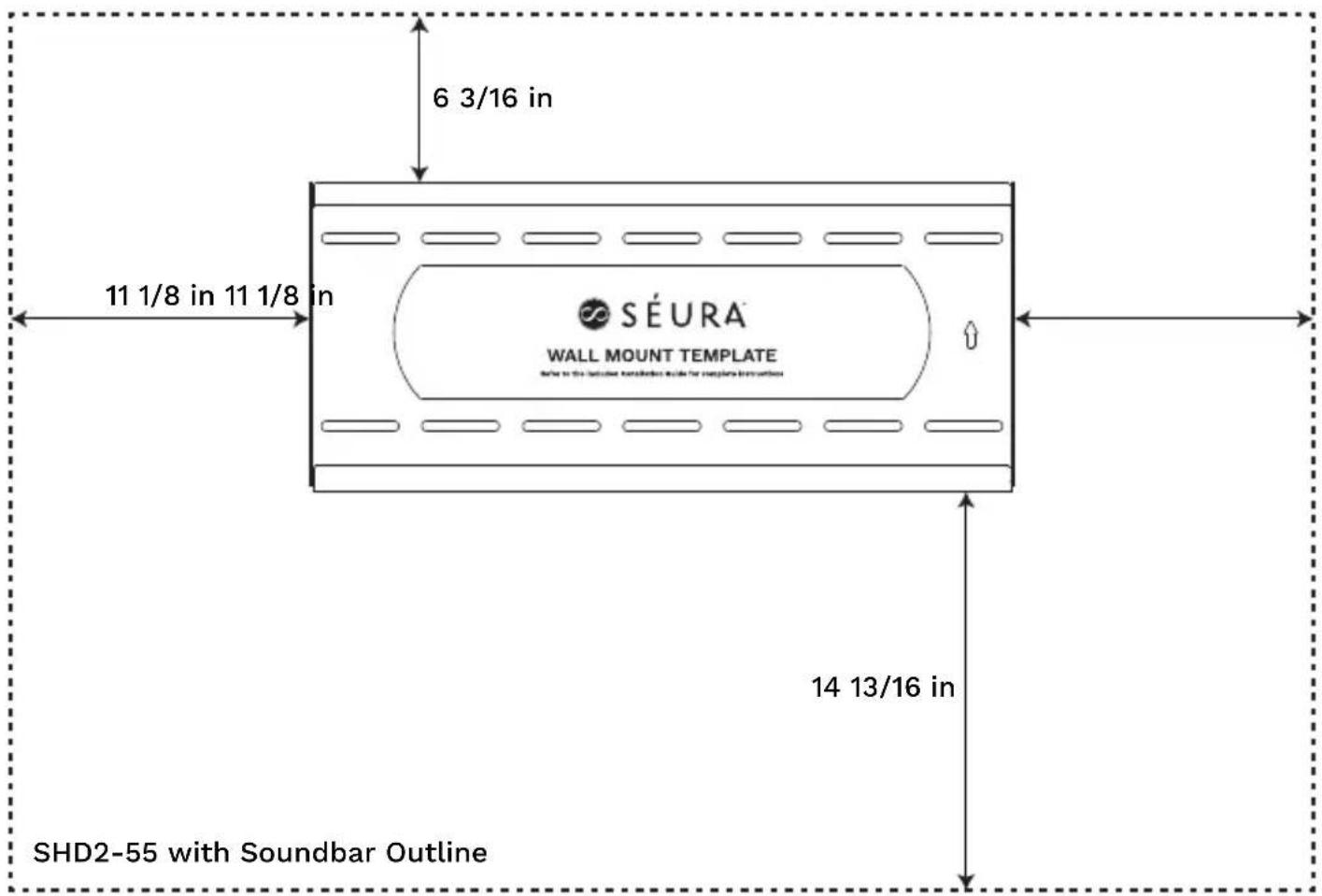
Outdoor TV Mount Warranty
The standard limited warranty policies of Séura, Inc. ("Séura") shall apply to all equipment or other goods ("Products") at the time of sale to any authorized Séura distributor and/or product reseller. These warranty policies may be modified by Séura from time to time. Copies of the standard limited warranties then in effect for a particular Product will be made available upon request and are also available on the Séura website at https://www.seura.com/warranty/. This warranty is valid only with respect to Product sales in the U.S. and Canada.
If any Product fails to work or operate properly because of a defect in materials or workmanship, Séura will, if notified of such defect within the applicable warranty period indicated below, at its option, either: (a) repair the Product with new or refurbished parts onsite or at Séura's factory, including Séura's labor if applicable; or (b) replace the Product with a new or refurbished Product; or (c) if repair or replacement is not commercially feasible, refund an amount equal to a pro rata share of the current MSRP (as determined by the remainder of the warranty period). The remedy chosen will be in good faith and at the discretion of Séura. In no event will Séura be responsible for any costs related to installation and/or removal of Product.
Séura warrants its Products as set forth below, which warranty periods shall start and run from the date of Séura's sale of the Product:
- Indoor and Outdoor Mounts for two (2) years against defects in original hardware and/or workmanship. Excludes corrosion or rust resulting from damaged, scratched or chipped paint or other surfaces.
ExceptionstoWarranty: This warranty is valid only with respect to Product sales in the U.S. and Canada. Séura does not warrant Products against defects arising out of, related to, or caused by, whether totally or partially, and whether directly or indirectly, any of the following:
A. Failing to properly clean and maintain, any Product, part or component of a Product, including, but not limited to, filters, front bezel, and other Product areas or components;
B. A Product's extended use, including particularly, commercial applications, where a Product is operating on average more than twelve (12) hours per day on a permanent or extended periodic basis;
C. Circumstances, damage (including concealed damage) or other conditions occurring during shipment of a Product or at any time after a Product leaves Séura's facility (including without limitation transport of the Product to or from Séura before or after authorized service). Products must be packed properly using original packaging or Séura replacement or pre-authorized packaging. Customer assumes all risk, and costs, including transportation costs, while Product is in transit to or from Séura;
D. Circumstances, damage or other conditions occurring
during unpacking and/or removal of a Product from its original packaging, including the removal of protective material;
E. Improper, incorrect, or insufficient AC supply voltage to a Product;
F. Alterations, modifications, including use of unauthorized mount, or changes to a Product without Séura's prior written authorization;
G. The incorporation of a Product into or within a product of a third party, without Séura's prior written authorization;
H. A Product's misuse, neglect use, abuse, or improper operation, including the failure to follow a Product's normal and ordinary operating instructions;
I. The effects of fire, flood, lightning, electrical surges, water and other liquid infiltration, smoke, insect or animal infestation, sand, mud, chemicals, improper cleaning agents and other substances not intended to come into contact with a Product, including any such substances contact with a Product as the result of acts of God;
J. The improper or faulty installation, setup, or adjustment of a Product;
K. A Product's repair, attempted repair, or total or partial disassembly by any party other than a Séura authorized service representative;
L. When the Product occurs with pixel errors within the specified and permitted area. (For more information about this, inquire directly with Séura regarding the Séura Pixel Policy.)
M. Corrosion that does not affect the performance of a Product or the reasonable cosmetic appearance of a Product (including without limitation, scratches or other paint or finish damage to a Product that lead to or are caused by, in part or in total, corrosion);
O. Normal wear and tear on the Product.
Séura does not warrant that its Products will integrate with any third party products at present or in the future. It is purchaser's responsibility to test and verify compatibility. Further, Séura does not warrant its software or programs, or any content downloaded after shipment. It is the purchaser responsibility to take precautions to protect the product from malware, viruses, data loss, and other potentially destructive programs.
Warranty Disqualifiers. This Limited Warranty only extends to, and runs for the benefit of, the original purchaser of the Product and only covers a Product purchased new. All warranty claims must be submitted together with original proof of purchase and any Product subject to a warranty claim must retain its original Séura serial number. Séura reserves the right to require any warranty claimant to produce the original purchase receipt or other original purchase date proof as may
be reasonably required by Séura to verify the Product's warranty eligibility. Séura shall have no liability with respect to Products whose serial number has been removed, defaced, replaced, or otherwise tampered with in any manner. Séura reserves the right to examine all failed product components and determine, in its sole discretion, whether any product components are defective and covered under warranty.
LIMITATION OF LIABILITY. THE EXPRESS LIMITED WARRANTIES SET FORTH HEREIN ARE IN LIEU OF ALL OTHER WARRANTIES, WRITTEN OR ORAL, EXPRESSED OR IMPLIED, INCLUDING, BUT NOT LIMITED TO, ANY IMPLIED WARRANTIES OF MERCHANTABILITY OR FITNESS FOR A PARTICULAR PURPOSE OR USE. SÉURA WILL NOT BE LIABLE FOR ANY DAMAGE TO OTHER PROPERTY CAUSED BY ANY DEFECT IN THE PRODUCT, DAMAGES BASED ON INCONVENIENCE, LOSS OF BUSINESS OPPORTUNITY, LOSS OF GOODWILL, INTERFERENCE WITH BUSINESS RELATIONSHIPS, OR OTHER COMMERCIAL LOSS, EVEN IF THE CUSTOMER HAS BEEN ADVISED OF THE POSSIBILITY OF SUCH DAMAGES. SÉURA WILL NOT BE LIABLE FOR ANY LOSS, DAMAGE OR LIABILITY OR ANY DIRECT, INCIDENTAL, INDIRECT, PUNITIVE, SPECIAL OR CONSEQUENTIAL DAMAGES RESULTING FROM THE USE OR MISUSE OF A PRODUCT, OR ARISING OUT OF ANY BREACH, BY THE PURCHASER OF A PRODUCT, OF THIS LIMITED WARRANTY. SÉURA SHALL NOT BE LIABLE FOR ANY CLAIM AGAINST THE CUSTOMER BY ANY OTHER PARTY. SÉURA SHALL NOT BE LIABLE FOR ANY VERBAL WARRANTY ASSURANCES MADE BY ANY EMPLOYEE OR AUTHORIZED DISTRIBUTOR, RESELLER OR INSTALLER THAT CONFLICTS WITH OR ENHANCES THE WRITTEN WARRANTY HEREIN. SOME STATES DO NOT ALLOW THE EXCLUSION OR LIMITATION OF INCIDENTAL OR CONSEQUENTIAL DAMAGES, OR LIMITATIONS ON HOW LONG AN IMPLIED LIMITED WARRANTY LASTS, SO THE EXCLUSIONS MAY NOT APPLY TO A PARTICULAR PURCHASER. NOTWITHSTANDING ANYTHING HEREIN TO THE CONTRARY, SÉURA'S MAXIMUM AGGREGATE LIABILITY RELATED TO ANY WARRANTY CLAIM OR WITH RESPECT TO A PRODUCT SHALL NOT EXCEED THE THEN CURRENT SÉURA WHOLESALE PRICE OF THE SPECIFIC PRODUCT FROM WHICH THE CLAIM DERIVES.
NOTICE OF ANY WARRANTY CLAIM MUST BE RECEIVED BY SÉURA, IN WRITING, PRIOR TO THE EXPIRATION OF THE APPLICABLE WARRANTY PERIOD SET FORTH ABOVE. THE PRODUCT WARRANTY APPLIES ONLY FOR THE PERIODS SET FORTH ABOVE.
Warranty Procedure. A warranty claimant must contact Séura at 920-857-9069 for a diagnostic. Please have your Product receipt available. At that time, Séura will provide technical support over the phone to attempt to fix the problem. If unsuccessful, a Séura Representative will determine if the Product will be serviced onsite, replaced, or returned to Séura's factory in Green Bay, Wisconsin for repair. If Séura determines that the Product is not covered under the warranty or damaged in shipping, Séura will notify and inform the purchaser of service alternatives that are available on a fee basis.
Toll-Free Technical Support: Please call 1-800-957-3872 to speak with a Séura Technical Support Representative. Séura Representatives are available Monday-Friday, 8:00am-4:30pm Central Time.
Onsite Service: If Technical Support determines the problem may be fixed onsite, a Séura service agent will be scheduled within 24 hours to service the unit. A Séura representative will work with the customer to schedule a convenient time for onsite service. Parts may be sent to the customer's location. Onsite service is available in the United States during normal business hours Monday – Friday, unless other special circumstances exist and special arrangements are made.
Factory Service: If Technical Support determines the Product must be sent back to Séura's factory for repair, the customer must follow return instructions below. Séura will ship the repaired Product to the authorized reseller, installer or customer's address. This warranty does not cover removal or installation costs of Products.
Advanced Replacement: If Technical Support determines the Product must be replaced, Séura will ship a new Product to the authorized reseller, installer or customer's address. The customer must follow return instructions below to send the damaged Product back to Séura's factory. Credit card information will be collected before shipment of the replacement Product. If Séura does not receive the original Product back within thirty (30) days of shipping the replacement Product, the credit card on file will be charged at full MSRP. This warranty does not cover removal or installation costs of Products.
Return Instructions: If return is necessary, Séura will issue a return goods authorization (RGA) number and, if applicable, specific return and shipping instructions. A Product will only be accepted for warranty claims if returned and shipped to Séura in the Product's original packaging materials. If original packaging is not available, please contact Séura to receive authorized replacement packaging. Packages not bearing the issued returned goods authorization (RGA) number will not be accepted by Séura and will be returned to sender. In addition to the Product, the package must include the warranty claimant's original sales receipt for the purchase of the Product. All Product returns shall be received by Séura, at 1230 Ontario Road; Green Bay, WI 54311 with freight prepaid by the warranty claimant. Séura shall not be responsible for, and the warranty claimant assumes and retains all such responsibility, any damage or loss to or of the Product during shipment to and from Séura as the result of a warranty claim.
Exclusive Remedy. This Limited Warranty sets forth the exclusive remedies of a warranty claimant, and the exclusive liabilities and obligations of Séura, with respect to allegations of a defective Product.
19163121.3
Specifications
SLIM WALL MOUNT
Model: SW-2
| GENERAL | DISPLAY COMPATIBILITY 42" - 86" Séura Outdoor TVs |
| WALL PLATE DIMENSIONS 26.25" w x 11.4" h | |
| FINISH COLOR Black Powder Coat | |
| DURABILITY Acrylic E-Coated Steel | |
| INSTALLATION | MAXIMUM TV WEIGHT 200 lbs |
| INSTALLATION SURFACE Solid / Brick / Stone / Masonry / Stud Wall | |
| HARDWARE Stainless Steel | |
| SHIPPING | SHIPPING CONTAINER DIMS 12" w x 27.5" l x 2" h |
| SHIPPING WEIGHT 10 lbs | |
| PRODUCT WEIGHT 8 lbs |
Maximum TV Weight: 200 lbs.
The wall structure must be capable of supporting at least five times the weight of the TV. If not, the wall structure must be reinforced.
![26 1/4" [25mm] 1" 20 5/16" 11 7/16" 5" 6" 7"](/content/2026/06/1210227/images/e3bd96bfd5e9398dc489276755decb6c834d242d6fbc3d4ae0eb59bce34c939e.jpg)
For technical support, please contact Séura at
1-800-957-3872 during regular business hours:
M-F 8:00 am - 4:30 pm, Central Time.

SÉURA
1230 Ontario Road Green Bay, Wisconsin 54311
1-800-957-3872 contacts@seura.com
www.seura.com
Publish date: August 10, 2020
Information is subject to change without notice.
94-060071
© 2020 Séura
- OUTDOOR TV
- SLIM WALL MOUNT
- INSTALLATION GUIDE
- COMPATIBLE WITH SÉURA OUTDOOR TVS
- SAFETY
- CAUTION DO NOT EXCEED MAXIMUM LISTED WEIGHT CAPACITY. SERIOUS INJURY OR PROPERTY DAMAGE MAY OCCUR
- NOTE: RECESSED OUTLET REQUIRED
- PARTS INCLUDED
- MOUNTING TOOLS AND HARDWARE
- PARTS AND TOOLS REQUIRED (NOT INCLUDED)
- FOR WOOD STUD INSTALLATION
- FOR CONCRETE, BRICK AND STONE INSTALLATION
- CABLE/ELECTRICAL CUT OUT
- INSTALLATION
- STEP 1: HANG THE MOUNTING PLATE
- WOOD STUD WALL MOUNTING
- CHOOSE MOUNTING LOCATION
- LOCATE STUDS AND MARK THE WALL
- DRILL PILOT HOLES
- ATTACH MOUNTING PLATE
- CONCRETE, STONE OR BRICK WALL MOUNTING
- 2.MARKTHEWALL
- STEP 2: ATTACH SLIM MOUNT TV BRACKETS TO TV
- STEP 3: HANG THE TV
- STEP 4: ADJUST THE TV
- TOP LEVELING SCREW ADJUSTMENT
- TOP LEVELING SCREW
- SÉURA OUTDOOR TV MOUNTING MEASUREMENT GUIDE
- EXAMPLE WALL LOCATION
- OUTDOOR TV MOUNT WARRANTY
- SPECIFICATIONS
- MAXIMUM TV WEIGHT: 200 LBS
- SÉURA
Brand : Seura
Model : SW-2
Category : Smart Mirror