
Row Power 35 - Kibodi 4ms - Free user manual and instructions
Find the device manual for free Row Power 35 4ms in PDF.


| Product Type | Eurorack power supply module |
| Brand | 4ms |
| Model | Row Power 35 |
| Width | 4 HP |
| Depth | 22.0 mm (0.87") without power cable, 25.6 mm (1.01") with power cable attached |
| Input Power | 15V – 20V DC, positive center 2.1mm barrel plug, minimum 30W |
| +12V Output | 1.4A maximum, 1.0A recommended |
| -12V Output | 0.8A maximum, 0.5A recommended |
| +5V Output | 1.0A maximum, 0.8A recommended |
| Power Connector | Standard 16-pin Eurorack header on back |
| Features | On/off switch, LED indicator for ±12V rails, two identical barrel jacks for daisy-chaining |
| Installation Options | Flying bus cables, direct connection, multi-power connectors, bus boards (e.g., 4ms Bus Stick), solder points for custom wiring |
| Solder Points | Four holes for +12V, -12V, +5V, ground; 0.082" diameter, 0.156" spacing; fit MTA156 connectors or 14 AWG wire |
| Daisy-Chain | Multiple Row Power modules or 4ms Pod enclosures using barrel cable |
| Compatibility | Any 15-20V DC power brick with positive center 2.1mm plug, minimum 30W |
Frequently Asked Questions - Row Power 35 4ms
User questions about Row Power 35 4ms
0 question about this device. Answer the ones you know or ask your own.
Ask a new question about this device
Download the instructions for your Kibodi in PDF format for free! Find your manual Row Power 35 - 4ms and take your electronic device back in hand. On this page are published all the documents necessary for the use of your device. Row Power 35 by 4ms.
USER MANUAL Row Power 35 4ms
User Manual 1.0 - Sept. 24, 2019

The Row Power 25 is a power supply module for the Eurorack modular system. It requires a barrel-style power brick (15V – 20V DC) and supplies power to modules via flying bus cables, direction connection, and/or bus boards using the single standard 16-pin Eurorack header on the back. For custom power systems, the
Row Power 25 has a set of easily soldered holes for using large gauge wire or MTA156 connectors to connect to distribution bus boards.
Multiple Row Power modules can be powered from a single power brick by daisy-chaining with an inexpensive barrel cable. The Row Power 25 can also be daisy-chained to 4ms Company's Pod enclosures.
Maximum and recommended power output:
•+12V: 1.4A maximum, 1.0A recommended
-12V: 0.8A maximum, 0.5A recommended
•+5V: 1.0A maximum, 0.8A recommended
Maximum power output can be expected under normal operating conditions.
Recommended power output is guaranteed under extreme temperature and limited airflow conditions.
Power Brick:
• Available wherever Row Power modules are sold.
- You may use your own power brick if it meets the following:
- 15VDC to 20VDC
- Minimum 30W output power
• Positive center 2.1mm barrel plug - Low-noise output
Features:
- Two identical barrel power jacks at top and bottom for daisy-chaining (either jack can be used for power input or chaining)
- On/off switch
- LED indicates +/-12V rails are functioning
-25.6mm (1.01") deep with power cable attached
-22.0mm (0.87") with no power cable (when using solder points)
•4HP
Installation
natural_image
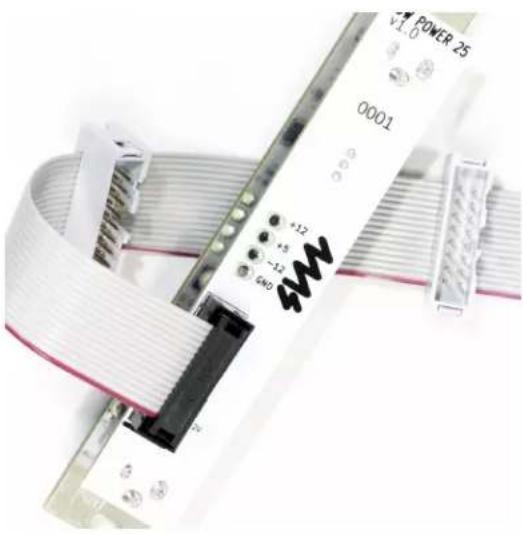
Close-up of a white 3000 microcontroller with visible I/O port labels and connector pins (no readable text beyond labels)The Row Power 25 can be used with flying bus cables, multi-power cables, bus boards and other passive distribution systems.
Flying Bus Cables
A flying bus cable has a female connector on one end. Simply plug the female connector into the male pins on the back of the Row Power 25. The notch on the male pin connector will prevent you from plugging a standard cable in backwards, but it's always good practice to verify the red stripe on the cable is orientated towards the bottom of the module.
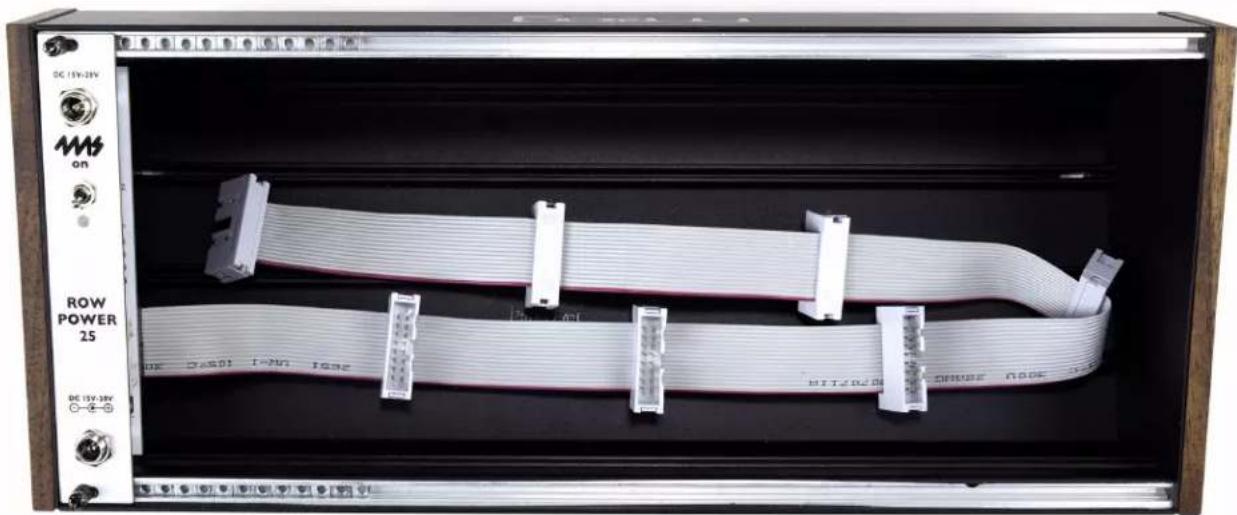
If you have more than one flying bus cable, you can safely daisy-chain them together. You also can daisy-chain a bus board or bus stick to the end of the flying bus cable, or vice-versa. To insure the lowest noise in a Eurorack system, always use the shortest power cables available and the least number of connectors.
natural_image
Interior view of an electronic device showing a coiled network cable with white connectors and labeled ports (no readable text or symbols beyond labels)Direct Connection
You can directly connect any Eurorack module to the Row Power 25. Simply plug the 16-pin cable to the Row Power 25's 16-pin header. Verify the red stripe is down on both ends of the cable.
Multi-Power Connectors
These type of cables are similar to flying bus cables, but have multiple female connectors instead of male connectors. They will only be a good solution if you intend to power three or less modules which all have the same time of power header (10-pin or 16-pin). Simply plug the 16-pin connector on the end of the multi-power connector to the Row Power 25 and then plug the female connectors directly to your modules. The multi-power connectors sold by 4ms can connect to up to three modules and they cannot be daisy-chained since they have only female connectors. For powering more than three modules, or for powering some modules with 10-pin headers and some modules with 16-pin headers, we recommend using flying bus cables.
Bus Board (4ms Bus Stick or other passive distribution board)
Any passive power distribution board can be used with the Row Power 25. If the bus board connects to the power supply with a standard 16-pin Eurorack power cable, then simply use the male pin power connector on the back of the Row Power 25 to connect to the bus board. Verify the red stripe is pointed down on both ends of the cable. An example using the 4ms Bus Stick is shown below.

natural_image
Front view of a rack-mounted power supply unit with a central connector and cable (no visible text or symbols)The Bus Stick can be secured to the case using the adhesive pads on the back. Make sure the surface is clean and apply pressure for 20 seconds. It's safe to daisy-chain a flying bus cable or another Bus Stick, but to insure the lowest noise system, use as few connectors as possible.
Solder connectors
The Row Power 25 has a set of four holes for +12V, -12V, +5V, and ground. The holes are 0.082" (2.1mm) in diameter and are spaced 0.156" (3.96mm). They fit the Molex MTA156 connector (example: Molex PN: 5273-04A or 09652048). They also will fit 14 AWG wire.
These connectors are provided for advanced users with sufficient knowledge of soldering and power systems. They can be used with a custom or specialized low-noise bus board system. While 4ms Company will warranty and support the internal circuitry of the Row Power 25, we do not offer support for 3rd party or DIY bus boards or distribution systems.


natural_image
Abstract logo design with red, blue, and green stylized letters forming a stylized 'M' shape (no text or symbols)4ms Company

Brand : 4ms
Model : Row Power 35
Category : Kibodi