Profile DPSB650ECWW - Coffee maker GE - Free user manual and instructions
Find the device manual for free Profile DPSB650ECWW GE in PDF.


User questions about Profile DPSB650ECWW GE
0 question about this device. Answer the ones you know or ask your own.
Ask a new question about this device
Download the instructions for your Coffee maker in PDF format for free! Find your manual Profile DPSB650ECWW - GE and take your electronic device back in hand. On this page are published all the documents necessary for the use of your device. Profile DPSB650ECWW by GE.
USER MANUAL Profile DPSB650ECWW GE
Safety Instructions ..... 2-5
Operating Instructions
Control Panels 6,7
Controls Features ....12
Cycle Options 13
Cycle Status ....14
Dryer Features 15
Drying Cycles 10
Dryness Levels 11
EASY TOUCH Selections .....7, 9
Heat Settings .....11
Loading and Using
the Dryer .....17, 18
Quick Start Guides....6,8
Reversing the Door .....16
Timed Dry Cycles 7,9
Venting the Dryer .....19
Troubleshooting Tips ....20-22
Consumer Support
Consumer Support ..... Back Cover
Warranty 23
Owner's Manual
DPSB620
DPSB650
Write the model and serial numbers here:
Model # ____
Serial # ____
They are on the label on the front of the dryer behind the door.

natural_image
Abstract decorative swirl design with no text or symbols175D1807P534 49-90266 11-05 JR
IMPORTANT SAFETY INFORMATION. READ ALL INSTRUCTIONS BEFORE USING.
⚠ WARNING!
For your safety, the information in this manual must be followed to minimize the risk of fire or explosion, electric shock, or to prevent property damage, personal injury, or death.
■Do not store or use gasoline or other flammable vapors and liquids in the vicinity of this or any other appliance.
■Installation and service must be performed by a qualified installer, service agency or the gas supplier.
WHAT TO DO IF YOU SMELL GAS:
Do not try to light a match, or cigarette, or turn on any gas or electrical appliance.
2 Do not touch any electrical switch; do not use any phone in your building.
3 Clear the room, building or area of all occupants.
4 Immediately call your gas supplier from a neighbor's phone. Follow the gas supplier's instructions carefully.
5 If you cannot reach your gas supplier, call the fire department.
California Safe Drinking Water and Toxic Enforcement Act
This act requires the governor of California to publish a list of substances known to the state to cause cancer, birth defects or other reproductive harm and requires businesses to warn customers of potential exposure to such substances.
Gas appliances can cause minor exposure to four of these substances, namely benzene, carbon monoxide, formaldehyde and soot, caused primarily by the incomplete combustion of natural gas or LP fuels.
Properly adjusted dryers will minimize incomplete combustion. Exposure to these substances can be minimized further by properly venting the dryer to the outdoors.
PROPER INSTALLATION
This dryer must be properly installed and located in accordance with the Installation Instructions before it is used. If you did not receive an Installation Instructions sheet, you can receive one by visiting ge.com or by calling 800.GE.CARES (800.432.2737).
■Properly ground dryer to conform with all governing codes and ordinances. Follow details in Installation Instructions.
■Install or store where it will not be exposed to temperatures below freezing or exposed to the weather.
■Connect to a properly rated, protected and sized power supply circuit to avoid electrical overload.
■Remove the colored protective film from the control panel.
■Remove all sharp packing items and dispose of all shipping materials properly.
Exhaust/Ducting:
Gas dryers MUST be exhausted to the outside.
2 Use only rigid metal 4" diameter ductwork inside the dryer cabinet. Use only rigid metal or flexible metal 4" diameter ductwork for exhausting to the outside. USE OF PLASTIC OR OTHER COMBUSTIBLE DUCTWORK CAN CAUSE A FIRE. PUNCTURED DUCTWORK CAN CAUSE A FIRE IF IT COLLAPSES OR BECOMES OTHERWISE RESTRICTED IN USE OR DURING INSTALLATION.
For complete details, follow the Installation Instructions.
IMPORTANT SAFETY INFORMATION. READ ALL INSTRUCTIONS BEFORE USING.
⚠ WARNING!
YOUR LAUNDRY AREA
■Keep the area underneath and around your appliances free of combustible materials (lint, paper, rags, etc.), gasoline, chemicals, and other flammable vapors and liquids.
■Keep the floor around your appliances clean and dry to reduce the possibility of slipping.
■Close supervision is necessary if this appliance is used by or near children. Do not allow children to play on, with or inside this or any other appliance.
- Keep all laundry aids (such as detergents, bleaches, etc.) out of the reach of children, preferably in a locked cabinet. Observe all warnings on container labels to avoid injury.
■Never climb on or stand on the dryer top.
WHEN USING YOUR DRYER
■Never reach into the dryer while the drum is moving. Before loading, unloading or adding clothes, wait until the drum has completely stopped.
■Clean the lint filter before each load to prevent lint accumulation inside the dryer or in the room. DO NOT OPERATE THE DRYER WITHOUT THE LINT FILTER IN PLACE.
■Do not wash or dry articles that have been cleaned in, washed in, soaked in or spotted with combustible or explosive substances (such as wax, oil, paint, gasoline, degreasers, dry-cleaning solvents, kerosene, etc.). These substances give off vapors that may ignite or explode. Do not add these substances to the wash water. Do not use or place these substances around your washer or dryer during operation.
■Do not place items exposed to cooking oils in your dryer. Items contaminated with cooking oils may contribute to a chemical reaction that could cause a clothes load to catch fire.
■Any article on which you have used a cleaning solvent or that contains flammable materials (such as cleaning cloths, mops, towels used in beauty salons, restaurants or barber shops, etc.) must not be placed in or near the dryer until solvents or flammable materials have been removed. There are many highly flammable items used in homes such as acetone, denatured alcohol, gasoline, kerosene, some household cleaners, some spot removers, turpentines, waxes, wax removers and products containing petroleum distillates.
■The laundry process can reduce the flame retardancy of fabrics. To avoid such a result, carefully follow the garment manufacturer's care instructions.
■Do not dry articles containing rubber, plastic, foam or similar materials such as padded bras, tennis shoes, galoshes, bath mats, rugs, bibs, baby pants, plastic bags, pillows, etc., that may melt or burn. Some rubber materials, when heated, can under certain circumstances produce fire by spontaneous combustion.
■Do not store plastic, paper or clothing that may burn or melt on top of the dryer during operation.
■ Garments labeled Dry Away from Heat or Do Not Tumble Dry (such as life jackets containing kapok) must not be put in your dryer.
■Do not dry fiberglass articles in your dryer. Skin irritation could result from the remaining particles that may be picked up by clothing during subsequent dryer uses.
To minimize the possibility of electric shock, unplug this appliance from the power supply or disconnect the dryer at the building's distribution panel by removing the fuse or switching off the circuit breaker before attempting any maintenance or cleaning (except the removal and cleaning of the lint filter). NOTE: Pressing START, STOP or POWER does NOT disconnect the appliance from the power supply.

WHEN USING YOUR DRYER (cont.)
■Never attempt to operate this appliance if it is damaged, malfunctioning, partially disassembled, or has missing or broken parts, including a damaged cord or plug.
■The interior of the machine and the exhaust duct connection inside the dryer should be cleaned at least once a year by a qualified technician. See the Loading and Using the Dryer section.
■If yours is a gas dryer, it is equipped with an automatic electric ignition and does not have a pilot light. DO NOT ATTEMPT TO LIGHT WITH A MATCH. Burns may result from having your hand in the vicinity of the burner when the automatic ignition turns on.
- You may wish to soften your laundered fabrics or reduce the static electricity in them by using a dryer-applied fabric softener or an anti-static conditioner. We recommend you use either a fabric softener in the wash cycle, according to the manufacturer's instructions for those products, or try a dryer-added product for which the manufacturer gives written assurance on the package that their product can be safely used in your dryer. Service or performance problems caused by use of these products are the responsibility of the manufacturers of those products and are not covered under the warranty to this appliance.
WHEN NOT USING YOUR DRYER
■Grasp the plug firmly when disconnecting this appliance to avoid damage to the cord while pulling. Place the cord away from traffic areas so it will not be stepped on, tripped over or subjected to damage.
- Do not attempt to repair or replace any part of this appliance or attempt any servicing unless specifically recommended in this Owner's Manual or in published user-repair instructions that you understand and have the skills to carry out.
■Before discarding a dryer, or removing it from service, remove the dryer door to prevent children from hiding inside.
■Do not tamper with controls.

READ AND FOLLOW THIS SAFETY INFORMATION CAREFULLY.
SAVE THESE INSTRUCTIONS
Quick Start Guide for Model DPSB620.
You can locate your model number on the label on the front of the dryer, behind the door.

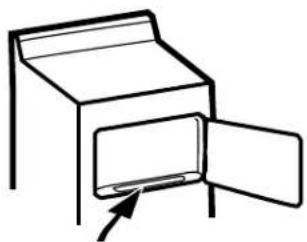
Clean the lint filter.
IMPORTANT: Clean the lint filter each time you use the dryer.
natural_image
Simple line drawing of a cabinet with an open door and an arrow pointing to the door (no text or symbols)
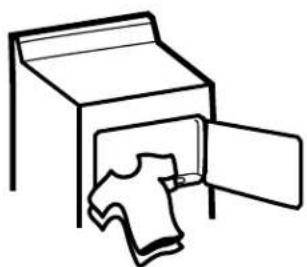
Add clothes. Do not overload. This wastes energy and causes wrinkling.
natural_image
Simple line drawing of an open box with a T-shirt inside, no text or symbols present
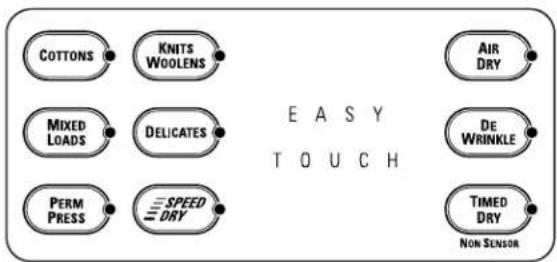
Select the dry cycle and other options.
For TIMED DRY, use the SET TIME arrow pads to set the drying time.
NOTE: Any time you make a selection that is incompatible with the chosen dry cycle, the dryer will beep twice.
text_image
COTTONS KNITS WOOLENS MIXED LOADS DELICATES PERM PRESS SPEED DRY AIR DRY DE WRINKLE TIMED DRY NON SENSOR E A S Y T O U C H

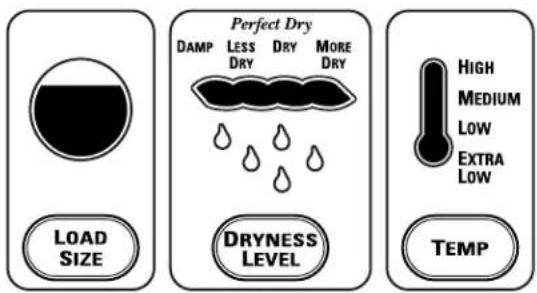
Change any of the automatic settings, if desired, by pressing the pad beneath the setting.
■ For best performance, adjust load size to appropriate setting
■ Dryness level determines how dry your clothes will be at the end of the cycle
■ Adjust temperature as recommended on the fabric manufacturer's care label
text_image
LOAD SIZE Perfect Dry DAMP LESS DRY MORE DRY DRYNESS LEVEL HIGH MEDIUM LOW EXTRA LOW TEMP
Close the door and press START.
Easy Touch Selections for Model DPSB620. ge.com
Your new dryer offers the convenience of starting your dryer loads with our EASY TOUCH cycles. Make one simple selection, and your LOAD SIZE, DRYNESS LEVEL and TEMP SETTING are automatically set. Then all you have to do is press START.
COTTONS For cottons and most linens.

MIXED LOADS For loads consisting of cottons and poly-blends.
PERM PRESS For wrinkle-free, permanent press and delicate items, and knits.

KNITS For knits with fabric care labels that say "Machine Dry." WOOLENS
DELICATES For lingerie and special-care fabrics.
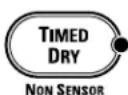
TIMED DRY
Use to set your own drying time. TIMED DRY is also recommended for small loads.
To use TIMED DRY:


- Press TIMED DRY.
- Select the drying time.
- Select the TEMP setting.
- Select any options. (NOTE: The ANTI-BACTERIAL and EXTEND TUMBLE options are not available with TIMED DRY cycles.)
- Close door.
- Push START.
Quick Start Guide for Model DPSB650.
You can locate your model number on the label on the front of the dryer, behind the door.

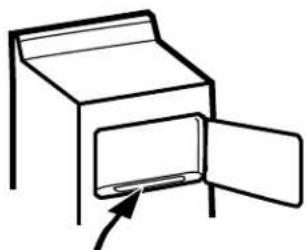
Clean the lint filter.
IMPORTANT: Clean the lint filter each time you use the dryer.

Add clothes. Do not overload. This wastes energy and causes wrinkling.

Select one of the three drying methods:
■ Press SENSOR CYCLES to dry according to load type
■ Press GARMENT CYCLES to dry according to clothing type
■ Press TIMED DRY to specify dry time
Select the dry cycle by pressing the arrow pads ( ) and the sides of the display. You can scroll up and down through the list of cycles by pressing the UP ( ) and DOWN ( ) arrow pads beneath the display.
For TIMED DRY, you can use either the display or the SET TIME arrow pads to set the drying time.
NOTE: Any time you make a selection that is incompatible with the chosen dry cycle, the dryer will beep twice.

Change any of the automatic settings, if desired, by pressing the pad beneath the setting.
■ For best performance, adjust load size to appropriate setting
■ Dryness level determines how dry your clothes will be at the end of the cycle
■ Adjust temperature as recommended on the fabric manufacturer's care label

Close the door and press START.
natural_image
Simple line drawing of a cabinet with an open door and a small object inside (no text or symbols)
natural_image
Simple line drawing of an open box with a folded garment inside (no text or symbols)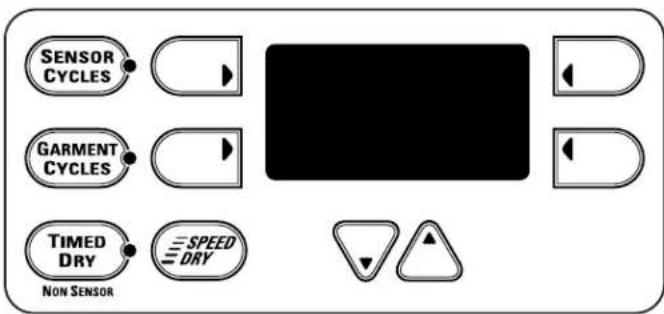
text_image
SENSOR CYCLES GARMENT CYCLES TIMED DRY NON SENSOR SPEED DRY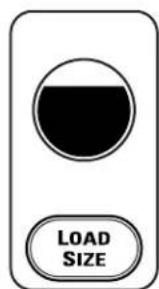
text_image
LOAD SIZE
text_image
Perfect Dry DAMP LESS DRY MORE DRY DRYNESS LEVEL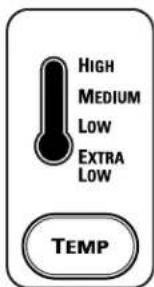
text_image
HIGH MEDIUM LOW EXTRA LOW TEMP
Easy Touch Selections for Model DPSB650. ge.com
Your new dryer offers the convenience of starting your dryer loads with our EASY TOUCH cycles. Make one simple selection, and your LOAD SIZE, DRYNESS LEVEL and TEMP SETTING are automatically set. Then all you have to do is press START.
SENSOR CYCLES
The Sensor Cycles continuously monitor the amount of moisture in the load and stop the dryer when the clothes are dry.
COTTONS For cottons and most linens.
PERM PRESS For wrinkle-free, permanent press and delicate items, and knits.
MIXED LOAD For loads consisting of cottons and poly-blends.
KNITS For knits with fabric care labels that say "Machine Dry."
SPEED DRY For small loads that are needed in a hurry, such as sport or school uniforms. Can also be used if the previous cycle left some items damp, such as collars or waistbands.
DRYEL Designed for use with the DRYEL™ "dry-clean only" fabric care system. See product package for directions. For questions or issues related to the use and performance of DRYEL™, call 1.800.214.8913, or visit the DRYEL™ Website at www.dryel.com.
DELICATES For lingerie and special-care fabrics.
DEWRINKLE For removing wrinkles from items that are dry or slightly damp. This cycle is not recommended for delicate fabrics.
WARM UP Provides 10 minutes of warming time to warm up clothes.
RACK DRY For use with the drying rack.
GARMENT CYCLES
The Garment Cycles are customized to provide optimum drying for a variety of fabrics and clothing types.
Garment Cycles include:
■ Jeans
■ Underwear
Sheets
■ Dress Shirts
■ Play Clothes
Linens
Khakis
■ Everyday Wear
■ Infant Wear
■ Knit Shirts
■ Towels
■ Lingerie
■ Athletic Wear
■ Mats/Rugs
■ Washable Silks
SET TIME
TIMED DRY
Use to set your own drying time. TIMED DRY is also recommended for small loads.
To use TIMED DRY:
- Press TIMED DRY.
- Select the drying time.
- Select the TEMP setting.
- Select any OPTIONS. (NOTE: The ANTI-BACTERIAL and EXTEND TUMBLE options are not available with TIMED DRY cycles.)
- Close door.
- Push START.
About drying cycles.
Throughout this manual, features and appearance may vary from your model.
SPEED DRY
For small loads that are needed in a hurry, such as sport or school uniforms. Can also be used if the previous cycle left some items damp, such as collars or waistbands.

DEWRINKLE
Use this feature to remove wrinkles from items that are dry or slightly damp. This cycle is not recommended for delicate fabrics.
AIR DRY
Use this feature to tumble items without heat.


CUSTOM Cycles (on some models)
Set up your favorite combination of settings and save them here for one-touch recall.
These custom settings can be set while a cycle is in progress.
To store a custom combination of settings:
- Select an EASY TOUCH setting.
- Change LOAD SIZE, DRYNESS LEVEL and TEMP setting to fit your needs.
- Select any drying OPTIONS you want.
- Press and hold the CUSTOM pad for three seconds to store your selection. A beep will sound and the pad will light up.
To recall your stored combination:
Press the CUSTOM pad, then press START.
To reprogram the CUSTOM settings:
Repeat steps 1-4 above.

text_image
Perfect Dry DAMP LESS DRY MORE DRY DRYNESS LEVELMORE DRY
Use for heavy-duty fabrics.
DRY
Use for a normal dryness level suitable for most loads. This is the preferred cycle for energy saving.
LESS DRY
Use for lighter fabrics.
DAMP
For leaving items partially damp.
About heat settings.
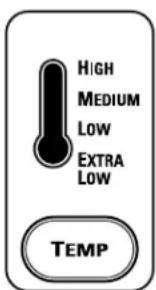
text_image
HIGH MEDIUM LOW EXTRA LOW TEMPHIGH
For regular to heavy cottons.
MEDIUM
For synthetics, blends and items labeled permanent press.
LOW
For delicates, synthetics and items labeled Tumble Dry Low.
EXTRA LOW
For lingerie and special-care fabrics.
About controls features.
Throughout this manual, features and appearance may vary from your model.
START
■ After you have selected a new cycle, press once to start the cycle.
■ Press twice to select the last cycle used and start the dryer.
If the dryer is running, press once to interrupt the cycle; press again to continue the cycle.

STOP
If the dryer is running, press once to interrupt the cycle; press again to cancel the cycle.
TIME REMAINING

Time Remaining
Displays the approximate time remaining until the end of the cycle.
As the cycle begins, you will see the approximate total cycle time in the display. Then lights will "race" in the display. This means the dryer is continuously monitoring the amount of moisture in the load. The lights will continue until the dryer senses a low level of moisture in the load. At that point, the dryer will calculate and display the approximate time remaining.
About cycle options.
NOTE: Not all features are available on all dryer models.
ge.com
(Appearance and features may vary)
SIGNAL
Alerts you that the cycle is complete. The beeper will continue to sound every two minutes for the next 6 minutes, until the clothes are removed. The clothes should be removed when the beeper goes off so wrinkles won't set in.
Press SIGNAL to select low, medium or high volume, or to turn the beeper off.

EXTEND TUMBLE PLUS
Minimizes wrinkles by adding approximately 60 minutes of no-heat tumbling after clothes are dry. The beeper will sound every 5 minutes to remind you to remove the clothes. The TIME REMAINING display will show 00.
ANTI-BACTERIAL (on some models)
This option can only be used with the COTTONS or MIXED LOADS cycles. This option reduces certain types of bacteria by 99.9%, including: Staphylococcus aureus, Pseudomonas aeruginosa and Klebsiella pneumoniae*. The anti-bacterial process occurs when high heat is used during a portion of the drying cycle.
NOTE: Do not use this cycle on delicate fabrics.
* The Anti-Bacterial Cycle is Certified by NSF International (formerly National Sanitation Foundation) to NSF Protocol P154 Sanitization Performance of Residential Clothes Dryers.

NSF Protocol P154
Sanitization Performance of Residential Clothes Dryers

DELAY START (on some models)
Use to delay the start of your dryer.
- Choose your dry cycle and any options.
- Press DELAY START. You can change the delay time in 30 minute increments using the SET TIME arrow pads.
- Press the START pad to start the countdown.
The countdown time will be shown in the TIME REMAINING display.
NOTE: If the door is opened while the dryer is in DELAY, the countdown time will not restart unless the door is closed and START has been pressed again.
DAMP SIGNAL (on some models)
This option causes the dryer to beep when clothes have dried to a damp level. Remove items that you wish to hang dry. The DAMP SIGNAL will only beep when the dryer SIGNAL is turned on.
Removing clothes and hanging them when they are damp can reduce the need to iron some items.
About cycle status.
The cycle status indicator lights (on some models) show what part of the cycle the dryer is in and remind you to clean the lint filter. On models without indicator lights, the cycle status will show in the display.
CYCLE STATUS
● SENSING
TIMED DRY
COOL DOWN
EXTENDED TUMBLE
● CLEAN LINT FILTER
SENSING
This light comes on when an EASY TOUCH Sensor Dry Cycle is active.
TIMED DRY
This light comes on when AIR DRY, DEWRINKLE, DRYEL™ (on some models), TIMED DRY or RACK DRY is selected.
EXTENDED TUMBLE
This light comes on when the dryer is in the EXTEND TUMBLE mode.
CLEAN LINT FILTER
This light is a reminder to clean the lint filter. It comes on at the end of a cycle and goes off when the door is opened.
natural_image
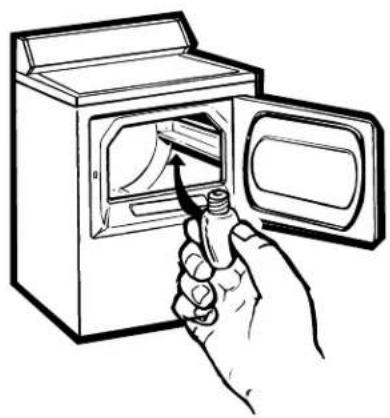
Line drawing of a hand inserting a spring into a washing machine (no text or symbols)Drum Lamp
Before replacing the light bulb, be sure to unplug the dryer power cord or disconnect the dryer at the household distribution panel by removing the fuse or switching off the circuit breaker. Reach above dryer opening from inside the drum. Remove the bulb and replace with the same size bulb.
natural_image
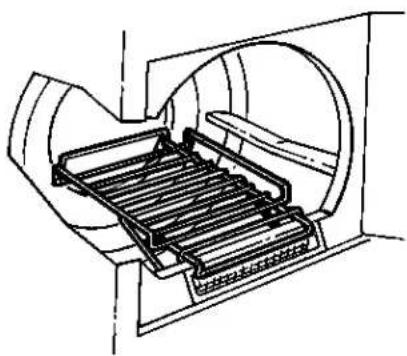
Technical line drawing of a mechanical device with internal components (no text or symbols)Drying Rack (on some models)
A handy drying rack may be used for drying delicate items such as washable sweaters.
Hook the rack over the lint filter so the rack extends into the dryer drum.
NOTE:
■ The drying rack must be used with the TIMED DRY or RACK DRY (on some models) cycles.
■Do not use this drying rack when there are other clothes in the dryer.
Stainless Steel Drum (on some models)
The stainless steel used to make the dryer drum provides the highest reliability available in a GE dryer. If the dryer drum should be scratched or dented during normal use, the drum will not rust or corrode. These surface blemishes will not affect the function or durability of the drum.
About reversing the door.

natural_image
Technical diagram of a mechanical component with an inset close-up showing a bracket detail (no text or symbols)Reversing the Door
Tools needed:
■Standard #2 ■Tape-tipped Phillips screwdriver putty knife
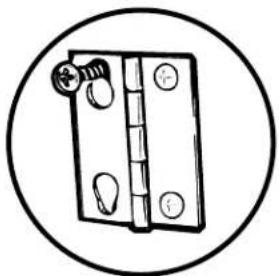
Open the door and remove the filler plugs opposite the hinges. With the door completely open, remove the bottom screw from each hinge on the dryer face. Insert these screws about halfway into the TOP holes, for each hinge, on the opposite side (where you removed the filler plugs). Apply firm pressure to get the screw started in new holes.
natural_image
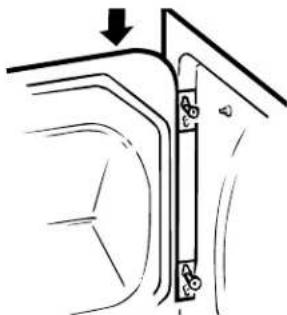
Simple line drawing of a wooden hinge with a circular outline (no text or symbols)2 Loosen top screw from each hinge on the dryer face halfway. With one hand holding the top of the door and the other hand holding the bottom, remove the door from the dryer by lifting it UP and OUT.
natural_image
Diagram of a vehicle door frame with a vertical lock and mounting bracket (no text or symbols)3 Rotate the door 180°. Insert it on the opposite side of the opening by moving the door IN and DOWN until the top hinge and the bottom hinge are resting on the top screws inserted in step 1.

natural_image
Diagram of a door hinge with screw holes and a separate screw, showing no text or symbols4 Remove the remaining screws from the side of the opening from which the door was removed. With these screws secure each hinge at the bottom. Tighten the two top screws of each hinge. Reinsert the plastic plugs on the side from which the door was removed.
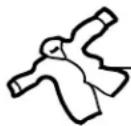
Always follow the fabric manufacturer's care label when laundering.
Fabric Care Labels
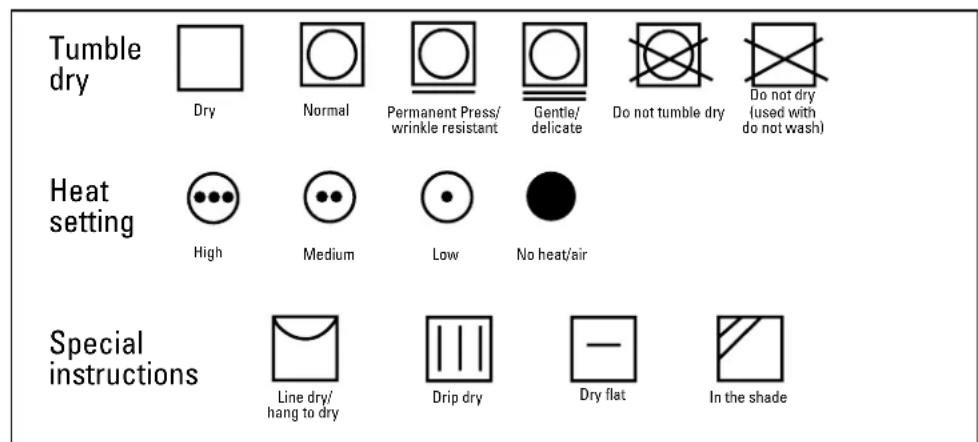
Below are fabric care label “symbols” that affect the clothing you will be laundering.
WASH LABELS

text_image
Machine wash cycle Normal Permanent Press/ wrinkle resistant Gentle/ delicate Hand wash Do not wash Do not wring Water temperature Hot (50°C/120°F) Warm (40°C/105°F) Cold/cool (30°C/85°F)DRY LABELS
text_image
Tumble dry Dry Normal Permanent Press/ wrinkle resistant Gentle/ delicate Do not tumble dry Do not dry (used with do not wash) Heat setting High Medium Low No heat/air Special instructions Line dry/ hang to dry Drip dry Dry flat In the shadeBLEACH LABELS

text_image
Bleach symbols Any bleach (when needed) Only non-chlorine bleach (when needed) Do not bleach
Sorting and Loading Hints
As a general rule, if clothes are sorted properly for the washer, they are sorted properly for the dryer. Try also to sort items according to size. For example, do not dry a sheet with socks or other small items.
Do not add fabric softener sheets once the load has become warm. They may cause fabric softener stains. Bounce® Fabric Conditioner Dryer Sheets have been approved for use in all GE Dryers when used in accordance with the manufacturer's instructions.
Do not overload. This wastes energy and causes wrinkling.
Do not dry the following items: fiberglass items, woolens, rubber-coated items, plastics, items with plastic trim and foam-filled items.
Loading and using the dryer.
Always follow the fabric manufacturer's care label when laundering.
Care and Cleaning of the Dryer
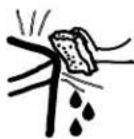
The Exterior: Wipe or dust any spills or washing compounds with a damp cloth. Dryer control panel and finishes may be damaged by some laundry pretreatment soil and stain remover products. Apply these products away from the dryer. The fabric may then be washed and dried normally. Damage to your dryer caused by these products is not covered by your warranty.
The Lint Filter: Clean the lint filter before each use. Moisten your fingers and reach into the filter opening. Run your fingers across the filter. Have a qualified technician vacuum the lint from the dryer once a year.

natural_image
Simple line drawing of a hand holding a small object over a rectangular frame (no text or symbols)Stainless Steel: To clean stainless steel surfaces, use a damp cloth with a mild, non-abrasive cleaner suitable for stainless steel surfaces. Remove the cleaner residue, and then dry with a clean cloth.
The Exhaust Duct: Inspect and clean the exhaust ducting at least once a year to prevent clogging. A partially clogged exhaust can lengthen the drying time.
Follow these steps:
1 Turn off electrical supply by disconnecting the plug from the wall socket.
2 Disconnect the duct from the dryer.
3 Vacuum the duct with the hose attachment and reconnect the duct.
The Exhaust Hood: Check from the outside that the flaps of the hood move freely when operating. Make sure that there is no wildlife (birds, insects, etc.) nesting inside the duct or hood.
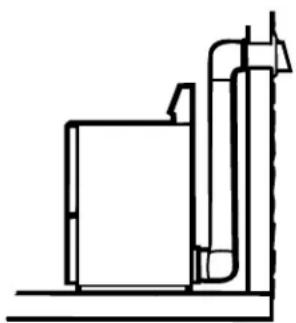
For the best drying performance, the dryer needs to be properly vented. The dryer will use more energy and run longer if it is not vented to the below specifications. Carefully follow the details on Exhausting in the Installation Instructions.
■ Use only rigid metal 4" diameter ductwork inside the dryer cabinet. Use only rigid metal or flexible metal 4" diameter ductwork for exhausting to the outside.
■Do not use plastic or other combustible ductwork.
■Use the shortest length possible.
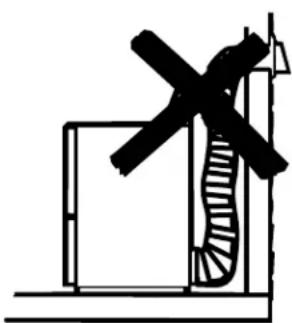
■Do not crush, kink or collapse the duct.
■Avoid resting the duct on sharp objects.
■Venting must conform to local building codes.
Correct Venting
natural_image
Pure technical line drawing of a mechanical assembly without any text, numbers, or symbols
natural_image
Pure architectural line drawing of a building corner with stairs and windows (no text or symbols)Incorrect Venting
natural_image
Simple line drawing of a staircase with a cross symbol, no text or labels present
natural_image
Pure technical diagram of a mechanical assembly with no text or symbolsBefore you call for service...

Troubleshooting Tips Save time and money! Review the charts on the following pages, or visit ge.com. You may not need to call for service.
OPERATION Possible Causes What To Do
| Control pads not responding service mode | Controls accidentally put in | • Press STOP. |
| Dryer doesn't start | Control panel is “asleep” | • This is normal. Press POWER to activate the control panel. |
| Dryer is unplugged | • Make sure the dryer plug is pushed completely into the outlet. | |
| Fuse is blown/circuit breaker is tripped | • Check the building's fuse/circuit breaker box and replace fuse or reset breaker. NOTE: Electric dryers use two fuses or breakers. | |
| Dryer was accidentally paused when starting Delay Start | • If the light on the DELAY START pad is flashing, the dryer is paused. Press START to restart the countdown. | |
| Dryer doesn't heat | Fuse is blown/circuit breaker is tripped; the dryer may tumble but not heat | • Check the building's fuse/circuit breaker box and replace both fuses or reset both breakers. Your dryer may tumble if only one fuse is blown or one breaker tripped. |
| Gas service is off | • Make sure gas shutoff at dryer and main shutoff are fully open. | |
| LP gas supply tank is empty or there has been a utility interruption of natural gas (gas models) | • Refill or replace tank. Dryer should heat when utility service is restored. | |
| Dryer shakes or makes noise | Some shaking/noise is normal. Dryer may be sitting unevenly | • Move dryer to an even floor space, or adjust leveling legs as necessary until even. |
| Inconsistent drying times | Type of heat | • Drying time will vary according to the type of heat used. If you recently changed from an electric to a gas (natural or LP) dryer, or vice versa, the drying time could be different. |
| Type of load and drying conditions | • The load size, types of fabric, wetness of clothes and the length and condition of the exhaust system will affect drying times. | |
| No numbers displayed during cycle, only lights | Dryer is continuously monitoring the amount of moisture in the clothes | • This is normal. When the dryer senses a low level of moisture in the load, the dryer will display the dry time remaining. |
| Time Remaining jumped to a lower number | The estimated time may change when a smaller load than usual is drying | • This is normal. |
| OPERATION Possible Causes What To Do | ||
| Clothes are still wet and dryer shut off The load was then removed from is put in. after a short time the dryer and a new load put in without selecting a new cycle | The door was opened mid-cycle. | A dry cycle must be reselected each time a new load |
| Small load | When drying only a few items, choose SPEED DRY or TIMED DRY. | |
| Load was already dry except for collars and waistbands and waistbands. In the future, when drying a load with collars and waistbands, choose MORE DRY. | ||
| Dryer is not level | Move dryer to an even floor space or adjust leveling legs as necessary until even. | |
| The DRY dryness level was chosen but load is still damp | Load consists of a mixture of heavy and light fabrics | When combining heavy and light fabrics in a load, choose MORE DRY. |
| Exhaust system is blocked | Inspect and clean exhaust system. | |
| Cannot make a selection and the dryer beeps twice trying to select is incompatible with the chosen dry cycle | The DRYNESS LEVEL, TEMP or OPTION that you are | This is normal. |
| Dryer is running but 00 is displayed in Time Remaining | The EXTEND TUMBLE option was chosen | This is normal. During extended tumbling, the time remaining is not displayed. The extended tumbling option lasts approximately 20 minutes. |
| LAUNDRY PRACTICES | Possible Causes What To Do | |
| Clothes are wrinkled | Overdrying | Select a shorter drying time.Remove items while they still hold a slight amount of moisture. Select a LESS DRY or DAMP setting. |
| Letting items sit in dryer after cycle ends | Remove items when cycle ends and fold or hang immediately, or use the EXTEND TUMBLE option. | |
| Overloading | Separate large loads into smaller ones. | |
| Clothes shrink | Some fabrics will naturally shrink when washed. Others can be safely washed, but will shrink in the dryer | To avoid shrinkage, follow garment care labels exactly.Some items may be pressed back into shape after drying.If you are concerned about shrinkage in a particular item, do not machine wash or tumble dry it. |
| Greasy spots on clothes | Improper use of fabric softener | Follow directions on fabric softener package. |
| Drying dirty items with clean ones | Use your dryer to dry only clean items. Dirty items can stain clean items and the dryer. | |
| Clothes were not completely clean | Sometimes stains which cannot be seen when the clothes are wet appear after drying. Use proper washing procedures before drying. | |
| Lint on clothes | Lint filter is full | Clean lint screen before each load. |
| Improper sorting | Sort lint producers (like chenille) from lint collectors (like corduroy). | |
| Static electricity can attract lint | See suggestions in this section under STATIC. | |
| Overloading | Separate large loads into smaller ones. | |
| Paper, tissue, etc., left in pockets | Empty all pockets before laundering clothes. | |
Before you call for service...
| LAUNDRY PRACTICES Possible Causes What To Do | ||
| Static occurs | No fabric softener was used | Try a fabric softener.Bounce® Fabric Conditioner Dryer Sheets have been approved for use in all GE Dryers when used in accordance with the manufacturer's instructions. |
| Overdrying Try a fabric softener. | Adjust setting to LESS DRY or DAMP. | |
| Synthetics, permanent press and blends can cause static | Try a fabric softener. | |
| Collars and waistbands still wet at end of cycle | The dryness monitor senses that the body of the clothes is dry | Choose SPEED DRY or TIMED DRY to dry damp collars and waistbands. In the future, when drying a load with collars and waistbands, choose MORE DRY. |
| Clothes take too long to dry | Improper sorting | Separate heavy items from lightweight items (generally, a well-sorted washer load is a well-sorted dryer load). |
| Large loads of heavy fabrics (like beach towels) longer to dry. | Large, heavy fabrics contain more moisture and take Separate large, heavy fabrics into smaller loads to speed drying time. | |
| Controls improperly set | Match control settings to the load you are drying. | |
| Lint filter is full | Clean lint filter before every load. | |
| Improper or obstructed ducting | Check installation instructions for proper ducting/venting.Make sure ducting is clean, free of kinks and unobstructed.Check to see if outside wall damper operates easily.Check the Installation Instructions to make sure the dryer venting is correct. | |
| Blown fuses or tripped circuit breaker | Replace fuses or reset circuit breakers. Since most dryers use 2 fuses/breakers, make sure both are operating. | |
| Overloading/combining loads | Do not put more than one washer load in the dryer at a time. | |
| Underloading | If you are drying only one or two items, add a few items to ensure proper tumbling. | |
GE Dryer Warranty. (For customers in the United States)

All warranty service provided by our Factory Service Centers, or an authorized Customer Care® technician. To schedule service, on-line, 24 hours a day, visit us at ge.com or call 800.GE.CARES (800.432.2737). Please have serial number and model number available when calling for service.
Staple your receipt here. Proof of the original purchase date is needed to obtain service under the warranty.
For The Period Of: We Will Replace:
| One YearFrom the date of the original purchase to replace | Any part of the dryer which fails due to a defect in materials or workmanship. During this limited one-year warranty, GE will also provide, free of charge, all labor and related service costs the defective part. |
| Second YearFrom the date of the original purchase | Any part of the dryer which fails due to a defect in materials or workmanship. During this additional one-year limited warranty, you will be responsible for any labor or related service costs. |
| Second through Fifth YearFrom the date of the original purchase | The extra large or super capacity dryer drum and main electronic control board if any of these parts should fail due to a defect in materials or workmanship. During this additional three-year limited warranty, you will be responsible for any labor or related service costs. |
What Is Not Covered:
■Service trips to your home to teach you how to use the product.
■Improper installation, delivery or maintenance.
■Failure of the product if it is abused, misused, or used for other than the intended purpose or used commercially.
■Replacement of the light bulb.
■Replacement of house fuses or resetting of circuit breakers.
■Damage to the product caused by accident, fire, floods or acts of God.
■Incidental or consequential damage caused by possible defects with this appliance.
■Damage caused after delivery.
■Product not accessible to provide required service.
EXCLUSION OF IMPLIED WARRANTIES—Your sole and exclusive remedy is product repair as provided in this Limited Warranty. Any implied warranties, including the implied warranties of merchantability or fitness for a particular purpose, are limited to one year or the shortest period allowed by law.
This warranty is extended to the original purchaser and any succeeding owner for products purchased for home use within the USA. If the product is located in an area where service by a GE Authorized Servicer is not available, you may be responsible for a trip charge or you may be required to bring the product to an Authorized GE Service location. In Alaska, the warranty excludes the cost of shipping or service calls to your home.
Some states do not allow the exclusion or limitation of incidental or consequential damages. This warranty gives you specific legal rights, and you may also have other rights which vary from state to state. To know what your legal rights are, consult your local or state consumer affairs office or your state's Attorney General.
Warrantor: General Electric Company. Louisville, KY 40225
GE Appliances Website
ge.com
Have a question or need assistance with your appliance? Try the GE Appliances Website 24 hours a day, any day of the year! For greater convenience and faster service, you can now download Owner's Manuals, order parts, catalogs, or even schedule service on-line. You can also "Ask Our Team of Experts" your questions, and so much more...

Schedule Service ge.com
Expert GE repair service is only one step away from your door. Get on-line and schedule your service at your convenience 24 hours any day of the year! Or call 800.GE.CARES (800.432.2737) during normal business hours.

Real Life Design Studio ge.com
GE supports the Universal Design concept—products, services and environments that can be used by people of all ages, sizes and capabilities. We recognize the need to design for a wide range of physical and mental abilities and impairments. For details of GE's Universal Design applications, including kitchen design ideas for people with disabilities, check out our Website today. For the hearing impaired, please call 800.TDD.GEAC (800.833.4322).
Extended Warranties ge.com
Purchase a GE extended warranty and learn about special discounts that are available while your warranty is still in effect. You can purchase it on-line anytime, or call 800.626.2224 during normal business hours. GE Consumer Home Services will still be there after your warranty expires.
Parts and Accessories ge.com
Individuals qualified to service their own appliances can have parts or accessories sent directly to their homes (VISÄ, MasterCard and Discover cards are accepted). Order on-line today, 24 hours every day or by phone at 800.626.2002 during normal business hours.
Instructions contained in this manual cover procedures to be performed by any user. Other servicing generally should be referred to qualified service personnel. Caution must be exercised, since improper servicing may cause unsafe operation.

Contact Us ge.com
If you are not satisfied with the service you receive from GE, contact us on our Website with all the details including your phone number, or write to: General Manager, Customer Relations
GE Appliances, Appliance Park
Louisville, KY 40225
Register Your Appliance ge.com
Register your new appliance on-line—at your convenience! Timely product registration will allow for enhanced communication and prompt service under the terms of your warranty, should the need arise. You may also mail in the pre-printed registration card included in the packing material.