ZIFI240PII - Cooker GE - Free user manual and instructions
Find the device manual for free ZIFI240PII GE in PDF.


| Product Type | Freestanding Electric Cooker |
| Brand | GE |
| Model | ZIFI240PII |
| Dimensions (Height x Width x Depth) | 36 x 24 x 24 inches |
| Weight | 150 lbs |
| Power Supply | 240V, 60Hz, 40A |
| Cooking Zones | 4 Radiant Elements |
| Oven Capacity | 5.0 cubic feet |
| Oven Type | Electric |
| Self-Cleaning Function | Yes |
| Storage Drawer | Yes |
| Control Type | Knobs and Oven Controls |
| Color | White |
| User Manual Language | English |
| User Manual Format | PDF (20 pages) |
| Installation Type | Freestanding |
| Oven Cleaning | Self-Cleaning Cycle |
| Cooktop Surface | Radiant Glass |
| Number of Oven Racks | 2 |
| Warranty | 1 Year Limited |
Frequently Asked Questions - ZIFI240PII GE
User questions about ZIFI240PII GE
0 question about this device. Answer the ones you know or ask your own.
Ask a new question about this device
Download the instructions for your Cooker in PDF format for free! Find your manual ZIFI240PII - GE and take your electronic device back in hand. On this page are published all the documents necessary for the use of your device. ZIFI240PII by GE.
USER MANUAL ZIFI240PII GE
| Fresh-Food Refrigerator | ||
| Introduction | Your new Monogram fresh-food refrigerator makes an eloquent statement of style, convenience and kitchen planning flexibility. Whether you chose it for its purity of design or the assiduous attention to detail, you will find that your Monogram fresh-food refrigerator's superior blend of form and function will delight you for years to come.The information on the following pages will help you operate and maintain your fresh-food refrigerator properly.If you have any other questions, visit our Website at: monogram.com | |
| Contents | Care and Cleaning .....11, 12Consumer Services .....19Controls and Features .....8-10Model and Serial Numbers .....2Problem Solver .....13-15 | Product Registration .....2Repair Service .....3, 19Safety Instructions .....4-7Warranty ....Back Cover |
| Before using your fresh-food refrigerator | Read this manual carefully. It is intended to help you operate and maintain your new fresh-food refrigerator properly.Keep it handy for answers to your questions. | If you don't understand something or need more help, there is a list of toll-free consumer service numbers included in the back section of this manual.ORVisit our Website at: monogram.com |
| Write down the model & serial numbers | You will find them on a label on the ceiling inside the fresh-food refrigerator. | Please write these numbers here: |
| Model Number | ||
| Serial NumberUse these numbers in any correspondence or service calls concerning your fresh-food refrigerator. | ||
Consumer Information
Fresh-Food Refrigerator
| If you received a damaged appliance | The warranty does not cover damage caused after delivery. | Immediately contact the dealer (or builder) that sold you the fresh-food refrigerator. |
| Save time & money | Before you request service, check the Problem Solver in the back of this manual. | It lists causes of minor operating problems that you can correct yourself. |
| Remove packaging | Before using, be sure all packing materials and tape have been removed.To assure no damage is done to the finish of the product, the safest way to remove the adhesive left from packaging tape on new | appliances is an application of household liquid detergent. Apply with a soft cloth and allow to soak. Wipe dry and then apply an appliance polish to thoroughly clean and protect the surface. |
| If you need service | To obtain service, see the Consumer Services page in the back of this manual.We are proud of our service and want you to be pleased. If for some reason you are not happy with the service you receive, here are steps to follow for further help.For customers in the USA:FIRST, contact the people who serviced your appliance. Explain why you are not pleased.In most cases, this will solve the problem.NEXT, if you are still not pleased, write all the details—including your phone number—to:Manager, Customer RelationsGE AppliancesAppliance ParkLouisville, KY 40225 | For customers in Canada:FIRST, contact the people who serviced your appliance. Explain why you are not pleased.In most cases, this will solve the problem.NEXT, if you are still not pleased, write all the details—including your phone number to:Manager, Consumer RelationsMabe Canada Inc.1 Factory Lane, Suite 310Moncton, N.B. E1C 9M3 |
| After installation is completed | Promptly inspect your new Monogram fresh-food refrigerator. If it has been damaged, contact the Installer or Dealer immediately.This fresh-food refrigerator must be properly leveled to ensure correct door alignment and door closure. Contact the Installer if the unit is not level.The unit should be centered in the opening. In a standard 24" opening, the front face of the Stainless Steel door will be flush with adjacent cabinetry. The front face of the Custom Panel door should be 1-31/44" forward of adjacent cabinetry. Contact the installer if clearance is not correct. | Test the door swing. Carefully open and close the door. The door should not rub or catch on adjacent cabinetry. Notify the installer if the door makes contact with cabinetry.Please Contact the Installer or Dealer if you experience any of these problems.Your custom panel (ZIFI240 model only) fresh-food refrigerator is shipped with two toekicks, a stainless steel and a black toekick. For shipping purposes, one of the toekicks will be secured to the back of the unit and the second will be installed on the unit. Keep the unused toekick and other unused or removed parts for possible future use. |
READ AND SAVE THESE INSTRUCTIONS
REFRIGERATOR SAFETY INFORMATION
This is the safety alert symbol. This symbol alerts you to potential hazards that can kill or hurt you and others. All safety messages will follow the safety alert symbol and the word “DANGER”, “WARNING”, or “CAUTION”. These words are defined as:

DANGER
Indicates a hazardous situation which, if not avoided, will result in death or serious injury.

WARNING
Indicates a hazardous situation which, if not avoided, could result in death or serious injury.

CAUTION
Indicates a hazardous situation which, if not avoided, could result in minor or moderate injury.
IMPORTANT SAFETY INSTRUCTIONS

WARNING
To reduce the risk of fire, explosion, electric shock, or injury when using your refrigerator follow these basic safety precautions:
- Use this appliance only for its intended purpose as described in this Owner's Manual.
- This fresh-food refrigerator must be properly installed in accordance with the Installation Instructions before it is used.
- Do not allow children to climb, stand or hang on the shelves in the fresh-food refrigerator. They could damage the fresh-food refrigerator and seriously injure themselves.
-
Do not store or use gasoline or other flammable vapors and liquids in the vicinity of this or any other appliance.
-
Keep fingers out of the “pinch point” areas: clearances between the door and between the door and cabinet are necessarily small. Be careful closing the door when children are in the area.
- Unplug your fresh-food refrigerator before cleaning or making repairs.
NOTE: We strongly recommend that any servicing be performed by a qualified individual. - Before replacing a burned-out light bulb, the fresh-food refrigerator should be turned OFF or unplugged in order to avoid contact with a live wire filament. (A burned-out light bulb may break when being replaced.)
WARNING
DANGER: RISK OF CHILD ENTRAPMENT
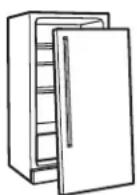
Child entrapment and suffocation are not problems of the past. Junked or abandoned refrigeration products are still dangerous... even if they will sit for “just a few days.” If you are getting rid of your old appliance, please follow these instructions to help prevent accidents.
Before You Throw Away Your Old Refrigeration Product:
• Take off the doors.
- Leave the shelves in place so that children may not easily climb inside.
REFRIGERANTS
All refrigeration products contain refrigerants, which under federal law must be removed prior to product disposal.
If you are getting rid of an old refrigeration product, check with the company handling the disposal about what to do.
LIRE ET CONSERVER CES INSTRUCTIONS
CONSIGNES DE SÉCURITÉ POUR LE RÉFRIGÉRATEUR
Electrical Shock Hazard.
Plug into a grounded 3-prong outlet
Do not remove the ground prong
Do not use an adapter
Failure to follow these instructions can result in death, fire, or electrical shock.
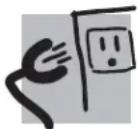
Do not, under any circumstances, cut or remove the third (ground) prong from the power cord. For personal safety, this appliance must be properly grounded.
The power cord of this appliance is equipped with a 3-prong (grounding) plug which mates with a standard 3-prong (grounding) wall outlet to minimize the possibility of electric shock hazard from this appliance. Have the wall outlet and circuit checked by a qualified electrician to make sure the outlet is properly grounded. Where a standard 2-prong wall outlet is encountered, it is your personal responsibility and obligation to have it replaced with a properly grounded 3-prong wall outlet. Do not use an adapter.
Use of a GFI (Ground Fault Interrupter) is not recommended for the fresh-food refrigerator.
The refrigerator should always be plugged into its own individual electrical outlet which has a voltage rating that matches the rating plate. This provides the best performance and also prevents overloading house wiring circuits which could cause a fire hazard from overheated wires.
Never unplug your refrigerator by pulling on the power cord. Always grip plug firmly and pull straight out from the outlet.
Repair or replace immediately all power cords that have become frayed or otherwise damaged. Do not use a cord that shows cracks or abrasion damage along its length or at either end.
When moving the refrigerator away from the wall, be careful not to roll over or damage the power cord.
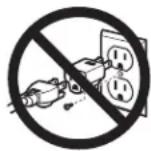
DO NOT USE AN
ADAPTER PLUG TO
CONNECT THE FRESH-
FOOD REFRIGERATOR TO
A 2-PRONG OUTLET.
BRANCHEMENTS ÉLECTRIQUES
AVERTISSEMENT

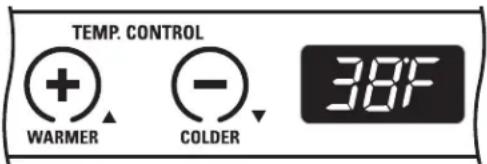
The temperature display shows the actual temperature of the fresh-food refrigerator. The actual temperature may vary slightly from the set temperature based on factors such as door openings, amount of food and room temperature.
To change the temperature setting, press the WARMER or COLDER pads until you reach the desired set temperature. After 5 seconds, the display will return to the actual temperature.
After making adjustments, allow 12 to 24 hours for the fresh-food refrigerator to reach the temperature you have set and before making any further adjustments.
text_image
TEMP. CONTROL WARMER - COLDER 38FTemperature Settings
Minimum: 34^ F ( 1.1^ C)
Maximum: 45°F (7.2°C)
Child control lockout
This child control lockout feature prevents unwanted changes to your temperature settings.
After the desired temperature is set, the temperature can be locked. To lock, press both the + and – pads at the same time for five seconds. To unlock, press both + and – pads for five seconds.
Unit ON/OFF
This pad stops cooling in the fresh-food refrigerator, turns off the temperature controls and removes power to the light circuit.
Press this pad for a minimum of 3 seconds to turn the fresh-food refrigerator on or off or unplug the unit for long vacations or absences, or when cleaning the unit or changing the light bulb.

Interior fan
The interior fan is located in the rear wall of the fresh-food refrigerator and is designed to run continuously to help maintain the proper cooling temperature. The interior fan will only turn off when the door is opened.
Glass shelves
Tempered glass shelves in the fresh-food refrigerator are removable for easy cleaning or for storing larger items.
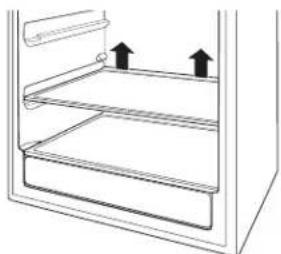
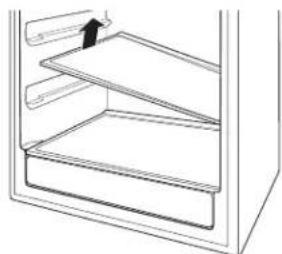
To remove a shelf, open the door completely to avoid potential damage to the gasket. Lift up on the back of the shelf slightly. Tilt the shelf to one side at an angle while pulling forward.
To replace a shelf, open the door completely to avoid potential damage to the gasket. Tilt the shelf to one side at an angle and slide toward the back wall, placing one side onto the shelf support. Place the other side onto the opposite shelf support. Ensure rear locking tabs are engaged. When installed properly, the shelf will not slide forward when gently pulled.
Appearance may vary
natural_image
Diagram of a refrigerator interior showing two shelves with upward arrows indicating direction (no text or symbols)To remove, lift up on the back of the shelf Tilt the shelf at an angle while removing or replacing
natural_image
Line drawing of a refrigerator interior showing the door, shelves, and drawer (no text or symbols)
natural_image
Line drawing of a refrigerator interior showing the door, shelves, and drawer (no text or symbols)Place in slots when replacing the shelf
QuickSpace ^TM Shelf
This shelf splits in half and slides under itself for storage of tall items on the shelf below.
Step 1: Lift the back edge of the front half of the shelf.
Step 2: Pull slightly forward.
Step 3: Lower the back edge of the front half of the shelf while sliding it underneath the back half.
The entire Quick Space shelf can be removed and replaced (see Glass Shelves section).

text_image
Step 1 Step 2 Step 3Loading tips and suggestions
- Do not block the thermistor, located on the right hand side, just above the third shelf of the fresh-food refrigerator. Blocking the thermistor could impair the air circulation and temperature control.
Vegetable pan
The full extension vegetable pan provides constant high humidity levels required to store most fruits and vegetables.
How long produce can be stored will depend upon the type of food and its condition when placed in the pan.
Unlike many refrigerators, the pan may be removed with the door at a 90° angle. This allows you to clean the vegetable pan easier. The vegetable pan is dishwasher safe, top rack only.
To remove the pan from the wire holder:
- Pull the pan out to the STOP position.
- Lift the front of the pan up and out of the wire holder.
- Lift the back of the pan up and out.
To replace a pan in the wire holder:
- Place the back of the pan in the wire holder, making sure the wire holder fits into the grooves on the back of the pan.
- Lower the front of the pan into the wire holder.
- Press firmly on the top of the pan to snap it into the wire holder.

text_image
2. Lift back up and out. 1. Lift front up and out.For your safety


Electrical Shock Hazard.
Turn the fresh-food refrigerator OFF or unplug the unit before cleaning.
Turn the fresh-food refrigerator OFF by pressing the button on the control panel a minimum of 3 seconds until the light turns off.


Turn the fresh-food refrigerator OFF or unplug the unit before cleaning.
Turn the fresh-food refrigerator OFF by pressing the button on the control panel a minimum of 3 seconds until the light turns off.
Door gasket
The vinyl gasket may be cleaned with mild soap and water, a baking soda solution or a mild scouring powder. Rinse well.
After cleaning the door gasket, apply a thin layer of paraffin wax or petroleum jelly to the door gasket at the hinge side. This helps keep the gasket from sticking and bending out of shape.
Light bulb replacement
Turn the fresh-food unit OFF before replacing the light bulb.
To remove the light shield, push in the tab on the left side of the shield and lower it. Replace with a 15 watt appliance bulb or a 4.5 watt UL Listed LED Lamp or call 800. GE.CARES (800.492.2737) during normal business hours to order service part'.
In the event of a power failure
If the power fails, open the door as infrequently as possible to maintain the temperature.
Do not store or use gasoline or other flammable vapors and liquids in the vicinity of this or any other appliance.
Preparing for vacation
For long vacations or absences, remove food and turn the fresh-food refrigerator OFF. Clean the interior (see Cleaning the Inside section).
For shorter vacations, remove perishable foods and leave controls at regular settings. However, if the room temperature is expected to drop below 60^ F ( 16^ C), follow the same instructions as for long vacations.
Preparing to move
Secure all loose items such as shelves and the vegetable pan by taping them securely in place to prevent damage.
Be sure the fresh-food refrigerator stays in an upright position during moving.
Fresh-Food Refrigerator
For your safety
Turn the fresh-food refrigerator OFF or unplug the unit before cleaning.
Turn the fresh-food refrigerator OFF by pressing the button on the control panel a minimum of 3 seconds until the light turns off.
Cleaning the outside
Door handles and trim—Clean with a cloth dampened with soapy water. Dry with a soft cloth.
Keep the outside clean. Wipe with a clean cloth lightly dampened with mild liquid dish detergent. Dry with a clean, soft cloth.
Do not wipe the refrigerator with a soiled dish cloth or wet towel. These may leave a residue that can damage the finish. Do not use scouring pads, powdered cleaners, bleach or cleaners containing bleach because these products can scratch and damage the finish.
Stainless Steel—The stainless steel doors and door handles (on some models) can be cleaned with a commercially available stainless steel cleaner. Cleaners with oxlic acid such as Bar Keepers Friend Soft Cleanser™ will remove surface rust, tarnish, and small blemishes. Use only a liquid cleaner free of grit and rub in the direction of the brush lines with a damp soft sponge. Do not use appliance wax or polish on the stainless steel.
Cleaning the inside
Unplug the fresh-food refrigerator before cleaning. If this is not practical, turn the unit OFF and wring excess moisture out of the cloth or sponge when cleaning around lights or controls.
Use warm water and baking soda solution—about a tablespoon (15 ml) of baking soda to a quart (1 liter) of water. This both cleans and neutralizes odors. Thoroughly rinse and wipe dry.
Other parts of the fresh-food refrigerator—including the door gaskets, vegetable pan and glass shelves—can be cleaned the same way.
CAUTION
Do not clean glass
shelves or covers with warm water when they are cold. Glass shelves and covers may break if exposed to sudden temperature changes or impact, such as bumping or dropping. Tempered glass is designed to shatter into many small pieces if it breaks.
ATTENTION
Ne nettoyez pas les
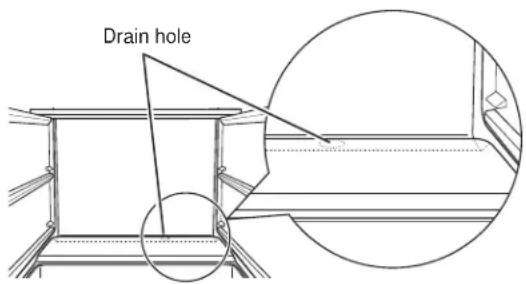
Periodically check the drain hole and channel for any debris. If the drain is blocked, condensation will not drain properly.
To check and clean the drain hole, remove the bottom two glass shelves. Sweep a damp cloth along the channel in the back of the fresh-food refrigerator. Use a finger to sweep away any debris from the drain hole.
Appearance may vary
text_image
Drain holeNormal operating sounds
Newer appliances sound different from older appliances. Modern appliances have more features and use newer technology.
Do you hear what I hear? These sounds are normal.
HUMMM... WHOOSH...
- The new high efficiency compressor may run faster and longer than your old appliance and you may hear a high-pitched hum or pulsating sounds while it is operating.
- Sometimes the appliance runs for an extended period, especially when the doors are opened frequently.
- You may hear a whooshing sound when the doors close. This is due to pressure equalizing within the appliance.
- The cabinet fan runs continuously except when the door is opened.

- You may hear the fans spinning at high speeds. This happens when the appliance is first plugged in, when the door is opened frequently or when a large amount of food is added to the appliance. The fans help maintain desired temperatures.
- If the door is open for over 3 minutes, you may hear the fans come on in order to cool the light bulbs.
- The fans change speeds in order to provide optimal cooling and energy savings.
CLICKS, POPS, CRACKS and CHIRPS
- You may hear cracking or popping sounds when the appliance is first plugged in. This happens as the appliance cools to the correct temperature.
- The electronic control board may cause a clicking sound when relays activate to control appliance components.
- Expansion and contraction of cooling coils during and after defrost can cause cracking or popping sounds.
WATER SOUNDS
- The flow of refrigerant through the freezer cooling coils may make a gurgling noise like boiling water.
- Water dropping on the defrost heater can cause a sizzling, popping or buzzing sound during the defrost cycle.
- A water dripping noise may occur during the defrost cycle as ice melts from the evaporator and flows into the drain pan.
- Closing the door may cause a gurgling sound due to pressure equalization.
Questions? Use this problem solver!
| PROBLEM | POSSIBLE | CAUSE |
| APPLIANCE • Appliance may be in defrost cycle when compressor motor does not DOES NOT OPERATE operate for about 30 minutes.• Appliance is so quiet, that most of the time you will hear low or nooperating noise.• Controls are set to OFF Press ON/OFF button on control panelfor a minimum of 3 seconds.• If interior light is not on appliance may not be plugged inat wall outlet. Push the plug completely into the wall outlet.• The fuse is blown/circuit breaker is tripped. Replace fuse or resetthe breaker.• The appliance is in showroom mode. Unplug it and plug it back in. | ||
| VIBRATION OR • Adjust the leveling legs as shown in the Installation Instructions.RATTLING (Slight vibration is normal.) | ||
| COMPRESSOR • Normal when appliance is first plugged in. Wait 24 hours for theMOTOR OPERATES appliance to completely cool down.FOR LONG PERIODS • Often occurs when large amounts of food are placed in appliance.OR CYCLES ON AND This is normal.OFF FREQUENTLY • Door left open or package holding door open.• Hot weather or frequent door openings. This is normal.• Temperature control set at the coldest setting.See Temperature | ||
| FRESH FOOD • Temperature control not set cold enough.COMPARTMENT See Temperature Control. Allow 12 to 24 hours for temperature toTOO WARM change.• Warm weather or frequent door openings.• Door left open for long time.• Package may be holding door open.The thermistor is located • Thermistor may be blocked, which can affect the overall temperature.on the right hand side just above thethird shelf. | ||
| FROST OR ICE • Too frequent or too long door openings.CRYSTALS ON REAR WALL • Thermistor may be blocked, which can affect the overall temperature.The thermistor is located on the right hand side just above thethird shelf. | ||
Questions? Use this problem solver!
| PROBLEM | POSSIBLE | CAUSE |
| APPLIANCE • Interior needs cleaning. See Care and Cleaning.HAS ODOR • Keep open box of baking soda in appliance; replace every 3 months. | ||
| DOOR NOT CLOSING • Door gasket is sticking or folding over. Apply petroleum jelly or PROPERLY paraffin wax to the face of the gasket.• The door is hitting an internal component inside the appliance.Adjust interior components to prevent interference. | ||
| MOISTURE FORMS • Not unusual during periods of high humidity. Wipe surface dry.ON OUTSIDE OF • Door left open or package holding door open. | ||
| MOISTURE • Too frequent or too long door openings.COLLECTS INSIDE • In humid weather, air carries moisture into appliance when doors are opened. | ||
| INTERIOR LIGHT • No power at outlet.DOES NOT WORK • Light bulb needs replacing. See Care and Cleaning. | ||
| HOT AIR FROM BOTTOM OF APPLIANCE Some floor coverings are sensitive and will discolor at these safe and normal temperatures. | ||
| APPLIANCE NEVER SHUTS OFF BUT TEMPERATURES ARE OK | • Adaptive defrost keeps compressor running during door openings.This is normal. The appliance will cycle off after the door remains closed for two hours.• Normal operation in extreme temperatures. | |
| ACTUAL TEMPERATURE NOT EQUAL TO SET TEMPERATURE• Defrost cycle is in process. Allow 24 hours for the system to stabilize.The thermistor is located on the right hand side just above the third shelf. | ||
| TEMPERATURE WILL NOT ADJUST• Thermistor may be blocked, which can affect the overall temperature.The thermistor is located on the right hand side just above the third shelf. | ||
With the purchase of your new Monogram appliance, receive the assurance that if you ever need information or assistance from GE, we will be there. All you have to do is call—toll-free!
GE Answer Center®
In the USA: 800.626.2000
Whatever your question about any Monogram major appliance, GE Answer Center® information service is available to help. Your call—and your question—will be answered promptly and courteously. And you can call any time. GE Answer Center® service is open 24 hours a day, Monday through Saturday.
OR
Visit our Website at: monogram.com
In Canada, call 1.800.561.3344.
In-Home Repair Service
In the USA: 800.444.1845 In Canada: 1.800.561.3344
A GE consumer service professional will provide expert repair service, scheduled at a time that's convenient for you. Many GE Consumer Service company-operated locations offer you service today or tomorrow, or at your con venience (7:00 a.m. to 10:00 p.m. week days, 8:00 a.m. to 6:00 p.m. Satur day and Sunday). Our factory-trained technicians know your appliance inside and out—so most repairs can be handled in just one visit. In Canada: Monday to Friday, 7:00 a.m. to 8:00 p.m. and Saturday, 8:00 a.m. to 5:00 p.m. EDST.
For Customers With Special Needs...
In the USA: 800.626.2000
text_image
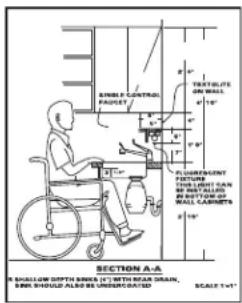
STABLE CONTROL FAUDET TRAVELITE ON WALL 4" 1" PLUMBINGENT FIXTURE THE LIGHT HAN ON SHEET, BANES, AND WALL CABBETS 2" 10" SHELLION SPINCE 1" WITH NEAR DRAIN. BRR SHOULD ALSO BE UNSURVATICATED. SCALES T=5"GE offers Braille controls for a variety of GE appliances, and a brochure to assist in planning a barrier-free kitchen for persons with limited mobility.
Consumers with impaired hearing or speech who have access to a TDD or a conventional teletypewriter may call 800.TDD.GEAC (800.833.4322) to request information or service.
Service Contracts
In the USA: 800.626.2224 In Canada: 1.800.561.334
You can have the secure feeling that GE Consumer Service will still be there after your warranty expires. Purchase a GE contract while your warranty is still in effect and you'll receive a substantial discount. With a multiple -year contract, you are assured of future service at today's prices.
Parts and Accessories
In the USA: 800.626.2002 In Canada: 1.800.561.3344
Individuals qualified to service their own appliances can have parts or accessories sent directly to their home. The GE parts system provides access to over 47,000 parts...and all GE Genuine Renewal Parts are fully warranted. VISA, MasterCard and Discover cards are accepted.
User maintenance instructions contained in this manual cover procedures intended to be performed by any user. Other servicing generally should be referred to qualified service personnel. Caution must be exercised, since improper servicing may cause unsafe operation.
YOUR MONOGRAM FRESH-FOOD REFRIGERATOR WARRANTY Staple sales slip or canceled check here. Proof of original purchase date is needed to obtain service under warranty.
WHAT IS COVERED
From the Date of the Original Purchase
LIMITED ONE-YEAR WARRANTY
For one year from date of original purchase, we will provide, free of charge, parts and service labor in your home to repair or replace any part of the unit that fails because of a manufacturing defect.
LIMITED FIVE-YEAR WARRANTY
For five years from date of original purchase, we will provide, free of charge, parts and service labor in your home to repair or replace any part of the sealed refrigerating system (the compressor, condenser, evaporator and all connecting tubing) that fails because of a manufacturing defect.
This warranty is extended to the original purchaser and any succeeding owner for products purchased for ordinary home use in the 48 mainland states, Hawaii, Washington, D.C. or Canada. If the product is located in an area where service by a GE Authorized Servicer is not available, you may be responsible for a trip charge or you may be required to bring the product to an Authorized GE Service location for service. In Alaska the warranty is the same except that it is LIMITED because you must pay to ship the product to the service shop or for the service technician's travel costs to your home.
All warranty service will be provided by our Factory Service Centers or by our authorized Customer Care® servicers during normal working hours.
Should your appliance need service, during warranty period or beyond, in the USA call 800.444.1845. In Canada: 800.561.3344. Please have your serial number and model number available when calling for service.
WHAT IS NOT COVERED
• Service trips to your home to teach you how to use the product.
- Replacement of house fuses or resetting of circuit breakers.
- Damage to the product caused by accident, fire, floods or acts of God.
- Failure of the product if it is used for other than its intended purpose or used commercially.
• Damage caused after delivery.
- Improper installation, delivery or maintenance.
If you have an installation problem, contact your dealer or installer. You are responsible for providing adequate electrical, plumbing and other connecting facilities.
- Replacement of the light bulbs, if included.
- Loss of food due to spoilage (in the USA only).
- Incidental or consequential damage caused by possible defects with this appliance.
- Product not accessible to provide required service.
- Damage to finish, such as surface rust, tarnish, or small belmishes not reported within 48 hours of delivery.
EXCLUSION OF IMPLIED WARRANTIES—Your sole and exclusive remedy is product repair as provided in this Limited Warranty. Any implied warranties, including the implied warranties of merchantability or fitness for a particular purpose, are limited to one year or the shortest period allowed by law.
Some states/provinces do not allow the exclusion or limitation of incidental or consequential damages, so the above limitation or exclusion may not apply to you. This warranty gives you specific legal rights, and you may also have other rights which vary from state to state/province to province. To know what your legal rights are in your state/province, consult your local or state/provincial consumer affairs office or your state's Attorney General.
Warrantor in USA: General Electric Company, Louisville, KY 40225
Warrantor in Canada: Mabe Canada Inc., Burlington, Ontario
197D5891P011
49-60433-2
09-14 GE
Printed in Slovenia

GE
Appliances
Appliance Park
Louisville, KY 40225
GEAppliances.com