PSQ 10 - Chargeur pour appareil mobile CALIBER - Free user manual and instructions
Find the device manual for free PSQ 10 CALIBER in PDF.


User questions about PSQ 10 CALIBER
0 question about this device. Answer the ones you know or ask your own.
Ask a new question about this device
Download the instructions for your Chargeur pour appareil mobile in PDF format for free! Find your manual PSQ 10 - CALIBER and take your electronic device back in hand. On this page are published all the documents necessary for the use of your device. PSQ 10 by CALIBER.
USER MANUAL PSQ 10 CALIBER
natural_image
Product photo of a CD/DVD device with attached cable and USB port (no visible text or symbols)PSQ10
Qi CERTIFIED WIRELESS CHARGING PAD
GB·F·D·I·E·P·SW·PL·GR·CZ/SK·NL
Input: Standard charging 5V 2A Fast Charging 9V 1.67A
Wireless Charger Output: Standard charging 5V 1A/ Fast charging 9V 1A
Transmission Power: Standard charging 5W/ Fast charging 9W
Wireless Distance: <6mm
Efficiency: >75%
Dimensions: ∅112 x 3.5mm
Weight: 88g
PS54Q FAST CHARGER ADAPTER

natural_image
Two electronic components with black and white plastic caps, no visible text or symbolsPS54Q adapter is included with PSQ10C packages PS54Q adapter is not included with PSQ10 packages
GB • Do not expose to liquids!
- Avoid extreme temperatures
- Do not disassemble the product. It may result in short-circuit or damage.
- Use the PS54Q (included in PSQ10C only) or other fast charging adapter
- Please check your phone specifications for Qi compatibility
text_image
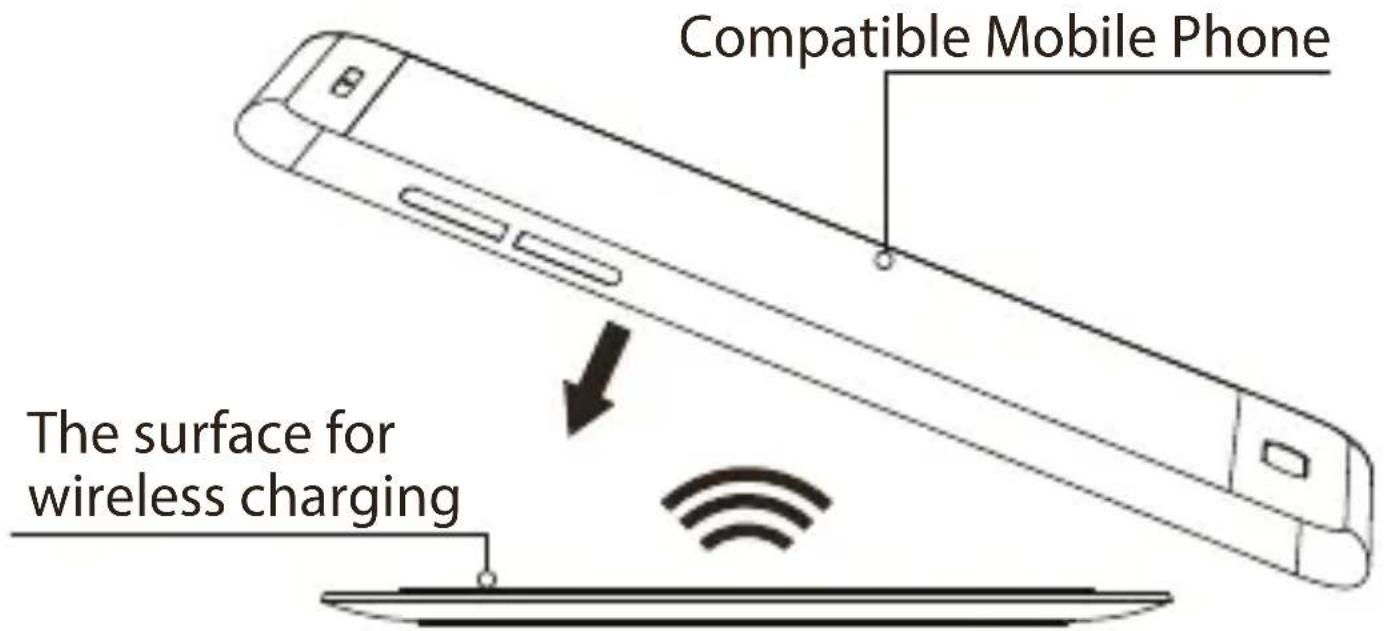
Compatible Mobile Phone The surface for wireless chargingInstructions:
The wireless charging has several advantages. Different phones can be charged with the same charging pad, eliminating the need for a universal telephone plug. Another advantage is the simplicity of loading; charging starts as soon as the device is close enough to the charging pad (<6mm). Left, right or upside down; it all gives the same effect. If the device is already fully charged or not compatible, than nothing happens. It can hardly be easier.
1 Plug the USB connector of the charging pad in:
- the included (PS54Q) or other fast charging adapter
- any standard USB port (computer, laptop, etc.) to charge at a standard rate.
note: Make sure the device, where you plug the USB of the charging pad into, is turned ON
2 Place your wireless charging compatible phone on the pad.
3 There's no step 3, it's that simple!
LED colors on USB plug indicate:
Device is not charging when LED is red
Device is charging when LED is blue
When the LED is tuned OFF, there is no power. Please connect to a power source.
text_image
Compatible Mobile Phone The surface for wireless chargingInstructions:
text_image
Compatible Mobile Phone The surface for wireless chargingAnleitung:
text_image
Compatible Mobile Phone The surface for wireless chargingIstruzioni:
text_image
Compatible Mobile Phone The surface for wireless chargingInstrucciones:
text_image
Compatible Mobile Phone The surface for wireless chargingInstruções:
text_image
Compatible Mobile Phone The surface for wireless chargingInstruktioner:
text_image
Compatible Mobile Phone The surface for wireless chargingInstrukcje:
text_image
Compatible Mobile Phone The surface for wireless chargingΟδηγίες:
text_image
Compatible Mobile Phone The surface for wireless chargingPokyny:
text_image
Compatible Mobile Phone The surface for wireless charginginstructies:
98 Old appliances and/or batteries must not be disposed with garbage. If the device/battery can not be used anymore, every user is legally obliged to dispose of old appliances and/or batteries separated from the garbage, e.g. at a collection point of his municipality district.