GSM2110FAA - Dishwasher GE - Free user manual and instructions
Find the device manual for free GSM2110FAA GE in PDF.


| Product Type | Built-in Dishwasher |
| Model | GSM2110FAA |
| Brand | GE |
| Installation Type | Under-counter |
| Width | 24 inches (61 cm) |
| Height | 34.5 inches (87.6 cm) |
| Depth | 26.75 inches (68 cm) |
| Weight | 120 lbs (54.4 kg) |
| Power Supply | 120 V, 60 Hz, 15 A |
| Energy Consumption | 270 kWh/year (approx.) |
| Water Consumption | 4.2 gallons/cycle (approx.) |
| Number of Cycles | 6 (Normal, Heavy, Light, Rinse, Eco, Quick) |
| Number of Place Settings | 14 |
| Noise Level | 48 dBA |
| Control Type | Electronic touchpad |
| Rack Features | Adjustable upper rack, fold-down tines |
| Soil Sensor | Yes |
| Delay Start | Up to 8 hours |
| Child Lock | Yes |
| Filter Type | Self-cleaning hard food disposer |
| Drying Option | Heated dry with fan |
| Maintenance | Clean filter monthly; check spray arms for clogs |
| Safety Features | Overfill protection, leak detection |
| Spare Parts Availability | Racks, spray arms, filters, heating element |
| Repair Access | Serviceable from front; user manuals online |
Frequently Asked Questions - GSM2110FAA GE
User questions about GSM2110FAA GE
0 question about this device. Answer the ones you know or ask your own.
Ask a new question about this device
Download the instructions for your Dishwasher in PDF format for free! Find your manual GSM2110FAA - GE and take your electronic device back in hand. On this page are published all the documents necessary for the use of your device. GSM2110FAA by GE.
USER MANUAL GSM2110FAA GE
Safety Information .....4-7
Operating Instructions
Control Panel ....8
Control Settings .....8-9
Dial Cycles ..... 10
Loading the
Dishwasher Racks .....13, 14
Optional Accessories .....17
Using the Dishwasher ..11, 12
Care and Cleaning .....15, 16
Troubleshooting Tips
Before You Call
for Service .....18-23
Customer Service
Product Registration .....29
Service Telephone
Numbers .....3, Back Cover
Warranty ....31
Owner's Manual
GSM2110
GSM2130

natural_image
Abstract decorative swirl design with no text or symbolsGE & You, A Service Partnership.

natural_image
Simple icon of a light bulb with radiating lines, no text or symbols presentImportant!
Two easy ways to register your appliance!
■ Through the internet at www.geappliances.com
■ Complete and mail the enclosed Product Registration Card

natural_image
Illustration of a pencil writing on a black square (no text or symbols present)Write the model and serial numbers here.
You can find them on the tub wall just inside the door.
Staple sales slip or cancelled check here.
Proof of the original purchase date is needed to obtain service under the warranty.
natural_image
Simple line drawing of a pair of eyeglasses on a black background (no text or symbols)Read this Manual
Inside you will find many helpful hints on how to use and maintain your dishwasher properly. Just a little preventive care on your part can save you a great deal of time and money over the life of your dishwasher.

natural_image
Simple icon of a magnifying glass with a question mark inside, no text or symbols presentReview the Section on Troubleshooting Tips
You'll find many answers to common problems here. If you review our chart of Troubleshooting Tips first, you may not need to call for service at all.
natural_image
Simple line drawing of a classic rotary telephone handset with keypad (no text or symbols)If You Need Service
If you do need service, you can relax knowing help is only a phone call away. A list of toll-free customer service numbers is included in the back section. Or you can always call the GE Answer Center ^® at 800.626.2000, 24 hours a day, 7 days a week.
OR
Visit our Website at: www.geappliances.com
IMPORTANT SAFETY INFORMATION. READ ALL INSTRUCTIONS BEFORE USING.
WARNING!
For your safety, the information in this manual must be followed to minimize the risk of fire, explosion, electric shock, or to prevent property damage, personal injury, or loss of life.

natural_image
Black and white graphic with a central exclamation mark surrounded by radiating lines (no text or symbols)WATER HEATER SAFETY
Under certain conditions hydrogen gas may be produced in a water heater that has not been used for two weeks or more. HYDROGEN GAS IS EXPLOSIVE.
If the hot water has not been used for two weeks or more, prevent the possibility of damage or injury by turning on all hot water faucets and allow them to run for several minutes. Do this before using any electrical appliance which is connected to the hot water system. This simple procedure will allow any built-up hydrogen gas to escape. Since the gas is flammable, do not smoke or use an open flame or appliance during this process.
Use your dishwasher only for its intended purpose as described in this Owner's Manual.
natural_image
Simple icon of a wrench inside a square frame (no text or symbols)PROPER INSTALLATION AND MAINTENANCE
This dishwasher must be properly installed and located in accordance with the Installation Instructions before it is used. If you did not receive an Installation Instructions sheet with your dishwasher, you can receive one by calling us toll-free at the GE Answer Center ^® , 800.626.2000.
■ Connect to a grounded metal, permanent wiring system; or run an equipment-grounding conductor with the circuit conductors and connect to the equipment-grounding terminal or lead of the appliance.
■ Improper connection of the equipment-grounding conductor can result in a risk of electric shock. Check with a qualified electrician or service representative if you are in doubt whether the appliance is properly grounded.
■ Dispose of discarded appliances and shipping or packing material properly.
- Do not attempt to repair or replace any part of your dishwasher unless it is specifically recommended in this manual. All other servicing should be referred to a qualified technician.
■ To minimize the possibility of electric shock, disconnect this appliance from the power supply before attempting any maintenance. NOTE: Turning the dishwasher off does not disconnect the appliance from the power supply. We recommend having a qualified technician service your appliance.
IMPORTANT SAFETY INFORMATION. READ ALL INSTRUCTIONS BEFORE USING.
WARNING!

natural_image
Abstract geometric symbol with a diagonal line inside a circle (no text or symbols)DO NOT...
■ Do not tamper with controls.
- Do not abuse, sit on, or stand on the door or dish rack of the dishwasher.
- Do not discard a dishwasher without first removing the door of the washing compartment.
■ Do not store or use combustible materials, gasoline or other flammable vapors and liquids in the vicinity of this or any other appliance.
- Do not allow children to play inside, on or with this appliance or any discarded appliance.

WHEN USING YOUR DISHWASHER
- Use only powder, tabs or liquid detergents or wetting agents recommended for use in a dishwasher and keep them out of the reach of children. Cascade® Automatic Dishwashing Detergent has been approved for use in all GE dishwashers.
- Locate sharp items so that they are not likely to damage the door seal.
- Load sharp knives with the handles up to reduce the risk of cut-type injuries.
- Do not wash plastic items unless marked dishwasher safe or the equivalent. For plastic items not so marked, check the manufacturer's recommendations.
■ Non-Dishware Items: Do not wash items such as electronic air cleaner filters, furnace filters and paint brushes in your dishwasher. Damage to dishwasher and discoloration or staining of dishwasher may result.
■ Do not touch the heating element during or immediately after use.
- Do not operate your dishwasher unless all enclosure panels are properly in place.
■ Close supervision is necessary if this appliance is used by or near children.
- Load light plastic items so they will not become dislodged and drop to the bottom of the dishwasher—they might come into contact with the heating element and be damaged.

natural_image
Simple icon of a lightbulb with rays, symbolizing an idea or concern (no text or symbols present)READ AND FOLLOW THIS SAFETY INFORMATION CAREFULLY.
SAVE THESE INSTRUCTIONS
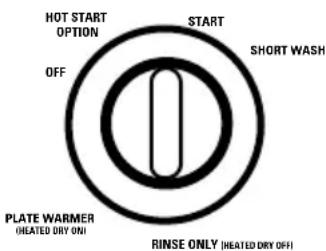
About the dishwasher control panel.
You can locate your model number on the tub wall just inside the door. Throughout this manual, features and appearance may vary from your model.


text_image
HOT START OPTION START SHORT WASH OFF PLATE WARMER HEATED DRY ONI RINSE ONLY (HEATED DRY OFF)


natural_image
Abstract icon of a magnifying glass over a black square, with no text or symbols present.Control Settings

Cycles
POTS & 9.5 gal., 62 min. Rinse–Rinse–Rinse–Main Wash–Rinse–Rinse–Rinse PANS For heavily soiled dishes or cookware with dried-on or baked-on soils. Everyday dishes may be included. This cycle will not remove burned-on foods.
NORMAL 8.0 gal., 62 min. Rinse–Rinse–Main Wash–Rinse–Rinse–Rinse WASH For loads of everyday dishes, glasses and cookware with medium soils. NOTE: Many dishes have lighter soil than normal. Choosing a cycle other than NORMAL WASH will save energy and water.
SHORT 6.6 gal., 52 min. Rinse–Main Wash–Rinse–Rinse–Rinse WASH For quickly washing loads of everyday dishes with medium soils that have not dried on, such as loads consisting mostly of glasses.
RINSE 3.9 gal., 12 min. Rinse–Rinse–Rinse ONLY For rinsing partial loads that will be washed later. Do not use detergent.
PLATE For warming clean dishes and serving plates. This cycle will take WARMER approximately 31 minutes.
HOT adds 3.0 gal., 30 min. to selected cycle. Rinse–Rinse–Start Selected Cycle START Preheats wash water to correct temperature.
■ Make sure the Dial is at the OFF position.
- Latch the door.

Energy Options
HEATED DRY Turns the drying heater on for fast drying. This ON cycle will extend the time to your wash cycle. Available on all wash cycles except RINSE ONLY. Add approximately 31 minutes to the cycle.
HEATED DRY Shuts off the drying heat options. Dishes air dry OFF naturally and energy is saved.

Start
Slowly turn the Dial to the START position. Don't turn it past the START position, or you could accidentally miss a rinse. There is a time delay between start-up and water fill so you will not hear any wash action right away.
About the dial cycles.
text_image
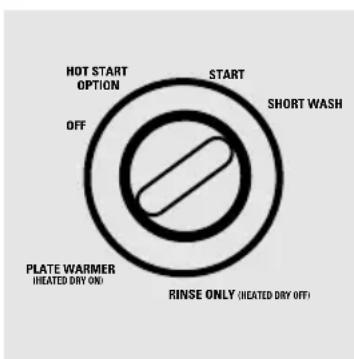
HOT START OPTION START SHORT WASH OFF PLATE WARMER (IHEATED DRY ON) RINSE ONLY (IHEATED DRY OFF)Short Wash
For quickly washing loads of everyday dishes with medium soils that have not dried on.
1 Select the NORMAL WASH cycle and any options.
2 Be sure the door is unlatched.
3 Slowly turn the Dial to SHORT WASH.
4 Latch the door to start the cycle.
text_image
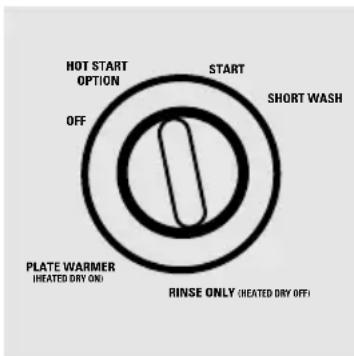
HOT START OPTION START SHORT WASH OFF PLATE WARMER (HEATED DRY ON) RINSE ONLY (HEATED DRY OFF)Rinse Only
For rinsing partial loads that will be washed later. Do not use detergent.
1 Make sure HEATED DRY OFF is selected.
2 Be sure the door is unlatched.
3 Slowly turn the Dial to RINSE ONLY.
4 Latch the door to start the cycle.
text_image
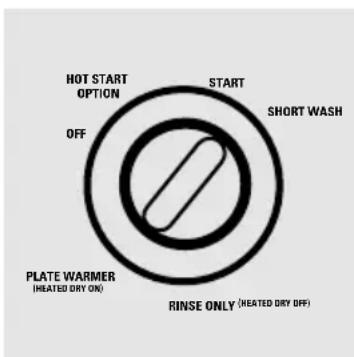
HOT START OPTION START SHORT WASH OFF PLATE WARMER (HIATED DRY ON) RINSE ONLY (HEATED DRY OFF)Plate Warmer
For warming clean dishes and serving plates. This cycle will take approximately 31 minutes.
1 Load clean dishware to be warmed.
2 Select HEATED DRY ON.
3 Be sure the door is unlatched.
4 Slowly turn the Dial to PLATE WARMER.
5 Latch the door to start the cycle.
text_image
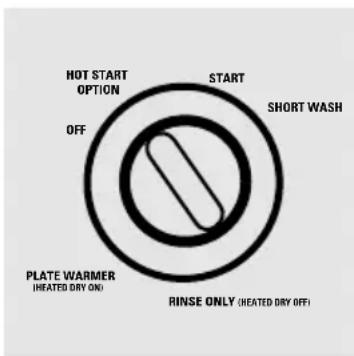
HOT START OPTION START SHORT WASH OFF PLATE WARMER (HEATED DRY ON) RINSE ONLY (HEATED DRY OFF)Hot Start
Preheats wash water to correct temperature.
1 Be sure the door is unlatched.
2 Slowly turn the Dial to HOT START.
3 Latch the door to start the cycle.

Check the Water Temperature
The entering water must be at least 120^ F. and not more than 150^ F., for effective cleaning and to prevent dish damage. Check the water temperature with a candy or meat thermometer. Turn on the hot water faucet nearest the dishwasher, place the thermometer in a glass and let the water run continuously into the glass until the temperature stops rising.

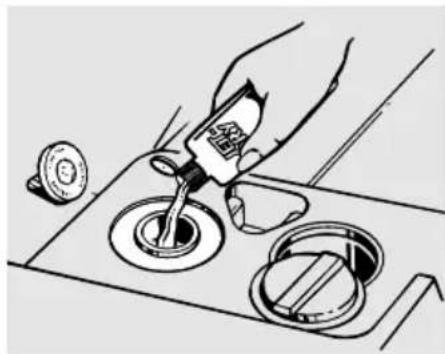
Use Jet-Dry ^® Rinse Agent
Jet-Dry ^® rinse agent removes spots and prevents new film build-up on your dishes, glasses, flatware, cookware and plastic.
Fill the rinse agent dispenser until it reaches the bottom of lip inside the opening. Replace cap.
To check if rinse agent is needed, remove the cap and look into the dispenser.
A full dispenser should last about one month.
natural_image
Illustration of a hand pouring liquid into a control panel with a lid and sink (no text or symbols)If rinse agent spills, wipe up the excess.
Using the dishwasher.

natural_image
Abstract composition of white spheres on a black square background (no text or symbols)Proper Use of Detergent
Use only detergent specifically made for use in dishwashers. Cascade® Automatic Dishwashing Detergent has been approved for use in all GE dishwashers. Keep your detergent fresh and dry. Don't put powder detergent into the dispenser until you're ready to wash dishes.
The amount of detergent to use depends on whether your water is hard or soft. With hard water, you need extra detergent. With soft water, you need less detergent.
Protect your dishes and dishwasher by contacting your water department and asking how hard your water is. Twelve or more grains is extremely hard water. A water softener is recommended. Without it, lime can build up in the water valve, which could stick while open and cause flooding. Too much detergent with soft water can cause a permanent cloudiness of glassware, called etching.
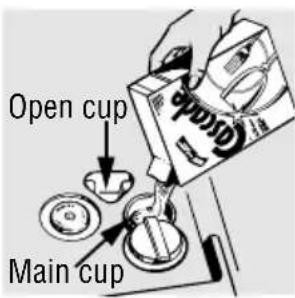
You'll find two detergent dispensers on the inside door of your dishwasher. All wash cycles except RINSE ONLY require detergent in the main cup. Wash cycles with two washes will also use the open cup. When using automatic dishwashing detergent tabs, simply place one tab in the main cup and close.
text_image
Open cup Main cupBe sure the Dial is OFF before adding detergent. Otherwise, the detergent cup will not close and latch properly. Add detergent then close the main cup.
NOTE: To open detergent cup after it has been closed, simply turn the detergent cup handle counter-clockwise until it releases. A snapping sound may be heard.

natural_image
Illustration of a hand using a tool to press or adjust a circular component, with no visible text or symbols.
natural_image
Simple black-and-white icon of an exclamation mark with radiating lines, no text or symbols present.Forget to Add a Dish?
A forgotten dish can be added any time before the main wash.
1 Push the door latch to the left.
2 Once the water calms, open the door. Steam may rise out of the dishwasher.
3 Add forgotten dishes.
4 Close the door and push the latch to the far right.
Loading the dishwasher racks.
For best dishwashing results, follow these loading guidelines. Features and appearance of racks and silverware baskets may vary from your model.

natural_image
Illustration of a metal crate filled with various cylindrical components (no text or symbols visible)Upper Rack
The upper rack is for glasses, cups and saucers. Cups and glasses fit best along the sides. This is also a secure place for dishwasher-safe plastics. The upper rack is good for all kinds of odd-shaped utensils. Saucepans, mixing bowls and other items should be placed face down.
Secure larger dishwasher-safe plastics over two fingers when possible.
Make sure small plastic items are secure so they can't fall onto the heating element.

natural_image
Technical line drawing of a mechanical component with concentric circular features (no text or symbols)The Wash Tower
Keep the center area clear in the lower rack.
The wash tower rises through the center of the lower rack during the wash and rinse portions of the cycle.

Don't block it or load tall things next to it.
Also, be careful not to let a portion of an item such as a pot or dish handle extend through the bottom rack. This could block the wash arm and cause poor washing results.
Loading the dishwasher racks.
natural_image
Line drawing of various mechanical components or parts, including gears and levers (no text or symbols)Lower Rack
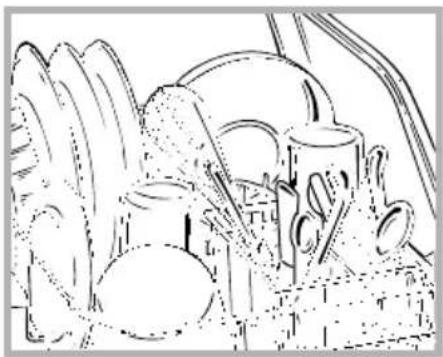
When loading the lower rack, do not load large platters or trays in the front right corner. They may prevent detergent from circulating during the wash cycle.
The lower rack is best used for plates, saucers and cookware. Large items such as broiler pans and racks should go along the sides. Load platters, pots and bowls along the sides, in corners, or in the back. The soiled side of items should face the center of the rack.

text_image
Don't let any item extend through bottom.Silverware Basket
Put flatware in the removable basket with fork and knife handles up to protect your hands. Place spoons in the basket with handles down. Mix knives, forks and spoons so they don't nest together. Distribute evenly. Small plastic items, such as measuring spoons and lids from small containers, should go in the bottom of the silverware basket with silverware on top.
Caring for the dishwasher.
To clean the control panel use a lightly dampened cloth then dry thoroughly. To clean the exterior use a good appliance polish wax.
Never use sharp objects, scouring pads or harsh cleaners on any part of the dishwasher.
text_image
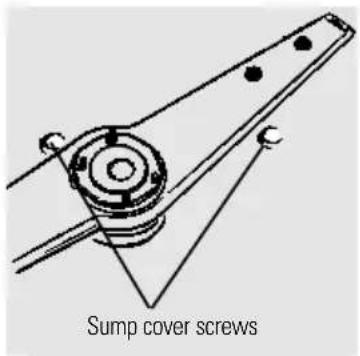
Sump cover screwsProtect Against Freezing
If your dishwasher is left in an unheated place during the winter, ask a service technician to:
1 Cut off electrical power to the dishwasher. Remove fuses or trip circuit breaker.
2 Turn off the water supply and disconnect the water inlet line from the water valve.
3 Drain water from the inlet line and water valve. (Use a pan to catch the water.)
4 Reconnect the water inlet line to the water valve.
5 Remove the plastic sump cover in the tub bottom and use a sponge to soak up water in the rubber boot.
Caring for the dishwasher.
text_image
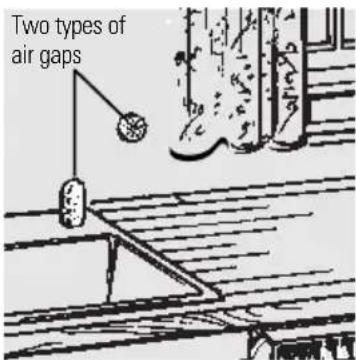
Two types of air gapsCheck the air gap any time your dishwasher isn't draining well.
Does Your Dishwasher Have an Air Gap?
An air gap protects your dishwasher against water backing up into it if a drain clogs. The air gap is not a part of the dishwasher. It is not covered by your warranty. Not all plumbing codes require air gaps, so you may not have one.
The air gap is easy to clean.
1 Turn off the dishwasher and lift off the chrome cover.
2 Unscrew the plastic cap and clean with a toothpick.
About optional accessories.
You can change the door and lower access panel appearance of your dishwasher by ordering one of these optional accessories:
Color Panels
■ 1/4" Wood Panel Trim Kit
■ 3/4" Trimless Panel Kit
These accessories are available at extra cost (VISA, MasterCard or Discover cards accepted) by calling 800-626-2002.
Specify accessory number when ordering.

Descriptions of Optional Accessories
Color panels—Replacement door panels and lower access panels are available in the following colors:
■ GPF300A (Almond)
■ GPF300B (Black)
■ GPF300W (White)
Wood panel trim kit—This accessory contains trim and instructions for you to supply and install a 1/4" thick decorative wood door and lower access panel:
■ GPF325A (Almond)
■ GPF325B (Black)
■ GPF325W (White)
NOTE: The GPF100 dishwasher door spring kit must also be ordered and installed when the door panel weighs four lbs. or more.
Trimless panel kit—This accessory contains parts and instructions for you to supply and install a 3/4" thick decorative wood door and lower access panel:
GPF375
NOTE: The GPF100 dishwasher door spring kit will be included with the trimless panel kit and must be installed with it.
Before you call for service...

Troubleshooting Tips Review the charts on the following pages first and you may not need to call for service.
| Problem Possible Causes What To Do | ||
| Dishwasher won't run | Fuse is blown, or the circuit breaker tripped | Replace fuse or reset circuit breaker. Remove any other appliances from the circuit. |
| Noise | Some of the sounds you'll hear are normal | Soft food disposal shredding action.Drain valve opening to pump water out.Timer control as cycle progresses.Detergent cup opening.The motor stopping during the drying period. |
| Utensils are not secure in the rack or something small has dropped into the rack | Make sure everything is secured in dishwasher. | |
| Motor hums | Dishwasher has not been used on a regular basis. If you do not use your dishwasher often, set it to fill and pump out once every week. This will help keep the seal moist and the garbage disposer clear. | |
| Water standing in the bottom of the tub | This is normal | A small amount of clean water around the outlet on the tub bottom at the back of the tub keeps the water seal lubricated. |
| Water won't pump out of the tub | Drain is clogged | If you have an air gap, clean it.Check to see if your kitchen sink is draining well. If not, you may need a plumber.If the dishwasher drains into a disposer, run disposer clear. |
| Suds in the tub | Correct detergent wasn't used dishwasher detergents to avoid sudsing. Cascade® Automatic Dishwashing Detergent has been approved for use in all GE dishwashers.To remove suds from the tub, open the dishwasher and let suds evaporate. Add 1 gallon of cold water to the tub. Close and latch the dishwasher. Pump out water by slowly turning the Dial until a drain period is reached. Repeat if necessary. | |
| Rinse agent was spilled spills immediately. | Always wipe up rinse agent | |
Before you call for service...

Troubleshooting Tips
| Problem Possible Causes What To Do | ||
| Stained tub interior | Detergent with colorant was used colorant (pigment or dyes) | Some detergents contain that will discolor the tub interior with extended use. Check the detergent cup for signs of any discoloration. If cup is discolored, change to detergent without any colorant. Cascade®Automatic Dishwashing Detergent has been approved for use in all GE dishwashers. |
| Some tomato-based • Use of the foods can stain cycle (on some models) | RINSE ONLY after adding the dish to the load can decrease the level of staining. | |
| Dishes don't dry | Low inlet water temperature temperature is correct. | Make sure inlet water |
| Rinse agent dispenser is empty dispenser. | Check the rinse agent | |
| Dishes and flatware not clean | Inlet water temperature is below 120°F. temperature to 120°F. | Raise the water heater |
| Water pressure is temporarily low coming out more slowly than usual? If so, wait until pressure is normal before using your dishwasher. | Use HOT START option. | |
| Air gap is clogged • Clean the air gap. | ||
| Improper rack loading | Make sure large dishware does not block the detergent dispenser or the wash arm. | |
| Spots and filming on glasses and flatware | Extremely hard waterLow inlet water temperatureOverloading the dishwasherImproper loadingOld or damp powder detergentRinse agent dispenser emptyToo little detergent | Use Jet-Dry® rinse agent to remove spots and prevent new film build-up.To remove stubborn spots and pre-existing film from glassware:1 Remove all metal utensils from the dishwasher.2 Do not add detergent.3 Select the longest cycle.4 Start the dishwasher and allow to run for 18 to 22 minutes. Dishwasher will now be in the main wash.5 Open the door and pour 2 cups (500 ml) of white vinegar into the bottom of the dishwasher.6 Close the door and allow to complete the cycle. If vinegar rinse doesn’t work: Repeat as above, except use 1/4 cup (60 ml) of citric acid crystals instead of vinegar. |
| Cloudiness on glassware | Combination of soft water and too much is permanent. To prevent detergent this from happening, useless detergent if you have soft water. Wash glassware in the shortest cycle that will get them clean. | |
| Water temperature entering the dishwasher temperature. exceeds 150°F. | Lower the water heater | |
Before you call for service...

Troubleshooting Tips
| Problem Possible Causes What To Do | ||
| Yellow or brown film on tub | Tea or coffee stains | Remove the stain by hand, using a solution of 1/2 cup bleach and 3 cups warm water.⚠ WARNINGBefore cleaning interior, wait at least 20 minutes after a cycle for the heating element to cool down. Failure to do so can result in burns. |
| An overall yellow or brown film can be caused by iron deposits in water | A special filter in the water supply line is the only way to correct this problem.Contact a water softener company. | |
| White film on inside surfaces | Hard water minerals | To clean the interior, apply dishwasher detergent to a damp sponge. Wear rubber gloves.Do notuse any type of cleanser other than dishwasher detergent because it may cause foaming or sudsing. Cascade® Automatic Dishwashing Detergent has been approved for use in all GE dishwashers. |
| Detergent cup lid won't latch | Dial is not in the OFF position and slide the door latch to the left. | Turn the Dial to OFF the left. |
| Detergent left in dispenser cups | Dishes are blocking the detergent cups | Reposition the dishes. |
| Steam | This is normal | Steam comes through the vent by the door latch during drying and when water is being pumped out. |
| Black or gray marks on dishes | Aluminum utensils have rubbed against dishes abrasive cleaner. | Remove marks with a mild, |
Notes
Customer ServiceTroublesh
Notes
Customer ServiceTroublesh
Notes
GE Service Protection Plus™
GE, a name recognized worldwide for quality and dependability, offers you Service Protection Plus™—comprehensive protection on all your appliances—No Matter What Brand!
Benefits Include:
- Backed by GE
- All brands covered
- Unlimited service calls
- All parts and labor costs included
• No out-of-pocket expenses
• No hidden deductibles
• One 800 number to call
We'll Cover Any Appliance. Anywhere. Anytime.\*
You will be completely satisfied with our service protection or you may request your money back on the remaining value of your contract. No questions asked. It's that simple.
Protect your refrigerator, dishwasher, washer and dryer, range, TV, VCR and much more—any brand! Plus there’s no extra charge for emergency service and low monthly financing is available. Even icemaker coverage and food spoilage protection is offered. You can rest easy, knowing that all your valuable household products are protected against expensive repairs.
Place your confidence in GE and call us in the U.S. toll-free at 800-626-2224 for more information.
*All brands covered, up to 20 years old, in the continental U.S.
Cut here
Please place in envelope and mail to:
General Electric Company
Warranty Registration Department
P.O. Box 32150
Louisville, KY 40232-2150
Consumer Product Ownership Registration
Dear Customer:
Thank you for purchasing our product and thank you for placing your confidence in us.
We are proud to have you as a customer!
Follow these three steps to protect your new appliance investment:
1
Complete and mail your Consumer Product Ownership Registration today. Have the peace of mind of knowing we can contact you in the unlikely event of a safety modification.
2
After mailing the registration below, store this document in a safe place. It contains information you will need should you require service. Our service number is 800 GE CARES (800-432-2737).
3
Read your Owner's Manual carefully. It will help you operate your new appliance properly. If you have questions, or need more information, call the GE Answer Center® 800.626.2000.
Model Number
Serial Number
Important: If you did not get a registration card with your product, detach and return the form below to ensure that your product is registered, or register online at www.geappliances.com.
Cut here
Consumer Product Ownership Registration

text_image
Important Mail Today!Model Number

Serial Number

Mr. □ Ms. □ Mrs. □ Miss □

text_image
First Name Last Name
text_image
Street Address
text_image
Apt. # E-mail Address_
text_image
City Zip Code State
text_image
Date Placed In Use Month Day Year Phone Number
Occasionally, we may allow selected companies to send you information.
□ Check here if you do not want this information.
GE Appliances
General Electric Company
Louisville, Kentucky
www.geappliances.com
All warranty service provided by our Factory Service Centers, or an authorized Customer Care® technician. For service, call 800-GE-CARES.
For The Period Of: GE Will Replace:
| One Year Any partFrom the date of the original purchase warranty, | of the dishwasher which fails due to a defect in materials or workmanship. During thisfull one-yearGE will also provide,free of charge, all labor and in-home service to replace the defective part. |
| Second Year Any part of the Water Distribution Systemwhich fails due From the date of the original purchase to a defect in materials or workmanship. Associated inlet and drain plumbing parts are not covered by this warranty. During thissecond-year limited warranty, you will be responsible for any labor or in-home service costs. | |
| Ten Years The PermaTufFrom the date of the original purchase®tub or door liner, if it fails to contain water due to a defect in materials or workmanship such as cracking, chipping, peeling or rusting. During thisfull ten-year warranty, GE will also provide,free of charge, all labor and in-home service to replace the defective part. | |
What GE Will Not Cover:
■ Service trips to your home to teach you how to use the product.
■ Improper installation.
■ Replacement of house fuses or resetting of circuit breakers.
■ Failure of the product if it is abused, misused, or used for other than the intended purpose or used commercially.
■ Damage to the product caused by accident, fire, floods or acts of God.
■ Incidental or consequential damage to personal property caused by possible defects with this appliance.
■ Cleaning or servicing of the air gap device in the drain line.
This warranty is extended to the original purchaser and any succeeding owner for products purchased for home use within the USA. In Alaska, the warranty excludes the cost of shipping or service calls to your home.
Some states do not allow the exclusion or limitation of incidental or consequential damages. This warranty gives you specific legal rights, and you may also have other rights which vary from state to state. To know what your legal rights are, consult your local or state consumer affairs office or your state's Attorney General.
Service Telephone Numbers.

GE Answer Center® 800.626.2000
The GE Answer Center ^® is open 24 hours a day, 7 days a week. OR
Visit our Website at: www.geappliances.com

natural_image
Simple line drawing of a house with windows and cloud motifs (no text or symbols)In-Home Repair Service 800-GE-CARES (800-432-2737)
Expert GE repair service is only a phone call away.

Special Needs Service 800.626.2000
TDD 800-TDD-GEAC (800-833-4322)
GE offers, free of charge, a brochure to assist in planning a barrier-free kitchen for persons with limited mobility.

text_image
Illustration of a rolled document with visible text lines, no readable text or symbolsService Contracts 800-626-2224
Purchase a GE service contract while your warranty is still in effect and you'll receive a substantial discount. GE Consumer Service will still be there after your warranty expires.

Parts and Accessories 800-626-2002
Individuals qualified to service their own appliances can have parts or accessories sent directly to their homes (VISA, MasterCard and Discover cards are accepted).
Instructions contained in this manual cover procedures to be performed by any user. Other servicing generally should be referred to qualified service personnel. Caution must be exercised, since improper servicing may cause unsafe operation.

natural_image
Simple hand-drawn smiley face on black background with no text or symbolsService Satisfaction
If you are not satisfied with the service you receive from GE, follow these two steps. First, contact the people who serviced your appliance. Next, if you are still not pleased, write all the details—including your phone number—to: Manager, Customer Relations, GE Appliances, Appliance Park, Louisville, KY 40225.