
SVCC8080B - USB Drive SVAN - Free user manual and instructions
Find the device manual for free SVCC8080B SVAN in PDF.


| Product Type | Cooker Hood (Range Hood) |
| Brand | SVAN |
| Model | SVCC8080B |
| Voltage | 220-240 V~ |
| Frequency | 50-60 Hz |
| Maximum Fuse Rating | 6 A |
| Number of Fan Speeds | 3 |
| Timer Function | 15-minute automatic shut-off |
| Lighting Type | LED (replaceable) |
| Grease Filter Material | Aluminium |
| Grease Filter Cleaning Frequency | Every 3 months or 60 hours of use |
| Carbon Filter Option | Yes (optional, for recirculation mode) |
| Carbon Filter Replacement Interval | Every 3-5 months |
| Duct Diameter | 150 mm (120 mm with adapter) |
| Minimum Installation Height (Electric Cooker) | 65 cm |
| Minimum Installation Height (Gas Cooker) | 75 cm |
| Control Type | Touch panel with optional remote control |
| Air Exhaust Mode | Exhaust or recirculation (with carbon filter) |
| Package Contents | Product, inner/outer flue, flue connection plate, adapter, remote (optional), manual, installation template, mounting hardware |
| Safety Features | Overheat protection? (not specified), automatic shut-off? (not specified) |
Frequently Asked Questions - SVCC8080B SVAN
User questions about SVCC8080B SVAN
0 question about this device. Answer the ones you know or ask your own.
Ask a new question about this device
Download the instructions for your USB Drive in PDF format for free! Find your manual SVCC8080B - SVAN and take your electronic device back in hand. On this page are published all the documents necessary for the use of your device. SVCC8080B by SVAN.
USER MANUAL SVCC8080B SVAN
Assembly instructions
ENGLISH
natural_image
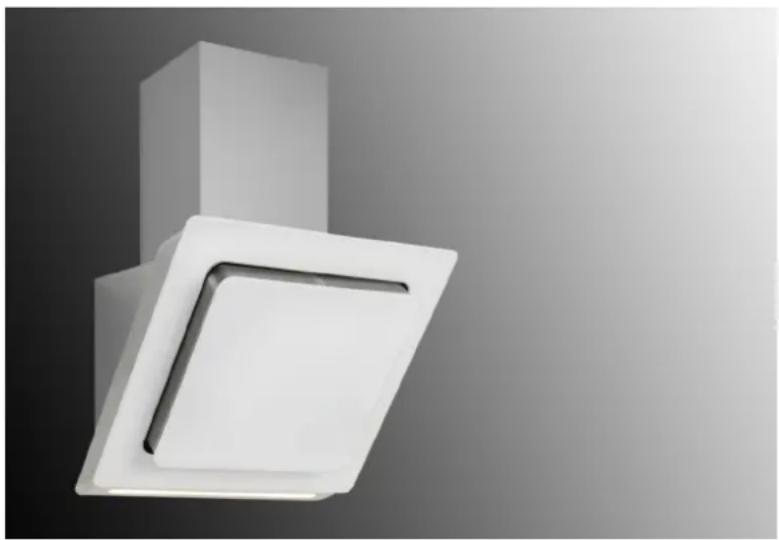
Modern white ceiling-mounted fixture with a square panel and angled cutout, against a gradient gray background (no text or symbols)svan
SVAN TRADING SL CIUDAD DE CARTAGENA 20 (FUENTE DEL JARRO) PATERNA 46988 VALENCIA Spain
Telephone: +34 960 600 034
1, en_US
This device is designed exclusively for domestic use.
Table of contents
1 Technical Drawing....4
2 WARNING AND SAFETY PRECAUTIONS.... 5
3 LETHAL RISK, DANGER OF POISONING....7
4 USAGE WITH AND WITHOUT CARBON FILTER.... 11
5 CARBON FILTER REPLACEMENT....12
6 CLEANING AND PREVENTIVE MAINTENANCE.... 13
6.1 Washing in Dishwasher.... 13
6.2 Hand Wash.... 14
6.3 Removing the Metal Filters.... 14
6.4 Removing/Installing Aluminium Filters.... 14
7 APPLIANCE POSITION.... 16
7.1 Installation and Unpacking of the Appliance.... 16
7.2 Recommendations for Energy Saving.... 16
8 CONTENT OF PACKAGE.... 18
9 OVERVIEW OF hood.... 19
10 ASSEMBLY OF PRODUCT.... 20
10.1 AIR EXIT INSTALLATION.... 21
10.2 ASSEMBLY OF SHEET METAL FLUES.... 21
11 USE OF PRODUCT....22
11.1 REMOTE CONTROL.... 23
12 REPLACING THE LAMPS.... 24
13 AUTHORIZED SERVICE.... 25
1 Technical Drawing

Fig. 1
2 WARNING AND SAFETY PRECAUTIONS
WARNING AND SAFETY PRECAUTIONS
This appliance can be used by children of 8 years and older, people with physical, sensory or mental capability deficiency or people with lack of experience or knowledge; as long as they are provided supervision or instructions for the safe use of the appliance and they comprehend the dangers.
Children should not tamper with the appliance. Cleaning and user maintenance operations must not be performed by children unless supervised.
■ This product is designed for home use.
■ Usage voltage of your product is 220-240 Volt\~50-60 Hz.
■ Power cord of your product is fitted with a grounded plug. This cord must be plugged into a grounded outlet.
- The whole electrical wiring must be installed by a qualified electrician.
■ Installation by unauthorized persons could lead to poor operation performance, damage to the product, and accidents.
- Feeder cable of the appliance mustn't be exposed to jamming or crashing during assembly. Feeder cable mustn't be placed near the cooker. In such cases, it might melt down and lead to fire.
- Do not plug in the appliance before the installation.
■ Make sure that the installation place allows the user to easily unplug the power cable in case of any danger.
Do not touch your product's lamps when they work for a long time. The lamps may burn your hand as they will be hot.
Kitchen hoods are manufactured for household use in normal home cooking. There is a risk of malfunction in other types of use, and the product guarantee will be void.
■ Comply with the rules and instructions regarding discharge of outgoing air, stipulated by the relevant authorities. (This warning does not apply to uses without flue.)
- Flammable foods must not be cooked under the appliance.
- Start your product after you place pot, pan etc. on the stoves. Otherwise, high temperature may cause same parts of your products to deform.
■ Turn off the cooker's burner before taking the saucepan, pan, etc. off the cooker.
- Do not leave boiling oil on the stove. Pots that contain boiling oil may catch fire by itself.
■ Since oils could catch fire when you cook fried foods in particular, be careful about your curtains and tablecloths.
- Ensure timely replacement of the filters. Filters not replaced in a timely manner pose risk of fire due to accumulated grease deposits on them.
- Do not use non-fire-resistant filtering materials instead of the filter.
- Do not operate your product without filter, and do not remove the filters when the product is in operation.
In case of any fire, de-energize the hood and any other cooking devices. (Plug off the appliance or turn off the main switch.)
If your product's periodic cleaning is not made in a timely manner, it could pose risk of fire.
■ De-energize the appliance before any maintenance operations. (Plug off the appliance or turn off the main switch.)
When electric cooker hood and devices fed with energies other than electricity operate simultaneously, the negative pressure in the room must not exceed 4 Pa (4 X 10 bar).
Gas or fuel oil burning appliances, such as room heaters, which share the same environment with your product, must be fully insulated from the exhaust of this product or they must be hermetical.
When you make a flue connection for your product, use pipes with a diameter of 150mm or 120 mm. The length of the duct connection as well as the number of elbows must be as minimum as possible.
■ Children must not play with the appliance.
For your safety, use "MAX 6 A" fuse in the hood system.
■ Since the packing materials could be dangerous, keep them away from children.
If the feeder cable is damaged, it must be replaced by its manufacturer or its authorized technical service or any other personnel qualified at the same level, in order to avoid any dangerous situation.
In case of any deflagration, de-energize the cooker hood and cooking appliances, and cover the flame. Never use water to extinguish the fire.
- When cooking appliances are in operation, their accessible parts could be hot.
This appliance is not intended to be used by people with physical, sensory and mental disabilities (including children) or those who have not adequate experience and knowledge regarding its use, unless they are under the supervision of a person responsible for the safety of the appliance.
■ After the installation of the hood, the minimum distance must be 65 cm between the product and any electric cooker; and 75 cm between it and any gas ranges or cookers burning other fuels.
- Output of the hood must not be connected to air ducts, where there exist another smokes.
You must be careful when using the appliance spontaneously with other appliances (e.g. gas, diesel fuels, coal, wood, etc. burning heaters, shower heaters), which use the same air in the same environment. Attention must be paid when using them simultaneously. It is because the hood could adversely affect the combustion, by discharging the ambient air.
This warning does not apply to uses without flue.
- When electric cooker hood is used simultaneously with devices that use gas or other fuels, there must be sufficient ventilation in the room (might not apply to devices that discharges the air back into the room).
3 LETHAL RISK, DANGER OF POISONING

DANGER!
Warning - Choking Hazard
The packaging materials are dangerous for children. Never allow children to play with packaging materials.

DANGER!
Warning - Death Hazard
There are life-threatening danger and poisoning danger due to reabsorbed combustion gases. During the air discharge outlet use, unless sufficient air supply is provided, do not use the appliance simultaneously with devices that discharge toxic gases through flue such as ventilated, gas, oil, wood or coal burning heaters, shower heaters, water heaters, etc. Fig. 2
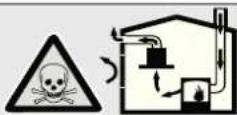
Fig. 2: Poisoning Danger
Ventilated goods (e.g. gas, oil, wood or coal burning heaters, shower heaters, water heaters) take combustion air from the installation location, and discharge the waste gas through a waste gas system (e.g. flue). When the cooker hood is active, it absorbs air from the kitchen and neighbouring rooms. If adequate air entry is not provided, vacuum emerges. In such a case, the toxic gases are absorbed from the flue and waste gas channel, and are taken into to door again. Fig. 2
Therefore, adequate fresh air ingress must always be ensured. Fig. 3
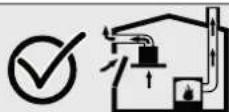
Fig. 3

WARNING!
Fire danger!
- The oil residue in the oil filter may catch fire. Clean the oil filter at least once every 3 months. Never operate the device without the oil filter.
- The oil residue in the oil filter may catch fire. Never work with open flame (ex. flambe) near the device. The apparatus is allowed to be installed near a solid fuel (e.g. wood or coal) heater only if it has a non-removable cover. No sparks should be scattered.
- Hot oils and fats catch fire easily. Hot oils and fats should never be left unattended. Never try to put out the fire with water. Turn off the cooker. Kill the flames carefully using a cover, fire blanket or a similar material.
- Gas operated cookers that do not have a cooking pot on create high heat during operation. A ventilation device placed over the cookers can be damaged or burned for this reason. Operate gas cookers only when there is a cooking pot on them.
- Operating multiple gas cookers simultaneously creates high heat. A ventilation device placed over the cookers can be damaged or burned for this reason. Never operate two gas cookers longer than 15 minutes on high flame setting. A large burner over 5kW (Wok) has the power of two gas burners.

WARNING!
Electrocution hazard!
- A malfunctioning device may cause electric shock. Never turn on a malfunctioning device. Pull the power plug and switch off the circuit breaker. Call customer service.
- Unsuitable repairs pose hazards. Repairs and replacement of damaged power cords must be performed only by a customer services technician trained by us. If the device is malfunctioning pull the power plug and switch off the circuit breaker. Call customer service.
– Water leaking into the device may cause electric shock. High pressure or steam cleaners must not be used.

DANGER!
Danger of physical injury!
– During the installation, there is a danger of physical injury due to the sharp edges. Use protective gloves throughout the installation process of the appliance.
- Due to risk of dropping the appliance, assembly of all safety bolts and covers must be performed as specified in the user manual.
- Objects placed on the appliance may fall over. Do not place any objects on the device.
- LED lights are very bright and may damage eyes (Risk group 1). You must not look directly at running LED lights for longer than 100 seconds.

WARNING!
Risk of burn, risk of electric shock!
- Allow the appliance to cool before cleaning or maintenance process. Switch off the fuse or pull out the mains plug from the socket.
– There is risk of damage due to ingress of moisture in the electronics. Do not clean the control components with a wet cloth. - The surface could be damaged due to a wrong cleaning process. Clean stainless steel surfaces only in their brushing direction. Do not use a stainless steel cleaner for the control elements.
- The surface could be damaged due to aggressive and abrasive cleaning agents. Never use aggressive and abrasive cleaning agents.

WARNING!
Dangers of fire and physical injury!
In case of repairing that is not performed according to the rules or as required, turn off the fuse or unplug the feeder cable of your appliance. Repairing must be performed only by the authorized technical service or authorized experts.

NOTICE!
If the appliance is faulty or damages, turn off the fuse or unplug the feeder cable of your appliance and call the authorized service.

NOTICE!
If the feeder cable is damaged, it must be replaced by its manufacturer or its authorized technical service or any other personnel qualified at the same level, in order to avoid any dangerous situation.

NOTICE!
When the bulbs of the device malfunction, switch off the circuit breaker and unplug the device's power plug from the socket. Replace the defective bulbs immediately (leave bulbs to cool down first), in order to protect the remaining bulbs against overloading.

CAUTION!
Accessible components might be heated when used with cooking devices.

DANGER!
Air outlet pipe of this appliance mustn't be connected in the flue used to discharge the fume generated by devices that use gas or other fuels.
Damage reasons

CAUTION!
Damage hazard due to corrosion. Always run the appliance to prevent condensate formation while cooking. Condensates may cause corrosion damage. Replace the malfunctioning lamp right away to prevent overloading of other lamps. Moisture intrusion in electronic parts poses a risk of damage. Never clean the control elements with a wet cloth. The surface could be damaged due to a wrong cleaning process. Clean stainless steel surfaces only in their brushing direction. Do not use a stainless steel cleaner for the control elements. The surface could be damaged due to aggressive and abrasive cleaning agents. Never use aggressive and abrasive cleaning agents. There is a risk of damage due to condensate liquid backflow. Install the air exit canal with a small downward inclination (1° inclination) from the appliance.
4 USAGE WITH AND WITHOUT CARBON FILTER

You can use this appliance in exhaust air mode and ventilated air mode.
Exhaust air mode
The absorbed air is cleaned by the grease filters, and is discharged through a piping system. Fig. 4

Fig. 4: Air Outlet without Carbon Filter

NOTICE!
Exhaust air must not be transferred to an active smoke or waste gas flue; or a flue used for ventilation of the places, where heat sources are installed.
If you want to transfer exhaust air to an inactive smoke or waste gas flue, you need to obtain permission from an authorized chimney sweep.
If exhaust air is discharged through the external wall, a telescopic wall safe must be used.
Ventilated air mode
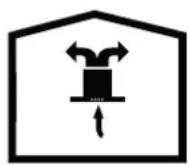
Fig. 5: Air Circulation with Carbon Filter

Absorbed air is cleaned by the grease filters and an active carbon filter, and then it is transferred back to the kitchen. Fig. 5

You need to install an active carbon filter, in order to catch the substances, which cause stink in the circulating air. Consult your authorized dealer to know the different opportunities available for enabling the appliance to function in circulating air mode. You can buy the accessories required for this process from the relevant outlets, authorized technical service or online sales center.
5 CARBON FILTER REPLACEMENT
Under circumstances without a flue, an active carbon filter should be used to resend the inside air by re-filtering. An active carbon filter should be obtained from the service or your dealer. Disconnect the device prior to replacing the carbon filter. Since the carbon filter is used in kitchens without a flue outlet, it should be replaced with a new one every 3 to 5 months subject to usage. The carbon filter should never be washed. In any case the oil filters should be attached to the product regardless of using a carbon filter or not. Do not use the product without an oil filter.

Fig. 6
Open the main cover of the product for carbon filter replacement ().
1 Carbon Filter
2 Carbon Filter Tab
3 Aluminium Filter
4 Carbon Filter Tooth Slot
Insert the carbon filter tooth located on the carbon filter into the carbon filter tooth slot located on the aluminium filter and push forward to lock it. (Fig. 6)
Reverse the process to install the carbon filter. (Fig. 6)
6 CLEANING AND PREVENTIVE MAINTENANCE

CAUTION!
Cleaning and user maintenance of the appliance shall not be performed by unattended children.
The surface could be damaged due to aggressive and abrasive cleaning agents. Never use aggressive and abrasive cleaning agents. Supply your cleaning and protective substances that are appropriate for your appliance from the authorized technical service. Surface of appliance and control units are sensitive to scratching.
- Clean the surfaces with a soft and damp cloth, dish-washing liquid or mild glass cleaning agent. Soften the dry, sticky dirt with a damp cloth. Do not scrape!
It is not appropriate to use dry cloths, sponges that may scratch, materials that require rubbing, and other aggressive cleaning agents containing sand, soda, acid or chlorine.
- Clean the stainless steel surfaces in their brushing direction only.
Do not use stainless steel cleaning agents and wet clothes for control units. Cleaning of metal grease filters Used metal grease filters retain the greasy particles in the moisture and vapour generated in the kitchen. Clean the metal grease filters about every three months, under normal use conditions (1 to 2 hours a day).
- Do not use excessively effective, acidic or alkaline cleaning agents.
For cleaning the metal grease filters, clean the holder parts of the metal grease filters in the appliance, with a damp cloth as well.
- You can clean the metal grease filters in the dishwasher or by hand.
- Do not apply spray cleaning supplies directly to the product.
- Do not keep flammable and/or heavy decorative items on the product.
6.1 Washing in Dishwasher
In case of washing in dishwasher, a slight change might occur in colour. This has no effect on the function of the metal grease filter.
- Do not clean too dirty metal grease filters together with utensils in the dishwasher.
Place the metal grease filters loosely and freely in the dishwasher. Metal grease filters must be placed in the dishwasher without jamming.
6.2 Hand Wash

For stubborn dirt, you can use a special grease solvent. You can buy such an agent from the authorized sales centre.
- Soften the metal grease filters in a hot water with dish-washing liquid.
- Use a brush for cleaning and wait for the liquid in metal grease filters to flow off completely.
– Rinse the filters thoroughly after cleaning.
6.3 Removing the Metal Filters
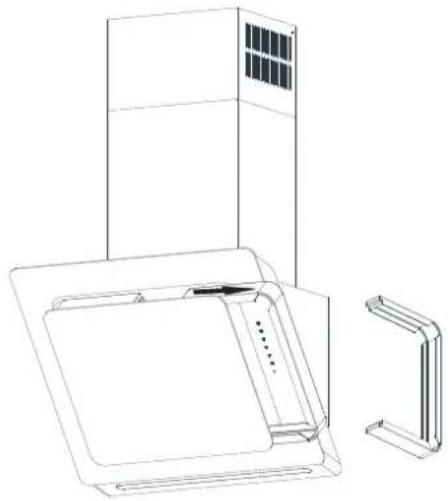
natural_image
Line drawing of a kitchen appliance with a cabinet, fan, and side panel (no text or symbols)Metal filters shall require cleaning after the product is used for 60 hours. Switch the product to service mode to remove the metal filters ().
Pull the metal filters out of their sockets(Fig. 7).
After the filter cleaning is done replace the Metal filters in the same way and take the product out of service mode ().
Fig. 7
6.4 Removing/Installing Aluminium Filters
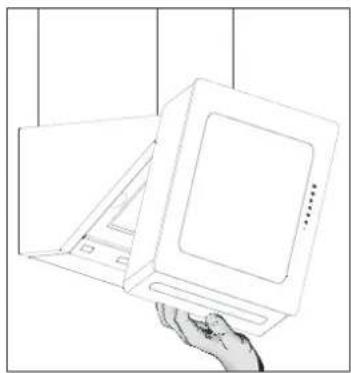
natural_image
Line drawing of a hand holding a flatboard with a paper lid, placed on a surface (no text or symbols)To remove or install the aluminium filter pull the main cover towards yourself and open. (Fig. 8)
Fig. 8

natural_image
Line drawing of a hand interacting with an open refrigerator (no text or symbols)Fig. 9
Press on the aluminium filter's latch and lightly pull out towards yourself. Apply these steps in reverse to install the aluminium filter (Fig. 9).

DANGER!
When removing the filter of your product, take care not to have any pot etc. item on the cooker and not to drop the filters when removing them.

Filters falling on the cooker can damage you and your items.

If there is a carbon filter applied on the aluminium filter, remove the carbon filter prior to cleaning works.
7 APPLIANCE POSITION

Fig. 10
After completing the installation of hood, the minimum distance must be 65 cm between the product and any electric cooker; and 75 cm between it and any gas ranges or cookers burning other fuels (Fig. 10).
7.1 Installation and Unpacking of the Appliance
- Check that your appliance is not deformed.
■ Report the transport issues immediately to transport operator.
■ Any faults encountered shall be reported to the dealer, too. - Do not allow children to play the with packaging materials!
7.2 Recommendations for Energy Saving

Your new appliance is exclusively energy saving. Here, you can find some recommendations on how you can save more energy while using your appliance and some advice required to dispose of your appliance properly.
Save energy
■ Ensure there is adequate air inlet to enable your good to work efficiently with low operating noise.
■ Adjust the fan speed according to the intensity of kitchen vapour. Use the intense setting only in cases of need. A lower fan setting means less energy consumption.
If high amounts of kitchen smoke shall be present, select a higher fan speed beforehand. Hood has to run for a much longer duration in order to clear kitchen smoke that is already spread in the kitchen.
■ Turn off the hood when not needed.
- Clean or replace the filter in the specified time intervals, this way you can increase ventilation efficiency and avoid fire hazard.

Disposal in environmentally compliant way
Dispose of the packaging material in an environmentally compliant way.
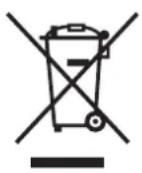
This appliance is marked in accordance with European directive 2012/19/EG (waste electrical and electronic equipment – WEEE). This directive sets the framework for the recovery and recycling of old appliances and the related EU-wide applications.
8 CONTENT OF PACKAGE
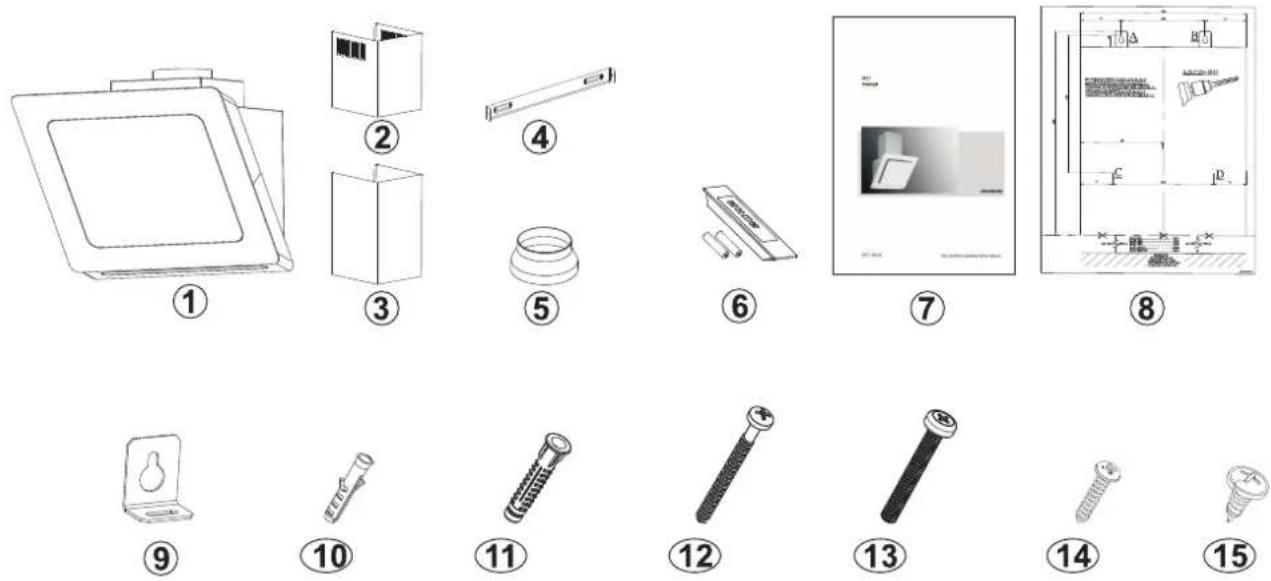
Fig. 11: CONTENT OF PACKAGE
1 Product
2 Inner Flue
3 Outer Flue
4 Flue Connection Plate
5 120/150 mm Flue Adapter (optional)
6 Remote Control (Optional)
7 User Manual
8 Installation Template
9 Product Hanging Plate
10 ∅6mm Plastic Dowel
11 ∅10mm Plastic Dowel
12 5.5x60 Wall Mount Screw
13 M5x35 Product Mount Screw
14 3.9x22 Flue Connection Plate Screw
15 3.5x9.5 Flue Connection Screw
9 OVERVIEW OF hood

1 Inner Flue
2 Outer Flue
3 Body
4 Panel
5 Control Panel
6 Side Suction Plate/Glass
7 Glass
8 Cooker Lighting
Fig. 12: OVERVIEW OF hood
10 ASSEMBLY OF PRODUCT
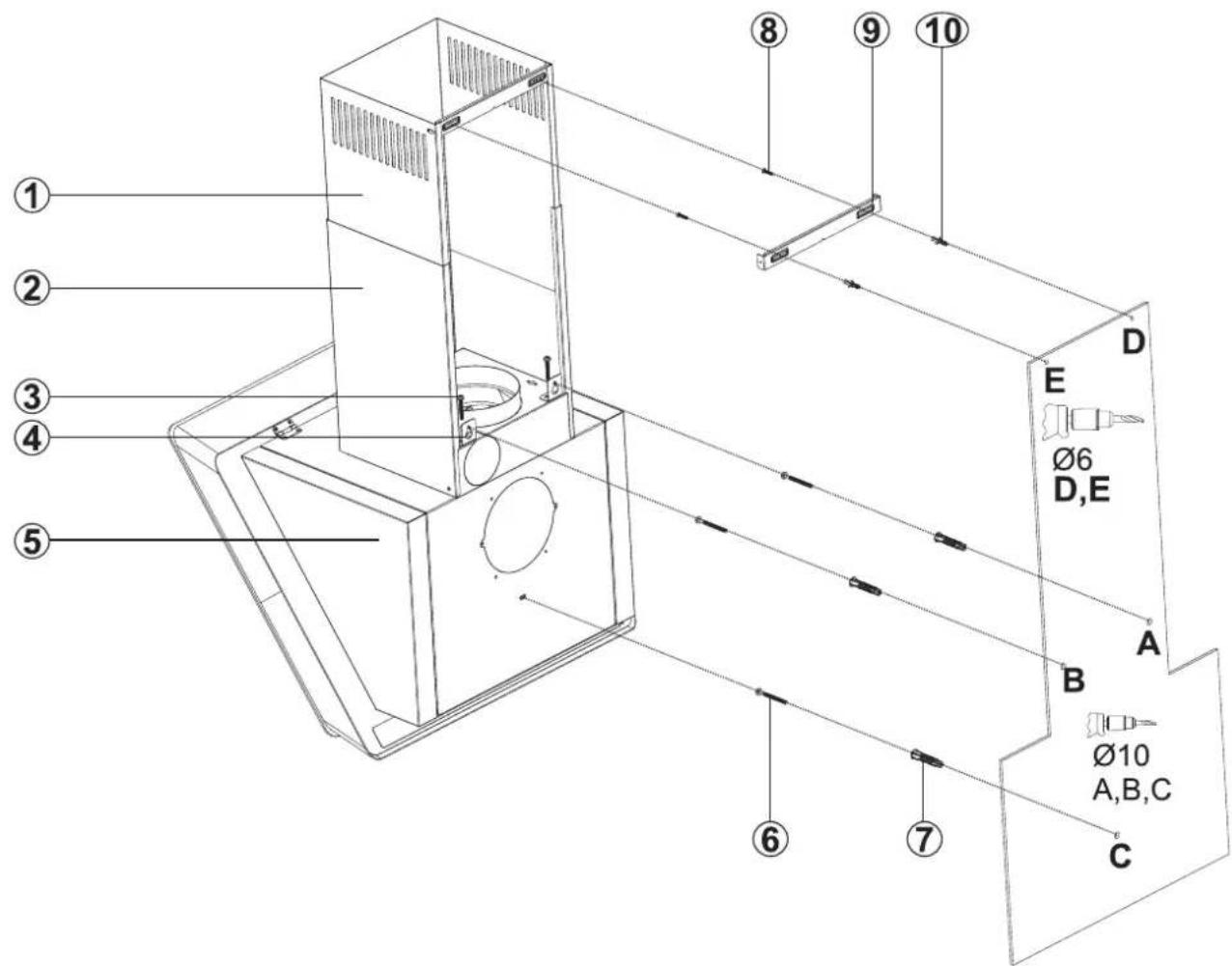
Fig. 13: ASSEMBLY INSTALLATION AND COMPONENTS
1 Inner Flue
2 Outer Flue
3 2x M5x35 Screw
4 Product Hanging Plate
5 Body
6 3x 5.5x60 Wall Mount Screw
7 3x ∅10mm Plastic Dowel
8 2x 3.9x22 Screw
9 Flue Connection Plate
10 2x ∅6mm Plastic Dowel Product Hanger Plate
- Assemble the cooker hood with the help of the assembly scheme.
- Affix the hanging plate of the cooker hood on the body of the cooker hood with M5x35 screw (Fig. 13).
-
Affix the assembly pattern on the wall, at the specified height (See the minimum and maximum distances intended for the worktop, in the assembly pattern). Perforate points A, B and C.(Fig. 13)
-
Insert ∅10mm dowels into the holes drilled as A, B, C and screw down the screws at the points A + B so that 5mm space remains between the screw head and the wall. (Fig. 13)
-
Affix the hanging plate of the cooker hood on the body of the cooker hood with M5x35 screw (Fig. 13).
-
Hang it on the wall with the hanging plate of the cooker hood. If the cooker hood is not parallel, loosen or tighten M5x35 screws to make the cooker hood parallel.
-
Tighten A + B (2) fixing screw on the wall, and completely secure the product from its point C.
10.1 AIR EXIT INSTALLATION

Fig. 14: PLASTIC FLUE CONNECTION
1 ∅150/120 mm Flue Adapter (Option)
2 ∅150 mm Motor Flue Outlet
3 Body

When the air exit channel is narrower than 150 mm, install ∅150/120 mm flue adaptor.
- Install the ∅150/120 mm flue adapter (1) to the motor flue exit (2) and press well.(Fig. 14).
■ Make the air outlet connection of the product.
10.2 ASSEMBLY OF SHEET METAL FLUES
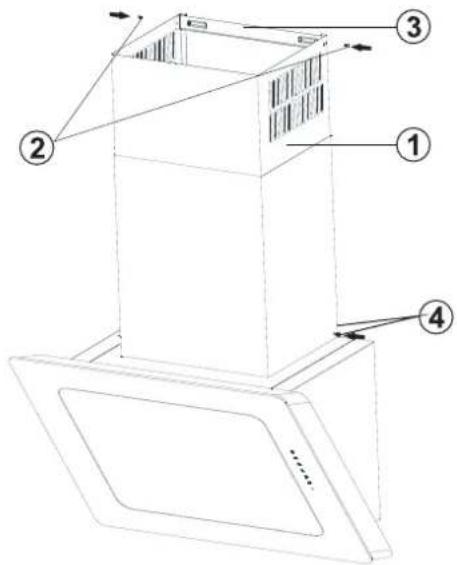
Fig. 15
1 Inner Flue
2 Flue Connection Plate Fixing Screws
3 Flue Connection Plate
4 Outer Flue Fixing Screw
The outer and inner sheet metal flues are assembled one within the other (Fig. 15).
The cooker hood is set in the midst, and then the flue connecting plate 3 is directly affixed to the wall, under the cover or points D and E are marked after performing a measurement.()
Drill points D and E with ∅6mm drill bit, and insert ∅6mm plastic wall plugs. Insert the flue connection plate with 3.9x22 screws ().
■ Affix the inner flue to the flue connection plate from its left and right sides with 2 screws, by pulling it upwards.(Fig. 15)
- Fix the inner flue to the flue connection plate with screws (Fig. 15).
- Fix the outer funnel to the product body from its lower section using 2 screws (4).(Fig. 15).
11 USE OF PRODUCT
LIGHTING

Touch this button to turn cooker lighting on/off (Fig. 16/1).
Fig. 16
RUNNING SPEEDS

■ Touch this button to run the product at first speed level (Fig. 17/2).
■ Touch this button to run the product at second speed level (Fig. 17/3).
■ Touch this button to run the product at third speed level (Fig. 17/4).
Fig. 17
TIMER

Pressing this button while the product is running at any speed activates a 15-minute timer function, when the countdown starts this icon starts flashing. After 15 minutes, all functions running before the timer is activated motor, lamp shall automatically turn off (Fig. 18/5).

NOTICE!
The functions activated after the timer function is turned on continue to be active at the end of the timer function.
Fig. 18
FILTER CLEANING WARNING

Fig. 19
Design Mode
■ After the product runs for 60 hours, the filter cleaning light shall start to blink. When you see this warning the aluminium filters must be cleaned. For filter cleaning operation see - Fig. 9
- When you touch the filter cleaning warning icon once, the filter cleaning warning is deactivated.
- Touch this button for 3 seconds to switch the product into service mode. Repeat the same to exit service mode.
When you touch filter cleaning warning icon (Fig. 19/6) once the suction glass comes out from the side and enables the filters to be seen.
The motor won't run when the product is in design mode.
To exit design mode, touch the filter cleaning warning icon once.
11.1 REMOTE CONTROL

flowchart
graph TD
    A["Power"] --> B["+"]
    B --> C["-"]
    C --> D["Star"]
    style A fill:#f9f,stroke:#333
    style B fill:#ccf,stroke:#333
    style C fill:#cfc,stroke:#333
    style D fill:#fcc,stroke:#333
Fig. 20: REMOTE CONTROL
1- Motor On/Off
2- Motor Speed Increase
3- Motor Speed Decrease
4- Lighting On/Off

Remote control is sold together with the product optionally. The product you bought may not have remote control option.
12 REPLACING THE LAMPS
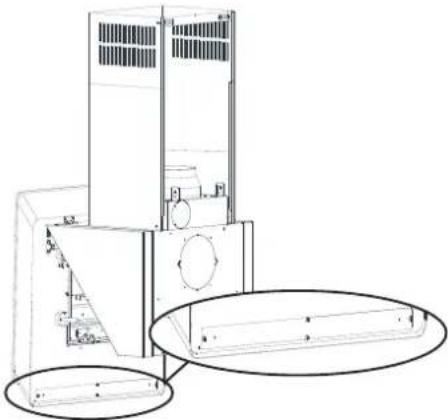
natural_image
Technical line drawing of a mechanical device with internal components and mounting holes (no text or symbols)Fig. 21
Open the product's main cover. ✉ Further information on page 14 - Fig. 8
Remove the lamp cover plate and remove the malfunctioning lamp. Install the new lamp. Fig. 21
13 AUTHORIZED SERVICE
If Lighting is Not Functioning:
■ Make sure that the plug is plugged in, and that the fuses are intact.
Check the bulbs. Make sure you unplugged the device before performing this check. Tighten the bulbs if they are loose; you can replace the bulbs if they still don't work.
Possible Faults and Things that You can do Before Calling Technical Service:
A) If the device does not run in any way:
- Check to see if the hood is plugged in or if the plug is fit properly into the socket.
- Check the fuse, to which the appliance is connected, as well as the main fuse of your house.
If the device performance is not enough and it creates high noise while running:
Is the outlet diameter of the appliance's flue adequate? (min. 120 mm).
Are the metal filters clean? Please check.
If you use the hood without flue, make sure that the carbon filters are not older than 6 months.
- Be attentive to ventilate your kitchen adequately, in order to provide an airflow. If you are still not satisfied with the performance of the appliance, consult the authorized technical service.
Troubleshooting
| Fault description Cause Remedy | ||
| Product Does Not Work Check the power connection. | Mains voltage must be 220-240 V, and product must be plugged into a grounded socket. | |
| Illumination lamp does not operate | Check the power connection. | Mains voltage must be 220-240 V, and product must be plugged into a grounded socket. |
| Illumination lamp does not operate | Check the lamp switch. | Lamp switch must be at "on" position. |
| Illumination lamp does not operate | Check the bulbs. Bulbs must be operative. | |
| Product's Air Intake is Weak Check The Aluminium Filter. | The aluminium cartridge filter should be washed once a month under normal conditions. | |
| Product's Air Intake is Weak Check The Air Outlet Flue. | Air Outlet Flue Must Be Open. | |
| Product's Air Intake is Weak Check The Carbon Filter. | In products that work with carbon filters, carbon filter must be replaced once in every 3 months under normal conditions. | |
| It Does Not Discharge Air (in flueless use) | Check The Aluminium Filter. | The aluminium cartridge filter should be washed once a month under normal conditions. |
| It Does Not Discharge Air (in flueless use) | Check The Carbon Filter. | In products that work with carbon filters, carbon filter must be replaced once in every 3 months under normal conditions. |


- Assembly instructions
- Table of contents
- Technical Drawing
- WARNING AND SAFETY PRECAUTIONS
- WARNING AND SAFETY PRECAUTIONS
- LETHAL RISK, DANGER OF POISONING
- DANGER!
- Warning - Choking Hazard
- Warning - Death Hazard
- WARNING!
- Fire danger!
- Electrocution hazard!
- Danger of physical injury!
- Risk of burn, risk of electric shock!
- Dangers of fire and physical injury!
- NOTICE!
- CAUTION!
- Damage reasons
- USAGE WITH AND WITHOUT CARBON FILTER
- CARBON FILTER REPLACEMENT
- CLEANING AND PREVENTIVE MAINTENANCE
- Washing in Dishwasher
- Hand Wash
- Removing the Metal Filters
- Removing/Installing Aluminium Filters
- APPLIANCE POSITION
- Installation and Unpacking of the Appliance
- Recommendations for Energy Saving
- Save energy
- Disposal in environmentally compliant way
- CONTENT OF PACKAGE
- OVERVIEW OF hood
- AIR EXIT INSTALLATION
- ASSEMBLY OF SHEET METAL FLUES
- USE OF PRODUCT
- Design Mode
- REPLACING THE LAMPS
- AUTHORIZED SERVICE
- If Lighting is Not Functioning:
- Possible Faults and Things that You can do Before Calling Technical Service:
- A) If the device does not run in any way:
- If the device performance is not enough and it creates high noise while running:
- Troubleshooting
Brand : SVAN
Model : SVCC8080B
Category : USB Drive