A21DJ - Air-conditioner GE - Free user manual and instructions
Find the device manual for free A21DJ GE in PDF.


User questions about A21DJ GE
0 question about this device. Answer the ones you know or ask your own.
Ask a new question about this device
Download the instructions for your Air-conditioner in PDF format for free! Find your manual A21DJ - GE and take your electronic device back in hand. On this page are published all the documents necessary for the use of your device. A21DJ by GE.
USER MANUAL A21DJ GE
Safety Instructions .....2, 3
Operating Instructions .....4, 5
Care and Cleaning....6
Installation Instructions
Preparing to Install the Air Conditioner ....7 Window Installation ....8-12
Troubleshooting Tips .....13–15 Normal Operating Sounds .....15
Consumer Support
Consumer Support . . .Back Cover Product Registration . . . . . . . . . . . . . . . . . . . . . . . . . . . . . . . . . . . . . . . . . . . . . . . . . . . . . . . . . 17, 18 Warranty . . . . . . . . . . . . . . . . . . . . . . . . . . . . . . . . . .
Write the model and serial numbers here:
Model #
Serial #
Find these numbers on a label on the side of the air conditioner.
Owner's Manual and Installation Instructions
AGE14
AGE18
AGE21

natural_image
Abstract decorative swirl design with no text or symbols3828A20514S 49-7529 11-05 JR
IMPORTANT SAFETY INFORMATION. READ ALL INSTRUCTIONS BEFORE USING.
⚠ WARNING!
For your safety, the information in this manual must be followed to minimize the risk of fire, electric shock or personal injury.

SAFETY PRECAUTIONS
Use this appliance only for its intended purpose as described in this Owner's Manual.
This air conditioner must be properly installed in accordance with the Installation Instructions before it is used.
■ Never unplug your air conditioner by pulling on the power cord. Always grip plug firmly and pull straight out from the receptacle.
■ Replace immediately all electric service cords that have become frayed or otherwise damaged. A damaged power supply cord must be replaced with a new power supply cord obtained from the manufacturer and not repaired. Do not use a cord that shows cracks or abrasion damage along its length or at either the plug or connector end.
■ Turn the unit OFF and unplug your air conditioner before making any repairs or cleaning.
NOTE: We strongly recommend that any servicing be performed by a qualified individual.
For your safety...do not store or use combustible materials, gasoline or other flammable vapors or liquids in the vicinity of this or any other appliance.
All air conditioners contain refrigerants, which under federal law must be removed prior to product disposal. If you are getting rid of an old product with refrigerants, check with the company handling disposal about what to do.

HOW TO CONNECT ELECTRICITY
Do not, under any circumstances, cut or remove the third (ground) prong from the power cord. For personal safety, this appliance must be properly grounded.
The power cord of this appliance is equipped with a 3-prong (grounding) plug which mates with a standard 3-prong (grounding) wall outlet to minimize the possibility of electric shock hazard from this appliance.
Power cord includes a current interrupter device. A test and reset button is provided on the plug case. The device should be tested on a periodic basis by first pressing the TEST button and then the RESET button. If the TEST button does not trip or if the RESET button will not stay engaged, discontinue use of the air conditioner and contact a qualified service technician.
Have the wall outlet and circuit checked by a qualified electrician to make sure the outlet is properly grounded.
Where a 2-prong wall outlet is encountered, it is your personal responsibility and obligation to have it replaced with a properly grounded 3-prong wall outlet.
The air conditioner should always be plugged into its own individual electrical outlet which has a voltage rating that matches the rating plate.
This provides the best performance and also prevents overloading house wiring circuits which could cause a fire hazard from overheated wires.
See the Installation Instructions, Electrical Requirements section for specific electrical connection requirements.
⚠ WARNING!
USE OF EXTENSION CORDS—115-Volt models only
Because of potential safety hazards under certain conditions, we strongly recommend against the use of an extension cord.
However, if you must use an extension cord, it is absolutely necessary that it be a UL-listed, 14 gauge, 3-wire grounding type appliance extension cord having a grounding type plug and outlet and that the electrical rating of the cord be 15 amperes (minimum) and 125 volts.
CAUTION: DO NOT use an extension cord with any of the 230/208 volt models.

USE OF ADAPTER PLUGS—115-Volt models only
Because of potential safety hazards under certain conditions, we strongly recommend against the use of an adapter plug.
However, if you must use an adapter, where local codes permit, a temporary connection may be made to a properly grounded 2-prong wall outlet by use of a UL-listed adapter available at most local hardware stores.
The larger slot in the adapter must be aligned with the larger slot in the wall outlet to provide proper polarity in the connection of the power cord.
When disconnecting the power cord from the adapter, always hold the adapter in place with one hand while pulling the power cord plug with the other hand. If this is not done, the adapter ground terminal is very likely to break with repeated use.
If the adapter ground terminal breaks, DO NOT USE the air conditioner until a proper ground has been established.
Attaching the adapter ground terminal to a wall outlet cover screw does not ground the appliance unless the cover screw is metal, and not insulated, and the wall outlet is grounded through the house wiring. You should have the circuit checked by a qualified electrician to make sure the outlet is properly grounded.

READ AND FOLLOW THIS SAFETY INFORMATION CAREFULLY.
SAVE THESE INSTRUCTIONS
About the controls on the air conditioner.
Features and appearance will vary.

text_image
WARMER COOLER1

text_image
OFF FAN FAN LOW HEAT HIGH HEAT HIGH COOL LOW COOLMODE CONTROLTEMP CONTROL
2

Controls

Temp Control
The temp control is used to maintain the room temperature. The compressor will cycle on and off to keep the room at the same level of comfort. Turn the knob clockwise to COOLER (blue) and the indoor air will become cooler. Turn the knob counterclockwise to WARMER (red) and the indoor air will become warmer.

Mode Control
HIGH COOL and LOW COOL provide cooling with different fan speeds.
HIGH HEAT and LOW HEAT provide heating with different fan speeds.
FAN settings provide air circulation and filtering without cooling or heating.
NOTE: If you move the mode control from a cool setting to OFF, a fan setting, or a heat setting wait at least 3 minutes before switching back to a cool setting.
Cooling Descriptions
For Normal Cooling—Select HIGH COOL or LOW COOL with the temp control at midpoint.
For Maximum Cooling—Select HIGH COOL with the temp control turned clockwise as far as possible.
For Quieter & Nighttime Cooling—Select LOW COOL with the temp control at midpoint.
Heating Descriptions
For Normal Heating—Select HIGH HEAT or LOW HEAT with the temp control at midpoint.
For Maximum Heating—Select HIGH HEAT with the temp control turned counterclockwise as far as possible.
For Quieter & Nighttime Heating—Select LOW HEAT with the temp control at midpoint.
Additional controls and important information.
Vent Control
The vent control is located above the control knobs.
When set at CLOSE, only the air inside the room will be circulated and conditioned. When set at OPEN, some inside air is exhausted outside.
To open the vent, pull the lever toward you. To close it, push it in.
Air Direction—Side-to-Side
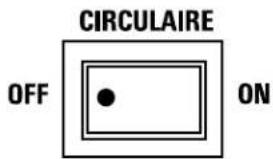
CIRCULAIRE (on some models)
For fixed side-to-side air direction, set the Circulaire switch to ON until the desired air direction is obtained, then move it to OFF.
For continuous side-to-side air circulation (cool settings only), set the Circulaire switch to ON.
text_image
CIRCULAIRE OFF ONAir Direction—Up and Down
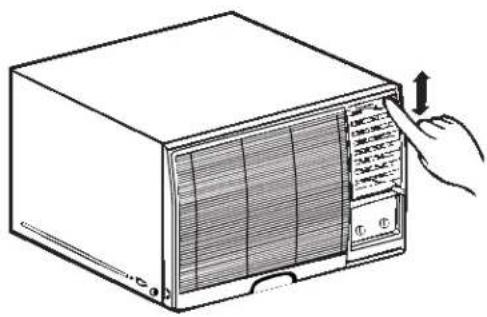
Fingertip pressure on the bank of horizontal louvers adjusts the air direction up or down.
natural_image
Line drawing of a portable air conditioner unit with a hand pointing to the front panel (no text or symbols)Water Drain Valve
When the outside temperature drops below 58^ F and the unit is set for heating, a drain valve opens up to release water from the base pan. This is normal and prevents water from freezing in the base pan and interfering with the outdoor fan.
Care and cleaning of the air conditioner.
Grille and Case
Turn the air conditioner off and remove the plug from the wall outlet before cleaning.
To clean, use water and a mild detergent. Do not use bleach or abrasives.
Outdoor Coils
The coils on the outdoor side of the air conditioner should be checked regularly. If they are clogged with dirt or soot they may be professionally cleaned.

natural_image
Line drawing of a wall-mounted air conditioner unit mounted on a shelf (no text or symbols)Air Filter
The air filter behind the front grille should be checked and cleaned at least every 30 days or more often if necessary.
Clean the filter with warm, soapy water. Rinse and let the filter dry before replacing it.
⚠️ CAUTION: DO NOT operate the air conditioner without a filter because dirt and lint will clog it and reduce performance.
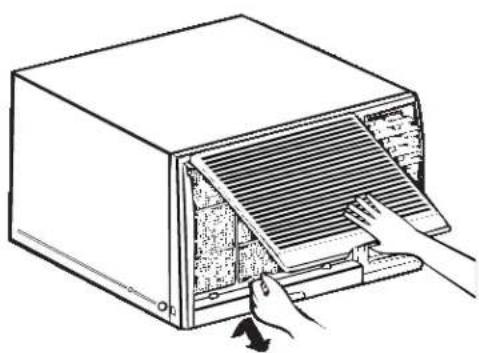
To remove (on some models):
1 Open the inlet grille upward by pulling out the bottom of the inlet grille.
2 Using the tab, pull up slightly on the filter to release it and pull it down.
natural_image
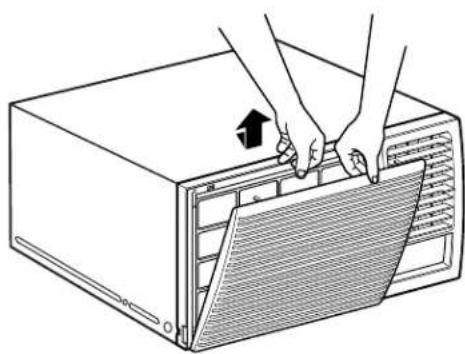
Illustration of a computer oven with a hand inserting a fan into the rack (no text or symbols)To remove (on some models):
1 Open the inlet grille downward by pulling out the top of the inlet grille.
2 Using the tab, push down slightly on the filter to release it and pull it up.
natural_image
Illustration of hands installing or adjusting a ventilation grille on an air conditioner unit (no text or symbols visible)Installation Instructions
Air Conditioner

Questions? Call 800.GE.CARES (800.432.2737) or Visit our Website at: ge.com

BEFORE YOU BEGIN
Read these instructions completely and carefully.
- IMPORTANT — Save these instructions for local inspector's use.
• IMPORTANT — Observe all governing codes and ordinances. - Note to Installer – Be sure to leave these instructions with the Consumer.
- Note to Consumer – Keep these instructions for future reference.
- Skill level – Installation of this appliance requires basic mechanical skills.
- Completion time – Approximately 1 hour
- We recommend that two people install this product.
- Proper installation is the responsibility of the installer.
- Product failure due to improper installation is not covered under the Warranty.

ELECTRICAL REQUIREMENTS

Some models require a 115/120-volt a.c., 60 Hz grounded outlet protected with a 15-amp time delay fuse or circuit breaker.
The 3-prong grounding plug minimizes the possibility of electric shock hazard. If the wall outlet you plan to use is only a 2-prong outlet, it is your responsibility to have it replaced with a properly grounded 3-prong wall outlet.

Some models require 230/208-volt a.c., protected with a time delay fuse or circuit breaker. These models should be installed on their own single branch circuit for best performance and to prevent overloading house or apartment wiring circuits, which could cause a possible fire hazard from overheating wires.
▲CAUTION:
Do not, under any circumstances, cut or remove the third (ground) prong from the power cord.
Do not change the plug on the power cord of this air conditioner.
Aluminum house wiring may present special problems—consult a qualified electrician.
TOOLS YOU WILL NEED
natural_image
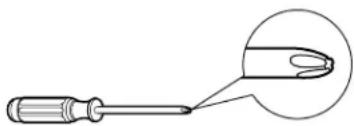
Illustration of a screwdriver with a magnified close-up showing the tip (no text or symbols)Phillips head screwdriver

Flat-blade screwdriver


Ruler or tape measurePencil

Level

Scissors or knife
Power cord includes a current interrupter device. A test and reset button is provided on the plug case. The device should be tested on a periodic basis by first pressing the TEST button and then the RESET button. If the TEST button does not trip or if the RESET button will not stay engaged, discontinue use of the air conditioner and contact a qualified service technician.
text_image
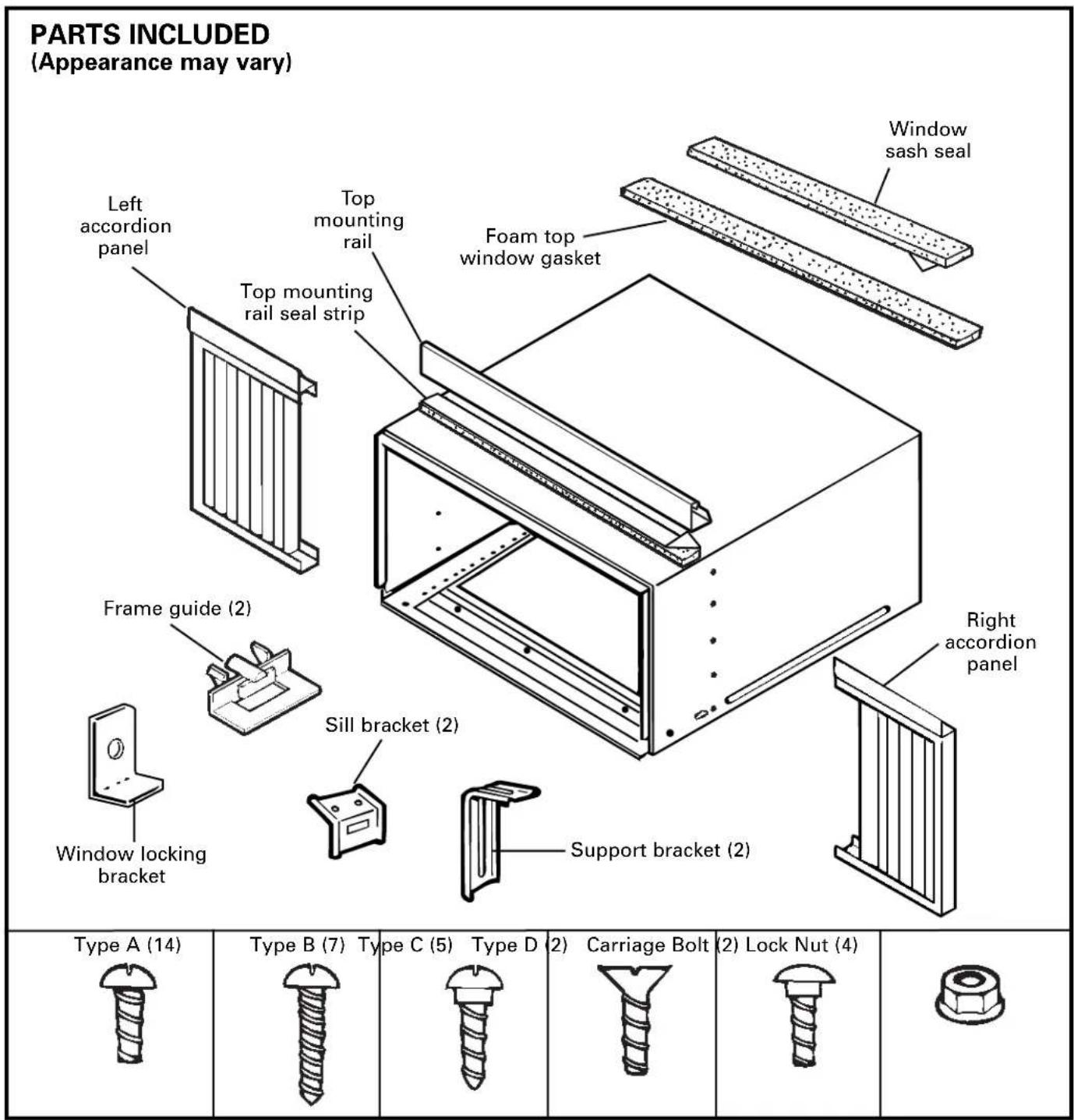
PARTS INCLUDED (Appearance may vary) Left accordion panel Top mounting rail Top mounting rail seal strip Foam top window gasket Window sash seal Frame guide (2) Sill bracket (2) Window locking bracket Right accordion panel Support bracket (2) Type A (14) Type B (7) Type C (5) Type D (2) Carriage Bolt (2) Lock Nut (4)① WINDOW REQUIREMENTS
• These instructions are for a standard double-hung window. You will need to modify them for other types of windows.
- The air conditioner can be installed without the accordion panels if needed to fit in a narrow window. See the window opening dimensions.
- All supporting parts must be secured to firm wood, masonry or metal.
- The electrical outlet must be within reach of the power cord.

text_image
18" min. 29" to 41" (With accordion panels) 27" min.(Without accordion panels)
② STORM WINDOW REQUIREMENTS
A storm window frame will not allow the air conditioner to tilt toward the outside, and will keep it from draining properly. To adjust for this, attach a piece of wood to the stool.
WOOD PIECES-
WIDTH: 2"
LENGTH: Long enough to fit inside the window frame.
THICKNESS: To determine the thickness, place a piece of wood on the stool to make it 1/2" higher than the top of the storm window frame.
Attach securely with nails or screws provided by the installer.

text_image
1/2" higher than frame Storm window frame Wood Stool③ REMOVE THE AIR CONDITIONER FROM THE CASE
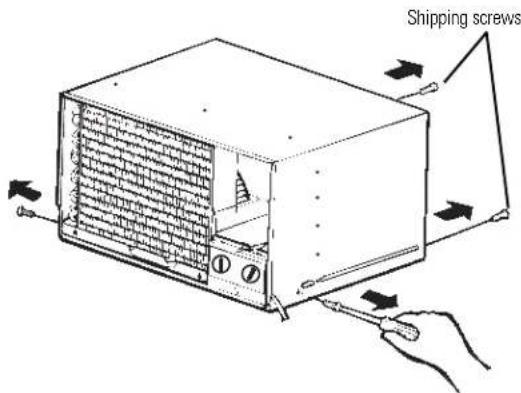
A Remove the 2 shipping screws from the back of the case.
B Remove the 2 screws on each side of the case. Keep these for later use.
text_image
Shipping screwsC Slide the air conditioner from the case by gripping the base pan handle and pulling forward while bracing the case.

natural_image
Diagram of a computer heat exchanger with cooling fins and fan (no text or symbols)④ PREPARE THE WINDOW AND THE CASE
A Cut the window sash seal to the proper length. Peel off the backing and attach the seal to the underside of the window sash.

natural_image
Technical line drawing of a structural frame with supports and a curved cutout (no text or symbols)4 PREPARE THE WINDOW AND THE CASE (CONT.)
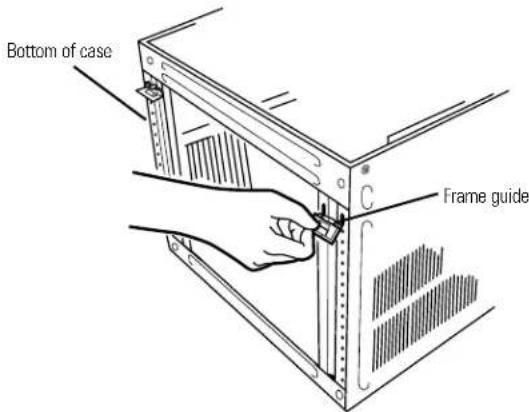
B Carefully insert the plastic frame guides into the bottom of the case on each side.
text_image
Bottom of case Frame guideC Remove the backing from the top mounting rail seal strip and attach it to the bottom of the top mounting rail.

natural_image
Technical line drawing of a two-layered structural beam or panel (no text or symbols)D Install the top mounting rail with 3 type A screws on the inside of the case. Insert the frames for the accordion panels into the top mounting rail and the frame guides. Attach the accordion panels to the side of the case using 5 type A screws on each side.

text_image
Top mounting rail Frame guides5 PREPARE THE WINDOW
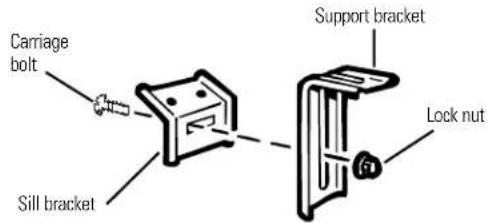
A Loosely attach the sill brackets to the support brackets using the 2 carriage bolts and 2 lock nuts.
text_image
Carriage bolt Sill bracket Support bracket Lock nutB Open the window and mark the centerline of the window stool. Measure and mark 11" to the left and right of the centerline.

text_image
Centerline 11" 11"6 INSTALL THE CASE IN THE WINDOW
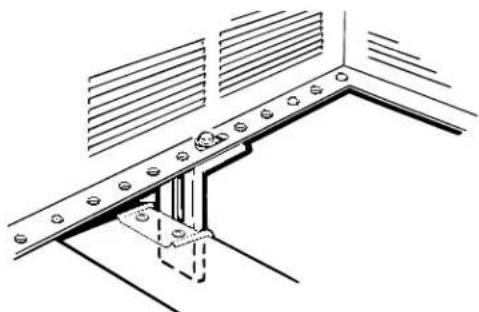
A Align the inside edge of the sill brackets with the 11"marks from the centerline and attach them to the window sill using 2 type B screws on each side.
B Carefully place the case on the window stool aligning the center front on the bottom with the centerline marked on the window stool. Close the window, making sure the window sash is behind the top mounting rail.
C Using the larger diameter hole in the case, attach the brackets to the case using two type D screws and 2 lock nuts on each side.
natural_image
Technical line drawing of a structural bracket with mounting holes and slatted panels (no text or symbols)⑥ INSTALL THE CASE IN THE WINDOW (CONT.)
D Adjust the carriage bolts and the lock nuts in each support so that the case is installed with a slight tilt to the outside. Use a level; about 1/3 bubble will be the correct case slant to the outside. Tighten the bolts.
CAUTION: DO NOT drill a hole in the base pan. The unit is designed to operate with approximately 1/2 "of water in the base pan.
E Secure the case to the window stool by using 3 type B screws.

natural_image
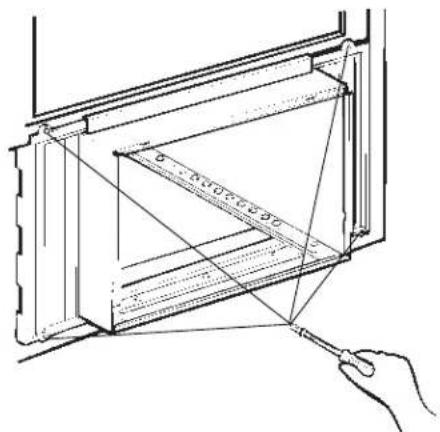
Technical line drawing of a structural frame with internal components and mounting holes (no text or symbols)F Pull the accordion panels to each window sash track. Attach them on each side to the window sash and the window stool using 4 type C screws.
text_image
Technical diagram showing a hand holding a tool interacting with a structural frame, with dimension lines and angle markings.7 INSTALL A SUPPORT BRACKET AND THE FOAM TOP WINDOW GASKET
A Attach a support bracket with a Type C screw.

natural_image
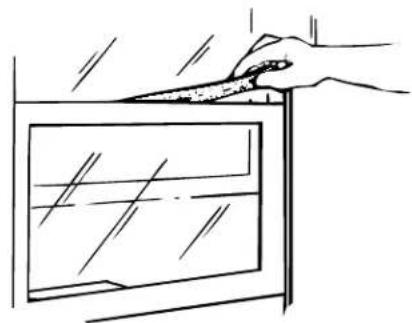
Line drawing of a screwdriver inserted into a bracket on a table (no text or symbols)B Cut the foam top window gasket to the window width.
C Stuff the foam between the glass and the window to prevent air and insects from getting into the room.
natural_image
Line drawing of a hand holding a knife above a window with liquid, no text or symbols present⑧ INSTALL THE AIR CONDITIONER IN THE CASE
A Slide the air conditioner into the case. Reinstall the 2 screws removed earlier on each side of the case.
B Before installing the front grille, pull out the vent control lever located above the unit control knobs, as shown.

natural_image
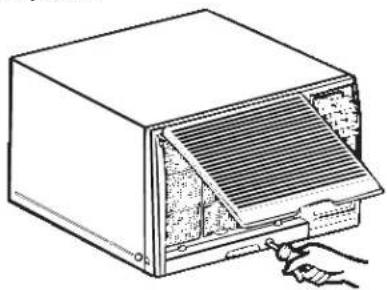
Technical line drawing of a mechanical clamp or bracket assembly (no text or symbols)C Attach the front grille to the case by inserting the tabs on the grille into the slots on the front of the case. Push the grille in until it snaps into place.

text_image
Guide the lever carefully through the grille as you push it in.D Lift the inlet grille and secure the front frame with a type A screw through the front grille. Lower the inlet grille back into place.
natural_image
Line drawing of a computer oven with a handle inserting a tray (no text or symbols)
Troubleshooting Tips Save time and money! Review the chart below first and you may not need to call for service.
Problem Possible Causes What To Do
| Air conditioner does not start is unplugged into the outlet. | The air conditioner | • Make sure the air conditioner plug is pushed completely |
| The fuse is blown/circuit breaker is tripped the fuse or reset the breaker. | • Check the house fuse/circuit breaker box and replace the breaker. | |
| Power failure | • The unit will automatically re-start in the settings last used after the power is restored.• There is a protective time delay (approximately 3 minutes) to prevent tripping of the compressor overload. For this reason, the unit may not start normal cooling or heating for 3 minutes after it is turned back on. | |
| The current interrupter device is tripped | • Press the RESET button located on the power cord plug.• If the RESET button will not stay engaged, discontinue use of the air conditioner and contact a qualified service technician. | |
| Air conditioner freezing up | Ice blocks the air flow and stops the air conditioner from cooling the room | • Set the mode control at FAN or HIGH COOL with the temp control at a warmer setting. |
| Air conditioner does not cool as it should | Airflow is restricted | • Make sure there are no curtains, blinds or furniture blocking the front of the air conditioner. |
| The temp control may not be set correctly | • Turn the temperature knob clockwise as far as possible. | |
| The air filter is dirty | • Clean the filter at least every 30 days. See the Operating Instructions section. | |
| The room may have been hot | • When the air conditioner is first turned on you need to allow time for the room to cool down. | |
| Cold air is escaping | • Check for open furnace floor registers and cold air returns.• Set the air conditioner's vent to the closed position. | |
| Cooling coils have iced up | • See “Air conditioner freezing up” below. | |
| Air conditioner does not warm as it should | Airflow is restricted | • Make sure there are no curtains, blinds or furniture blocking the front of the air conditioner. |
| The temp control may not be set low enough | • Turn the knob counterclockwise as far as possible. The lowest setting provides maximum warming. | |
| The air filter is dirty | • Clean the filter at least every 30 days. See the Operating Instructions section. | |
| The room may have been cold | • When the air conditioner is first turned on, you need to allow time for the room to warm up. | |
| Warm air is escaping | • Check for open furnace floor registers and cold air returns. |
Before you call for service...

Troubleshooting Tips
Problem Possible Causes What To Do
| Water drips outside | Excessively hot and humid weather | • This is normal. |
| Water drips indoors | The air conditioner is not tilted to the outside slants slightly from the case front to the rear. | • For proper water disposal, make sure the air conditioner |
| Water collects in base pan | Moisture is removed from indoor air and drains into rear of a cabinet where a fan blows it against the outdoor condenser coil | • This is normal for a short period in areas with little humidity; normal for a longer period in very humid areas. |
Normal Operating Sounds
You may hear a pinging noise caused by water being picked up and thrown against the condenser on rainy days or when the humidity is high. This design feature helps remove moisture and improve efficiency.
- You may hear the thermostat click when the compressor cycles on and off.
Water will collect in the base pan during high humidity or on rainy days. The water may overflow and drip from the outdoor side of the unit.
The fan may run even when the compressor does not.
Notes.
GE Service Protection Plus™
GE, a name recognized worldwide for quality and dependability, offers you Service Protection Plus™—comprehensive protection on all your appliances—No Matter What Brand!
Benefits Include:
- Backed by GE
- All brands covered
- Unlimited service calls
- All parts and labor costs included
• No out-of-pocket expenses
• No hidden deductibles
• One 800 number to call
We'll Cover Any Appliance. Anywhere. Anytime.\*
You will be completely satisfied with our service protection or you may request your money back on the remaining value of your contract. No questions asked. It's that simple.
Protect your refrigerator, dishwasher, washer and dryer, range, TV, VCR and much more—any brand! Plus there's no extra charge for emergency service and low monthly financing is available. Even icemaker coverage and food spoilage protection is offered. You can rest easy, knowing that all your valuable household products are protected against expensive repairs.
Place your confidence in GE and call us in the U.S. toll-free at 800.626.2224 for more information.
*All brands covered, up to 20 years old, in the continental U.S.

Cut here
Please place in envelope and mail to:
General Electric Company
Warranty Registration Department
P.O. Box 32150
Louisville, KY 40232-2150
Consumer Product Ownership Registration
Dear Customer:
Thank you for purchasing our product and thank you for placing your confidence in us.
We are proud to have you as a customer!
Follow these three steps to protect your new appliance investment:

Complete and mail
your Consumer
Product Ownership
Registration today.
Have the peace of
mind of knowing we
can contact you in
the unlikely event of a
safety modification.

text_image
2After mailing the
registration below,
store this document
in a safe place. It
contains information
you will need should
you require service.
Our service number is
800.GE.CARES
(800.432.2737).

text_image
3Read your Owner's
Manual carefully.
It will help you
operate your new
appliance properly.
Model Number Serial Number

natural_image
Two identical horizontal lines with tick marks, no text or symbols presentImportant: If you did not get a registration card with your product, detach and return the form below to ensure that your product is registered, or register online at ge.com.

Consumer Product Ownership Registration

Model Number Serial Number

natural_image
Two identical horizontal lines with tick marks, no text or symbols present
text_image
Mr. Mr. Ms. Mrs. Miss First Name Last Name
text_image
Street Address
text_image
Apt. # E-mail Address* _
text_image
City State Zip Code
text_image
Date Placed In Use Month Day Year Phone Number
GE Consumer & Industrial
Appliances
General Electric Company
Louisville, KY 40225
ge.com
* Please provide your e-mail address to receive, via e-mail, discounts, special offers and other important communications from GE Appliances (GEA).
□ Check here if you do not want to receive communications from GFA's carefully selected partners.
FAILURE TO COMPLETE AND RETURN THIS CARD DOES NOT DIMINISH YOUR WARRANTY RIGHTS.
For information about GEA's privacy and data usage policy, go to ge.com and click on "Privacy Policy" or call 800.626.2224.
GE Air Conditioner Warranty.
All warranty service provided by our Factory Service Centers, or an authorized Customer Care® technician. To schedule service, on-line, 24 hours a day, visit us at ge.com, or call 800.GE.CARES (800.432.2737). Please have serial number and model number available when calling for service.
Staple your receipt here. Proof of the original purchase date is needed to obtain service under the warranty.
For The Period Of: GE Will Replace:
| One YearFrom the date of the original purchase service | Any part of the air conditioner which fails due to a defect in materials or workmanship.During this limited one-year warranty, GE will also provide, free of charge, all labor and related to replace the defective part. |
| Five YearsFrom the date of the original purchase | Any part of the sealed refrigerating system (the compressor, condenser, evaporator and all connecting tubing) which fails due to a defect in materials or workmanship. During this four-year limited additional warranty, GE will also provide, free of charge, all labor and related to replace the defective part. |
What Is Not Covered:
| Service trips to your home to teach you how to use the product. | Replacement of house fuses or resetting of circuit breakers. |
| Improper installation, delivery or maintenance. If you have an installation problem, or if the air conditioner is of improper cooling capacity for the intended use, contact your dealer or installer. You are responsible for providing adequate electrical connecting facilities. | Failure due to corrosion on models not corrosion-protected. |
| Damage to the product caused by improper power supply voltage, accident, fire, floods or acts of God. | |
| Failure of the product resulting from modifications to the product or due to unreasonable use including failure to provide reasonable and necessary maintenance. | Incidental or consequential damage caused by possible defects with this air conditioner. |
| Damage caused after delivery. | |
| In commercial locations labor necessary to move the unit to a location where it is accessible for service by an individual technician. | Product not accessible to provide required service. |
EXCLUSION OF IMPLIED WARRANTIES—Your sole and exclusive remedy is product repair as provided in this Limited Warranty. Any implied warranties, including the implied warranties of merchantability or fitness for a particular purpose, are limited to one year or the shortest period allowed by law.
This warranty is extended to the original purchaser and any succeeding owner for products purchased for home use within the USA. If the product is located in an area where service by a GE Authorized Servicer is not available, you may be responsible for a trip charge or you may be required to bring the product to an Authorized GE Service location for service. In Alaska, the warranty excludes the cost of shipping or service calls to your home.
Some states do not allow the exclusion or limitation of incidental or consequential damages. This warranty gives you specific legal rights, and you may also have other rights which vary from state to state. To know what your legal rights are, consult your local or state consumer affairs office or your state's Attorney General.
GE Appliances Website ge.com
Have a question or need assistance with your appliance? Try the GE Appliances Website 24 hours a day, any day of the year! For greater convenience and faster service, you can now download Owner's Manuals, order parts, catalogs, or even schedule service on-line. You can also "Ask Our Team of Experts" your questions, and so much more...
Schedule Service ge.com
Expert GE repair service is only one step away from your door. Get on-line and schedule your service at your convenience 24 hours any day of the year! Or call 800.GE.CARES (800.432.2737) during normal business hours.
Real Life Design Studio ge.com
GE supports the Universal Design concept—products, services and environments that can be used by people of all ages, sizes and capabilities. We recognize the need to design for a wide range of physical and mental abilities and impairments. For details of GE's Universal Design applications, including kitchen design ideas for people with disabilities, check out our Website today. For the hearing impaired, please call 800.TDD.GEAC (800.833.4322).

Extended Warranties ge.com
Purchase a GE extended warranty and learn about special discounts that are available while your warranty is still in effect. You can purchase it on-line anytime, or call 800.626.2224 during normal business hours. GE Consumer Home Services will still be there after your warranty expires.

Parts and Accessories ge.com
Individuals qualified to service their own appliances can have parts or accessories sent directly to their homes (VISA, MasterCard and Discover cards are accepted). Order on-line today, 24 hours every day or by phone at 800.626.2002 during normal business hours.
Instructions contained in this manual cover procedures to be performed by any user. Other servicing generally should be referred to qualified service personnel. Caution must be exercised, since improper servicing may cause unsafe operation.

Contact Us ge.com
If you are not satisfied with the service you receive from GF., contact us on our Website with all the details including your phone number, or write to: General Manager, Customer Relations
GE Appliances, Appliance Park
Louisville, KY 40225

Register Your Appliance ge.com
Register your new appliance on-line—at your convenience! Timely product registration will allow for enhanced communication and prompt service under the terms of your warranty, should the need arise. You may also mail in the pre-printed registration card included in the packing material.