Power Flip Case HC B100 - Smartphone HTC - Free user manual and instructions
Find the device manual for free Power Flip Case HC B100 HTC in PDF.


User questions about Power Flip Case HC B100 HTC
0 question about this device. Answer the ones you know or ask your own.
Ask a new question about this device
Download the instructions for your Smartphone in PDF format for free! Find your manual Power Flip Case HC B100 - HTC and take your electronic device back in hand. On this page are published all the documents necessary for the use of your device. Power Flip Case HC B100 by HTC.
USER MANUAL Power Flip Case HC B100 HTC
© 2013 HTC Corporation.
All rights reserved.
HTC, the HTC logo and HTC One
are trademarks of HTC Corporation.
http://www.htc.com/support
htc
About your HTC Power Flip Case
Your HTC Power Flip Case extends the length of time you can use your HTC One max on a single charge.

text_image
Diagram of a smartphone showing three labeled parts: front, back, and side views with numbered annotations.① battery
2 battery contacts
3 kickstand hinge
Important!
• Do not bend or warp the front cover or the hinge.
- Do not spill liquid onto HTC Power Flip Case. Doing so may damage the circuitry.
- HTC Power Flip Case is designed to supplement the battery on the HTC One max. It is not designed to charge the phone battery or power a phone with an empty battery.
Inserting your HTC One max into HTC Power Flip Case
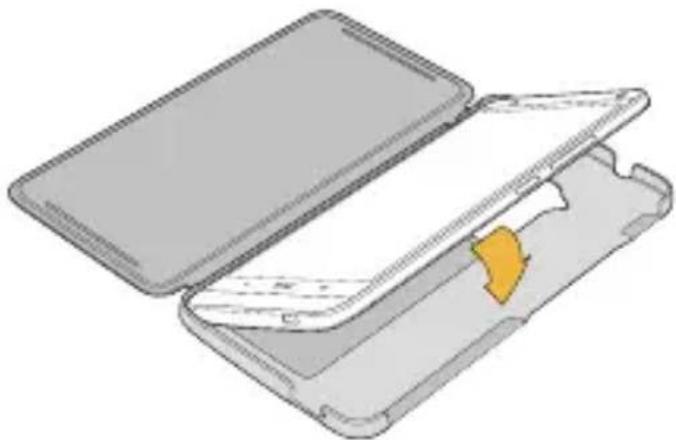
Align the contacts on your HTC One max with the corresponding battery contacts on the inside of the back cover of HTC Power Flip Case.
natural_image
3D illustration of a mechanical component with an open lid and internal structure, showing no text or symbols.The fit should be snug while leaving all of the ports and hardware buttons accessible. When the case is properly attached, the battery status icon on the phone will change to 📄
Charging your HTC Power Flip Case
The battery in HTC Power Flip Case will charge slowly while you charge HTC One max. Just charge your phone with HTC Power Flip Case installed.
Note:
It will take longer for HTC One max to reach a full charge when HTC Power Flip Case is attached.
Using the kickstand
Flip the back cover out and rest the edge on the front cover of HTC Power Flip Case.
