
CON-AUDXTRACT - Audio accessory KanexPro - Free user manual and instructions
Find the device manual for free CON-AUDXTRACT KanexPro in PDF.


| Product Type | HDMI Audio Extractor / Decoder |
| Model | CON-AUDXTRACT |
| Brand | KanexPro |
| Dimensions (W x H x D) | 132 mm x 22 mm x 77 mm |
| Weight | 172 g |
| Power Supply | DC 12V 1A |
| Power Consumption | 4.5 W (max) |
| Input Video | 1× HDMI (Type A female) |
| Output Video | 1× HDMI (Type A female) |
| Output Audio | 1× Optical (Toslink), 1× Coaxial (RCA), 1× Analog Stereo (RCA L/R) |
| Max Video Resolution | 4K×2K @ 60 Hz (4:4:4 8-bit) / 4K×2K @ 30 Hz (4:4:4 10/12/16-bit) |
| HDCP Version | HDCP 2.2 compliant |
| Supported Audio Formats (Input) | LPCM, Dolby Digital 5.1, Dolby TrueHD, DTS, DTS-HD 5.1 |
| Decoded Audio Output | PCM 2.0 (stereo) via Optical, Coaxial, and RCA |
| Audio Extraction Mode | Downmix (PCM2.0) or Bypass (native digital pass-through) |
| HDMI Cable Length | Up to 15 m (AWG24) |
| Operating Temperature | -10 to +55 °C |
| Storage Temperature | -20 to 70 °C |
| Humidity (Operating/Storage) | 10 – 90% (non-condensing) |
| Included Accessories | Power adapter (DC 12V 1A), Mounting ears + screws (2), Plastic cushions (4), User manual |
| Warranty | 3 years (limited) |
| Firmware Update | Via Micro-USB port (front panel) |
Frequently Asked Questions - CON-AUDXTRACT KanexPro
User questions about CON-AUDXTRACT KanexPro
0 question about this device. Answer the ones you know or ask your own.
Ask a new question about this device
Download the instructions for your Audio accessory in PDF format for free! Find your manual CON-AUDXTRACT - KanexPro and take your electronic device back in hand. On this page are published all the documents necessary for the use of your device. CON-AUDXTRACT by KanexPro.
USER MANUAL CON-AUDXTRACT KanexPro
Extract multi-channel audio from HDMI
All Rights Reserved
Version: CON-AUDXTRACT_2018V1.1
Preface
Read this user manual carefully before using the product. Pictures are shown in this manual for reference only. Different models and specifications are subject to real product.
This manual is only for operation instruction, please contact the local distributor for maintenance assistance. The functions described in this version were updated till February, 2018. In the constant effort to improve the product, we reserve the right to make functions or parameters changes without notice or obligation. Please refer to the dealers for the latest details.
Trademarks
Product model and logo are trademarks. Any other trademarks mentioned in this manual are acknowledged as the properties of the trademark owner. No part of this publication may be copied or reproduced without the prior written consent.
FCC Statement
This equipment generates, uses and can radiate radio frequency energy and, if not installed and used in accordance with the instructions, may cause harmful interference to radio communications. It has been tested and found to comply with the limits for a Class B digital device, pursuant to part 15 of the FCC Rules. These limits are designed to provide reasonable protection against harmful interference in a commercial installation.
Operation of this equipment in a residential area is likely to cause interference, in which case the user at their own expense will be required to take whatever measures may be necessary to correct the interference
Any changes or modifications not expressly approved by the manufacture would void the user's authority to operate the equipment.

SAFETY PRECAUTIONS
To ensure the best performance from the product, please read all instructions carefully before using the device. Save this manual for further reference.
- Unpack the equipment carefully and save the original box and packing material for possible future shipment
- Follow basic safety precautions to reduce the risk of fire, electrical shock and injury to persons.
- Do not dismantle the housing or modify the module. It may result in electrical shock or burn.
- Using supplies or parts not meeting the products' specifications may cause damage, deterioration or malfunction.
• Refer all servicing to qualified service personnel. - To prevent fire or shock hazard, do not expose the unit to rain, moisture or install this product near water.
- Do not put any heavy items on the extension cable in case of extrusion.
- Do not remove the housing of the device as opening or removing housing may expose you to dangerous voltage or other hazards.
- Install the device in a place with fine ventilation to avoid damage caused by overheat.
- Keep the module away from liquids.
- Spillage into the housing may result in fire, electrical shock, or equipment damage. If an object or liquid falls or spills on to the housing, unplug the module immediately.
- Do not twist or pull by force ends of the optical cable. It can cause malfunction.
- Do not use liquid or aerosol cleaners to clean this unit. Always unplug the power to the device before cleaning.
- Unplug the power cord when left unused for a long period of time.
- Information on disposal for scrapped devices: do not burn or mix with general household waste, please treat them as normal electrical wastes.
Table of Contents
1. Introduction......4
1.1 Introduction to CON-AUDXTRACT 4
1.2 Features .... 4
1.3 Packing List....5
2. Panel Description ....6
2.1 Front Panel....6
2.2 Rear Panel 7
3. System Connection 8
3.1 Usage Precautions....8
3.2 System Diagram....8
3.3 Connection Procedure....9
4. Specification 10
- Panel Drawing 11
- Troubleshooting & Maintenance....12
- Customer Service .... 13
- Warranty 14
1. Introduction
1.1 Introduction to CON-AUDXTRACT
The KanexPro CON-AUDXTRACT is an audio converter used to extract the encoded multi-channel LPCM, Dolby Digital 5.1, DTS-HD 5.1 from HDMI sources to optical audio output and decode to 2 CHs analog stereo audio via RCA (L/R) and COAX outputs without any other external equipment.
Content from multi-channel sources such as Blu-ray players, set-top boxes and game consoles can be distributed to multi-channel and two-channel-capable zones simultaneously, ensuring compatibility, reducing system complexity and eliminating the expense of separate dedicated sources for each zone and you can listen to digital audio sources such as DVD and CD players or digital computer audio on your legacy analog sound system, preserving your current investment.
1.2 Features
- Ultra-thin design.
• Support 4K HDMI video source - HDCP2.2 compliant.
- Any input HD source can do audio extract by the OPTICAL, RCA (L/R) and COAX.
- Optical, Digital Coaxial and analog stereo audio outputs for connection to legacy AVRs and systems without HDMI support.
- Comprehensive audio format signal compatibility: LPCM, Dolby Digital 5.1,DTS-HD 5.1
- Plug and play functionality and simplicity eliminates the need for any setup, programming or configuration.
- Transmit 4Kx2K signal for 15m via AWG24 HDMI cable
• LED indicators show work status.
1.3 Packing List
- 1 x CON-AUDXTRACT
- 2 x Mounting Ears (with 2 Screws)
- 4 x Plastic Cushions
• 1 x Power Adapter (DC 12V 1A) - 1 x User Manual
Note: Please contact your distributor immediately if any damage or defect in the components is found.
2. Panel Description
2.1 Front Panel

| No. | Name | Description |
| 1 | Power LED | Turns red when DC power present. |
| 2 | HDMI IN Activity LED | Green when HDMI signal input. |
| 3 | HDMI OUT Activity LED | Green when HDMI signal output. |
| 4 | Dolby Activity LED | Green when Dolby audio signal input. |
| 5 | DTS Activity LED | Green when DTS audio signal input. |
| 6 | DOWNMIX Activity LED | Green when the digital audio is decoded to PCM2.0 to output via OPTICAL and COAX ports. |
| 7 | Bypass Activity LED | Green when the digital audio is allowed to pass through to the OPTICAL and COAX output ports without any decode operations. |
| 8 | SPDIF Activity Selector | Press this to select DOWNMIX or Bypass mode. |
| 9 | FW | Micro-USB port for firmware updating. |
2.2 Rear Panel
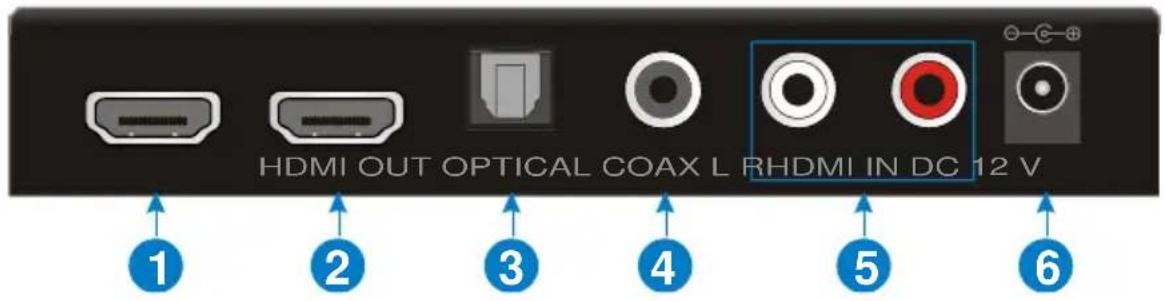
| No. | Name | Description |
| 1 | HDMI IN | HDMI signal input. |
| 2 | HDMI OUT | HDMI signal output. |
| 3 | OPTICAL | Optical audio output. |
| 4 | COAX | Coaxial audio output. |
| 5 | L/R | RCA (L/R) audio output. |
| 6 | DC 12V | Power input port. |
Note: Pictures shown in this manual are only for reference.
3. System Connection
3.1 Usage Precautions
- Verify all components and accessories included before installation.
- System should be installed in a clean environment with proper temperature and humidity.
- All of the power switches, plugs, sockets, and power cords should be insulated and safe.
- All devices should be connected before power on.
3.2 System Diagram

flowchart
graph TD
    subgraph Living Room
        A["Blu-Ray"] --> B["HDBaseT Matrix"]
        C["HDMI Audio Decoder"] --> B
        D["Amplifier TV Speaker"] --> B
        E["Video"] --> B
    end

    subgraph Bed Room
        F["TV"] --> G["HDBaseT Receiver"]
        H["Speaker"] --> I["HDMI Audio Decoder"]
    end

    B --> I
    style Living Room fill:#f9f,stroke:#333
    style Bed Room fill:#bbf,stroke:#333
3.3 Connection Procedure
• In the living room:
Step1. Connect a HDMI source (Blu-Ray) to HDMI input port of the HDBaseT Matrix with HDMI cable.
Step2. Connect the HDMI output of HDBaseT Matrix to the HDMI IN port of the Audio converter with HDMI cable.
Step3. Connect an HDMI display device to the HDMI OUT port of the Audio converter with HDMI cable.
Step4. Connect an AV Amplifier to OPTICAL/COAX/RCA port of the Audio converter with the corresponding audio cable.
Step5. Connect the CAT5e/6 cable between the HDBaseT Matrix and HDBaseT Receiver.
- In the Bed room:
Step1. Connect the HDBaseT Receiver to the HDMI IN port of the Audio converter with HDMI cable.
Step2. Connect an HDMI display device (HDTV) to the HDMI OUT port of the Audio converter with HDMI cable.
Step3. Connect a Speaker to OPTICAL/COAX/RCA port of the Audio converter with the corresponding audio cable.
Step4. Plug power adaptors.
- Specification
| Input & Output | |
| Input Signal | (1) HDMI |
| Input Connector | (1) Type A Receptacle |
| Output Signal | (1) HDMI; (1) OPTICAL; (1) COAX; (1) L/R; |
| OUTPUT Connector | (1) Type A Receptacle; (1) Toslink Receptacle;(1) Black RCA Receptacle; (1) Red & White RCAReceptacle; |
| General | |
| Maximum Video Compatibility | Deep Color 8/10/12/16 Bit at 1080p and 2160p/60 |
| HDMI Resolution | Up to 4Kx2K@60Hz |
| HDMI Embedded Audio | PCM ,Dolby Digital, Dolby TrueHD, DTS,DTS-HD |
| Decoded Audio | PCM2.0 |
| HDMI Cable | ≤15m AWG24 HDMI standard cable |
| Power Supply | Input: AC (50HZ, 60HZ) 100V-240V; Output:DC12V/1A |
| Maximum Power Consumption | 4.5W |
| Operating Temperature | -10 ~ +55°C |
| Storage Temperature | -20 ~ 70°C |
| Operating Humidity | 10 ~ 90% |
| Storage Humidity | 10 ~90% |
| Dimensions (W x H x D) | 132mm X 22mm X 77mm |
| Weight | 172g |
Note: All nominal levels are at ±10%.
5. Panel Drawing
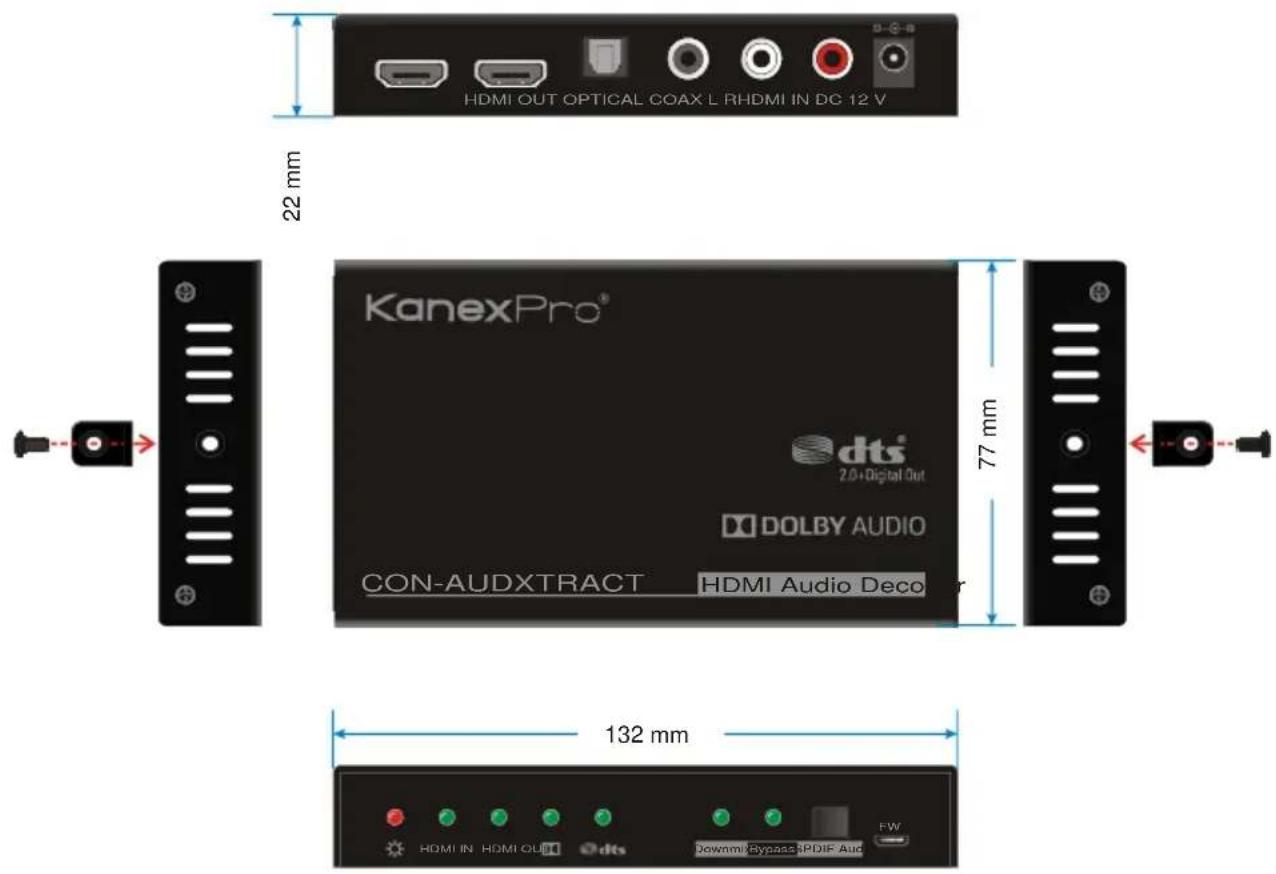
- Troubleshooting & Maintenance
| Problems | Potential Causes | Solutions |
| Output images in display show with ghost | Incorrect setting on the display | Check the display's setting |
| A cable of bad quality | Try another high quality connection cable | |
| No output image when switching | No signal at the input / output end | Check with oscilloscope or multimeter if there is any signal at the input / output end. |
| Fail or loose connection | Make sure the connection is good | |
| The extender is broken | Send it to authorized dealer for repairing. | |
| Static becomes stronger when connecting the video connectors | Bad grounding | Check the grounding and make sure it is connected well. |
If your problem still remaining after following the above troubleshooting steps, please contact your local dealer or distributor for further assistance.
7. Customer Service
The return of a product to our Customer Service implies the full agreement of the terms and conditions hereinafter. There terms and conditions may be changed without prior notice.
1) Warranty
The limited warranty period of the product is fixed three years.
2) Scope
These terms and conditions of Customer Service apply to the customer service provided for the products or any other items sold by authorized distributor only.
3) Warranty Exclusions:
- Warranty expiration.
• Factory applied serial number has been altered or removed from the product. - Damage, deterioration or malfunction caused by:
√ Normal wear and tear.
√ Use of supplies or parts not meeting our specifications.
√ No certificate or invoice as the proof of warranty.
√ The product model showed on the warranty card does not match with the model of the product for repairing or had been altered.
√ Damage caused by force majeure.
√ Servicing not authorized by distributor.
√ Any other causes which does not relate to a product defect.
- Shipping fees, installation or labor charges for installation or setup of the product.
4) Documentation:
Customer Service will accept defective product(s) in the scope of warranty coverage at the sole condition that the defeat has been clearly defined, and upon reception of the documents or copy of invoice, indicating the date of purchase, the type of product, the serial number, and the name of distributor.
Remarks: For further assistance or solutions, please contact your local distributor.
8. Warranty
A. LIMITED WARRANTY
KanexPro™ warrants that (a) its products (the “Product”) will perform greatly in agreement with the accompanying written materials for a period of 36 months (3 full years) from the date of receipt and (b) that the product will be free from defects in materials and workmanship under normal use and service for a period of 3 years.
B. CUSTOMER REMEDIES
KanexPro's entire liability and Customer's exclusive remedy shall be, at KanexPro option, either return of the price paid for the product, or repair or replacement of the Product that does not meet this Limited Warranty and which is returned to KanexPro with a copy of customers' receipt. This Limited Warranty is void if failure of the Product has resulted from accident, abuse, or misapplication. Any replacement Product will be warranted for the remainder of the original warranty period of 3 years, whichever is longer.
C. NO OTHER WARRANTIES
To the maximum extent permitted by applicable law, KanexPro disclaims all other warranties, either express or implied, including, but not limited to implied warranties of merchantability and fitness for a particular purpose, with regard to the product and any related written materials. This limited warranty gives customers specific legal rights. Customers may have other rights depending on the jurisdiction.
D. NO LIABILITY FOR DAMAGES
To the maximum extent permitted by applicable law, in no event shall KanexPro be liable for any damages whatsoever (including without limitation, special, incidental, consequential, or indirect damages for personal injury, loss of business profits, business interruption, loss of business information, or any other pecuniary loss) arising out of the use of or inability to use this product, even if KanexPro has been advised of the possibility of such damages.
KanexPro
1405 pioneer street
Brea, CA 92821
- Extract multi-channel audio from HDMI
- All Rights Reserved
- Preface
- Trademarks
- FCC Statement
- SAFETY PRECAUTIONS
- Table of Contents
- Introduction......4
- Panel Description ....6
- System Connection 8
- Specification 10
- Introduction
- Introduction to CON-AUDXTRACT
- Features
- Packing List
- Panel Description
- Front Panel
- Rear Panel
- System Connection
- Usage Precautions
- System Diagram
- Connection Procedure
- • In the living room:
- - In the Bed room:
- Panel Drawing
- Customer Service
- 1) Warranty
- 2) Scope
- 3) Warranty Exclusions:
- 4) Documentation:
- Warranty
- LIMITED WARRANTY
- CUSTOMER REMEDIES
- NO OTHER WARRANTIES
- NO LIABILITY FOR DAMAGES
- KanexPro
Brand : KanexPro
Model : CON-AUDXTRACT
Category : Audio accessory