ZSF6280 - Dishwasher Zanussi-Electrolux - Free user manual and instructions
Find the device manual for free ZSF6280 Zanussi-Electrolux in PDF.


| Type of product | Freestanding Dishwasher |
| Model | ZSF6280 |
| Brand | Zanussi-Electrolux |
| Dimensions (H x W x D) | 850 x 598 x 598 mm |
| Weight | 54 kg |
| Capacity | 12 place settings including serving dishes |
| Power supply | 230 V, 13 A, 2250 W |
| Water pressure | 1 - 10 bar (0.1 - 1.0 MPa) |
| Water connection | Cold or hot water up to 60 °C |
| Programs | Automatic, Eat-Load-Run, 70° Intensive, Energy, 45° Glass, Prewash |
| Main functions | Delay timer (1-19h), 3in1 detergent support, button lock, acoustic signal, language selection |
| Water softener | Manual and electronic adjustment (levels 1-10) |
| Noise level | Not specified (estimated <50 dB) |
| Energy consumption | 0.8 - 2.05 kWh per cycle depending on program |
| Water consumption | 4 - 24 litres per cycle depending on program |
| Drying system | Passive drying with fan on some programs |
| Safety features | Anti-flood system, child lock, door safety catch |
| Cleaning and maintenance | Self-cleaning filter system, removable spray arms |
| Spare parts availability | Service Force Centre (phone 0870 5 929 929) |
| Warranty | Standard manufacturer warranty (details in purchase documentation) |
Frequently Asked Questions - ZSF6280 Zanussi-Electrolux
User questions about ZSF6280 Zanussi-Electrolux
0 question about this device. Answer the ones you know or ask your own.
Ask a new question about this device
Download the instructions for your Dishwasher in PDF format for free! Find your manual ZSF6280 - Zanussi-Electrolux and take your electronic device back in hand. On this page are published all the documents necessary for the use of your device. ZSF6280 by Zanussi-Electrolux.
USER MANUAL ZSF6280 Zanussi-Electrolux
natural_image
Simple line drawing of a washing machine with no text or symbolsDear Customer,
Please read these user instructions carefully and keep them to refer to later.
Please pass the user instructions on to any future owner of the appliance.
The following symbols are used in the text:

Safety instructions
Warning! Notes that concern your personal safety.
Important! Notes that show how to avoid damage to the appliance.

Useful tips and hints

Environmental information
Contents
Operating Instructions 4
Safety 4
Diagram of Appliance 6
Control Panel.... 6
Switching on for the first time - setting the language. 7
Display 8
Basic operation....9
Adjusting an option/setting.... 10
Prior to Using for the First Time 10
Setting the Water Softener 10
Adding dishwasher Salt 12
Filling Up with Rinse Aid 13
Setting the acoustic signal: 14
In daily use.... 15
Loading cutlery and dishes.... 15
Adjusting the Height of the Upper Basket 19
Adding Detergent 20
Using 3in1 detergents.... 22
Selecting the dishwashing cycle (Cycle Table) 23
Starting a Dishwashing Cycle.... 25
Setting the Delay Timer.... 25
Switching Off the dishwasher 26
Button lock 26
Care and cleaning 27
What to do if ... 30
Resetting the language.... 30
Remedying small malfunctions.... 30
If the Dishwashing Results are not Satisfactory 32
Disposal 33
Technical data 34
Notes for Test Institutes 35
Installation and connection instructions.... 36
Safety Information for the Installation 36
Installing the Dishwasher 37
Connecting the dishwasher 39
Electrical Connection 41
Service and Spare Parts 43
Operating Instructions

Safety
Prior to using for the first time
- Follow the "Instructions for installation and connection".
Correct Use
- The dishwasher is only intended for washing domestic dishes.
- Additions or modifications to the dishwasher are not permitted.
- Use only special salt, detergent and rinse aid suitable for domestic dishwashers.
- Do not put any solvents in the dishwasher. This could cause an explosion.
Child Safety
- Keep packaging away from children. There is a risk of suffocation.
- Children often do not recognise the hazards associated with electrical appliances. Don't allow children to use the dishwasher unsupervised.
- Make sure that children and pets don't climb into the dishwasher. Could endanger life!
- Dishwasher detergents can cause chemical burns to the eyes, mouth and throat. Could endanger life! Comply with the safety instructions of the dishwasher detergent manufacturer.
- The water in the dishwasher is not for drinking. Risk of chemical burns.
General Safety
- Repairs to the dishwasher are only to be carried out by qualified/authorised service engineers.
- When the dishwasher is not being used, switch it off and shut off the water tap.
- Never unplug the appliance by pulling on the cable. Always pull the plug.
- Ensure that the door of the dishwasher is always closed when it is not being loaded or unloaded. In this way you will avoid anybody tripping over the open door and hurting themselves.
- Never sit or stand on the open door.
- If the dishwasher is located in a room where there may be a frost, remove the connection hose from the tap after each use of the dishwasher.
Dishwasher door safety catch
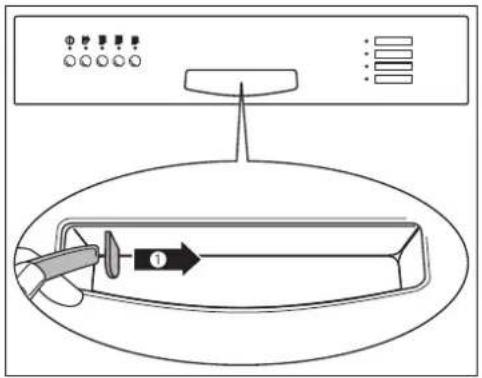
The dishwasher door has a safety catch which prevents children opening the dishwasher door by mistake.
The door safety catch is set as follows:
-
There is a plate (1) on the lefthand side of the door handle. You can secure the dishwasher against accidental opening by turning this plate clockwise (for example, with the handle of a spoon).
-
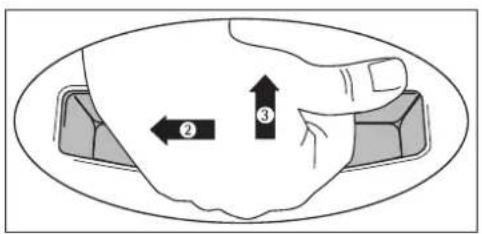
If the safety catch is engaged, to open the dishwasher you must
-first move the door handle to the left (2) until a slight resistance is felt.
-then press the door handle upwards (3) / forwards.
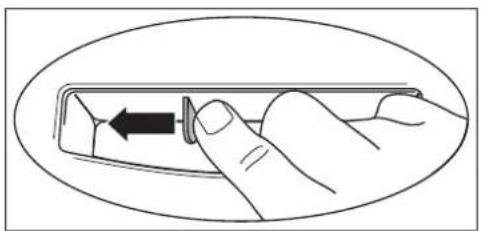
- You can disengage the dishwasher's door safety catch by pressing the plate all the way to the left with your finger.
natural_image
Illustration of a hand holding a small object inside an oval frame (no text or symbols)Diagram of Appliance
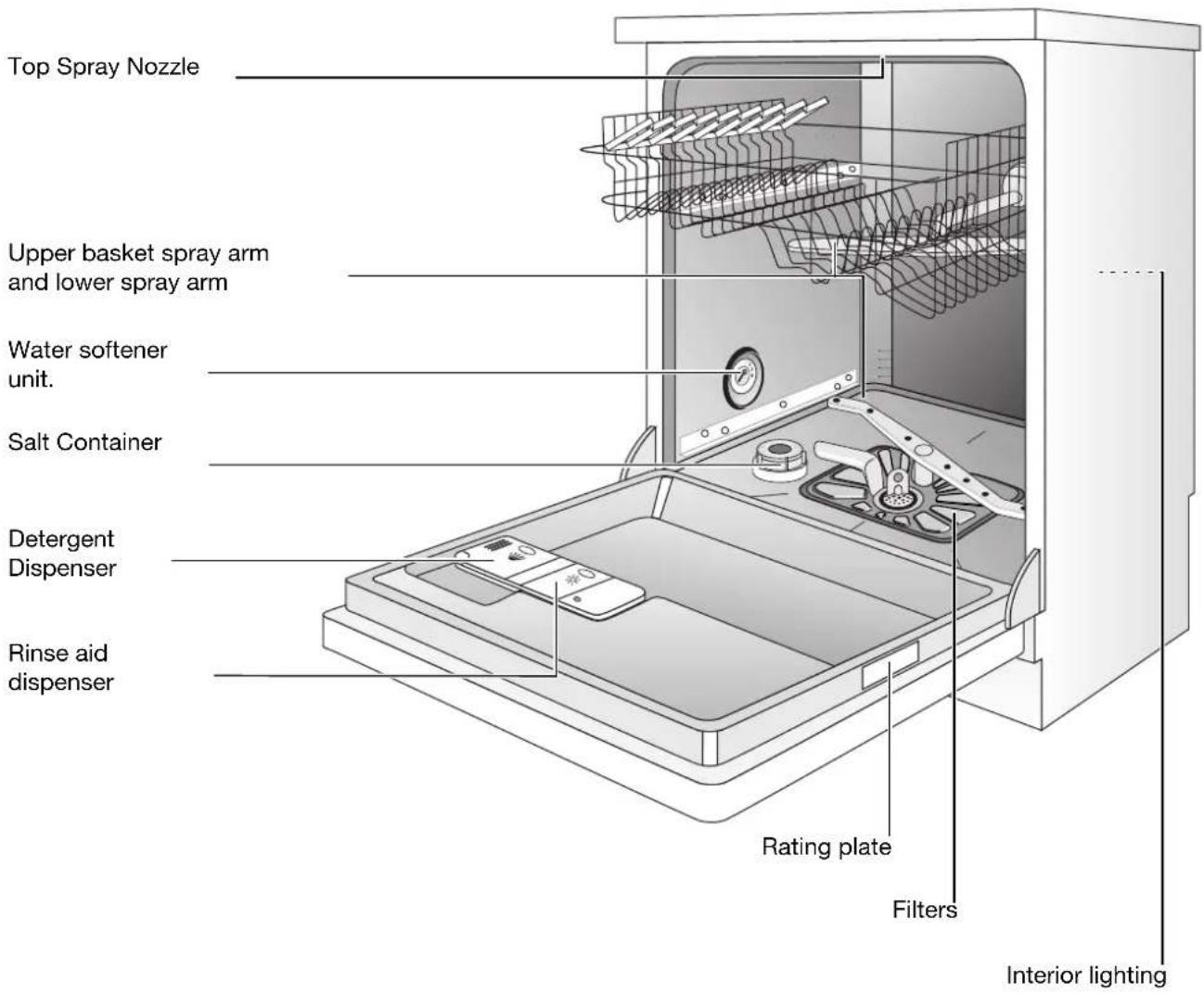
Control Panel
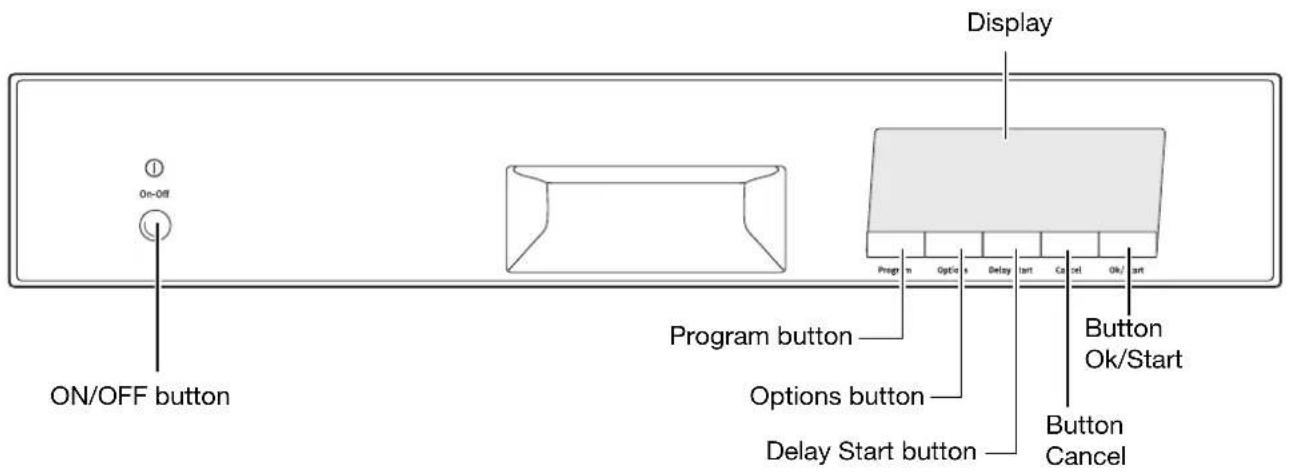
Switching on for the first time – setting the language
- Press the ON/OFF button.
In the display HELLO appears first.
As soon as the dishwasher is ready for use, this is replaced by LANGUAGE ENGLISH; the word ENGLISH flashes.
-
Using the Options button, select the desired language.
-
Press the Ok/Start button.
You have changed the display to the desired language. In the display SELECT PROGRAMME is displayed.

If you want to change the language at a later date, please see the section "Resetting the language".
LANGUAGE ENGLISH
LANGUAGE ENGLISH
CHOOSE PROGRAMME
Display
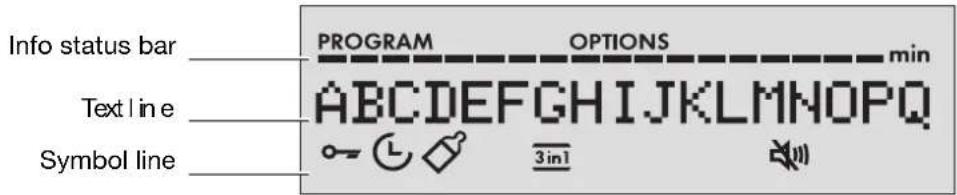
The info status bar consists of a row of individual lamps that is divided into two sections: the left section refers to the Programmes menu, the right section to the Options menu.
- In the Programmes and Options menus you can see at what stage within a cycle you currently are (the relevant lamp flashes).
- While a dishwashing cycle is running, the info status bar functions as a programme progress display. You can then see at any time how many programme stages are still to take place (including the current programme stage).
The text line indicates in the Programmes menu the name of the programme selected and the estimated length of the cycle in minutes.
- In the Options menu the name of the selected option or setting is displayed and the current value set.
- While a dishwashing cycle is running, in the text line you can see the name of the current programme stage and the estimated time remaining for the whole dishwashing cycle.
Using the Options button you can briefly display the name of the dishwashing cycle.
- If there is a fault, a message is displayed.
The symbols in the symbol line have the following meanings:
| -Permanently lit: Button lock is activated, no operation possible- Flashing: Button lock is temporarily cancelled; see section “Button lock” | |
| - option active | |
| -Programme selected for hygienic cleaning e.g. of babies’ bottles | |
| -3 IN 1 option active | |
| - Loudspeaker is switched off; no acoustic signals (BUZZER setting) |
Basic operation
This section contains basic information regarding the use of your dishwasher. Please read this section very carefully.
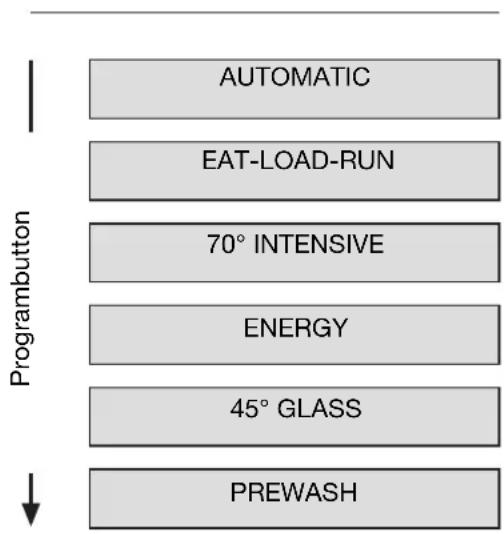
Programme menu
flowchart
graph TD
    A["AUTOMATIC"] --> B["EAT-LOAD-RUN"]
    B --> C["70° INTENSIVE"]
    C --> D["ENERGY"]
    D --> E["45° GLASS"]
    E --> F["PREWASH"]
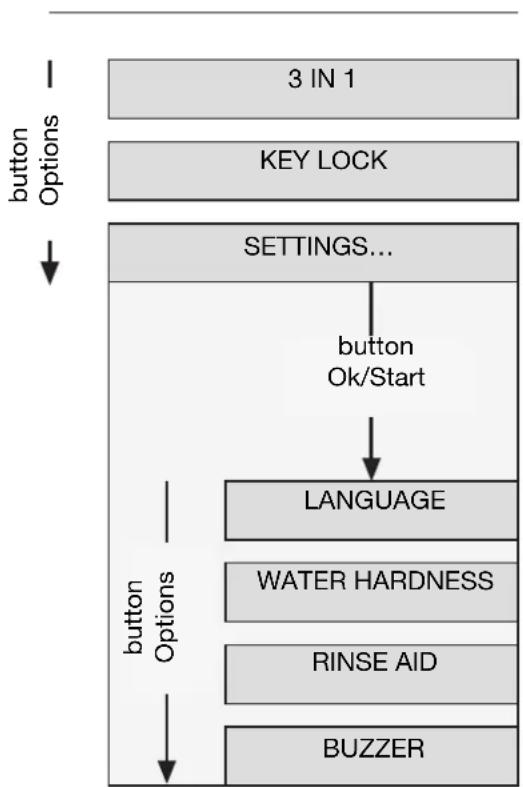
Options menu
flowchart
graph TD
    A["3 IN 1"] --> B["KEY LOCK"]
    B --> C["SETTINGS..."]
    C --> D["button Ok/Start"]
    D --> E["LANGUAGE"]
    E --> F["WATER HARDNESS"]
    F --> G["RINSE AID"]
    G --> H["BUZZER"]
    C --> I["button Options"]
The Programmes menu
•After switching on the dishwasher, you will find yourself in the Programmes menu.
- Select your dishwashing cycle here using the Program button. In the Info status bar your current position within the menu is shown.
The Options menu
- Using the Options button, go to the desired option. In the Info status bar your current position within the menu is displayed.
- For more detail about the options, refer to the respective sections; for more about the 3 IN 1 option, see the section "Before using the appliance for the first time".
- Use the Ok/Start button to switch from the menu item SETTINGS... to the Settings sub-menu.
The Settings sub-menu
Go to the desired setting here using the Options button. In the Info status bar your current position within the sub-menu is shown.
•LANGUAGE
Set the language of the text line in the display; see also section "Resetting the language".
•WATER HARDNESS
Set the value for water hardness electronically (value range 1 to 10).
•RINSE AID
If 3 IN 1 option is active: Activate or deactivate rinse aid inflow
If 3 IN 1 option is not active: Rinse aid inflow is always switched on, even if with RINSE AID the value OFF is selected.
•BUZZER
Activate or deactivate audible beep
i Using the Cancel button you can get back from any setting to the 3 IN 1 option.
Adjusting an option/setting
- To go to the option or setting that you want to adjust.
- Press the Ok/Start button. Currently set value flashes.
- Using the Options button, set the desired value.
- Press the Ok/Start button. Newly set value is permanently lit.
- Using the Options button, you can select another option or setting.

Using the Cancel button, you can cancel a setting procedure.
Prior to Using for the First Time

If you wish to use 3 in 1 detergent:
- First read the section "Using 3in1 detergents".
- Do not fill up with special salt or rinse aid.
If you do not use 3in1 detergent, before using for the first time
- Set the water softener
- Fill up with dishwasher salt
- Fill up with rinse aid
Setting the Water Softener
The water softener must be set manually and electronically:

To avoid scale deposits on the dishes and in the dishwasher, the dishes must be washed with soft water, i.e. water with a low lime content. The water softener must be set according to the table to the water hardness in the area where you live. Your local water company will be able to give you information about the water hardness in your area.
The dishwasher must be switched off.
Setting manually:
- Open the dishwasher door.
- Remove the lower basket from the dishwasher.
- Turn water hardness dial on the left wall of the dishwasher interior to O or 1 (see table).
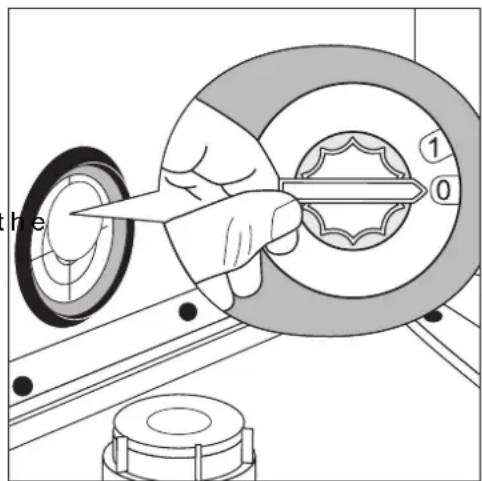
Setting electronically:
- Press the ON/OFF button.

If the name of a programme stage is displayed in the display, a dishwashing cycle is active. First of all you must cancel the dishwashing cycle:
-Press the Cancel button. CONFIRM CANCEL? appears in the display.
-Press the Ok/Start button. This cancels the dish-washing cycle.
-
Go to the WATER HARDNESS setting; see section "Adapting an option/setting".
-
Set WATER HARDNESS to the right setting.
If the water softener is set electronically to "1" this switches off the display of the REFILL SALT message.
| Water hardness Adjusting the hardness setting | ||||
| in °d1) | in mmol/l2) | Range Manual Electronic | ||
| 51 - 70 | 9,0 - 12,5 | IV | 1 | 103) |
| 43 - 50 | 7,6 - 8,9 | 9 | ||
| 37 - 42 | 6,5 - 7,5 | 8 | ||
| 29 - 36 | 5,1 - 6,4 | 7 | ||
| 23 - 28 | 4,0 - 5,0 | 0*2 | 6 | |
| 19 - 22 | 3,3 - 3,9 | III | 5 | |
| 15 - 18 | 2,6 - 3,2 | 4* | ||
| 11 - 14 1,9 - 2,5 II 3 | ||||
| 4 - 10 0,7 - 1,8 I/II | ||||
| below 4 | below 0.7 | I | 1no salt necessary | |
1) (°d) German degree, measure of the hardness of water
2) [mmol/l] millimol per litre, international unit for water hardness
3) On this setting the length of the dishwashing cycle may be slightly longer.
*) factory setting
Adding dishwasher Salt
To decalcify the water softener, it must be filled up with dishwasher salt. Use only special salt suitable for domestic dishwashers.
If you do not use 3 in1 detergent, fill up with dishwasher salt:
—Before using the dishwasher for the first time.
-If when starting a cycle the message REFILL SALT is displayed.
-
Open the door and remove the lower basket.
-
Unscrew the lid on the salt dispenser by turning it anti-clockwise.
-
Only when using the dishwasher for the first time:
Fill the salt dispenser with water.
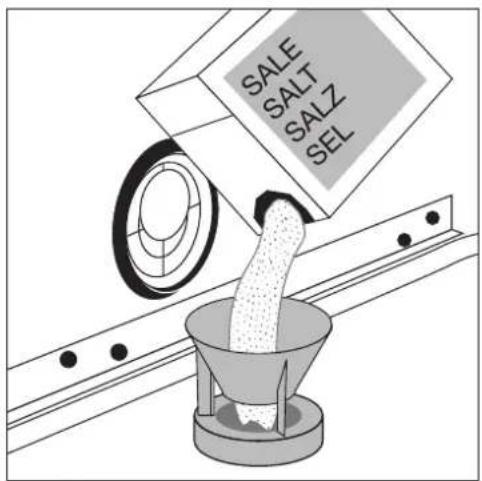
- Place the funnel (supplied) over the dispenser opening.
Fill the dispenser with dishwasher salt; the capacity of the dispenser is approx. 1.0-1.5 kg, depending on the size of the grains. Do not overfill the dispenser.

If water overflows when filling up with dish-washer salt, this is completely harmless.
- Clean away any salt remnants from the dispenser opening.
6.Screw the lid back on in a clockwise direction.
- Run a dishwashing cycle after filling the salt dispenser with dishwasher salt. This will wash away salt water and salt crystals that have been spilt.

Depending on the size of the grains, it can take several hours for the salt to dissolve in the water and for the message REFILL SALT not to be displayed when starting a dishwashing cycle.
Filling Up with Rinse Aid
Rinse aid causes the rinse water to flow easily from the crockery leaving gleaming dishes and glassware.
If you do not use 3in1 detergent, fill up with rinse aid:
—Before using the dishwasher for the first time.
-If when starting a dishwashing cycle the message REFILL RINSE AID is displayed.
Use only special rinse aid for dishwashers.
1.Open the door.
The rinse aid compartment is located on the inside of the dishwasher door.
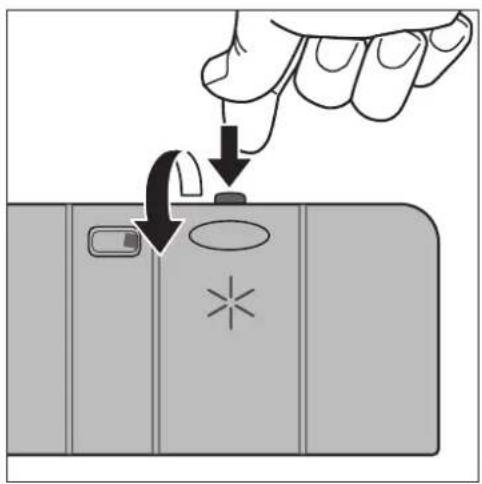
- Press the release button on the rinse aid compartment.
3.Open the cover.
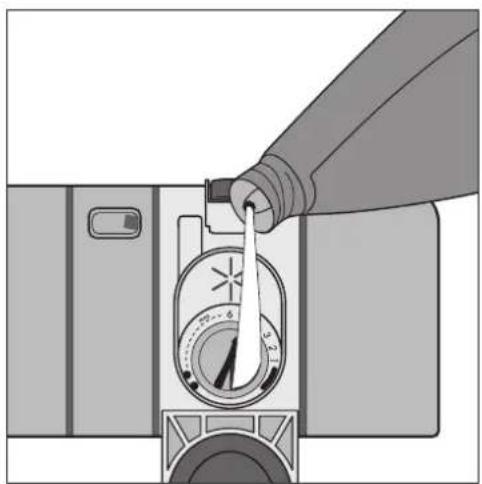
- Pour rinse aid in slowly right up to the broken "max" line;
this corresponds to a volume of approx. 140 ml when full.
-
Press the lid shut until it clicks into place.
-
Wipe up any spilt rinse aid with a cloth. Otherwise there will be too much foam when rinsing.
natural_image
Illustration of a hand pouring liquid into a camera mode dial (no text or symbols visible)Setting the Amount of Rinse Aid Required

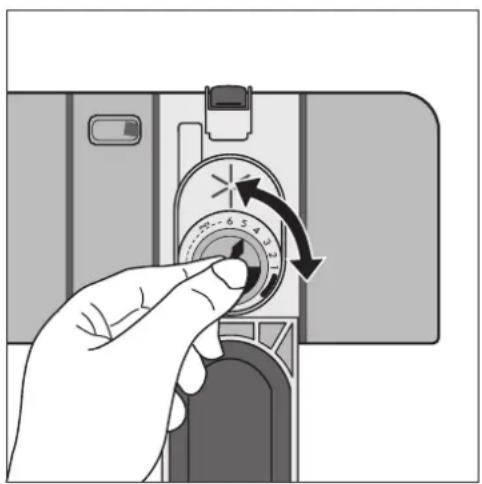
Only change the amount dispensed, if smears, milky spots (reduce the amount) or dried on water spots (increase the amount) can be seen on glasses and dishes. (See section "If dish-washing results are not satisfactory".) The dosage can be set from 1-6. The dosage is pre-set to "4" in the factory.
- Open the dishwasher door.
- Press the release button on the rinse aid compartment.
3.Open the cover. - Set the dosage level.
- Press the lid shut until it clicks into place.
- If rinse aid has leaked out, wipe it away with a cloth.
natural_image
Hand inserting a camera into a device, showing the dial and scroll (no text or symbols visible)Setting the acoustic signal:
In addition to the optical display (e.g. indicating the end of the cycle, errors) you can also choose to set an acoustic signal.
- Press the ON/OFF button.

If the name of a programme stage is displayed in the display, a dishwashing cycle is active. First of all you must cancel the dishwashing cycle:
-Press the Cancel button. CONFIRM CANCEL? appears in the display.
-Press the Ok/Start button. This cancels the dish-washing cycle.
2. To go the BUZZER setting; see section "Adjusting an option/setting".
3. To switch audible beep (BUZZER) on or off.
When the audible beep is switched off, the symbol 🏠 is lit in the display.
In daily use
Loading cutlery and dishes

Sponges, cleaning cloths and any other objects that can absorb water must not be washed in the dishwasher. Plastic and Teflon-coated dishes and pans tend to retain water droplets. These dishes and pans therefore do not dry as well as those made of china and stainless steel.
For washing in the dishwasher, the following cutlery/dishes/pots and pans
| are not suitable: are of limited | suitability: |
| Cutlery with wooden, horn, china or mother of pearl handlesPlastic items that are not heat resistantOlder cutlery with cement that is sensitive to temperatureDishes or cutlery with glued partsPewter or copper itemsLead crystal glassSteel items that rustWooden boards/plattersItems made from synthetic materials | Only wash stoneware in the dishwasher if it is specifically marked by the manufacturer as being dishwasher-safe.Glazed patterns may fade if washed very frequently in the dishwasher.Silver and aluminium parts have a tendency to discolour during washing. Food remains, e.g. egg white, egg yolk and mustard often cause discoloration and staining on silver. Therefore always clean food residues from silver immediately, if it is not to be washed straight after use.Glass can become dull after a large number of washes. |
- Before loading the dishes, you should:
-Remove the worst of the food residues.
-Soak pans with burnt-on food residues. - When loading the dishes and cutlery, please note:
–Dishes and cutlery must not impede the rotation of the spray arms.
-Load bowls, cups, glasses, pans, etc. with the opening downwards so that water cannot collect in them
–Dishes and items of cutlery must not lie inside one another or cover one another
-To avoid damage to glasses, they must not touch one another - Don't put small items (e.g. lids) in the baskets for the dishes, but in the cutlery basket, so that they can't fall through the holes.
Loading cutlery

Warning: Sharp knives and other items of cutlery with sharp edges must be laid in the cutlery rack or in the upper basket because of the risk of injury.
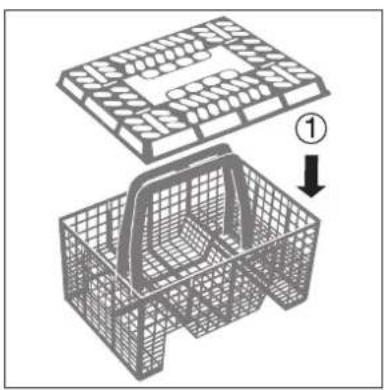
To ensure that all items of cutlery in the cutlery basket can be reached by the water, you should:
- Place the grid insert on the cutlery basket
natural_image
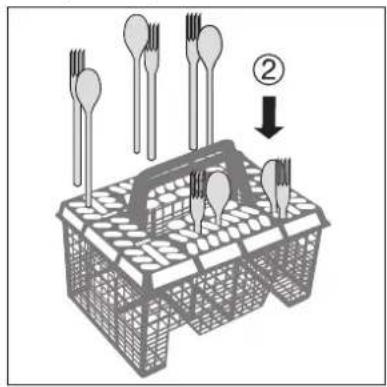
3D wireframe diagram of a mechanical housing with an open top panel and internal structure, showing a numbered arrow indicating assembly (no text or symbols present)- Place forks and spoons in the cutlery basket's grid insert with their handles pointing downwards.
Pots, Pans, Large Plates
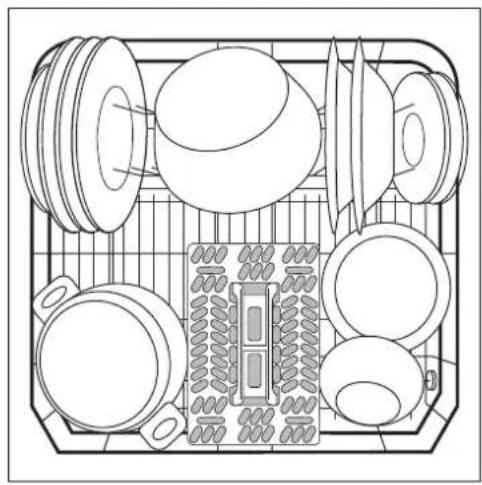
Load larger and heavily soiled dishes and pans in the lower basket.
(Max. diameter for plates 29 cm).
To make it easier to load larger dishes, the two rear plate rests in the lower basket can be folded down and the cutlery basket in the lower basket can be moved to the side.
natural_image
Top-down line drawing of a kitchen appliance with multiple kitchen utensils and a central sink (no text or symbols)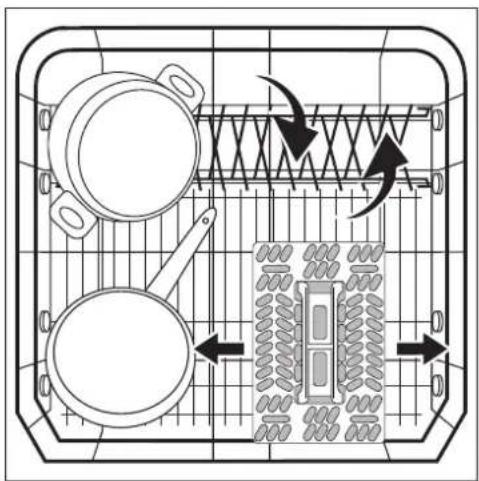
natural_image
Top-down schematic of a kitchen appliance with pan, stove, and rack (no text or labels)Cups, Glasses, Coffee Service
Load smaller, fragile crockery and long, sharp cutlery in the knife drawer.
- Arrange items of crockery on and under the folding cup racks so that they are offset from each other and water can reach all items.
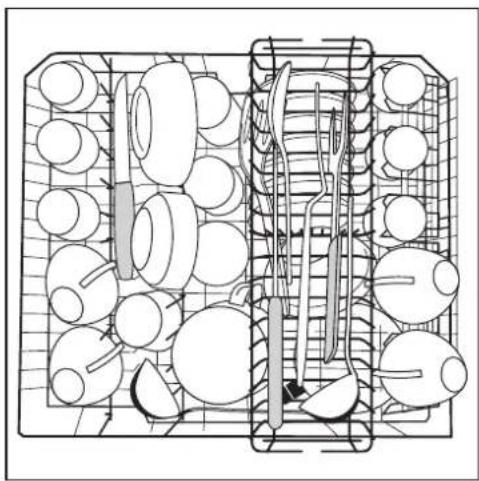
natural_image
Technical line drawing of a mechanical assembly with circular components and internal components (no text or symbols)- The cup racks can be folded up out of the way for tall crockery items.
- Lay or hang wine and brandy glasses in the slots in the cup racks.
- For glasses with long stems, fold the glass rack to the right, otherwise fold it away to the left.
- The row of spikes on the left of the upper basket is also in two parts and can be folded away. Spikes not folded away: place glasses, mugs etc. in the upper basket. Spikes folded away: More room for serving dishes.
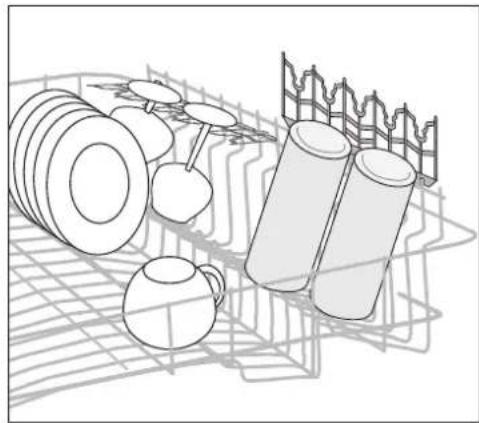
natural_image
Illustration of stacked cylindrical objects and a grid-patterned structure (no text or symbols)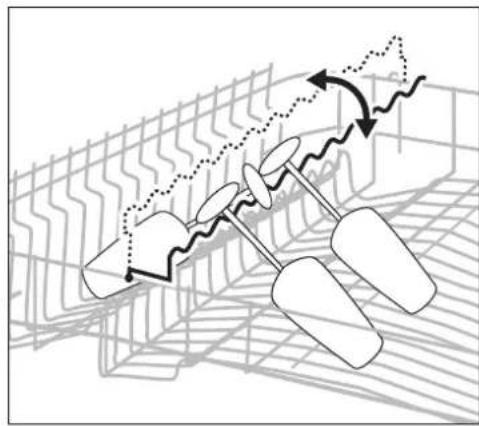
natural_image
Diagram of mechanical components with motion arrows and grid pattern (no text or symbols)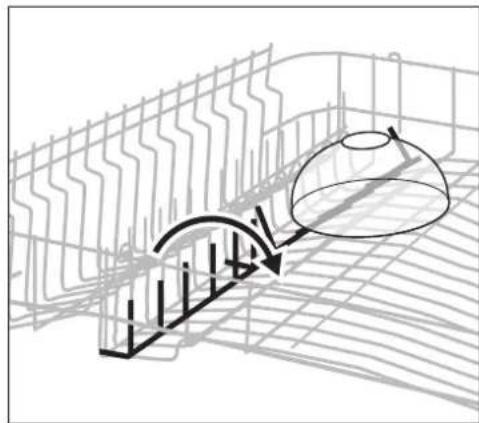
natural_image
Diagram of a curved structure with grid lines and a dome-shaped object, no text or symbols presentAdjusting the Height of the Upper Basket
| Maximum height of dishes in the | ||
| Upper basket Lower | basket | |
| with upper basket raised 22 cm 30 cm | ||
| with upper basket lowered 24 cm 29 cm | ||

The height of the baskets can also be adjusted when they are loaded.
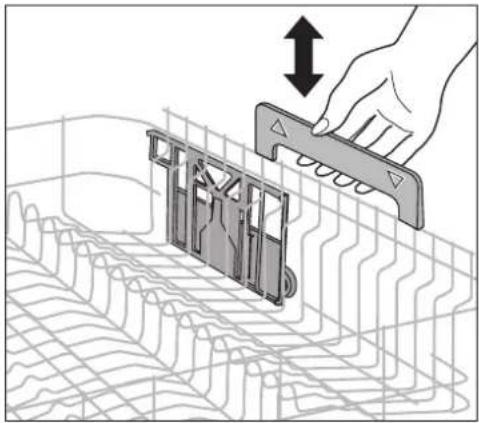
Raising / Lowering the upper basket
- Pull out the upper basket completely.
- Holding the upper basket by the handle, raise it as far as it will go and then lower it vertically.
The upper basket will latch into the lower or the upper position.
natural_image
Diagram showing a hand holding a tool interacting with a device panel, overlaid on a grid pattern (no text or symbols)Adding Detergent
Detergents remove the dirt from dishes and cutlery. The detergent must be added before the cycle starts.

Only use detergent intended for domestic dishwashers.
The detergent compartment is located on the inside of the door.
-
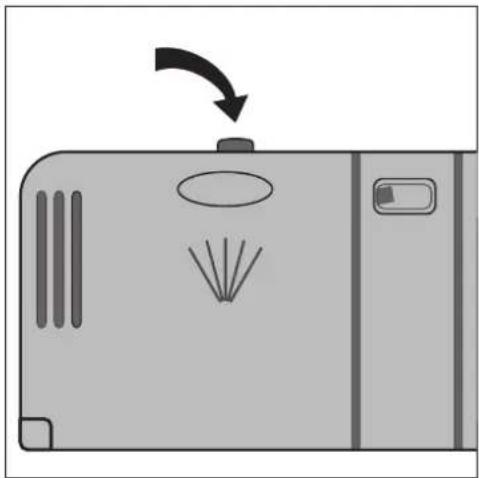
If the lid is closed: Press the release button. The lid will spring open.
-
Place the detergent in the detergent dispenser. The markings indicate the dosing levels for powder detergents: "20/30" corresponds to approx. 20/30 ml of detergent. Follow the manufacturer's instructions with regard to dosing and storage.
- Close the lid and press until it locks into place.

In the case of very heavily soiled dishes, fill the adjoining compartment (1) with additional detergent. This detergent comes into use during the pre-wash cycle.
natural_image
Diagram of a device with a button and fan, showing airflow or explosion (no text or symbols)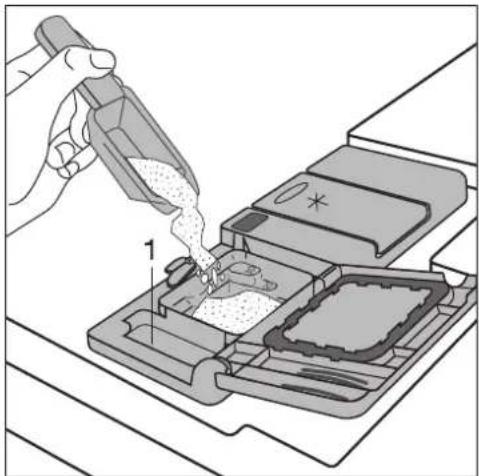
natural_image
Illustration of a hand using a tool to lift a component into a tray (no text or symbols visible)Concentrated detergents
Today's detergents for dishwashers are almost exclusively low-alkaline concentrated detergents with natural enzymes in tablet or powder form.

Using 50°C dishwashing cycles in conjunction with these concentrated detergents reduces pollution and is good for your dishes, as these dishwashing cycles are specially matched to the dirt-dissolving properties of the enzymes in concentrated detergents. It is for this reason that using 50 °C dishwashing cycles in conjunction with concentrated detergents can achieve the same cleaning results that can otherwise only be achieved using 65 °C cycles.
Detergent tablets

Detergent tablets from different manufacturers dissolve at different rates. For this reason, some detergent tablets do not attain their full cleaning power during short cycles. Therefore please use dishwashing cycles with pre-wash when using detergent tablets.
Using 3in1 detergents
These products are detergents with a combined cleaning, rinsing and salt function.
When the 3in1 function is activated,
-the addition of special salt and rinse aid from the respective dispenser is prevented.
-If the salt and rinse aid dispensers are empty, this is not indicated.
- The dishwashing cycles can be up to 30 minutes longer.

If you want to use 3in1 detergents, check whether these detergents are suitable for your water hardness. (Follow the manufacturer's instructions.)
If you want to use 3in1 products
- Press the ON/OFF button.
- Go to the 3 IN 1 option.
- Set the value to ON (see section "Adjusting an option/setting" symbol lights up in the symbol line.
Before the start of the dishwashing cycle put 3in1 detergent in the detergent dispenser.

As the rinse aid inflow is automatically switched off when the 3in1 function is activated, it may come about because of the different quality standards in the 3in1 detergent, that the dishes do not dry sufficiently. If this happens, proceed as follows (see section "Adding rinse aid"):
- Fill up the dispenser (if this is empty) with rinse aid.
- Set rinse aid dosage to "2" mechanically.
- Activate rinse aid inflow.
If you do not want to use 3in1 products any more
If you want to stop using 3in1 products, please do the following:
- Deactivate the 3in1 function.
- Fill up the dispensers for salt and rinse aid again.
- Switch the water softener to the highest setting and perform up to three normal cycles without loading any dishes.
- Then set the water softener to the water hardness in your area.
If you want to use 4in1 products
When using "4 in 1" detergents that integrate also anti-glass corrosion agent into "3 in 1" formula, please follow the same indication as given for "3 in 1" detergents.
Selecting the dishwashing cycle (Cycle Table)
| Dishwashingcycle^1) | Suitable for: | Type of soiling | Programme sequence | Consumption values^2) | ||||||
| Pre-wash | Main wash | Intermediate rinse | Final rinse | Drying | Length (minutes) | Energy (kWh) | Water (litres) | |||
| AUTOMATIC (50^ - 65^)^*3) | Dinner service and cookware | normally soiled, dried-on food remains | ● | ● | 1 to 2x | ● | ● | 100 - 120 | 1,10 - 1,60 | 12 - 24 |
| EAT-LOAD-RUN (60^)^4) | Dishes, excluding saucepans | just used, lightly to normally soiled | - | ● | - | ● | - | 30 | 0,8 | 9 |
| 70° INTENSIVE* | Dinner service and cookware | heavily soiled, dried-on food remains, in particular protein and starch | ● | ● | 2x | ● | ● | 120 - 130 | 1,85 - 2,05 | 22 - 24 |
| ENERGY (50^)^5) | Dinner service and cookware, temperature-sensitive crockery | normally soiled | ● | ● | ● | ● | ● | 130 - 160 | 0,95 - 1,05 | 12 - 14 |
| 45° GLASS | Dessert dishes and coffee service, delicate glassware | lightly soiled - ● | 2x | ● | ● | 73 | 0,9 | 14 | ||
| PREWASH (cold)^6) | All types of dishes | Used dishes that are being stored in the dishwasher and are to be washed later. | ● | - | - | - | - | 12 | < 0,1 | 4 |
1) In all dishwasher programmes with a *, during the final rinse the temperature is raised to 68° for 10 minutes to hygienically clean e.g. plastic chopping boards or jam jars.
2) The consumption values were obtained under standardised conditions. They depend on how full the baskets for the dishes are. Variations are therefore possible in practice.
3) When using this cycle the degree of water clouding determines the amount of soiling on the dishes. The length of the cycle and water and energy consumption can vary greatly – depending upon the load and how dirty the dishes are. Depending upon the soiling, the temperature of the water will be automatically adjusted to between 50^ C and 65^ C.
4) When using this cycle, only load the dishwasher half full.
5) Test programme for Test Institutes
6) This cycle does not need any detergent.
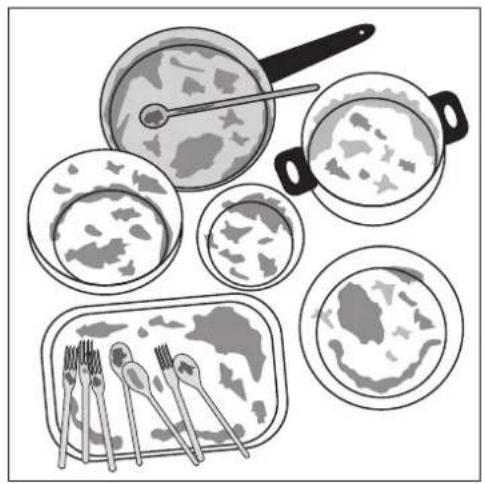
Selecting a programme
When your dishes look like this, select: an intensive programme.
a normal or energy-saving programme.
a short programme (e.g. 30 minute programme).
natural_image
Illustration of various food items including a pan, steamed dish, and plate with cutlery (no text or symbols)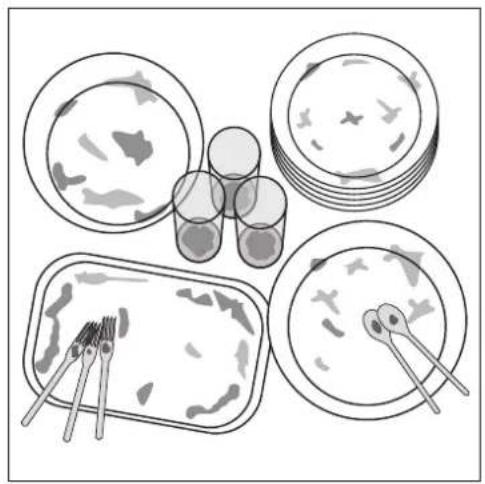
natural_image
Illustration of four food containers with cutlery and utensils, no text or symbols present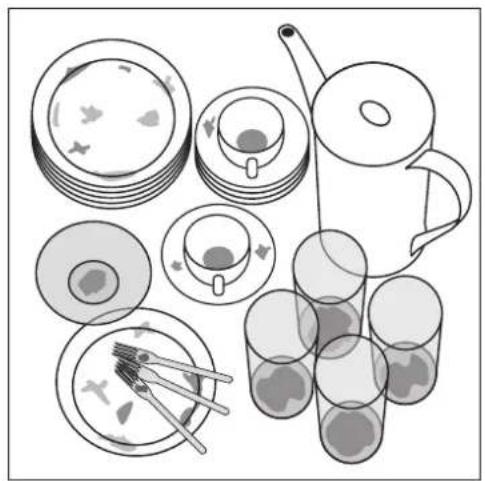
natural_image
Illustration of a set of food items including plates, cups, a teapot, and glasses with chopsticks (no text or symbols)Starting a Dishwashing Cy- cle
- Check that the spray arms can turn freely.
- Turn the water tap on fully.
- Close the door.
- Press the ON/OFF button.
- Using the Program button, select the desired programme.
The name of the dishwashing cycle that is currently selected flashes.
To the right of the name the estimated duration of the cycle is displayed.
6. Press the Ok/Start button.
The selected dishwashing cycle will begin. In the text line of the display you will see the name of the current programme stage. Next to this you will see the estimated remaining duration in minutes.
Using the Options button you can briefly display the name of the dishwashing cycle in the display.

A dishwashing cycle can only be started from the Programmes menu.

During the dishwashing cycle, the remaining time shown in the display may be adjusted according to the size of the load, degree of soiling, etc.
If the dishwashing cycle does not start:
If after pressing the Ok/Start button, the programme does not start and a message appears in the display (REFILL RINSE AID, REFILL SALT or PLEASE CLOSE DOOR):
- Follow the instructions in the message.
After the problem has been remedied, the cycle starts automatically.

With the messages REFILL RINSE AID or RE-FILL SALT you can however start the cycle, by pressing the Ok/Start button again.

While a dishwashing cycle is running, you cannot change the options or settings.
Interrupting or Cancelling a dish-washing cycle
Interrupt a dishwashing cycle that is in progress if it is absolutely necessary.
Interrupting the dishwashing pro- gramme by opening the dishwasher door

Hot steam may escape when the door is opened. There is a risk of scalding.
- Open the door carefully. The dishwashing cycle will stop, in the display: PLEASE CLOSE DOOR
- Close the door. The cycle will continue.
Cancelling the dishwashing cycle
- Press the Cancel button.
In the display: CONFIRM CANCEL? - Press the Ok/Start button.
The programme is cancelled. In the display: CHOOSE PROGRAMME - If you want to start a new dishwashing cycle, check whether there is any detergent in the dispenser.

Turning off the dishwasher will only interrupt a selected dishwashing cycle, not cancel it. The cycle will recommence after turning the dishwasher back on again.
Setting the Delay Timer

With the delay timer you can delay the start of a dishwashing cycle for between 1 and 19 hours. First set the Delay Start and then the desired dishwashing cycle.
- Press the Delay Start button repeatedly until the desired period by which you want to delay the start is displayed in the display.
① lights up in the symbol line of the display. - Select and start dishwashing cycle.
First the pre-set time delay counts down. In the display you will see START IN and the time remaining until the start of the dishwashing cycle. After the time delay the dishwashing cycle begins automatically, the symbol goes out.
Cancelling a delay start:
You can cancel a delay start that is counting down at any time.
- Press the Cancel button.
In the display: CONFIRM CANCEL? - Press the Ok/Start button.
The delay start is cancelled. The dishwasher cycle that is set begins.
Switching Off the dish-washer
Switch off the dishwasher if the messages PRO-GRAMME END and PLEASE SWITCH OFF are being displayed alternately.
With some dishwashing cycles, the drying fan continues to run even after the end of the cycle.
If the acoustic signal has been enabled, a continuous tone will sound for 15 seconds at the end of the dish-washing cycle.
If the dishwasher is not switched off, then the acoustic signal is repeated after 3 minutes and after 6 minutes.
-
Press the ON/OFF button. Display goes out.
-
Turn off the water tap.

Carefully open the door. Hot steam may escape.
- Hot dishes are sensitive to knocks. Therefore leave the dishes to cool for about 15 minutes before removing them. You also get a better drying result.
- Dishes dry more quickly if you open the door for a moment after the cycle has ended and then leave it slightly open.
Removing the Dishes

It is normal for the inner door and the dispensers to be damp.
- Empty the lower basket first, then the upper basket. This way you avoid dripping water from the upper basket onto dishes in the lower basket.
- The dishwasher's interior light will always be on when the door of the appliance is open. Therefore, in order to save energy, you should always close the door of the dishwasher after having loaded or removed dishes.
Button lock
Using the KEY LOCK option, you can prevent unintentional use of your dishwasher – perhaps by children. You can temporarily cancel the button lock (and then operate your dishwasher) or switch off the button lock again.
Switching the button lock on
- Switch on the appliance.
- Go to KEY LOCK option; see section "Adjusting an option/setting".
- Switch on KEY LOCK option.
In the display the symbol flashes. While the symbol flashes, you can operate the dishwasher.
15 seconds after the last button activation, the o-symbol is permanently lit. This locks the buttons. The button lock remains active even when the dishwasher is switched off and then switched on again.
Cancelling the button lock temporarily
- Press and hold any button (except the ON/OFF button) for five seconds.
Symbol begins to flash, button lock is temporarily cancelled, you can operate the dishwasher. If you do not press any buttons for 15 seconds, the button lock automatically switches itself on (symbol is then lit permanently).
Switching the button lock off
- Cancel the button lock temporarily.
In the display the symbol flashes. - Go to the KEY LOCK option; see section "Adjusting an option/setting".
- Switch off the button lock.
Symbol o-goes out, you can operate your dishwasher again normally.
Care and cleaning

Do not use furniture care products or aggressive cleaners.
- When necessary, clean the dishwasher's controls with a soft cloth.
- Occasionally check the internal dispensers, door seal and water inlet filter (if fitted) for dirt and clean them, if necessary.
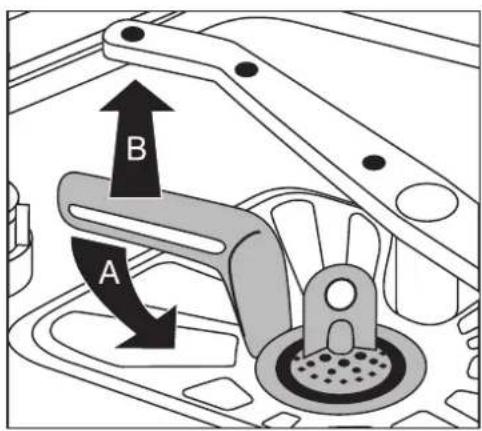
Cleaning the filters

The filters must be regularly checked and cleaned. Dirty filters will spoil the wash results.
- Open the door and remove the lower basket.
-
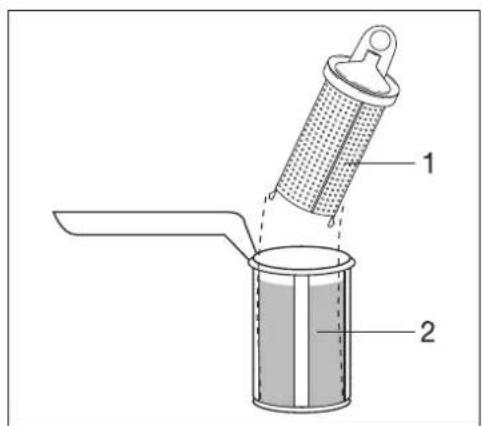
Turn the handle about 14 of a turn anticlockwise (A) and remove the filter system (B).
-
Grasp the grip hole on the fine filter (1) and remove it from the micro-filter (2).
-
Clean all filters thoroughly under running water.
-
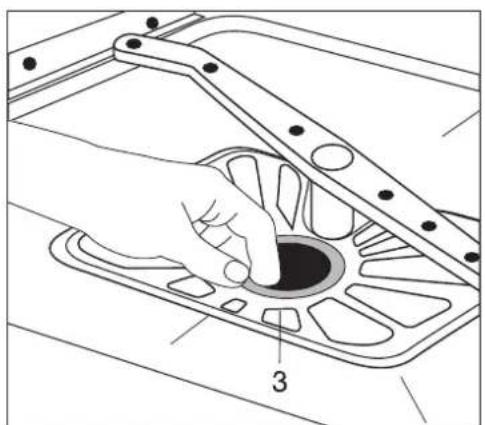
Remove the flat filter (3) from the base of the washing compartment and clean both surfaces thoroughly.
- Re-insert the flat filter.
- Place the fine filter in the micro-filter and fit the two together.
- Insert the filter system in place and lock it by turning the handle clockwise as far as it will go. Ensure that the flat filter does not protrude above the base of the washing compartment.

Under no circumstances may the dishwasher be used without its filters.
natural_image
Technical line drawing of a hand operating a mechanical component with a numbered callout (no text or symbols present)Cleaning the spray arm jets
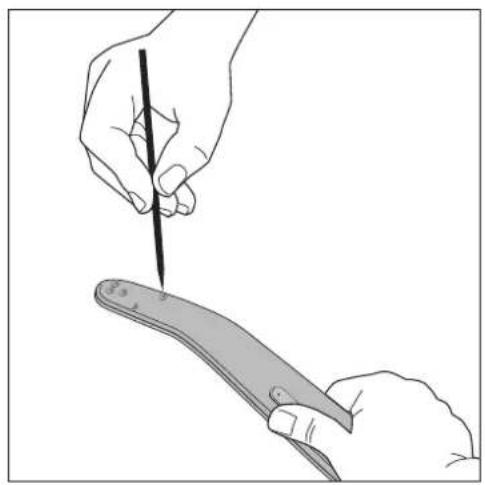
Regularly check the jets in the spray arms for blockages. When cleaning is necessary, remove spray arm from the fixture and clean jets with a pointed object (wire or needle). Then rinse out the spray arm using a strong jet of water.

Do not damage the jet opening.
Upper basket spray arm
- To remove upper basket spray arm, tilt it down hard.
-
Clean spray arms jets.
-
Place cleaned upper basket spray arm back in position against the connecting piece: press the two together firmly, until you feel them snap into place.
natural_image
Illustration of two hands holding a tool, one writing on paper (no text or symbols present)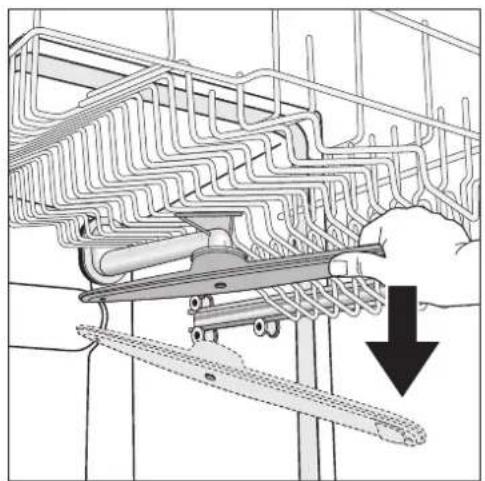
natural_image
Technical diagram of a mechanical assembly with a downward arrow indicating a force or component (no text or symbols present)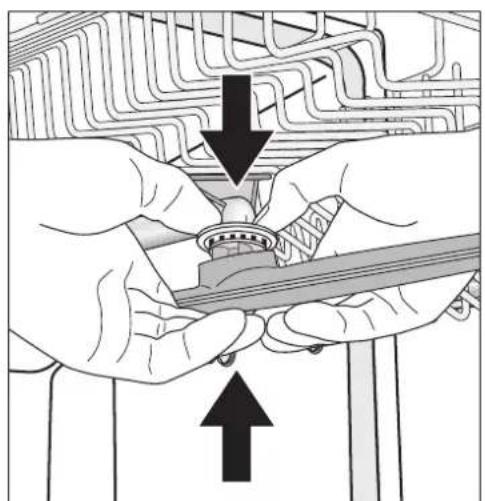
natural_image
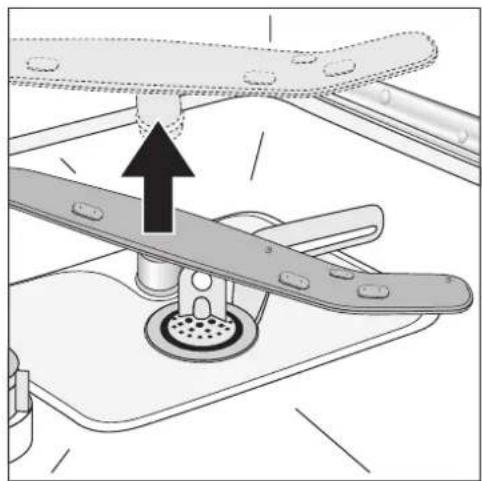
Illustration of hands assembling a mechanical component with arrows indicating assembly direction (no text or symbols)Bottom spray arm
- To remove bottom spray arm, pull it upwards out of its catch.
- Clean spray arm jets.
- Place bottom spray arm back in position against connecting piece and press down firmly, until you feel it snap into place.
natural_image
Mechanical assembly diagram showing a valve mechanism with an upward arrow indicating motion (no text or symbols present)What to do if ...
Resetting the language
You can reset the language of the display to the factory setting at any time.
- Press the Cancel button repeatedly until what is shown in the display no longer changes.
- Press and hold the Cancel button for six seconds.
LANGUAGE ENGLISH appears in the text line. The word ENGLISH flashes. - Using the Options button, select the desired language.
- Press the Ok/Start button.
Remedying small malfunctions
If one of the following fault messages is displayed in the display during operation:
-OPEN THE TAP
-DRAIN BLOCKED
Remedy the fault, then re-start the dishwashing cycle. The cycle will continue.
In the case of other fault messages:
-Cancel the dishwashing cycle.
-Switch the appliance off and on again.
-Select dishwashing cycle.
-Press the Ok/Start button.
If the fault is displayed again, please contact the Service Force Centre and inform them of the fault message.
| Malfunction Possible | cause Remedy | |
| 1 short warning tone, continuously repeated, can be heard, in the display: OPEN THE TAP | Tap is blocked with limescale or is faulty. | Check the tap and have it repaired, if necessary. |
| The tap is turned off. Turn on the tap. | ||
| The filter (where present) in the threaded hose fitting on the tap is blocked. | Clean the filter in the threaded hose fitting. | |
| Filters in the base of the washing compartment are blocked. | Cancel the dishwashing cycle (see chapter: Starting a dishwashing cycle); clean filters (see chapter: Cleaning the filters). | |
| Water inlet hose has not been correctly positioned. | Check the position of the hose. | |
| 2 short warning tones, continuously repeated, can be heard, in the display: DRAIN BLOCKED (Rinse water has collected in the dishwasher's interior container). | The spigot is blocked. Clean the spigot. | |
| Water drain hose has not been correctly positioned. | Check the position of the hose. | |
| 3 short warning tones, continuously repeated, can be heard, in the display: SERVICE CODE | The anti-flood system has been triggered. | First turn off the water tap, then switch off the appliance and contact the Customer Care department. |
| 1 long warning tone can be heard, in the display: SPRAYARM BLOCKED | The upper basket spray arm is jammed | Open the door carefully . Hot steam may escape when the door is opened. There is a risk of scalding. Arrange the dishes and cutlery in the baskets so that the spray arm above them can rotate freely. Close the dishwasher door. |
| Appliance is switched on, but does not react to the buttons being pressed. | Button lock is activated. | Deactivate button lock; see section “Button lock”. |
| in the display: PLEASE CLOSE DOOR | The door of the dishwasher is open. | Close the dishwasher door. |
| The cycle is not starting. | The mains plug is not plugged in. Connect the plug to a mains socket. | |
| A fuse in the house’s wiring system is defective. | Replace fuse. | |
| For dishwasher models with a delay start timer:A start time has been selected. | If the dishes are to be washed immediately, cancel the delay start. | |
| Rust spots are visible in the dishwashing compartment. | The dishwashing compartment is made from stainless steel. Rust spots in the washing compartment are due to rust particles from external sources (rust particles from water pipes, pans, cutlery, etc.). Remove such spots with a commercially available cleaning product for stainless steel. | Only wash cutlery, dishes and pans that are suitable for dishwasher use. |
| A whistling noise can be heard when washing dishes. | The whistling is not a cause for concern. | Decalcify appliance with commercially available agents for cleaning dishwashers. If the noises can still be heard after decalcifying the machine, use a different brand of detergent for washing cutlery and dishes. |
| The dishwasher interior light does not come on. | The mains plug is not plugged in. | Connect the plug to a mains socket. |
| The bulb in the interior light is faulty. | Contact the Customer Care Department. | |
If the Dishwashing Results are not Satisfactory
The dishes are still dirty.
•The wrong dishwashing cycle was selected.
- The dishes were loaded is such a way that the dishwashing water did not reach all items. The baskets for the dishes must not be overloaded.
- The filters in the base of the washing compartment are dirty or incorrectly positioned.
- Good quality detergent was not used, or too little was used.
- In the case of scale deposits on the dishes: The dishwasher salt dispenser is empty or the water softening system has been incorrectly set.
•The drain hose is incorrectly positioned.
- Pollutants from the water in the dishwasher can block the jets in the spray arms. You have the option of removing the spray arms from their fixture for cleaning (see section “Care and Cleaning”).
The dishes do not dry and are not shining.
- Poor quality rinse aid was used.
•The rinse aid dispenser is empty.
There are smears, streaks, milky spots or a shiny bluish coating on glasses and dishes.
- Lower rinse aid dosage.
There are dried water drops on the glasses and dishes.
- Increase rinse aid dosage.
- The detergent may be the cause. Contact the detergent manufacturer's customer advice centre.
Glass corrosion
- Contact the detergent manufacturer's customer advice centre.
Disposal

Packaging material
The packaging materials are environmentally friendly and can be recycled. The plastic components are identified by markings, e.g. >PE<, >PS<, etc. Please dispose of the packaging materials in the appropriate container at your local waste disposal facilities.

Old appliance
The symbol 📄 on the product or on its packaging indicates that this product may not be treated as household waste. Instead it shall be handed over to the applicable collection point for the recycling of electrical and electronic equipment. By ensuring this product is disposed of correctly, you will help prevent potential negative consequences for the environment and human health, which could otherwise be caused by inappropriate waste handling of this product. For more detailed information about recycling of this product, please contact your local city office, your household waste disposal service or the shop where you purchased the product.

Warning! When your appliance has finished its working life, remove the plug from the socket. Cut off the cable and plug and dispose of them.
Break the door lock so that the door no longer shuts. This prevents children from trapping themselves inside and endangering their lives.
Technical data
| Capacity: 12 place settings including serving dishes | |
| Permitted water pressure: 1-10 bar (=10-100 N/cm ^2 = 0.1-1.0 MPa) | |
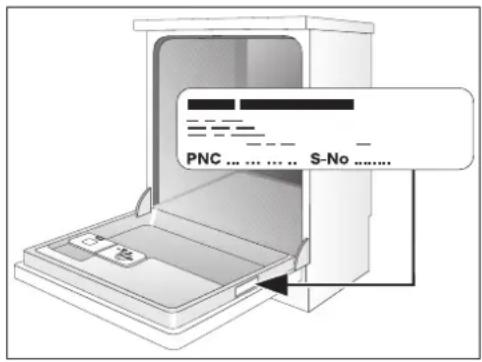
| Electrical connection: | 230 V, 13 A, also see the rating plate on the right-hand side of the dishwasher's interior door |
| Total output 2250 W | |
| Dishwasher: Free-standing appliances | |
| Dimensions: 850 x 598 x 598 (H x W x D in mm) | |
| Max. weight: 54 kg | |
CE This appliance conforms with the following EU Directives:
-73/23/EEC dated 19.02.1973 Low Voltage Directive
-89/336/EEC dated 03.05.1989 EMC Directive inclusive of Amending Directive 92/31/EEC
-93/68/EEC dated 22.07.1993 CE Marking Directive
Notes for Test Institutes
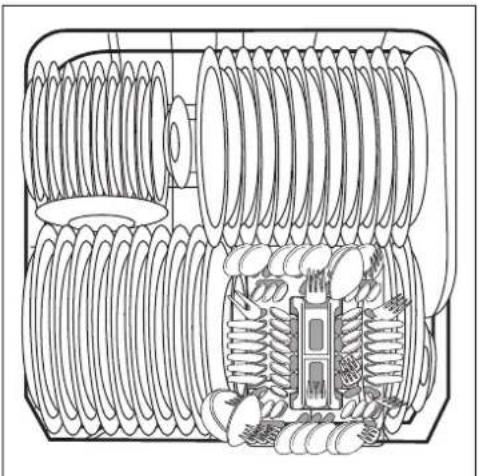
Testing in accordance with EN 60704 must be carried out with the appliance fully loaded and using the test cycle (see "Cycle Table").
Tests in accordance with EN 50242 must be carried out when the salt dispenser in the water softener and the rinse aid dispenser have been filled with salt and rinse aid respectively, and using the test cycle (see "Cycle Table").
| Full load:12 place settingsincluding serving dishes | Half load:6 place settings including serving dish-es, leaving alternate positions in therack free | |
| Amount of detergent required: 5g + 25g (Type B) 20g (Type B) | ||
| Rinse aid setting: 4 (Type III) 4 (Type III) | ||
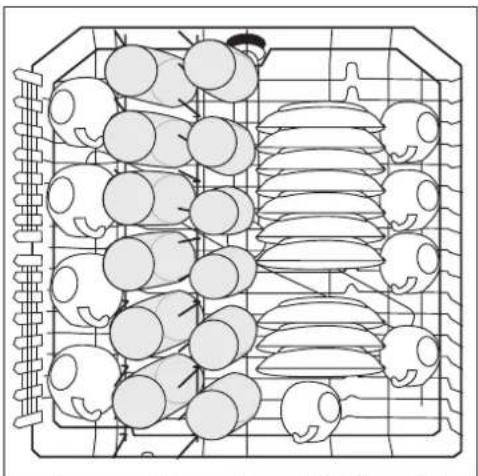
Sample loading arrangements:
Upper basket *)
natural_image
Top-down line drawing of a grid-like structure with circular elements and curved shapes, no text or symbols present.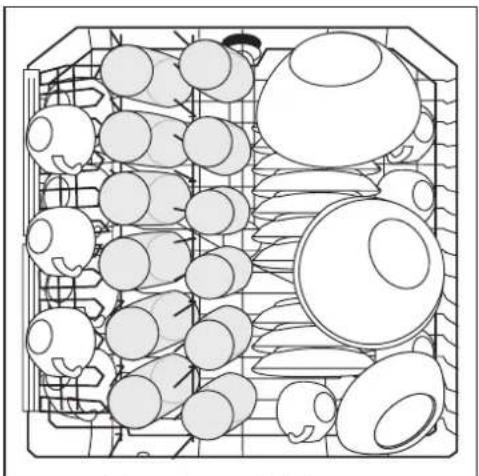
natural_image
Top-down line drawing of a grid-like container filled with various circular objects, no text or symbols present.*) If necessary, move the cup rack from right to left. When doing this, ensure that the cup rack is at the same height.
Lower basket with cutlery basket *)
Cutlery basket
natural_image
Technical line drawing of a mechanical component with coiled spring and housing (no text or symbols)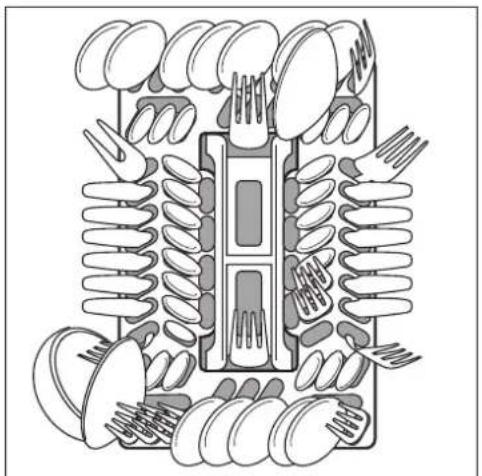
natural_image
Diagram of a mechanical or electrical component with multiple springs and cutouts, no visible text or symbols*) If there are cup racks in place on the lefthand side or if beer glass holders are in place, remove them.
Installation and connection instructions

Safety Information for the Installation
- Only transport the dishwasher in an upright position, otherwise salt water may run out.
- Before using the dishwasher for the first time, check for any damage caused in transport. Do not under any circumstances connect an appliance that is damaged. In the case of damage, please contact your supplier.
- Never use the dishwasher if the mains cable, water inlet or drain hose are damaged; or if the control panel, work top or plinth area are damaged such that the inside of the appliance is freely accessible.
- Always plug the mains plug into a correctly installed shockproof socket.
- Permanent connection: a permanent connection must only be installed by a trained electrician.
- Prior to using the appliance for the first time, ensure that the rated voltage and type of supply on the rating plate match that of the supply where the appliance is to be installed. The fuse rating is also to be found on the rating plate.
- Multi-way plugs / connectors and extension cables must not be used. This could constitute a fire hazard through overheating.
- The dishwasher's cable must only be replaced by a Service Force Engineer.
- A water inlet hose with safety valve must only be replaced by a Service Force Engineer.
Installing the Dishwasher
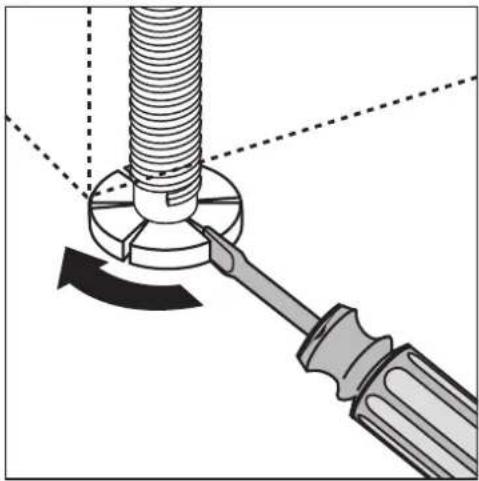
- The dishwasher must be installed on a firm floor and adjusted to ensure that it is stable and level in all directions.
- To compensate for unevenness in the floor and to match the height of the appliance to that of surrounding units, extend the threaded feet using a screwdriver.
•The drain hose, inlet hose and mains cable must be laid so that they are able to move freely within the plinth area, and so that they are not kinked or crushed when the dishwasher is in position. - The dishwasher must also be screwed tightly to the work surface or to the adjoining units. This is essential to ensure the dishwasher does not tip up.
natural_image
Mechanical diagram showing a screw being inserted into a nut, with a wrench inserted (no text or symbols present)Free-standing appliances

If the dishwasher is installed directly next to a cooker, a heat-insulating, non-flammable panel (laminated with aluminium foil on the side next to the cooker) must be fitted flush with the top edge of the work surface (depth 57.5 cm).
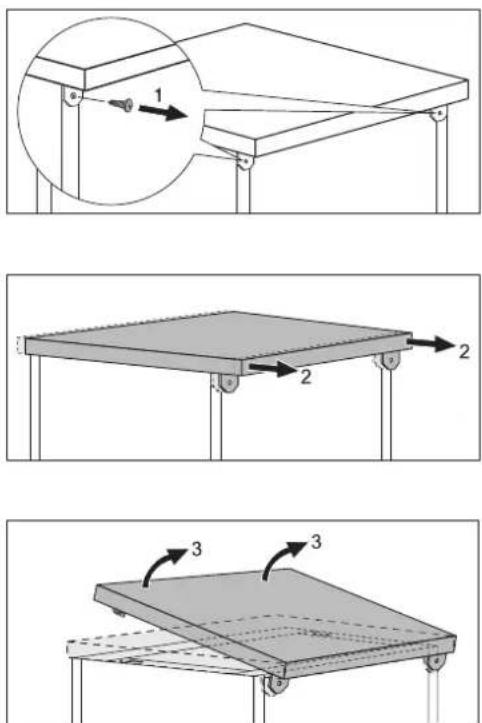
If the appliance is built-in under a kitchen work surface, the worktop supplied with the dishwasher can be removed in the following way:
-
Unscrew the screws from the elbows at the rear (1).
-
Push the appliance's worktop backwards about 1 cm (2).
-
Lift the worktop at the front (3) and remove it.

If the dishwasher is later used as a free-standing appliance, the work surface supplied with it must be re-mounted.

The plinth on free-standing appliances is not adjustable.
Connecting the dishwasher
Connecting to the water supply
- The dishwasher can be connected to cold and hot water supplies up to max. 60°C.
- The dishwasher must not be connected to open hot water appliances or instantaneous water heaters.
Permitted water pressure
| Lowest permitted water pressure:1 bar (=10 N/cm2 =100 kPa) | Consult your plumber if the water pressure is less than 1 bar. |
| Highest permitted water pressure:10 bar (=100 N/cm2 =1 MPa) | If the water pressure is greater than 10 bar, a pressure reduction valve must be used (available from your dealer). |
Connecting the inlet hose

The water inlet hose must not be kinked, crushed or entangled when it is being connected.
Connect the threaded hose fitting (ISO 228-1:2000) on the water inlet hose to a tap with an external thread ( 34 inch). The inlet hose is fitted with either a plastic or a metal nut:
- Only tighten the nut hand tight.
Then do a visual check for water tightness. (Make sure that the tap is not dripping.)

So that access to the tap in the kitchen is not restricted by the use of the dishwasher, we recommend installing an additional tap, or fitting a T-branch to the existing tap.
If you need a longer water inlet hose than that supplied, the following VDE-approved complete hose sets are to be used. These are available from your local service centre.
Water drainage
Drain hose

The drain hose must not be kinked, crushed or entangled.
Connecting the drain hose:
-Maximum permitted height: 1 metre.
-Minimum required height: 40 cm above the bottom edge of the appliance.
Extension hoses
- Extension hoses are available from your local Service Force Centre. To ensure that the function of the appliance is not impeded, the internal diameter of extension hoses must be 19 mm.
- Extension hoses must not be laid more than a maximum distance of 4 metres horizontally; the maximum permitted height for the connection for the drain hose is then 85~cm .
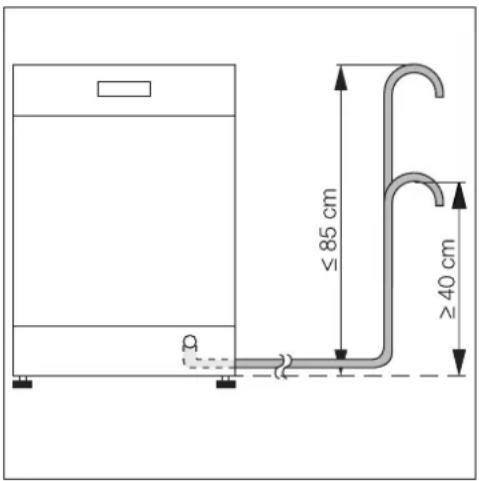
Sink outlet connection
- The outlet of the drain hose (ø 19 mm) fits all commonly available sink outlet types. The outer diameter of the sink outlet connection must be at least 15 mm.
- The drain hose must be fixed to the sink outlet connection using the hose clamp supplied.
Water drainage if the dishwasher is built-in at high level
If the dishwasher is installed at a high level, and the drain hose connection is less than 30 cm from the lower edge of the appliance, adapter kit ET 111099520 must be fitted by your local Service Force Centre.
Water drainage into sink (only possible with free-standing appliances)
If you wish to hang the drain hose over the edge of a sink, use a detachable hose elbow. You can obtain this from Service Force by referring to spare part number ET 646 069 190.
- Fit the elbow to the drain hose.
- Secure the drain hose so that it cannot slide off the edge of the sink.
Pass a piece of cord through the hose elbow and fix it to the wall or the tap.
Anti-flood system
For protection from water damage, the dishwasher is equipped with a anti-flood system.
In the event of a fault, the safety valve in the water inlet hose immediately interrupts the supply of water to the appliance and the drain pump is activated. In this way water can neither escape nor overflow. The remaining water in the appliance is automatically pumped out.
Should a fault occur when the appliance is switched on, a buzzing tone can also be heard.
Electrical Connection
Any electrical work required to install this appliance should be carried out by a qualified electrician or competent person.

WARNING - This appliance must be earthed.
The manufacturer declines any responsibility should these safety measures not be observed.
Before switching on make sure the electricity supply voltage is the same as that indicated on the appliance rating plate.
To isolate the dishwasher from the mains, remove the mains plug.
Important: The plug must still be accessible after the appliance has been installed.
Changing a fuse
The appliance is supplied with a 13amp plug fitted. In the event of having to change the fuse in the plug supplied, a 13amp ASTA approved (BS 1363A) fuse must be used.
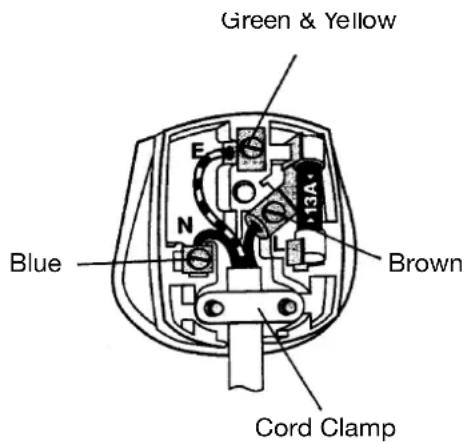
Should the plug need to be replaced for any reason, proceed as described below.
The wires on the mains lead are coloured in accordance with the following code.
Green and Yellow: Earth
Blue: Neutral
Brown: Live
- The wire coloured green and yellow must be connected to the terminal marked with the letter "E" or by the earth symbol or coloured green and yellow.
- The wire coloured blue must be connected to the terminal "N" or coloured black.
- The wire coloured brown must be connected to the terminal marked "L" or coloured red.
- Upon completion there must be no cut, or stray strands of wire present and the cord clamp must be secure over the outer sheath.

WARNING! A cut off plug inserted into a 13 amp socket is a serious safety (shock) hazard. Ensure that, if it is necessary to cut off the plug, it is disposed of safely and not retained.
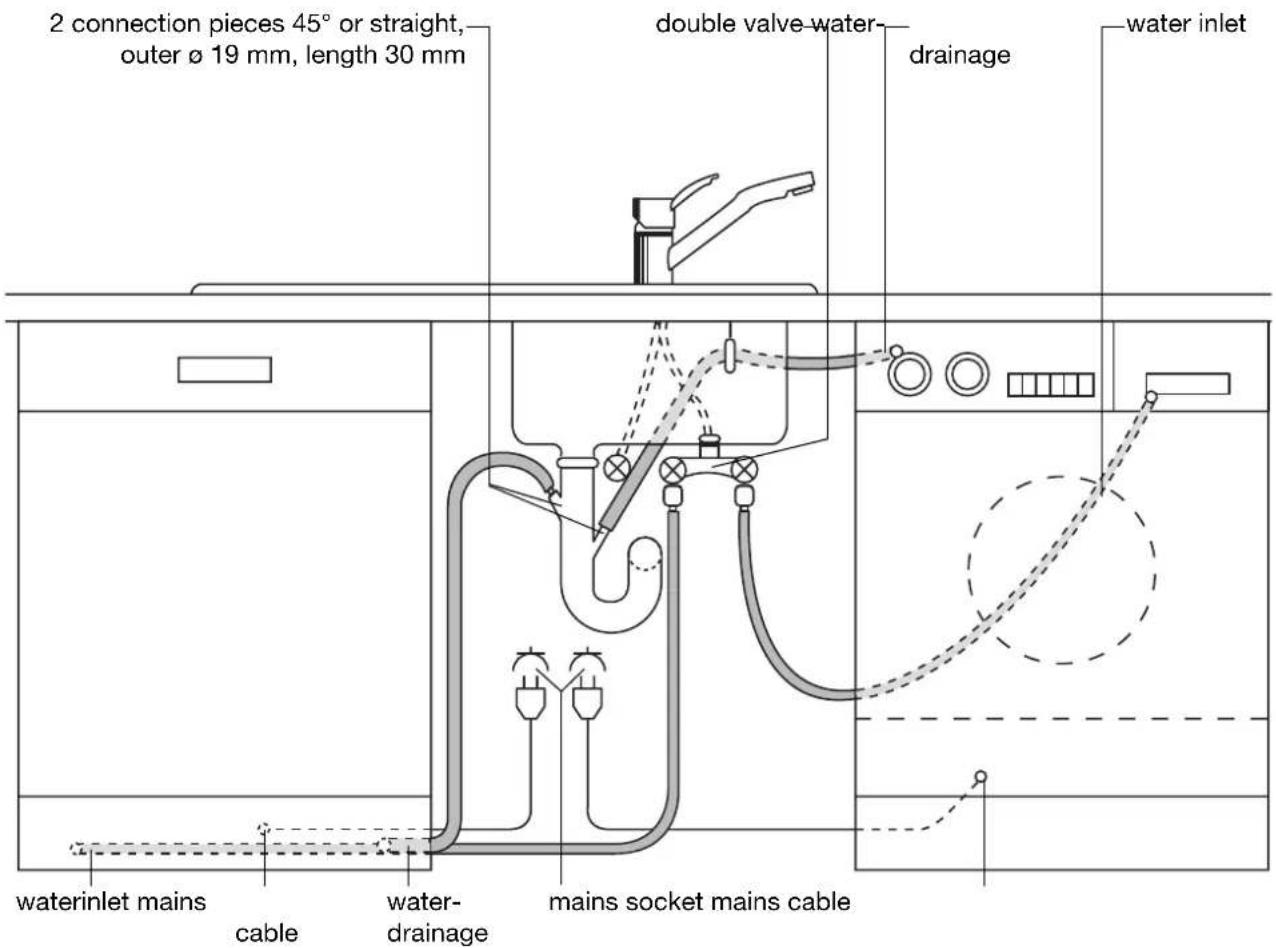
Connecting systems
The water inlet hose, drain hose and the mains cable must all be connected to the side of the dishwasher as there is no space for them behind the appliance.
Service and Spare Parts
If the event of your appliance requiring service, or if you wish to purchase spare parts, please contact Service Force by telephoning:
0870 5 929 929
Your telephone call will be automatically routed to the Service Force Centre covering your post code area.
For the address of your local Service Force Centre and further information about Service Force, please visit the website at
www.serviceforce.co.uk
Before calling out an engineer, please ensure you have read the details under the heading „What to do if...“
When you contact the Service Force Centre you will need to give the following details:
- Your name, address and post code.
- Your telephone number.
- Clear and concise details of the fault.
- The model and serial number of the appliance (found on the rating plate)
- The purchase date.
Please note that a valid purchase receipt or guarantee documentation is required for in-guarantee service calls.
Customer Care Department
For general enquiries concerning your Zanussi Electrolux appliance, or for further information on Zanussi Electrolux products, please contact our Customer Care Department by letter or telephone at the address below or visit our website at www.zanussi.co.uk.
Customer Care Department
Major Appliances
Zanussi Electrolux
Addington Way
Luton
Bedfordshire, LU4 9QQ
Tel: 08705 727727 (*)
(*) calls to this number may be recorded for training purposes.
822 612 196-00-300605-03 Subject to change without notice. Electrolux