
WCTYCMY - Mobile Phone Charger BLAUPUNKT - Free user manual and instructions
Find the device manual for free WCTYCMY BLAUPUNKT in PDF.


| Product Type | Wireless Car Phone Charger |
| Brand | Blaupunkt |
| Model | WCTYCMY |
| Input Voltage | 9V - 16V DC |
| Output Voltage / Current | 9V / 1.1A |
| Transmitting Power | 10W |
| Operating Frequency | 110kHz - 205kHz |
| Operating Temperature Range | -30°C to 80°C |
| Protection Features | Overvoltage, Overcurrent, High Temperature, Reverse Polarity, Short Circuit |
| Indicator Light Status | White (standby), Blue (charging), Flashing Blue/White (foreign object) |
| Charging Area (X-axis) | -15mm to 15mm |
| Charging Area (Y-axis) | -35mm to 35mm |
| Charging Area (Z-axis) | 0mm to 8mm |
| Dimensions (Approx.) | 100mm x 100mm x 20mm |
| Weight (Approx.) | 150g |
| Material | Plastic |
| Color | Black |
| Mounting Accessories | Bracket, Adhesive Pad, Screws |
| Compatibility | Qi-Enabled Smartphones |
| Installation Requirement | 12V Vehicle Electrical System (ACC) |
| Certifications | CE, RoHS |
| Maintenance | Clean with dry cloth; avoid liquids |
| Safety Notes | Do not disassemble, avoid direct sunlight, use only included parts |
| Warranty | Contact authorized Blaupunkt dealer for details |
Frequently Asked Questions - WCTYCMY BLAUPUNKT
User questions about WCTYCMY BLAUPUNKT
0 question about this device. Answer the ones you know or ask your own.
Ask a new question about this device
Download the instructions for your Mobile Phone Charger in PDF format for free! Find your manual WCTYCMY - BLAUPUNKT and take your electronic device back in hand. On this page are published all the documents necessary for the use of your device. WCTYCMY by BLAUPUNKT.
USER MANUAL WCTYCMY BLAUPUNKT
natural_image
Illustration of a smartphone with a 45% battery displayed on its screen, surrounded by floating blue and white circular graphics (no text or symbols)Enjoy it.
Safety Notes
This vehicle security system has been manufactured according to established safety guidelines. However, dangers may still occur if the safety notes in this manual is not observed. This manual is intended to familiarize the user with the wireless charger important functions. Read this carefully, prior to using the wireless charger. Keep this manual in an easily accessible location. In addition, do observe the instructions of the devices used in conjunction with this wireless charger.
Attentions
- Assign a mounting location that will not obstruct drive in any circumstances. Or cause injuries to drives and passengers in case of emergency brake or accidents.
- Ensure all wires are connected properly, and that the unit is functioning well before fitting the unit into the mount.
- Any unauthorized installation, disassembly or modification may cause malfunction to the unit and void warranty of the unit.
- Always use only the parts that are included with the units only.
- Do not damage vehicle components when drilling holes for the mount.
- Do not expose device to direct sunlight or store in high temperature environment.
-
Do not drop or expose device to high vibration/impact.
-
Vehicle may differ from the description provided here. Consult an authorized Blaupunkt dealer or vehicle's manufacturer if the information provided here does not fit your specific installation requirement.
- The device is intended for installation and operation in 12V vehicle system outage.
This manual may be updated from time to time without any notice.
Disclaimer
In no event shall Blaupunkt be liable for any direct, indirect, punitive, incidental, special consequential damages to property or life and whatsoever arising out of or connected with the use or misuse of our products.
USA & CANADA: This product is not intended for sale in the United States and Canada. If purchased in the U.S. or Canada, this product is purchased on as-is basis. No warranty, whether expressed or implied is provided in the U.S. or Canada.
• Input Voltage : 9V - 16V
• Output Current : 9V/1.1A
• Transmitting Power : 10W
• Operating Frequency : 110kHz-205kHz
- Operating Temperature: -30^ 80^
- Protection : Overvoltage, over current, high temperature, reverse polarity & short circuit
Indicator Light Status
| LED Indicator Light | Status |
| White | Standby mode (no charging) |
| Blue | Device is charging |
| Flashing Blue and White | Foreign object is detected |
TROUBLESHOOTING
If any of the following problem occur, please resort to Troubleshooting for the possible solutions. Consult Blaupunkt authorized dealer if problem persist.
| Problem | Problem | Solution |
| Indicator light does not work. | No ACC power supply. | Activate the ACC power supply. |
| Device working abnormal. | Restart ACC and the device. | |
| Blue or white indicator light is flashing | A foreign object is detected between the phone and the device. | Remove the foreign object from the device or clean the device with dry cloth. |
| Device is not charging | Wireless transmitter unidentified or don’t start. | Please use the compatible smartphone. |
| The phone is deviating the transmitter range. | Ensure smartphone is placed on the center the device. |
1. Turn on
- Start car ACC, the LED indicator will illuminate in white colour.
2. Charging Smartphone
- When smartphone is placed at the center of the device, the LED indicator switched to blue colour.
- Charging status will reflect on the smartphone screen.
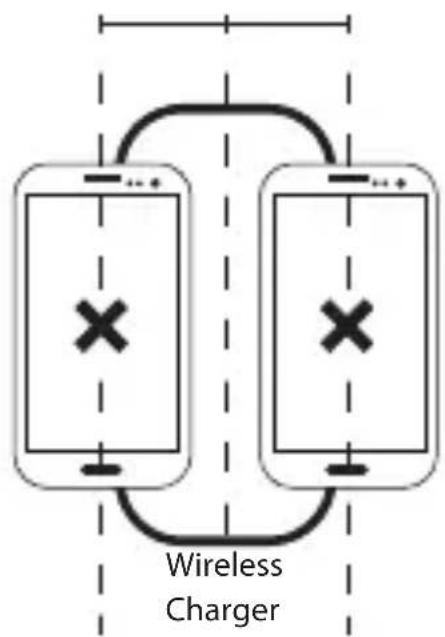
3. Charging Area
a) X-axis movable area: -15mm \~ 15mm
flowchart
graph TD
    A["Smartphone 1"] -->|Wireless Charger| B["Smartphone 2"]
    B -->|Wireless Charger| A
    style A fill:#f9f,stroke:#333
    style B fill:#f9f,stroke:#333
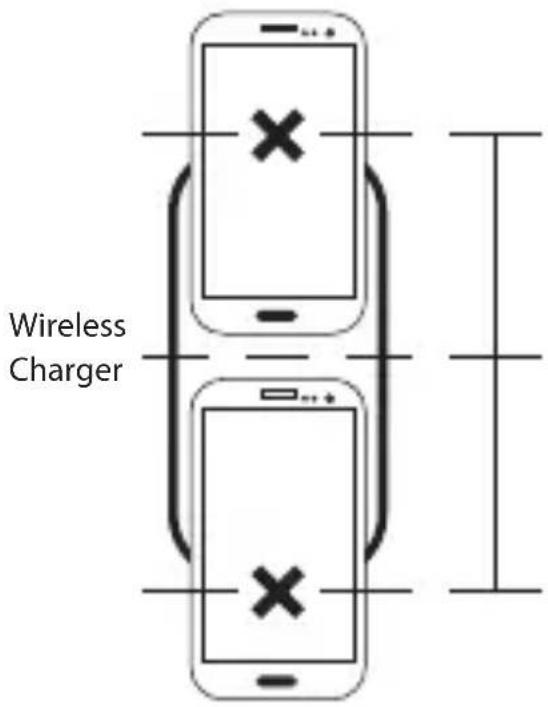
b) Y-axis movable area: -35mm \~ 35mm
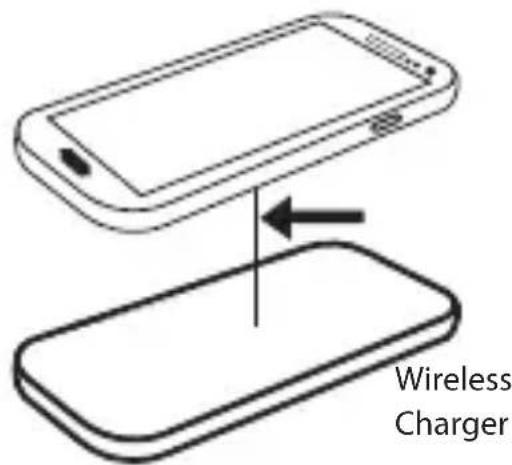
c) Z-axis movable area: 0mm \~ 8mm

Designed and engineered by Blaupunkt Competence Centre

Brand : BLAUPUNKT
Model : WCTYCMY
Category : Mobile Phone Charger