Atdec

AWMS-3-137140-C - Wall mount Atdec - Free user manual and instructions

Find the device manual for free AWMS-3-137140-C Atdec in PDF.

📄 15 pages English EN Download 💬 AI Question
Notice Atdec AWMS-3-137140-C - page 2
Pick your language and provide your email: we'll send you a specifically translated version.

User questions about AWMS-3-137140-C Atdec

0 question about this device. Answer the ones you know or ask your own.

Ask a new question about this device

The email remains private: it is only used to notify you if someone responds to your question.

No questions yet. Be the first to ask one.

Download the instructions for your Wall mount in PDF format for free! Find your manual AWMS-3-137140-C - Atdec and take your electronic device back in hand. On this page are published all the documents necessary for the use of your device. AWMS-3-137140-C by Atdec.

USER MANUAL AWMS-3-137140-C Atdec

1 x 130 Arm and 2 x 710 Arm on 400 Post with C-Clamp

Atdec AWMS-3-137140-C - x 130 Arm and 2 x 710 Arm on 400 Post with C-Clamp - 1

natural_image Technical line drawing of a mechanical linkage assembly (no text or symbols)

COMPONENT CHECKLIST RANGE

Atdec AWMS-3-137140-C - x 130 Arm and 2 x 710 Arm on 400 Post with C-Clamp - 2

Atdec AWMS-3-137140-C - x 130 Arm and 2 x 710 Arm on 400 Post with C-Clamp - 3

natural_image Technical line drawing of a mechanical arm with mounting feet and a central hub (no text or symbols)

Atdec AWMS-3-137140-C - x 130 Arm and 2 x 710 Arm on 400 Post with C-Clamp - 4

Atdec AWMS-3-137140-C - x 130 Arm and 2 x 710 Arm on 400 Post with C-Clamp - 5

natural_image Technical line drawing of a mechanical component with a central cavity and mounting base (no text or symbols)

Atdec AWMS-3-137140-C - x 130 Arm and 2 x 710 Arm on 400 Post with C-Clamp - 6
A

AWM-A13

130 Arm

(x1)

B

AWM-A71

710 Arm

(x2)

C

AWM-P40

400 Post

(x1)

D

AWM-FC

C-Clamp

(x1)

CONTENTS

C-ClampAWM-FC
Page 2Component Checklist
Page 3Clamp Installation
400 PostAWM-P40
Page 6Component Checklist
Page 7Post Installation
130 ArmAWM-130
Page 8Component Checklist
Page 9Arm Installation
Page 10Monitor Installation
Page 11Cable Management
460 ArmAWM-460
Page 12Component Checklist
Page 13Arm Installation
Page 14Monitor Installation
Page 15Cable Management

Atdec AWMS-3-137140-C - x 130 Arm and 2 x 710 Arm on 400 Post with C-Clamp - 7

natural_image Technical line drawing of a mechanical component with no visible text or symbols

Atdec AWMS-3-137140-C - x 130 Arm and 2 x 710 Arm on 400 Post with C-Clamp - 8

natural_image Technical line drawing of a mechanical component with a cylindrical shaft and base plate (no text or symbols)

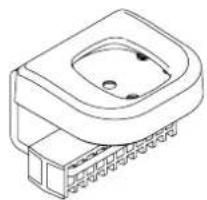
COMPONENT CHECKLIST REQUIRED TOOLS

Atdec AWMS-3-137140-C - COMPONENT CHECKLIST REQUIRED TOOLS - 1

natural_image Technical line drawing of a 3-pin connector (no text or symbols)

A
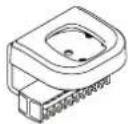
C Clamp Bracket (x1)

Atdec AWMS-3-137140-C - COMPONENT CHECKLIST REQUIRED TOOLS - 2

natural_image Simple line drawing of a rounded rectangular object with a curved top and bottom edge (no text or symbols)

C
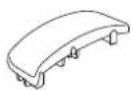
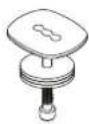
Cover for Post (x1)

Atdec AWMS-3-137140-C - COMPONENT CHECKLIST REQUIRED TOOLS - 3
E
4mm Allen key (x1)

Atdec AWMS-3-137140-C - COMPONENT CHECKLIST REQUIRED TOOLS - 4

natural_image Isometric line drawing of a mechanical part with four circular holes (no text or symbols)

B
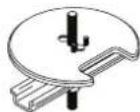
C Clamp Plate (x1)

Atdec AWMS-3-137140-C - COMPONENT CHECKLIST REQUIRED TOOLS - 5

natural_image Simple line drawing of a mechanical part with a square flange and central hole (no text or symbols)

D
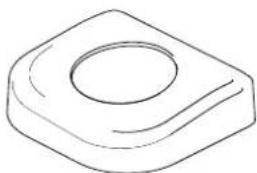
Cover for Base (x1)

Atdec AWMS-3-137140-C - COMPONENT CHECKLIST REQUIRED TOOLS - 6
F
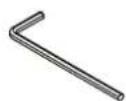
5mm Allen key (x1)

- All tools supplied

IMPORTANT INFORMATION

! Please ensure this product is installed as per these installation instructions.
! This product is compatible with Atdec modular (AWM) products.
! The manufacturer accepts no responsibility for incorrect installation.

1. C Clamp overview

1.1 Default - This is the "out of the box" configuration

Atdec AWMS-3-137140-C - C Clamp overview - 1

natural_image Technical line drawing of a mechanical component with housing and internal structure (no text or symbols)

MIN THICKNESS - 25mm (1") MAX THICKNESS - 33mm (1 ^5 / _16 )

1.2 Inverted - The C Clamp can be reconfigured for thicker surfaces

Atdec AWMS-3-137140-C - C Clamp overview - 2

natural_image Technical line drawing of a mechanical component with mounting holes and a schematic diagram showing internal structure (no text or symbols)

MIN THICKNESS - 18mm (1/8") MAX THICKNESS - 25.8mm (1")

2. Re-configure Clamp

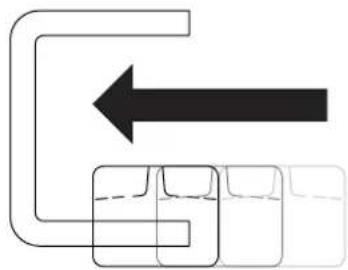
2.1 Slide pad off

Atdec AWMS-3-137140-C - Re-configure Clamp - 1

natural_image Pure diagram of a pipe with an arrow indicating direction, no text or symbols present

2.3 Invert pad

Atdec AWMS-3-137140-C - Re-configure Clamp - 2

flowchart
graph TD
    A["Process Step"] --> B["Output"]
    style A fill:#fff,stroke:#000
    style B fill:#fff,stroke:#000

2.3 Slide pad back on

Atdec AWMS-3-137140-C - Re-configure Clamp - 3

natural_image Pure diagram of a mechanical or fluidic system with arrows indicating direction, no text or symbols present

3. Post mount configuration

3.1 Attach plate to post

Atdec AWMS-3-137140-C - Post mount configuration - 1

text_image Fasteners supplied with post Tighten Firmly

3.2 Place in desired location

Atdec AWMS-3-137140-C - Post mount configuration - 2

natural_image Technical line drawing of a mechanical assembly with a base and mounting bracket (no text or symbols)

3.3 Slide the C Clamp bracket over the plate and position screw tips in the indents on the base plate

Atdec AWMS-3-137140-C - Post mount configuration - 3

natural_image Mechanical assembly diagram showing a rotating component with directional arrows, no text or symbols present

Note: You may need to un-screw the set screws out of the plate using the allen key

3.4 Check the set screws are mounted in position. Also check the desk clamp bracket is positioned tight up against the mounting surface edge

Atdec AWMS-3-137140-C - Post mount configuration - 4

text_image M8 x 16mm Set Screw Desk Clamp Bracket Mounting surface Pad

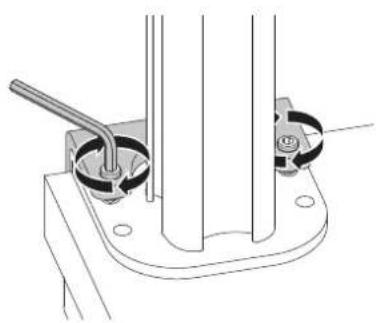
3.5 Tighten the set screws firmly and evenly on both sides of the desk clamp bracket.
Atdec AWMS-3-137140-C - Post mount configuration - 5

natural_image Technical line drawing of a mechanical assembly with two circular components and a rod (no text or symbols)

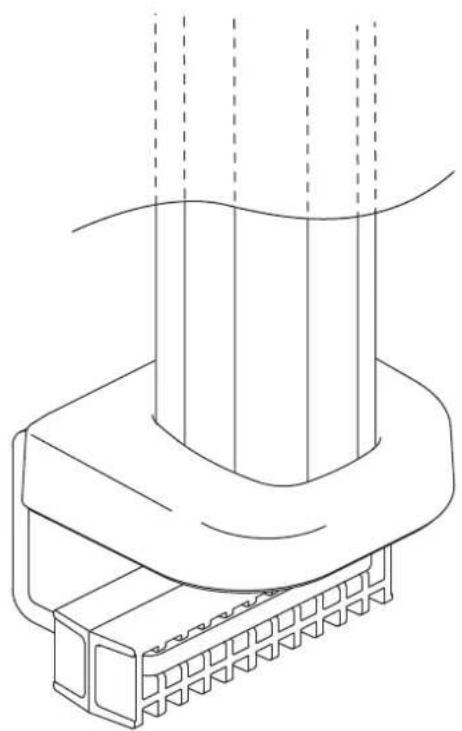
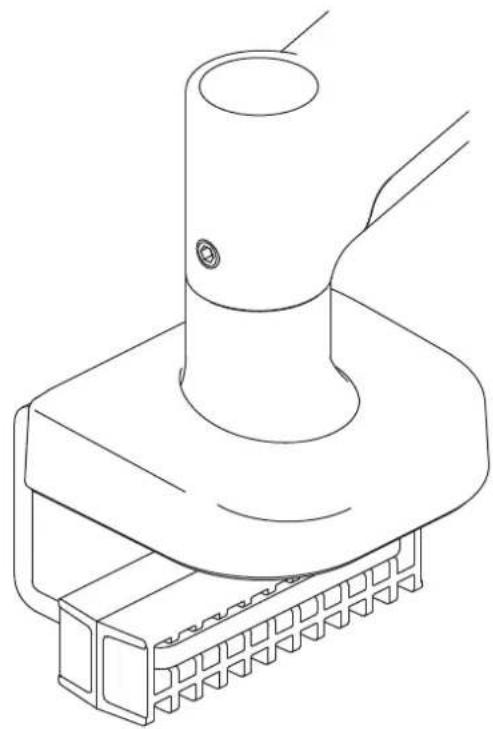
4. Installing the clamp cover to post

4.1 Remove the cable cover by pulling it straight up and out of the post. Remove top cap if already installed

Atdec AWMS-3-137140-C - Installing the clamp cover to post - 1

natural_image Diagram of a device with an upward arrow and component structure, no visible text or symbols

4.2 Locate the C Clamp cover over the post. Guide over the holes in the base plate and gently apply pressure on the cover until it clicks into place

Atdec AWMS-3-137140-C - Installing the clamp cover to post - 2

text_image Click!

4.3 Re-attach the cable cover by sliding it into the post channel. Fit the pole and cover caps back on.

Atdec AWMS-3-137140-C - Installing the clamp cover to post - 3

natural_image Technical line drawing of a vertical mechanical device with a black arrow indicating downward motion (no text or symbols)

5. Base mount installation

5.1 Attach plate to base
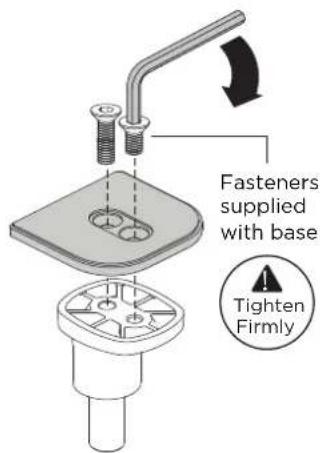
Atdec AWMS-3-137140-C - Base mount installation - 1

text_image Fasteners supplied with base Tighten Firmly

5.2 Place the base and plate in desired location

Atdec AWMS-3-137140-C - Base mount installation - 2

natural_image Technical line drawing of a mechanical assembly with a flanged base and cylindrical component (no text or symbols)

5.3 Slide the bracket onto the base plate and position screw tips in the indents on the base plate
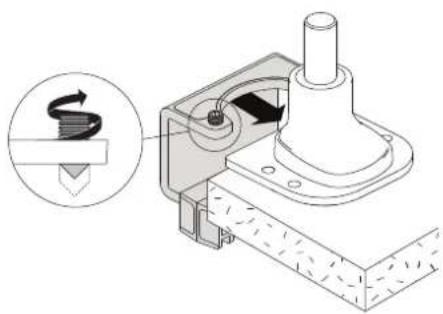
Atdec AWMS-3-137140-C - Base mount installation - 3

natural_image Mechanical assembly diagram showing a rotating component with a magnified inset (no text or symbols)

Note: You may need to un-screw the set screws out of the plate using the allen key

5.4 Check the set screws are mounted in position. Also check the desk clamp bracket is positioned tight up against the mounting surface edge
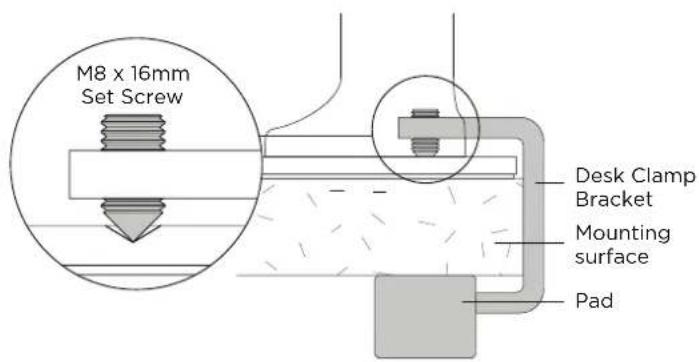
Atdec AWMS-3-137140-C - Base mount installation - 4

text_image M8 x 16mm Set Screw Desk Clamp Bracket Mounting surface Pad

5.5 Tighten the set screws firmly and evenly on both sides of the desk clamp bracket

Atdec AWMS-3-137140-C - Base mount installation - 5

natural_image Technical line drawing of a mechanical assembly with a cylindrical component and rotating parts (no text or symbols)

6. Installing the clamp cover to base

6.1 Locate the Cover for Base over the base. Guide over the holes in the base plate and gently apply pressure on the cover until it clicks into place.

Atdec AWMS-3-137140-C - Installing the clamp cover to base - 1

text_image Click!

6.2 Installation Complete

To continue with installation of your monitor arm, refer to your monitor arm's installation guide.

Atdec AWMS-3-137140-C - Installation Complete - 1

natural_image Mechanical assembly diagram showing a hand pressing a cylindrical component into a base (no text or symbols)

Atdec AWMS-3-137140-C - Installation Complete - 2

natural_image Line drawing of a cylindrical device with a lid and internal components, shown against a wavy background (no text or symbols)

COMPONENT CHECKLIST

Atdec AWMS-3-137140-C - Installation Complete - 3

natural_image Technical line drawing of a symmetrical mechanical component with no text or symbols

A
Post (x1)

Atdec AWMS-3-137140-C - Installation Complete - 4
B
Post Cap (x1)

Atdec AWMS-3-137140-C - Installation Complete - 5
C
Screw M8 (x2)

Atdec AWMS-3-137140-C - Installation Complete - 6
D

Cable Cover Cap (x1) (not supplied with all posts)
Atdec AWMS-3-137140-C - Installation Complete - 7
E
Cable Cover (x1) (not supplied with all posts)

Atdec AWMS-3-137140-C - Installation Complete - 8
F
Cable clips (not supplied with all posts)

Atdec AWMS-3-137140-C - Installation Complete - 9

REQUIRED TOOLS

- All tools provided

IMPORTANT INFORMATION

! Please ensure this product is installed as per these installation instructions.
! This product is compatible with Atdec AWM Series products.
! The manufacturer accepts no responsibility for incorrect installation.

1. Attach Post to fixing (fixing sold separately)

1.1 Follow the installation guide provided with your fixing to attach it to the post and fit it to the worksurface.

Atdec AWMS-3-137140-C - Attach Post to fixing (fixing sold separately) - 1

AWM Fixing options
Atdec AWMS-3-137140-C - Attach Post to fixing (fixing sold separately) - 2
Bolt Through Kit AWM-FB

Atdec AWMS-3-137140-C - Attach Post to fixing (fixing sold separately) - 3
F Clamp
AWM-FF

Atdec AWMS-3-137140-C - Attach Post to fixing (fixing sold separately) - 4
Heavy Duty F Clamp AWM-FH

Atdec AWMS-3-137140-C - Attach Post to fixing (fixing sold separately) - 5
C Clamp
AWM-FC

Atdec AWMS-3-137140-C - Attach Post to fixing (fixing sold separately) - 6
Grommet Clamp AC-GC

2. Check post placement & arm positions

2.1 Do not mount a monitor arm on the rear channel of a post when the post is fixed to the desk using an F Clamp, Heavy Duty F Clamp, or C Clamp.

Atdec AWMS-3-137140-C - Check post placement & arm positions - 1
F Clamp
AWM-FF

Atdec AWMS-3-137140-C - Check post placement & arm positions - 2
Heavy Duty F Clamp
AWM-FH

Atdec AWMS-3-137140-C - Check post placement & arm positions - 3
C Clamp
AWM-FC

Atdec AWMS-3-137140-C - Check post placement & arm positions - 4

text_image Rear of Mounting Surface

3. Cable cover position and post cap

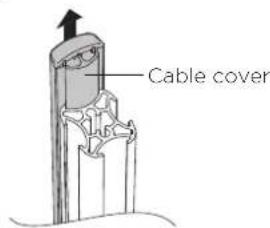
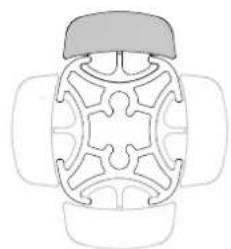
3.1 To reposition the cable cover, pull it straight up and out of the post and insert it into any of the available channels

Atdec AWMS-3-137140-C - Cable cover position and post cap - 1

text_image Cable Cover

Note: The cable cover shown does not come with all posts

3.2 Optional cable cover positions

Atdec AWMS-3-137140-C - Cable cover position and post cap - 2

natural_image Top-down line drawing of a symmetrical mechanical or architectural component with no text or symbols

3.3 Fit post cap onto the top of the post

Atdec AWMS-3-137140-C - Cable cover position and post cap - 3

natural_image Technical diagram of a mechanical assembly showing a lever and base component (no text or symbols)

Allen Key
Post Cap
Note: An allen key may be stored in the Post Cap.
Post

4. Cable clips and cover

4.1 Push the cable down into the cable clip.

Atdec AWMS-3-137140-C - Cable clips and cover - 1

natural_image Close-up of hands connecting a cable to a connector (no text or symbols visible)

Note: Cable clips do not come with all posts. Additional clips sold separately.

4.2 Insert one side of the cable clip into the channel on the post assembly, then push in the other side.

Atdec AWMS-3-137140-C - Cable clips and cover - 2

natural_image Illustration of a hand inserting a cable into a plastic housing (no text or symbols visible)

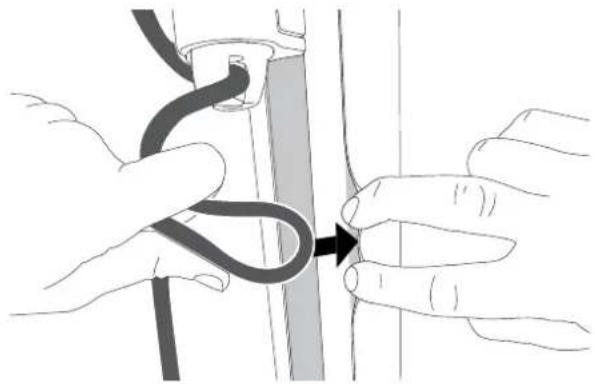
4.3 Loop cable and insert into cable cover.

Atdec AWMS-3-137140-C - Cable clips and cover - 3

natural_image Illustration of hands tying a knot between two vertical strips (no text or symbols)

4.4 Feed remaining cable into the cover.

Atdec AWMS-3-137140-C - Cable clips and cover - 4

natural_image Diagram of a joint with a bandage and shaded area, no text or symbols present

Atdec AWMS-3-137140-C - Cable clips and cover - 5

natural_image Technical line drawing of a mechanical clamp or bracket assembly (no text or symbols)

COMPONENT CHECKLIST
Atdec AWMS-3-137140-C - Cable clips and cover - 6
A
Monitor Arm (x1)

Atdec AWMS-3-137140-C - Cable clips and cover - 7
B
VESA Head (x1)

Atdec AWMS-3-137140-C - Cable clips and cover - 8
D
Screw M4x25mm (x4)

Atdec AWMS-3-137140-C - Cable clips and cover - 9
E
Screw M4x16mm (x4)

Atdec AWMS-3-137140-C - Cable clips and cover - 10
F
Screw M4x12mm (x4)

Atdec AWMS-3-137140-C - Cable clips and cover - 11
C
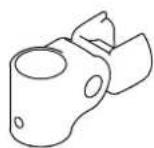
Post Clamp (x1)

Atdec AWMS-3-137140-C - Cable clips and cover - 12
G
Spacer (x4)

Atdec AWMS-3-137140-C - Cable clips and cover - 13
H

Security screw (x1)
Atdec AWMS-3-137140-C - Cable clips and cover - 14
|
4mm allen key (x4)

Atdec AWMS-3-137140-C - Cable clips and cover - 15

REQUIRED TOOLS

• Phillips Head Screwdriver

WEIGHT RANGE

Atdec AWMS-3-137140-C - WEIGHT RANGE - 1

0 - 12kg (0 - 26.5lbs)

IMPORTANT INFORMATION

! Please ensure this product is installed as per these installation instructions.
! The manufacturer accepts no responsibility for incorrect installation.
! This product is compatible with Atdec AWM Series products.

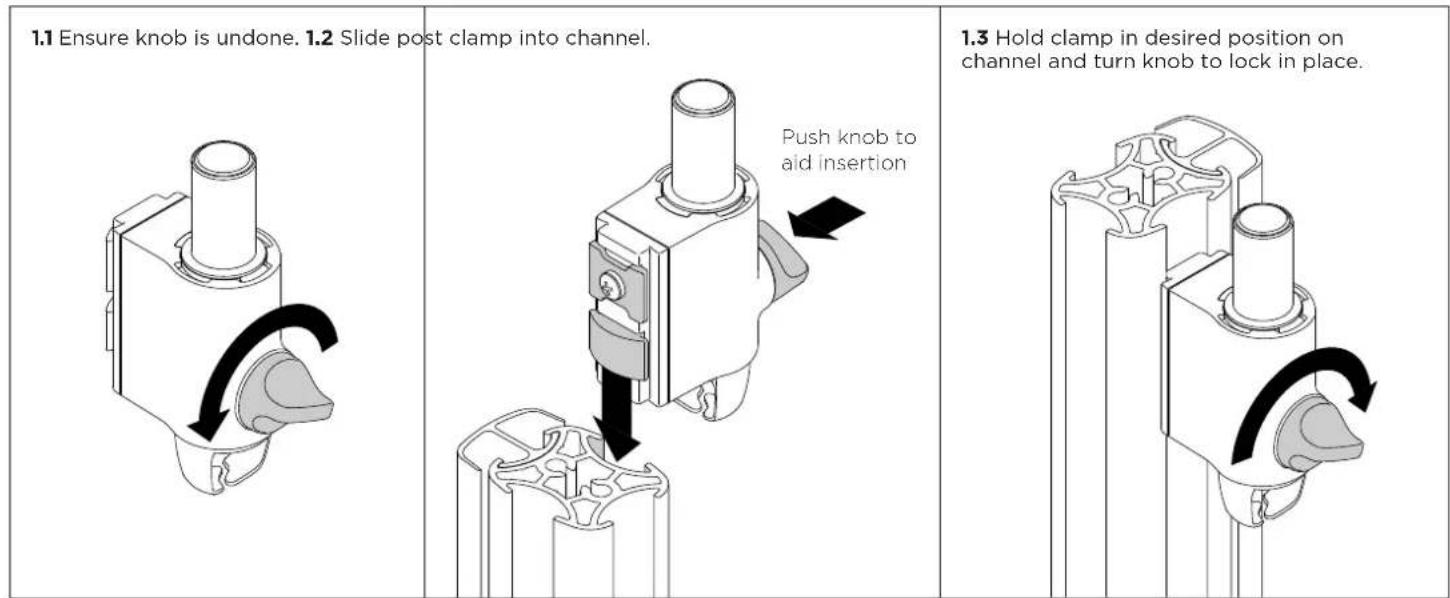
1. Fix clamp to Post or Wall Channel

Atdec AWMS-3-137140-C - Fix clamp to Post or Wall Channel - 1

text_image 1.1 Ensure knob is undone. 1.2 Slide post clamp into channel. Push knob to aid insertion 1.3 Hold clamp in desired position on channel and turn knob to lock in place.

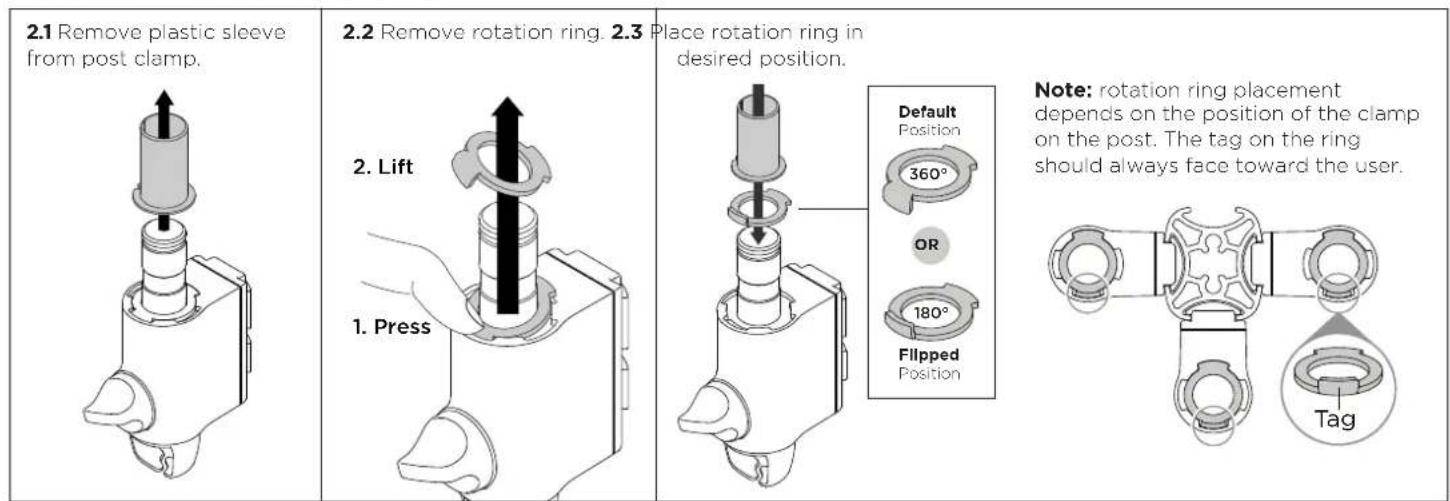
2. Set arm rotation to 180^ (optional)

Note rotation is set to 360^ by default.

Atdec AWMS-3-137140-C - Set arm rotation to 180^ (optional) - 1

text_image 2.1 Remove plastic sleeve from post clamp. 2.2 Remove rotation ring. 2.3 Place rotation ring in desired position. Default Position 360° OR 180° Flipped Position Note: rotation ring placement depends on the position of the clamp on the post. The tag on the ring should always face toward the user. 1. Press 2. Lift 1. Press

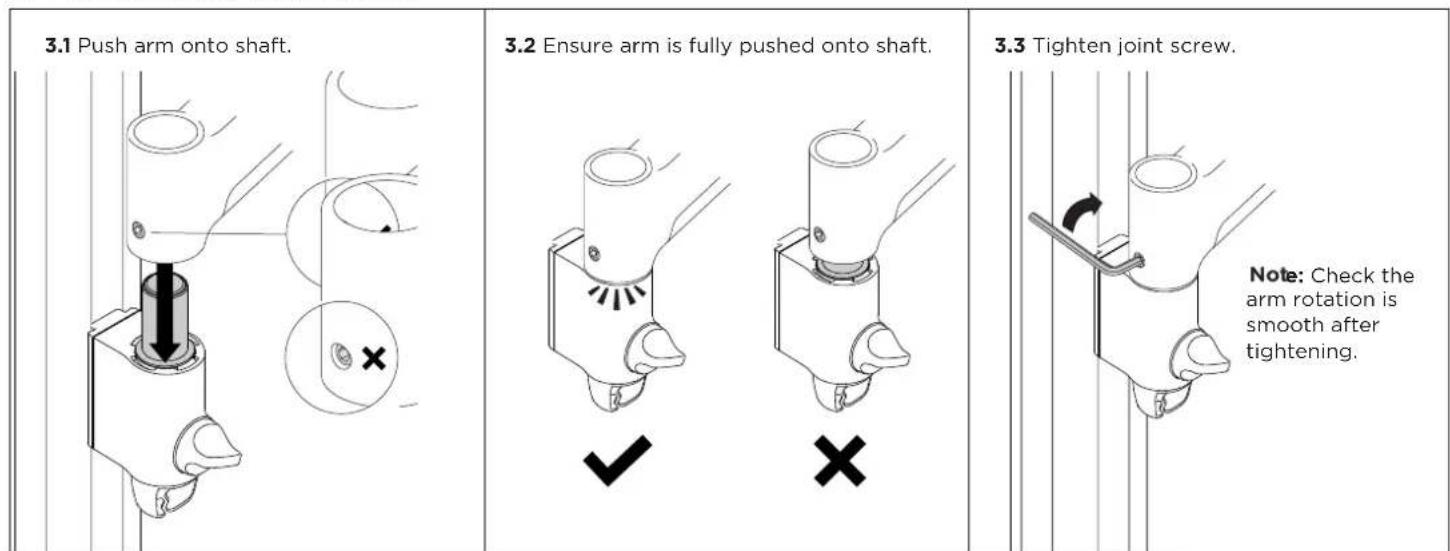
3. Fit arm onto post clamp

Atdec AWMS-3-137140-C - Fit arm onto post clamp - 1

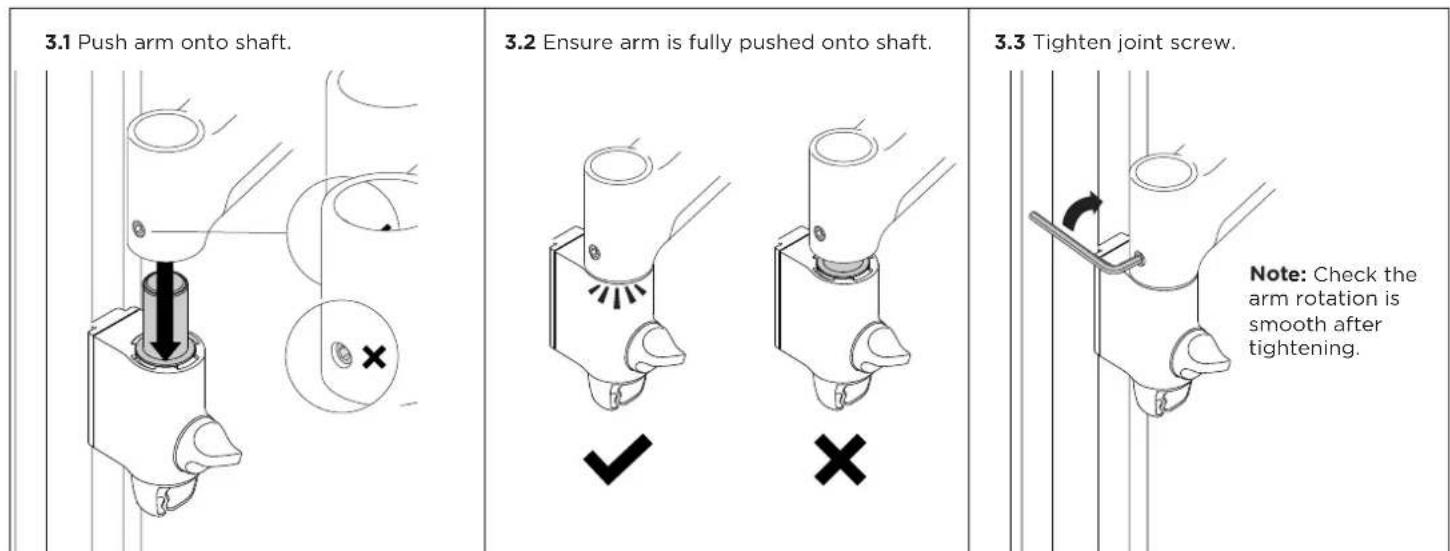
text_image 3.1 Push arm onto shaft. 3.2 Ensure arm is fully pushed onto shaft. 3.3 Tighten joint screw. Note: Check the arm rotation is smooth after tightening.

4. Attach VESA head to monitor

4.1 VESA mounting compatibility
Atdec AWMS-3-137140-C - Attach VESA head to monitor - 1

text_image 100mm 75mm 100mm 75mm

Note: For other sizes, use a suitable adaptor plate (sold separately).

4.2 Screw the VESA head onto monitor
Atdec AWMS-3-137140-C - Attach VESA head to monitor - 2

natural_image Technical diagram of a mechanical component with multiple pins and mounting holes (no text or symbols)

Note spacers may be required for curved, recessed or uneven monitor surfaces.

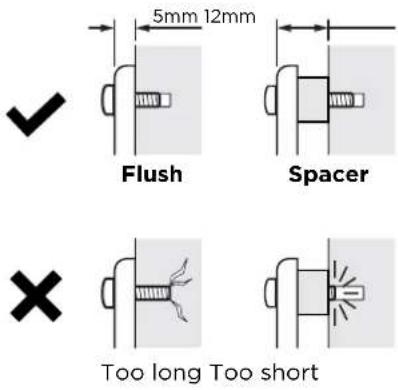
4.3 Ensure the correct screw length is used to attach the monitor.
Atdec AWMS-3-137140-C - Attach VESA head to monitor - 3

text_image 5mm 12mm Flush Spacer Too long Too short

5. Mount monitor

5.1 Insert VESA head into the monitor arm
Atdec AWMS-3-137140-C - Mount monitor - 1

text_image Monitor arm

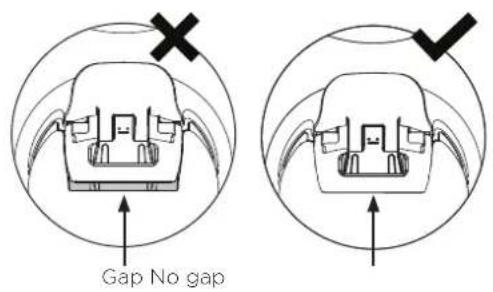
5.2 Ensure that the VESA head sits flush within the monitor arm. There should be no gap

Atdec AWMS-3-137140-C - Mount monitor - 2

text_image Gap No gap

5.3 Push the lever down to secure it to the arm assembly
Atdec AWMS-3-137140-C - Mount monitor - 3

natural_image Diagram showing a hand pressing down on a mechanical component with a downward arrow indicating force or direction (no text or symbols present)

6. Adjust tilt tension & Install security screw

6.1 Use the allen key to adjust the tilt tension until the monitor holds in a vertical position at the end of the arm.
Atdec AWMS-3-137140-C - Adjust tilt tension & Install security screw - 1

text_image Note: Support monitor while adjusting Loosen Tighten

6.2 OPTIONAL security screw
To install the optional security screw tilt the head upwards

Atdec AWMS-3-137140-C - Adjust tilt tension & Install security screw - 2

natural_image Diagram of a mechanical component being inserted into a tool, showing a curved arrow indicating rotation (no text or symbols present)

6. Monitor arm cable management

6.1 Plug cables into the monitor and route the cables down the arm using the cable hooks and clips.

Atdec AWMS-3-137140-C - Monitor arm cable management - 1

natural_image Simple line drawing of a wall-mounted device with a hose and cable, no text or symbols present

Important:

Ensure enough cable slack is given to allow for movement of the monitor

7. Post cable management

7.1 Push the cable down into the cable clip

Atdec AWMS-3-137140-C - Post cable management - 1

text_image Note: Cable clips do not come with all posts

7.2 Push cable clip into post channel

Atdec AWMS-3-137140-C - Post cable management - 2

natural_image Diagram of a hand inserting a cable into a mechanical component (no text or symbols)

7.3 Recommended post cable cover position for double or triple arm set-ups

Atdec AWMS-3-137140-C - Post cable management - 3

text_image Cable Cover Desk Clamp

7.4 To reposition the cable cover, pull it straight up and out of the post and insert it into any of the available channels

Atdec AWMS-3-137140-C - Post cable management - 4

text_image Cable cover

Note: The cable cover shown does not come with all posts

Atdec AWMS-3-137140-C - Post cable management - 5

natural_image Top-down line drawing of a symmetrical mechanical or architectural component with no text or symbols

Alternative cable cover positions

7.5 Loop cable and insert into cable cover

Atdec AWMS-3-137140-C - Post cable management - 6

natural_image Illustration of hands tying a knot between two vertical strips (no text or symbols)

7.6 Feed remaining cable into cover

Atdec AWMS-3-137140-C - Post cable management - 7

natural_image Diagram of a mechanical joint or connector with a curved black cable inserted into a gray section (no text or symbols)

Atdec AWMS-3-137140-C - Post cable management - 8

natural_image Technical line drawing of a mechanical linkage assembly (no text or symbols)

COMPONENT CHECKLIST

Atdec AWMS-3-137140-C - Post cable management - 9

natural_image Technical line drawing of a mechanical bracket or clamp (no text or symbols)

A
Monitor Arm (x1)

Atdec AWMS-3-137140-C - Post cable management - 10
B

VESA Head (x1)
Atdec AWMS-3-137140-C - Post cable management - 11
C
Post Clamp (x1)

Atdec AWMS-3-137140-C - Post cable management - 12

Atdec AWMS-3-137140-C - Post cable management - 13

Atdec AWMS-3-137140-C - Post cable management - 14
E
Screw M4x16mm (x4)
F
Screw M4x12mm (x4)

D
Screw M4x25mm (x4)
Atdec AWMS-3-137140-C - Post cable management - 15

Atdec AWMS-3-137140-C - Post cable management - 16

Atdec AWMS-3-137140-C - Post cable management - 17
G
Spacer (x4)
H
Security screw (x1)
|
4mm allen key (x1)

Atdec AWMS-3-137140-C - Post cable management - 18

REQUIRED TOOLS

• Phillips Head Screwdriver

WEIGHT RANGE

Atdec AWMS-3-137140-C - WEIGHT RANGE - 1

0 - 12kg (0 - 26.5lbs)

IMPORTANT INFORMATION

! Please ensure this product is installed as per these installation instructions.
! The manufacturer accepts no responsibility for incorrect installation.
! This product is compatible with Atdec AWM Series products.

1. Fix clamp to Post or Wall Channel
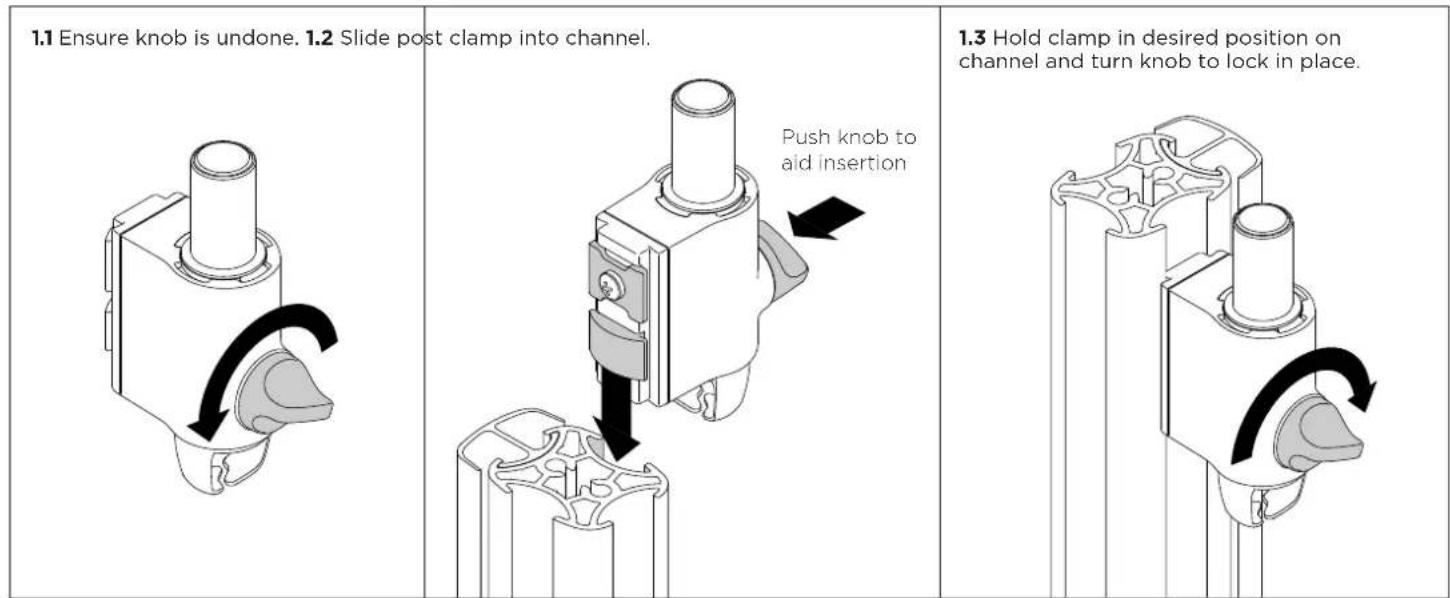
Atdec AWMS-3-137140-C - Fix clamp to Post or Wall Channel - 1

text_image 1.1 Ensure knob is undone. 1.2 Slide post clamp into channel. Push knob to aid insertion 1.3 Hold clamp in desired position on channel and turn knob to lock in place.

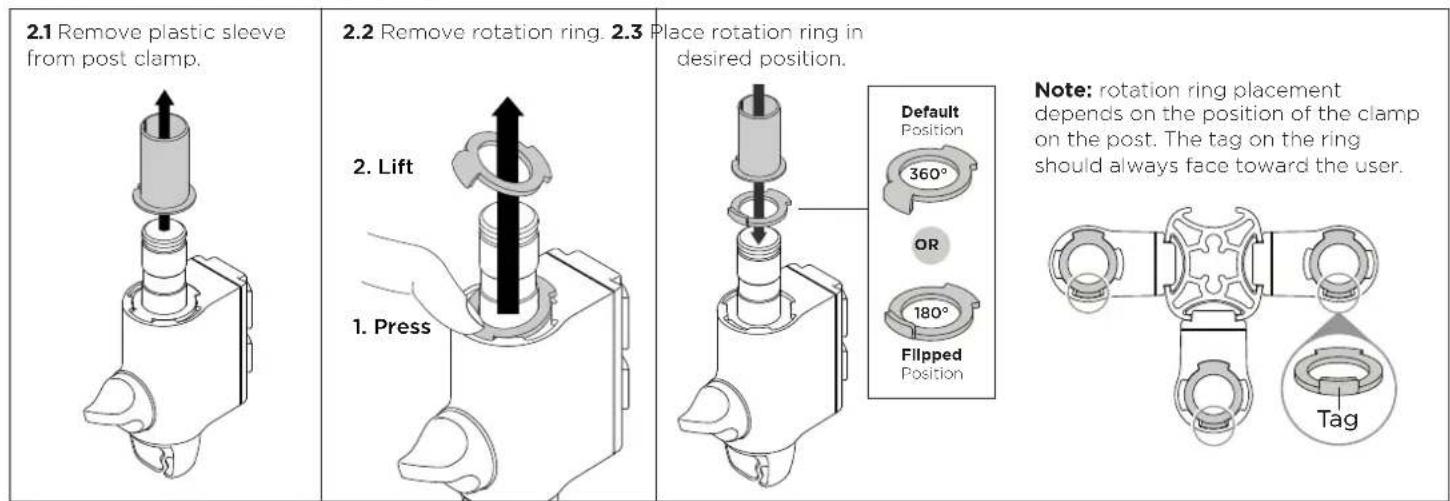
2. Set arm rotation to 180^ (optional)

Note rotation is set to 360^ by default.

Atdec AWMS-3-137140-C - Set arm rotation to 180^ (optional) - 1

text_image 2.1 Remove plastic sleeve from post clamp. 2.2 Remove rotation ring. 2.3 Place rotation ring in desired position. Default Position 360° OR 180° Flipped Position Note: rotation ring placement depends on the position of the clamp on the post. The tag on the ring should always face toward the user. 2. Lift 1. Press

3. Fit arm onto post clamp

Atdec AWMS-3-137140-C - Fit arm onto post clamp - 1

text_image 3.1 Push arm onto shaft. 3.2 Ensure arm is fully pushed onto shaft. 3.3 Tighten joint screw. Note: Check the arm rotation is smooth after tightening.

4. Attach VESA head to monitor

4.1 VESA mounting compatibility
Atdec AWMS-3-137140-C - Attach VESA head to monitor - 1

text_image 100mm 75mm 100mm 75mm

Note: For other sizes, use a suitable adaptor plate (sold separately).

4.2 Screw the VESA head onto monitor
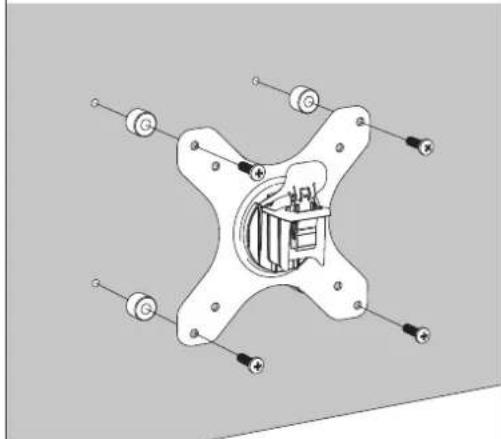
Atdec AWMS-3-137140-C - Attach VESA head to monitor - 2

natural_image Pure mechanical diagram of a star-shaped component with mounting holes and internal components (no text or symbols)

Note spacers may be required for curved, recessed or uneven monitor surfaces.

4.3 Ensure the correct screw length is used to attach the monitor.
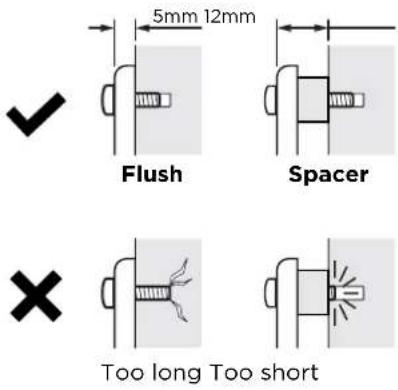
Atdec AWMS-3-137140-C - Attach VESA head to monitor - 3

text_image 5mm 12mm Flush Spacer Too long Too short

5. Mount monitor

5.1 Insert VESA head into the monitor arm
Atdec AWMS-3-137140-C - Mount monitor - 1

text_image Monitor arm

5.2 Ensure that the VESA head sits flush within the monitor arm. There should be no gap

Atdec AWMS-3-137140-C - Mount monitor - 2

text_image Gap No gap

5.3 Push the lever down to secure it to the arm assembly
Atdec AWMS-3-137140-C - Mount monitor - 3

natural_image Diagram of a hand pressing down on a mechanical component with a downward arrow indicating force or direction (no text or symbols present)

6. Adjust tilt tension & Install security screw

6.1 Use the allen key to adjust the tilt tension until the monitor holds in a vertical position at the end of the arm.
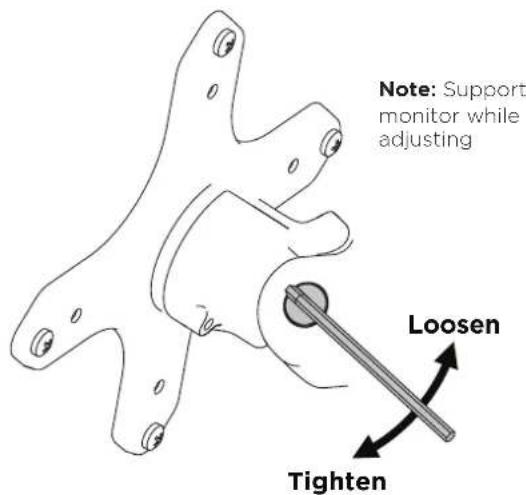
Atdec AWMS-3-137140-C - Adjust tilt tension & Install security screw - 1

text_image Note: Support monitor while adjusting. Loosen Tighten

6.2 OPTIONAL security screw
To install the optional security screw tilt the head upwards

Atdec AWMS-3-137140-C - Adjust tilt tension & Install security screw - 2

natural_image Diagram of a mechanical component with an arrow indicating rotation, no text or symbols present

6. Monitor arm cable management

6.1 Plug cables into the monitor and route the cables down the arm using the cable hooks and clips

Atdec AWMS-3-137140-C - Monitor arm cable management - 1

text_image the monitor and route e arm using the cable Note Ensure enough cable slack is given to allow for movement of the monitor

7. Post cable management

7.1 Push the cable down into the cable clip

Atdec AWMS-3-137140-C - Post cable management - 1

text_image Note: Cable clips do not come with all posts

7.2 Push cable clip into post channel

Atdec AWMS-3-137140-C - Post cable management - 2

natural_image Illustration of a hand inserting a cable into a mechanical component (no text or symbols)

7.3 Recommended post cable cover position for double or triple arm set-ups

Atdec AWMS-3-137140-C - Post cable management - 3

text_image Cable Cover Desk Clamp

7.4 To reposition the cable cover, pull it straight up and out of the post and insert it into any of the available channels

Atdec AWMS-3-137140-C - Post cable management - 4

text_image Cable cover

Note: The cable cover shown does not come with all posts
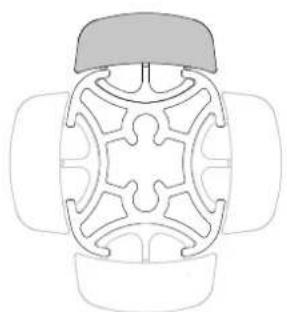
Atdec AWMS-3-137140-C - Post cable management - 5

natural_image Top-down line drawing of a symmetrical mechanical or architectural component with no text or symbols

Alternative cable cover positions

7.5 Loop cable and insert into cable cover

Atdec AWMS-3-137140-C - Post cable management - 6

natural_image Illustration of hands tying a knot between two vertical strips (no text or symbols)

7.6 Feed remaining cable into cover

Atdec AWMS-3-137140-C - Post cable management - 7

natural_image Diagram of a cable being inserted into a vertical pipe (no text or symbols)
Manual assistant
Powered by Anthropic
Waiting for your message
Product information

Brand : Atdec

Model : AWMS-3-137140-C

Category : Wall mount