
USBC2000 - Docking Station Black Box - Free user manual and instructions
Find the device manual for free USBC2000 Black Box in PDF.


| Product Type | Docking Station |
| Model | USBC2000 |
| Brand | Black Box |
| Connectivity | USB-C (Power Delivery, Data, Video) |
| Dimensions (approx.) | 19 x 9 x 2.5 cm (7.5 x 3.5 x 1 in) |
| Weight (approx.) | 450 g (1 lb) |
| Power Supply | USB-C Power Delivery (100W input) or optional AC adapter |
| Video Output | Up to 4K@60Hz via HDMI or DisplayPort |
| USB Ports | 3x USB-A (USB 3.0), 1x USB-C (Data only) |
| Ethernet | Gigabit Ethernet (RJ45) |
| Audio | 3.5mm combo jack (headphone/microphone) |
| Card Reader | SD/TF card slot |
| Compatibility | Windows, macOS, Linux, Chrome OS (with USB-C or Thunderbolt 3/4) |
| Data Transfer Rate | Up to 10 Gbps (USB 3.1 Gen 2) |
| Charging | Supports pass-through charging up to 100W for host device |
| Operating Temperature | 0°C to 45°C (32°F to 113°F) |
| Storage Temperature | -20°C to 60°C (-4°F to 140°F) |
| Maintenance | Wipe with a soft dry cloth; avoid liquids and abrasive cleaners |
| Safety Precautions | Do not expose to water or excessive heat; ensure proper ventilation |
| Spare Parts & Repairability | No user-serviceable parts; contact Black Box support for assistance |
Frequently Asked Questions - USBC2000 Black Box
User questions about USBC2000 Black Box
0 question about this device. Answer the ones you know or ask your own.
Ask a new question about this device
Download the instructions for your Docking Station in PDF format for free! Find your manual USBC2000 - Black Box and take your electronic device back in hand. On this page are published all the documents necessary for the use of your device. USBC2000 by Black Box.
USER MANUAL USBC2000 Black Box
2.1 Introduction....4
2.2 Features ....4
2.3 What's Included....5
2.4 Hardware Description....5
-
OPERATION....8
-
CONNECTION DIAGRAM 9
APPENDIX: DISCLAIMER/TRADEMARKS....10
A.1 Disclaimer....10
A.2 Trademarks Used in this Manual....10
CHAPTER 1: SPECIFICATIONS
NEED HELP?
LE AVE THE TECH TO US
LIVE 24/7
TECHNICAL
SUPPORT
1.8 7 7.87 7.2269
TABLE 1-1. SPECIFICATIONS
| SPECIFICATION DESCRIPTION | |
| Connectors | |
| Input Connectors (1) USB-C Female (with our Type-C M to M cable) | |
| Output Connectors | (3) USB 3.0 Female;(1) USB-C Female (for data and charging);(1) RJ-45;(1) HDMI Female;(1) Micro SDX;(1) SD/MMCX |
| Environmental | |
| Operating Temperature 32 to 113°F (0 to 45°C) | |
| Storage Temperature +14 to +158°F (-10 to +70°C) | |
| Operating Humidity 10 to 85% RH (no condensation) | |
| Storage Humidity 5 to 90% RH (no condensation) | |
| Regulatory Approvals | |
| Certifications | FCC, CECAN ICES-3(B)/NMB-3(B) |
| Power | |
| Power Supply | USB-C Female Port,Up to 100 W (20 V/5 A) |
2.1 INTRODUCTION
This is a USB-C to three USB 3.0, HDMI, RJ-45, Micro SD, SD/MMC, Type-C Data and PD Charging Adapter. The USB 3.0 port allows you to connect a USB device to the host USB-C computer. The USB-C female port supports both PD Charging and data; the Gigabit Ethernet port allows the host computer to get access to the network; the HDMI port allows you to connect an HDMI monitor so that you can watch videos on a big screen; and the Micro SD and SD/MMC port allows you to read data in the memory card on the host PC. It can work on all PCs and mobile phones that support DP Alt Mode.
2.2 FEATURES
- Interface:
(1) Type-C Female (connect to Type-C host PC with our equipped Type-C M to M cable)
(1) Type-C Female (for data and PD Charging)
(3) USB-A Female
(1) HDMI Female
(1) RJ-45
(1) SD slot
(1) Micro SD slot
◆ Supports USB 3.0 super speed (5 Gbps) transmission, backwards-compatible with USB 2.0
One of the three USB-A ports supports BC 1.2, the power of this port can be up to 7.5W (5V/1.5A)
◆ Supports 10/100/1000Mbps bandwidth for the RJ-45 port
◆ Supports HDMI resolution up to 4K @ 30 Hz, 2K @ 30 Hz
- Type-C female port supports both data (5 Gbps) and PD Charging 100W (20 V / 5 A)
- Multiple USB-C interfaces support plug and play, hot swap
- Supports Secure Digital v3.0 UHS-I (Ultra High Speed): SDR12 (12.5 Mbyte/s)/SDR25 (25 Mbyte/s)/SDR50 (50 Mbyte/s)/DDR50 (50 Mbyte/s)/ SDR104 (104 Mbyte/s)
- Allows SD and Micro SD card to work at the same time
◆ Supports Fast Role Swap of PD 3.0, the connected device will not get disconnected when plugging in and out PD Adapter - Easy to use and carry
NOTE: Description of the Detached Type-C M to M Cable
- It is a USB 3.1 Type-C Gen2 Full-featured cable with speeds up to 10 Gbps; E-marked IC and Vbus current capability up to 5 Amp
- This product only functions well with the Black Box equipped Type-C M to M cable or cable produced by Black Box that has the same spec as the original one. To guarantee the proper functioning of this product, if you lose the equipped cable, contact Black Box Technical Support at 877-877-2269 or info@blackbox.com to buy another cable of the same spec. Avoid using cables produced by other manufacturers.
2.3 WHAT'S INCLUDED
Your package should include the following items. If anything is missing or damaged, contact Black Box Technical Support at 877-877-2269 or info@blackbox.com
(1) Main unit
♦ (1) Type-C M to M cable (stores inside the main unit)
2.4 HARDWARE DESCRIPTION
Figures 2-1 through 2-4 show the front, back, and sides of the unit. Tables 2-1 through 2-4 describe its components.
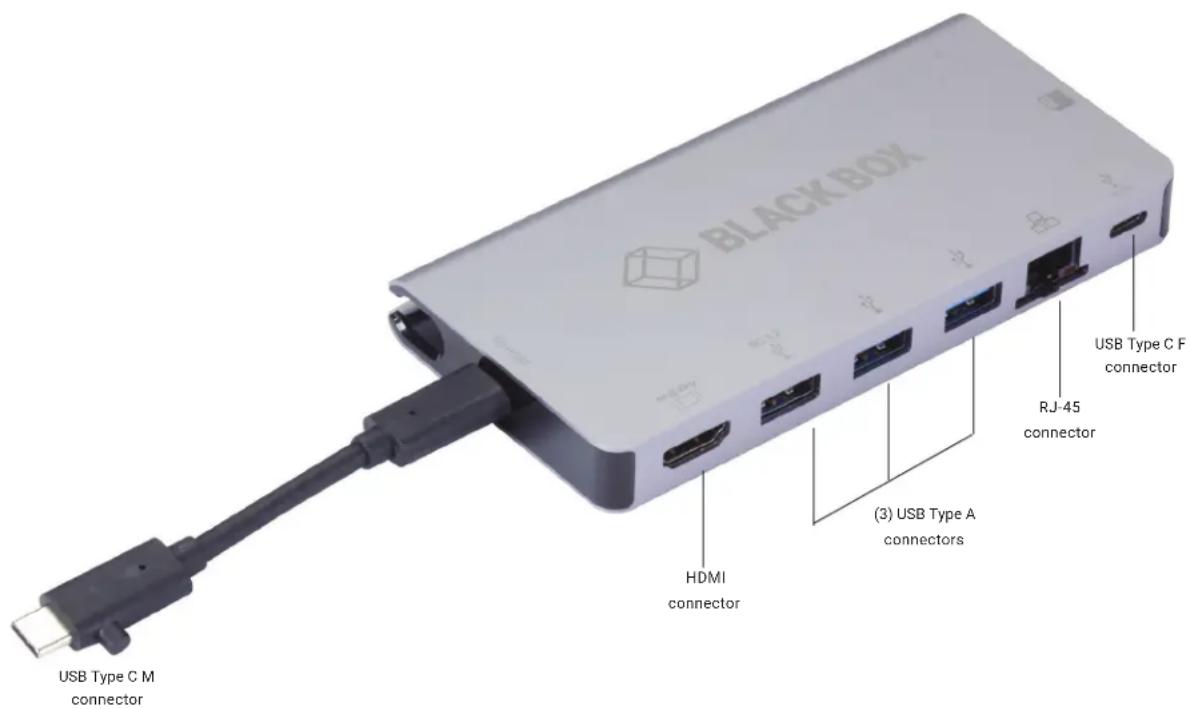
FIGURE 2-1. FRONT OF UNIT
TABLE 2-1. FRONT PANEL COMPONENTS
| COMPONENT DESCRIPTION | |
| USB Type C male connector Connects to MacBook or Chromebook computer | |
| HDMI connector Connects to HDMI display, 4K @ 30 Hz | |
| (3) USB Type A connectors Connect to USB 3.0/2.0 devices | |
| RJ-45 connector | Connects to Ethernet router |
| USB Type C female connector | Connects to USB Type C device or Type C PD adapter |
CHAPTER 2: OVERVIEW
NEED HELP?
LE AVE THE TECH TO US
LIVE 24/7
TECHNICAL
SUPPORT
1.8 7 7.87 7.2269
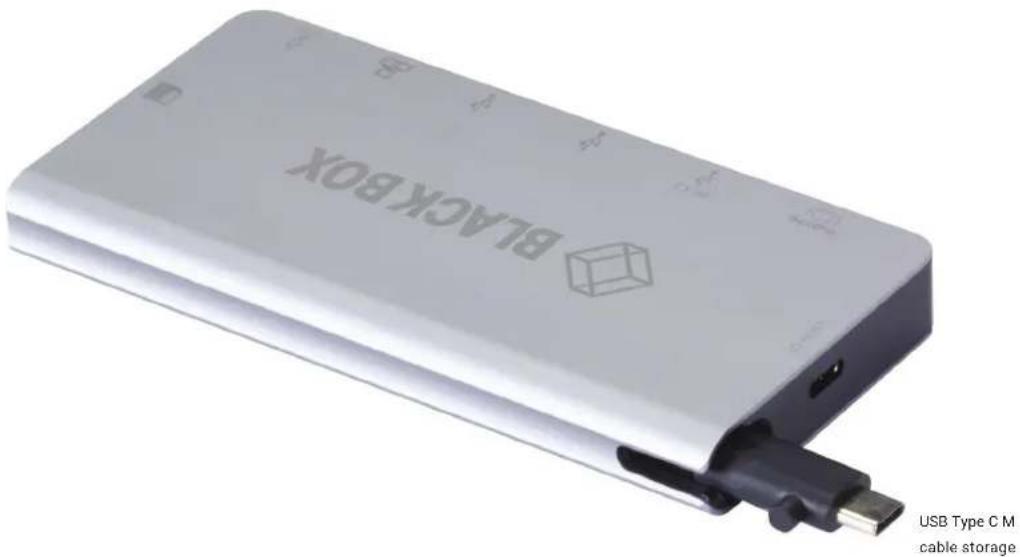
FIGURE 2-2. BACK OF UNIT
TABLE 2-2. BACK PANEL COMPONENTS
| COMPONENT DESCRIPTION | |
| USB-C cable storage slot | This is where the cable is stored. It would be removed from here and be plugged into the USB -C port labeled Host. |

FIGURE 2-3. SIDE 1 OF UNIT
TABLE 2-3. SIDE 1 PANEL COMPONENTS
| COMPONENT DESCRIPTION |
| Micro SD card slot Insert Micro SD card here |
| SD card slot Insert SD card here |
CHAPTER 2: OVERVIEW
NEED HELP?
LE AVE THE TECH TO US
LIVE 24/7
TECHNICAL
SUPPORT
1.8 7 7.87 7.2269
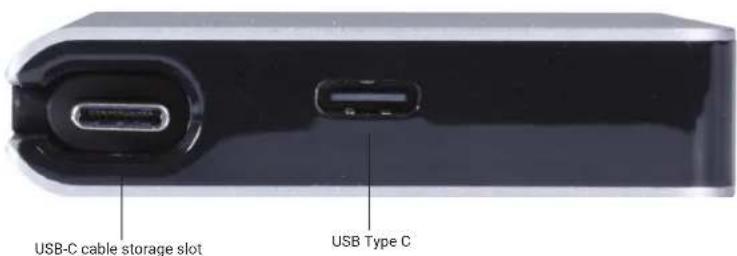
FIGURE 2-4. SIDE 2 OF UNIT
TABLE 2-4. SIDE 2 PANEL COMPONENTS
| COMPONENT DESCRIPTION |
| USB-C cable storage slot This is where you store the supplied USB-C cable when not in use |
| USB Type C connector Connects to host computer |
- Connect the USB-C Female port of the USB C Docking Station to a Macbook or Chromebook or other USB-C host with the included Type-C M to M cable.
- Connect the three USB 3.0 outputs of the USB C Docking Station to three USB 3.0/2.0 devices.
- Connect HDMI output of the USB C Docking Station to HDTV with one HDMI cable.
- Connect the Gigabit Ethernet port of the USB C Docking Station to an Ethernet Router with an Ethernet cable.
- Automatically or manually set the IP address of the computer.
- Insert a Micro SD, SD/MMC card into the responding slots.
- Connect the USB-C charging port, it can charge the host computer and support power for the USB C Docking Station simultaneously.
CHAPTER 4: CONNECTION DIAGRAM
NEED HELP?
LE AVE THE TECH TO US
LIVE 24/7
TECHNICAL
SUPPORT
1.8 7 7.87 7.2269

FIGURE 4-1. CONNECTION DIAGRAM
APPENDIX A: DISCLAIMER/TRADEMARKS
NEED HELP? LE AVE THE TECH TO US
LIVE 24/7 TECHNICAL SUPPORT
1.8 7 7.87 7.2269
A.1 DISCLAIMER
Black Box Corporation shall not be liable for damages of any kind, including, but not limited to, punitive, consequential or cost of cover damages, resulting from any errors in the product information or specifications set forth in this document and Black Box Corporation may revise this document at any time without notice.
A.2 TRADEMARKS USED IN THIS MANUAL
Black Box and the Black Box logo type and mark are registered trademarks of Black Box Corporation.
Any other trademarks mentioned in this manual are acknowledged to be the property of the trademark owners.
NOTES
NEED HELP?
LE AVE THE TECH TO US
LIVE 24/7
TECHNICAL
SUPPORT
1.8 7 7.87 7.2269
NEED HELP?
LEAVE THE TECH TO US
LIVE 24/7
TECHNICAL
SUPPORT
1.87 7.8 7 7.2 269
Brand : Black Box
Model : USBC2000
Category : Docking Station