
LST-RLS - Drill JobSite - Free user manual and instructions
Find the device manual for free LST-RLS JobSite in PDF.


| Brand | JobSite |
| Model | LST-RLS |
| Product Type | In-wall loudspeaker |
| Speaker Configuration | Left, Right, Surround |
| Woofer | Dual 5-1/4" mica filled polypropylene with butyl rubber surrounds |
| Tweeter | 1" liquid cooled ElastoDynamic dome tweeter |
| Frequency Response | 45 Hz - 21 kHz (±3 dB) |
| Impedance | 8 ohms |
| Power Handling | 10 - 150 watts |
| Dimensions (Overall) | 8-1/4" x 14-1/2" |
| Cutout Dimensions | 7-1/8" x 13-1/4" |
| Mounting Depth | 3-1/8" (in 1/2" drywall) |
| Baffle Material | Rigid braced ABS |
| Grille Material | Rust proof aluminum, paintable |
| Moisture Resistance | Yes |
| UV Resistance | Yes |
| Front Switches | Bass cut (-3dB), Treble cut (-3dB) |
| Rear Switch | Main/Surround selector |
| Wire Gauge Accepted | Up to 12 AWG |
| Installation Types | New construction or retrofit |
| Included Hardware | Mounting brackets, screws, cutout template |
| Warranty | 5 years limited |
Frequently Asked Questions - LST-RLS JobSite
User questions about LST-RLS JobSite
0 question about this device. Answer the ones you know or ask your own.
Ask a new question about this device
Download the instructions for your Drill in PDF format for free! Find your manual LST-RLS - JobSite and take your electronic device back in hand. On this page are published all the documents necessary for the use of your device. LST-RLS by JobSite.
USER MANUAL LST-RLS JobSite
For High Performance
Home Theater Reproduction
from In-Wall Locations

natural_image
Close-up of a black electronic speaker chamber with two large speakers and mounting holes (no text or symbols visible)LST-RLS/CTR
RIGHT, LEFT, SURROUND AND CENTER IN-WALL LOUDSPEAKER
TABLE OF CONTENTS
Features....1
Product Overview....1
Package Contents ......2
Preparing for Installation....2
Installation....2
Setting the Speaker Configuration Settings ....6
Operation....7
Specifications....7
Warranty....7
FEATURES: LST-RLS
Dual 5-1/4" mica filled polypropylene woofers with butyl rubber surrounds
1" liquid cooled ElastoDynamic® dome tweeter
Front mounted bass and treble cut switches (-3dB)
- Configurable as a main or surround speaker
Rigid braced ABS speaker baffle
■ Moisture and UV resistant
■ Rust proof aluminum grille
Installation friendly design:
Suitable for painting
■ Connection terminals accept up to 12 gauge speaker wire
■ Includes system mounting hardware for New Construction or retrofit installations
PRODUCT OVERVIEW
FEATURES: LST-CTR
Dual 5-1/4" magnetically shielded mica filled polypropylene woofers with butyl rubber surrounds
1" liquid cooled magnetically shielded ElastoDynamic® dome tweeter
Front mounted dialog enhancement switch
Front mounted treble cut switch (-3dB)
■ Crossover mounted Off-Axis compensation (OAC) switch
■ Rigid braced ABS speaker baffle
■ Moisture and UV resistant
■ Rust proof aluminum grille
Installation friendly design:
Suitable for painting
■ Connection terminals accept up to 12 gauge speaker wire
■ Includes system mounting hardware for New Construction or retrofit installations
PACKAGE CONTENTS
Speaker x 1
Speaker frame x 1
Speaker grille x 1
Speaker bracket x 1
Wings for new construction x 2
6 x 1-5/8" Philips head drywall screws x 14
Speaker cutout template x 1
PREPARING FOR INSTALLATION
If you are installing LST speakers into an existing wall, take time to consider any possible obstructions, which may be hidden inside the wall: studs, electrical wiring, telephone wiring, plumbing, AC or heating conduit and ductwork.
Determine the best mounting locations based on the room layout. Before cutting any holes, make sure the area behind both speakers is clear for installation. Speakers provide the best coverage, when centered in the wall. Choose a suitable mounting height, and then line up both speakers approximately the same distance from the sidewall and ceiling boundaries.
If you are installing the speakers into a new construction wall, follow the above recommendations and install the new construction speaker bracket.
Label the speakers wires at the amplifier location.
TOOLS REQUIRED
■ Stud Locator (for existing construction)
Drywall saw (for existing construction)
■ Pencil (for existing construction)
■ Cordless screwdriver with No2 Philips bit
1/8" Slotted screwdriver x 2
Wire stripper
Wire labels
INSTALLATION
Installation Existing Construction:
- Using your stud locator, identify the location of the studs on each side of the proposed speaker mounting location.
- Mark their edges, using masking tape.
- Repeat this process for the other speakers.
- You may have to adjust the speaker mounting locations based on how symmetrical the studs are located, in the wall space.
-
Check for clearance using the following method.
a. Drill a 1/4" pilot hole in the center of the intended speaker location.
b. Cut a foot-long piece of coat hanger.
c. Bend the wire, creating a right angle, leaving 4-1/4" at one end.
d. Poke the "L-shaped" wire into the pilot hole and turn it in a complete circle, checking for obstructions.
e. Push it into the wall cavity to make sure you have approximately 4" of depth.
f. If the coat hanger movement is obstructed by anything, fill the hole(s) with spackle and try another location -
Locate the cutout template.
- Use a pencil and the cutout template to trace the speaker outline in the desired locations on the wall.
- Use a drywall saw to cut along the penciled line.
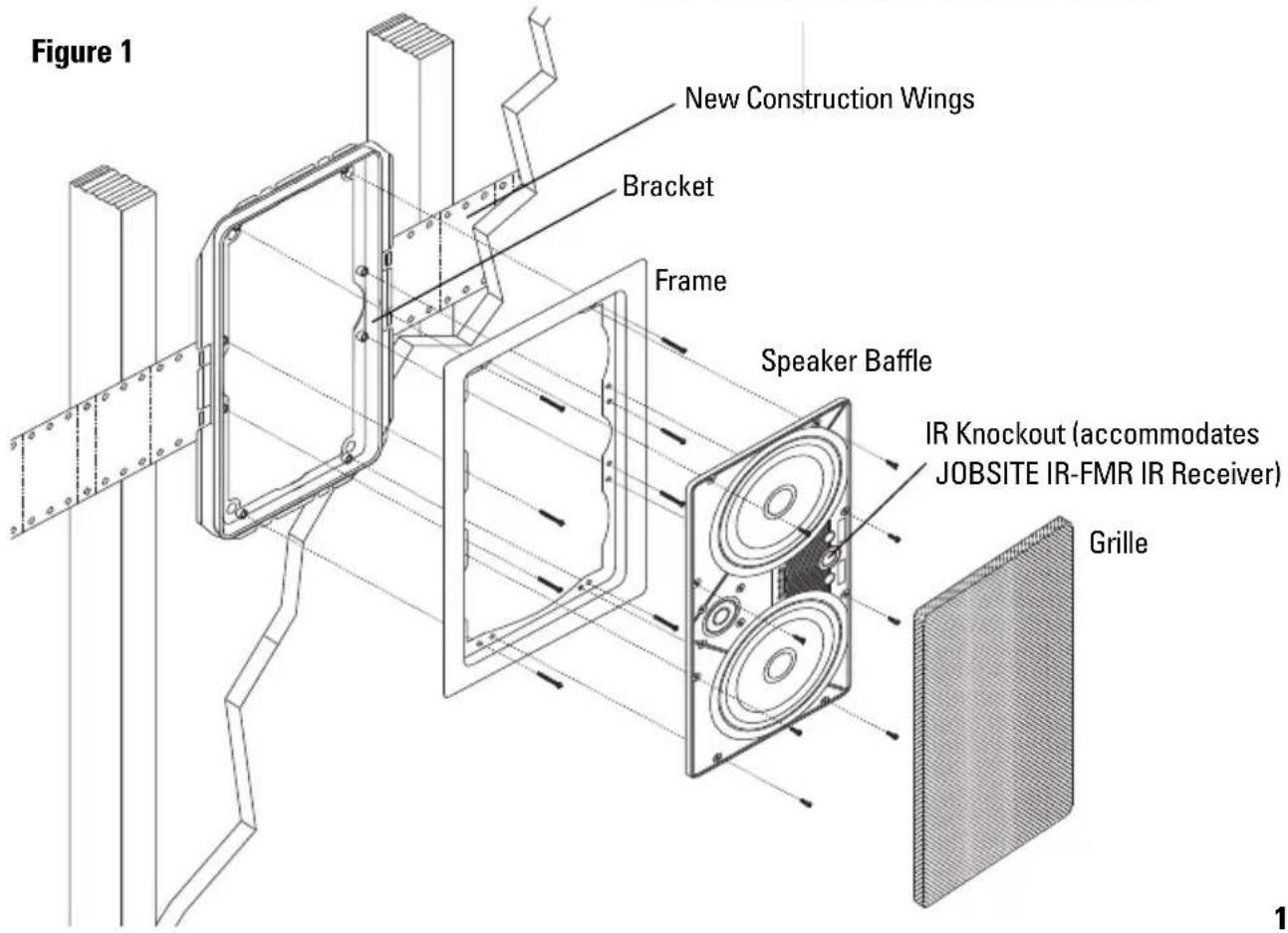
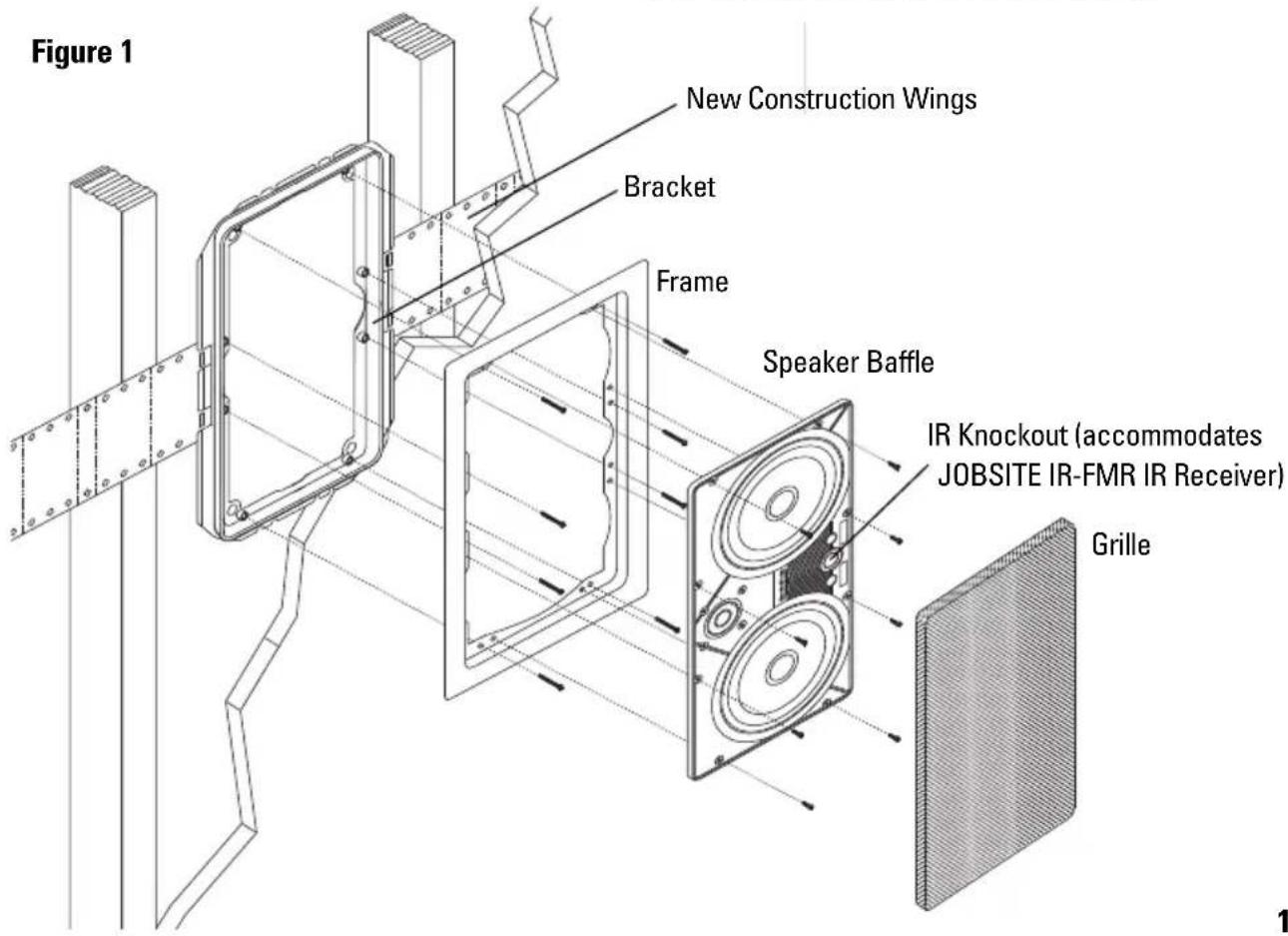
- Slip the mounting bracket through the opening and pull it toward you so that its front edge slides into the hole and stops in place.
- Attach the frame to the bracket by screwing the frame to the bracket using the supplied screws. NOTE: Do not over tighten the screws, this will distort the frame and the grille will not fit.
- The screws should pull the frame and bracket together (sandwiching the drywall) so that the frame is flush with the wall surface.
-
Strip 1/4" of insulation from the end of each wire.
-
Tightly twist the end of each wire until no frayed ends remain.
- Attach the speaker wires to the speaker terminal connectors. Connect the negative output from the amplifier to the black terminal. Connect the positive output from the amplifier to the red terminal.
- Set the speaker configuration switches on the rear of the speaker (see Setting the Speaker Configuration Settings).
- Install the speaker in the frame. Screw the enclosed self-tapping screws into the dimples of the speaker baffle as shown in Figure 2.
- Repeat steps 1-16 for each speaker being installed.
- After making tonal adjustments on all speakers (see Setting the Speaker Configuration Settings), install the grill into the speaker.

natural_image
Technical diagram of a device with internal components and external structure, labeled Figure 2 (no text or symbols on the diagram itself)Installation New Construction:
The speaker brackets should be installed prior to the drywall.
- Attach the wings to the bracket by snapping them into the sides of the bracket. (See Figure 1). To shorten the wings, break them along the scored lines.
- The wings and brackets have centering lines to simplify placement of the speaker.
- Use a tape measure to locate and center the brackets in the ceiling.
- Mark each speaker location with a pencil.
- Screw one side of the assembled bracket with wings to the joist using one of the supplied screws.
- Screw the other side of the bracket/wing assembly to the joist. Two screws on each side make for a very secure installation.
-
Secure the wire to the bracket using the bracket's wire tie.
-
In unique situations where the bracket must be located precisely next to a joist, the bracket has "emergency" screw holes located on its snap-on tabs. Break away two of the outer mounting tabs on the side you wish to affix, see Figure 3. Notching the joist so the bracket lies flush may be required.
-
Next, screw the bracket tab to the joist using one of the supplied screws. Important: Do not over-tighten the screw, doing so could crack the bracket tab. Level the bracket, then affix the other side of the bracket assembly using the supplied screws.
-
After the drywall is installed, cut a hole in the drywall using the outside of the circular bracket flange as a template.
-
Attach the frame to the bracket by screwing the frame to the bracket using the supplied screws. NOTE: Do not over tighten the screws, this will distort the frame and the grille will not fit.
Figure 3

- The screws should pull the frame and bracket together (sandwiching the drywall) so that the frame is flush with the wall surface.
- Strip 1/4" of insulation from the end of each wire.
- Tightly twist the end of each wire until no frayed ends remain.
- Attach the speaker wires to the speaker terminal connectors. Connect the negative output from the amplifier to the black terminal. Connect the positive output from the amplifier to the red terminal.
- Set the speaker configuration switches on the rear of the speaker (see Setting the Speaker Configuration Settings).
- Install the speaker in the frame. Screw the enclosed self-tapping screws into the dimples of the speaker baffle as shown in Figure 2.
- Repeat steps 1-17 for each speaker being installed.
- After making tonal adjustments on all speakers (see Setting the Speaker Configuration Settings), install the grill into the speaker.
SETTING THE SPEAKER CONFIGURATION SETTINGS
Crossover Mounted Switches
LST-CTR OAC Switch
The crossover on the back of the LST-CTR enables you to defeat the Off-Axis Compensation (OAC) feature. Defeat OAC when the speaker is mounted at ear level directly in front of the primary listening position, as would be the case when the speaker is mounted behind a perforated projection TV screen.
LST-RLS Main/Surround Switch
The crossover on the back of the LST-RLS enables you to configure the speaker for best performance as either a front "main" speaker or rear "surround" speaker. When the LST-RLS is used as a surround speaker, set the switch to the "Surround" position to provide a diffuse sound field which provides a more convincing illusion of sound all around the listener. When configured as a surround speaker, the orientation of the tweeter is no longer critical.
Front Baffle Switches
LST-CTR Acoustic Fine Tuning
The front-mounted switches on the LST-CTR enable the speaker to be optimized regardless of positioning or room acoustics by providing 3dB of Treble Cut and 3dB of Dialog Enhancement. Start by listening to the speaker in the normal mode (switch is in the "out" position). If the sound seems to have too much treble, depress the switch labeled Treble Cut to reduce the amount of high frequencies.
If you desire to make dialog more pronounced, depress the switch labeled Dialog Enhance.
LST-RLS Acoustic Fine Tuning
The front-mounted switches on the LST-RLS also enable the speaker to be optimized regardless of positioning or room acoustics. They provide 3dB of Treble and Bass Cut respectively. Start by listening to the speaker in the normal mode (switch is in the out position). If the sound seems to have too much treble, depress the switch labeled Treble Cut to reduce the amount of high frequencies. If the sound has too much low frequency output (because it is placed near a corner perhaps) depress the switch labeled Bass Cut.
REMOVAL OF GRILLE
Removing the Grille
If the grille is already installed, remove it by using a bent paper clip or the tip of a corkscrew and pulling it away from the frame. See Figure 4.

PAINTING THE GRILLE AND FRAME
Painting the Speaker Frame
The speakers must be removed prior to painting the frames.
Painting the Grilles:
The grilles should be painted before they are installed on the speakers. The best results will be obtained by using a spray gun or airless sprayer. Thin the paint, and then apply several light coats. This technique helps prevent clogging of grille holes. Paint both sides of the grille to cover all the white paint.
OPERATION
Listening at Higher Volumes:
Listening at Higher Volumes:
It requires more power to achieve a reasonable volume of sound in a large room than it does in a small room. It is possible to turn the volume so high that the amplifier runs out of power. This creates “clipping” distortion.
Clipping distortion makes treble sound very harsh and unmusical. When you hear harsh sounding treble from any good speaker, turn the volume down immediately! You are much less likely to damage a speaker with a large amplifier less likely to produce any clipping distortion.
SPECIFICATIONS: LST-RLS
Power handing:
10 - 150 watts
Frequency response:
45Hz-21kHz +/- 3dB
Impedance:
8 ohms
Dimensions:
8-1/4" x 14-1/2" outside dimension
7-1/8" x 13-1/4" hole cutout
3-1/8" deep when installed in 1/2" drywall
Warranty:
5 year limited
SPECIFICATIONS: LST-CTR
Power handing:
10 - 150 watts
Frequency response:
45Hz-21kHz +/- 3dB
Impedance:
8 ohms
Dimensions:
8-1/4" x 14-1/2" outside dimension
7-1/8" x 13-1/4" hole cutout
3-1/8" deep when installed in 1/2" drywall
Warranty:
5 year limited
LIMITED WARRANTY
JobSite Systems ("JOBSITE"), a Niles Audio Corporation company, warrants its passive products (those not requiring AC or battery power) to the original purchaser to be free of manufacturing defects in material and workmanship for a period of ten years from date of purchase.
JOBSITE warrants its passive loudspeaker products (those not requiring AC or battery power) to the original purchaser to be free of manufacturing defects in material and workmanship for a period of five years from date of purchase.
JOBSITE warrants its indoor/outdoor loudspeaker products to the original purchaser to be free of manufacturing defects in material and workmanship for a period of two years from date of purchase.
JOBSITE warrants its all weather rock loudspeaker products to the original purchaser to be free of manufacturing defects in material and workmanship for a period of five years from date of purchase.
JOBSITE warrants its active products (those requiring AC or battery power) to the original purchaser to be free of manufacturing defects in material and workmanship for a period of two years from date of purchase.
This Warranty is subject to the following additional conditions and limitations. The Warranty is void and inapplicable if JOBSITE deems that the product has been used or handled other than in accordance with the instructions provided by the manufacturer, including, but not limited to, damage caused by accident, mishandling, improper installation, abuse, negligence, or normal wear and tear, or any defect caused by repair to the product other than by JOBSITE or an authorized JOBSITE wholesale distributor.
To obtain warranty service, you must write to JOBSITE: Include your name, address, telephone number, model number and serial number of your unit, and a brief description of the problem.
A factory Return Authorization Number will be sent to you. DO NOT RETURN ANY UNIT WITHOUT FIRST RECEIVING WRITTEN AUTHORIZATION AND SHIPPING INSTRUCTIONS FROM JOBSITE.
If the above conditions are met, the purchaser's sole remedy shall be to return the product to JOBSITE, in which case JOBSITE will repair or replace, at its sole option, the defective product without charge for parts or labor. JOBSITE will return the unit repaired or replaced under warranty by shipping it by its usual shipping method from the factory (only) at its expense within the United States of America. THERE ARE NO OTHER WARRANTIES, INCLUDING, WITHOUT LIMITATION, EITHER EXPRESS OR IMPLIED WARRANTIES OF MERCHANTABILITY OR FITNESS FOR A PARTICULAR PURPOSE, WITH RESPECT TO THE PRODUCT.
REPAIR OR REPLACEMENT AS PROVIDED UNDER THIS WARRANTY IS THE EXCLUSIVE REMEDY OF THE CONSUMER/PURCHASER. JOBSITE SHALL NOT BE RESPONSIBLE FOR ANY INCIDENTAL OR CONSEQUENTIAL DAMAGES EXCEPT TO THE EXTENT PROVIDED (OR PROHIBITED) BY APPLICABLE LAW.
Some states do not allow the exclusion or limitation of incidental or consequential damages, so the above limitation may not apply to you. This warranty gives you specific legal rights, and you may also have other rights, which vary from state to state.
For the name of the nearest authorized JOBSITE wholesale distributor, contact:
JobSite Systems, a Niles Audio Corporation company
P.O. Box 160818, Miami, Florida 33116
NOTES:

JOBSITE SYSTEMS
12331 S.W. 130 STREET, MIAMI, FLORIDA 33186
P (866) 4JB-SITE (866-452-7483) - F (305) 238-0185
WWW.JOBSITESYSTEMS.COM
JobSite Systems, a Niles Audio Corporation company, 12331 S.W. 130 Street, Miami, Fl 33186. ©2004 Niles Audio Corporation. JobSite, Pure Custom, ElastoDynamic and Niles are registered trademarks of Niles Audio Corporation and the JobSite Logo is a trademark of Niles Audio Corporation. All other trademarks are the property of their respective owners. Some JobSite products (or components thereof) are manufactured under one or more U.S. Patents, foreign equivalents and/or pending patents (see product for details). Because we constantly strive to improve our products, JobSite reserves the right to change product specifications, descriptions, and prices without notice. The technical and other specifications of information contained herein are not intended to set forth all technical and other specifications of JobSite products. Additional information can be obtained at www.JobSitesystems.com or by calling JobSite at 866-452-7483. Printed in China. 11/04 DS00388ACN


- LST-RLS/CTR
- TABLE OF CONTENTS
- FEATURES: LST-RLS
- Installation friendly design:
- FEATURES: LST-CTR
- PACKAGE CONTENTS
- x 1-5/8" Philips head drywall screws x 14
- PREPARING FOR INSTALLATION
- TOOLS REQUIRED
- INSTALLATION
- Installation Existing Construction:
- Installation New Construction:
- SETTING THE SPEAKER CONFIGURATION SETTINGS
- Crossover Mounted Switches
- LST-CTR OAC Switch
- LST-RLS Main/Surround Switch
- Front Baffle Switches
- LST-CTR Acoustic Fine Tuning
- LST-RLS Acoustic Fine Tuning
- REMOVAL OF GRILLE
- Removing the Grille
- PAINTING THE GRILLE AND FRAME
- Painting the Speaker Frame
- Painting the Grilles:
- OPERATION
- Listening at Higher Volumes:
- SPECIFICATIONS: LST-RLS
- Power handing:
- Frequency response:
- Impedance:
- Dimensions:
- Warranty:
- SPECIFICATIONS: LST-CTR
- LIMITED WARRANTY
- NOTES:
Brand : JobSite
Model : LST-RLS
Category : Drill