Bee - Mp3 player ZipyLife - Free user manual and instructions
Find the device manual for free Bee ZipyLife in PDF.


User questions about Bee ZipyLife
0 question about this device. Answer the ones you know or ask your own.
Ask a new question about this device
Download the instructions for your Mp3 player in PDF format for free! Find your manual Bee - ZipyLife and take your electronic device back in hand. On this page are published all the documents necessary for the use of your device. Bee by ZipyLife.
USER MANUAL Bee ZipyLife
natural_image
Line drawing of a capsule with heart-shaped symbols and swirling floral patterns inside (no text or symbols)ZiPY







natural_image
Close-up of a hand holding a black USB flash drive with visible internal components (no text or symbols)6.2: Retirar la tarjeta Micro-SD
natural_image
Two-panel image showing hands holding a black USB flash drive, with no visible text or symbols on the device itself.natural_image
Line drawing of a bottle with heart-shaped symbols and swirling floral patterns (no text or labels)ZiPY
Plugue dos auriculares
ON / OFF / STOP
FM / MUSICA / Mudar
Adiantar Rápido
Rebobinar Rápido
VOLUME -
VOLUME +
Reset
natural_image
Close-up of a hand holding a black USB flash drive with visible internal components (no text or symbols)natural_image
Two-step black-and-white photo showing hands holding a card into a plastic clip, with no visible text or symbols.6.3 : Notas importantes:
natural_image
Line drawing of a bottle with heart-shaped decorations and swirling floral patterns (no text or symbols)ZiPY
1. Product Features:
◆ MP3 Player with Micro-SD Card slot
Built-in FM Radio
◆ Colorful design, available with many color options with flower prints
◆ No internal flash integrated
◆ Plays WMA, MP3 audio format files
USB2.0 high speed
Built-in 55mAh Battery
2. Product Specification
| Item | Specifications |
| Dimensions | 48 x 22 x 10 mm |
| Data transfer rate | USB2.0 |
| File formats supported | Music: MP1, MP2, MP3, WMA. |
| S/N rate | 85dB |
| Max power output | (L) 10mW + (R) 10mW (320hm) |
| External memory | Support external Micro-SD card upto 8GB |
| FM Radio frequency range | 87.5MHZ-108MHZ; FM memory: 20 stations. |
| Running time | Maximum 2 hours |
| Operating temperature | -5°C~40°C |
| Operating System | WIN SE/ME/2K/XP/WIN7, MacOS10.Linux2.4.2(Only Windows 98 needs the CD driver) |
| Accessories | User Manual, Earphone, Blister pack |
3. Button Instruction:
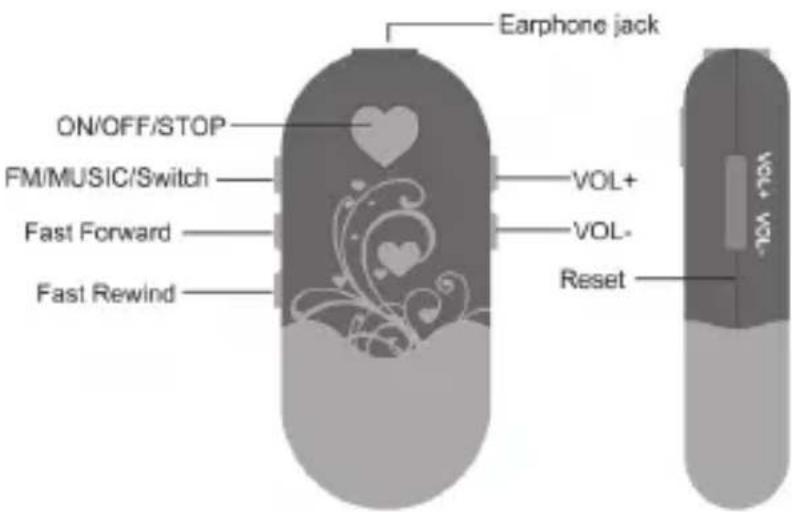
4. Music Operation Instruction:
4.1: Turn On/Turn Off
Press and hold the "♥" button to turn on or turn off the player
4.2: Volume Increase
To increase volume, press the "VOL+" key
4.3: Volume Decrease
To decrease volume, press the "VOL-" key
4.4: Previous Music
To choose the previous music, press the “||<” key once
4.5: Next Music
To choose the next music, press the ">||" key once
4.6: Pause/Resume Music
Press the "♥" button once to pause or resume the music.
While the music is being paused, the button “♥” light remains on without flashing.
4.7: Fast Rewind
Press and hold the press the "||<" key to fast rewind.
4.7: Fast Forward
Press and hold the press the ">||" key to fast forward.
5. FM Radio Operation Instruction:
5.1: Switch
To switch between FM Radio and Music function, press the "■" key once
5.2: FM Station selection
Press the “♥” button once to select the next available FM Station in FM memory (up to 20 stations)
5.3: FM auto search
Tune up or down the FM radio spectrum by pressing the "| |<" or "> | |" key. The device will scan in that direction and lock on to the next available FM station
5.4: Volume Increase
To increase volume, press the "VOL+" key
5.5: Volume Decrease
To decrease volume, press the "VOL-" key
6. Micro-SD Slot
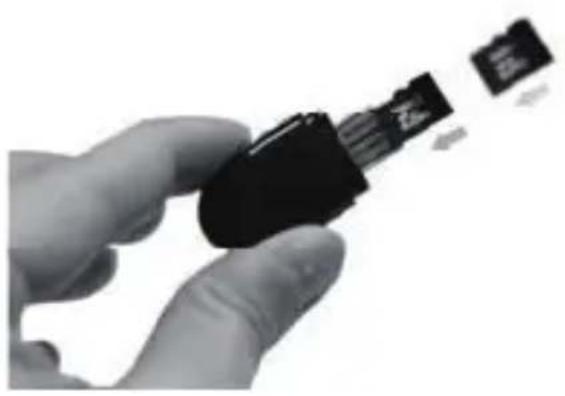
6.1: Insert Micro-SD card
Please see here below how to insert the Micro-SD card into the device.
natural_image
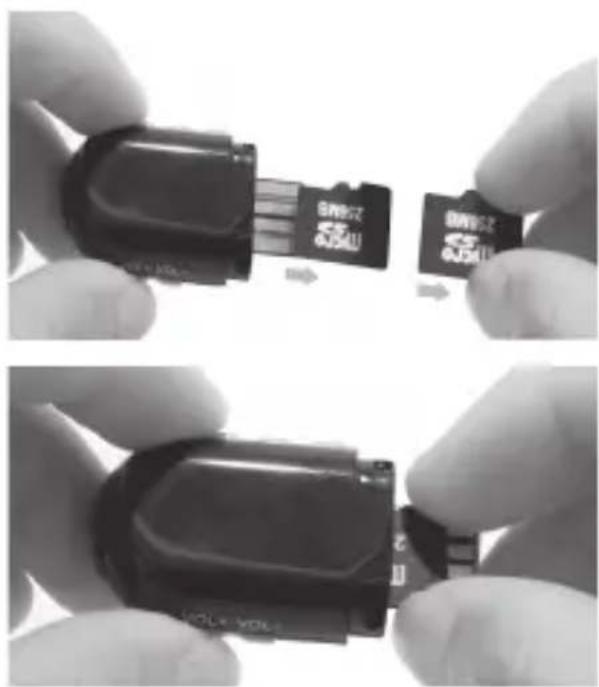
Close-up of a hand holding a black USB flash drive with a small card partially inserted (no visible text or symbols)6.2: Take out Micro-SD card
Please see here below how to take out the Micro-SD card.
natural_image
Two-step black-and-white photo showing hands holding a small gray SMI card into a device, with no visible text or symbols.6.3: Important Remarks:
When the device is turned on,
- it will go to FM Radio function directly if there is no Micro-SD card inserted
- it will go to Music function directly if there is Micro-SD card inserted
7. Reset
To reset the device, please press the "Reset" key
8. Charge:
When the device is out of battery, the button “♥” will not light up. To charge up the device, simply connect it to a PC through the USB port While the device is being charged up, the button “♥” light flashes. When the device is fully charged, the button “♥” light remains on without flashing. In general, the battery can be fully charged within 30 minutes.
9. Flash Disk
You can use the device as a Flash drive, simply plug it into a PC through the USB port.
AID WARRANTY CONDITIONS
AID, in compliance with the Customer Protection Law (Ley 23/2003, July 10th, of Warranty in the Sale of Consumer Goods, BOE no. 165, 11/07/2003), offers Direct Warranty to Spain and Portugal customers for all our brands' products: ZIPY, MUSE, NEW ONE, AC-RAYAN, TNB, BARKAN, BRASFORMA, THE COMPLEMENTS, and GO BY ZIPY, under the following conditions:
A – Our products have a two year warranty. During the first year original defects that may be detected are repaired. In those cases stipulated by law, the buyer will be entitled to the replacement of the device by a new one, provided that the defects are not due to the negligence or exclusive fault of the buyer in handling the device. During the second year the buyer will need to prove that the malfunctioning of the device is due to a manufacturing defect. In both cases the warranty will apply provided that:
- The product has been used for its destined purpose alone.
- It was not opened, manipulated or altered in any way by someone other than the Official Technical Service.
- It has not undergone shock, flood, overheating, electric overcharge or any other external circumstance that may constitute a possible reason of INVALIDATING the warranty.
- The product will be returned to AID in proper packaging together with the receipt where the brand and type of product, the date of the purchase, the name and address of the shop that sold it and the reason for the malfunctioning should be clearly stated.
Any of the following circumstances invalidates the present warranty:
- Breaking the ports, the screen or the glass.
- Loss of liquid from the screen.
- Wearing out, obvious marks of incorrect manipulation, inappropriate use, ill-treatment, shock, falls, dirt, and so on.
- The data contained in the products are under no circumstances covered by any warranty whatsoever, nor are they to be considered during the physical repairing process of the products.
AID guarantees absolute confidentiality of the data. - AID does not cover the incorrect configuration or installation of the software / hardware on
the part of the client, neither as a component nor as a peripheral, included prives / controllers included.
-
The legislation on guarantees sets certain limits. “the guarantee does not cover additional components such as batteries, nor any elements that are subject to maintenance due to its use such as earphones”. These accessories have a 6 months guarantee.
-
Waterproof bags have a 48-hour trial period, such as indicated on the product itself, therefore once this time period is elapsed they will no longer be covered by any guarantee.
-
Final users do not need to send us the device accessories, especially if they are not the original ones, since we will not be held responsible for them.
CASES:
-
If the product is out our guarantee, the AID technical department will facilitate a budget for the repair by fax or e-mail. Said budget will need to be authorized in writing, sealed and signed, and the user will have to satisfy the repair fee as well as the freight.
-
If the budget is not accepted a diagnosis fee will be charged. (6€)
-
Repairs have a 90 days guarantee, provided that the breakdown is under the same concept and in the case of budgeted breakdowns alone.
B – All the freight costs for the product will be covered by AID using only the transportation company designed by AID following the authorization procedure.
The expenses derived from incorrect or unjustified returns on the part of the client will be covered by the client alone.
C – Any incidence detected at the moment of the reception of the merchandise must be immediately notified at the AID Post-Sales Department: maria@accesoriosdigital.com in compliance with Article 366 from the Code of Commerce, AID will not consider complaints about breakages, shocks or absence of boxes or pieces 24 hours after the delivery of the merchandise.
In the case of shipments originated in Canarias, Ceuta and Melilla, AID will not pay the customs tax nor any kind of reimbursable expenses.
ZiPY