RADS-121M - Air-conditioner Comfort-Aire - Free user manual and instructions
Find the device manual for free RADS-121M Comfort-Aire in PDF.


User questions about RADS-121M Comfort-Aire
0 question about this device. Answer the ones you know or ask your own.
Ask a new question about this device
Download the instructions for your Air-conditioner in PDF format for free! Find your manual RADS-121M - Comfort-Aire and take your electronic device back in hand. On this page are published all the documents necessary for the use of your device. RADS-121M by Comfort-Aire.
USER MANUAL RADS-121M Comfort-Aire
natural_image
Line drawing of a portable air conditioner unit with ventilation grilles and control panel (no text or symbols)Room Air Conditioner with R-410A:
RADS-61L
RAD-81L
RADS-81L
RAD-101L
RADS-101L
RAD-121L
RADS-121L
RADS-123L
CONTENTS
- SAFETY PRECAUTIONS....2
- IMPORTANT SAFETY INSTRUCTIONS ....4
- NORMAL SOUNDS ....5
- AIR CONDITIONER FEATURES ....5
- INSTALLATION INSTRUCTIONS....10
- CARE AND CLEANING ....14
- TROUBLESHOOTING TIPS....15
Read This Manual
Inside you will find many helpful hints on how to use and maintain your air conditioner properly. Just a little preventive care on your part can save you a great deal of time and money over the life of your air conditioner. You'll find many answers to common problems in the chart of troubleshooting tips. If you review our chart of Troubleshooting Tips first, you may not need to call for service at all.

CAUTION
- Contact an authorized service technician for repair or maintenance of this unit.
- Contact an authorized installer for installation of this unit.
- If the power cord needs to be replaced, replacement work shall be performed by authorized service personnel only.
• Installation work must be performed in accordance with the national and local electric codes and must be performed by authorized personnel only.
NOTE: All the illustrations in this manual are for explanation purposes only. Your air conditioner may be slightly different.
Safety Precautions
To prevent injury to the user and proper damage, the following instructions must be followed. Incorrect operation due to ignoring instructions may cause harm or damage. The seriousness is classified by the following indications.
 WARNING WARNING | This symbol indicates the possibility of death or serious injury. |
 CAUTION CAUTION | This symbol indicates the possibility of injury or damage to property. |
■ Meanings of symbols used in this manual are as shown below.


WARNING

Plug in power cord plug properly
- Otherwise, it may cause electric shock or fire due to excess heat generation

Do not open the unit during operation
- It may cause electric shock

Always ensure effective grounding
- Incorrect grounding may cause electric shock

Do not modify power cord length or share the outlet with other appliances.
- It may cause electric shock or fire due to heat generation

Do not operate or stop the unit by inserting or pulling out the power plug
- It may cause electric shock or fire due to heat generation

Unplug the unit if strange sounds, odors or smoke comes from it.
- It may cause fire and electric shock

Do not operate with wet hands or in a damp environment
- It may cause electric shock

Do not use the power cord close to heating appliances
- It may cause fire and electric shock

Do not allow water to run in to electric parts
- It may cause failure of machine or electric shock

Unplug the unit if strange sounds, odors or smoke comes from it.
- It may cause fire and electric shock

Always install circuit breaker and a dedicated power circuit
- Incorrect installation may cause fire and electric shock

Do not use the socket if it is loose or damaged
- It may cause fire and electric shock

Do not use a damaged or unspecified power cord
- It may cause electric shock or fire
- If the power cord is damaged, it must be replaced by the manufacturer or an authorized service center or a qualified person in order to avoid a hazard

Do not disassemble or modify unit.
- It may cause failure and electric shock

Do not use the power cord near flammable gas or combustibles, such as gasoline, benzene, thinner, etc.
- It may cause an explosion or fire
CAUTION

When the air filter is to be removed, do not touch the metal parts of the unit
- It may cause an injury due to sharp edges of components.

Do not allow water to enter inside the unit during cleaning
• Water may enter the unit and degrade the insulation. It may cause an electric shock

Ventilate the room well when used together with a gas stove or if there is a gas leak
- An oxygen shortage may occur - May cause explosion, fire and/or burns

When the unit is to be cleaned, switch off, and turn off the circuit breaker
- Do not clean unit when power is on as it may cause fire and electric shock

Hold the plug by the head of the power plug when taking it out
- It may cause electric shock and damage

Turn off the main power switch when not using the unit for a long time
• It may cause failure of product or fire

Stop operation and close the window in storm or hurricane
• Operation with windows opened may allow rain to enter inside and damage property

Ensure that the installation bracket of the outdoor appliance is not damaged
- If bracket is damaged, there is concern of damage due to falling of unit.

Always insert the filters securely. Clean filter once every two weeks
- Operation without filters may cause failure - Operation with dirty/clogged filters may cause failure

Do not place obstacles around air-inlets or inside of air-outlet
- It may cause failure of appliance or accident

Do not place heavy object on the power cord and ensure that the cord is not compressed
• There is danger of fire or electric shock

Do not drink water drained from air conditioner
- It contains contaminants and could make you sick

Do not use strong deter- gents such as wax or thin- ner; use a damp, soft cloth
• Appearance may be deteriorated due to change of product color or scratching of its surface

Use caution when un- packing and installing
- Sharp edges could cause injury

If water enters the unit, turn the unit off at the power outlet and switch off the circuit breaker. Isolate supply by taking power-plug out and contact a qualified service technician
• Water may enter the unit and degrade the insulation. It may cause an electric shock
IMPORTANT SAFETY INSTRUCTIONS
NOTE For some models, the power supply cord with this air conditioner contains a current detection device designed to reduce the risk of fire. Please refer to the section "Operation of Current Device" for details. In the event that the power supply cord is damaged, it cannot be repaired-it must be replaced with a cord from the Product Manufacturer.
⚠ WARNING For your safety
- Do not store or use gasoline or other flammable vapors and liquids in the vicinity of this or any other appliance.
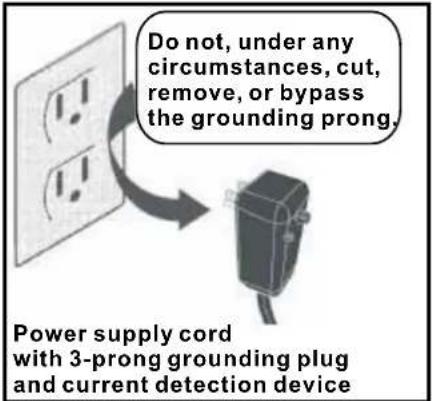
- Avoid fire hazard or electric shock. Do not use an extension cord or an adaptor plug. Do not remove any prong from the power cord.
▲WARNING Electrical Information
- Be sure the electrical service is adequate for the model you have chosen. This information can be found on the serial plate, which is located on the side of the cabinet and behind the grille.
- Be sure the air conditioner is properly grounded. To minimize shock and fire hazards, proper grounding is important. The power cord is equipped with a three-prong grounding plug for protection against shock hazards.
- Your air conditioner must be used in a properly grounded wall receptacle. If the wall receptacle you intend to use is not adequately grounded or protected by a time delay fuse or circuit breaker, have a qualified electrician install the proper receptacle.
- Ensure the receptacle is accessible after the unit installation.
- Do not run air conditioner without side protective cover in place. This could result in mechanical damage within the air conditioner.
- Do not use an extension cord or an adapter plug.
Operation of Current Device
(Applicable to the unit adopts current detection device only)
The power supply cord contains a current device that senses damage to the power cord. To test your power supply cord do the following:
- Plug in the Air Conditioner.
- The power supply cord will have TWO buttons on the plug head. Press the TEST button, you will notice a click as the RESET button pops out.
- Press the RESET button, again you will notice a click as the button engages.
- The power supply cord is now supplying electricity to the unit. (On some products this it also indicated by a light on the plug head.)
NOTES:
- Do not use this device to turn the unit on or off.
- Always make sure the RESET button is pushed in for correct operation.
- The power supply must be replaced if it fails reset when either the TEST button is pushed, or it cannot be reset. A new one can be obtained from the product manufacturer.
- If power supply cord is damaged, it cannot be repaired. It MUST be replaced by one obtained from the product manufacturer.
NOTE: This air conditioner is designed to be operated under condition as follows:
| Cooling operation | Outdoor Temp: | 64.4-109.4°F (18-43°C) ( T_1 Environment) | 69.8-125.6°F (21-52°C) ( T_3 Environment) |
| Indoor Temp: | 62.6-89.6°F (17-32°C) ( T_1 Environment) | 62.6-89.6°F (17-32°C) ( T_3 Environment) | |
| Heat operation | Outdoor Temp: | 23.0-75.2°F (-5-24°C) ( T_1 Environment) | 19.4-75.2°F (-7-24°C) ( T_3 Environment) |
| Indoor Temp: | 32.0-80.6°F (0-27°C) ( T_1 Environment) | 32.0-86.0°F (0-30°C) ( T_3 Environment) |
Note: Performance may be reduced outside of these operating temperatures.
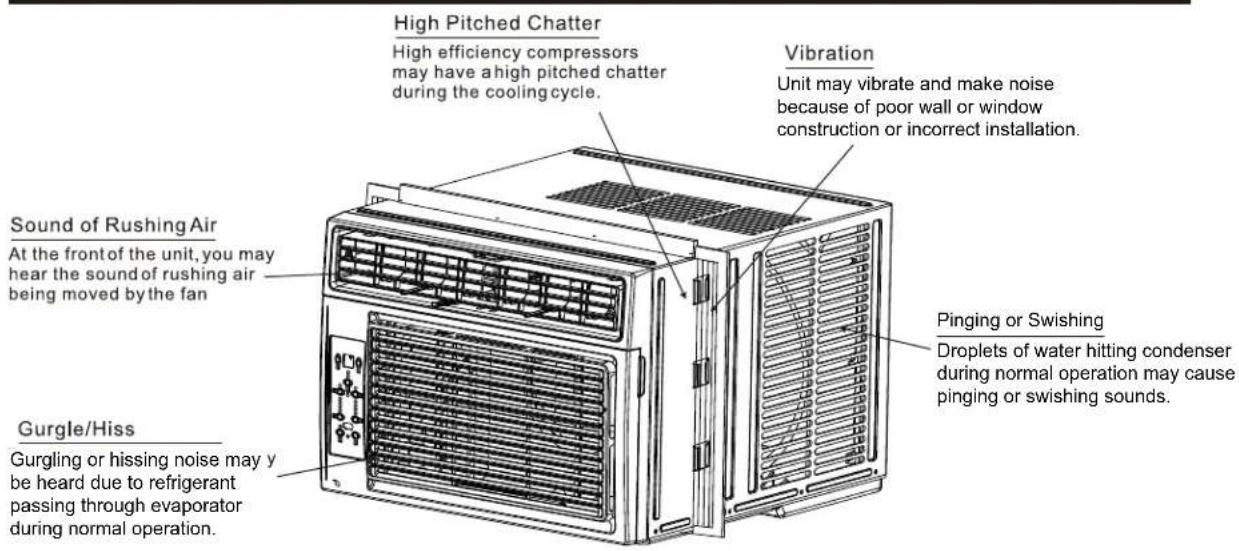
NORMAL SOUNDS
AIR CONDITIONER FEATURES
ELECTRONIC CONTROL OPERATING INSTRUCTIONS
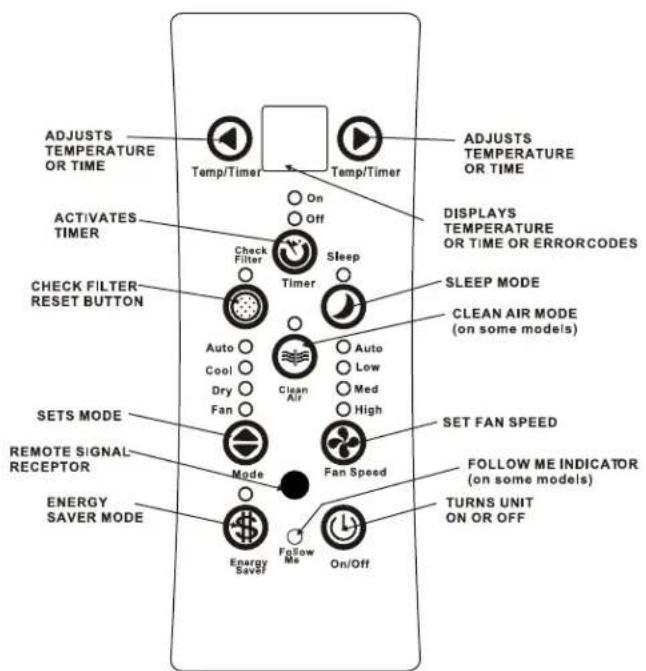
Before you begin, thoroughly familiarize yourself with the control panel and remote as shown below and all its functions, then follow the symbol for the functions you desire. The unit can be controlled by the unit control alone or with the remote.
UNIT CONTROL
NOTE: Clear Air and/or Follow Me features only apply to certain models. Your control panel may or may not have these features and display lights. Check the actual unit you purchased to determine if these options apply.
AIR CONDITIONER FEATURES(CONTINUED)
NOTE: The following instructions represent the Unit Controls, the same instructions can be used for the Remote Control.
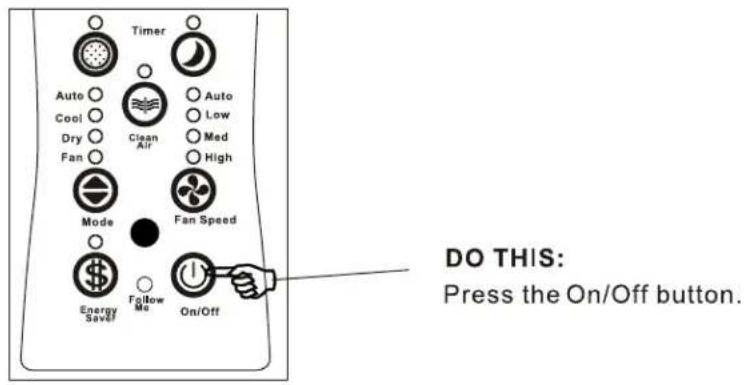
TO TURN UNIT ON:
TO CHANGE TEMPERATURE SETTING:
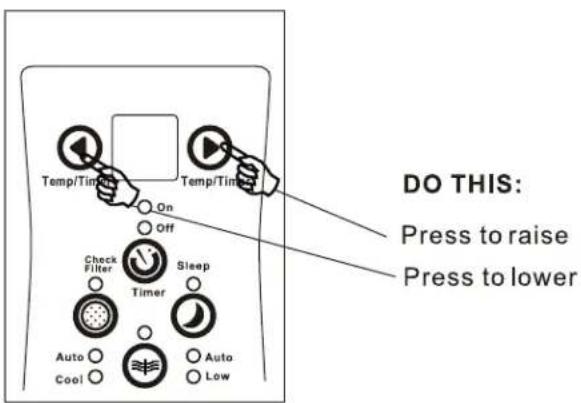
Press or hold either Left (<) or Right (>) Temp/Timer buttons until the desired temperature is seen on the display. This temperature will be automatically maintained anywhere between 62°F (17°C) and 86°F (30°C). If you want the display to read the actual room temperature, see "To Operate on Fan Only" section.
TO ADJUST FAN SPEEDS:
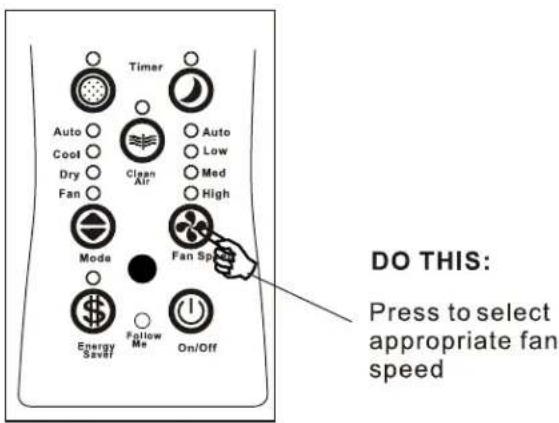
The fan speed button is used to select the Fan Speed in four steps: Auto, Low, Med or High. Each time the button is pressed, the fan speed mode is shifted. When the unit is operating in Dry mode, the fan speed is automatically controlled at Low fan speed.
AIR CONDITIONER FEATURES(CONTINUED)
- To choose operating mode, press the Mode button. Each time you press the button, a mode is selected in a sequence that goes from Auto, Cool, Dry and Fan. The indicator light beside will illuminate and remain on once the mode is selected.
To operate on Auto feature:
- When you set the air conditioner in AUTO mode, it will automatically select cooling or fan only operation depending on what temperature you have selected and the room temperature.
- The air conditioner will control room temperature automatically round the temperature point set by you.
- In this mode, the fan speed cannot be adjusted, it starts automatically at a speed according to the room temperature.
To operate on Fan Only:
- Use this function only when cooling is not desired, such as for room air circulation or to exhaust stale air (on some models). Remember to open the vent during this function, but keep it closed during cooling for maximum cooling efficiency. You can choose any fan speed you prefer when Fan Only mode is selected.
- During this function, the display will show the actual room temperature, not the set temperature as in the cooling mode.
- In Fan only mode, the temperature is not adjusted.
To operate on Dry mode:
- In this mode, the air conditioner will generally operate in the form of a dehumidifier. However, some degree of cooling will continue.
TO USE THE ENERGY SAVER FEATURE
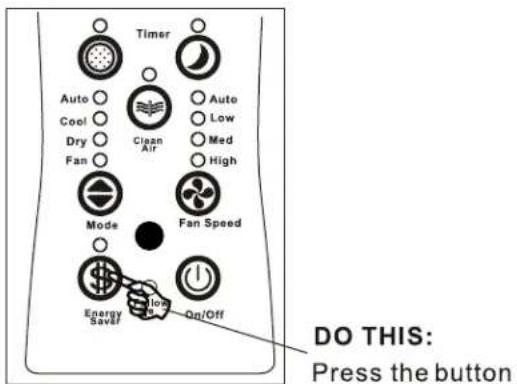
This function is available on COOL mode. The fan will continue to run for 3 minutes after the compressor shuts off. The fan then cycles on for 2 minutes at 10 minute intervals until the room temperature is above the set temperature, at which time the compressor turns back on and Cooling Starts.
AIR CONDITIONER FEATURES (CONTINUED)
SLEEP FEATURE:
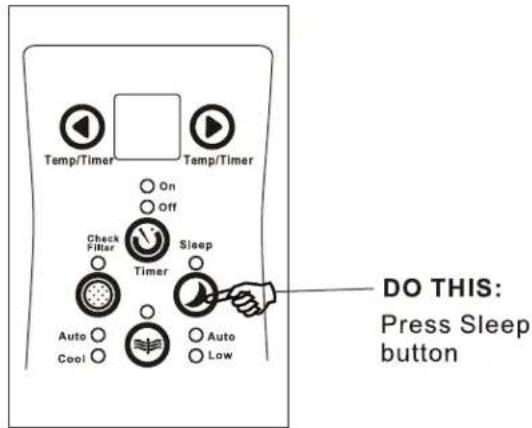
- In this mode the selected temperature will increase by 2^ F/1(or 2^ C 30 minutes after the mode is selected. The temperature will then increase by another 2^ F/1(or 2^ C after an additional 30 minutes. This new temperature will be maintained for 6 hours before it returns to the originally selected temperature. This ends the Sleep mode and the unit will continue to operate as originally programmed. The Sleep mode program can be cancelled at any time during operation by again pressing the Sleep button.
TIMER: AUTO START/STOP FEATURE
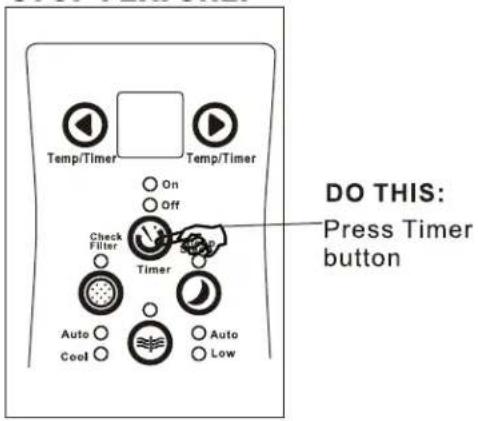
- When the unit is on or off, first press the Timer button, the TIMER ON indicator light illuminates. It indicates the Auto Start program is initiated.
- When the time of TIMER ON is displayed, press the Timer button again, the TIMER OFF indicator light illuminates. It indicates the Auto Stop program is initiated.
- Press or hold the UP or DOWN button to change the Auto time by 0.5 hour increments, up to 10 hours, then at 1 hour increments up to 24 hours. The control will count down the time remaining until start.
- The selected time will register in 5 seconds, and the system will automatically revert back to display the previous temperature setting or room temperature when the unit is on.
- Turning the unit ON or OFF at any time or adjusting the timer setting to 0.0 will cancel the Auto Start/Stop timed program.
CHECK FILTER FEATURE:
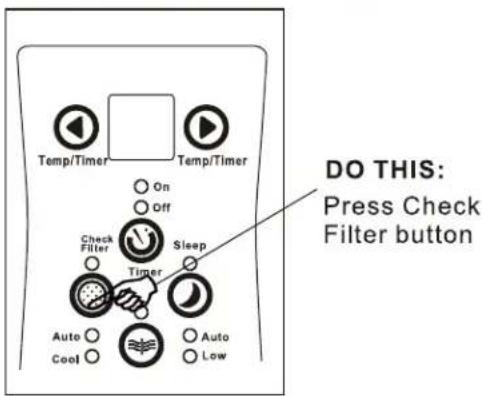
- This feature is a reminder to clean the Air Filter for more efficient operation. The LED will illuminate after 250 hours of operation. To reset after cleaning the filter, press the Check Filter button and the light will go off.
AIR CONDITIONER FEATURES (CONTINUED)
DISPLAYS:
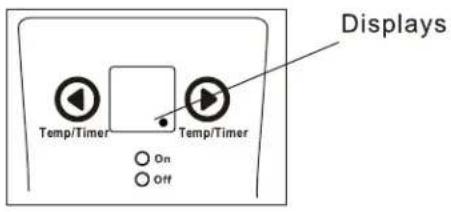
THE DISPLAYS
* The control is capable of displaying temperature in degree Fahrenheit or degrees Celsius. To convert from one to the other, press and hold the Left and Right Temp/Timer buttons at the same time, for 3 seconds.
Shows the set temperature in "°C" or "°F" and the Auto-timer settings. While on Fan only mode, it shows the room temperature.
Error codes:
AS-Room temperature sensor error-Unplug the unit and plug it back in. If error repeats, call for service. NOTE: In Fan only mode, it will display "LO" or "HI".
- -Evaporator temperature sensor error-Unplug the unit and plug it back in. If error repeats, call for service.
NOTE: "•" is displayed as shown in the left picture.
ADDITIONAL THINGS YOU SHOULD KNOW
Now that you have mastered the operating procedure, here are more features in your control that you should become familiar with.
- The Cool circuit has an automatic 3 minute time delayed start if the unit is turned off and on quickly. This prevents overheating of the compressor and possible circuit breaker tripping. The fan will continue to run during this time, but the compressor will remain off and no cooling will occur. Once the 3 minutes has passed, the compressor will turn on and cooling will occur.
Fresh Air Vent Control(on some models):
natural_image
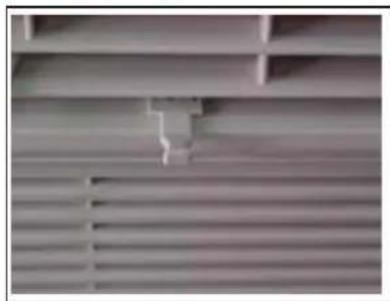
Interior view of a wooden wardrobe with slats and shelves (no visible text or symbols)Figure 1 (VENT CLOSED)
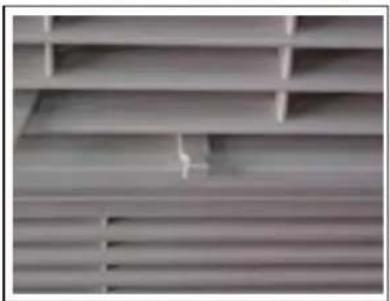
The Fresh Air Vent allows the air conditioner to:
- Recirculate inside air - Vent Closed (See Fig.1)
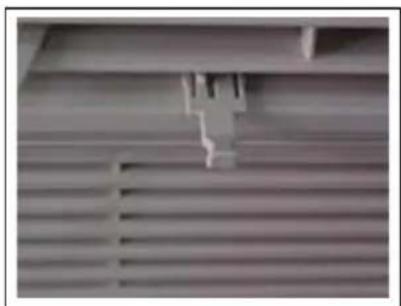
- Draw fresh air into the room- Vent Open (see Fig.2)
- Exchange air from the room and draws fresh air into the room - Vent and Exhaust Open (see Fig.3)
natural_image
Close-up of a metallic bracket with ribbed metal structure (no visible text or symbols)Figure 2 (VENT OPEN)
natural_image
Close-up of a metallic ventilation grille with slatted ventilation slots and a small bracket (no text or symbols visible)Figure 3 (VENT & EXHAUST OPEN)
Air Directional Louvers
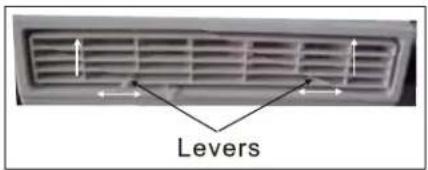
Air Direction
The louvers will allow you to direct the air flow Up, Left or Right throughout the room as needed. Pivot horizontal louvers until the desired Up direction is obtained.
Move the Levers from side to side until the desired Left/Right direction is obtained.
INSTALLATION INSTRUCTIONS
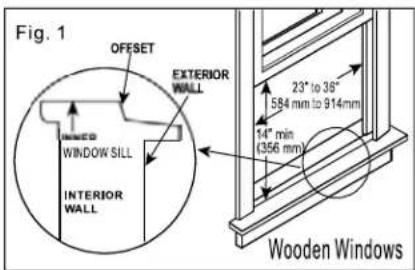
Your air conditioner is designed to install in standard double hung windows with opening widths of 23 to 36 inches(584mm to 914mm) (See Fig.1).
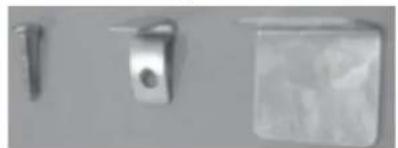
Mounting Hardware
natural_image
Three metallic hardware components with mounting holes, shown against a plain background (no text or symbols visible)3/4" (or 1/2") Lock Frame Screws (2)
Sash Lock
(1)
(7)
Lower sash must open sufficiently to allow a clear vertical opening of following size (see Table 1).Side louvers and the rear of the AC must have clear air space to allow enough airflow through the condenser, for heat removal. The rear of the unit must be outdoors, not inside a building or garage.
Table 1
| Size\Model | 5000~8000Btu/h | 10000~12000Btu/h |
| 14"(356mm) | 15-1/2"(394mm) |
NOTE: Save Carton and these Installation Instructions for future reference. The carton is the best way to store unit during winter, or when not in use.
TOOLS NEEDED:
Phillips Screw Driver
Drill(If pilot holes are needed)
CAUTION: When handling unit, be careful to avoid cuts from sharp metal edges and aluminum fins on front and rear coils.
Top Rail Hardware

3/8" Screws (4)
Top Rail (1)
NOTE: The top rail hardware and the following Fig.A, Fig.B and Fig.C are not applicable to the units more than 10000Btu/h.
Before installing unit, the top rail must be assembled on the unit (For <10000Btu/h models only).
A: Remove the air conditioner from the carton and place on a flat surface.
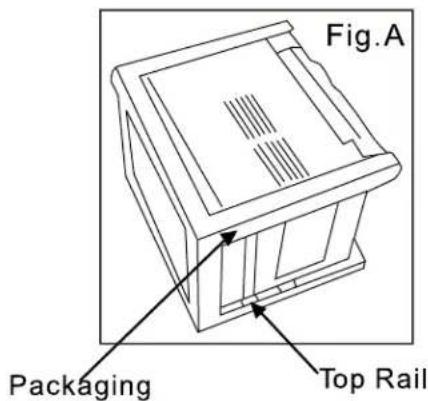
B: Remove top rail from the rear of the packaging material as shown in Fig. A.
natural_image
Technical line drawing of a kitchen appliance with labeled Fig.B (no text or symbols on the diagram itself)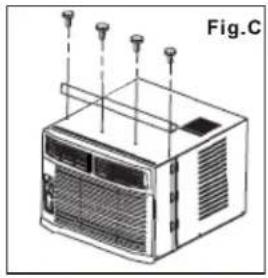
natural_image
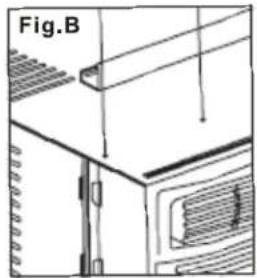
Line drawing of an air conditioning unit with ventilation grilles and mounting points (no text or symbols)C: Align the hole in the top rail with those in the top of the unit as shown in Fig.B
D: Secure the top rail to the unit with the 3/8" Screws as shown in Fig.C.
NOTE: For safety reasons, all four(4) screws MUST be securely fastened.
HOW TO INSTALL
NOTE: Top rail and Sliding Panels at each side are offset to provide the proper pitch to the rear of (5/16''). This is necessary for proper condensed water utilization and drainage. If you are not using the Side Panels for any reason, this pitch to the rear must be maintained.
1 Place unit on floor, a bench or a table. There is a Left and Right Window Filler Panel- be sure to use the proper panel for each side. When installed the flange for securing the panel in place to the window sill will be facing into the room.
natural_image
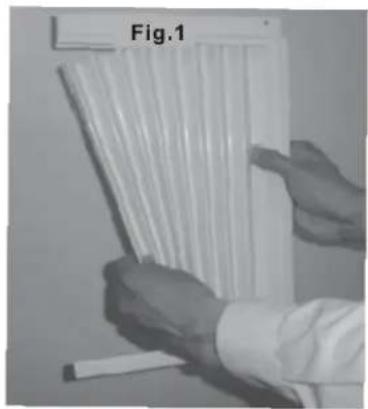
Person holding a bundle of white plastic strips, labeled Fig.1 (no text on strips or background)A. Hold the Accordion Panel in one hand and gently pull back the center to free the open end. See Fig.1.
natural_image
Close-up of a mechanical component with visible teeth and a label 'Fig.2A' (no other text or symbols)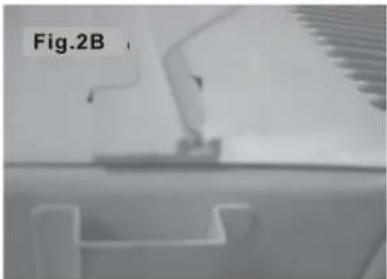
natural_image
Close-up of a mechanical component with no visible text or symbols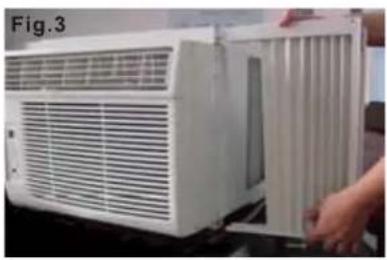
natural_image
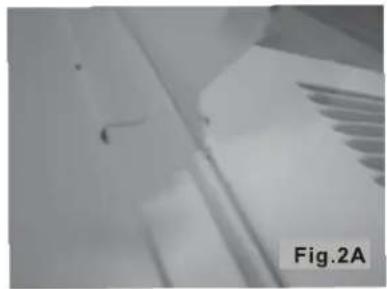
White air conditioner unit with ventilation grilles and a hand adjusting its side panel (no visible text or symbols)B. Slide the free end and "I" section of the panel into the cabinet as shown in Fig. 2A, 2B & 3. Slide the panel down. Be sure to leave enough space to slip the top and bottom of the frame into the rails on the cabinet.
natural_image
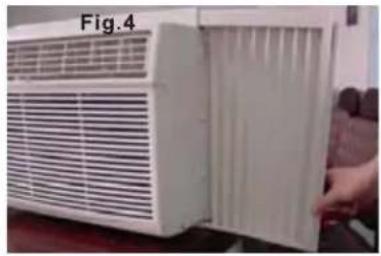
White air conditioner unit with ventilation grilles and a door open, no visible text or symbols on the device itselfC. Once the panel has been installed on the side of the cabinet, make sure it sits securely inside the frame channel by making slight adjustments. Slide the top and bottom ends of the frame into the top and bottom ends of the frame into the top and bottom rails of the cabinet. Fig.4.
D. Slide the panel all the way in and repeat on the other side.
NOTE: If storm window blocks AC, see Fig. 13.
natural_image
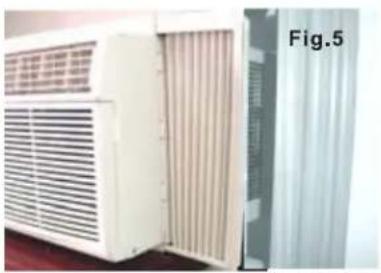
Exterior view of a white air conditioner unit with ventilation grilles, next to a metallic panel labeled Fig.5 (no text or symbols on the device itself)2 Keep a firm grip on the air conditioner, carefully place the unit into the window opening so the bottom of the air conditioner frame is against the window sill (Fig.5). Carefully close the window behind the top rail of the unit.
natural_image
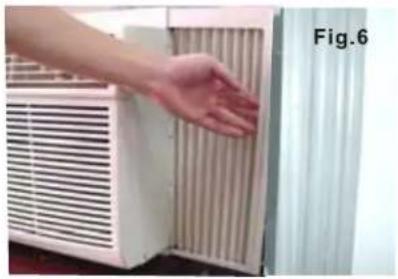
Hand touching a wall-mounted air conditioner unit (no text or symbols visible)3 Extend the side panels out against the window frame (Fig.6).
natural_image
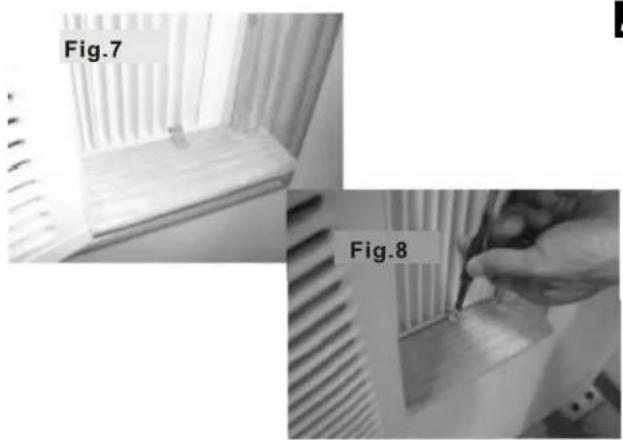
Two-panel image showing a window with ventilation grilles and a hand holding a tool, labeled Fig.7 and Fig.8 (no text or symbols on the main objects)4 Place the frame lock between the frame extensions and the window sill as shown (Fig.7). Drive 3 / 4''(19mm) or 1 / 2''(13mm) locking screws through the frame lock and into the sill (Fig.8). NOTE: To prevent window sill from splitting, drill 1 / 8''(3mm) pilot holes before driving screws.
natural_image
Exterior view of a white air conditioner unit labeled Fig.9, with a hand holding a tool near it (no readable text or symbols beyond labels)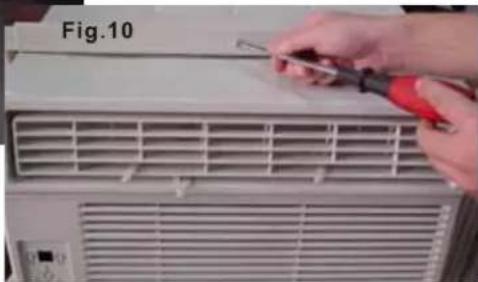
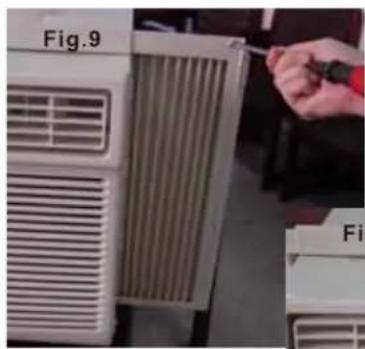
5 Drive 1 / 2''(13mm) locking screws through frame holes into window sash (Fig.9/10)
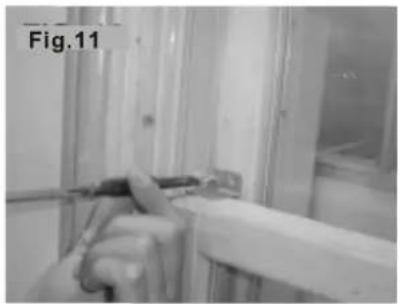
6 To secure lower sash in place, attach right angle sash lock with 3/4''(19mm)or1/2''(13mm) screw as shown(Fig.11).
natural_image
Interior view of a hospital room with medical equipment and glass partitions (no visible text or symbols)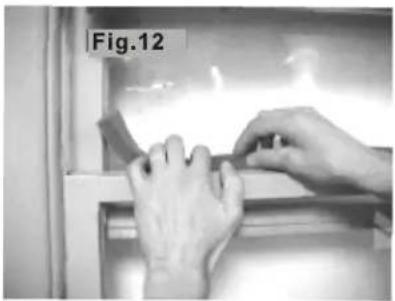
natural_image
Close-up of hands installing or adjusting a component on a shelf (no visible text or symbols)7 Cut foam seal and insert in the space between the upper and lower sashes (Fig.12).
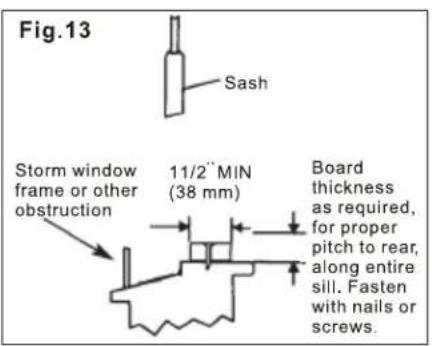
If AC is Blocked by Storm Window
Add wood as shown in Fig.13, or remove storm window before air conditioner is installed.
If Storm Window Frame must remain, be sure the drain holes or slots are not caulked or painted shut. Accumulated Rain Water or Condensation must be allowed to drain out.
Removing AC From Window
◆ Turn AC off, and disconnect power cord.
◆ Remove sash seal from between windows, and unscrew safety lock.
◆ Remove screws installed through frame and frame lock.
◆ Close (slide) side panels into frame.
- Keeping a firm grip on air conditioner, raise sash and carefully "rock" air conditioner backward to drain any condensate water in base of unit. Be carefully not to spill any remaining water while lifting unit form window. Store parts WITH air conditioner.
CARE AND CLEANING
CAUTION
Clean your air conditioner occasionally to keep it looking new. Be sure to unplug the unit before cleaning to prevent chock or fire hazards.
natural_image
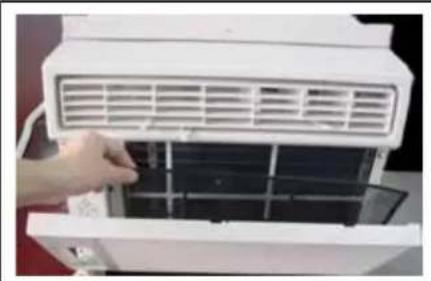
Close-up of a hand inserting a grid into an air conditioner unit (no visible text or symbols)Air Filter Cleaning
The air filter should be checked at least once a month to see if cleaning is necessary. Trapped particles in the filter can build up and cause an accumulation of frost on the cooling coils.
- Push the vent handle to the Vent Closed position (where applicable).
- Open the front panel.
- Grasp the filter by the center and pull up and out.
- Wash the filter using liquid dishwashing detergent and warm water. Rinse filter thoroughly.
• Gently shake excess water from the filter. Be sure the filter is thoroughly dry before replacing. - Or, instead of washing you may vacuum the filter clean.
Note: Never use hot water over 104^ F ( 40^ C) to clean the air filter. Never attempt to operate the unit without the air filter.
Cabinet Cleaning
- Be sure to unplug the air conditioner to prevent shock or fire hazard. The cabinet and front may be dusted with an oil-free cloth or washed with a cloth dampened in a solution of warm water and mild liquid dishwashing detergent. Rinse thoroughly and wipe dry.
- Never use harsh cleaners, wax or polish on the cabinet front.
- Be sure to wring excess water from the cloth before wiping around the controls. Excess water in or around the controls may cause damage to the air conditioner.
- Plug in air conditioner.
Winter Storage
If you plan to store the air conditioner during the winter, remove it carefully from the window according to the installation instructions. Cover it with plastic or return it to the original carton.
TROUBLESHOOTING TIPS
Before calling for service, review this list. It may save you time and expense. This list includes common occurrences that are not the result of defective workman-ship or materials in this appliance.
| Problem | Solution |
| Air conditioner does not start | Wall plug disconnected. Push plug firmly into wall outlet. |
| House fuse blown or circuit breaker tripped. Replace fuse with time delay type or reset circuit breaker. | |
| Plug Current Device Tripped. Press the RESET button. | |
| Control is OFF. Turn Control ON and set to desired setting. | |
| Air from unit does not feel cold enough | Room temperature below 62°F (17°C). Cooling may not occur until room temperature rises above 162°F (17°C). |
| Temperature sensing element touching cold coil, located behind air filter. Straighten tube away from coil. | |
| Reset to a Lower temperature. | |
| Compressor shut-off by changing modes. Wait approximately 3 minutes and listen for compressor to restart when set in the COOLmode. | |
| Air conditioner cooling, but room is too warm- ice forming on cooling coil behind decorative front. | Outdoor temperature below 64°F (18°C). To defrost the coil, set FAN ONLYmode. |
| Air filter may be dirty. Clean filter. Refer to Care and Cleaning section. To defrost, set to FAN ONLYmode. | |
| Thermostat set too cold for night-time cooling. To defrost the coil, set to FAN ONLY mode. Then, set temperature to a Higher setting. | |
| Air conditioner cooling, but room is too warm- NO ice forming on cooling coil behind decorative front. | Dirty air filter- air restricted. Clean air filter. Refer to Care and Cleaning section. |
| Temperature is set too High, set temperature to a Lower setting. | |
| Air directional louvers positioned improperly. Position louvers for better air distribution. | |
| Front of units is blocked by drapes, blinds, furniture, etc. - restricts air distribution. Clear blockage in front of unit. | |
| Doors, windows, registers, etc. Open- cold air escapes. Close doors, windows, registers. | |
| Unit recently turned on in hot room.Allow additional time to remove "Stored heat" from walls, ceiling, floor and furniture. | |
| Air conditioner turns on and off rapidly | Dirty air filter- air restricted. Clean air filter. |
| Outside temperature extremely hot. Set FAN speed to a Higher setting to bring air past cooling coils more frequently. | |
| Noise when unit is cooling | Air movement sound. This is normal. If too loud, set to a slower FAN setting. |
| Window vibration - poor installation. Refer to installation instructions or check with installer. | |
| Water dripping INSIDE when unit is cooling. | Improper installation. Tilt air conditioner slightly to the rear/outside to allow water drainage. Refer to installation instructions - check with installer. |
| Water dripping OUTSIDE when unit is cooling. | Unit removing large quantity of moisture from humid room. This is normal during excessively humid days. |
| Remote Sensing Deactivating Prematurely (some models) | Remote control not located within range. Place remote control within 20 feet & 180^ , radius of the front of the unit. |
| Remote control signal obstructed. Remove obstruction. | |
| Room too cold | Set temperature too low. Increase set temperature. |
Due to ongoing product improvements, specifications and dimensions are subject to change and correction without notice or incurring obligations. Determining the application and suitability for use of any product is the responsibility of the installer. Additionally, the installer is responsible for verifying dimensional data on the actual product prior to beginning any installation preparations.
Incentive and rebate programs have precise requirements as to product performance and certification. All products meet applicable regulations in effect on date of manufacture; however, certifications are not necessarily granted for the life of a product. Therefore, it is the responsibility of the applicant to determine whether a specific model qualifies for these incentive/rebate programs.
HEAT CONTROLLER
1900 Wellworth Ave., Jackson MI 49203 • Ph. 517-787-2100 • www.heatcontroller.com
A Company
- Room Air Conditioner with R-410A:
- CONTENTS
- Read This Manual
- CAUTION
- Safety Precautions
- WARNING
- IMPORTANT SAFETY INSTRUCTIONS
- ⚠ WARNING For your safety
- ▲WARNING Electrical Information
- Operation of Current Device
- (Applicable to the unit adopts current detection device only)
- NOTES:
- NORMAL SOUNDS
- AIR CONDITIONER FEATURES
- ELECTRONIC CONTROL OPERATING INSTRUCTIONS
- AIR CONDITIONER FEATURES(CONTINUED)
- To operate on Auto feature:
- To operate on Fan Only:
- To operate on Dry mode:
- TO USE THE ENERGY SAVER FEATURE
- AIR CONDITIONER FEATURES (CONTINUED)
- THE DISPLAYS
- Error codes:
- ADDITIONAL THINGS YOU SHOULD KNOW
- Fresh Air Vent Control(on some models):
- INSTALLATION INSTRUCTIONS
- TOOLS NEEDED:
- HOW TO INSTALL
- If AC is Blocked by Storm Window
- Removing AC From Window
- CARE AND CLEANING
- Air Filter Cleaning
- Cabinet Cleaning
- Winter Storage
- TROUBLESHOOTING TIPS
Brand : Comfort-Aire
Model : RADS-121M
Category : Air-conditioner